maintenance schedule FORD FLEX 2014 1.G User Guide
[x] Cancel search | Manufacturer: FORD, Model Year: 2014, Model line: FLEX, Model: FORD FLEX 2014 1.GPages: 554, PDF Size: 8.04 MB
Page 299 of 554
TRANSMISSION FLUID CHECK
6F50/6F55 Transmission
WARNING:The dipstick cap and surrounding components may
be hot; gloves are recommended.
WARNING:Use gloves when moving the air filter assembly;
components will be hot.
Note:
Automatic transmission fluid expands when warmed. To obtain an
accurate fluid check, drive the vehicle until it is warmed up (approximately
20 miles [30 km]). If your vehicle has been operated for an extended
period at high speeds, in city traffic during hot weather or pulling a trailer,
the vehicle should be turned off until normal operating temperatures are
reached to allow the fluid to cool before checking. Depending on vehicle
use, cooling times could take up to 30 minutes or longer.
Refer to yourscheduled maintenance informationfor scheduled
intervals for fluid checks and changes. Your transmission does not
consume fluid. However, the fluid level should be checked if the
transmission is not working properly, i.e., if the transmission slips or
shifts slowly or if you notice some sign of fluid leakage.
1. Drive the vehicle 20 miles (30 km) or until it reaches normal operating
temperature.
2. Park the vehicle on a level surface and engage the parking brake.
3. With the parking brake engaged and your foot on the brake pedal,
start the engine and move the gearshift lever through all of the gear
ranges. Allow a minimum of 10 seconds for each gear to engage.
4. Latch the gearshift lever inP(Park) and leave the engine running.
5. Remove the dipstick, wiping it clean with a clean, dry lintfree rag. If
necessary, refer toUnder hood overviewin this chapter for the location
of the dipstick. (For vehicles with the EcoBoost engine, move the air
filter assembly aside to access the transmission dipstick. SeeMoving the
Air Filter Assembly (EcoBoost engine)for more information.
6. Install the dipstick making sure it is fully seated in the filler tube by
turning it to the locked position.
7. Remove the dipstick and inspect the fluid level. The fluid should be in
the designated areas for normal operating temperature.
298Maintenance
2014 Flex(471)
Owners Guide gf, 1st Printing, April 2013
USA(fus)
Page 307 of 554
3. The wiper arm has a snap
retention feature to receive a cross
pin from the wiper blade structure.
Grip tightly and press on the
arm/blade joint from beneath and
separate the blade from the arm.
Avoid rotating the wiper blade structure and trapping your left hand
between the arm and blade.
4. Attach the new wiper to the wiper arm and press it into place until a
click is heard.
If you find this procedure too difficult, please see your dealer.
AIR FILTER CHECK
WARNING:To reduce the risk of vehicle damage and/or personal
burn injuries, do not start your engine with the air cleaner
removed and do not remove it while the engine is running.
When changing the air filter element, use only the air filter element
listed. Refer toMotorcraft® Part Numbersin theCapacities and
Specificationschapter.
For EcoBoostequipped vehicles: When servicing the air cleaner, it is
important that no foreign material enter the air induction system. The
engine and turbocharger are susceptible to damage from even small
particles.
Refer toScheduled Maintenancefor the appropriate intervals for
changing the air filter element.
Note:Failure to use the correct air filter element may result in severe
engine damage. The customer warranty may be void for any damage to
the engine if the correct air filter element is not used.
306Maintenance
2014 Flex(471)
Owners Guide gf, 1st Printing, April 2013
USA(fus)
Page 341 of 554
If you feel a sudden vibration or ride disturbance while driving, or you
suspect your tire or vehicle has been damaged, immediately reduce your
speed. Drive with caution until you can safely pull off the road. Stop and
inspect the tires for damage. If a tire is under-inflated or damaged,
deflate it, remove the wheel and replace it with your spare tire and
wheel. If you cannot detect a cause, have the vehicle towed to the
nearest repair facility or tire dealer to have the vehicle inspected.
Tire and Wheel Alignment
A bad jolt from hitting a curb or pothole can cause the front end of your
vehicle to become misaligned or cause damage to your tires. If your
vehicle seems to pull to one side when you are driving, the wheels may
be out of alignment. Have an authorized dealer check the wheel
alignment periodically.
Wheel misalignment in the front or the rear can cause uneven and rapid
treadwear of your tires and should be corrected by an authorized dealer.
Front-wheel drive vehicles and those with an independent rear
suspension may require alignment of all four wheels.
The tires should also be balanced periodically. An unbalanced tire and
wheel assembly may result in irregular tire wear.
Tire Rotation
Note:If your tires show uneven wear ask an authorized dealer to check
for and correct any wheel misalignment, tire imbalance or mechanical
problem involved before tire rotation.
Note:Your vehicle may be equipped with a dissimilar spare tire and
wheel assembly. A dissimilar spare tire and wheel assembly is defined as
a spare tire or wheel that is different in brand, size or appearance from
the road tires and wheels. If you have a dissimilar spare tire and wheel
assembly, it is intended for temporary use only and should not be used
in a tire rotation.
Note:After having your tires rotated, inflation pressure must be checked
and adjusted to the vehicle requirements.
Rotating your tires at the recommended interval (as indicated in your
scheduled maintenance information) will help your tires wear more
evenly, providing better tire performance and longer tire life.
340Wheels and Tires
2014 Flex(471)
Owners Guide gf, 1st Printing, April 2013
USA(fus)
Page 359 of 554
Items CapacityFord Part Name or
equivalentFord Part Number /
Ford Specification
A/C Refrigerant
Compressor Oil
8
3.5L GTDI
7.9 oz (0.23 L)
3.5LTiVCT
8.9 oz (0.26 L)Motorcraft PAG
Refrigerant Compressor
OilYN-12–D
WSH-M1C231–B
1Use only Motorcraft™ DOT 4 LV High Performance Brake Fluid or equivalent meeting
WSS-M6C65-A2 and ISO 4925 Class 6. Use of any fluid other than the recommended fluid may
cause brake system damage.2Approximate dry fill capacity. Actual amount may vary during fluid changes.3Automatic transmissions that require MERCON™ LV should only use MERCON™ LV fluid. Refer
toscheduled maintenance informationto determine the correct service interval. Use of any
fluid other than the recommended fluid may cause transmission damage.4See your authorized dealer for fluid level checking or filling.5Your engine has been designed to use engine oil that meets Ford specification or an equivalent
engine oil of the recommended viscosity grade that displays the API Certification Mark for
gasoline engines.6Add the coolant type originally equipped in your vehicle.7Warning: The A/C refrigerant system contains refrigerant R134A under high pressure. Opening
the A/C refrigerant system can cause personal injury. A/C refrigerant system is to be serviced
only by qualified personnel.
358Capacities and Specifications
2014 Flex(471)
Owners Guide gf, 1st Printing, April 2013
USA(fus)
Page 360 of 554
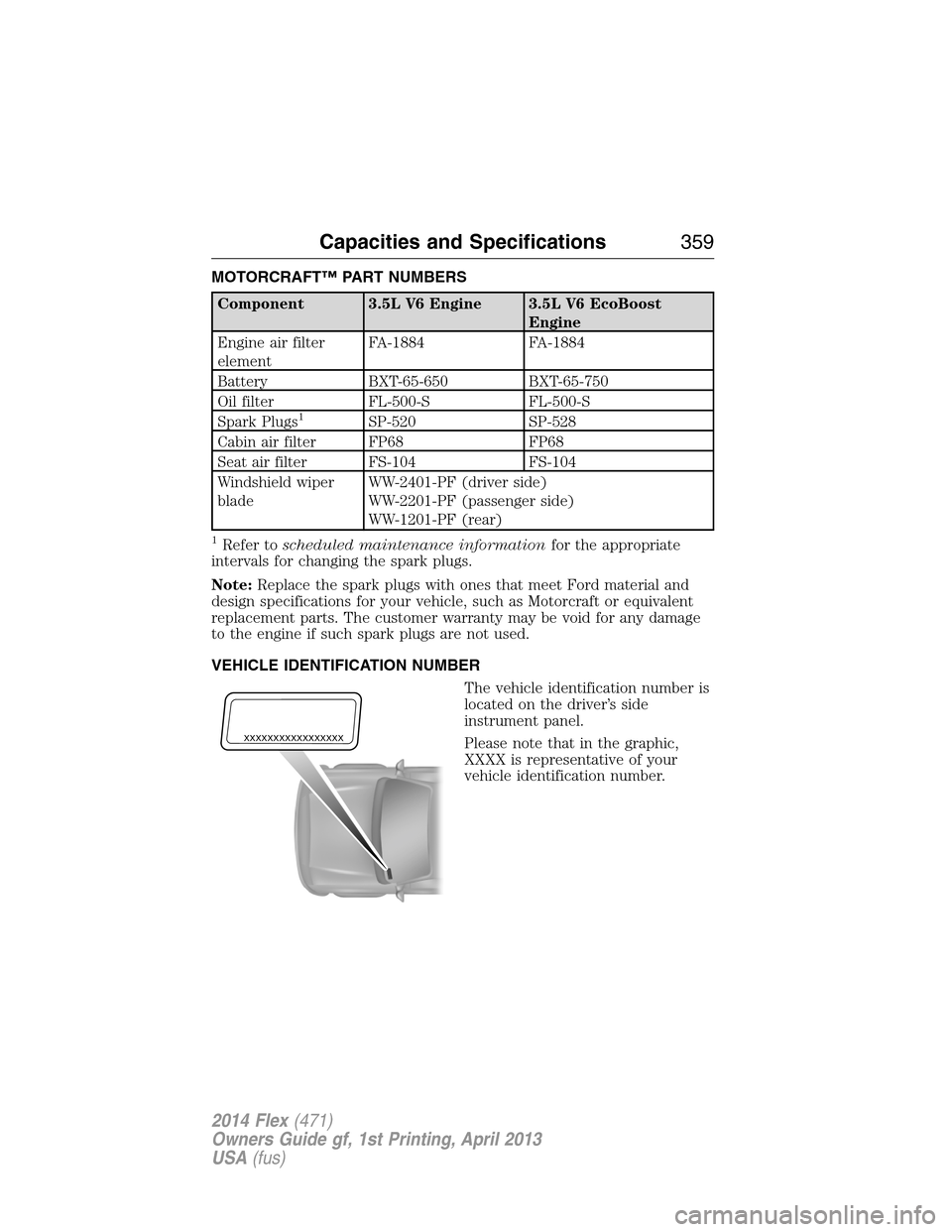
MOTORCRAFT™ PART NUMBERS
Component 3.5L V6 Engine 3.5L V6 EcoBoost
Engine
Engine air filter
elementFA-1884 FA-1884
Battery BXT-65-650 BXT-65-750
Oil filter FL-500-S FL-500-S
Spark Plugs
1SP-520 SP-528
Cabin air filter FP68 FP68
Seat air filter FS-104 FS-104
Windshield wiper
bladeWW-2401-PF (driver side)
WW-2201-PF (passenger side)
WW-1201-PF (rear)
1Refer toscheduled maintenance informationfor the appropriate
intervals for changing the spark plugs.
Note:Replace the spark plugs with ones that meet Ford material and
design specifications for your vehicle, such as Motorcraft or equivalent
replacement parts. The customer warranty may be void for any damage
to the engine if such spark plugs are not used.
VEHICLE IDENTIFICATION NUMBER
The vehicle identification number is
located on the driver’s side
instrument panel.
Please note that in the graphic,
XXXX is representative of your
vehicle identification number.
XXXXXXXXXXXXXXXXX
Capacities and Specifications359
2014 Flex(471)
Owners Guide gf, 1st Printing, April 2013
USA(fus)
Page 366 of 554
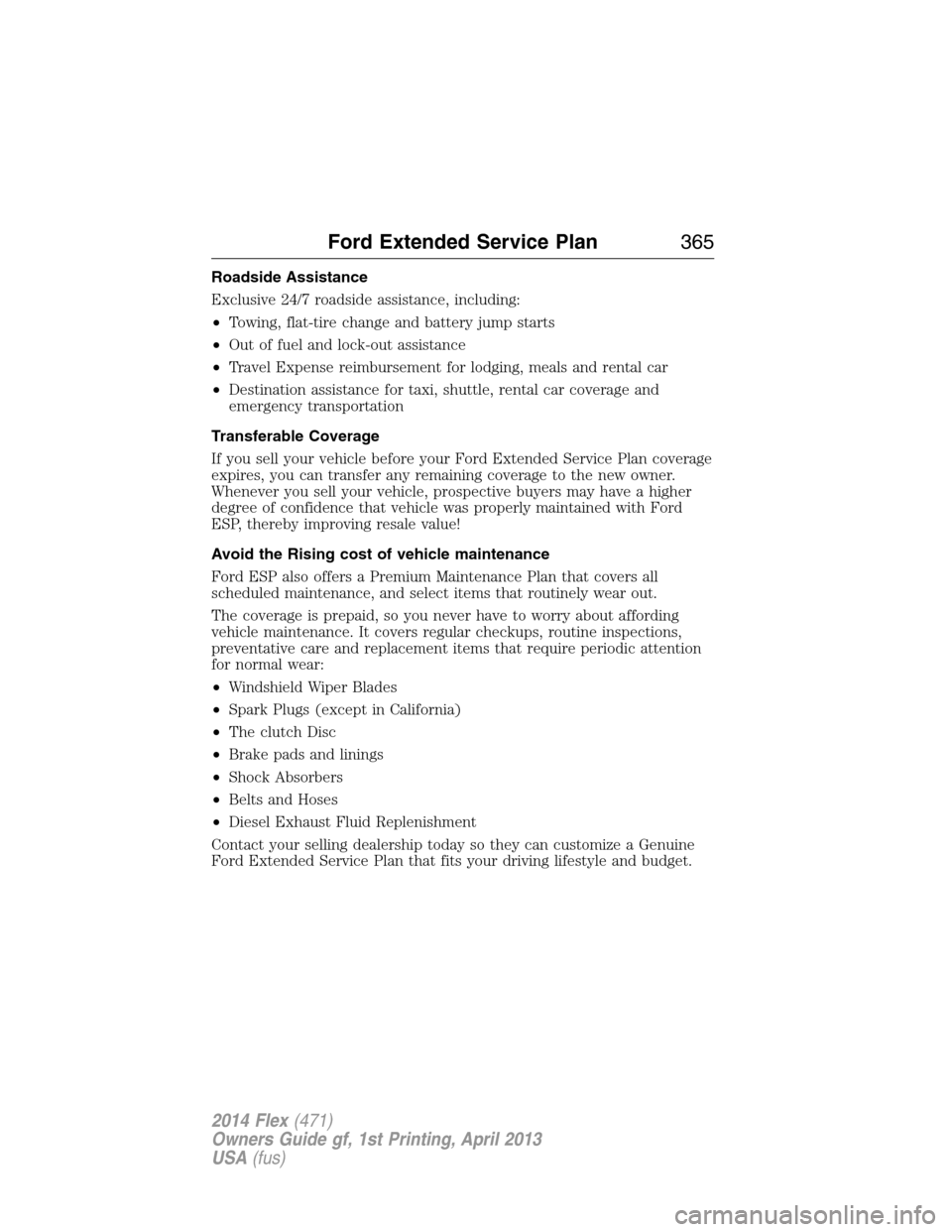
Roadside Assistance
Exclusive 24/7 roadside assistance, including:
•Towing, flat-tire change and battery jump starts
•Out of fuel and lock-out assistance
•Travel Expense reimbursement for lodging, meals and rental car
•Destination assistance for taxi, shuttle, rental car coverage and
emergency transportation
Transferable Coverage
If you sell your vehicle before your Ford Extended Service Plan coverage
expires, you can transfer any remaining coverage to the new owner.
Whenever you sell your vehicle, prospective buyers may have a higher
degree of confidence that vehicle was properly maintained with Ford
ESP, thereby improving resale value!
Avoid the Rising cost of vehicle maintenance
Ford ESP also offers a Premium Maintenance Plan that covers all
scheduled maintenance, and select items that routinely wear out.
The coverage is prepaid, so you never have to worry about affording
vehicle maintenance. It covers regular checkups, routine inspections,
preventative care and replacement items that require periodic attention
for normal wear:
•Windshield Wiper Blades
•Spark Plugs (except in California)
•The clutch Disc
•Brake pads and linings
•Shock Absorbers
•Belts and Hoses
•Diesel Exhaust Fluid Replenishment
Contact your selling dealership today so they can customize a Genuine
Ford Extended Service Plan that fits your driving lifestyle and budget.
Ford Extended Service Plan365
2014 Flex(471)
Owners Guide gf, 1st Printing, April 2013
USA(fus)
Page 409 of 554
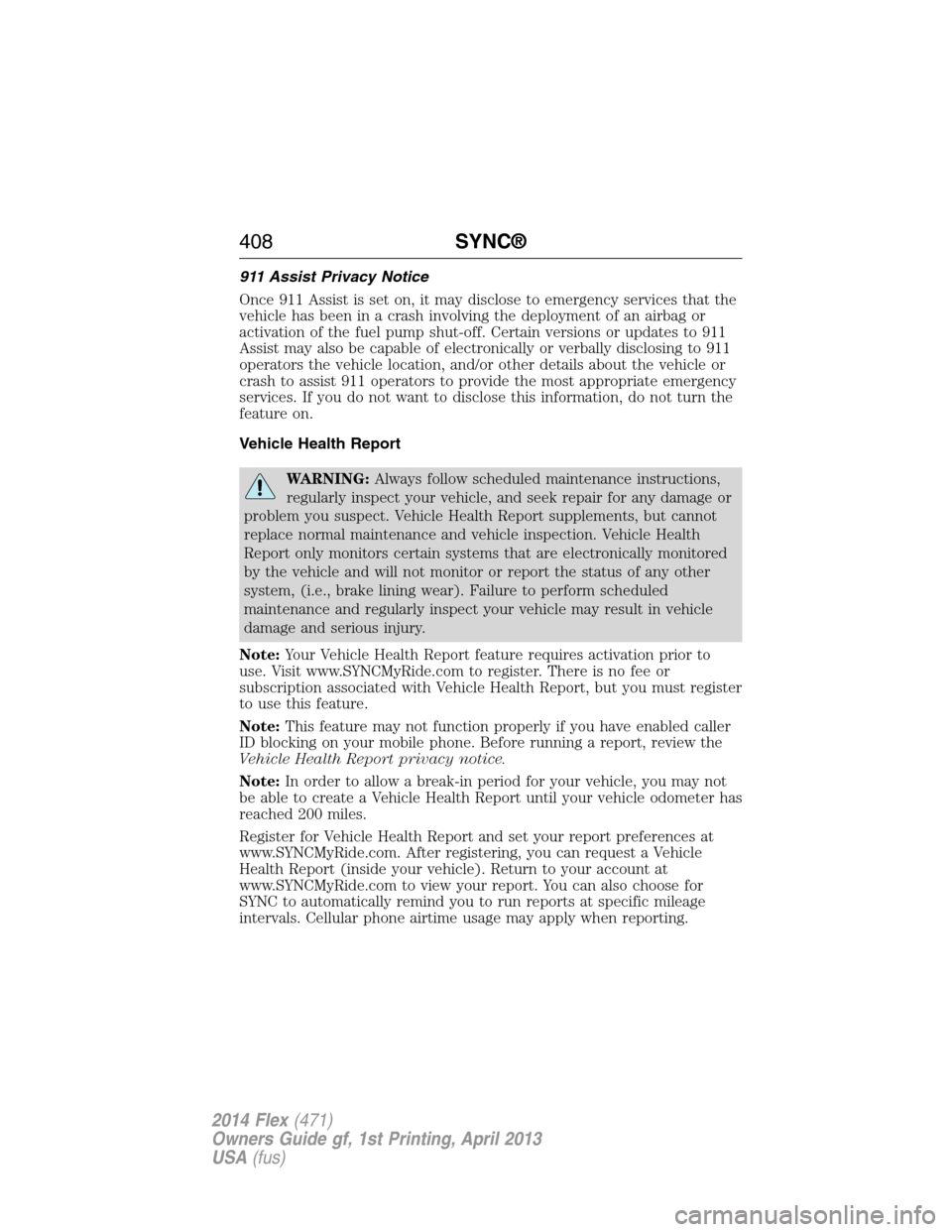
911 Assist Privacy Notice
Once 911 Assist is set on, it may disclose to emergency services that the
vehicle has been in a crash involving the deployment of an airbag or
activation of the fuel pump shut-off. Certain versions or updates to 911
Assist may also be capable of electronically or verbally disclosing to 911
operators the vehicle location, and/or other details about the vehicle or
crash to assist 911 operators to provide the most appropriate emergency
services. If you do not want to disclose this information, do not turn the
feature on.
Vehicle Health Report
WARNING:Always follow scheduled maintenance instructions,
regularly inspect your vehicle, and seek repair for any damage or
problem you suspect. Vehicle Health Report supplements, but cannot
replace normal maintenance and vehicle inspection. Vehicle Health
Report only monitors certain systems that are electronically monitored
by the vehicle and will not monitor or report the status of any other
system, (i.e., brake lining wear). Failure to perform scheduled
maintenance and regularly inspect your vehicle may result in vehicle
damage and serious injury.
Note:Your Vehicle Health Report feature requires activation prior to
use. Visit www.SYNCMyRide.com to register. There is no fee or
subscription associated with Vehicle Health Report, but you must register
to use this feature.
Note:This feature may not function properly if you have enabled caller
ID blocking on your mobile phone. Before running a report, review the
Vehicle Health Report privacy notice.
Note:In order to allow a break-in period for your vehicle, you may not
be able to create a Vehicle Health Report until your vehicle odometer has
reached 200 miles.
Register for Vehicle Health Report and set your report preferences at
www.SYNCMyRide.com. After registering, you can request a Vehicle
Health Report (inside your vehicle). Return to your account at
www.SYNCMyRide.com to view your report. You can also choose for
SYNC to automatically remind you to run reports at specific mileage
intervals. Cellular phone airtime usage may apply when reporting.
408SYNC®
2014 Flex(471)
Owners Guide gf, 1st Printing, April 2013
USA(fus)
Page 410 of 554
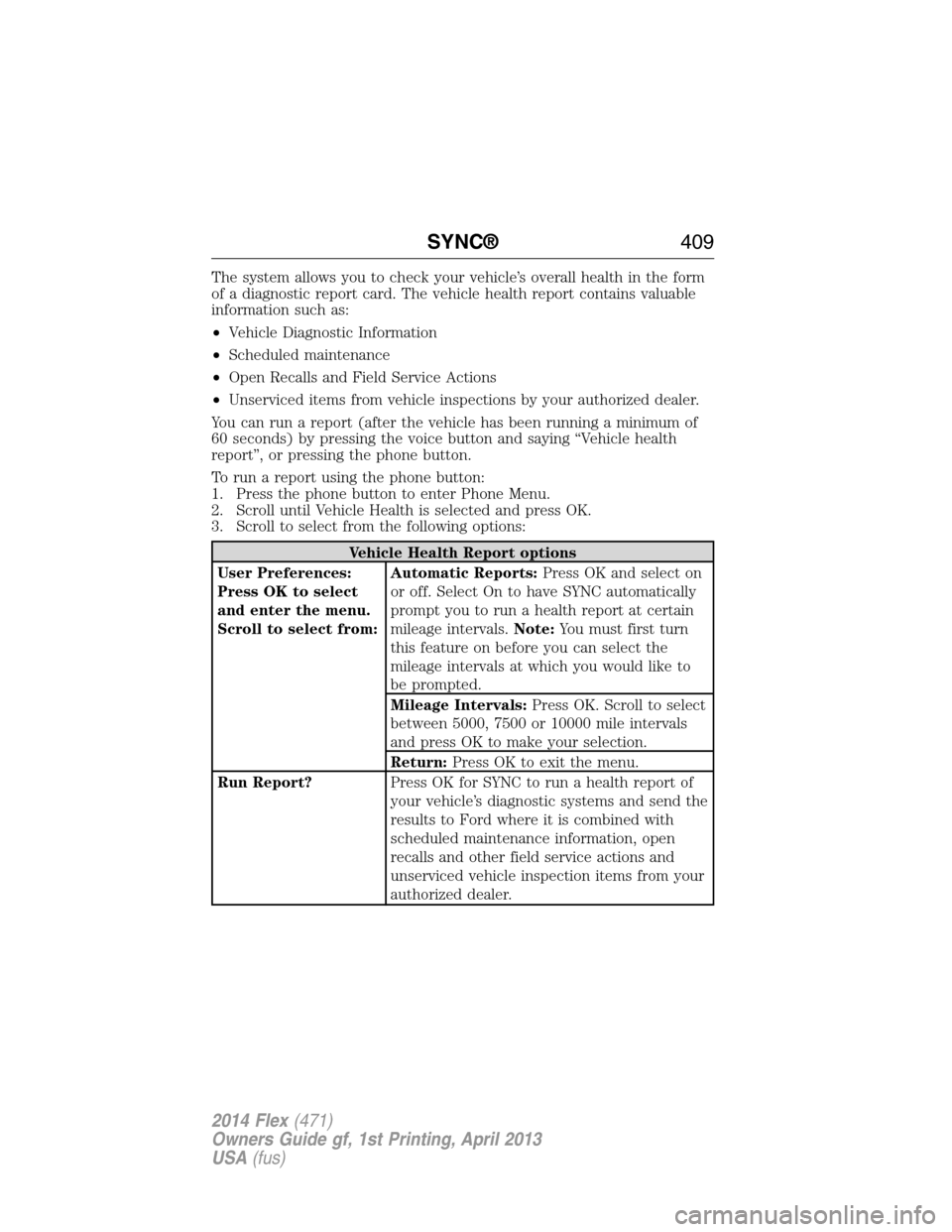
The system allows you to check your vehicle’s overall health in the form
of a diagnostic report card. The vehicle health report contains valuable
information such as:
•Vehicle Diagnostic Information
•Scheduled maintenance
•Open Recalls and Field Service Actions
•Unserviced items from vehicle inspections by your authorized dealer.
You can run a report (after the vehicle has been running a minimum of
60 seconds) by pressing the voice button and saying “Vehicle health
report”, or pressing the phone button.
To run a report using the phone button:
1. Press the phone button to enter Phone Menu.
2. Scroll until Vehicle Health is selected and press OK.
3. Scroll to select from the following options:
Vehicle Health Report options
User Preferences:
Press OK to select
and enter the menu.
Scroll to select from:Automatic Reports:Press OK and select on
or off. Select On to have SYNC automatically
prompt you to run a health report at certain
mileage intervals.Note:You must first turn
this feature on before you can select the
mileage intervals at which you would like to
be prompted.
Mileage Intervals:Press OK. Scroll to select
between 5000, 7500 or 10000 mile intervals
and press OK to make your selection.
Return:Press OK to exit the menu.
Run Report?Press OK for SYNC to run a health report of
your vehicle’s diagnostic systems and send the
results to Ford where it is combined with
scheduled maintenance information, open
recalls and other field service actions and
unserviced vehicle inspection items from your
authorized dealer.
SYNC®409
2014 Flex(471)
Owners Guide gf, 1st Printing, April 2013
USA(fus)
Page 483 of 554
911 Assist May Not Work If
•Your cellular phone or 911 Assist hardware sustains damage in a
crash.
•The vehicle’s battery or SYNC system has no power.
•The phone(s) thrown from your vehicle are the ones paired and
connected to the system.
911 Assist Privacy Notice
When you turn on 911 Assist, it may disclose to emergency services that
your vehicle has been in a crash involving the deployment of an airbag or
activation of the fuel pump shut-off. Certain versions or updates to 911
Assist may also be capable of electronically or verbally disclosing to 911
operators your vehicle location or other details about your vehicle or
crash to assist 911 operators to provide the most appropriate emergency
services. If you do not want to disclose this information, do not turn the
feature on.
Vehicle Health Report (If Equipped, United States Only)
WARNING:Always follow scheduled maintenance instructions,
regularly inspect your vehicle, and seek repair for any damage or
problem you suspect. Vehicle Health Report supplements, but cannot
replace, normal maintenance and vehicle inspection. Vehicle Health
Report only monitors certain systems electronically monitored by your
vehicle and will not monitor or report the status of any other system,
(such as brake lining wear). Failure to perform scheduled maintenance
and regularly inspect your vehicle may result in vehicle damage and
serious injury.
Note:Your Vehicle Health Report feature requires activation prior to
use. Visit www.SYNCMyRide.com to register. There is no fee or
subscription associated with Vehicle Health Report, but you must register
to use this feature.
Note:This feature may not function properly if you have enabled caller
ID blocking on your mobile phone. Before running a report, review the
Vehicle Health Report Privacy Notice.
Note:In order to allow a break-in period for your vehicle, you may not
be able to create a Vehicle Health Report until your vehicle odometer has
reached 200 miles.
Note:Cellular phone and SMS charges may apply when making a report.
482MyFord Touch® (If Equipped)
2014 Flex(471)
Owners Guide gf, 1st Printing, April 2013
USA(fus)
Page 484 of 554
Register for Vehicle Health Report and set your report preferences at
www.SYNCMyRide.com. After registering, you can request a Vehicle
Health Report (inside your vehicle). Return to your account at
www.SYNCMyRide.com to view your report. You can also choose for
SYNC to remind you automatically to run reports at specific mileage
intervals. Cellular phone airtime usage may apply when reporting.
The system allows you to check your vehicle’s overall health in the form
of a diagnostic report card. The Vehicle Health Report contains valuable
information, such as:
•Vehicle Diagnostic Information
•Scheduled maintenance
•Open Recalls and Field Service Actions
•Items noted during vehicle inspections by your authorized dealer that
still need servicing.
Making a Report
If your vehicle is equipped with Navigation, touch the i
(Information) button to access these features. If your vehicle is
not equipped with Navigation, touch the corner of the
touchscreen with the green tab.
If you want to run a report by using the touchscreen, touchApps>
Vehicle Health Report.
To run a report by voice command, press the voice button on
the steering wheel and, when prompted, say “Vehicle health
report”.
Vehicle Health Report Privacy Notice
When you create a Vehicle Health Report, Ford Motor Company may
collect your cellular phone number (to process your report request) and
diagnostic information about your vehicle. Certain versions or updates to
Vehicle Health Report may also collect more vehicle information. Ford
may use your vehicle information it collects for any purpose. If you do
not want to disclose your cellular phone number or vehicle information,
do not run the feature or set up your Vehicle Health Report profile at
www.SYNCMyRide.com. See www.SYNCMyRide.com (Vehicle Health
Report Terms and Conditions, and Privacy Statement) for more
information.
MyFord Touch® (If Equipped)483
2014 Flex(471)
Owners Guide gf, 1st Printing, April 2013
USA(fus)