park assist FORD FLEX 2015 1.G User Guide
[x] Cancel search | Manufacturer: FORD, Model Year: 2015, Model line: FLEX, Model: FORD FLEX 2015 1.GPages: 571, PDF Size: 5.52 MB
Page 220 of 571
Using Active Park Assist
Press the button; the touch screen
displays a message and a
corresponding graphic to indicate
it’s searching for a parking space.
Use the turn signal to indicate
which side of the vehicle you want
the system to search on.
Note:If the turn signal is not on, the system automatically searches on
the vehicle’s passenger side.
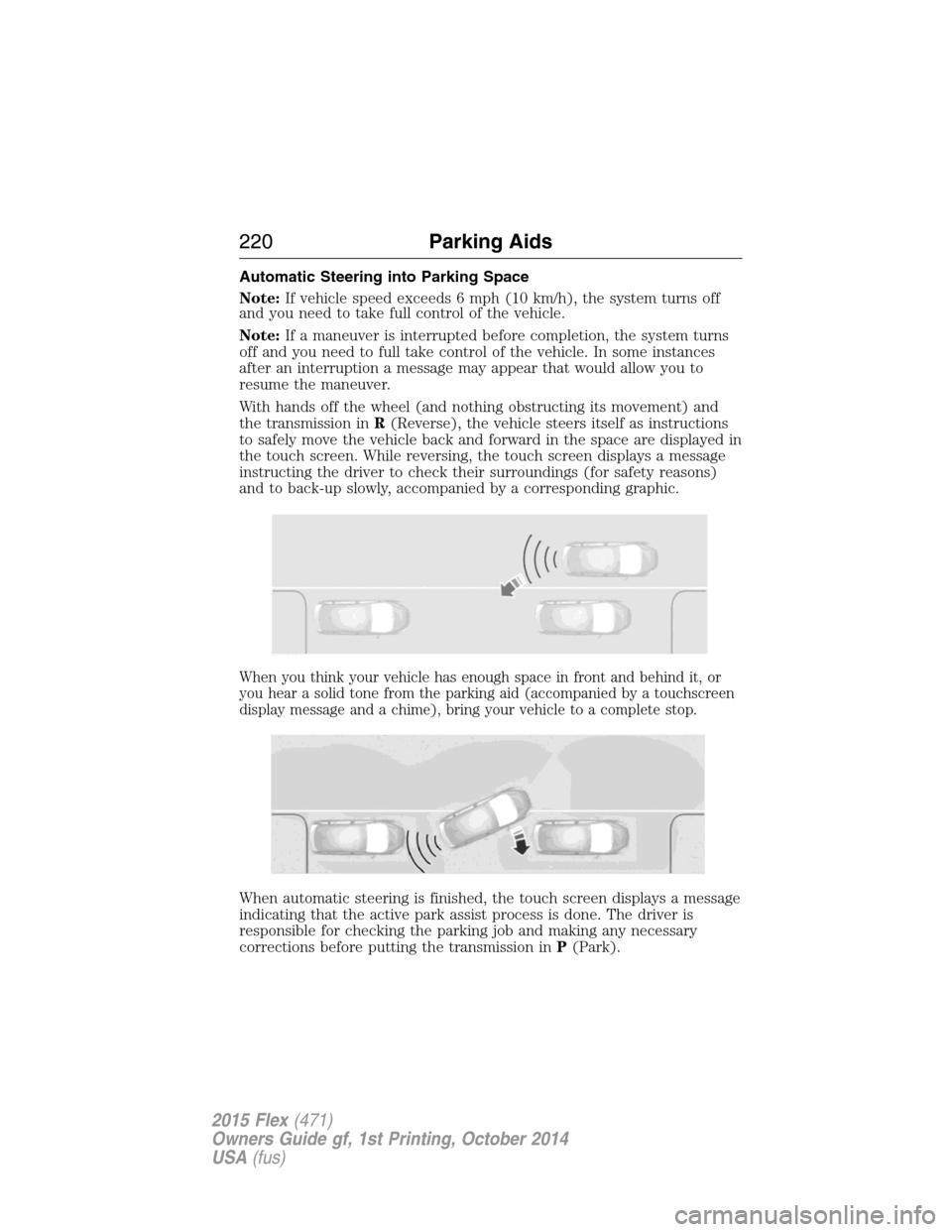
When a suitable space is found, the touch screen displays a message and
a chime sounds. Slow down and stop at approximately position (A), then
follow the instructions on the touch screen.
Note:You must observe that the selected space remains clear of
obstructions at all times in the maneuver.
Note:Vehicles with overhanging loads (e.g. a bus or a truck), street
furniture and other items may not be detected by active park assist. You
must ensure the selected space is suitable for parking.
Note:The vehicle should be driven as parallel to other vehicles as
possible while passing a parking space.
Note:The system always offers the last detected parking space (i.e. if
the vehicle detects multiple spaces while you are driving, it offers the
last one).
Note:If driven above approximately 20 mph (35 km/h), the touch
screen shows a message to alert the driver to reduce vehicle speed.
AUTO
P
Parking Aids219
2015 Flex(471)
Owners Guide gf, 1st Printing, October 2014
USA(fus)
Page 221 of 571
Automatic Steering into Parking Space
Note:If vehicle speed exceeds 6 mph (10 km/h), the system turns off
and you need to take full control of the vehicle.
Note:If a maneuver is interrupted before completion, the system turns
off and you need to full take control of the vehicle. In some instances
after an interruption a message may appear that would allow you to
resume the maneuver.
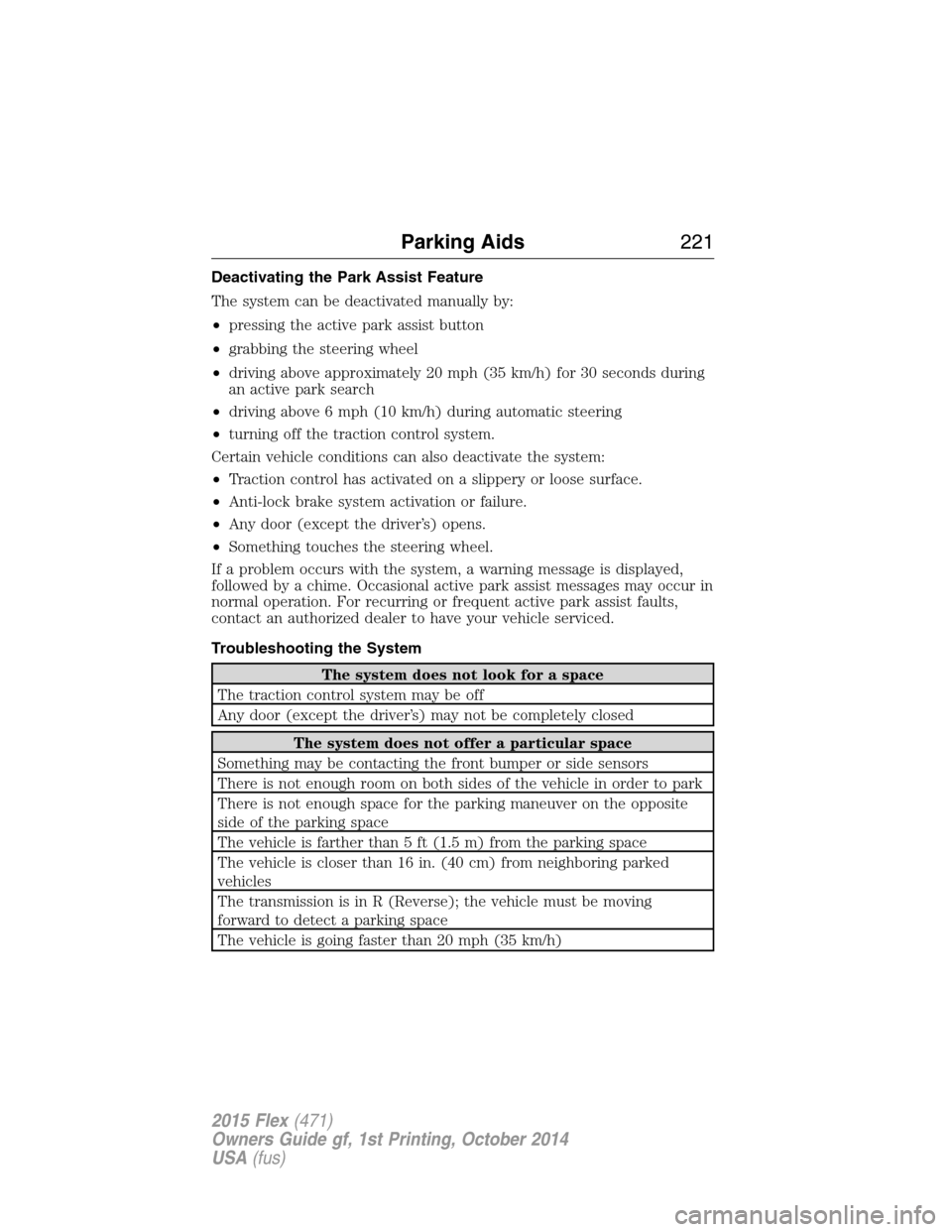
With hands off the wheel (and nothing obstructing its movement) and
the transmission inR(Reverse), the vehicle steers itself as instructions
to safely move the vehicle back and forward in the space are displayed in
the touch screen. While reversing, the touch screen displays a message
instructing the driver to check their surroundings (for safety reasons)
and to back-up slowly, accompanied by a corresponding graphic.
When you think your vehicle has enough space in front and behind it, or
you hear a solid tone from the parking aid (accompanied by a touchscreen
display message and a chime), bring your vehicle to a complete stop.
When automatic steering is finished, the touch screen displays a message
indicating that the active park assist process is done. The driver is
responsible for checking the parking job and making any necessary
corrections before putting the transmission inP(Park).
220Parking Aids
2015 Flex(471)
Owners Guide gf, 1st Printing, October 2014
USA(fus)
Page 222 of 571
Deactivating the Park Assist Feature
The system can be deactivated manually by:
•pressing the active park assist button
•grabbing the steering wheel
•driving above approximately 20 mph (35 km/h) for 30 seconds during
an active park search
•driving above 6 mph (10 km/h) during automatic steering
•turning off the traction control system.
Certain vehicle conditions can also deactivate the system:
•Traction control has activated on a slippery or loose surface.
•Anti-lock brake system activation or failure.
•Any door (except the driver’s) opens.
•Something touches the steering wheel.
If a problem occurs with the system, a warning message is displayed,
followed by a chime. Occasional active park assist messages may occur in
normal operation. For recurring or frequent active park assist faults,
contact an authorized dealer to have your vehicle serviced.
Troubleshooting the System
The system does not look for a space
The traction control system may be off
Any door (except the driver’s) may not be completely closed
The system does not offer a particular space
Something may be contacting the front bumper or side sensors
There is not enough room on both sides of the vehicle in order to park
There is not enough space for the parking maneuver on the opposite
side of the parking space
The vehicle is farther than 5 ft (1.5 m) from the parking space
The vehicle is closer than 16 in. (40 cm) from neighboring parked
vehicles
The transmission is in R (Reverse); the vehicle must be moving
forward to detect a parking space
The vehicle is going faster than 20 mph (35 km/h)
Parking Aids221
2015 Flex(471)
Owners Guide gf, 1st Printing, October 2014
USA(fus)
Page 275 of 571
Connecting the Jumper Cables
WARNING:Do not connect the end of the second cable to the
negative (-) terminal of the battery to be jumped. A spark may
cause an explosion of the gases that surround the battery.
Note:Do not attach the negative (-) cable to fuel lines, engine rocker
covers, the intake manifold or electrical components as grounding points.
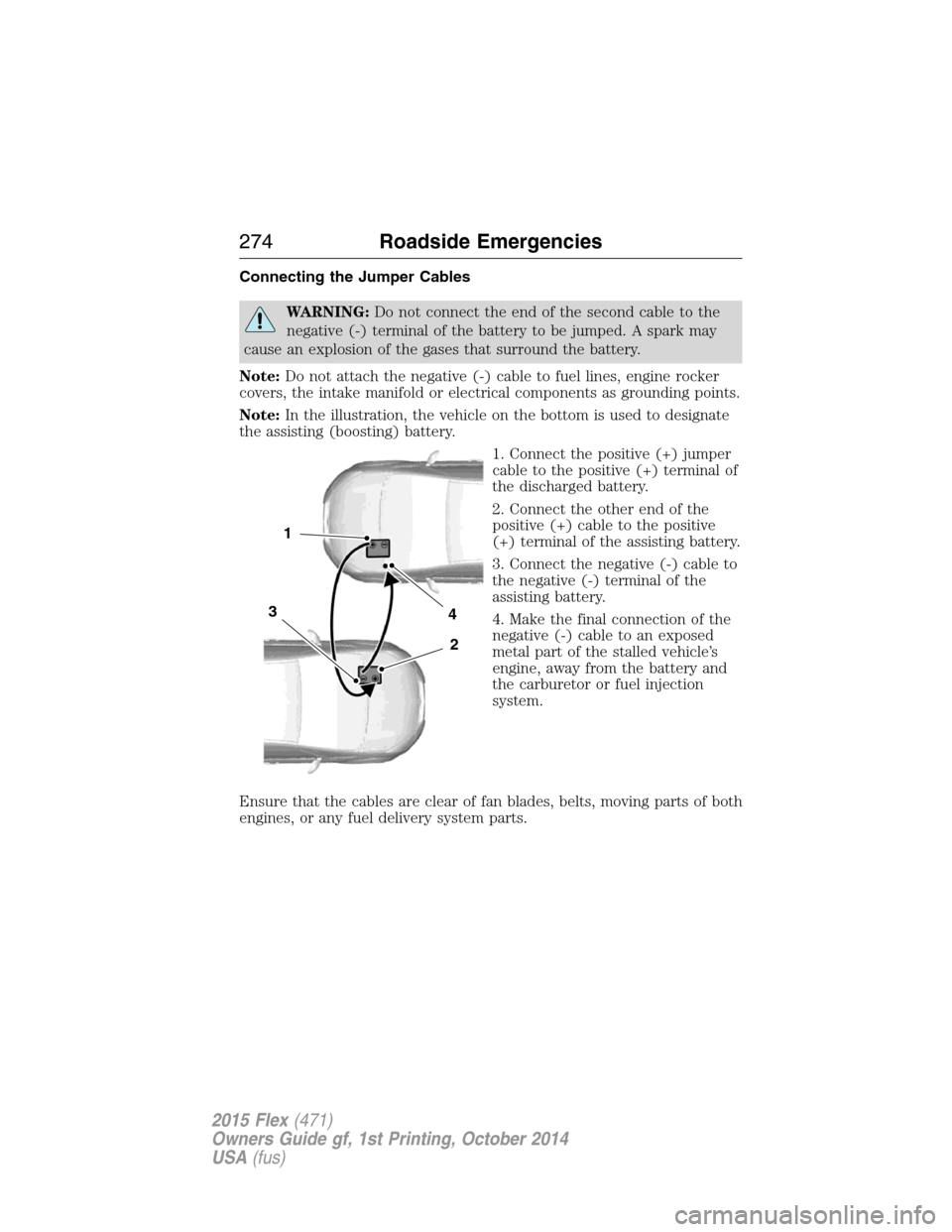
Note:In the illustration, the vehicle on the bottom is used to designate
the assisting (boosting) battery.
1. Connect the positive (+) jumper
cable to the positive (+) terminal of
the discharged battery.
2. Connect the other end of the
positive (+) cable to the positive
(+) terminal of the assisting battery.
3. Connect the negative (-) cable to
the negative (-) terminal of the
assisting battery.
4. Make the final connection of the
negative (-) cable to an exposed
metal part of the stalled vehicle’s
engine, away from the battery and
the carburetor or fuel injection
system.
Ensure that the cables are clear of fan blades, belts, moving parts of both
engines, or any fuel delivery system parts.
4
2
1
3
274Roadside Emergencies
2015 Flex(471)
Owners Guide gf, 1st Printing, October 2014
USA(fus)
Page 282 of 571
If your vehicle must be serviced while you are traveling or living
in Asia-Pacific Region, Sub-Saharan Africa, U.S. Virgin Islands,
Central America, the Caribbean, and Israel, contact the nearest
authorized dealer. If the authorized dealer cannot help you,
contact:
FORD MOTOR COMPANY
Customer Relationship Center
1555 Fairlane Drive
Fairlane Business Park #3
Allen Park, Michigan 48101
U.S.A.
Telephone: (313) 594-4857
FAX: (313) 390-0804
Email: [email protected]
For customers in Guam, the Commonwealth of the Northern
Mariana Islands (CNMI), America Samoa, and the U.S. Virgin
Islands, please feel free to call our Toll-Free Number:
(800) 841-FORD (3673)
If your vehicle must be serviced while you are traveling or living
in Puerto Rico, contact the nearest authorized dealer. If the
authorized dealer cannot help you, contact:
FORD MOTOR COMPANY
Customer Relationship Center
1555 Fairlane Drive
Fairlane Business Park #3
Allen Park, Michigan 48101
Telephone: (800) 841-FORD (3673)
FAX: (313) 390-0804
Email: [email protected]
www.ford.com.pr
Customer Assistance281
2015 Flex(471)
Owners Guide gf, 1st Printing, October 2014
USA(fus)
Page 283 of 571
If your vehicle must be serviced while you are traveling or living
in the Middle East, contact the nearest authorized dealer. If the
authorized dealer cannot help you, contact:
FORD MOTOR COMPANY
Customer Relationship Center
1555 Fairlane Drive
Fairlane Business Park #3
Allen Park, Michigan 48101
Telephone: +971 4 3326084
Toll-Free Number of the Kingdom of Saudi Arabia: 800 8971409
Local Telephone Number of Kuwait: 24810575
FAX: +971 4 3327299
Email: [email protected]
www.me.ford.com
If you buy your vehicle in North America and then relocate to any of the
above locations, register your vehicle identification number (VIN) and
new address with Ford Motor Company Export Operations & Global
Growth Initiatives by emailing [email protected].
If you are in another foreign country, contact the nearest
authorized dealer. In the event your inquiry is unresolved,
communicate your concern with the dealership’s Sales Manager,
Service Manager or Customer Relations Manager. If you require
additional assistance or clarification, please contact the
respective Customer Relationship Center as previously listed.
Customers in the U.S. should call 1-800-392-3673.
ORDERING ADDITIONAL OWNER’S LITERATURE
To order the publications in this portfolio, contact Helm, Incorporated at:
HELM, INCORPORATED
47911 Halyard Drive
Plymouth, Michigan 48170
Attention: Customer Service
Or to order a free publication catalog, call toll free: 1-800-782-4356
Monday-Friday 8:00 a.m. - 6:00 p.m. EST
Helm, Incorporated can also be reached by their website:
www.helminc.com.
(Items in this catalog may be purchased by credit card, check or
money order.)
282Customer Assistance
2015 Flex(471)
Owners Guide gf, 1st Printing, October 2014
USA(fus)
Page 373 of 571
Roadside Assistance
Exclusive 24/7 roadside assistance, including:
•Towing, flat-tire change and battery jump starts
•Out of fuel and lock-out assistance
•Travel expense reimbursement for lodging, meals and rental car
•Destination assistance for taxi, shuttle, rental car coverage and
emergency transportation
Transferable Coverage
If you sell your vehicle before your Ford Extended Service Plan coverage
expires, you can transfer any remaining coverage to the new owner.
Whenever you sell your vehicle, prospective buyers may have a higher
degree of confidence that vehicle was properly maintained with Ford
ESP, thereby improving resale value.
Avoid the Rising Cost of Properly Maintaining Your Vehicle!
Ford Extended Service Plan also offers a Premium Maintenance Plan
that covers all scheduled maintenance, and selected wear items. The
coverage is prepaid, so you never have to worry about affording your
vehicle’s maintenance. It covers regular checkups, routine inspections,
preventive care and replacement of select items that require periodic
attention for normal wear:
•Windshield wiper blades
•Spark plugs (except in California)
•The clutch disc
•Brake pads and linings
•Shock absorbers
•Belts and hoses
•Diesel exhaust fluid replenishment
Contact your selling authorized Ford or Lincoln dealership today so they
can customize a Ford Extended Service Plan that fits your driving
lifestyle and budget.
372Extended Service Plan
2015 Flex(471)
Owners Guide gf, 1st Printing, October 2014
USA(fus)
Page 448 of 571
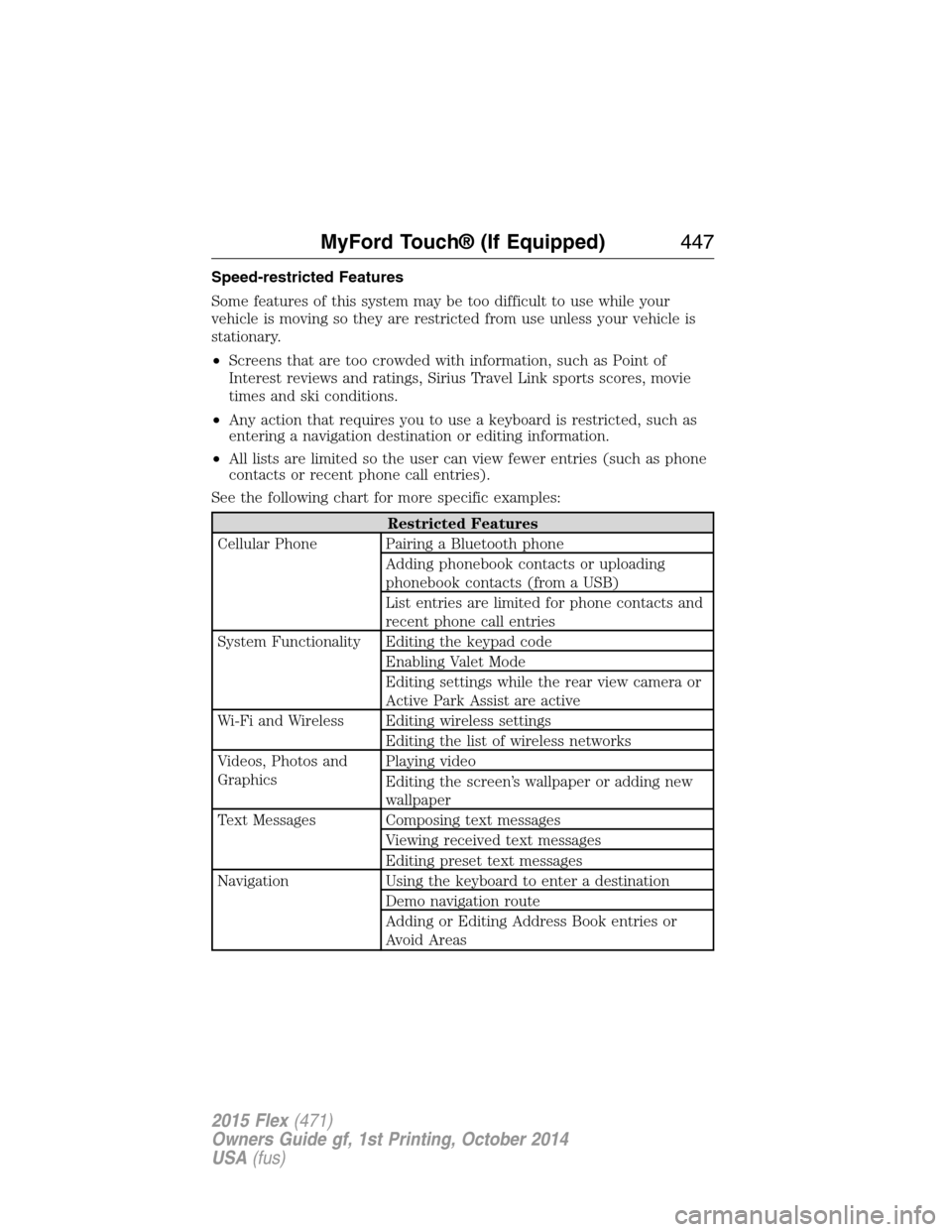
Speed-restricted Features
Some features of this system may be too difficult to use while your
vehicle is moving so they are restricted from use unless your vehicle is
stationary.
•Screens that are too crowded with information, such as Point of
Interest reviews and ratings, Sirius Travel Link sports scores, movie
times and ski conditions.
•Any action that requires you to use a keyboard is restricted, such as
entering a navigation destination or editing information.
•All lists are limited so the user can view fewer entries (such as phone
contacts or recent phone call entries).
See the following chart for more specific examples:
Restricted Features
Cellular Phone Pairing a Bluetooth phone
Adding phonebook contacts or uploading
phonebook contacts (from a USB)
List entries are limited for phone contacts and
recent phone call entries
System Functionality Editing the keypad code
Enabling Valet Mode
Editing settings while the rear view camera or
Active Park Assist are active
Wi-Fi and Wireless Editing wireless settings
Editing the list of wireless networks
Videos, Photos and
GraphicsPlaying video
Editing the screen’s wallpaper or adding new
wallpaper
Text Messages Composing text messages
Viewing received text messages
Editing preset text messages
Navigation Using the keyboard to enter a destination
Demo navigation route
Adding or Editing Address Book entries or
Avoid Areas
MyFord Touch® (If Equipped)447
2015 Flex(471)
Owners Guide gf, 1st Printing, October 2014
USA(fus)
Page 564 of 571
911 Assist™ ......................412, 491
A
ABS (see Brakes) .....................212
Accessing and using your
USB port ....................................469
Accessing call history/phone
book during active call .............401
Accessing your calendar ..........490
Accessing your media menu
features ......................................423
Accessing your phone menu
features ......................................402
Accessory delay ........................106
Active call menu options .........401
Active Park Assist .....................218
Adaptive Cruise Control ...........228
Adding (pairing) a phone ........477
Advanced menu options ...410, 430
Advanced menu options
(prompts, languages, defaults,
master reset, installing
applications) ..............................410
Airbag supplemental restraint
system ..........................................52
and child safety seats ..............53
description ................................52
disposal ......................................62
driver airbag ..............................52
passenger airbag .......................52
side airbag ...........................52, 57
Air cleaner filter .......312–313, 366
Air conditioning ........................138
manual heating and air
conditioning system ...............138
Air filter, cabin ..........................147All Wheel Drive (AWD),
driving off road .........................204
Ambient mood/lighting .............497
AM/FM .......................................456
Antifreeze
(see Engine coolant) ................298
Anti-lock brake system
(see Brakes) ..............................212
Anti-theft system ..................85, 88
arming the system ..............85, 88
disarming a triggered system ..88
Audio system
Single CD ................376, 381–382
Audio system
(see Radio) ................376, 381–382
Automatic transmission
driving an automatic
overdrive .................................199
fluid, adding ............................304
fluid, checking ........................304
fluid, refill capacities ..............362
fluid, specification ..................362
Selectshift (SST) ....................200
Auxiliary Input Jack .................465
Auxiliary input jack (Line in) ..390
Auxiliary powerpoint ................175
A/V inputs ..........................391, 473
B
Battery .......................................309
acid, treating emergencies .....309
jumping a disabled battery ....273
maintenance-free ....................309
replacement, specifications ...366
servicing ..................................309
Blind Spot Information
System .......................................237
Index563
2015 Flex(471)
Owners Guide gf, 1st Printing, October 2014
USA(fus)
Page 565 of 571
Booster seats ...............................33
Brakes ........................................211
anti-lock ...................................212
anti-lock brake system (ABS)
warning light ...........................212
brake warning light ................212
fluid, checking and adding ....308
fluid, refill capacities ..............362
fluid, specifications .................362
lubricant specifications ..........362
parking ....................................212
shift interlock ..........................202
trailer .......................................261
C
Capacities for refilling fluids ....362
Cargo net ...................................247
CD ..............................376, 381–382
CD player ..........................374, 467
CD voice commands .................468
Cell phone use ............................16
Changing a tire .........................353
Child safety restraints ..........26, 28
Child safety seats
automatic locking mode
(retractor) .................................41
LATCH .......................................26
Child safety seats -
booster seats ...............................33
Cleaning the touchscreen ........445
Cleaning your vehicle ...............320
engine compartment ..............322
instrument panel ....................324
interior .....................................324
plastic parts ............................321
washing ....................................320
waxing .....................................322wheels ......................................326
wiper blades ............................323
Climate control (see Air
conditioning or Heating) ..........138
Climate voice commands .........509
Clock ..................................376, 495
Collision Warning System .........241
Compass Display .......................123
Console ......................................178
overhead ..................................180
rear ..........................................178
Coolant ......................................298
checking and adding ..............298
refill capacities ........................362
specifications ..........................362
Cooler ........................................179
Cross Traffic Alert ....................237
Cruise control ...........................227
Customer Assistance ................270
Ford Extended Service
Plan ..........................................371
Getting roadside assistance ...270
Getting the service you
need .........................................276
Ordering additional owner’s
literature .................................282
Utilizing the
Mediation/Arbitration
Program ...................................280
D
Defrost .......................138, 140, 142
rear window ............................147
Dipstick
automatic transmission
fluid ..........................................304
engine oil .................................297
564Index
2015 Flex(471)
Owners Guide gf, 1st Printing, October 2014
USA(fus)