automatic transmission FORD FLEX 2015 1.G Owner's Manual
[x] Cancel search | Manufacturer: FORD, Model Year: 2015, Model line: FLEX, Model: FORD FLEX 2015 1.GPages: 571, PDF Size: 5.52 MB
Page 296 of 571
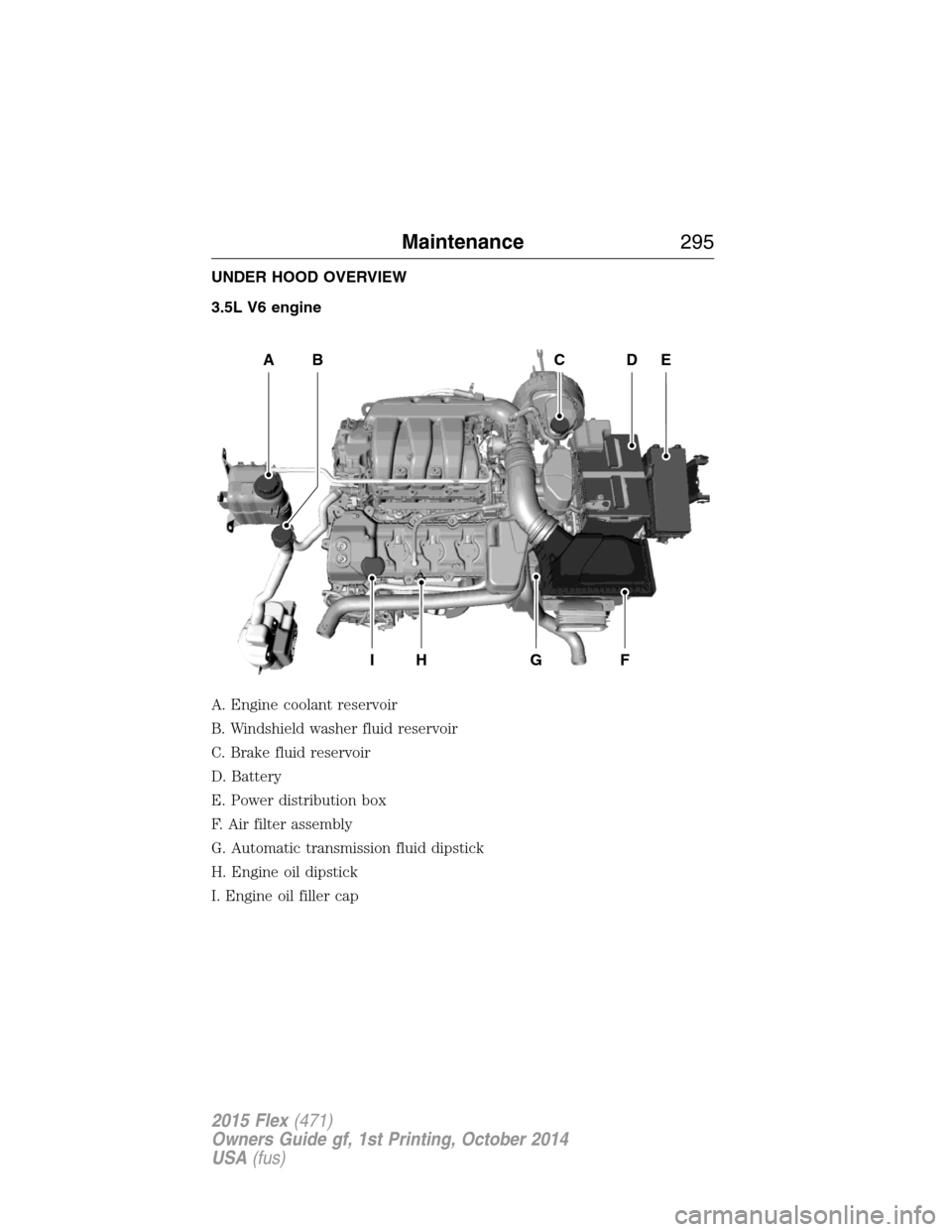
UNDER HOOD OVERVIEW
3.5L V6 engine
A. Engine coolant reservoir
B. Windshield washer fluid reservoir
C. Brake fluid reservoir
D. Battery
E. Power distribution box
F. Air filter assembly
G. Automatic transmission fluid dipstick
H. Engine oil dipstick
I. Engine oil filler cap
A
IHGF
BCDE
Maintenance295
2015 Flex(471)
Owners Guide gf, 1st Printing, October 2014
USA(fus)
Page 297 of 571
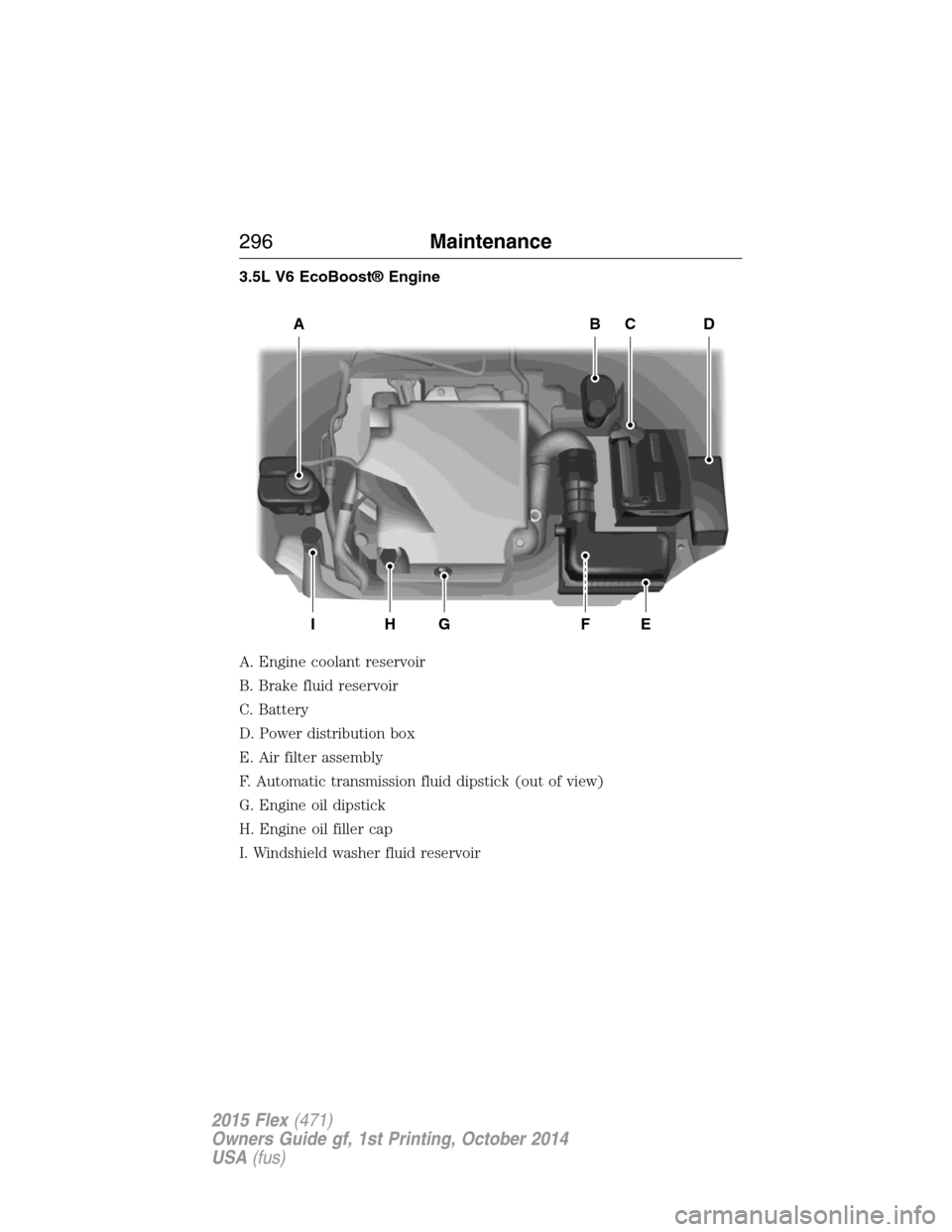
3.5L V6 EcoBoost® Engine
A. Engine coolant reservoir
B. Brake fluid reservoir
C. Battery
D. Power distribution box
E. Air filter assembly
F. Automatic transmission fluid dipstick (out of view)
G. Engine oil dipstick
H. Engine oil filler cap
I. Windshield washer fluid reservoir
ABCD
EFGHI
296Maintenance
2015 Flex(471)
Owners Guide gf, 1st Printing, October 2014
USA(fus)
Page 305 of 571
TRANSMISSION FLUID CHECK
6F50/6F55 Transmission
WARNING:The dipstick cap and surrounding components may
be hot; gloves are recommended.
WARNING:Use gloves when moving the air filter assembly;
components will be hot.
Note:Automatic transmission fluid expands when warmed. To obtain an
accurate fluid check, drive the vehicle until it is warmed up (approximately
20 miles [30 km]). If your vehicle has been operated for an extended
period at high speeds, in city traffic during hot weather or pulling a trailer,
the vehicle should be turned off until normal operating temperatures are
reached to allow the fluid to cool before checking. Depending on vehicle
use, cooling times could take up to 30 minutes or longer.
Refer to yourscheduled maintenance informationfor scheduled
intervals for fluid checks and changes. Your transmission does not
consume fluid. However, the fluid level should be checked if the
transmission is not working properly, i.e., if the transmission slips or
shifts slowly or if you notice some sign of fluid leakage.
1. Drive the vehicle 20 miles (30 km) or until it reaches normal operating
temperature.
2. Park the vehicle on a level surface and engage the parking brake.
3. With the parking brake engaged and your foot on the brake pedal,
start the engine and move the gearshift lever through all of the gear
ranges. Allow a minimum of 10 seconds for each gear to engage.
4. Latch the gearshift lever inP(Park) and leave the engine running.
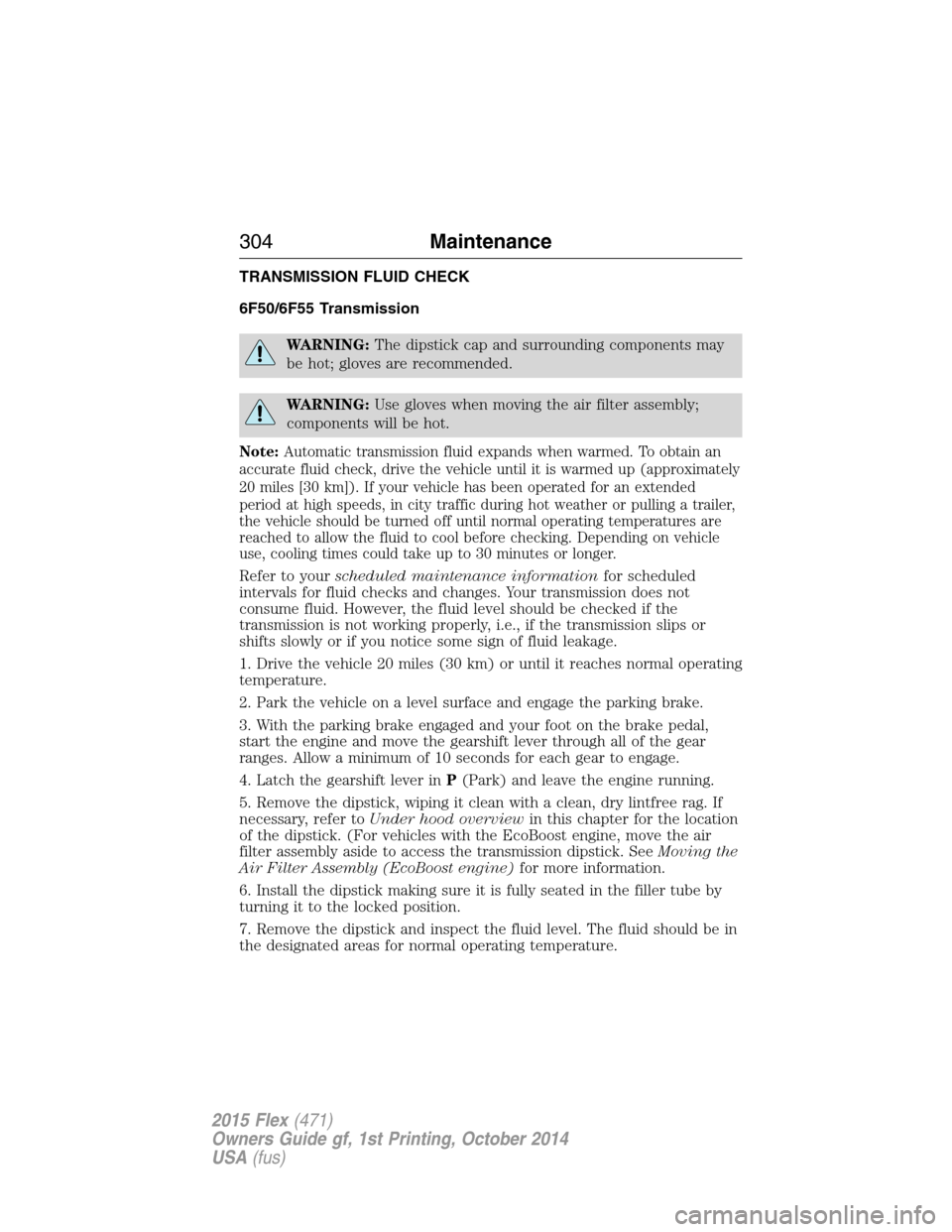
5. Remove the dipstick, wiping it clean with a clean, dry lintfree rag. If
necessary, refer toUnder hood overviewin this chapter for the location
of the dipstick. (For vehicles with the EcoBoost engine, move the air
filter assembly aside to access the transmission dipstick. SeeMoving the
Air Filter Assembly (EcoBoost engine)for more information.
6. Install the dipstick making sure it is fully seated in the filler tube by
turning it to the locked position.
7. Remove the dipstick and inspect the fluid level. The fluid should be in
the designated areas for normal operating temperature.
304Maintenance
2015 Flex(471)
Owners Guide gf, 1st Printing, October 2014
USA(fus)
Page 308 of 571
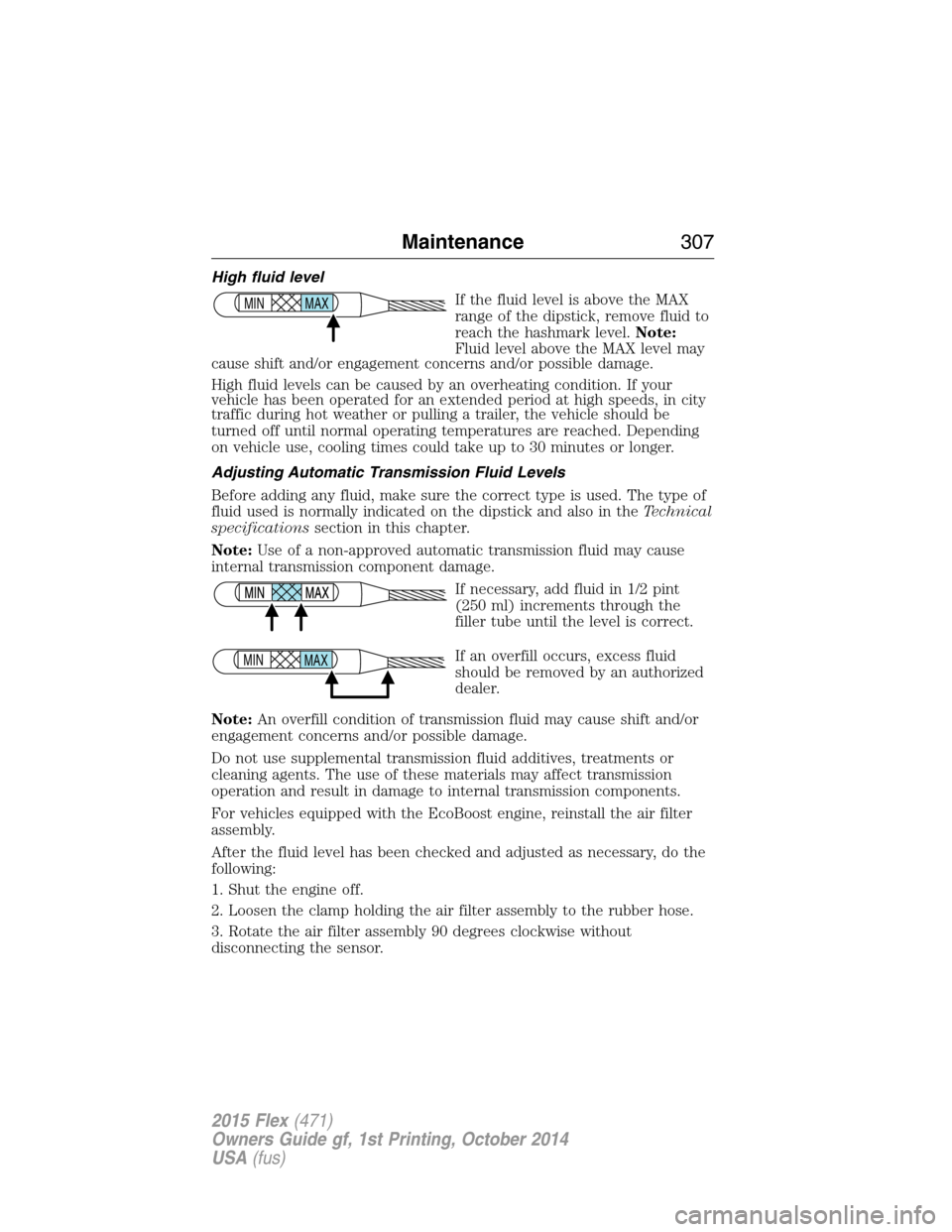
High fluid level
If the fluid level is above the MAX
range of the dipstick, remove fluid to
reach the hashmark level.Note:
Fluid level above the MAX level may
cause shift and/or engagement concerns and/or possible damage.
High fluid levels can be caused by an overheating condition. If your
vehicle has been operated for an extended period at high speeds, in city
traffic during hot weather or pulling a trailer, the vehicle should be
turned off until normal operating temperatures are reached. Depending
on vehicle use, cooling times could take up to 30 minutes or longer.
Adjusting Automatic Transmission Fluid Levels
Before adding any fluid, make sure the correct type is used. The type of
fluid used is normally indicated on the dipstick and also in theTechnical
specificationssection in this chapter.
Note:Use of a non-approved automatic transmission fluid may cause
internal transmission component damage.
If necessary, add fluid in 1/2 pint
(250 ml) increments through the
filler tube until the level is correct.
If an overfill occurs, excess fluid
should be removed by an authorized
dealer.
Note:An overfill condition of transmission fluid may cause shift and/or
engagement concerns and/or possible damage.
Do not use supplemental transmission fluid additives, treatments or
cleaning agents. The use of these materials may affect transmission
operation and result in damage to internal transmission components.
For vehicles equipped with the EcoBoost engine, reinstall the air filter
assembly.
After the fluid level has been checked and adjusted as necessary, do the
following:
1. Shut the engine off.
2. Loosen the clamp holding the air filter assembly to the rubber hose.
3. Rotate the air filter assembly 90 degrees clockwise without
disconnecting the sensor.
MAX MIN
MAX MIN
Maintenance307
2015 Flex(471)
Owners Guide gf, 1st Printing, October 2014
USA(fus)
Page 363 of 571
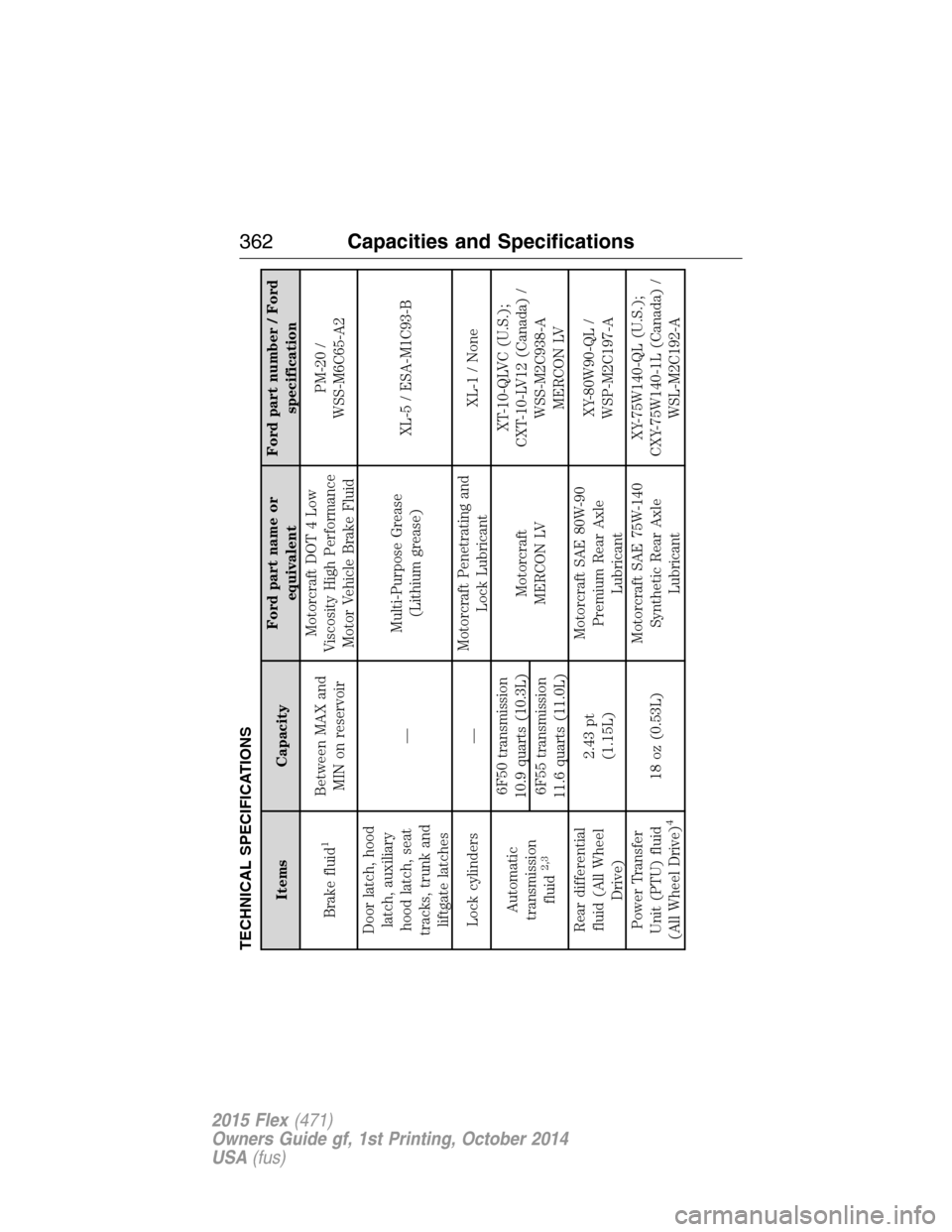
TECHNICAL SPECIFICATIONS
Items CapacityFord part name or
equivalentFord part number / Ford
specification
Brake fluid
1
Between MAX and
MIN on reservoirMotorcraft DOT 4 Low
Viscosity High Performance
Motor Vehicle Brake FluidPM-20 /
WSS-M6C65-A2
Door latch, hood
latch, auxiliary
hood latch, seat
tracks, trunk and
liftgate latches—Multi-Purpose Grease
(Lithium grease)XL-5 / ESA-M1C93-B
Lock cylinders —Motorcraft Penetrating and
Lock LubricantXL-1 / None
Automatic
transmission
fluid
2,3
6F50 transmission
10.9 quarts (10.3L)
Motorcraft
MERCON LVXT-10-QLVC (U.S.);
CXT-10-LV12 (Canada) /
WSS-M2C938-A
MERCON LV 6F55 transmission
11.6 quarts (11.0L)
Rear differential
fluid (All Wheel
Drive)2.43 pt
(1.15L)Motorcraft SAE 80W-90
Premium Rear Axle
LubricantXY-80W90-QL /
WSP-M2C197-A
Power Transfer
Unit (PTU) fluid
(All Wheel Drive)
4
18 oz (0.53L)Motorcraft SAE 75W-140
Synthetic Rear Axle
LubricantXY-75W140-QL (U.S.);
CXY-75W140-1L (Canada) /
WSL-M2C192-A
362Capacities and Specifications
2015 Flex(471)
Owners Guide gf, 1st Printing, October 2014
USA(fus)
Page 365 of 571
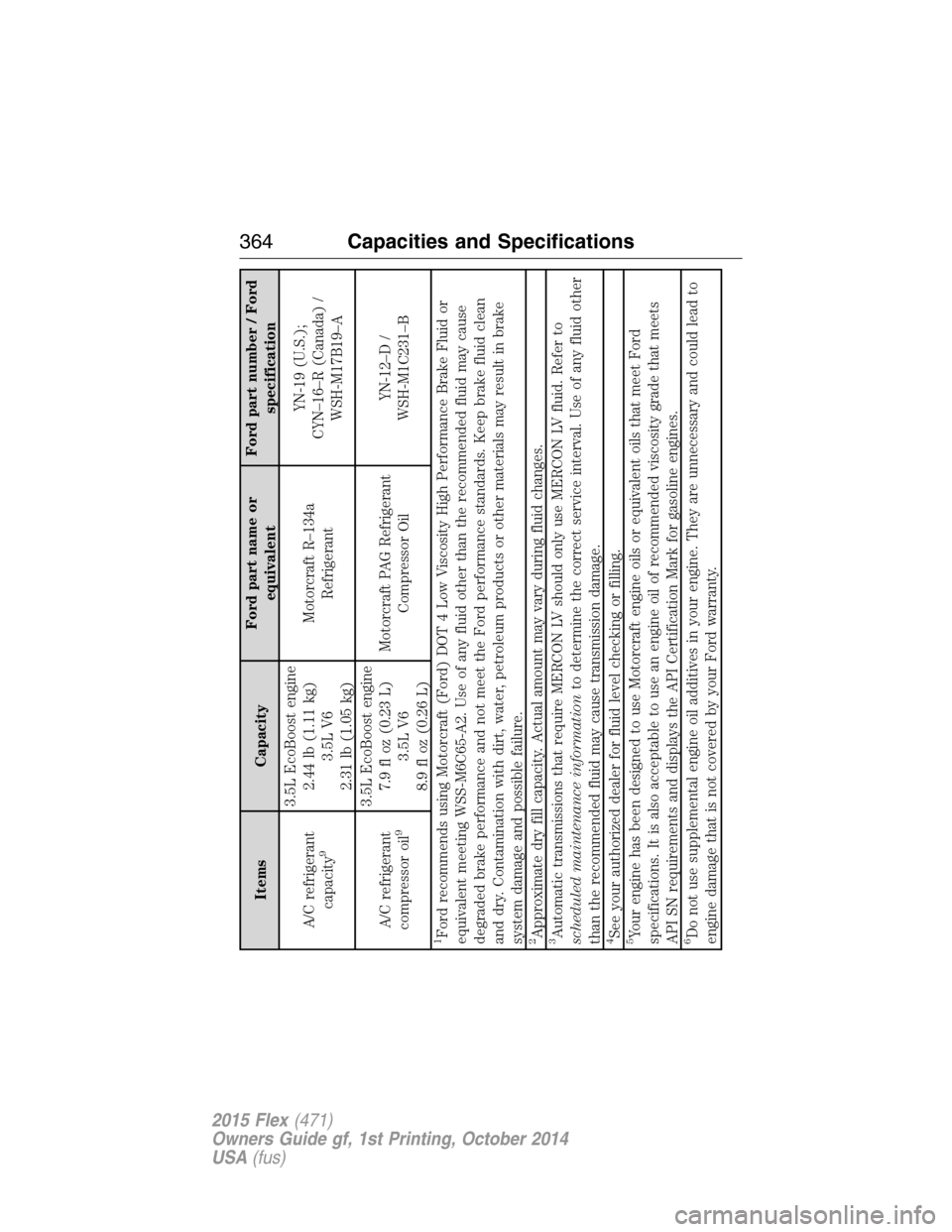
Items CapacityFord part name or
equivalentFord part number / Ford
specification
A/C refrigerant
capacity
9
3.5L EcoBoost engine
2.44 lb (1.11 kg)
3.5L V6
2.31 lb (1.05 kg)Motorcraft R–134a
RefrigerantYN-19 (U.S.);
CYN–16–R (Canada) /
WSH-M17B19–A
A/C refrigerant
compressor oil
9
3.5L EcoBoost engine
7.9 fl oz (0.23 L)
3.5L V6
8.9 fl oz (0.26 L)Motorcraft PAG Refrigerant
Compressor OilYN-12–D /
WSH-M1C231–B
1Ford recommends using Motorcraft (Ford) DOT 4 Low Viscosity High Performance Brake Fluid or
equivalent meeting WSS-M6C65-A2. Use of any fluid other than the recommended fluid may cause
degraded brake performance and not meet the Ford performance standards. Keep brake fluid clean
and dry. Contamination with dirt, water, petroleum products or other materials may result in brake
system damage and possible failure.2Approximate dry fill capacity. Actual amount may vary during fluid changes.3Automatic transmissions that require MERCON LV should only use MERCON LV fluid. Refer to
scheduled maintenance informationto determine the correct service interval. Use of any fluid other
than the recommended fluid may cause transmission damage.4See your authorized dealer for fluid level checking or filling.5Your engine has been designed to use Motorcraft engine oils or equivalent oils that meet Ford
specifications. It is also acceptable to use an engine oil of recommended viscosity grade that meets
API SN requirements and displays the API Certification Mark for gasoline engines.6Do not use supplemental engine oil additives in your engine. They are unnecessary and could lead to
engine damage that is not covered by your Ford warranty.
364Capacities and Specifications
2015 Flex(471)
Owners Guide gf, 1st Printing, October 2014
USA(fus)
Page 369 of 571
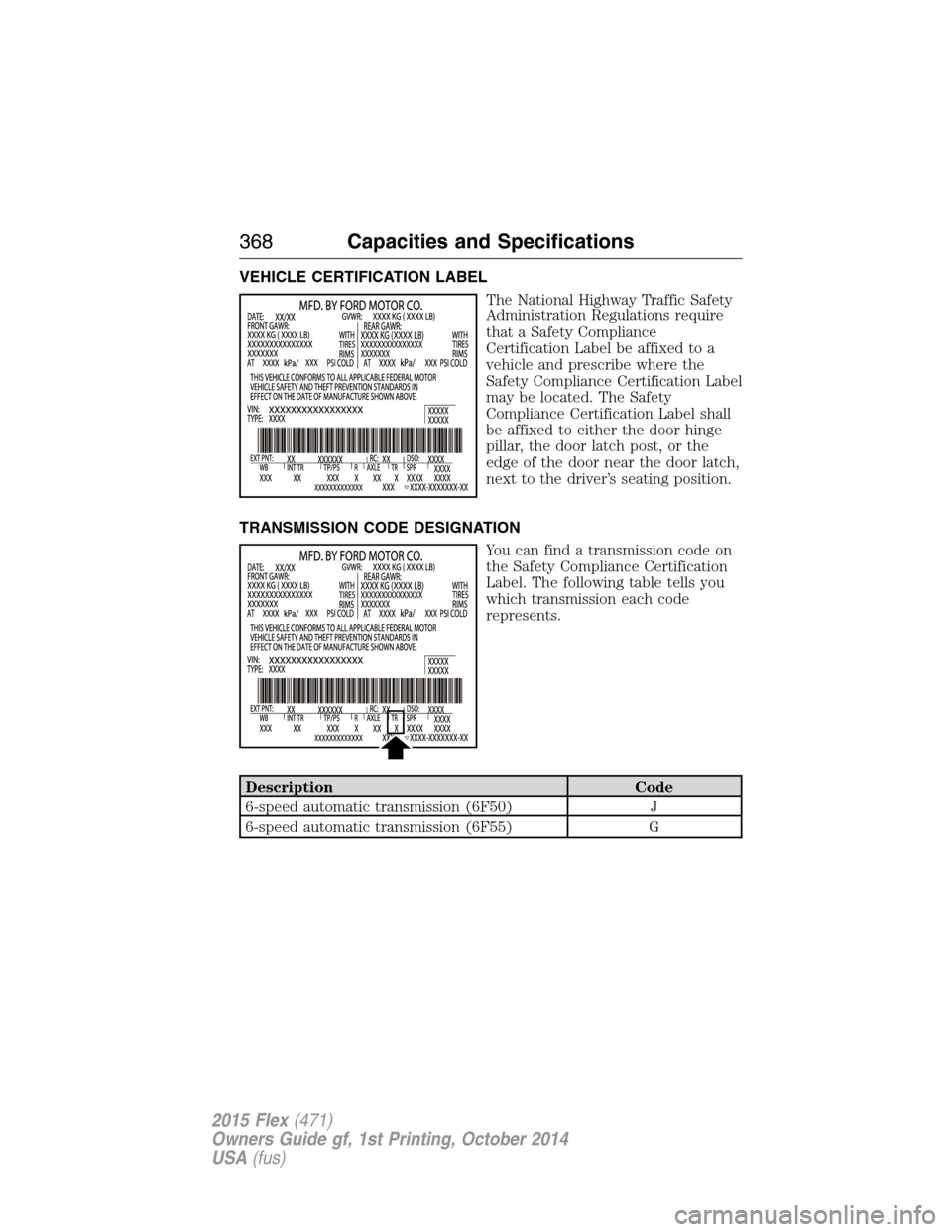
VEHICLE CERTIFICATION LABEL
The National Highway Traffic Safety
Administration Regulations require
that a Safety Compliance
Certification Label be affixed to a
vehicle and prescribe where the
Safety Compliance Certification Label
may be located. The Safety
Compliance Certification Label shall
be affixed to either the door hinge
pillar, the door latch post, or the
edge of the door near the door latch,
next to the driver’s seating position.
TRANSMISSION CODE DESIGNATION
You can find a transmission code on
the Safety Compliance Certification
Label. The following table tells you
which transmission each code
represents.
Description Code
6-speed automatic transmission (6F50) J
6-speed automatic transmission (6F55) G
368Capacities and Specifications
2015 Flex(471)
Owners Guide gf, 1st Printing, October 2014
USA(fus)
Page 398 of 571
•Speak naturally, without long pauses between words.
•At any time you can interrupt the system while it is speaking by
pressing the voice icon.
USING SYNC WITH YOUR PHONE
Hands-free calling is one of the main features of SYNC. While the system
supports a variety of features, many are dependent on your cellular
phone’s functionality. At a minimum, most cellular phones with Bluetooth
wireless technology support the following functions:
•Answering an incoming call
•Ending a call
•Using privacy mode
•Dialing a number
•Redialing
•Call waiting notification
•Caller ID.
Other features, such as text messaging using Bluetooth and automatic
phonebook download, are phone-dependent features. To check your
phone’s compatibility, see your phone’s user manual and visit
www.SYNCMyRide.com, www.SYNCMyRide.ca or www.syncmaroute.ca.
Pairing a Phone for the First Time
Note:SYNC can support downloading up to approximately 1000 entries
per Bluetooth-enabled cellular phone.
Note:Make sure the vehicle ignition and radio are turned on and the
transmission is in positionP.
Note:To scroll through the menus, press the up and down arrows on
your audio system.
Wirelessly pairing your phone with SYNC allows you to make and receive
hands-free calls.
1. Press the phone button; when the display indicates no phone is
paired, pressOK.
2. WhenFind SYNCappears in the display, pressOK.
3. Put your phone into Bluetooth discovery mode. See your phone’s
user guide if necessary.
SYNC®397
2015 Flex(471)
Owners Guide gf, 1st Printing, October 2014
USA(fus)
Page 399 of 571
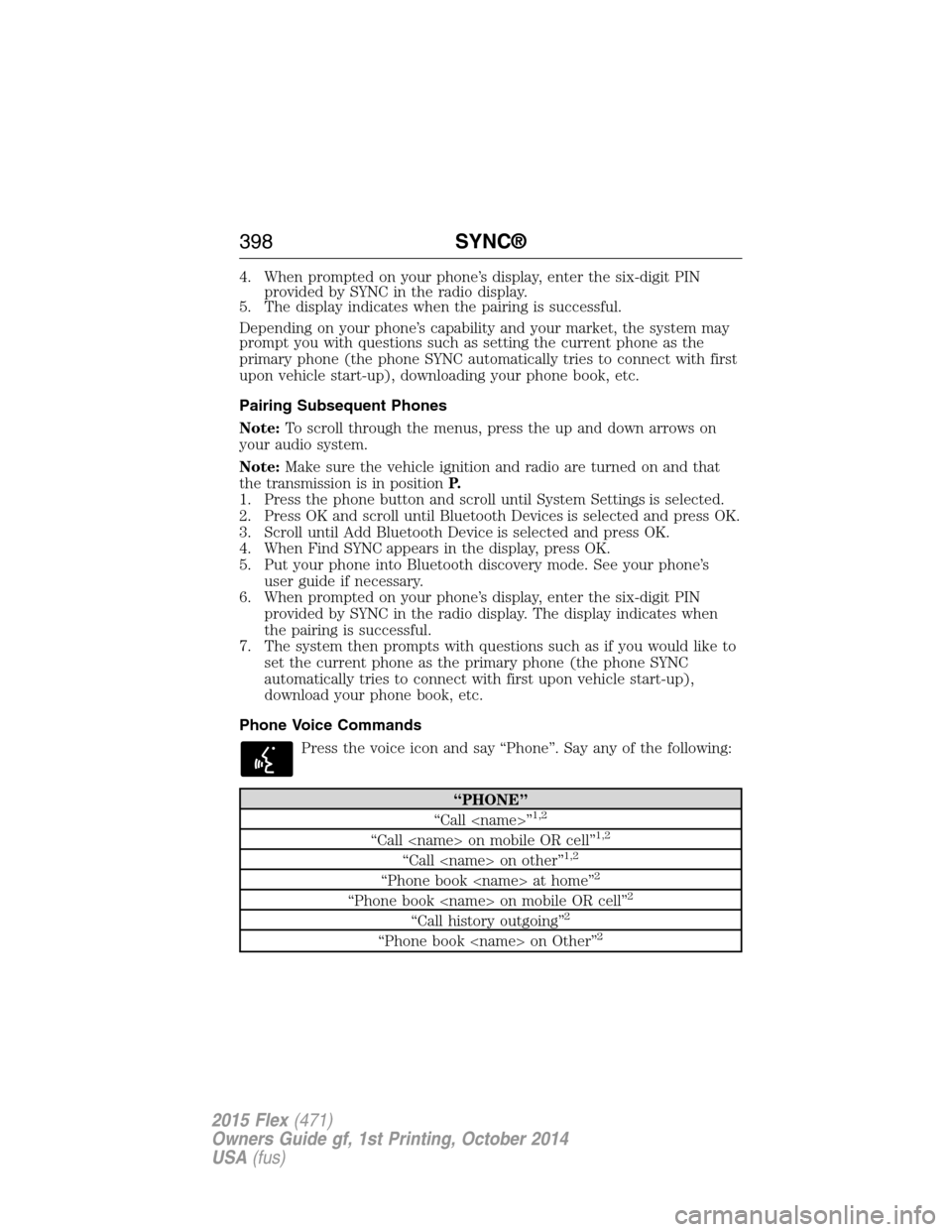
4. When prompted on your phone’s display, enter the six-digit PIN
provided by SYNC in the radio display.
5. The display indicates when the pairing is successful.
Depending on your phone’s capability and your market, the system may
prompt you with questions such as setting the current phone as the
primary phone (the phone SYNC automatically tries to connect with first
upon vehicle start-up), downloading your phone book, etc.
Pairing Subsequent Phones
Note:To scroll through the menus, press the up and down arrows on
your audio system.
Note:Make sure the vehicle ignition and radio are turned on and that
the transmission is in positionP.
1. Press the phone button and scroll until System Settings is selected.
2. Press OK and scroll until Bluetooth Devices is selected and press OK.
3. Scroll until Add Bluetooth Device is selected and press OK.
4. When Find SYNC appears in the display, press OK.
5. Put your phone into Bluetooth discovery mode. See your phone’s
user guide if necessary.
6. When prompted on your phone’s display, enter the six-digit PIN
provided by SYNC in the radio display. The display indicates when
the pairing is successful.
7. The system then prompts with questions such as if you would like to
set the current phone as the primary phone (the phone SYNC
automatically tries to connect with first upon vehicle start-up),
download your phone book, etc.
Phone Voice Commands
Press the voice icon and say “Phone”. Say any of the following:
“PHONE”
“Call
“Call
“Call
“Phone book
“Phone book
“Call history outgoing”2
“Phone book
398SYNC®
2015 Flex(471)
Owners Guide gf, 1st Printing, October 2014
USA(fus)
Page 477 of 571
commands. While the system supports a variety of features, many are
dependent on your cellular phone’s functionality. At a minimum, most
cellular phones with Bluetooth wireless technology support the following
functions:
•Answering an incoming call
•Ending a call
•Using privacy mode
•Dialing a number
•Redialing
•Call waiting notification
•Caller ID.
Other features, such as text messaging using Bluetooth and automatic
phonebook download, are phone-dependent features. To check your
phone’s compatibility, see your phone’s user manual and visit
www.SYNCMyRide.com, www.SYNCMyRide.ca or www.syncmaroute.ca.
Pairing Your Phone for the First Time
WARNING:Driving while distracted can result in loss of vehicle
control, crash and injury. We strongly recommend that you use
extreme caution when using any device that may take your focus off
the road. Your primary responsibility is the safe operation of your
vehicle. We recommend against the use of any hand-held device while
driving and encourage the use of voice-operated systems when possible.
Make sure you are aware of all applicable local laws that may affect the
use of electronic devices while driving.
The first thing you must do to use the phone features of SYNC is to pair
your Bluetooth-enabled cellular phone with SYNC. This allows you to use
your phone in a hands-free manner.
Note:Put the transmission in positionP.Turn on your vehicle ignition
and the radio.
1. TouchAdd Phonein the upper left corner of the touchscreen.Find
SYNCappears on the screen and instructs you to begin the pairing
process from your device.
2. Make sure that Bluetooth is set toOnand that your cellular phone is
in the proper mode. See your phone’s manual if necessary.
•SelectSYNC,and a six-digit PIN appears on your device.
3. If you are prompted to enter a PIN on your device, it does not
support Secure Simple Pairing. To pair, enter the PIN displayed on
the touchscreen. Skip the next step.
476MyFord Touch® (If Equipped)
2015 Flex(471)
Owners Guide gf, 1st Printing, October 2014
USA(fus)