washer fluid FORD FLEX 2016 1.G Owners Manual
[x] Cancel search | Manufacturer: FORD, Model Year: 2016, Model line: FLEX, Model: FORD FLEX 2016 1.GPages: 417, PDF Size: 4.52 MB
Page 7 of 417
Post-Crash Alert System..........................225
Customer Assistance
Getting the Services You Need...............226
In California (U.S. Only).............................227
The Better Business Bureau (BBB) Auto
Line Program (U.S. Only)......................228
Utilizing the Mediation/Arbitration Program (Canada Only).......................229
Getting Assistance Outside the U.S. and Canada........................................................229
Ordering Additional Owner's Literature....................................................230
Reporting Safety Defects (U.S. Only)..............................................................231
Reporting Safety Defects (Canada Only)..............................................................231
Fuses
Fuse Specification Chart...........................233
Changing a Fuse...........................................242
Maintenance
General Information
...................................243
Opening and Closing the Hood..............243
Under Hood Overview - 3.5L Duratec........................................................245
Under Hood Overview - 3.5L Ecoboost™................................................246
Engine Oil Dipstick.......................................247
Engine Oil Check..........................................247
Oil Change Indicator Reset.......................247
Engine Coolant Check
...............................248
Automatic Transmission Fluid Check ............................................................
252
Brake Fluid Check........................................253
Power Steering Fluid Check.....................254
Washer Fluid Check....................................254
Changing the 12V Battery.........................254
Checking the Wiper Blades.....................256
Changing the Wiper Blades.....................256 Adjusting the Headlamps.........................257
Removing a Headlamp.............................258
Changing a Bulb...........................................258
Bulb Specification Chart
............................261
Changing the Engine Air Filter................263
Vehicle Care
General Information
...................................264
Cleaning Products
.......................................264
Cleaning the Exterior..................................264
Waxing.............................................................265
Cleaning the Engine
...................................266
Cleaning the Windows and Wiper Blades..........................................................266
Cleaning the Interior...................................267
Cleaning the Instrument Panel and Instrument Cluster Lens........................267
Cleaning Leather Seats.............................268
Repairing Minor Paint Damage..............268
Cleaning the Alloy Wheels
.......................268
Vehicle Storage
............................................269
Wheels and Tires
General Information.....................................271
Tire Care
...........................................................273
Using Snow Chains.....................................287
Tire Pressure Monitoring System..........288
Changing a Road Wheel
............................291
Technical Specifications..........................296
Capacities and Specific- ations
Engine Specifications - 3.5L Duratec........................................................297
Engine Specifications - 3.5L Ecoboost™................................................297
Motorcraft Parts - 3.5L Duratec.............298
Motorcraft Parts - 3.5L Ecoboost™......299
Vehicle Identification Number...............300
Vehicle Certification Label........................301
4
Flex (), enUSA, First Printing Table of Contents
Page 80 of 417
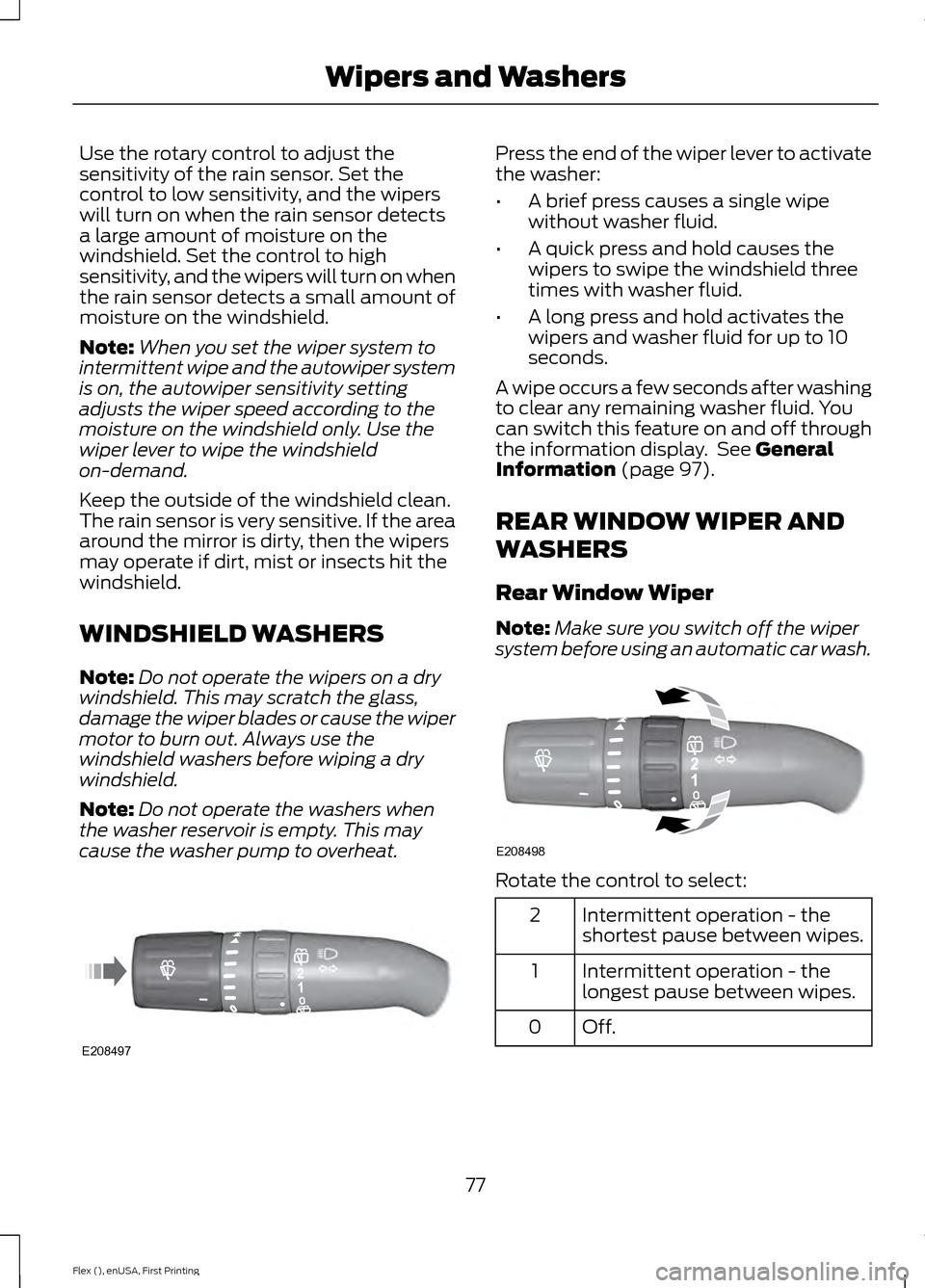
Use the rotary control to adjust the
sensitivity of the rain sensor. Set the
control to low sensitivity, and the wipers
will turn on when the rain sensor detects
a large amount of moisture on the
windshield. Set the control to high
sensitivity, and the wipers will turn on when
the rain sensor detects a small amount of
moisture on the windshield.
Note:
When you set the wiper system to
intermittent wipe and the autowiper system
is on, the autowiper sensitivity setting
adjusts the wiper speed according to the
moisture on the windshield only. Use the
wiper lever to wipe the windshield
on-demand.
Keep the outside of the windshield clean.
The rain sensor is very sensitive. If the area
around the mirror is dirty, then the wipers
may operate if dirt, mist or insects hit the
windshield.
WINDSHIELD WASHERS
Note: Do not operate the wipers on a dry
windshield. This may scratch the glass,
damage the wiper blades or cause the wiper
motor to burn out. Always use the
windshield washers before wiping a dry
windshield.
Note: Do not operate the washers when
the washer reservoir is empty. This may
cause the washer pump to overheat. Press the end of the wiper lever to activate
the washer:
•
A brief press causes a single wipe
without washer fluid.
• A quick press and hold causes the
wipers to swipe the windshield three
times with washer fluid.
• A long press and hold activates the
wipers and washer fluid for up to 10
seconds.
A wipe occurs a few seconds after washing
to clear any remaining washer fluid. You
can switch this feature on and off through
the information display. See General
Information (page 97).
REAR WINDOW WIPER AND
WASHERS
Rear Window Wiper
Note: Make sure you switch off the wiper
system before using an automatic car wash. Rotate the control to select:
Intermittent operation - the
shortest pause between wipes.
2
Intermittent operation - the
longest pause between wipes.
1
Off.0
77
Flex (), enUSA, First Printing Wipers and WashersE208497 E208498
Page 84 of 417
The headlamps will not turn on by wiper
activation:
•
During a single wipe.
• When the wipers are on to clear washer
fluid during a wash condition.
Note: If you switch autolamps and
autowipers on, the headlamps will
automatically turn on when the windshield
wipers continuously operate.
INSTRUMENT LIGHTING
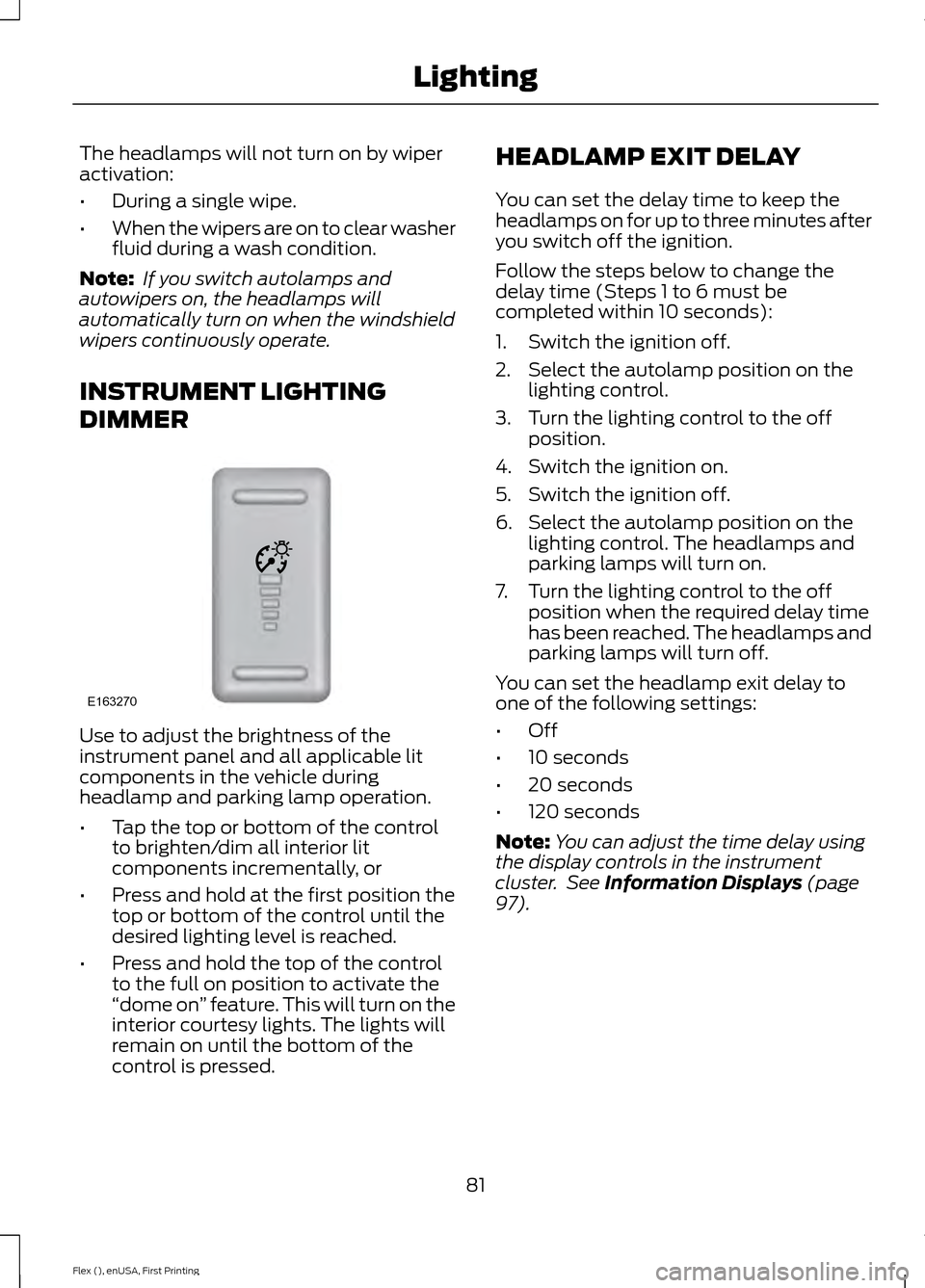
DIMMER Use to adjust the brightness of the
instrument panel and all applicable lit
components in the vehicle during
headlamp and parking lamp operation.
•
Tap the top or bottom of the control
to brighten/dim all interior lit
components incrementally, or
• Press and hold at the first position the
top or bottom of the control until the
desired lighting level is reached.
• Press and hold the top of the control
to the full on position to activate the
“dome on ” feature. This will turn on the
interior courtesy lights. The lights will
remain on until the bottom of the
control is pressed. HEADLAMP EXIT DELAY
You can set the delay time to keep the
headlamps on for up to three minutes after
you switch off the ignition.
Follow the steps below to change the
delay time (Steps 1 to 6 must be
completed within 10 seconds):
1. Switch the ignition off.
2. Select the autolamp position on the
lighting control.
3. Turn the lighting control to the off position.
4. Switch the ignition on.
5. Switch the ignition off.
6. Select the autolamp position on the lighting control. The headlamps and
parking lamps will turn on.
7. Turn the lighting control to the off position when the required delay time
has been reached. The headlamps and
parking lamps will turn off.
You can set the headlamp exit delay to
one of the following settings:
• Off
• 10 seconds
• 20 seconds
• 120 seconds
Note: You can adjust the time delay using
the display controls in the instrument
cluster. See Information Displays (page
97).
81
Flex (), enUSA, First Printing LightingE163270
Page 97 of 417
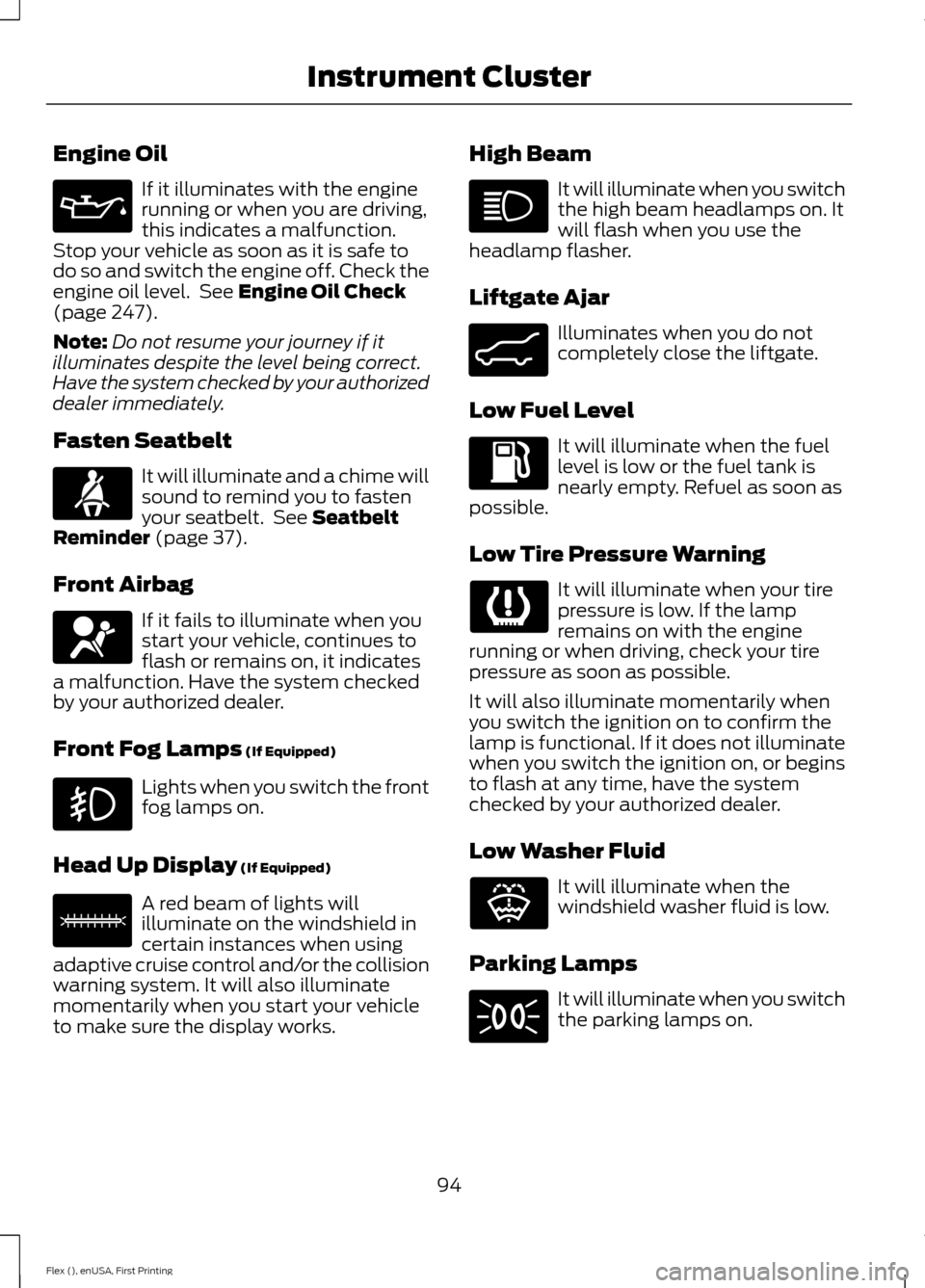
Engine Oil
If it illuminates with the engine
running or when you are driving,
this indicates a malfunction.
Stop your vehicle as soon as it is safe to
do so and switch the engine off. Check the
engine oil level. See Engine Oil Check
(page 247).
Note: Do not resume your journey if it
illuminates despite the level being correct.
Have the system checked by your authorized
dealer immediately.
Fasten Seatbelt It will illuminate and a chime will
sound to remind you to fasten
your seatbelt. See
Seatbelt
Reminder (page 37).
Front Airbag If it fails to illuminate when you
start your vehicle, continues to
flash or remains on, it indicates
a malfunction. Have the system checked
by your authorized dealer.
Front Fog Lamps
(If Equipped) Lights when you switch the front
fog lamps on.
Head Up Display
(If Equipped) A red beam of lights will
illuminate on the windshield in
certain instances when using
adaptive cruise control and/or the collision
warning system. It will also illuminate
momentarily when you start your vehicle
to make sure the display works. High Beam It will illuminate when you switch
the high beam headlamps on. It
will flash when you use the
headlamp flasher.
Liftgate Ajar Illuminates when you do not
completely close the liftgate.
Low Fuel Level It will illuminate when the fuel
level is low or the fuel tank is
nearly empty. Refuel as soon as
possible.
Low Tire Pressure Warning It will illuminate when your tire
pressure is low. If the lamp
remains on with the engine
running or when driving, check your tire
pressure as soon as possible.
It will also illuminate momentarily when
you switch the ignition on to confirm the
lamp is functional. If it does not illuminate
when you switch the ignition on, or begins
to flash at any time, have the system
checked by your authorized dealer.
Low Washer Fluid It will illuminate when the
windshield washer fluid is low.
Parking Lamps It will illuminate when you switch
the parking lamps on.
94
Flex (), enUSA, First Printing Instrument Cluster E156133 E162453 E132353
Page 114 of 417
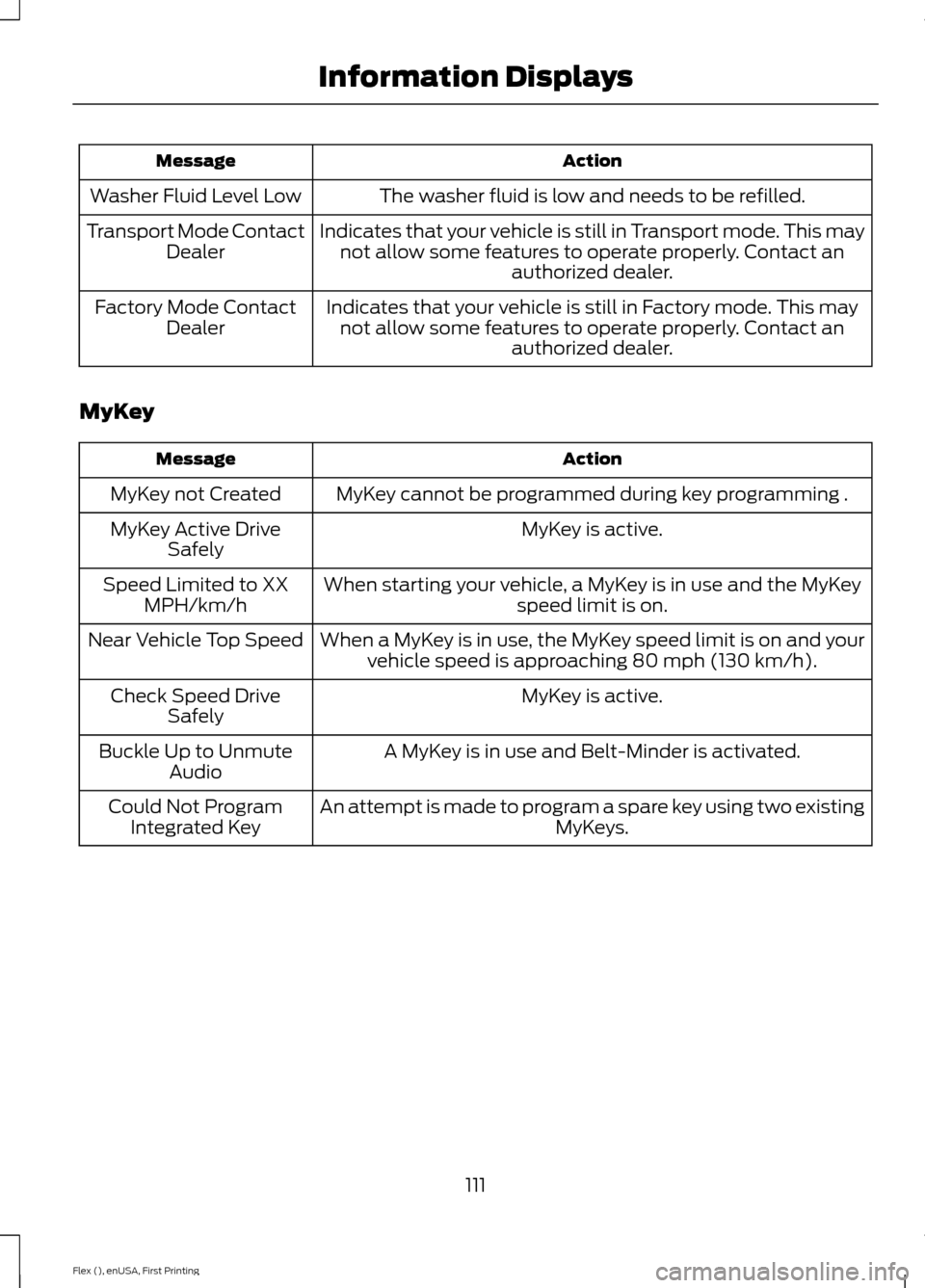
Action
Message
The washer fluid is low and needs to be refilled.
Washer Fluid Level Low
Indicates that your vehicle is still in Transport mode. This maynot allow some features to operate properly. Contact an authorized dealer.
Transport Mode Contact
Dealer
Indicates that your vehicle is still in Factory mode. This maynot allow some features to operate properly. Contact an authorized dealer.
Factory Mode Contact
Dealer
MyKey Action
Message
MyKey cannot be programmed during key programming .
MyKey not Created
MyKey is active.
MyKey Active Drive
Safely
When starting your vehicle, a MyKey is in use and the MyKey speed limit is on.
Speed Limited to XX
MPH/km/h
When a MyKey is in use, the MyKey speed limit is on and yourvehicle speed is approaching 80 mph (130 km/h).
Near Vehicle Top Speed
MyKey is active.
Check Speed Drive
Safely
A MyKey is in use and Belt-Minder is activated.
Buckle Up to Unmute
Audio
An attempt is made to program a spare key using two existing MyKeys.
Could Not Program
Integrated Key
111
Flex (), enUSA, First Printing Information Displays
Page 236 of 417
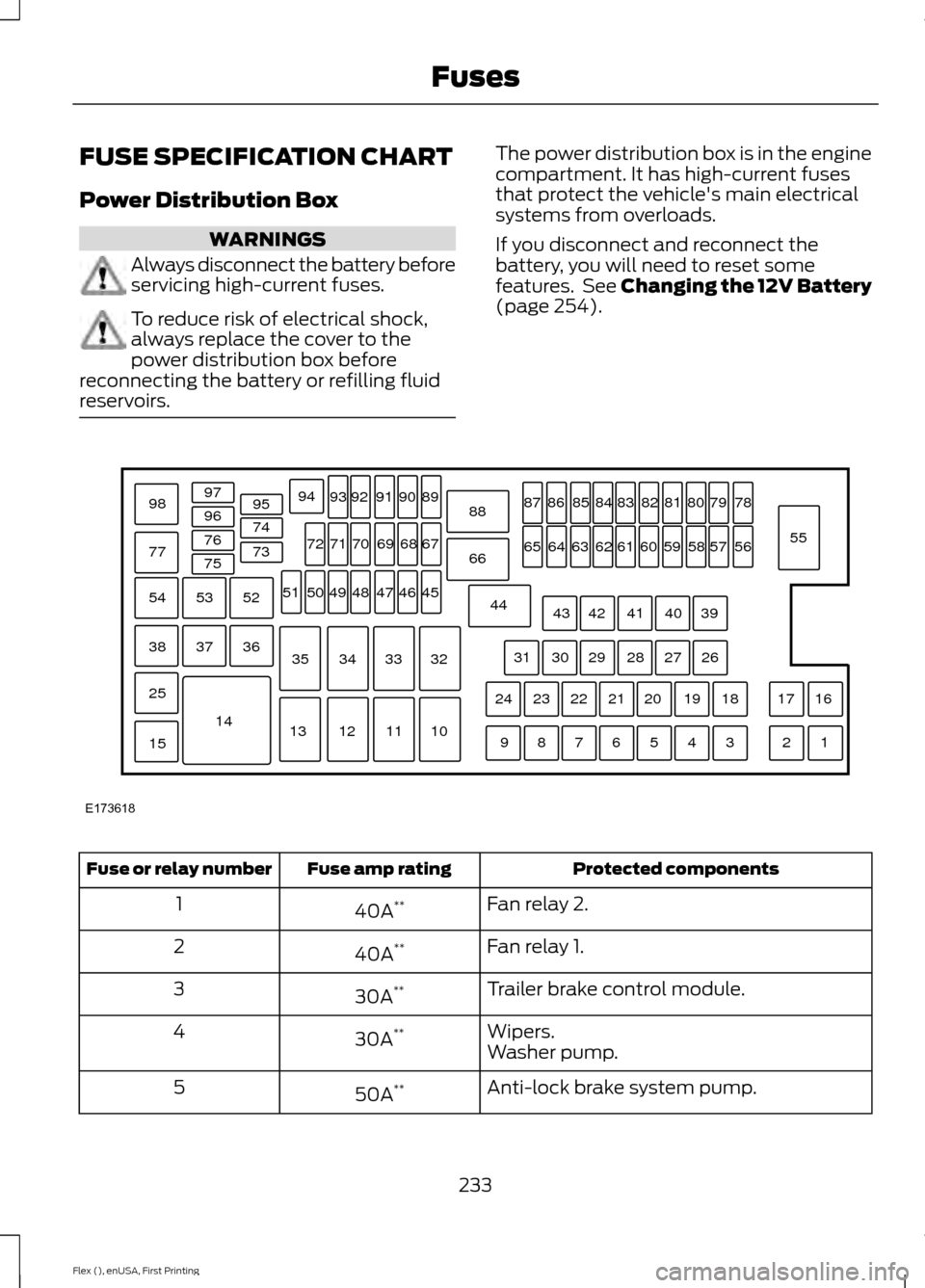
FUSE SPECIFICATION CHART
Power Distribution Box
WARNINGS
Always disconnect the battery before
servicing high-current fuses.
To reduce risk of electrical shock,
always replace the cover to the
power distribution box before
reconnecting the battery or refilling fluid
reservoirs. The power distribution box is in the engine
compartment. It has high-current fuses
that protect the vehicle's main electrical
systems from overloads.
If you disconnect and reconnect the
battery, you will need to reset some
features. See Changing the 12V Battery
(page 254).
Protected components
Fuse amp rating
Fuse or relay number
Fan relay 2.
40A **
1
Fan relay 1.
40A **
2
Trailer brake control module.
30A **
3
Wipers.
30A **
4
Washer pump.
Anti-lock brake system pump.
50A **
5
233
Flex (), enUSA, First Printing FusesE173618
97
98
77 96
95
94
9392 919089
88
66
44 78
56
39 26 18 16
17
3 1
2
4
5
6
7
8
9 19
20
21
22
23
24 27
28
29
30
31 40
41
42
43 55
57
58
59
60
61
62
63
64
65 79
80
81
82
83
84
85
86
87
67
45
32
10
11
12
13 33
34
35 46
47
48
49
50
51 68
69
70
71
72
74
73
76
75
53
37 36
54
38
25
15
1452
Page 248 of 417
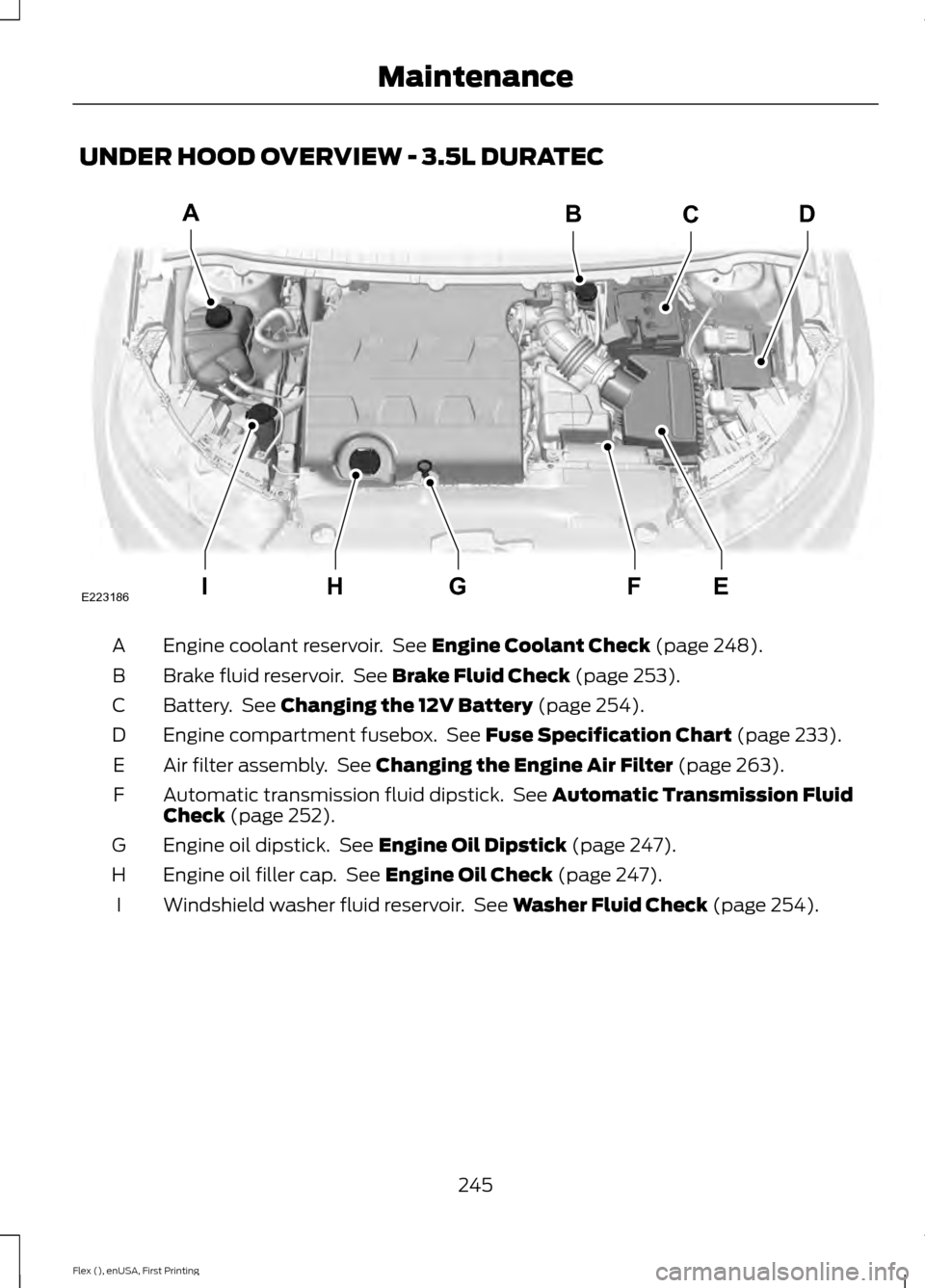
UNDER HOOD OVERVIEW - 3.5L DURATEC
Engine coolant reservoir. See Engine Coolant Check (page 248).
A
Brake fluid reservoir. See
Brake Fluid Check (page 253).
B
Battery. See
Changing the 12V Battery (page 254).
C
Engine compartment fusebox. See
Fuse Specification Chart (page 233).
D
Air filter assembly. See
Changing the Engine Air Filter (page 263).
E
Automatic transmission fluid dipstick. See
Automatic Transmission Fluid
Check (page 252).
F
Engine oil dipstick. See
Engine Oil Dipstick (page 247).
G
Engine oil filler cap. See
Engine Oil Check (page 247).
H
Windshield washer fluid reservoir. See
Washer Fluid Check (page 254).
I
245
Flex (), enUSA, First Printing MaintenanceIEFGH
ABCD
E223186
Page 249 of 417
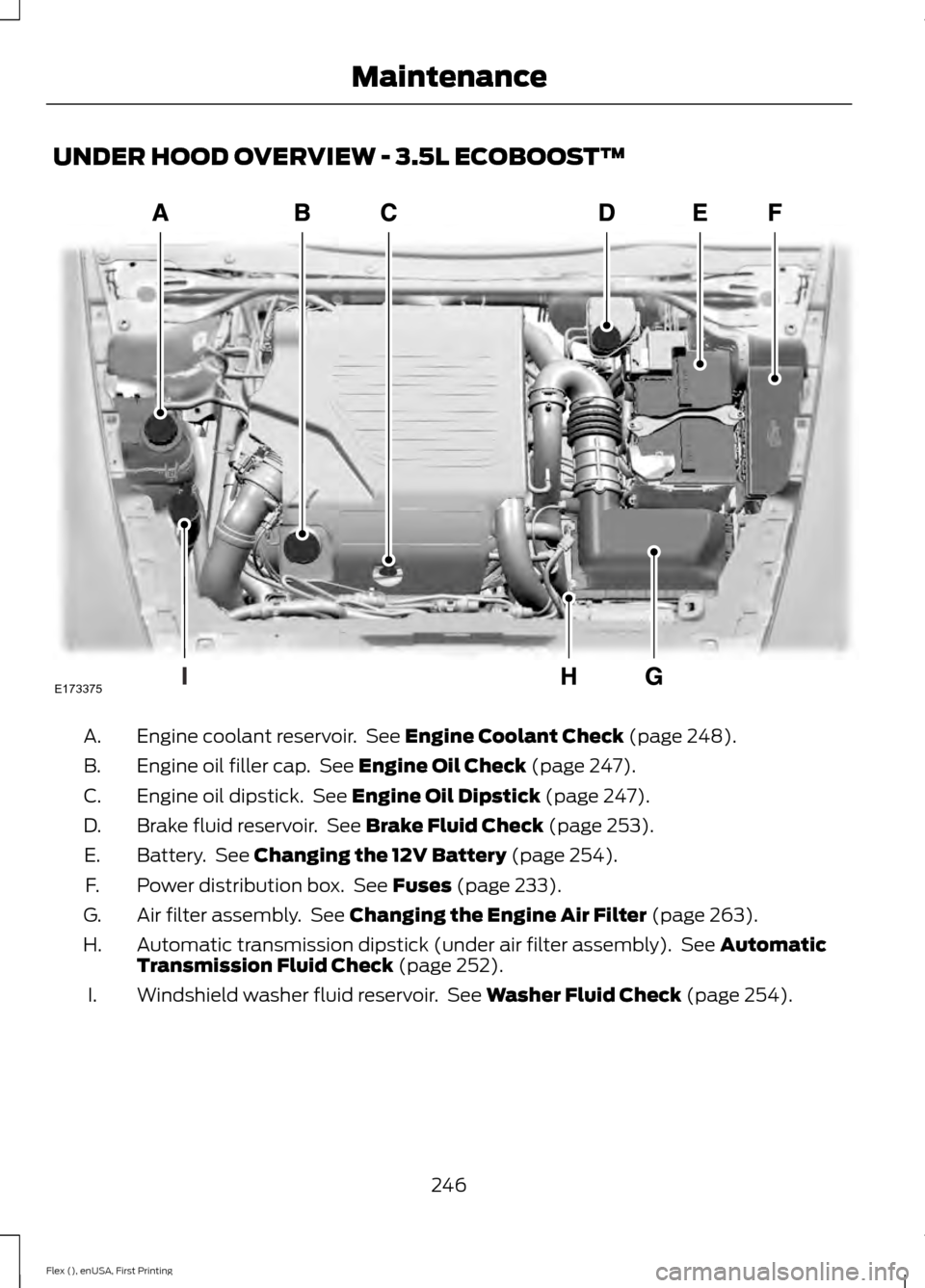
UNDER HOOD OVERVIEW - 3.5L ECOBOOST™
Engine coolant reservoir. See Engine Coolant Check (page 248).
A.
Engine oil filler cap. See
Engine Oil Check (page 247).
B.
Engine oil dipstick. See
Engine Oil Dipstick (page 247).
C.
Brake fluid reservoir. See
Brake Fluid Check (page 253).
D.
Battery. See
Changing the 12V Battery (page 254).
E.
Power distribution box. See
Fuses (page 233).
F.
Air filter assembly. See
Changing the Engine Air Filter (page 263).
G.
Automatic transmission dipstick (under air filter assembly). See
Automatic
Transmission Fluid Check (page 252).
H.
Windshield washer fluid reservoir. See
Washer Fluid Check (page 254).
I.
246
Flex (), enUSA, First Printing MaintenanceE173375
Page 251 of 417
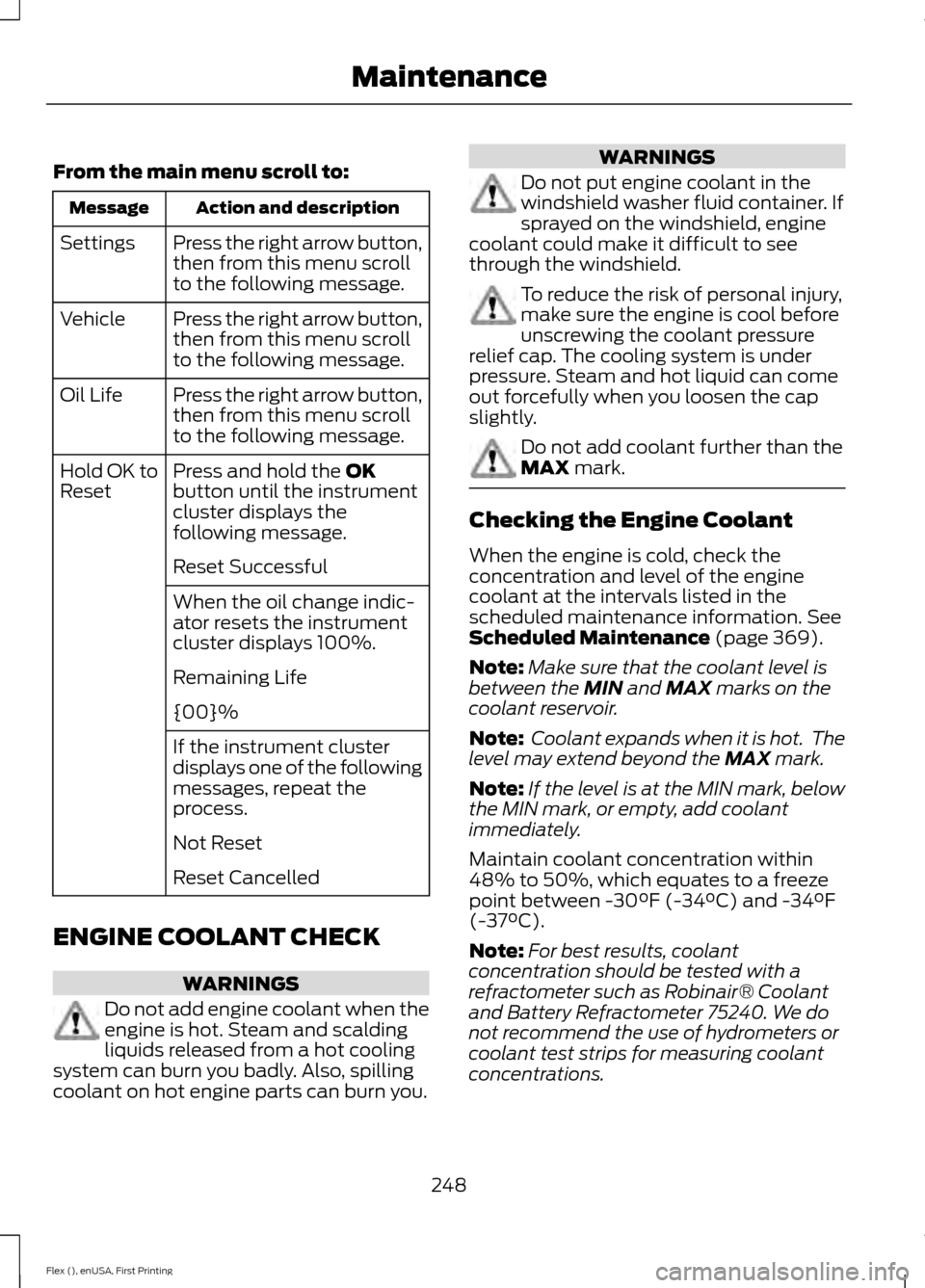
From the main menu scroll to:
Action and description
Message
Press the right arrow button,
then from this menu scroll
to the following message.
Settings
Press the right arrow button,
then from this menu scroll
to the following message.
Vehicle
Press the right arrow button,
then from this menu scroll
to the following message.
Oil Life
Press and hold the OK
button until the instrument
cluster displays the
following message.
Hold OK to
Reset
Reset Successful
When the oil change indic-
ator resets the instrument
cluster displays 100%.
Remaining Life
{00}%
If the instrument cluster
displays one of the following
messages, repeat the
process.
Not Reset
Reset Cancelled
ENGINE COOLANT CHECK WARNINGS
Do not add engine coolant when the
engine is hot. Steam and scalding
liquids released from a hot cooling
system can burn you badly. Also, spilling
coolant on hot engine parts can burn you. WARNINGS
Do not put engine coolant in the
windshield washer fluid container. If
sprayed on the windshield, engine
coolant could make it difficult to see
through the windshield. To reduce the risk of personal injury,
make sure the engine is cool before
unscrewing the coolant pressure
relief cap. The cooling system is under
pressure. Steam and hot liquid can come
out forcefully when you loosen the cap
slightly. Do not add coolant further than the
MAX mark.
Checking the Engine Coolant
When the engine is cold, check the
concentration and level of the engine
coolant at the intervals listed in the
scheduled maintenance information.
See
Scheduled Maintenance (page 369).
Note: Make sure that the coolant level is
between the
MIN and MAX marks on the
coolant reservoir.
Note: Coolant expands when it is hot. The
level may extend beyond the
MAX mark.
Note: If the level is at the MIN mark, below
the MIN mark, or empty, add coolant
immediately.
Maintain coolant concentration within
48% to 50%, which equates to a freeze
point between -30°F (-34°C) and -34°F
(-37°C).
Note: For best results, coolant
concentration should be tested with a
refractometer such as Robinair® Coolant
and Battery Refractometer 75240. We do
not recommend the use of hydrometers or
coolant test strips for measuring coolant
concentrations.
248
Flex (), enUSA, First Printing Maintenance
Page 252 of 417
Note:
Automotive fluids are not
interchangeable. Do not use engine coolant,
antifreeze or windshield washer fluid outside
of its specified function and vehicle location.
Adding Engine Coolant
Note: Do not use stop leak pellets, cooling
system sealants or additives as they can
cause damage to the engine cooling or
heating systems. Your warranty may not
cover these damages.
Note: During normal vehicle operation, the
coolant may change color from orange to
pink or light red. As long as the coolant is
clear and uncontaminated, this color change
does not indicate the coolant has degraded
nor does it require the coolant to be drained,
the system to be flushed, or the coolant to
be replaced.
Do not mix different colors or types of
coolant in your vehicle. Mixing of engine
coolants may harm your engine ’s cooling
system. Use prediluted engine coolant
meeting the correct specification. See
Capacities and Specifications (page
297). The use of an incorrect coolant may
harm the engine or cooling system
components and may not be covered by
the vehicle Warranty.
In case of emergency, you can add a large
amount of water without engine coolant
in order to reach a vehicle service location.
In this instance, qualified personnel:
1. Must drain the cooling system.
2. Chemically clean the cooling system with Motorcraft Premium Cooling
System Flush.
3. Refill with engine coolant as soon as possible.
Water alone, without engine coolant, can
cause engine damage from corrosion,
overheating or freezing. Do not use the following as a coolant
substitute:
•
Alcohol.
• Methanol.
• Brine.
• Any engine coolant mixed with alcohol
or methanol antifreeze or coolant.
Alcohol and other liquids can cause engine
damage from overheating or freezing.
Do not add extra inhibitors or additives to
the coolant. These can be harmful and
compromise the corrosion protection of
the engine coolant.
When adding coolant:
1. Unscrew the cap slowly. Any pressure will escape as you unscrew the cap.
2. Add prediluted engine coolant meeting
the correct specification. See
Capacities and Specifications (page
297
).
3. Check the coolant level in the coolant reservoir the next few times you drive
your vehicle.
4. If necessary, add enough prediluted engine coolant to bring the coolant
level to the proper level.
Recycled Engine Coolant
We do not recommend the use of recycled
engine coolant as an approved recycling
process is not yet available.
Used engine coolant should be disposed
of in an appropriate manner. Follow your
community ’s regulations and standards
for recycling and disposing of automotive
fluids.
249
Flex (), enUSA, First Printing Maintenance