key battery FORD FLEX 2017 1.G User Guide
[x] Cancel search | Manufacturer: FORD, Model Year: 2017, Model line: FLEX, Model: FORD FLEX 2017 1.GPages: 496, PDF Size: 5.92 MB
Page 165 of 496
On-Board Diagnostics (OBD-II)
Your vehicle has a computer known as the
on-board diagnostics system (OBD-II) that
monitors the engine
’s emission control
system. The system protects the
environment by making sure that your
vehicle continues to meet government
emission standards. The OBD-II system
also assists a service technician in properly
servicing your vehicle. When the service engine soon
indicator illuminates, the OBD-II
system has detected a
malfunction. Temporary malfunctions may
cause the service engine soon indicator to
illuminate. Examples are:
1. Your vehicle has run out of fuel —the
engine may misfire or run poorly.
2. Poor fuel quality or water in the fuel —the engine may misfire or run
poorly.
3. The fuel fill inlet may not have closed properly. See Refueling (page 157).
4. Driving through deep water —the
electrical system may be wet.
You can correct these temporary
malfunctions by filling the fuel tank with
good quality fuel, properly closing the fuel
fill inlet or letting the electrical system dry
out. After three driving cycles without these
or any other temporary malfunctions
present, the service engine soon indicator
should stay off the next time you start the
engine. A driving cycle consists of a cold
engine startup followed by mixed city and
highway driving. No additional vehicle
service is required. If the service engine soon indicator remains
on, have your vehicle serviced at the first
available opportunity. Although some
malfunctions detected by the OBD-II may
not have symptoms that are apparent,
continued driving with the service engine
soon indicator on can result in increased
emissions, lower fuel economy, reduced
engine and transmission smoothness and
lead to more costly repairs.
Readiness for Inspection and
Maintenance (I/M) Testing
Some state and provincial and local
governments may have
Inspection/Maintenance (I/M) programs
to inspect the emission control equipment
on your vehicle. Failure to pass this
inspection could prevent you from getting
a vehicle registration.
If the service engine soon
indicator is on or the bulb does
not work, your vehicle may need
service. See On-Board Diagnostics.
Your vehicle may not pass the I/M test if
the service engine soon indicator is on or
not working properly (bulb is burned out),
or if the OBD-II system has determined
that some of the emission control systems
have not been properly checked. In this
case, the vehicle is not ready for I/M
testing.
If the vehicle ’s engine or transmission has
just been serviced, or the battery has
recently run down or been replaced, the
OBD-II system may indicate that the
vehicle is not ready for I/M testing. To
determine if the vehicle is ready for I/M
testing, turn the ignition key to the on
position for 15 seconds without cranking
the engine. If the service engine soon
indicator blinks eight times, it means that
the vehicle is not ready for I/M testing; if
the service engine soon indicator stays on
solid, it means that your vehicle is ready
for I/M testing.
162
Flex (), enUSA, First Printing Fuel and Refueling
Page 219 of 496
If you tow your vehicle with all four wheels
on the ground:
•
Tow only in the forward direction.
• Release the parking brake.
Vehicles with Keyless Start
1. Start the vehicle by pressing the brake pedal, and then pressing the keyless
start button until the vehicle starts.
2. Press the brake pedal and shift the gearshift into neutral (N).
3. Turn the vehicle off by pressing the keyless start button once.
4. Disconnect the negative (black) cable from the battery. You need the door
key to lock and unlock doors when the
battery cable is disconnected. See
Changing the 12V Battery (page 256).
Note: The anti-theft system does not work
until you reconnect the battery cable.
Start the engine within 15 minutes of
reconnecting the battery cable.
Vehicles with an Ignition Key
1. Start the vehicle by pressing the brake pedal, and then turning the ignition key
until the vehicle starts.
2. Press the brake pedal and shift the transmission into neutral (N).
3. Turn off your vehicle by turning the ignition key past the accessory position.
The key position is between the
accessory and off positions. See
Ignition Switch (page 149).
4. Disconnect the negative (black) cable from the battery. See
Changing the
12V Battery (page 256).
Note: The anti-theft system does not work
until you reconnect the battery cable.
Start the engine within 15 minutes of
reconnecting the battery cable. All Vehicles
•
Do not exceed
65 mph (105 km/h).
• Start the engine and allow it to run for
five minutes at the beginning of each
day and every six hours thereafter. With
the engine running and your foot on the
brake, shift into drive (D) and then into
reverse (R) before shifting back into
neutral (N).
Front-wheel Drive Vehicles
Alternatively, you can tow your front-wheel
drive vehicle with the front wheels off the
ground by using a tow dolly, or with all four
wheels off the ground using a vehicle
transport trailer. If you are using a tow
dolly, follow the instructions specified by
the equipment provider.
All-wheel Drive Vehicles
Alternatively, you can tow your all-wheel
drive vehicle with all four wheels off the
ground using a vehicle transport trailer. Do
not tow your all-wheel drive vehicle with
the front wheels off the ground (by using
a tow dolly) and the rear wheels on the
ground. This causes damage to your
all-wheel drive system. If you are using a
vehicle transport trailer, follow the
instruction specified by the equipment
provider.
216
Flex (), enUSA, First Printing Towing
Page 223 of 496
ROADSIDE ASSISTANCE
Vehicles Sold in the United States:
Getting Roadside Assistance
To fully assist you should you have a
vehicle concern, Ford Motor Company
offers a complimentary roadside
assistance program. This program is
separate from the New Vehicle Limited
Warranty. The service is available:
•
24 hours a day, seven days a week.
• For the coverage period listed on the
Roadside Assistance Card included in
your Owner's Manual portfolio.
Roadside Assistance covers:
• A flat tire change with a good spare, if
provided with the vehicle (except
vehicles supplied with a tire inflation
kit).
• Battery jump start.
• Lock-out assistance (key replacement
cost is the customer's responsibility).
• Fuel delivery — independent service
contractors, if not prohibited by state,
local or municipal law, shall deliver up
to 2 gal (7.6 L) of gasoline or 5 gal
(18.9 L) of diesel fuel to a disabled
vehicle. Roadside Assistance limits fuel
delivery service to two no-charge
occurrences within a 12-month period.
• Winch out — available within
100 ft
(30.5 m) of a paved or county
maintained road, no recoveries.
• Towing — independent service
contractors, if not prohibited by state,
local or municipal law, shall tow Ford
eligible vehicles to an authorized dealer
within
35 mi (56 km) of the
disablement location or to the nearest authorized dealer. If a member
requests a tow to an authorized dealer
that is more than
35 mi (56 km) from
the disablement location, the member
shall be responsible for any mileage
costs in excess of
35 mi (56 km).
Roadside Assistance includes up to $200
for a towed trailer if the disabled eligible
vehicle requires service at the nearest
authorized dealer. If the towing vehicle is
operational but the trailer is not, then the
trailer does not qualify for any roadside
services.
Vehicles Sold in the United States:
Using Roadside Assistance
Complete the roadside assistance
identification card and place it in your
wallet for quick reference. This card is in
the owner's information portfolio in the
glove compartment.
United States Ford vehicle customers who
require Roadside Assistance, call
1-800-241-3673.
If you need to arrange roadside assistance
for yourself, Ford Motor Company
reimburses a reasonable amount for
towing to the nearest dealership within
35 mi (56 km)
. To obtain reimbursement
information, United States Ford vehicle
customers call 1-800-241-3673.
Customers need to submit their original
receipts.
Vehicles Sold in Canada: Getting
Roadside Assistance
To fully assist you should you have a
vehicle concern, Ford Motor Company of
Canada, Limited offers a complimentary
roadside assistance program. This program
is eligible within Canada or the continental
United States.
220
Flex (), enUSA, First Printing Roadside Emergencies
Page 224 of 496
This program is separate from the New
Vehicle Limited Warranty, but the coverage
is concurrent with the powertrain coverage
period of your vehicle.
Canadian customers who require roadside
assistance, call 1-800-665-2006.
Vehicles Sold in Canada: Using
Roadside Assistance
Complete the roadside assistance
identification card and place it in your
wallet for quick reference.
In Canada, this card is found in the
Warranty Guide in the glove compartment
of your vehicle.
Vehicles Sold in Canada: Roadside
Assistance Program Coverage
The service is available 24 hours a day,
seven days a week.
Canadian roadside coverage and benefits
may differ from the U.S. coverage.
For complete program coverage details
you may contact your dealer, you can call
us in Canada at 1-800-665-2006, or visit
our website at www.ford.ca.
HAZARD WARNING FLASHERS
Note:
If used when the vehicle is not
running, the battery will lose charge. There
may be insufficient power to restart your
vehicle. The hazard warning button is
located on the instrument panel.
Use it when your vehicle is
creating a safety hazard for other
motorists.
• Press the button to turn on the hazard
warning function, and the front and
rear direction indicators will flash.
• Press the button again to turn them
off. FUEL SHUTOFF WARNING
Failure to inspect and, if necessary,
repair fuel leaks after a collision may
increase the risk of fire and serious
injury. Ford Motor Company recommends
that the fuel system be inspected by an
authorized dealer after any collision. In the event of a moderate to severe
collision, this vehicle includes a fuel pump
shutoff feature that stops the flow of fuel
to the engine. Not every impact will cause
a shutoff.
Should your vehicle shut off after a
collision, you may restart your vehicle. For
vehicles equipped with a key system:
1. Switch off the ignition.
2. Switch on the ignition.
3. Repeat Steps 1 and 2 to re-enable the
fuel pump.
For vehicles equipped with a push button
start system:
1. Press the START/STOP button to
switch off the ignition.
2. Press the brake pedal and press the START/STOP
button to switch on the
ignition.
3. Remove your foot from the brake pedal
and press the
START/STOP button
to switch off the ignition.
4. You can either attempt to start the engine by pressing the brake pedal and
the
START/STOP button, or switch
on the ignition only by pressing the
START/STOP
button without
pressing the brake pedal. Both ways
re-enable the fuel system.
221
Flex (), enUSA, First Printing Roadside Emergencies
Page 242 of 496
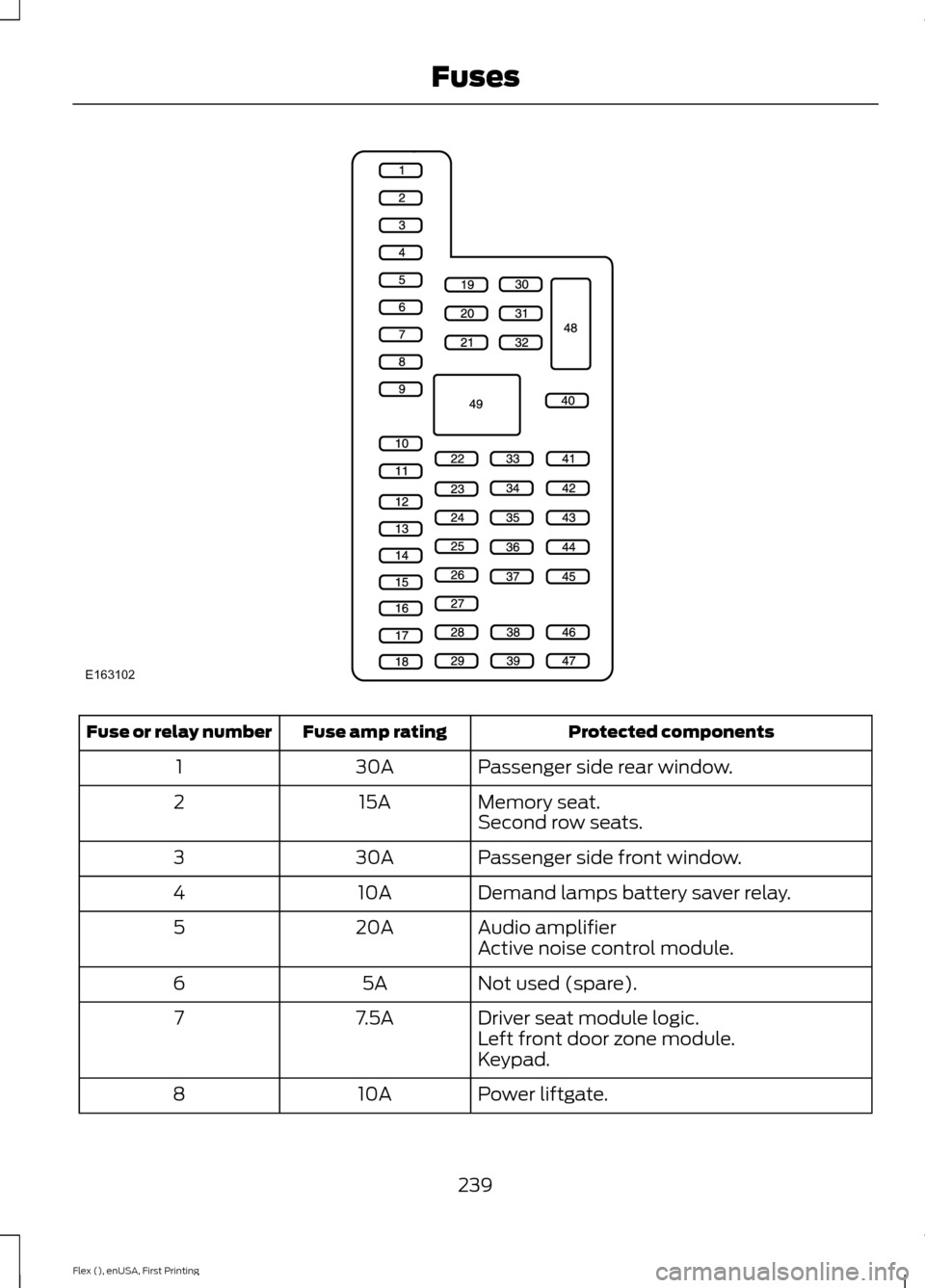
Protected components
Fuse amp rating
Fuse or relay number
Passenger side rear window.
30A
1
Memory seat.
15A
2
Second row seats.
Passenger side front window.
30A
3
Demand lamps battery saver relay.
10A
4
Audio amplifier
20A
5
Active noise control module.
Not used (spare).
5A
6
Driver seat module logic.
7.5A
7
Left front door zone module.
Keypad.
Power liftgate.
10A
8
239
Flex (), enUSA, First Printing FusesE163102
Page 400 of 496
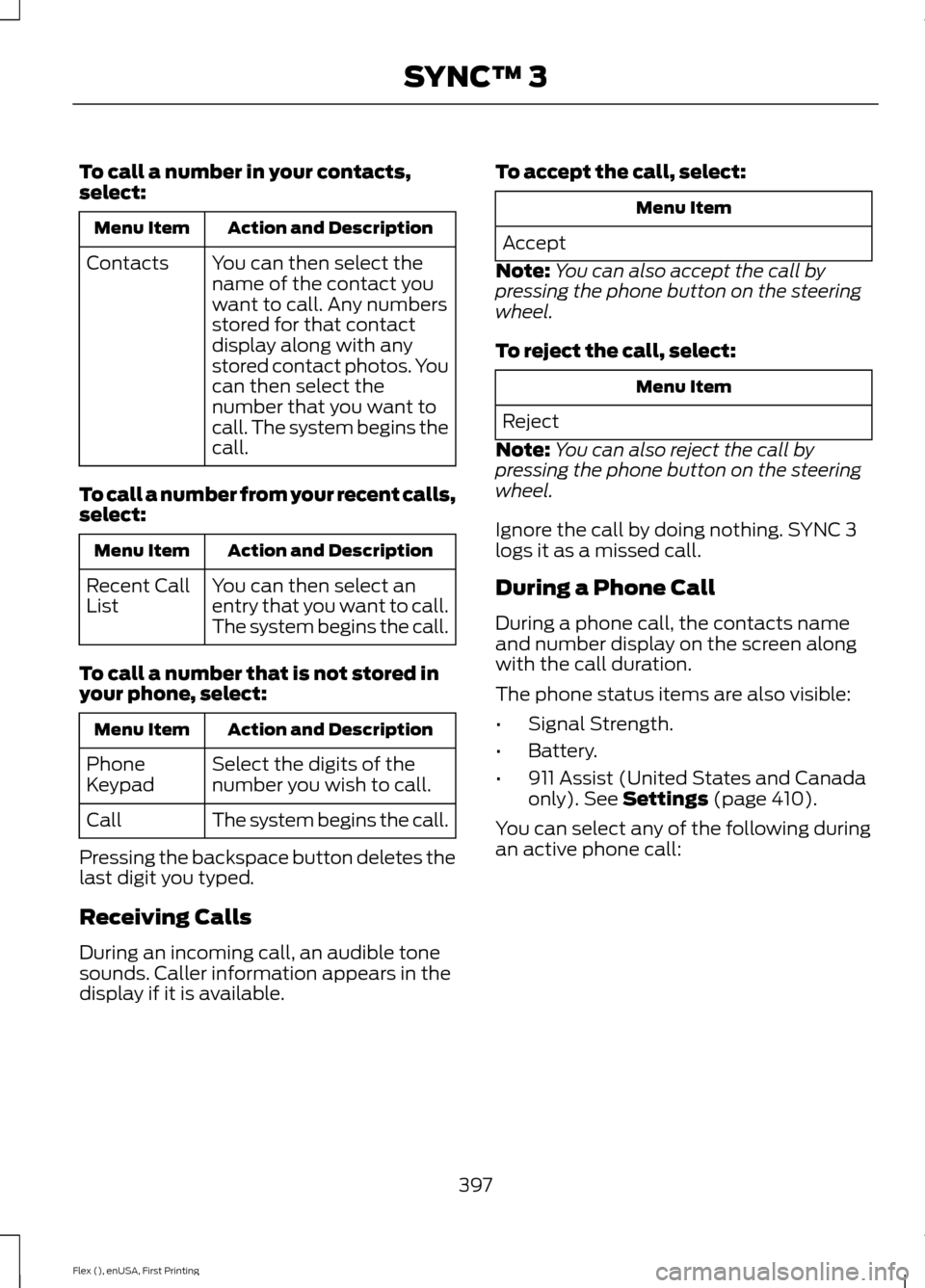
To call a number in your contacts,
select:
Action and Description
Menu Item
You can then select the
name of the contact you
want to call. Any numbers
stored for that contact
display along with any
stored contact photos. You
can then select the
number that you want to
call. The system begins the
call.
Contacts
To call a number from your recent calls,
select: Action and Description
Menu Item
You can then select an
entry that you want to call.
The system begins the call.
Recent Call
List
To call a number that is not stored in
your phone, select: Action and Description
Menu Item
Select the digits of the
number you wish to call.
Phone
Keypad
The system begins the call.
Call
Pressing the backspace button deletes the
last digit you typed.
Receiving Calls
During an incoming call, an audible tone
sounds. Caller information appears in the
display if it is available. To accept the call, select: Menu Item
Accept
Note: You can also accept the call by
pressing the phone button on the steering
wheel.
To reject the call, select: Menu Item
Reject
Note: You can also reject the call by
pressing the phone button on the steering
wheel.
Ignore the call by doing nothing. SYNC 3
logs it as a missed call.
During a Phone Call
During a phone call, the contacts name
and number display on the screen along
with the call duration.
The phone status items are also visible:
• Signal Strength.
• Battery.
• 911 Assist (United States and Canada
only). See Settings (page 410).
You can select any of the following during
an active phone call:
397
Flex (), enUSA, First Printing SYNC™ 3
Page 487 of 496
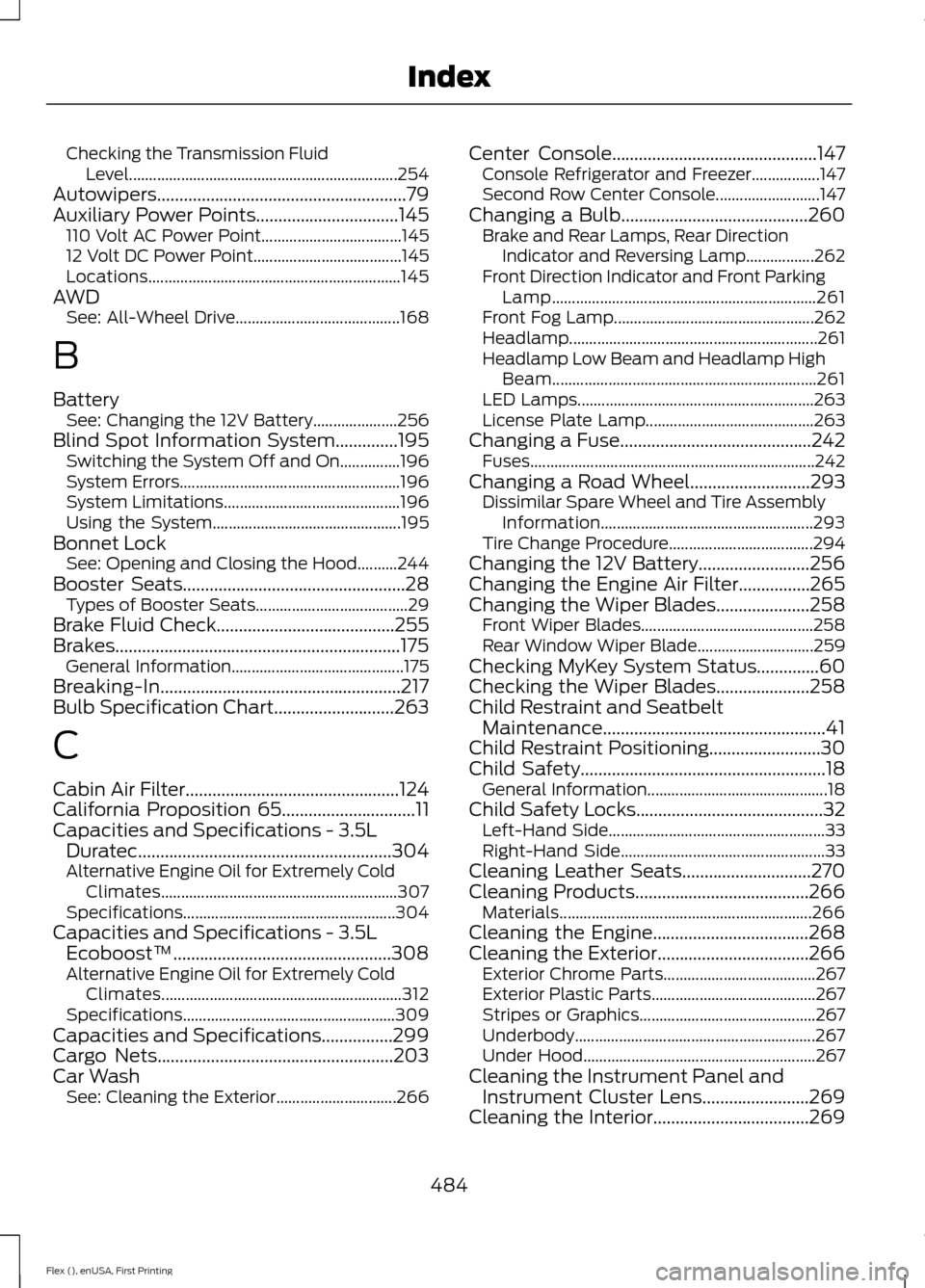
Checking the Transmission Fluid
Level................................................................... 254
Autowipers........................................................79
Auxiliary Power Points................................145 110 Volt AC Power Point................................... 145
12 Volt DC Power Point..................................... 145
Locations............................................................... 145
AWD See: All-Wheel Drive......................................... 168
B
Battery See: Changing the 12V Battery..................... 256
Blind Spot Information System..............195
Switching the System Off and On...............196
System Errors....................................................... 196
System Limitations............................................ 196
Using the System............................................... 195
Bonnet Lock See: Opening and Closing the Hood..........244
Booster Seats..................................................28 Types of Booster Seats...................................... 29
Brake Fluid Check........................................255
Brakes................................................................175 General Information........................................... 175
Breaking-In......................................................217
Bulb Specification Chart...........................263
C
Cabin Air Filter................................................124
California Proposition 65..............................11
Capacities and Specifications - 3.5L Duratec.........................................................304
Alternative Engine Oil for Extremely Cold Climates........................................................... 307
Specifications..................................................... 304
Capacities and Specifications - 3.5L Ecoboost™.................................................308
Alternative Engine Oil for Extremely Cold Climates............................................................ 312
Specifications..................................................... 309
Capacities and Specifications................299
Cargo Nets
.....................................................203
Car Wash See: Cleaning the Exterior.............................. 266Center Console
..............................................147
Console Refrigerator and Freezer.................147
Second Row Center Console.......................... 147
Changing a Bulb..........................................260 Brake and Rear Lamps, Rear Direction
Indicator and Reversing Lamp.................262
Front Direction Indicator and Front Parking Lamp.................................................................. 261
Front Fog Lamp.................................................. 262
Headlamp.............................................................. 261
Headlamp Low Beam and Headlamp High Beam.................................................................. 261
LED Lamps........................................................... 263
License Plate Lamp.......................................... 263
Changing a Fuse...........................................242 Fuses....................................................................... 242
Changing a Road Wheel
...........................293
Dissimilar Spare Wheel and Tire Assembly
Information..................................................... 293
Tire Change Procedure.................................... 294
Changing the 12V Battery.........................256
Changing the Engine Air Filter................265
Changing the Wiper Blades
.....................258
Front Wiper Blades........................................... 258
Rear Window Wiper Blade............................. 259
Checking MyKey System Status..............60
Checking the Wiper Blades
.....................258
Child Restraint and Seatbelt Maintenance..................................................41
Child Restraint Positioning
.........................30
Child Safety.......................................................18
General Information............................................. 18
Child Safety Locks..........................................32 Left-Hand Side...................................................... 33
Right-Hand Side................................................... 33
Cleaning Leather Seats
.............................270
Cleaning Products.......................................266 Materials............................................................... 266
Cleaning the Engine
...................................268
Cleaning the Exterior..................................266 Exterior Chrome Parts...................................... 267
Exterior Plastic Parts......................................... 267
Stripes or Graphics............................................ 267
Underbody............................................................ 267
Under Hood.......................................................... 267
Cleaning the Instrument Panel and Instrument Cluster Lens........................269
Cleaning the Interior
...................................269
484
Flex (), enUSA, First Printing Index
Page 490 of 496
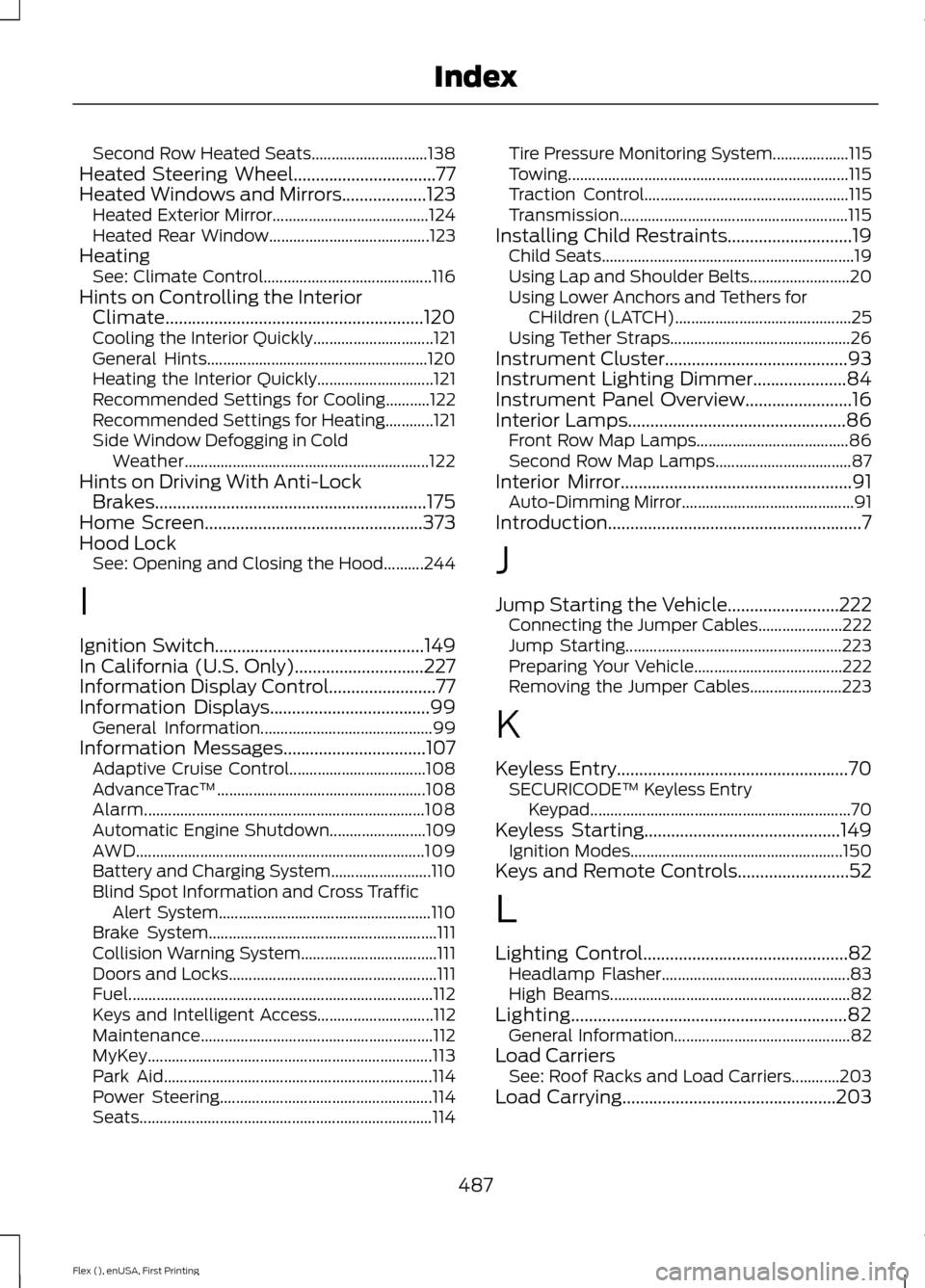
Second Row Heated Seats.............................
138
Heated Steering Wheel................................77
Heated Windows and Mirrors...................123
Heated Exterior Mirror....................................... 124
Heated Rear Window........................................ 123
Heating See: Climate Control.......................................... 116
Hints on Controlling the Interior Climate..........................................................120
Cooling the Interior Quickly.............................. 121
General Hints....................................................... 120
Heating the Interior Quickly............................. 121
Recommended Settings for Cooling...........122
Recommended Settings for Heating............121
Side Window Defogging in Cold Weather............................................................. 122
Hints on Driving With Anti-Lock Brakes.............................................................175
Home Screen.................................................373
Hood Lock See: Opening and Closing the Hood..........244
I
Ignition Switch
...............................................149
In California (U.S. Only).............................227
Information Display Control........................77
Information Displays....................................99 General Information........................................... 99
Information Messages................................107 Adaptive Cruise Control.................................. 108
AdvanceTrac ™.................................................... 108
Alarm...................................................................... 108
Automatic Engine Shutdown........................ 109
AWD........................................................................\
109
Battery and Charging System......................... 110
Blind Spot Information and Cross Traffic Alert System..................................................... 110
Brake System......................................................... 111
Collision Warning System.................................. 111
Doors and Locks.................................................... 111
Fuel........................................................................\
.... 112
Keys and Intelligent Access............................. 112
Maintenance.......................................................... 112
MyKey....................................................................... 113
Park Aid................................................................... 114
Power Steering..................................................... 114
Seats........................................................................\
. 114Tire Pressure Monitoring System...................
115
Towing...................................................................... 115
Traction Control................................................... 115
Transmission......................................................... 115
Installing Child Restraints............................19 Child Seats............................................................... 19
Using Lap and Shoulder Belts......................... 20
Using Lower Anchors and Tethers for CHildren (LATCH)............................................ 25
Using Tether Straps............................................. 26
Instrument Cluster
.........................................93
Instrument Lighting Dimmer.....................84
Instrument Panel Overview........................16
Interior Lamps.................................................86 Front Row Map Lamps...................................... 86
Second Row Map Lamps.................................. 87
Interior Mirror
....................................................91
Auto-Dimming Mirror........................................... 91
Introduction.........................................................7
J
Jump Starting the Vehicle
.........................222
Connecting the Jumper Cables..................... 222
Jump Starting...................................................... 223
Preparing Your Vehicle..................................... 222
Removing the Jumper Cables....................... 223
K
Keyless Entry
....................................................70
SECURICODE™ Keyless Entry
Keypad................................................................. 70
Keyless Starting
............................................149
Ignition Modes..................................................... 150
Keys and Remote Controls.........................52
L
Lighting Control..............................................82 Headlamp Flasher............................................... 83
High Beams............................................................ 82
Lighting
..............................................................82
General Information............................................ 82
Load Carriers See: Roof Racks and Load Carriers............203
Load Carrying
................................................203
487
Flex (), enUSA, First Printing Index
Page 491 of 496
Load Limit......................................................203
Special Loading Instructions for Owners of
Pick-up Trucks and Utility-type
Vehicles............................................................ 208
Vehicle Loading - with and without a Trailer................................................................. 203
Locking and Unlocking.................................63 Activating Intelligent Access........................... 64
Autolock.................................................................. 65
Autounlock ............................................................ 65
Battery Saver......................................................... 66
Enabling or Disabling Autolock and Autounlock........................................................ 65
Illuminated Entry.................................................. 66
Illuminated Exit..................................................... 66
Locking and Unlocking the Doors with the Key Blade............................................................ 63
Opening a Rear Door From the Inside..........64
Power Door Locks................................................ 63
Remote Control.................................................... 63
Smart Unlocks for Integrated Keyhead Transmitter........................................................ 64
Smart Unlocks for Intelligent Access Keys...................................................................... 64
Lug Nuts See: Changing a Road Wheel....................... 293
M
Maintenance.................................................244 General Information......................................... 244
Manual Climate Control..............................116
Manual Liftgate
..............................................66
Closing the Liftgate.............................................. 67
Opening the Liftgate........................................... 67
Manual Seats.................................................128 Lumbar Adjustment.......................................... 129
Moving the Seat Backward and Forward............................................................. 128
Recline Adjustment........................................... 128
Media Hub
......................................................320
Memory Function.........................................130 Easy Entry and Exit Feature............................. 131
Linking a PreSet Position to your Remote Control or Intelligent Access Key Fob
........................................................................\
....... 131
Saving a PreSet Position................................. 130Message Center
See: Information Displays................................. 99
Mirrors See: Heated Windows and Mirrors...............123
See: Windows and Mirrors............................... 88
Mobile Communications Equipment.......13
Moonroof............................................................91 Bounce-Back......................................................... 92
Opening and Closing the Moonroof..............92
Venting the Moonroof........................................ 92
Motorcraft Parts - 3.5L Duratec............300
Motorcraft Parts - 3.5L Ecoboost™..................................................301
MyKey Troubleshooting
................................61
MyKey ™.............................................................57
Principle of Operation......................................... 57
N
Navigation......................................................399 cityseeker............................................................. 406
Destination Mode............................................... 401
Map Mode............................................................ 399
Navigation Map Updates................................ 407
Navigation Menu............................................... 404
SiriusXM Traffic and Travel Link................... 407
Waypoints............................................................ 405
Normal Scheduled Maintenance..........442 Intelligent Oil-Life Monitor™........................ 442
Normal Maintenance Intervals..................... 443
O
Oil Change Indicator Reset
......................249
Oil Check See: Engine Oil Check...................................... 248
Opening and Closing the Hood..............244 Closing the Hood............................................... 245
Opening the Hood............................................. 244
Ordering Additional Owner's Literature
.....................................................230
Obtaining a French Owner ’s Manual...........231
Overhead Console
.......................................148
P
Parking Aids
...................................................180
Principle of Operation...................................... 180
488
Flex (), enUSA, First Printing Index
Page 492 of 496
Parking Brake..................................................176
Passive Anti-Theft System.........................73
SecuriLock®........................................................... 73
PATS See: Passive Anti-Theft System..................... 73
Pedals.................................................................78
Perchlorate.........................................................11
Personal Safety System ™..........................43
How Does the Personal Safety System
Work?.................................................................. 43
Phone...............................................................393 During a Phone Call.......................................... 397
Making Calls........................................................ 396
Pairing Your Cell Phone for the First Time................................................................... 393
Phone Menu........................................................ 394
Receiving Calls.................................................... 397
Smartphone Connectivity.............................. 398
Text Messaging.................................................. 398
Post-Crash Alert System..........................224
Power Door Locks See: Locking and Unlocking............................. 63
Power Liftgate.................................................67 Hands-Free Feature............................................ 70
Obstacle Detection............................................. 69
Opening and Closing the Liftgate.................. 68
Setting the Liftgate Open Height.................. 69
Stopping the Liftgate Movement.................. 69
Power Seats....................................................129 Power Lumbar..................................................... 130
Power Steering Fluid Check.....................256
Power Windows.............................................88 Accessory Delay................................................... 88
Bounce-Back......................................................... 88
One-Touch Down................................................ 88
One-Touch Up...................................................... 88
Window Lock......................................................... 88
Protecting the Environment........................15
R
Rear Parking Aid...........................................180
Rear Passenger Climate Controls...........123
Rear Seats
........................................................131
Adjusting the Rear Seats................................... 131
Rear View Camera
.......................................185
Using the Rear View Camera System.........185 Rear View Camera
See: Rear View Camera.................................... 185
Rear Window Wiper and Washers..........80 Rear Camera Washer........................................... 81
Rear Window Washer.......................................... 81
Rear Window Wiper............................................ 80
Recommended Towing Weights............210
Refueling..........................................................157 System Warnings................................................ 159
Remote Control..............................................53 Car Finder................................................................ 55
Integrated Keyhead Transmitter..................... 53
Intelligent Access Key......................................... 53
Memory Feature................................................... 56
Remote Start......................................................... 55
Replacing the Battery......................................... 54
Sounding the Panic Alarm................................ 55
Remote Start
..................................................124
Automatic Settings............................................ 124
Removing a Headlamp.............................260
Repairing Minor Paint Damage...............270
Replacement Parts Recommendation........................................12
Collision Repairs.................................................... 12
Scheduled Maintenance and Mechanical Repairs.................................................................. 12
Warranty on Replacement Parts..................... 12
Replacing a Lost Key or Remote Control............................................................56
Reporting Safety Defects (Canada Only)...............................................................231
Reporting Safety Defects (U.S. Only)...............................................................231
Roadside Assistance..................................220 Vehicles Sold in Canada: Getting Roadside
Assistance....................................................... 220
Vehicles Sold in Canada: Roadside Assistance Program Coverage.................. 221
Vehicles Sold in Canada: Using Roadside Assistance......................................................... 221
Vehicles Sold in the United States: Getting Roadside Assistance................................... 220
Vehicles Sold in the United States: Using Roadside Assistance................................... 220
Roadside Emergencies
..............................220
Roof Racks and Load Carriers................203
Running-In See: Breaking-In................................................... 217
489
Flex (), enUSA, First Printing Index