light FORD FLEX 2018 Owners Manual
[x] Cancel search | Manufacturer: FORD, Model Year: 2018, Model line: FLEX, Model: FORD FLEX 2018Pages: 508, PDF Size: 6.31 MB
Page 415 of 508
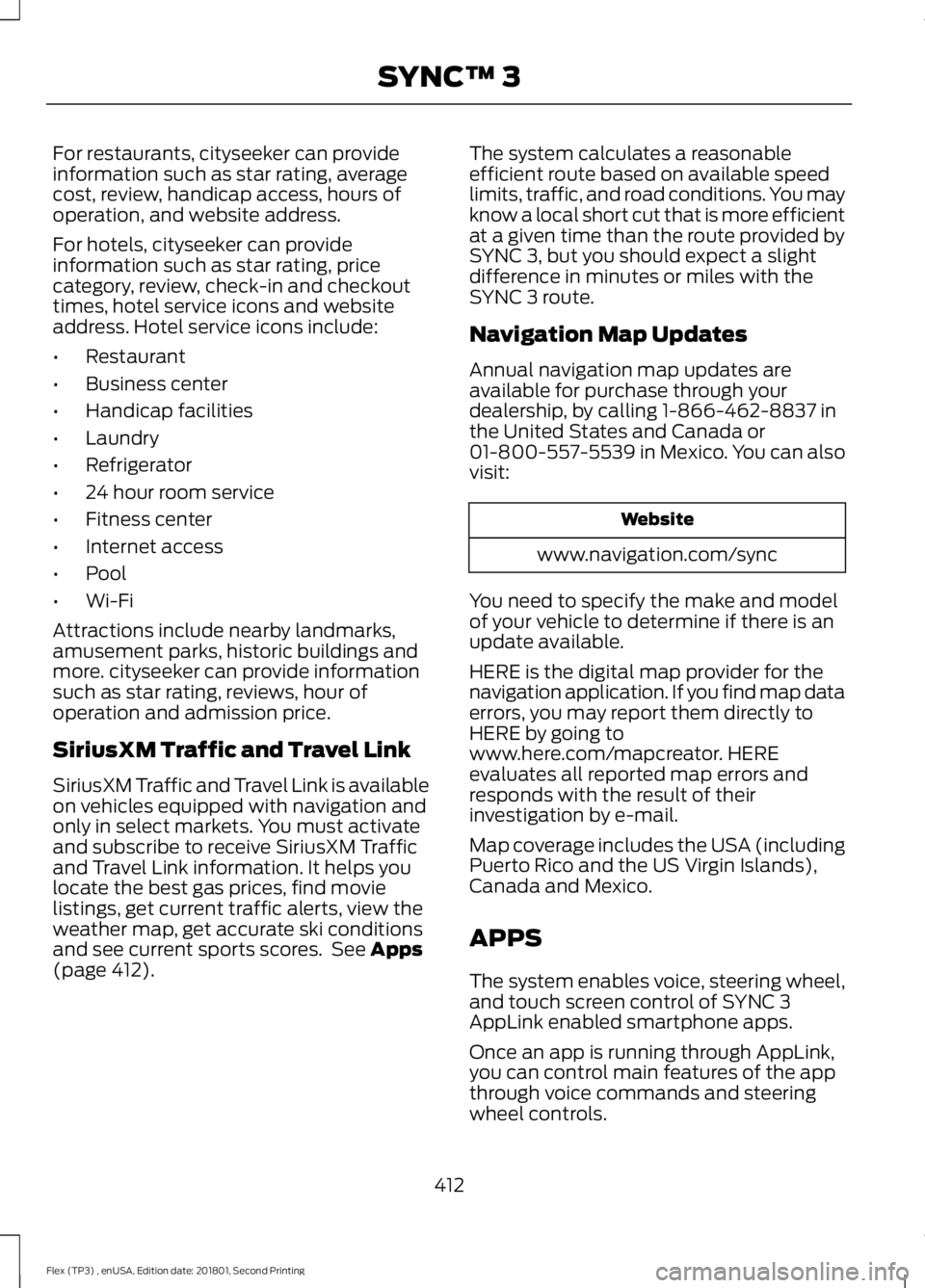
For restaurants, cityseeker can provide
information such as star rating, average
cost, review, handicap access, hours of
operation, and website address.
For hotels, cityseeker can provide
information such as star rating, price
category, review, check-in and checkout
times, hotel service icons and website
address. Hotel service icons include:
•
Restaurant
• Business center
• Handicap facilities
• Laundry
• Refrigerator
• 24 hour room service
• Fitness center
• Internet access
• Pool
• Wi-Fi
Attractions include nearby landmarks,
amusement parks, historic buildings and
more. cityseeker can provide information
such as star rating, reviews, hour of
operation and admission price.
SiriusXM Traffic and Travel Link
SiriusXM Traffic and Travel Link is available
on vehicles equipped with navigation and
only in select markets. You must activate
and subscribe to receive SiriusXM Traffic
and Travel Link information. It helps you
locate the best gas prices, find movie
listings, get current traffic alerts, view the
weather map, get accurate ski conditions
and see current sports scores. See Apps
(page 412). The system calculates a reasonable
efficient route based on available speed
limits, traffic, and road conditions. You may
know a local short cut that is more efficient
at a given time than the route provided by
SYNC 3, but you should expect a slight
difference in minutes or miles with the
SYNC 3 route.
Navigation Map Updates
Annual navigation map updates are
available for purchase through your
dealership, by calling 1-866-462-8837 in
the United States and Canada or
01-800-557-5539 in Mexico. You can also
visit:
Website
www.navigation.com/sync
You need to specify the make and model
of your vehicle to determine if there is an
update available.
HERE is the digital map provider for the
navigation application. If you find map data
errors, you may report them directly to
HERE by going to
www.here.com/mapcreator. HERE
evaluates all reported map errors and
responds with the result of their
investigation by e-mail.
Map coverage includes the USA (including
Puerto Rico and the US Virgin Islands),
Canada and Mexico.
APPS
The system enables voice, steering wheel,
and touch screen control of SYNC 3
AppLink enabled smartphone apps.
Once an app is running through AppLink,
you can control main features of the app
through voice commands and steering
wheel controls.
412
Flex (TP3) , enUSA, Edition date: 201801, Second Printing SYNC™ 3
Page 430 of 508
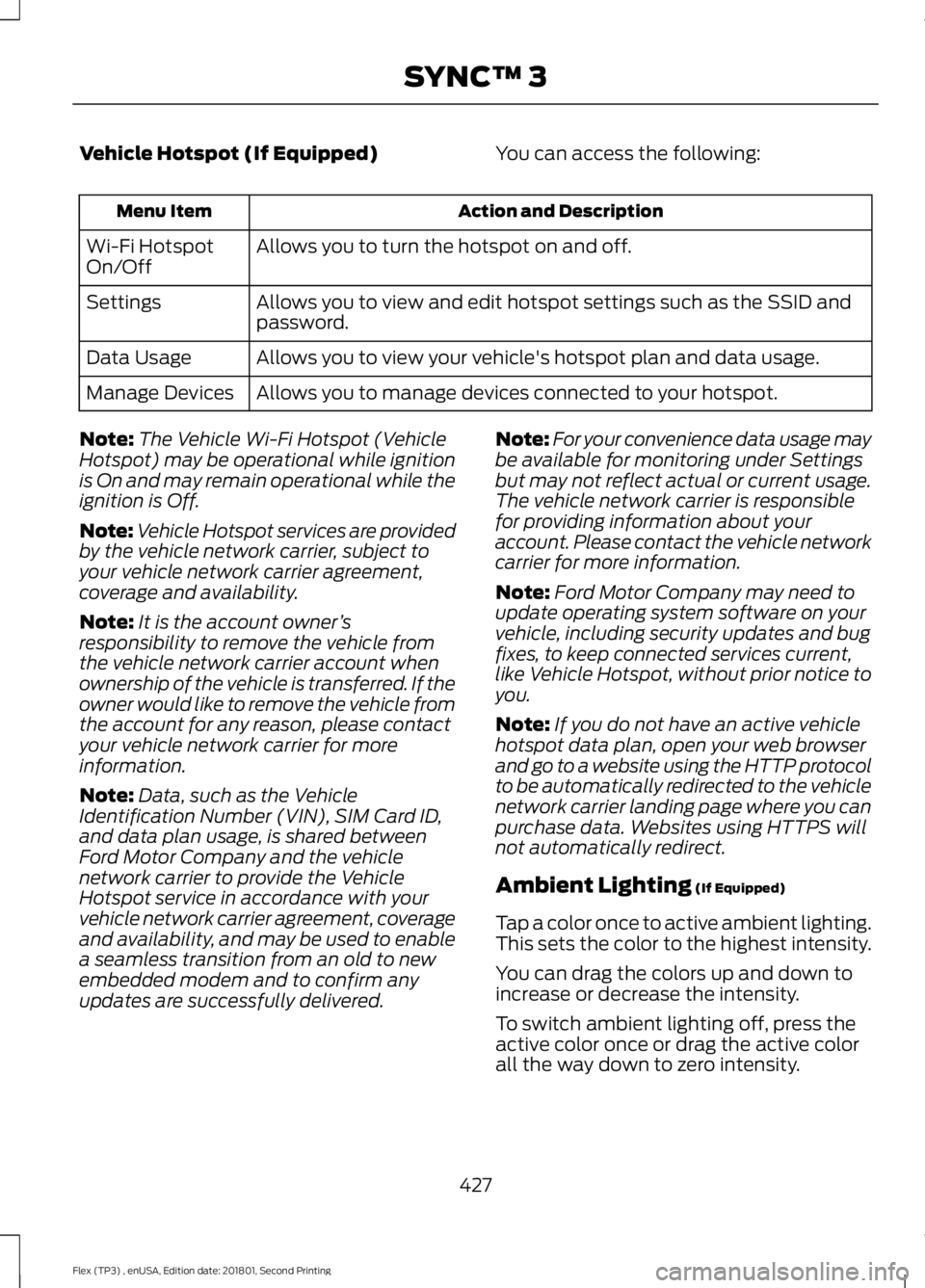
Vehicle Hotspot (If Equipped)
You can access the following: Action and Description
Menu Item
Allows you to turn the hotspot on and off.
Wi-Fi Hotspot
On/Off
Allows you to view and edit hotspot settings such as the SSID and
password.
Settings
Allows you to view your vehicle's hotspot plan and data usage.
Data Usage
Allows you to manage devices connected to your hotspot.
Manage Devices
Note: The Vehicle Wi-Fi Hotspot (Vehicle
Hotspot) may be operational while ignition
is On and may remain operational while the
ignition is Off.
Note: Vehicle Hotspot services are provided
by the vehicle network carrier, subject to
your vehicle network carrier agreement,
coverage and availability.
Note: It is the account owner ’s
responsibility to remove the vehicle from
the vehicle network carrier account when
ownership of the vehicle is transferred. If the
owner would like to remove the vehicle from
the account for any reason, please contact
your vehicle network carrier for more
information.
Note: Data, such as the Vehicle
Identification Number (VIN), SIM Card ID,
and data plan usage, is shared between
Ford Motor Company and the vehicle
network carrier to provide the Vehicle
Hotspot service in accordance with your
vehicle network carrier agreement, coverage
and availability, and may be used to enable
a seamless transition from an old to new
embedded modem and to confirm any
updates are successfully delivered. Note:
For your convenience data usage may
be available for monitoring under Settings
but may not reflect actual or current usage.
The vehicle network carrier is responsible
for providing information about your
account. Please contact the vehicle network
carrier for more information.
Note: Ford Motor Company may need to
update operating system software on your
vehicle, including security updates and bug
fixes, to keep connected services current,
like Vehicle Hotspot, without prior notice to
you.
Note: If you do not have an active vehicle
hotspot data plan, open your web browser
and go to a website using the HTTP protocol
to be automatically redirected to the vehicle
network carrier landing page where you can
purchase data. Websites using HTTPS will
not automatically redirect.
Ambient Lighting (If Equipped)
Tap a color once to active ambient lighting.
This sets the color to the highest intensity.
You can drag the colors up and down to
increase or decrease the intensity.
To switch ambient lighting off, press the
active color once or drag the active color
all the way down to zero intensity.
427
Flex (TP3) , enUSA, Edition date: 201801, Second Printing SYNC™ 3
Page 431 of 508

Vehicle
Note:
You vehicle may not have all of these
features.
You can select the following features to
update their settings. Door Keypad Code
Select this button to add or erase a
personal door keypad code. To add or
erase a personal code, you first need to
enter the five-digit factory set code. You
can find this code on the owner's wallet
card in the glove box or from your
authorized dealer.
Camera Settings
To make adjustments using the touchscreen, select: Action and Description
Message
Camera Settings
Then select from the following: You can enable or disable this option using the slider.
Rear Camera
Delay
You can find more information on the rear-view camera system in the parking aids chapter
of your owner manual.
Onboard Modem Serial Number (ESN)
Selecting this button on the settings menu
shows you the ESN number for your
system. You need this number for certain
registrations such as Satellite Radio.
Display
To make adjustments using the touchscreen, select: Action and Description
Menu Item
The screen goes black and does not display anything. Tap the screen
to switch it back on.
Display Off
Make the screen display brighter or dimmer.
Brightness
You can select:
Mode
The screen automatically switches between day and
night modes based on the outside light level.
Auto
428
Flex (TP3) , enUSA, Edition date: 201801, Second Printing SYNC™ 3
Page 432 of 508

Action and Description
Menu Item
The screen displays with a light background to enhance
daytime viewing.
Day
The screen displays with a darker background to make
nighttime viewing easier.
Night
Enable this option to automatically dim the display brightness based
on ambient lighting conditions.
Auto Dim
Voice Control
You can adjust the voice control settings
by selecting the following options. Menu Item
Enable this option to remove
additional voice prompts
and confirmations.
Advanced Mode
Enable this option to have
the system confirm a
contacts name with you
before making a call.
Phone Confirmation
Enable this option to have
the system display a list of
available voice commands
when the voice button is
pressed.
Voice Command List
Valet Mode
Valet mode allows you to lock the system.
No information is accessible until the
system is unlocked with the correct PIN.
When you select valet mode a pop up
appears informing you that a four digit
code must be entered to enable and
disable valet mode. You can use any PIN
you chose but you must use the same PIN
to disable valet mode. The system asks
you to input the code. Note:
If the system is locked and you
cannot remember the PIN, please contact
the Customer Relationship Center.
For Lincoln
United States: 1-800-521-4140
Canada: 1-800-387-9333
To enable valet mode, enter your chosen
PIN. The system then asks to confirm your
PIN by reentering it. The system then locks.
To unlock the system, enter the same pin
number. The system reconnects to your
phone and all of your options are available
again.
429
Flex (TP3) , enUSA, Edition date: 201801, Second Printing SYNC™ 3
Page 433 of 508
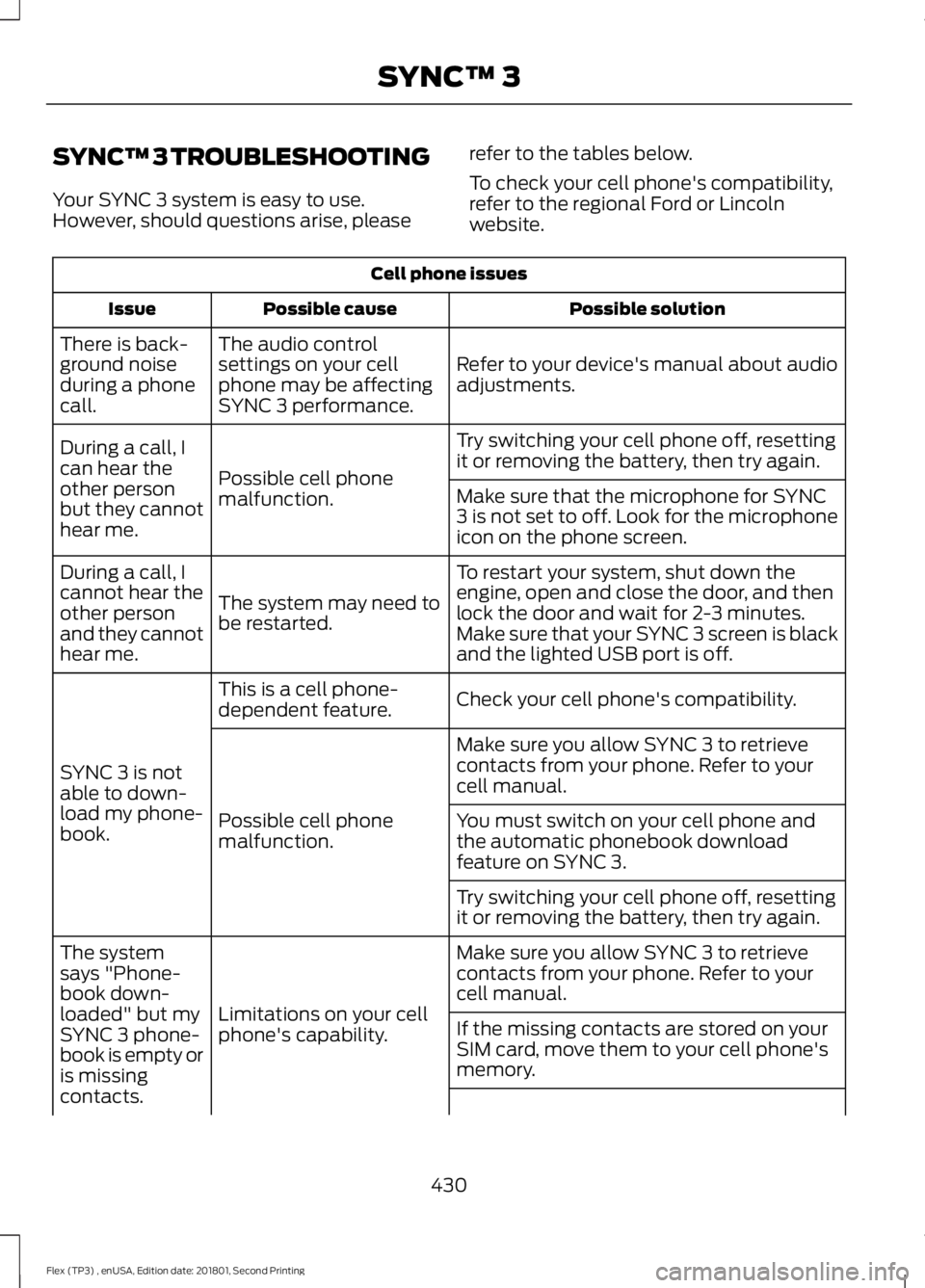
SYNC™ 3 TROUBLESHOOTING
Your SYNC 3 system is easy to use.
However, should questions arise, please
refer to the tables below.
To check your cell phone's compatibility,
refer to the regional Ford or Lincoln
website.Cell phone issues
Possible solution
Possible cause
Issue
Refer to your device's manual about audio
adjustments.
The audio control
settings on your cell
phone may be affecting
SYNC 3 performance.
There is back-
ground noise
during a phone
call.
Try switching your cell phone off, resetting
it or removing the battery, then try again.
Possible cell phone
malfunction.
During a call, I
can hear the
other person
but they cannot
hear me.
Make sure that the microphone for SYNC
3 is not set to off. Look for the microphone
icon on the phone screen.
To restart your system, shut down the
engine, open and close the door, and then
lock the door and wait for 2-3 minutes.
Make sure that your SYNC 3 screen is black
and the lighted USB port is off.
The system may need to
be restarted.
During a call, I
cannot hear the
other person
and they cannot
hear me.
Check your cell phone's compatibility.
This is a cell phone-
dependent feature.
SYNC 3 is not
able to down-
load my phone-
book. Make sure you allow SYNC 3 to retrieve
contacts from your phone. Refer to your
cell manual.
Possible cell phone
malfunction. You must switch on your cell phone and
the automatic phonebook download
feature on SYNC 3.
Try switching your cell phone off, resetting
it or removing the battery, then try again.
Make sure you allow SYNC 3 to retrieve
contacts from your phone. Refer to your
cell manual.
Limitations on your cell
phone's capability.
The system
says "Phone-
book down-
loaded" but my
SYNC 3 phone-
book is empty or
is missing
contacts.
If the missing contacts are stored on your
SIM card, move them to your cell phone's
memory.
430
Flex (TP3) , enUSA, Edition date: 201801, Second Printing SYNC™ 3
Page 446 of 508

For a complete listing of the accessories
that are available for your vehicle, please
contact your authorized dealer or visit the
online store web site:
Web Address (United States)
www.Accessories.Ford.com Web Address (Canada)
www.Accessories.Ford.ca
Ford Accessories are available for your
vehicle through an authorized Ford dealer.
Ford Motor Company will repair or replace
any properly authorized dealer-installed
Ford Original Accessory found to be
defective in factory-supplied materials or
workmanship during the warranty period,
as well as any component damaged by the
defective accessories.
Ford Motor Company will warrant your
Ford Original Accessory through the
warranty that provides the greatest
benefit:
• 24 months, unlimited mileage.
• The remainder of your new vehicle
limited warranty.
Contact an authorized dealer for details
and a copy of the warranty.
Exterior Style
• Hood deflectors.
• Side-window deflectors*.
• Splash guards.
• Spoiler.
Interior Style
• Ambient lighting.
• Door sill plates with logo.
• Floor mats. •
Illuminated door sill plate.
• Rear seat entertainment*.
Lifestyle
• Ash cup or coin holder.
• Camping tent*.
• Cargo area protector.
• Cargo net.
• Cargo organization and management.
• Conversation mirror.
• Roof racks and carriers*.
• Roof rails.
• Seat covers*.
• Trailer hitches, wiring harnesses and
accessories.
• Tablet cradle.
Peace of Mind
• Full vehicle covers*.
• Locking fuel plug.
• Remote start.
• Roadside assistance kits*.
• Vehicle security systems.
• Wheel locks.
*Ford Licensed Accessories. The accessory
manufacturer designs, develops and
therefore warrants Ford Licensed
Accessories, and does not design or test
these accessories to Ford Motor Company
engineering requirements. Contact an
authorized Ford dealer for the
manufacturer's limited warranty details
and request a copy of the Ford Licensed
Accessories product limited warranty from
the accessory manufacturer.
443
Flex (TP3) , enUSA, Edition date: 201801, Second Printing Accessories
Page 452 of 508
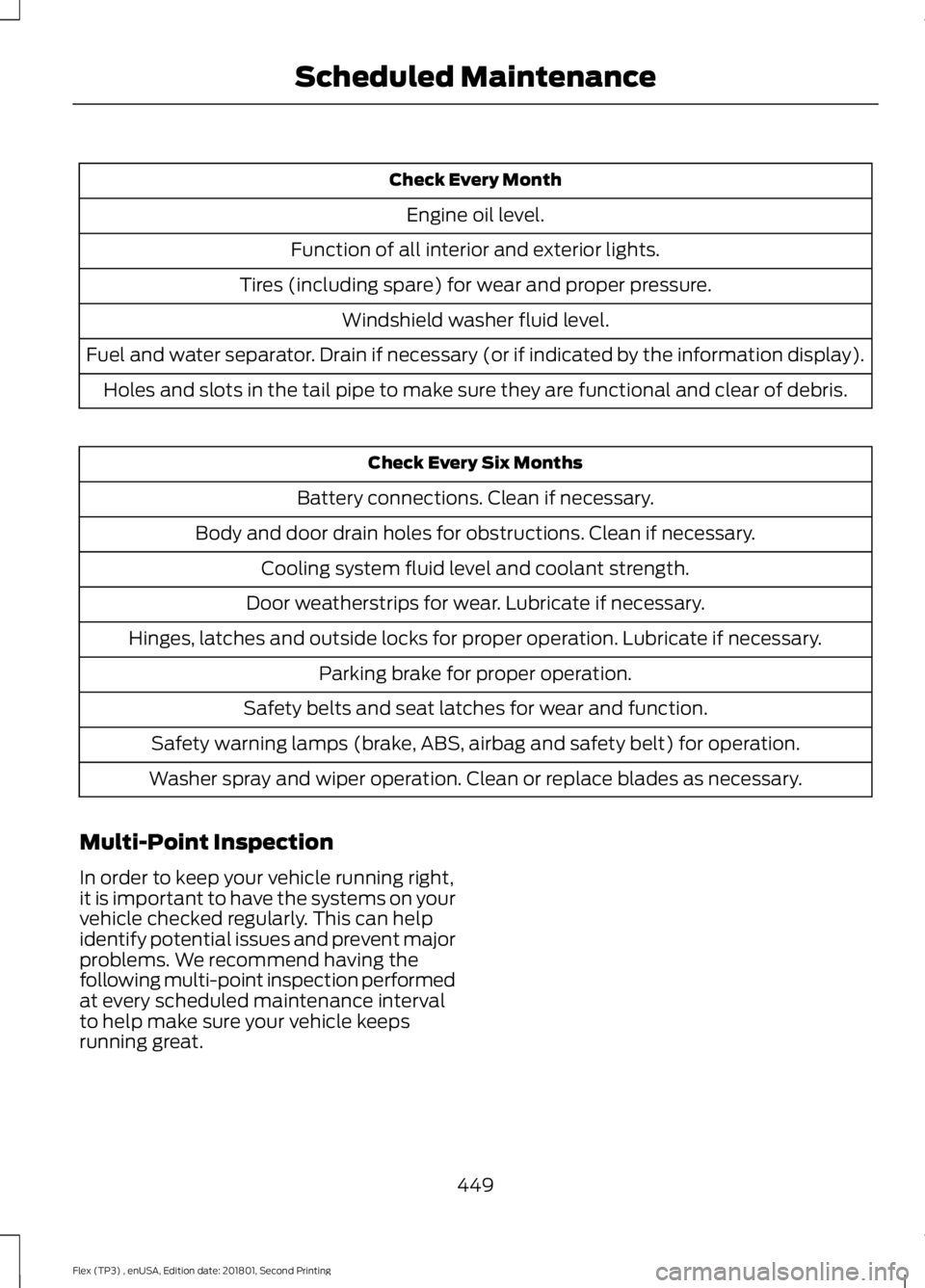
Check Every Month
Engine oil level.
Function of all interior and exterior lights.
Tires (including spare) for wear and proper pressure. Windshield washer fluid level.
Fuel and water separator. Drain if necessary (or if indicated by the information display). Holes and slots in the tail pipe to make sure they are functional and clear of debris. Check Every Six Months
Battery connections. Clean if necessary.
Body and door drain holes for obstructions. Clean if necessary. Cooling system fluid level and coolant strength.
Door weatherstrips for wear. Lubricate if necessary.
Hinges, latches and outside locks for proper operation. Lubricate if necessary. Parking brake for proper operation.
Safety belts and seat latches for wear and function.
Safety warning lamps (brake, ABS, airbag and safety belt) for operation.
Washer spray and wiper operation. Clean or replace blades as necessary.
Multi-Point Inspection
In order to keep your vehicle running right,
it is important to have the systems on your
vehicle checked regularly. This can help
identify potential issues and prevent major
problems. We recommend having the
following multi-point inspection performed
at every scheduled maintenance interval
to help make sure your vehicle keeps
running great.
449
Flex (TP3) , enUSA, Edition date: 201801, Second Printing Scheduled Maintenance
Page 495 of 508
By using SUNA Products and/or Services,
you will be deemed to have accepted and
agreed to be bound by the terms and
conditions fully detailed at:
Website
www.sunatraffic.com.au/termsandcon- ditions/
2. Intellectual Property
SUNA Products and/or Services are for
your personal use. You may not record, or
retransmit the content, nor use the content
in association with any other traffic
information or route guidance service or
device not approved by Intelematics. You
obtain no right of ownership in any
Intellectual Property Rights (including
copyright) in the data that is used to
provide SUNA Products and/or Services.
3. Appropriate Use
SUNA Products and/or Services are
intended as an aid to personal motoring
and travel planning, and do not provide
comprehensive or accurate information on
all occasions. On occasions, you may
experience additional delay as a result of
using SUNA Products and/or Services. You
acknowledge that it is not intended, or
suitable, for use in applications where time
of arrival or driving directions may impact
the safety of the public or yourself.
4. Use of SUNA Products and Services
while driving
You, and other authorised drivers of the
vehicle in which SUNA Products and/or
Services are available or installed and
active, remain at all times responsible for
observing all relevant laws and codes of
safe driving. In particular, you agree to only
actively operate SUNA Products and/or
Services when the Vehicle is at a complete
stop and it is safe to do so. 5. Service Continuity and Reception of
the SUNA Traffic Channel
We will use reasonable endeavours to
provide the SUNA Traffic Channel 24 hours
a day, 365 days a year. The SUNA Traffic
Channel may occasionally be unavailable
for technical reasons or for planned
maintenance. We will try to perform
maintenance at times when congestion is
light. We reserve the right to withdraw
SUNA Products and/or Services at any
time.
Also, we cannot assure the uninterrupted
reception of the SUNA Traffic Channel
RDS-TMC signal at any particular location.
6. Limitation of Liability
Neither Intelematics (nor its suppliers or
the manufacturer of your device (the
“Suppliers”)) shall be liable to you or to
any third party for any damages either
direct, indirect, incidental, consequential
or otherwise arising out of the use of or
inability to use SUNA Products and/or
Services even if Intelematics or a Supplier
has been advised of the possibility of such
damages. You also acknowledge that the
neither Intelematics nor any Supplier
guarantees nor make any warranties that
relate to the availability, accuracy or
completeness of SUNA Products and/or
Services, and to the extent which it is
lawful to do so, both Intelematics and each
Supplier excludes any warranties which
might otherwise be implied by any State
or Federal legislation in relation to SUNA
Products and/or Services.
7. Please Note
Great care has been taken in preparing this
manual. Constant product development
may mean that some information is not
entirely up-to-date. The information in this
document is subject to change without
notice.
492
Flex (TP3) , enUSA, Edition date: 201801, Second Printing Appendices
Page 498 of 508
A
A/C
See: Climate Control.......................................... 114
About This Manual...........................................7
ABS See: Brakes............................................................ 175
ABS driving hints See: Hints on Driving With Anti-Lock
Brakes................................................................. 176
Accessories....................................................443 Exterior Style....................................................... 443
Interior Style........................................................ 443
Lifestyle................................................................. 443
Peace of Mind..................................................... 443
Accessories See: Replacement Parts
Recommendation............................................ 12
ACC See: Using Adaptive Cruise Control............190
Active Park Assist..........................................181 Automatic Steering into Parking
Space................................................................. 183
Deactivating the Park Assist Feature..........184
Troubleshooting the System.......................... 184
Using Active Park Assist................................... 182
Adjusting the Headlamps........................260 Horizontal Aim Adjustment............................ 261
Vertical Aim......................................................... 260
Adjusting the Pedals.....................................79
Adjusting the Steering Wheel - Vehicles With: Manual Adjustable Steering
Column............................................................76
Adjusting the Steering Wheel - Vehicles With: Power Adjustable Steering
Column............................................................75
End of Travel Position......................................... 75
Airbag Disposal................................................51
Air Conditioning See: Climate Control.......................................... 114
Air Filter See: Changing the Engine Air Filter.............267
Alarm See: Anti-Theft Alarm......................................... 74
All-Wheel Drive.............................................168
Ambient Lighting
...........................................86
Anti-Theft Alarm............................................74
Arming the Alarm................................................. 74Disarming the Alarm...........................................
74
Appendices....................................................465
Apps...................................................................412 ........................................................................\
........... 412
SiriusXM Traffic and Travel Link.................... 414
At a Glance........................................................16
Audible Warnings and Indicators.............96 Headlamps On Warning Chime..................... 96
Key in Ignition Warning Chime........................ 96
Keyless Warning Alert........................................ 96
Parking Brake On Warning Chime.................96
Audio Control
...................................................76
MEDIA....................................................................... 76
Seek, Next or Previous......................................... 77
Audio System.................................................317 General Information........................................... 317
Audio Unit - Vehicles With: AM/FM/CD/ SYNC/Satellite Radio
..............................318
Menu Structure.................................................. 320
Audio Unit - Vehicles With: Premium AM/FM/CD..................................................323
Audio Unit - Vehicles With: Sony AM/ FM/CD...........................................................324
Autolamps
........................................................83
Windshield Wiper Activated
Headlamps........................................................ 83
Automatic Climate Control - Vehicles With: Premium AM/FM/CD....................115
Automatic Climate Control - Vehicles With: Sony Audio System........................116
Automatic Transmission
...........................164
Automatic Transmission Adaptive
Learning............................................................. 167
Brake-Shift Interlock......................................... 166
If Your Vehicle Gets Stuck In Mud or Snow................................................................... 167
SelectShift Automatic ™
Transmission................................................... 164
Understanding the Positions of Your Automatic Transmission............................ 164
Automatic Transmission Fluid Check
............................................................254
Adding Transmission Fluid ............................ 255
Checking the Transmission Fluid Level................................................................... 255
Autowipers.......................................................80
Auxiliary Power Points................................143 110 Volt AC Power Point................................... 143
495
Flex (TP3) , enUSA, Edition date: 201801, Second Printing Index
Page 500 of 508
Cleaning the Instrument Panel and
Instrument Cluster Lens..........................271
Cleaning the Interior.....................................271
Cleaning the Wheels
...................................273
Cleaning the Windows and Wiper Blades...........................................................270
Clearing All MyKeys
.......................................59
Climate............................................................396
Climate Control
..............................................114
Climate Controlled Seats...........................137 Cooled Seats......................................................... 137
Heated Seats........................................................ 137
Collision Warning System.........................201 PRINCIPLE OF OPERATION........................... 201
Coolant Check See: Engine Coolant Check........................... 250
Crash Sensors and Airbag Indicator
.......50
Creating a MyKey...........................................58
Programming/Changing Configurable
Settings............................................................... 58
Cross Traffic Alert.........................................198 False Alerts.......................................................... 200
Switching the System Off and On..............200
System Errors..................................................... 200
System Lights, Messages and Audible Alerts.................................................................. 199
System Limitations.......................................... 200
Using the System............................................... 198
Cruise Control
...................................................77
Principle of Operation...................................... 189
Cruise control See: Using Cruise Control................................ 189
Customer Assistance
..................................227
D
Data Recording
..................................................9
Event Data Recording.......................................... 10
Service Data Recording........................................ 9
Daytime Running Lamps............................84
Direction Indicators
.......................................85
Doors and Locks.............................................63
Driver and Passenger Airbags...................45 Children and Airbags.......................................... 46
Proper Driver and Front Passenger Seating Adjustment........................................................ 45
Driving Aids
.....................................................196
Driving Hints...................................................218 Driving Through Water
................................219
DRL See: Daytime Running Lamps......................... 84
E
Economical Driving
......................................218
Electromagnetic Compatibility..............465
Emission Law.................................................160 Noise Emissions Warranty, Prohibited
Tampering Acts and Maintenance...........161
Tampering With a Noise Control System.............................................................. 160
End User License Agreement..................467 VEHICLE SOFTWARE END USER LICENSE
AGREEMENT (EULA) ................................. 467
Engine Block Heater
.....................................151
Using the Engine Block Heater...................... 152
Engine Coolant Check...............................250 Adding Coolant.................................................... 251
Coolant Change.................................................. 253
Engine Coolant Temperature Management.................................................. 254
Fail-Safe Cooling............................................... 253
Recycled Coolant............................................... 252
Severe Climates.................................................. 252
Engine Emission Control...........................160
Engine Immobilizer See: Passive Anti-Theft System..................... 73
Engine Oil Check..........................................249 Adding Engine Oil.............................................. 249
Engine Oil Dipstick
......................................249
Engine Specifications - 3.5L Duratec
.........................................................302
Drivebelt Routing............................................... 302
Engine Specifications - 3.5L Ecoboost™.................................................302
Drivebelt Routing............................................... 303
Entertainment..............................................386 AM/FM Radio...................................................... 387
Apps....................................................................... 395
Bluetooth Stereo or USB................................ 394
CD (If equipped)................................................ 393
HD Radio ™ Information (If
Available)........................................................ 390
SiriusXM® Satellite Radio (If Activated)....................................................... 388
Sources.................................................................. 387
497
Flex (TP3) , enUSA, Edition date: 201801, Second Printing Index