remote start FORD FLEX 2018 User Guide
[x] Cancel search | Manufacturer: FORD, Model Year: 2018, Model line: FLEX, Model: FORD FLEX 2018Pages: 508, PDF Size: 6.31 MB
Page 103 of 508
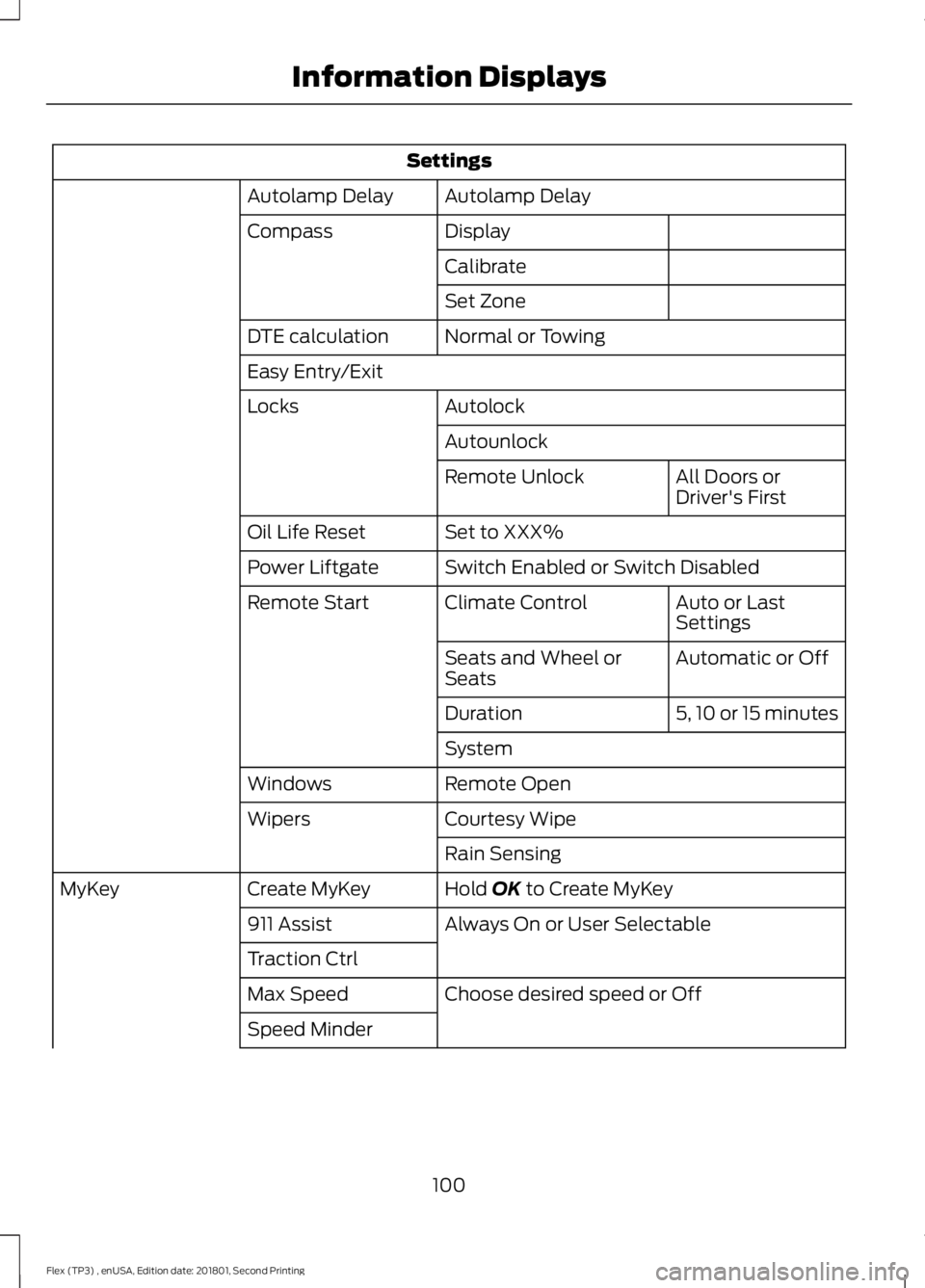
Settings
Autolamp Delay
Autolamp Delay
Display
Compass
Calibrate
Set Zone
Normal or Towing
DTE calculation
Easy Entry/Exit
Autolock
Locks
Autounlock All Doors or
Driver's First
Remote Unlock
Set to XXX%
Oil Life Reset
Switch Enabled or Switch Disabled
Power Liftgate
Auto or Last
Settings
Climate Control
Remote Start
Automatic or Off
Seats and Wheel or
Seats
5, 10 or 15 minutes
Duration
System
Remote Open
Windows
Courtesy Wipe
Wipers
Rain Sensing
Hold OK to Create MyKey
Create MyKey
MyKey
Always On or User Selectable
911 Assist
Traction Ctrl
Choose desired speed or Off
Max Speed
Speed Minder
100
Flex (TP3) , enUSA, Edition date: 201801, Second Printing Information Displays
Page 107 of 508
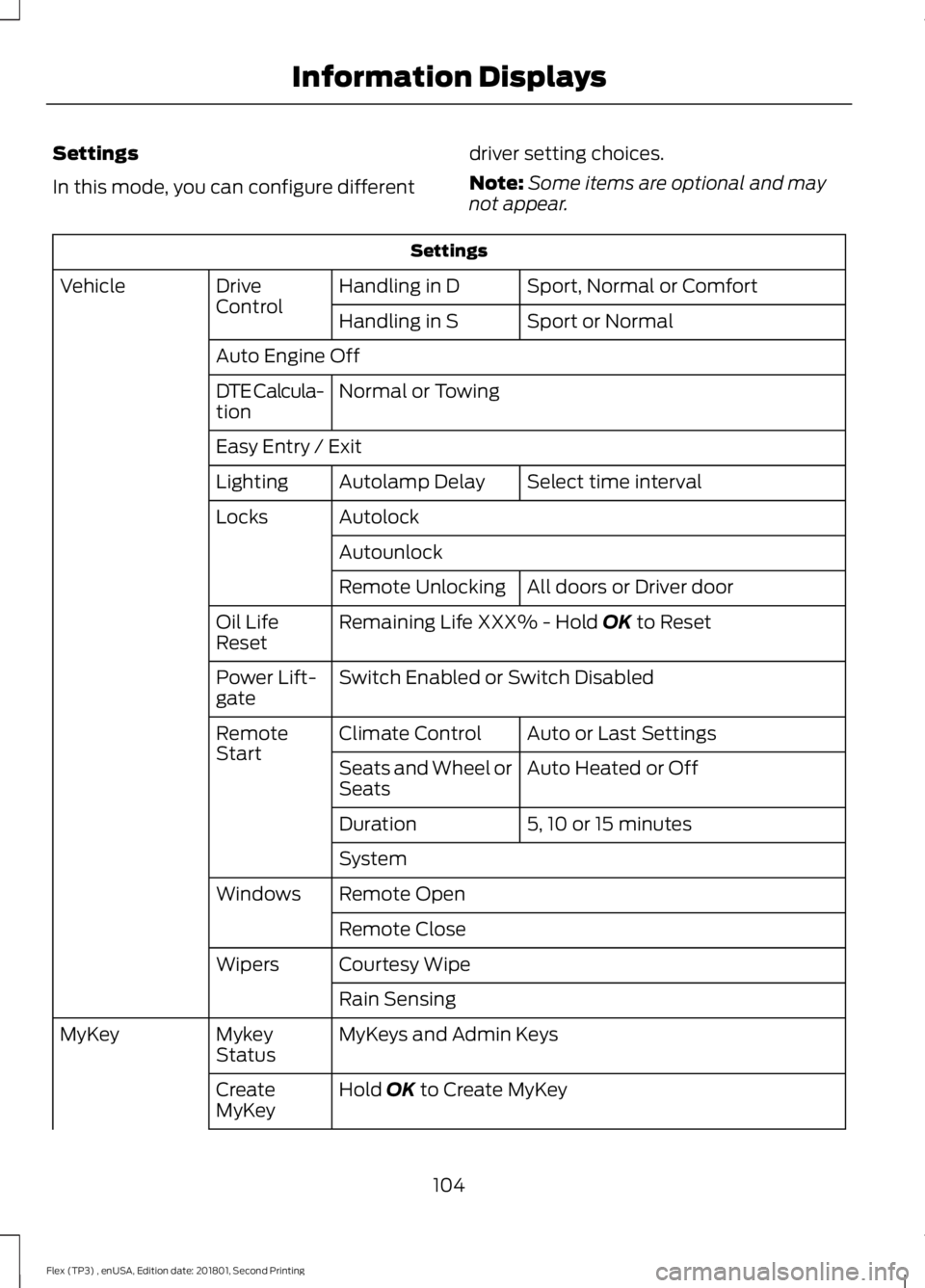
Settings
In this mode, you can configure different
driver setting choices.
Note:
Some items are optional and may
not appear. Settings
Sport, Normal or Comfort
Handling in D
Drive
Control
Vehicle
Sport or Normal
Handling in S
Auto Engine Off Normal or Towing
DTE Calcula-
tion
Easy Entry / Exit
Select time interval
Autolamp Delay
Lighting
Autolock
Locks
Autounlock All doors or Driver door
Remote Unlocking
Remaining Life XXX% - Hold OK to Reset
Oil Life
Reset
Switch Enabled or Switch Disabled
Power Lift-
gate
Auto or Last Settings
Climate Control
Remote
Start
Auto Heated or Off
Seats and Wheel or
Seats
5, 10 or 15 minutes
Duration
System
Remote Open
Windows
Remote Close
Courtesy Wipe
Wipers
Rain Sensing
MyKeys and Admin Keys
Mykey
Status
MyKey
Hold
OK to Create MyKey
Create
MyKey
104
Flex (TP3) , enUSA, Edition date: 201801, Second Printing Information Displays
Page 125 of 508
Note:
Do not remove ice from the mirrors
with a scraper or adjust the mirror glass
when it is frozen in place.
Note: Do not clean the mirror housing or
glass with harsh abrasives, fuel or other
petroleum-based cleaning products.
CABIN AIR FILTER
Your vehicle is equipped with a cabin air
filter, which gives you and your passengers
the following benefits:
• It improves your driving comfort by
reducing particle concentration.
• It improves the interior compartment
cleanliness.
• It protects the climate control
components from particle deposits.
You can locate the cabin air filter behind
the glove box.
Note: Make sure you have a cabin air filter
installed at all times. This prevents foreign
objects from entering the system. Running
the system without a filter in place could
result in degradation or damage to the
system.
Replace the filter at regular intervals. See
Scheduled Maintenance (page 447).
For additional cabin air filter information,
or to replace the filter, see an authorized
dealer.
REMOTE START
(If Equipped)
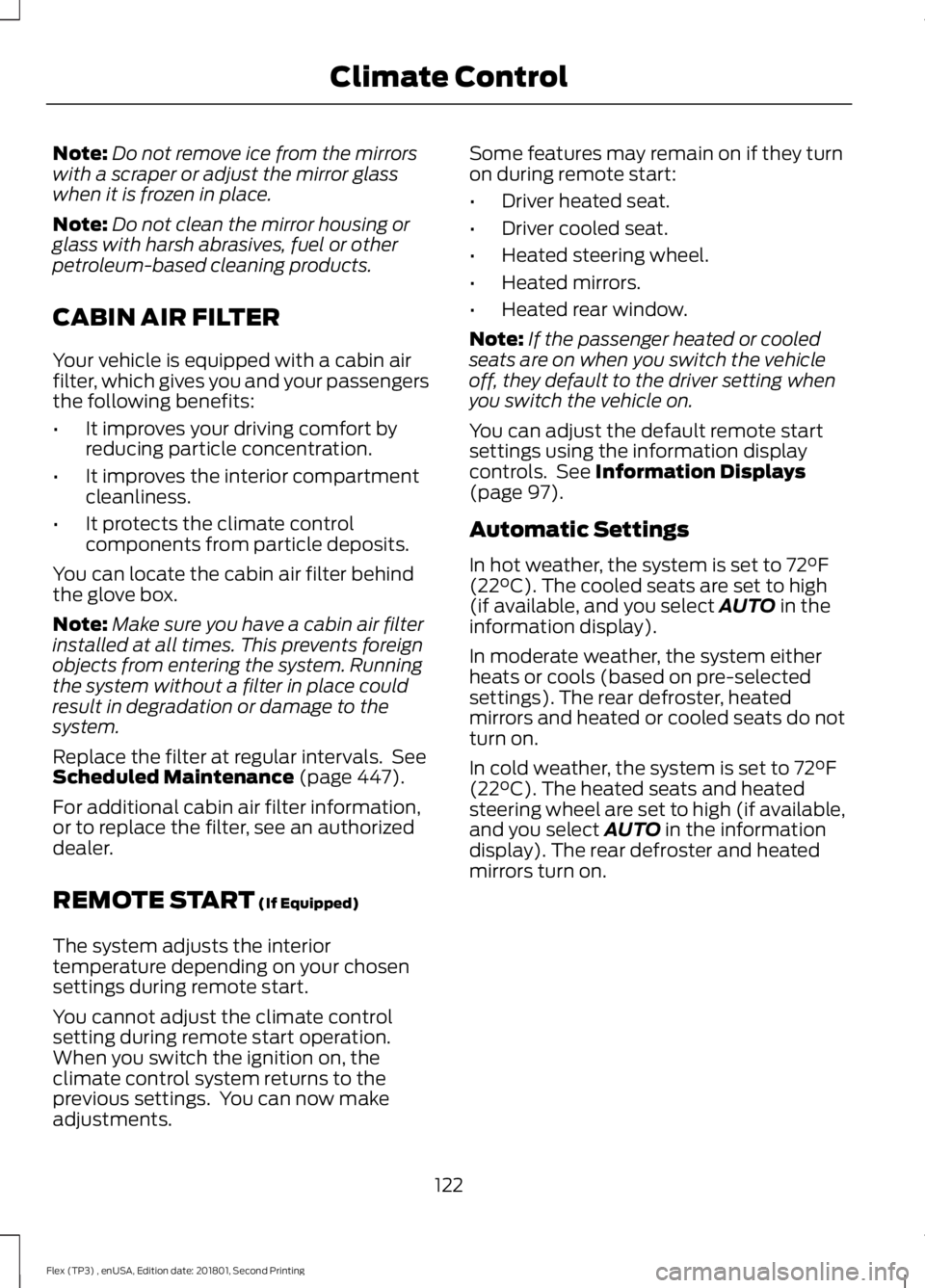
The system adjusts the interior
temperature depending on your chosen
settings during remote start.
You cannot adjust the climate control
setting during remote start operation.
When you switch the ignition on, the
climate control system returns to the
previous settings. You can now make
adjustments. Some features may remain on if they turn
on during remote start:
•
Driver heated seat.
• Driver cooled seat.
• Heated steering wheel.
• Heated mirrors.
• Heated rear window.
Note: If the passenger heated or cooled
seats are on when you switch the vehicle
off, they default to the driver setting when
you switch the vehicle on.
You can adjust the default remote start
settings using the information display
controls. See
Information Displays
(page 97).
Automatic Settings
In hot weather, the system is set to
72°F
(22°C). The cooled seats are set to high
(if available, and you select AUTO in the
information display).
In moderate weather, the system either
heats or cools (based on pre-selected
settings). The rear defroster, heated
mirrors and heated or cooled seats do not
turn on.
In cold weather, the system is set to
72°F
(22°C). The heated seats and heated
steering wheel are set to high (if available,
and you select
AUTO in the information
display). The rear defroster and heated
mirrors turn on.
122
Flex (TP3) , enUSA, Edition date: 201801, Second Printing Climate Control
Page 198 of 508
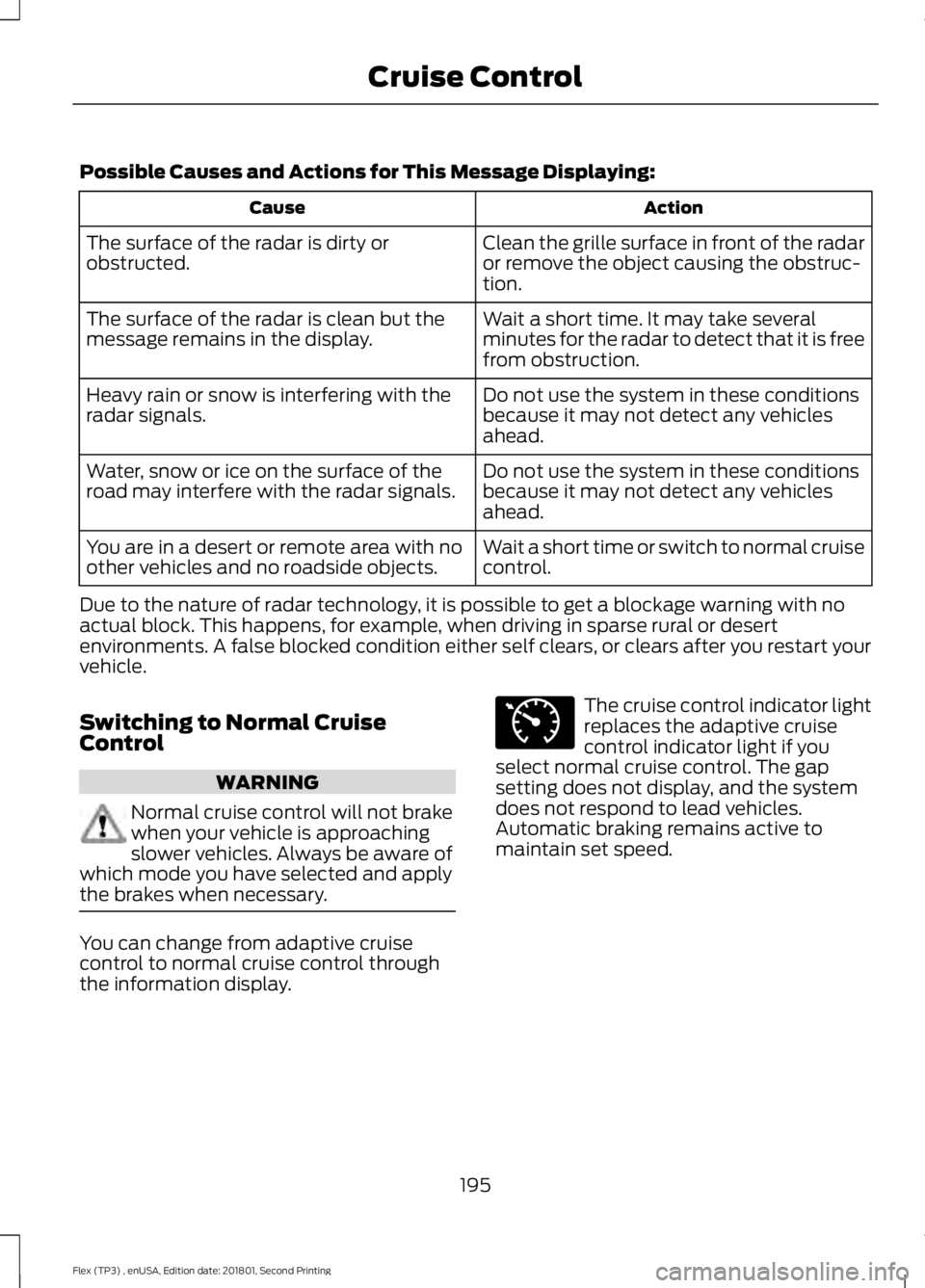
Possible Causes and Actions for This Message Displaying:
Action
Cause
Clean the grille surface in front of the radar
or remove the object causing the obstruc-
tion.
The surface of the radar is dirty or
obstructed.
Wait a short time. It may take several
minutes for the radar to detect that it is free
from obstruction.
The surface of the radar is clean but the
message remains in the display.
Do not use the system in these conditions
because it may not detect any vehicles
ahead.
Heavy rain or snow is interfering with the
radar signals.
Do not use the system in these conditions
because it may not detect any vehicles
ahead.
Water, snow or ice on the surface of the
road may interfere with the radar signals.
Wait a short time or switch to normal cruise
control.
You are in a desert or remote area with no
other vehicles and no roadside objects.
Due to the nature of radar technology, it is possible to get a blockage warning with no
actual block. This happens, for example, when driving in sparse rural or desert
environments. A false blocked condition either self clears, or clears after you restart your
vehicle.
Switching to Normal Cruise
Control WARNING
Normal cruise control will not brake
when your vehicle is approaching
slower vehicles. Always be aware of
which mode you have selected and apply
the brakes when necessary. You can change from adaptive cruise
control to normal cruise control through
the information display. The cruise control indicator light
replaces the adaptive cruise
control indicator light if you
select normal cruise control. The gap
setting does not display, and the system
does not respond to lead vehicles.
Automatic braking remains active to
maintain set speed.
195
Flex (TP3) , enUSA, Edition date: 201801, Second Printing Cruise ControlE71340
Page 444 of 508
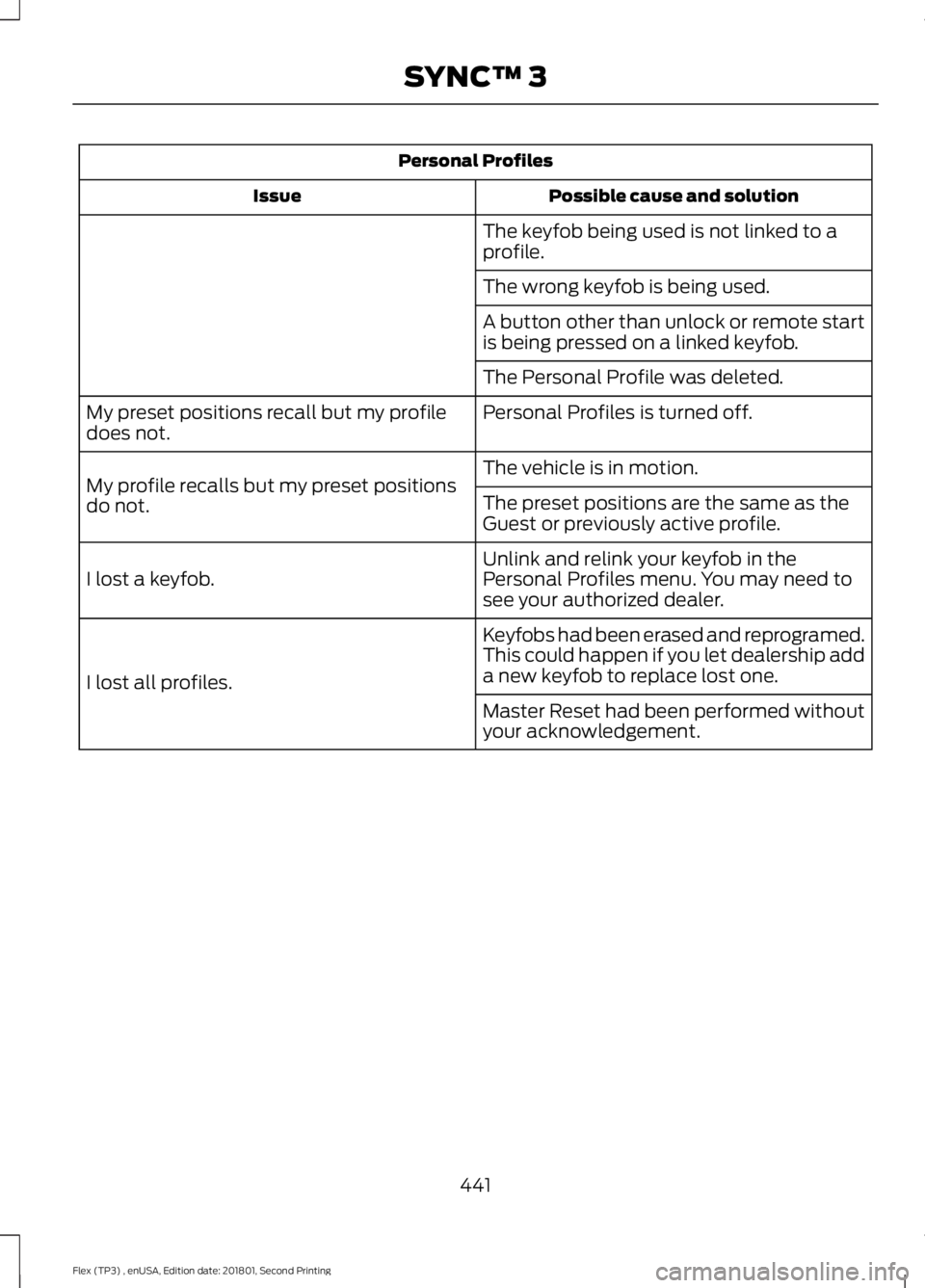
Personal Profiles
Possible cause and solution
Issue
The keyfob being used is not linked to a
profile.
The wrong keyfob is being used.
A button other than unlock or remote start
is being pressed on a linked keyfob.
The Personal Profile was deleted.
Personal Profiles is turned off.
My preset positions recall but my profile
does not.
The vehicle is in motion.
My profile recalls but my preset positions
do not. The preset positions are the same as the
Guest or previously active profile.
Unlink and relink your keyfob in the
Personal Profiles menu. You may need to
see your authorized dealer.
I lost a keyfob.
Keyfobs had been erased and reprogramed.
This could happen if you let dealership add
a new keyfob to replace lost one.
I lost all profiles.
Master Reset had been performed without
your acknowledgement.
441
Flex (TP3) , enUSA, Edition date: 201801, Second Printing SYNC™ 3
Page 446 of 508

For a complete listing of the accessories
that are available for your vehicle, please
contact your authorized dealer or visit the
online store web site:
Web Address (United States)
www.Accessories.Ford.com Web Address (Canada)
www.Accessories.Ford.ca
Ford Accessories are available for your
vehicle through an authorized Ford dealer.
Ford Motor Company will repair or replace
any properly authorized dealer-installed
Ford Original Accessory found to be
defective in factory-supplied materials or
workmanship during the warranty period,
as well as any component damaged by the
defective accessories.
Ford Motor Company will warrant your
Ford Original Accessory through the
warranty that provides the greatest
benefit:
• 24 months, unlimited mileage.
• The remainder of your new vehicle
limited warranty.
Contact an authorized dealer for details
and a copy of the warranty.
Exterior Style
• Hood deflectors.
• Side-window deflectors*.
• Splash guards.
• Spoiler.
Interior Style
• Ambient lighting.
• Door sill plates with logo.
• Floor mats. •
Illuminated door sill plate.
• Rear seat entertainment*.
Lifestyle
• Ash cup or coin holder.
• Camping tent*.
• Cargo area protector.
• Cargo net.
• Cargo organization and management.
• Conversation mirror.
• Roof racks and carriers*.
• Roof rails.
• Seat covers*.
• Trailer hitches, wiring harnesses and
accessories.
• Tablet cradle.
Peace of Mind
• Full vehicle covers*.
• Locking fuel plug.
• Remote start.
• Roadside assistance kits*.
• Vehicle security systems.
• Wheel locks.
*Ford Licensed Accessories. The accessory
manufacturer designs, develops and
therefore warrants Ford Licensed
Accessories, and does not design or test
these accessories to Ford Motor Company
engineering requirements. Contact an
authorized Ford dealer for the
manufacturer's limited warranty details
and request a copy of the Ford Licensed
Accessories product limited warranty from
the accessory manufacturer.
443
Flex (TP3) , enUSA, Edition date: 201801, Second Printing Accessories
Page 502 of 508
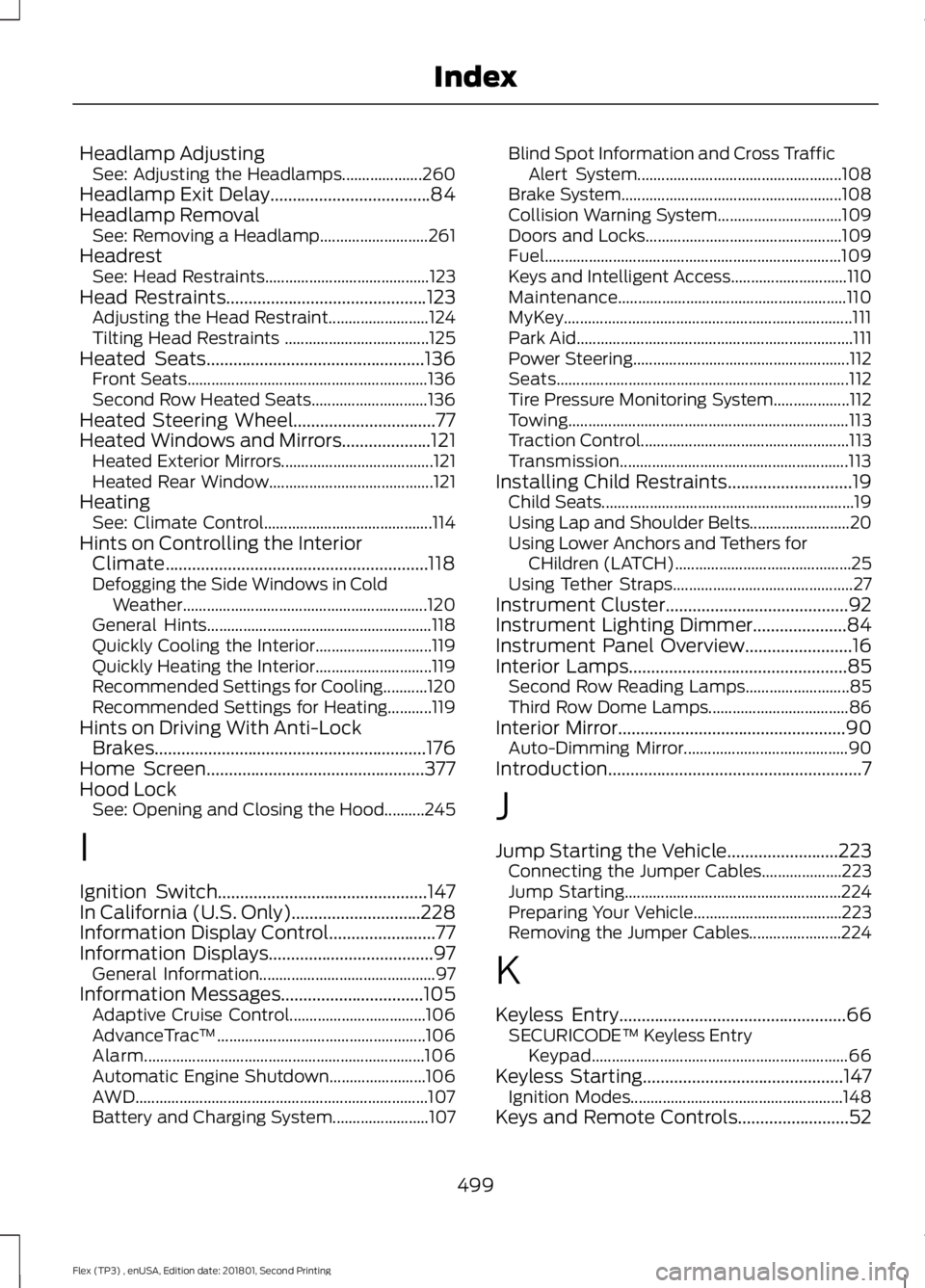
Headlamp Adjusting
See: Adjusting the Headlamps.................... 260
Headlamp Exit Delay....................................84
Headlamp Removal See: Removing a Headlamp........................... 261
Headrest See: Head Restraints......................................... 123
Head Restraints.............................................123
Adjusting the Head Restraint......................... 124
Tilting Head Restraints .................................... 125
Heated Seats.................................................136 Front Seats............................................................ 136
Second Row Heated Seats............................. 136
Heated Steering Wheel
................................77
Heated Windows and Mirrors....................121
Heated Exterior Mirrors...................................... 121
Heated Rear Window......................................... 121
Heating See: Climate Control.......................................... 114
Hints on Controlling the Interior Climate...........................................................118
Defogging the Side Windows in Cold Weather............................................................. 120
General Hints........................................................ 118
Quickly Cooling the Interior............................. 119
Quickly Heating the Interior............................. 119
Recommended Settings for Cooling...........120
Recommended Settings for Heating...........119
Hints on Driving With Anti-Lock Brakes.............................................................176
Home Screen
.................................................377
Hood Lock See: Opening and Closing the Hood..........245
I
Ignition Switch...............................................147
In California (U.S. Only).............................228
Information Display Control........................77
Information Displays.....................................97 General Information............................................ 97
Information Messages
................................105
Adaptive Cruise Control.................................. 106
AdvanceTrac ™.................................................... 106
Alarm...................................................................... 106
Automatic Engine Shutdown........................ 106
AWD........................................................................\
. 107
Battery and Charging System........................ 107Blind Spot Information and Cross Traffic
Alert System................................................... 108
Brake System....................................................... 108
Collision Warning System............................... 109
Doors and Locks................................................. 109
Fuel........................................................................\
.. 109
Keys and Intelligent Access............................. 110
Maintenance......................................................... 110
MyKey........................................................................\
111
Park Aid..................................................................... 111
Power Steering...................................................... 112
Seats........................................................................\
. 112
Tire Pressure Monitoring System................... 112
Towing...................................................................... 113
Traction Control.................................................... 113
Transmission......................................................... 113
Installing Child Restraints............................19 Child Seats............................................................... 19
Using Lap and Shoulder Belts......................... 20
Using Lower Anchors and Tethers for CHildren (LATCH)............................................ 25
Using Tether Straps............................................. 27
Instrument Cluster
.........................................92
Instrument Lighting Dimmer.....................84
Instrument Panel Overview........................16
Interior Lamps
.................................................85
Second Row Reading Lamps.......................... 85
Third Row Dome Lamps................................... 86
Interior Mirror...................................................90 Auto-Dimming Mirror......................................... 90
Introduction.........................................................7
J
Jump Starting the Vehicle.........................223 Connecting the Jumper Cables.................... 223
Jump Starting...................................................... 224
Preparing Your Vehicle..................................... 223
Removing the Jumper Cables....................... 224
K
Keyless Entry...................................................66 SECURICODE™ Keyless Entry
Keypad................................................................ 66
Keyless Starting
.............................................147
Ignition Modes..................................................... 148
Keys and Remote Controls.........................52
499
Flex (TP3) , enUSA, Edition date: 201801, Second Printing Index
Page 504 of 508
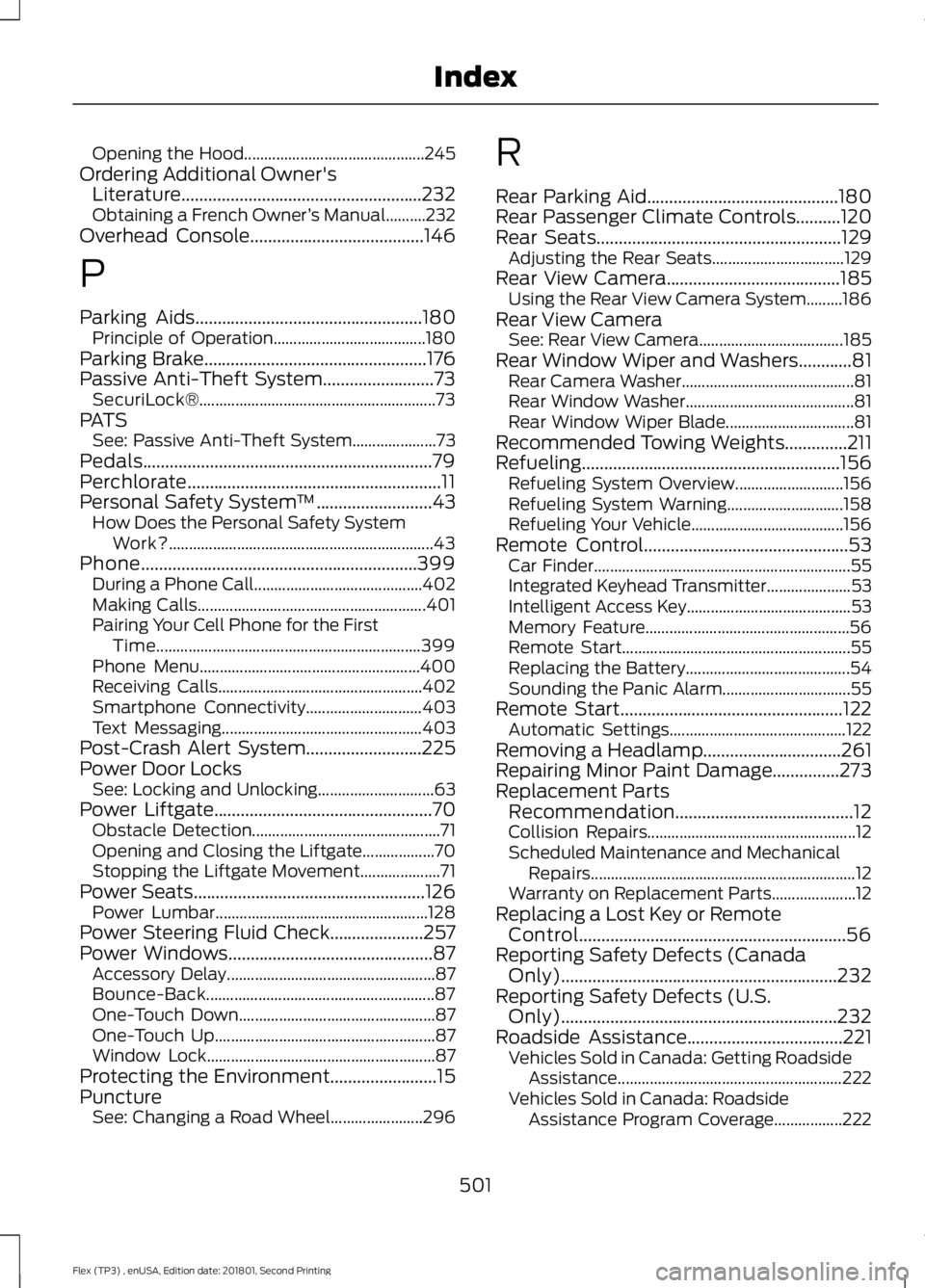
Opening the Hood.............................................
245
Ordering Additional Owner's Literature......................................................232
Obtaining a French Owner ’s Manual..........232
Overhead Console.......................................146
P
Parking Aids...................................................180
Principle of Operation...................................... 180
Parking Brake..................................................176
Passive Anti-Theft System.........................73 SecuriLock®........................................................... 73
PATS See: Passive Anti-Theft System..................... 73
Pedals.................................................................79
Perchlorate.........................................................11
Personal Safety System ™
..........................43
How Does the Personal Safety System
Work?.................................................................. 43
Phone
..............................................................399
During a Phone Call.......................................... 402
Making Calls......................................................... 401
Pairing Your Cell Phone for the First Time.................................................................. 399
Phone Menu....................................................... 400
Receiving Calls................................................... 402
Smartphone Connectivity............................. 403
Text Messaging.................................................. 403
Post-Crash Alert System..........................225
Power Door Locks See: Locking and Unlocking............................. 63
Power Liftgate.................................................70 Obstacle Detection............................................... 71
Opening and Closing the Liftgate.................. 70
Stopping the Liftgate Movement.................... 71
Power Seats....................................................126 Power Lumbar..................................................... 128
Power Steering Fluid Check.....................257
Power Windows
..............................................87
Accessory Delay.................................................... 87
Bounce-Back......................................................... 87
One-Touch Down................................................. 87
One-Touch Up....................................................... 87
Window Lock......................................................... 87
Protecting the Environment........................15
Puncture See: Changing a Road Wheel....................... 296R
Rear Parking Aid...........................................180
Rear Passenger Climate Controls..........120
Rear Seats
.......................................................129
Adjusting the Rear Seats................................. 129
Rear View Camera
.......................................185
Using the Rear View Camera System.........186
Rear View Camera See: Rear View Camera.................................... 185
Rear Window Wiper and Washers............81 Rear Camera Washer........................................... 81
Rear Window Washer.......................................... 81
Rear Window Wiper Blade................................ 81
Recommended Towing Weights
..............211
Refueling..........................................................156 Refueling System Overview........................... 156
Refueling System Warning............................. 158
Refueling Your Vehicle...................................... 156
Remote Control..............................................53 Car Finder................................................................ 55
Integrated Keyhead Transmitter..................... 53
Intelligent Access Key......................................... 53
Memory Feature................................................... 56
Remote Start......................................................... 55
Replacing the Battery......................................... 54
Sounding the Panic Alarm................................ 55
Remote Start
..................................................122
Automatic Settings............................................ 122
Removing a Headlamp...............................261
Repairing Minor Paint Damage...............273
Replacement Parts Recommendation........................................12
Collision Repairs.................................................... 12
Scheduled Maintenance and Mechanical Repairs.................................................................. 12
Warranty on Replacement Parts..................... 12
Replacing a Lost Key or Remote Control............................................................56
Reporting Safety Defects (Canada Only)
..............................................................232
Reporting Safety Defects (U.S. Only)
..............................................................232
Roadside Assistance...................................221
Vehicles Sold in Canada: Getting Roadside
Assistance........................................................ 222
Vehicles Sold in Canada: Roadside Assistance Program Coverage.................222
501
Flex (TP3) , enUSA, Edition date: 201801, Second Printing Index
Page 506 of 508
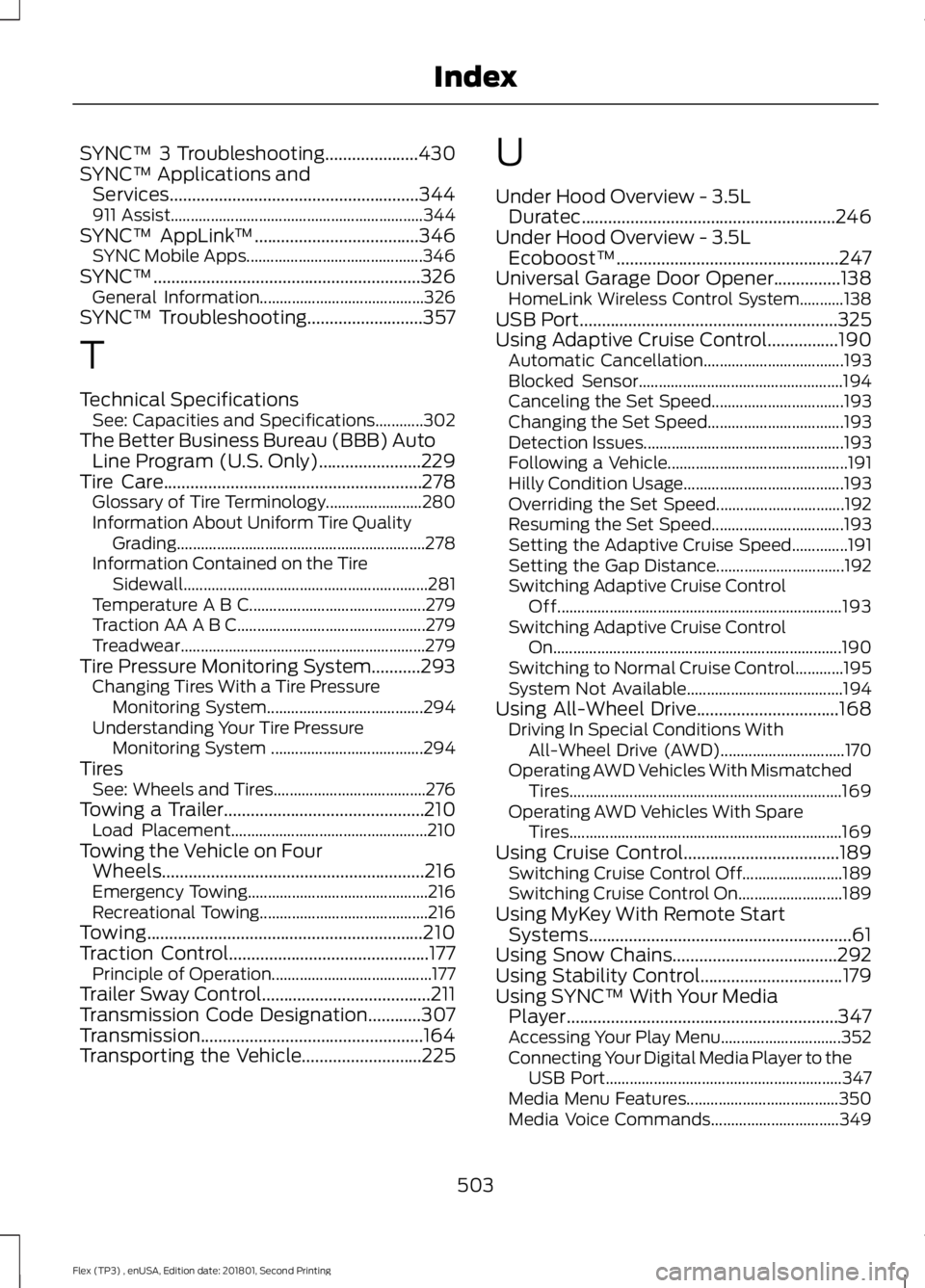
SYNC™ 3 Troubleshooting.....................430
SYNC™ Applications and
Services........................................................344
911 Assist............................................................... 344
SYNC™ AppLink ™.....................................346
SYNC Mobile Apps............................................ 346
SYNC™............................................................326 General Information......................................... 326
SYNC™ Troubleshooting
..........................357
T
Technical Specifications See: Capacities and Specifications............302
The Better Business Bureau (BBB) Auto Line Program (U.S. Only)
.......................229
Tire Care..........................................................278 Glossary of Tire Terminology........................ 280
Information About Uniform Tire Quality Grading .............................................................. 278
Information Contained on the Tire Sidewall............................................................. 281
Temperature A B C............................................ 279
Traction AA A B C............................................... 279
Treadwear............................................................. 279
Tire Pressure Monitoring System...........293 Changing Tires With a Tire Pressure
Monitoring System....................................... 294
Understanding Your Tire Pressure Monitoring System ...................................... 294
Tires See: Wheels and Tires...................................... 276
Towing a Trailer.............................................210 Load Placement................................................. 210
Towing the Vehicle on Four Wheels...........................................................216
Emergency Towing............................................. 216
Recreational Towing.......................................... 216
Towing..............................................................210
Traction Control
.............................................177
Principle of Operation........................................ 177
Trailer Sway Control......................................211
Transmission Code Designation
............307
Transmission..................................................164
Transporting the Vehicle...........................225 U
Under Hood Overview - 3.5L
Duratec.........................................................246
Under Hood Overview - 3.5L Ecoboost™..................................................247
Universal Garage Door Opener...............138 HomeLink Wireless Control System...........138
USB Port..........................................................325
Using Adaptive Cruise Control................190 Automatic Cancellation................................... 193
Blocked Sensor................................................... 194
Canceling the Set Speed................................. 193
Changing the Set Speed.................................. 193
Detection Issues.................................................. 193
Following a Vehicle............................................. 191
Hilly Condition Usage........................................ 193
Overriding the Set Speed................................ 192
Resuming the Set Speed................................. 193
Setting the Adaptive Cruise Speed..............191
Setting the Gap Distance................................ 192
Switching Adaptive Cruise Control Off....................................................................... 193
Switching Adaptive Cruise Control On........................................................................\
190
Switching to Normal Cruise Control............195
System Not Available....................................... 194
Using All-Wheel Drive................................168 Driving In Special Conditions With
All-Wheel Drive (AWD)............................... 170
Operating AWD Vehicles With Mismatched Tires.................................................................... 169
Operating AWD Vehicles With Spare Tires.................................................................... 169
Using Cruise Control...................................189 Switching Cruise Control Off......................... 189
Switching Cruise Control On.......................... 189
Using MyKey With Remote Start Systems...........................................................61
Using Snow Chains
.....................................292
Using Stability Control................................179
Using SYNC™ With Your Media Player.............................................................347
Accessing Your Play Menu.............................. 352
Connecting Your Digital Media Player to the USB Port........................................................... 347
Media Menu Features...................................... 350
Media Voice Commands................................ 349
503
Flex (TP3) , enUSA, Edition date: 201801, Second Printing Index