wheel FORD FLEX 2018 Owner's Manual
[x] Cancel search | Manufacturer: FORD, Model Year: 2018, Model line: FLEX, Model: FORD FLEX 2018Pages: 508, PDF Size: 6.31 MB
Page 132 of 508
Note:
Adjusting any active memory feature
or pressing a memory switch during a
memory recall cancels the operation.
Linking a PreSet Position to your
Remote Control or Intelligent
Access Key Fob
Your vehicle can save the preset memory
positions for up to two remote controls.
1. With the ignition on, move the memory
features to the desired positions.
2. Press and hold the desired preset button for about five seconds. A tone
sounds after about two seconds.
Continue holding until you hear a
second tone.
3. Within three seconds, press the lock button on the remote control you are
linking.
To unlink a remote control, follow the
same procedure – except in step 3, press
the unlock button on the remote control.
Note: If more than one linked remote
control or intelligent access key is in range,
the memory function moves to the settings
of the first key to initiate a memory recall.
Easy Entry and Exit Feature
This feature adjusts the position of the seat
and steering column to allow easier exit
and entry to the vehicle.
The driver seat automatically moves 2 in
(5 cm) rearward when the transmission is
in park (P) and you remove the key from
the ignition or you switch the ignition off.
The driver seat and steering wheel return
to their previous positions when you put
the key in the ignition or switch the ignition
on.
You can enable or disable this feature
through the information display. See
Information Displays
(page 97). REAR SEATS
Adjusting the Rear Seats
Second Row Seats WARNINGS
Always drive and ride with your
seatback upright and the lap belt
snug and low across the hips.
Reclining the seatback can cause an
occupant to slide under the seat's
seatbelt, resulting in severe personal
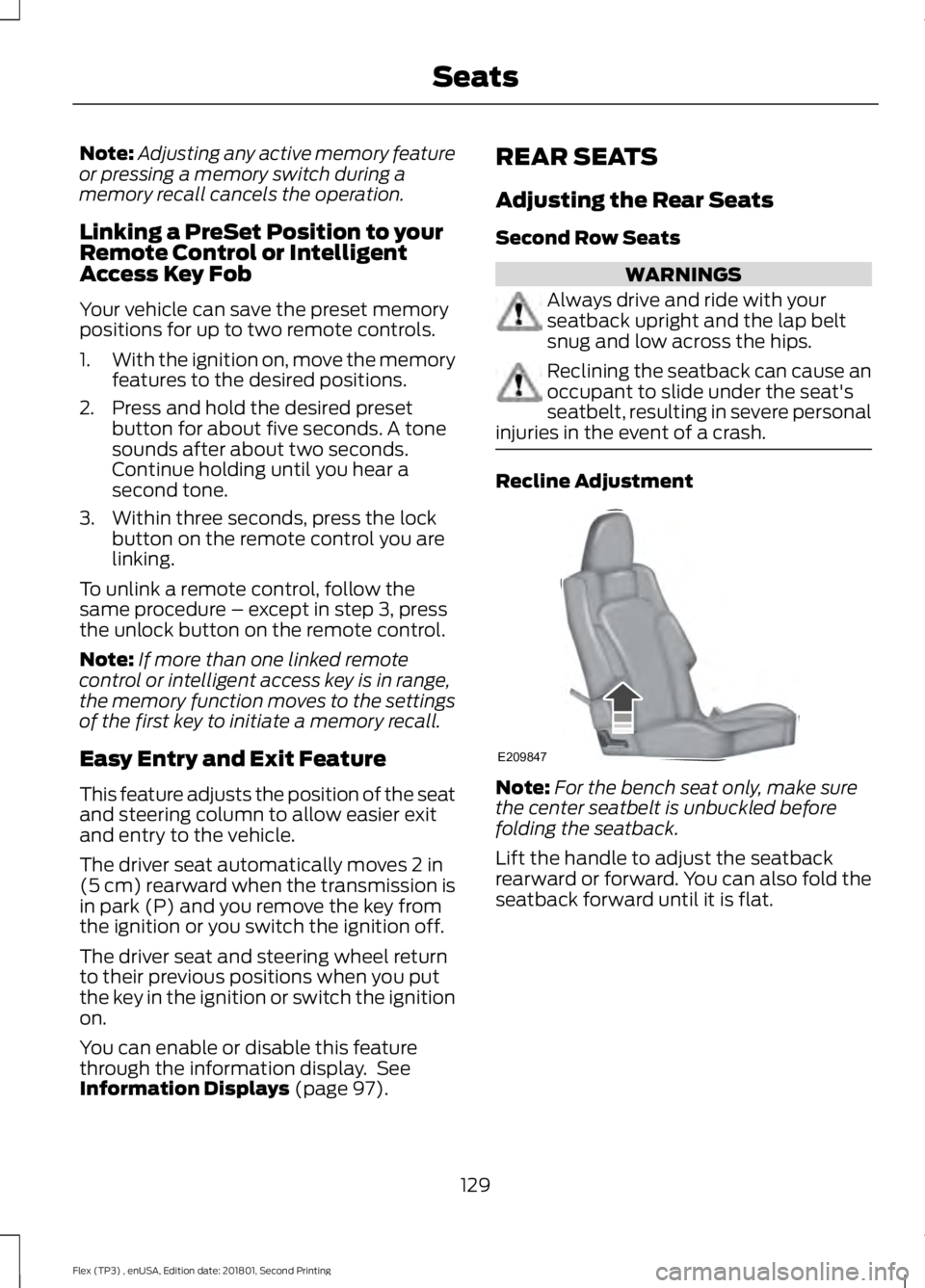
injuries in the event of a crash. Recline Adjustment
Note:
For the bench seat only, make sure
the center seatbelt is unbuckled before
folding the seatback.
Lift the handle to adjust the seatback
rearward or forward. You can also fold the
seatback forward until it is flat.
129
Flex (TP3) , enUSA, Edition date: 201801, Second Printing SeatsE209847
Page 157 of 508
Some fuel stations, particularly those in
high altitude areas, offer fuels posted as
regular unleaded gasoline with an octane
rating below 87.
For best overall vehicle and engine
performance, premium fuel with an octane
rating of 91 or higher is recommended. The
performance gained by using premium fuel
is most noticeable in hot weather as well
as other conditions, for example when
towing a trailer. See Towing (page 210).
Do not be concerned if the engine
sometimes knocks lightly. However, if the
engine knocks heavily while using fuel with
the recommended octane rating, contact
an authorized dealer to prevent any engine
damage.
We recommend Top Tier detergent
gasolines, where available to help minimize
engine deposits and maintain optimal
vehicle and engine performance. For
additional information, refer to
www.toptiergas.com.
Note: Use of any fuel for which the vehicle
was not designed can impair the emission
control system, cause loss of vehicle
performance, and cause damage to the
engine which may not be covered by the
vehicle Warranty.
Do not use:
• Diesel fuel.
• Fuels containing kerosene or paraffin.
• Fuel containing more than 15% ethanol
or E85 fuel.
• Fuels containing methanol.
• Fuels containing metallic-based
additives, including manganese-based
compounds.
• Fuels containing the octane booster
additive, methylcyclopentadienyl
manganese tricarbonyl (MMT).
• Leaded fuel, using leaded fuel is
prohibited by law. The use of fuels with metallic compounds
such as methylcyclopentadienyl
manganese tricarbonyl (commonly known
as MMT), which is a manganese-based
fuel additive, will impair engine
performance and affect the emission
control system.
FUEL FILLER FUNNEL
LOCATION
The fuel filler funnel is in the spare wheel
storage tray.
RUNNING OUT OF FUEL
Running out of fuel can cause damage not
covered by the vehicle Warranty.
If your vehicle runs out of fuel:
•
Add a minimum of
1.3 gal (5 L) of fuel
to restart the engine.
• You may need to switch the ignition
from off to on several times after
refueling to allow the fuel system to
pump the fuel from the tank to the
engine. When restarting, cranking time
takes a few seconds longer than
normal.
Note: If your vehicle is on a steep slope,
more fuel may be required.
Filling a Portable Fuel Container WARNING
Flow of fuel through a fuel pump
nozzle can produce static electricity.
This can cause a fire if you are filling
an ungrounded fuel container. 154
Flex (TP3) , enUSA, Edition date: 201801, Second Printing Fuel and Refueling
Page 167 of 508
AUTOMATIC TRANSMISSION
WARNINGS
Always fully apply the parking brake.
Make sure you shift into park (P) for
vehicles with an automatic
transmission. Switch the ignition off and
remove the key whenever you leave your
vehicle. Do not apply the brake pedal and
accelerator pedal simultaneously.
Applying both pedals simultaneously
for more than a few seconds will limit
engine performance, which may result in
difficulty maintaining speed in traffic and
could lead to serious injury. Understanding the Positions of
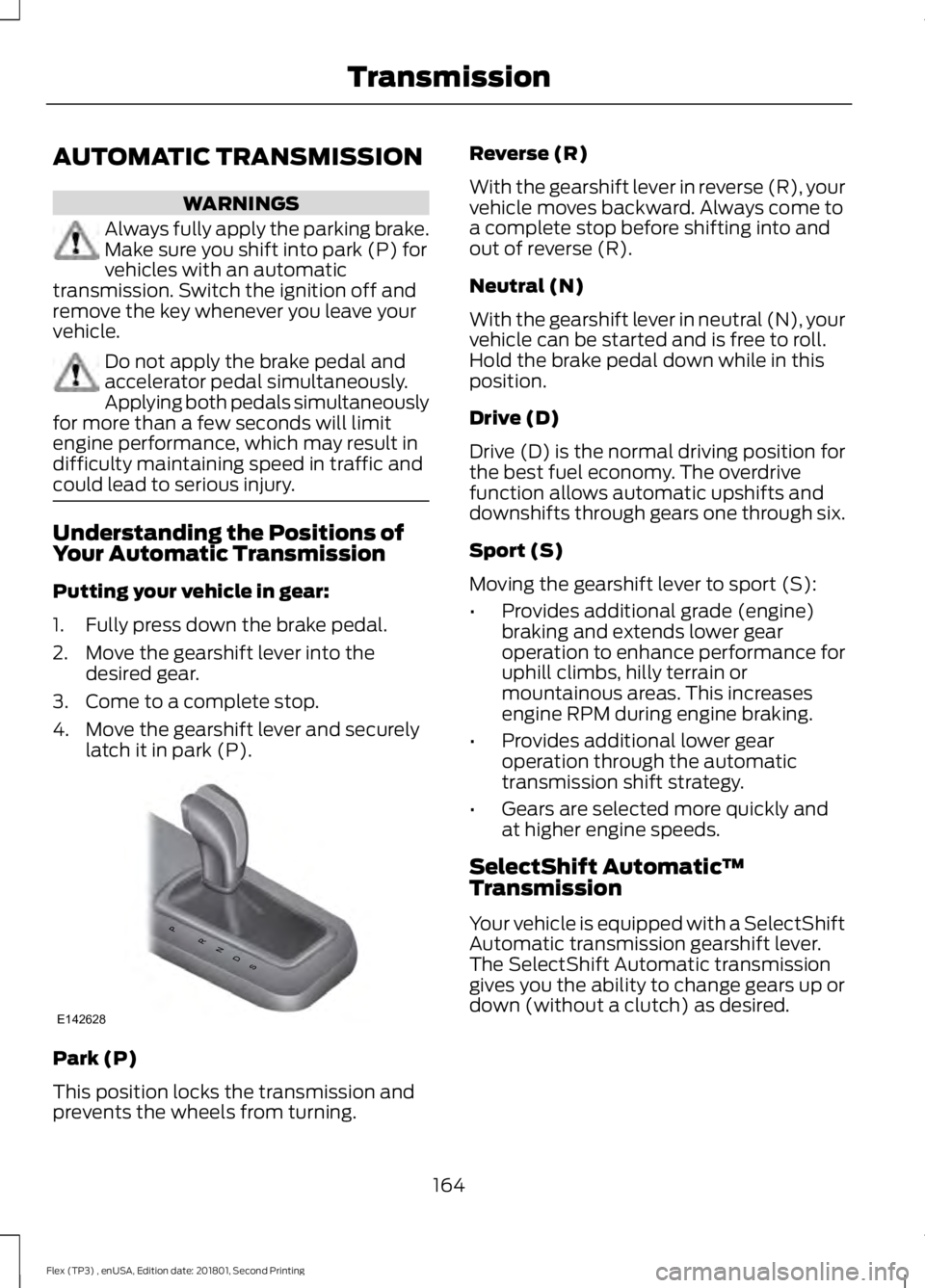
Your Automatic Transmission
Putting your vehicle in gear:
1. Fully press down the brake pedal.
2. Move the gearshift lever into the
desired gear.
3. Come to a complete stop.
4. Move the gearshift lever and securely latch it in park (P). Park (P)
This position locks the transmission and
prevents the wheels from turning. Reverse (R)
With the gearshift lever in reverse (R), your
vehicle moves backward. Always come to
a complete stop before shifting into and
out of reverse (R).
Neutral (N)
With the gearshift lever in neutral (N), your
vehicle can be started and is free to roll.
Hold the brake pedal down while in this
position.
Drive (D)
Drive (D) is the normal driving position for
the best fuel economy. The overdrive
function allows automatic upshifts and
downshifts through gears one through six.
Sport (S)
Moving the gearshift lever to sport (S):
•
Provides additional grade (engine)
braking and extends lower gear
operation to enhance performance for
uphill climbs, hilly terrain or
mountainous areas. This increases
engine RPM during engine braking.
• Provides additional lower gear
operation through the automatic
transmission shift strategy.
• Gears are selected more quickly and
at higher engine speeds.
SelectShift Automatic ™
Transmission
Your vehicle is equipped with a SelectShift
Automatic transmission gearshift lever.
The SelectShift Automatic transmission
gives you the ability to change gears up or
down (without a clutch) as desired.
164
Flex (TP3) , enUSA, Edition date: 201801, Second Printing TransmissionPRNDS
E142628
Page 168 of 508
In order to prevent the engine from running
at too low an RPM, which may cause it to
stall, SelectShift still automatically makes
some downshifts if it has determined that
you have not downshifted in time.
Although SelectShift makes some
downshifts for you, it still allows you to
downshift at any time as long as the
SelectShift determines that damage will
not be caused to the engine from
over-revving.
Note:
Engine damage may occur if you
maintain excessive engine revving without
shifting.
SelectShift does not automatically upshift,
even if the engine is approaching the RPM
limit. It must be shifted manually by
pressing the + button.
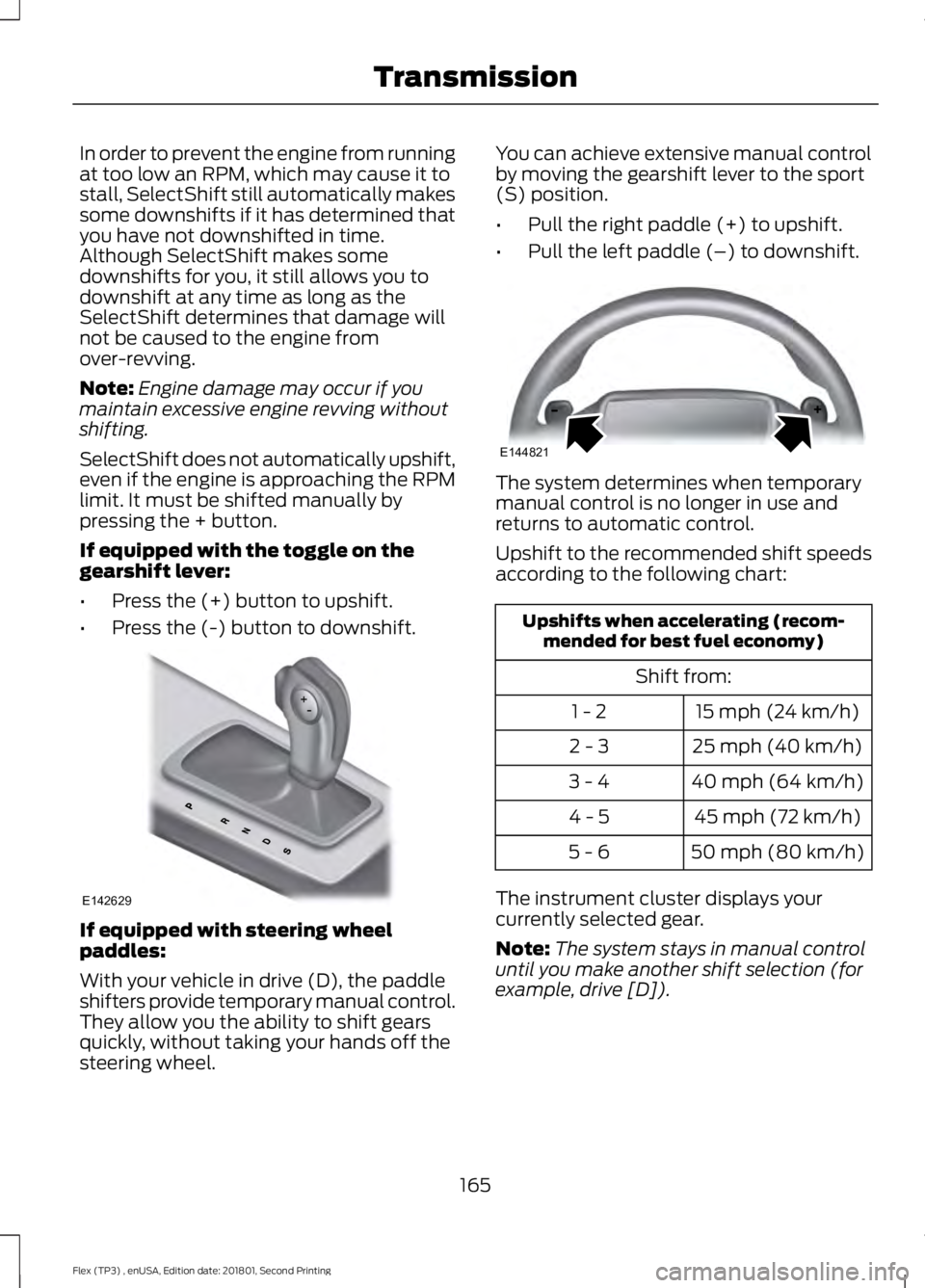
If equipped with the toggle on the
gearshift lever:
• Press the (+) button to upshift.
• Press the (-) button to downshift. If equipped with steering wheel
paddles:
With your vehicle in drive (D), the paddle
shifters provide temporary manual control.
They allow you the ability to shift gears
quickly, without taking your hands off the
steering wheel. You can achieve extensive manual control
by moving the gearshift lever to the sport
(S) position.
•
Pull the right paddle (+) to upshift.
• Pull the left paddle (–) to downshift. The system determines when temporary
manual control is no longer in use and
returns to automatic control.
Upshift to the recommended shift speeds
according to the following chart:
Upshifts when accelerating (recom-
mended for best fuel economy)
Shift from:15 mph (24 km/h)
1 - 2
25 mph (40 km/h)
2 - 3
40 mph (64 km/h)
3 - 4
45 mph (72 km/h)
4 - 5
50 mph (80 km/h)
5 - 6
The instrument cluster displays your
currently selected gear.
Note: The system stays in manual control
until you make another shift selection (for
example, drive [D]).
165
Flex (TP3) , enUSA, Edition date: 201801, Second Printing TransmissionE142629 E144821
Page 169 of 508
Brake-Shift Interlock
WARNINGS
Do not drive your vehicle until you
verify that the stoplamps are
working.
When doing this procedure, you need
to take the transmission out of park
(P) which means your vehicle can
roll freely. To avoid unwanted vehicle
movement, always fully apply the parking
brake prior to doing this procedure. Use
wheels chocks if appropriate. If the parking brake is fully released,
but the brake warning lamp remains
illuminated, the brakes may not be
working properly. Have your vehicle
checked as soon as possible. Note:
For some markets this feature will be
disabled.
Your vehicle is equipped with a brake-shift
interlock feature that prevents moving the
gearshift lever from park (P) when the
ignition is in the on position and the brake
pedal is not pressed.
If you cannot move the gearshift lever out
of park (P) position with the ignition in the
on position and the brake pedal pressed,
a malfunction may have occurred. It is
possible that a fuse has blown or your
vehicle ’s brake lamps are not operating
properly. See Fuse Specification Chart
(page 234).
If the fuse is not blown and the brake
lamps are working properly, the following
procedure will allow you to move the
gearshift lever from park (P):
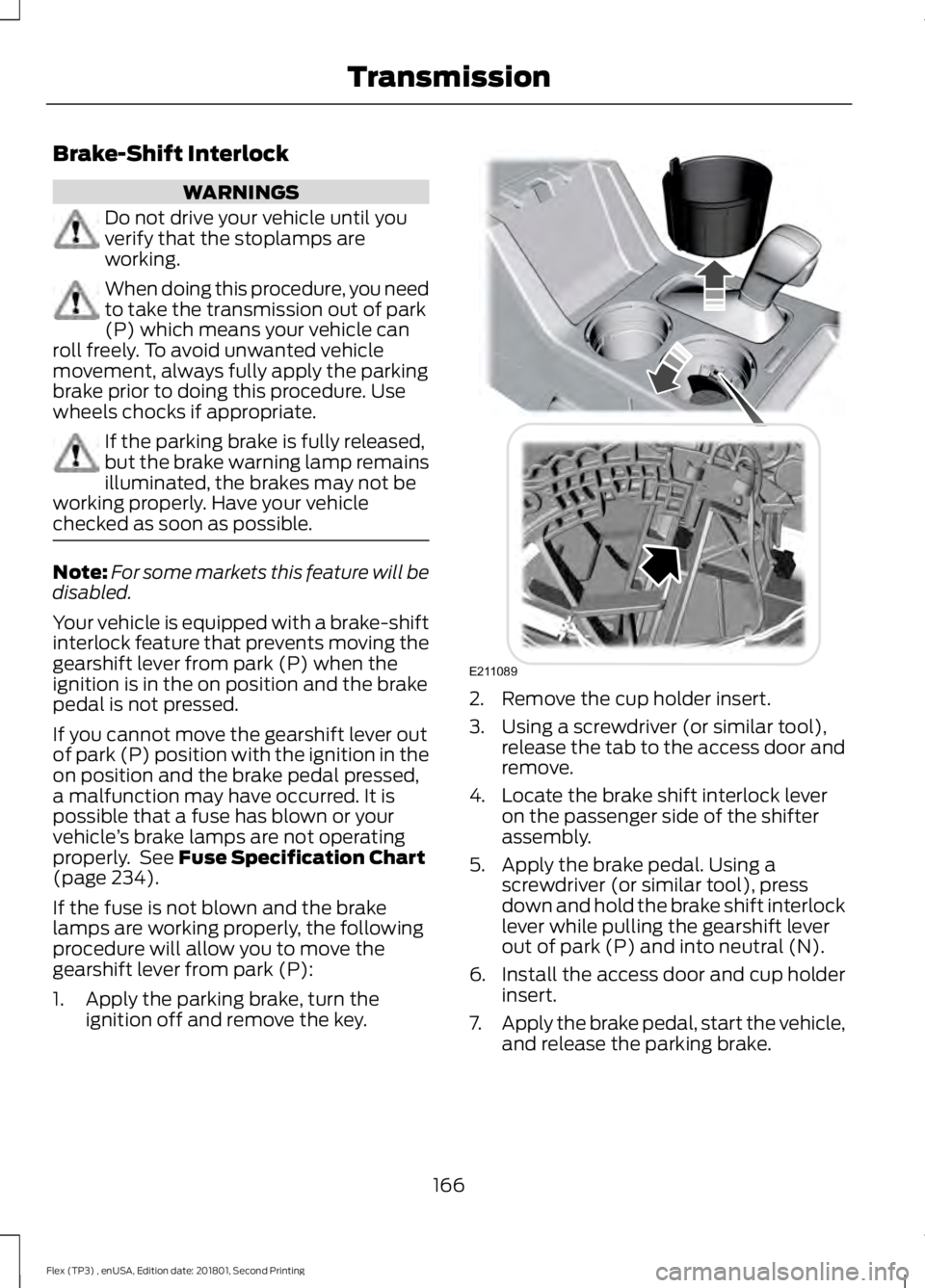
1. Apply the parking brake, turn the ignition off and remove the key. 2. Remove the cup holder insert.
3. Using a screwdriver (or similar tool),
release the tab to the access door and
remove.
4. Locate the brake shift interlock lever on the passenger side of the shifter
assembly.
5. Apply the brake pedal. Using a screwdriver (or similar tool), press
down and hold the brake shift interlock
lever while pulling the gearshift lever
out of park (P) and into neutral (N).
6. Install the access door and cup holder insert.
7. Apply the brake pedal, start the vehicle,
and release the parking brake.
166
Flex (TP3) , enUSA, Edition date: 201801, Second Printing TransmissionE211089
Page 171 of 508
USING ALL-WHEEL DRIVE
All-wheel drive uses all four wheels to
power the vehicle. This increases traction,
enabling you to drive over terrain and road
conditions that a conventional two-wheel
drive vehicle cannot. The AWD system is
active all the time and requires no input
from the operator.
Note:
Your AWD vehicle is not intended for
off-road use. The AWD feature gives your
vehicle some limited off-road capabilities
in which driving surfaces are relatively level,
obstruction-free and otherwise similar to
normal on-road driving conditions.
Operating your vehicle under other than
those conditions could subject the vehicle
to excessive stress which might result in
damage which is not covered under your
warranty. Note:
When an AWD system fault is
present, the warning Check AWD displays
in the information display. The AWD system
is not functioning correctly and defaults to
front-wheel drive. When this warning
displays, have your vehicle serviced at an
authorized dealer.
Note: The
AWD OFF message may also
appear in the information display if the AWD
system overheats and defaults to
front-wheel drive. This may occur if the
vehicle is operated in extreme conditions
with excessive wheel slip, such as deep
sand. To resume normal AWD function as
soon as possible, stop the vehicle in a safe
location and stop the engine for at least 10
minutes. After the engine has been
restarted and the AWD system has
adequately cooled, the AWD OFF message
will turn off and normal AWD function
returns. If the engine is not stopped, the
AWD OFF
message turns off when the
system cools and normal AWD function
returns.
All-Wheel Drive Messages Action / Description
AWD Messages
Displays if the AWD system disables to
protect itself. This may occur if you operate
the vehicle after installing the compact
spare tire, if the system is overheating or if
there is an issue with another vehicle
system that prevents the AWD system from
AWD OFF
operating. The AWD system resumes
168
Flex (TP3) , enUSA, Edition date: 201801, Second Printing All-Wheel Drive
(If Equipped)
Page 172 of 508
Action / Description
AWD Messages
normal operation and clears this message
after you install the road tire and you switch
the ignition on and off, or after you allow
the system to cool. If this message remains
on, have a qualified technician service your
vehicle to repair other vehicle systems.
Displayed in conjunction with the power-
train malfunction/reduced power light
when the system is not operating properly.
If the warning stays on or continues to
come on, contact your authorized dealer
as soon as possible.
Check AWD
Operating AWD Vehicles With
Spare Tires
A spare tire of a different size other than
the tire provided should never be used. The
AWD system may disable automatically
and enter front-wheel drive only mode to
protect driveline components if a non-full
sized tire is installed. This condition may
display an AWD OFF message in the
information display. If there is an AWD OFF
message in the information display from
using a non-full sized spare tire, this
indicator should turn off after reinstalling
the repaired or replaced normal road tire
and cycling the ignition off and on. It is
recommended to reinstall the repaired or
replaced road tire as soon as possible.
Major dissimilar tire sizes between the front
and rear axles (for example, 17 inch low
profile tires on the front axle and 22 inch
high profile tires on the rear axle) could
cause the AWD system to stop functioning
and default to front-wheel drive or damage
the AWD system. Operating AWD Vehicles With
Mismatched Tires WARNINGS
Only use replacement tires and
wheels that are the same size, load
index, speed rating and type (such
as P-metric versus LT-metric or all-season
versus all-terrain) as those originally
provided by Ford. The recommended tire
and wheel size may be found on either the
Safety Compliance Certification Label
(affixed to either the door hinge pillar,
door-latch post, or the door edge that
meets the door-latch post, next to the
driver's seating position), or the Tire Label
which is located on the B-Pillar or edge of
the driver's door. If this information is not
found on these labels, then you should
contact your authorized dealer as soon as
possible. Use of any tire or wheel not
recommended by Ford can affect the
safety and performance of your vehicle,
which could result in an increased risk of
loss of vehicle control, vehicle rollover,
personal injury and death.
169
Flex (TP3) , enUSA, Edition date: 201801, Second Printing All-Wheel Drive
(If Equipped)
Page 173 of 508
WARNINGS
The use of non-recommended tires
and wheels could cause steering,
suspension, axle, transfer case or
power transfer unit failure. If you have
questions regarding tire replacement,
contact your authorized dealer as soon as
possible. Major dissimilar tire sizes between the front
and rear axles (for example, 17 inch low
profile tires on the front axle and 22 inch
high profile tires on the rear axle) could
cause the AWD system to stop functioning
and default to front-wheel drive or damage
the AWD system. However, the AWD
system is capable of tolerating any
combination of new and worn tires of the
same original tire size. For example, using
3 worn tread tires and 1 new tread tire all
of the same original tire size, can be
tolerated by the AWD system.
Driving In Special Conditions With
All-Wheel Drive (AWD)
AWD vehicles are equipped for driving on
sand, snow, mud and rough roads and have
operating characteristics that are
somewhat different from conventional
vehicles, both on and off the highway.
When driving at slow speeds in deep sand
under high outside temperatures, use a low
gear when possible. Lower gear operation
will maximize the engine and transmission
cooling capability.
Under severe operating conditions, the A/C
may cycle on and off to protect
overheating of the engine.
Basic operating principles in special
conditions
•
Drive slower in strong crosswinds which
can affect the normal steering
characteristics of your vehicle.
• Be extremely careful when driving on
pavement made slippery by loose sand,
water, gravel, snow or ice.
If Your Vehicle Goes Off the Edge of the
Pavement
• If your vehicle goes off the edge of the
pavement, slow down, but avoid severe
brake application, ease the vehicle
back onto the pavement only after
reducing your speed. Do not turn the
steering wheel too sharply while
returning to the road surface.
• It may be safer to stay on the apron or
shoulder of the road and slow down
gradually before returning to the
pavement. You may lose control if you
do not slow down or if you turn the
steering wheel too sharply or abruptly.
• It often may be less risky to strike small
objects, such as highway reflectors,
with minor damage to your vehicle
rather than attempt a sudden return to
the pavement which could cause the
vehicle to slide sideways out of control
or rollover. Remember, your safety and
the safety of others should be your
primary concern.
If Your Vehicle Gets Stuck WARNINGS
Always fully apply the parking brake.
Make sure you shift into park (P) for
vehicles with an automatic
transmission. Switch the ignition off and
remove the key whenever you leave your
vehicle.
170
Flex (TP3) , enUSA, Edition date: 201801, Second Printing All-Wheel Drive (If Equipped)
Page 174 of 508
WARNINGS
If the parking brake is fully released,
but the brake warning lamp remains
illuminated, the brakes may not be
working properly. Have your vehicle
checked as soon as possible. Do not spin the wheels at over
34 mph (55 km/h). The tires may fail
and injure a passenger or bystander.
Note:
Do not rock the vehicle if the engine
is not at normal operating temperature or
damage to the transmission may occur.
Note: Do not rock the vehicle for more than
a few minutes or damage to the
transmission and tires may occur or the
engine may overheat.
If your vehicle gets stuck in mud or snow it
may be rocked out by shifting between
forward and reverse gears, stopping
between shifts, in a steady pattern. Press
lightly on the accelerator in each gear.
If your vehicle is equipped with
AdvanceTrac® with Roll Stability
Control ™, it may be beneficial to
disengage the AdvanceTrac® with Roll
Stability Control ™ system while
attempting to rock the vehicle.
Emergency Maneuvers
• In an unavoidable emergency situation
where a sudden sharp turn must be
made, remember to avoid
"over-driving" your vehicle (that is, turn
the steering wheel only as rapidly and
as far as required to avoid the
emergency). Excessive steering will
result in less vehicle control, not more.
Additionally, smooth variations of the
accelerator and/or brake pedal
pressure should be utilized if changes
in vehicle speed are called for. Avoid abrupt steering, acceleration or braking
which could result in an increased risk
of loss of vehicle control, vehicle
rollover and/or personal injury. Use all
available road surface to return the
vehicle to a safe direction of travel.
• In the event of an emergency stop,
avoid skidding the tires and do not
attempt any sharp steering wheel
movements.
• If the vehicle goes from one type of
surface to another (that is, from
concrete to gravel) there will be a
change in the way the vehicle responds
to a maneuver (steering, acceleration
or braking). Again, avoid these abrupt
inputs.
Sand
Most of the time traction control improves
tire traction by managing wheel slip
through Brake, Engine, and AWD
calibrations. However, during low speed
driving, disabling traction control in deep
sand can help keep the wheels moving to
maintain vehicle momentum.
When driving over sand, try to keep all four
wheels on the most solid area of the trail.
Avoid reducing the tire pressures but shift
to a lower gear and drive steadily through
the terrain. Apply the accelerator slowly
and avoid spinning the wheels.
Do not drive your vehicle in deep sand for
an extended period of time. This could
cause the AWD system to overheat and
default to front-wheel drive. If this occurs,
an AWD OFF message displays in the
information display. To resume normal
AWD function as soon as possible, stop
the vehicle in a safe location and stop the
engine for at least 10 minutes. After the
engine has been restarted and the AWD
171
Flex (TP3) , enUSA, Edition date: 201801, Second Printing All-Wheel Drive
(If Equipped)
Page 175 of 508
system has adequately cooled, the AWD
OFF message turns off and normal AWD
function returns. In the event the engine is
not stopped, the AWD OFF message turns
off when the system cools and normal
AWD function returns.
When driving at slow speeds in deep sand
under high outside temperatures, use L
(Low) gear when possible. L (Low) gear
operation will maximize the engine and
transmission cooling capability.
Under severe operating conditions, the A/C
may cycle on and off to protect
overheating of the engine.
Avoid excessive speed because vehicle
momentum can work against you and
cause the vehicle to become stuck to the
point that assistance may be required from
another vehicle. Remember, you may be
able to back out the way you came if you
proceed with caution.
Mud and Water
If you must drive through high water, drive
slowly. Traction or brake capability may
be limited.
When driving through water, determine the
depth; avoid water higher than the bottom
of the wheel rims (for cars) or the bottom
of the hubs (for trucks) (if possible) and
proceed slowly. If the ignition system gets
wet, the vehicle may stall.
Once through water, always try the brakes.
Wet brakes do not stop the vehicle as
effectively as dry brakes. Drying can be
improved by moving your vehicle slowly
while applying light pressure on the brake
pedal. Be cautious of sudden changes in vehicle
speed or direction when you are driving in
mud. Even AWD vehicles can lose traction
in slick mud. As when you are driving over
sand, apply the accelerator slowly and
avoid spinning your wheels. If the vehicle
does slide, steer in the direction of the slide
until you regain control of the vehicle.
After driving through mud, clean off residue
stuck to rotating driveshafts and tires.
Excess mud stuck on tires and rotating
driveshafts causes an imbalance that
could damage drive components.
Note:
Driving through deep water may
damage the transmission.
If the front or rear axle is submerged in
water, have the power transfer unit (PTU)
or rear axle serviced by an authorized
dealer. “Tread Lightly
” is an educational program
designed to increase public awareness of
land-use regulations and responsibilities
in our nations wilderness areas. Ford Motor
Company joins the U.S. Forest Service and
the Bureau of Land Management in
encouraging you to help preserve our
national forest and other public and private
lands by “treading lightly. ”
Driving on Hilly or Sloping Terrain
Note: Avoid driving crosswise or turning on
steep slopes or hills. A danger lies in losing
traction, slipping sideways and possibly
rolling over. Whenever driving on a hill,
determine beforehand the route you will
use. Do not drive over the crest of a hill
without seeing what conditions are on the
other side. Do not drive in reverse over a hill
without the aid of an observer.
172
Flex (TP3) , enUSA, Edition date: 201801, Second Printing All-Wheel Drive
(If Equipped)E143950