towing FORD FLEX 2018 Owners Manual
[x] Cancel search | Manufacturer: FORD, Model Year: 2018, Model line: FLEX, Model: FORD FLEX 2018Pages: 508, PDF Size: 6.31 MB
Page 6 of 508
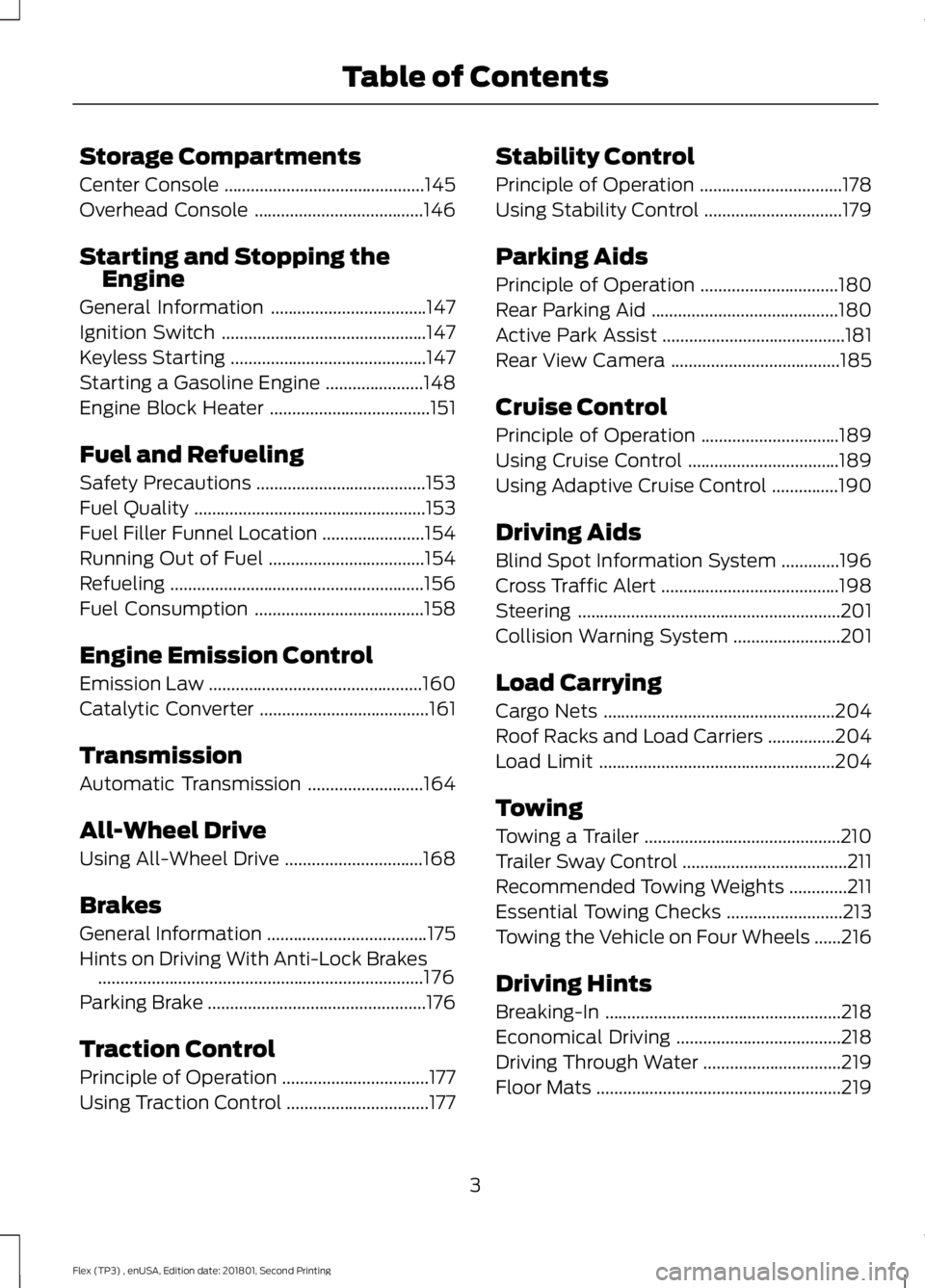
Storage Compartments
Center Console
.............................................145
Overhead Console ......................................
146
Starting and Stopping the Engine
General Information ...................................
147
Ignition Switch ..............................................
147
Keyless Starting ............................................
147
Starting a Gasoline Engine ......................
148
Engine Block Heater ....................................
151
Fuel and Refueling
Safety Precautions ......................................
153
Fuel Quality ....................................................
153
Fuel Filler Funnel Location .......................
154
Running Out of Fuel ...................................
154
Refueling .........................................................
156
Fuel Consumption ......................................
158
Engine Emission Control
Emission Law ................................................
160
Catalytic Converter ......................................
161
Transmission
Automatic Transmission ..........................
164
All-Wheel Drive
Using All-Wheel Drive ...............................
168
Brakes
General Information ....................................
175
Hints on Driving With Anti-Lock Brakes ........................................................................\
.
176
Parking Brake .................................................
176
Traction Control
Principle of Operation .................................
177
Using Traction Control ................................
177Stability Control
Principle of Operation
................................
178
Using Stability Control ...............................
179
Parking Aids
Principle of Operation ...............................
180
Rear Parking Aid ..........................................
180
Active Park Assist .........................................
181
Rear View Camera ......................................
185
Cruise Control
Principle of Operation ...............................
189
Using Cruise Control ..................................
189
Using Adaptive Cruise Control ...............
190
Driving Aids
Blind Spot Information System .............
196
Cross Traffic Alert ........................................
198
Steering ...........................................................
201
Collision Warning System ........................
201
Load Carrying
Cargo Nets ....................................................
204
Roof Racks and Load Carriers ...............
204
Load Limit .....................................................
204
Towing
Towing a Trailer ............................................
210
Trailer Sway Control .....................................
211
Recommended Towing Weights .............
211
Essential Towing Checks ..........................
213
Towing the Vehicle on Four Wheels ......
216
Driving Hints
Breaking-In .....................................................
218
Economical Driving .....................................
218
Driving Through Water ...............................
219
Floor Mats .......................................................
219
3
Flex (TP3) , enUSA, Edition date: 201801, Second Printing Table of Contents
Page 41 of 508
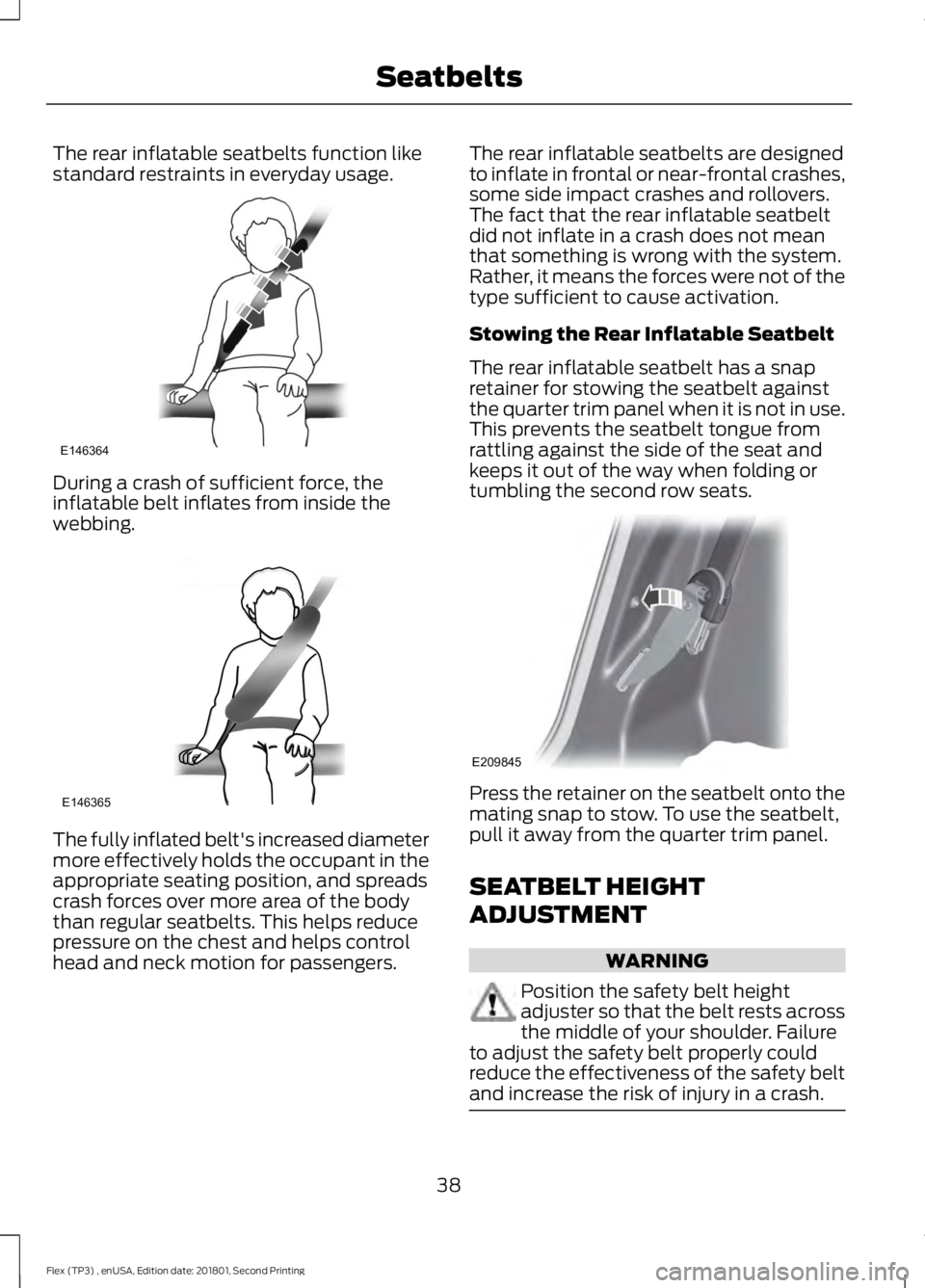
The rear inflatable seatbelts function like
standard restraints in everyday usage.
During a crash of sufficient force, the
inflatable belt inflates from inside the
webbing.
The fully inflated belt's increased diameter
more effectively holds the occupant in the
appropriate seating position, and spreads
crash forces over more area of the body
than regular seatbelts. This helps reduce
pressure on the chest and helps control
head and neck motion for passengers. The rear inflatable seatbelts are designed
to inflate in frontal or near-frontal crashes,
some side impact crashes and rollovers.
The fact that the rear inflatable seatbelt
did not inflate in a crash does not mean
that something is wrong with the system.
Rather, it means the forces were not of the
type sufficient to cause activation.
Stowing the Rear Inflatable Seatbelt
The rear inflatable seatbelt has a snap
retainer for stowing the seatbelt against
the quarter trim panel when it is not in use.
This prevents the seatbelt tongue from
rattling against the side of the seat and
keeps it out of the way when folding or
tumbling the second row seats.
Press the retainer on the seatbelt onto the
mating snap to stow. To use the seatbelt,
pull it away from the quarter trim panel.
SEATBELT HEIGHT
ADJUSTMENT
WARNING
Position the safety belt height
adjuster so that the belt rests across
the middle of your shoulder. Failure
to adjust the safety belt properly could
reduce the effectiveness of the safety belt
and increase the risk of injury in a crash. 38
Flex (TP3) , enUSA, Edition date: 201801, Second Printing SeatbeltsE146364 E146365 E209845
Page 103 of 508
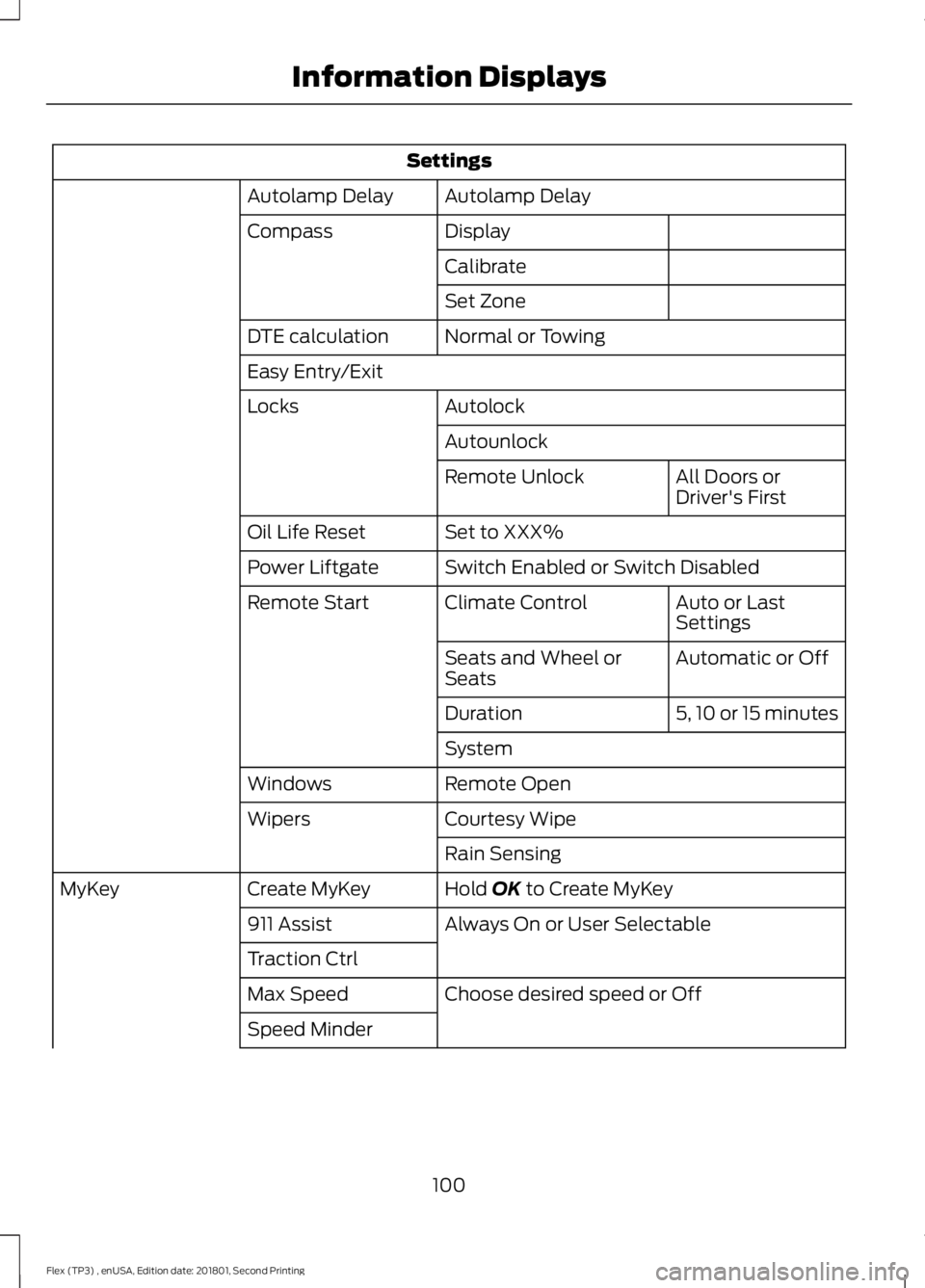
Settings
Autolamp Delay
Autolamp Delay
Display
Compass
Calibrate
Set Zone
Normal or Towing
DTE calculation
Easy Entry/Exit
Autolock
Locks
Autounlock All Doors or
Driver's First
Remote Unlock
Set to XXX%
Oil Life Reset
Switch Enabled or Switch Disabled
Power Liftgate
Auto or Last
Settings
Climate Control
Remote Start
Automatic or Off
Seats and Wheel or
Seats
5, 10 or 15 minutes
Duration
System
Remote Open
Windows
Courtesy Wipe
Wipers
Rain Sensing
Hold OK to Create MyKey
Create MyKey
MyKey
Always On or User Selectable
911 Assist
Traction Ctrl
Choose desired speed or Off
Max Speed
Speed Minder
100
Flex (TP3) , enUSA, Edition date: 201801, Second Printing Information Displays
Page 107 of 508
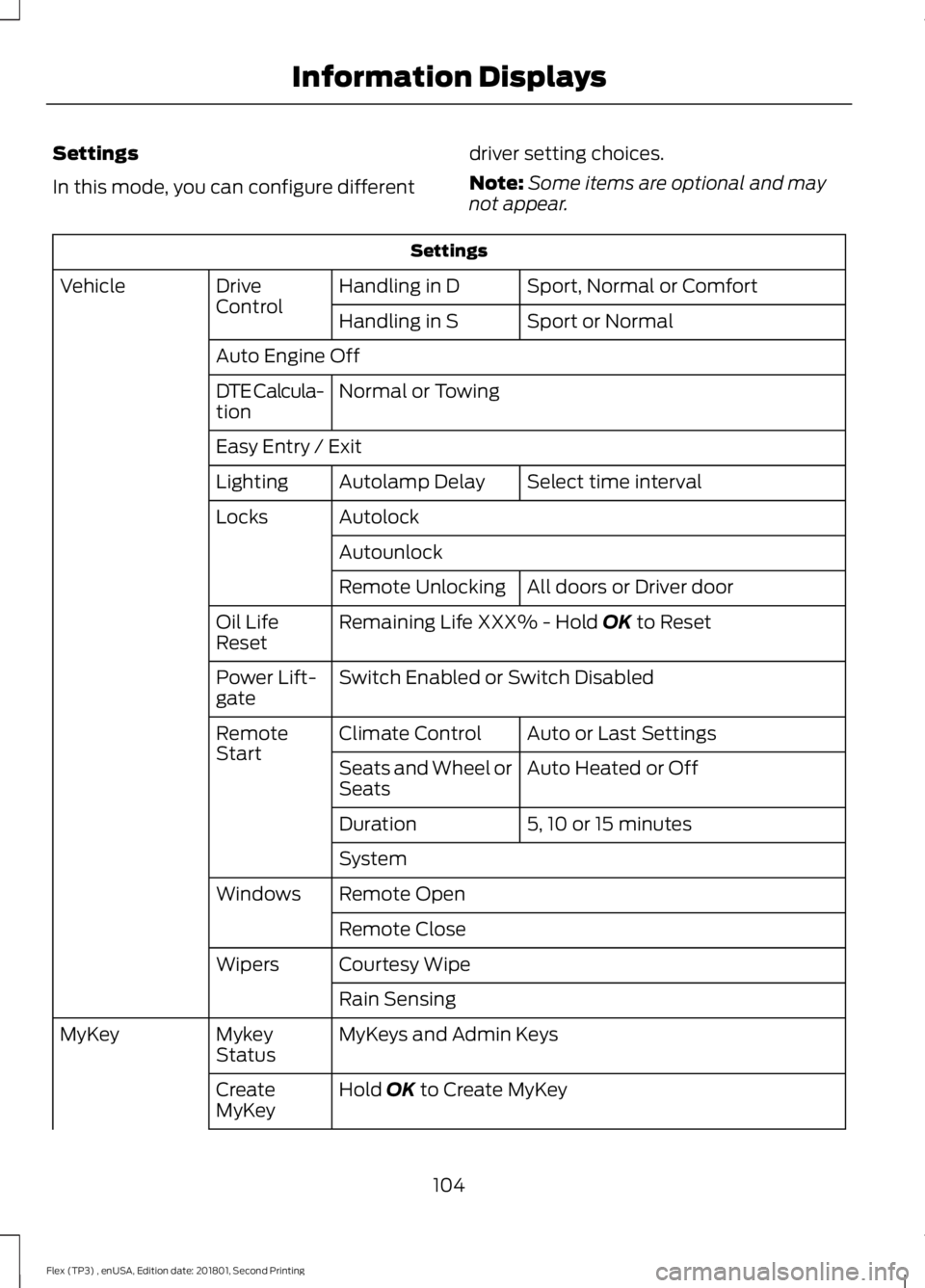
Settings
In this mode, you can configure different
driver setting choices.
Note:
Some items are optional and may
not appear. Settings
Sport, Normal or Comfort
Handling in D
Drive
Control
Vehicle
Sport or Normal
Handling in S
Auto Engine Off Normal or Towing
DTE Calcula-
tion
Easy Entry / Exit
Select time interval
Autolamp Delay
Lighting
Autolock
Locks
Autounlock All doors or Driver door
Remote Unlocking
Remaining Life XXX% - Hold OK to Reset
Oil Life
Reset
Switch Enabled or Switch Disabled
Power Lift-
gate
Auto or Last Settings
Climate Control
Remote
Start
Auto Heated or Off
Seats and Wheel or
Seats
5, 10 or 15 minutes
Duration
System
Remote Open
Windows
Remote Close
Courtesy Wipe
Wipers
Rain Sensing
MyKeys and Admin Keys
Mykey
Status
MyKey
Hold
OK to Create MyKey
Create
MyKey
104
Flex (TP3) , enUSA, Edition date: 201801, Second Printing Information Displays
Page 116 of 508
Traction Control
Action
Message
Displays the status of the traction control system. See UsingTraction Control (page 177).
Traction Control Off
Transmission Action
Message
You switched the engine off and shift select lever is in anyposition other than P (Park).
Shift to Park
Towing Action
Message
The system detects trailer sway, so you need to reduce your speed.
Trailer Sway Reduce
Speed
113
Flex (TP3) , enUSA, Edition date: 201801, Second Printing Information Displays
Page 136 of 508
Stowing the Third Row Seat
Note:
Remove all objects from the seat and
stowage tub. Objects in the seat or stowage
tub may cause serious damage to the seat
upholstery and cause improper seat
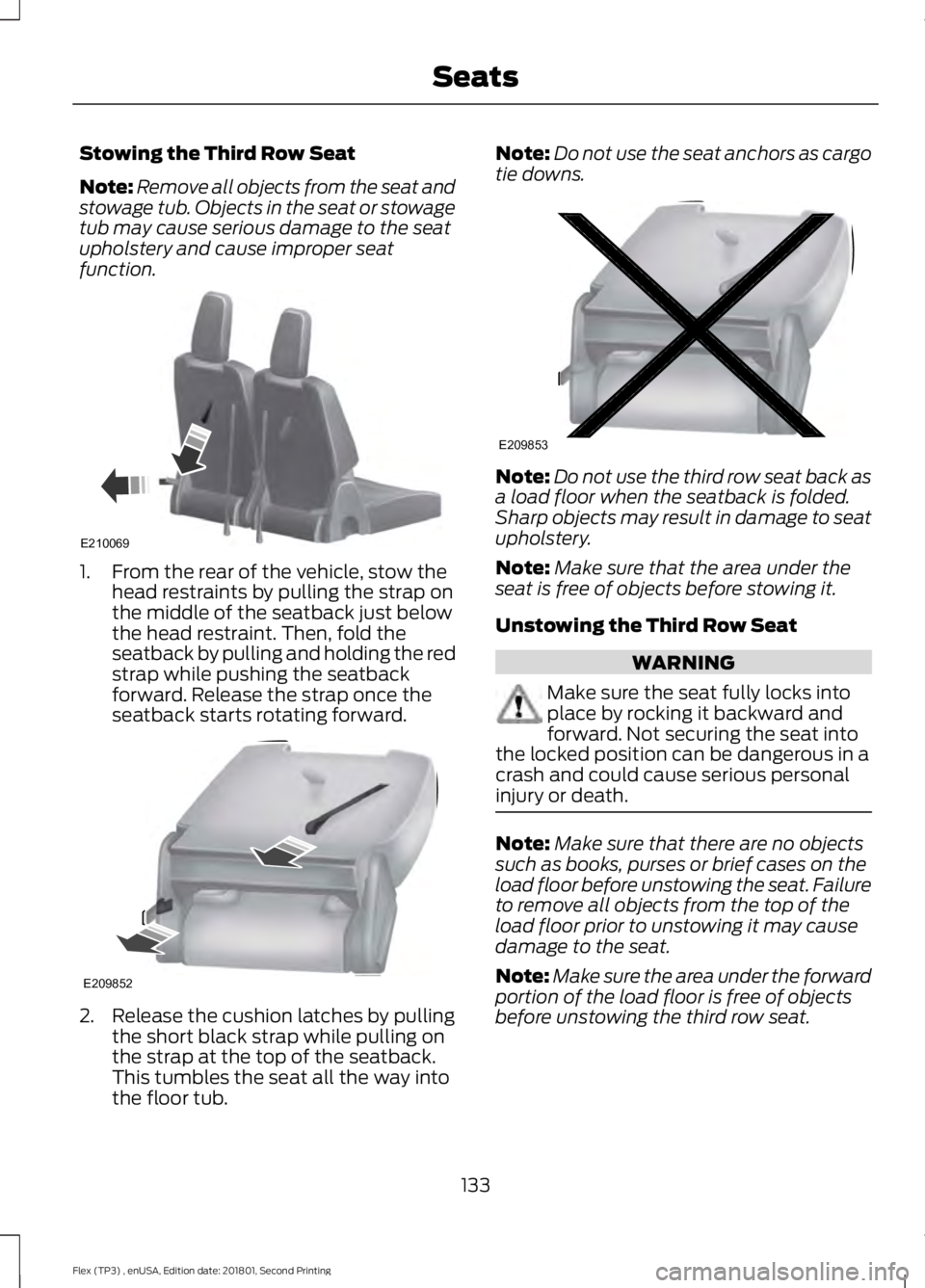
function. 1. From the rear of the vehicle, stow the
head restraints by pulling the strap on
the middle of the seatback just below
the head restraint. Then, fold the
seatback by pulling and holding the red
strap while pushing the seatback
forward. Release the strap once the
seatback starts rotating forward. 2. Release the cushion latches by pulling
the short black strap while pulling on
the strap at the top of the seatback.
This tumbles the seat all the way into
the floor tub. Note:
Do not use the seat anchors as cargo
tie downs. Note:
Do not use the third row seat back as
a load floor when the seatback is folded.
Sharp objects may result in damage to seat
upholstery.
Note: Make sure that the area under the
seat is free of objects before stowing it.
Unstowing the Third Row Seat WARNING
Make sure the seat fully locks into
place by rocking it backward and
forward. Not securing the seat into
the locked position can be dangerous in a
crash and could cause serious personal
injury or death. Note:
Make sure that there are no objects
such as books, purses or brief cases on the
load floor before unstowing the seat. Failure
to remove all objects from the top of the
load floor prior to unstowing it may cause
damage to the seat.
Note: Make sure the area under the forward
portion of the load floor is free of objects
before unstowing the third row seat.
133
Flex (TP3) , enUSA, Edition date: 201801, Second Printing SeatsE210069 E209852 E209853
Page 138 of 508
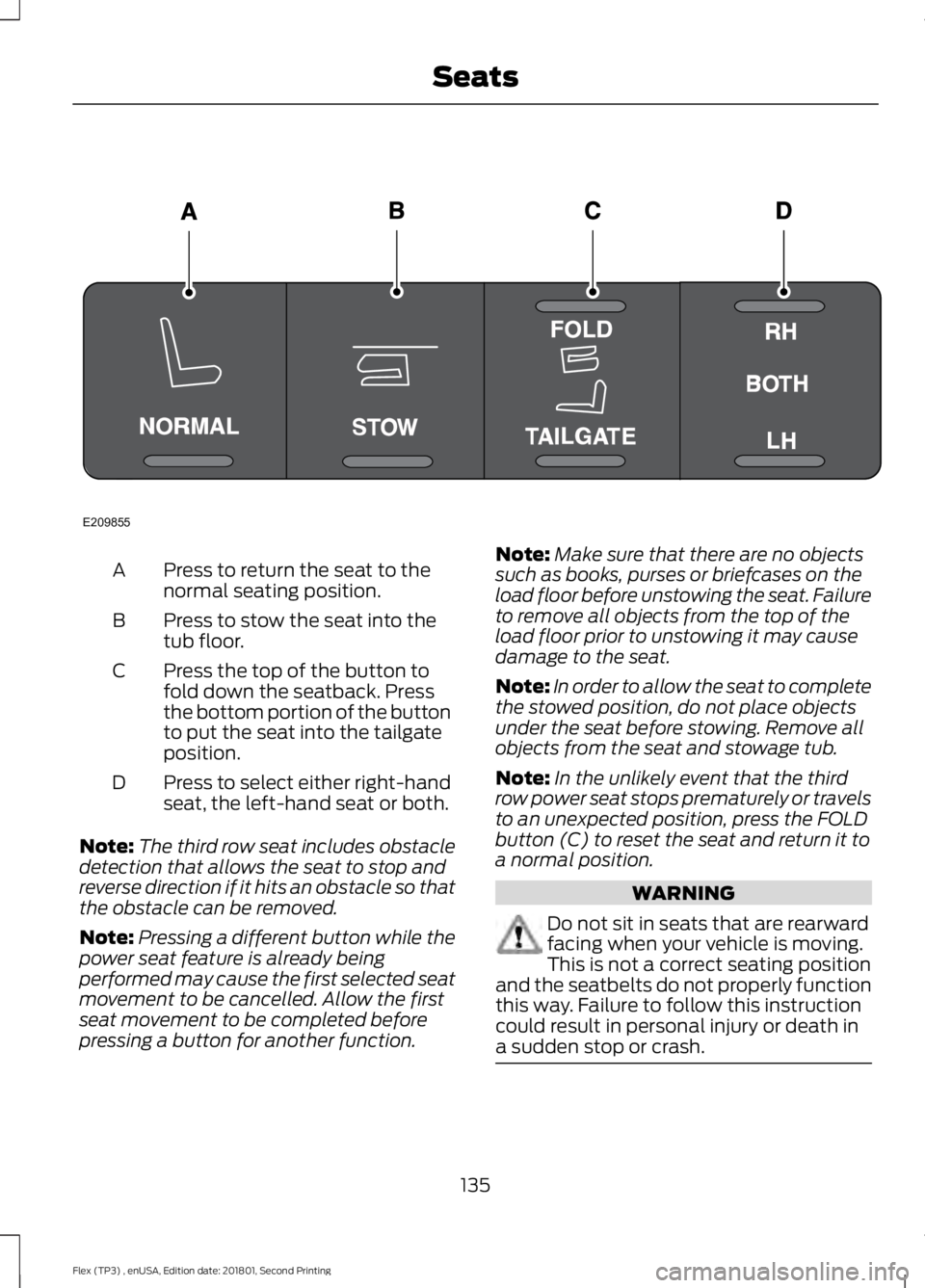
Press to return the seat to the
normal seating position.
A
Press to stow the seat into the
tub floor.
B
Press the top of the button to
fold down the seatback. Press
the bottom portion of the button
to put the seat into the tailgate
position.
C
Press to select either right-hand
seat, the left-hand seat or both.
D
Note: The third row seat includes obstacle
detection that allows the seat to stop and
reverse direction if it hits an obstacle so that
the obstacle can be removed.
Note: Pressing a different button while the
power seat feature is already being
performed may cause the first selected seat
movement to be cancelled. Allow the first
seat movement to be completed before
pressing a button for another function. Note:
Make sure that there are no objects
such as books, purses or briefcases on the
load floor before unstowing the seat. Failure
to remove all objects from the top of the
load floor prior to unstowing it may cause
damage to the seat.
Note: In order to allow the seat to complete
the stowed position, do not place objects
under the seat before stowing. Remove all
objects from the seat and stowage tub.
Note: In the unlikely event that the third
row power seat stops prematurely or travels
to an unexpected position, press the FOLD
button (C) to reset the seat and return it to
a normal position. WARNING
Do not sit in seats that are rearward
facing when your vehicle is moving.
This is not a correct seating position
and the seatbelts do not properly function
this way. Failure to follow this instruction
could result in personal injury or death in
a sudden stop or crash. 135
Flex (TP3) , enUSA, Edition date: 201801, Second Printing SeatsE209855
Page 157 of 508
Some fuel stations, particularly those in
high altitude areas, offer fuels posted as
regular unleaded gasoline with an octane
rating below 87.
For best overall vehicle and engine
performance, premium fuel with an octane
rating of 91 or higher is recommended. The
performance gained by using premium fuel
is most noticeable in hot weather as well
as other conditions, for example when
towing a trailer. See Towing (page 210).
Do not be concerned if the engine
sometimes knocks lightly. However, if the
engine knocks heavily while using fuel with
the recommended octane rating, contact
an authorized dealer to prevent any engine
damage.
We recommend Top Tier detergent
gasolines, where available to help minimize
engine deposits and maintain optimal
vehicle and engine performance. For
additional information, refer to
www.toptiergas.com.
Note: Use of any fuel for which the vehicle
was not designed can impair the emission
control system, cause loss of vehicle
performance, and cause damage to the
engine which may not be covered by the
vehicle Warranty.
Do not use:
• Diesel fuel.
• Fuels containing kerosene or paraffin.
• Fuel containing more than 15% ethanol
or E85 fuel.
• Fuels containing methanol.
• Fuels containing metallic-based
additives, including manganese-based
compounds.
• Fuels containing the octane booster
additive, methylcyclopentadienyl
manganese tricarbonyl (MMT).
• Leaded fuel, using leaded fuel is
prohibited by law. The use of fuels with metallic compounds
such as methylcyclopentadienyl
manganese tricarbonyl (commonly known
as MMT), which is a manganese-based
fuel additive, will impair engine
performance and affect the emission
control system.
FUEL FILLER FUNNEL
LOCATION
The fuel filler funnel is in the spare wheel
storage tray.
RUNNING OUT OF FUEL
Running out of fuel can cause damage not
covered by the vehicle Warranty.
If your vehicle runs out of fuel:
•
Add a minimum of
1.3 gal (5 L) of fuel
to restart the engine.
• You may need to switch the ignition
from off to on several times after
refueling to allow the fuel system to
pump the fuel from the tank to the
engine. When restarting, cranking time
takes a few seconds longer than
normal.
Note: If your vehicle is on a steep slope,
more fuel may be required.
Filling a Portable Fuel Container WARNING
Flow of fuel through a fuel pump
nozzle can produce static electricity.
This can cause a fire if you are filling
an ungrounded fuel container. 154
Flex (TP3) , enUSA, Edition date: 201801, Second Printing Fuel and Refueling
Page 189 of 508
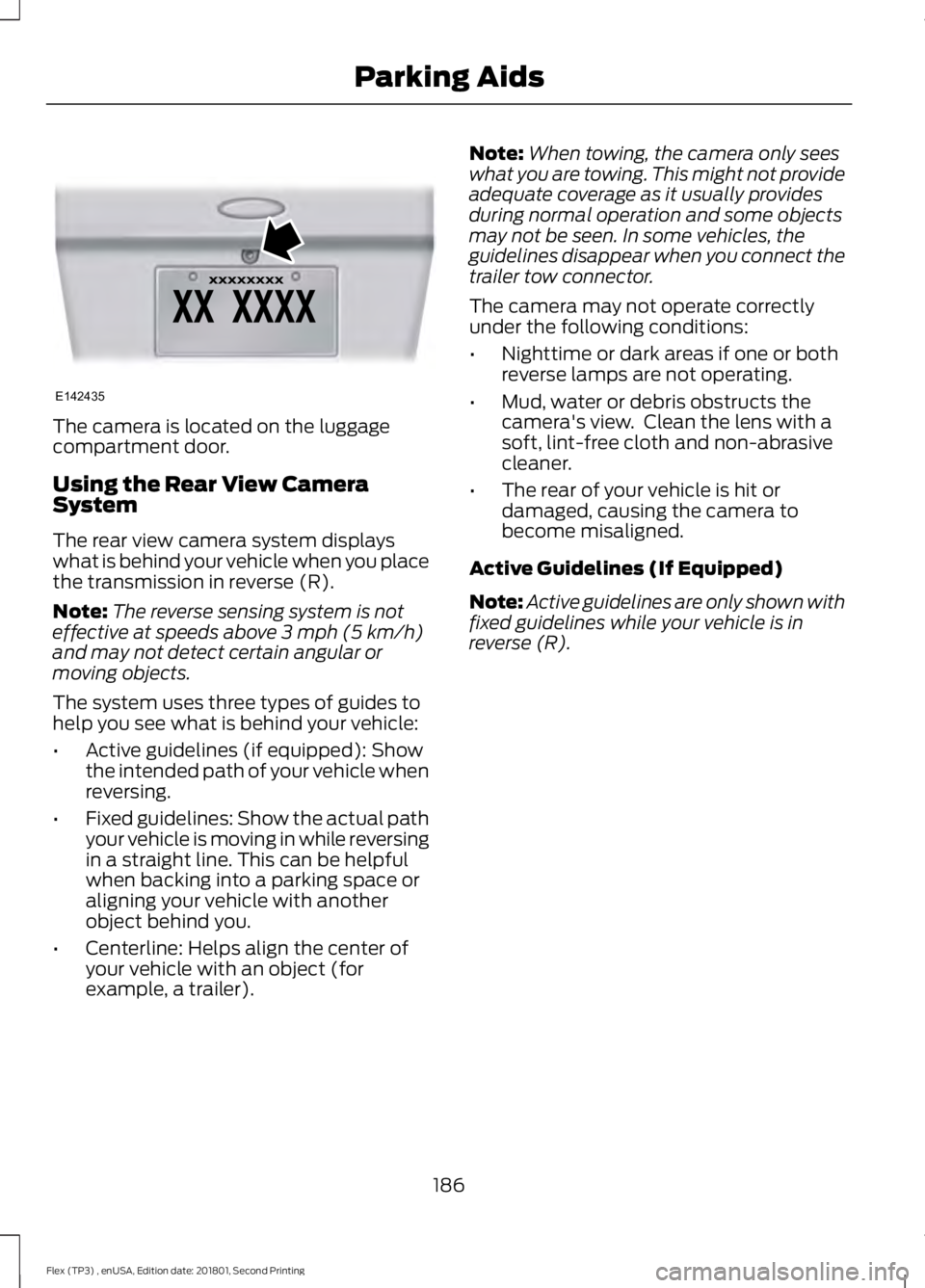
The camera is located on the luggage
compartment door.
Using the Rear View Camera
System
The rear view camera system displays
what is behind your vehicle when you place
the transmission in reverse (R).
Note:
The reverse sensing system is not
effective at speeds above 3 mph (5 km/h)
and may not detect certain angular or
moving objects.
The system uses three types of guides to
help you see what is behind your vehicle:
• Active guidelines (if equipped): Show
the intended path of your vehicle when
reversing.
• Fixed guidelines: Show the actual path
your vehicle is moving in while reversing
in a straight line. This can be helpful
when backing into a parking space or
aligning your vehicle with another
object behind you.
• Centerline: Helps align the center of
your vehicle with an object (for
example, a trailer). Note:
When towing, the camera only sees
what you are towing. This might not provide
adequate coverage as it usually provides
during normal operation and some objects
may not be seen. In some vehicles, the
guidelines disappear when you connect the
trailer tow connector.
The camera may not operate correctly
under the following conditions:
• Nighttime or dark areas if one or both
reverse lamps are not operating.
• Mud, water or debris obstructs the
camera's view. Clean the lens with a
soft, lint-free cloth and non-abrasive
cleaner.
• The rear of your vehicle is hit or
damaged, causing the camera to
become misaligned.
Active Guidelines (If Equipped)
Note: Active guidelines are only shown with
fixed guidelines while your vehicle is in
reverse (R).
186
Flex (TP3) , enUSA, Edition date: 201801, Second Printing Parking AidsE142435
Page 193 of 508
USING ADAPTIVE CRUISE
CONTROL (If Equipped)
WARNINGS
Always pay close attention to
changing road conditions when using
adaptive cruise control. The system
does not replace attentive driving. Failing
to pay attention to the road may result in
a crash, serious injury or death. Do not use the adaptive cruise
control when entering or leaving a
highway, on roads with intersections
or roundabouts or non-vehicular traffic or
roads that are winding, slippery, unpaved,
or steep slopes. Do not use the system in poor
visibility, for example fog, heavy rain,
spray or snow.
Do not use the system when towing
a trailer with aftermarket trailer
brake controls. Aftermarket trailer
brakes will not function properly when you
switch the system on because the brakes
are electronically controlled. Failing to do
so may result in loss of vehicle control,
which could result in serious injury. Do not use tire sizes other than those
recommended because this can
affect the normal operation of the
system. Failure to do so may result in a loss
of vehicle control, which could result in
serious injury. Adaptive cruise control may not
detect stationary or slow moving
vehicles below
6 mph (10 km/h).
Adaptive cruise control does not
detect pedestrians or objects in the
road.
Adaptive cruise control does not
detect oncoming vehicles in the
same lane. WARNINGS
Adaptive cruise control is not a crash
warning or avoidance system.
Note:
It is your responsibility to stay alert,
drive safely and be in control of the vehicle
at all times.
The system adjusts your vehicle speed to
maintain the set gap between you and the
vehicle in front of you in the same lane.
You can select four gap settings.
The system uses a radar sensor that
projects a beam directly in front of your
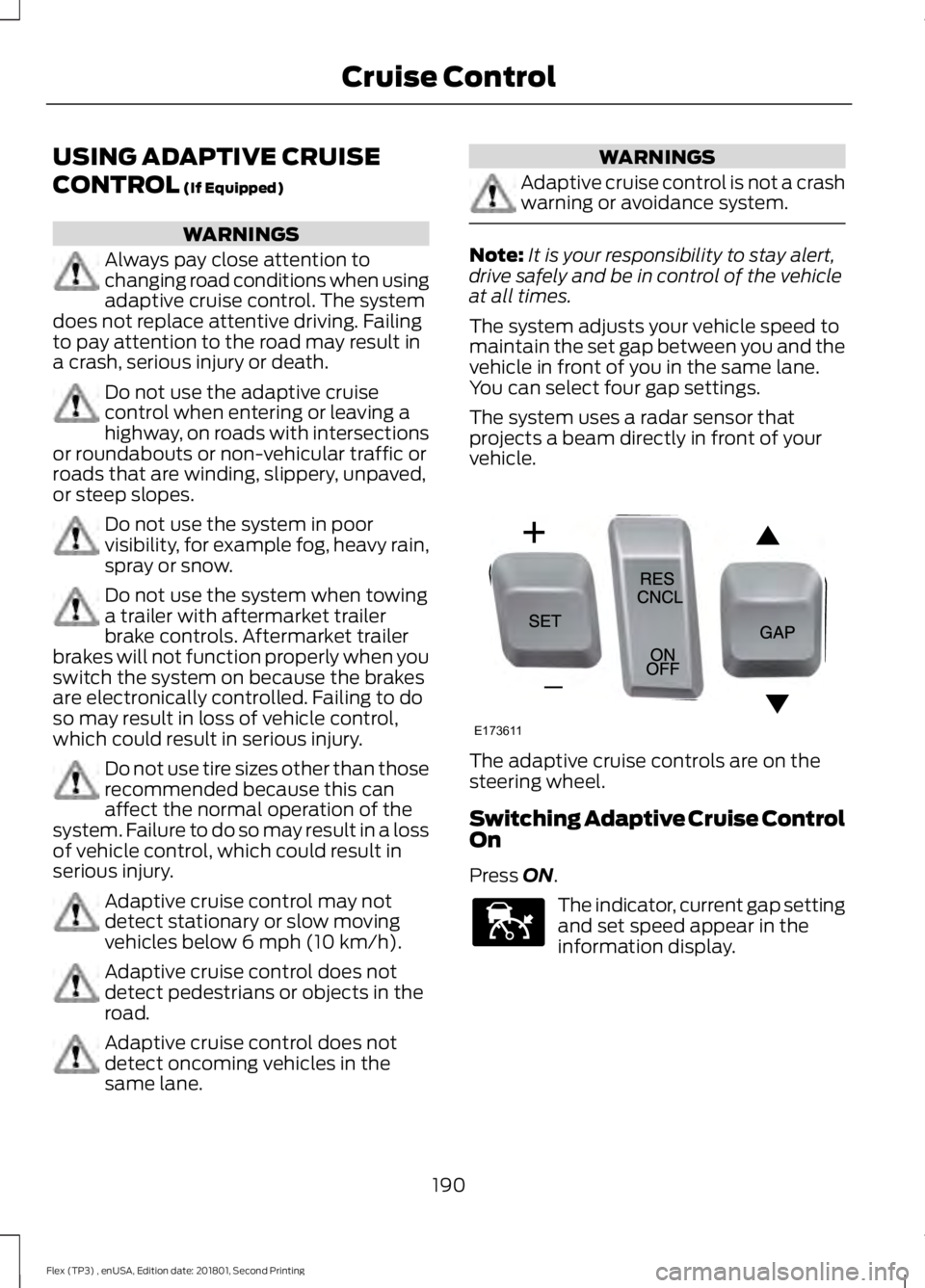
vehicle. The adaptive cruise controls are on the
steering wheel.
Switching Adaptive Cruise Control
On
Press
ON.
The indicator, current gap setting
and set speed appear in the
information display.
190
Flex (TP3) , enUSA, Edition date: 201801, Second Printing Cruise ControlE173611 E144529