USB FORD FLEX 2019 Owners Manual
[x] Cancel search | Manufacturer: FORD, Model Year: 2019, Model line: FLEX, Model: FORD FLEX 2019Pages: 513, PDF Size: 39.3 MB
Page 8 of 513

Engine Specifications - 3.5L Ecoboost™
........................................................................\
299
Motorcraft Parts - 3.5L Duratec ...........
300
Motorcraft Parts - 3.5L Ecoboost™ .....
302
Vehicle Identification Number ...............
303
Vehicle Certification Label ......................
304
Transmission Code Designation ...........
304
Capacities and Specifications - 3.5L Duratec .......................................................
305
Capacities and Specifications - 3.5L Ecoboost™ ..............................................
309
Bulb Specification Chart ...........................
313
Audio System
General Information ...................................
315
Audio Unit - Vehicles With: AM/FM/CD/ SYNC/Satellite Radio ............................
316
Audio Unit - Vehicles With: Premium AM/ FM/CD ..........................................................
321
Audio Unit - Vehicles With: Sony AM/FM/ CD .................................................................
322
USB Port .........................................................
323
Media Hub .....................................................
323
SYNC™
General Information ..................................
324
Using Voice Recognition ..........................
326
Using SYNC™ With Your Phone ...........
329
SYNC™ Applications and Services ......
342
Using SYNC™ With Your Media Player ........................................................................\
344
SYNC™ Troubleshooting ........................
354
SYNC™ 3
General Information ..................................
362
Home Screen ................................................
374
Using Voice Recognition ...........................
375
Entertainment .............................................
382
Climate ...........................................................
392
Phone ..............................................................
394
Navigation ....................................................
400Apps
................................................................
408
Settings ............................................................
411
SYNC™ 3 Troubleshooting .....................
424
Accessories
Accessories ...................................................
438
Ford Protect
Ford Protect .................................................
440
Scheduled Maintenance
General Maintenance Information ......
442
Normal Scheduled Maintenance .........
445
Special Operating Conditions Scheduled Maintenance ............................................
448
Scheduled Maintenance Record ..........
450
Appendices
Electromagnetic Compatibility ............
460
End User License Agreement ................
462
Type Approvals ...........................................
488
5
Flex (TP3) , enUSA, Edition date: 201803, Second-Printing Table of Contents
Page 55 of 513
GENERAL INFORMATION ON
RADIO FREQUENCIES
This device complies with Part 15 of the
FCC Rules and with Licence exempt RSS
Standards of Industry Canada. Operation
is subject to the following two conditions:
•
This device may not cause harmful
interference, and
• This device must accept any
interference received, including
interference that may cause undesired
operation. WARNING: Changes or
modifications not expressively approved
by the party responsible for compliance
could void the user's authority to operate
the equipment. The term "IC:" before the
radio certification number only signifies
that Industry Canada technical
specifications were met.
The typical operating range for your
transmitter is approximately
33 ft (10 m).
Vehicles with the remote start feature will
have a greater range. One of the following
could cause a decrease in operating range:
• weather conditions
• nearby radio towers
• structures around the vehicle
• other vehicles parked next to your
vehicle
Other short-distance radio transmitters,
such as amateur radios, medical
equipment, wireless headphones, remote
controls and alarm systems may operate
on the same frequency as your remote
control. If other transmitters are operating
on those frequencies, you may not be able
to use your remote control. Using your
remote control near some types of
electronic equipment, such as USB devices, computers or cell phones can interfere with
remote operation. Operating your remote
control near metal or metallic-finished
purses, bags or clothing can interfere with
remote operation. You can lock and unlock
the doors with the key.
Note:
Make sure to lock your vehicle before
leaving it unattended.
Note: If you are in range, the remote control
will operate if you press any button
unintentionally.
Intelligent Access
The system uses a radio frequency signal
to communicate with your vehicle and
authorize your vehicle to unlock when one
of the following conditions are met:
• You touch the inside of any exterior
door handle within
3 ft (1 m) proximity
of an intelligent access key.
• You press the luggage compartment
button.
• You press a button on the transmitter.
If excessive radio frequency interference
is present in the area or if the transmitter
battery is low, you may need to
mechanically unlock your door. You can
use the mechanical key blade in your
intelligent access key to open the driver
door in this situation. See
Remote
Control (page 53).
52
Flex (TP3) , enUSA, Edition date: 201803, Second-Printing Keys and Remote Controls
Page 146 of 513
CENTER CONSOLE
Stow items in the cup holder carefully as
items may become loose during hard
braking, acceleration or crashes, including
hot drinks which may spill.
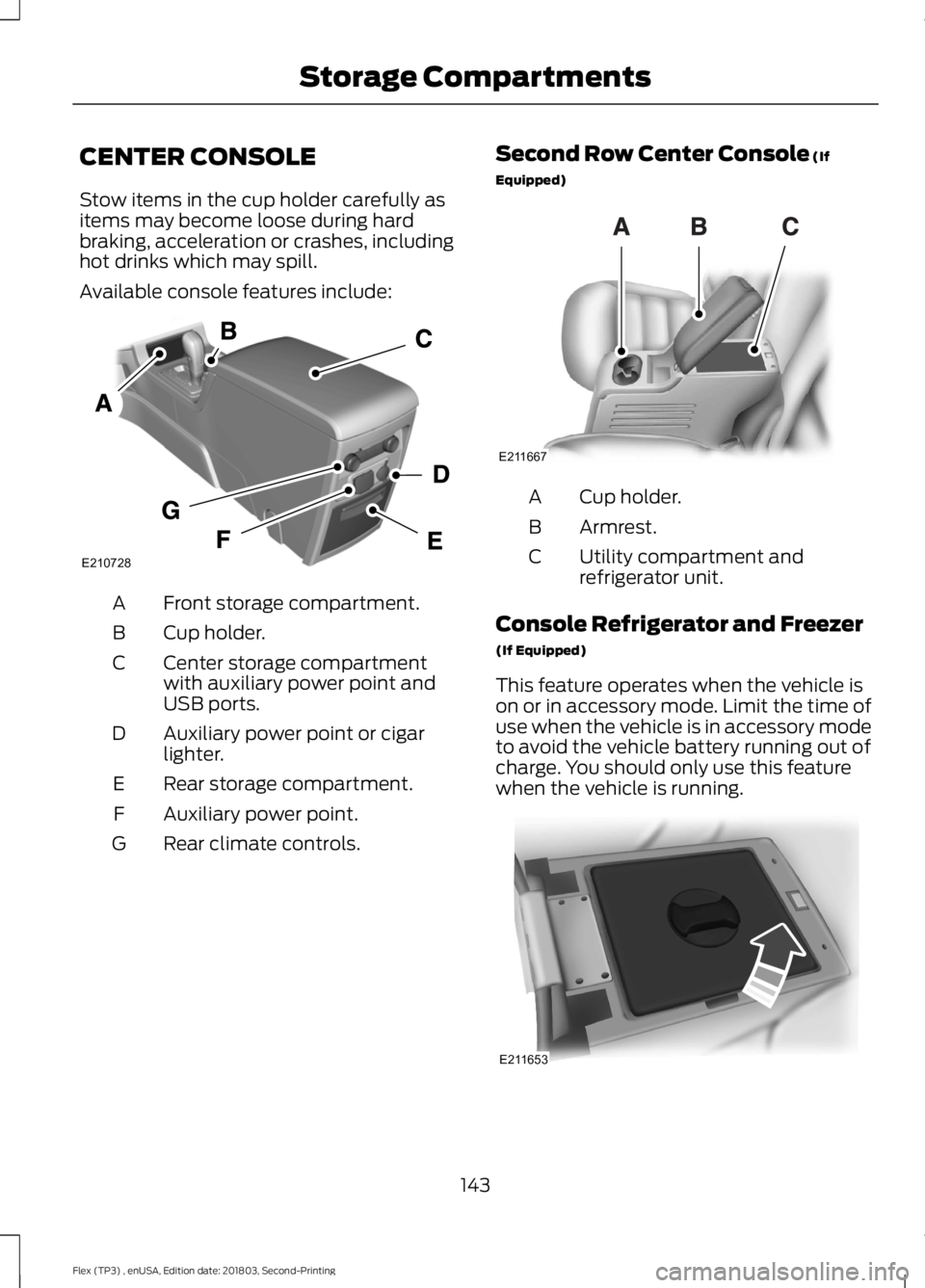
Available console features include:
Front storage compartment.
A
Cup holder.
B
Center storage compartment
with auxiliary power point and
USB ports.
C
Auxiliary power point or cigar
lighter.
D
Rear storage compartment.
E
Auxiliary power point.
F
Rear climate controls.
G Second Row Center Console (If
Equipped) Cup holder.
A
Armrest.
B
Utility compartment and
refrigerator unit.
C
Console Refrigerator and Freezer
(If Equipped)
This feature operates when the vehicle is
on or in accessory mode. Limit the time of
use when the vehicle is in accessory mode
to avoid the vehicle battery running out of
charge. You should only use this feature
when the vehicle is running. 143
Flex (TP3) , enUSA, Edition date: 201803, Second-Printing Storage CompartmentsE210728 E211667 E211653
Page 326 of 513
Using Seek, Fast Forward and
Reverse
In radio mode, select a frequency band and
press and release either button. The
system stops at the first station it finds in
that direction.
In CD mode, press and release to select
the next or previous track. Press and hold
to move quickly forward or backward
through the current track.
In satellite radio mode, press and release
to select the next or previous satellite radio
station. If you select a specific category,
such as jazz, rock or news, press to find the
next or previous station in the category you
select.
USB PORT
WARNING: Driving while distracted
can result in loss of vehicle control, crash
and injury. We strongly recommend that
you use extreme caution when using any
device that may take your focus off the
road. Your primary responsibility is the safe
operation of your vehicle. We recommend
against the use of any hand-held device
while driving and encourage the use of
voice-operated systems when possible.
Make sure you are aware of all applicable
local laws that may affect the use of
electronic devices while driving. The USB port allows you to plug in media
playing devices, memory sticks and charge
devices, if supported.
MEDIA HUB
WARNING:
Driving while distracted
can result in loss of vehicle control, crash
and injury. We strongly recommend that
you use extreme caution when using any
device that may take your focus off the
road. Your primary responsibility is the safe
operation of your vehicle. We recommend
against the use of any hand-held device
while driving and encourage the use of
voice-operated systems when possible.
Make sure you are aware of all applicable
local laws that may affect the use of
electronic devices while driving.
The media hub may be on the instrument
panel or center console.
The media hub may contain one or more
of the following inputs:
See
USB Port (page 323).
323
Flex (TP3) , enUSA, Edition date: 201803, Second-Printing Audio System E201595
Page 327 of 513
GENERAL INFORMATION
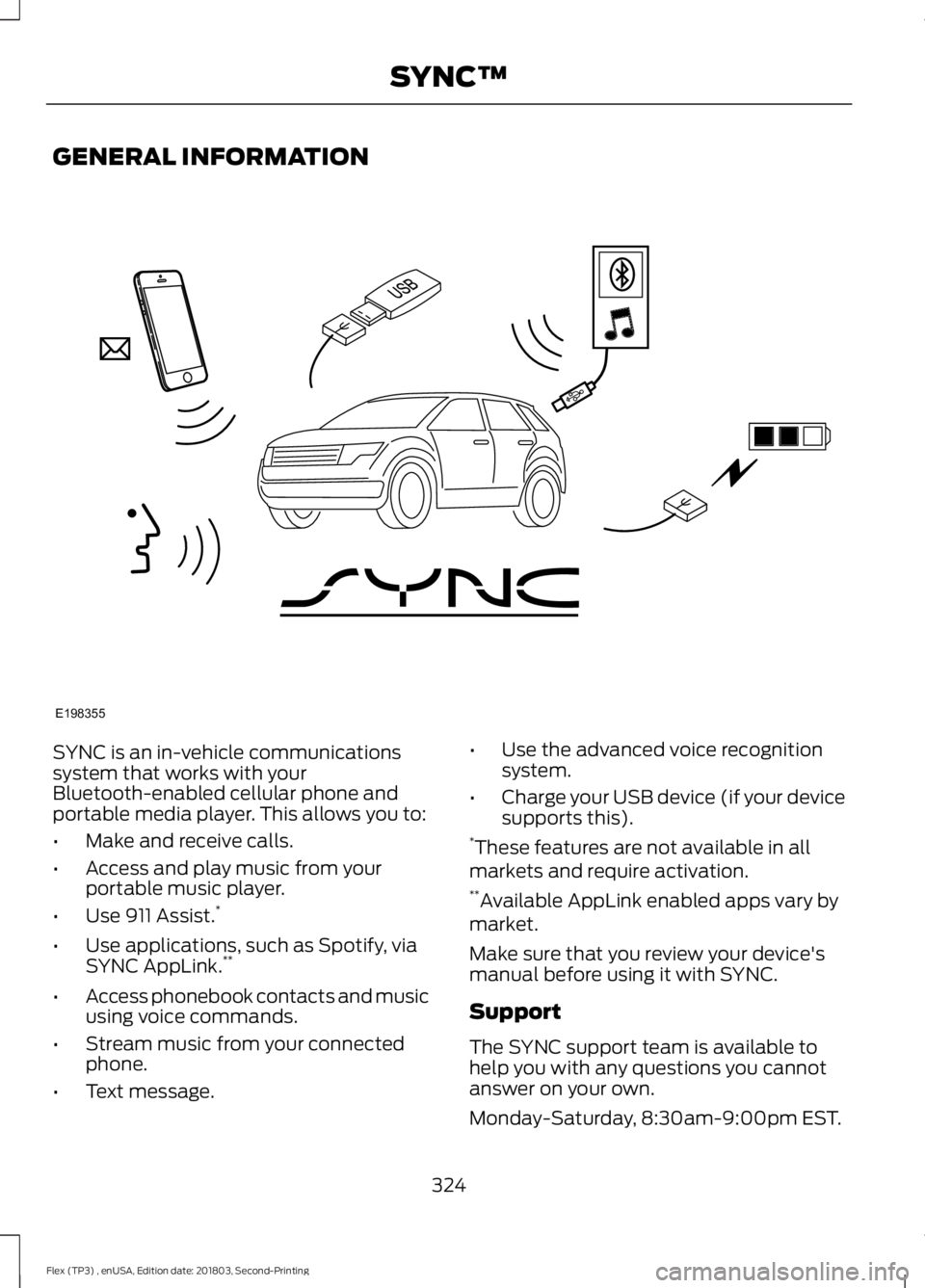
SYNC is an in-vehicle communications
system that works with your
Bluetooth-enabled cellular phone and
portable media player. This allows you to:
•
Make and receive calls.
• Access and play music from your
portable music player.
• Use 911 Assist. *
• Use applications, such as Spotify, via
SYNC AppLink. **
• Access phonebook contacts and music
using voice commands.
• Stream music from your connected
phone.
• Text message. •
Use the advanced voice recognition
system.
• Charge your USB device (if your device
supports this).
* These features are not available in all
markets and require activation.
** Available AppLink enabled apps vary by
market.
Make sure that you review your device's
manual before using it with SYNC.
Support
The SYNC support team is available to
help you with any questions you cannot
answer on your own.
Monday-Saturday, 8:30am-9:00pm EST.
324
Flex (TP3) , enUSA, Edition date: 201803, Second-Printing SYNC™E198355
Page 329 of 513
System data cannot be accessed without
special equipment and access to the
vehicle's SYNC module. Ford Motor
Company and Ford of Canada will not
access the system data for any purpose
other than as described absent consent, a
court order, or where required by law
enforcement, other government
authorities, or other third parties acting
with lawful authority. Other parties may
seek to access the information
independently of Ford Motor Company and
Ford of Canada. For further privacy
information, see the section on 911 Assist.
USING VOICE RECOGNITION
This system helps you control many
features using voice commands. This
allows you to keep your hands on the
wheel and focus on what is in front of you.
Helpful Hints
•
Make sure the interior of your vehicle is
as quiet as possible. Wind noise from
open windows and road vibrations may
prevent the system from correctly
recognizing spoken commands.
• After pressing the voice button, wait
until after the tone sounds and
Listening appears before saying a
command. Any command spoken
before this does not register with the
system.
• Speak naturally, without long pauses
between words.
• At any time, you can interrupt the
system while it is speaking by pressing
the voice button.
Initiating a Voice Session Initiate a voice session by
pressing the voice button on the
steering wheel controls. See
Voice Control (page 75).
When prompted you can say any of the following: If you want the system to carry out the following
Voice command
Stream audio from your phone.
Bluetooth Audio
Cancel the requested action.
Cancel
Access mobile applications.
mobile (apps | applica-
tions)
Make calls.
Phone
Access the device connected to your USB port.
USB [1]
326
Flex (TP3) , enUSA, Edition date: 201803, Second-Printing SYNC™E142599
Page 330 of 513
If you want the system to carry out the following
Voice command
Adjust the level of voice interaction and feedback.
Voice Settings | Voice
Preferences
Hear a list of voice commands available in the current mode.
Help
You can say any of the voice commands that appear within open and close brackets that
are separated by |. For example, where (cancel | stop | exit) appears you say; cancel or
stop or exit.
You must say any of the voice commands that appear outside of open and close brackets.
For example, where mobile (apps | applications) appears, you must say mobile followed
by either apps or applications.
You do not need to say words that appear within square brackets. For example, for where
(USB [stick] | iPOD | MP3 [player]) appears, you can say USB or USB stick.
System Interaction and Feedback
The system provides feedback through
audible tones, prompts, questions and
spoken confirmations depending on the
situation and the chosen level of
interaction (voice settings). You can
customize the voice recognition system to
provide more or less instruction and
feedback. The default setting is to a higher level of
interaction in order to help you learn to use
the system. You can change these settings
at any time.
Adjusting the Interaction Level Initiate a voice session by
pressing the voice button on the
steering wheel controls. See
Voice Control (page 75).
When prompted say the following: If you want the system to carry out the following
Voice command
Voice Settings | Voice Preferences
Followed by either of the following: Provide more detailed interaction and guidance.
Interaction Mode
Standard
Provide less audible interaction and more tone prompts.
Interaction Mode
Advanced
The system defaults to the standard interaction mode.
327
Flex (TP3) , enUSA, Edition date: 201803, Second-Printing SYNC™E142599
Page 347 of 513
If you do not cancel the call, and SYNC
makes a successful call, a pre-recorded
message plays for the 911 operator, and
then the occupant(s) in your vehicle is able
to talk with the operator. Be prepared to
provide your name, phone number and
location immediately, because not all 911
systems are capable of receiving this
information electronically.
911 Assist May Not Work If
•
Your cellular phone or 911 Assist
hardware sustains damage in a crash.
• The vehicle's battery or the SYNC
system has no power.
• The phone(s) thrown from your vehicle
are the ones paired and connected to
the system.
911 Assist Privacy Notice
When you turn on 911 Assist, it may
disclose to emergency services that your
vehicle has been in a crash involving the
deployment of an airbag or activation of
the fuel pump shut-off. Certain versions or
updates to 911 Assist may also be capable
of electronically or verbally disclosing to
911 operators your vehicle location or other
details about your vehicle or crash to assist
911 operators to provide the most
appropriate emergency services. If you do
not want to disclose this information, do
not turn the feature on. USING SYNC™ WITH YOUR
MEDIA PLAYER
You can access and play music from your
digital music player over your vehicle's
speaker system using the system's media
menu or voice commands. You can also
sort and play your music by specific
categories, for example artist and album.
Note:
The system is capable of indexing up
to 6,000 songs.
SYNC is capable of hosting nearly any
digital media player including: iPod®,
Zune ™, plays from device players, and
most USB drives. SYNC also supports the
following audio formats MP3, WMA, WAV
and ACC.
Connecting Your Digital Media
Player to the USB Port
Note: If your digital media player has a
power switch, make sure you switch it on
before plugging it in.
To Connect Using Voice Commands
Plug the device into the USB port. See
USB Port (page 323). Press the voice button and when prompted say:
Action and Description
Voice command
You can now play music by saying any of the appropriate
voice commands. See Media voice commands.
USB [1]
You do not need to say words that appear within square brackets. For example, for where
USB[1]appears, you can say USB or USB one.
344
Flex (TP3) , enUSA, Edition date: 201803, Second-Printing SYNC™E142599
Page 348 of 513
To Connect Using the System Menu
Plug the device into the USB port. See
USB Port (page 323).
Press the
AUX button, then the Menu
button to enter the Media Menu.
You can then scroll to: Action and Description
Message
Press the
OK button.
SELECT SRC
Press the
OK button.
SYNC USB
Depending on how many digital media files are on your
connected device, the following message may appear in the
radio display.
Indexing\b
When indexing is complete, the screen returns to the Play menu. You can then
select one of the following:
PLAY ALL
ARTISTS
ALBUMS
GENRES
PLAYLISTS
TRACKS
EXPLORE USB
SIMILARMUSIC Exit the current menu.
RETURN
What's Playing?
When a track is playing, you can ask the
system to tell you what is currently playing.
345
Flex (TP3) , enUSA, Edition date: 201803, Second-Printing SYNC™
Page 349 of 513
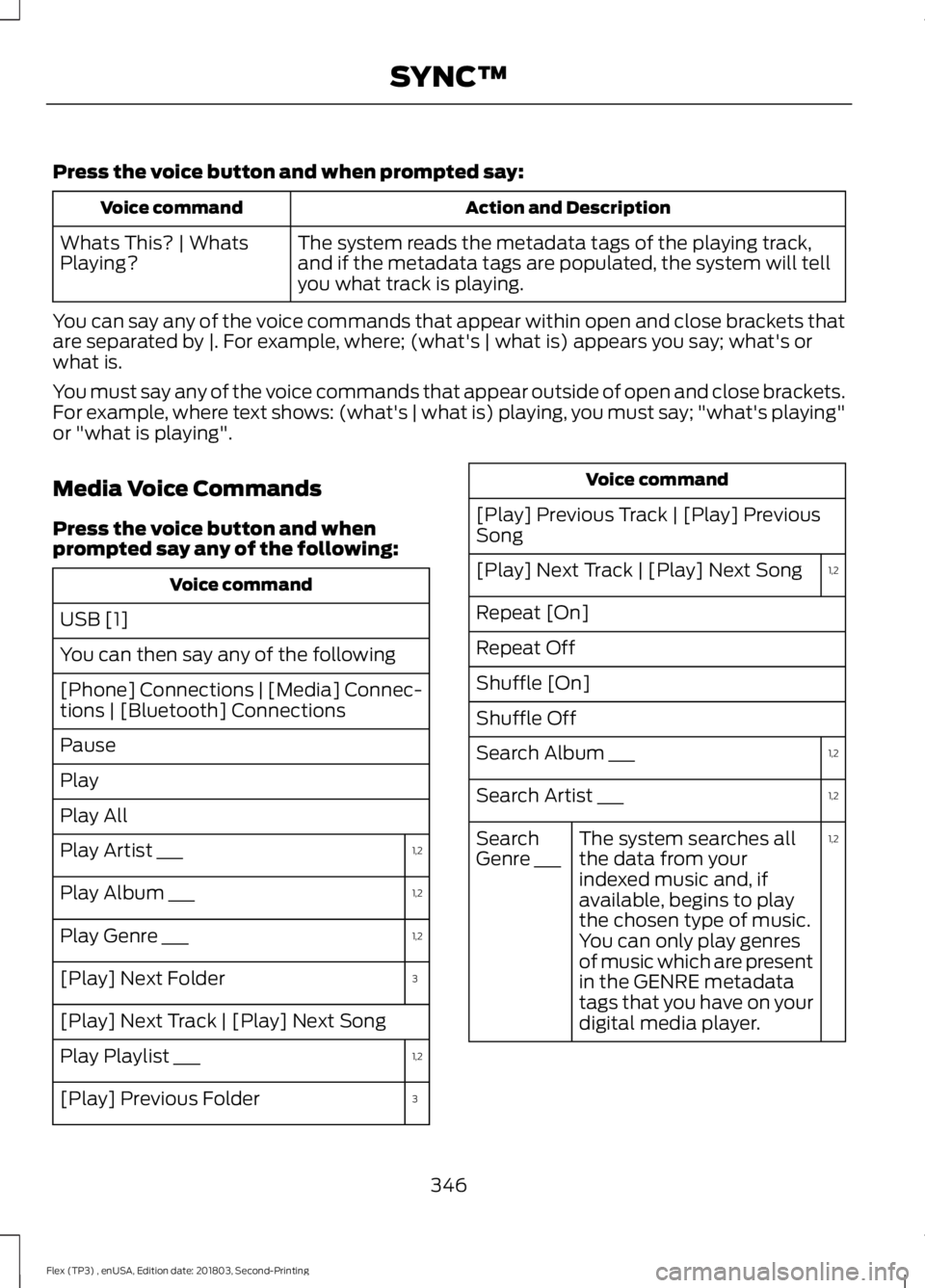
Press the voice button and when prompted say:
Action and Description
Voice command
The system reads the metadata tags of the playing track,
and if the metadata tags are populated, the system will tell
you what track is playing.
Whats This? | Whats
Playing?
You can say any of the voice commands that appear within open and close brackets that
are separated by |. For example, where; (what's | what is) appears you say; what's or
what is.
You must say any of the voice commands that appear outside of open and close brackets.
For example, where text shows: (what's | what is) playing, you must say; "what's playing"
or "what is playing".
Media Voice Commands
Press the voice button and when
prompted say any of the following: Voice command
USB [1]
You can then say any of the following
[Phone] Connections | [Media] Connec-
tions | [Bluetooth] Connections
Pause
Play
Play All 1,2
Play Artist ___
1,2
Play Album ___
1,2
Play Genre ___
3
[Play] Next Folder
[Play] Next Track | [Play] Next Song
1,2
Play Playlist ___
3
[Play] Previous Folder Voice command
[Play] Previous Track | [Play] Previous
Song 1,2
[Play] Next Track | [Play] Next Song
Repeat [On]
Repeat Off
Shuffle [On]
Shuffle Off
1,2
Search Album ___
1,2
Search Artist ___
1,2
The system searches all
the data from your
indexed music and, if
available, begins to play
the chosen type of music.
You can only play genres
of music which are present
in the GENRE metadata
tags that you have on your
digital media player.
Search
Genre ___
346
Flex (TP3) , enUSA, Edition date: 201803, Second-Printing SYNC™