brake fluid FORD FLEX 2019 Owners Manual
[x] Cancel search | Manufacturer: FORD, Model Year: 2019, Model line: FLEX, Model: FORD FLEX 2019Pages: 513, PDF Size: 39.3 MB
Page 7 of 513
Roadside Emergencies
Roadside Assistance
..................................219
Hazard Flashers ..........................................
220
Fuel Shutoff ..................................................
220
Jump Starting the Vehicle .........................
221
Post-Crash Alert System ..........................
223
Transporting the Vehicle ..........................
223
Customer Assistance
Getting the Services You Need ..............
225
In California (U.S. Only) ............................
226
The Better Business Bureau (BBB) Auto Line Program (U.S. Only) .....................
227
Utilizing the Mediation/Arbitration Program (Canada Only) ......................
228
Getting Assistance Outside the U.S. and Canada .......................................................
228
Ordering Additional Owner's Literature ........................................................................\
230
Reporting Safety Defects (U.S. Only) ........................................................................\
230
Reporting Safety Defects (Canada Only) ........................................................................\
230
Fuses
Fuse Specification Chart ..........................
232
Changing a Fuse ...........................................
241
Maintenance
General Information ..................................
243
Opening and Closing the Hood .............
243
Under Hood Overview - 3.5L Duratec ........................................................................\
244
Under Hood Overview - 3.5L Ecoboost™ ........................................................................\
245
Engine Oil Dipstick ......................................
247
Engine Oil Check .........................................
247
Oil Change Indicator Reset .....................
248
Engine Coolant Check ..............................
249
Automatic Transmission Fluid Check ........................................................................\
253 Brake Fluid Check
.......................................
255
Power Steering Fluid Check ....................
255
Washer Fluid Check ...................................
255
Changing the 12V Battery ........................
256
Checking the Wiper Blades .....................
257
Changing the Wiper Blades ....................
258
Adjusting the Headlamps .......................
259
Removing a Headlamp ............................
260
Changing a Bulb .........................................
260
Changing the Engine Air Filter ...............
263
Vehicle Care
General Information ..................................
265
Cleaning Products ......................................
265
Cleaning the Exterior .................................
265
Waxing ............................................................
267
Cleaning the Engine ...................................
267
Cleaning the Windows and Wiper Blades ........................................................................\
267
Cleaning the Interior ..................................
268
Cleaning the Instrument Panel and Instrument Cluster Lens ......................
268
Cleaning Leather Seats ............................
269
Repairing Minor Paint Damage ..............
270
Cleaning the Wheels .................................
270
Vehicle Storage ............................................
270
Body Styling Kits ..........................................
272
Wheels and Tires
General Information ...................................
273
Tire Care .........................................................
275
Using Snow Chains ....................................
288
Tire Pressure Monitoring System .........
289
Changing a Road Wheel ..........................
293
Technical Specifications .........................
298
Capacities and Specifications
Engine Specifications - 3.5L Duratec ........................................................................\
299
4
Flex (TP3) , enUSA, Edition date: 201803, Second-Printing Table of Contents
Page 10 of 513
ABOUT THIS MANUAL
Thank you for choosing Ford. We
recommend that you take some time to
get to know your vehicle by reading this
manual. The more that you know about
your vehicle, the greater the safety and
pleasure you will get from driving it.
WARNING: Driving while distracted
can result in loss of vehicle control, crash
and injury. We strongly recommend that
you use extreme caution when using any
device that may take your focus off the
road. Your primary responsibility is the safe
operation of your vehicle. We recommend
against the use of any hand-held device
while driving and encourage the use of
voice-operated systems when possible.
Make sure you are aware of all applicable
local laws that may affect the use of
electronic devices while driving.
Note: This manual describes product
features and options available throughout
the range of available models, sometimes
even before they are generally available. It
may describe options not fitted to the
vehicle you have purchased.
Note: Some of the illustrations in this
manual may show features as used in
different models, so may appear different
to you on your vehicle.
Note: Always use and operate your vehicle
in line with all applicable laws and
regulations.
Note: Pass on this manual when selling
your vehicle. It is an integral part of your
vehicle.
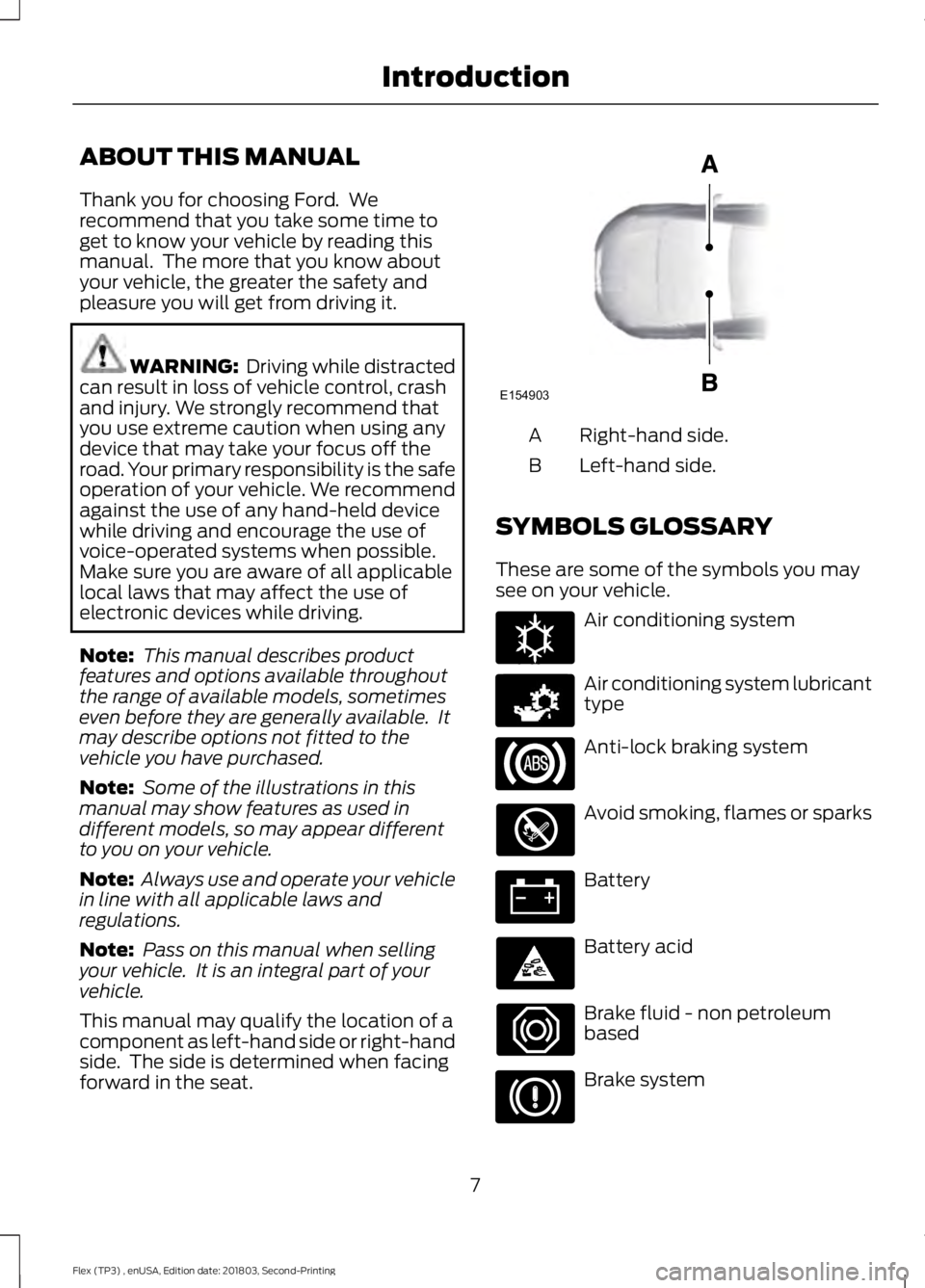
This manual may qualify the location of a
component as left-hand side or right-hand
side. The side is determined when facing
forward in the seat. Right-hand side.
A
Left-hand side.
B
SYMBOLS GLOSSARY
These are some of the symbols you may
see on your vehicle. Air conditioning system
Air conditioning system lubricant
type
Anti-lock braking system
Avoid smoking, flames or sparks
Battery
Battery acid
Brake fluid - non petroleum
based
Brake system
7
Flex (TP3) , enUSA, Edition date: 201803, Second-Printing IntroductionE154903 E162384 E231157
Page 11 of 513
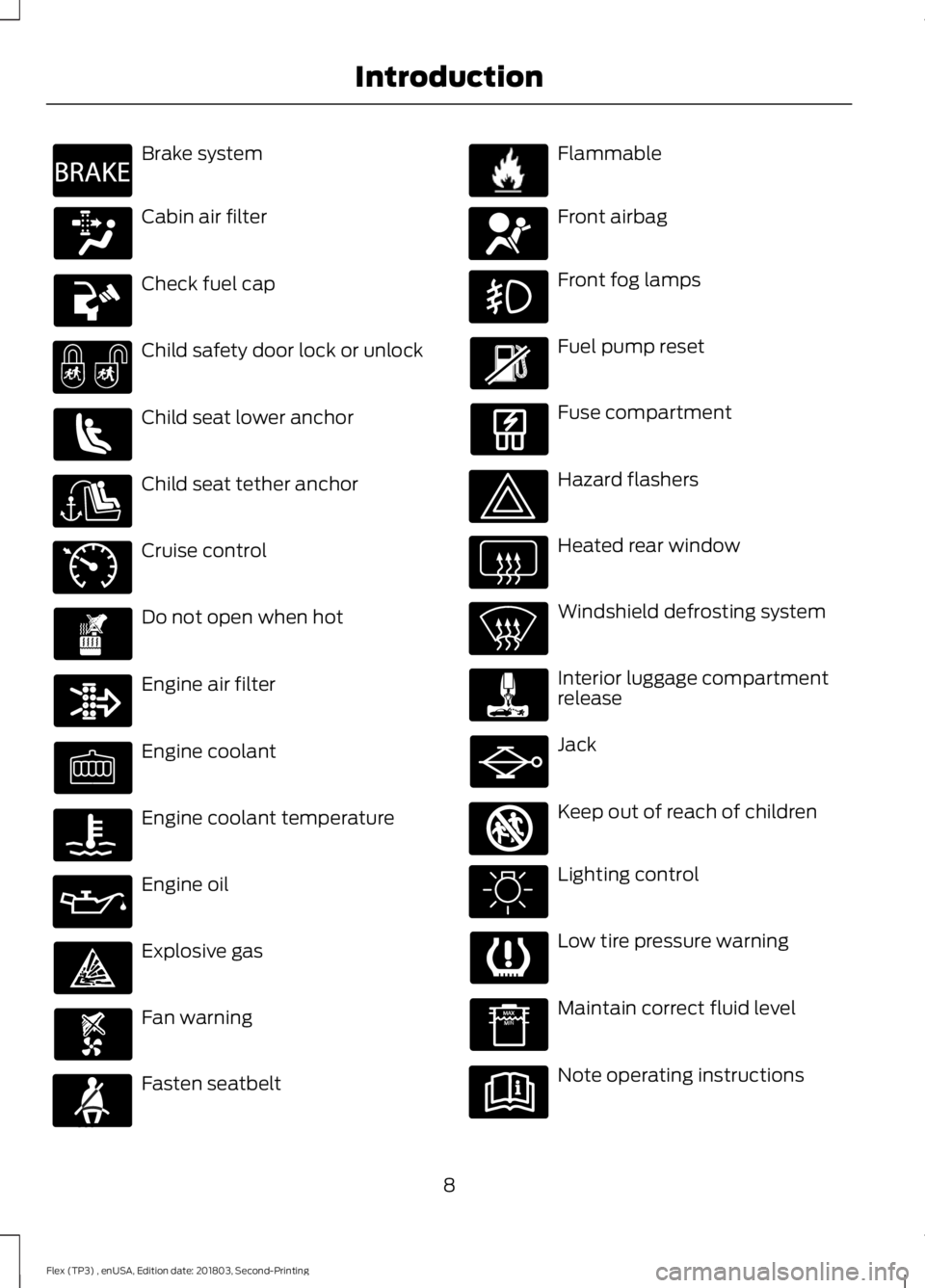
Brake system
Cabin air filter
Check fuel cap
Child safety door lock or unlock
Child seat lower anchor
Child seat tether anchor
Cruise control
Do not open when hot
Engine air filter
Engine coolant
Engine coolant temperature
Engine oil
Explosive gas
Fan warning
Fasten seatbelt Flammable
Front airbag
Front fog lamps
Fuel pump reset
Fuse compartment
Hazard flashers
Heated rear window
Windshield defrosting system
Interior luggage compartment
release
Jack
Keep out of reach of children
Lighting control
Low tire pressure warning
Maintain correct fluid level
Note operating instructions
8
Flex (TP3) , enUSA, Edition date: 201803, Second-Printing IntroductionE270480 E71340 E71880 E231160 E67017 E161353
Page 12 of 513
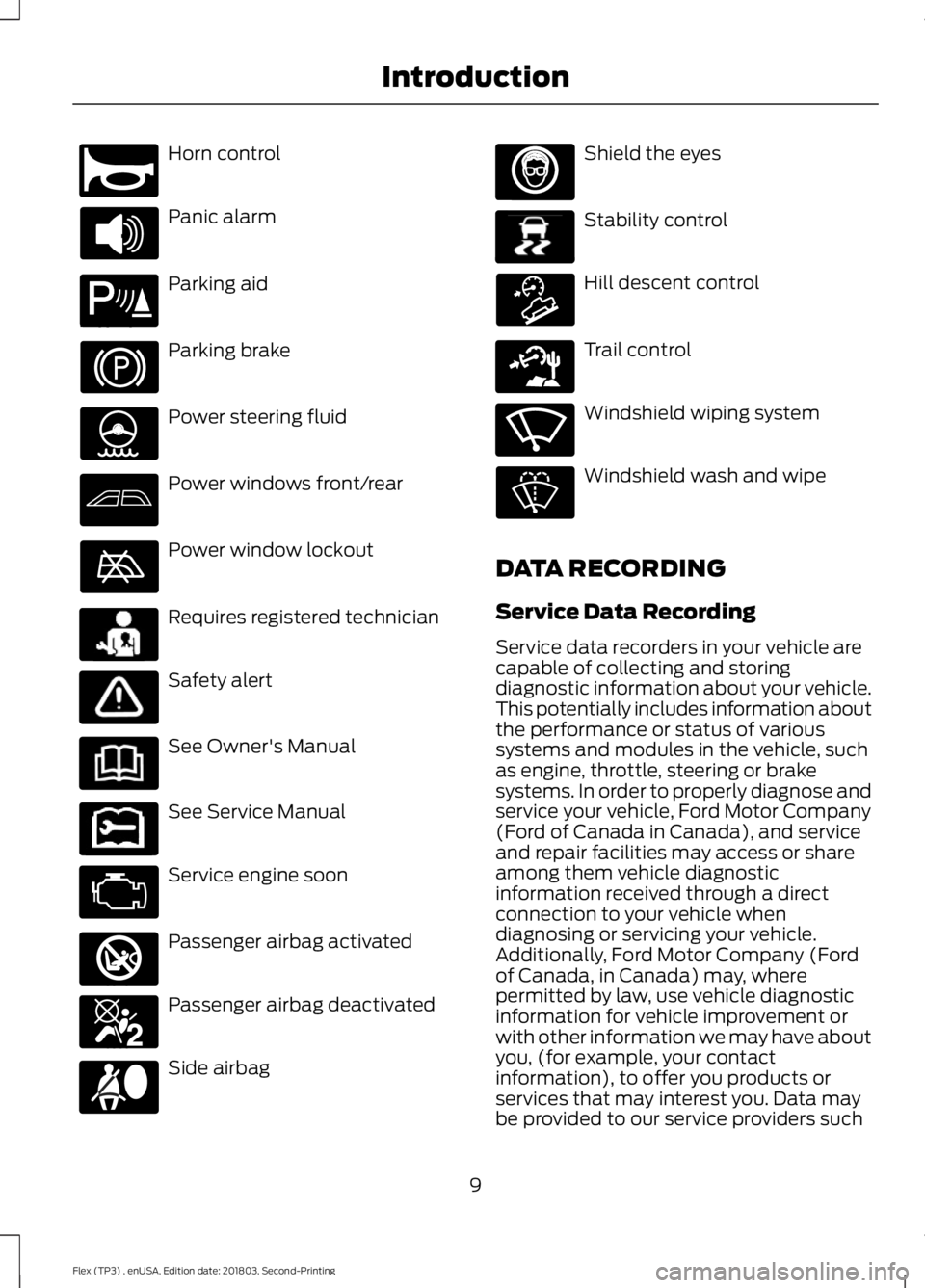
Horn control
Panic alarm
Parking aid
Parking brake
Power steering fluid
Power windows front/rear
Power window lockout
Requires registered technician
Safety alert
See Owner's Manual
See Service Manual
Service engine soon
Passenger airbag activated
Passenger airbag deactivated
Side airbag Shield the eyes
Stability control
Hill descent control
Trail control
Windshield wiping system
Windshield wash and wipe
DATA RECORDING
Service Data Recording
Service data recorders in your vehicle are
capable of collecting and storing
diagnostic information about your vehicle.
This potentially includes information about
the performance or status of various
systems and modules in the vehicle, such
as engine, throttle, steering or brake
systems. In order to properly diagnose and
service your vehicle, Ford Motor Company
(Ford of Canada in Canada), and service
and repair facilities may access or share
among them vehicle diagnostic
information received through a direct
connection to your vehicle when
diagnosing or servicing your vehicle.
Additionally, Ford Motor Company (Ford
of Canada, in Canada) may, where
permitted by law, use vehicle diagnostic
information for vehicle improvement or
with other information we may have about
you, (for example, your contact
information), to offer you products or
services that may interest you. Data may
be provided to our service providers such
9
Flex (TP3) , enUSA, Edition date: 201803, Second-Printing IntroductionE270945 E139213 E231159 E231158 E270849 E270850 E167012 E138639 E163957 E271982 E270969
Page 95 of 513
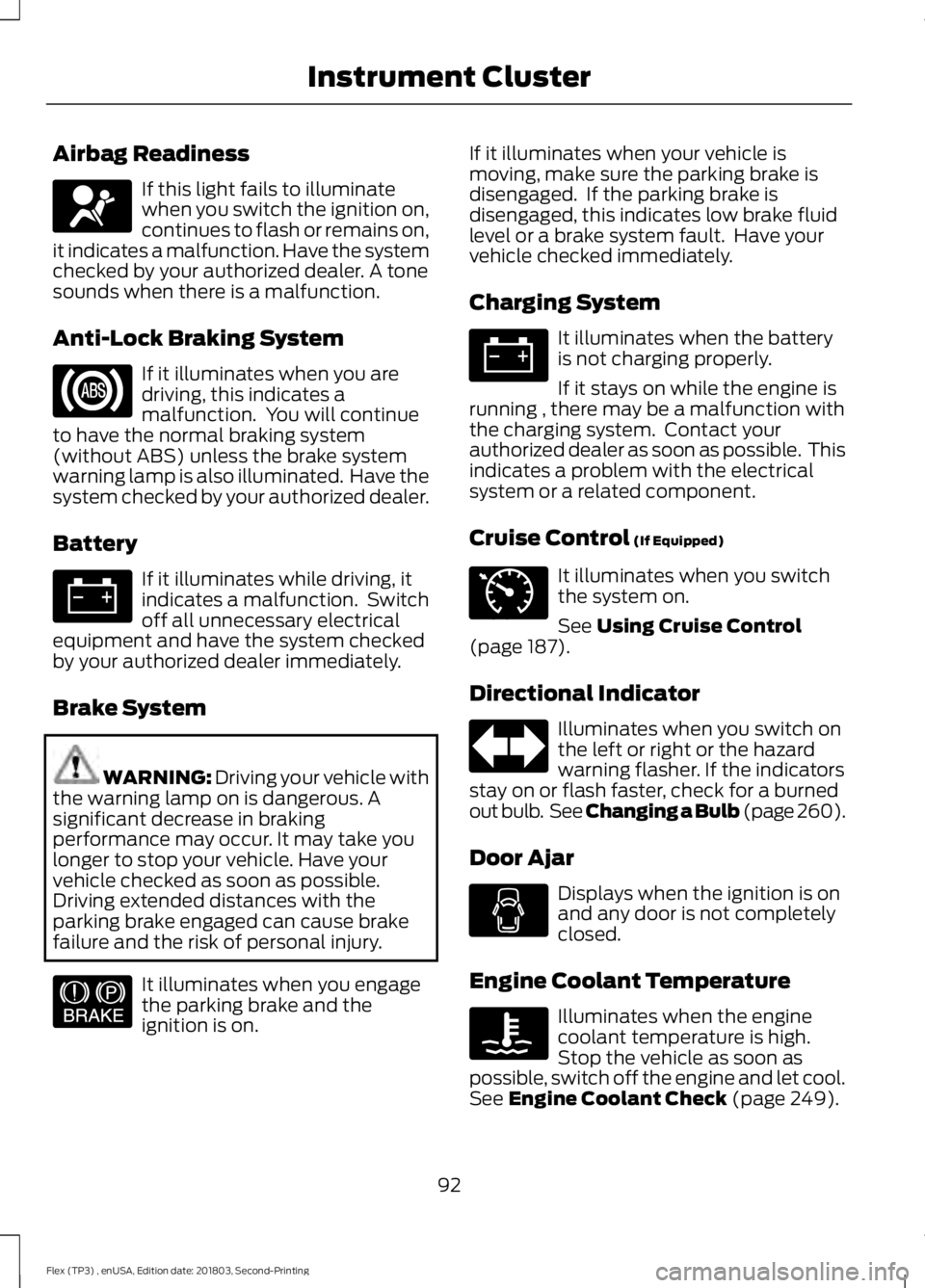
Airbag Readiness
If this light fails to illuminate
when you switch the ignition on,
continues to flash or remains on,
it indicates a malfunction. Have the system
checked by your authorized dealer. A tone
sounds when there is a malfunction.
Anti-Lock Braking System If it illuminates when you are
driving, this indicates a
malfunction. You will continue
to have the normal braking system
(without ABS) unless the brake system
warning lamp is also illuminated. Have the
system checked by your authorized dealer.
Battery If it illuminates while driving, it
indicates a malfunction. Switch
off all unnecessary electrical
equipment and have the system checked
by your authorized dealer immediately.
Brake System WARNING: Driving your vehicle with
the warning lamp on is dangerous. A
significant decrease in braking
performance may occur. It may take you
longer to stop your vehicle. Have your
vehicle checked as soon as possible.
Driving extended distances with the
parking brake engaged can cause brake
failure and the risk of personal injury. It illuminates when you engage
the parking brake and the
ignition is on. If it illuminates when your vehicle is
moving, make sure the parking brake is
disengaged. If the parking brake is
disengaged, this indicates low brake fluid
level or a brake system fault. Have your
vehicle checked immediately.
Charging System It illuminates when the battery
is not charging properly.
If it stays on while the engine is
running , there may be a malfunction with
the charging system. Contact your
authorized dealer as soon as possible. This
indicates a problem with the electrical
system or a related component.
Cruise Control (If Equipped) It illuminates when you switch
the system on.
See
Using Cruise Control
(page 187).
Directional Indicator Illuminates when you switch on
the left or right or the hazard
warning flasher. If the indicators
stay on or flash faster, check for a burned
out bulb. See Changing a Bulb (page 260).
Door Ajar Displays when the ignition is on
and any door is not completely
closed.
Engine Coolant Temperature Illuminates when the engine
coolant temperature is high.
Stop the vehicle as soon as
possible, switch off the engine and let cool.
See
Engine Coolant Check (page 249).
92
Flex (TP3) , enUSA, Edition date: 201803, Second-Printing Instrument ClusterE67017 E144522 E71340
Page 109 of 513
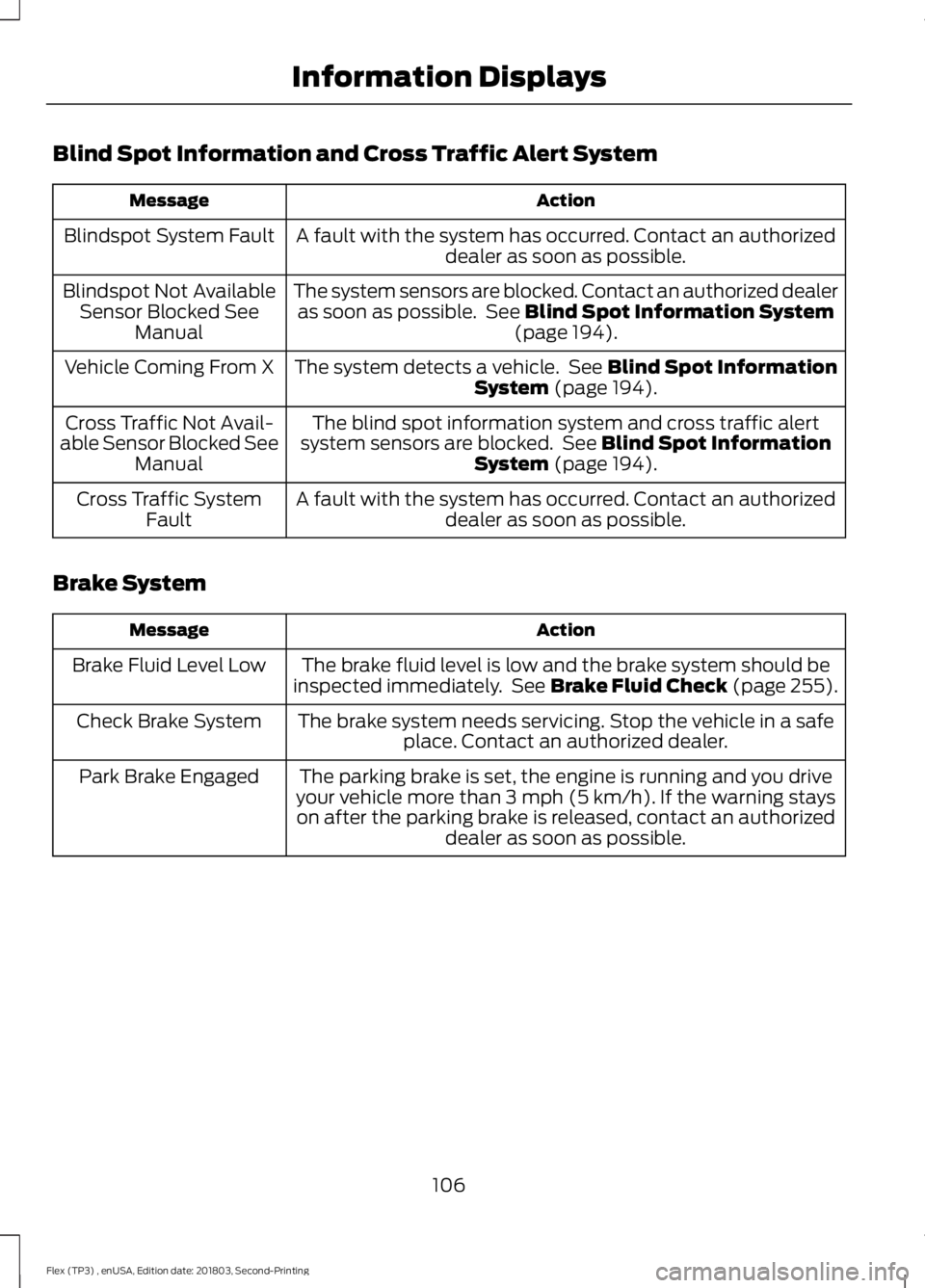
Blind Spot Information and Cross Traffic Alert System
Action
Message
A fault with the system has occurred. Contact an authorizeddealer as soon as possible.
Blindspot System Fault
The system sensors are blocked. Contact an authorized dealeras soon as possible. See Blind Spot Information System
(page 194).
Blindspot Not Available
Sensor Blocked See Manual
The system detects a vehicle. See
Blind Spot Information
System (page 194).
Vehicle Coming From X
The blind spot information system and cross traffic alert
system sensors are blocked. See
Blind Spot Information
System (page 194).
Cross Traffic Not Avail-
able Sensor Blocked See Manual
A fault with the system has occurred. Contact an authorizeddealer as soon as possible.
Cross Traffic System
Fault
Brake System Action
Message
The brake fluid level is low and the brake system should be
inspected immediately. See Brake Fluid Check (page 255).
Brake Fluid Level Low
The brake system needs servicing. Stop the vehicle in a safeplace. Contact an authorized dealer.
Check Brake System
The parking brake is set, the engine is running and you drive
your vehicle more than 3 mph (5 km/h). If the warning stays on after the parking brake is released, contact an authorized dealer as soon as possible.
Park Brake Engaged
106
Flex (TP3) , enUSA, Edition date: 201803, Second-Printing Information Displays
Page 111 of 513
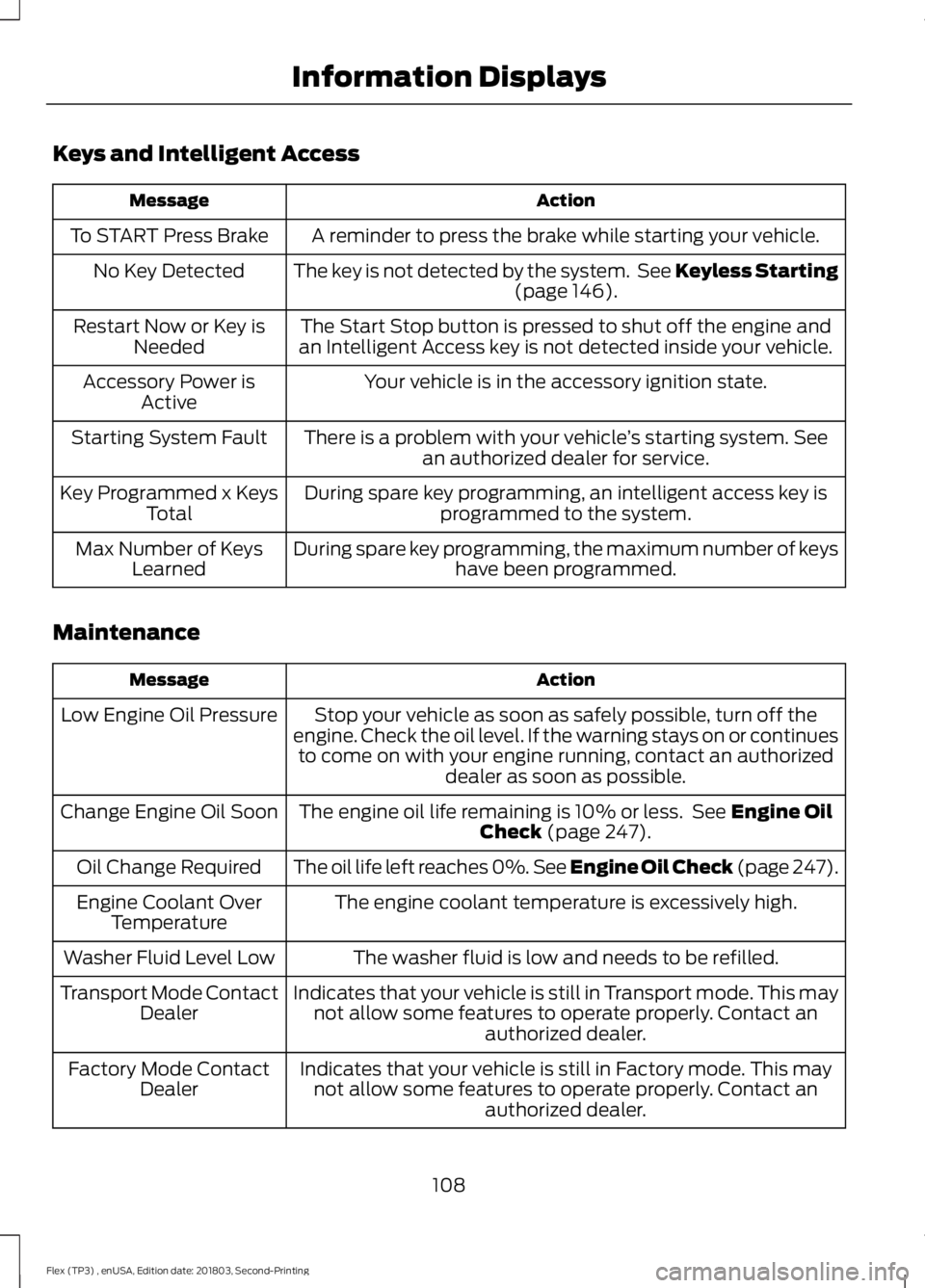
Keys and Intelligent Access
Action
Message
A reminder to press the brake while starting your vehicle.
To START Press Brake
The key is not detected by the system. See Keyless Starting(page 146).
No Key Detected
The Start Stop button is pressed to shut off the engine and
an Intelligent Access key is not detected inside your vehicle.
Restart Now or Key is
Needed
Your vehicle is in the accessory ignition state.
Accessory Power is
Active
There is a problem with your vehicle ’s starting system. See
an authorized dealer for service.
Starting System Fault
During spare key programming, an intelligent access key isprogrammed to the system.
Key Programmed x Keys
Total
During spare key programming, the maximum number of keys have been programmed.
Max Number of Keys
Learned
Maintenance Action
Message
Stop your vehicle as soon as safely possible, turn off the
engine. Check the oil level. If the warning stays on or continues to come on with your engine running, contact an authorized dealer as soon as possible.
Low Engine Oil Pressure
The engine oil life remaining is 10% or less. See
Engine Oil
Check (page 247).
Change Engine Oil Soon
The oil life left reaches 0%. See Engine Oil Check (page 247
).
Oil Change Required
The engine coolant temperature is excessively high.
Engine Coolant Over
Temperature
The washer fluid is low and needs to be refilled.
Washer Fluid Level Low
Indicates that your vehicle is still in Transport mode. This maynot allow some features to operate properly. Contact an authorized dealer.
Transport Mode Contact
Dealer
Indicates that your vehicle is still in Factory mode. This maynot allow some features to operate properly. Contact an authorized dealer.
Factory Mode Contact
Dealer
108
Flex (TP3) , enUSA, Edition date: 201803, Second-Printing Information Displays
Page 176 of 513
GENERAL INFORMATION
Note:
Occasional brake noise is normal. If
a metal-to-metal, continuous grinding or
continuous squeal sound is present, the
brake linings may be worn-out. Have the
system checked by an authorized dealer. If
your vehicle has continuous vibration or
shudder in the steering wheel while braking,
have it checked by an authorized dealer.
Note: Brake dust may accumulate on the
wheels, even under normal driving
conditions. Some dust is inevitable as the
brakes wear and does not contribute to
brake noise. See Cleaning the Wheels
(page 270).
Note: Depending on applicable laws and
regulations in the country for which your
vehicle was originally built, your brake lamps
may flash during heavy braking. Following
this, your hazard lights may also flash when
your vehicle comes to a stop. See
Warning Lamps and
Indicators (page 91).
Wet brakes result in reduced braking
efficiency. Gently press the brake pedal a
few times when driving from a car wash or
standing water to dry the brakes.
Brake Over Accelerator
In the event the accelerator pedal
becomes stuck or entrapped, apply steady
and firm pressure to the brake pedal to
slow the vehicle and reduce engine power.
If you experience this condition, apply the
brakes and bring your vehicle to a safe
stop. Move the transmission to park (P),
switch the engine off and apply the parking
brake. Inspect the accelerator pedal for
any interference. If none are found and the
condition persists, have your vehicle towed
to the nearest authorized dealer. Brake Assist
Brake assist detects when you rapidly
brake by measuring the rate at which you
press the brake pedal. It provides
maximum braking efficiency as long as you
press the pedal. It can also reduce
stopping distances in critical situations.
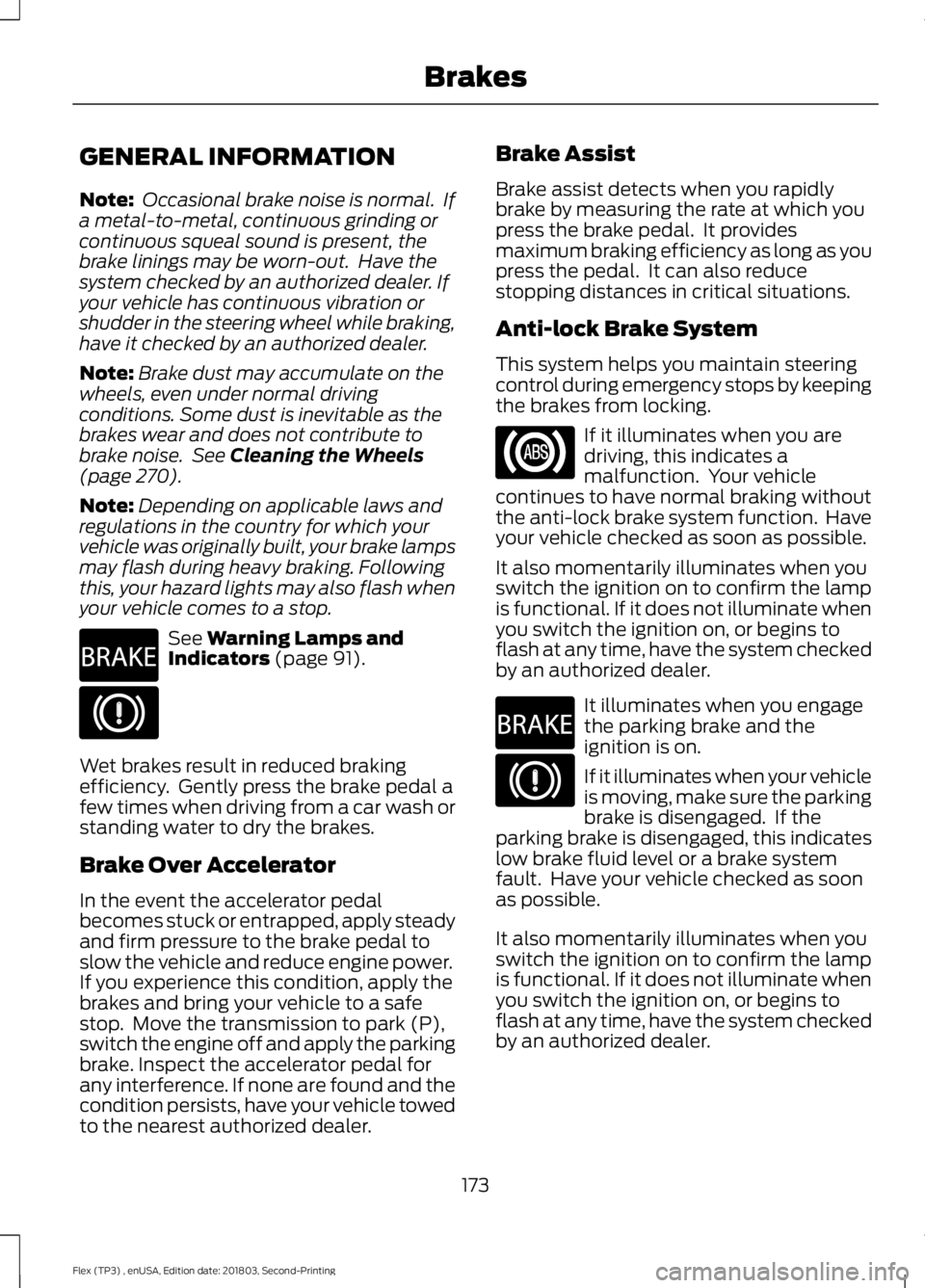
Anti-lock Brake System
This system helps you maintain steering
control during emergency stops by keeping
the brakes from locking.
If it illuminates when you are
driving, this indicates a
malfunction. Your vehicle
continues to have normal braking without
the anti-lock brake system function. Have
your vehicle checked as soon as possible.
It also momentarily illuminates when you
switch the ignition on to confirm the lamp
is functional. If it does not illuminate when
you switch the ignition on, or begins to
flash at any time, have the system checked
by an authorized dealer. It illuminates when you engage
the parking brake and the
ignition is on.
If it illuminates when your vehicle
is moving, make sure the parking
brake is disengaged. If the
parking brake is disengaged, this indicates
low brake fluid level or a brake system
fault. Have your vehicle checked as soon
as possible.
It also momentarily illuminates when you
switch the ignition on to confirm the lamp
is functional. If it does not illuminate when
you switch the ignition on, or begins to
flash at any time, have the system checked
by an authorized dealer.
173
Flex (TP3) , enUSA, Edition date: 201803, Second-Printing BrakesE270480 E270480
Page 202 of 513
STEERING
Electric Power Steering
WARNING: The electric power
steering system has diagnostic checks that
continuously monitor the system. If a fault
is detected, a message displays in the
information display. Stop your vehicle as
soon as it is safe to do so. Switch the
ignition off. After at least 10 seconds,
switch the ignition on and watch the
information display for a steering system
warning message. If a steering system
warning message returns, have the system
checked by an authorized dealer. WARNING: If the system detects an
error, you may not feel a difference in the
steering, however a serious condition may
exist. Obtain immediate service from an
authorized dealer, failure to do so may
result in loss of steering control.
Your vehicle has an electric power steering
system. There is no fluid reservoir. No
maintenance is required.
If your vehicle loses electrical power while
you are driving, electric power steering
assistance is lost. The steering system still
operates and you can steer your vehicle
manually. Manually steering your vehicle
requires more effort.
Extreme continuous steering may increase
the effort required for you to steer your
vehicle. This increased effort prevents
overheating and permanent damage to
the steering system. You do not lose the
ability to steer your vehicle manually.
Typical steering and driving maneuvers
allow the system to cool and return to
normal operation. Steering Tips
If the steering wanders or pulls, check for:
•
Correct tire pressures.
• Uneven tire wear.
• Loose or worn suspension
components.
• Loose or worn steering components.
• Improper vehicle alignment.
Note: A high crown in the road or high
crosswinds may also make the steering
seem to wander or pull.
Adaptive Learning
The electronic power steering system
adaptive learning helps correct road
irregularities and improves overall handling
and steering feel. It communicates with
the brake system to help operate
advanced stability control and accident
avoidance systems. Additionally, whenever
the battery is disconnected or a new
battery installed, you must drive your
vehicle a short distance before the system
relearns the strategy and reactivates all
systems.
COLLISION WARNING SYSTEM
(If Equipped)
PRINCIPLE OF OPERATION WARNING: This system is designed
to be a supplementary driving aid. It is not
intended to replace the driver ’s attention,
and judgment, or the need to apply the
brakes. This system does NOT activate the
brakes automatically. Failure to press the
brake pedal to activate the brakes may
result in a collision.
199
Flex (TP3) , enUSA, Edition date: 201803, Second-Printing Driving Aids
Page 235 of 513
FUSE SPECIFICATION CHART
Power Distribution Box
WARNING: Always disconnect the
battery before servicing high current fuses. WARNING:
To reduce risk of
electrical shock, always replace the cover
to the power distribution box before
reconnecting the battery or refilling fluid
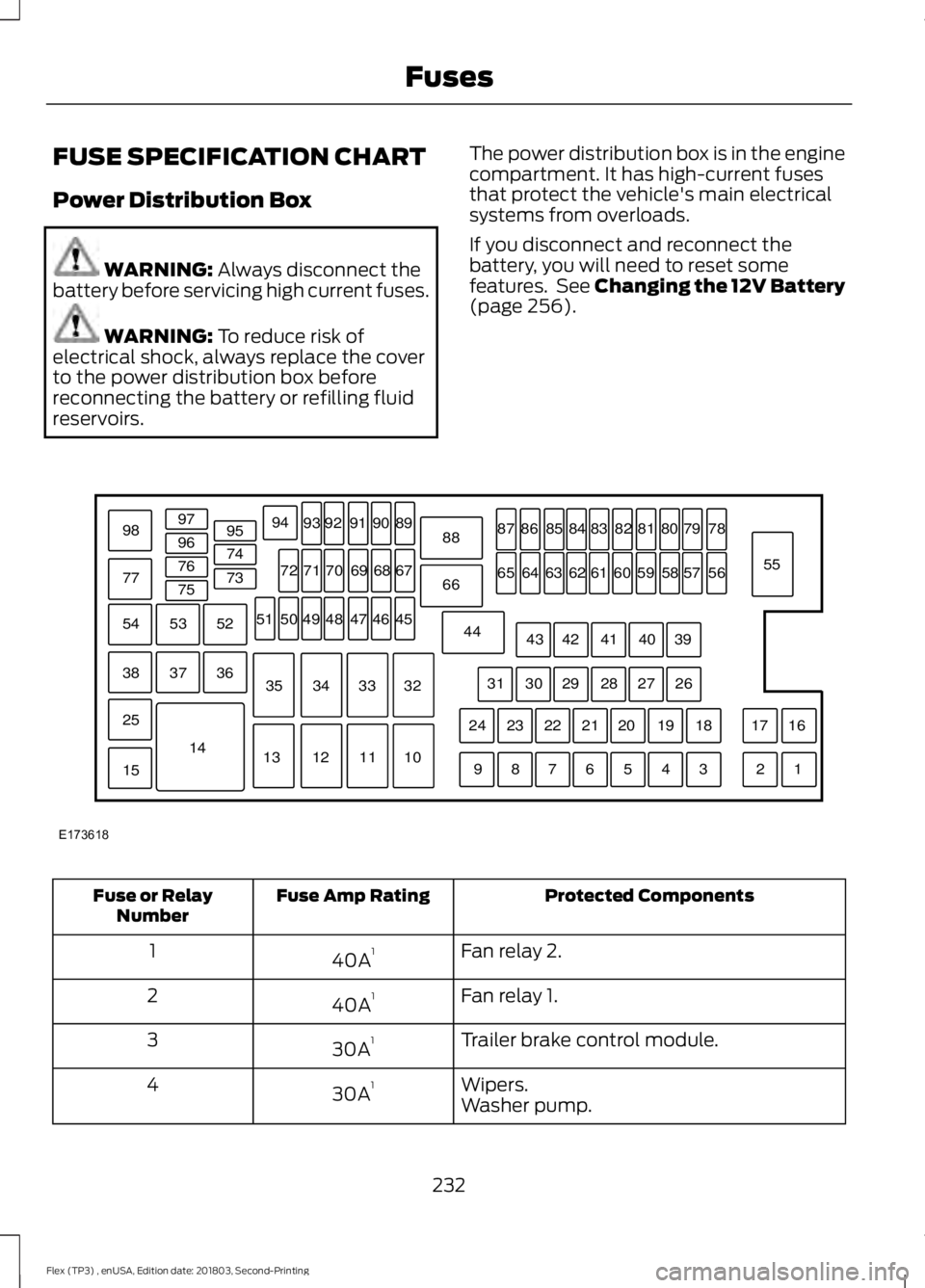
reservoirs. The power distribution box is in the engine
compartment. It has high-current fuses
that protect the vehicle's main electrical
systems from overloads.
If you disconnect and reconnect the
battery, you will need to reset some
features. See Changing the 12V Battery
(page
256). Protected Components
Fuse Amp Rating
Fuse or Relay
Number
Fan relay 2.
40A 1
1
Fan relay 1.
40A 1
2
Trailer brake control module.
30A 1
3
Wipers.
30A 1
4
Washer pump.
232
Flex (TP3) , enUSA, Edition date: 201803, Second-Printing FusesE173618
97
98
77 96
95
94
9392 919089
88
66
44 78
56
39 26 18 16
17
3 1
2
4
5
6
7
8
9 19
20
21
22
23
24 27
28
29
30
31 40
41
42
43 55
57
58
59
60
61
62
63
64
65 79
80
81
82
83
84
85
86
87
67
45
32
10
11
12
13 33
34
35 46
47
48
49
50
51 68
69
70
71
72
74
73
76
75
53
37 36
54
38
25
15
1452