tow FORD FOCUS 2013 3.G Owner's Manual
[x] Cancel search | Manufacturer: FORD, Model Year: 2013, Model line: FOCUS, Model: FORD FOCUS 2013 3.GPages: 475, PDF Size: 5.55 MB
Page 145 of 475
HINTS ON CONTROLLING THE INTERIOR CLIMATE
General Hints
Note:Prolonged use of recirculated air may cause the windows to fog
up.
Note:A small amount of air may be felt from the footwell air vents
regardless of the air distribution setting.
Note:To reduce humidity build-up inside your vehicle, do not drive with
the system switched off or with recirculated air always switched on.
Note:Do not place objects under the front seats as this may interfere
with the airflow to the rear seats.
Note:Remove any snow, ice or leaves from the air intake area at the
base of the windshield.
Manual Climate Control
Note:To reduce fogging of the windshield during humid weather, adjust
the air distribution control to the windshield air vents position. Increase
the temperature and fan speed to improve clearing if required.
Automatic Climate Control
Note:Do not adjust the settings when your vehicle interior is extremely
hot or cold. The system automatically adjusts to the previously stored
settings. For the system to function efficiently, the instrument panel and
side air vents should be fully open.
Note:At low ambient temperatures with AUTO selected, the air stream
is directed toward the windshield and side windows for as long as the
engine remains cold.
Note:When the system is switched off, outside air is prevented from
entering your vehicle.
Note:When the system is in AUTO mode, and the interior and exterior
temperatures are high, the system automatically selects recirculated air
to maximize cooling of the interior. When the selected air temperature is
reached, the system automatically selects outside air.
Note:When you select windshield defrosting and defogging, the
instrument panel and footwell level functions automatically switch off
and air conditioning switches on. Outside air flows into your vehicle.
Climate Control145
2013 Focus(foc)
Owners Guide gf, 1st Printing
USA(fus)
Page 146 of 475
Heating the Interior Quickly
Vehicles with Manual Climate
ControlVehicles with Automatic
Climate Control
1 Adjust the fan speed to the
highest speed setting.Press the high fan speed button
control.
2 Adjust the temperature control
to the highest setting.Adjust the temperature control
to the highest setting.
3 Adjust the air distribution
control to the footwell air vents
position.Press the footwell button to
distribute air to the footwell air
vents.
Recommended Settings for Heating
Vehicles with Manual Climate
ControlVehicles with Automatic
Climate Control
1 Adjust the fan speed to the
second speed setting.Press the slow fan speed button.
2 Adjust the temperature control
to the midway point of the hot
settings.Adjust the temperature control
to the midway point of the hot
settings.
3 Adjust the air distribution
control to the footwell and
windshield air vents position.Press the footwell and
windshield air distribution
buttons.
4 Close the instrument panel air
vents. Open the side air vents
and direct them toward the side
windows.
146Climate Control
2013 Focus(foc)
Owners Guide gf, 1st Printing
USA(fus)
Page 148 of 475
Side Window Defogging in Cold Weather
Vehicles with Manual Climate
ControlVehicles with Automatic
Climate Control
1 Adjust the air distribution
control to the instrument panel
and footwell air vents positions.Press the windshield defrosting
and defogging button.
2 Press the A/C button. Adjust the temperature control
to the desired setting.
3 Adjust the temperature control
to the desired setting.
4 Adjust the fan speed to the
highest setting.
5 Direct the instrument panel side
air vents toward the side
windows.
6 Close the instrument panel
vents.
Maximum Cooling Performance in Instrument Panel or Instrument
Panel and Footwell Positions
Both Manual and Automatic Climate Control
1 Adjust the temperature control to the lowest setting.
2 Press the A/C and recirculated air buttons.
3 Adjust the fan speed to the highest setting initially and then
adjust it to suit the desired comfort level.
HEATED WINDOWS AND MIRRORS (IF EQUIPPED)
Heated Rear Window
Note:The ignition must be switched on to use this feature.
Press the button to clear the rear window of thin ice and fog. Press the
button again within 10 minutes to switch it off. It switches off
automatically after 10 minutes, or when you switch the ignition off.
Do not use razor blades or other sharp objects to clean the inside
of the rear window or to remove decals from the inside of the
rear window. This may cause damage to the heated grid lines and
will not be covered by your warranty.
148Climate Control
2013 Focus(foc)
Owners Guide gf, 1st Printing
USA(fus)
Page 159 of 475
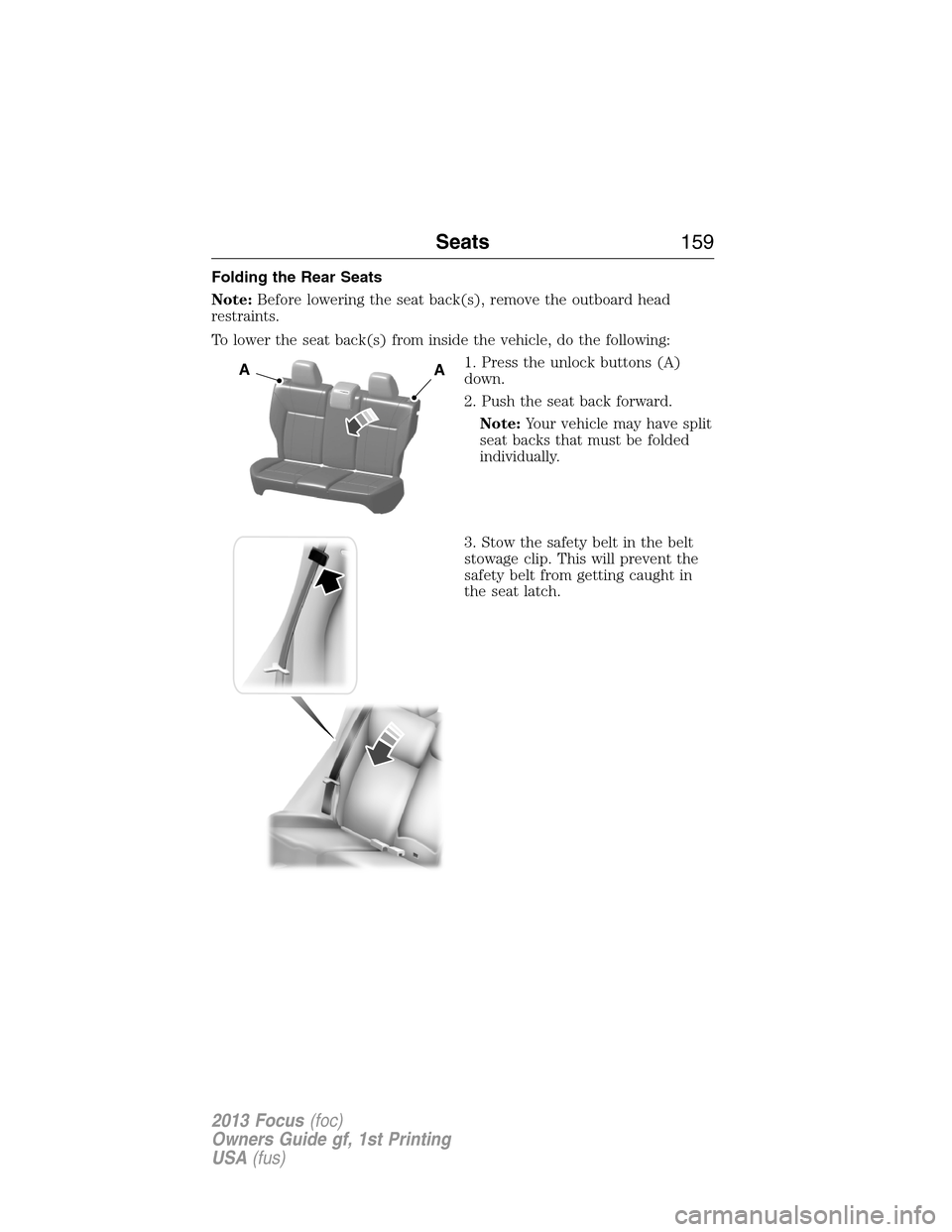
Folding the Rear Seats
Note:Before lowering the seat back(s), remove the outboard head
restraints.
To lower the seat back(s) from inside the vehicle, do the following:
1. Press the unlock buttons (A)
down.
2. Push the seat back forward.
Note:Your vehicle may have split
seat backs that must be folded
individually.
3. Stow the safety belt in the belt
stowage clip. This will prevent the
safety belt from getting caught in
the seat latch.
AA
Seats159
2013 Focus(foc)
Owners Guide gf, 1st Printing
USA(fus)
Page 168 of 475
The heater acts as a starting aid by warming the engine coolant. This
allows the climate control system to respond quickly. The equipment
includes a heater element (installed in the engine block) and a wire
harness. You can connect the system to a grounded 120 volt A/C
electrical source.
We recommend that you do the following for safe and correct operation:
•Use a 16-gauge outdoor extension cord that is product certified by
Underwriter’s Laboratory or Canadian Standards Association. This
extension cord must be able to be used outdoors, in cold
temperatures, and be clearly markedSuitable for Use with Outdoor
Appliances. Never use an indoor extension cord outdoors; it could
result in an electric shock or become a fire hazard.
•Use as short an extension cord as possible.
•Do not use multiple extension cords.
•Make sure that when in operation, the extension cord plug and the
heater cord plug connections are free and clear of water. This could
cause an electric shock or fire.
•Make sure your vehicle is parked in a clean area, clear of
combustibles.
•Make sure the heater, heater cord and extension cord are firmly
connected.
•Check for heat anywhere in the electrical hookup once the system has
been operating for approximately 30 minutes.
•Make sure the system is unplugged and properly stowed before driving
your vehicle. Make sure the protective cover seals the prongs of the
block heater cord plug when not in use.
•Make sure the heater system is checked for proper operation before
winter.
Using the Engine Block Heater
Make sure the receptacle terminals are clean and dry prior to use. Clean
them with a dry cloth, if necessary.
The heater uses 0.4 to 1.0 kilowatt-hours of energy per hour of use. The
system does not have a thermostat. It achieves maximum temperature
after approximately three hours of operation. Using the heater longer
than three hours does not improve system performance and
unnecessarily uses electricity.
168Starting and Stopping the Engine
2013 Focus(foc)
Owners Guide gf, 1st Printing
USA(fus)
Page 172 of 475
RUNNING OUT OF FUEL
Avoid running out of fuel because this situation may have an adverse
effect on powertrain components.
If you have run out of fuel:
•You may need to cycle the ignition from off to on several times after
refueling to allow the fuel system to pump the fuel from the tank to
the engine. On restarting, cranking time will take a few seconds longer
than normal. With keyless ignition, just start the engine. Crank time
will be longer than usual.
•Normally, adding 1 gallon (3.8L) of fuel is enough to restart the
engine. If the vehicle is out of fuel and on a steep grade, more than
1 gallon (3.8L) may be required.
•The service engine soon indicator may come on. For more information
on the service engine soon indicator, refer toWarning lamps and
indicatorsin theInstrument Clusterchapter.
Refilling with a Portable Fuel Container
WARNING:Do not insert the nozzle of portable fuel containers or
aftermarket funnels into the capless fuel system. This could damage
the fuel system and its seal, and may cause fuel to run onto the ground
instead of filling the tank, which could result in serious personal injury.
WARNING:Do not try to pry open or push open the capless fuel
system with foreign objects. This could damage the fuel system
and its seal and cause injury to you or others.
Note:Do not use aftermarket funnels; they will not work with the
capless fuel system and can damage it. The included funnel has been
specially designed to work safely with your vehicle.
When filling the vehicle’s fuel tank from a portable fuel container, use the
funnel included with the vehicle.
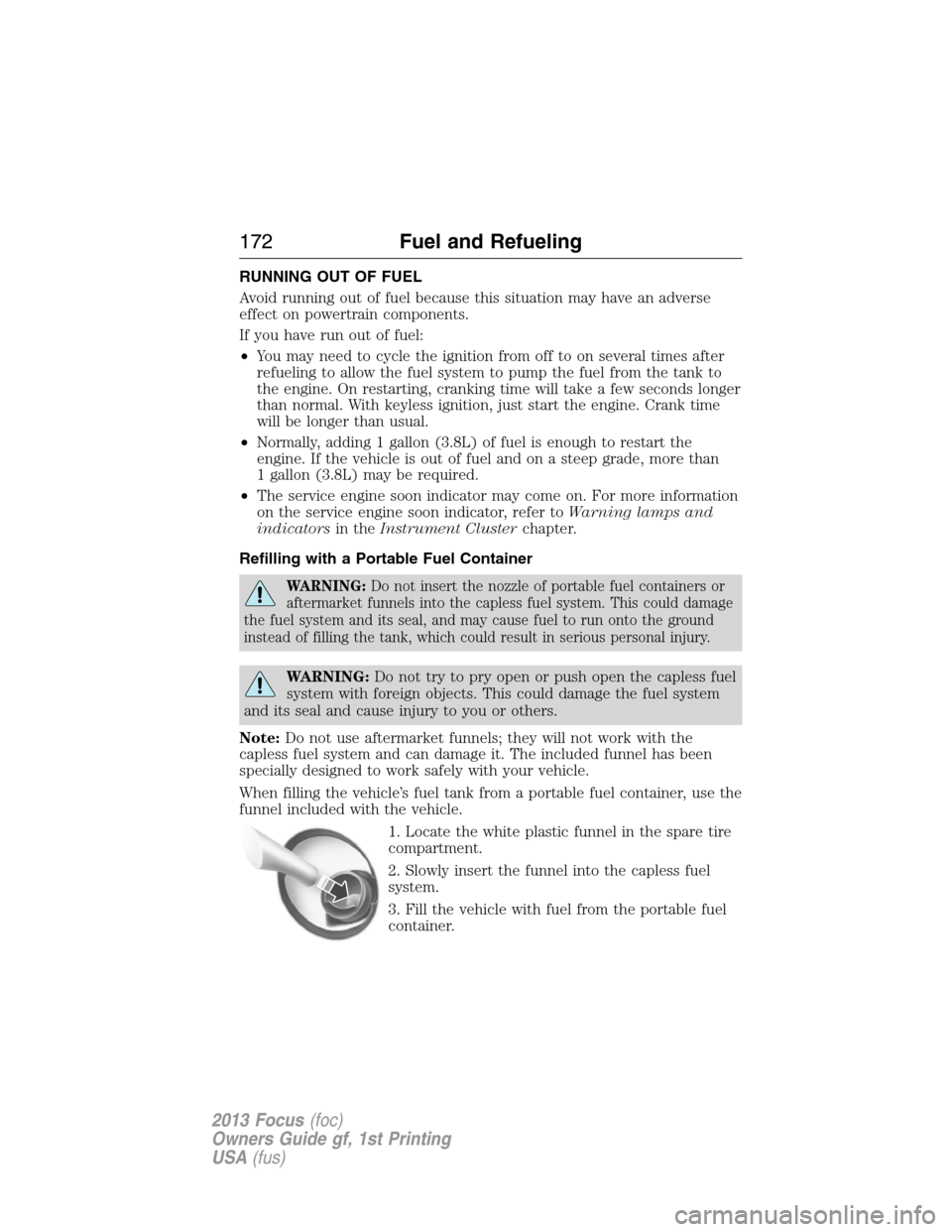
1. Locate the white plastic funnel in the spare tire
compartment.
2. Slowly insert the funnel into the capless fuel
system.
3. Fill the vehicle with fuel from the portable fuel
container.
172Fuel and Refueling
2013 Focus(foc)
Owners Guide gf, 1st Printing
USA(fus)
Page 187 of 475
GENERAL INFORMATION
Note:Occasional brake noise is normal. If a metal-to-metal, continuous
grinding or continuous squeal sound is present, the brake linings may be
worn-out and should be inspected by an authorized dealer. If the vehicle
has continuous vibration or shudder in the steering wheel while braking,
the vehicle should be inspected by an authorized dealer.
Note:Brake dust may accumulate on the wheels, even under normal
driving conditions. Some dust is inevitable as the brakes wear and does
not contribute to brake noise. See theVehicle Carechapter for wheel
cleaning instructions.
See theInstrument Clusterchapter for information on the
brake system warning light.
Wet brakes result in reduced braking efficiency. Gently press the brake
pedal a few times when driving from a car wash or standing water to dry
the brakes.
Brake Over Accelerator
In the event the accelerator pedal becomes stuck or entrapped, apply
steady and firm pressure to the brake pedal to slow the vehicle and
reduce engine power. If you experience this condition, apply the brakes
and bring your vehicle to a safe stop. Turn the engine off, shift to
positionPand apply the parking brake, then inspect the accelerator
pedal for any interferences. If none are found and the condition persists,
have your vehicle towed to the nearest authorized dealer.
Brake Assist
Brake assist detects when you brake heavily by measuring the rate at
which you press the brake pedal. It provides maximum braking efficiency
as long as you press the pedal. Brake assist can reduce stopping
distances in critical situations.
Anti-Lock Brake System (ABS)
This system helps you maintain steering control during emergency stops
by keeping the brakes from locking.
The ABS lamp momentarily illuminates when the ignition is
turned on. If the light does not illuminate during start-up,
remains on or flashes, the ABS may be disabled and may need
to be serviced.
Brakes187
2013 Focus(foc)
Owners Guide gf, 1st Printing
USA(fus)
Page 193 of 475
Using the Front and Rear Sensing System
Rear Sensing System
The rear sensors are only active when the transmission is in R (Reverse).
As the vehicle moves closer to the obstacle, the rate of the audible
warning increases. When the obstacle is fewer than 12 inches (30
centimeters) away, the warning sounds continuously. If a stationary or
receding object is detected farther than 12 inches (30 centimeters) from
the side of the vehicle, the tone sounds for only three seconds. Once the
system detects an object approaching, the warning sounds again.
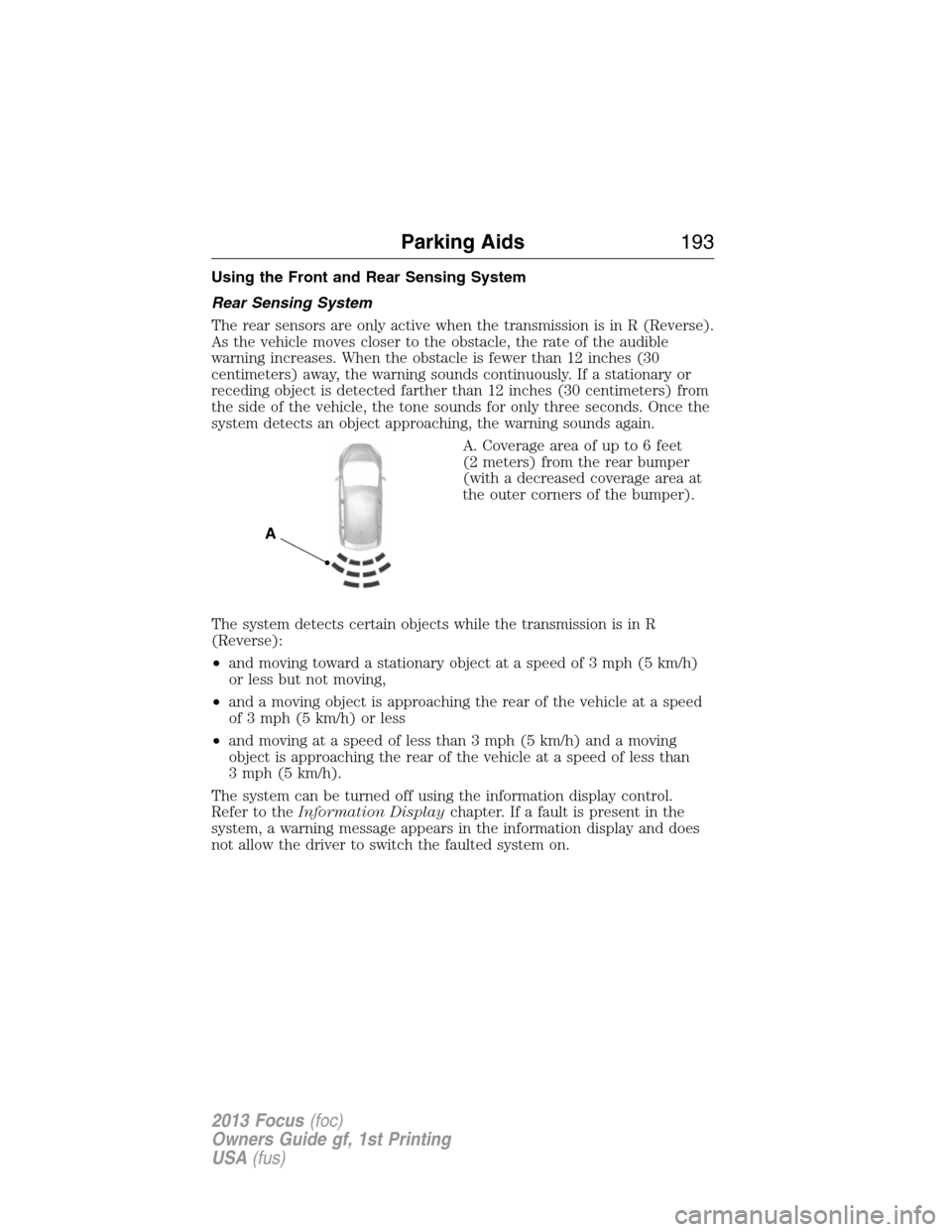
A. Coverage area of up to 6 feet
(2 meters) from the rear bumper
(with a decreased coverage area at
the outer corners of the bumper).
The system detects certain objects while the transmission is in R
(Reverse):
•and moving toward a stationary object at a speed of 3 mph (5 km/h)
or less but not moving,
•and a moving object is approaching the rear of the vehicle at a speed
of 3 mph (5 km/h) or less
•and moving at a speed of less than 3 mph (5 km/h) and a moving
object is approaching the rear of the vehicle at a speed of less than
3 mph (5 km/h).
The system can be turned off using the information display control.
Refer to theInformation Displaychapter. If a fault is present in the
system, a warning message appears in the information display and does
not allow the driver to switch the faulted system on.
A
Parking Aids193
2013 Focus(foc)
Owners Guide gf, 1st Printing
USA(fus)
Page 195 of 475
ACTIVE PARK ASSIST (IF EQUIPPED)
WARNING:This system is designed to be a supplementary park
aid. It may not work in all conditions and is not intended to
replace the driver’s attention and judgment. The driver is responsible
for avoiding hazards and maintaining a safe distance and speed, even
when the system is in use.
Note:The driver is always responsible for controlling the vehicle,
supervising the system and intervening if required.
The system detects an available parallel parking space and automatically
steers the vehicle into the space (hands-free) while you control the
accelerator, gearshift and brakes. The system visually and/or audibly
instructs the driver to park the vehicle.
The system may not function correctly if something passes between the
front bumper and the parking space (i.e. a pedestrian or cyclist) or if the
edge of the neighboring parked vehicle is high from the ground (i.e. a
bus, tow truck or flatbed truck).
Note:The sensors may not detect objects in heavy rain or other
conditions that cause disruptive reflections.
Note:The sensors may not detect objects with surfaces that absorb
ultrasonic waves.
The system should not be used if:
•a foreign object (i.e. bike rack or trailer) is attached to the front or
rear of the vehicle or at another location close to the sensors.
•an overhanging object (i.e. surfboard) is attached to the roof.
•the front bumper or side sensors are damaged (i.e. in a collision) or
obstructed by a foreign object (i.e. front bumper cover).
•a mini-spare tire is in use.
Parking Aids195
2013 Focus(foc)
Owners Guide gf, 1st Printing
USA(fus)
Page 201 of 475
Note:If the image comes on while the transmission is not in R
(Reverse), have the system inspected by your authorized dealer.
Note:When towing, the camera only sees what is being towed behind
the vehicle. This might not provide adequate coverage as it usually
provides in normal operation and some objects might not be seen. In
some vehicles, the guidelines may disappear once the trailer tow
connector is engaged.
Note:The camera may not operate correctly under the following
conditions:
•Nighttime or dark areas if one or both reverse lamps are not
operating. Do not use the rear view camera display when lighting is
low until both reverse lamps are functional.
•The camera’s view is obstructed by mud, water or debris. Clean the
lens with a soft, lint-free cloth and non-abrasive cleaner.
•The rear of the vehicle is hit or damaged, causing the camera to
become misaligned. Check with your authorized dealer to have the
rear view camera system checked for proper coverage and operation.
Adjusting the Rear View Camera Settings (If Equipped)
To access any of the rear view camera system settings, make the
following selections in the touch screen when the transmission is not in
R (Reverse):
1. Menu
2. Vehicle
3. Rear View Camera
After changing a system setting, the touch screen shows a preview of the
feature(s) selected.
Parking Aids201
2013 Focus(foc)
Owners Guide gf, 1st Printing
USA(fus)