service FORD FOCUS 2015 3.G User Guide
[x] Cancel search | Manufacturer: FORD, Model Year: 2015, Model line: FOCUS, Model: FORD FOCUS 2015 3.GPages: 453, PDF Size: 5.32 MB
Page 51 of 453
The design and development of the side
curtain airbags included recommended
testing procedures that were developed
by a group of automotive safety experts
known as the Side Airbag Technical
Working Group. These recommended
testing procedures help reduce the risk of
injuries related to the deployment of side
curtain airbags.
CRASH SENSORS AND
AIRBAG INDICATOR
WARNING
Do not modify the front end of your
vehicle. Modifying or adding
equipment to the front end of your
vehicle, including frame, bumper, front end
body structure or tow hooks, may affect
the performance of the airbag system,
increasing the risk of injury. Your vehicle has a collection of crash and
occupant sensors. These provide
information to the restraints control
module which will deploy the front safety
belt pretensioners, driver airbag, driver knee
airbag, passenger airbag, seat mounted
side airbags, and the side curtain airbags.
Based on the type of crash, frontal impact
or side impact, the restraints control
module will deploy the appropriate safety
devices.
The restraints control module also
monitors the readiness of the above safety
devices plus the crash and occupant
sensors. The readiness of the safety
system is indicated by a warning lamp in
the instrument cluster or by a backup tone
if the warning lamp is not working. Routine
maintenance of the airbag is not required.
A difficulty with the system is indicated by
one or more of the following: The lamp will not illuminate
immediately when you switch
the ignition on.
• The lamp will either flash or remain on.
• A series of five beeps will be heard. The
tone pattern will repeat periodically
until the problem, the lamp or both are
repaired.
If any of these things happen, even
intermittently, have the supplemental
restraint system checked by an authorized
dealer immediately. Unless serviced, the
system may not function correctly in the
event of a crash.
The safety belt pretensioners and the front
airbag supplemental restraint system are
designed to deploy when your vehicle
sustains longitudinal deceleration
sufficient to cause the restraints control
module to deploy a safety device.
The fact that the safety belt pretensioners
or front airbags did not deploy for both
front seat occupants in a crash does not
mean that something is wrong with the
system. It means the restraints control
module determined that the crash
conditions were not appropriate to deploy
these safety devices.
• The design of the front airbags is to
deploy only in frontal and near-frontal
crashes (not rollovers, side impacts or
rear impacts) unless the crash causes
sufficient longitudinal deceleration.
• The design of the safety belt
pretensioners is to deploy in frontal and
near-frontal crashes, and may also
deploy when a side curtain airbag
deploys.
48
Focus (CDH), enUSA, First Printing Supplementary Restraints System
Page 94 of 453
Engine Coolant Temperature
Gauge
WARNING
Never remove the coolant reservoir
cap while the engine is running or hot.
At normal operating temperature, the
needle remains in the center section.
Note:
Do not restart the engine until the
cause of overheating has been determined
and resolved.
If the needle enters the red section, the
engine is overheating. Stop the engine,
switch the ignition off and determine the
cause once the engine has cooled down.
See Engine Coolant Check (page 214).
Fuel Gauge
Note: : The fuel gauge may vary slightly
when your vehicle is moving or on a gradient.
Switch the ignition on. The fuel gauge will
indicate approximately how much fuel is
left in the fuel tank. The arrow adjacent to
the fuel pump symbol indicates on which
side of your vehicle the fuel filler door is
located. The needle should move toward F when
you refuel your vehicle. If the needle points
to E after adding fuel, this indicates your
vehicle needs service soon.
After refueling some variability in needle
position is normal.
Note:
It may take a short time for the
needle to reach F after leaving the gas
station. This is normal and depends upon
the slope of pavement at the gas station.
Note: The fuel amount dispensed into the
tank is a little less or more than the gauge
indicated. This is normal and depends upon
the slope of pavement at the gas station.
Note: If the gas station nozzle shuts off
before the tank is full, try a different gas
pump nozzle.
Low Fuel Level Reminder
Vehicles with no distance-to-empty
display
A low fuel reminder triggers when the fuel
gauge needle is at 1/16th.
Vehicles equipped with distance-to-
empty display
A low fuel reminder triggers when the fuel
gauge needle is at 1/16th or about 35 miles
(56 km) to empty, whichever occurs first.
Variations:
Note: : The low fuel warning and distance-to-empty warning can appear at different fuel
gauge positions depending on fuel economy conditions. This variation is normal. Distance-to-empty
Fuel gauge position
Driving type (fuel economy
conditions)
35 miles to 80 miles (56 kmto 129 km)
1/16th
Highway driving
10 miles to 35 miles (16 kmto 56 km)
1/16th-1/4
Severe duty driving (trailer
towing, extended idle)
91
Focus (CDH), enUSA, First Printing Instrument Cluster
Page 97 of 453
It also lights momentarily when you switch
the ignition on to confirm the lamp is
functional. If it does not light when you
switch the ignition on, or begins to flash at
any time, have the system checked by an
authorized dealer.
Low Washer Fluid
Lights when the windshield
washer fluid is low.
Parking Lamps Lights when you switch the
parking lamps on.
Service Engine Soon If the service engine soon
indicator light stays illuminated
after you start the engine, it
indicates that the On Board Diagnostics
system (OBD) has detected a malfunction
of the vehicle emissions control system.
Refer to On board diagnostics (OBD) in
the Fuel and Refueling chapter for more
information about having your vehicle
serviced. See Emission Control System
(page 138).
If the light is blinking, engine misfire is
occurring which could damage your
catalytic converter. Drive in a moderate
fashion (avoid heavy acceleration and
deceleration) and have your vehicle
serviced immediately. WARNING
Under engine misfire conditions,
excessive exhaust temperatures
could damage the catalytic
converter, the fuel system, interior floor
coverings or other vehicle components,
possibly causing a fire. Have your vehicle
serviced immediately. The service engine soon indicator light
illuminates when you first switch the
ignition on before engine start to check the
bulb and to indicate whether the vehicle
is ready for Inspection/Maintenance (I/M)
testing.
Normally, the service engine soon light
stays on until you crank the engine, then
turns itself off if no malfunctions are
present. However, if after 15 seconds the
service engine soon light blinks eight times,
it means that the vehicle is not ready for
I/M testing. See
Emission Control
System (page 138).
Stability Control Lights when the system is active.
If it remains on or does not light
when you power your vehicle on,
this indicates a malfunction. During a
malfunction, the system turns off. Have
the system checked by an authorized
dealer immediately.
See (page 152).
Stability Control Off Lights when you switch the
system off. It goes out when you
switch the system back on or
when you power off your vehicle.
See
(page 152).
AUDIBLE WARNINGS AND
INDICATORS
Key in Ignition Warning Chime
Sounds when you open the driver's door
and you have left the key in the ignition.
94
Focus (CDH), enUSA, First Printing Instrument ClusterE132353 E138639
Page 102 of 453
All Values
Indicates all the respective trip, distance,
time and average fuel consumption
information.
Average Fuel Consumption
Indicates the average fuel consumption
since the function was last reset.
Distance to Empty
Indicates the approximate distance your
vehicle will travel on the fuel remaining in
the tank. Changes in driving pattern may
cause the value to vary.
Outside Air Temperature
Shows the outside air temperature.
Trip Odometer
Registers the distance traveled of
individual journeys.
Trip Timer
Registers the elapsed time of individual
journeys or the total time since the function
was last reset.
INFORMATION MESSAGES
Note:
Depending on your vehicle options
and instrument cluster type, not all of the
messages will display or be available. Note:
The information display may
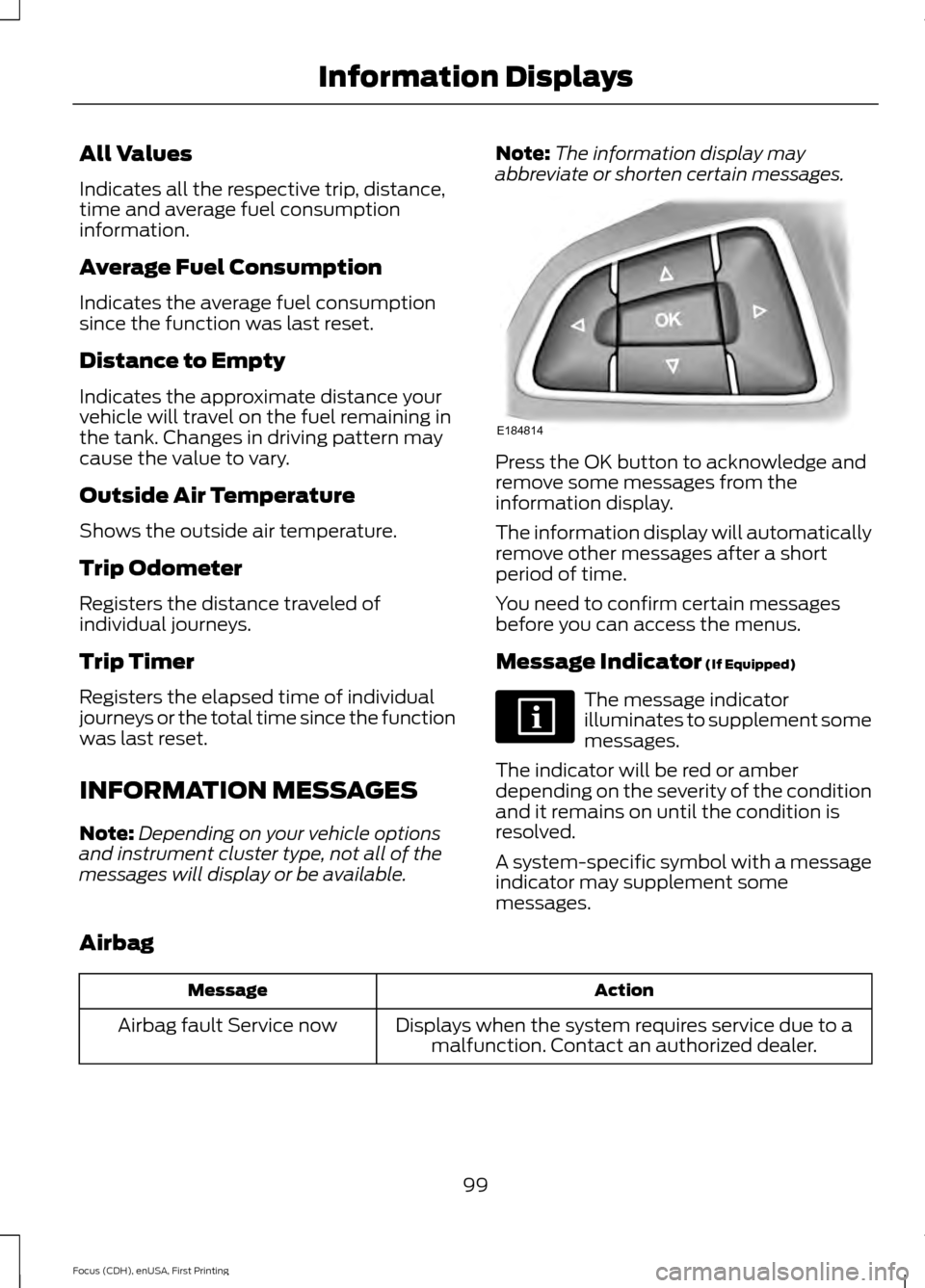
abbreviate or shorten certain messages. Press the OK button to acknowledge and
remove some messages from the
information display.
The information display will automatically
remove other messages after a short
period of time.
You need to confirm certain messages
before you can access the menus.
Message Indicator (If Equipped)
The message indicator
illuminates to supplement some
messages.
The indicator will be red or amber
depending on the severity of the condition
and it remains on until the condition is
resolved.
A system-specific symbol with a message
indicator may supplement some
messages.
Airbag Action
Message
Displays when the system requires service due to amalfunction. Contact an authorized dealer.
Airbag fault Service now
99
Focus (CDH), enUSA, First Printing Information DisplaysE184814
Page 103 of 453
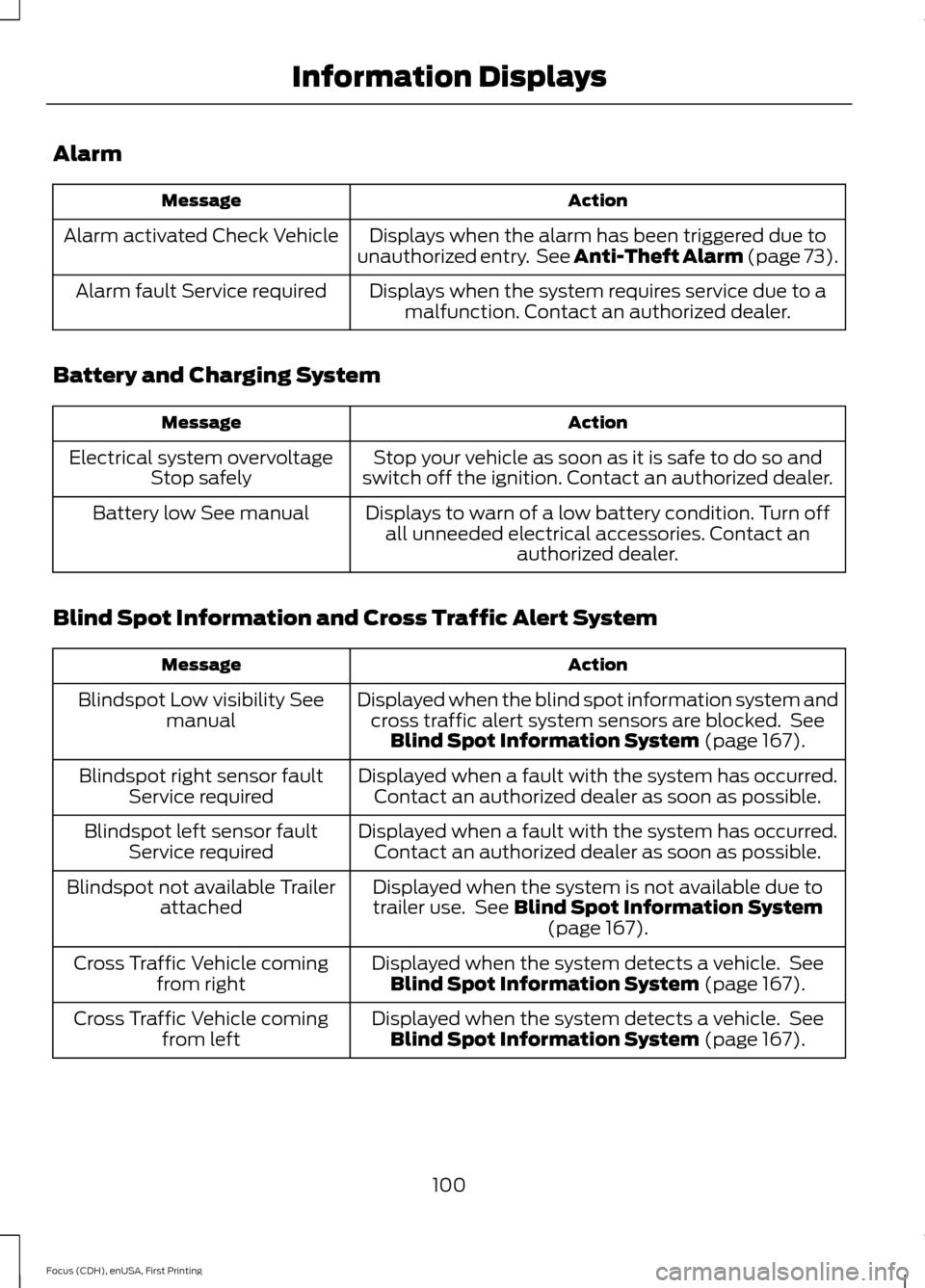
Alarm
Action
Message
Displays when the alarm has been triggered due to
unauthorized entry. See Anti-Theft Alarm (page 73).
Alarm activated Check Vehicle
Displays when the system requires service due to amalfunction. Contact an authorized dealer.
Alarm fault Service required
Battery and Charging System Action
Message
Stop your vehicle as soon as it is safe to do so and
switch off the ignition. Contact an authorized dealer.
Electrical system overvoltage
Stop safely
Displays to warn of a low battery condition. Turn offall unneeded electrical accessories. Contact an authorized dealer.
Battery low See manual
Blind Spot Information and Cross Traffic Alert System Action
Message
Displayed when the blind spot information system andcross traffic alert system sensors are blocked. See Blind Spot Information System (page 167).
Blindspot Low visibility See
manual
Displayed when a fault with the system has occurred.Contact an authorized dealer as soon as possible.
Blindspot right sensor fault
Service required
Displayed when a fault with the system has occurred.Contact an authorized dealer as soon as possible.
Blindspot left sensor fault
Service required
Displayed when the system is not available due to
trailer use. See
Blind Spot Information System (page 167).
Blindspot not available Trailer
attached
Displayed when the system detects a vehicle. SeeBlind Spot Information System
(page 167).
Cross Traffic Vehicle coming
from right
Displayed when the system detects a vehicle. SeeBlind Spot Information System
(page 167).
Cross Traffic Vehicle coming
from left
100
Focus (CDH), enUSA, First Printing Information Displays
Page 104 of 453
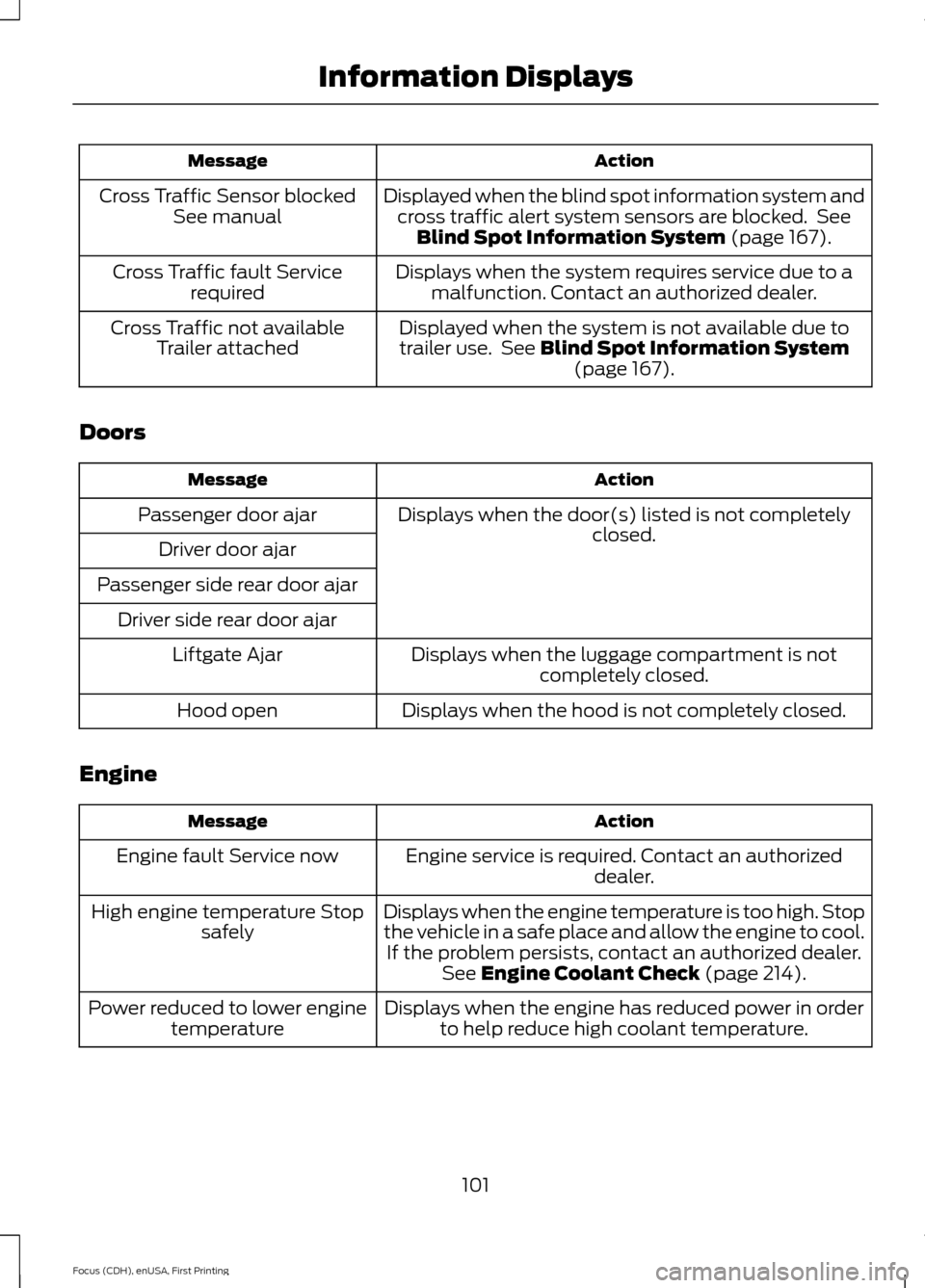
Action
Message
Displayed when the blind spot information system andcross traffic alert system sensors are blocked. See Blind Spot Information System (page 167).
Cross Traffic Sensor blocked
See manual
Displays when the system requires service due to amalfunction. Contact an authorized dealer.
Cross Traffic fault Service
required
Displayed when the system is not available due to
trailer use. See
Blind Spot Information System (page 167).
Cross Traffic not available
Trailer attached
Doors Action
Message
Displays when the door(s) listed is not completelyclosed.
Passenger door ajar
Driver door ajar
Passenger side rear door ajar Driver side rear door ajar Displays when the luggage compartment is notcompletely closed.
Liftgate Ajar
Displays when the hood is not completely closed.
Hood open
Engine Action
Message
Engine service is required. Contact an authorizeddealer.
Engine fault Service now
Displays when the engine temperature is too high. Stop
the vehicle in a safe place and allow the engine to cool.If the problem persists, contact an authorized dealer. See
Engine Coolant Check (page 214).
High engine temperature Stop
safely
Displays when the engine has reduced power in orderto help reduce high coolant temperature.
Power reduced to lower engine
temperature
101
Focus (CDH), enUSA, First Printing Information Displays
Page 105 of 453
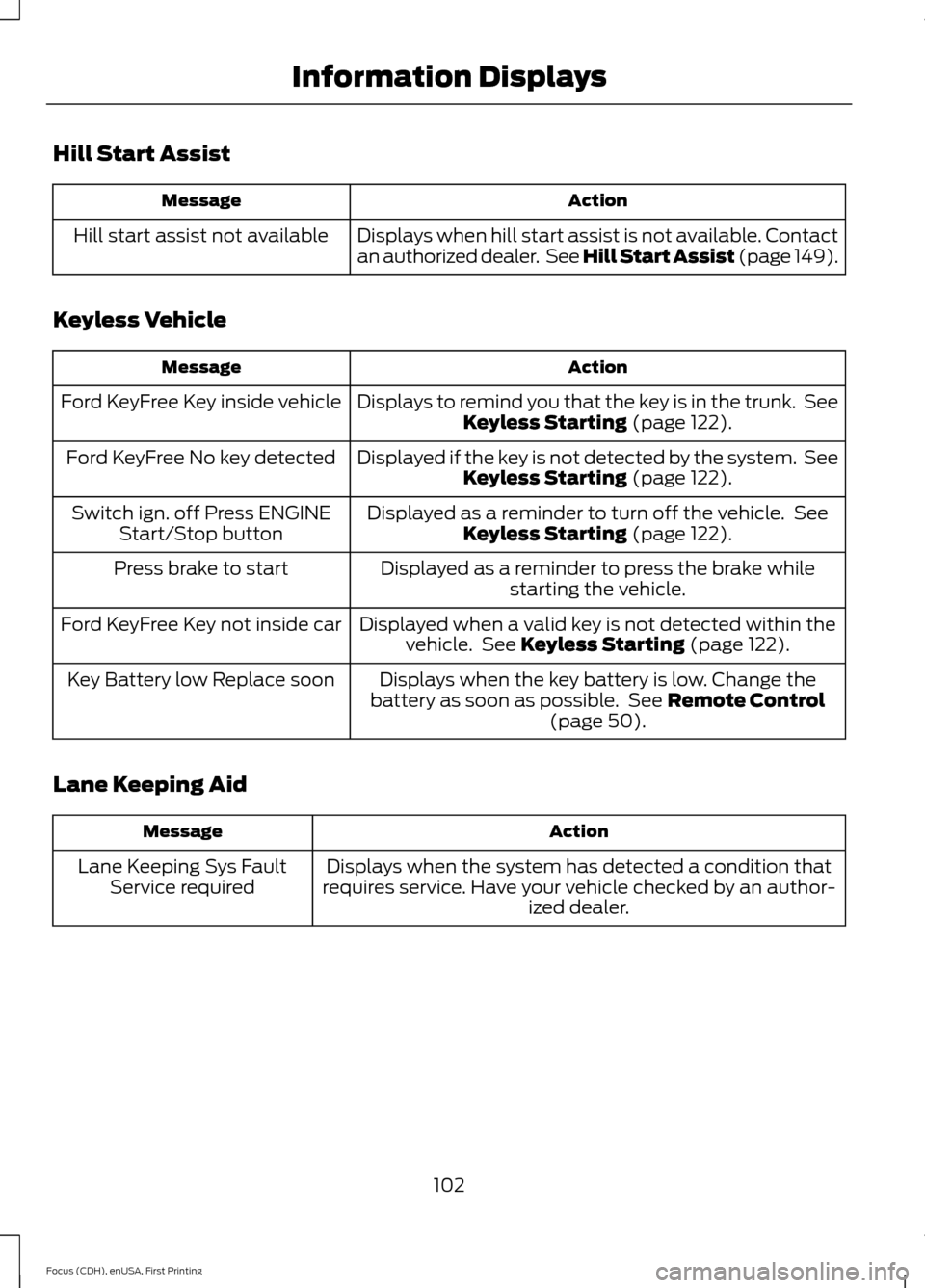
Hill Start Assist
Action
Message
Displays when hill start assist is not available. Contact
an authorized dealer. See Hill Start Assist (page 149).
Hill start assist not available
Keyless Vehicle Action
Message
Displays to remind you that the key is in the trunk. SeeKeyless Starting (page 122).
Ford KeyFree Key inside vehicle
Displayed if the key is not detected by the system. SeeKeyless Starting
(page 122).
Ford KeyFree No key detected
Displayed as a reminder to turn off the vehicle. SeeKeyless Starting
(page 122).
Switch ign. off Press ENGINE
Start/Stop button
Displayed as a reminder to press the brake whilestarting the vehicle.
Press brake to start
Displayed when a valid key is not detected within thevehicle. See
Keyless Starting (page 122).
Ford KeyFree Key not inside car
Displays when the key battery is low. Change the
battery as soon as possible. See
Remote Control
(page 50).
Key Battery low Replace soon
Lane Keeping Aid Action
Message
Displays when the system has detected a condition that
requires service. Have your vehicle checked by an author- ized dealer.
Lane Keeping Sys Fault
Service required
102
Focus (CDH), enUSA, First Printing Information Displays
Page 106 of 453
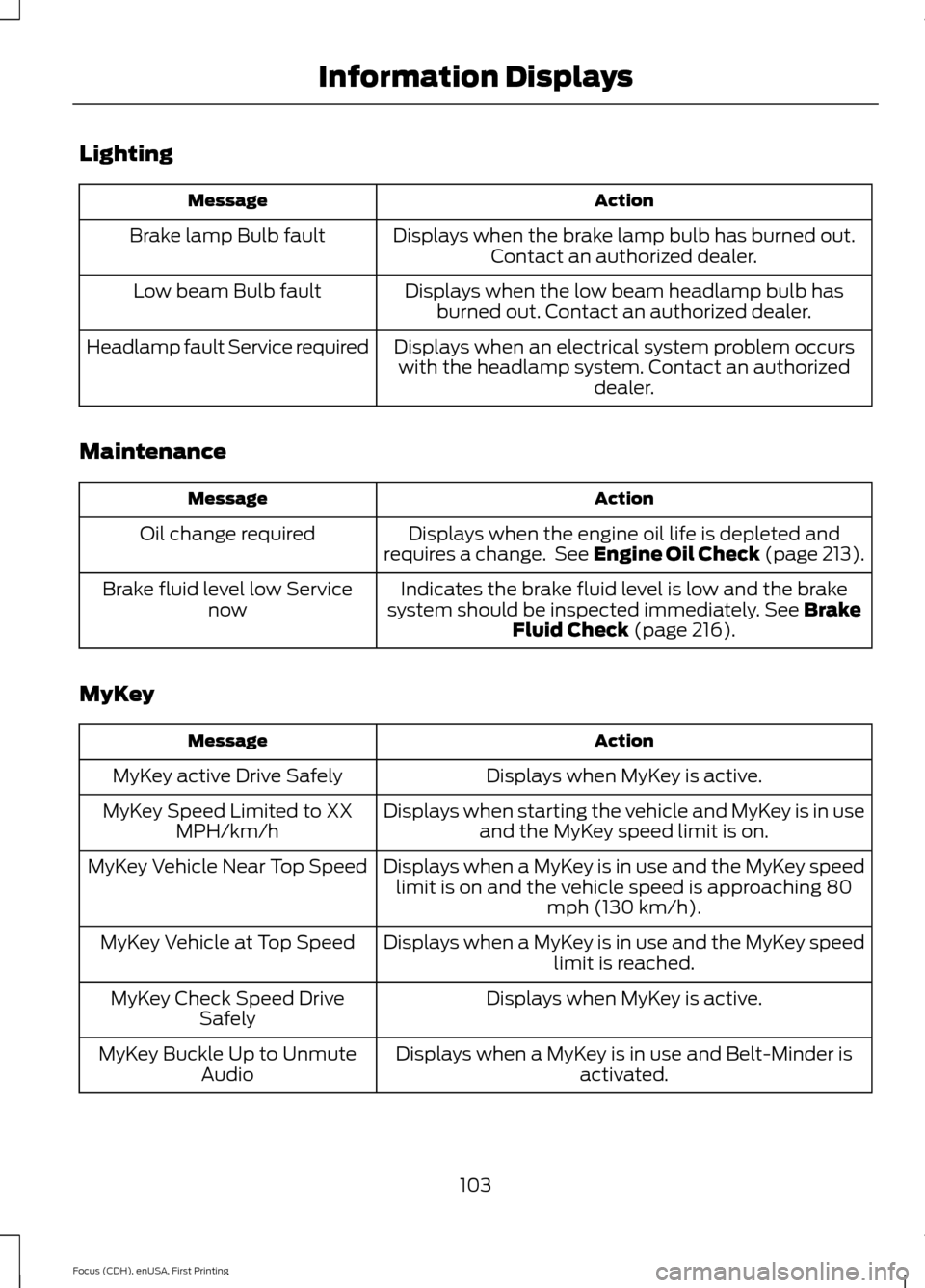
Lighting
Action
Message
Displays when the brake lamp bulb has burned out.Contact an authorized dealer.
Brake lamp Bulb fault
Displays when the low beam headlamp bulb hasburned out. Contact an authorized dealer.
Low beam Bulb fault
Displays when an electrical system problem occurswith the headlamp system. Contact an authorized dealer.
Headlamp fault Service required
Maintenance Action
Message
Displays when the engine oil life is depleted and
requires a change. See Engine Oil Check (page 213).
Oil change required
Indicates the brake fluid level is low and the brake
system should be inspected immediately. See Brake
Fluid Check (page 216).
Brake fluid level low Service
now
MyKey Action
Message
Displays when MyKey is active.
MyKey active Drive Safely
Displays when starting the vehicle and MyKey is in useand the MyKey speed limit is on.
MyKey Speed Limited to XX
MPH/km/h
Displays when a MyKey is in use and the MyKey speedlimit is on and the vehicle speed is approaching 80 mph (130 km/h).
MyKey Vehicle Near Top Speed
Displays when a MyKey is in use and the MyKey speedlimit is reached.
MyKey Vehicle at Top Speed
Displays when MyKey is active.
MyKey Check Speed Drive
Safely
Displays when a MyKey is in use and Belt-Minder isactivated.
MyKey Buckle Up to Unmute
Audio
103
Focus (CDH), enUSA, First Printing Information Displays
Page 107 of 453
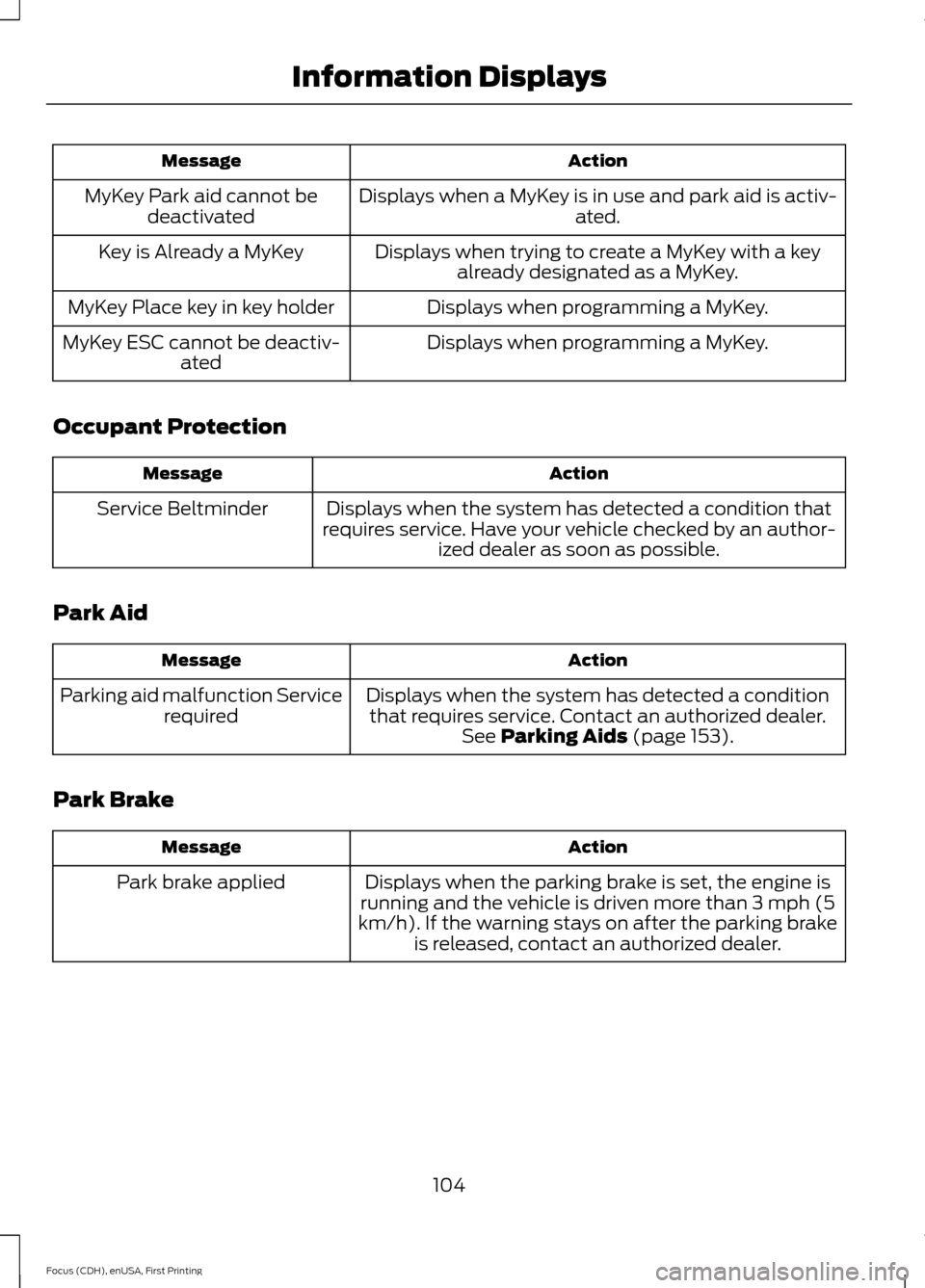
Action
Message
Displays when a MyKey is in use and park aid is activ- ated.
MyKey Park aid cannot be
deactivated
Displays when trying to create a MyKey with a keyalready designated as a MyKey.
Key is Already a MyKey
Displays when programming a MyKey.
MyKey Place key in key holder
Displays when programming a MyKey.
MyKey ESC cannot be deactiv-
ated
Occupant Protection Action
Message
Displays when the system has detected a condition that
requires service. Have your vehicle checked by an author- ized dealer as soon as possible.
Service Beltminder
Park Aid Action
Message
Displays when the system has detected a conditionthat requires service. Contact an authorized dealer. See Parking Aids (page 153).
Parking aid malfunction Service
required
Park Brake Action
Message
Displays when the parking brake is set, the engine is
running and the vehicle is driven more than 3 mph (5
km/h). If the warning stays on after the parking brake is released, contact an authorized dealer.
Park brake applied
104
Focus (CDH), enUSA, First Printing Information Displays
Page 108 of 453
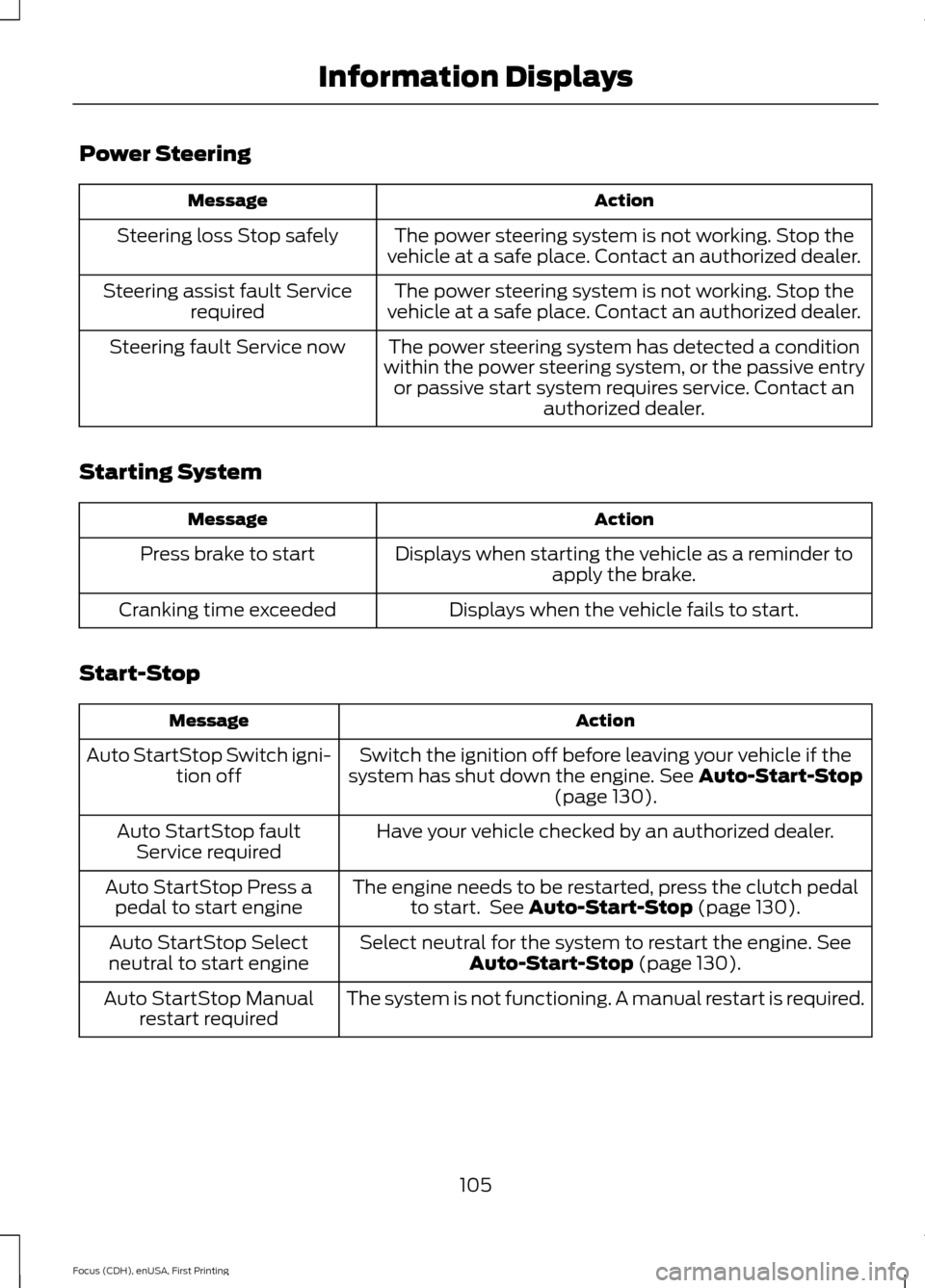
Power Steering
Action
Message
The power steering system is not working. Stop the
vehicle at a safe place. Contact an authorized dealer.
Steering loss Stop safely
The power steering system is not working. Stop the
vehicle at a safe place. Contact an authorized dealer.
Steering assist fault Service
required
The power steering system has detected a condition
within the power steering system, or the passive entry or passive start system requires service. Contact an authorized dealer.
Steering fault Service now
Starting System Action
Message
Displays when starting the vehicle as a reminder toapply the brake.
Press brake to start
Displays when the vehicle fails to start.
Cranking time exceeded
Start-Stop Action
Message
Switch the ignition off before leaving your vehicle if the
system has shut down the engine. See Auto-Start-Stop
(page 130).
Auto StartStop Switch igni-
tion off
Have your vehicle checked by an authorized dealer.
Auto StartStop fault
Service required
The engine needs to be restarted, press the clutch pedalto start. See
Auto-Start-Stop (page 130).
Auto StartStop Press a
pedal to start engine
Select neutral for the system to restart the engine.
See
Auto-Start-Stop (page 130).
Auto StartStop Select
neutral to start engine
The system is not functioning. A manual restart is required.
Auto StartStop Manual
restart required
105
Focus (CDH), enUSA, First Printing Information Displays