oil FORD FOCUS 2015 3.G Owner's Guide
[x] Cancel search | Manufacturer: FORD, Model Year: 2015, Model line: FOCUS, Model: FORD FOCUS 2015 3.GPages: 453, PDF Size: 5.32 MB
Page 431 of 453
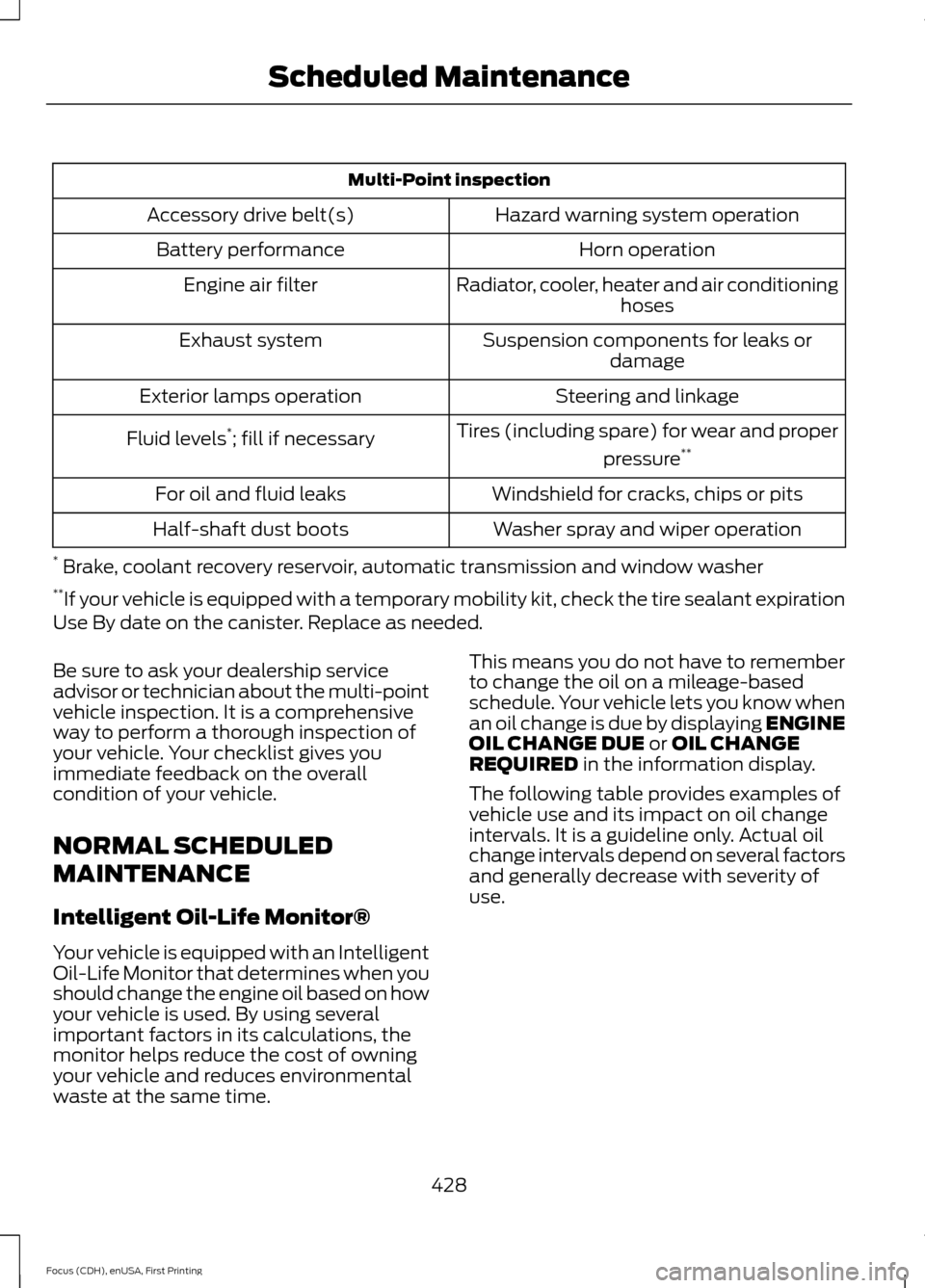
Multi-Point inspection
Hazard warning system operation
Accessory drive belt(s)
Horn operation
Battery performance
Radiator, cooler, heater and air conditioninghoses
Engine air filter
Suspension components for leaks ordamage
Exhaust system
Steering and linkage
Exterior lamps operation
Tires (including spare) for wear and properpressure**
Fluid levels *
; fill if necessary
Windshield for cracks, chips or pits
For oil and fluid leaks
Washer spray and wiper operation
Half-shaft dust boots
* Brake, coolant recovery reservoir, automatic transmission and window washer
** If your vehicle is equipped with a temporary mobility kit, check the tire sealant expiration
Use By date on the canister. Replace as needed.
Be sure to ask your dealership service
advisor or technician about the multi-point
vehicle inspection. It is a comprehensive
way to perform a thorough inspection of
your vehicle. Your checklist gives you
immediate feedback on the overall
condition of your vehicle.
NORMAL SCHEDULED
MAINTENANCE
Intelligent Oil-Life Monitor®
Your vehicle is equipped with an Intelligent
Oil-Life Monitor that determines when you
should change the engine oil based on how
your vehicle is used. By using several
important factors in its calculations, the
monitor helps reduce the cost of owning
your vehicle and reduces environmental
waste at the same time. This means you do not have to remember
to change the oil on a mileage-based
schedule. Your vehicle lets you know when
an oil change is due by displaying ENGINE
OIL CHANGE DUE or OIL CHANGE
REQUIRED in the information display.
The following table provides examples of
vehicle use and its impact on oil change
intervals. It is a guideline only. Actual oil
change intervals depend on several factors
and generally decrease with severity of
use.
428
Focus (CDH), enUSA, First Printing Scheduled Maintenance
Page 432 of 453
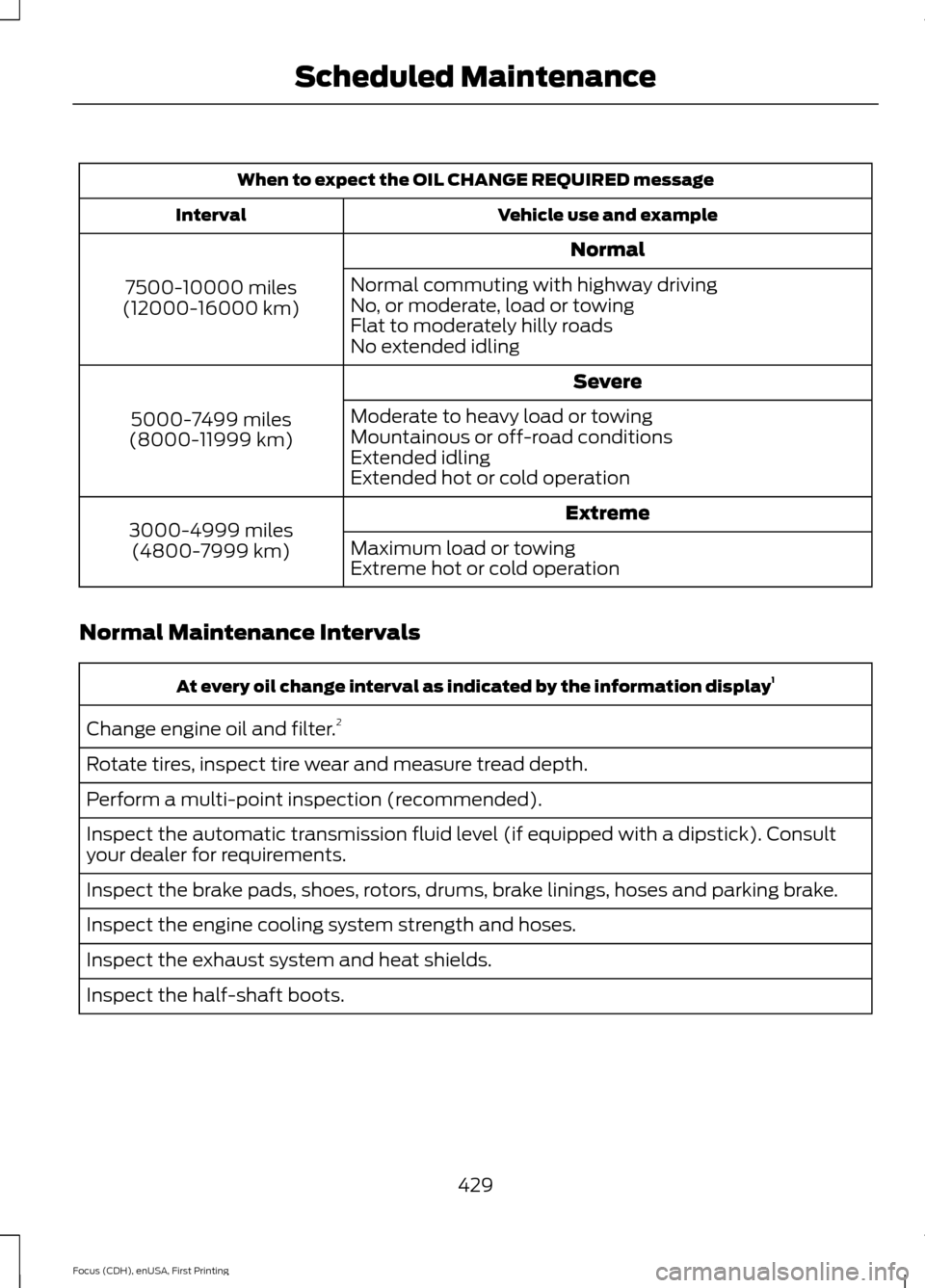
When to expect the OIL CHANGE REQUIRED message
Vehicle use and example
Interval
Normal
7500-10000 miles
(12000-16000 km) Normal commuting with highway driving
No, or moderate, load or towing
Flat to moderately hilly roads
No extended idling
Severe
5000-7499 miles
(8000-11999 km) Moderate to heavy load or towing
Mountainous or off-road conditions
Extended idling
Extended hot or cold operation
Extreme
3000-4999 miles
(4800-7999 km) Maximum load or towing
Extreme hot or cold operation
Normal Maintenance Intervals At every oil change interval as indicated by the information display
1
Change engine oil and filter. 2
Rotate tires, inspect tire wear and measure tread depth.
Perform a multi-point inspection (recommended).
Inspect the automatic transmission fluid level (if equipped with a dipstick). Consult
your dealer for requirements.
Inspect the brake pads, shoes, rotors, drums, brake linings, hoses and parking brake.
Inspect the engine cooling system strength and hoses.
Inspect the exhaust system and heat shields.
Inspect the half-shaft boots.
429
Focus (CDH), enUSA, First Printing Scheduled Maintenance
Page 433 of 453
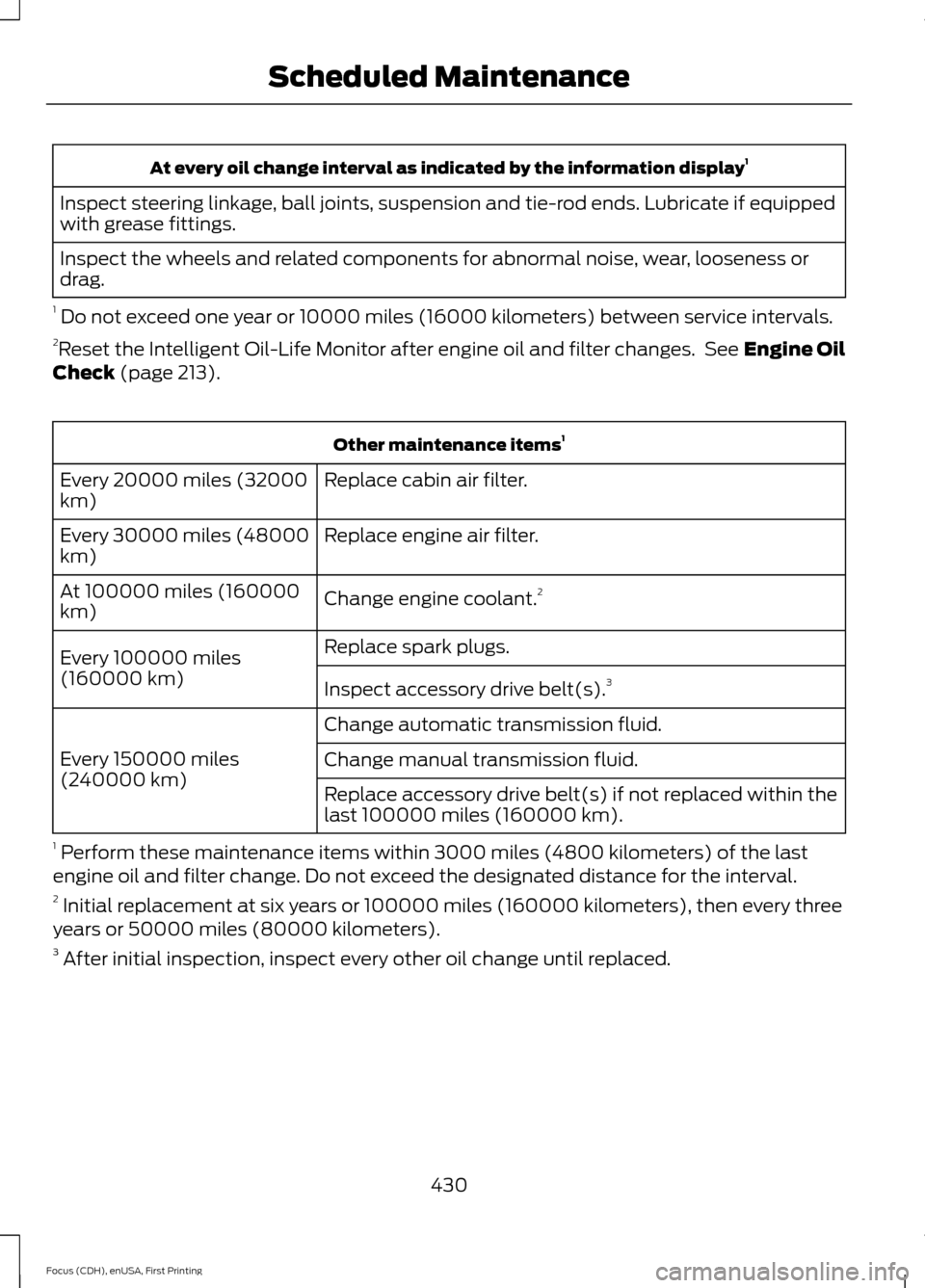
At every oil change interval as indicated by the information display
1
Inspect steering linkage, ball joints, suspension and tie-rod ends. Lubricate if equipped
with grease fittings.
Inspect the wheels and related components for abnormal noise, wear, looseness or
drag.
1 Do not exceed one year or 10000 miles (16000 kilometers) between service intervals.
2 Reset the Intelligent Oil-Life Monitor after engine oil and filter changes. See Engine Oil
Check (page 213). Other maintenance items
1
Replace cabin air filter.
Every 20000 miles (32000
km)
Replace engine air filter.
Every 30000 miles (48000
km)
Change engine coolant.2
At 100000 miles (160000
km)
Replace spark plugs.
Every 100000 miles
(160000 km) Inspect accessory drive belt(s). 3
Change automatic transmission fluid.
Every 150000 miles
(240000 km) Change manual transmission fluid.
Replace accessory drive belt(s) if not replaced within the
last 100000 miles (160000 km).
1 Perform these maintenance items within 3000 miles (4800 kilometers) of the last
engine oil and filter change. Do not exceed the designated distance for the interval.
2 Initial replacement at six years or 100000 miles (160000 kilometers), then every three
years or 50000 miles (80000 kilometers).
3 After initial inspection, inspect every other oil change until replaced.
430
Focus (CDH), enUSA, First Printing Scheduled Maintenance
Page 434 of 453
SPECIAL OPERATING
CONDITIONS SCHEDULED
MAINTENANCE
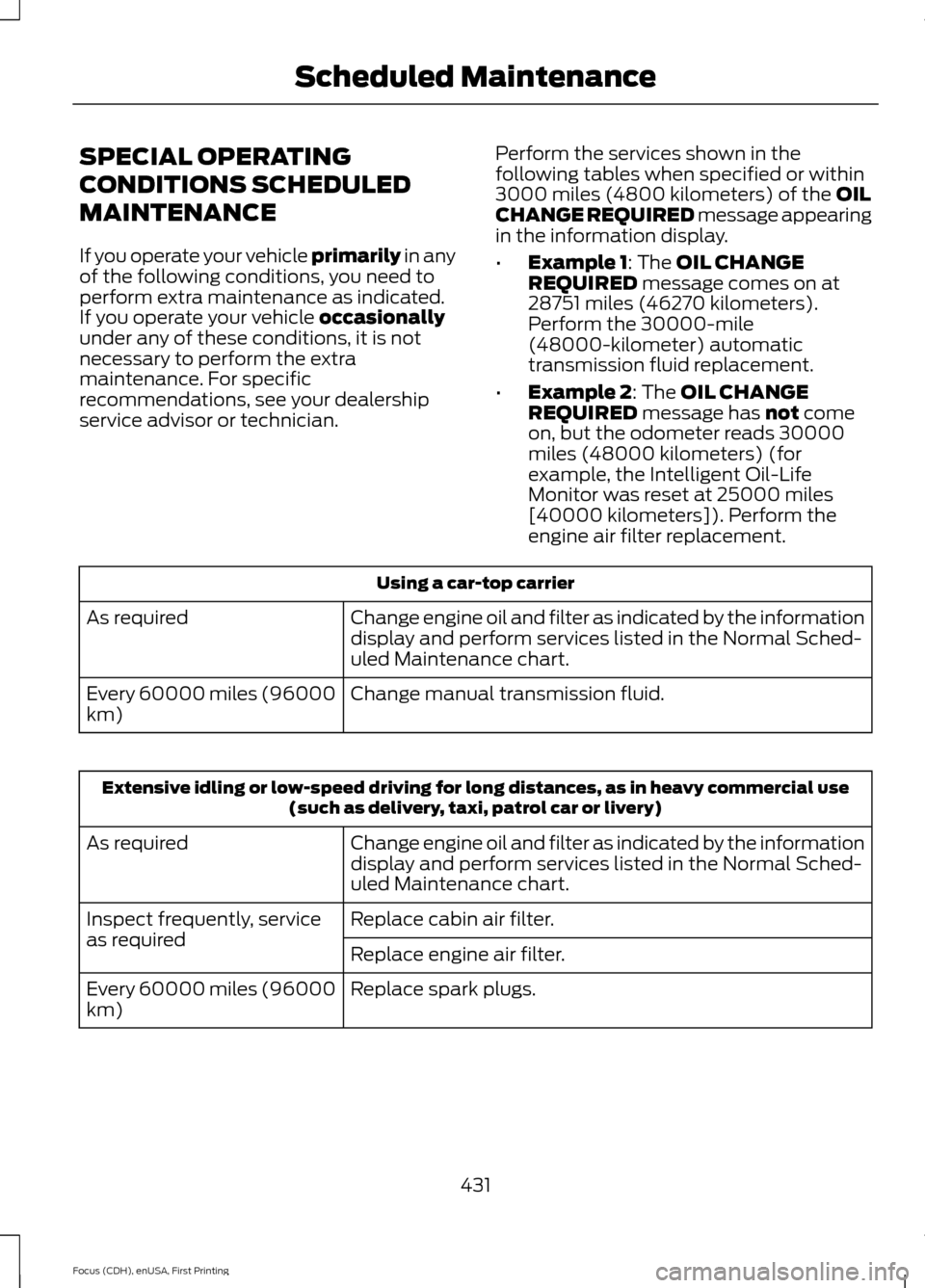
If you operate your vehicle primarily in any
of the following conditions, you need to
perform extra maintenance as indicated.
If you operate your vehicle
occasionally
under any of these conditions, it is not
necessary to perform the extra
maintenance. For specific
recommendations, see your dealership
service advisor or technician. Perform the services shown in the
following tables when specified or within
3000 miles (4800 kilometers) of the
OIL
CHANGE REQUIRED message appearing
in the information display.
• Example 1
: The OIL CHANGE
REQUIRED message comes on at
28751 miles (46270 kilometers).
Perform the 30000-mile
(48000-kilometer) automatic
transmission fluid replacement.
• Example 2
: The OIL CHANGE
REQUIRED message has not come
on, but the odometer reads 30000
miles (48000 kilometers) (for
example, the Intelligent Oil-Life
Monitor was reset at 25000 miles
[40000 kilometers]). Perform the
engine air filter replacement. Using a car-top carrier
Change engine oil and filter as indicated by the information
display and perform services listed in the Normal Sched-
uled Maintenance chart.
As required
Change manual transmission fluid.
Every 60000 miles (96000
km) Extensive idling or low-speed driving for long distances, as in heavy commercial use
(such as delivery, taxi, patrol car or livery)
Change engine oil and filter as indicated by the information
display and perform services listed in the Normal Sched-
uled Maintenance chart.
As required
Replace cabin air filter.
Inspect frequently, service
as required
Replace engine air filter.
Replace spark plugs.
Every 60000 miles (96000
km)
431
Focus (CDH), enUSA, First Printing Scheduled Maintenance
Page 435 of 453
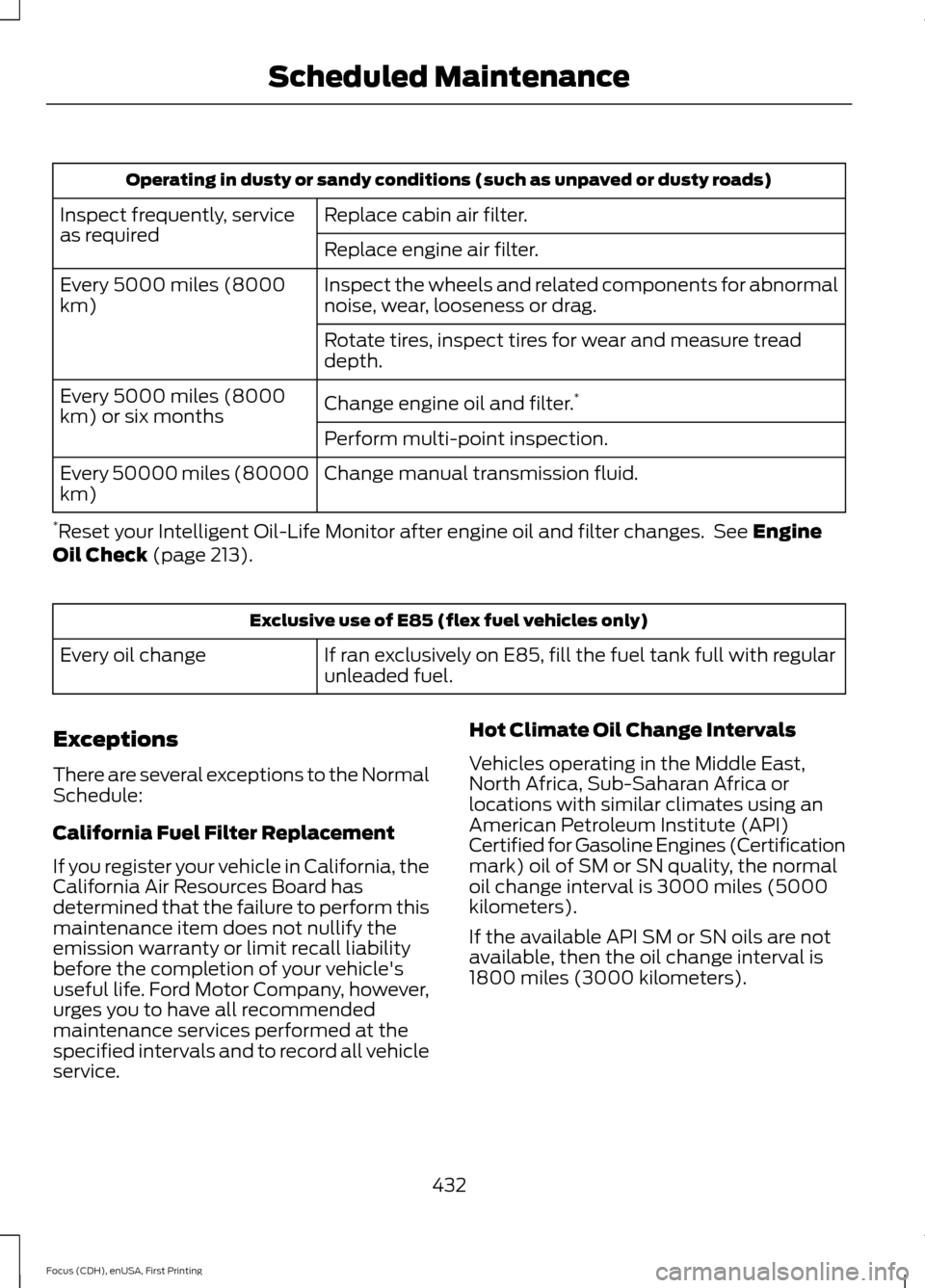
Operating in dusty or sandy conditions (such as unpaved or dusty roads)
Replace cabin air filter.
Inspect frequently, service
as required
Replace engine air filter.
Inspect the wheels and related components for abnormal
noise, wear, looseness or drag.
Every 5000 miles (8000
km)
Rotate tires, inspect tires for wear and measure tread
depth.
Change engine oil and filter.*
Every 5000 miles (8000
km) or six months
Perform multi-point inspection.
Change manual transmission fluid.
Every 50000 miles (80000
km)
* Reset your Intelligent Oil-Life Monitor after engine oil and filter changes. See Engine
Oil Check (page 213). Exclusive use of E85 (flex fuel vehicles only)
If ran exclusively on E85, fill the fuel tank full with regular
unleaded fuel.
Every oil change
Exceptions
There are several exceptions to the Normal
Schedule:
California Fuel Filter Replacement
If you register your vehicle in California, the
California Air Resources Board has
determined that the failure to perform this
maintenance item does not nullify the
emission warranty or limit recall liability
before the completion of your vehicle's
useful life. Ford Motor Company, however,
urges you to have all recommended
maintenance services performed at the
specified intervals and to record all vehicle
service. Hot Climate Oil Change Intervals
Vehicles operating in the Middle East,
North Africa, Sub-Saharan Africa or
locations with similar climates using an
American Petroleum Institute (API)
Certified for Gasoline Engines (Certification
mark) oil of SM or SN quality, the normal
oil change interval is 3000 miles (5000
kilometers).
If the available API SM or SN oils are not
available, then the oil change interval is
1800 miles (3000 kilometers).
432
Focus (CDH), enUSA, First Printing Scheduled Maintenance
Page 446 of 453
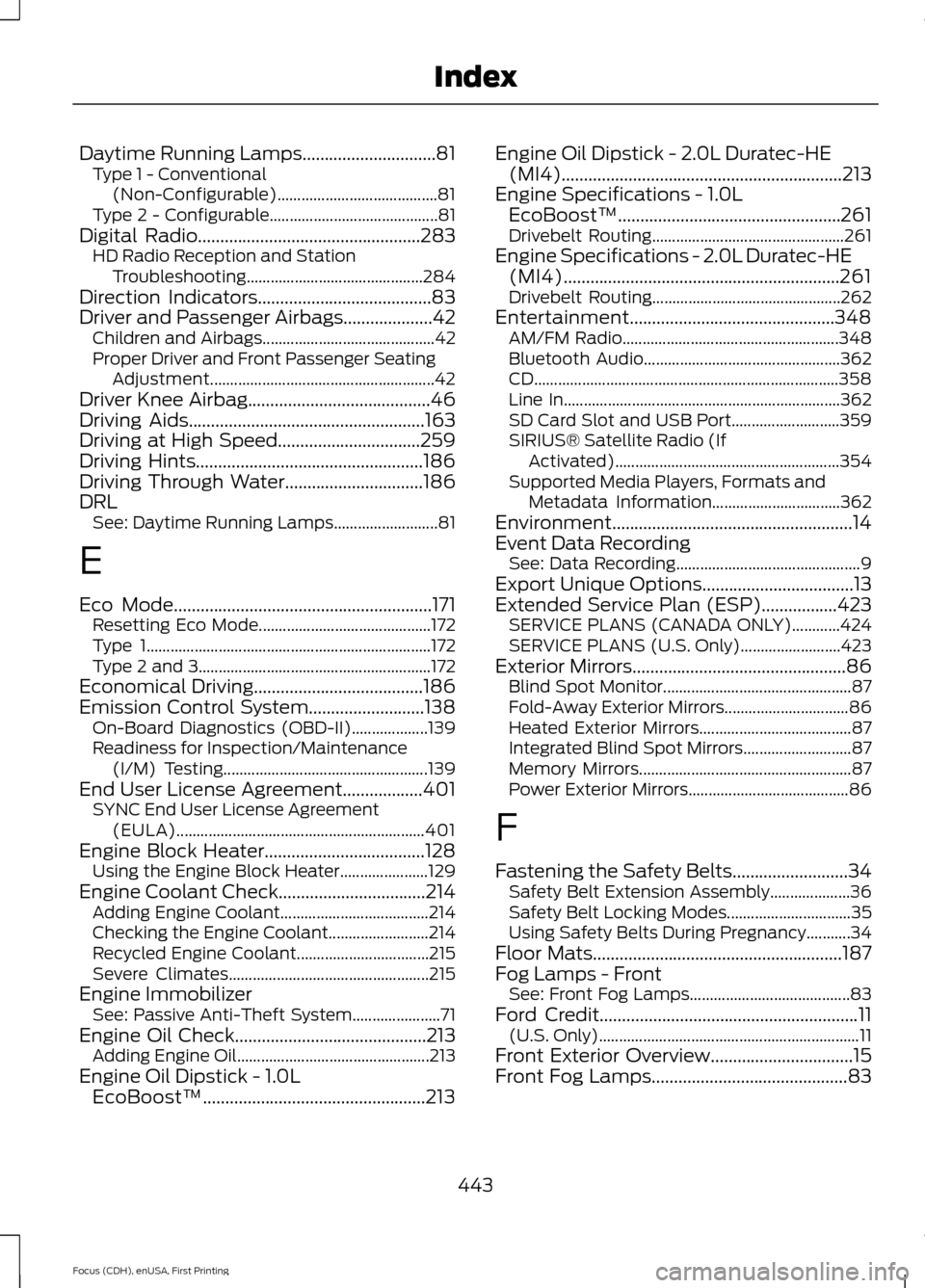
Daytime Running Lamps..............................81
Type 1 - Conventional
(Non-Configurable)........................................ 81
Type 2 - Configurable.......................................... 81
Digital Radio..................................................283
HD Radio Reception and Station
Troubleshooting............................................ 284
Direction Indicators.......................................83
Driver and Passenger Airbags....................42 Children and Airbags........................................... 42
Proper Driver and Front Passenger Seating Adjustment........................................................ 42
Driver Knee Airbag
.........................................46
Driving Aids.....................................................163
Driving at High Speed................................259
Driving Hints...................................................186
Driving Through Water...............................186
DRL See: Daytime Running Lamps.......................... 81
E
Eco Mode
..........................................................171
Resetting Eco Mode........................................... 172
Type 1....................................................................... 172
Type 2 and 3.......................................................... 172
Economical Driving
......................................186
Emission Control System..........................138 On-Board Diagnostics (OBD-II)................... 139
Readiness for Inspection/Maintenance (I/M) Testing................................................... 139
End User License Agreement..................401 SYNC End User License Agreement
(EULA).............................................................. 401
Engine Block Heater
....................................128
Using the Engine Block Heater...................... 129
Engine Coolant Check
.................................214
Adding Engine Coolant..................................... 214
Checking the Engine Coolant......................... 214
Recycled Engine Coolant................................. 215
Severe Climates.................................................. 215
Engine Immobilizer See: Passive Anti-Theft System...................... 71
Engine Oil Check...........................................213 Adding Engine Oil................................................ 213
Engine Oil Dipstick - 1.0L EcoBoost™..................................................213 Engine Oil Dipstick - 2.0L Duratec-HE
(MI4)
...............................................................213
Engine Specifications - 1.0L EcoBoost™..................................................261
Drivebelt Routing................................................ 261
Engine Specifications - 2.0L Duratec-HE (MI4)..............................................................261
Drivebelt Routing............................................... 262
Entertainment..............................................348 AM/FM Radio...................................................... 348
Bluetooth Audio................................................. 362
CD........................................................................\
.... 358
Line In..................................................................... 362
SD Card Slot and USB Port........................... 359
SIRIUS® Satellite Radio (If Activated)........................................................ 354
Supported Media Players, Formats and Metadata Information................................ 362
Environment......................................................14
Event Data Recording See: Data Recording.............................................. 9
Export Unique Options..................................13
Extended Service Plan (ESP).................423 SERVICE PLANS (CANADA ONLY)............424
SERVICE PLANS (U.S. Only)......................... 423
Exterior Mirrors................................................86 Blind Spot Monitor............................................... 87
Fold-Away Exterior Mirrors............................... 86
Heated Exterior Mirrors...................................... 87
Integrated Blind Spot Mirrors........................... 87
Memory Mirrors..................................................... 87
Power Exterior Mirrors........................................ 86
F
Fastening the Safety Belts
..........................34
Safety Belt Extension Assembly.................... 36
Safety Belt Locking Modes............................... 35
Using Safety Belts During Pregnancy...........34
Floor Mats........................................................187
Fog Lamps - Front See: Front Fog Lamps........................................ 83
Ford Credit
..........................................................11
(U.S. Only)................................................................. 11
Front Exterior Overview................................15
Front Fog Lamps............................................83
443
Focus (CDH), enUSA, First Printing Index
Page 449 of 453
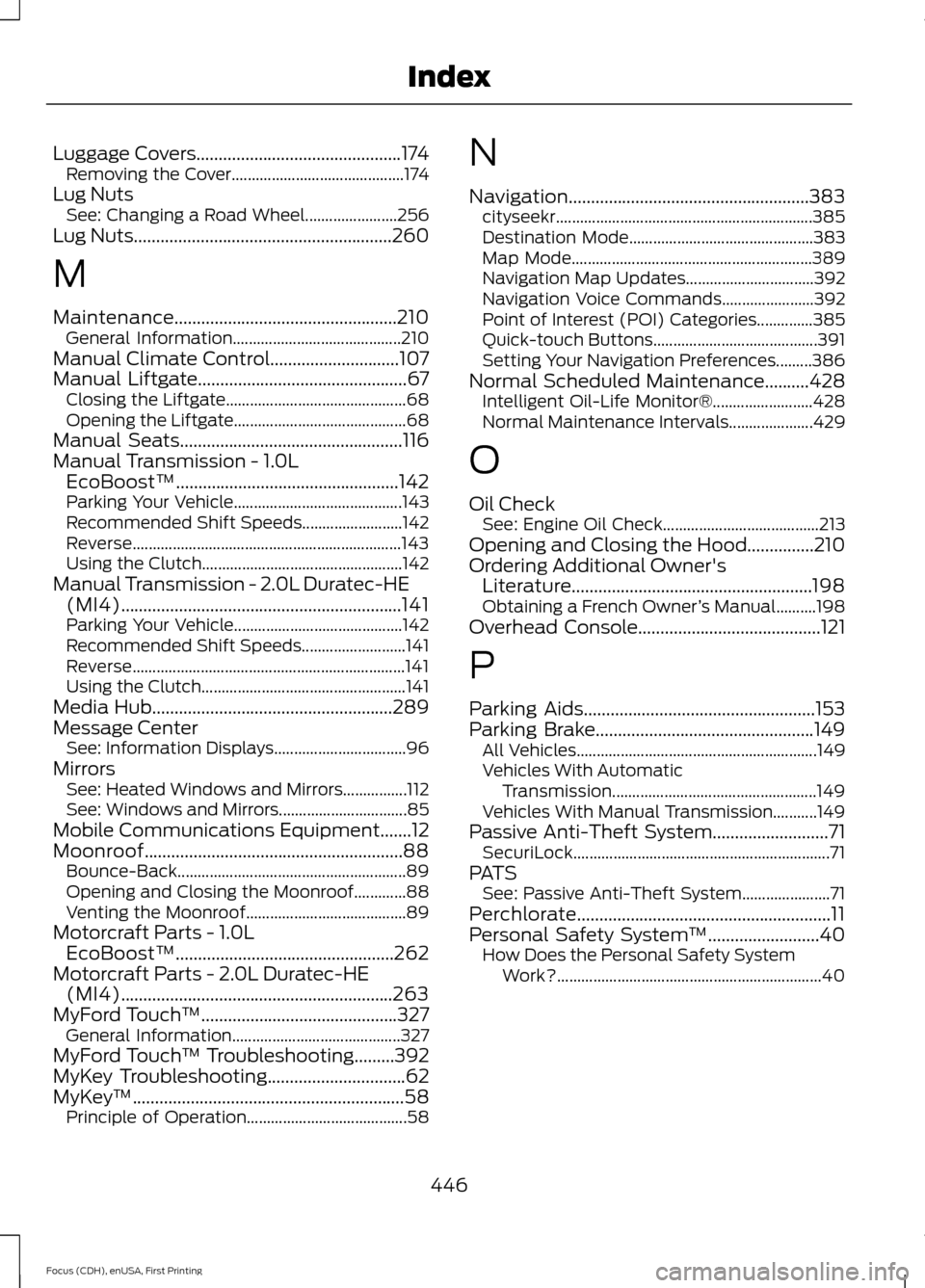
Luggage Covers..............................................174
Removing the Cover........................................... 174
Lug Nuts See: Changing a Road Wheel....................... 256
Lug Nuts
..........................................................260
M
Maintenance..................................................210 General Information.......................................... 210
Manual Climate Control.............................107
Manual Liftgate...............................................67 Closing the Liftgate............................................. 68
Opening the Liftgate........................................... 68
Manual Seats..................................................116
Manual Transmission - 1.0L EcoBoost™..................................................142
Parking Your Vehicle.......................................... 143
Recommended Shift Speeds......................... 142
Reverse................................................................... 143
Using the Clutch.................................................. 142
Manual Transmission - 2.0L Duratec-HE (MI4)...............................................................141
Parking Your Vehicle.......................................... 142
Recommended Shift Speeds.......................... 141
Reverse.................................................................... 141
Using the Clutch................................................... 141
Media Hub......................................................289
Message Center See: Information Displays................................. 96
Mirrors See: Heated Windows and Mirrors................112
See: Windows and Mirrors................................ 85
Mobile Communications Equipment
.......12
Moonroof..........................................................88 Bounce-Back......................................................... 89
Opening and Closing the Moonroof.............88
Venting the Moonroof........................................ 89
Motorcraft Parts - 1.0L EcoBoost™.................................................262
Motorcraft Parts - 2.0L Duratec-HE (MI4).............................................................263
MyFord Touch ™
............................................327
General Information.......................................... 327
MyFord Touch ™ Troubleshooting
.........392
MyKey Troubleshooting...............................62
MyKey ™.............................................................58
Principle of Operation........................................ 58N
Navigation......................................................383
cityseekr................................................................ 385
Destination Mode.............................................. 383
Map Mode............................................................ 389
Navigation Map Updates................................ 392
Navigation Voice Commands....................... 392
Point of Interest (POI) Categories..............385
Quick-touch Buttons......................................... 391
Setting Your Navigation Preferences.........386
Normal Scheduled Maintenance..........428 Intelligent Oil-Life Monitor®......................... 428
Normal Maintenance Intervals..................... 429
O
Oil Check See: Engine Oil Check....................................... 213
Opening and Closing the Hood
...............210
Ordering Additional Owner's Literature......................................................198
Obtaining a French Owner ’s Manual..........198
Overhead Console.........................................121
P
Parking Aids....................................................153
Parking Brake
.................................................149
All Vehicles............................................................ 149
Vehicles With Automatic Transmission................................................... 149
Vehicles With Manual Transmission...........149
Passive Anti-Theft System..........................71 SecuriLock................................................................ 71
PATS See: Passive Anti-Theft System...................... 71
Perchlorate.........................................................11
Personal Safety System ™
.........................40
How Does the Personal Safety System
Work?.................................................................. 40
446
Focus (CDH), enUSA, First Printing Index
Page 453 of 453
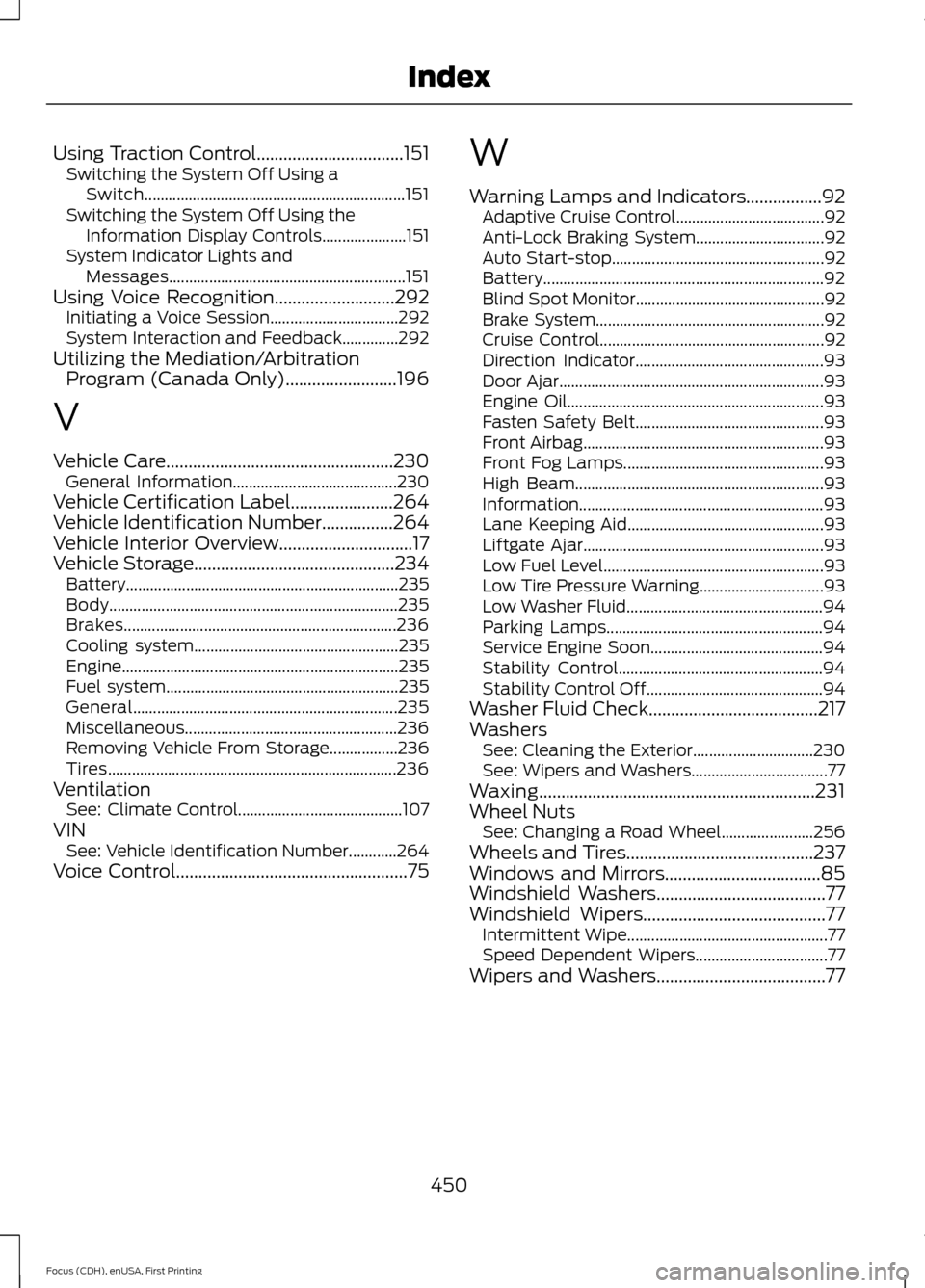
Using Traction Control.................................151
Switching the System Off Using a
Switch................................................................. 151
Switching the System Off Using the Information Display Controls..................... 151
System Indicator Lights and Messages........................................................... 151
Using Voice Recognition...........................292 Initiating a Voice Session................................ 292
System Interaction and Feedback..............292
Utilizing the Mediation/Arbitration Program (Canada Only).........................196
V
Vehicle Care...................................................230 General Information......................................... 230
Vehicle Certification Label.......................264
Vehicle Identification Number................264
Vehicle Interior Overview..............................17
Vehicle Storage.............................................234
Battery.................................................................... 235
Body........................................................................\
235
Brakes.................................................................... 236
Cooling system................................................... 235
Engine..................................................................... 235
Fuel system.......................................................... 235
General.................................................................. 235
Miscellaneous..................................................... 236
Removing Vehicle From Storage.................236
Tires........................................................................\
236
Ventilation See: Climate Control......................................... 107
VIN See: Vehicle Identification Number............264
Voice Control....................................................75 W
Warning Lamps and Indicators
.................92
Adaptive Cruise Control..................................... 92
Anti-Lock Braking System................................ 92
Auto Start-stop..................................................... 92
Battery...................................................................... 92
Blind Spot Monitor............................................... 92
Brake System......................................................... 92
Cruise Control........................................................ 92
Direction Indicator............................................... 93
Door Ajar.................................................................. 93
Engine Oil................................................................ 93
Fasten Safety Belt............................................... 93
Front Airbag............................................................ 93
Front Fog Lamps.................................................. 93
High Beam.............................................................. 93
Information............................................................. 93
Lane Keeping Aid................................................. 93
Liftgate Ajar............................................................ 93
Low Fuel Level....................................................... 93
Low Tire Pressure Warning............................... 93
Low Washer Fluid................................................. 94
Parking Lamps...................................................... 94
Service Engine Soon........................................... 94
Stability Control................................................... 94
Stability Control Off............................................ 94
Washer Fluid Check......................................217
Washers See: Cleaning the Exterior.............................. 230
See: Wipers and Washers.................................. 77
Waxing
..............................................................231
Wheel Nuts See: Changing a Road Wheel....................... 256
Wheels and Tires..........................................237
Windows and Mirrors...................................85
Windshield Washers
......................................77
Windshield Wipers.........................................77
Intermittent Wipe.................................................. 77
Speed Dependent Wipers................................. 77
Wipers and Washers......................................77
450
Focus (CDH), enUSA, First Printing Index