Disc FORD FOCUS 2016 3.G User Guide
[x] Cancel search | Manufacturer: FORD, Model Year: 2016, Model line: FOCUS, Model: FORD FOCUS 2016 3.GPages: 385, PDF Size: 5.23 MB
Page 199 of 385
You are required to submit your warranty
dispute to BBB AUTO LINE before asserting
in court any rights or remedies conferred
by California Civil Code Section 1793.22(b).
You are also required to use BBB AUTO
LINE before exercising rights or seeking
remedies created by the Federal
Magnuson-Moss Warranty Act, 15 U.S.C.
sec. 2301 et seq. If you choose to seek
redress by pursuing rights and remedies
not created by California Civil Code Section
1793.22(b) or the Magnuson-Moss
Warranty Act, resort to BBB AUTO LINE is
not required by those statutes.
THE BETTER BUSINESS
BUREAU (BBB) AUTO LINE
PROGRAM (U.S. ONLY)
Your satisfaction is important to Ford
Motor Company and to your dealer. If a
warranty concern has not been resolved
using the three-step procedure outlined
earlier in this chapter in the Getting the
Services you need section, you may be
eligible to participate in the BBB AUTO
LINE program.
The BBB AUTO LINE program consists of
two parts – mediation and arbitration.
During mediation, a representative of the
BBB will contact both you and Ford Motor
Company to explore options for settlement
of the claim. If an agreement is not reached
during mediation or you do not want to
participate in mediation, and if your claim
is eligible, you may participate in the
arbitration process. An arbitration hearing
will be scheduled so that you can present
your case in an informal setting before an
impartial person. The arbitrator will
consider the testimony provided and make
a decision after the hearing.
Disputes submitted to the BBB AUTO LINE
program are usually decided within forty
days after you file your claim with the BBB.
You are not bound by the decision, and
may reject the decision and proceed to
court where all findings of the BBB Auto
Line dispute, and decision, are admissible
in the court action. Should you choose to
accept the BBB AUTO LINE decision, Ford
is then bound by the decision, and must
comply with the decision within 30 days
of receipt of your acceptance letter.
BBB AUTO LINE Application: Using the
information provided below, please call or
write to request a program application.
You will be asked for your name and
address, general information about your
new vehicle, information about your
warranty concerns, and any steps you have
already taken to try to resolve them. A
Customer Claim Form will be mailed that
will need to be completed, signed and
returned to the BBB along with proof of
ownership. Upon receipt, the BBB will
review the claim for eligibility under the
Program Summary Guidelines.
You can get more information by
calling BBB AUTO LINE at
1-800-955-5100, or writing to:
BBB AUTO LINE
3033 Wilson Boulevard, Suite 600
Arlington, Virginia 22201
BBB AUTO LINE applications can also be
requested by calling the Ford Motor
Company Customer Relationship Center
at 1-800-392-3673.
Note:
Ford Motor Company reserves the
right to change eligibility limitations, modify
procedures, or to discontinue this process
at any time without notice and without
obligation.
196
Focus (CDH) Canada/United States of America, enUSA, First Printing Customer Assistance
Page 224 of 385
Because your vehicle
’s engine is
electronically-controlled by a computer,
some engine control settings are
maintained by power from the low voltage
battery. Some engine computer settings,
like the idle trim and fuel trim strategy,
optimize the driveability and performance
of the engine. Some other computer
settings, like the clock and radio station
presets, are also maintained in memory by
power from the low voltage battery. When
a technician disconnects and connects the
low voltage battery, these settings are
erased. Complete the following procedure
in order to restore the settings:
1. With the vehicle at a complete stop, set the parking brake.
2. Shift into park (P).
3. Switch off all accessories.
4. Fully press the brake pedal and start the vehicle.
5. Run the engine until it reaches normal operating temperature. While the
engine is warming up, complete the
following: Reset the clock. See Audio
System (page 278). Reset the power
windows bounce-back feature. See
Windows and Mirrors
(page 81).
Reset the radio station presets. See
Audio System
(page 278).
6. Allow the engine to idle for at least one
minute. If the engine turns off, press
the accelerator pedal to start the
engine.
7. While the engine is running, press the brake pedal and shift into neutral (N).
8. Allow the engine to run for at least one
minute by pressing on the accelerator
pedal.
9. Drive the vehicle at least 12 mi (20 km)
to completely relearn the idle and fuel
trim strategy. Note:
If you do not allow the engine to
relearn the idle and fuel trim strategy, the
idle quality of your vehicle may be adversely
affected until the engine computer
eventually relearns the idle trim and fuel
trim strategy.
Make sure that you dispose of old batteries
in an environmentally friendly way. Seek
advice from your local authority about
recycling old batteries.
CHECKING THE WIPER
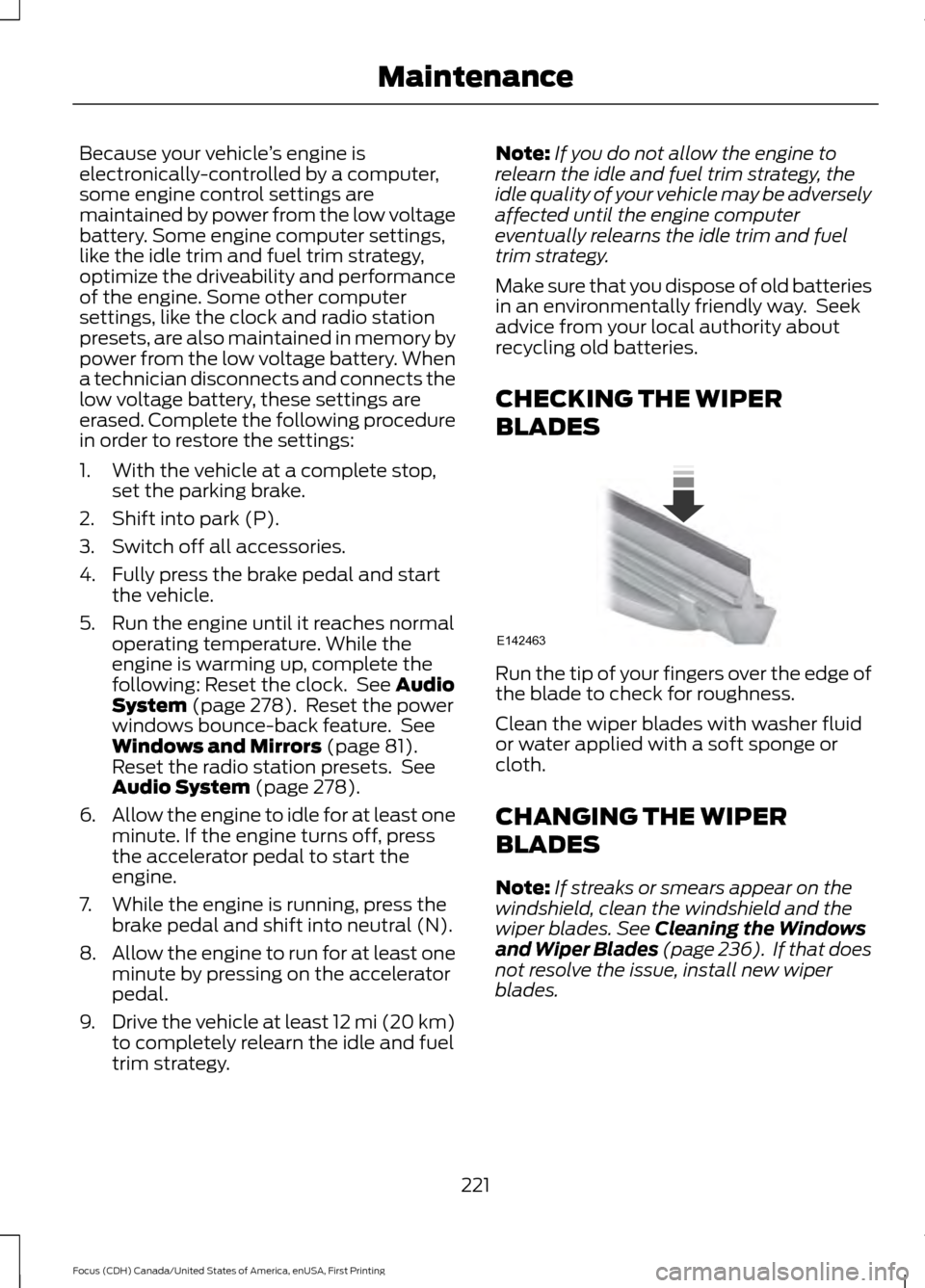
BLADES Run the tip of your fingers over the edge of
the blade to check for roughness.
Clean the wiper blades with washer fluid
or water applied with a soft sponge or
cloth.
CHANGING THE WIPER
BLADES
Note:
If streaks or smears appear on the
windshield, clean the windshield and the
wiper blades.
See Cleaning the Windows
and Wiper Blades (page 236). If that does
not resolve the issue, install new wiper
blades.
221
Focus (CDH) Canada/United States of America, enUSA, First Printing MaintenanceE142463
Page 228 of 385
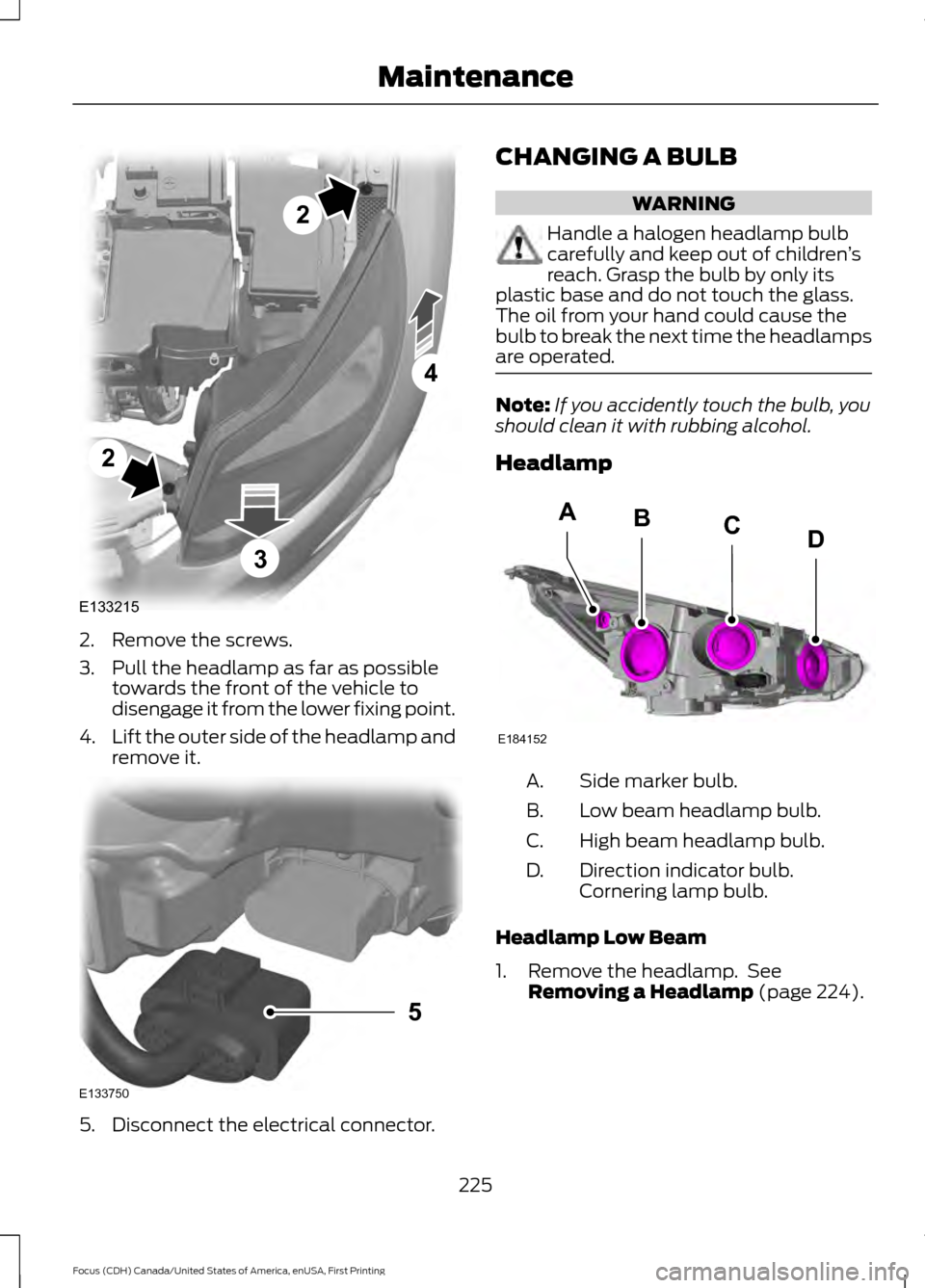
2. Remove the screws.
3. Pull the headlamp as far as possible
towards the front of the vehicle to
disengage it from the lower fixing point.
4. Lift the outer side of the headlamp and
remove it. 5. Disconnect the electrical connector. CHANGING A BULB WARNING
Handle a halogen headlamp bulb
carefully and keep out of children
’s
reach. Grasp the bulb by only its
plastic base and do not touch the glass.
The oil from your hand could cause the
bulb to break the next time the headlamps
are operated. Note:
If you accidently touch the bulb, you
should clean it with rubbing alcohol.
Headlamp Side marker bulb.
A.
Low beam headlamp bulb.
B.
High beam headlamp bulb.
C.
Direction indicator bulb.
Cornering lamp bulb.
D.
Headlamp Low Beam
1. Remove the headlamp. See Removing a Headlamp (page 224).
225
Focus (CDH) Canada/United States of America, enUSA, First Printing MaintenanceE133215
2
2
4
3 E133750
5 E184152
BACD
Page 229 of 385
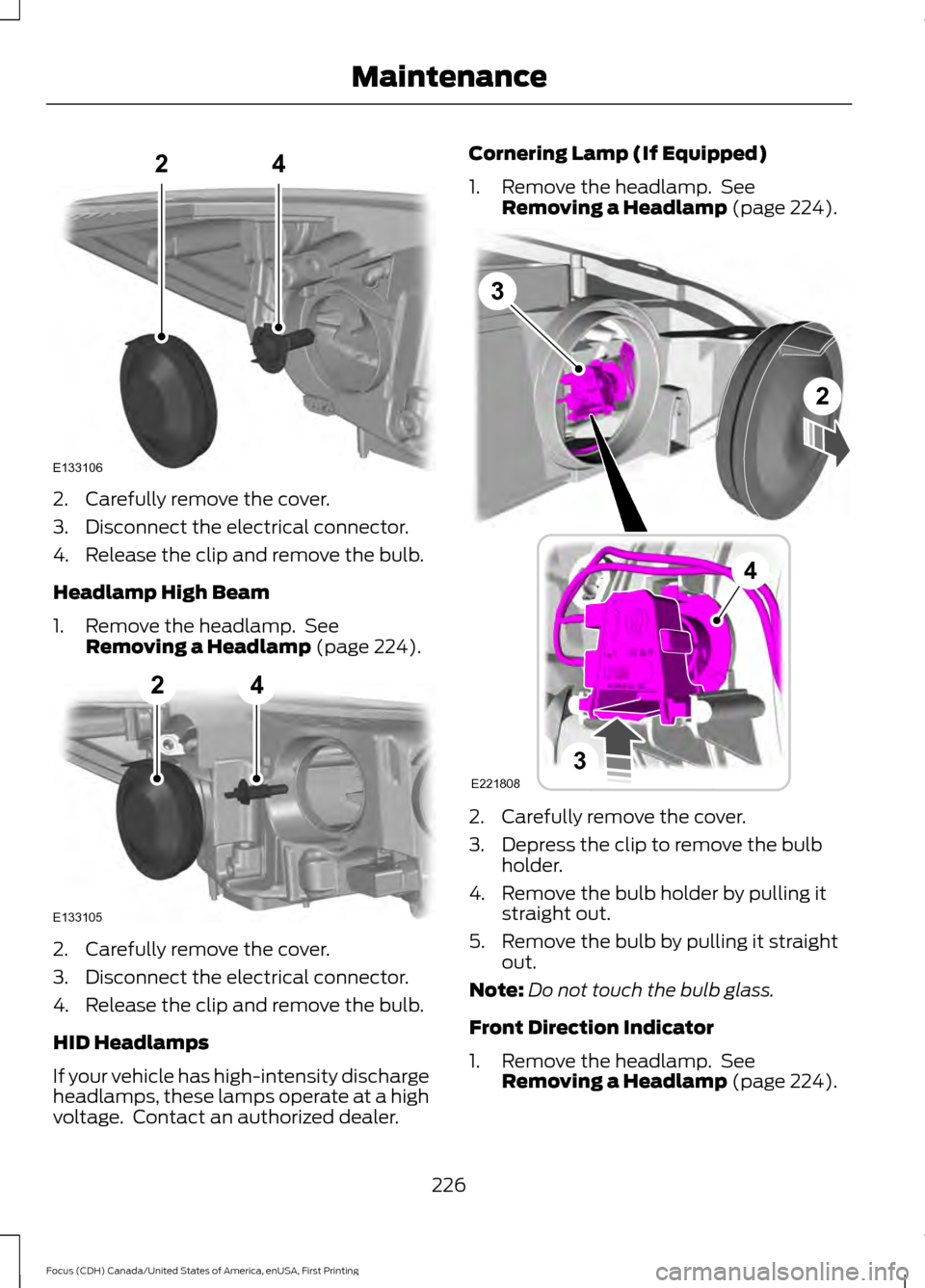
2. Carefully remove the cover.
3. Disconnect the electrical connector.
4. Release the clip and remove the bulb.
Headlamp High Beam
1. Remove the headlamp. See
Removing a Headlamp (page 224). 2. Carefully remove the cover.
3. Disconnect the electrical connector.
4. Release the clip and remove the bulb.
HID Headlamps
If your vehicle has high-intensity discharge
headlamps, these lamps operate at a high
voltage. Contact an authorized dealer. Cornering Lamp (If Equipped)
1. Remove the headlamp. See
Removing a Headlamp
(page 224). 2. Carefully remove the cover.
3. Depress the clip to remove the bulb
holder.
4. Remove the bulb holder by pulling it straight out.
5. Remove the bulb by pulling it straight out.
Note: Do not touch the bulb glass.
Front Direction Indicator
1. Remove the headlamp. See Removing a Headlamp
(page 224).
226
Focus (CDH) Canada/United States of America, enUSA, First Printing MaintenanceE133106
24 E133105
24 3
2
3
4
E221808
Page 230 of 385
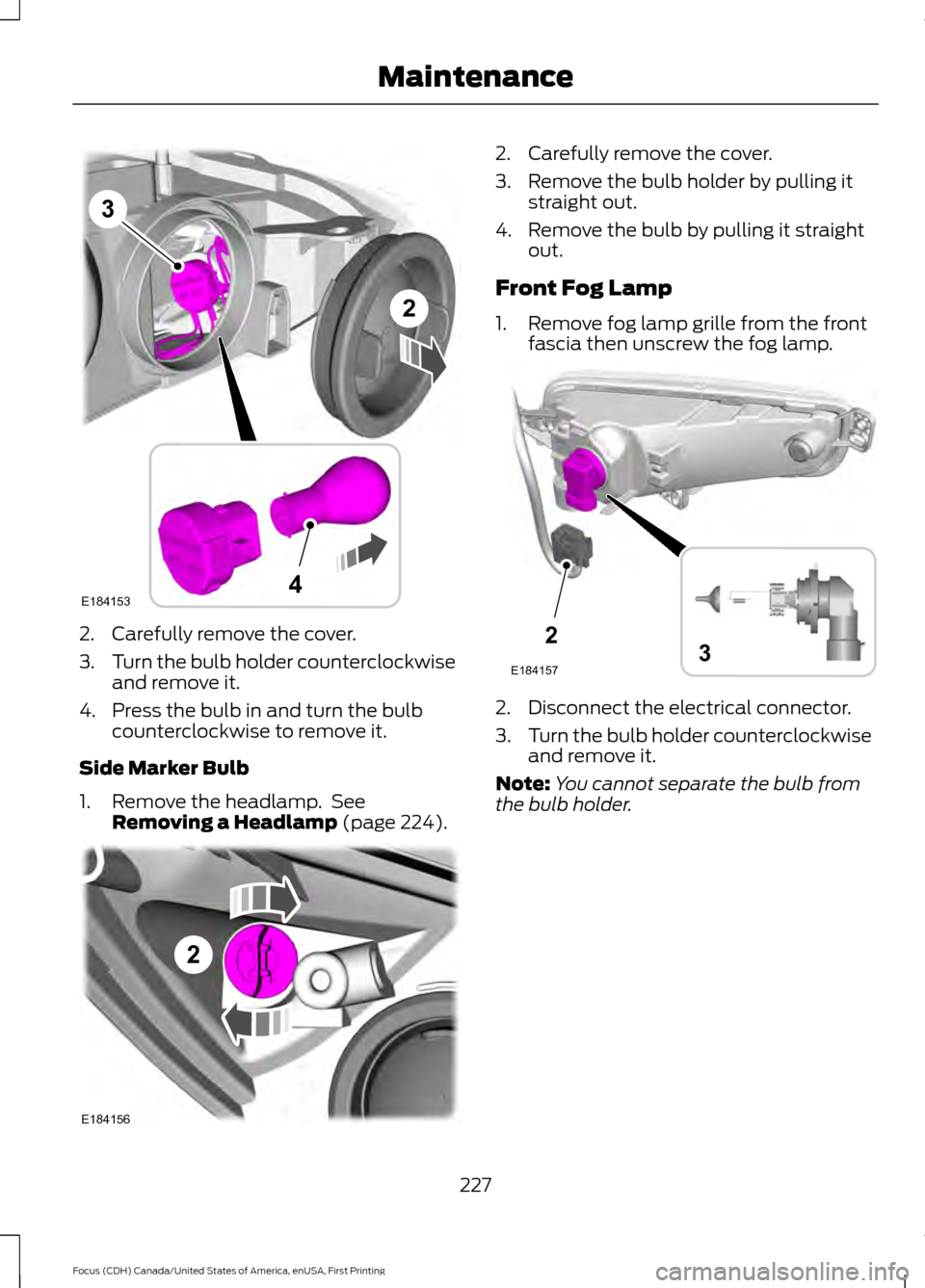
2. Carefully remove the cover.
3.
Turn the bulb holder counterclockwise
and remove it.
4. Press the bulb in and turn the bulb counterclockwise to remove it.
Side Marker Bulb
1. Remove the headlamp. See Removing a Headlamp (page 224). 2. Carefully remove the cover.
3. Remove the bulb holder by pulling it
straight out.
4. Remove the bulb by pulling it straight out.
Front Fog Lamp
1. Remove fog lamp grille from the front fascia then unscrew the fog lamp. 2. Disconnect the electrical connector.
3.
Turn the bulb holder counterclockwise
and remove it.
Note: You cannot separate the bulb from
the bulb holder.
227
Focus (CDH) Canada/United States of America, enUSA, First Printing MaintenanceE184153
3
4
2 2
E184156 2
E1841573
Page 231 of 385
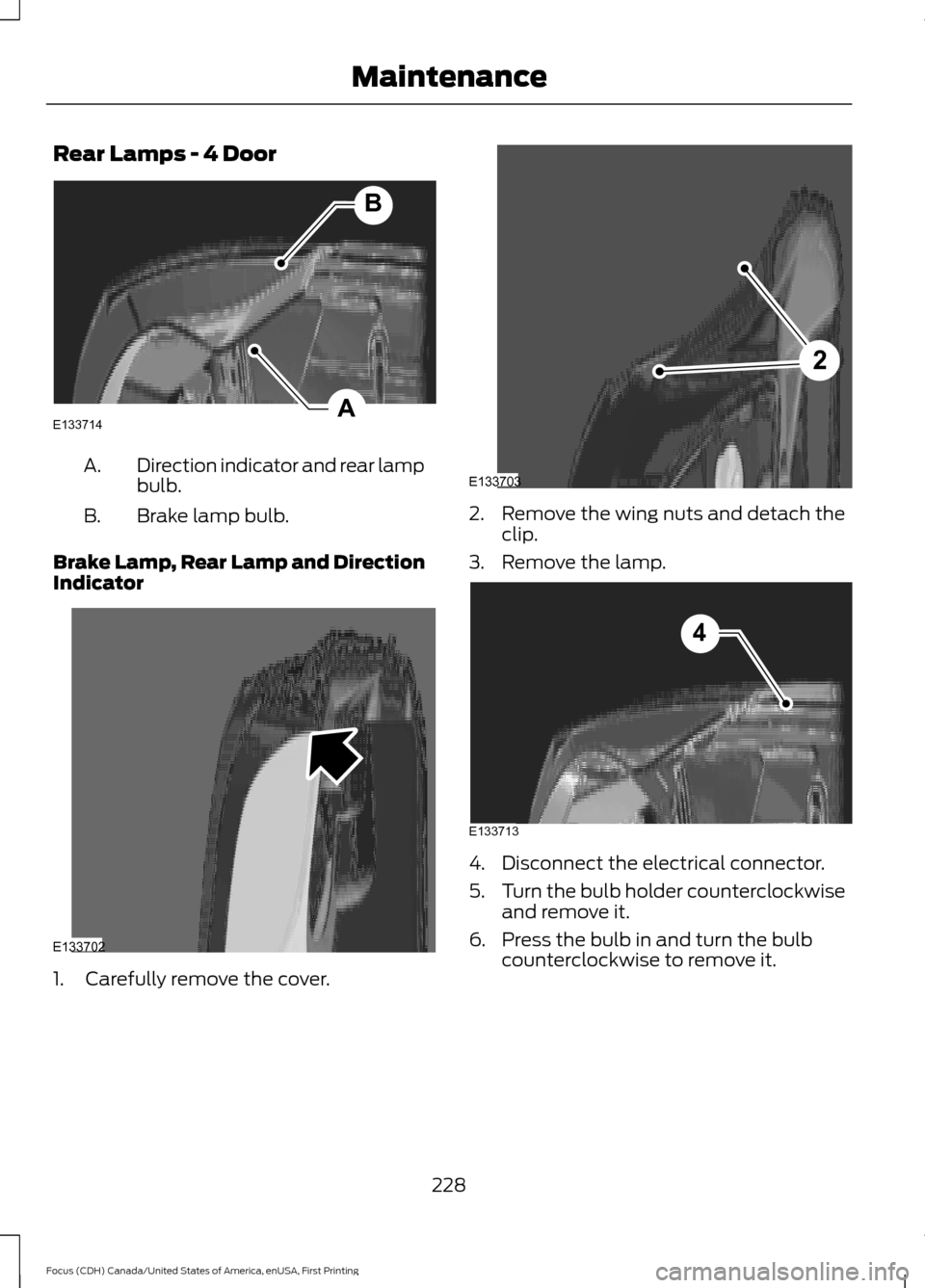
Rear Lamps - 4 Door
Direction indicator and rear lamp
bulb.
A.
Brake lamp bulb.
B.
Brake Lamp, Rear Lamp and Direction
Indicator 1. Carefully remove the cover. 2. Remove the wing nuts and detach the
clip.
3. Remove the lamp. 4. Disconnect the electrical connector.
5.
Turn the bulb holder counterclockwise
and remove it.
6. Press the bulb in and turn the bulb counterclockwise to remove it.
228
Focus (CDH) Canada/United States of America, enUSA, First Printing MaintenanceA
B
E133714 E133702 2
E133703 E133713
4
Page 233 of 385
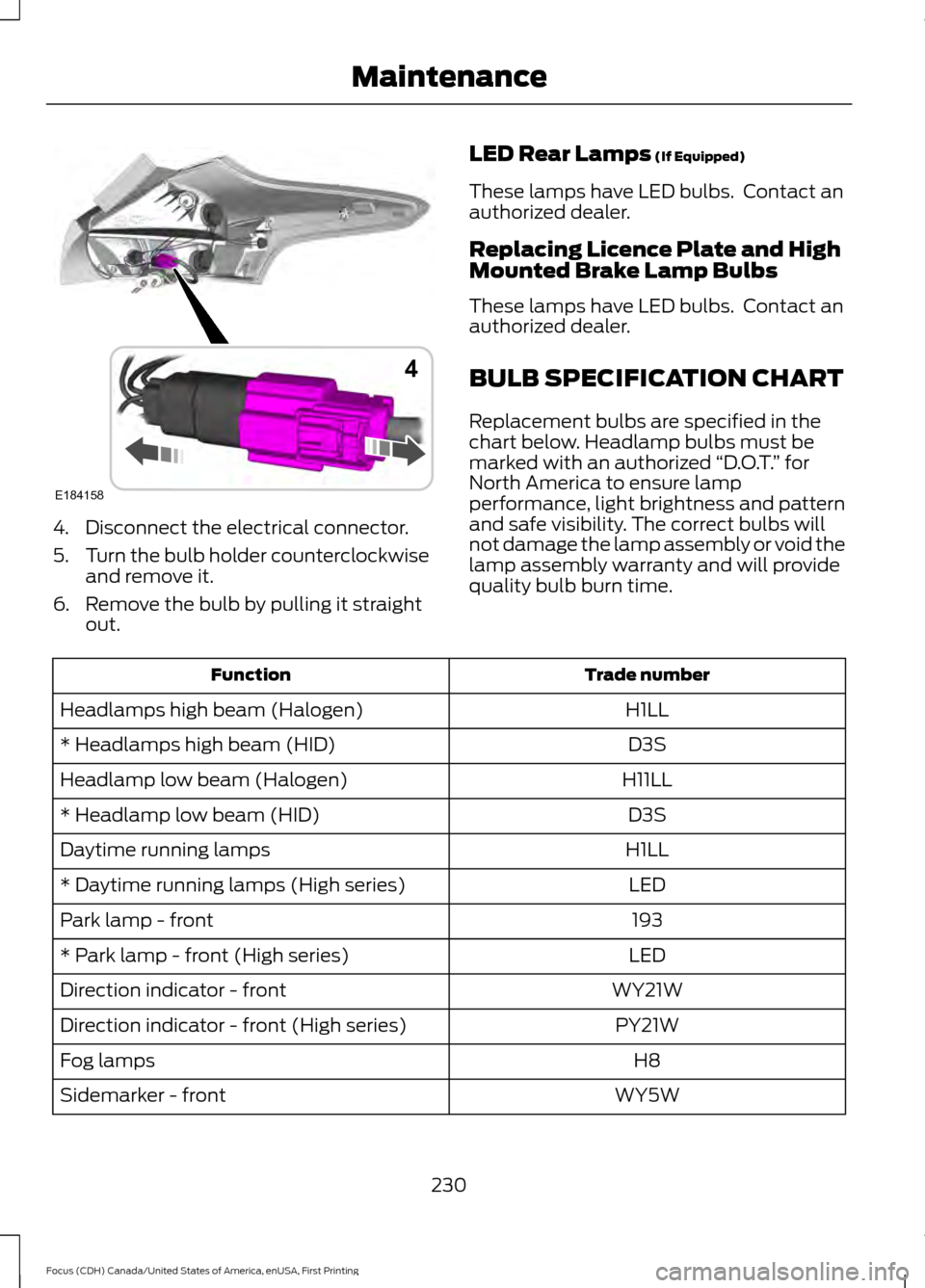
4. Disconnect the electrical connector.
5.
Turn the bulb holder counterclockwise
and remove it.
6. Remove the bulb by pulling it straight out. LED Rear Lamps (If Equipped)
These lamps have LED bulbs. Contact an
authorized dealer.
Replacing Licence Plate and High
Mounted Brake Lamp Bulbs
These lamps have LED bulbs. Contact an
authorized dealer.
BULB SPECIFICATION CHART
Replacement bulbs are specified in the
chart below. Headlamp bulbs must be
marked with an authorized “D.O.T.” for
North America to ensure lamp
performance, light brightness and pattern
and safe visibility. The correct bulbs will
not damage the lamp assembly or void the
lamp assembly warranty and will provide
quality bulb burn time. Trade number
Function
H1LL
Headlamps high beam (Halogen)
D3S
* Headlamps high beam (HID)
H11LL
Headlamp low beam (Halogen)
D3S
* Headlamp low beam (HID)
H1LL
Daytime running lamps
LED
* Daytime running lamps (High series)
193
Park lamp - front
LED
* Park lamp - front (High series)
WY21W
Direction indicator - front
PY21W
Direction indicator - front (High series)
H8
Fog lamps
WY5W
Sidemarker - front
230
Focus (CDH) Canada/United States of America, enUSA, First Printing MaintenanceE184158
4
Page 237 of 385
GENERAL INFORMATION
Your Ford or Lincoln authorized dealer has
many quality products available to clean
your vehicle and protect its finishes.
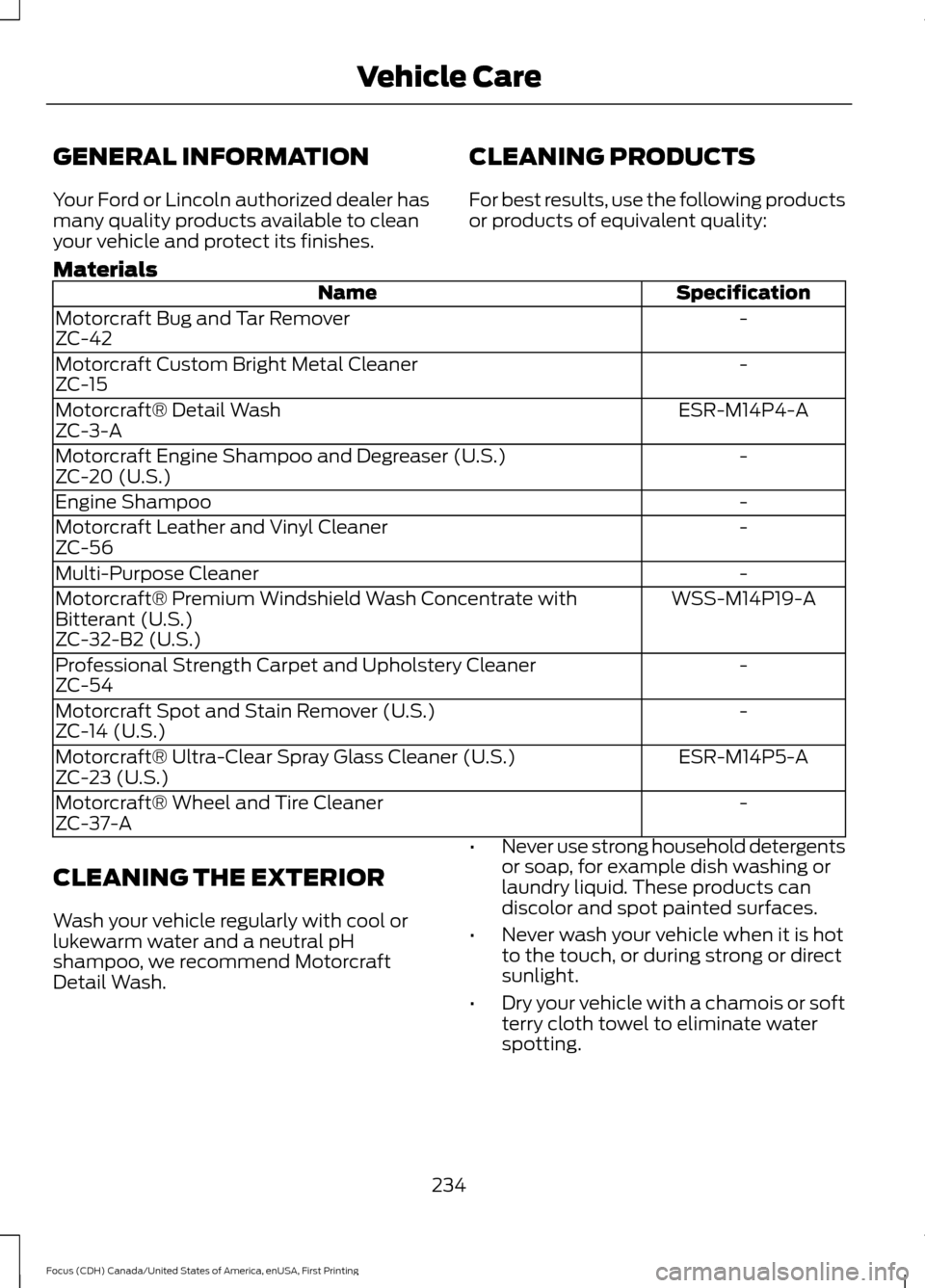
CLEANING PRODUCTS
For best results, use the following products
or products of equivalent quality:
Materials Specification
Name
-
Motorcraft Bug and Tar Remover
ZC-42
-
Motorcraft Custom Bright Metal Cleaner
ZC-15
ESR-M14P4-A
Motorcraft® Detail Wash
ZC-3-A
-
Motorcraft Engine Shampoo and Degreaser (U.S.)
ZC-20 (U.S.)
-
Engine Shampoo
-
Motorcraft Leather and Vinyl Cleaner
ZC-56
-
Multi-Purpose Cleaner
WSS-M14P19-A
Motorcraft® Premium Windshield Wash Concentrate with
Bitterant (U.S.)
ZC-32-B2 (U.S.)
-
Professional Strength Carpet and Upholstery Cleaner
ZC-54
-
Motorcraft Spot and Stain Remover (U.S.)
ZC-14 (U.S.)
ESR-M14P5-A
Motorcraft® Ultra-Clear Spray Glass Cleaner (U.S.)
ZC-23 (U.S.)
-
Motorcraft® Wheel and Tire Cleaner
ZC-37-A
CLEANING THE EXTERIOR
Wash your vehicle regularly with cool or
lukewarm water and a neutral pH
shampoo, we recommend Motorcraft
Detail Wash. •
Never use strong household detergents
or soap, for example dish washing or
laundry liquid. These products can
discolor and spot painted surfaces.
• Never wash your vehicle when it is hot
to the touch, or during strong or direct
sunlight.
• Dry your vehicle with a chamois or soft
terry cloth towel to eliminate water
spotting.
234
Focus (CDH) Canada/United States of America, enUSA, First Printing Vehicle Care
Page 239 of 385
•
Do not allow wax to come in contact
with any non-body (low-gloss black)
colored trim. The wax will discolor or
stain the parts over time.
•Roof racks.
• Bumpers.
• Grained door handles.
• Side moldings.
• Mirror housings.
• Windshield cowl area.
• Do not apply wax to glass areas.
• After waxing, your car's paint should
feel smooth, and be free of streaks and
smudges.
CLEANING THE ENGINE
Engines are more efficient when they are
clean because grease and dirt buildup keep
the engine warmer than normal.
When washing:
• Take care when using a power washer
to clean the engine. The high-pressure
fluid could penetrate the sealed parts
and cause damage.
• Do not spray a hot engine with cold
water to avoid cracking the engine
block or other engine components.
• Spray Motorcraft Engine Shampoo and
Degreaser on all parts that require
cleaning and pressure rinse clean. In
Canada, use Motorcraft Engine
Shampoo.
• Never wash or rinse the engine while it
is hot or running; water in the running
engine may cause internal damage. •
Never wash or rinse any ignition coil,
spark plug wire or spark plug well, or
the area in and around these locations.
• Cover the battery, power distribution
box, and air filter assembly to prevent
water damage when cleaning the
engine.
CLEANING THE WINDOWS AND
WIPER BLADES
Car wash chemicals and environmental
fallout can result in windshield and wiper
blade contamination. Dirty windshield and
wipers will result in poor windshield wiper
operation. Keep the windshield and wiper
blades clean to maintain windshield wiper
performance.
To clean the windshield and wiper blades:
• Clean the windshield with a
non-abrasive glass cleaner. When
cleaning the interior of the windshield,
avoid getting any glass cleaner on the
instrument panel or door panels. Wipe
any glass cleaner off these surfaces
immediately.
• For windshields contaminated with
tree sap, chemicals, wax or bugs, clean
the entire windshield using steel wool
(no greater than 0000 grade) in a
circular motion and rinse with water.
• Clean the wiper blades with isopropyl
rubbing alcohol or windshield washer
concentrate.
Note: Do not use razor blades or other
sharp objects to clean or remove decals
from the inside of the heated rear window.
The vehicle warranty does not cover
damage caused to the heated rear window
grid lines.
236
Focus (CDH) Canada/United States of America, enUSA, First Printing Vehicle Care
Page 240 of 385
CLEANING THE INTERIOR
WARNINGS
Do not use cleaning solvents, bleach
or dye on the vehicle
’s safety belts,
as these actions may weaken the
belt webbing. On vehicles equipped with
seat-mounted airbags, do not use
chemical solvents or strong
detergents. Such products could
contaminate the side airbag system and
affect performance of the side airbag in a
collision. For fabric, carpets, cloth seats, safety belts
and seats equipped with side airbags:
•
Remove dust and loose dirt with a
vacuum cleaner.
• Remove light stains and soil with
Motorcraft Professional Strength
Carpet & Upholstery Cleaner.
• If grease or tar is present on the
material, spot-clean the area first with
Motorcraft Spot and Stain Remover. In
Canada, use Motorcraft Multi-Purpose
Cleaner.
• If a ring forms on the fabric after spot
cleaning, clean the entire area
immediately (but do not oversaturate)
or the ring will set.
• Do not use household cleaning
products or glass cleaners, which can
stain and discolor the fabric and affect
the flame retardant abilities of the seat
materials. CLEANING THE INSTRUMENT
PANEL AND INSTRUMENT
CLUSTER LENS WARNING
Do not use chemical solvents or
strong detergents when cleaning the
steering wheel or instrument panel
to avoid contamination of the airbag
system. Note:
Follow the same procedure as
cleaning leather seats for cleaning leather
instrument panels and leather interior trim
surfaces. See Cleaning Leather Seats
(page 238).
Clean the instrument panel and cluster
lens with a clean, damp and soft cloth,
then use a clean, dry and soft cloth to dry
these areas.
• Avoid cleaners or polishes that increase
the gloss of the upper portion of the
instrument panel. The dull finish in this
area helps protect you from
undesirable windshield reflection.
• Do not use any household cleaning
products or glass cleaners as these
may damage the finish of the
instrument panel, interior trim and
cluster lens.
• Wash or wipe your hands clean if you
have been in contact with certain
products such as insect repellent and
suntan lotion to avoid possible damage
to the interior painted surfaces.
• Do not allow air fresheners and hand
sanitizers to spill onto interior surfaces.
If a spill occurs, wipe off immediately.
Your warranty may not cover these
damages.
If a staining liquid like coffee or juice has
been spilled on the instrument panel or on
interior trim surfaces:
237
Focus (CDH) Canada/United States of America, enUSA, First Printing Vehicle Care