park assist FORD FOCUS 2017 3.G User Guide
[x] Cancel search | Manufacturer: FORD, Model Year: 2017, Model line: FOCUS, Model: FORD FOCUS 2017 3.GPages: 467, PDF Size: 5.34 MB
Page 159 of 467
Note:
The system always offers the last
detected parking space (for example, if your
vehicle detects multiple spaces while you
are driving, it offers the last one).
Note: If driven above approximately 19 mph
(30 km/h), the system shows a message to
alert you to reduce your vehicle speed.
Note: Perpendicular parking is a multi-step
process and may require you to shift your
transmission multiple times. Follow the on
screen instructions until the parking process
is completed.
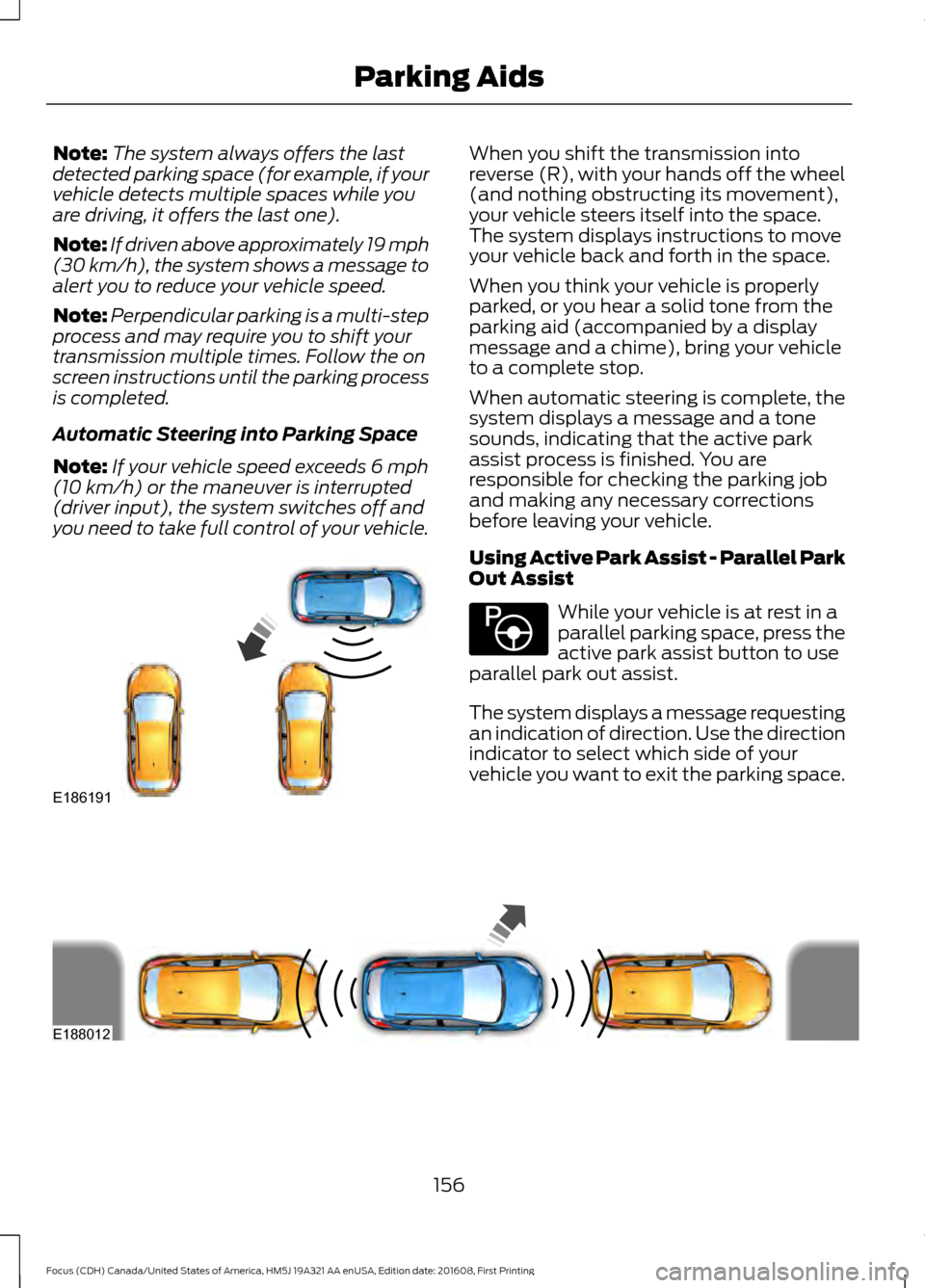
Automatic Steering into Parking Space
Note: If your vehicle speed exceeds
6 mph
(10 km/h) or the maneuver is interrupted
(driver input), the system switches off and
you need to take full control of your vehicle. When you shift the transmission into
reverse (R), with your hands off the wheel
(and nothing obstructing its movement),
your vehicle steers itself into the space.
The system displays instructions to move
your vehicle back and forth in the space.
When you think your vehicle is properly
parked, or you hear a solid tone from the
parking aid (accompanied by a display
message and a chime), bring your vehicle
to a complete stop.
When automatic steering is complete, the
system displays a message and a tone
sounds, indicating that the active park
assist process is finished. You are
responsible for checking the parking job
and making any necessary corrections
before leaving your vehicle.
Using Active Park Assist - Parallel Park
Out Assist
While your vehicle is at rest in a
parallel parking space, press the
active park assist button to use
parallel park out assist.
The system displays a message requesting
an indication of direction. Use the direction
indicator to select which side of your
vehicle you want to exit the parking space. 156
Focus (CDH) Canada/United States of America, HM5J 19A321 AA enUSA, Edition date: 201608, First Printing Parking AidsE186191 E146186 E188012
Page 160 of 467
The system determines the clearance to
the front and rear of your vehicle and
automatically steers your vehicle out of a
parallel parking space (hands-free) while
you control the accelerator, gearshift and
brakes. The system visually and audibly
guides you to enter traffic.
After the system has directed your vehicle
past the adjacent vehicle or object, it
guides you to take control of the steering
to complete the exit from the parking spot.
Note:
If the clearance in front of your
vehicle allows easy departure, the Parallel
Park Out Assist feature might not be
available.
Note: You are responsible for controlling
your vehicle and making sure the path is
clear prior to pulling into traffic.
Note: This system is not intended to assist
in exiting perpendicular parking spaces,
damages to your vehicle may occur.
Note: If your vehicle speed exceeds 6 mph
(10 km/h) or the maneuver is interrupted
(driver input), the system switches off and
you need to take full control of your vehicle. Deactivating the Active Park
Assist Feature
Manually deactivate the system by:
•
Pressing the active park assist button
during an active maneuver.
• Grabbing the steering wheel during an
active maneuver.
• Driving above approximately
22 mph
(35 km/h) for 30 seconds during an
active park search.
• Driving above approximately
6 mph
(10 km/h) during automatic steering.
• Switching off the traction control
system.
Certain vehicle conditions can also
deactivate the system, such as:
• Traction control has activated.
• There is an anti-lock brake system
activation or failure.
If a problem occurs with the system, a
warning message displays accompanied
by a tone. Occasional system messages
may occur in normal operation. For
recurring or frequent system faults, contact
an authorized dealer to have your vehicle
serviced.
Troubleshooting the System The system does not look for a space
The traction control system may be off.
The transmission is in reverse (R). Your vehicle must be moving forward to be able to
detect a parking space.
157
Focus (CDH) Canada/United States of America, HM5J 19A321 AA enUSA, Edition date: 201608, First Printing Parking Aids
Page 195 of 467

2. Connect the other end of the positive
(+) cable to the positive (+) terminal
of the assisting battery.
3. Connect the negative (-) cable to the negative (-) terminal of the assisting
battery. 4. Make the final connection of the
negative (-) cable to an exposed metal
part of the stalled vehicle's engine, or
connect the negative (-) cable to the
ground connection point, if available. WARNING
Do not connect the end of the
second cable to the negative (-)
terminal of the battery to be jumped.
A spark may cause an explosion of the
gases that surround the battery. Jump Starting
1.
Start the engine of the booster vehicle
and rev the engine moderately, or press
the accelerator gently to keep your
engine speed between 2000 and 3000
rpms, as shown in your tachometer.
2. Start the engine of the disabled vehicle.
3. After starting the disabled vehicle, run both vehicle engines for an additional
three minutes before disconnecting the
jumper cables. Removing the Jumper Cables
Remove the jumper cables in the reverse
order that they were connected.
1. Remove the jumper cable from the
ground metal surface or connecting
point, if available.
2. Remove the jumper cable on the negative (-) terminal of the booster
vehicle's battery.
3. Remove the jumper cable from the positive (+) terminal of the booster
vehicle's battery.
4. Remove the jumper cable from the positive (+) terminal of the disabled
vehicle's battery.
After starting your disabled vehicle and
removing the jumper cables, allow your
vehicle to idle for several minutes so the
battery can recharge.
192
Focus (CDH) Canada/United States of America, HM5J 19A321 AA enUSA, Edition date: 201608, First Printing Roadside EmergenciesE152134 4
1
3
2
E142665
Page 224 of 467
Your vehicle has limited engine power
when in the fail-safe mode, drive your
vehicle with caution. Your vehicle does not
maintain high-speed operation and the
engine may operate poorly.
Remember that the engine is capable of
automatically shutting down to prevent
engine damage. In this situation:
1. Pull off the road as soon as safely
possible and switch the engine off.
2. If you are a member of a roadside assistance program, we recommend
that you contact your roadside
assistance service provider.
3. If this is not possible, wait a short period for the engine to cool.
4. Check the coolant level. If the coolant level is at or below the minimum mark,
add prediluted coolant immediately.
5. When the engine temperature cools, you can re-start the engine. Have your
vehicle checked as soon as possible to
minimize engine damage.
Note: Driving your vehicle without repair
increases the chance of engine damage.
Engine Coolant Temperature
Management (If Equipped) WARNING
To reduce the risk of crash and injury,
be prepared that the vehicle speed
may reduce and the vehicle may not
be able to accelerate with full power until
the coolant temperature reduces. If you tow a trailer with your vehicle, the
engine may temporarily reach a higher
temperature during severe operating
conditions, for example ascending a long
or steep grade in high ambient
temperatures. At this time, you may notice the coolant
temperature gauge moves toward the red
zone and a message may appear in the
information display.
You may notice a reduction in vehicle
speed caused by reduced engine power.
In order to manage the engine coolant
temperature. Your vehicle may enter this
mode if certain high-temperature and
high-load conditions take place. The
amount of speed reduction depends on
vehicle loading, grade and ambient
temperature. If this occurs, there is no need
to pull off the road. You can continue to
drive your vehicle.
The air conditioning may automatically
turn on and off during severe operating
conditions to protect the engine from
overheating. When the coolant
temperature decreases to the normal
operating temperature, the air conditioning
turns on.
If the coolant temperature gauge moves
fully into the red zone, or if the coolant
temperature warning or service engine
soon messages appear in your information
display, do the following:
1. Pull off the road as soon as safely
possible and shift the transmission into
park
(P).
2. Leave the engine running until the coolant temperature gauge needle
returns to the normal position. After
several minutes, if the temperature
does not drop, follow the remaining
steps.
3. Switch the engine off and wait for it to
cool. Check the coolant level.
4. If the coolant level is at or below the minimum mark, add prediluted coolant
immediately.
5. If the coolant level is normal, restart the engine and continue.
221
Focus (CDH) Canada/United States of America, HM5J 19A321 AA enUSA, Edition date: 201608, First Printing Maintenance
Page 346 of 467
Safety Information
WARNING
Driving while distracted can result in
loss of vehicle control, crash and
injury. We strongly recommend that
you use extreme caution when using any
device that may take your focus off the
road. Your primary responsibility is the safe
operation of your vehicle. We recommend
against the use of any hand-held device
while driving and encourage the use of
voice-operated systems when possible.
Make sure you are aware of all applicable
local laws that may affect the use of
electronic devices while driving. •
Do not attempt to service or repair the
system. Have an authorized dealer
check your vehicle.
• Do not operate playing devices if the
power cords or cables are broken, split
or damaged. Place cords and cables
out of the way, so they do not interfere
with the operation of pedals, seats,
compartments or safe driving abilities. •
Do not leave playing devices in your
vehicle during extreme conditions as it
could cause them damage. See your
device's user guide for further
information.
• For your safety, some SYNC 3 functions
are speed-dependent. Their use is
limited to when your vehicle is traveling
at speeds under 3 mph (5 km/h). Make
sure that you review your device's
manual before using it with SYNC 3.
Speed-restricted Features
Some features of this system may be too
difficult to use while your vehicle is moving
so they are restricted from use unless your
vehicle is stationary.
• Screens crowded with information,
such as Point of Interest reviews and
ratings, SiriusXM Traffic and Travel Link
sports scores, movie times or ski
conditions.
• Any action that requires you to use a
keyboard is restricted, such as entering
a navigation destination or editing
information.
• All lists are limited so the user can view
fewer entries (such as phone contacts
or recent phone call entries).
See the following chart for more specific
examples. Restricted features
Pairing a Bluetooth phone.
Cellular Phone
Browsing of list entries is limited for phone contacts and
recent phone calls.
Editing the keypad code.
System Functionality
Enabling Valet Mode.
Editing settings while the rear view camera or active park
assist are active.
343
Focus (CDH) Canada/United States of America, HM5J 19A321 AA enUSA, Edition date: 201608, First Printing SYNC™ 3
Page 408 of 467
For a complete listing of the accessories
that are available for your vehicle, please
contact your authorized dealer or visit the
online store web site:
Web Address (United States)
www.Accessories.Ford.com Web Address (Canada)
www.Accessories.Ford.ca
Ford Accessories are available for your
vehicle through an authorized Ford dealer.
Ford Motor Company will repair or replace
any properly authorized dealer-installed
Ford Original Accessory found to be
defective in factory-supplied materials or
workmanship during the warranty period,
as well as any component damaged by the
defective accessories.
Ford Motor Company will warrant your
accessory through the warranty that
provides the greatest benefit:
• 24 months, unlimited mileage.
• The remainder of your new vehicle
limited warranty.
Contact an authorized dealer for details
and a copy of the warranty.
Exterior style
• Graphics.
• Hood deflector.*
• Keyless entry.
• Side window deflectors.
• Splash guards.
• Spoilers.
• Wheels.
• Bumper protector. Interior style
•
All-weather floor mats.
• Cargo area protectors.
• Cargo organizers.
• Door sills.
• Interior light kit.
• Premium carpeted floor mats.
• Shift knobs.
• Sport pedals.
Lifestyle
• Tablet cradle.*
• Ash cup and smokers packages.
• Roof racks and carriers.*
Peace of mind
• Bumper-mounted parking sensor.*
• Full vehicle covers.*
• Locking fuel plug.
• Remote start.
• Vehicle security systems.
• Wheel locks.
• Roadside assistance kits.*
405
Focus (CDH) Canada/United States of America, HM5J 19A321 AA enUSA, Edition date: 201608, First Printing Accessories
Page 411 of 467
Less Cost to Properly Maintain Your
Vehicle
Ford Protect Extended Service Plan also
offers a Premium Maintenance Plan that
covers all scheduled maintenance, and
selected wear items. The coverage is
prepaid, so you never have to worry about
the cost of your vehicle
’s maintenance.
Covered maintenance includes:
• Windshield wiper blades.
• Spark plugs.
• The clutch disc.
• Brake pads and linings.
• Shock absorbers.
• Struts.
• Engine Belts.
• Engine coolant hoses, clamps and
o-rings.
• Diesel exhaust fluid replenishment.
• Cabin air filter replacement every
20,000 mi (32,000 km) (electric
vehicles only).
Interest Free Finance Options
Just a 10% down payment will provide you
with an affordable, no interest, no fee
payment program allowing you all the
security and benefits Ford Protect
Extended Service Plan has to offer while
paying over time. You are pre-approved
with no credit check or hassles. To learn
more, call our Ford Protect Extended
Service Plan specialists at 800-367-3377.
Ford Protect Extended Service Plan
P.O. Box 321067
Detroit, MI 48232 Ford Protect Extended Service
Plan (CANADA ONLY)
You can get more protection for your
vehicle by purchasing a Ford Protect
Extended Service Plan. Ford Protect
Extended Service Plan is the only service
contract backed by Ford Motor Company
of Canada, Limited. Depending on the plan
you purchase, Ford Protect Extended
Service Plan provides benefits such as:
•
Rental reimbursement.
• Coverage for certain maintenance and
wear items.
• Protection against repair costs after
your New Vehicle Limited Warranty
Coverage expires.
• Roadside Assistance benefits.
There are several Ford Protect Extended
Service Plans available in various time,
distance and deductible combinations.
Each plan is tailored to fit your own driving
needs, including reimbursement for towing
and rental. When you purchase Ford
Protect Extended Service Plan, you receive
added peace-of-mind protection
throughout Canada, the United States and
Mexico, provided by a network of
participating authorized Ford Motor
Company dealers.
Note: Repairs performed outside of
Canada, the United States and Mexico are
not eligible for Ford Protect Extended
Service Plan coverage.
This information is subject to change. For
more information; visit your local Ford of
Canada dealer or www.ford.ca to find the
Ford Protect Extended Service Plan that
is right for you.
408
Focus (CDH) Canada/United States of America, HM5J 19A321 AA enUSA, Edition date: 201608, First Printing Ford Protect
Page 458 of 467
A
A/C
See: Climate Control......................................... 103
About This Manual...........................................7
ABS See: Brakes............................................................ 145
ABS driving hints See: Hints on Driving With Anti-Lock
Brakes................................................................ 145
Accessories...................................................405 Exterior style....................................................... 405
Interior style......................................................... 405
Lifestyle................................................................. 405
Peace of mind.................................................... 405
Accessories See: Replacement Parts
Recommendation............................................ 12
Active Park Assist
.........................................153
Deactivating the Active Park Assist
Feature............................................................... 157
Parallel Parking, Perpendicular Parking, Parallel Park Out Assist............................... 153
Troubleshooting the System.......................... 157
Adjusting the Headlamps.........................226 Horizontal Aim Adjustment............................ 227
Vertical Aim Adjustment................................. 226
Adjusting the Steering Wheel....................70
Airbag Disposal
..............................................46
Air Conditioning See: Climate Control......................................... 103
Air Filter See: Changing the Engine Air Filter.............235
Alarm See: Anti-Theft Alarm........................................ 69
Ambient Lighting...........................................80
Anti-Theft Alarm............................................69 Arming the Alarm................................................ 69
Disarming the Alarm........................................... 69
Appendices....................................................427
Apps..................................................................377 ........................................................................\
........... 377
SiriusXM Traffic and Travel Link................... 379
Audible Warnings and Indicators............90 Fasten Safety Belt............................................... 90
Headlamps On Warning Chime..................... 90
Key in Ignition Warning Chime........................ 90
Keyless Warning Alert........................................ 90Low Fuel Minder...................................................
90
Parking Brake On Warning Chime.................90
Audio Control...................................................70 Seek, Next or Previous......................................... 71
Audio System
................................................282
General Information......................................... 282
Audio Unit - Vehicles With: Satellite Radio.............................................................290
Audio Unit - Vehicles With: Sony Audio System.........................................................286
Menu Structure................................................... 287
Audio Unit - Vehicles With: SYNC.........283
Autolamps........................................................76 Windshield Wiper Activated
Headlamps........................................................ 76
Automatic Climate Control......................104 Dual Zone Temperature Control.................. 106
Single Zone Temperature Control...............105
Temperature Control........................................ 105
Automatic High Beam Control..................78 Activating the System........................................ 78
Manually Overriding the System.................... 79
Automatic Transmission...........................140 Automatic Transmission Adaptive
Learning............................................................. 144
Brake-Shift Interlock......................................... 143
If Your Vehicle Gets Stuck In Mud or Snow.................................................................. 144
SelectShift Automatic ™
Transmission.................................................... 141
Understanding the Positions of Your Automatic Transmission.............................. 141
Automatic Transmission Fluid Check
.............................................................222
Auto-Start-Stop...........................................126 Limitations of Use.............................................. 126
Switching the System On and Off................127
Using Auto-Start-Stop with a Manual Transmission................................................... 126
Using Auto-Start-Stop with an Automatic Transmission................................................... 126
Auxiliary Power Points
.................................116
12 Volt DC Power Point...................................... 116
Location.................................................................. 116
455
Focus (CDH) Canada/United States of America, HM5J 19A321 AA enUSA, Edition date: 201608, First Printing Index
Page 461 of 467
Supported Media Players, Formats and
Metadata Information................................ 363
USB Ports............................................................. 363
Environment......................................................15
Event Data Recording See: Data Recording.............................................. 9
Export Unique Options..................................13
Exterior Mirrors................................................82 Blind Spot Monitor.............................................. 83
Fold-Away Exterior Mirrors............................... 83
Heated Exterior Mirrors...................................... 83
Integrated Blind Spot Mirrors.......................... 83
Power Exterior Mirrors........................................ 82
F
Fan See: Engine Cooling Fan.................................. 218
Fastening the Seatbelts..............................30 Seatbelt Locking Modes..................................... 31
Using Seatbelts During Pregnancy...............30
Floor Mats........................................................187
Fog Lamps - Front See: Front Fog Lamps......................................... 79
Ford Credit
..........................................................11
US Only...................................................................... 11
Ford Protect...................................................407 Ford Protect Extended Service Plan
(CANADA ONLY)......................................... 408
Ford Protect Extended Service Plans (U.S. Only).................................................................. 407
Front Fog Lamps
............................................79
Front Parking Aid..........................................152
Front Passenger Sensing System............40
Front Wiper Blades See: Changing the Front Wiper Blades.......224
Fuel and Refueling
.......................................128
Fuel Consumption........................................134
Calculating Fuel Economy.............................. 135
Filling the Fuel Tank........................................... 134
Fuel Filler Funnel Location
........................130
Fuel Quality - E85.........................................129 Choosing the Right Fuel - Flex Fuel
Vehicles............................................................. 129
Switching Between E85 and Gasoline............................................................ 130
Fuel Quality - Gasoline...............................130 Choosing the Right Fuel.................................. 130Fuel Shutoff
...................................................190
Fuses.................................................................201
Fuse Specification Chart...........................201 Engine Compartment Fuse Box.................... 201
Luggage Compartment Fuse Box................207
Passenger Compartment Fuse Box...........205
G
Gauges...............................................................86 Engine Coolant Temperature Gauge............86
Fuel Gauge.............................................................. 87
Information Display............................................. 86
General Information on Radio Frequencies...................................................47
General Maintenance Information.......409 Multi-Point Inspection....................................... 411
Owner Checks and Services.......................... 410
Protecting Your Investment.......................... 409
Why Maintain Your Vehicle?......................... 409
Why Maintain Your Vehicle at Your Dealership?.................................................... 409
Getting Assistance Outside the U.S. and Canada..........................................................197
Getting the Services You Need...............194 Away From Home.............................................. 194
H
Handbrake See: Parking Brake............................................. 146
Hazard Warning Flashers..........................190
Headlamp Adjusting See: Adjusting the Headlamps..................... 226
Headlamp Exit Delay.....................................77
Headlamp Removal See: Removing a Headlamp........................... 227
Head Restraints.............................................110 Adjusting the Head Restraint........................... 111
Tilting Head Restraints ..................................... 112
Heated Seats...................................................115
Heated Steering Wheel................................72
Heated Windows and Mirrors..................108 Heated Exterior Mirrors.................................... 108
Heated Rear Window....................................... 108
Heating See: Climate Control......................................... 103
458
Focus (CDH) Canada/United States of America, HM5J 19A321 AA enUSA, Edition date: 201608, First Printing Index
Page 462 of 467
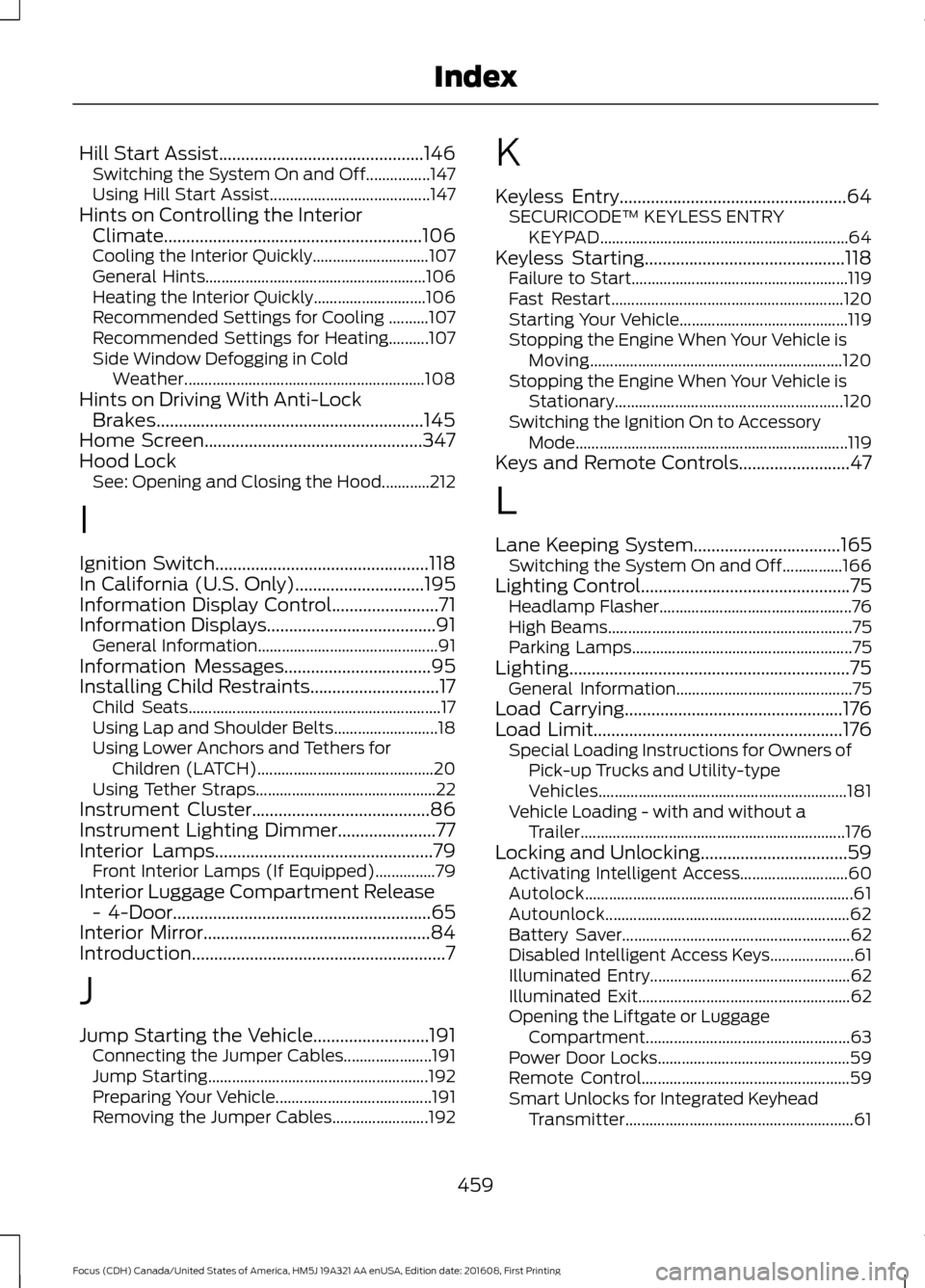
Hill Start Assist..............................................146
Switching the System On and Off................147
Using Hill Start Assist........................................ 147
Hints on Controlling the Interior Climate..........................................................106
Cooling the Interior Quickly............................. 107
General Hints....................................................... 106
Heating the Interior Quickly............................ 106
Recommended Settings for Cooling ..........107
Recommended Settings for Heating..........107
Side Window Defogging in Cold Weather............................................................ 108
Hints on Driving With Anti-Lock Brakes............................................................145
Home Screen.................................................347
Hood Lock See: Opening and Closing the Hood............212
I
Ignition Switch................................................118
In California (U.S. Only).............................195
Information Display Control........................71
Information Displays
......................................91
General Information............................................. 91
Information Messages
.................................95
Installing Child Restraints.............................17 Child Seats............................................................... 17
Using Lap and Shoulder Belts.......................... 18
Using Lower Anchors and Tethers for Children (LATCH)............................................ 20
Using Tether Straps............................................. 22
Instrument Cluster
........................................86
Instrument Lighting Dimmer......................77
Interior Lamps
.................................................79
Front Interior Lamps (If Equipped)...............79
Interior Luggage Compartment Release - 4-Door..........................................................65
Interior Mirror...................................................84
Introduction.........................................................7
J
Jump Starting the Vehicle..........................191 Connecting the Jumper Cables...................... 191
Jump Starting....................................................... 192
Preparing Your Vehicle....................................... 191
Removing the Jumper Cables........................ 192K
Keyless Entry
...................................................64
SECURICODE™ KEYLESS ENTRY
KEYPAD.............................................................. 64
Keyless Starting.............................................118 Failure to Start...................................................... 119
Fast Restart.......................................................... 120
Starting Your Vehicle.......................................... 119
Stopping the Engine When Your Vehicle is Moving............................................................... 120
Stopping the Engine When Your Vehicle is Stationary......................................................... 120
Switching the Ignition On to Accessory Mode.................................................................... 119
Keys and Remote Controls.........................47
L
Lane Keeping System
.................................165
Switching the System On and Off...............166
Lighting Control
...............................................75
Headlamp Flasher................................................ 76
High Beams............................................................. 75
Parking Lamps....................................................... 75
Lighting...............................................................75 General Information............................................ 75
Load Carrying
.................................................176
Load Limit........................................................176 Special Loading Instructions for Owners of
Pick-up Trucks and Utility-type
Vehicles.............................................................. 181
Vehicle Loading - with and without a Trailer.................................................................. 176
Locking and Unlocking.................................59 Activating Intelligent Access........................... 60
Autolock................................................................... 61
Autounlock............................................................. 62
Battery Saver......................................................... 62
Disabled Intelligent Access Keys..................... 61
Illuminated Entry.................................................. 62
Illuminated Exit..................................................... 62
Opening the Liftgate or Luggage Compartment................................................... 63
Power Door Locks................................................ 59
Remote Control.................................................... 59
Smart Unlocks for Integrated Keyhead Transmitter......................................................... 61
459
Focus (CDH) Canada/United States of America, HM5J 19A321 AA enUSA, Edition date: 201608, First Printing Index