remote start FORD FOCUS 2017 3.G User Guide
[x] Cancel search | Manufacturer: FORD, Model Year: 2017, Model line: FOCUS, Model: FORD FOCUS 2017 3.GPages: 467, PDF Size: 5.34 MB
Page 65 of 467
Autounlock
Autounlock unlocks all the doors when all
of the following occur:
•
The ignition is on, all the doors are
closed and your vehicle has been in
motion at a speed greater than 4 mph
(7 km/h).
• Your vehicle comes to a stop and you
switch the ignition off or to accessory.
• You open the driver door within 10
minutes of switching the ignition off or
to accessory.
Note: If you electronically lock your vehicle
after you switch the ignition off with the
driver door closed, the doors will not
autounlock.
To enable or disable autounlock, do the
following:
1. Switch the ignition on.
2. Press the power door unlock control three times.
3. Switch the ignition off.
4. Press the power door unlock control three times.
5. Switch the ignition on. The horn sounds
indicating your vehicle is in
programming mode.
6. Press the power door lock control and within five seconds, press the power
door unlock control. The horn sounds
once if disabled or twice if enabled.
7. Switch the ignition off. The horn sounds
indicating programming is complete.
Illuminated Entry
The interior lamps and select exterior
lamps illuminate when you unlock the
doors with the remote entry system. The lamps turn off if:
•
The ignition is on.
• You press the remote control lock
button.
• 25 seconds have elapsed.
The lamps will not turn off if:
• You switch them on with the lighting
control.
• Any door is open.
Illuminated Exit
For vehicles with an integrated keyhead
transmitter, the interior lamps and select
exterior lamps illuminate when you close
all the doors, you switch the ignition off
and you remove the key from the ignition.
The lamps turn off if all the doors remain
closed and:
• 25 seconds have elapsed.
• You insert the key in the ignition
(integrated keyhead transmitter only).
• You press the
START/STOP button
(intelligent access key only).
Battery Saver
If you leave the courtesy lamps, dome
lamps or headlamps on, the battery saver
will turn them off 10 minutes after you
switch the ignition off.
Accessory Mode Battery Saver for
Intelligent Access Keys (If Equipped)
If you leave the ignition switched on and
the engine is not running, the battery saver
will turn the ignition off when it detects a
certain amount of battery drain, or after
45 minutes have elapsed.
62
Focus (CDH) Canada/United States of America, HM5J 19A321 AA enUSA, Edition date: 201608, First Printing Doors and Locks
Page 70 of 467
PASSIVE ANTI-THEFT
SYSTEM
Note:
The system is not compatible with
non-Ford aftermarket remote start systems.
Use of these systems may result in engine
starting problems and a loss of security
protection.
Note: Metallic objects, electronic devices
or a second coded key on the same key
chain may result in vehicle starting
problems, especially if they are too close to
the key when starting your vehicle. Prevent
these objects from touching the coded key
when starting your vehicle. If your vehicle
fails to start, switch the ignition off, move
all objects on the key chain away from the
key and start your vehicle.
Note: Do not leave a duplicate coded key
in your vehicle. Always take your keys and
lock all doors when leaving your vehicle.
SecuriLock
The system helps prevent the engine from
starting unless you use a coded key
programmed to your vehicle. A message
may appear in the information display.
If your vehicle fails to start, the system may
have a fault. Contact an authorized dealer.
A message may appear in the information
display.
Automatic Arming
The system arms when you switch the
ignition off.
Automatic Disarming
The system disarms when you switch the
ignition on with a coded key.
Replacement Keys
Note: Your vehicle comes with two keys. The intelligent access key functions as a
programmed key that operates the driver
door lock and turns on the intelligent
access with push button start system, as
well as a remote control.
If your intelligent access keys are lost or
stolen and you do not have an extra coded
key, you need to have your vehicle towed
to an authorized dealer. You need to erase
the key codes from your vehicle and
program new coded keys.
Store a spare intelligent access key away
from your vehicle in a safe place. Contact
an authorized dealer to purchase
additional spare or replacement keys.
Programming a Spare Integrated
Keyhead Transmitter
You can program your own integrated
keyhead transmitter or standard
SecuriLock coded keys to your vehicle. This
procedure will program both the vehicle
immobilizer keycode and the remote entry
portion of the remote control to your
vehicle.
Only use integrated keyhead transmitters
or standard SecuriLock keys.
You must have two previously
programmed coded keys and the new
unprogrammed key readily accessible.
Contact an authorized dealer to have the
spare key programmed if two previously
programmed keys are not available.
Make sure that the ignition is switched off
before beginning this procedure. Carry out
all steps within 30 seconds of starting the
sequence. Stop and wait for at least one
minute before starting again if you carry
out any steps out of sequence.
Note:
You can program a maximum of eight
coded keys to your vehicle. All eight can be
integrated keyhead transmitters.
Read and understand the entire procedure
before you begin.
67
Focus (CDH) Canada/United States of America, HM5J 19A321 AA enUSA, Edition date: 201608, First Printing Security
Page 71 of 467
1.
Insert the first previously programmed
coded key into the ignition.
2. Switch the ignition from off to on. Keep
the ignition on for at least 3 seconds,
but no more than 10 seconds.
3. Switch the ignition off and remove the
first coded key from the ignition.
4. After at least 3 seconds but within 10 seconds of switching the ignition off,
insert the second previously coded key
into the ignition.
5. Switch the ignition from off to on. Keep
the ignition on for at least 3 seconds,
but no more than 10 seconds.
6. Switch the ignition off and remove the
second previously programmed coded
key from the ignition.
7. After at least 3 seconds but within 10 seconds of switching the ignition off
and removing the previously
programmed coded key, insert the new
unprogrammed key into the ignition.
8. Switch the ignition from off to on. Keep
the ignition on for at least six seconds.
9. Remove the newly programmed coded
key from the ignition.
If you have successfully programmed the
coded key, it will start your vehicle and
operate the remote entry system.
If programming was unsuccessful, wait 10
seconds and repeat Steps 1 through 8. If
programming remains unsuccessful, have
your vehicle checked by an authorized
dealer.
Wait 20 seconds and repeat Steps 1
through 9 to program an additional key. Programming a Spare Intelligent
Access Key
You must have two previously
programmed coded keys and the new
unprogrammed key readily accessible.
Contact an authorized dealer to have the
spare key programmed if two previously
programmed keys are not available.
Make sure that the ignition is switched off
before beginning this procedure. Make sure
that you close all the doors before
beginning and that they remain closed
throughout the procedure. Carry out all
steps within 30 seconds of starting the
sequence. Stop and wait for at least one
minute before starting again if you carry
out any steps out of sequence.
Note:
You can program a maximum of eight
intelligent access keys to your vehicle.
Read and understand the entire procedure
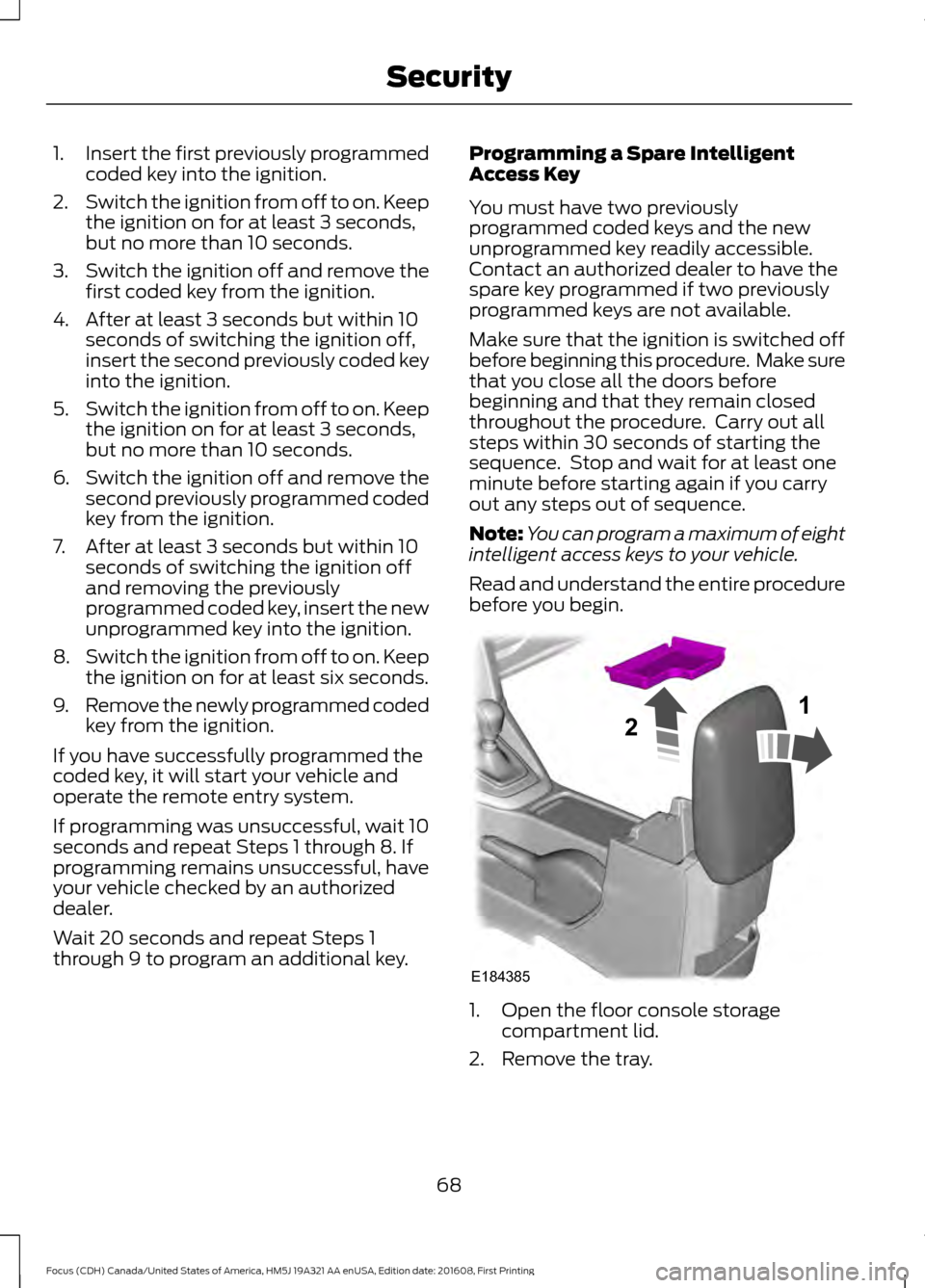
before you begin. 1. Open the floor console storage
compartment lid.
2. Remove the tray.
68
Focus (CDH) Canada/United States of America, HM5J 19A321 AA enUSA, Edition date: 201608, First Printing SecurityE184385
21
Page 72 of 467
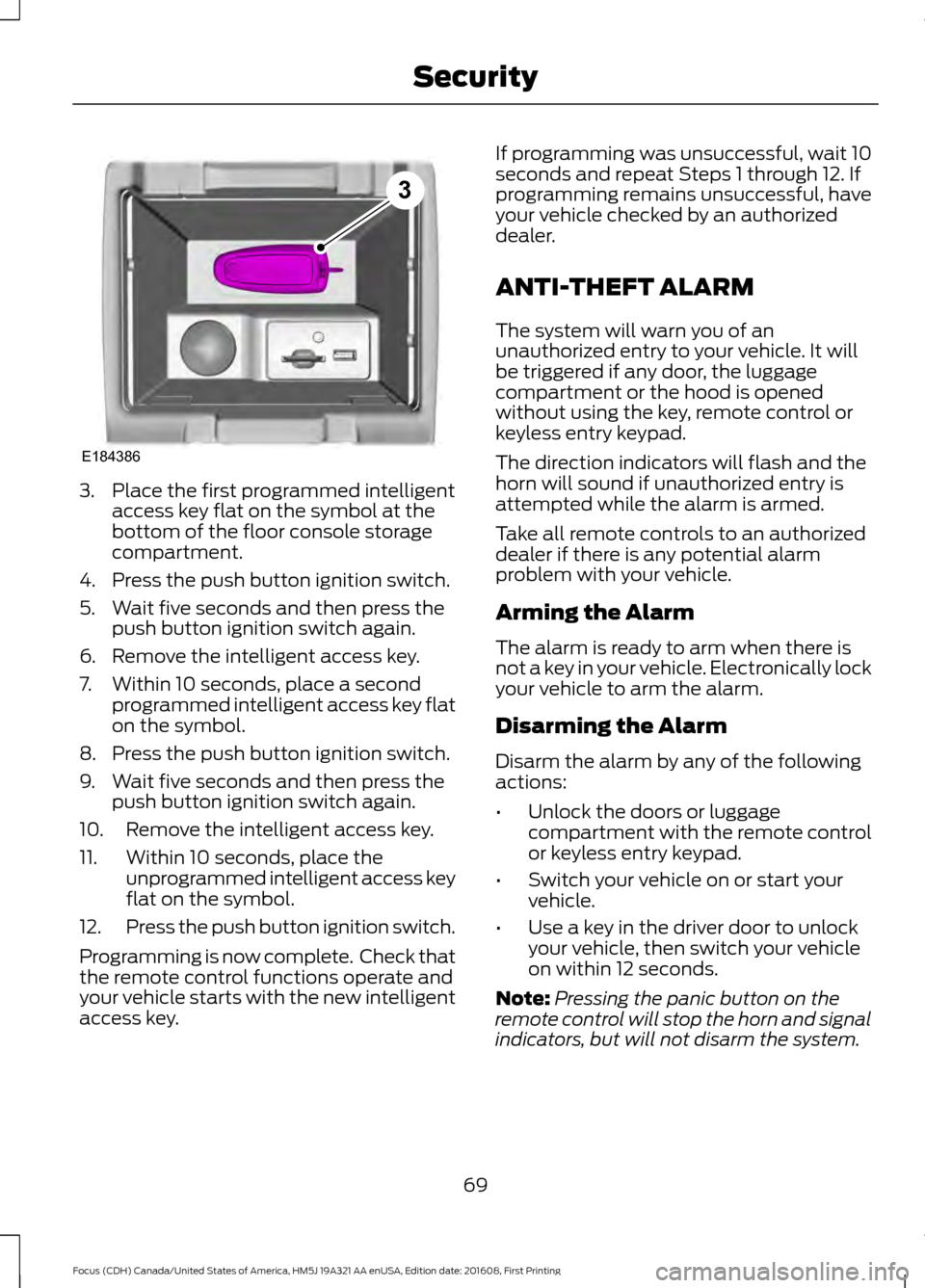
3. Place the first programmed intelligent
access key flat on the symbol at the
bottom of the floor console storage
compartment.
4. Press the push button ignition switch.
5. Wait five seconds and then press the push button ignition switch again.
6. Remove the intelligent access key.
7. Within 10 seconds, place a second programmed intelligent access key flat
on the symbol.
8. Press the push button ignition switch.
9. Wait five seconds and then press the push button ignition switch again.
10. Remove the intelligent access key.
11. Within 10 seconds, place the unprogrammed intelligent access key
flat on the symbol.
12. Press the push button ignition switch.
Programming is now complete. Check that
the remote control functions operate and
your vehicle starts with the new intelligent
access key. If programming was unsuccessful, wait 10
seconds and repeat Steps 1 through 12. If
programming remains unsuccessful, have
your vehicle checked by an authorized
dealer.
ANTI-THEFT ALARM
The system will warn you of an
unauthorized entry to your vehicle. It will
be triggered if any door, the luggage
compartment or the hood is opened
without using the key, remote control or
keyless entry keypad.
The direction indicators will flash and the
horn will sound if unauthorized entry is
attempted while the alarm is armed.
Take all remote controls to an authorized
dealer if there is any potential alarm
problem with your vehicle.
Arming the Alarm
The alarm is ready to arm when there is
not a key in your vehicle. Electronically lock
your vehicle to arm the alarm.
Disarming the Alarm
Disarm the alarm by any of the following
actions:
•
Unlock the doors or luggage
compartment with the remote control
or keyless entry keypad.
• Switch your vehicle on or start your
vehicle.
• Use a key in the driver door to unlock
your vehicle, then switch your vehicle
on within 12 seconds.
Note: Pressing the panic button on the
remote control will stop the horn and signal
indicators, but will not disarm the system.
69
Focus (CDH) Canada/United States of America, HM5J 19A321 AA enUSA, Edition date: 201608, First Printing SecurityE184386
3
Page 96 of 467
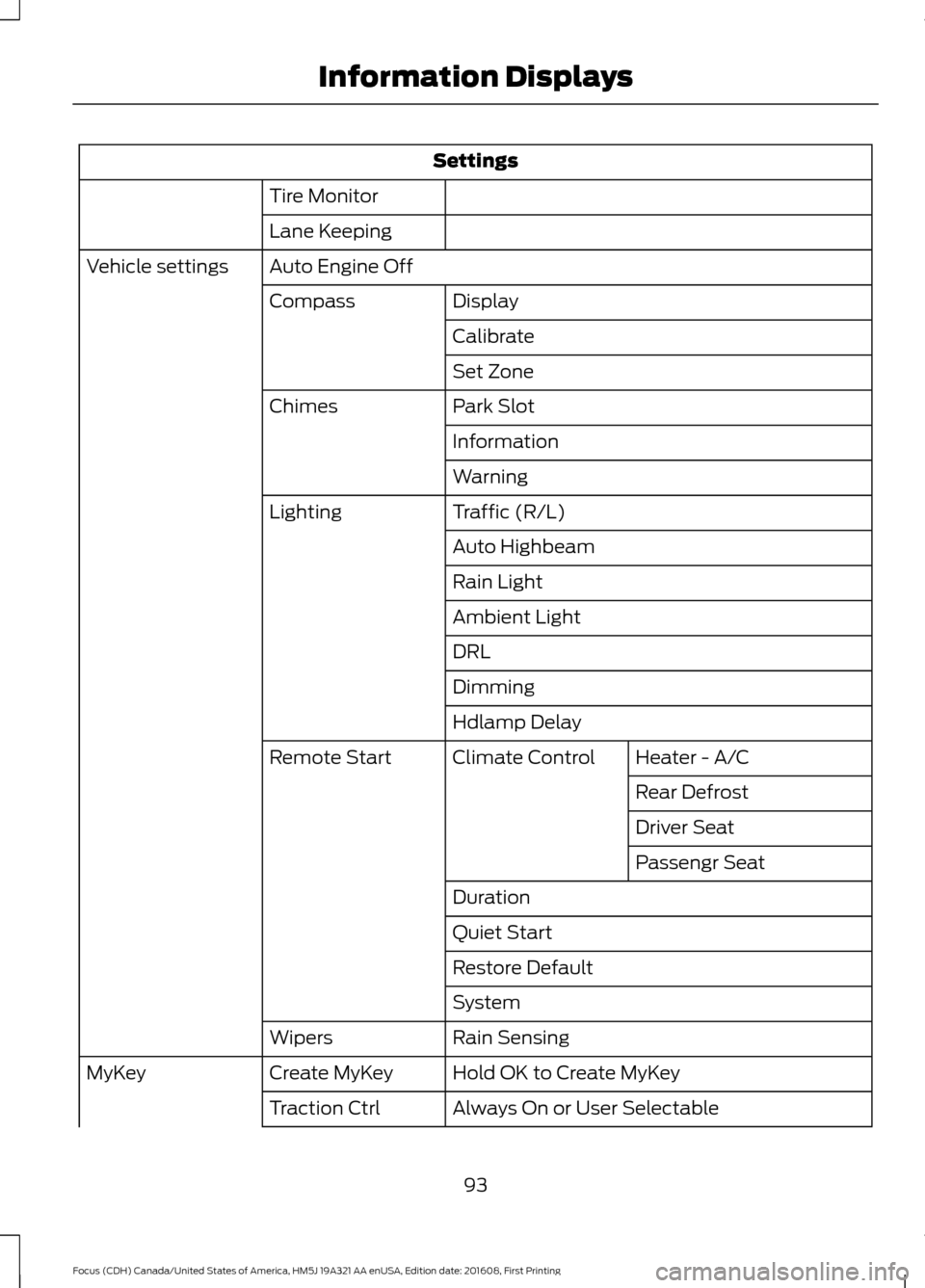
Settings
Tire Monitor
Lane Keeping
Auto Engine Off
Vehicle settings
Display
Compass
Calibrate
Set Zone
Park Slot
Chimes
Information
Warning
Traffic (R/L)
Lighting
Auto Highbeam
Rain Light
Ambient Light
DRL
Dimming
Hdlamp DelayHeater - A/C
Climate Control
Remote Start
Rear Defrost
Driver Seat
Passengr Seat
Duration
Quiet Start
Restore Default
System
Rain Sensing
Wipers
Hold OK to Create MyKey
Create MyKey
MyKey
Always On or User Selectable
Traction Ctrl
93
Focus (CDH) Canada/United States of America, HM5J 19A321 AA enUSA, Edition date: 201608, First Printing Information Displays
Page 101 of 467
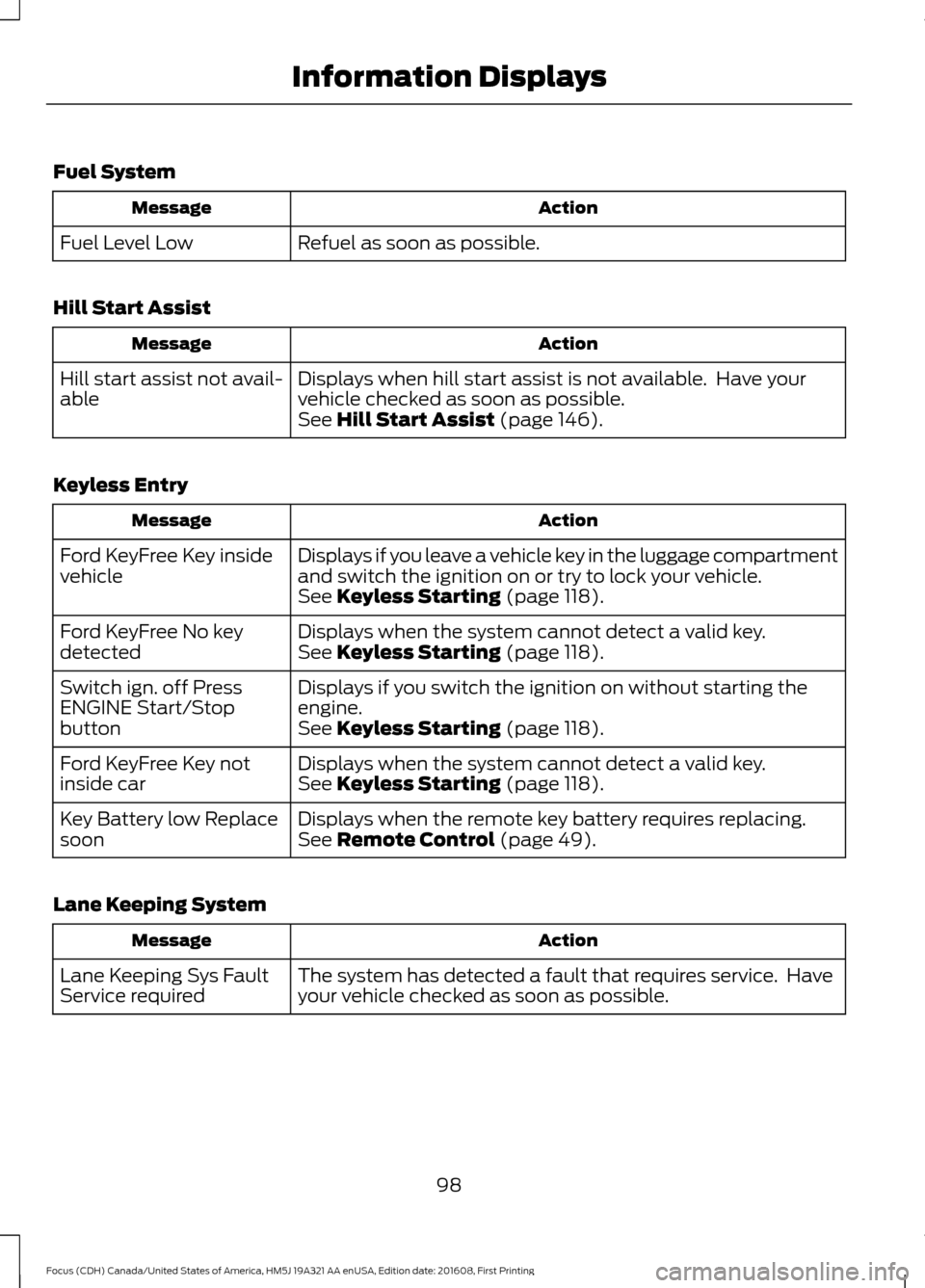
Fuel System
Action
Message
Refuel as soon as possible.
Fuel Level Low
Hill Start Assist Action
Message
Displays when hill start assist is not available. Have your
vehicle checked as soon as possible.
Hill start assist not avail-
able
See Hill Start Assist (page 146).
Keyless Entry Action
Message
Displays if you leave a vehicle key in the luggage compartment
and switch the ignition on or try to lock your vehicle.
Ford KeyFree Key inside
vehicle
See
Keyless Starting (page 118).
Displays when the system cannot detect a valid key.
Ford KeyFree No key
detected See
Keyless Starting (page 118).
Displays if you switch the ignition on without starting the
engine.
Switch ign. off Press
ENGINE Start/Stop
button
See
Keyless Starting (page 118).
Displays when the system cannot detect a valid key.
Ford KeyFree Key not
inside car See
Keyless Starting (page 118).
Displays when the remote key battery requires replacing.
Key Battery low Replace
soon See
Remote Control (page 49).
Lane Keeping System Action
Message
The system has detected a fault that requires service. Have
your vehicle checked as soon as possible.
Lane Keeping Sys Fault
Service required
98
Focus (CDH) Canada/United States of America, HM5J 19A321 AA enUSA, Edition date: 201608, First Printing Information Displays
Page 112 of 467
For additional cabin air filter information,
or to replace the filter, see an authorized
dealer.
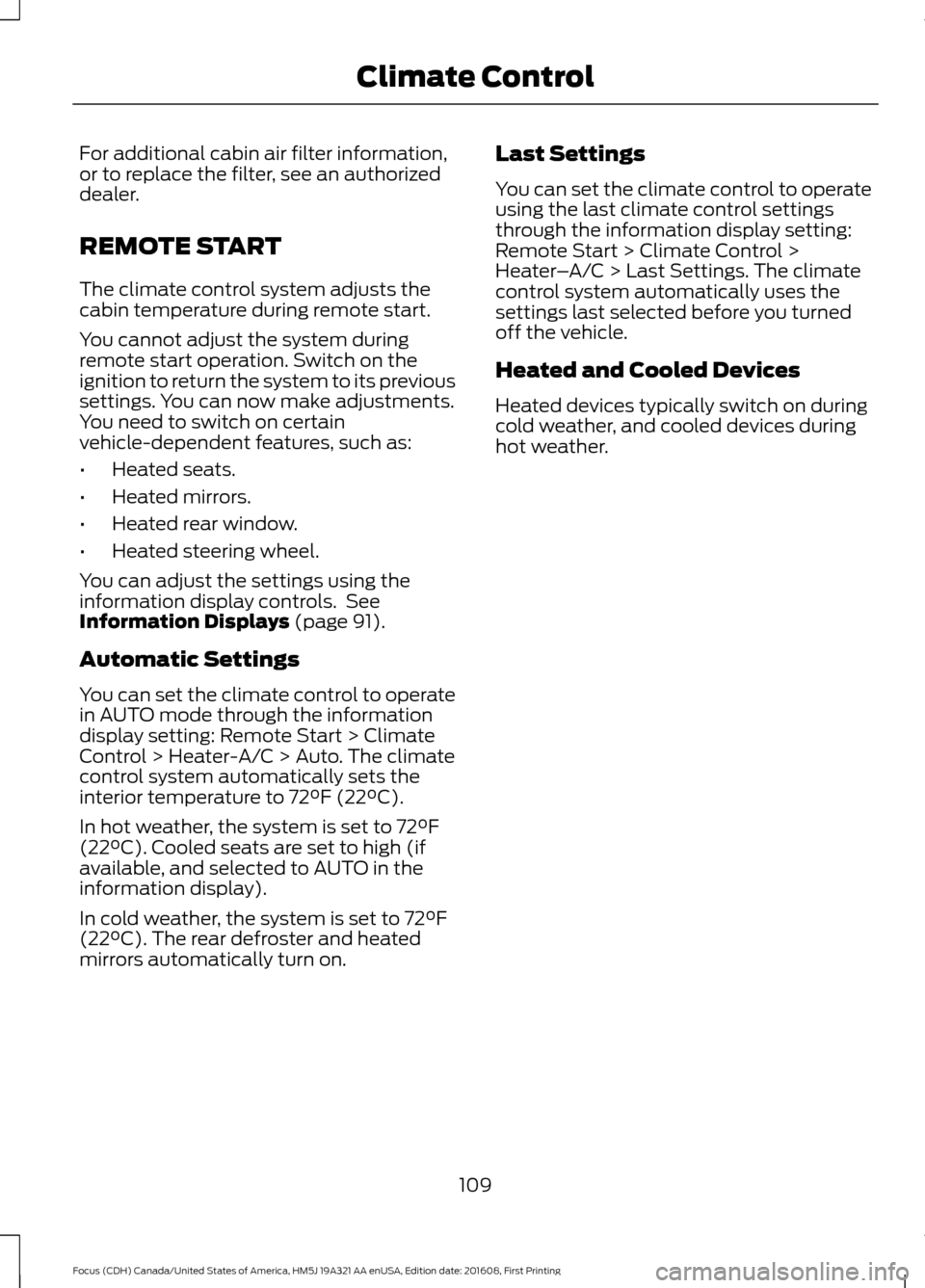
REMOTE START
The climate control system adjusts the
cabin temperature during remote start.
You cannot adjust the system during
remote start operation. Switch on the
ignition to return the system to its previous
settings. You can now make adjustments.
You need to switch on certain
vehicle-dependent features, such as:
•
Heated seats.
• Heated mirrors.
• Heated rear window.
• Heated steering wheel.
You can adjust the settings using the
information display controls. See
Information Displays (page 91).
Automatic Settings
You can set the climate control to operate
in AUTO mode through the information
display setting: Remote Start > Climate
Control > Heater-A/C > Auto. The climate
control system automatically sets the
interior temperature to 72°F (22°C).
In hot weather, the system is set to 72°F
(22°C). Cooled seats are set to high (if
available, and selected to AUTO in the
information display).
In cold weather, the system is set to 72°F
(22°C). The rear defroster and heated
mirrors automatically turn on. Last Settings
You can set the climate control to operate
using the last climate control settings
through the information display setting:
Remote Start > Climate Control >
Heater
–A/C > Last Settings. The climate
control system automatically uses the
settings last selected before you turned
off the vehicle.
Heated and Cooled Devices
Heated devices typically switch on during
cold weather, and cooled devices during
hot weather.
109
Focus (CDH) Canada/United States of America, HM5J 19A321 AA enUSA, Edition date: 201608, First Printing Climate Control
Page 347 of 467
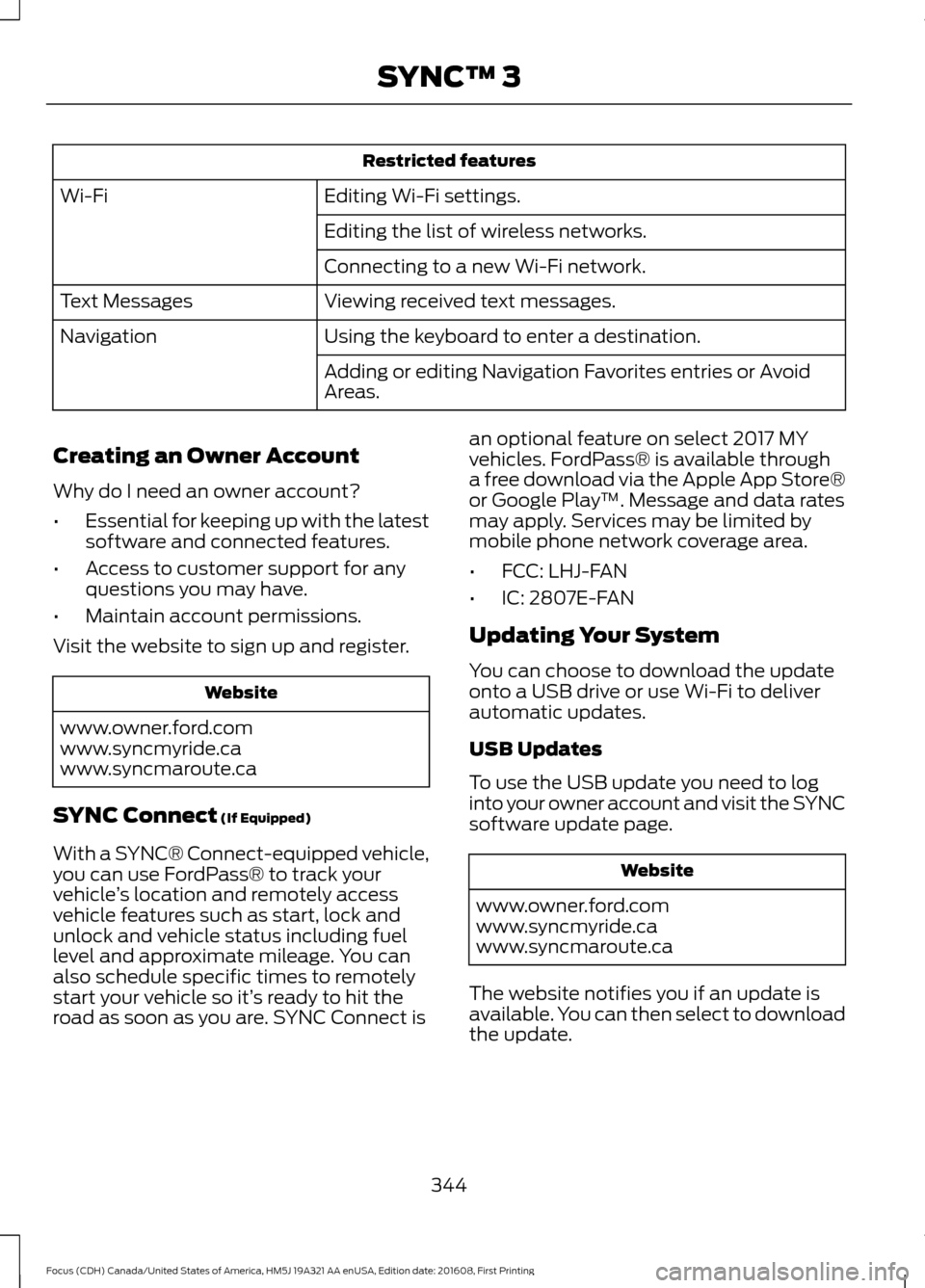
Restricted features
Editing Wi-Fi settings.
Wi-Fi
Editing the list of wireless networks.
Connecting to a new Wi-Fi network.
Viewing received text messages.
Text Messages
Using the keyboard to enter a destination.
Navigation
Adding or editing Navigation Favorites entries or Avoid
Areas.
Creating an Owner Account
Why do I need an owner account?
• Essential for keeping up with the latest
software and connected features.
• Access to customer support for any
questions you may have.
• Maintain account permissions.
Visit the website to sign up and register. Website
www.owner.ford.com
www.syncmyride.ca
www.syncmaroute.ca
SYNC Connect (If Equipped)
With a SYNC® Connect-equipped vehicle,
you can use FordPass® to track your
vehicle ’s location and remotely access
vehicle features such as start, lock and
unlock and vehicle status including fuel
level and approximate mileage. You can
also schedule specific times to remotely
start your vehicle so it’ s ready to hit the
road as soon as you are. SYNC Connect is an optional feature on select 2017 MY
vehicles. FordPass® is available through
a free download via the Apple App Store®
or Google Play
™. Message and data rates
may apply. Services may be limited by
mobile phone network coverage area.
• FCC: LHJ-FAN
• IC: 2807E-FAN
Updating Your System
You can choose to download the update
onto a USB drive or use Wi-Fi to deliver
automatic updates.
USB Updates
To use the USB update you need to log
into your owner account and visit the SYNC
software update page. Website
www.owner.ford.com
www.syncmyride.ca
www.syncmaroute.ca
The website notifies you if an update is
available. You can then select to download
the update.
344
Focus (CDH) Canada/United States of America, HM5J 19A321 AA enUSA, Edition date: 201608, First Printing SYNC™ 3
Page 408 of 467
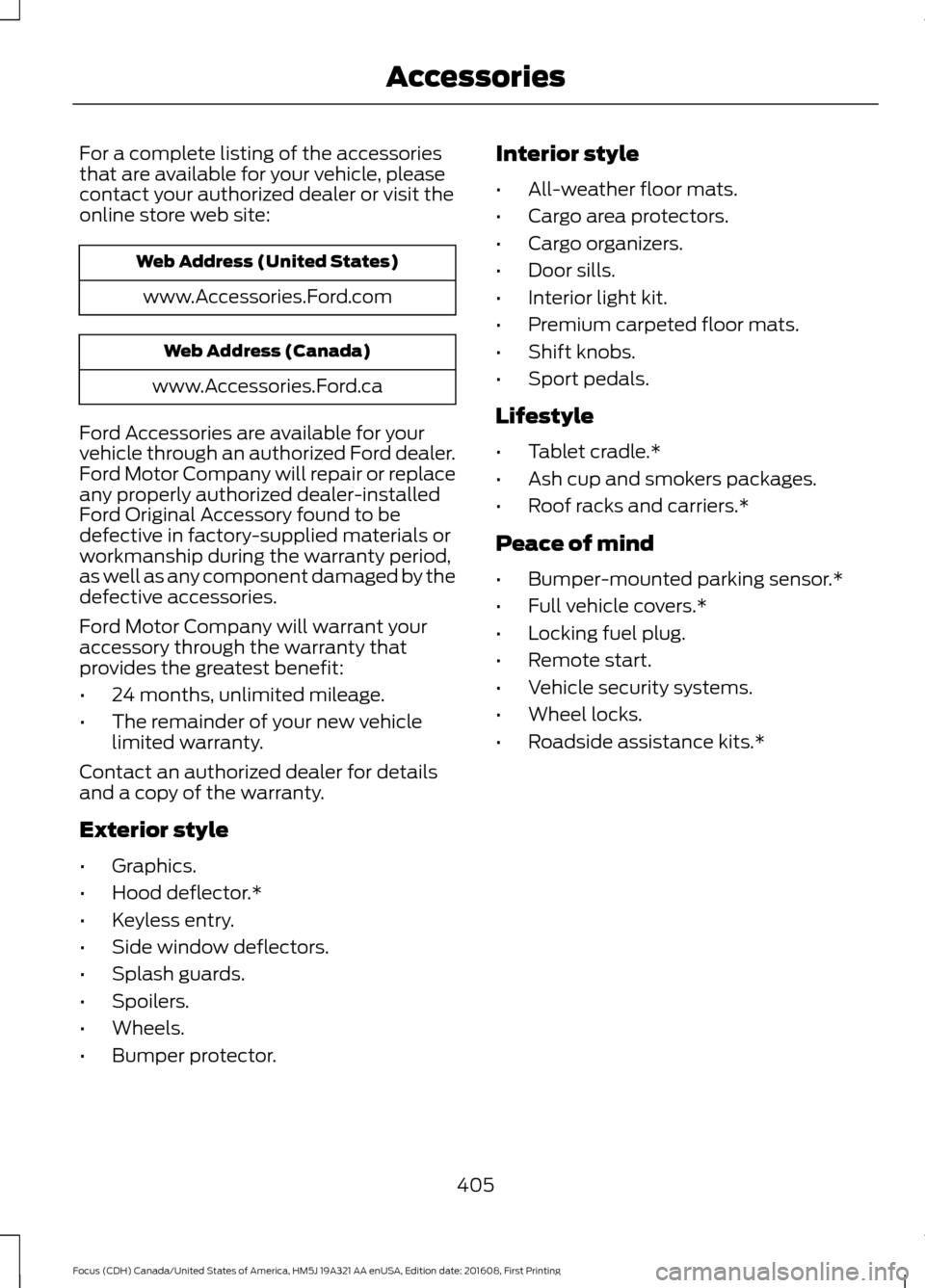
For a complete listing of the accessories
that are available for your vehicle, please
contact your authorized dealer or visit the
online store web site:
Web Address (United States)
www.Accessories.Ford.com Web Address (Canada)
www.Accessories.Ford.ca
Ford Accessories are available for your
vehicle through an authorized Ford dealer.
Ford Motor Company will repair or replace
any properly authorized dealer-installed
Ford Original Accessory found to be
defective in factory-supplied materials or
workmanship during the warranty period,
as well as any component damaged by the
defective accessories.
Ford Motor Company will warrant your
accessory through the warranty that
provides the greatest benefit:
• 24 months, unlimited mileage.
• The remainder of your new vehicle
limited warranty.
Contact an authorized dealer for details
and a copy of the warranty.
Exterior style
• Graphics.
• Hood deflector.*
• Keyless entry.
• Side window deflectors.
• Splash guards.
• Spoilers.
• Wheels.
• Bumper protector. Interior style
•
All-weather floor mats.
• Cargo area protectors.
• Cargo organizers.
• Door sills.
• Interior light kit.
• Premium carpeted floor mats.
• Shift knobs.
• Sport pedals.
Lifestyle
• Tablet cradle.*
• Ash cup and smokers packages.
• Roof racks and carriers.*
Peace of mind
• Bumper-mounted parking sensor.*
• Full vehicle covers.*
• Locking fuel plug.
• Remote start.
• Vehicle security systems.
• Wheel locks.
• Roadside assistance kits.*
405
Focus (CDH) Canada/United States of America, HM5J 19A321 AA enUSA, Edition date: 201608, First Printing Accessories
Page 462 of 467
Hill Start Assist..............................................146
Switching the System On and Off................147
Using Hill Start Assist........................................ 147
Hints on Controlling the Interior Climate..........................................................106
Cooling the Interior Quickly............................. 107
General Hints....................................................... 106
Heating the Interior Quickly............................ 106
Recommended Settings for Cooling ..........107
Recommended Settings for Heating..........107
Side Window Defogging in Cold Weather............................................................ 108
Hints on Driving With Anti-Lock Brakes............................................................145
Home Screen.................................................347
Hood Lock See: Opening and Closing the Hood............212
I
Ignition Switch................................................118
In California (U.S. Only).............................195
Information Display Control........................71
Information Displays
......................................91
General Information............................................. 91
Information Messages
.................................95
Installing Child Restraints.............................17 Child Seats............................................................... 17
Using Lap and Shoulder Belts.......................... 18
Using Lower Anchors and Tethers for Children (LATCH)............................................ 20
Using Tether Straps............................................. 22
Instrument Cluster
........................................86
Instrument Lighting Dimmer......................77
Interior Lamps
.................................................79
Front Interior Lamps (If Equipped)...............79
Interior Luggage Compartment Release - 4-Door..........................................................65
Interior Mirror...................................................84
Introduction.........................................................7
J
Jump Starting the Vehicle..........................191 Connecting the Jumper Cables...................... 191
Jump Starting....................................................... 192
Preparing Your Vehicle....................................... 191
Removing the Jumper Cables........................ 192K
Keyless Entry
...................................................64
SECURICODE™ KEYLESS ENTRY
KEYPAD.............................................................. 64
Keyless Starting.............................................118 Failure to Start...................................................... 119
Fast Restart.......................................................... 120
Starting Your Vehicle.......................................... 119
Stopping the Engine When Your Vehicle is Moving............................................................... 120
Stopping the Engine When Your Vehicle is Stationary......................................................... 120
Switching the Ignition On to Accessory Mode.................................................................... 119
Keys and Remote Controls.........................47
L
Lane Keeping System
.................................165
Switching the System On and Off...............166
Lighting Control
...............................................75
Headlamp Flasher................................................ 76
High Beams............................................................. 75
Parking Lamps....................................................... 75
Lighting...............................................................75 General Information............................................ 75
Load Carrying
.................................................176
Load Limit........................................................176 Special Loading Instructions for Owners of
Pick-up Trucks and Utility-type
Vehicles.............................................................. 181
Vehicle Loading - with and without a Trailer.................................................................. 176
Locking and Unlocking.................................59 Activating Intelligent Access........................... 60
Autolock................................................................... 61
Autounlock............................................................. 62
Battery Saver......................................................... 62
Disabled Intelligent Access Keys..................... 61
Illuminated Entry.................................................. 62
Illuminated Exit..................................................... 62
Opening the Liftgate or Luggage Compartment................................................... 63
Power Door Locks................................................ 59
Remote Control.................................................... 59
Smart Unlocks for Integrated Keyhead Transmitter......................................................... 61
459
Focus (CDH) Canada/United States of America, HM5J 19A321 AA enUSA, Edition date: 201608, First Printing Index