instrument panel FORD FOCUS 2017 3.G Owners Manual
[x] Cancel search | Manufacturer: FORD, Model Year: 2017, Model line: FOCUS, Model: FORD FOCUS 2017 3.GPages: 467, PDF Size: 5.34 MB
Page 7 of 467
Roadside Emergencies
Roadside Assistance..................................189
Hazard Warning Flashers..........................190
Fuel Shutoff
...................................................190
Jump Starting the Vehicle..........................191
Post-Crash Alert System...........................193
Customer Assistance
Getting the Services You Need...............194
In California (U.S. Only).............................195
The Better Business Bureau (BBB) Auto Line Program (U.S. Only)......................196
Utilizing the Mediation/Arbitration Program (Canada Only)........................197
Getting Assistance Outside the U.S. and Canada.........................................................197
Ordering Additional Owner's Literature.....................................................198
Reporting Safety Defects (U.S. Only)
.............................................................199
Reporting Safety Defects (Canada Only)
.............................................................199
Fuses
Fuse Specification Chart...........................201
Changing a Fuse...........................................210
Maintenance
General Information.....................................212
Opening and Closing the Hood...............212
Under Hood Overview - 1.0L EcoBoost™.................................................214
Under Hood Overview - 2.0L....................215
Engine Oil Dipstick - 1.0L EcoBoost™.................................................216
Engine Oil Dipstick - 2.0L...........................216
Engine Oil Check...........................................216
Oil Change Indicator Reset........................217
Engine Cooling Fan......................................218
Engine Coolant Check
................................218 Automatic Transmission Fluid
Check............................................................222
Brake Fluid Check........................................222
Clutch Fluid Check - Manual Transmission.............................................222
Washer Fluid Check....................................223
Changing the 12V Battery.........................223
Checking the Wiper Blades......................224
Changing the Front Wiper Blades.........224
Changing the Rear Wiper Blades...........225
Adjusting the Headlamps.........................226
Removing a Headlamp
..............................227
Changing a Bulb...........................................228
Bulb Specification Chart...........................233
Changing the Engine Air Filter.................235
Drive Belt Routing - 1.0L EcoBoost™................................................236
Drive Belt Routing - 2.0L
...........................236
Vehicle Care
General Information....................................237
Cleaning Products........................................237
Cleaning the Exterior..................................238
Waxing
.............................................................239
Cleaning the Engine....................................239
Cleaning the Windows and Wiper Blades..........................................................240
Cleaning the Interior...................................240
Cleaning the Instrument Panel and Instrument Cluster Lens........................241
Cleaning Leather Seats..............................241
Repairing Minor Paint Damage...............242
Cleaning the Wheels..................................242
Vehicle Storage.............................................242
Body Styling Kits
..........................................244
Wheels and Tires
Tire Care
..........................................................245
Using Snow Chains....................................260
Tire Pressure Monitoring System
............261
4
Focus (CDH) Canada/United States of America, HM5J 19A321 AA enUSA, Edition date: 201608, First Printing Table of Contents
Page 43 of 467
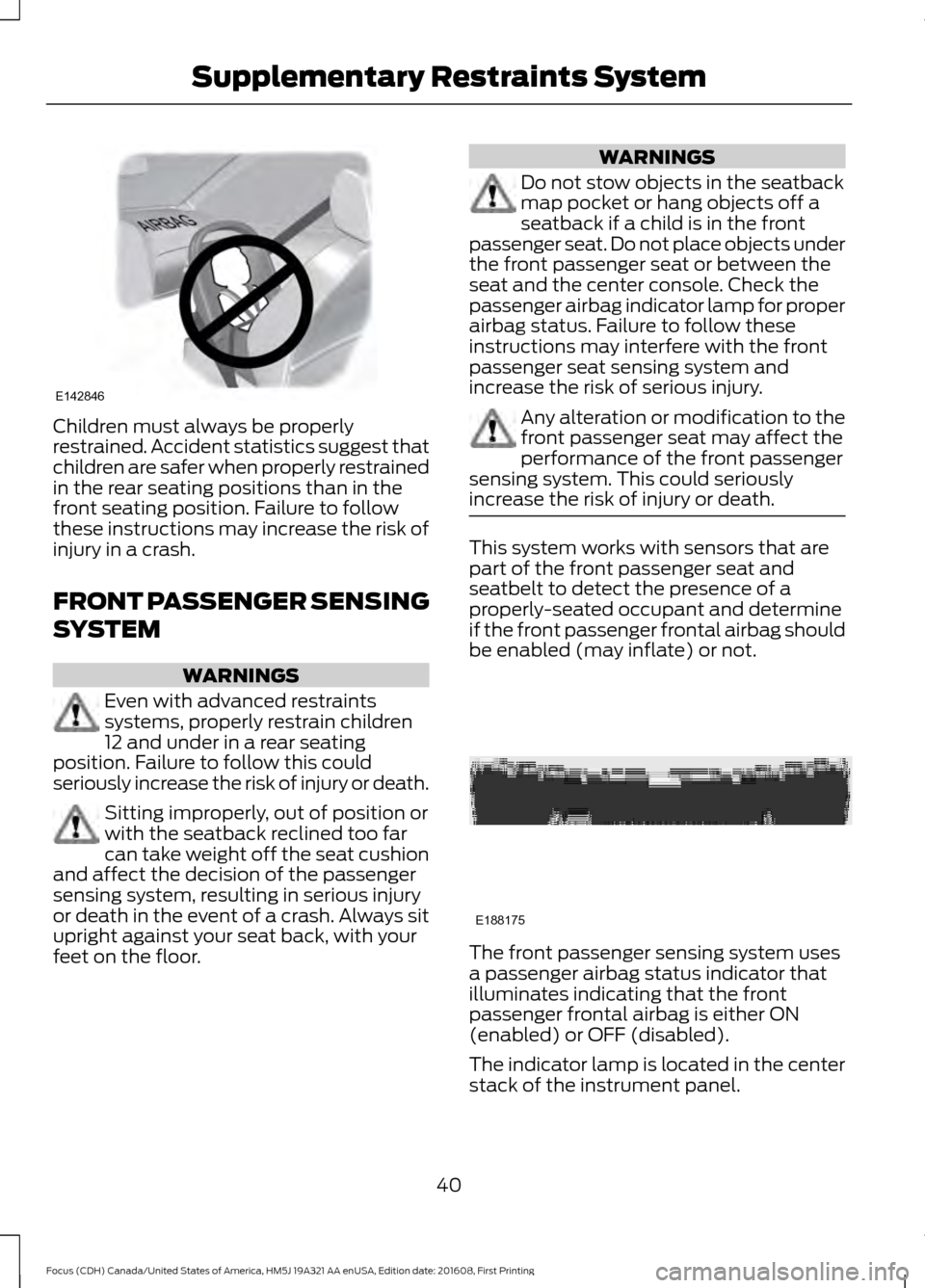
Children must always be properly
restrained. Accident statistics suggest that
children are safer when properly restrained
in the rear seating positions than in the
front seating position. Failure to follow
these instructions may increase the risk of
injury in a crash.
FRONT PASSENGER SENSING
SYSTEM
WARNINGS
Even with advanced restraints
systems, properly restrain children
12 and under in a rear seating
position. Failure to follow this could
seriously increase the risk of injury or death. Sitting improperly, out of position or
with the seatback reclined too far
can take weight off the seat cushion
and affect the decision of the passenger
sensing system, resulting in serious injury
or death in the event of a crash. Always sit
upright against your seat back, with your
feet on the floor. WARNINGS
Do not stow objects in the seatback
map pocket or hang objects off a
seatback if a child is in the front
passenger seat. Do not place objects under
the front passenger seat or between the
seat and the center console. Check the
passenger airbag indicator lamp for proper
airbag status. Failure to follow these
instructions may interfere with the front
passenger seat sensing system and
increase the risk of serious injury. Any alteration or modification to the
front passenger seat may affect the
performance of the front passenger
sensing system. This could seriously
increase the risk of injury or death. This system works with sensors that are
part of the front passenger seat and
seatbelt to detect the presence of a
properly-seated occupant and determine
if the front passenger frontal airbag should
be enabled (may inflate) or not.
The front passenger sensing system uses
a passenger airbag status indicator that
illuminates indicating that the front
passenger frontal airbag is either ON
(enabled) or OFF (disabled).
The indicator lamp is located in the center
stack of the instrument panel.
40
Focus (CDH) Canada/United States of America, HM5J 19A321 AA enUSA, Edition date: 201608, First Printing Supplementary Restraints SystemE142846 E188175
Page 46 of 467
WARNINGS
Do not use accessory seat covers.
The use of accessory seat covers
may prevent the deployment of the
side airbags and increase the risk of injury
in an accident. Do not lean your head on the door.
The side airbag could injure you as it
deploys from the side of the
seatback. Do not attempt to service, repair, or
modify the seat airbag supplemental
restraint systems, its fuses or the
seat cover on a vehicle containing seat
airbags as you could be seriously injured
or killed. Contact your authorized dealer
as soon as possible. If the side airbag has deployed, the
airbag will not function again. The
side airbag system (including the
seat) must be inspected as soon as
possible. If the airbag is not replaced, the
unrepaired area will increase the risk of
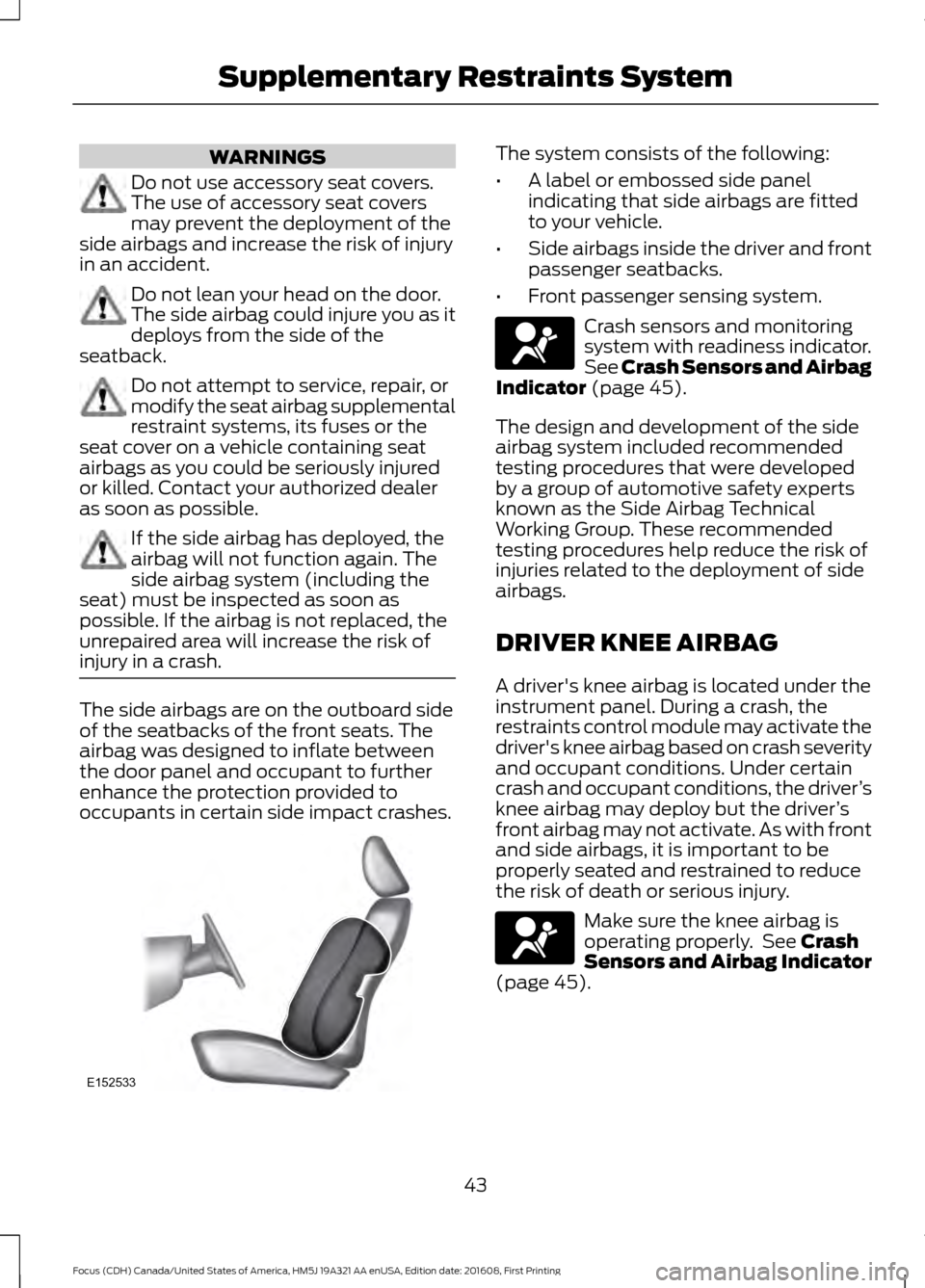
injury in a crash. The side airbags are on the outboard side
of the seatbacks of the front seats. The
airbag was designed to inflate between
the door panel and occupant to further
enhance the protection provided to
occupants in certain side impact crashes. The system consists of the following:
•
A label or embossed side panel
indicating that side airbags are fitted
to your vehicle.
• Side airbags inside the driver and front
passenger seatbacks.
• Front passenger sensing system. Crash sensors and monitoring
system with readiness indicator.
See Crash Sensors and Airbag
Indicator (page 45).
The design and development of the side
airbag system included recommended
testing procedures that were developed
by a group of automotive safety experts
known as the Side Airbag Technical
Working Group. These recommended
testing procedures help reduce the risk of
injuries related to the deployment of side
airbags.
DRIVER KNEE AIRBAG
A driver's knee airbag is located under the
instrument panel. During a crash, the
restraints control module may activate the
driver's knee airbag based on crash severity
and occupant conditions. Under certain
crash and occupant conditions, the driver ’s
knee airbag may deploy but the driver ’s
front airbag may not activate. As with front
and side airbags, it is important to be
properly seated and restrained to reduce
the risk of death or serious injury. Make sure the knee airbag is
operating properly. See
Crash
Sensors and Airbag Indicator
(page
45).
43
Focus (CDH) Canada/United States of America, HM5J 19A321 AA enUSA, Edition date: 201608, First Printing Supplementary Restraints SystemE152533 E67017 E67017
Page 56 of 467
•
Your vehicle battery has no charge.
• The powertrain fault indicator was on
the last time you drove your vehicle.
Remote Starting your Vehicle
Note: You must press each button within
three seconds of each other. If you do not
follow this sequence, your vehicle does not
start remotely, the direction indicators do
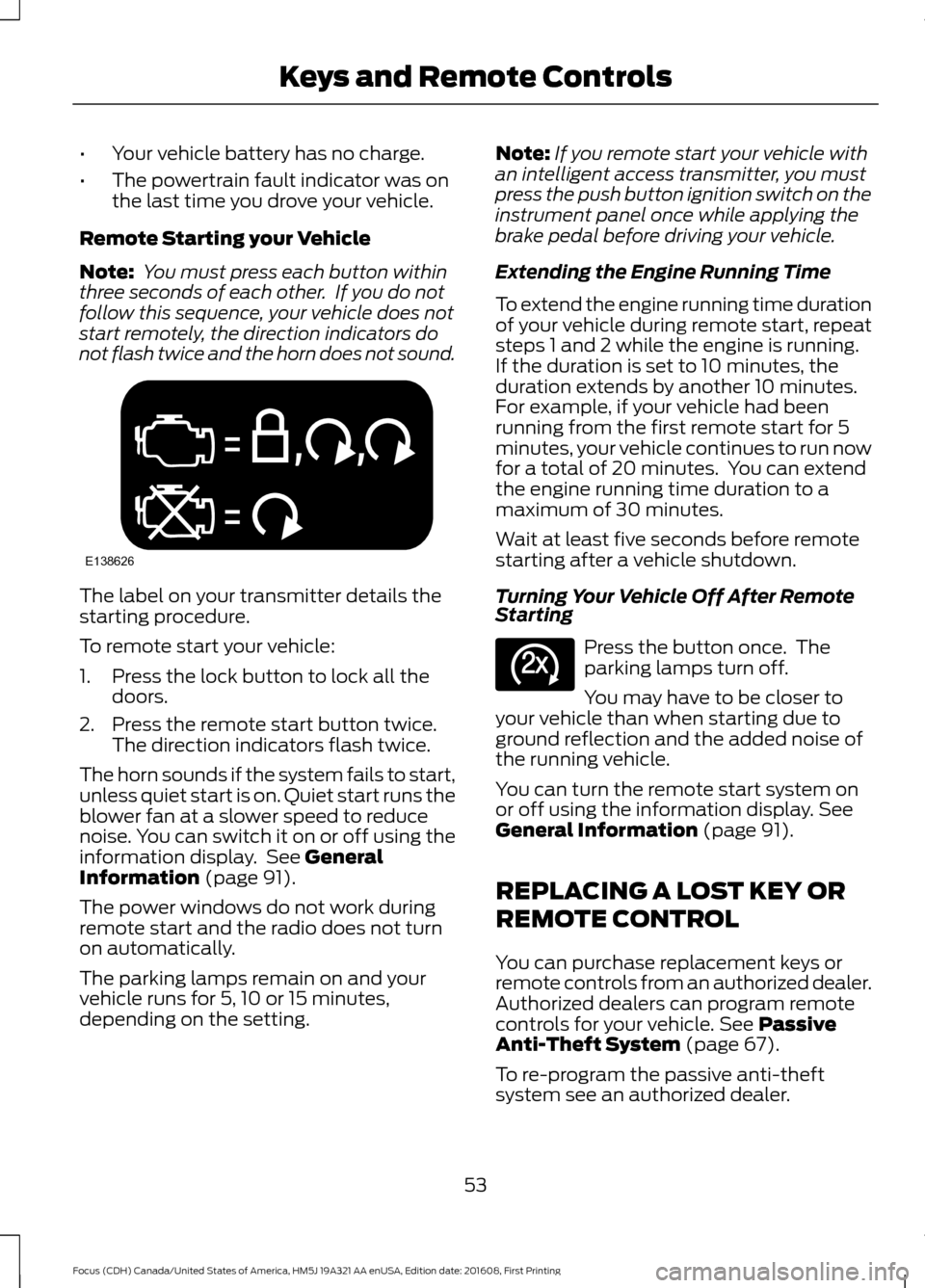
not flash twice and the horn does not sound. The label on your transmitter details the
starting procedure.
To remote start your vehicle:
1. Press the lock button to lock all the
doors.
2. Press the remote start button twice. The direction indicators flash twice.
The horn sounds if the system fails to start,
unless quiet start is on. Quiet start runs the
blower fan at a slower speed to reduce
noise. You can switch it on or off using the
information display. See General
Information (page 91).
The power windows do not work during
remote start and the radio does not turn
on automatically.
The parking lamps remain on and your
vehicle runs for 5, 10 or 15 minutes,
depending on the setting. Note:
If you remote start your vehicle with
an intelligent access transmitter, you must
press the push button ignition switch on the
instrument panel once while applying the
brake pedal before driving your vehicle.
Extending the Engine Running Time
To extend the engine running time duration
of your vehicle during remote start, repeat
steps 1 and 2 while the engine is running.
If the duration is set to 10 minutes, the
duration extends by another 10 minutes.
For example, if your vehicle had been
running from the first remote start for 5
minutes, your vehicle continues to run now
for a total of 20 minutes. You can extend
the engine running time duration to a
maximum of 30 minutes.
Wait at least five seconds before remote
starting after a vehicle shutdown.
Turning Your Vehicle Off After Remote
Starting Press the button once. The
parking lamps turn off.
You may have to be closer to
your vehicle than when starting due to
ground reflection and the added noise of
the running vehicle.
You can turn the remote start system on
or off using the information display.
See
General Information (page 91).
REPLACING A LOST KEY OR
REMOTE CONTROL
You can purchase replacement keys or
remote controls from an authorized dealer.
Authorized dealers can program remote
controls for your vehicle.
See Passive
Anti-Theft System (page 67).
To re-program the passive anti-theft
system see an authorized dealer.
53
Focus (CDH) Canada/United States of America, HM5J 19A321 AA enUSA, Edition date: 201608, First Printing Keys and Remote ControlsE138626 E138625
Page 78 of 467
GENERAL INFORMATION
Condensation in Lamp Assemblies
Exterior lamps have vents to
accommodate normal changes in air
pressure.
Condensation can be a natural by-product
of this design. When moist air enters the
lamp assembly through the vents, there is
a possibility that condensation can occur
when the temperature is cold. When
normal condensation occurs, a fine mist
can form on the interior of the lens. The
fine mist eventually clears and exits
through the vents during normal operation.
Clearing time may take as long as 48 hours
under dry weather conditions.
Examples of acceptable condensation are:
•
The presence of a fine mist (no streaks,
drip marks or large droplets).
• A fine mist covers less than 50% of the
lens.
Examples of unacceptable condensation
are:
• A water puddle inside the lamp.
• Streaks, drip marks or large droplets
present on the interior of the lens.
If you see any unacceptable condensation,
have your vehicle checked by an authorized
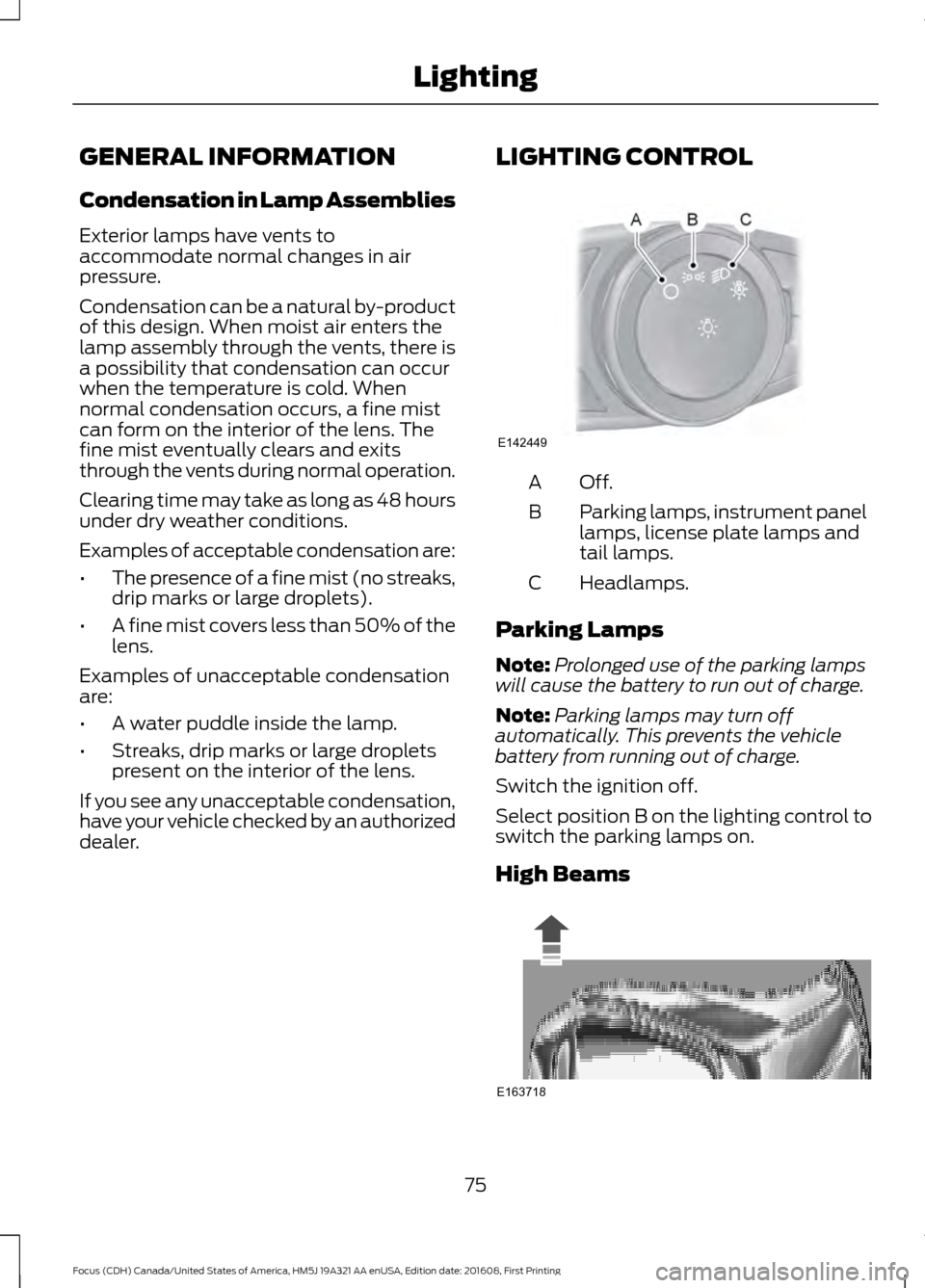
dealer. LIGHTING CONTROL Off.A
Parking lamps, instrument panel
lamps, license plate lamps and
tail lamps.
B
Headlamps.
C
Parking Lamps
Note: Prolonged use of the parking lamps
will cause the battery to run out of charge.
Note: Parking lamps may turn off
automatically. This prevents the vehicle
battery from running out of charge.
Switch the ignition off.
Select position B on the lighting control to
switch the parking lamps on.
High Beams 75
Focus (CDH) Canada/United States of America, HM5J 19A321 AA enUSA, Edition date: 201608, First Printing LightingE142449 E163718
Page 106 of 467
MANUAL CLIMATE CONTROL
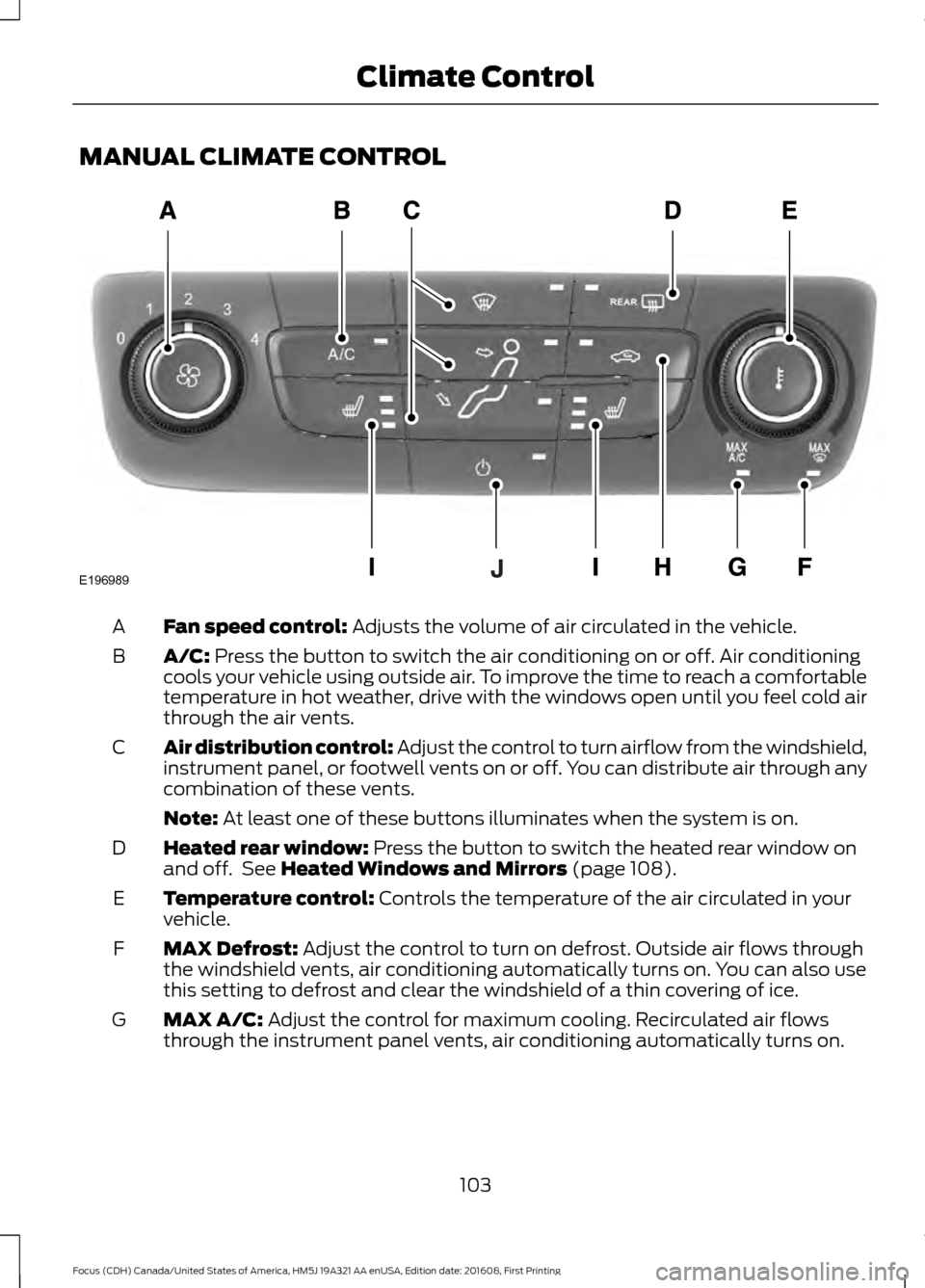
Fan speed control: Adjusts the volume of air circulated in the vehicle.
A
A/C:
Press the button to switch the air conditioning on or off. Air conditioning
cools your vehicle using outside air. To improve the time to reach a comfortable
temperature in hot weather, drive with the windows open until you feel cold air
through the air vents.
B
Air distribution control: Adjust the control to turn airflow from the windshield,
instrument panel, or footwell vents on or off. You can distribute air through any
combination of these vents.
C
Note:
At least one of these buttons illuminates when the system is on.
Heated rear window:
Press the button to switch the heated rear window on
and off. See Heated Windows and Mirrors (page 108).
D
Temperature control:
Controls the temperature of the air circulated in your
vehicle.
E
MAX Defrost:
Adjust the control to turn on defrost. Outside air flows through
the windshield vents, air conditioning automatically turns on. You can also use
this setting to defrost and clear the windshield of a thin covering of ice.
F
MAX A/C:
Adjust the control for maximum cooling. Recirculated air flows
through the instrument panel vents, air conditioning automatically turns on.
G
103
Focus (CDH) Canada/United States of America, HM5J 19A321 AA enUSA, Edition date: 201608, First Printing Climate ControlE196989
Page 107 of 467
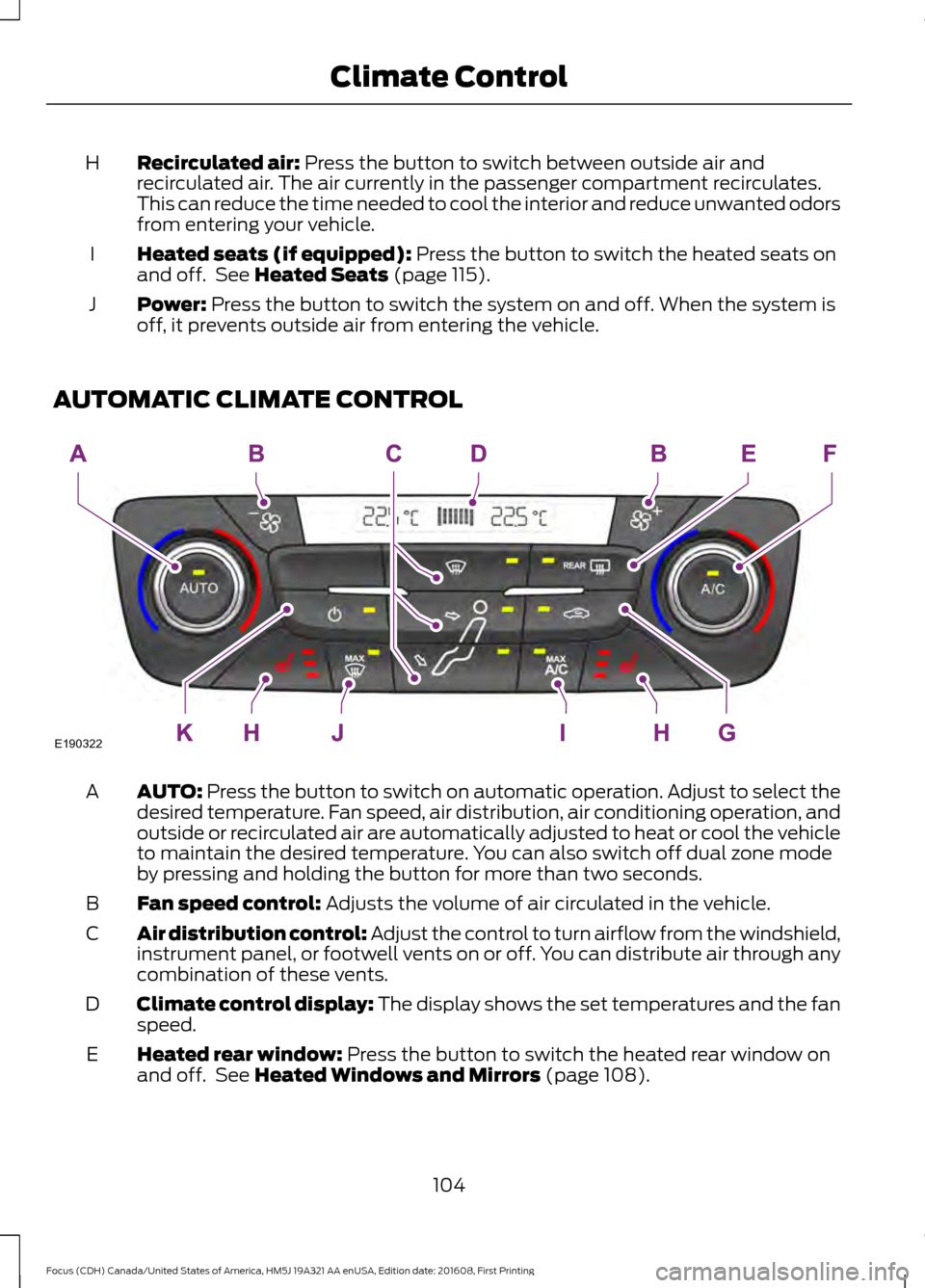
Recirculated air: Press the button to switch between outside air and
recirculated air. The air currently in the passenger compartment recirculates.
This can reduce the time needed to cool the interior and reduce unwanted odors
from entering your vehicle.
H
Heated seats (if equipped):
Press the button to switch the heated seats on
and off. See Heated Seats (page 115).
I
Power:
Press the button to switch the system on and off. When the system is
off, it prevents outside air from entering the vehicle.
J
AUTOMATIC CLIMATE CONTROL AUTO:
Press the button to switch on automatic operation. Adjust to select the
desired temperature. Fan speed, air distribution, air conditioning operation, and
outside or recirculated air are automatically adjusted to heat or cool the vehicle
to maintain the desired temperature. You can also switch off dual zone mode
by pressing and holding the button for more than two seconds.
A
Fan speed control:
Adjusts the volume of air circulated in the vehicle.
B
Air distribution control: Adjust the control to turn airflow from the windshield,
instrument panel, or footwell vents on or off. You can distribute air through any
combination of these vents.
C
Climate control display: The display shows the set temperatures and the fan
speed.
D
Heated rear window:
Press the button to switch the heated rear window on
and off. See Heated Windows and Mirrors (page 108).
E
104
Focus (CDH) Canada/United States of America, HM5J 19A321 AA enUSA, Edition date: 201608, First Printing Climate ControlE190322
Page 108 of 467
A/C: Press the button to switch the air conditioning on or off. Air conditioning
cools your vehicle using outside air. To improve the time to reach a comfortable
temperature in hot weather, drive with the windows open until you feel cold air
through the air vents.
F
Recirculated air:
Press the button to switch between outside air and
recirculated air. The air currently in the passenger compartment recirculates.
This can reduce the time needed to cool the interior and reduce unwanted odors
from entering your vehicle.
G
Heated seats (if equipped):
Press the button to switch the heated seats on
and off. See Heated Seats (page 115).
H
MAX A/C: Press the button for maximum cooling. Recirculated air flows through
the instrument panel vents, air conditioning automatically turns on and the fan
automatically adjusts to the highest speed.
I
MAX Defrost: Press the button to switch on defrost. Outside air flows through
the windshield vents, air conditioning automatically turns on, and fan
automatically adjusts to the highest speed. You can also use this setting to
defrost and clear the windshield of a thin covering of ice. The heated rear window
also automatically turns on when you select maximum defrost.
J
Power:
Press the button to switch the system on and off. When the system is
off, it prevents outside air from entering the vehicle.
K
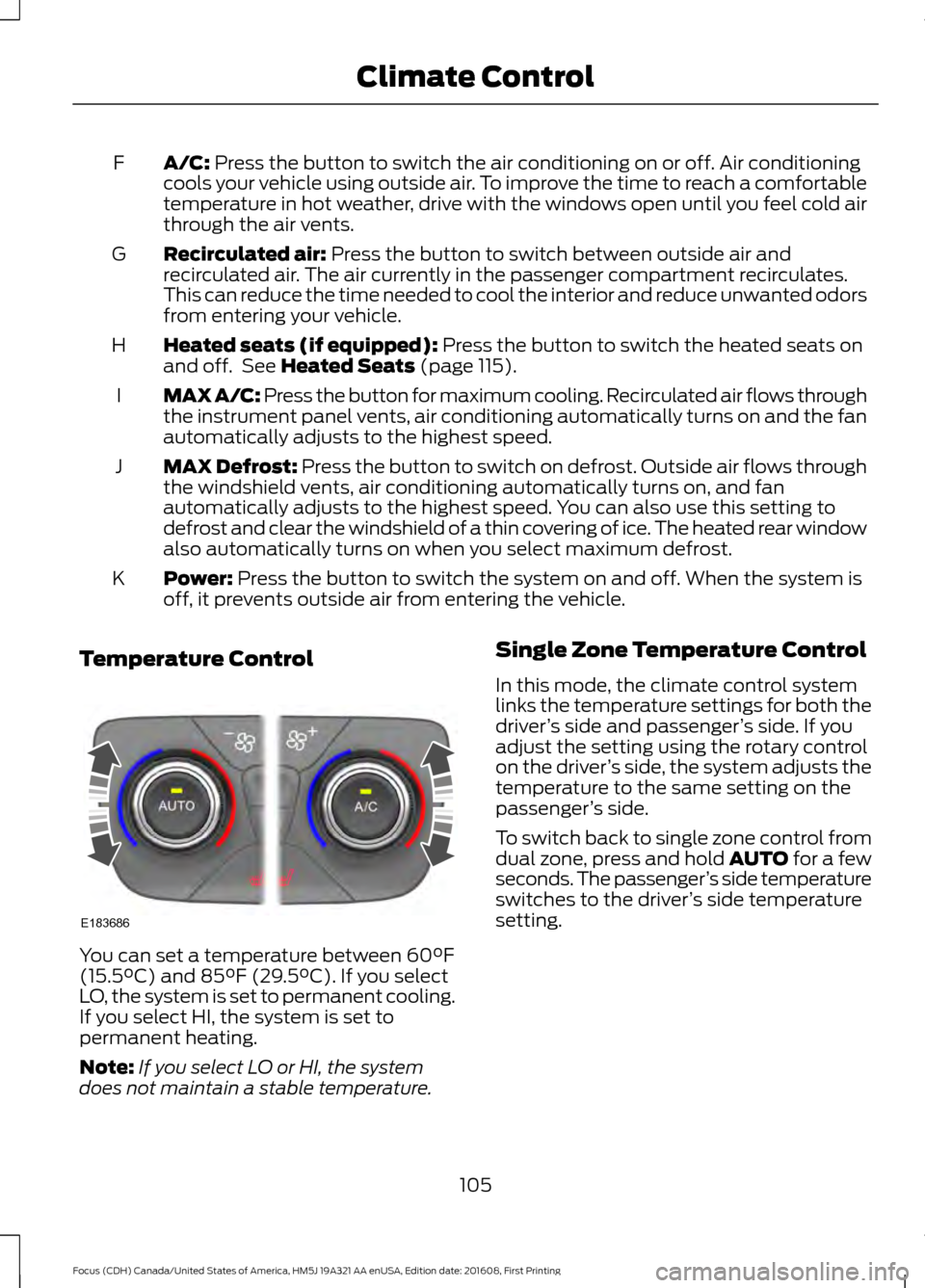
Temperature Control You can set a temperature between
60°F
(15.5°C) and 85°F (29.5°C). If you select
LO, the system is set to permanent cooling.
If you select HI, the system is set to
permanent heating.
Note: If you select LO or HI, the system
does not maintain a stable temperature. Single Zone Temperature Control
In this mode, the climate control system
links the temperature settings for both the
driver
’s side and passenger ’s side. If you
adjust the setting using the rotary control
on the driver ’s side, the system adjusts the
temperature to the same setting on the
passenger ’s side.
To switch back to single zone control from
dual zone, press and hold AUTO for a few
seconds. The passenger ’s side temperature
switches to the driver ’s side temperature
setting.
105
Focus (CDH) Canada/United States of America, HM5J 19A321 AA enUSA, Edition date: 201608, First Printing Climate ControlE183686
Page 109 of 467
Dual Zone Temperature Control
Select a temperature for the passenger
’s
side using the rotary control on the
passenger ’s side. Single zone temperature
control automatically switches off. The
temperature on the driver ’s side remains
unchanged. You can now adjust the driver ’s
side and passenger ’s side temperatures
independently. The display shows the
temperature settings for each side.
HINTS ON CONTROLLING THE
INTERIOR CLIMATE
General Hints
Note: Prolonged use of recirculated air may
cause the windows to fog up.
Note: To reduce humidity build-up inside
your vehicle, do not drive with the system
switched off or with recirculated air always
switched on.
Note: Do not place objects under the front
seats as this may interfere with the airflow
to the rear seats.
Note: Remove any snow, ice or leaves from
the air intake area at the base of the
windshield. Note:
To improve the time to reach comfort
in hot weather, drive with the windows fully
open until you feel cold air through the air
vents.
Manual Climate Control
Note: To reduce fogging of the windshield
during humid weather, adjust the air
distribution control to the windshield air
vents position.
Automatic Climate Control
Note: Adjusting the settings when your
vehicle interior is extremely hot or cold is
not necessary. The system automatically
adjusts to heat or cool the cabin to your
selected temperature as quickly as possible.
For the system to function efficiently, the
instrument panel and side air vents should
be fully open.
Note: If you select AUTO during cold
outside temperatures, the system directs
airflow to the windshield and side window
vents. In addition, the fan may run at a
slower speed until the engine warms up.
Note: If you select AUTO during hot outside
temperatures, or when the inside of the
vehicle is hot, the system automatically uses
recirculated air to maximize interior cooling.
When the interior reaches the selected
temperature, the system automatically
switches to using outside air.
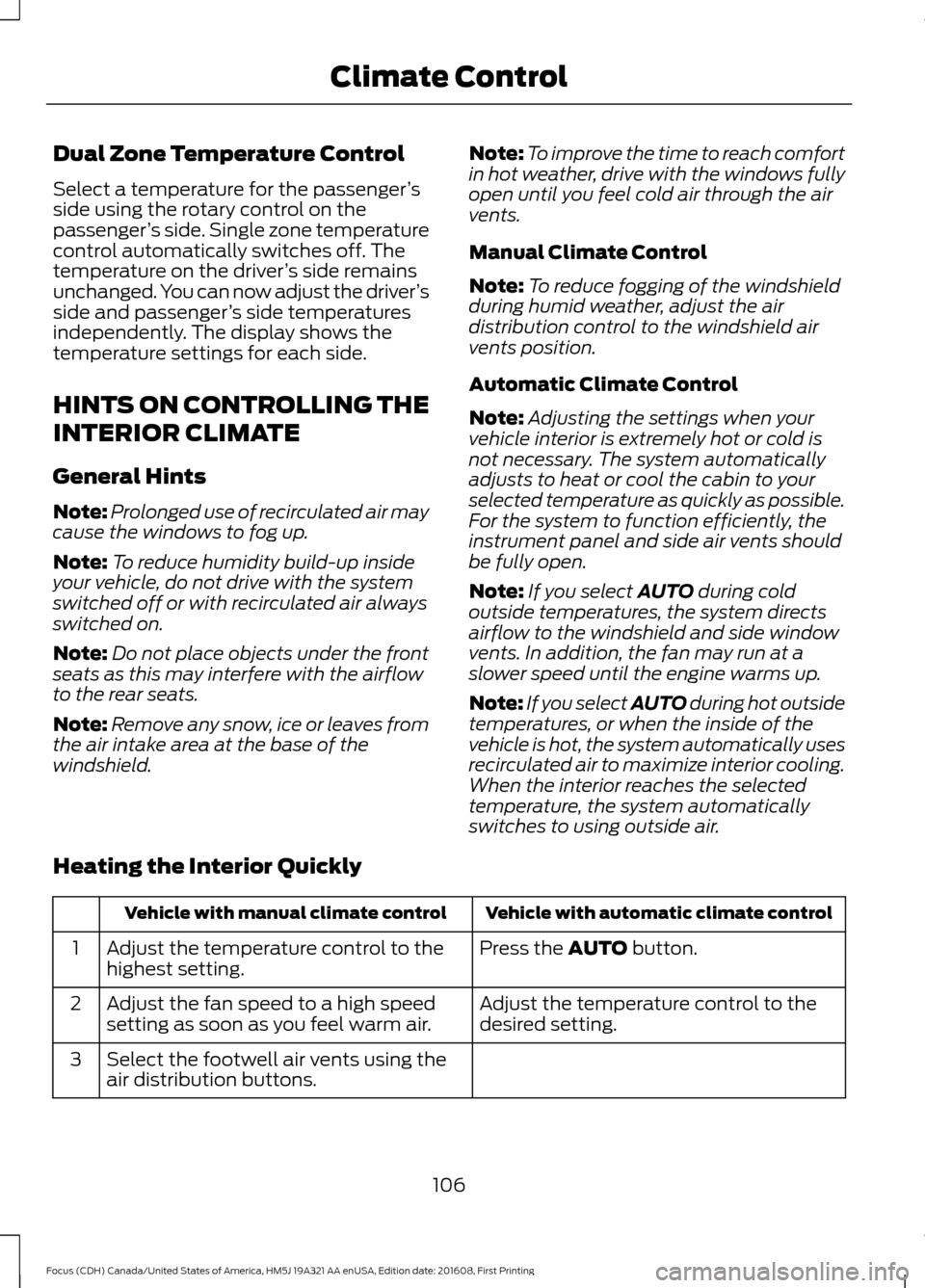
Heating the Interior Quickly Vehicle with automatic climate control
Vehicle with manual climate control
Press the
AUTO button.
Adjust the temperature control to the
highest setting.
1
Adjust the temperature control to the
desired setting.
Adjust the fan speed to a high speed
setting as soon as you feel warm air.
2
Select the footwell air vents using the
air distribution buttons.
3
106
Focus (CDH) Canada/United States of America, HM5J 19A321 AA enUSA, Edition date: 201608, First Printing Climate Control
Page 110 of 467
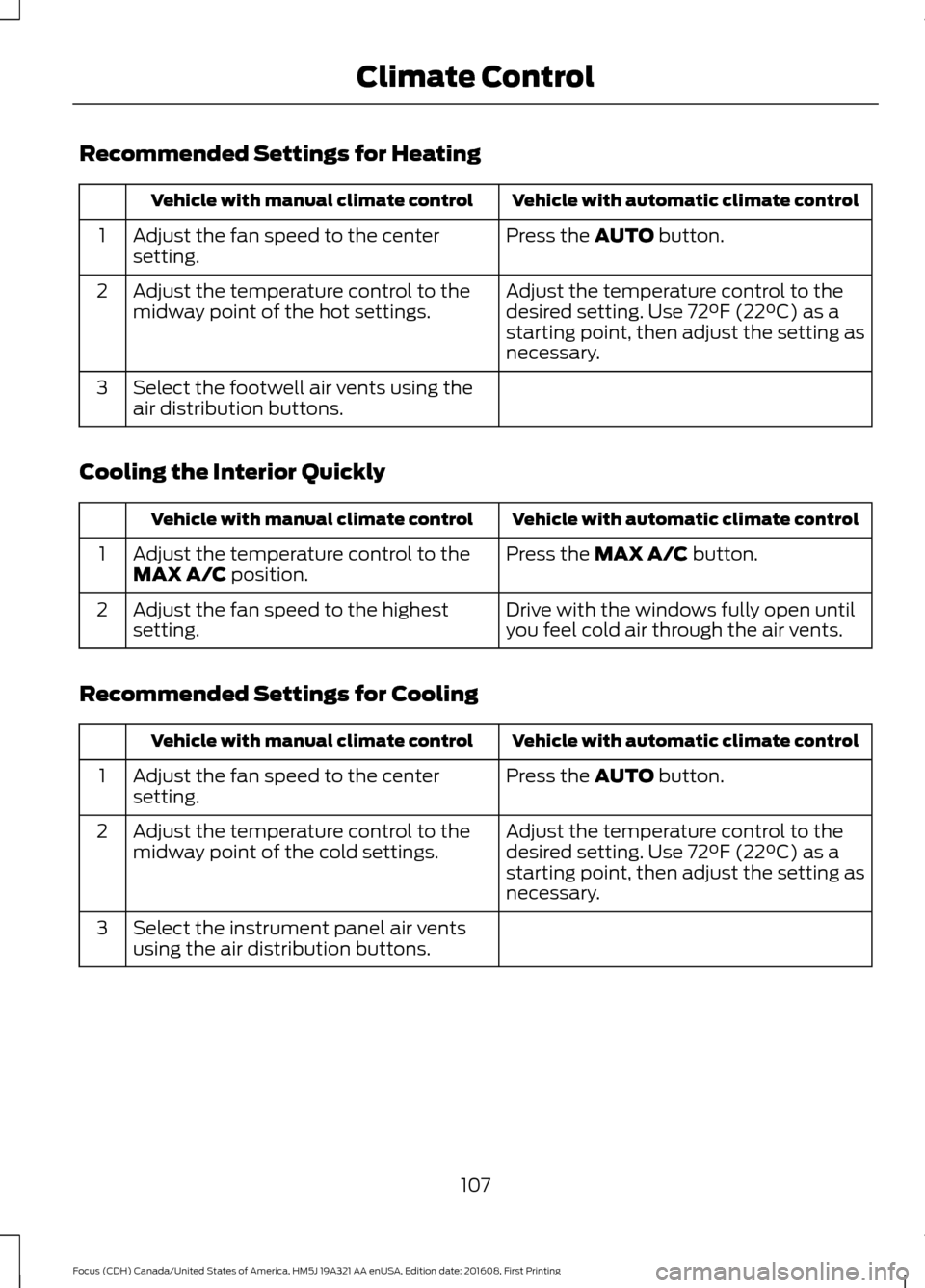
Recommended Settings for Heating
Vehicle with automatic climate control
Vehicle with manual climate control
Press the AUTO button.
Adjust the fan speed to the center
setting.
1
Adjust the temperature control to the
desired setting. Use 72°F (22°C) as a
starting point, then adjust the setting as
necessary.
Adjust the temperature control to the
midway point of the hot settings.
2
Select the footwell air vents using the
air distribution buttons.
3
Cooling the Interior Quickly Vehicle with automatic climate control
Vehicle with manual climate control
Press the
MAX A/C button.
Adjust the temperature control to the
MAX A/C position.
1
Drive with the windows fully open until
you feel cold air through the air vents.
Adjust the fan speed to the highest
setting.
2
Recommended Settings for Cooling Vehicle with automatic climate control
Vehicle with manual climate control
Press the
AUTO button.
Adjust the fan speed to the center
setting.
1
Adjust the temperature control to the
desired setting. Use 72°F (22°C) as a
starting point, then adjust the setting as
necessary.
Adjust the temperature control to the
midway point of the cold settings.
2
Select the instrument panel air vents
using the air distribution buttons.
3
107
Focus (CDH) Canada/United States of America, HM5J 19A321 AA enUSA, Edition date: 201608, First Printing Climate Control