ECU FORD FOCUS 2018 User Guide
[x] Cancel search | Manufacturer: FORD, Model Year: 2018, Model line: FOCUS, Model: FORD FOCUS 2018Pages: 473, PDF Size: 39.91 MB
Page 68 of 473
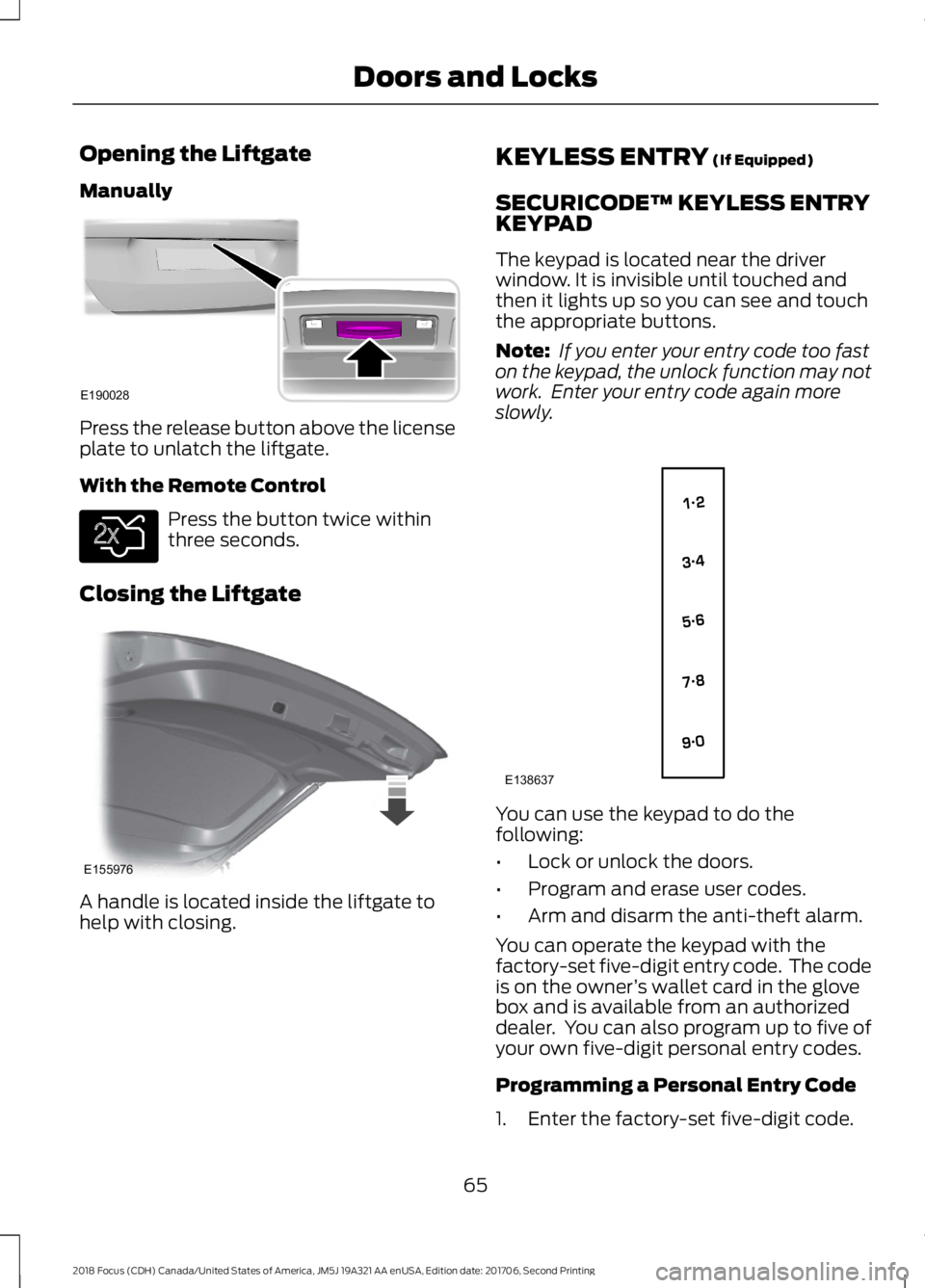
Opening the Liftgate
Manually
Press the release button above the licenseplate to unlatch the liftgate.
With the Remote Control
Press the button twice withinthree seconds.
Closing the Liftgate
A handle is located inside the liftgate tohelp with closing.
KEYLESS ENTRY (If Equipped)
SECURICODE™ KEYLESS ENTRYKEYPAD
The keypad is located near the driverwindow. It is invisible until touched andthen it lights up so you can see and touchthe appropriate buttons.
Note: If you enter your entry code too faston the keypad, the unlock function may notwork. Enter your entry code again moreslowly.
You can use the keypad to do thefollowing:
•Lock or unlock the doors.
•Program and erase user codes.
•Arm and disarm the anti-theft alarm.
You can operate the keypad with thefactory-set five-digit entry code. The codeis on the owner’s wallet card in the glovebox and is available from an authorizeddealer. You can also program up to five ofyour own five-digit personal entry codes.
Programming a Personal Entry Code
1.Enter the factory-set five-digit code.
652018 Focus (CDH) Canada/United States of America, JM5J 19A321 AA enUSA, Edition date: 201706, Second PrintingDoors and LocksE190028 E138630 E155976 E138637
Page 71 of 473
PASSIVE ANTI-THEFT
SYSTEM
Note: The system is not compatible withnon-Ford aftermarket remote start systems.Use of these systems may result in enginestarting problems and a loss of securityprotection.
Note: Metallic objects, electronic devicesor a second coded key on the same keychain may result in vehicle startingproblems, especially if they are too close tothe key when starting your vehicle. Preventthese objects from touching the coded keywhen starting your vehicle. If your vehiclefails to start, switch the ignition off, moveall objects on the key chain away from thekey and start your vehicle.
Note: Do not leave a duplicate coded keyin your vehicle. Always take your keys andlock all doors when leaving your vehicle.
SecuriLock
The system helps prevent the engine fromstarting unless you use a coded keyprogrammed to your vehicle. A messagemay appear in the information display.
If your vehicle fails to start, the system mayhave a fault. Contact an authorized dealer.A message may appear in the informationdisplay.
Automatic Arming
The system arms when you switch theignition off.
Automatic Disarming
The system disarms when you switch theignition on with a coded key.
Replacement Keys
Note:Your vehicle comes with two keys.
The intelligent access key functions as aprogrammed key that operates the driverdoor lock and turns on the intelligentaccess with push button start system, aswell as a remote control.
If your intelligent access keys are lost orstolen and you do not have an extra codedkey, you need to have your vehicle towedto an authorized dealer. You need to erasethe key codes from your vehicle andprogram new coded keys.
Store a spare intelligent access key awayfrom your vehicle in a safe place. Contactan authorized dealer to purchaseadditional spare or replacement keys.
Programming a Spare IntegratedKeyhead Transmitter
You can program your own integratedkeyhead transmitter or standardSecuriLock coded keys to your vehicle. Thisprocedure will program both the vehicleimmobilizer keycode and the remote entryportion of the remote control to yourvehicle.
Only use integrated keyhead transmittersor standard SecuriLock keys.
You must have two previouslyprogrammed coded keys and the newunprogrammed key readily accessible.Contact an authorized dealer to have thespare key programmed if two previouslyprogrammed keys are not available.
Make sure that the ignition is switched offbefore beginning this procedure. Carry outall steps within 30 seconds of starting thesequence. Stop and wait for at least oneminute before starting again if you carryout any steps out of sequence.
Note:You can program a maximum of eightcoded keys to your vehicle. All eight can beintegrated keyhead transmitters.
Read and understand the entire procedurebefore you begin.
682018 Focus (CDH) Canada/United States of America, JM5J 19A321 AA enUSA, Edition date: 201706, Second PrintingSecurity
Page 72 of 473
1.Insert the first previously programmedcoded key into the ignition.
2.Switch the ignition from off to on. Keepthe ignition on for at least 3 seconds,but no more than 10 seconds.
3.Switch the ignition off and remove thefirst coded key from the ignition.
4.After at least 3 seconds but within 10seconds of switching the ignition off,insert the second previously coded keyinto the ignition.
5.Switch the ignition from off to on. Keepthe ignition on for at least 3 seconds,but no more than 10 seconds.
6.Switch the ignition off and remove thesecond previously programmed codedkey from the ignition.
7.After at least 3 seconds but within 10seconds of switching the ignition offand removing the previouslyprogrammed coded key, insert the newunprogrammed key into the ignition.
8.Switch the ignition from off to on. Keepthe ignition on for at least six seconds.
9.Remove the newly programmed codedkey from the ignition.
If you have successfully programmed thecoded key, it will start your vehicle andoperate the remote entry system.
If programming was unsuccessful, wait 10seconds and repeat Steps 1 through 8. Ifprogramming remains unsuccessful, haveyour vehicle checked by an authorizeddealer.
Wait 20 seconds and repeat Steps 1through 9 to program an additional key.
Programming a Spare IntelligentAccess Key
You must have two previouslyprogrammed coded keys and the newunprogrammed key readily accessible.Contact an authorized dealer to have thespare key programmed if two previouslyprogrammed keys are not available.
Make sure that the ignition is switched offbefore beginning this procedure. Make surethat you close all the doors beforebeginning and that they remain closedthroughout the procedure. Carry out allsteps within 30 seconds of starting thesequence. Stop and wait for at least oneminute before starting again if you carryout any steps out of sequence.
Note:You can program a maximum of eightintelligent access keys to your vehicle.
Read and understand the entire procedurebefore you begin.
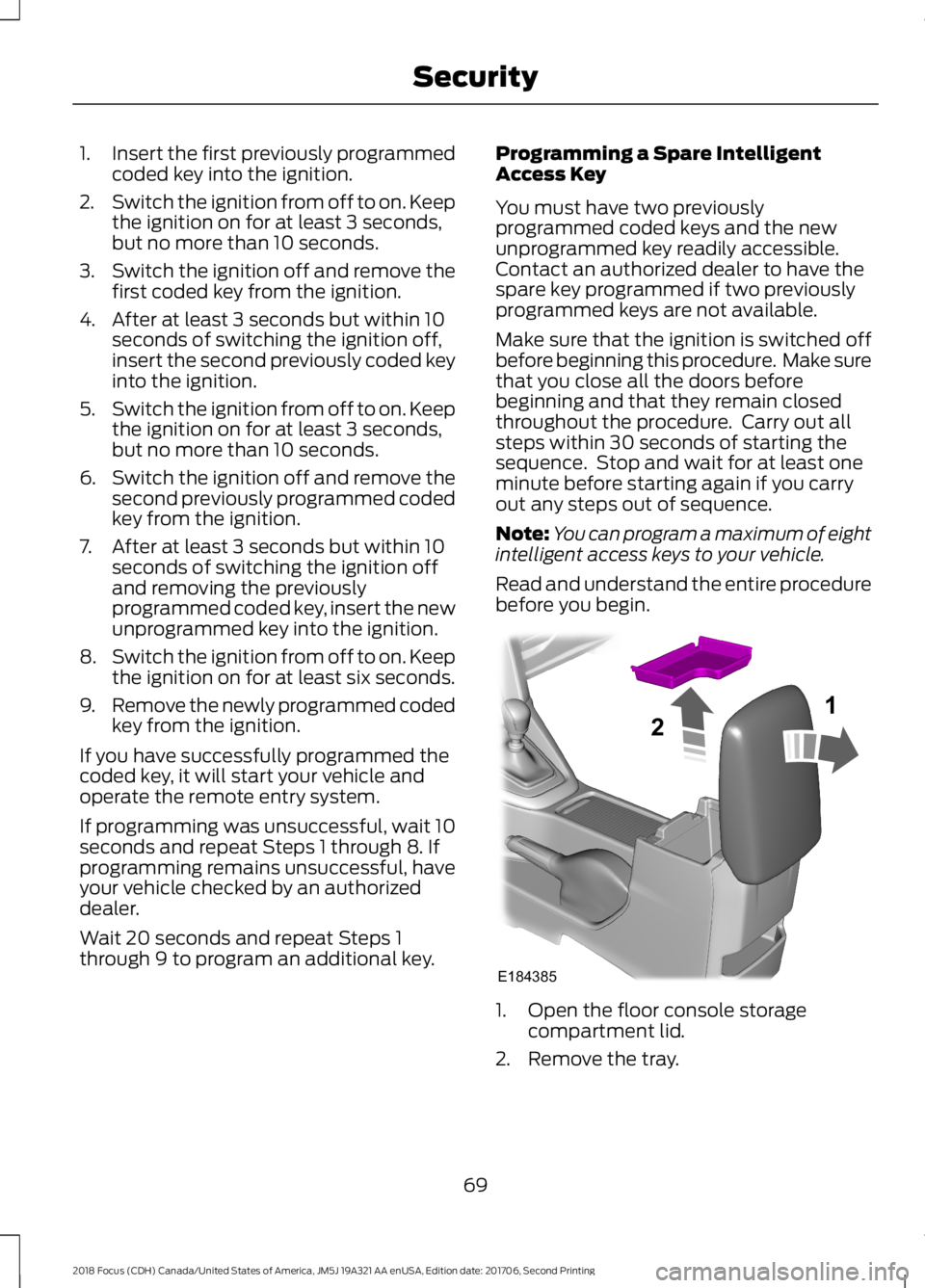
1.Open the floor console storagecompartment lid.
2.Remove the tray.
692018 Focus (CDH) Canada/United States of America, JM5J 19A321 AA enUSA, Edition date: 201706, Second PrintingSecurityE18438521
Page 73 of 473
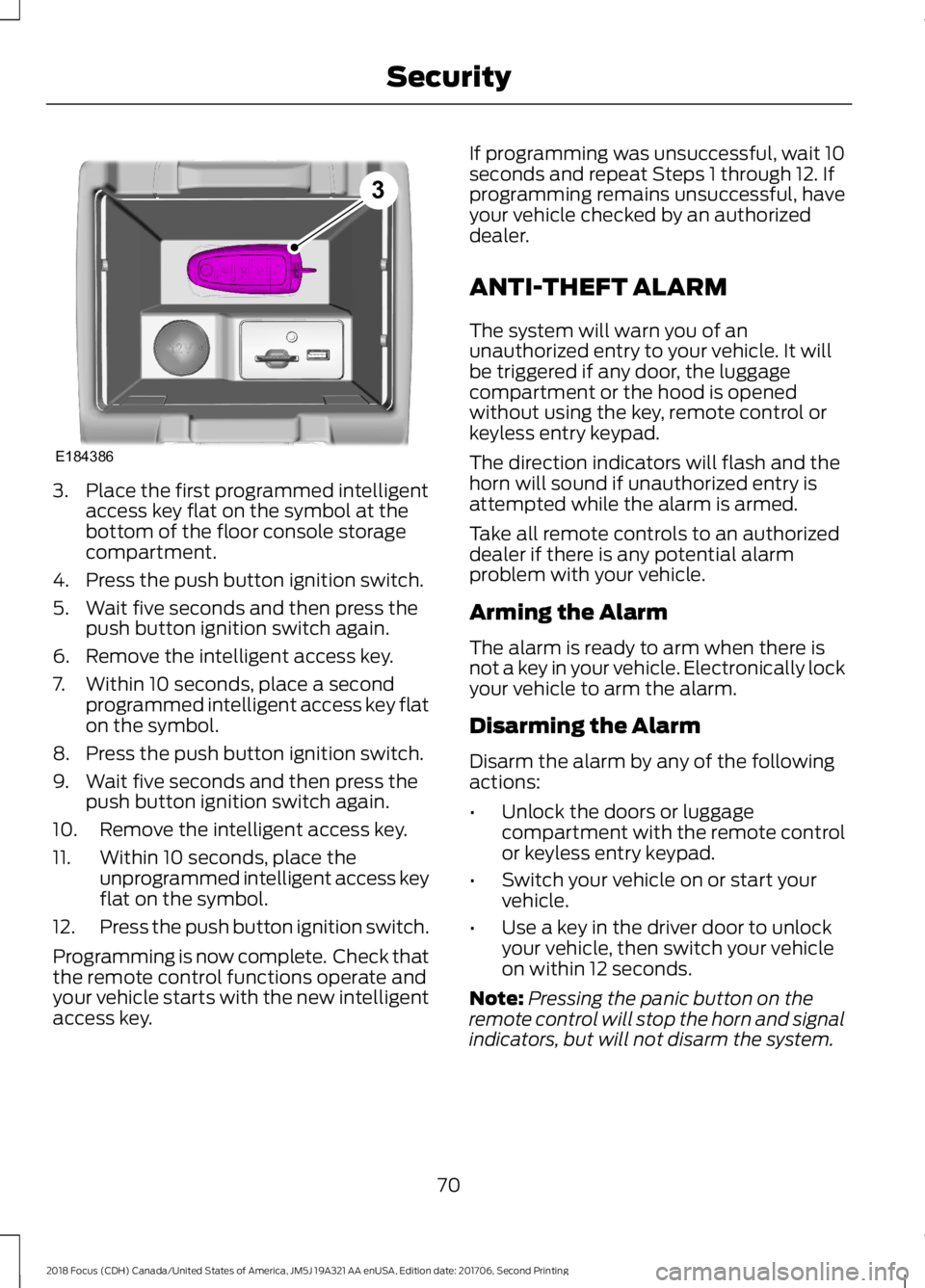
3.Place the first programmed intelligentaccess key flat on the symbol at thebottom of the floor console storagecompartment.
4.Press the push button ignition switch.
5.Wait five seconds and then press thepush button ignition switch again.
6.Remove the intelligent access key.
7.Within 10 seconds, place a secondprogrammed intelligent access key flaton the symbol.
8.Press the push button ignition switch.
9.Wait five seconds and then press thepush button ignition switch again.
10.Remove the intelligent access key.
11.Within 10 seconds, place theunprogrammed intelligent access keyflat on the symbol.
12.Press the push button ignition switch.
Programming is now complete. Check thatthe remote control functions operate andyour vehicle starts with the new intelligentaccess key.
If programming was unsuccessful, wait 10seconds and repeat Steps 1 through 12. Ifprogramming remains unsuccessful, haveyour vehicle checked by an authorizeddealer.
ANTI-THEFT ALARM
The system will warn you of anunauthorized entry to your vehicle. It willbe triggered if any door, the luggagecompartment or the hood is openedwithout using the key, remote control orkeyless entry keypad.
The direction indicators will flash and thehorn will sound if unauthorized entry isattempted while the alarm is armed.
Take all remote controls to an authorizeddealer if there is any potential alarmproblem with your vehicle.
Arming the Alarm
The alarm is ready to arm when there isnot a key in your vehicle. Electronically lockyour vehicle to arm the alarm.
Disarming the Alarm
Disarm the alarm by any of the followingactions:
•Unlock the doors or luggagecompartment with the remote controlor keyless entry keypad.
•Switch your vehicle on or start yourvehicle.
•Use a key in the driver door to unlockyour vehicle, then switch your vehicleon within 12 seconds.
Note:Pressing the panic button on theremote control will stop the horn and signalindicators, but will not disarm the system.
702018 Focus (CDH) Canada/United States of America, JM5J 19A321 AA enUSA, Edition date: 201706, Second PrintingSecurityE1843863
Page 146 of 473
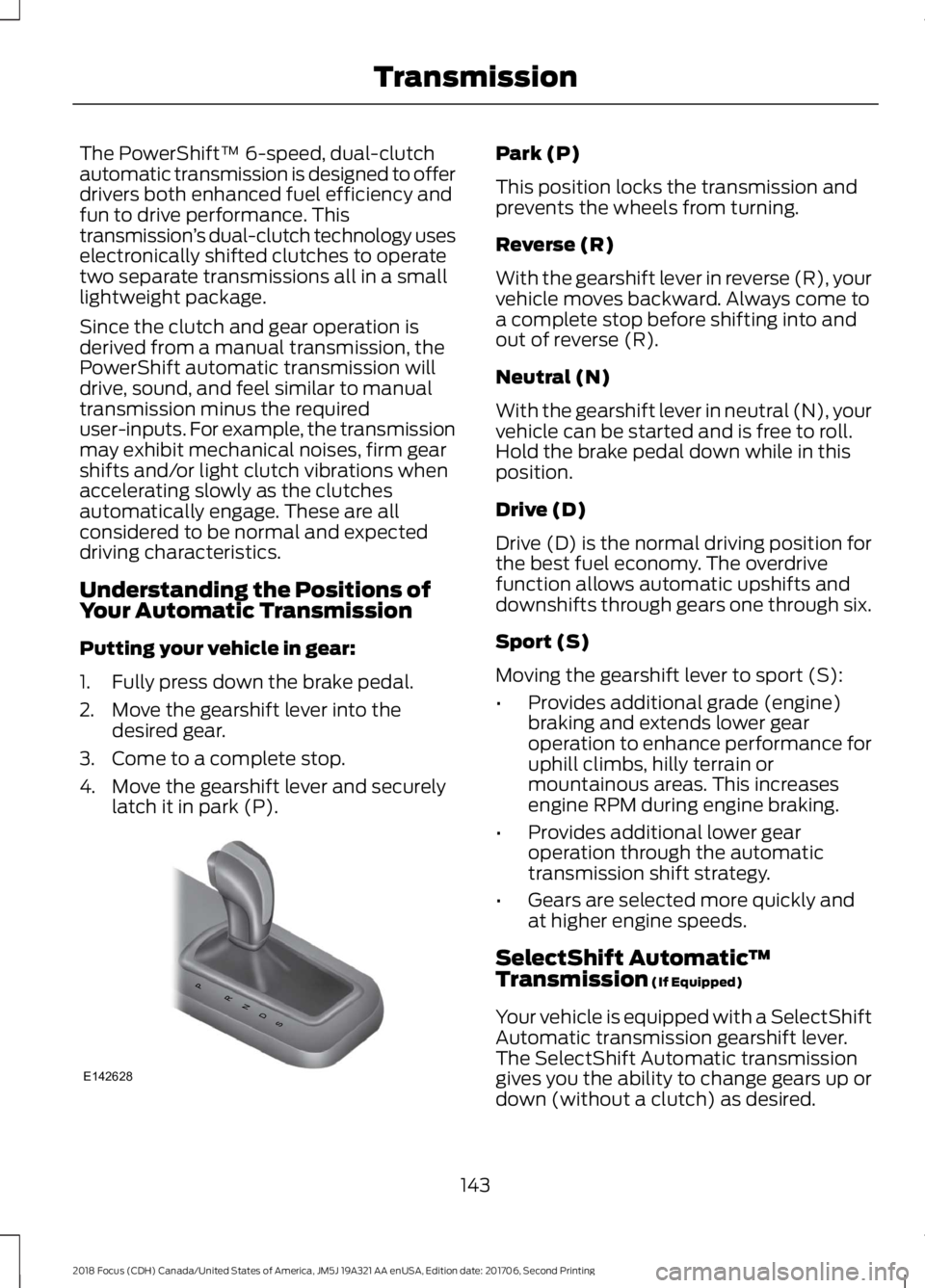
The PowerShift™ 6-speed, dual-clutchautomatic transmission is designed to offerdrivers both enhanced fuel efficiency andfun to drive performance. Thistransmission’s dual-clutch technology useselectronically shifted clutches to operatetwo separate transmissions all in a smalllightweight package.
Since the clutch and gear operation isderived from a manual transmission, thePowerShift automatic transmission willdrive, sound, and feel similar to manualtransmission minus the requireduser-inputs. For example, the transmissionmay exhibit mechanical noises, firm gearshifts and/or light clutch vibrations whenaccelerating slowly as the clutchesautomatically engage. These are allconsidered to be normal and expecteddriving characteristics.
Understanding the Positions ofYour Automatic Transmission
Putting your vehicle in gear:
1.Fully press down the brake pedal.
2.Move the gearshift lever into thedesired gear.
3.Come to a complete stop.
4.Move the gearshift lever and securelylatch it in park (P).
Park (P)
This position locks the transmission andprevents the wheels from turning.
Reverse (R)
With the gearshift lever in reverse (R), yourvehicle moves backward. Always come toa complete stop before shifting into andout of reverse (R).
Neutral (N)
With the gearshift lever in neutral (N), yourvehicle can be started and is free to roll.Hold the brake pedal down while in thisposition.
Drive (D)
Drive (D) is the normal driving position forthe best fuel economy. The overdrivefunction allows automatic upshifts anddownshifts through gears one through six.
Sport (S)
Moving the gearshift lever to sport (S):
•Provides additional grade (engine)braking and extends lower gearoperation to enhance performance foruphill climbs, hilly terrain ormountainous areas. This increasesengine RPM during engine braking.
•Provides additional lower gearoperation through the automatictransmission shift strategy.
•Gears are selected more quickly andat higher engine speeds.
SelectShift Automatic™Transmission (If Equipped)
Your vehicle is equipped with a SelectShiftAutomatic transmission gearshift lever.The SelectShift Automatic transmissiongives you the ability to change gears up ordown (without a clutch) as desired.
1432018 Focus (CDH) Canada/United States of America, JM5J 19A321 AA enUSA, Edition date: 201706, Second PrintingTransmissionPRNDSE142628
Page 160 of 473
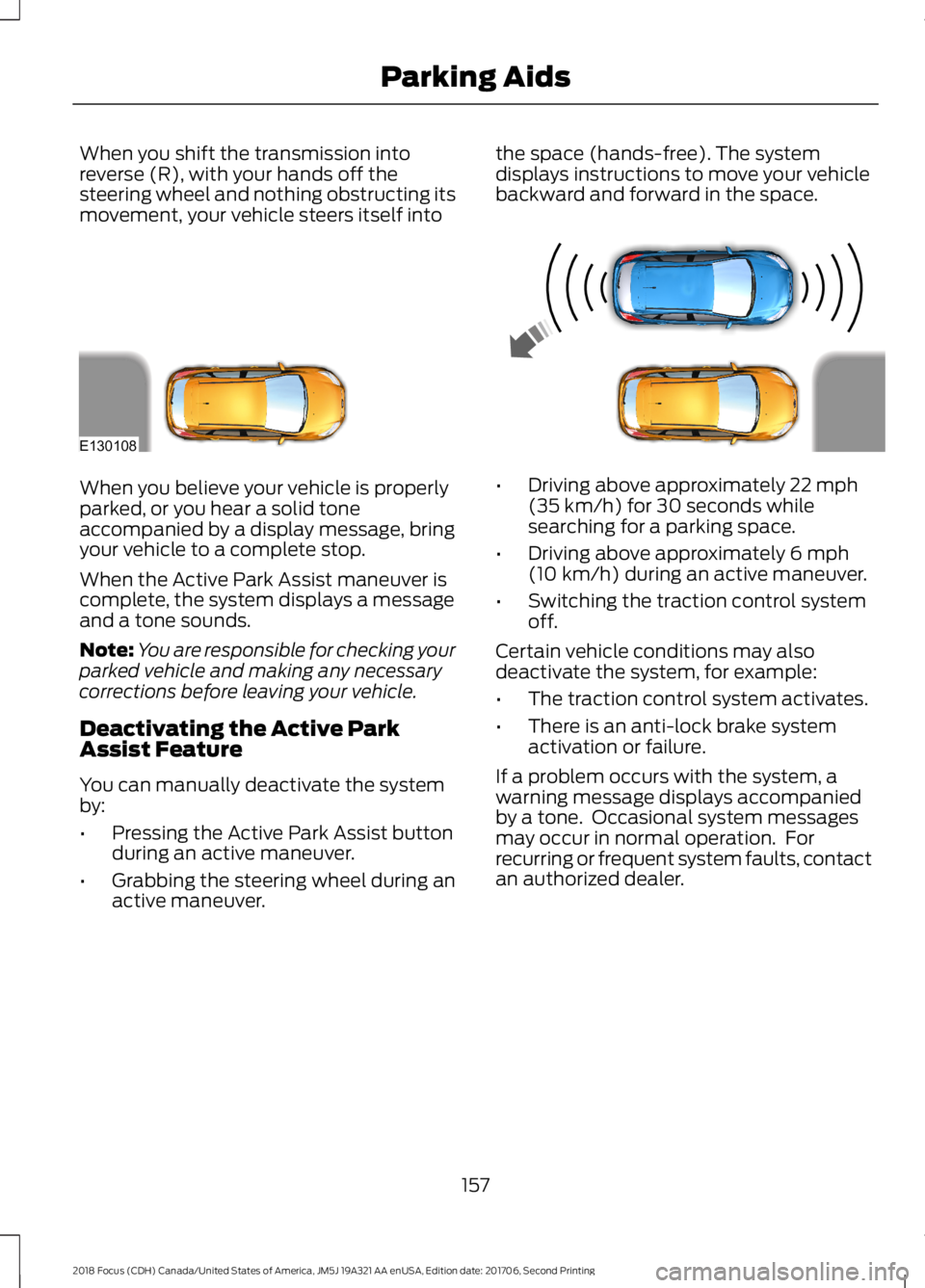
When you shift the transmission intoreverse (R), with your hands off thesteering wheel and nothing obstructing itsmovement, your vehicle steers itself into
the space (hands-free). The systemdisplays instructions to move your vehiclebackward and forward in the space.
When you believe your vehicle is properlyparked, or you hear a solid toneaccompanied by a display message, bringyour vehicle to a complete stop.
When the Active Park Assist maneuver iscomplete, the system displays a messageand a tone sounds.
Note:You are responsible for checking yourparked vehicle and making any necessarycorrections before leaving your vehicle.
Deactivating the Active ParkAssist Feature
You can manually deactivate the systemby:
•Pressing the Active Park Assist buttonduring an active maneuver.
•Grabbing the steering wheel during anactive maneuver.
•Driving above approximately 22 mph(35 km/h) for 30 seconds whilesearching for a parking space.
•Driving above approximately 6 mph(10 km/h) during an active maneuver.
•Switching the traction control systemoff.
Certain vehicle conditions may alsodeactivate the system, for example:
•The traction control system activates.
•There is an anti-lock brake systemactivation or failure.
If a problem occurs with the system, awarning message displays accompaniedby a tone. Occasional system messagesmay occur in normal operation. Forrecurring or frequent system faults, contactan authorized dealer.
1572018 Focus (CDH) Canada/United States of America, JM5J 19A321 AA enUSA, Edition date: 201706, Second PrintingParking AidsE130108
Page 161 of 473
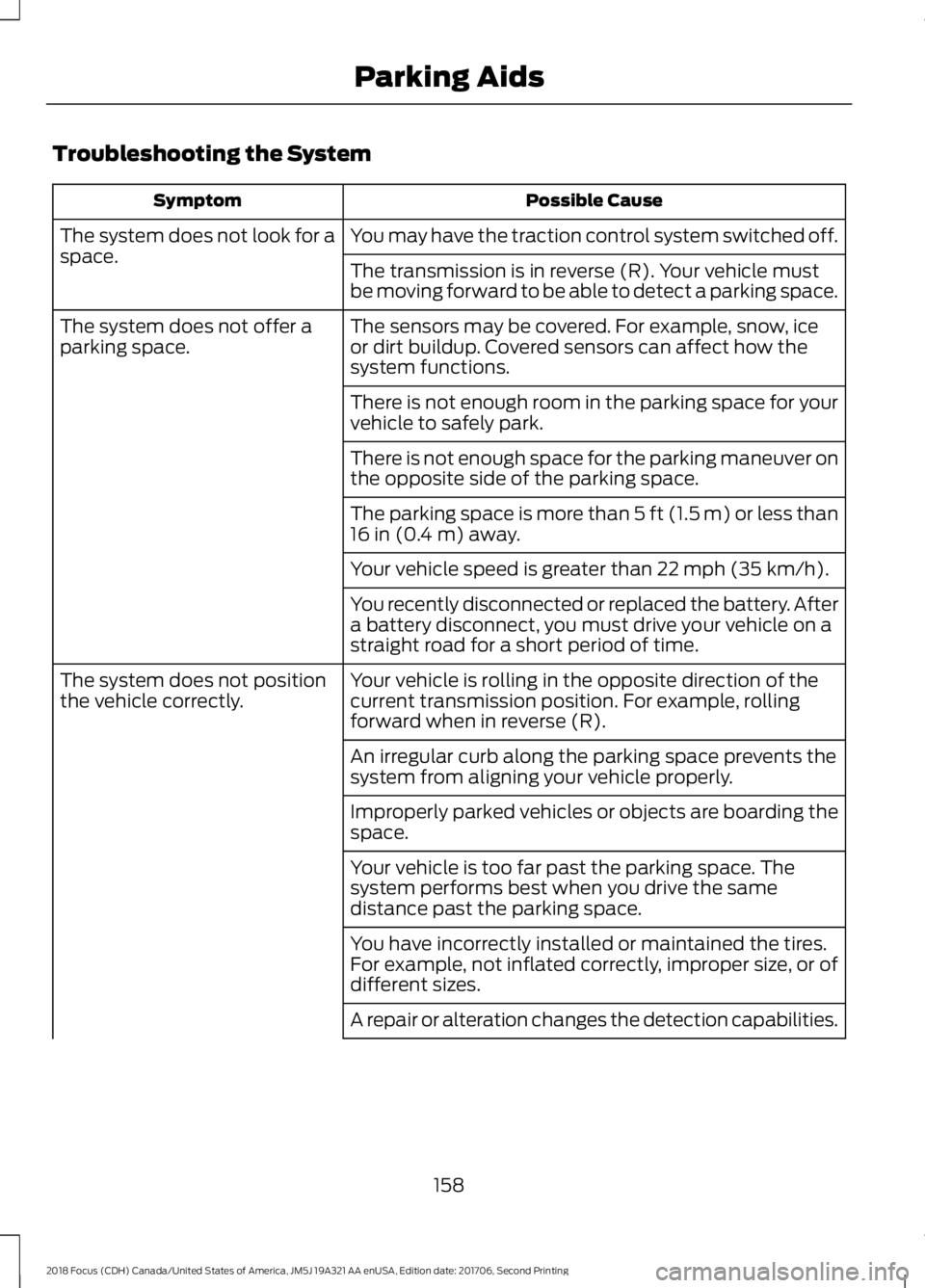
Troubleshooting the System
Possible CauseSymptom
You may have the traction control system switched off.The system does not look for aspace.The transmission is in reverse (R). Your vehicle mustbe moving forward to be able to detect a parking space.
The sensors may be covered. For example, snow, iceor dirt buildup. Covered sensors can affect how thesystem functions.
The system does not offer aparking space.
There is not enough room in the parking space for yourvehicle to safely park.
There is not enough space for the parking maneuver onthe opposite side of the parking space.
The parking space is more than 5 ft (1.5 m) or less than16 in (0.4 m) away.
Your vehicle speed is greater than 22 mph (35 km/h).
You recently disconnected or replaced the battery. Aftera battery disconnect, you must drive your vehicle on astraight road for a short period of time.
Your vehicle is rolling in the opposite direction of thecurrent transmission position. For example, rollingforward when in reverse (R).
The system does not positionthe vehicle correctly.
An irregular curb along the parking space prevents thesystem from aligning your vehicle properly.
Improperly parked vehicles or objects are boarding thespace.
Your vehicle is too far past the parking space. Thesystem performs best when you drive the samedistance past the parking space.
You have incorrectly installed or maintained the tires.For example, not inflated correctly, improper size, or ofdifferent sizes.
A repair or alteration changes the detection capabilities.
1582018 Focus (CDH) Canada/United States of America, JM5J 19A321 AA enUSA, Edition date: 201706, Second PrintingParking Aids
Page 179 of 473
REAR UNDER FLOOR
STORAGE
Cargo Management System (If
Equipped)
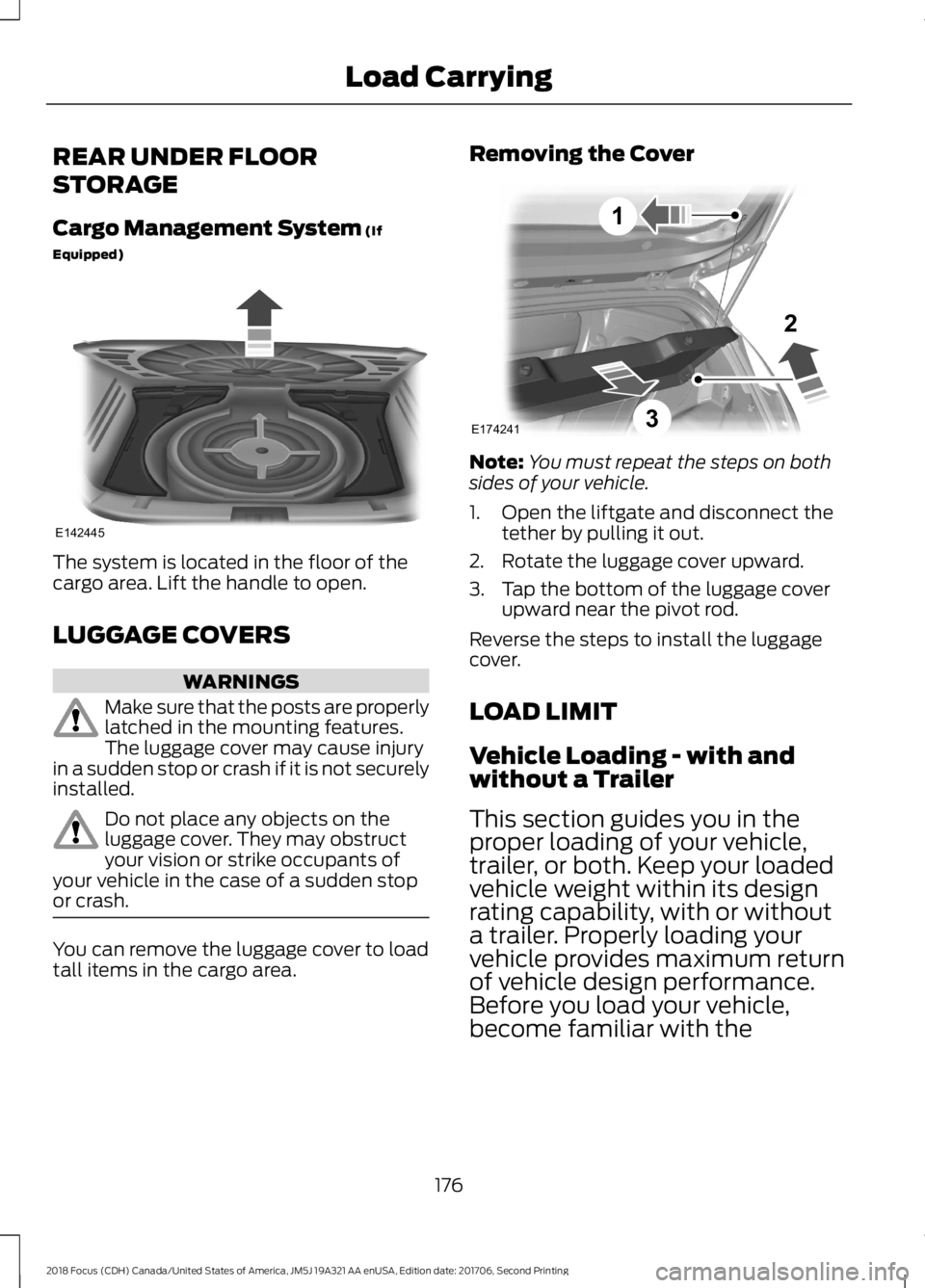
The system is located in the floor of thecargo area. Lift the handle to open.
LUGGAGE COVERS
WARNINGS
Make sure that the posts are properlylatched in the mounting features.The luggage cover may cause injuryin a sudden stop or crash if it is not securelyinstalled.
Do not place any objects on theluggage cover. They may obstructyour vision or strike occupants ofyour vehicle in the case of a sudden stopor crash.
You can remove the luggage cover to loadtall items in the cargo area.
Removing the Cover
Note:You must repeat the steps on bothsides of your vehicle.
1.Open the liftgate and disconnect thetether by pulling it out.
2.Rotate the luggage cover upward.
3.Tap the bottom of the luggage coverupward near the pivot rod.
Reverse the steps to install the luggagecover.
LOAD LIMIT
Vehicle Loading - with andwithout a Trailer
This section guides you in theproper loading of your vehicle,trailer, or both. Keep your loadedvehicle weight within its designrating capability, with or withouta trailer. Properly loading yourvehicle provides maximum returnof vehicle design performance.Before you load your vehicle,become familiar with the
1762018 Focus (CDH) Canada/United States of America, JM5J 19A321 AA enUSA, Edition date: 201706, Second PrintingLoad CarryingE142445 E174241132
Page 190 of 473

Before driving through standing water,check the depth. Never drive through waterthat is higher than the bottom of the frontrocker area of your vehicle.
When driving through standing water, drivevery slowly and do not stop your vehicle.Your brake performance and traction maybe limited. After driving through water andas soon as it is safe to do so:
•Lightly press the brake pedal to dry thebrakes and to check that they work.
•Check that the horn works.
•Check that the exterior lights work.
•Turn the steering wheel to check thatthe steering power assist works.
FLOOR MATS
WARNINGS
Use a floor mat designed to fit thefootwell of your vehicle that does notobstruct the pedal area. Failure tofollow this instruction could result in theloss of control of your vehicle, personalinjury or death.
Pedals that cannot move freely cancause loss of vehicle control andincrease the risk of serious personalinjury.
WARNINGS
Secure the floor mat to bothretention devices so that it cannotslip out of position and interfere withthe pedals. Failure to follow this instructioncould result in the loss of control of yourvehicle, personal injury or death.
Do not place additional floor matsor any other covering on top of theoriginal floor mats. This could resultin the floor mat interfering with theoperation of the pedals. Failure to followthis instruction could result in the loss ofcontrol of your vehicle, personal injury ordeath.
Always make sure that objectscannot fall into the driver foot wellwhile your vehicle is moving. Objectsthat are loose can become trapped underthe pedals causing a loss of vehicle control.
To install the floor mats, position the floormat eyelet over the retention post andpress down to lock in position.
To remove the floor mat, reverse theinstallation procedure.
Note:Regularly check the floor mats tomake sure they are secure.
1872018 Focus (CDH) Canada/United States of America, JM5J 19A321 AA enUSA, Edition date: 201706, Second PrintingDriving HintsE266447 E142666
Page 191 of 473
ROADSIDE ASSISTANCE
Vehicles Sold in the United States:Getting Roadside Assistance
To fully assist you should you have avehicle concern, Ford Motor Companyoffers a complimentary roadsideassistance program. This program isseparate from the New Vehicle LimitedWarranty.
The service is available:
•24 hours a day, seven days a week.
•For the coverage period listed on theRoadside Assistance Card included inyour Owner's Manual portfolio.
Roadside Assistance covers:
•A flat tire change with a good spare(except vehicles supplied with a tireinflation kit).
•Battery jump start.
•Lock-out assistance (key replacementcost is the customer's responsibility).
•Fuel delivery — independent servicecontractors, if not prohibited by state,local or municipal law, shall deliver upto 2 gal (8 L) of gasoline or 5 gal (20 L)of diesel fuel to a disabled vehicle.Roadside Assistance limits fuel deliveryservice to two no-charge occurrenceswithin a 12-month period.
•Winch out — available within 100 ft(30 m) of a paved or countymaintained road, no recoveries.
•Towing — independent servicecontractors, if not prohibited by state,local or municipal law, shall tow Fordeligible vehicles to an authorized dealerwithin 35 mi (56 km) of thedisablement location or to the nearestauthorized dealer. If a memberrequests a tow to an authorized dealerthat is more than 35 mi (56 km) fromthe disablement location, the membershall be responsible for any mileagecosts in excess of 35 mi (56 km).
•Roadside Assistance includes up to$200 for a towed trailer if the disabledeligible vehicle requires service at thenearest authorized dealer. If the towingvehicle is operational but the trailer isnot, then the trailer does not qualify forany roadside services.
Vehicles Sold in the United States:Using Roadside Assistance
Complete the roadside assistanceidentification card and place it in yourwallet for quick reference. This card is inthe owner's information portfolio in theglove compartment.
United States vehicle customers whorequire Roadside Assistance, call1-800-241-3673.
If you need to arrange roadside assistancefor yourself, Ford Motor Companyreimburses a reasonable amount fortowing to the nearest dealership within35 mi (56 km). To obtain reimbursementinformation, United States vehiclecustomers call 1-800-241-3673.Customers need to submit their originalreceipts.
1882018 Focus (CDH) Canada/United States of America, JM5J 19A321 AA enUSA, Edition date: 201706, Second PrintingRoadside Emergencies