mirror FORD FOCUS 2018 User Guide
[x] Cancel search | Manufacturer: FORD, Model Year: 2018, Model line: FOCUS, Model: FORD FOCUS 2018Pages: 473, PDF Size: 39.91 MB
Page 164 of 473
The fixed and active guidelines fade in andout depending on the steering wheelposition. The active guidelines are notshown when the steering wheel positionis straight.
Always use caution while reversing.Objects in the red zone are closest to yourvehicle and objects in the green zone arefarther away. Objects are getting closer toyour vehicle as they move from the greenzone to the yellow or red zones. Use theexterior mirrors and rear view mirror to getbetter coverage on both sides and rear ofyour vehicle.
Manual Zoom
WARNING
When manual zoom is on, the fullarea behind your vehicle may notshow. Be aware of your surroundingswhen using the manual zoom feature.
Note:Manual zoom is only available whenthe transmission is in reverse (R).
Note:When manual zoom is enabled, onlythe centerline is shown.
This allows you to get a closer view of anobject behind your vehicle. The zoomedimage keeps the bumper in the image toprovide a reference. The zoom is onlyactive while the transmission is in reverse(R). When the transmission is shifted outof reverse (R), the feature automaticallyturns off and must be reset when it is usedagain.
Selectable settings for this feature are +and -. The default setting for the manualzoom is OFF.
Rear Camera Delay (If Equipped)
When you shift the transmission out ofreverse (R) and into any gear while the rearcamera delay is active, the camera imagedisplays until:
•Your vehicle speed sufficientlyincreases.
•You shift your vehicle into park (P).
Selectable settings for this feature are ONand OFF. The default setting for the rearcamera delay is OFF.
Enhanced Park Aids
Note:The reverse sensing system is noteffective at speeds above 6 mph (10 km/h)and may not detect certain angular ormoving objects.
When the sensing system detects anobject, it displays red, yellow and greenhighlights at the top of the image. The alerthighlights all objects detected.
Selectable settings for this feature are ONand OFF.
1612018 Focus (CDH) Canada/United States of America, JM5J 19A321 AA enUSA, Edition date: 201706, Second PrintingParking Aids
Page 169 of 473
WARNINGS
If damage occurs in the immediatearea surrounding the sensor, haveyour vehicle checked as soon aspossible.
The sensor is located near the rear viewmirror.
Note:The system works above 40 mph(64 km/h).
Note:The system works as long as thecamera can detect one lane marking.
Note:The system may not function if thecamera is blocked or there is damage to thewindshield.
Note:When Aid mode is on and the systemdetects no steering activity for a shortperiod, the system will alert you to put yourhands on the steering wheel. The systemmay detect a light grip or touch on thesteering wheel as hands off driving.
The system notifies you to stay in your lanethrough the steering system and theinstrument cluster display when the frontcamera detects an unintentional drift outof your lane is likely to occur. The systemautomatically detects and tracks the roadlane markings using a camera mountedbehind the interior rear view mirror.
Switching the System On and Off
Note:The system on or off setting is storeduntil it is manually changed, unless a MyKeyis detected. If the system detects a MyKeyit defaults to on and the mode is set to Alert.
Note:If a MyKey is detected, pressing thebutton will not affect the on or off status ofthe system.
Press the button on the steeringwheel stalk to switch the systemon or off.
System Settings
The system has optional setting menusavailable. The system stores thelast-known selection for each of thesesettings. You do not need to readjust yoursettings each time you turn on the system.
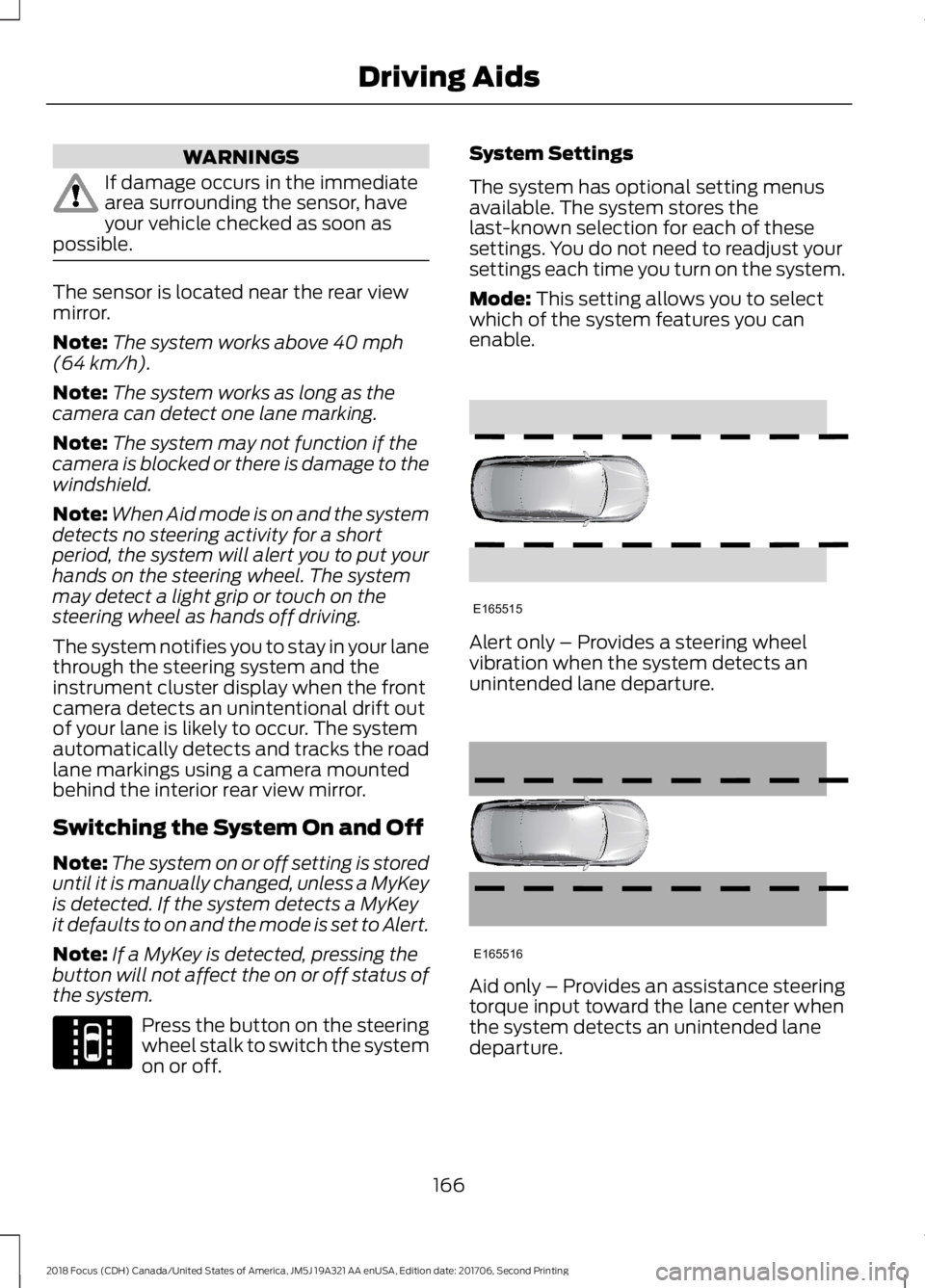
Mode: This setting allows you to selectwhich of the system features you canenable.
Alert only – Provides a steering wheelvibration when the system detects anunintended lane departure.
Aid only – Provides an assistance steeringtorque input toward the lane center whenthe system detects an unintended lanedeparture.
1662018 Focus (CDH) Canada/United States of America, JM5J 19A321 AA enUSA, Edition date: 201706, Second PrintingDriving AidsE144813 E165515 E165516
Page 172 of 473
Why is the feature not available (line markings are gray) when I can see the lane markingson the road?
Lane width too narrow or too wide
Camera not calibrated after a windshield replacement
Driving on tight roads or on uneven roads
Why does the vehicle not come back toward the middle of the lane, as expected, in theAid or Aid + Alert mode?
High cross winds
Large road crown
Rough roads, grooves, shoulder drop-offs
Heavy uneven loading of the vehicle or improper tire inflation pressure
If the tires have been exchanged (including snow tires), or the suspension has beenmodified
BLIND SPOT INFORMATION
SYSTEM
WARNINGS
Do not use the blind spot informationsystem as a replacement for usingthe interior and exterior mirrors orlooking over your shoulder before changinglanes. The blind spot information systemis not a replacement for careful driving.
The system may not operateproperly during severe weatherconditions, for example snow, ice,heavy rain and spray. Always drive withdue care and attention. Failure to take caremay result in a crash.
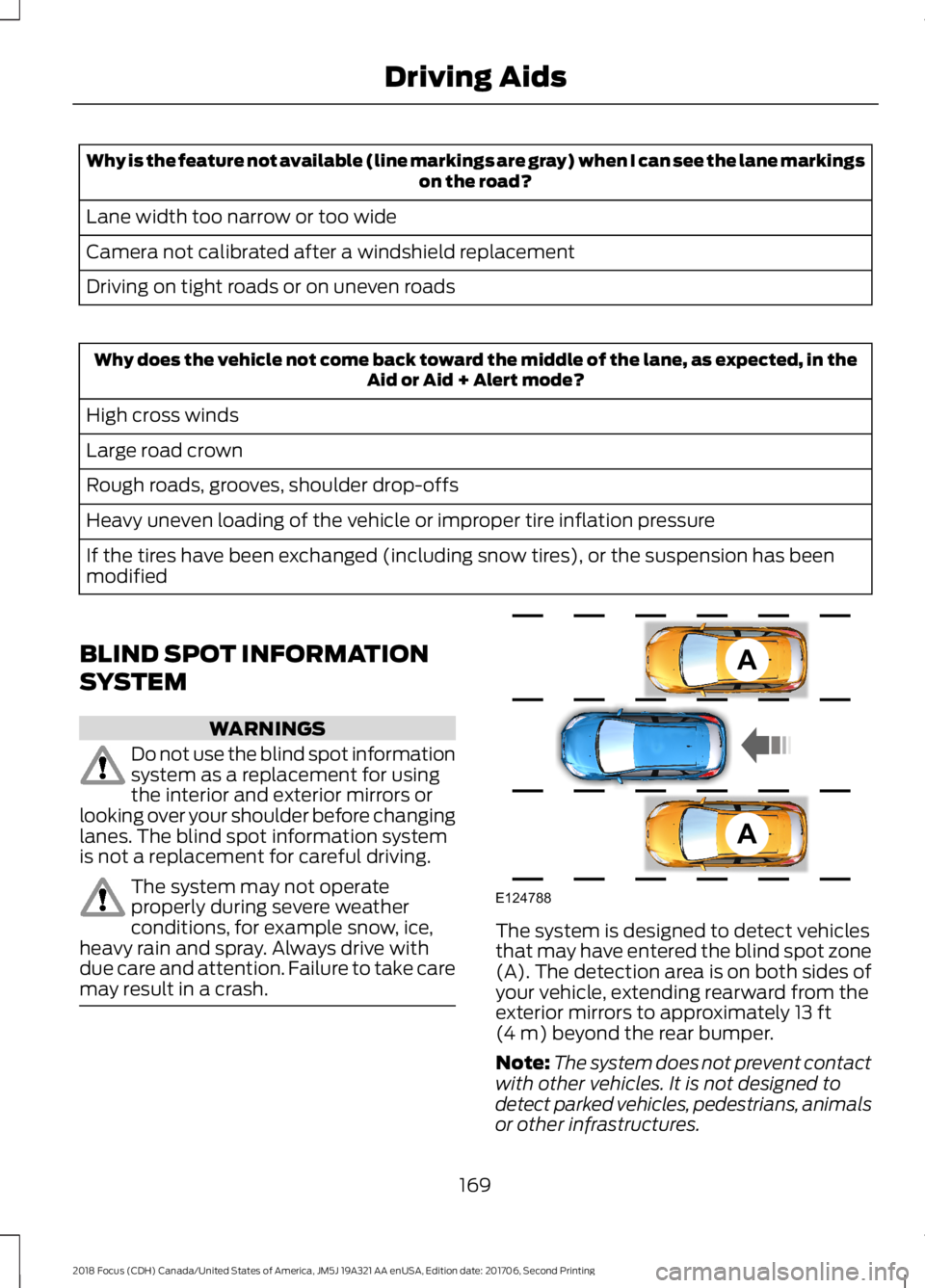
The system is designed to detect vehiclesthat may have entered the blind spot zone(A). The detection area is on both sides ofyour vehicle, extending rearward from theexterior mirrors to approximately 13 ft(4 m) beyond the rear bumper.
Note:The system does not prevent contactwith other vehicles. It is not designed todetect parked vehicles, pedestrians, animalsor other infrastructures.
1692018 Focus (CDH) Canada/United States of America, JM5J 19A321 AA enUSA, Edition date: 201706, Second PrintingDriving AidsAAE124788
Page 173 of 473
Using the Blind Spot InformationSystem
Vehicles with Automatic Transmission
The system turns on when all of thefollowing occur:
•You start your vehicle.
•You shift into drive (D).
•The vehicle speed is greater than6 mph (10 km/h).
Note:The system does not operate in park(P) or reverse (R).
Vehicles with Manual Transmission
The system turns on when all of thefollowing occur:
•You start your vehicle.
•The vehicle speed is greater than6 mph (10 km/h).
Note:The system does not operate inreverse (R).
System Lights and Messages
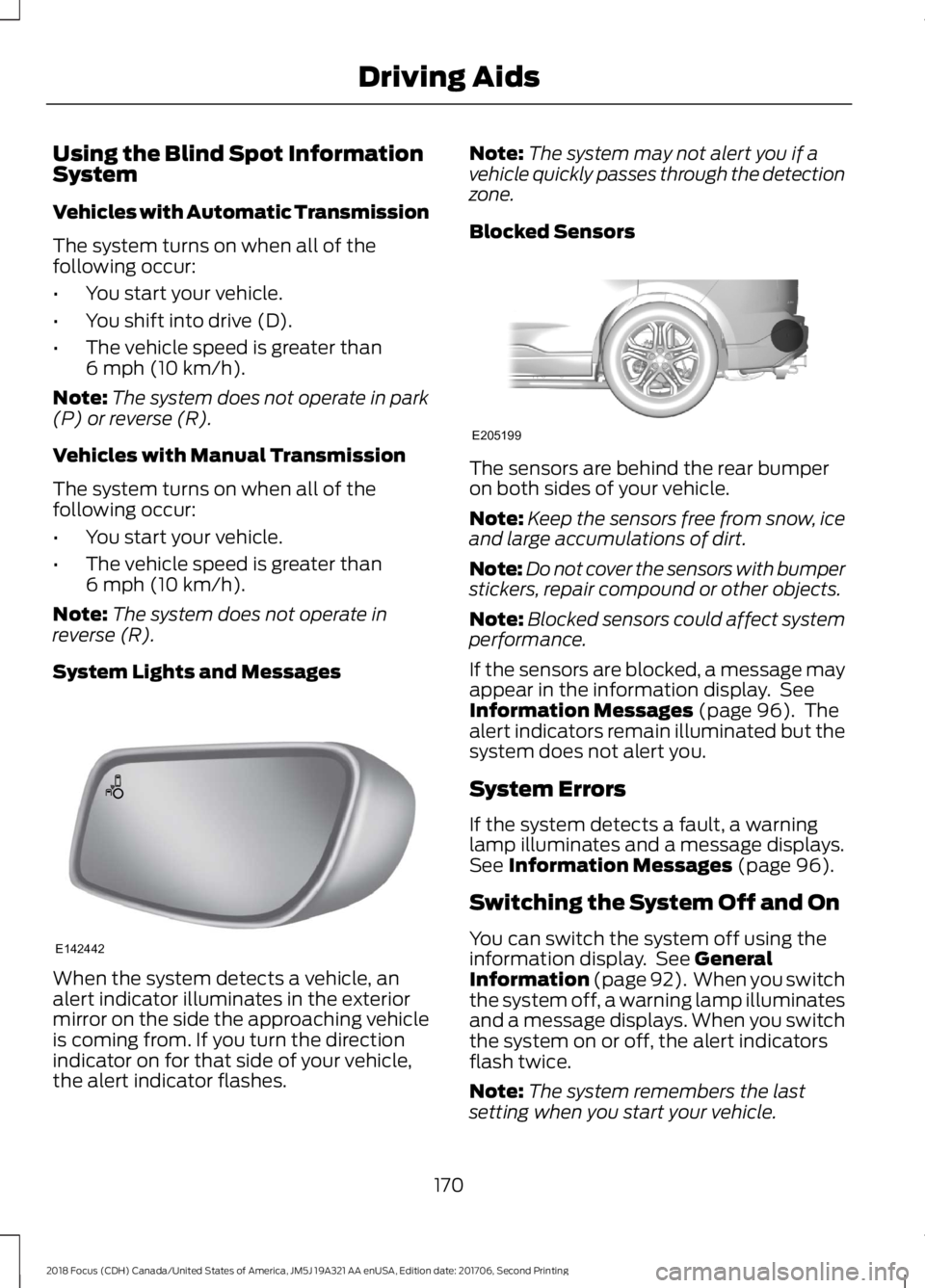
When the system detects a vehicle, analert indicator illuminates in the exteriormirror on the side the approaching vehicleis coming from. If you turn the directionindicator on for that side of your vehicle,the alert indicator flashes.
Note:The system may not alert you if avehicle quickly passes through the detectionzone.
Blocked Sensors
The sensors are behind the rear bumperon both sides of your vehicle.
Note:Keep the sensors free from snow, iceand large accumulations of dirt.
Note:Do not cover the sensors with bumperstickers, repair compound or other objects.
Note:Blocked sensors could affect systemperformance.
If the sensors are blocked, a message mayappear in the information display. SeeInformation Messages (page 96). Thealert indicators remain illuminated but thesystem does not alert you.
System Errors
If the system detects a fault, a warninglamp illuminates and a message displays.See Information Messages (page 96).
Switching the System Off and On
You can switch the system off using theinformation display. See GeneralInformation (page 92). When you switchthe system off, a warning lamp illuminatesand a message displays. When you switchthe system on or off, the alert indicatorsflash twice.
Note:The system remembers the lastsetting when you start your vehicle.
1702018 Focus (CDH) Canada/United States of America, JM5J 19A321 AA enUSA, Edition date: 201706, Second PrintingDriving AidsE142442 E205199
Page 174 of 473
Note:The system may not correctly operatewhen towing a trailer. For vehicles with atrailer tow module and tow bar approvedby us, the system turns off when you attacha trailer. For vehicles with an aftermarkettrailer tow module or tow bar, werecommend that you switch the system offwhen you attach a trailer.
To permanently switch the system off,contact an authorized dealer.
CROSS TRAFFIC ALERT
WARNINGS
Do not use the cross traffic alertsystem as a replacement for usingthe interior and exterior mirrors orlooking over your shoulder before reversingout of a parking space. The cross trafficalert system is not a replacement forcareful driving.
WARNINGS
The system may not operateproperly during severe weatherconditions, for example snow, ice,heavy rain and spray. Always drive withdue care and attention. Failure to take caremay result in a crash.
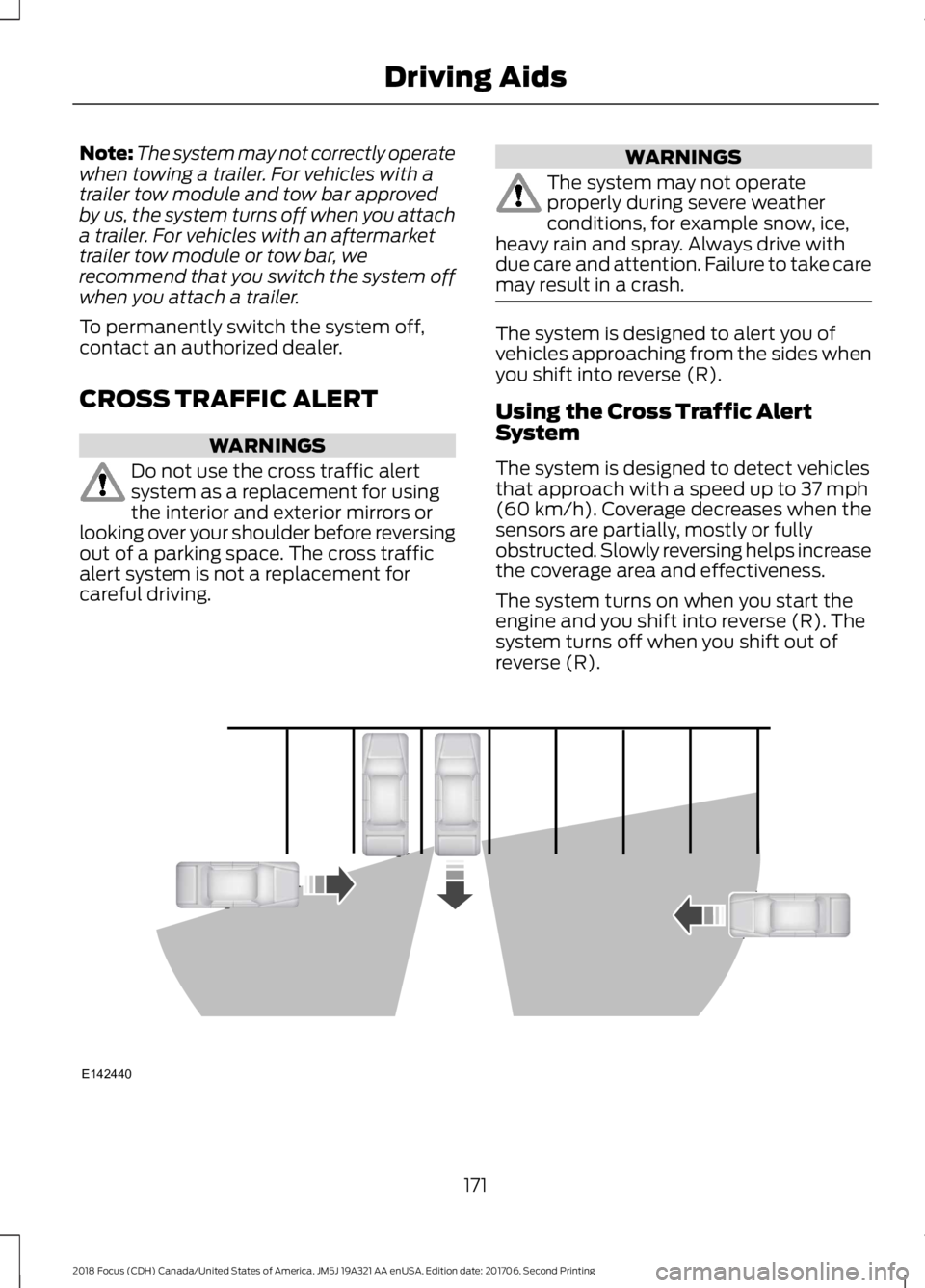
The system is designed to alert you ofvehicles approaching from the sides whenyou shift into reverse (R).
Using the Cross Traffic AlertSystem
The system is designed to detect vehiclesthat approach with a speed up to 37 mph(60 km/h). Coverage decreases when thesensors are partially, mostly or fullyobstructed. Slowly reversing helps increasethe coverage area and effectiveness.
The system turns on when you start theengine and you shift into reverse (R). Thesystem turns off when you shift out ofreverse (R).
1712018 Focus (CDH) Canada/United States of America, JM5J 19A321 AA enUSA, Edition date: 201706, Second PrintingDriving AidsE142440
Page 175 of 473
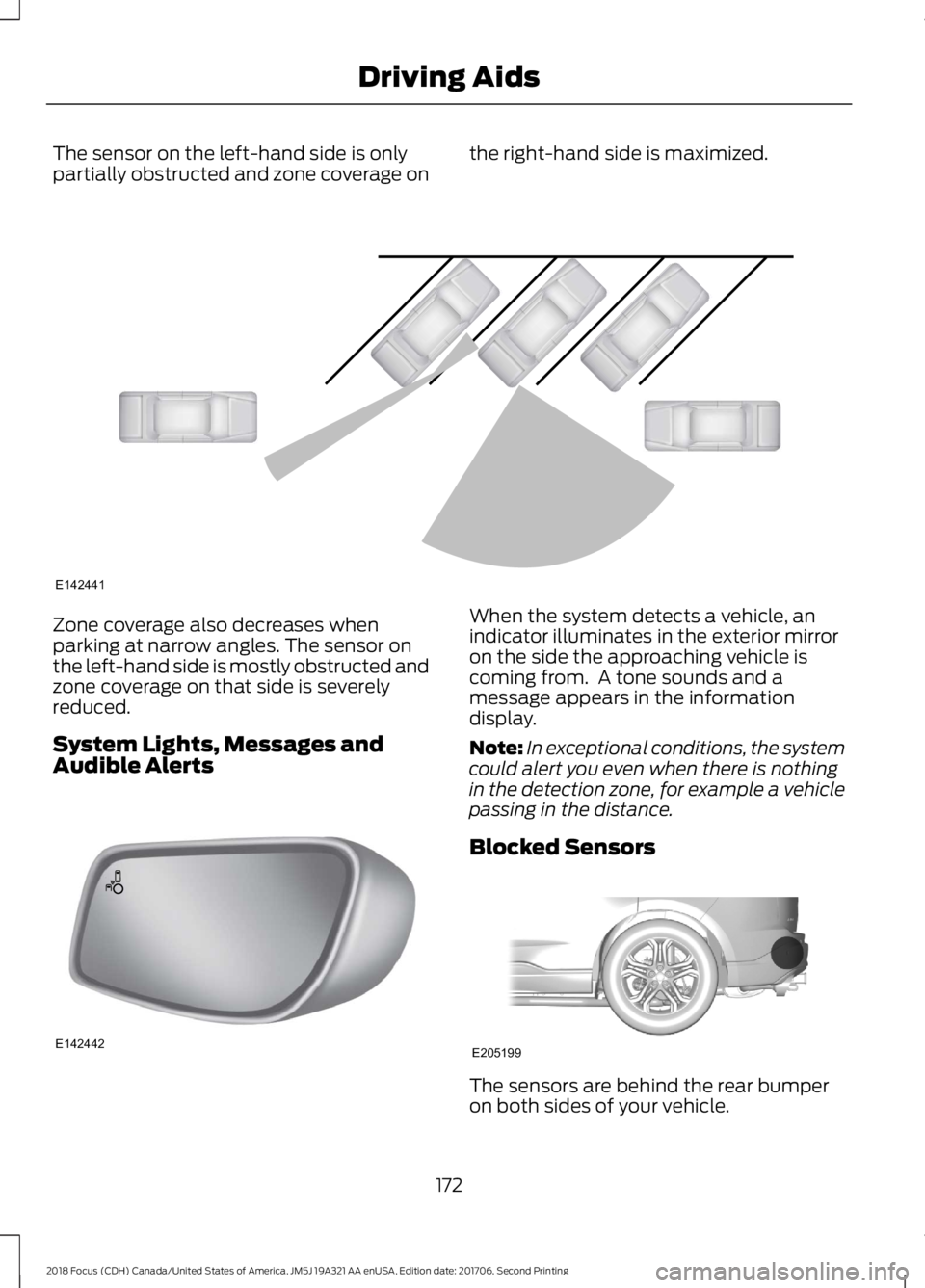
The sensor on the left-hand side is onlypartially obstructed and zone coverage onthe right-hand side is maximized.
Zone coverage also decreases whenparking at narrow angles. The sensor onthe left-hand side is mostly obstructed andzone coverage on that side is severelyreduced.
System Lights, Messages andAudible Alerts
When the system detects a vehicle, anindicator illuminates in the exterior mirroron the side the approaching vehicle iscoming from. A tone sounds and amessage appears in the informationdisplay.
Note:In exceptional conditions, the systemcould alert you even when there is nothingin the detection zone, for example a vehiclepassing in the distance.
Blocked Sensors
The sensors are behind the rear bumperon both sides of your vehicle.
1722018 Focus (CDH) Canada/United States of America, JM5J 19A321 AA enUSA, Edition date: 201706, Second PrintingDriving AidsE142441 E142442 E205199
Page 204 of 473
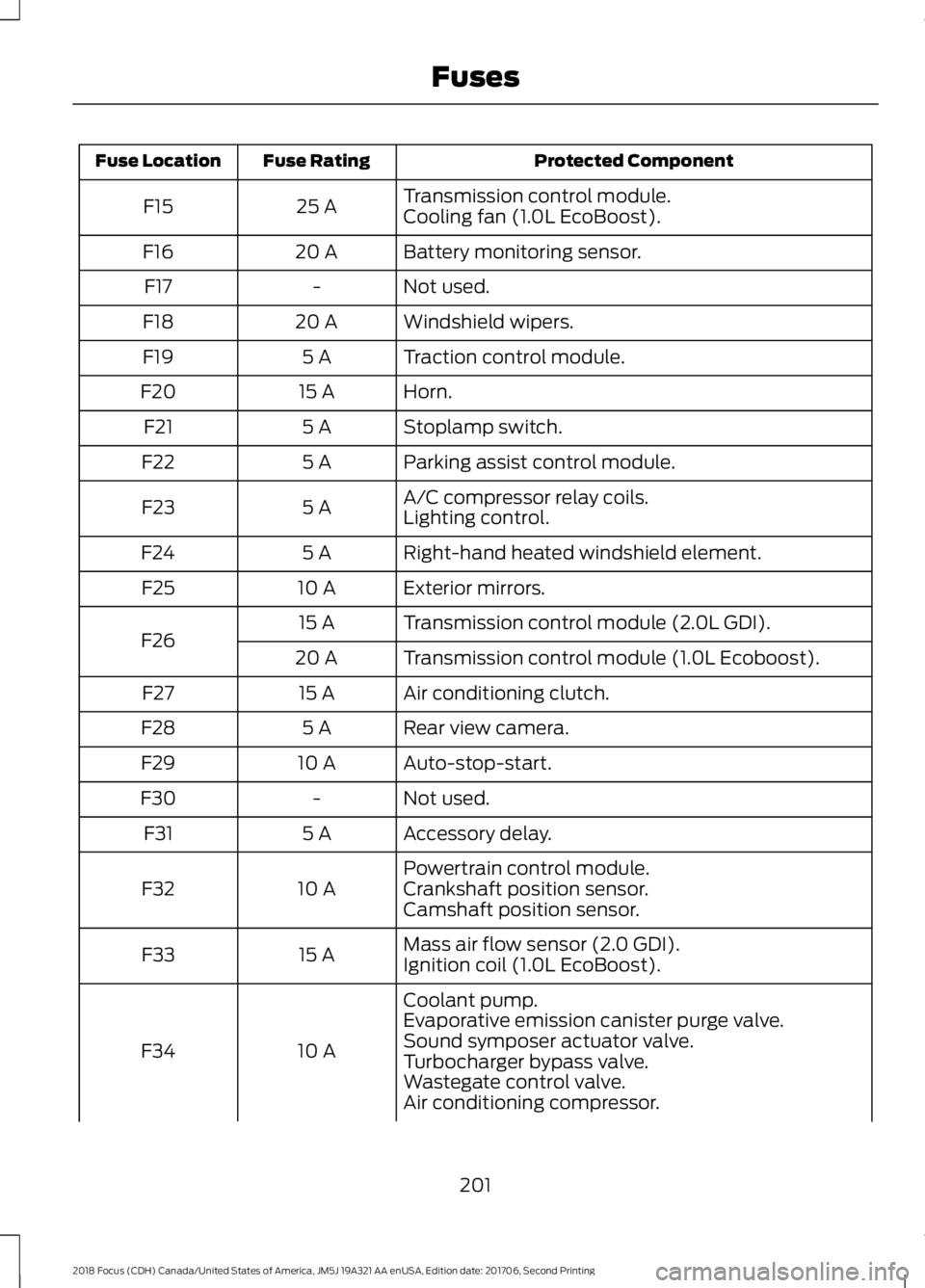
Protected ComponentFuse RatingFuse Location
Transmission control module.25 AF15Cooling fan (1.0L EcoBoost).
Battery monitoring sensor.20 AF16
Not used.-F17
Windshield wipers.20 AF18
Traction control module.5 AF19
Horn.15 AF20
Stoplamp switch.5 AF21
Parking assist control module.5 AF22
A/C compressor relay coils.5 AF23Lighting control.
Right-hand heated windshield element.5 AF24
Exterior mirrors.10 AF25
Transmission control module (2.0L GDI).15 AF26Transmission control module (1.0L Ecoboost).20 A
Air conditioning clutch.15 AF27
Rear view camera.5 AF28
Auto-stop-start.10 AF29
Not used.-F30
Accessory delay.5 AF31
Powertrain control module.10 AF32Crankshaft position sensor.Camshaft position sensor.
Mass air flow sensor (2.0 GDI).15 AF33Ignition coil (1.0L EcoBoost).
Coolant pump.
10 AF34
Evaporative emission canister purge valve.Sound symposer actuator valve.Turbocharger bypass valve.Wastegate control valve.Air conditioning compressor.
2012018 Focus (CDH) Canada/United States of America, JM5J 19A321 AA enUSA, Edition date: 201706, Second PrintingFuses
Page 205 of 473
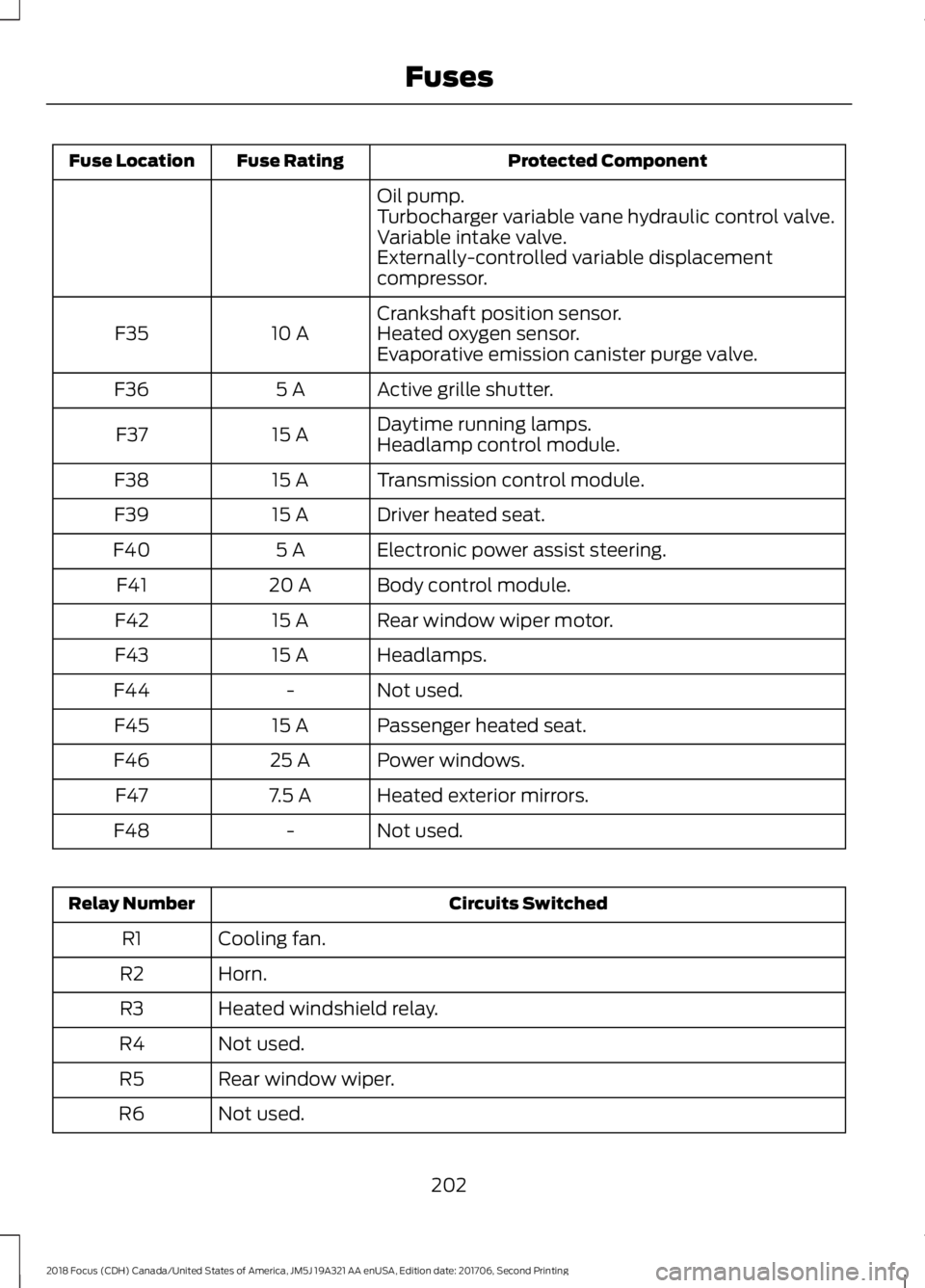
Protected ComponentFuse RatingFuse Location
Oil pump.Turbocharger variable vane hydraulic control valve.Variable intake valve.Externally-controlled variable displacementcompressor.
Crankshaft position sensor.10 AF35Heated oxygen sensor.Evaporative emission canister purge valve.
Active grille shutter.5 AF36
Daytime running lamps.15 AF37Headlamp control module.
Transmission control module.15 AF38
Driver heated seat.15 AF39
Electronic power assist steering.5 AF40
Body control module.20 AF41
Rear window wiper motor.15 AF42
Headlamps.15 AF43
Not used.-F44
Passenger heated seat.15 AF45
Power windows.25 AF46
Heated exterior mirrors.7.5 AF47
Not used.-F48
Circuits SwitchedRelay Number
Cooling fan.R1
Horn.R2
Heated windshield relay.R3
Not used.R4
Rear window wiper.R5
Not used.R6
2022018 Focus (CDH) Canada/United States of America, JM5J 19A321 AA enUSA, Edition date: 201706, Second PrintingFuses
Page 210 of 473
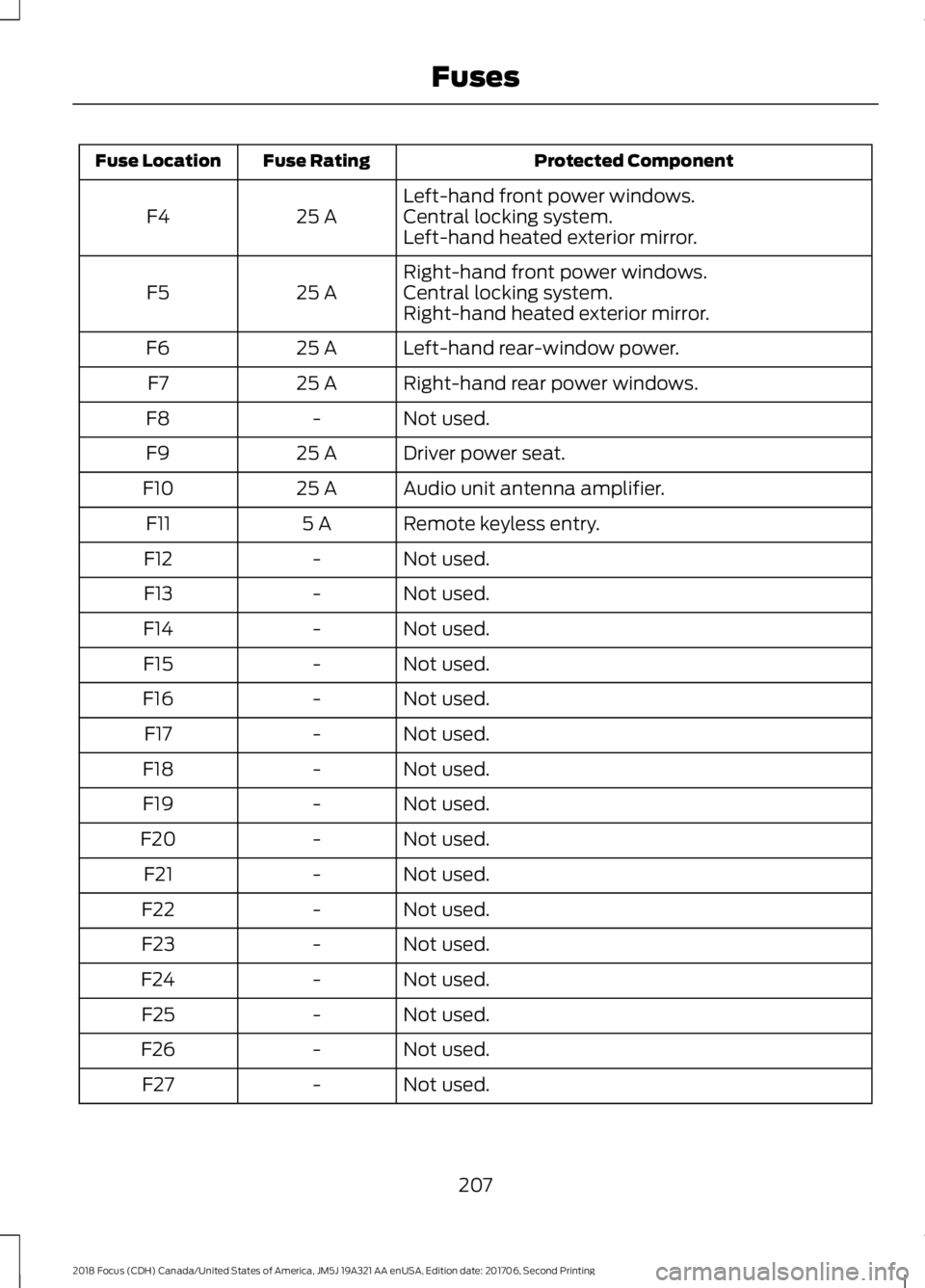
Protected ComponentFuse RatingFuse Location
Left-hand front power windows.25 AF4Central locking system.Left-hand heated exterior mirror.
Right-hand front power windows.25 AF5Central locking system.Right-hand heated exterior mirror.
Left-hand rear-window power.25 AF6
Right-hand rear power windows.25 AF7
Not used.-F8
Driver power seat.25 AF9
Audio unit antenna amplifier.25 AF10
Remote keyless entry.5 AF11
Not used.-F12
Not used.-F13
Not used.-F14
Not used.-F15
Not used.-F16
Not used.-F17
Not used.-F18
Not used.-F19
Not used.-F20
Not used.-F21
Not used.-F22
Not used.-F23
Not used.-F24
Not used.-F25
Not used.-F26
Not used.-F27
2072018 Focus (CDH) Canada/United States of America, JM5J 19A321 AA enUSA, Edition date: 201706, Second PrintingFuses
Page 226 of 473
When a battery replacement is required,the battery should only be replaced witha Ford recommended replacement batterythat matches the electrical requirementsof the vehicle.
Because your vehicle’s engine iselectronically-controlled by a computer,some engine control settings aremaintained by power from the low voltagebattery. Some engine computer settings,like the idle trim and fuel trim strategy,optimize the driveability and performanceof the engine. Some other computersettings, like the clock and radio stationpresets, are also maintained in memory bypower from the low voltage battery. Whena technician disconnects and connects thelow voltage battery, these settings areerased. Complete the following procedurein order to restore the settings:
1.With the vehicle at a complete stop,set the parking brake.
2.Shift into park (P).
3.Switch off all accessories.
4.Fully press the brake pedal and startthe vehicle.
5.Run the engine until it reaches normaloperating temperature. While theengine is warming up, complete thefollowing: Reset the clock. See AudioSystem (page 281). Reset the powerwindows bounce-back feature. SeeWindows and Mirrors (page 82).Reset the radio station presets. SeeAudio System (page 281).
6.Allow the engine to idle for at least oneminute. If the engine turns off, pressthe accelerator pedal to start theengine.
7.While the engine is running, press thebrake pedal and shift into neutral (N).
8.Allow the engine to run for at least oneminute by pressing on the acceleratorpedal.
9.Drive the vehicle at least 12 mi (20 km)to completely relearn the idle and fueltrim strategy.
Note:If you do not allow the engine torelearn the idle and fuel trim strategy, theidle quality of your vehicle may be adverselyaffected until the engine computereventually relearns the idle trim and fueltrim strategy.
Make sure that you dispose of old batteriesin an environmentally friendly way. Seekadvice from your local authority aboutrecycling old batteries.
CHECKING THE WIPER
BLADES
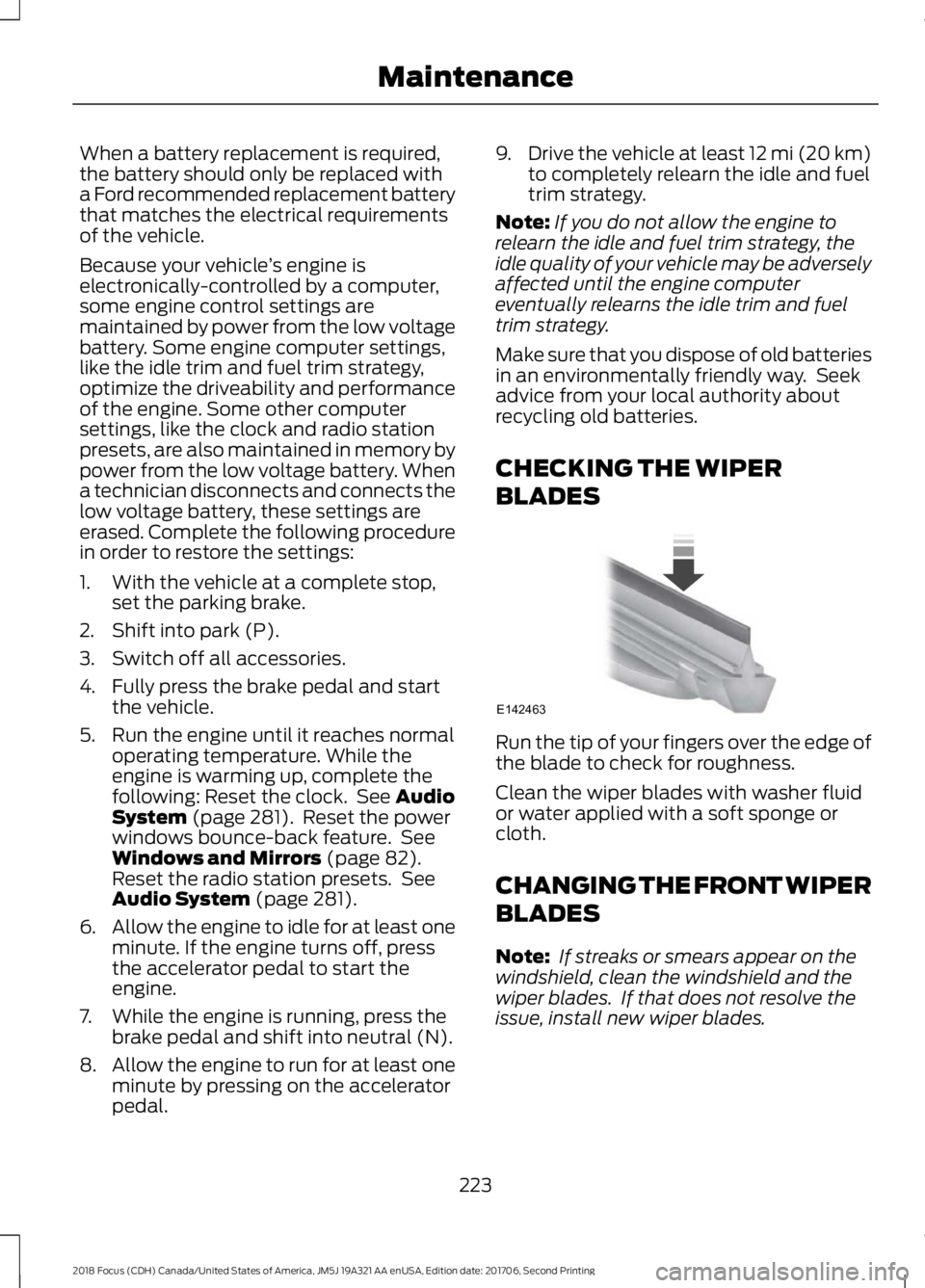
Run the tip of your fingers over the edge ofthe blade to check for roughness.
Clean the wiper blades with washer fluidor water applied with a soft sponge orcloth.
CHANGING THE FRONT WIPER
BLADES
Note: If streaks or smears appear on thewindshield, clean the windshield and thewiper blades. If that does not resolve theissue, install new wiper blades.
2232018 Focus (CDH) Canada/United States of America, JM5J 19A321 AA enUSA, Edition date: 201706, Second PrintingMaintenanceE142463