ESP FORD FOCUS 2018 Owner's Manual
[x] Cancel search | Manufacturer: FORD, Model Year: 2018, Model line: FOCUS, Model: FORD FOCUS 2018Pages: 473, PDF Size: 39.91 MB
Page 132 of 473
SAFETY PRECAUTIONS
WARNINGS
Do not overfill the fuel tank. Thepressure in an overfilled tank maycause leakage and lead to fuel sprayand fire.
The fuel system may be underpressure. If you hear a hissing soundnear the fuel filler inlet, do not refueluntil the sound stops. Otherwise, fuel mayspray out, which could cause seriouspersonal injury.
Fuels can cause serious injury ordeath if misused or mishandled.
Fuel may contain benzene, which isa cancer-causing agent.
When refueling always shut theengine off and never allow sparks oropen flames near the fuel tank fillervalve. Never smoke or use a cell phonewhile refueling. Fuel vapor is extremelyhazardous under certain conditions. Avoidinhaling excess fumes.
Follow these guidelines when refueling:
•Extinguish all smoking materials andany open flames before refueling yourvehicle.
•Always switch the engine off beforerefueling.
•Automotive fuels can be harmful orfatal if swallowed. Fuel is highly toxicand if swallowed can cause death orpermanent injury. If fuel is swallowedimmediately call a physician, even if nosymptoms are immediately apparent.The toxic effects of fuel may not beapparent for hours.
•Avoid inhaling fuel vapors. Inhaling fuelvapor can lead to eye and respiratorytract irritation. In severe cases,excessive or prolonged breathing offuel vapor can cause serious illness andpermanent injury.
•Avoid getting fuel in your eyes. If yousplash fuel in your eyes, immediatelyremove contact lenses (if worn), flushwith water for 15 minutes and seekmedical attention. Failure to seekproper medical attention could lead topermanent injury.
•Fuels can be harmful if absorbedthrough the skin. If you splash fuel onyour skin, clothing or both, promptlyremove contaminated clothing andthoroughly wash your skin with soapand water. Repeated or prolonged skincontact causes skin irritation.
•Be particularly careful if you are takingAntabuse or other forms of Disulfiramfor the treatment of alcoholism.Breathing fuel vapors could cause anadverse reaction, serious personalinjury or sickness. Immediately call aphysician if you experience any adversereactions.
FUEL QUALITY - GASOLINE
Choosing the Right Fuel
Your vehicle is designed to operate onregular unleaded gasoline with a minimumpump (R+M)/2 octane rating of 87.
1292018 Focus (CDH) Canada/United States of America, JM5J 19A321 AA enUSA, Edition date: 201706, Second PrintingFuel and RefuelingE161513
Page 139 of 473
EMISSION LAW
WARNING
Do not remove or alter the originalequipment floor covering orinsulation between it and the metalfloor of the vehicle. The floor covering andinsulation protect occupants of the vehiclefrom the engine and exhaust system heatand noise. On vehicles with no originalequipment floor covering insulation, do notcarry passengers in a manner that permitsprolonged skin contact with the metalfloor. Failure to follow these instructionsmay result in fire or personal injury.
U.S. federal laws and certain state lawsprohibit removing or rendering inoperativeemission control system components.Similar federal or provincial laws mayapply in Canada. We do not approve of anyvehicle modification without firstdetermining applicable laws.
Tampering with emissionscontrol systems includingrelated sensors or the DieselExhaust Fluid system can result in reducedengine power and the illumination of theservice engine soon light.
Tampering With a Noise ControlSystem
Federal laws prohibit the following acts:
•Removal or rendering inoperative byany person other than for purposes ofmaintenance.
•Repair or replacement of any device orelement of the design incorporated intoa new vehicle for the purpose of noisecontrol prior to its sale or delivery tothe ultimate purchaser or while it is inuse.
•The use of the vehicle after any personremoves or renders inoperative anydevice or element of the design.
The U.S. Environmental Protection Agencymay presume to constitute tampering asfollows:
•Removal of hood blanket, fender apronabsorbers, fender apron barriers,underbody noise shields or acousticallyabsorptive material.
•Tampering or rendering inoperative theengine speed governor, to allow enginespeed to exceed manufacturerspecifications.
If the engine does not start, runs rough,experiences a decrease in engineperformance, experiences excess fuelconsumption or produces excessiveexhaust smoke, check for the following:
•A plugged or disconnected air inletsystem hose.
•A plugged engine air filter element.
•Water in the fuel filter and waterseparator.
•A clogged fuel filter.
•Contaminated fuel.
•Air in the fuel system, due to looseconnections.
•An open or pinched sensor hose.
•Incorrect engine oil level.
1362018 Focus (CDH) Canada/United States of America, JM5J 19A321 AA enUSA, Edition date: 201706, Second PrintingEngine Emission Control
Page 151 of 473
HINTS ON DRIVING WITH
ANTI-LOCK BRAKES
The anti-lock braking system does noteliminate the risks when:
•You drive too closely to the vehicle infront of you.
•Your vehicle is hydroplaning.
•You take corners too fast.
•The road surface is poor.
Note: If the system activates, the brakepedal may pulse and may travel further.Maintain pressure on the brake pedal. Youmay also hear a noise from the system. Thisis normal.
PARKING BRAKE
Vehicles With AutomaticTransmission
WARNING
Always set the parking brake fullyand leave your vehicle with thetransmission selector lever inposition P.
Note:If you park your vehicle on a hill andfacing uphill move the transmission selectorlever to position P and turn the steeringwheel away from the curb.
Note:If you park your vehicle on a hill andfacing downhill move the transmissionselector lever to position P and turn thesteering wheel toward the curb.
Vehicles With ManualTransmission
WARNING
Always set the parking brake fully.
Note:If you park your vehicle on a hill andfacing uphill select first gear and turn thesteering wheel away from the curb.
Note:If you park your vehicle on a hill andfacing downhill select reverse gear and turnthe steering wheel toward the curb.
All Vehicles
Note:Do not press the release button whilepulling the lever up.
To apply the parking brake:
1.Press the foot brake pedal firmly.
2.Pull the parking brake lever up to itsfullest extent.
To release the parking brake:
1.Press the brake pedal firmly.
2.Pull the lever up slightly.
3.Press the release button and push thelever down.
HILL START ASSIST
WARNINGS
The system does not replace theparking brake. When you leave yourvehicle, always apply the parkingbrake and shift the transmission into park(P) for automatic transmission or first gearfor manual transmission.
You must remain in your vehiclewhen the system turns on. At alltimes, you are responsible forcontrolling your vehicle, supervising thesystem and intervening, if required. Failureto take care may result in the loss ofcontrol of your vehicle, serious personalinjury or death.
The system turns off if there is amalfunction or if you excessively revthe engine.
1482018 Focus (CDH) Canada/United States of America, JM5J 19A321 AA enUSA, Edition date: 201706, Second PrintingBrakes
Page 158 of 473
ACTIVE PARK ASSIST (If Equipped)
Parallel Parking Assist
WARNINGS
You must remain in your vehiclewhen the system turns on. At alltimes, you are responsible forcontrolling your vehicle, supervising thesystem and intervening, if required. Failureto take care may result in the loss ofcontrol of your vehicle, serious personalinjury or death.
The sensors may not detect objectsin heavy rain or other conditions thatcause interference.
Active park assist does not apply thebrakes under any circumstances.
The system is designed to aid thedriver. It is not intended to replaceyour attention and judgment. You arestill responsible to drive with due care andattention.
Note:The Blind Spot Information Systemdoes not detect traffic alongside or behindyour vehicle during an Active Park Assistmaneuver.
The system detects an available parallelparking space and automatically steersyour vehicle into the space (hands-free)while you control the accelerator, gearshiftand brakes. The system visually andaudibly guides you when parking yourvehicle.
If you are uncomfortable with the proximityto any vehicle or object, you may chooseto override the system by grabbing thesteering wheel or by pressing the activepark assist button.
The system may not correctly operate inany of the following conditions:
•You use a spare tire or a tiresignificantly worn more than the othertires.
•One or more tires are improperlyinflated.
•You try to park on a tight curve.
•Something passes between the frontbumper and the parking space. Forexample, a pedestrian or cyclist.
•The edge of the neighboring parkedvehicle is high off the ground. Forexample, a bus, tow truck or flatbedtruck.
•The weather conditions are poor. Forexample, during heavy rain, snow orfog.
Note: Keep the sensors on the bumper orfascia free from snow, ice and largeaccumulations of dirt. Covered sensors canaffect the system's accuracy. Do not cleanthe sensors with sharp objects.
Note:The sensors may not detect objectswith surfaces that absorb ultrasonic wavesor cause ultrasonic interference. Forexample, motorcycle exhaust, truck airbrakes or horns.
Note:Following a change in tire size, thesystem must recalibrate and operation maybe impaired for a short time.
Do not use the system if:
•You have attached a foreign objectclose to the sensors on the front or rearof your vehicle. For example, a bike rackor trailer.
•You attach an overhanging object tothe roof. For example, a surfboard.
•A foreign object damages or obstructsthe front or rear bumper or sidesensors.
•The correct tire size is not in use on yourvehicle. For example, a mini-spare tire.
1552018 Focus (CDH) Canada/United States of America, JM5J 19A321 AA enUSA, Edition date: 201706, Second PrintingParking Aids
Page 159 of 473
Using Active Park Assist - ParallelParking
Press the Active Park Assistbutton once to search for aparallel parking space.
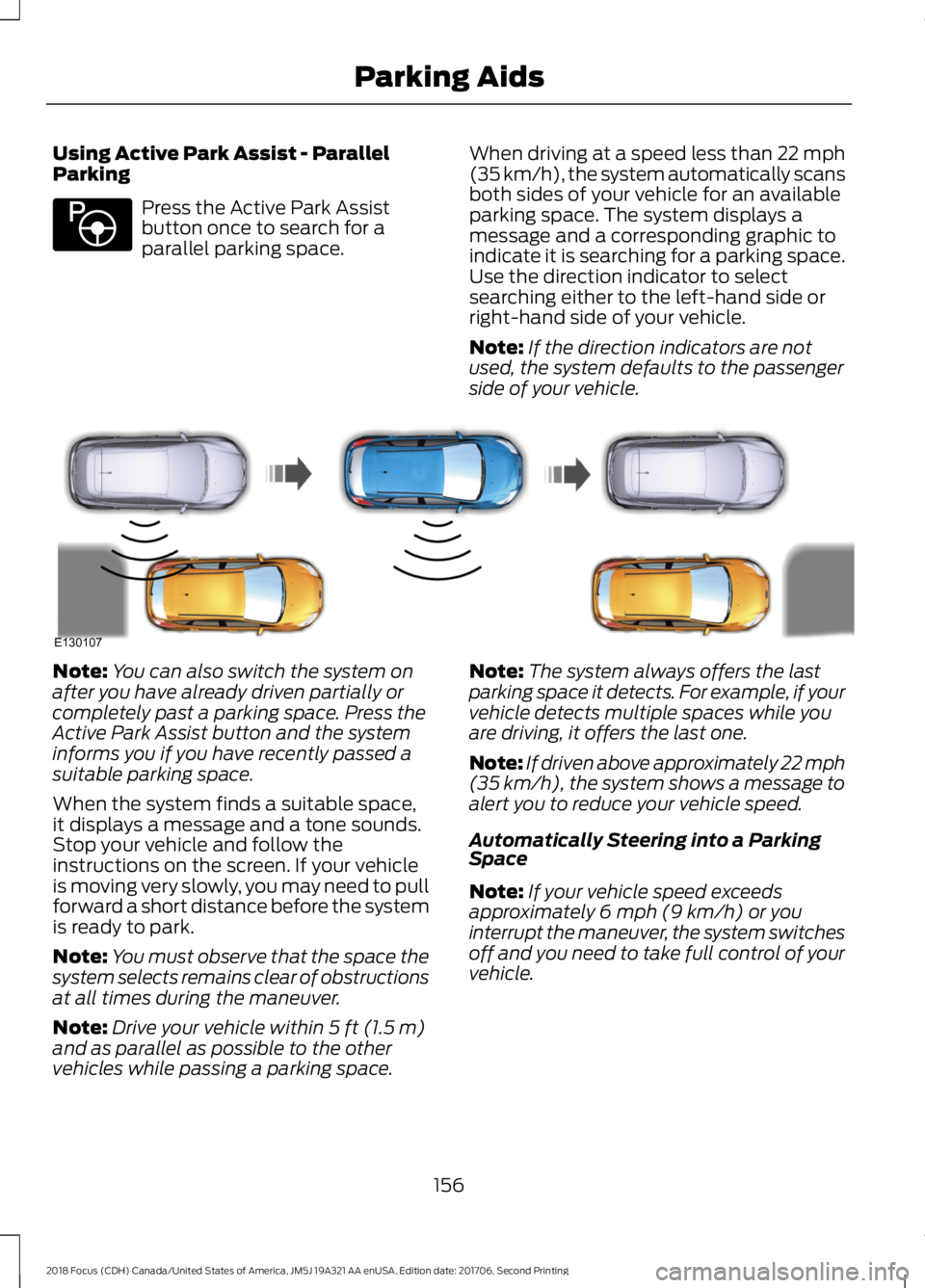
When driving at a speed less than 22 mph(35 km/h), the system automatically scansboth sides of your vehicle for an availableparking space. The system displays amessage and a corresponding graphic toindicate it is searching for a parking space.Use the direction indicator to selectsearching either to the left-hand side orright-hand side of your vehicle.
Note:If the direction indicators are notused, the system defaults to the passengerside of your vehicle.
Note:You can also switch the system onafter you have already driven partially orcompletely past a parking space. Press theActive Park Assist button and the systeminforms you if you have recently passed asuitable parking space.
When the system finds a suitable space,it displays a message and a tone sounds.Stop your vehicle and follow theinstructions on the screen. If your vehicleis moving very slowly, you may need to pullforward a short distance before the systemis ready to park.
Note:You must observe that the space thesystem selects remains clear of obstructionsat all times during the maneuver.
Note:Drive your vehicle within 5 ft (1.5 m)and as parallel as possible to the othervehicles while passing a parking space.
Note:The system always offers the lastparking space it detects. For example, if yourvehicle detects multiple spaces while youare driving, it offers the last one.
Note:If driven above approximately 22 mph(35 km/h), the system shows a message toalert you to reduce your vehicle speed.
Automatically Steering into a ParkingSpace
Note:If your vehicle speed exceedsapproximately 6 mph (9 km/h) or youinterrupt the maneuver, the system switchesoff and you need to take full control of yourvehicle.
1562018 Focus (CDH) Canada/United States of America, JM5J 19A321 AA enUSA, Edition date: 201706, Second PrintingParking AidsE146186 E130107
Page 160 of 473
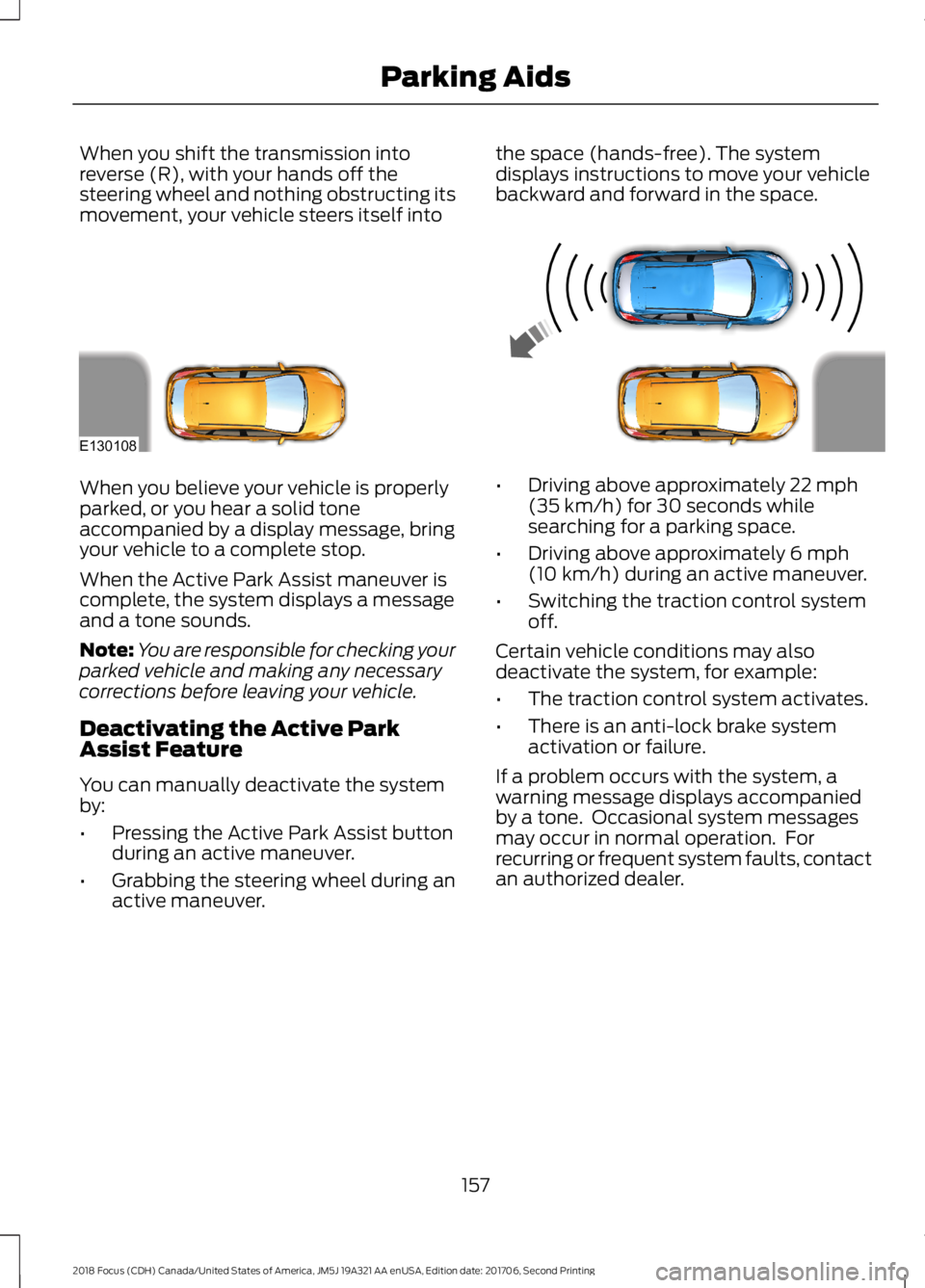
When you shift the transmission intoreverse (R), with your hands off thesteering wheel and nothing obstructing itsmovement, your vehicle steers itself into
the space (hands-free). The systemdisplays instructions to move your vehiclebackward and forward in the space.
When you believe your vehicle is properlyparked, or you hear a solid toneaccompanied by a display message, bringyour vehicle to a complete stop.
When the Active Park Assist maneuver iscomplete, the system displays a messageand a tone sounds.
Note:You are responsible for checking yourparked vehicle and making any necessarycorrections before leaving your vehicle.
Deactivating the Active ParkAssist Feature
You can manually deactivate the systemby:
•Pressing the Active Park Assist buttonduring an active maneuver.
•Grabbing the steering wheel during anactive maneuver.
•Driving above approximately 22 mph(35 km/h) for 30 seconds whilesearching for a parking space.
•Driving above approximately 6 mph(10 km/h) during an active maneuver.
•Switching the traction control systemoff.
Certain vehicle conditions may alsodeactivate the system, for example:
•The traction control system activates.
•There is an anti-lock brake systemactivation or failure.
If a problem occurs with the system, awarning message displays accompaniedby a tone. Occasional system messagesmay occur in normal operation. Forrecurring or frequent system faults, contactan authorized dealer.
1572018 Focus (CDH) Canada/United States of America, JM5J 19A321 AA enUSA, Edition date: 201706, Second PrintingParking AidsE130108
Page 161 of 473
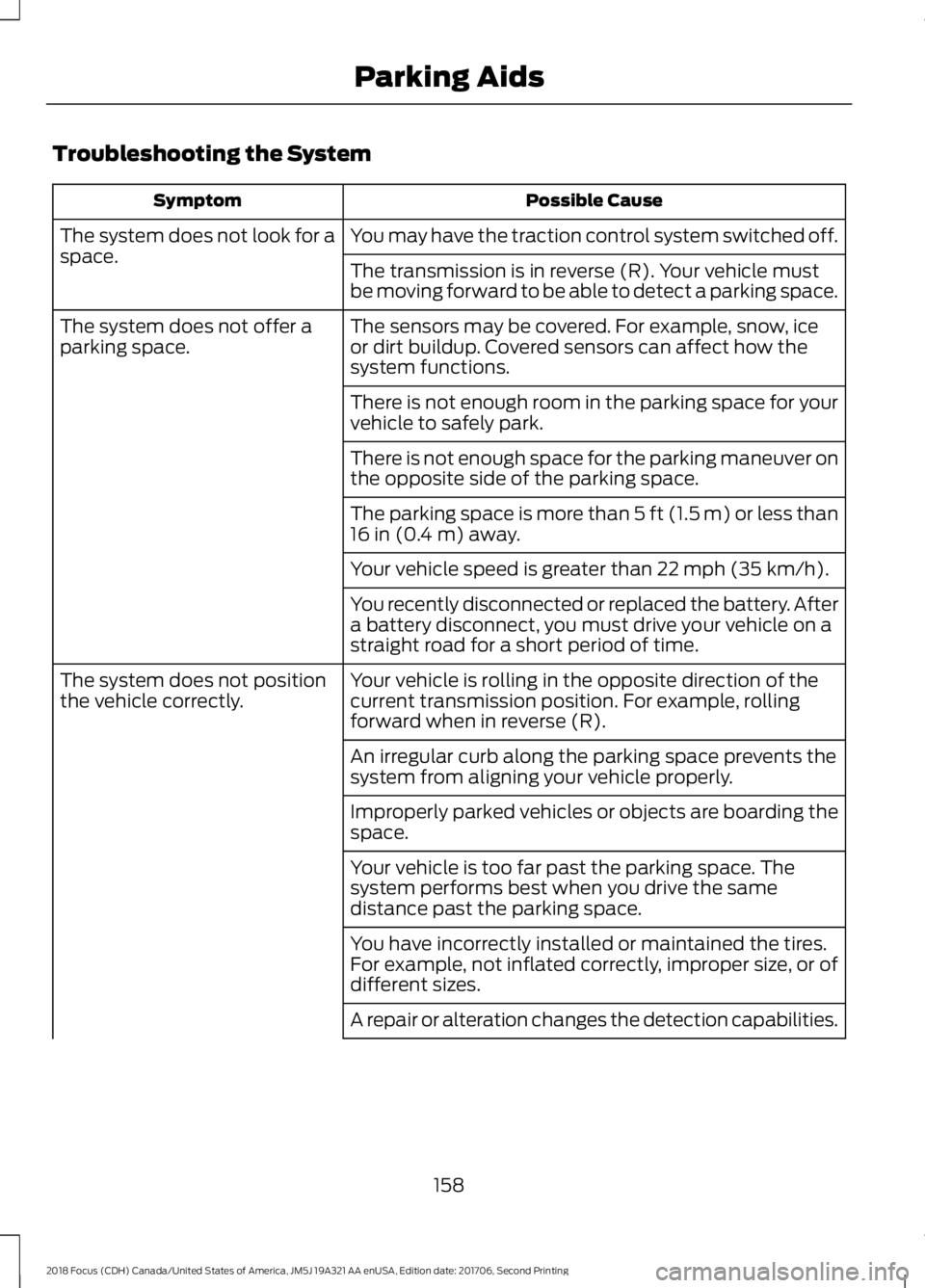
Troubleshooting the System
Possible CauseSymptom
You may have the traction control system switched off.The system does not look for aspace.The transmission is in reverse (R). Your vehicle mustbe moving forward to be able to detect a parking space.
The sensors may be covered. For example, snow, iceor dirt buildup. Covered sensors can affect how thesystem functions.
The system does not offer aparking space.
There is not enough room in the parking space for yourvehicle to safely park.
There is not enough space for the parking maneuver onthe opposite side of the parking space.
The parking space is more than 5 ft (1.5 m) or less than16 in (0.4 m) away.
Your vehicle speed is greater than 22 mph (35 km/h).
You recently disconnected or replaced the battery. Aftera battery disconnect, you must drive your vehicle on astraight road for a short period of time.
Your vehicle is rolling in the opposite direction of thecurrent transmission position. For example, rollingforward when in reverse (R).
The system does not positionthe vehicle correctly.
An irregular curb along the parking space prevents thesystem from aligning your vehicle properly.
Improperly parked vehicles or objects are boarding thespace.
Your vehicle is too far past the parking space. Thesystem performs best when you drive the samedistance past the parking space.
You have incorrectly installed or maintained the tires.For example, not inflated correctly, improper size, or ofdifferent sizes.
A repair or alteration changes the detection capabilities.
1582018 Focus (CDH) Canada/United States of America, JM5J 19A321 AA enUSA, Edition date: 201706, Second PrintingParking Aids
Page 167 of 473
DRIVER ALERT
Principle of Operation
WARNINGS
The system is designed to aid thedriver. It is not intended to replaceyour attention and judgment. You arestill responsible to drive with due care andattention.
At all times, you are responsible forcontrolling your vehicle, supervisingthe system and intervening, ifrequired. Failure to take care may result inthe loss of control of your vehicle, seriouspersonal injury or death.
The system may not function if thesensor is blocked.
Take regular rest breaks if you feeltired. Do not wait for the system towarn you.
Certain driving styles may result inthe system warning you even if youare not feeling tired.
In cold and severe weatherconditions the system may notfunction. Rain, snow and spray canall limit sensor performance.
The system will not operate if thesensor cannot track the road lanemarkings.
If damage occurs in the immediatearea surrounding the sensor, haveyour vehicle checked as soon aspossible.
The system may not correctlyoperate if your vehicle is fitted witha suspension kit not approved by us.
Note:Keep the windshield free fromobstructions for example bird droppings,insects and snow or ice.
Note:The system assists you when drivingon fast main roads and freeways.
Note:The system calculates an alertnesslevel at vehicle speeds above approximately40 mph (65 km/h).
The system automatically monitors yourdriving behavior.
The system is designed to alert you if itdetects that you are becoming drowsy orif your driving deteriorates.
Using Driver Alert
Switching the System On and Off
Switch the system on using the informationdisplay. See Information Displays (page92).
Note:The system remains on or offdepending on how it was last set.
The system calculates your alertness levelbased upon your driving behavior in relationto the lane markings and other factors.
System Warnings
Note:The system does not warn you if thevehicle speed falls below approximately40 mph (65 km/h).
The warning system has two stages:
1.A temporary warning is issued to adviseyou to take a rest. This message onlyappears for a short time.
2.If you do not rest and the systemcontinues to detect that your drivingdeteriorates, it issues a further warning.This remains in the information displayuntil you cancel it. See InformationMessages (page 96).
Press OK on the steering wheel control toremove the warning.
1642018 Focus (CDH) Canada/United States of America, JM5J 19A321 AA enUSA, Edition date: 201706, Second PrintingDriving Aids
Page 168 of 473
System Display
When active the system runs automaticallyin the background and only issue warningsif required. You can view the status at anytime using the information display. SeeGeneral Information (page 92).
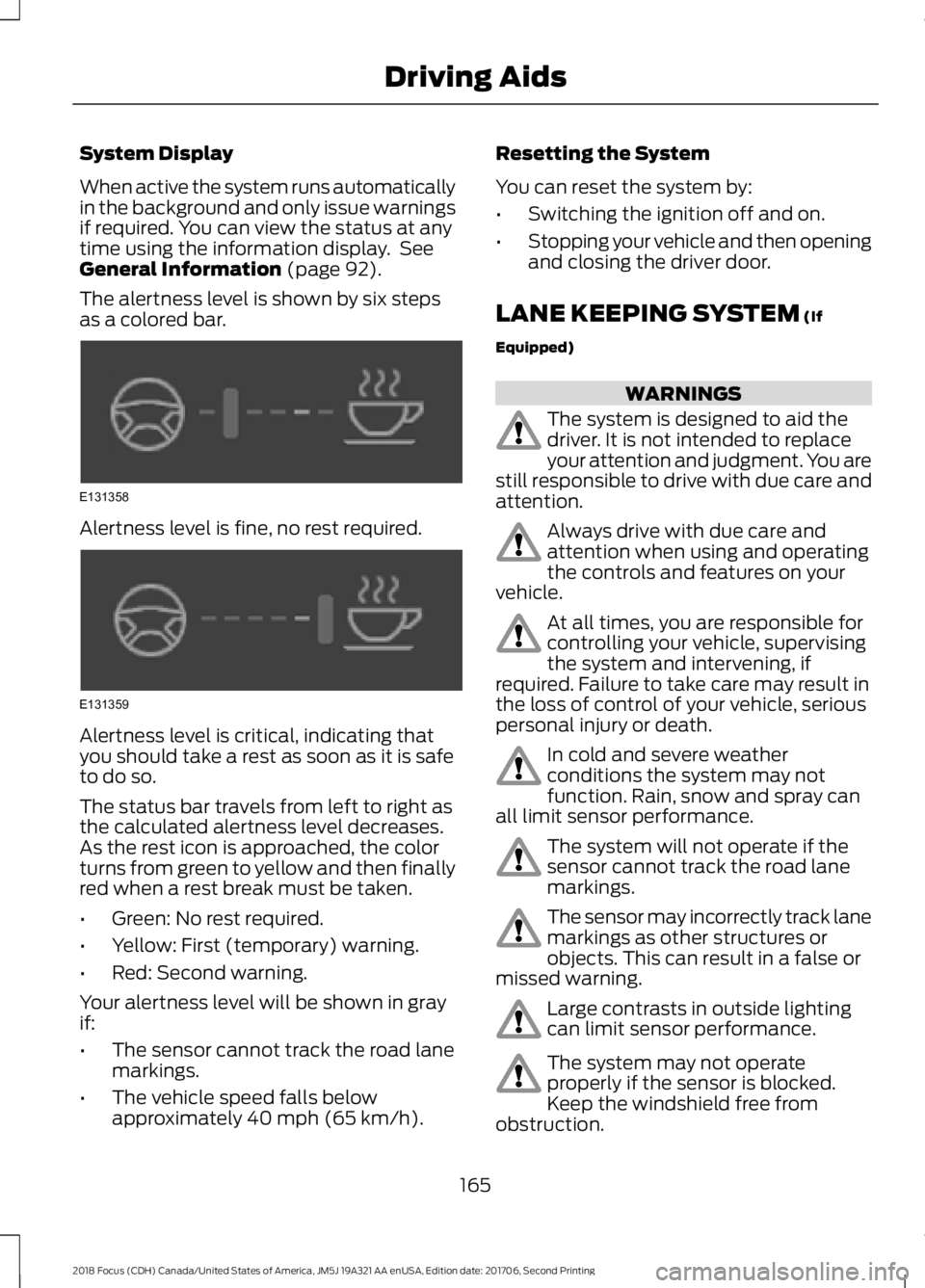
The alertness level is shown by six stepsas a colored bar.
Alertness level is fine, no rest required.
Alertness level is critical, indicating thatyou should take a rest as soon as it is safeto do so.
The status bar travels from left to right asthe calculated alertness level decreases.As the rest icon is approached, the colorturns from green to yellow and then finallyred when a rest break must be taken.
•Green: No rest required.
•Yellow: First (temporary) warning.
•Red: Second warning.
Your alertness level will be shown in grayif:
•The sensor cannot track the road lanemarkings.
•The vehicle speed falls belowapproximately 40 mph (65 km/h).
Resetting the System
You can reset the system by:
•Switching the ignition off and on.
•Stopping your vehicle and then openingand closing the driver door.
LANE KEEPING SYSTEM (If
Equipped)
WARNINGS
The system is designed to aid thedriver. It is not intended to replaceyour attention and judgment. You arestill responsible to drive with due care andattention.
Always drive with due care andattention when using and operatingthe controls and features on yourvehicle.
At all times, you are responsible forcontrolling your vehicle, supervisingthe system and intervening, ifrequired. Failure to take care may result inthe loss of control of your vehicle, seriouspersonal injury or death.
In cold and severe weatherconditions the system may notfunction. Rain, snow and spray canall limit sensor performance.
The system will not operate if thesensor cannot track the road lanemarkings.
The sensor may incorrectly track lanemarkings as other structures orobjects. This can result in a false ormissed warning.
Large contrasts in outside lightingcan limit sensor performance.
The system may not operateproperly if the sensor is blocked.Keep the windshield free fromobstruction.
1652018 Focus (CDH) Canada/United States of America, JM5J 19A321 AA enUSA, Edition date: 201706, Second PrintingDriving AidsE131358 E131359
Page 191 of 473
ROADSIDE ASSISTANCE
Vehicles Sold in the United States:Getting Roadside Assistance
To fully assist you should you have avehicle concern, Ford Motor Companyoffers a complimentary roadsideassistance program. This program isseparate from the New Vehicle LimitedWarranty.
The service is available:
•24 hours a day, seven days a week.
•For the coverage period listed on theRoadside Assistance Card included inyour Owner's Manual portfolio.
Roadside Assistance covers:
•A flat tire change with a good spare(except vehicles supplied with a tireinflation kit).
•Battery jump start.
•Lock-out assistance (key replacementcost is the customer's responsibility).
•Fuel delivery — independent servicecontractors, if not prohibited by state,local or municipal law, shall deliver upto 2 gal (8 L) of gasoline or 5 gal (20 L)of diesel fuel to a disabled vehicle.Roadside Assistance limits fuel deliveryservice to two no-charge occurrenceswithin a 12-month period.
•Winch out — available within 100 ft(30 m) of a paved or countymaintained road, no recoveries.
•Towing — independent servicecontractors, if not prohibited by state,local or municipal law, shall tow Fordeligible vehicles to an authorized dealerwithin 35 mi (56 km) of thedisablement location or to the nearestauthorized dealer. If a memberrequests a tow to an authorized dealerthat is more than 35 mi (56 km) fromthe disablement location, the membershall be responsible for any mileagecosts in excess of 35 mi (56 km).
•Roadside Assistance includes up to$200 for a towed trailer if the disabledeligible vehicle requires service at thenearest authorized dealer. If the towingvehicle is operational but the trailer isnot, then the trailer does not qualify forany roadside services.
Vehicles Sold in the United States:Using Roadside Assistance
Complete the roadside assistanceidentification card and place it in yourwallet for quick reference. This card is inthe owner's information portfolio in theglove compartment.
United States vehicle customers whorequire Roadside Assistance, call1-800-241-3673.
If you need to arrange roadside assistancefor yourself, Ford Motor Companyreimburses a reasonable amount fortowing to the nearest dealership within35 mi (56 km). To obtain reimbursementinformation, United States vehiclecustomers call 1-800-241-3673.Customers need to submit their originalreceipts.
1882018 Focus (CDH) Canada/United States of America, JM5J 19A321 AA enUSA, Edition date: 201706, Second PrintingRoadside Emergencies