belt FORD FOCUS 2018 Owner's Guide
[x] Cancel search | Manufacturer: FORD, Model Year: 2018, Model line: FOCUS, Model: FORD FOCUS 2018Pages: 473, PDF Size: 39.91 MB
Page 58 of 473
PRINCIPLE OF OPERATION
MyKey allows you to program keys withrestricted driving modes to promote gooddriving habits. All but one of the keys canbe activated with these restricted modes.
Any keys that remain unprogrammed arereferred to as administrator keys or adminkeys. They can be used to:
•Create a MyKey.
•Program configurable MyKey settings.
•Clear all MyKey features.
When you have created a MyKey, you canaccess the following information by usingthe information display to determine:
•How many admin keys and MyKeys areprogrammed to your vehicle.
•The total distance your vehicle traveledwith a MyKey.
Note:Switch the ignition on to use thesystem.
Note:All MyKeys are programmed to thesame settings. You cannot program themindividually.
Note:For vehicles equipped with apush-button start, when both a MyKey andan admin key are present, the admin key willbe recognized by the vehicle when you startthe vehicle.
Non-configurable Settings
The following settings cannot be changedby an admin key user:
•Safety belt reminder. You cannotdisable this feature. The audio systemwill mute when the front seatpassengers’ safety belts are notfastened.
•Early low fuel warning. The low-fuelwarning activates earlier, giving MyKeyusers more time to refuel.
•Driver assist features, if equipped onyour vehicle, are forced on: parking aidand Blind Spot Information System(BLIS) with cross traffic alert.
•Satellite radio adult contentrestrictions, if equipped on your vehicle.
•Pre-collision assist and Lane Departurewarning switches on every ignitioncycle, but can be switched off by theMyKey user.
Configurable Settings
With an admin key, you can configurecertain MyKey settings when you firstcreate a MyKey and before you recycle thekey or restart the engine. You can alsochange the settings afterward with anadmin key.
•A vehicle speed limit can be set.Warnings will be shown in the displayfollowed by an audible tone when yourvehicle reaches the set speed. Youcannot override the set speed by fullydepressing the accelerator pedal or bysetting cruise control.
WARNING
Do not set MyKey maximum speedlimit to a limit that will prevent thedriver from maintaining a safe speedconsidering posted speed limits andprevailing road conditions. The driver isalways responsible to drive in accordancewith local laws and prevailing conditions.Failure to do so could result in accident orinjury.
552018 Focus (CDH) Canada/United States of America, JM5J 19A321 AA enUSA, Edition date: 201706, Second PrintingMyKey™
Page 59 of 473
•Various vehicle speed minders can beset. Once you select a speed, it will beshown in the display, followed by anaudible tone when the preselectedvehicle speed is exceeded.
•Audio system maximum volume of45%. A message will be shown in thedisplay when you attempt to exceedthe limited volume. Also, thespeed-sensitive or compensatedautomatic volume control will bedisabled.
•Always on setting. When this isselected, you will not be able to turnoff AdvanceTrac or traction control,E911 or Emergency Assist, or the Do NotDisturb feature (if your vehicle isequipped with these features).
CREATING A MYKEY
Use the information display to create aMyKey:
1.Insert the key you want to program intothe ignition. If your vehicle is equippedwith a push-button start, place theintelligent access transmitter into thebackup position. The location of yourbackup position is in another chapter.See Starting and Stopping theEngine (page 119).
2.Switch the vehicle on.
3.Access the main menu through theinformation display controls. Use thearrow keys to get to the following menuselections:
Action and DescriptionMessage
Press the OK button or the right arrow key.Settings
Press the OK button or the right arrow key.MyKey
Press the OK button or the right arrow key.Create MyKey
When prompted, hold the OK button untilyou see a message informing you to labelthis key as a MyKey. The key will berestricted at the next start.
MyKey is successfully created. Make sureyou label it so you can distinguish it fromthe admin keys.
You can also program configurablesettings for the key(s). SeeProgramming/Changing ConfigurableSettings.
Programming/ChangingConfigurable Settings
Use the information display to access yourconfigurable MyKey settings by doing thefollowing:
1.Switch the vehicle on using an adminkey.
2.Use the arrow keys to get to thefollowing menu selections:
Action and DescriptionMessage
Press the OK button or the right arrow key.Settings
Press the OK button or the right arrow key.MyKey
562018 Focus (CDH) Canada/United States of America, JM5J 19A321 AA enUSA, Edition date: 201706, Second PrintingMyKey™
Page 67 of 473
Opening the Liftgate or LuggageCompartment
With the Remote Control
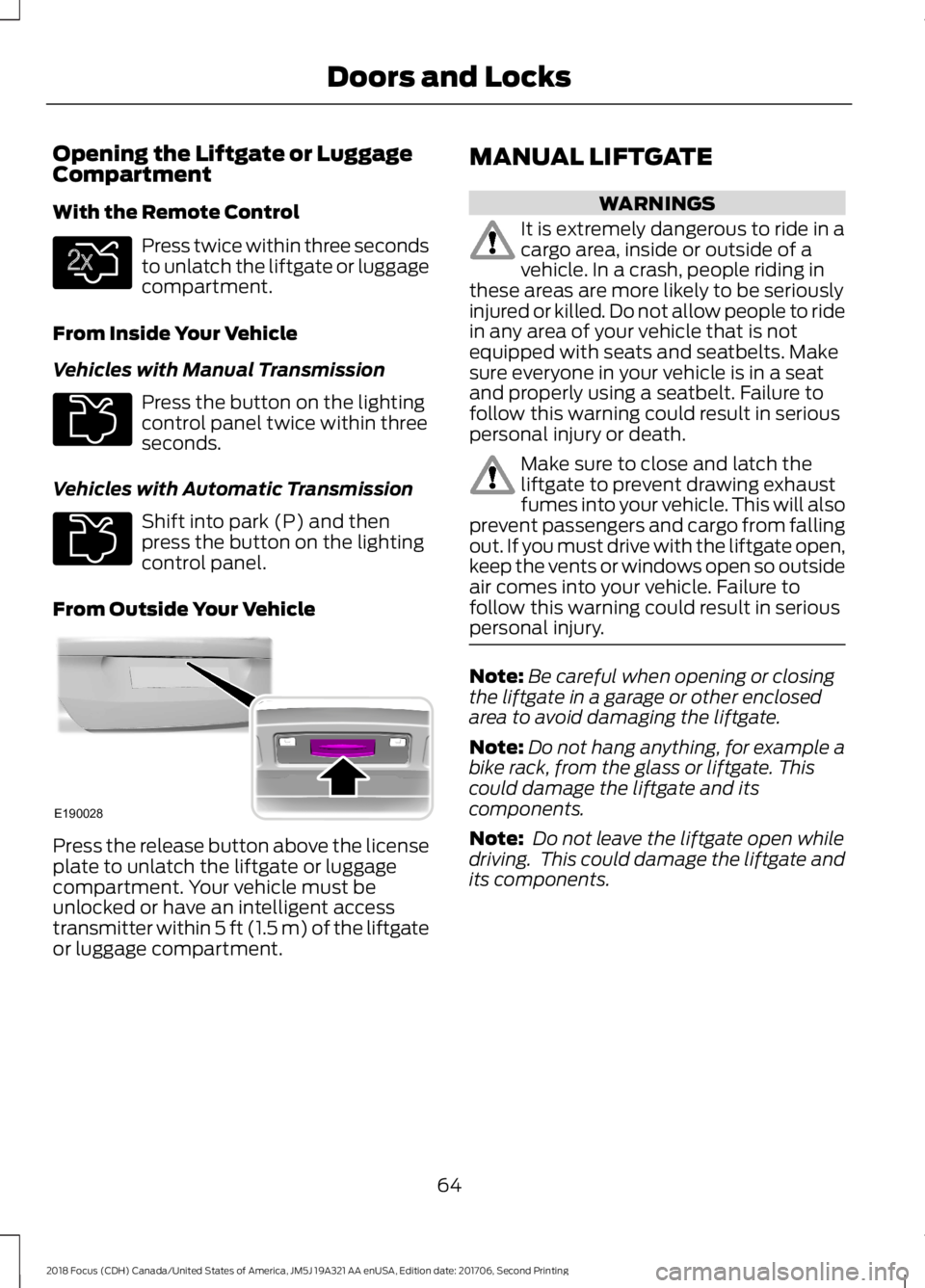
Press twice within three secondsto unlatch the liftgate or luggagecompartment.
From Inside Your Vehicle
Vehicles with Manual Transmission
Press the button on the lightingcontrol panel twice within threeseconds.
Vehicles with Automatic Transmission
Shift into park (P) and thenpress the button on the lightingcontrol panel.
From Outside Your Vehicle
Press the release button above the licenseplate to unlatch the liftgate or luggagecompartment. Your vehicle must beunlocked or have an intelligent accesstransmitter within 5 ft (1.5 m) of the liftgateor luggage compartment.
MANUAL LIFTGATE
WARNINGS
It is extremely dangerous to ride in acargo area, inside or outside of avehicle. In a crash, people riding inthese areas are more likely to be seriouslyinjured or killed. Do not allow people to ridein any area of your vehicle that is notequipped with seats and seatbelts. Makesure everyone in your vehicle is in a seatand properly using a seatbelt. Failure tofollow this warning could result in seriouspersonal injury or death.
Make sure to close and latch theliftgate to prevent drawing exhaustfumes into your vehicle. This will alsoprevent passengers and cargo from fallingout. If you must drive with the liftgate open,keep the vents or windows open so outsideair comes into your vehicle. Failure tofollow this warning could result in seriouspersonal injury.
Note:Be careful when opening or closingthe liftgate in a garage or other enclosedarea to avoid damaging the liftgate.
Note:Do not hang anything, for example abike rack, from the glass or liftgate. Thiscould damage the liftgate and itscomponents.
Note: Do not leave the liftgate open whiledriving. This could damage the liftgate andits components.
642018 Focus (CDH) Canada/United States of America, JM5J 19A321 AA enUSA, Edition date: 201706, Second PrintingDoors and LocksE138630 E211694 E211694 E190028
Page 92 of 473
Door Ajar Warning Lamp
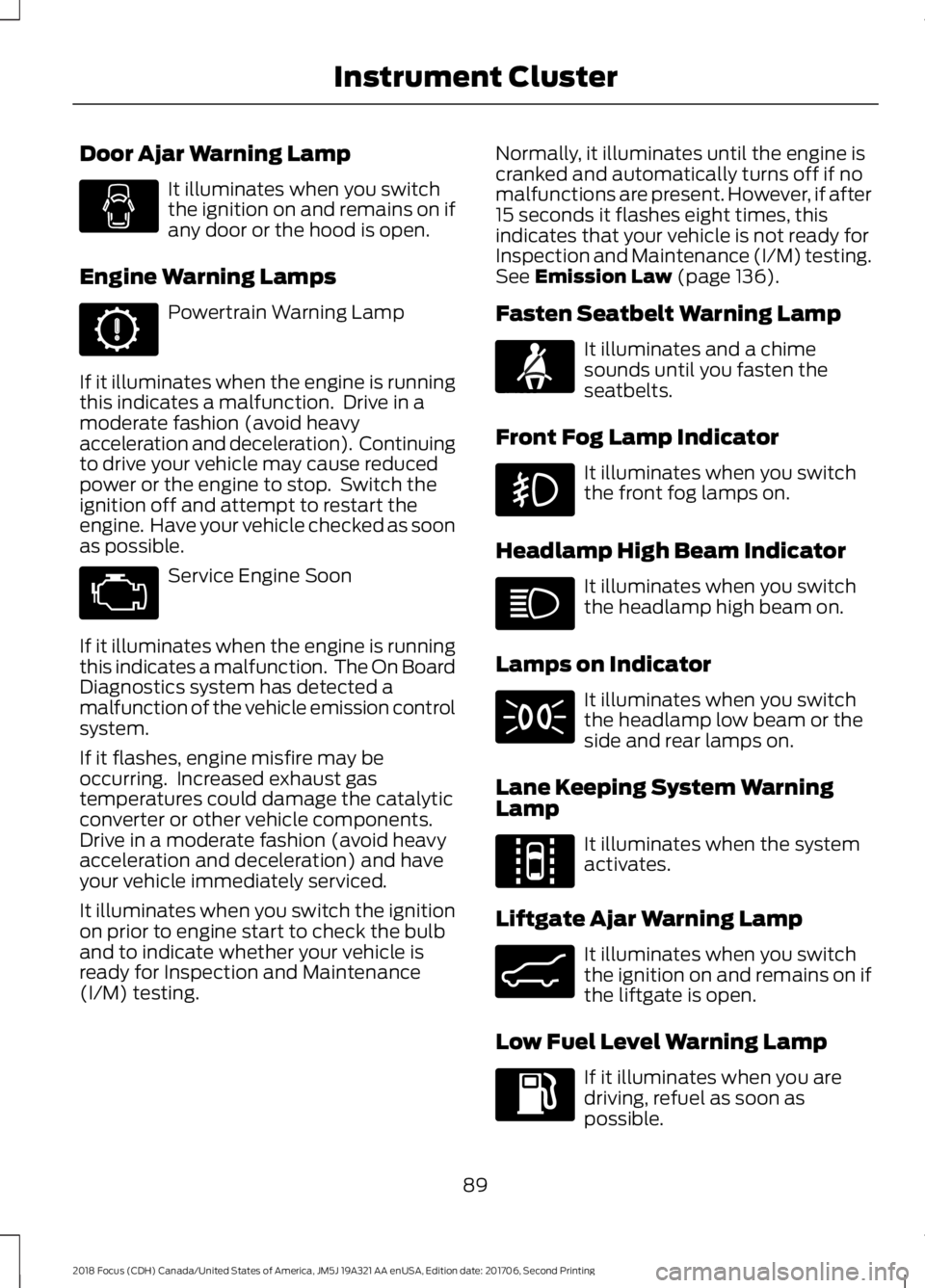
It illuminates when you switchthe ignition on and remains on ifany door or the hood is open.
Engine Warning Lamps
Powertrain Warning Lamp
If it illuminates when the engine is runningthis indicates a malfunction. Drive in amoderate fashion (avoid heavyacceleration and deceleration). Continuingto drive your vehicle may cause reducedpower or the engine to stop. Switch theignition off and attempt to restart theengine. Have your vehicle checked as soonas possible.
Service Engine Soon
If it illuminates when the engine is runningthis indicates a malfunction. The On BoardDiagnostics system has detected amalfunction of the vehicle emission controlsystem.
If it flashes, engine misfire may beoccurring. Increased exhaust gastemperatures could damage the catalyticconverter or other vehicle components.Drive in a moderate fashion (avoid heavyacceleration and deceleration) and haveyour vehicle immediately serviced.
It illuminates when you switch the ignitionon prior to engine start to check the bulband to indicate whether your vehicle isready for Inspection and Maintenance(I/M) testing.
Normally, it illuminates until the engine iscranked and automatically turns off if nomalfunctions are present. However, if after15 seconds it flashes eight times, thisindicates that your vehicle is not ready forInspection and Maintenance (I/M) testing.See Emission Law (page 136).
Fasten Seatbelt Warning Lamp
It illuminates and a chimesounds until you fasten theseatbelts.
Front Fog Lamp Indicator
It illuminates when you switchthe front fog lamps on.
Headlamp High Beam Indicator
It illuminates when you switchthe headlamp high beam on.
Lamps on Indicator
It illuminates when you switchthe headlamp low beam or theside and rear lamps on.
Lane Keeping System WarningLamp
It illuminates when the systemactivates.
Liftgate Ajar Warning Lamp
It illuminates when you switchthe ignition on and remains on ifthe liftgate is open.
Low Fuel Level Warning Lamp
If it illuminates when you aredriving, refuel as soon aspossible.
892018 Focus (CDH) Canada/United States of America, JM5J 19A321 AA enUSA, Edition date: 201706, Second PrintingInstrument Cluster E71880 E144813 E162453
Page 94 of 473
Parking Brake On Warning Chime
Sounds when you have left the parkingbrake on and drive your vehicle. If thewarning chime remains on after you havereleased the parking brake, have thesystem checked by an authorized dealerimmediately.
Low Fuel Minder
A low fuel reminder triggers at about 50miles (80 km). The low fuel warning lightwill light, a warning chime will sound anda pop up will be shown in the displayindicating the remaining distance to empty.You will also get a subsequent reminderat 20, 10 and 0 miles.
Fasten Safety Belt
Sounds as a reminder to fasten your safetybelt.
912018 Focus (CDH) Canada/United States of America, JM5J 19A321 AA enUSA, Edition date: 201706, Second PrintingInstrument Cluster
Page 103 of 473
Lighting
ActionMessage
Displays if a brake lamp bulb fails.Brake Lamp Bulb Fault
Displays if a low beam bulb fails.Low Beam Bulb Fault
Displays if an electrical malfunction occurs with the headlampsystem. Have your vehicle checked as soon as possible.Headlamp Fault ServiceRequired
Maintenance
ActionMessage
Displays when the engine oil life is depleted and your vehiclerequires an oil change.Oil Change Required
Displays if the brake fluid level is low or if there is a brakesystem fault.Brake Fluid Level LowService NowSee Brake Fluid Check (page 221).Have your vehicle immediately checked.
MyKey
ActionMessage
Displays when MyKey is active.MyKey Active DriveSafelySee MyKey™ (page 55).
Displays when a MyKey is in use and your vehicle speedapproaches a preset speed limit.MyKey Vehicle Near TopSpeed
Displays when a MyKey is in use and the MyKey speed limitis reached.MyKey Vehicle at TopSpeed
Displays when a MyKey is in use and the MyKey speed limitis reached.MyKey Check SpeedDrive Safely
Displays when a MyKey is in use and seatbelt reminder isactivated.MyKey Buckle Up toUnmute Audio
Displays when a MyKey is in use and the user tries to switchthe parking aid system off.MyKey Park Aid Cannotbe Deactivated
Displays when a MyKey is in use and the user tries to switchthe stability control system off.MyKey ESC Cannot beDeactivated
1002018 Focus (CDH) Canada/United States of America, JM5J 19A321 AA enUSA, Edition date: 201706, Second PrintingInformation Displays
Page 105 of 473
Seatbelt Reminder
ActionMessage
The system has detected a fault that requires service. Haveyour vehicle checked as soon as possible.Service Beltminder
Starting System
ActionMessage
Displays when you start your vehicle as a reminder to fullypress the brake pedal.Press Brake to Start
Displays if your vehicle fails to start.Cranking Time ExceededSee Starting and Stopping the Engine (page 119).
Steering System
ActionMessage
The system has detected a fault that requires service.Steering Loss StopSafelyHave your vehicle immediately checked.
You will continue to have full steering but will need to exertgreater force on the steering wheel. Have your vehiclechecked as soon as possible.
Steering Assist FaultService required
The system has detected a fault that requires service.Steering Fault ServiceNowHave your vehicle immediately checked.
Tire Pressure Monitoring System
ActionMessage
Displays if the tire pressure in one or more tires is below thecorrect pressure.Low Tire Pressure
See Tire Pressure Monitoring System (page 260).
The system has detected a fault that requires service. Haveyour vehicle checked as soon as possible.Tire Pressure MonitorFault
Displays if the system detects a fault with a tire pressuresensor or the spare tire is in use.Tire Pressure SensorFault
1022018 Focus (CDH) Canada/United States of America, JM5J 19A321 AA enUSA, Edition date: 201706, Second PrintingInformation Displays
Page 114 of 473
SITTING IN THE CORRECT
POSITION
WARNINGS
Do not recline the seatback too faras this can cause the occupant toslide under the seatbelt, resulting inserious injury in the event of a collision.
Always sit upright against yourseatback with your feet on the floor.
Do not place objects higher than thetop of the seat backrest. Failure tofollow this instruction could result inpersonal injury or death in the event of asudden stop or crash.
When you use them properly, the seat,head restraint, seatbelt and airbags willprovide optimum protection in the eventof a crash.
We recommend that you follow theseguidelines:
•Sit in an upright position with the baseof your spine as far back as possible.
•Do not recline the seat backrest morethan 30°.
•Adjust the head restraint so that thetop of it is level with the top of yourhead and as far forward as possible.Make sure that you remaincomfortable.
•Keep sufficient distance betweenyourself and the steering wheel. Werecommend a minimum of 10 in(25 cm) between your breastbone andthe airbag cover.
•Hold the steering wheel with your armsslightly bent.
•Bend your legs slightly so that you canpress the pedals fully.
•Position the shoulder strap of theseatbelt over the center of yourshoulder and position the lap straptightly across your hips.
Make sure that your driving position iscomfortable and that you can maintain fullcontrol of your vehicle.
HEAD RESTRAINTS
WARNINGS
To minimize the risk of neck injury inthe event of a crash, the driver andpassenger occupants should not sitin or operate the vehicle, until the headrestraint is placed in its proper position.The driver should never adjust the headrestraint while the vehicle is in motion.
The adjustable head restraint is asafety device. Whenever possible, itshould be installed and properlyadjusted when the seat is occupied. Failureto adjust the head restraint properly couldreduce its effectiveness during certainimpacts.
Install the head restraint properly tohelp minimize the risk of neck injuryin the event of a crash.
1112018 Focus (CDH) Canada/United States of America, JM5J 19A321 AA enUSA, Edition date: 201706, Second PrintingSeatsE68595
Page 116 of 473
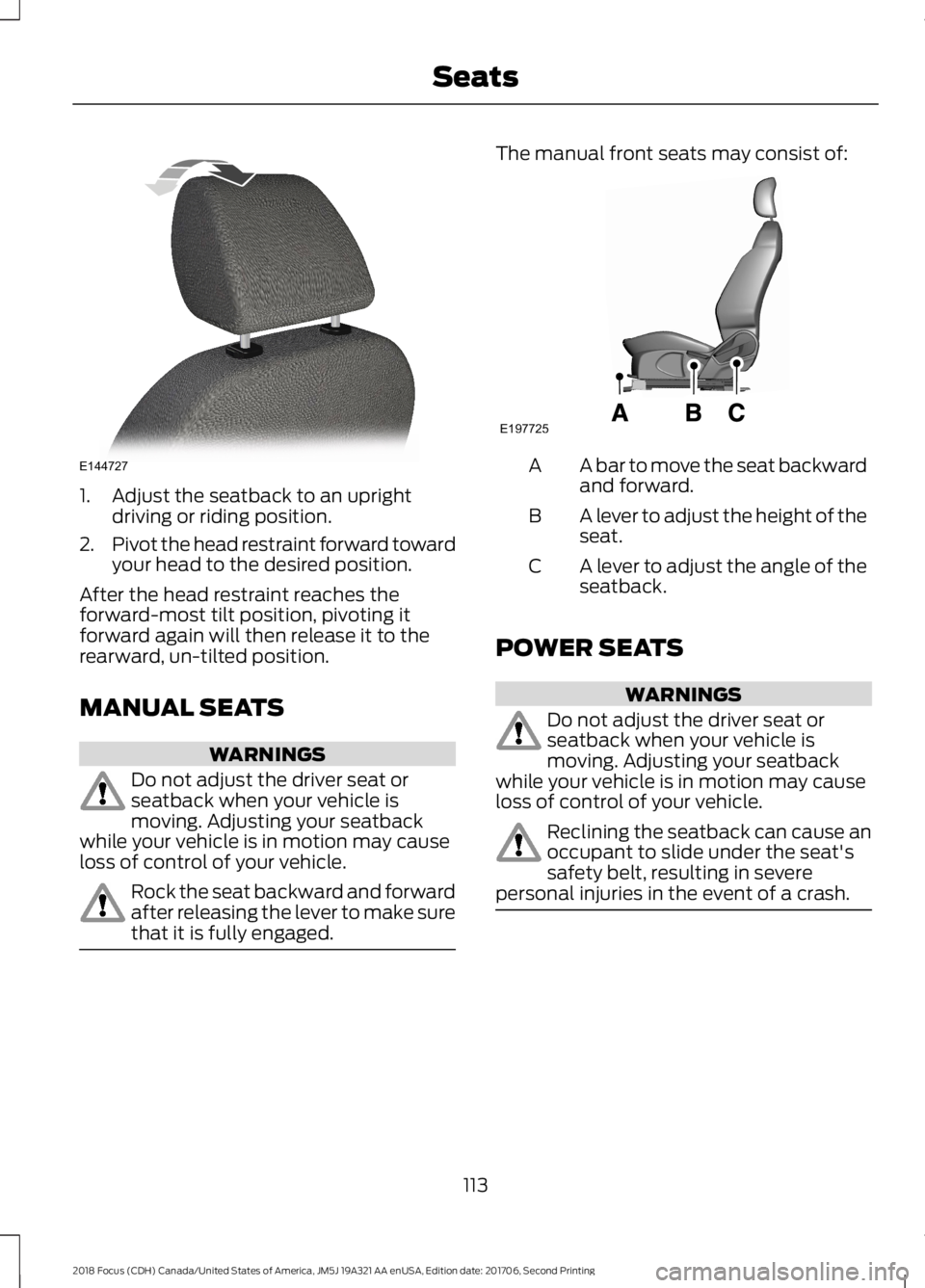
1.Adjust the seatback to an uprightdriving or riding position.
2.Pivot the head restraint forward towardyour head to the desired position.
After the head restraint reaches theforward-most tilt position, pivoting itforward again will then release it to therearward, un-tilted position.
MANUAL SEATS
WARNINGS
Do not adjust the driver seat orseatback when your vehicle ismoving. Adjusting your seatbackwhile your vehicle is in motion may causeloss of control of your vehicle.
Rock the seat backward and forwardafter releasing the lever to make surethat it is fully engaged.
The manual front seats may consist of:
A bar to move the seat backwardand forward.A
A lever to adjust the height of theseat.B
A lever to adjust the angle of theseatback.C
POWER SEATS
WARNINGS
Do not adjust the driver seat orseatback when your vehicle ismoving. Adjusting your seatbackwhile your vehicle is in motion may causeloss of control of your vehicle.
Reclining the seatback can cause anoccupant to slide under the seat'ssafety belt, resulting in severepersonal injuries in the event of a crash.
1132018 Focus (CDH) Canada/United States of America, JM5J 19A321 AA enUSA, Edition date: 201706, Second PrintingSeatsE144727 E197725
Page 118 of 473
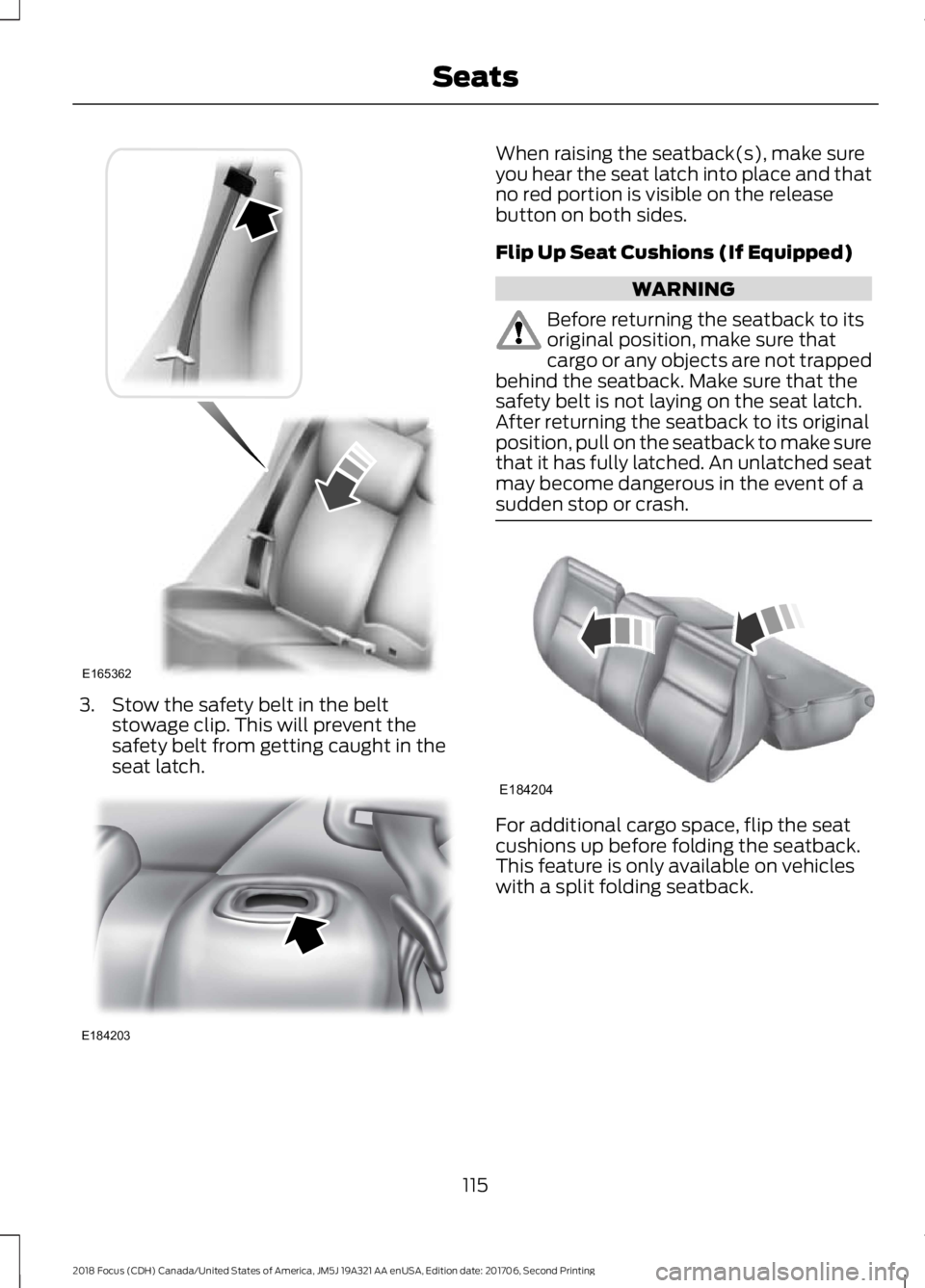
3.Stow the safety belt in the beltstowage clip. This will prevent thesafety belt from getting caught in theseat latch.
When raising the seatback(s), make sureyou hear the seat latch into place and thatno red portion is visible on the releasebutton on both sides.
Flip Up Seat Cushions (If Equipped)
WARNING
Before returning the seatback to itsoriginal position, make sure thatcargo or any objects are not trappedbehind the seatback. Make sure that thesafety belt is not laying on the seat latch.After returning the seatback to its originalposition, pull on the seatback to make surethat it has fully latched. An unlatched seatmay become dangerous in the event of asudden stop or crash.
For additional cargo space, flip the seatcushions up before folding the seatback.This feature is only available on vehicleswith a split folding seatback.
1152018 Focus (CDH) Canada/United States of America, JM5J 19A321 AA enUSA, Edition date: 201706, Second PrintingSeatsE165362 E184203 E184204