ESP FORD FOCUS 2018 Manual PDF
[x] Cancel search | Manufacturer: FORD, Model Year: 2018, Model line: FOCUS, Model: FORD FOCUS 2018Pages: 473, PDF Size: 39.91 MB
Page 393 of 473
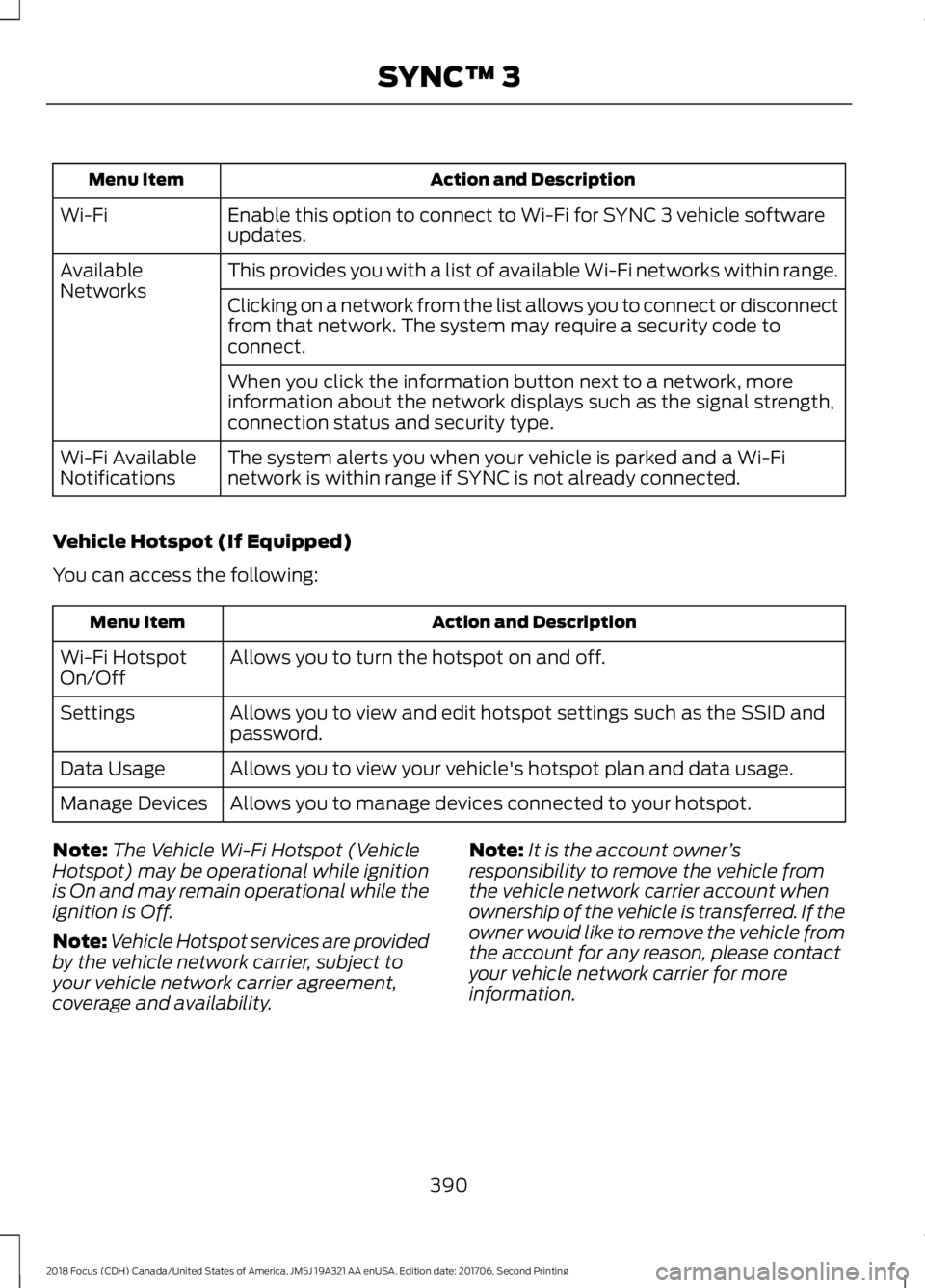
Action and DescriptionMenu Item
Enable this option to connect to Wi-Fi for SYNC 3 vehicle softwareupdates.Wi-Fi
This provides you with a list of available Wi-Fi networks within range.AvailableNetworksClicking on a network from the list allows you to connect or disconnectfrom that network. The system may require a security code toconnect.
When you click the information button next to a network, moreinformation about the network displays such as the signal strength,connection status and security type.
The system alerts you when your vehicle is parked and a Wi-Finetwork is within range if SYNC is not already connected.Wi-Fi AvailableNotifications
Vehicle Hotspot (If Equipped)
You can access the following:
Action and DescriptionMenu Item
Allows you to turn the hotspot on and off.Wi-Fi HotspotOn/Off
Allows you to view and edit hotspot settings such as the SSID andpassword.Settings
Allows you to view your vehicle's hotspot plan and data usage.Data Usage
Allows you to manage devices connected to your hotspot.Manage Devices
Note:The Vehicle Wi-Fi Hotspot (VehicleHotspot) may be operational while ignitionis On and may remain operational while theignition is Off.
Note:Vehicle Hotspot services are providedby the vehicle network carrier, subject toyour vehicle network carrier agreement,coverage and availability.
Note:It is the account owner’sresponsibility to remove the vehicle fromthe vehicle network carrier account whenownership of the vehicle is transferred. If theowner would like to remove the vehicle fromthe account for any reason, please contactyour vehicle network carrier for moreinformation.
3902018 Focus (CDH) Canada/United States of America, JM5J 19A321 AA enUSA, Edition date: 201706, Second PrintingSYNC™ 3
Page 394 of 473
Note:: Data, e.g. the Vehicle IdentificationNumber (VIN), SIM Card ID, and data planusage, is shared between Ford and thevehicle network carrier to provide theVehicle Hotspot service in accordance withyour vehicle network carrier agreement,coverage and availability, and may be usedto enable a seamless transition from an oldto new embedded modem and to confirmany updates are successfully delivered.
Note:: For your convenience data usagemay be available for monitoring underSettings but may not reflect actual orcurrent usage. The vehicle network carrieris responsible for providing informationabout your account. Please contact thevehicle network carrier for more information.
Note:: Ford may need to update operatingsystem software on your vehicle, includingsecurity updates and bug fixes, to keepconnected services current, like VehicleHotspot, without prior notice to you.
Note:If you do not have an active vehiclehotspot data plan, open your web browserand go to a website using the HTTP protocolto be automatically redirected to the vehiclenetwork carrier landing page where you canpurchase data. Websites using HTTPS willnot automatically redirect.
Ambient Lighting (If Equipped)
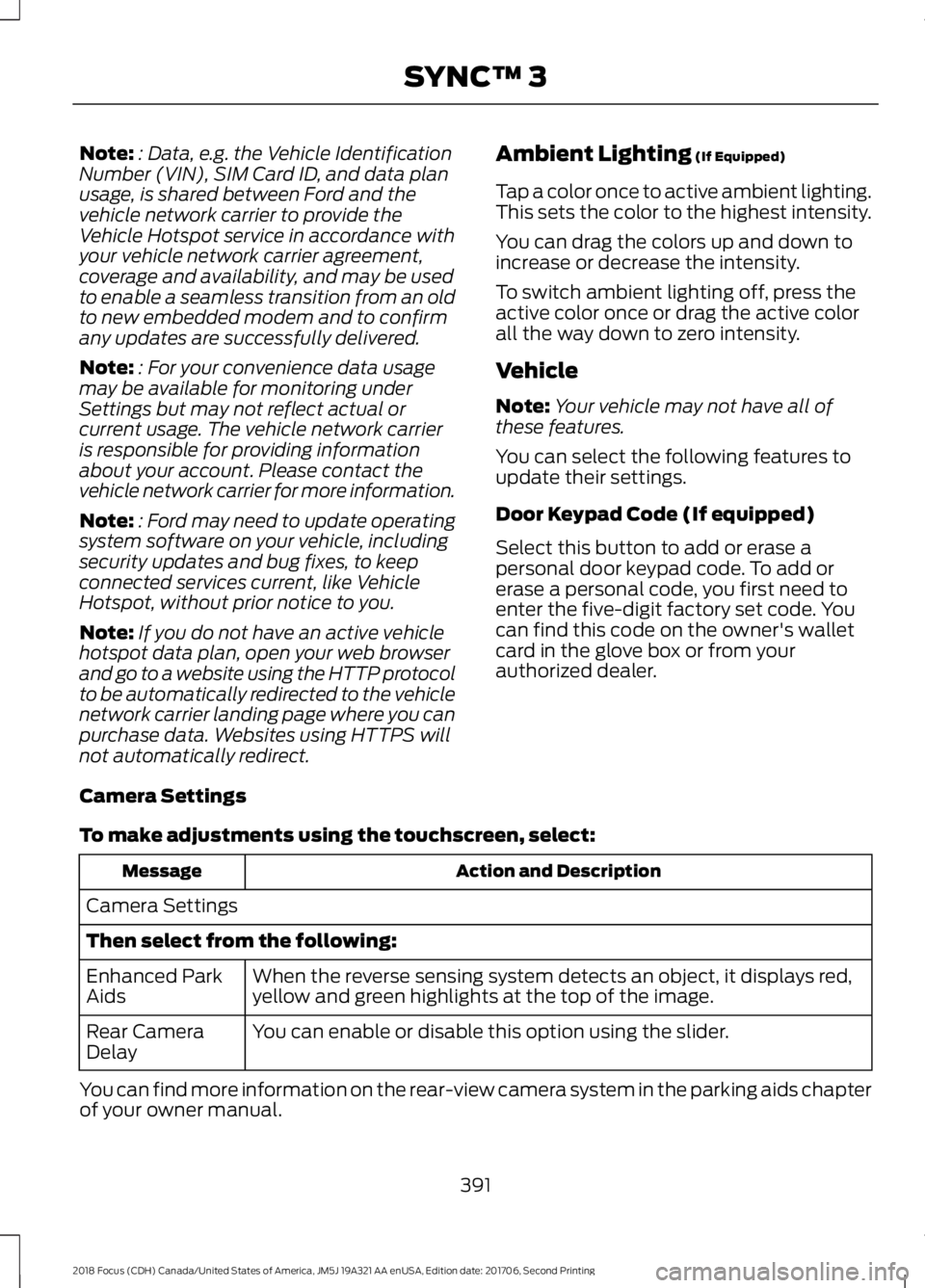
Tap a color once to active ambient lighting.This sets the color to the highest intensity.
You can drag the colors up and down toincrease or decrease the intensity.
To switch ambient lighting off, press theactive color once or drag the active colorall the way down to zero intensity.
Vehicle
Note:Your vehicle may not have all ofthese features.
You can select the following features toupdate their settings.
Door Keypad Code (If equipped)
Select this button to add or erase apersonal door keypad code. To add orerase a personal code, you first need toenter the five-digit factory set code. Youcan find this code on the owner's walletcard in the glove box or from yourauthorized dealer.
Camera Settings
To make adjustments using the touchscreen, select:
Action and DescriptionMessage
Camera Settings
Then select from the following:
When the reverse sensing system detects an object, it displays red,yellow and green highlights at the top of the image.Enhanced ParkAids
You can enable or disable this option using the slider.Rear CameraDelay
You can find more information on the rear-view camera system in the parking aids chapterof your owner manual.
3912018 Focus (CDH) Canada/United States of America, JM5J 19A321 AA enUSA, Edition date: 201706, Second PrintingSYNC™ 3
Page 401 of 473
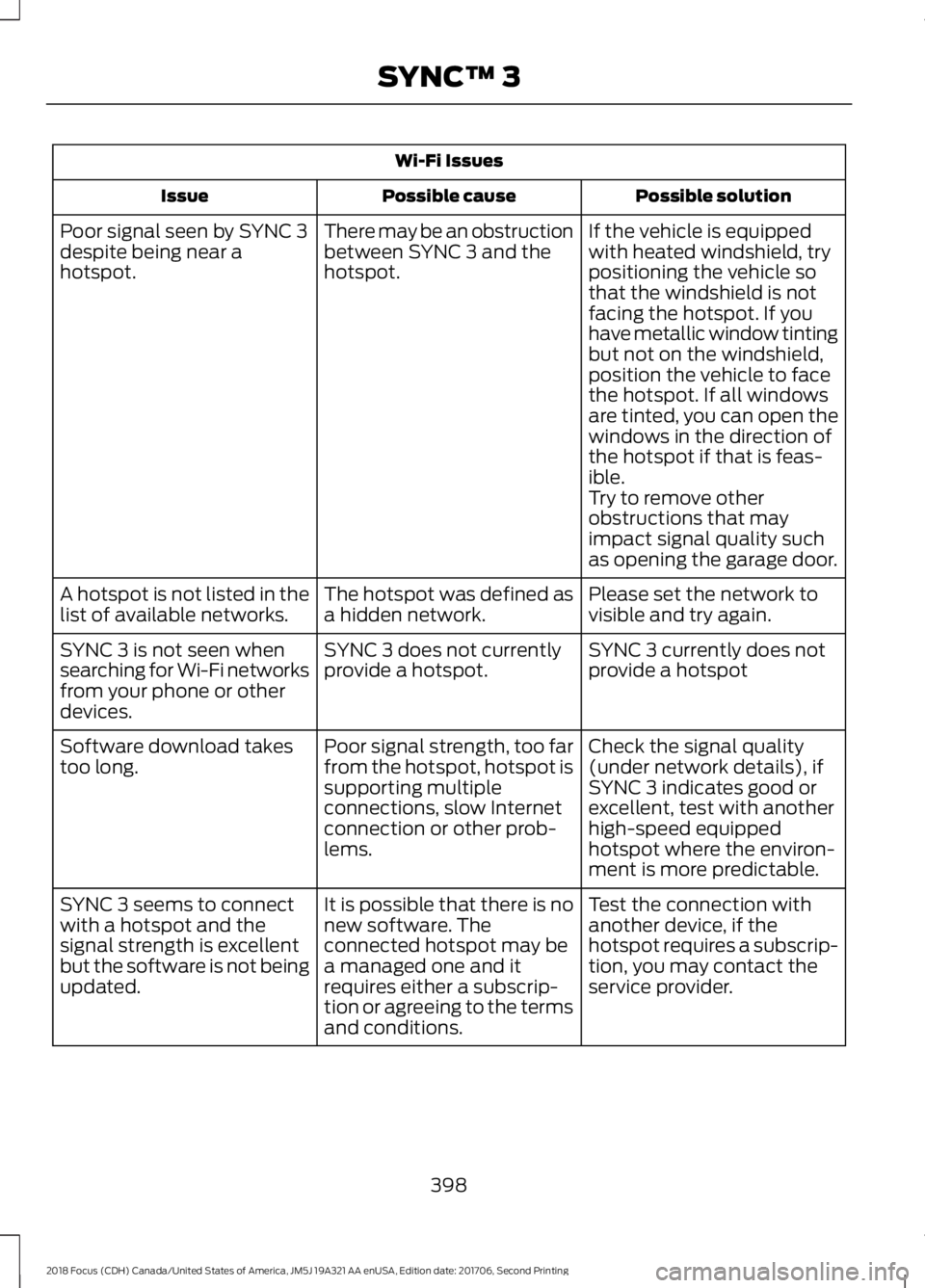
Wi-Fi Issues
Possible solutionPossible causeIssue
If the vehicle is equippedwith heated windshield, trypositioning the vehicle sothat the windshield is notfacing the hotspot. If youhave metallic window tinting
There may be an obstructionbetween SYNC 3 and thehotspot.
Poor signal seen by SYNC 3despite being near ahotspot.
but not on the windshield,position the vehicle to facethe hotspot. If all windowsare tinted, you can open thewindows in the direction ofthe hotspot if that is feas-ible.Try to remove otherobstructions that mayimpact signal quality suchas opening the garage door.
Please set the network tovisible and try again.The hotspot was defined asa hidden network.A hotspot is not listed in thelist of available networks.
SYNC 3 currently does notprovide a hotspotSYNC 3 does not currentlyprovide a hotspot.SYNC 3 is not seen whensearching for Wi-Fi networksfrom your phone or otherdevices.
Check the signal quality(under network details), ifSYNC 3 indicates good orexcellent, test with anotherhigh-speed equippedhotspot where the environ-ment is more predictable.
Poor signal strength, too farfrom the hotspot, hotspot issupporting multipleconnections, slow Internetconnection or other prob-lems.
Software download takestoo long.
Test the connection withanother device, if thehotspot requires a subscrip-tion, you may contact theservice provider.
It is possible that there is nonew software. Theconnected hotspot may bea managed one and itrequires either a subscrip-tion or agreeing to the termsand conditions.
SYNC 3 seems to connectwith a hotspot and thesignal strength is excellentbut the software is not beingupdated.
3982018 Focus (CDH) Canada/United States of America, JM5J 19A321 AA enUSA, Edition date: 201706, Second PrintingSYNC™ 3
Page 404 of 473
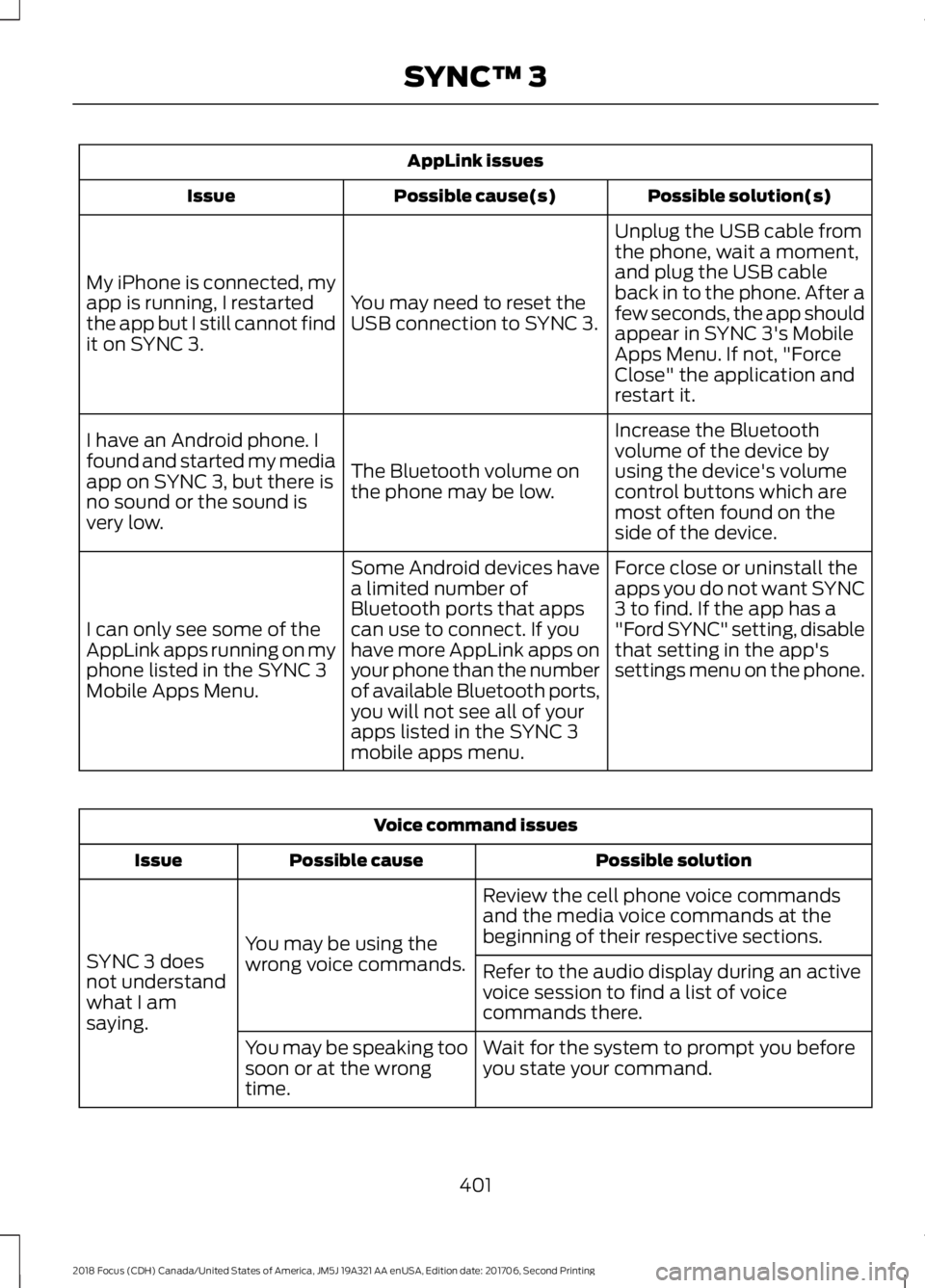
AppLink issues
Possible solution(s)Possible cause(s)Issue
Unplug the USB cable fromthe phone, wait a moment,and plug the USB cableback in to the phone. After afew seconds, the app shouldappear in SYNC 3's MobileApps Menu. If not, "ForceClose" the application andrestart it.
You may need to reset theUSB connection to SYNC 3.
My iPhone is connected, myapp is running, I restartedthe app but I still cannot findit on SYNC 3.
Increase the Bluetoothvolume of the device byusing the device's volumecontrol buttons which aremost often found on theside of the device.
The Bluetooth volume onthe phone may be low.
I have an Android phone. Ifound and started my mediaapp on SYNC 3, but there isno sound or the sound isvery low.
Force close or uninstall theapps you do not want SYNC3 to find. If the app has a"Ford SYNC" setting, disablethat setting in the app'ssettings menu on the phone.
Some Android devices havea limited number ofBluetooth ports that appscan use to connect. If youhave more AppLink apps onyour phone than the numberof available Bluetooth ports,you will not see all of yourapps listed in the SYNC 3mobile apps menu.
I can only see some of theAppLink apps running on myphone listed in the SYNC 3Mobile Apps Menu.
Voice command issues
Possible solutionPossible causeIssue
Review the cell phone voice commandsand the media voice commands at thebeginning of their respective sections.You may be using thewrong voice commands.SYNC 3 doesnot understandwhat I amsaying.
Refer to the audio display during an activevoice session to find a list of voicecommands there.
Wait for the system to prompt you beforeyou state your command.You may be speaking toosoon or at the wrongtime.
4012018 Focus (CDH) Canada/United States of America, JM5J 19A321 AA enUSA, Edition date: 201706, Second PrintingSYNC™ 3
Page 405 of 473
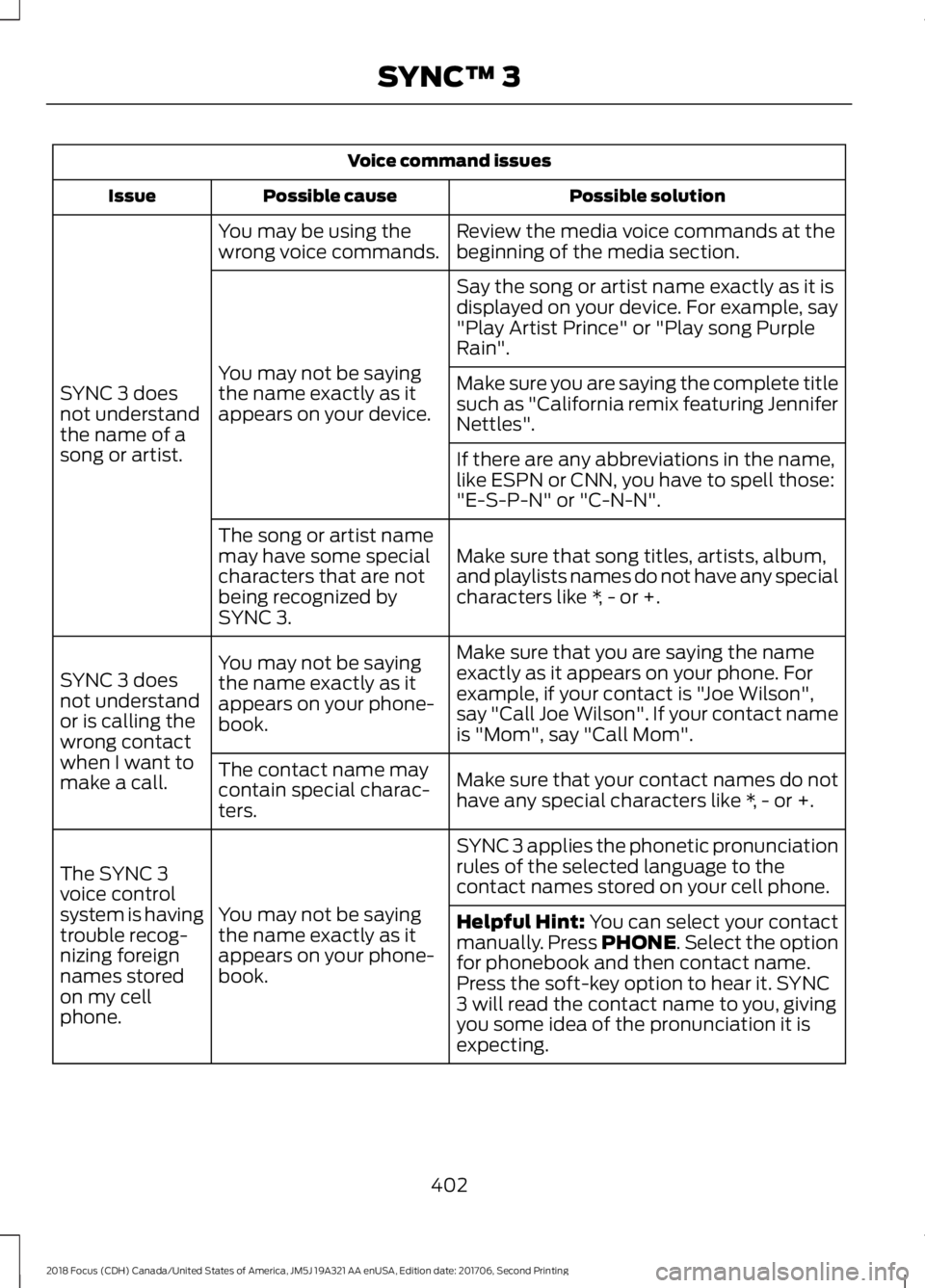
Voice command issues
Possible solutionPossible causeIssue
Review the media voice commands at thebeginning of the media section.You may be using thewrong voice commands.
SYNC 3 doesnot understandthe name of asong or artist.
Say the song or artist name exactly as it isdisplayed on your device. For example, say"Play Artist Prince" or "Play song PurpleRain".
You may not be sayingthe name exactly as itappears on your device.
Make sure you are saying the complete titlesuch as "California remix featuring JenniferNettles".
If there are any abbreviations in the name,like ESPN or CNN, you have to spell those:"E-S-P-N" or "C-N-N".
Make sure that song titles, artists, album,and playlists names do not have any specialcharacters like *, - or +.
The song or artist namemay have some specialcharacters that are notbeing recognized bySYNC 3.
Make sure that you are saying the nameexactly as it appears on your phone. Forexample, if your contact is "Joe Wilson",say "Call Joe Wilson". If your contact nameis "Mom", say "Call Mom".
You may not be sayingthe name exactly as itappears on your phone-book.
SYNC 3 doesnot understandor is calling thewrong contactwhen I want tomake a call.Make sure that your contact names do nothave any special characters like *, - or +.
The contact name maycontain special charac-ters.
SYNC 3 applies the phonetic pronunciationrules of the selected language to thecontact names stored on your cell phone.
You may not be sayingthe name exactly as itappears on your phone-book.
The SYNC 3voice controlsystem is havingtrouble recog-nizing foreignnames storedon my cellphone.
Helpful Hint: You can select your contactmanually. Press PHONE. Select the optionfor phonebook and then contact name.Press the soft-key option to hear it. SYNC3 will read the contact name to you, givingyou some idea of the pronunciation it isexpecting.
4022018 Focus (CDH) Canada/United States of America, JM5J 19A321 AA enUSA, Edition date: 201706, Second PrintingSYNC™ 3
Page 412 of 473
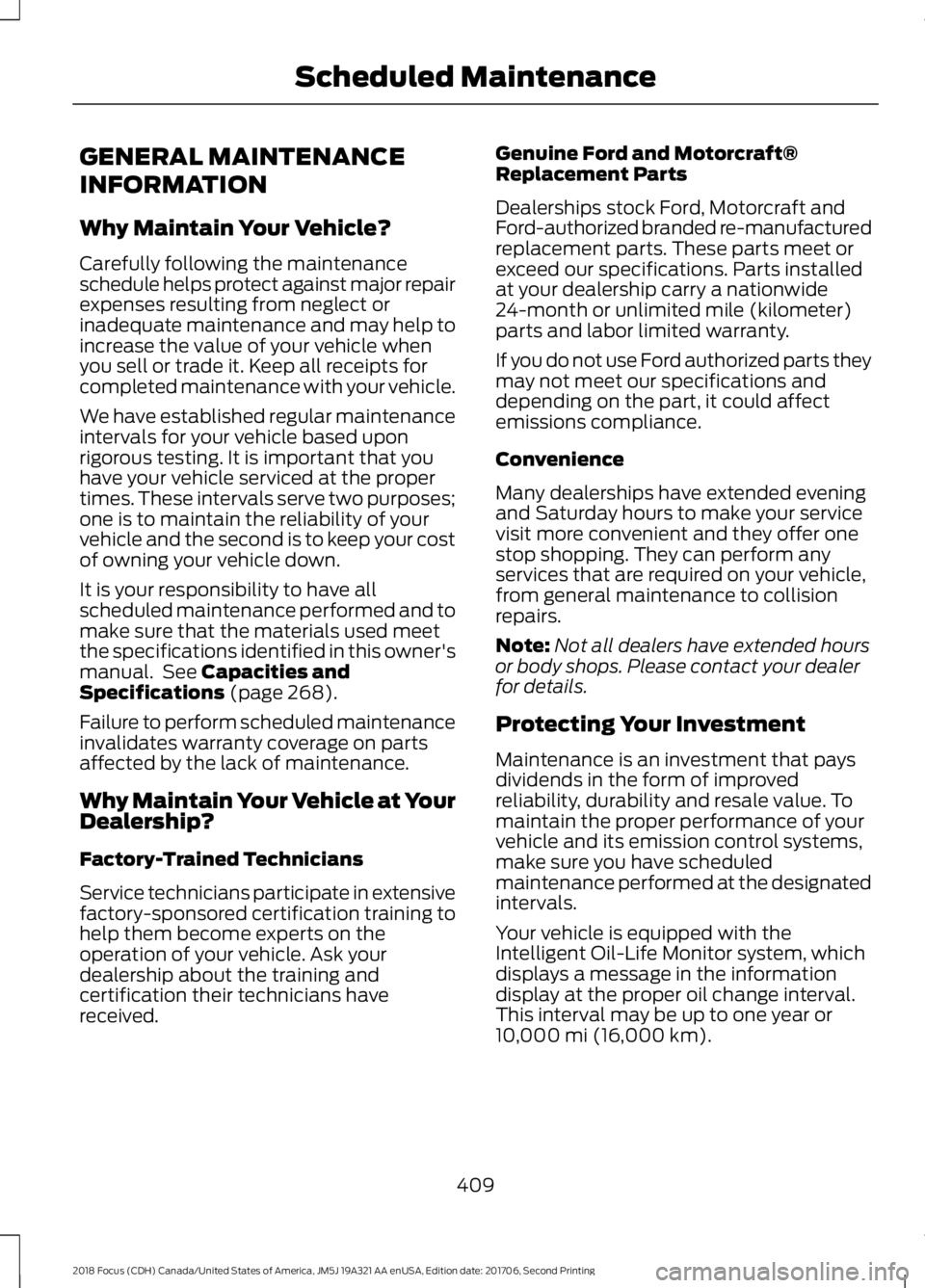
GENERAL MAINTENANCE
INFORMATION
Why Maintain Your Vehicle?
Carefully following the maintenanceschedule helps protect against major repairexpenses resulting from neglect orinadequate maintenance and may help toincrease the value of your vehicle whenyou sell or trade it. Keep all receipts forcompleted maintenance with your vehicle.
We have established regular maintenanceintervals for your vehicle based uponrigorous testing. It is important that youhave your vehicle serviced at the propertimes. These intervals serve two purposes;one is to maintain the reliability of yourvehicle and the second is to keep your costof owning your vehicle down.
It is your responsibility to have allscheduled maintenance performed and tomake sure that the materials used meetthe specifications identified in this owner'smanual. See Capacities andSpecifications (page 268).
Failure to perform scheduled maintenanceinvalidates warranty coverage on partsaffected by the lack of maintenance.
Why Maintain Your Vehicle at YourDealership?
Factory-Trained Technicians
Service technicians participate in extensivefactory-sponsored certification training tohelp them become experts on theoperation of your vehicle. Ask yourdealership about the training andcertification their technicians havereceived.
Genuine Ford and Motorcraft®Replacement Parts
Dealerships stock Ford, Motorcraft andFord-authorized branded re-manufacturedreplacement parts. These parts meet orexceed our specifications. Parts installedat your dealership carry a nationwide24-month or unlimited mile (kilometer)parts and labor limited warranty.
If you do not use Ford authorized parts theymay not meet our specifications anddepending on the part, it could affectemissions compliance.
Convenience
Many dealerships have extended eveningand Saturday hours to make your servicevisit more convenient and they offer onestop shopping. They can perform anyservices that are required on your vehicle,from general maintenance to collisionrepairs.
Note:Not all dealers have extended hoursor body shops. Please contact your dealerfor details.
Protecting Your Investment
Maintenance is an investment that paysdividends in the form of improvedreliability, durability and resale value. Tomaintain the proper performance of yourvehicle and its emission control systems,make sure you have scheduledmaintenance performed at the designatedintervals.
Your vehicle is equipped with theIntelligent Oil-Life Monitor system, whichdisplays a message in the informationdisplay at the proper oil change interval.This interval may be up to one year or10,000 mi (16,000 km).
4092018 Focus (CDH) Canada/United States of America, JM5J 19A321 AA enUSA, Edition date: 201706, Second PrintingScheduled Maintenance
Page 419 of 473
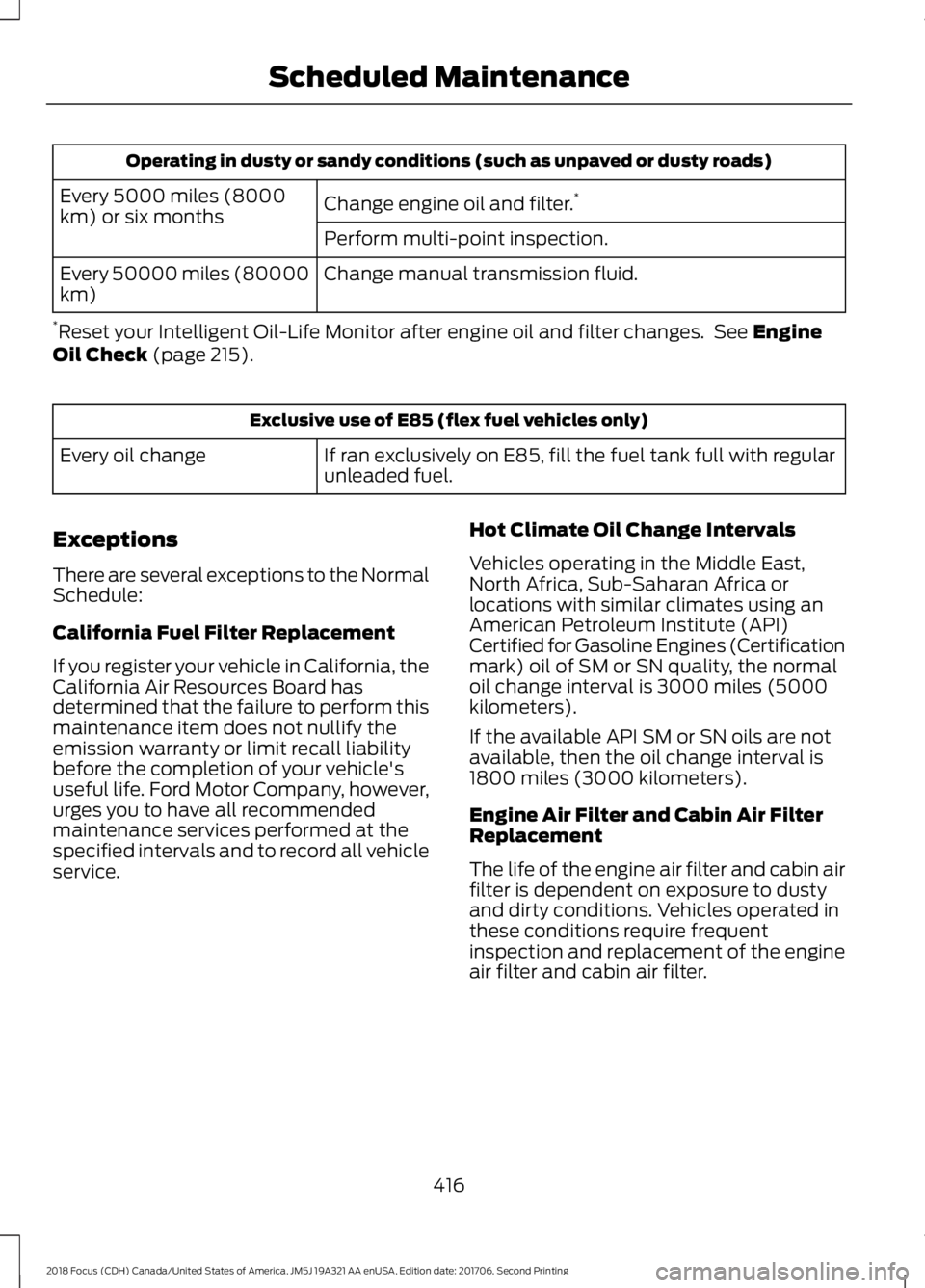
Operating in dusty or sandy conditions (such as unpaved or dusty roads)
Change engine oil and filter.*Every 5000 miles (8000km) or six monthsPerform multi-point inspection.
Change manual transmission fluid.Every 50000 miles (80000km)
*Reset your Intelligent Oil-Life Monitor after engine oil and filter changes. See EngineOil Check (page 215).
Exclusive use of E85 (flex fuel vehicles only)
If ran exclusively on E85, fill the fuel tank full with regularunleaded fuel.Every oil change
Exceptions
There are several exceptions to the NormalSchedule:
California Fuel Filter Replacement
If you register your vehicle in California, theCalifornia Air Resources Board hasdetermined that the failure to perform thismaintenance item does not nullify theemission warranty or limit recall liabilitybefore the completion of your vehicle'suseful life. Ford Motor Company, however,urges you to have all recommendedmaintenance services performed at thespecified intervals and to record all vehicleservice.
Hot Climate Oil Change Intervals
Vehicles operating in the Middle East,North Africa, Sub-Saharan Africa orlocations with similar climates using anAmerican Petroleum Institute (API)Certified for Gasoline Engines (Certificationmark) oil of SM or SN quality, the normaloil change interval is 3000 miles (5000kilometers).
If the available API SM or SN oils are notavailable, then the oil change interval is1800 miles (3000 kilometers).
Engine Air Filter and Cabin Air FilterReplacement
The life of the engine air filter and cabin airfilter is dependent on exposure to dustyand dirty conditions. Vehicles operated inthese conditions require frequentinspection and replacement of the engineair filter and cabin air filter.
4162018 Focus (CDH) Canada/United States of America, JM5J 19A321 AA enUSA, Edition date: 201706, Second PrintingScheduled Maintenance
Page 430 of 473
ELECTROMAGNETIC
COMPATIBILITY
WARNINGS
Do not place objects or mountequipment on or near the airbagcover, on the side of the seatbacks(of the front seats), or in front seat areasthat may come into contact with adeploying airbag. Failure to follow theseinstructions may increase the risk ofpersonal injury in the event of a crash.
Do not fasten antenna cables tooriginal vehicle wiring, fuel pipes andbrake pipes.
Keep antenna and power cables atleast 4 in (10 cm) from any electronicmodules and airbags.
Note:We test and certify your vehicle tomeet electromagnetic compatibilitylegislation (UNECE Regulation 10 or otherapplicable local requirements). It is yourresponsibility to make sure that anyequipment an authorized dealer installs onyour vehicle complies with applicable locallegislation and other requirements.
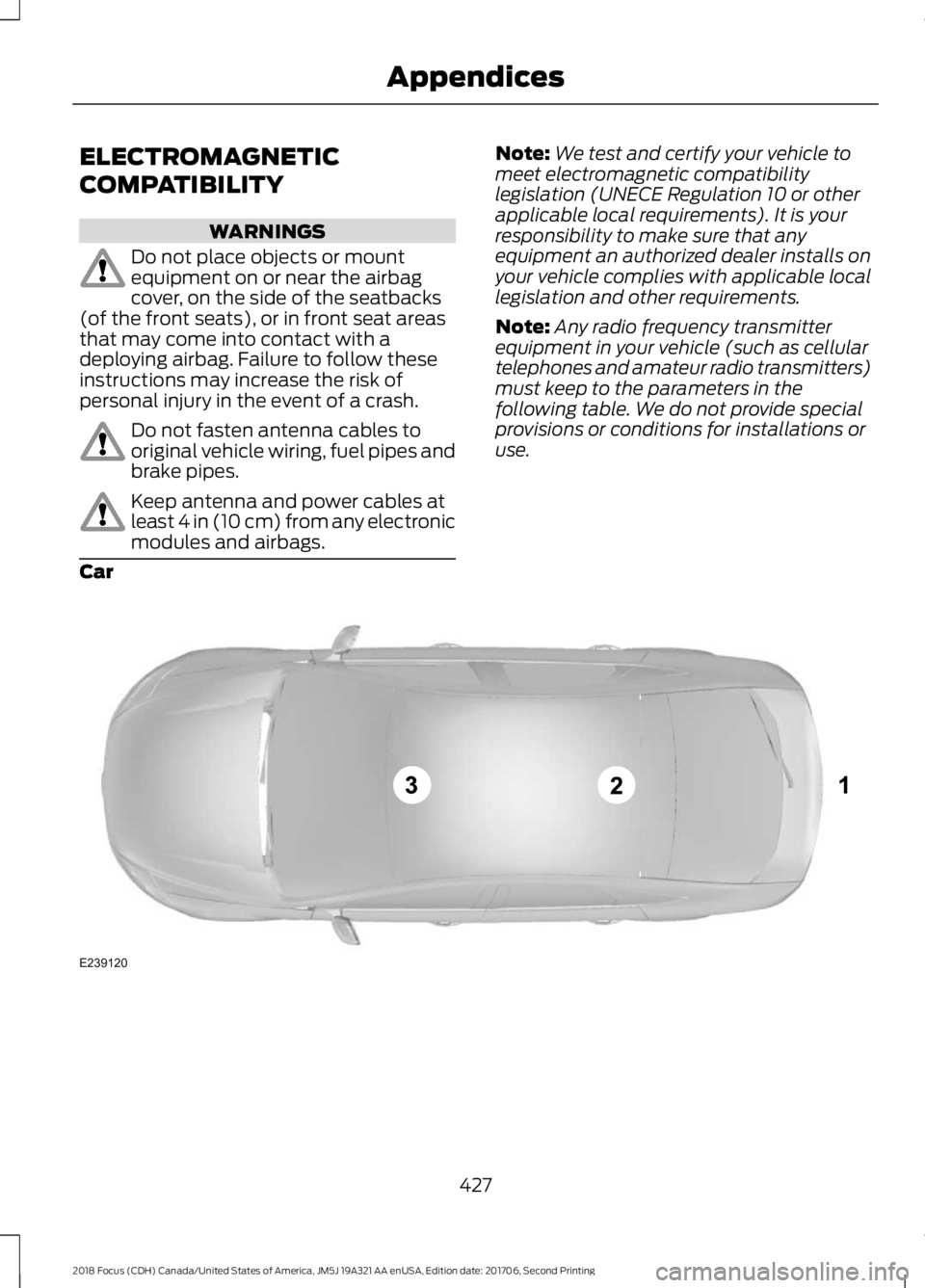
Note:Any radio frequency transmitterequipment in your vehicle (such as cellulartelephones and amateur radio transmitters)must keep to the parameters in thefollowing table. We do not provide specialprovisions or conditions for installations oruse.
Car
4272018 Focus (CDH) Canada/United States of America, JM5J 19A321 AA enUSA, Edition date: 201706, Second PrintingAppendicesE239120
Page 433 of 473
IF YOU DO NOT AGREE TO THIS ENDUSER LICENSE AGREEMENT ("EULA")DO NOT USE THE DEVICES OR COPYTHE SOFTWARE. ANY USE OF THESOFTWARE, INCLUDING BUT NOTLIMITED TO USE ON THE DEVICES,WILL CONSTITUTE YOUR AGREEMENTTO THIS EULA (OR RATIFICATION OFANY PREVIOUS CONSENT).
GRANT OF SOFTWARE LICENSE: ThisEULA grants you the following license:
•You may use the SOFTWARE asinstalled on the DEVICES and asotherwise interfacing with systemsand/or services provide by or throughFORD MOTOR COMPANY or its thirdparty software and service providers.
Description of Other Rights andLimitations
•Speech Recognition: If theSOFTWARE includes speechrecognition component(s), you shouldunderstand that speech recognition isan inherently statistical process andthat recognition errors are inherent inthe process. Neither FORD MOTOR
COMPANY nor its suppliers shall beliable for any damages arising out oferrors in the speech recognitionprocess. It is your responsibility tomonitor any speech recognitionfunctions included in the system.
•Limitations on Reverse Engineering,Decompilation and Disassembly:You may not reverse engineer,decompile, translate, disassemble orattempt to discover any source codeor underlying ideas or algorithms of theSOFTWARE nor permit others toreverse engineer, decompile ordisassemble the SOFTWARE, exceptand only to the extent that such activityis expressly permitted by applicablelaw notwithstanding this limitation orto the extent as may be permitted bythe licensing terms governing use ofany open source components includedwith the SOFTWARE.
•Limitations on Distributing,Copying, Modifying and CreatingDerivative Works: You may notdistribute, copy, make modificationsto or create derivative works based onthe SOFTWARE, except and only to theextent that such activity is expresslypermitted by applicable lawnotwithstanding this limitation or tothe extent as may be permitted by thelicensing terms governing use of anyopen source components included withthe SOFTWARE.
•Single EULA: The end userdocumentation for the DEVICES andrelated systems and services maycontain multiple EULAs, such asmultiple translations and/or multiplemedia versions (e.g., in the userdocumentation and in the software).Even if you receive multiple EULAs, youare licensed to use only one (1) copy ofthe SOFTWARE.
4302018 Focus (CDH) Canada/United States of America, JM5J 19A321 AA enUSA, Edition date: 201706, Second PrintingAppendices
Page 434 of 473
•SOFTWARE Transfer: You maypermanently transfer your rights underthis EULA only as part of a sale ortransfer of the DEVICES, provided youretain no copies, you transfer all of theSOFTWARE (including all componentparts, the media and printed materials,any upgrades, and, if applicable, theCertificate(s) of Authenticity), and therecipient agrees to the terms of thisEULA. If the SOFTWARE is an upgrade,any transfer must include all priorversions of the SOFTWARE.
•Termination: Without prejudice to anyother rights, FORD MOTOR COMPANYmay terminate this EULA if you fail tocomply with the terms and conditionsof this EULA.
•Internet-Based ServicesComponents: The SOFTWARE maycontain components that enable andfacilitate the use of certainInternet-based services. Youacknowledge and agree that FORDMOTOR COMPANY, third partysoftware and service suppliers, itsaffiliates and/or its designated agentmay automatically check the versionof the SOFTWARE and/or itscomponents that you are utilizing andmay provide upgrades or supplementsto the SOFTWARE that may beautomatically downloaded to yourDEVICES.
•Additional Software/Services: TheSOFTWARE may permit FORD MOTORCOMPANY, third party software andservice suppliers, its affiliates and/orits designated agent to provide or makeavailable to you SOFTWARE updates,supplements, add-on components, orInternet-based services componentsof the SOFTWARE after the date youobtain your initial copy of theSOFTWARE ("SupplementalComponents".) SOFTWARE updatesmay cause you to incur additional
charges from your wireless serviceprovider. If FORD MOTOR COMPANYor third party software and servicessuppliers provide or make available toyou Supplemental Components andno other EULA terms are providedalong with the SupplementalComponents, then the terms of thisEULA shall apply. FORD MOTORCOMPANY, its affiliates and/or itsdesignated agent reserve the right todiscontinue without liability anyInternet-based services provided toyou or made available to you throughthe use of the SOFTWARE.
•Links to Third Party Sites: TheSOFTWARE may provide you with theability to link to third party sites. Thethird party sites are not under thecontrol of FORD MOTOR COMPANY,its affiliates and/or its designatedagent. Neither FORD MOTORCOMPANY nor its affiliates nor itsdesignated agent are responsible for(I) the contents of any third party sites,any links contained in third party sites,or any changes or updates to thirdparty sites, or (ii) webcasting or anyother form of transmission receivedfrom any third party sites. If theSOFTWARE provides links to thirdparty sites, those links are provided toyou only as a convenience, and theinclusion of any link does not imply anendorsement of the third party site byFORD MOTOR COMPANY, its affiliatesand/or its designated agent.
•Obligation to Drive Responsibly:You recognize your obligation to driveresponsibly and keep attention on theroad. You will read and abide with theDEVICES operating instructionsparticularly as they pertain to safetyand you agree to assume any riskassociated with the use of theDEVICES.
4312018 Focus (CDH) Canada/United States of America, JM5J 19A321 AA enUSA, Edition date: 201706, Second PrintingAppendices