climate control FORD FOCUS ELECTRIC 2014 3.G User Guide
[x] Cancel search | Manufacturer: FORD, Model Year: 2014, Model line: FOCUS ELECTRIC, Model: FORD FOCUS ELECTRIC 2014 3.GPages: 403, PDF Size: 6.42 MB
Page 124 of 403
Side Window Defogging or Defrosting
1. Select air distribution through the floor vent.
2. Select air distribution through the panel vent.
3. SelectA/C.
4. Adjust the temperature control to maintain comfort.
5. Set the fan to the highest speed.
6. Direct the outer instrument panel vents toward the side windows.
To increase airflow to the outer instrument panel vents, close the vents
located in the middle of the instrument panel.
Improving Vehicle Drive Range
Your vehicle is equipped with a high voltage electric compressor and a
high voltage electric heater. You can increase your driving range by
minimizing the amount of energy expended to cool or heat the interior
during the drive.
•Pre-condition the interior temperature during vehicle charging
reduces the battery energy use on the interior comfort and improves
range. SeeConvenience charging with MyFord mobilein the
Charging Your High Voltage Batterychapter.Note:Your vehicle
may not always reach the set cabin temperature due to charging and
ambient temperature conditions.
•Hot and cold temperatures make your vehicle use more energy to
achieve and maintain a comfortable interior temperature. Park the
vehicle in the shade or in a parking structure when hot, and in a
garage when cold.
•Consider partially opening a window (or windows) to let fresh air
circulate, if weather conditions permit. You can achieve maximum
energy savings by switching the climate system off. Do this only if
conditions exist for safe vehicle operation.
•Reduce fan speed.
•Set the AUTO temperature a couple degrees cooler than you normally
do on cold days and a couple degrees higher on hot days. Use the
heated seats on cold days to increase interior comfort.
•Switch the air conditioning off in mild temperatures or low humidity
conditions.
Climate Control123
2014 Focus Electric Vehicle(fob)
Owners Guide gf, 1st Printing, May 2013
USA(fus)
Page 125 of 403
•Defrost mode automatically turns the air conditioning on to
dehumidify the air, and cannot be switched off. If defogging or
defrosting is not necessary, select a non-defrost mode and disengage
air conditioning to extend vehicle range.
•Air conditioning and heating functions are automatically switched off
(unless in defrost mode) when driving distance to empty is zero miles
(zero km). The interior fan continues to operate, however.
HEATED WINDOWS AND MIRRORS
Rear Window Defroster
Note:The vehicle must be in Ready to Drive for this feature to work.
The rear window defroster control is located on the climate control panel
and works to clear the rear window of fog and thin ice.
Press
to turn the rear window defroster on. An indicator light on
the control will illuminate when active. The rear window defroster turns
off automatically after a predetermined amount of time, if the system
detects a low battery condition or when you turn the ignition off or to
the accessory position. You can turn off the rear window defroster
manually, at any time, by pressing the control again.
If your vehicle is equipped with both rear defroster and heated mirrors,
the same control will activate both. Refer toHeated outside mirrorsin
theDriver Controlschapter.
Do not use razor blades or other sharp objects to clean the inside
of the rear window or to remove decals from the inside of the
rear window. This may cause damage to the heated grid lines.
Your warranty does not cover this damage.
Heated Exterior Mirror
Note:Do not remove ice from the mirrors with a scraper or attempt to
readjust the mirror glass that has frozen in place. These actions could
cause damage to the glass and mirrors.
Note:Do not clean the housing or glass of any mirror with harsh
abrasives, fuel or other petroleum-based cleaning products.
Both mirrors heat to remove ice, mist and fog when you turn the rear
window defroster on.
124Climate Control
2014 Focus Electric Vehicle(fob)
Owners Guide gf, 1st Printing, May 2013
USA(fus)
Page 126 of 403
CABIN AIR FILTER
Note:Make sure you have a cabin air filter installed at all times. This
prevents foreign objects from entering the system. Running the system
without a filter in place could result in degradation or damage to the
system.
Your cabin air filter is located under the instrument panel in the
passenger footwell area. The particulate filtration system reduces the
concentration of airborne particles such as dust, spores and pollen in
the air supplied to the interior of your vehicle. The particulate filtration
system gives you and your passengers the following benefits:
•It improves your driving comfort by reducing particle concentration.
•It improves the interior compartment cleanliness.
•It protects the climate control components from particle deposits.
Replace the filter at regular intervals. See theScheduled Maintenance
chapter.
For more information about your filter, see an authorized dealer.
REMOTE START CLIMATE OPERATION
The climate control system adjusts the cabin temperature during remote
start.
You cannot adjust the system during remote start operation. Turn the
ignition on to return the system to its previous settings. You can now
make adjustments. You will need to turn certain vehicle-dependent
features back on, such as:
•heated seats
•heated mirrors
•heated rear window.
You can adjust the settings using the information display controls.
See theInformation Displayschapter.
Climate Control125
2014 Focus Electric Vehicle(fob)
Owners Guide gf, 1st Printing, May 2013
USA(fus)
Page 127 of 403
Automatic Climate Systems
Automatic Settings
You can set the climate control to operate in AUTO mode through the
information display setting: Remote Start > Climate Control > Heater –
A/C > Auto. The climate control system automatically sets the interior
temperature to 72°F (22°C).
In hot weather, the system is set to 72°F (22°C).
In moderate weather, the system either heats or cools (based on
previous settings). The rear defroster, heated mirrors and heated seats
do not automatically turn on.
In cold weather, the system is set to 72°F (22°C). The rear defroster and
heated mirrors automatically turn on.
Last Settings
You can set the climate control to operate using the last climate control
settings through the information display setting: Remote Start > Climate
Control > Heater – A/C > Last Settings. The climate control system
automatically uses the settings last selected before you turned off the
vehicle.
Heated and Cooled Devices
The climate control system controls other heated and cooled devices
inside the vehicle. You can switch these devices on (if available, and
selected toAUTOin the information displays) during remote start.
Heated devices usually switch on during cold weather, and cooled
devices during hot weather.
126Climate Control
2014 Focus Electric Vehicle(fob)
Owners Guide gf, 1st Printing, May 2013
USA(fus)
Page 205 of 403
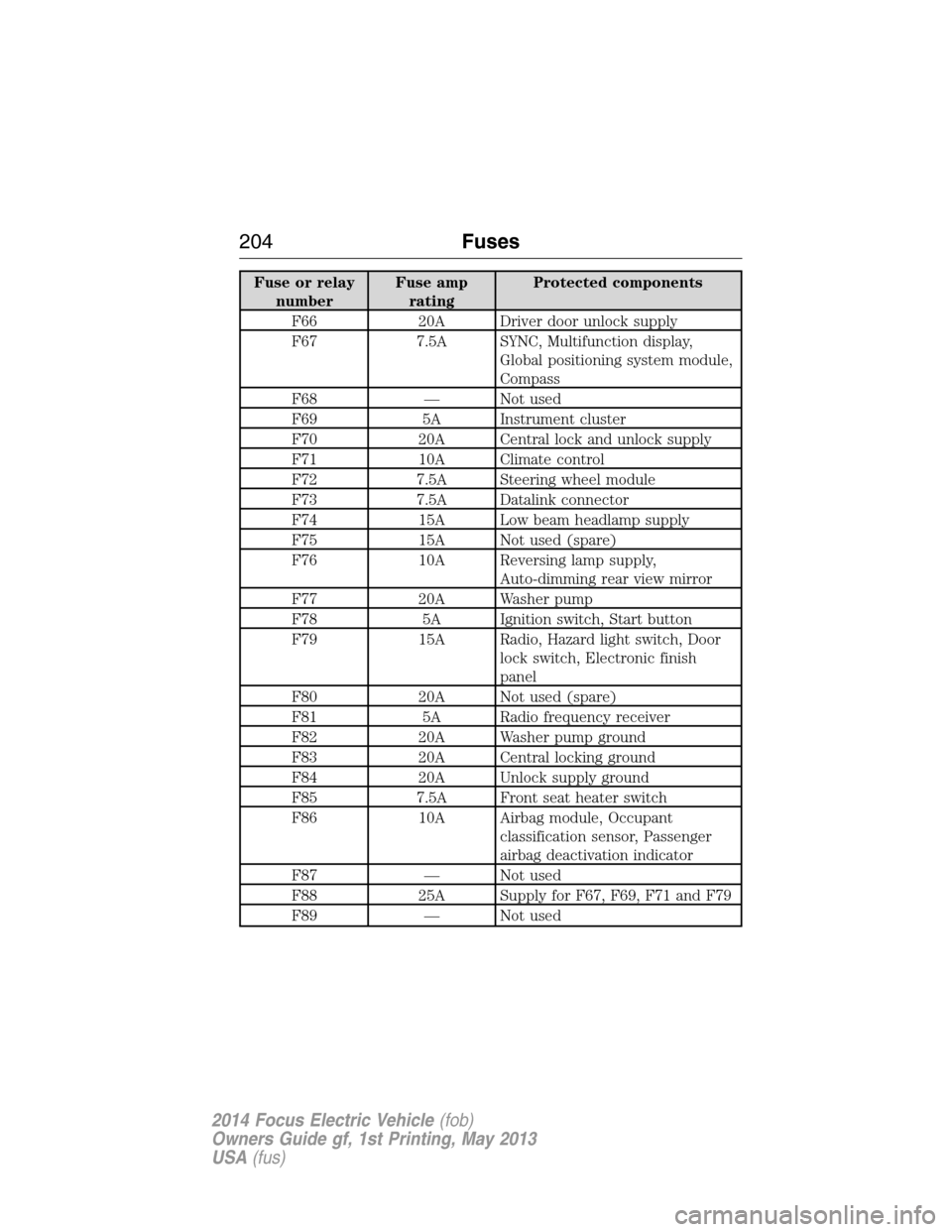
Fuse or relay
numberFuse amp
ratingProtected components
F66 20A Driver door unlock supply
F67 7.5A SYNC, Multifunction display,
Global positioning system module,
Compass
F68 — Not used
F69 5A Instrument cluster
F70 20A Central lock and unlock supply
F71 10A Climate control
F72 7.5A Steering wheel module
F73 7.5A Datalink connector
F74 15A Low beam headlamp supply
F75 15A Not used (spare)
F76 10A Reversing lamp supply,
Auto-dimming rear view mirror
F77 20A Washer pump
F78 5A Ignition switch, Start button
F79 15A Radio, Hazard light switch, Door
lock switch, Electronic finish
panel
F80 20A Not used (spare)
F81 5A Radio frequency receiver
F82 20A Washer pump ground
F83 20A Central locking ground
F84 20A Unlock supply ground
F85 7.5A Front seat heater switch
F86 10A Airbag module, Occupant
classification sensor, Passenger
airbag deactivation indicator
F87 — Not used
F88 25A Supply for F67, F69, F71 and F79
F89 — Not used
204Fuses
2014 Focus Electric Vehicle(fob)
Owners Guide gf, 1st Printing, May 2013
USA(fus)
Page 238 of 403
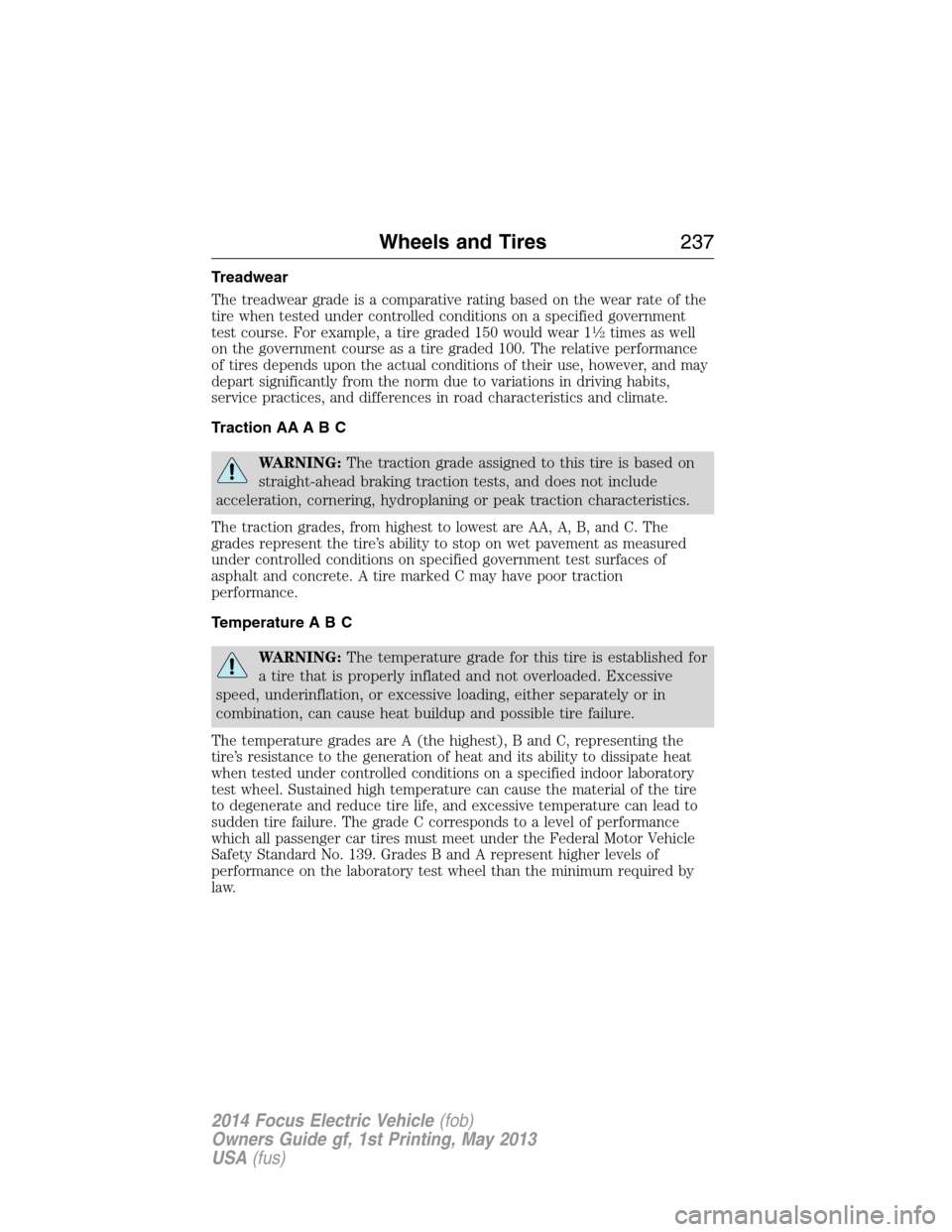
Treadwear
The treadwear grade is a comparative rating based on the wear rate of the
tire when tested under controlled conditions on a specified government
test course. For example, a tire graded 150 would wear 1
12times as well
on the government course as a tire graded 100. The relative performance
of tires depends upon the actual conditions of their use, however, and may
depart significantly from the norm due to variations in driving habits,
service practices, and differences in road characteristics and climate.
Traction AA A B C
WARNING:The traction grade assigned to this tire is based on
straight-ahead braking traction tests, and does not include
acceleration, cornering, hydroplaning or peak traction characteristics.
The traction grades, from highest to lowest are AA, A, B, and C. The
grades represent the tire’s ability to stop on wet pavement as measured
under controlled conditions on specified government test surfaces of
asphalt and concrete. A tire marked C may have poor traction
performance.
Temperature A B C
WARNING:The temperature grade for this tire is established for
a tire that is properly inflated and not overloaded. Excessive
speed, underinflation, or excessive loading, either separately or in
combination, can cause heat buildup and possible tire failure.
The temperature grades are A (the highest), B and C, representing the
tire’s resistance to the generation of heat and its ability to dissipate heat
when tested under controlled conditions on a specified indoor laboratory
test wheel. Sustained high temperature can cause the material of the tire
to degenerate and reduce tire life, and excessive temperature can lead to
sudden tire failure. The grade C corresponds to a level of performance
which all passenger car tires must meet under the Federal Motor Vehicle
Safety Standard No. 139. Grades B and A represent higher levels of
performance on the laboratory test wheel than the minimum required by
law.
Wheels and Tires237
2014 Focus Electric Vehicle(fob)
Owners Guide gf, 1st Printing, May 2013
USA(fus)
Page 280 of 403
INTRODUCTION
WARNING:Driving while distracted can result in loss of vehicle
control, crash and injury. We strongly recommend that you use
extreme caution when using any device that may take your focus off
the road. Your primary responsibility is the safe operation of your
vehicle. We recommend against the use of any hand-held device while
driving and encourage the use of voice-operated systems when possible.
Make sure you are aware of all applicable local laws that may affect the
use of electronic devices while driving.
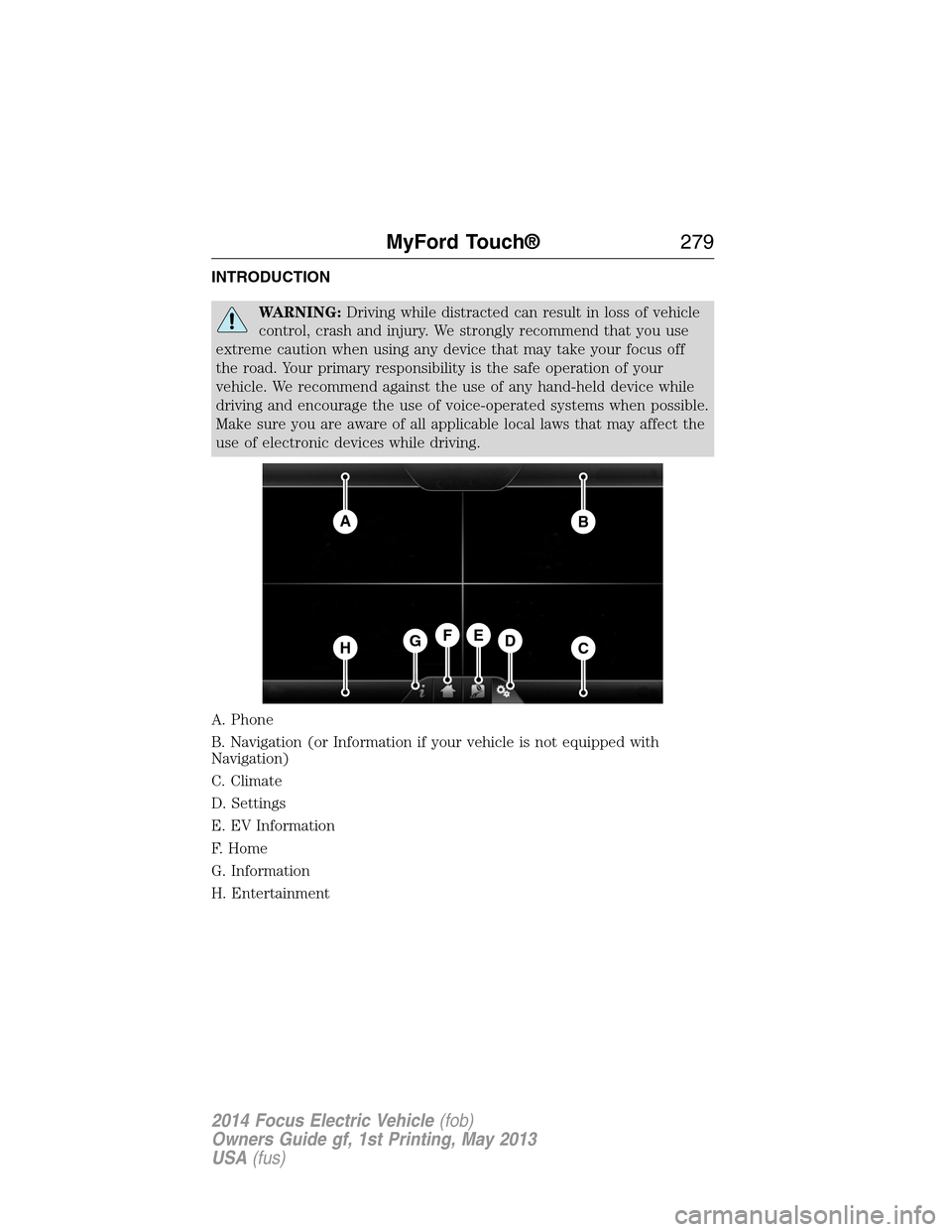
A. Phone
B. Navigation (or Information if your vehicle is not equipped with
Navigation)
C. Climate
D. Settings
E. EV Information
F. Home
G. Information
H. Entertainment
AB
HCDGEF
MyFord Touch®279
2014 Focus Electric Vehicle(fob)
Owners Guide gf, 1st Printing, May 2013
USA(fus)
Page 281 of 403
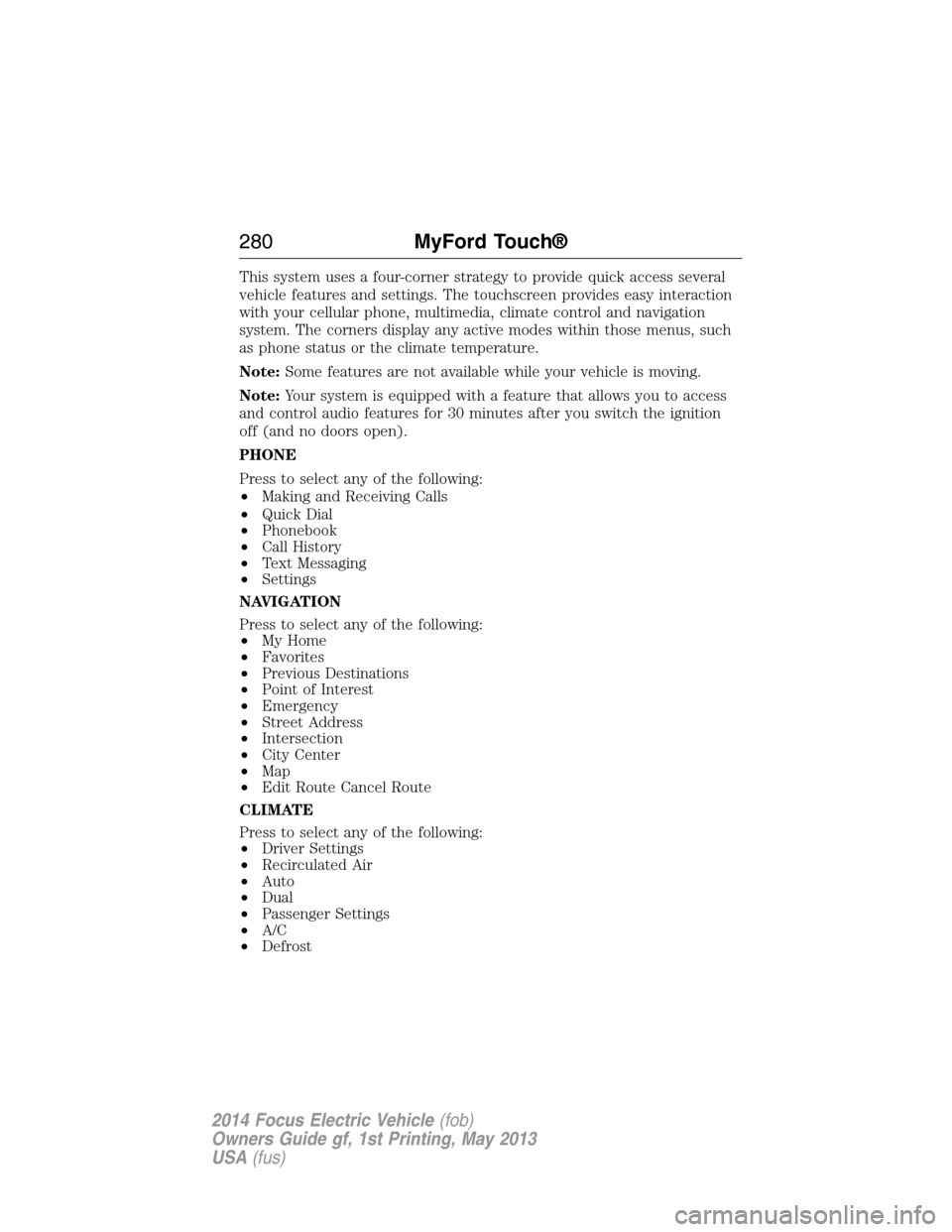
This system uses a four-corner strategy to provide quick access several
vehicle features and settings. The touchscreen provides easy interaction
with your cellular phone, multimedia, climate control and navigation
system. The corners display any active modes within those menus, such
as phone status or the climate temperature.
Note:Some features are not available while your vehicle is moving.
Note:Your system is equipped with a feature that allows you to access
and control audio features for 30 minutes after you switch the ignition
off (and no doors open).
PHONE
Press to select any of the following:
•Making and Receiving Calls
•Quick Dial
•Phonebook
•Call History
•Text Messaging
•Settings
NAVIGATION
Press to select any of the following:
•My Home
•Favorites
•Previous Destinations
•Point of Interest
•Emergency
•Street Address
•Intersection
•City Center
•Map
•Edit Route Cancel Route
CLIMATE
Press to select any of the following:
•Driver Settings
•Recirculated Air
•Auto
•Dual
•Passenger Settings
•A/C
•Defrost
280MyFord Touch®
2014 Focus Electric Vehicle(fob)
Owners Guide gf, 1st Printing, May 2013
USA(fus)
Page 283 of 403
Using the Touch-sensitive Controls on Your System
To turn a feature on and off, just touch the graphic with your finger.
To get the best performance from the touch-sensitive controls:
•Do not press hard on the controls. They are sensitive to light touch.
•Use your bare finger to touch the center of a touch-control graphic.
Touching off-center of the graphic may affect operation of a nearby
control.
•Make sure your hands are clean and dry.
•
Keep metal and other conductive material away from the surface of the
touchscreen as this may cause electronic interference (for example,
inadvertently turning on a feature other than the one you meant to
turn on).
Depending on your vehicle and option package, you may also have these
controls on your bezel:
•Power: Switch the media or climate features off and on.
•VOL:Control the volume of playing media.
•Fan: Control the speed of the climate system fan.
•Seek and Tune buttons: Use as you normally would in media modes.
•Eject: Eject a CD from the entertainment system.
•SOURCE:Touch the word repeatedly to see all available media
modes. The screen does not change, but you see the media change in
the lower left status bar.
•SOUND:Touch the word to access the Sound menu where you can
adjust settings such as: Bass, Treble, Midrange, Balance and Fade,
THX Deep Note Demo, DSP (Digital Signal Processing), Occupancy
Mode and Speed Compensated Volume. (Your vehicle may not have
all of these sound options.)
•Hazard flasher: Switch the hazard flashers off and on.
Cleaning the Touchscreen Display
Use a clean, soft cloth such as one used for cleaning glasses. If dirt or
fingerprints are still visible, apply a small amount of alcohol to the cloth.
Do not pour or spray alcohol onto the display. Do not use detergent or
any type of solvent to clean the display.
282MyFord Touch®
2014 Focus Electric Vehicle(fob)
Owners Guide gf, 1st Printing, May 2013
USA(fus)
Page 290 of 403
•Speak naturally, without long pauses between words.
•At any time, you can interrupt the system while it is speaking by
pressing the voice icon.
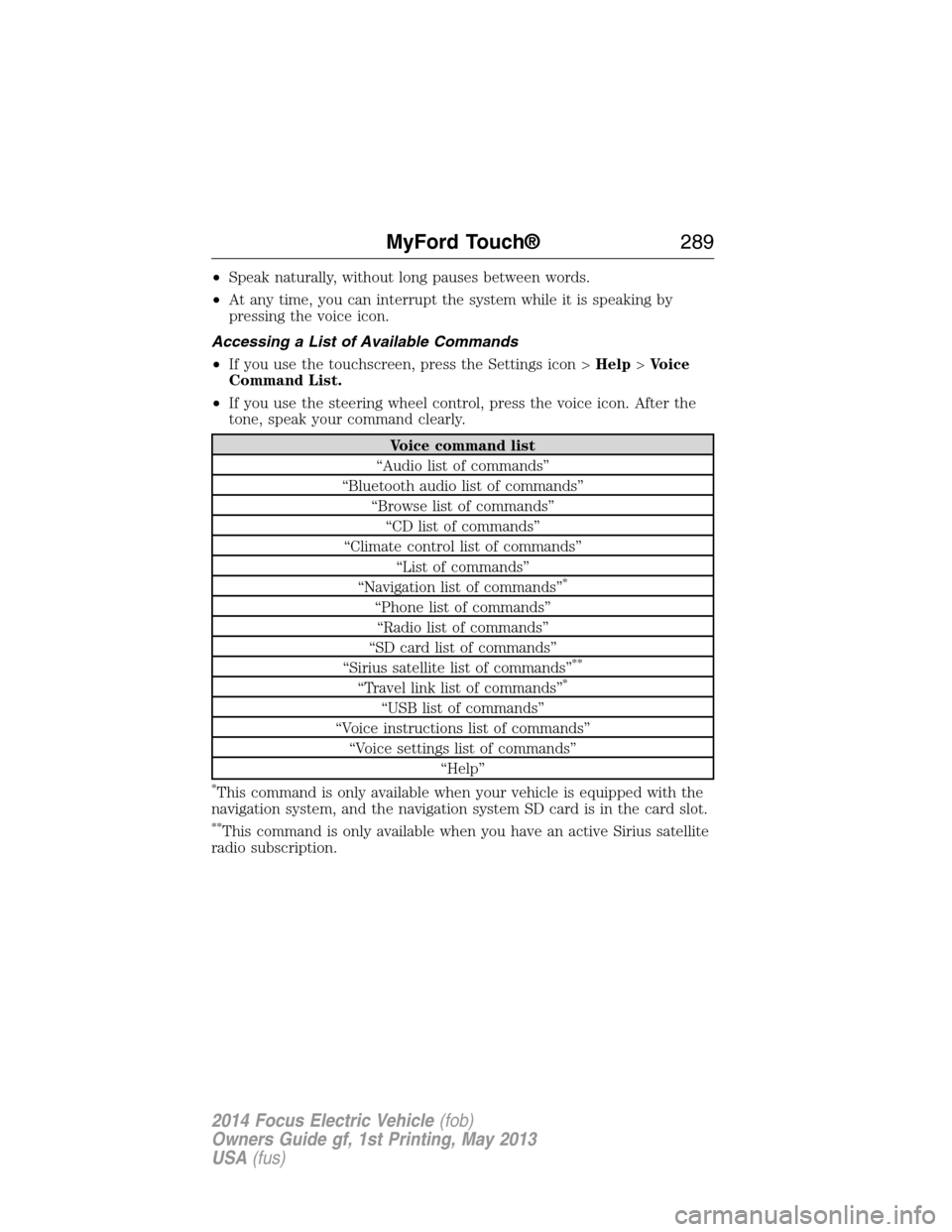
Accessing a List of Available Commands
•If you use the touchscreen, press the Settings icon >Help>Voice
Command List.
•If you use the steering wheel control, press the voice icon. After the
tone, speak your command clearly.
Voice command list
“Audio list of commands”
“Bluetooth audio list of commands”
“Browse list of commands”
“CD list of commands”
“Climate control list of commands”
“List of commands”
“Navigation list of commands”
*
“Phone list of commands”
“Radio list of commands”
“SD card list of commands”
“Sirius satellite list of commands”
**
“Travel link list of commands”*
“USB list of commands”
“Voice instructions list of commands”
“Voice settings list of commands”
“Help”
*This command is only available when your vehicle is equipped with the
navigation system, and the navigation system SD card is in the card slot.
**This command is only available when you have an active Sirius satellite
radio subscription.
MyFord Touch®289
2014 Focus Electric Vehicle(fob)
Owners Guide gf, 1st Printing, May 2013
USA(fus)