ECO mode FORD FOCUS ELECTRIC 2014 3.G Owner's Manual
[x] Cancel search | Manufacturer: FORD, Model Year: 2014, Model line: FOCUS ELECTRIC, Model: FORD FOCUS ELECTRIC 2014 3.GPages: 403, PDF Size: 6.42 MB
Page 353 of 403
To access Help using the voice commands, press the voice button, then,
after the tone, say “Help”. The system provides allowable voice
commands for the current mode.
CLIMATE
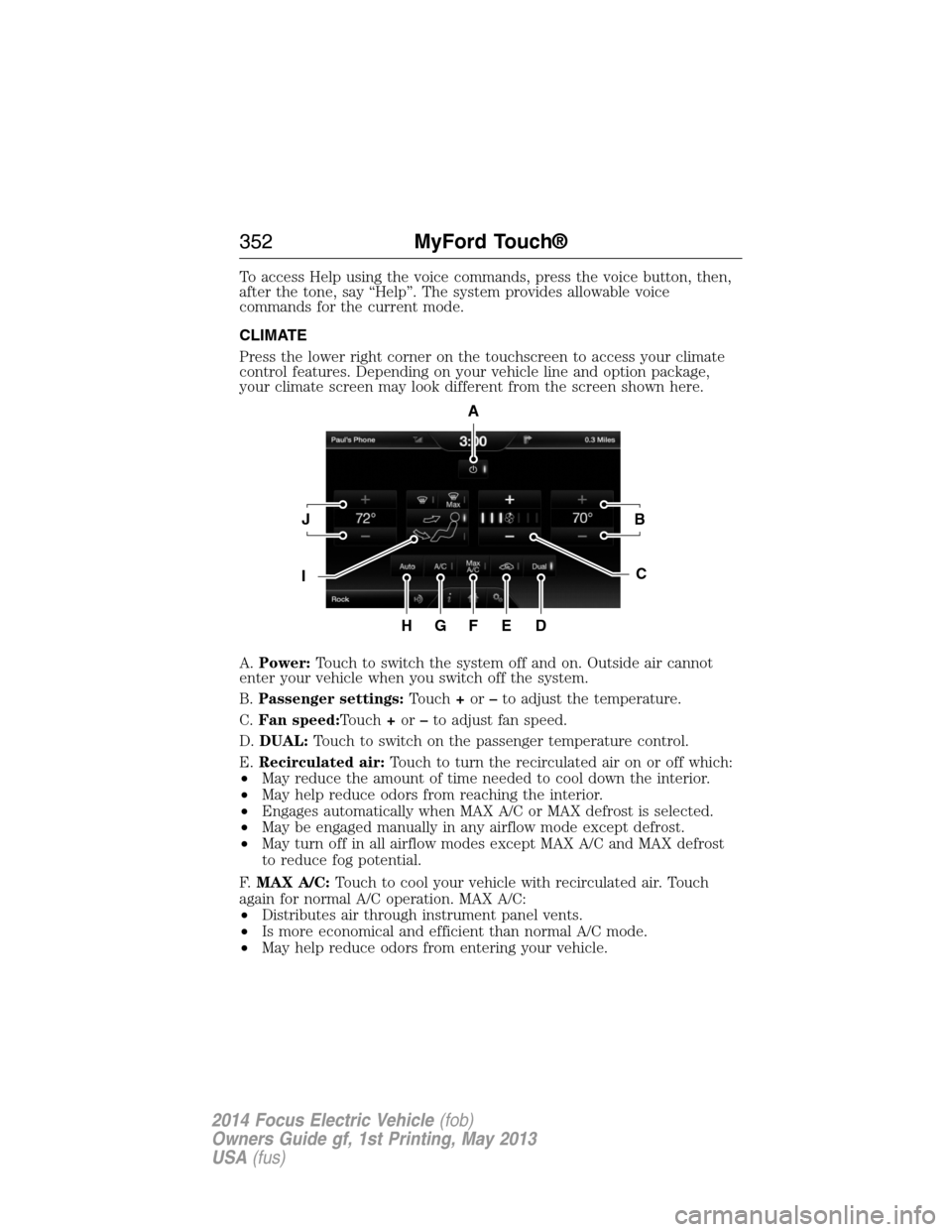
Press the lower right corner on the touchscreen to access your climate
control features. Depending on your vehicle line and option package,
your climate screen may look different from the screen shown here.
A.Power:Touch to switch the system off and on. Outside air cannot
enter your vehicle when you switch off the system.
B.Passenger settings:Touch+or–to adjust the temperature.
C.Fan speed:Touch+or–to adjust fan speed.
D.DUAL:Touch to switch on the passenger temperature control.
E.Recirculated air:Touch to turn the recirculated air on or off which:
•May reduce the amount of time needed to cool down the interior.
•May help reduce odors from reaching the interior.
•Engages automatically when MAX A/C or MAX defrost is selected.
•May be engaged manually in any airflow mode except defrost.
•May turn off in all airflow modes except MAX A/C and MAX defrost
to reduce fog potential.
F.MAX A/C:Touch to cool your vehicle with recirculated air. Touch
again for normal A/C operation. MAX A/C:
•Distributes air through instrument panel vents.
•Is more economical and efficient than normal A/C mode.
•May help reduce odors from entering your vehicle.
A
JB
IC
HGFED
352MyFord Touch®
2014 Focus Electric Vehicle(fob)
Owners Guide gf, 1st Printing, May 2013
USA(fus)
Page 363 of 403
Traffic Preferences
Avoid Traffic Problemsallows you to choose how you want the system
to handle traffic problems along your route.
•Automatic:Have the system reroute you to avoid traffic incidents
that develop and impact the current route. The system does not
provide a traffic alert notification.
•Manual:Have the system always provide a traffic alert notification
for traffic incidents along the planned route. You have a choice to
accept or ignore the notification before making the route deviation.
Traffic Alert Notificationallows you to choose have the system
display traffic alert notifications.
Other traffic alert features allows you to turn on certain, or all, traffic
icons on the map such as road work, incident, accidents and closed
roads. Scroll down to view all the different types of alerts. Turn these
featuresONorOFF.
Avoid Areas
Avoid Areasallows you to choose areas which you want the system to
avoid when calculating a route for you.
PressAddto program an entry. Once you make a selection, the system
tries to avoid the area(s) if possible for all routes. To delete a selection,
choose the listing on the screen. When the screen changes toAvoid
Areas Edit,you can pressDeleteat the bottom right of the screen.
Map Mode
Press the green bar in the upper right area of the touchscreen to view
map mode. Map mode shows advanced viewing comprised of both 2D
city maps as well as 3D landmarks (when available).
2D city mapsshow detailed outlines of buildings, visible land use and
land elements and detailed railway infrastructure for the most essential
cities around the globe. These maps also contain features, such as town
blocks, building footprints, and railways.
3D landmarksappear as clear, visible objects that are typically
recognizable and have a certain tourist value. The 3D landmarks appear
in 3D map mode only. Coverage varies, and improves with updated map
releases.
362MyFord Touch®
2014 Focus Electric Vehicle(fob)
Owners Guide gf, 1st Printing, May 2013
USA(fus)
Page 399 of 403
automatic locking mode
(retractor) .................................34
LATCH .......................................26
Child safety seats - booster
seats .............................................20
Cleaning the touchscreen ........282
Cleaning your vehicle ...............227
engine compartment ..............230
instrument panel ....................231
interior .....................................231
plastic parts ............................229
washing ....................................227
waxing .....................................229
wheels ......................................233
wiper blades ............................230
Climate control (see Air
conditioning or Heating) ..........120
Climate voice commands .........354
Clock ..........................................341
Console ......................................138
overhead ..................................138
Coolant ......................................212
checking and adding ..............212
refill capacities ........................265
specifications ..........................265
Customer Assistance ................182
Ford Extended
Service Plan ............................271
Getting roadside assistance ...182
Getting the service
you need .................................190
Ordering additional owner’s
literature .................................196
Utilizing the
Mediation/Arbitration
Program ...................................194D
Daytime running lamps
(see Lamps) ................................84
Defrost
rear window ............................124
Dipstick
automatic transmission
fluid ..........................................215
Display settings .........................342
Driving under special
conditions ..................................151
through water .........................179
E
Electronic message center .......102
Electronic stability control ......158
Emergencies, roadside
jump-starting ..........................184
End user license agreement ....368
Engine
cleaning ...................................230
service points ..........................212
Engine fan .................................212
Event data recording ..................10
F
Fan, Engine Cooling .........209, 212
Fleet MyKey programming ........60
Floor mats .................................180
Fluid capacities .........................265
Fog lamps ....................................84
Fuses ..........................198–199, 205
398Index
2014 Focus Electric Vehicle(fob)
Owners Guide gf, 1st Printing, May 2013
USA(fus)
Page 401 of 403
M
Making and receiving calls .......314
MAP DVD - Loading and
Unloading ..................................314
Map icons ..................................364
Map mode ..................................362
Map preferences .......................360
Map updates ..............................365
Message center .........................102
warning messages ...................110
Mirrors ...................................91, 93
fold away ...................................92
side view mirrors (power) .......91
Motorcraft® parts .............227, 267
MyFord Touch™ system ..........279
MyKey ..........................................60
N
Navigation features ...................355
Navigation voice commands ....366
Notifications ..............................336
P
Pairing other phones ................313
Pairing your phone ...................313
Pairing your phone for the first
time ............................................313
Parental MyKey programming ...60
Parking brake ............................155
Parts
(see Motorcraft® parts) ..........267
Phone settings ..................317, 348
Phone voice commands ............318POI categories ...........................357
Point of Interest (POI) .............357
Power distribution box
(see Fuses) ...............................199
Power door locks ........................67
Power mirrors .............................91
Powerpoint ................................137
Power steering ..........................168
fluid, checking and adding ....215
Power Windows ...........................89
Privacy information ..................285
Push button start system .........139
Q
Quick touch buttons .................365
R
Radio ..........................................276
AM/FM .....................................293
Single CD ................................276
Radio reception .........................274
Radio voice commands .............298
Rear view camera display ........343
Rear-view camera system .........160
Receiving a text message .........317
Recommendations for
attaching safety restraints for
children ........................................22
Relays ................................198–199
Remote entry system
illuminated entry ......................71
locking/unlocking doors ...........67
opening the trunk .....................68
replacing the batteries .............56
400Index
2014 Focus Electric Vehicle(fob)
Owners Guide gf, 1st Printing, May 2013
USA(fus)