battery FORD FOCUS ELECTRIC 2014 3.G Workshop Manual
[x] Cancel search | Manufacturer: FORD, Model Year: 2014, Model line: FOCUS ELECTRIC, Model: FORD FOCUS ELECTRIC 2014 3.GPages: 403, PDF Size: 6.42 MB
Page 271 of 403
and request a copy of the Ford Licensed Accessories product limited
warranty from the accessory manufacturer.
For maximum vehicle performance, keep the following information in
mind when adding accessories or equipment to your vehicle:
•When adding accessories, equipment, passengers and luggage to your
vehicle, do not exceed the total weight capacity of the vehicle or of
the front or rear axle (GVWR or GAWR as indicated on the Safety
Compliance Certification label). Ask an authorized dealer for specific
weight information.
•
The Federal Communications Commission (FCC) and Canadian Radio
Telecommunications Commission (CRTC) regulate the use of mobile
communications systems that are equipped with radio transmitters,
for example, two-way radios, telephones and theft alarms. Any such
equipment installed in your vehicle should comply with Federal
Communications Commission (FCC) and Canadian Radio
Telecommunications Commission (CRTC) regulations and
should be installed only by an authorized dealer.
•Mobile communications systems may harm the operation of your vehicle,
particularly if they are not properly designed for automotive use.
•To avoid interference with other vehicle functions, for example
anti-lock brake systems, do not locate amateur radio antennas in the
area of the driver side hood.
•If you or an authorized Ford dealer add any non-Ford custom
electrical or electronic accessories or components to your vehicle, you
may adversely affect battery performance and durability, and may
adversely affect the performance of other electrical systems in the
vehicle.
270Accessories
2014 Focus Electric Vehicle(fob)
Owners Guide gf, 1st Printing, May 2013
USA(fus)
Page 273 of 403
Roadside Assistance
Exclusive 24/7 roadside assistance, including:
•Towing, flat-tire change and battery jump starts
•Out of fuel and lock-out assistance
•Travel Expense reimbursement for lodging, meals and rental car
•Destination assistance for taxi, shuttle, rental car coverage and
emergency transportation
Transferable Coverage
If you sell your vehicle before your Ford Extended Service Plan coverage
expires, you can transfer any remaining coverage to the new owner.
Whenever you sell your vehicle, prospective buyers may have a higher
degree of confidence that vehicle was properly maintained with Ford
ESP, thereby improving resale value!
Avoid the Rising cost of vehicle maintenance
Ford ESP also offers a Premium Maintenance Plan that covers all
scheduled maintenance, and select items that routinely wear out.
The coverage is prepaid, so you never have to worry about affording
vehicle maintenance. It covers regular checkups, routine inspections,
preventative care and replacement items that require periodic attention
for normal wear:
•Windshield Wiper Blades
•Spark Plugs (except in California)
•The clutch Disc
•Brake pads and linings
•Shock Absorbers
•Belts and Hoses
•Diesel Exhaust Fluid Replenishment
Contact your selling dealership today so they can customize a Genuine
Ford Extended Service Plan that fits your driving lifestyle and budget.
272Ford Extended Service Plan
2014 Focus Electric Vehicle(fob)
Owners Guide gf, 1st Printing, May 2013
USA(fus)
Page 287 of 403
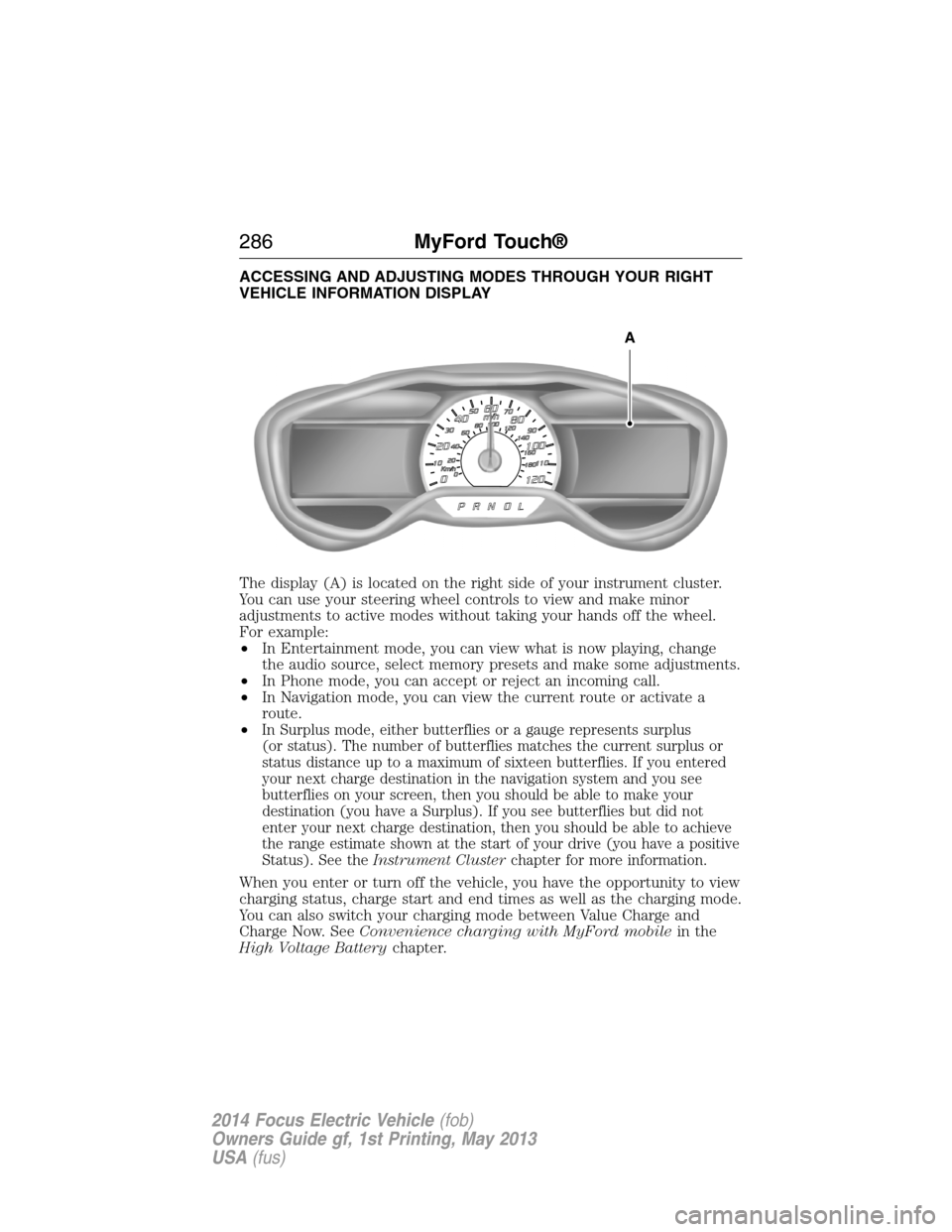
ACCESSING AND ADJUSTING MODES THROUGH YOUR RIGHT
VEHICLE INFORMATION DISPLAY
The display (A) is located on the right side of your instrument cluster.
You can use your steering wheel controls to view and make minor
adjustments to active modes without taking your hands off the wheel.
For example:
•In Entertainment mode, you can view what is now playing, change
the audio source, select memory presets and make some adjustments.
•In Phone mode, you can accept or reject an incoming call.
•In Navigation mode, you can view the current route or activate a
route.
•
In Surplus mode, either butterflies or a gauge represents surplus
(or status). The number of butterflies matches the current surplus or
status distance up to a maximum of sixteen butterflies. If you entered
your next charge destination in the navigation system and you see
butterflies on your screen, then you should be able to make your
destination (you have a Surplus). If you see butterflies but did not
enter your next charge destination, then you should be able to achieve
the range estimate shown at the start of your drive (you have a positive
Status). See theInstrument Clusterchapter for more information.
When you enter or turn off the vehicle, you have the opportunity to view
charging status, charge start and end times as well as the charging mode.
You can also switch your charging mode between Value Charge and
Charge Now. SeeConvenience charging with MyFord mobilein the
High Voltage Batterychapter.
A
286MyFord Touch®
2014 Focus Electric Vehicle(fob)
Owners Guide gf, 1st Printing, May 2013
USA(fus)
Page 321 of 403
To improve the charging experience, your vehicle has the following
convenience features:
•Value Charge:Your vehicle schedules its charging time for when the
utility rates are lowest. Contact your utility company to see what
rates are available.
•Charge Now:Your vehicle starts charging immediately after you
connect the charging plug.
•My GO Time:
Setting GO Times allows you to control charging
schedules and cabin conditioning settings so your vehicle is ready to
drive when you are. By setting a GO Time, your vehicle can use your
value charge settings to minimize your electricity cost but still prioritize
getting a full charge before your GO Time. A calendar view allows you
to program two GO Times per day for each day of the week.
Note:Remember, you must plug in your vehicle for My GO Time to work.
•Cabin Conditioning:Get the most miles out of every charge by
conditioning your vehicle while it is plugged in. Set the cabin
temperature when you set your GO Time in order to use energy from
your home (or charging station) instead of from your vehicle’s battery.
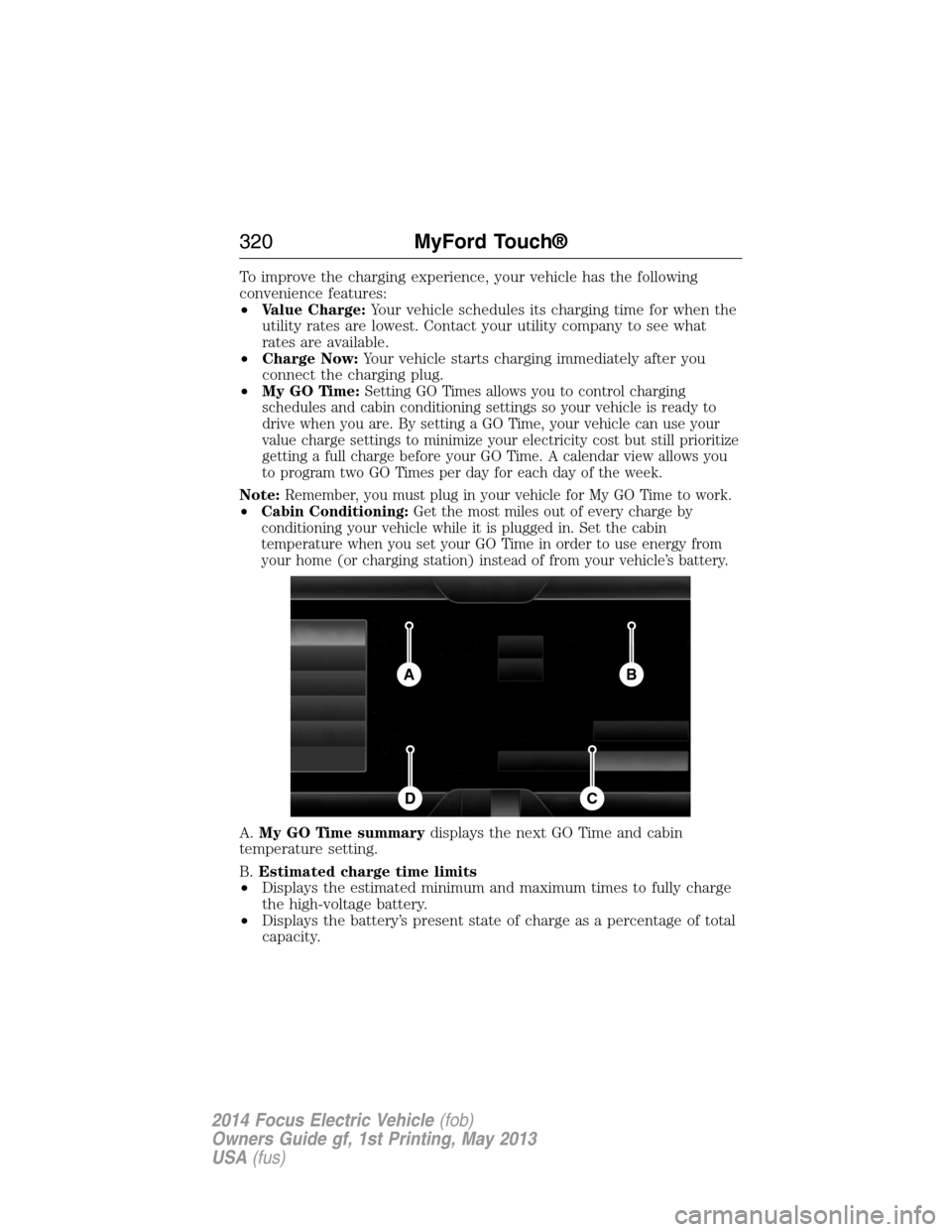
A.My GO Time summarydisplays the next GO Time and cabin
temperature setting.
B.Estimated charge time limits
•Displays the estimated minimum and maximum times to fully charge
the high-voltage battery.
•Displays the battery’s present state of charge as a percentage of total
capacity.
BA
CD
320MyFord Touch®
2014 Focus Electric Vehicle(fob)
Owners Guide gf, 1st Printing, May 2013
USA(fus)
Page 322 of 403
C.Charge profile and modedisplays the charging profile and charging
mode for the vehicle’s present location.
D.Charging status and actual timesdisplays charging status with the
charging start time, end time, and duration.
My GO Time Summary
Temperatureis the chosen cabin conditioning setting for this GO Time.
GO Timeis the time and date of your next set drive time. Your vehicle
automatically schedules charging and cabin conditioning to finish by this
time.
Skipcancels the cabin conditioning for the present GO Time. Once you
touch Skip, the GO Time and Temperature grey out, and the LED
illuminates on the Skip button. Touch the button again to turn on the
cabin conditioning. This feature allows you to ignore the present GO
Time without having to delete it or having to turn off the entire schedule
(seeGO Time Schedulelater in this section). After the present GO
Time passes, the Skip feature resets.
Editaccesses your GO Time Schedule (seeGO Time Schedulelater in
this section)
The system also alerts you to any conflicts by highlighting areas of the
screen in yellow. If your battery cannot have a full charge by the
scheduled drive time, the system highlights your next GO Time and
Charge Complete time, and a messageCharge at GO Time: under
100%appears. This is normal; the vehicle is informing you of the
conflicting situation. This notification only displays when the gearshift
selector lever is in positionP.
Note:Charging occurs as soon as you plug the vehicle in. The system
limits cabin conditioning to 15 minutes before your GO Time.
To eliminate the conflict notification immediately or to prevent a conflict
in the future, try the following:
•Change the present GO Time to occur later.
•Plug the vehicle into a 240V charging station instead of the 120V
convenience cord. Higher power charging yields shorter charge times.
•Plug the vehicle in sooner.
Estimated Charge Time Limits
Batteryshows you the battery’s current charge displayed as a
percentage. A reading of 100% means the battery has a full charge.
A reading of 0% means the battery has no charge.
MyFord Touch®321
2014 Focus Electric Vehicle(fob)
Owners Guide gf, 1st Printing, May 2013
USA(fus)
Page 323 of 403
To fully charge
•240Vis the estimated minimum charging time from the present
high-voltage battery level to full charge (100%). This represents the
shortest amount of time you should expect the high-voltage battery
to recharge under ideal conditions. Ideal conditions include a 240V
charging station and a minimum 30A service and high-voltage battery
at a moderate temperature.
Note:This charging time is only an estimate. It is normal for your actual
charge duration to be longer.
Note:Some charging stations use lower voltage (208V), which result in
longer charge times.
•120Vis the estimated maximum charging time from the present
high-voltage battery level to full charge (100%). This represents the
longest amount of time you should expect the high-voltage battery to
recharge under normal conditions. Normal conditions include a 120V
convenience cord and 12A service.
Note:This charging time is only an estimate. It is possible for your
actual charge duration to be longer. This occurs when the AC line
voltage is low and may indicate your electrical source is not meeting
certain requirements (seeCharging the high-voltage batteryin the
High Voltage Batterychapter).
Value Charge Profile and Mode
Value Charge profile nameis the name of the presently detected
Value Charge Profile. The system detects a customer defined value
charge profile when the vehicle is within approximately 300 feet
(100 meters) of the GPS location registered for the profile. If the vehicle
is close to more than one charge profile, it chooses the closest. When the
vehicle is not at a defined profile, it uses theDefault Valuecharge
profile. The system normally displaysDefault Profilewhile you are
driving because the vehicle is typically between defined value charge
profiles.
Editallows you to access your Value Charge profiles settings screen
(seeValue Charge Profileslater in this section).
Charge Nowif you want your vehicle to immediately charge when
plugged in at this profile location. This button illuminates when Charge
Now is the charge mode selected for the presently detected charge
profile.
322MyFord Touch®
2014 Focus Electric Vehicle(fob)
Owners Guide gf, 1st Printing, May 2013
USA(fus)
Page 324 of 403
Value Chargeif you want to take advantage of off-peak electricity rates.
The vehicle optimizes the charge schedule to be complete by the next
GO Time. This button illuminates when Value Charge is the charge mode
selected for the presently detected charge profile.
Charging Status and Actual Times
This is the status of the charging system, which includes the charging
plug, high-voltage battery and charger.
Next Chargemeans the vehicle is unplugged. Charge Start and
Complete information is for the present vehicle location.
Waiting to Chargemeans the vehicle is plugged in and ready to charge.
Typical of Value Charge mode, the vehicle may not start charging right
away because it is set to charge at times with lower utility costs.
Chargingmeans the high-voltage battery is charging.
Chargedmeans the high-voltage battery is fully charged and not
currently scheduled for further charging.
Charge Faultmeans a fault is present that is preventing the
high-voltage battery from charging. Inspect the charge plug connection,
charge cord and charging station.
Startis the scheduled start time of charging.
•At Plug In:When the vehicle is in Charge Now mode, and
unplugged, the message At Plug In appears, indicating the vehicle
immediately starts charging once you plug it in. Once you plug it in,
the system shows the actual charge start time.
•Scheduled Charge Start Time:When the vehicle is in Value Charge
mode, the system displays the scheduled charge start time (for
example, 8:00 PM). Once charging starts, the system continues to
display the actual charge start time.
Completeis the estimated time of charge completion.
•Charge Now Duration:When the vehicle is in Charge Now mode,
and unplugged, the system displays the charging duration in hours.
Once you plug in the vehicle, the value shows the estimated time to
finish charging.
•Scheduled Charge Complete:When the vehicle is in Value Charge
mode, the system displays the estimated charge complete time. It is
normal for the estimated complete time to change while charging.
The vehicle keeps charging until the high-voltage battery is fully
charged.
MyFord Touch®323
2014 Focus Electric Vehicle(fob)
Owners Guide gf, 1st Printing, May 2013
USA(fus)
Page 327 of 403
StartandFinishdisplay the times, which you can modify, using the
following:
•+and-allow you to change the hours and minutes of your start and
finish times.
•AMandPMallow you to change the time of your start and finish
time. This setting is viewable in 12-hour mode.
240Vand120Vrepresent the voltage service the default profile is using.
The system uses this selection to calculate estimated charge times.
Clearerases the Default Value Charge preferences.
Save Allstores your Default Value Charge preferences.
•Note:Make sure you save your settings before returning to the
previous screen. If you do not touchSave,your settings are not
stored in the system.
Power
This screen displays how the electric vehicle system transfers power in
order to accelerate or recharge the battery. The power flow screens show
power going to or through a component. These screens are for your
information only, and do not require any input from you.
Depending on your vehicle type, the power flow screen may vary in
order to show the appropriate components.
Note:Vehicle configuration and status displayed may not always match
actual vehicle state due to display constraints and simplified graphics.
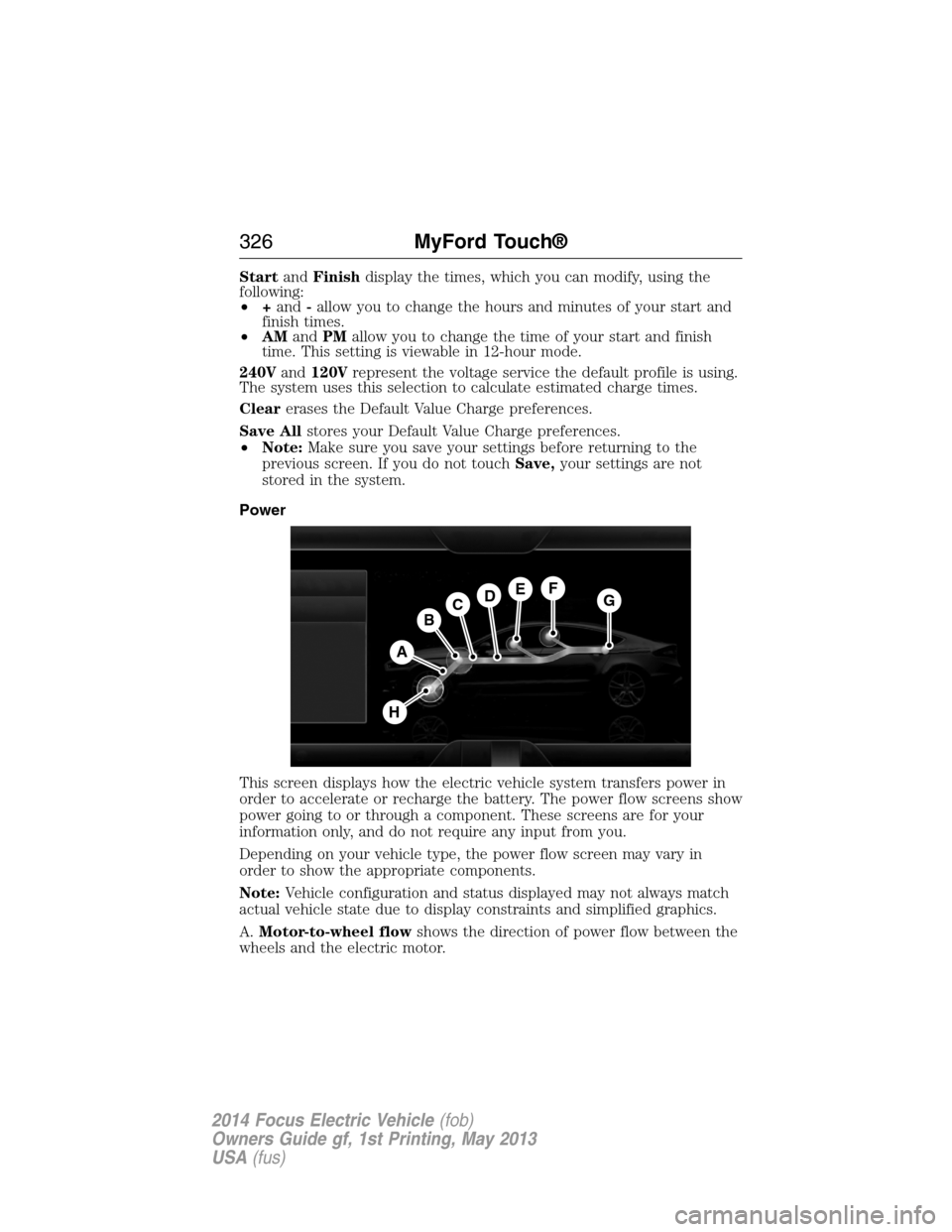
A.Motor-to-wheel flowshows the direction of power flow between the
wheels and the electric motor.
A
DGEF
BC
H
326MyFord Touch®
2014 Focus Electric Vehicle(fob)
Owners Guide gf, 1st Printing, May 2013
USA(fus)
Page 328 of 403
B.Electric Motorrepresents the electric motor. The higher the motor
power is, the larger the circle around this node. Any time the vehicle is
ready to be driven, the motor node illuminates.
C.Battery-to-motor flowshows the direction of power flow between
the high-voltage battery and the electric motor. Flow toward the motor
indicates the battery is providing power to accelerate the vehicle
(discharging the battery). Flow toward the battery indicates the electric
motor is providing power to the battery (charging the battery).
Note:The battery-to-motor flow includes battery power the vehicle is
using for acceleration. It does not include energy the vehicle is using for
accessories (such as air conditioning, headlights and radio). This screen
displays accessories and climate usage separately.
D.Plugappears when you plug your vehicle into the wall. When
charging the high voltage battery from the wall, you can see flow from
the plug to the battery on the screen.
•Accessoriesindicates electrical power demands from your vehicle’s
accessory systems. Accessories use power but do not contribute to
making the vehicle move. The power flow displays power usage from
the climate control system and other accessories separately.
E.Otherincludes all power usage from the low voltage accessories such
as the climate control fan, headlights and heated seats. The higher the
power usage is from these accessories, the larger the circle around the
node. This node illuminates anytime the vehicle is on since there is
always some low level power in use.
F.Climateincludes the power usage from the high-voltage climate
control components such as the electric A/C compressor and the electric
heater. The higher the power usage is from these components, the larger
the circle around this node.
Note:The climate control system may determine A/C is necessary even
when you turn it off. In this case, you may see some climate power when
the A/C is off.
G.High voltage battery powerrepresents your high-voltage battery.
A circle illuminates around the node when the high-voltage battery is
receiving power from regenerative braking or external charging (when
you plug it in). The higher the power going into the high-voltage battery,
the larger the circle around this node.
H.Drive powerrepresents the power going to the wheels. The higher
the wheel power is, the larger the circle around this node.
MyFord Touch®327
2014 Focus Electric Vehicle(fob)
Owners Guide gf, 1st Printing, May 2013
USA(fus)
Page 329 of 403
Status
This indicates which mode is active within the vehicle system.
Charging HV Battery
The hybrid system is storing power in the high-voltage battery.
Idle
The vehicle is either at rest, or sharing very little power between the
electric system parts.
Idle with Charging
The high-voltage battery is receiving power in order to recharge.
Electric Drive
The vehicle is driving in electric mode.
Charge Complete
The high-voltage battery charging from the wall is complete.
INFORMATION
If your vehicle is equipped with Navigation, touch the i
(Information) button to access these features. If your vehicle is
not equipped with Navigation, touch the corner of the
touchscreen with the green tab.
328MyFord Touch®
2014 Focus Electric Vehicle(fob)
Owners Guide gf, 1st Printing, May 2013
USA(fus)