battery FORD FOCUS ELECTRIC 2014 3.G Repair Manual
[x] Cancel search | Manufacturer: FORD, Model Year: 2014, Model line: FOCUS ELECTRIC, Model: FORD FOCUS ELECTRIC 2014 3.GPages: 403, PDF Size: 6.42 MB
Page 339 of 403
Setting 911 Assist On
If your vehicle is equipped with Navigation, touch the i
(Information) button to access these features. If your vehicle
is not equipped with Navigation, touch the corner of the
touchscreen with the green tab.
PressApps>911 Assist,>On.
You can also access 911 Assist by:
•Pressing the Settings icon >Settings>Phone>911
Assist,or
•Pressing the Settings icon >Help>911 Assist.
To Make Sure that 911 Assist Works Properly
•SYNC must be powered and working properly at the time of the
incident and throughout feature activation and use.
•The 911 Assist feature must be set on before the incident.
•You must pair and connect a Bluetooth-enabled and compatible phone
to SYNC.
•A connected Bluetooth-enabled phone must have the ability to make
and maintain an outgoing call at the time of the incident.
•A connected Bluetooth-enabled phone must have adequate network
coverage, battery power and signal strength.
•The vehicle must have battery power and be located in the United
States, Canada or in a territory in which 911 is the emergency
number.
In the Event of a Crash
Not all crashes deploy an airbag or activate the fuel pump shut-off
(which would trigger 911 Assist); however, SYNC tries to contact
emergency services if 911 Assist triggers. If a connected phone sustains
damage or loses connection to SYNC, SYNC searches for, and tries to
connect to, any available previously paired phone and tries to make the
call to 911.
Before making the call:
•SYNC provides a short window of time (about 10 seconds) to cancel
the call. If you fail to cancel the call, SYNC attempts to dial 911.
•SYNC says the following, or a similar message: “SYNC will attempt to
call 911, to cancel the call, press Cancel on your screen or press and
hold the phone button on your steering wheel.”
338MyFord Touch®
2014 Focus Electric Vehicle(fob)
Owners Guide gf, 1st Printing, May 2013
USA(fus)
Page 340 of 403
If you do not cancel the call, and SYNC makes a successful call, a
pre-recorded message plays for the 911 operator, and then the occupant(s)
in your vehicle is able to talk with the operator. Be prepared to provide
your name, phone number and location immediately, because not all 911
systems are capable of receiving this information electronically.
911 Assist May Not Work If
•Your cellular phone or 911 Assist hardware sustains damage in a
crash.
•The vehicle’s battery or SYNC system has no power.
•The phone(s) thrown from your vehicle are the ones paired and
connected to the system.
911 Assist Privacy Notice
When you turn on 911 Assist, it may disclose to emergency services that
your vehicle has been in a crash involving the deployment of an airbag or
activation of the fuel pump shut-off. Certain versions or updates to 911
Assist may also be capable of electronically or verbally disclosing to 911
operators your vehicle location or other details about your vehicle or
crash to assist 911 operators to provide the most appropriate emergency
services. If you do not want to disclose this information, do not turn the
feature on.
Vehicle Health Report (If Equipped, United States Only)
WARNING:Always follow scheduled maintenance instructions,
regularly inspect your vehicle, and seek repair for any damage or
problem you suspect. Vehicle Health Report supplements, but cannot
replace, normal maintenance and vehicle inspection. Vehicle Health
Report only monitors certain systems electronically monitored by your
vehicle and will not monitor or report the status of any other system,
(such as brake lining wear). Failure to perform scheduled maintenance
and regularly inspect your vehicle may result in vehicle damage and
serious injury.
Note:Your Vehicle Health Report feature requires activation prior to
use. Visit www.SYNCMyRide.com to register. There is no fee or
subscription associated with Vehicle Health Report, but you must register
to use this feature.
Note:This feature may not function properly if you have enabled caller
ID blocking on your mobile phone. Before running a report, review the
Vehicle Health Report Privacy Notice.
MyFord Touch®339
2014 Focus Electric Vehicle(fob)
Owners Guide gf, 1st Printing, May 2013
USA(fus)
Page 342 of 403
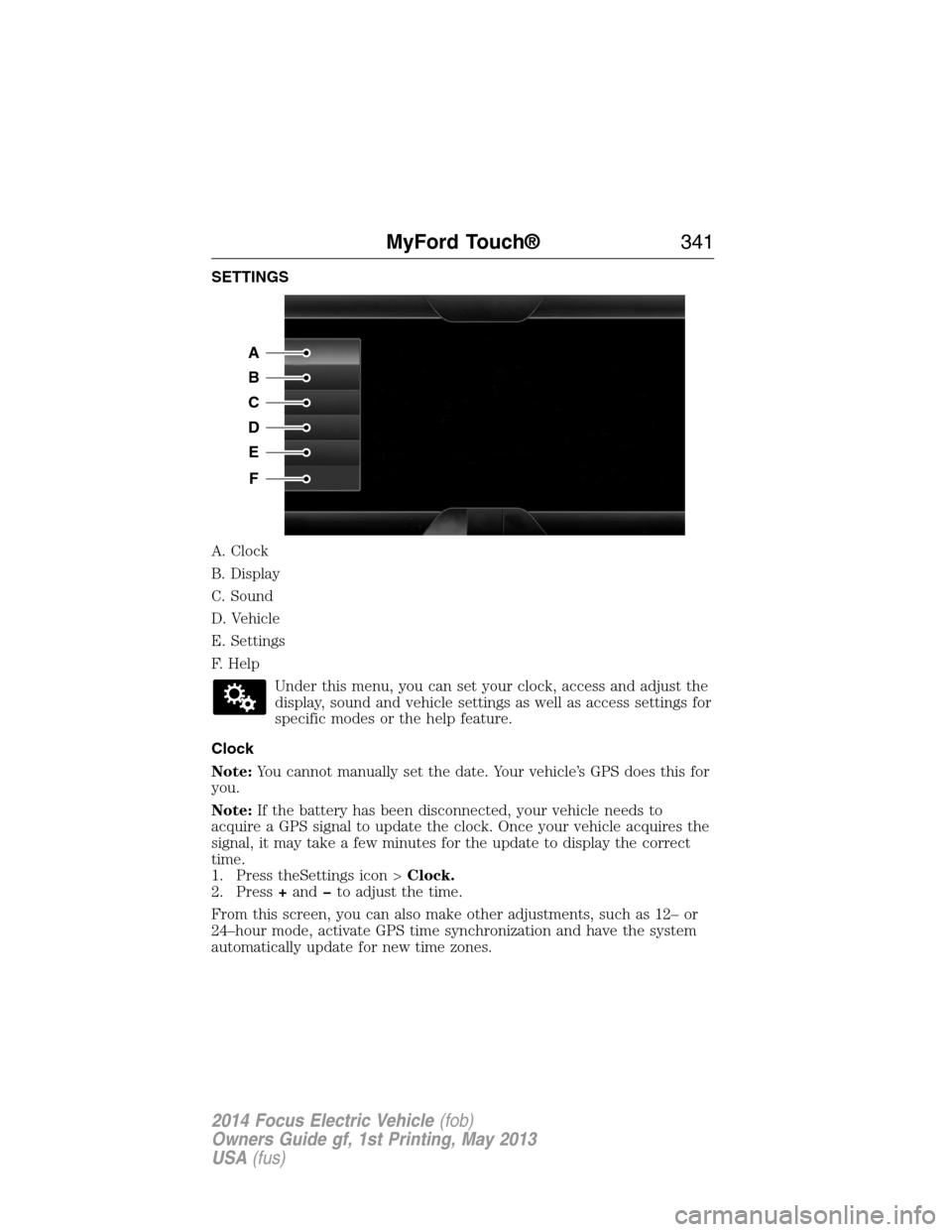
SETTINGS
A. Clock
B. Display
C. Sound
D. Vehicle
E. Settings
F. Help
Under this menu, you can set your clock, access and adjust the
display, sound and vehicle settings as well as access settings for
specific modes or the help feature.
Clock
Note:You cannot manually set the date. Your vehicle’s GPS does this for
you.
Note:If the battery has been disconnected, your vehicle needs to
acquire a GPS signal to update the clock. Once your vehicle acquires the
signal, it may take a few minutes for the update to display the correct
time.
1. Press theSettings icon >Clock.
2. Press+andto adjust the time.
From this screen, you can also make other adjustments, such as 12– or
24–hour mode, activate GPS time synchronization and have the system
automatically update for new time zones.
A
B
C
D
E
F
MyFord Touch®341
2014 Focus Electric Vehicle(fob)
Owners Guide gf, 1st Printing, May 2013
USA(fus)
Page 346 of 403
Charge Point Light Ring
Press the Settings icon >Settings>Charge Port Light Ring,
then select from the following:
Charge port light ring
OnIlluminates when plugging in, opening doors,
pressing the unlock button on your remote,
and while charging.
OffDoes not illuminate.
Limited Cord Acknowledgement:Illuminates when
plugging in.
Charge Status:Illuminates when opening
doors or pressing the unlock button on your
remote.
Note:See theHigh Voltage Batterychapter for details on the charge
port light ring functions.
Voice Control
Press the Settings icon >Settings>Voice Control,then
select from the following:
Voice control
Interaction ModeStandard interaction mode provides more
detailed interaction and guidance. Advanced
mode has less audible interaction and more
tone prompts.
Confirmation
PromptsHave the system ask you short questions if it
has not clearly heard or understood your
request.
Note:Even with confirmation prompts turned
off, the system may occasionally ask you to
confirm settings.
Media Candidate
ListsCandidate lists are possible results from your
voice commands. The system simply makes a
best guess at your request with these turned
off.
MyFord Touch®345
2014 Focus Electric Vehicle(fob)
Owners Guide gf, 1st Printing, May 2013
USA(fus)
Page 359 of 403
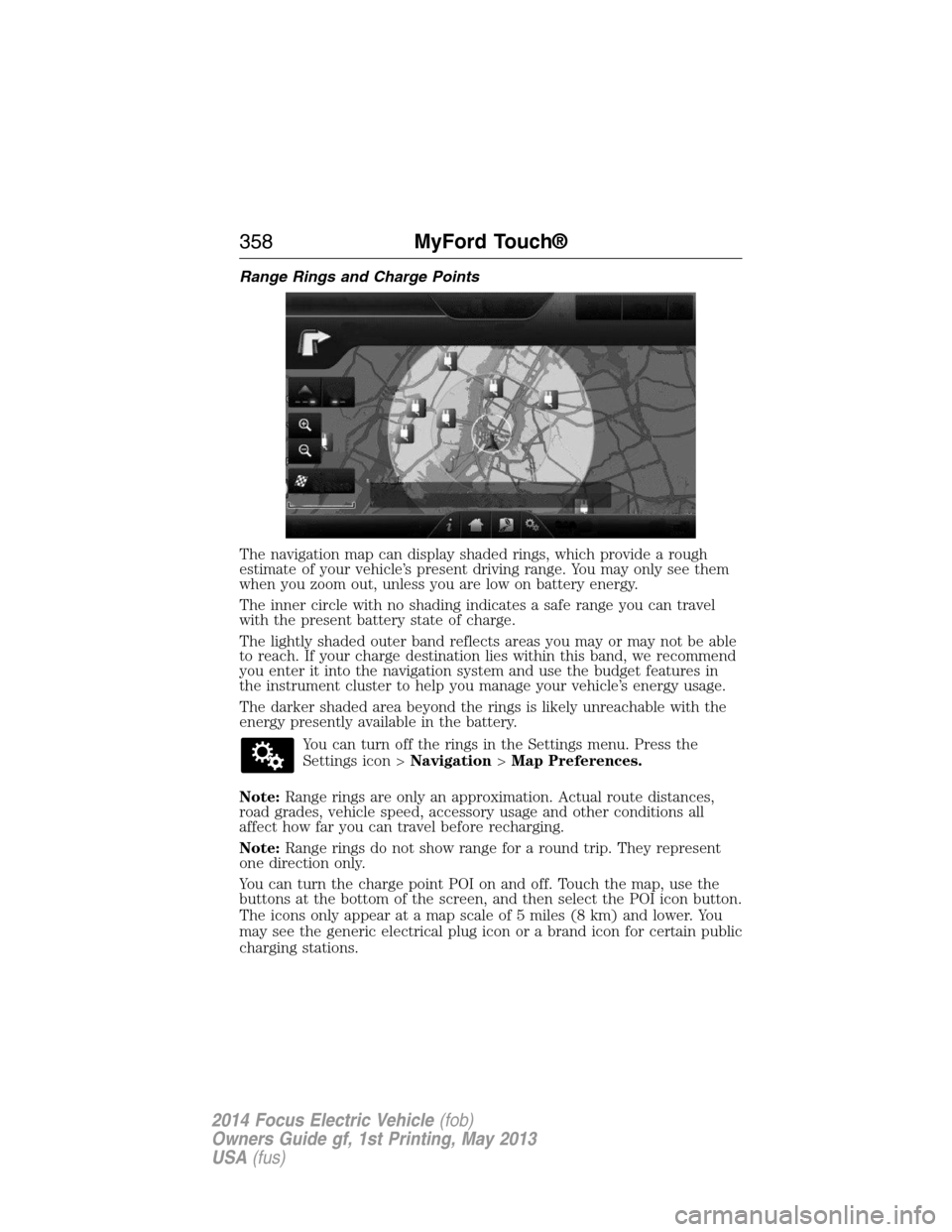
Range Rings and Charge Points
The navigation map can display shaded rings, which provide a rough
estimate of your vehicle’s present driving range. You may only see them
when you zoom out, unless you are low on battery energy.
The inner circle with no shading indicates a safe range you can travel
with the present battery state of charge.
The lightly shaded outer band reflects areas you may or may not be able
to reach. If your charge destination lies within this band, we recommend
you enter it into the navigation system and use the budget features in
the instrument cluster to help you manage your vehicle’s energy usage.
The darker shaded area beyond the rings is likely unreachable with the
energy presently available in the battery.
You can turn off the rings in the Settings menu. Press the
Settings icon >Navigation>Map Preferences.
Note:Range rings are only an approximation. Actual route distances,
road grades, vehicle speed, accessory usage and other conditions all
affect how far you can travel before recharging.
Note:Range rings do not show range for a round trip. They represent
one direction only.
You can turn the charge point POI on and off. Touch the map, use the
buttons at the bottom of the screen, and then select the POI icon button.
The icons only appear at a map scale of 5 miles (8 km) and lower. You
may see the generic electrical plug icon or a brand icon for certain public
charging stations.
358MyFord Touch®
2014 Focus Electric Vehicle(fob)
Owners Guide gf, 1st Printing, May 2013
USA(fus)
Page 390 of 403
Make sure to change your vehicle’s oils and fluids at the specified
intervals or in conjunction with a repair. Flushing is a viable way to
change fluid for many vehicle sub-systems during scheduled
maintenance. It is critical that systems are flushed only with new fluid
that is the same as that required to fill and operate the system or using a
Ford-approved flushing chemical.
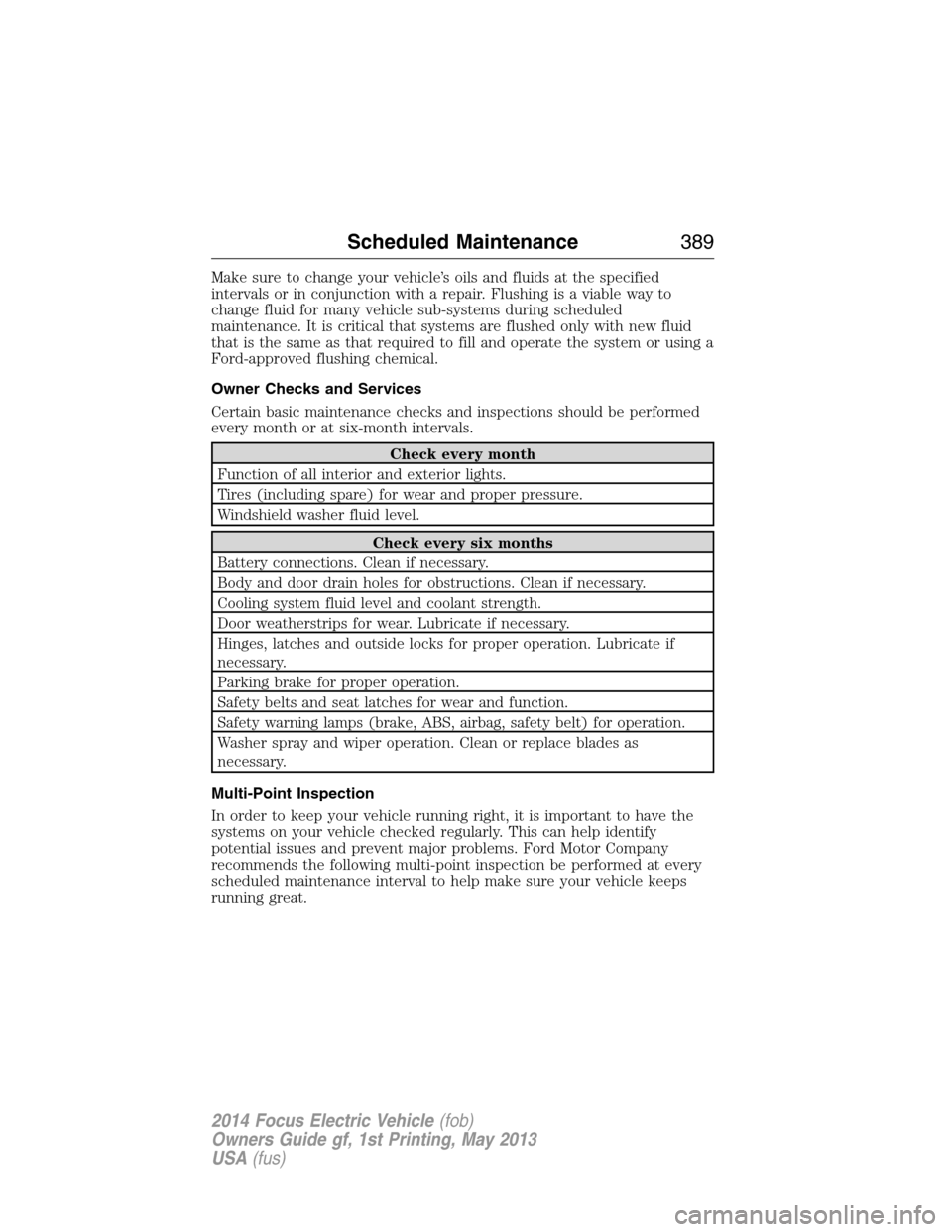
Owner Checks and Services
Certain basic maintenance checks and inspections should be performed
every month or at six-month intervals.
Check every month
Function of all interior and exterior lights.
Tires (including spare) for wear and proper pressure.
Windshield washer fluid level.
Check every six months
Battery connections. Clean if necessary.
Body and door drain holes for obstructions. Clean if necessary.
Cooling system fluid level and coolant strength.
Door weatherstrips for wear. Lubricate if necessary.
Hinges, latches and outside locks for proper operation. Lubricate if
necessary.
Parking brake for proper operation.
Safety belts and seat latches for wear and function.
Safety warning lamps (brake, ABS, airbag, safety belt) for operation.
Washer spray and wiper operation. Clean or replace blades as
necessary.
Multi-Point Inspection
In order to keep your vehicle running right, it is important to have the
systems on your vehicle checked regularly. This can help identify
potential issues and prevent major problems. Ford Motor Company
recommends the following multi-point inspection be performed at every
scheduled maintenance interval to help make sure your vehicle keeps
running great.
Scheduled Maintenance389
2014 Focus Electric Vehicle(fob)
Owners Guide gf, 1st Printing, May 2013
USA(fus)
Page 391 of 403
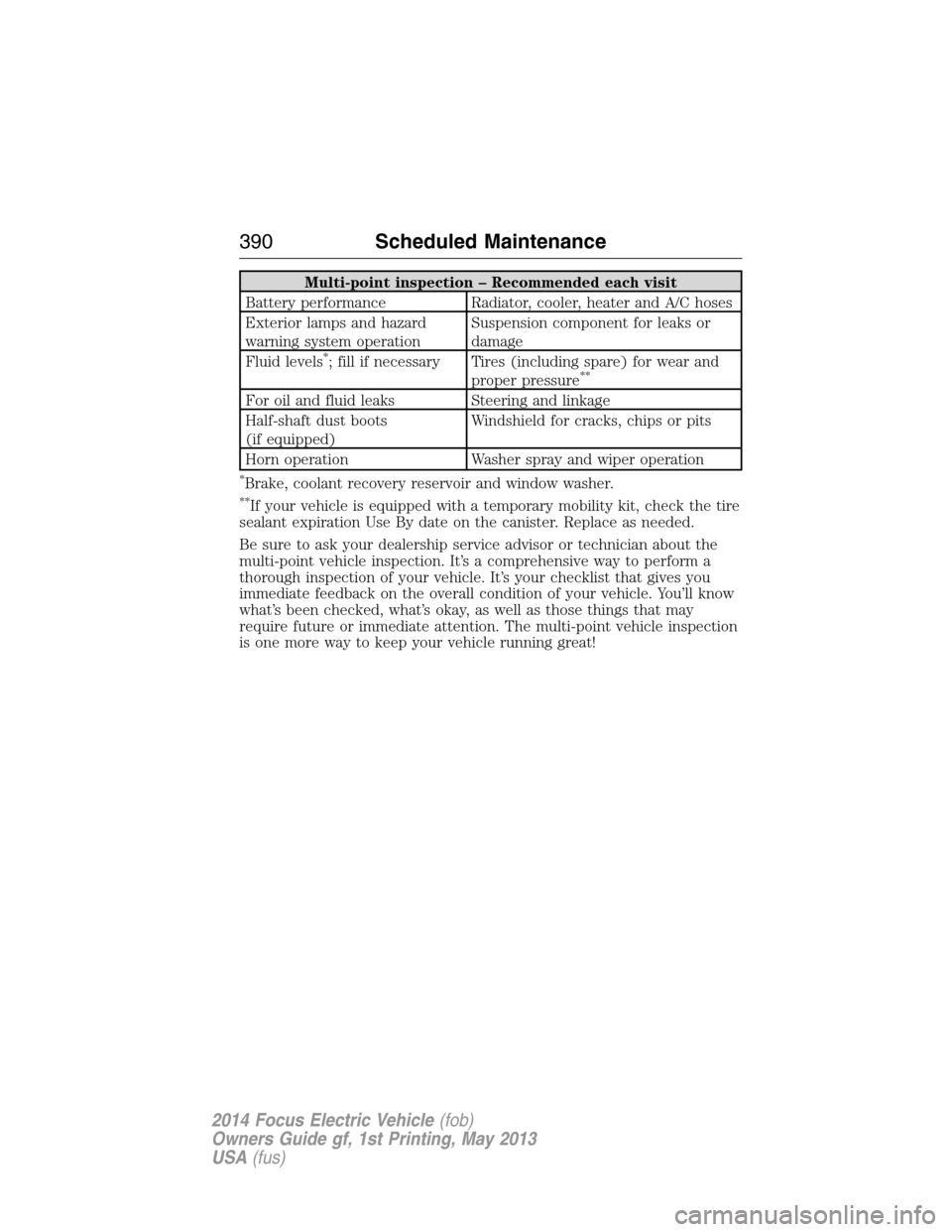
Multi-point inspection – Recommended each visit
Battery performance Radiator, cooler, heater and A/C hoses
Exterior lamps and hazard
warning system operationSuspension component for leaks or
damage
Fluid levels
*; fill if necessary Tires (including spare) for wear and
proper pressure**
For oil and fluid leaks Steering and linkage
Half-shaft dust boots
(if equipped)Windshield for cracks, chips or pits
Horn operation Washer spray and wiper operation
*Brake, coolant recovery reservoir and window washer.
**If your vehicle is equipped with a temporary mobility kit, check the tire
sealant expiration Use By date on the canister. Replace as needed.
Be sure to ask your dealership service advisor or technician about the
multi-point vehicle inspection. It’s a comprehensive way to perform a
thorough inspection of your vehicle. It’s your checklist that gives you
immediate feedback on the overall condition of your vehicle. You’ll know
what’s been checked, what’s okay, as well as those things that may
require future or immediate attention. The multi-point vehicle inspection
is one more way to keep your vehicle running great!
390Scheduled Maintenance
2014 Focus Electric Vehicle(fob)
Owners Guide gf, 1st Printing, May 2013
USA(fus)
Page 398 of 403
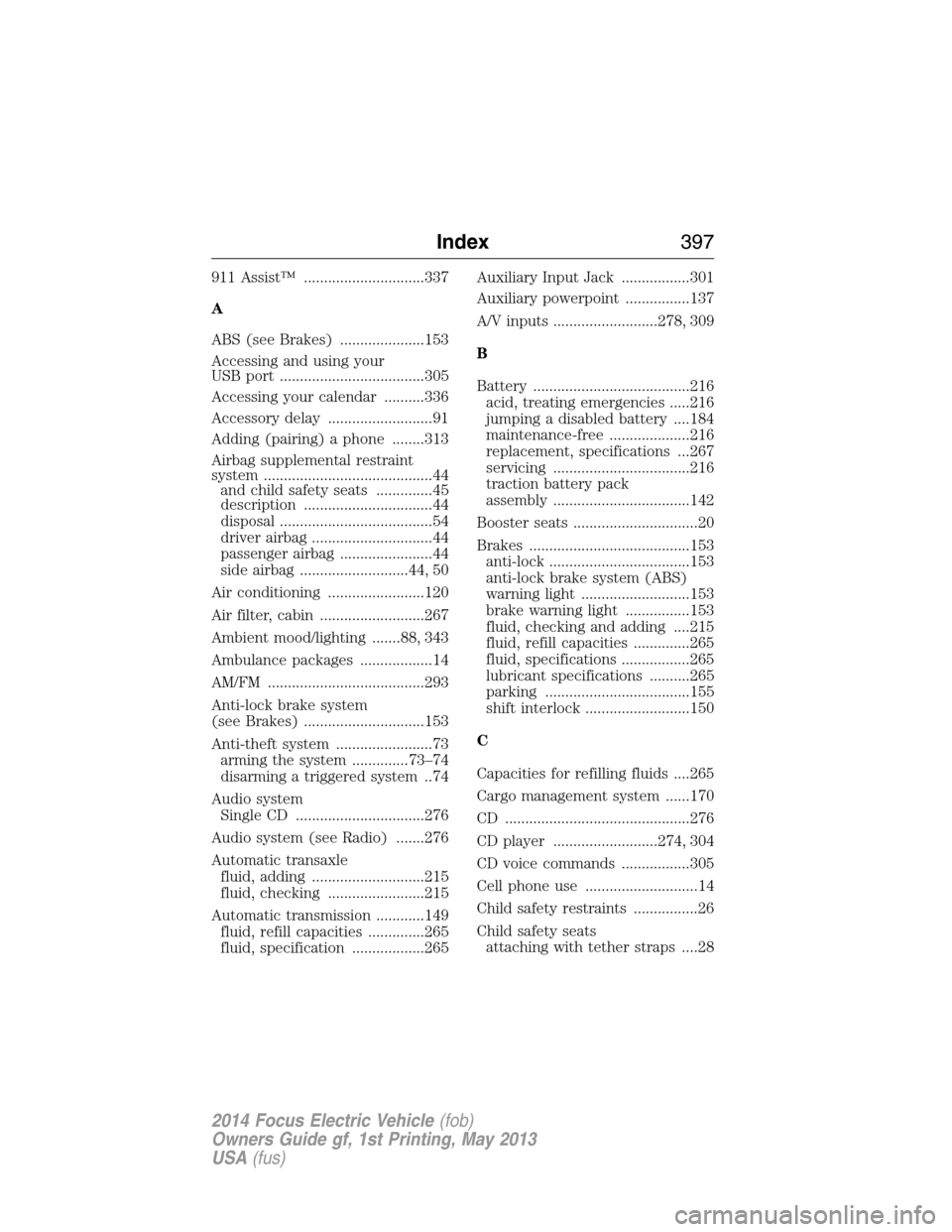
911 Assist™ ..............................337
A
ABS (see Brakes) .....................153
Accessing and using your
USB port ....................................305
Accessing your calendar ..........336
Accessory delay ..........................91
Adding (pairing) a phone ........313
Airbag supplemental restraint
system ..........................................44
and child safety seats ..............45
description ................................44
disposal ......................................54
driver airbag ..............................44
passenger airbag .......................44
side airbag ...........................44, 50
Air conditioning ........................120
Air filter, cabin ..........................267
Ambient mood/lighting .......88, 343
Ambulance packages ..................14
AM/FM .......................................293
Anti-lock brake system
(see Brakes) ..............................153
Anti-theft system ........................73
arming the system ..............73–74
disarming a triggered system ..74
Audio system
Single CD ................................276
Audio system (see Radio) .......276
Automatic transaxle
fluid, adding ............................215
fluid, checking ........................215
Automatic transmission ............149
fluid, refill capacities ..............265
fluid, specification ..................265Auxiliary Input Jack .................301
Auxiliary powerpoint ................137
A/V inputs ..........................278, 309
B
Battery .......................................216
acid, treating emergencies .....216
jumping a disabled battery ....184
maintenance-free ....................216
replacement, specifications ...267
servicing ..................................216
traction battery pack
assembly ..................................142
Booster seats ...............................20
Brakes ........................................153
anti-lock ...................................153
anti-lock brake system (ABS)
warning light ...........................153
brake warning light ................153
fluid, checking and adding ....215
fluid, refill capacities ..............265
fluid, specifications .................265
lubricant specifications ..........265
parking ....................................155
shift interlock ..........................150
C
Capacities for refilling fluids ....265
Cargo management system ......170
CD ..............................................276
CD player ..........................274, 304
CD voice commands .................305
Cell phone use ............................14
Child safety restraints ................26
Child safety seats
attaching with tether straps ....28
Index397
2014 Focus Electric Vehicle(fob)
Owners Guide gf, 1st Printing, May 2013
USA(fus)
Page 400 of 403
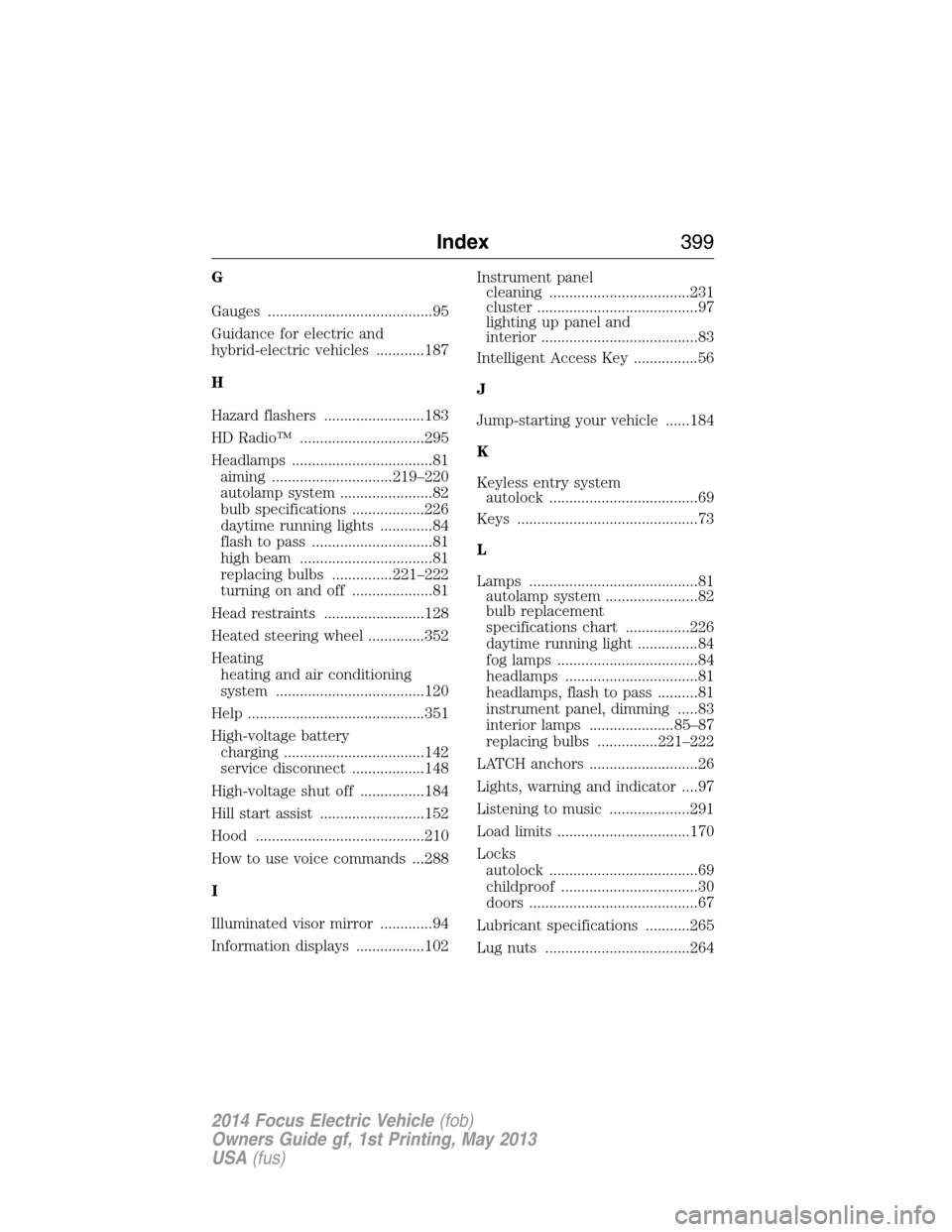
G
Gauges .........................................95
Guidance for electric and
hybrid-electric vehicles ............187
H
Hazard flashers .........................183
HD Radio™ ...............................295
Headlamps ...................................81
aiming ..............................219–220
autolamp system .......................82
bulb specifications ..................226
daytime running lights .............84
flash to pass ..............................81
high beam .................................81
replacing bulbs ...............221–222
turning on and off ....................81
Head restraints .........................128
Heated steering wheel ..............352
Heating
heating and air conditioning
system .....................................120
Help ............................................351
High-voltage battery
charging ...................................142
service disconnect ..................148
High-voltage shut off ................184
Hill start assist ..........................152
Hood ..........................................210
How to use voice commands ...288
I
Illuminated visor mirror .............94
Information displays .................102Instrument panel
cleaning ...................................231
cluster ........................................97
lighting up panel and
interior .......................................83
Intelligent Access Key ................56
J
Jump-starting your vehicle ......184
K
Keyless entry system
autolock .....................................69
Keys .............................................73
L
Lamps ..........................................81
autolamp system .......................82
bulb replacement
specifications chart ................226
daytime running light ...............84
fog lamps ...................................84
headlamps .................................81
headlamps, flash to pass ..........81
instrument panel, dimming .....83
interior lamps .....................85–87
replacing bulbs ...............221–222
LATCH anchors ...........................26
Lights, warning and indicator ....97
Listening to music ....................291
Load limits .................................170
Locks
autolock .....................................69
childproof ..................................30
doors ..........................................67
Lubricant specifications ...........265
Lug nuts ....................................264
Index399
2014 Focus Electric Vehicle(fob)
Owners Guide gf, 1st Printing, May 2013
USA(fus)