center console FORD FOCUS ELECTRIC 2015 3.G Owners Manual
[x] Cancel search | Manufacturer: FORD, Model Year: 2015, Model line: FOCUS ELECTRIC, Model: FORD FOCUS ELECTRIC 2015 3.GPages: 369, PDF Size: 4.53 MB
Page 5 of 369
Steering Wheel
Adjusting the Steering Wheel....................67
Audio Control...................................................67
Voice Control
...................................................68
Cruise Control.................................................68
Information Display Control
......................68
Wipers and Washers
Windshield Wipers
.........................................70
Windshield Washers.....................................70
Rear Window Wiper and Washers
............71
Lighting
General Information
......................................72
Lighting Control
...............................................72
Autolamps
.........................................................73
Instrument Lighting Dimmer......................74
Headlamp Exit Delay
....................................74
Daytime Running Lamps
.............................74
Direction Indicators
........................................75
Interior Lamps..................................................75
Ambient Lighting
............................................76
Windows and Mirrors
Power Windows...............................................77
Exterior Mirrors
................................................78
Interior Mirror
....................................................79
Sun Visors
.........................................................80
Instrument Cluster
Gauges................................................................81
Warning Lamps and Indicators.................83
Audible Warnings and Indicators.............85
Information Displays
General Information.....................................86
Information Messages
..................................92 Climate Control
Automatic Climate Control......................100
Hints on Controlling the Interior
Climate..........................................................101
Heated Windows and Mirrors..................102
Cabin Air Filter...............................................103
Remote Start
.................................................103
Seats
Sitting in the Correct Position
.................104
Head Restraints............................................104
Manual Seats
.................................................106
Power Seats
...................................................106
Rear Seats
.......................................................107
Heated Seats.................................................109
Auxiliary Power Points
Auxiliary Power Points.................................110
Storage Compartments
Center Console................................................111
Overhead Console
..........................................111
Starting and Stopping the Electric Motor
Starting the Electric Motor.........................112
Switching Off the Electric Motor..............113
High Voltage Battery
General Information
.....................................115
Charging the High Voltage Battery.........115
High Voltage Battery Cut-Off Switch...........................................................120
Transmission
Automatic Transmission............................122
Brakes
General Information
....................................124
2
Focus (CDH), enUSA, First Printing Table of Contents
Page 42 of 369
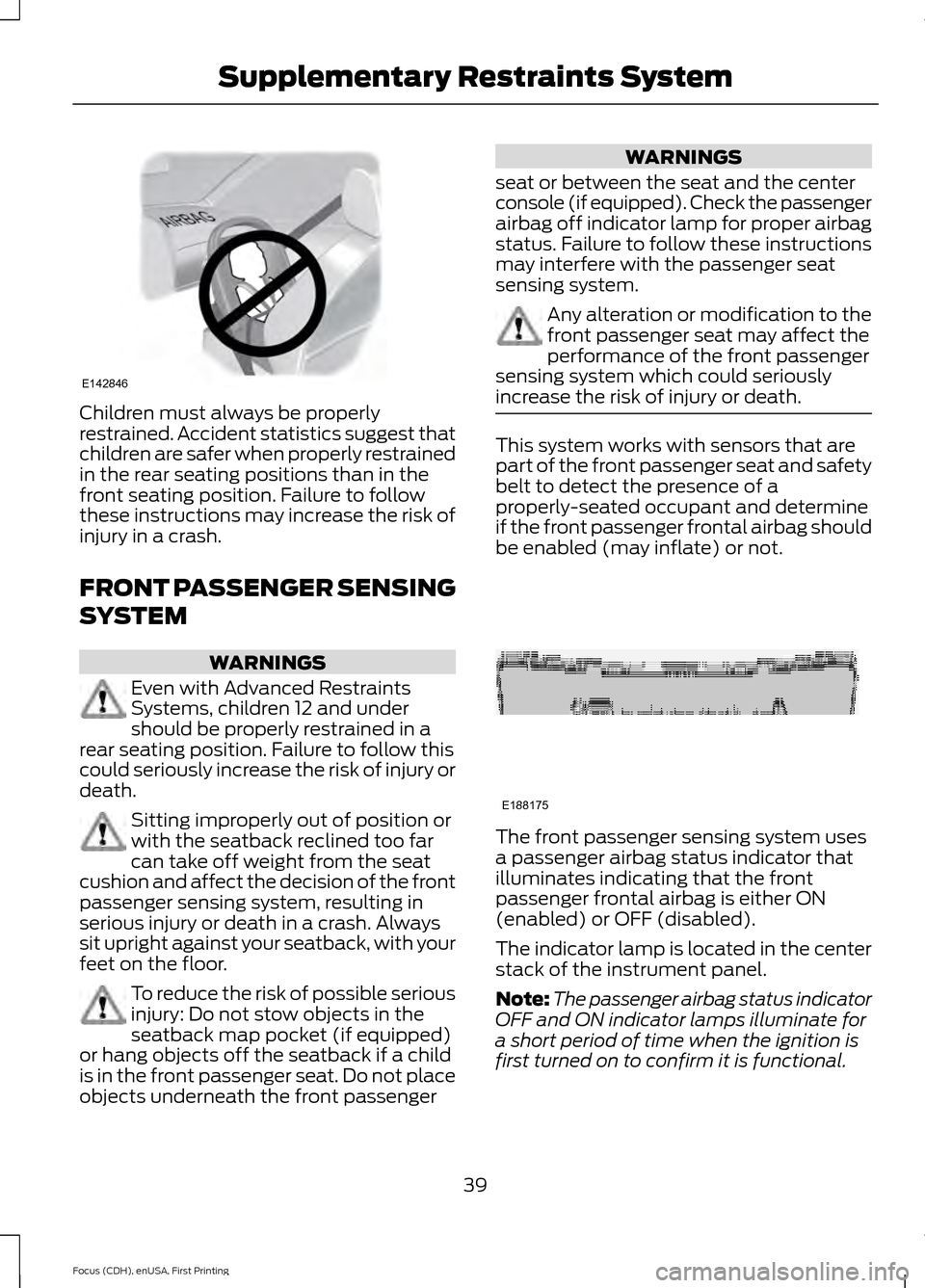
Children must always be properly
restrained. Accident statistics suggest that
children are safer when properly restrained
in the rear seating positions than in the
front seating position. Failure to follow
these instructions may increase the risk of
injury in a crash.
FRONT PASSENGER SENSING
SYSTEM
WARNINGS
Even with Advanced Restraints
Systems, children 12 and under
should be properly restrained in a
rear seating position. Failure to follow this
could seriously increase the risk of injury or
death. Sitting improperly out of position or
with the seatback reclined too far
can take off weight from the seat
cushion and affect the decision of the front
passenger sensing system, resulting in
serious injury or death in a crash. Always
sit upright against your seatback, with your
feet on the floor. To reduce the risk of possible serious
injury: Do not stow objects in the
seatback map pocket (if equipped)
or hang objects off the seatback if a child
is in the front passenger seat. Do not place
objects underneath the front passenger WARNINGS
seat or between the seat and the center
console (if equipped). Check the passenger
airbag off indicator lamp for proper airbag
status. Failure to follow these instructions
may interfere with the passenger seat
sensing system. Any alteration or modification to the
front passenger seat may affect the
performance of the front passenger
sensing system which could seriously
increase the risk of injury or death. This system works with sensors that are
part of the front passenger seat and safety
belt to detect the presence of a
properly-seated occupant and determine
if the front passenger frontal airbag should
be enabled (may inflate) or not.
The front passenger sensing system uses
a passenger airbag status indicator that
illuminates indicating that the front
passenger frontal airbag is either ON
(enabled) or OFF (disabled).
The indicator lamp is located in the center
stack of the instrument panel.
Note:
The passenger airbag status indicator
OFF and ON indicator lamps illuminate for
a short period of time when the ignition is
first turned on to confirm it is functional.
39
Focus (CDH), enUSA, First Printing Supplementary Restraints SystemE142846 E188175
Page 44 of 369
After all occupants have adjusted their
seats and put on safety belts, it is very
important that they continue to sit
properly. A properly seated occupant sits
upright, leaning against the seatback, and
centered on the seat cushion, with their
feet comfortably extended on the floor.
Sitting improperly can increase the chance
of injury in a crash event. For example, if
an occupant slouches, lies down, turns
sideways, sits forward, leans forward or
sideways, or puts one or both feet up, the
chance of injury during a crash is greatly
increased.
If you think that the status of the passenger
airbag indicator lamp is incorrect, check
for the following:
•
Objects lodged underneath the seat.
• Objects between the seat cushion and
the center console.
• Objects hanging off the seatback.
• Objects stowed in the seatback map
pocket.
• Objects placed on the occupant’ s lap.
• Cargo interference with the seat.
• Other passengers pushing or pulling on
the seat.
• Rear passenger feet and knees resting
or pushing on the seat.
The conditions listed above may cause the
weight of a properly seated occupant to
be incorrectly interpreted by the front
passenger sensing system. The person in
the front passenger seat may appear
heavier or lighter due to the conditions
described in the list above. Make sure the front passenger
sensing system is operating
properly, See Crash Sensors
and Airbag Indicator (page 44).
If the airbag readiness lamp is lit, do
the following: The driver or adult passengers should
check for any objects that may be lodged
underneath the front passenger seat or
cargo interfering with the seat.
If objects are lodged or cargo is interfering
with the seat, please take the following
steps to remove the obstruction:
•
Pull the vehicle over.
• Turn the vehicle off.
• Driver or adult passengers should
check for any objects lodged
underneath the front passenger seat
or cargo interfering with the seat.
• Remove the obstruction(s) (if found).
• Restart the vehicle.
• Wait at least two minutes and verify
that the airbag readiness lamp is no
longer illuminated
• If the airbag readiness lamp remains
illuminated, this may or may not be a
problem due to the front passenger
sensing system.
Do not attempt to repair or service the
system. Take your vehicle immediately to
an authorized dealer.
If it is necessary to modify an advanced
front airbag system to accommodate a
person with disabilities, contact the Ford
Customer Relationship Center. See
Getting the Services You Need
(page
152).
SIDE AIRBAGS WARNINGS
Do not place objects or mount
equipment on or near the airbag
cover, on the side of the seatbacks
(of the front seats), or in front seat areas
that may come into contact with a
deploying airbag. Failure to follow these
instructions may increase the risk of
personal injury in the event of a crash.
41
Focus (CDH), enUSA, First Printing Supplementary Restraints System
Page 113 of 369
12 Volt DC Power Point
WARNING
Do not plug optional electrical
accessories into the cigar lighter
socket. Incorrect use of the lighter
can cause damage not covered by your
warranty, and can result in fire or serious
injury. Note:
After starting your vehicle, you can
use the socket to power 12-volt appliances
with a maximum current rating of 20 amps.
After you switch your vehicle off, the power
supply works only for a maximum of 30
minutes.
Note: Do not insert objects other than an
accessory plug into the power point. This
damages the outlet and can blow the fuse.
Note: Do not hang any type of accessory or
accessory bracket from the plug.
Note: Do not use the power point over the
vehicle capacity of 12 volt DC 180 watt or a
fuse may blow.
Note: Do not use the power point for
operating a cigar lighter element.
Note: Incorrect use of the power point can
cause damage not covered by your
warranty.
Note: Always keep the power point caps
closed when not in use.
Run the vehicle for full capacity use of the
power point.
To prevent the battery from running out of
charge:
• Do not use the power point longer than
necessary after switching the vehicle
off.
• Do not leave devices plugged in
overnight or when your vehicle is in park
(P) for extended periods. Location
You may find power points in the following
locations:
•
On the center console
• In the center console.
110
Focus (CDH), enUSA, First Printing Auxiliary Power Points
Page 114 of 369
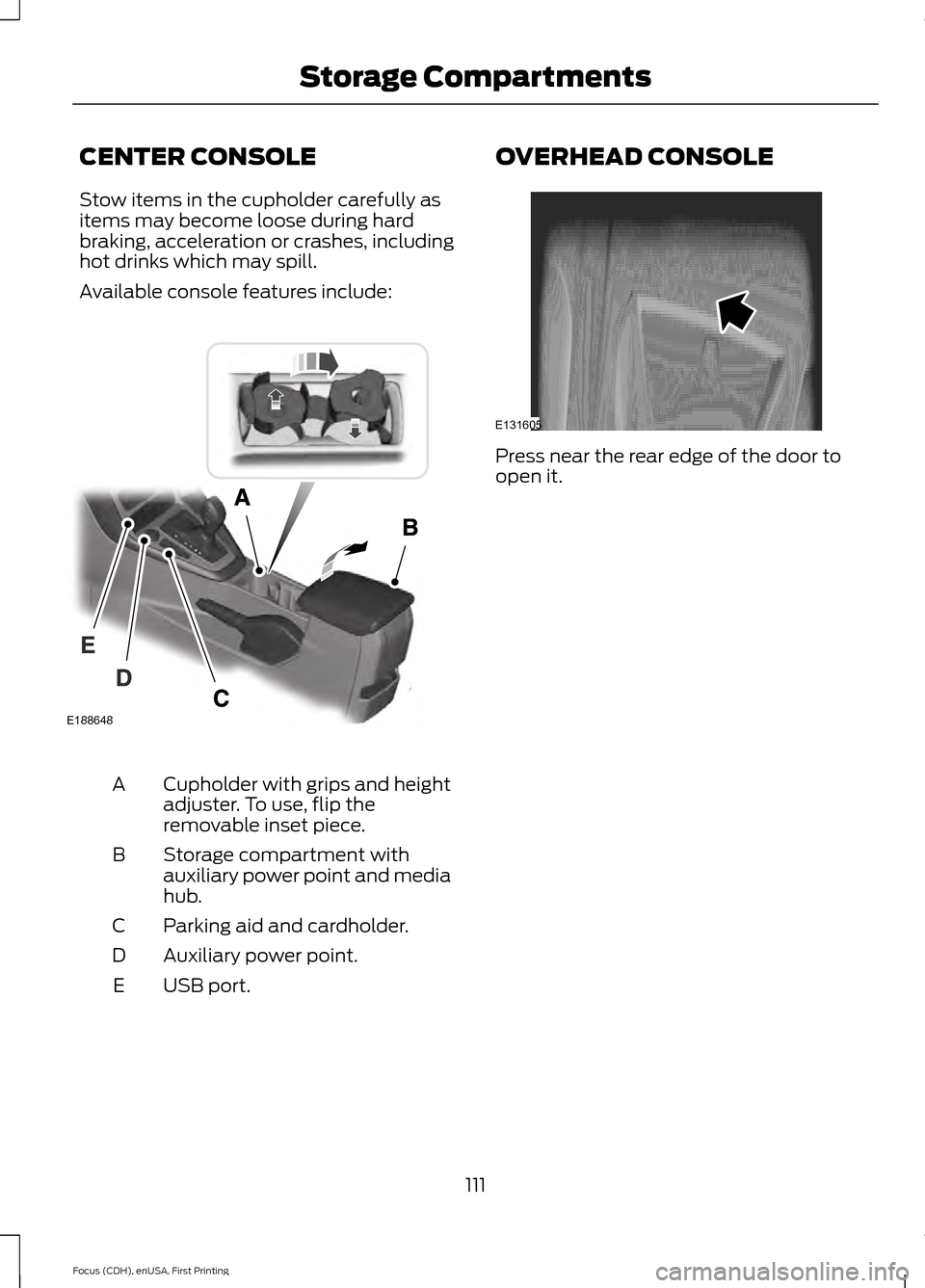
CENTER CONSOLE
Stow items in the cupholder carefully as
items may become loose during hard
braking, acceleration or crashes, including
hot drinks which may spill.
Available console features include:
Cupholder with grips and height
adjuster. To use, flip the
removable inset piece.
A
Storage compartment with
auxiliary power point and media
hub.
B
Parking aid and cardholder.
C
Auxiliary power point.
D
USB port.
E OVERHEAD CONSOLE
Press near the rear edge of the door to
open it.
111
Focus (CDH), enUSA, First Printing Storage CompartmentsE131605 E188648
Page 126 of 369
WARNINGS
If the parking brake is fully released,
but the brake warning lamp remains
illuminated, the brakes may not be
working properly. See your authorized
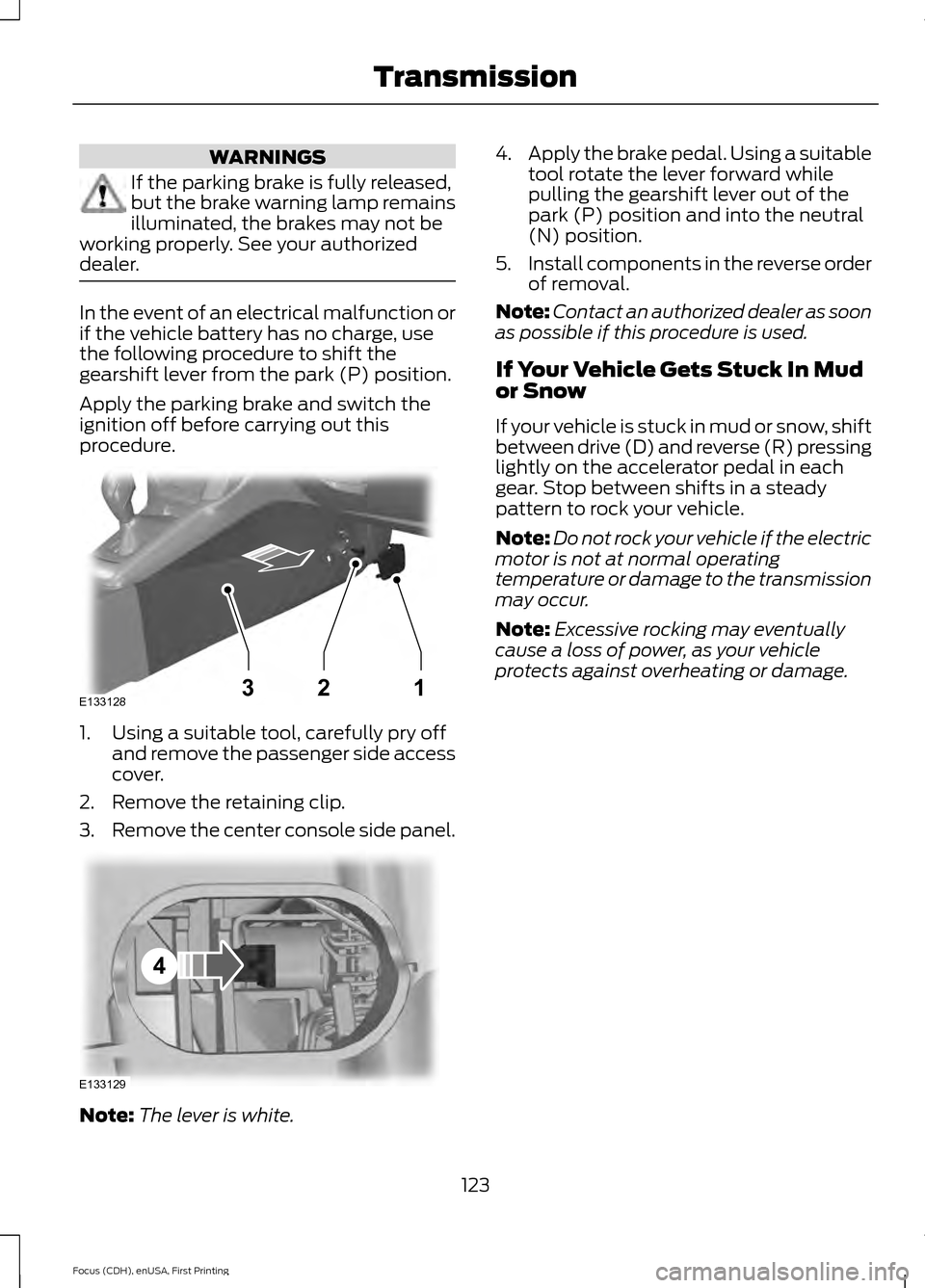
dealer. In the event of an electrical malfunction or
if the vehicle battery has no charge, use
the following procedure to shift the
gearshift lever from the park (P) position.
Apply the parking brake and switch the
ignition off before carrying out this
procedure.
1. Using a suitable tool, carefully pry off
and remove the passenger side access
cover.
2. Remove the retaining clip.
3. Remove the center console side panel. Note:
The lever is white. 4.
Apply the brake pedal. Using a suitable
tool rotate the lever forward while
pulling the gearshift lever out of the
park (P) position and into the neutral
(N) position.
5. Install components in the reverse order
of removal.
Note: Contact an authorized dealer as soon
as possible if this procedure is used.
If Your Vehicle Gets Stuck In Mud
or Snow
If your vehicle is stuck in mud or snow, shift
between drive (D) and reverse (R) pressing
lightly on the accelerator pedal in each
gear. Stop between shifts in a steady
pattern to rock your vehicle.
Note: Do not rock your vehicle if the electric
motor is not at normal operating
temperature or damage to the transmission
may occur.
Note: Excessive rocking may eventually
cause a loss of power, as your vehicle
protects against overheating or damage.
123
Focus (CDH), enUSA, First Printing TransmissionE133128132 E133129
4
Page 131 of 369
PRINCIPLE OF OPERATION
WARNINGS
Vehicle modifications involving
braking system, aftermarket roof
racks, suspension, steering system,
tire construction and wheel and tire size
may change the handling characteristics
of the vehicle and may adversely affect
the performance of the AdvanceTrac
system. In addition, installing any stereo
loudspeakers may interfere with and
adversely affect the AdvanceTrac system.
Install any aftermarket stereo loudspeaker
as far as possible from the front center
console, the tunnel, and the front seats in
order to minimize the risk of interfering with
the AdvanceTrac sensors. Reducing the
effectiveness of the AdvanceTrac system
could lead to an increased risk of loss of
vehicle control, vehicle rollover, personal
injury and death. Remember that even advanced
technology cannot defy the laws of
physics. It’
s always possible to lose
control of a vehicle due to inappropriate
driver input for the conditions. Aggressive
driving on any road condition can cause
you to lose control of your vehicle
increasing the risk of personal injury or
property damage. Activation of the
AdvanceTrac system is an indication that
at least some of the tires have exceeded
their ability to grip the road; this could
reduce the operator ’s ability to control the
vehicle potentially resulting in a loss of
vehicle control, vehicle rollover, personal
injury and death. If your AdvanceTrac
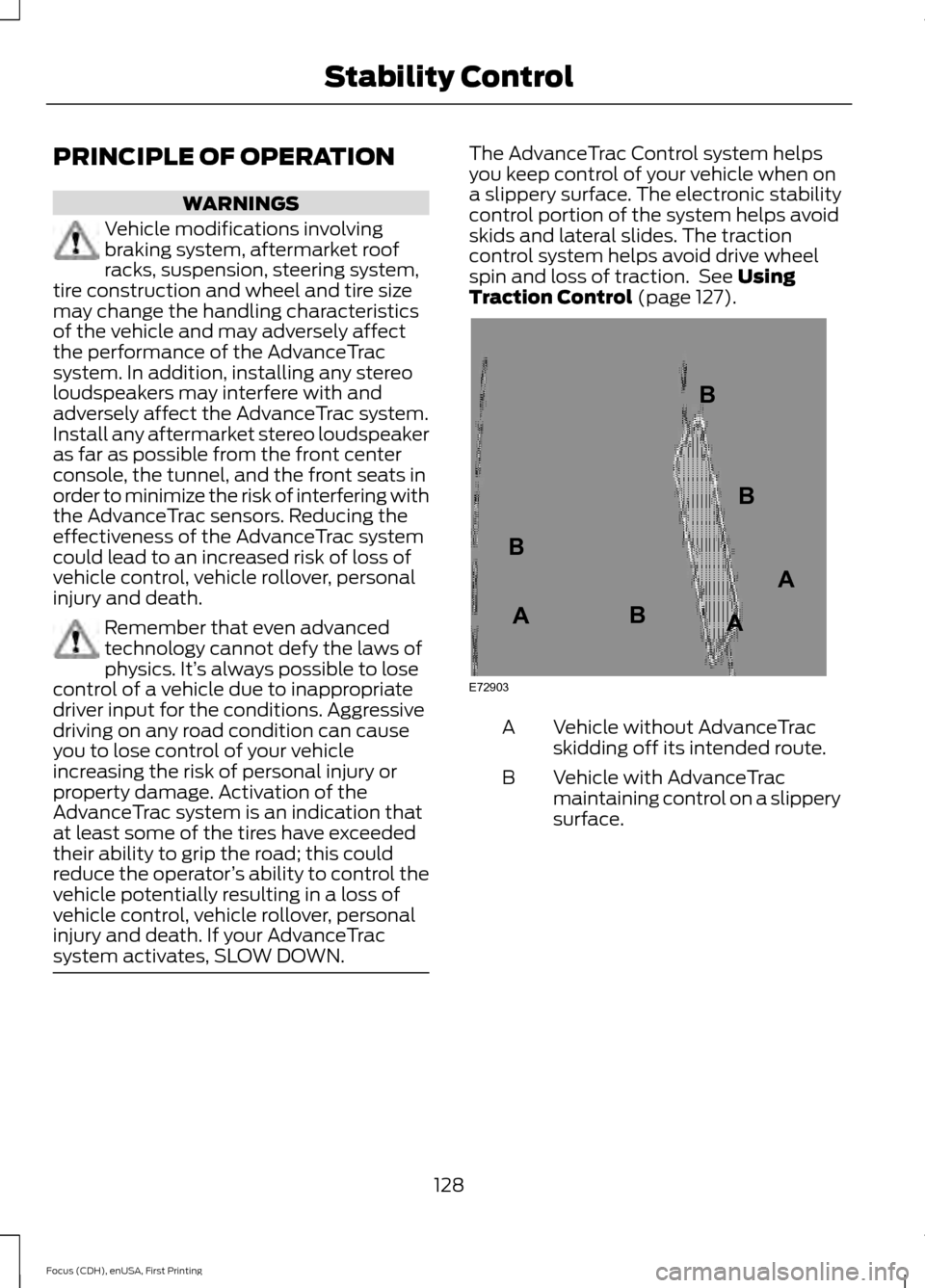
system activates, SLOW DOWN. The AdvanceTrac Control system helps
you keep control of your vehicle when on
a slippery surface. The electronic stability
control portion of the system helps avoid
skids and lateral slides. The traction
control system helps avoid drive wheel
spin and loss of traction. See Using
Traction Control (page 127). Vehicle without AdvanceTrac
skidding off its intended route.
A
Vehicle with AdvanceTrac
maintaining control on a slippery
surface.
B
128
Focus (CDH), enUSA, First Printing Stability ControlE72903A
AA
B
BB
B
Page 233 of 369
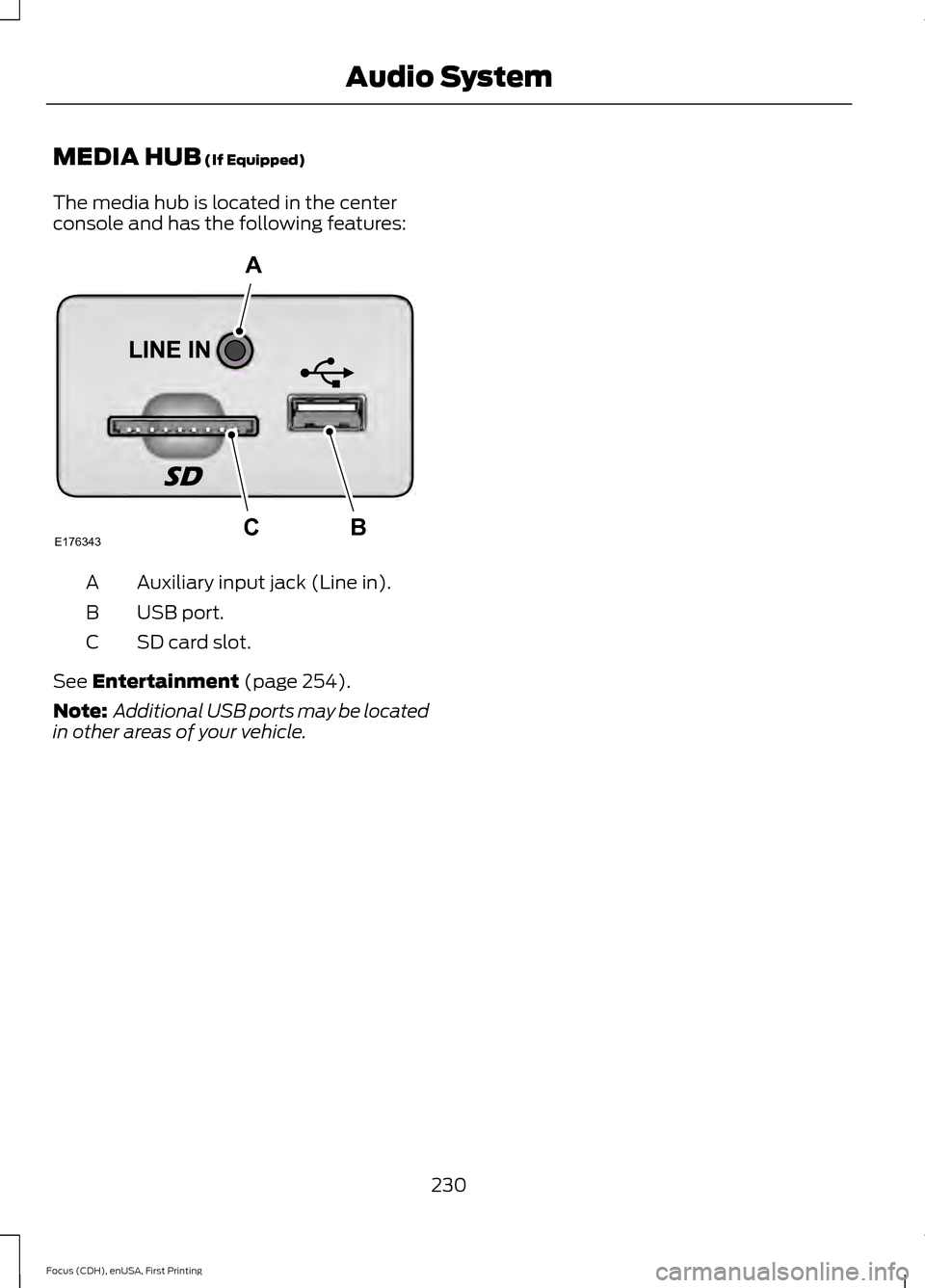
MEDIA HUB (If Equipped)
The media hub is located in the center
console and has the following features: Auxiliary input jack (Line in).
A
USB port.
B
SD card slot.
C
See
Entertainment (page 254).
Note: Additional USB ports may be located
in other areas of your vehicle.
230
Focus (CDH), enUSA, First Printing Audio SystemE176343
A
BC
Page 273 of 369
WARNINGS
Store the portable music player in a
secure location, such as the center
console or the glove box, when your
vehicle is moving. Hard objects may
become projectiles in a crash or sudden
stop, which may increase the risk of serious
injury. The audio extension cable must be
long enough to allow the portable music
player to be safely stored while your
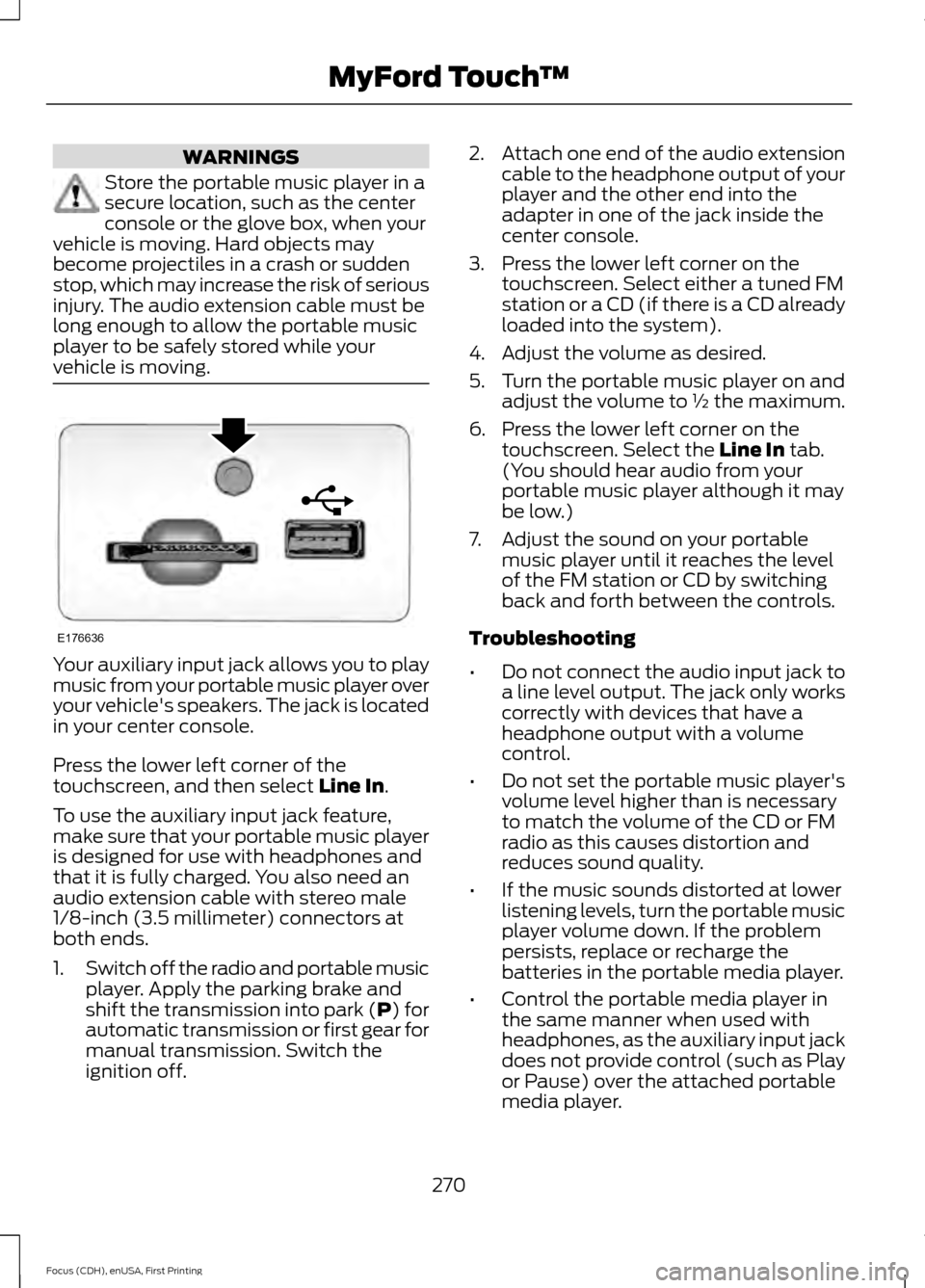
vehicle is moving. Your auxiliary input jack allows you to play
music from your portable music player over
your vehicle's speakers. The jack is located
in your center console.
Press the lower left corner of the
touchscreen, and then select Line In.
To use the auxiliary input jack feature,
make sure that your portable music player
is designed for use with headphones and
that it is fully charged. You also need an
audio extension cable with stereo male
1/8-inch (3.5 millimeter) connectors at
both ends.
1. Switch off the radio and portable music
player. Apply the parking brake and
shift the transmission into park (P) for
automatic transmission or first gear for
manual transmission. Switch the
ignition off. 2.
Attach one end of the audio extension
cable to the headphone output of your
player and the other end into the
adapter in one of the jack inside the
center console.
3. Press the lower left corner on the touchscreen. Select either a tuned FM
station or a CD (if there is a CD already
loaded into the system).
4. Adjust the volume as desired.
5. Turn the portable music player on and adjust the volume to ½ the maximum.
6. Press the lower left corner on the touchscreen. Select the
Line In tab.
(You should hear audio from your
portable music player although it may
be low.)
7. Adjust the sound on your portable music player until it reaches the level
of the FM station or CD by switching
back and forth between the controls.
Troubleshooting
• Do not connect the audio input jack to
a line level output. The jack only works
correctly with devices that have a
headphone output with a volume
control.
• Do not set the portable music player's
volume level higher than is necessary
to match the volume of the CD or FM
radio as this causes distortion and
reduces sound quality.
• If the music sounds distorted at lower
listening levels, turn the portable music
player volume down. If the problem
persists, replace or recharge the
batteries in the portable media player.
• Control the portable media player in
the same manner when used with
headphones, as the auxiliary input jack
does not provide control (such as Play
or Pause) over the attached portable
media player.
270
Focus (CDH), enUSA, First Printing MyFord Touch
™E176636
Page 362 of 369
A
A/C
See: Climate Control........................................ 100
About This Manual...........................................5
ABS See: Brakes............................................................ 124
ABS driving hints See: Hints on Driving With Anti-Lock
Brakes................................................................. 125
Accessories.....................................................321 Exterior style......................................................... 321
Interior style.......................................................... 321
Lifestyle.................................................................. 321
Peace of mind...................................................... 321
Accessories See: Replacement Parts
Recommendation.............................................. 9
Adjusting the Headlamps..........................176 Horizontal Aim Adjustment............................. 177
Vertical Aim Adjustment.................................. 176
Adjusting the Steering Wheel....................67
Airbag Disposal...............................................45
Air Conditioning See: Climate Control........................................ 100
Alarm See: Anti-Theft Alarm........................................ 65
Ambient Lighting............................................76
Anti-Theft Alarm
............................................65
Arming the Alarm................................................. 65
Disarming the Alarm........................................... 66
Appendices....................................................323
At a Glance
........................................................12
Audible Warnings and Indicators.............85 Headlamps On Warning Chime...................... 85
Keyless Warning Alert........................................ 85
Parking Brake On Warning Chime.................85
Audio Control...................................................67 Seek, Next or Previous....................................... 68
Audio System
.................................................227
General Information.......................................... 227
Audio Unit - Vehicles With: Sony Audio System..........................................................228
Autolamps.........................................................73 Windshield Wiper Activated
Headlamps......................................................... 73Automatic Climate Control......................100
Dual Zone Temperature Control.................... 101
Single Zone Temperature Control.................101
Temperature Control.......................................... 101
Automatic Transmission............................122 Brake-Shift Interlock.......................................... 122
If Your Vehicle Gets Stuck In Mud or Snow................................................................... 123
Single Speed Automatic Transmission.................................................... 122
Auxiliary Power Points.................................110 12 Volt DC Power Point...................................... 110
Location.................................................................. 110
B
Bonnet Lock See: Opening and Closing the Hood...........169
Booster Seats..................................................24 Types of Booster Seats...................................... 25
Brake Fluid Check..........................................173
Brakes................................................................124 General Information.......................................... 124
Breaking-In......................................................145
Bulb Specification Chart............................181
C
Cabin Air Filter...............................................103
California Proposition 65...............................9
Capacities and Specifications
................225
Specifications ...................................................... 225
Car Wash See: Cleaning the Exterior............................... 182
Center Console................................................111
Changing a Bulb............................................178 Replacing Headlamp Bulbs............................ 178
Replacing HID Headlamp Bulbs.................... 178
Replacing LED Rear Lamp Bulbs.................180
Replacing Licence Plate and High Mounted Brake Lamp Bulbs.......................................... 181
Replacing Rear Lamp Bulbs............................ 179
Changing a Fuse
...........................................168
Fuses....................................................................... 168
Changing a Road Wheel
...........................220
Important Information for Lifting or
Jacking.............................................................. 220
Changing the 12V Battery...........................173
359
Focus (CDH), enUSA, First Printing Index