wheel FORD FOCUS ELECTRIC 2017 3.G Repair Manual
[x] Cancel search | Manufacturer: FORD, Model Year: 2017, Model line: FOCUS ELECTRIC, Model: FORD FOCUS ELECTRIC 2017 3.GPages: 367, PDF Size: 6.35 MB
Page 258 of 367
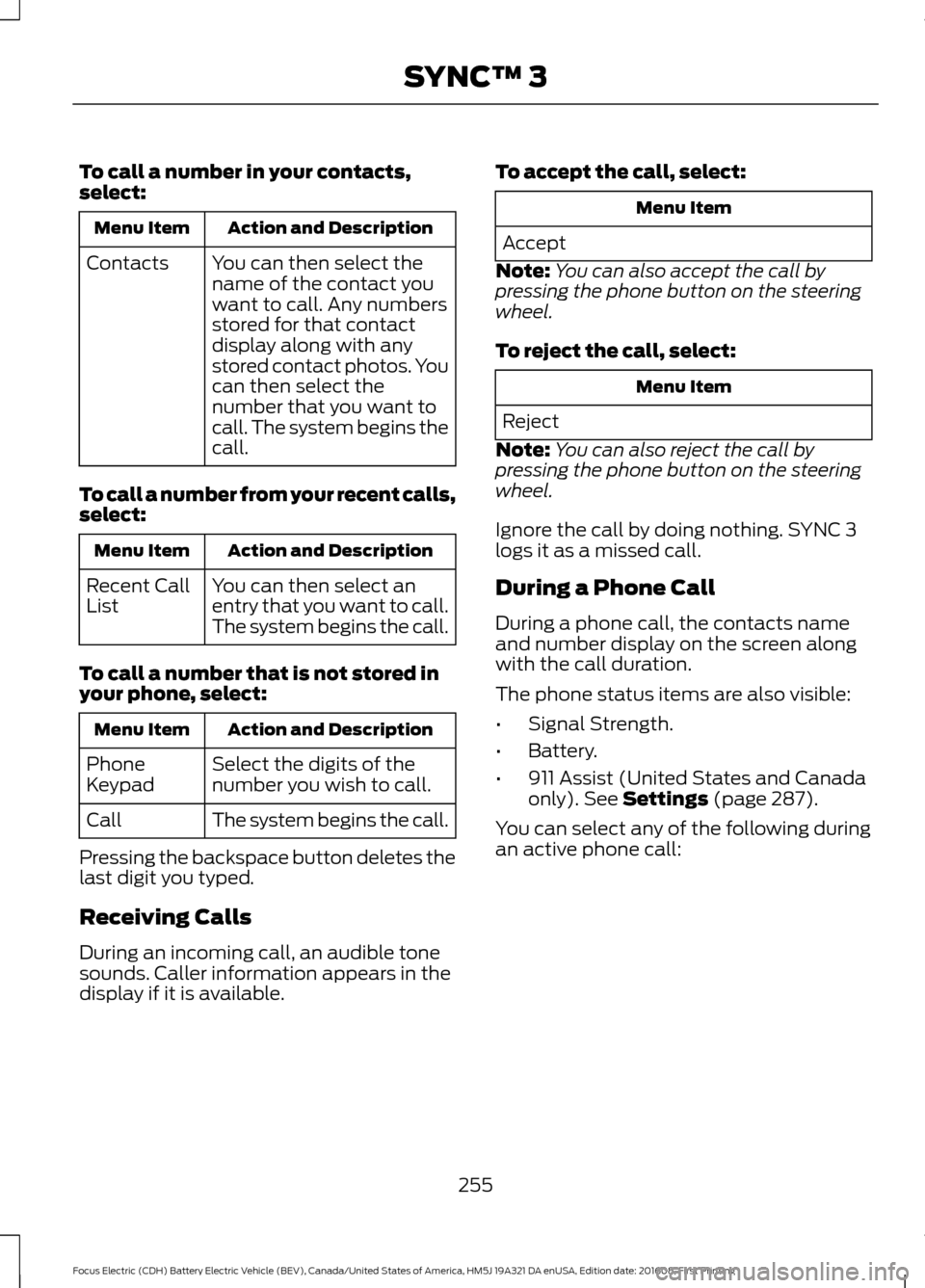
To call a number in your contacts,
select:
Action and Description
Menu Item
You can then select the
name of the contact you
want to call. Any numbers
stored for that contact
display along with any
stored contact photos. You
can then select the
number that you want to
call. The system begins the
call.
Contacts
To call a number from your recent calls,
select: Action and Description
Menu Item
You can then select an
entry that you want to call.
The system begins the call.
Recent Call
List
To call a number that is not stored in
your phone, select: Action and Description
Menu Item
Select the digits of the
number you wish to call.
Phone
Keypad
The system begins the call.
Call
Pressing the backspace button deletes the
last digit you typed.
Receiving Calls
During an incoming call, an audible tone
sounds. Caller information appears in the
display if it is available. To accept the call, select: Menu Item
Accept
Note: You can also accept the call by
pressing the phone button on the steering
wheel.
To reject the call, select: Menu Item
Reject
Note: You can also reject the call by
pressing the phone button on the steering
wheel.
Ignore the call by doing nothing. SYNC 3
logs it as a missed call.
During a Phone Call
During a phone call, the contacts name
and number display on the screen along
with the call duration.
The phone status items are also visible:
• Signal Strength.
• Battery.
• 911 Assist (United States and Canada
only). See Settings (page 287).
You can select any of the following during
an active phone call:
255
Focus Electric (CDH) Battery Electric Vehicle (BEV), Canada/United States of America, HM5J 19A321 DA enUSA, Edition date: 201608, First Printing SYNC™ 3
Page 259 of 367
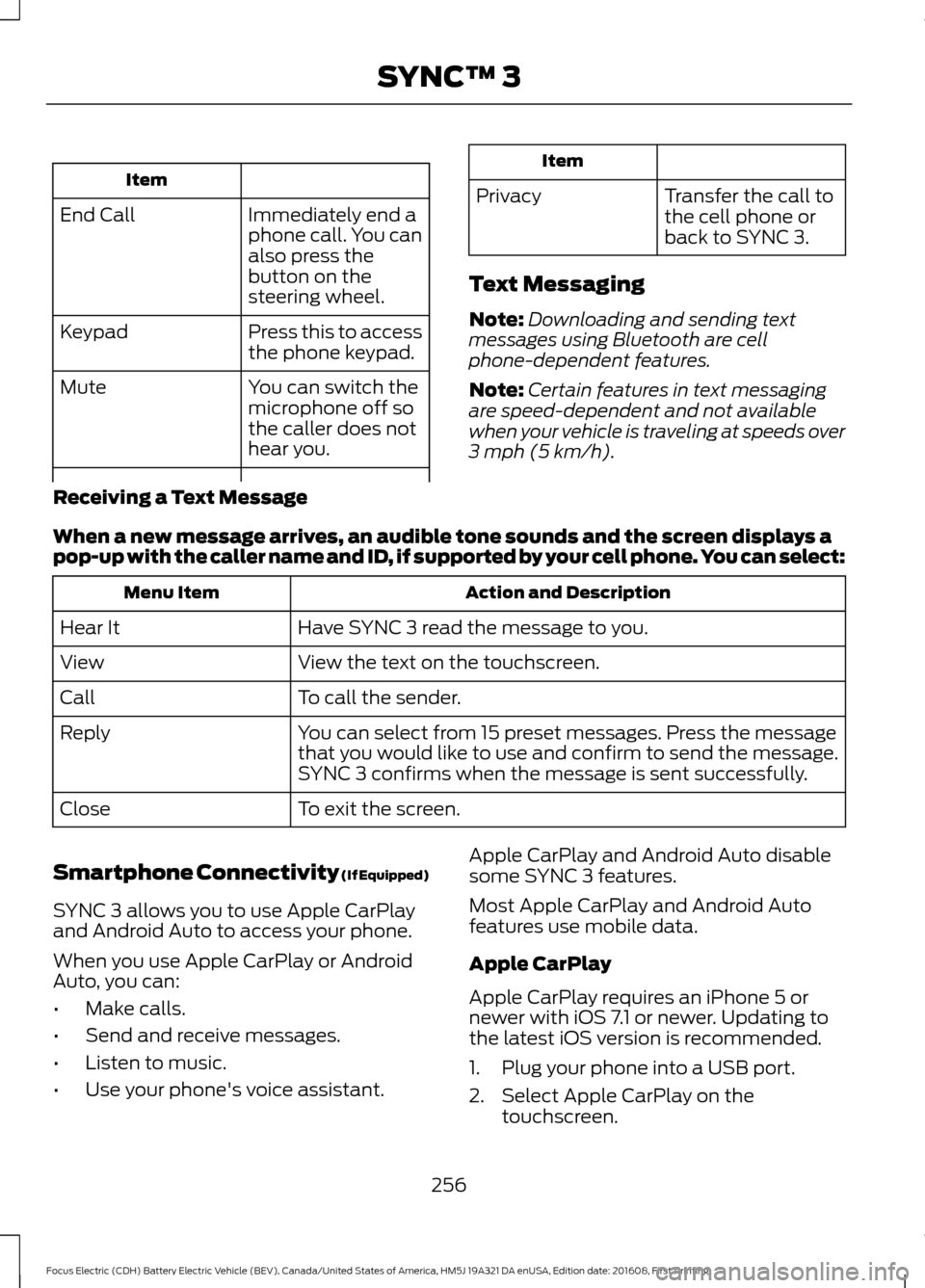
Item
Immediately end a
phone call. You can
also press the
button on the
steering wheel.
End Call
Press this to access
the phone keypad.
Keypad
You can switch the
microphone off so
the caller does not
hear you.
Mute Item
Privacy Transfer the call to
the cell phone or
back to SYNC 3.
Text Messaging
Note: Downloading and sending text
messages using Bluetooth are cell
phone-dependent features.
Note: Certain features in text messaging
are speed-dependent and not available
when your vehicle is traveling at speeds over
3 mph (5 km/h).
Receiving a Text Message
When a new message arrives, an audible tone sounds and the screen displays a
pop-up with the caller name and ID, if supported by your cell phone. You can select: Action and Description
Menu Item
Have SYNC 3 read the message to you.
Hear It
View the text on the touchscreen.
View
To call the sender.
Call
You can select from 15 preset messages. Press the message
that you would like to use and confirm to send the message.
SYNC 3 confirms when the message is sent successfully.
Reply
To exit the screen.
Close
Smartphone Connectivity (If Equipped)
SYNC 3 allows you to use Apple CarPlay
and Android Auto to access your phone.
When you use Apple CarPlay or Android
Auto, you can:
• Make calls.
• Send and receive messages.
• Listen to music.
• Use your phone's voice assistant. Apple CarPlay and Android Auto disable
some SYNC 3 features.
Most Apple CarPlay and Android Auto
features use mobile data.
Apple CarPlay
Apple CarPlay requires an iPhone 5 or
newer with iOS 7.1 or newer. Updating to
the latest iOS version is recommended.
1. Plug your phone into a USB port.
2. Select Apple CarPlay on the
touchscreen.
256
Focus Electric (CDH) Battery Electric Vehicle (BEV), Canada/United States of America, HM5J 19A321 DA enUSA, Edition date: 201608, First Printing SYNC™ 3
Page 286 of 367
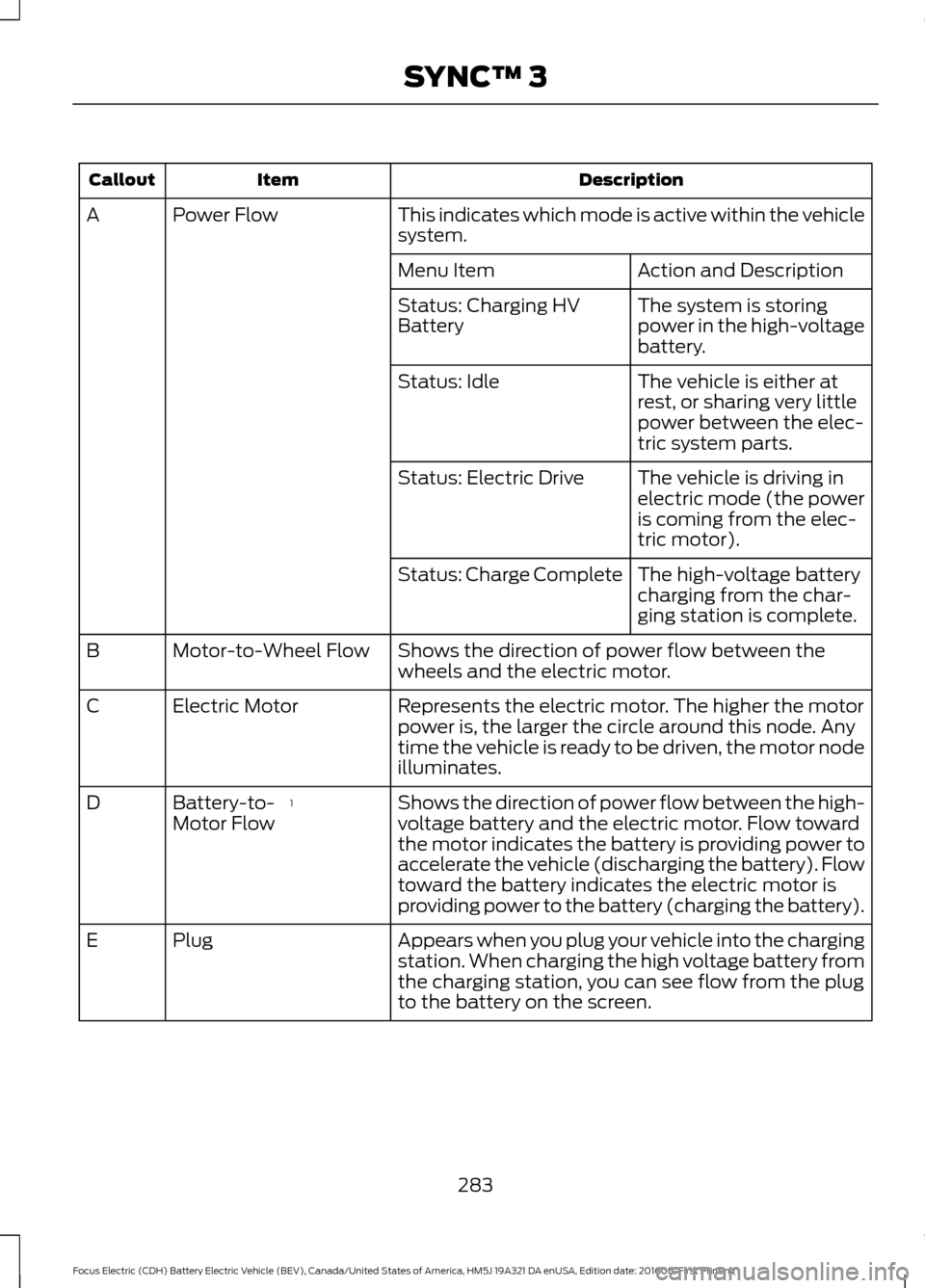
Description
Item
Callout
This indicates which mode is active within the vehicle
system.
Power Flow
A
Action and Description
Menu Item
The system is storing
power in the high-voltage
battery.
Status: Charging HV
Battery
The vehicle is either at
rest, or sharing very little
power between the elec-
tric system parts.
Status: Idle
The vehicle is driving in
electric mode (the power
is coming from the elec-
tric motor).
Status: Electric Drive
The high-voltage battery
charging from the char-
ging station is complete.
Status: Charge Complete
Shows the direction of power flow between the
wheels and the electric motor.
Motor-to-Wheel Flow
B
Represents the electric motor. The higher the motor
power is, the larger the circle around this node. Any
time the vehicle is ready to be driven, the motor node
illuminates.
Electric Motor
C
Shows the direction of power flow between the high-
voltage battery and the electric motor. Flow toward
the motor indicates the battery is providing power to
accelerate the vehicle (discharging the battery). Flow
toward the battery indicates the electric motor is
providing power to the battery (charging the battery).
1
Battery-to-
Motor Flow
D
Appears when you plug your vehicle into the charging
station. When charging the high voltage battery from
the charging station, you can see flow from the plug
to the battery on the screen.
Plug
E
283
Focus Electric (CDH) Battery Electric Vehicle (BEV), Canada/United States of America, HM5J 19A321 DA enUSA, Edition date: 201608, First Printing SYNC™ 3
Page 287 of 367
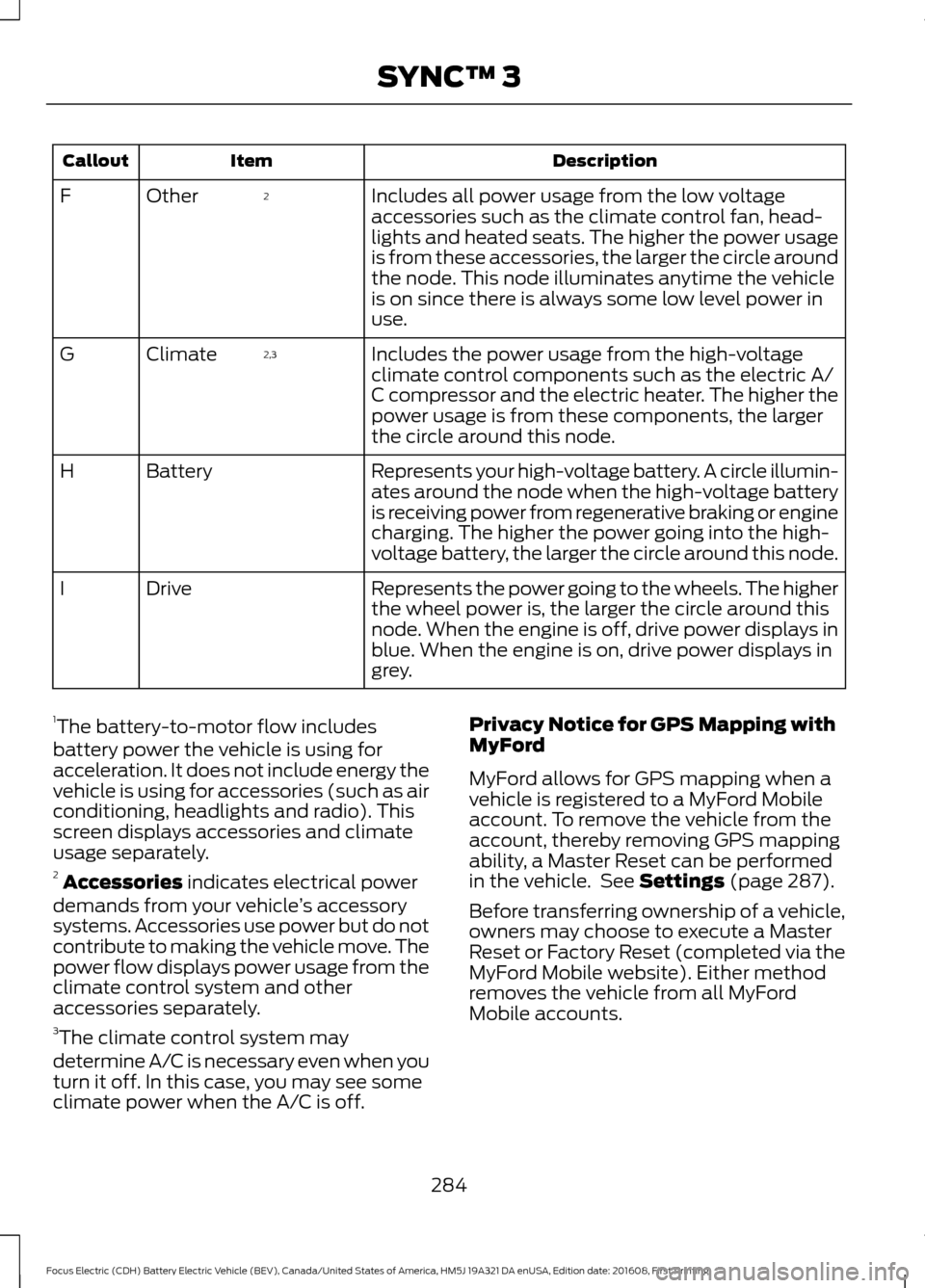
Description
Item
Callout
Includes all power usage from the low voltage
accessories such as the climate control fan, head-
lights and heated seats. The higher the power usage
is from these accessories, the larger the circle around
the node. This node illuminates anytime the vehicle
is on since there is always some low level power in
use.
2
Other
F
Includes the power usage from the high-voltage
climate control components such as the electric A/
C compressor and the electric heater. The higher the
power usage is from these components, the larger
the circle around this node.
2,3
Climate
G
Represents your high-voltage battery. A circle illumin-
ates around the node when the high-voltage battery
is receiving power from regenerative braking or engine
charging. The higher the power going into the high-
voltage battery, the larger the circle around this node.
Battery
H
Represents the power going to the wheels. The higher
the wheel power is, the larger the circle around this
node. When the engine is off, drive power displays in
blue. When the engine is on, drive power displays in
grey.
Drive
I
1 The battery-to-motor flow includes
battery power the vehicle is using for
acceleration. It does not include energy the
vehicle is using for accessories (such as air
conditioning, headlights and radio). This
screen displays accessories and climate
usage separately.
2 Accessories indicates electrical power
demands from your vehicle ’s accessory
systems. Accessories use power but do not
contribute to making the vehicle move. The
power flow displays power usage from the
climate control system and other
accessories separately.
3 The climate control system may
determine A/C is necessary even when you
turn it off. In this case, you may see some
climate power when the A/C is off. Privacy Notice for GPS Mapping with
MyFord
MyFord allows for GPS mapping when a
vehicle is registered to a MyFord Mobile
account. To remove the vehicle from the
account, thereby removing GPS mapping
ability, a Master Reset can be performed
in the vehicle. See Settings (page 287).
Before transferring ownership of a vehicle,
owners may choose to execute a Master
Reset or Factory Reset (completed via the
MyFord Mobile website). Either method
removes the vehicle from all MyFord
Mobile accounts.
284
Focus Electric (CDH) Battery Electric Vehicle (BEV), Canada/United States of America, HM5J 19A321 DA enUSA, Edition date: 201608, First Printing SYNC™ 3
Page 288 of 367
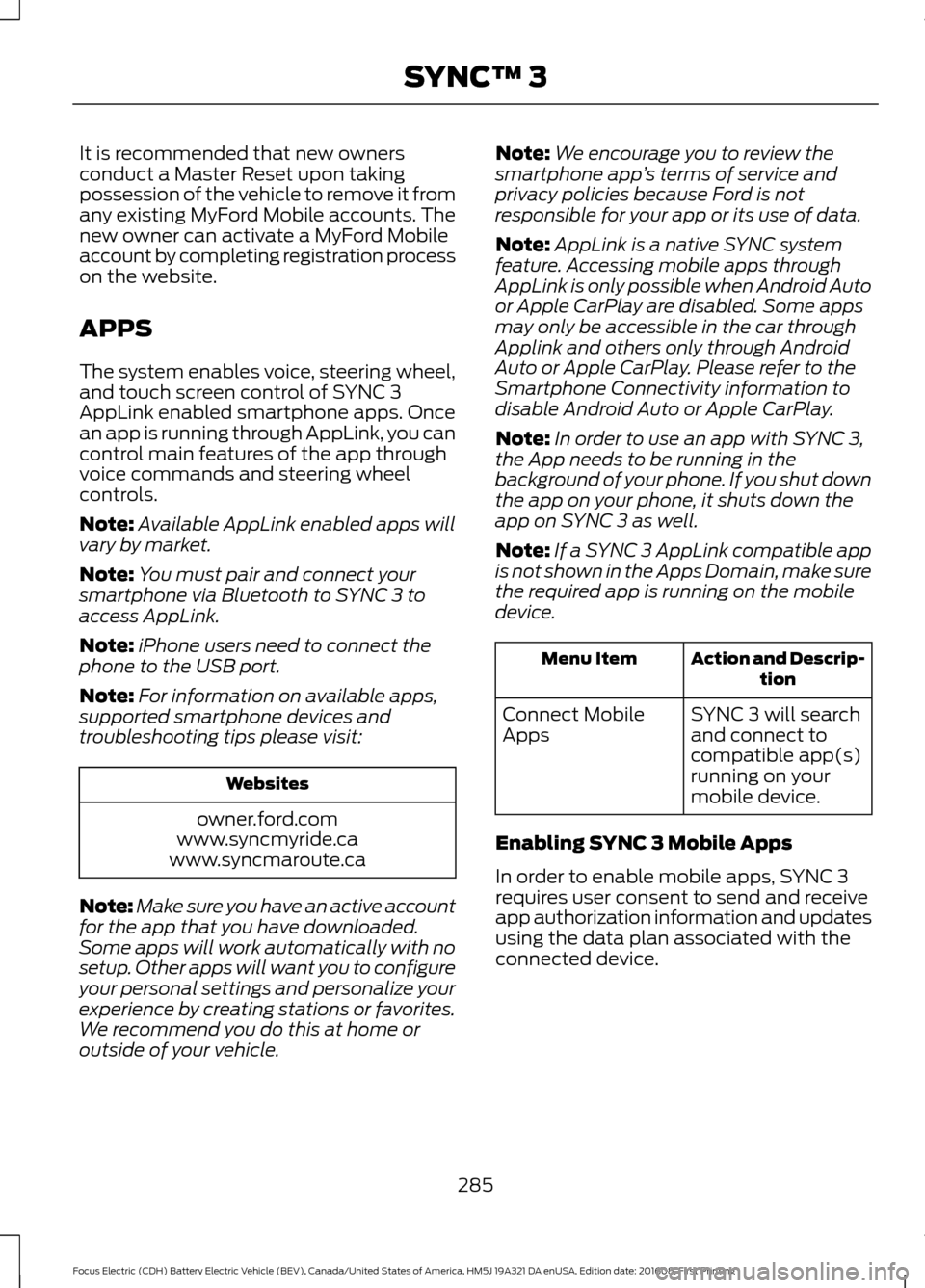
It is recommended that new owners
conduct a Master Reset upon taking
possession of the vehicle to remove it from
any existing MyFord Mobile accounts. The
new owner can activate a MyFord Mobile
account by completing registration process
on the website.
APPS
The system enables voice, steering wheel,
and touch screen control of SYNC 3
AppLink enabled smartphone apps. Once
an app is running through AppLink, you can
control main features of the app through
voice commands and steering wheel
controls.
Note:
Available AppLink enabled apps will
vary by market.
Note: You must pair and connect your
smartphone via Bluetooth to SYNC 3 to
access AppLink.
Note: iPhone users need to connect the
phone to the USB port.
Note: For information on available apps,
supported smartphone devices and
troubleshooting tips please visit: Websites
owner.ford.com
www.syncmyride.ca
www.syncmaroute.ca
Note: Make sure you have an active account
for the app that you have downloaded.
Some apps will work automatically with no
setup. Other apps will want you to configure
your personal settings and personalize your
experience by creating stations or favorites.
We recommend you do this at home or
outside of your vehicle. Note:
We encourage you to review the
smartphone app ’s terms of service and
privacy policies because Ford is not
responsible for your app or its use of data.
Note: AppLink is a native SYNC system
feature. Accessing mobile apps through
AppLink is only possible when Android Auto
or Apple CarPlay are disabled. Some apps
may only be accessible in the car through
Applink and others only through Android
Auto or Apple CarPlay. Please refer to the
Smartphone Connectivity information to
disable Android Auto or Apple CarPlay.
Note: In order to use an app with SYNC 3,
the App needs to be running in the
background of your phone. If you shut down
the app on your phone, it shuts down the
app on SYNC 3 as well.
Note: If a SYNC 3 AppLink compatible app
is not shown in the Apps Domain, make sure
the required app is running on the mobile
device. Action and Descrip-
tion
Menu Item
SYNC 3 will search
and connect to
compatible app(s)
running on your
mobile device.
Connect Mobile
Apps
Enabling SYNC 3 Mobile Apps
In order to enable mobile apps, SYNC 3
requires user consent to send and receive
app authorization information and updates
using the data plan associated with the
connected device.
285
Focus Electric (CDH) Battery Electric Vehicle (BEV), Canada/United States of America, HM5J 19A321 DA enUSA, Edition date: 201608, First Printing SYNC™ 3
Page 315 of 367
For a complete listing of the accessories
that are available for your vehicle, please
contact your authorized dealer or visit the
online store web site:
Web Address (United States)
www.Accessories.Ford.com Web Address (Canada)
www.Accessories.Ford.ca
Ford Accessories are available for your
vehicle through an authorized Ford dealer.
Ford Motor Company will repair or replace
any properly authorized dealer-installed
Ford Original Accessory found to be
defective in factory-supplied materials or
workmanship during the warranty period,
as well as any component damaged by the
defective accessories.
Ford Motor Company warrants your
accessory through the warranty that
provides the greatest benefit:
• 24 months, unlimited mileage.
• The remainder of your new vehicle
limited warranty.
Contact an authorized dealer for details
and a copy of the warranty.
Exterior style
• Graphics.
• Hood deflector.*
• Side window deflectors.
• Splash guards.
• Spoilers.
Interior style
• All-weather floor mats.
• Cargo area protectors.
• Cargo organizers. •
Door sill plates.
• Premium carpeted floor mats.
• Shift knobs.
Lifestyle
• Ash cup or coin holder.
• Roof racks and carriers.*
• Tablet cradle.*
Peace of mind
• Charge cord storage bag.*
• Full vehicle covers.
• Vehicle security systems.
• Wheel locks.
• Roadside assistance kits.*
312
Focus Electric (CDH) Battery Electric Vehicle (BEV), Canada/United States of America, HM5J 19A321 DA enUSA, Edition date: 201608, First Printing Accessories
Page 322 of 367
Be sure to ask your dealership service
advisor or technician about the multi-point
vehicle inspection. It is a comprehensive
way to perform a thorough inspection of
your vehicle. Your checklist gives you
immediate feedback on the overall
condition of your vehicle.
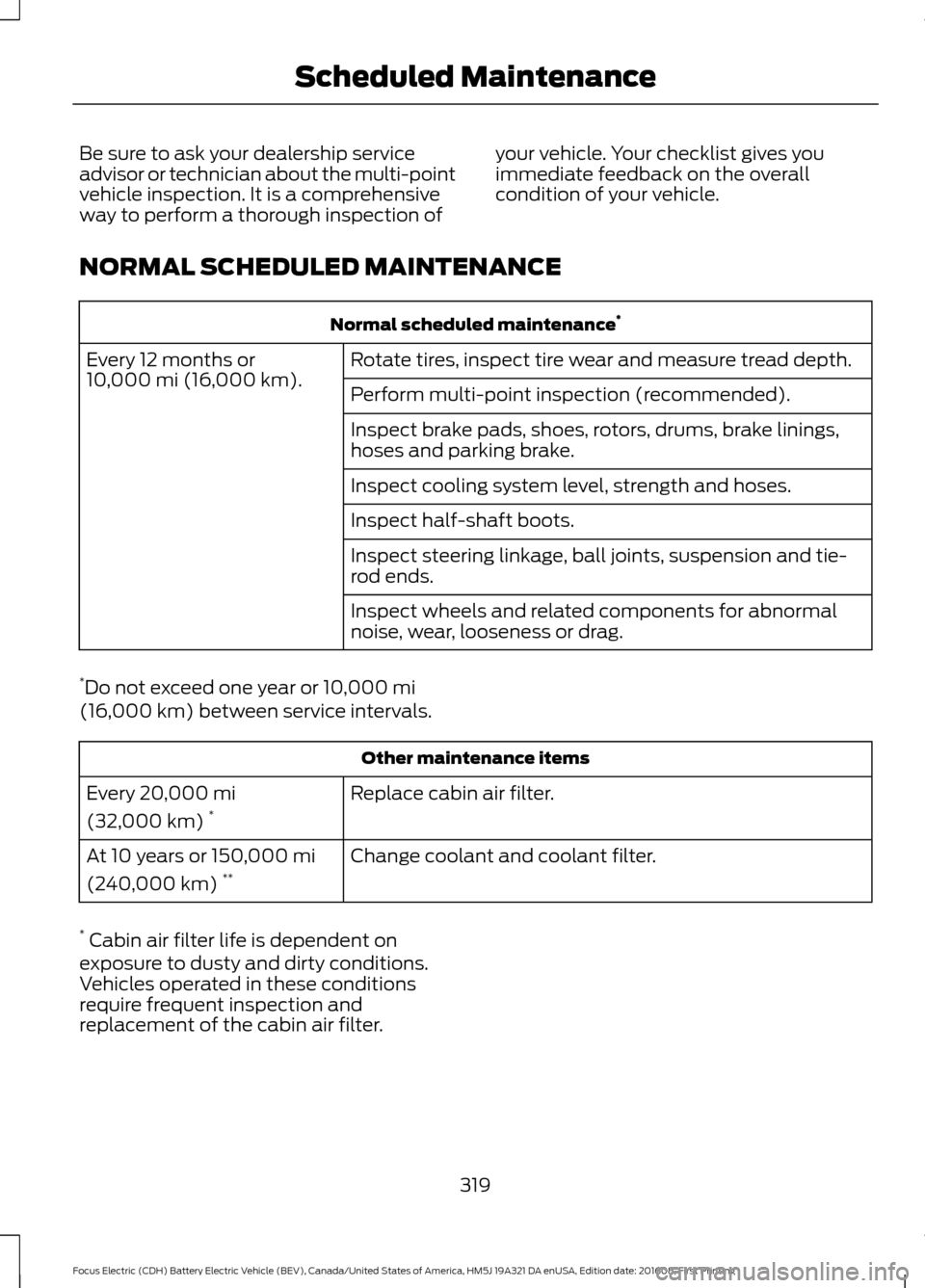
NORMAL SCHEDULED MAINTENANCE Normal scheduled maintenance
*
Rotate tires, inspect tire wear and measure tread depth.
Every 12 months or
10,000 mi (16,000 km).
Perform multi-point inspection (recommended).
Inspect brake pads, shoes, rotors, drums, brake linings,
hoses and parking brake.
Inspect cooling system level, strength and hoses.
Inspect half-shaft boots.
Inspect steering linkage, ball joints, suspension and tie-
rod ends.
Inspect wheels and related components for abnormal
noise, wear, looseness or drag.
* Do not exceed one year or
10,000 mi
(16,000 km) between service intervals. Other maintenance items
Replace cabin air filter.
Every
20,000 mi
(32,000 km) *
Change coolant and coolant filter.
At 10 years or
150,000 mi
(240,000 km) **
* Cabin air filter life is dependent on
exposure to dusty and dirty conditions.
Vehicles operated in these conditions
require frequent inspection and
replacement of the cabin air filter.
319
Focus Electric (CDH) Battery Electric Vehicle (BEV), Canada/United States of America, HM5J 19A321 DA enUSA, Edition date: 201608, First Printing Scheduled Maintenance
Page 336 of 367
TRADEMARKS: This EULA does not grant
you any rights in connection with any
trademarks or service marks of FORD
MOTOR COMPANY, its affiliates, and third
party software and service providers.
PRODUCT SUPPORT: Please refer to
FORD MOTOR COMPANY instructions
provided in the documentation for the
DEVICES product support, such as the
vehicle owner guide.
Should you have any questions concerning
this EULA, or if you desire to contact FORD
MOTOR COMPANY for any other reason,
please refer to the address provided in the
documentation for the DEVICES.
No Liability for Certain Damages:
EXCEPT AS PROHIBITED BY LAW, FORD
MOTOR COMPANY, ANY THIRD PARTY
SOFTWARE OR SERVICES SUPPLIERS,
AND THEIR AFFILIATES SHALL HAVE NO
LIABILITY FOR ANY INDIRECT, SPECIAL,
CONSEQUENTIAL OR INCIDENTAL
DAMAGES ARISING FROM OR IN
CONNECTION WITH THE USE OR
PERFORMANCE OF THE SOFTWARE. THIS
LIMITATION SHALL APPLY EVEN IF ANY
REMEDY FAILS OF ITS ESSENTIAL
PURPOSE. THERE ARE NO WARRANTIES
OTHER THAN THOSE THAT MAY BE
EXPRESSLY PROVIDED FOR YOUR NEW
VEHICLE.
SYNC® Automotive Important Safety
Information Read and follow
instructions:
• Before using your SYNC® system, read
and follow all instructions and safety
information provided in this end user
manual ("Owner Guide".) Not
following precautions found in the
Owner Guide can lead to an accident
or other serious injuries. General Operation
•
Voice Command Control
: Certain
functions within the SYNC® system
may be accomplished using voice
commands. Using voice commands
while driving helps you to operate the
system without removing your hands
from the wheel or eyes from the road.
• Prolonged Views of Screen:
Do not
access any function requiring a
prolonged view of the screen while you
are driving. Pull over in a safe and legal
manner before attempting to access a
function of the system requiring
prolonged attention.
• Volume Setting:
Do not raise the
volume excessively. Keep the volume
at a level where you can still hear
outside traffic and emergency signals
while driving. Driving while unable to
hear these sounds could cause an
accident.
• Navigation Features:
Any navigation
features included in the system are
intended to provide turn by turn
instructions to get you to a desired
destination. Please make certain all
persons using this system carefully
read and follow instructions and safety
information fully.
• Distraction Hazard:
Any navigation
features may require manual
(non-verbal) setup. Attempting to
perform such set-up or insert data
while driving can distract your attention
and could cause an accident or other
serious injury. Stop the vehicle in a safe
and legal manner before attempting
these operations.
• Let Your Judgment Prevail:
Any
navigation features are provided only
as an aid. Make your driving decisions
based on your observations of local
conditions and existing traffic
regulations. Any such feature is not a
333
Focus Electric (CDH) Battery Electric Vehicle (BEV), Canada/United States of America, HM5J 19A321 DA enUSA, Edition date: 201608, First Printing Appendices
Page 360 of 367
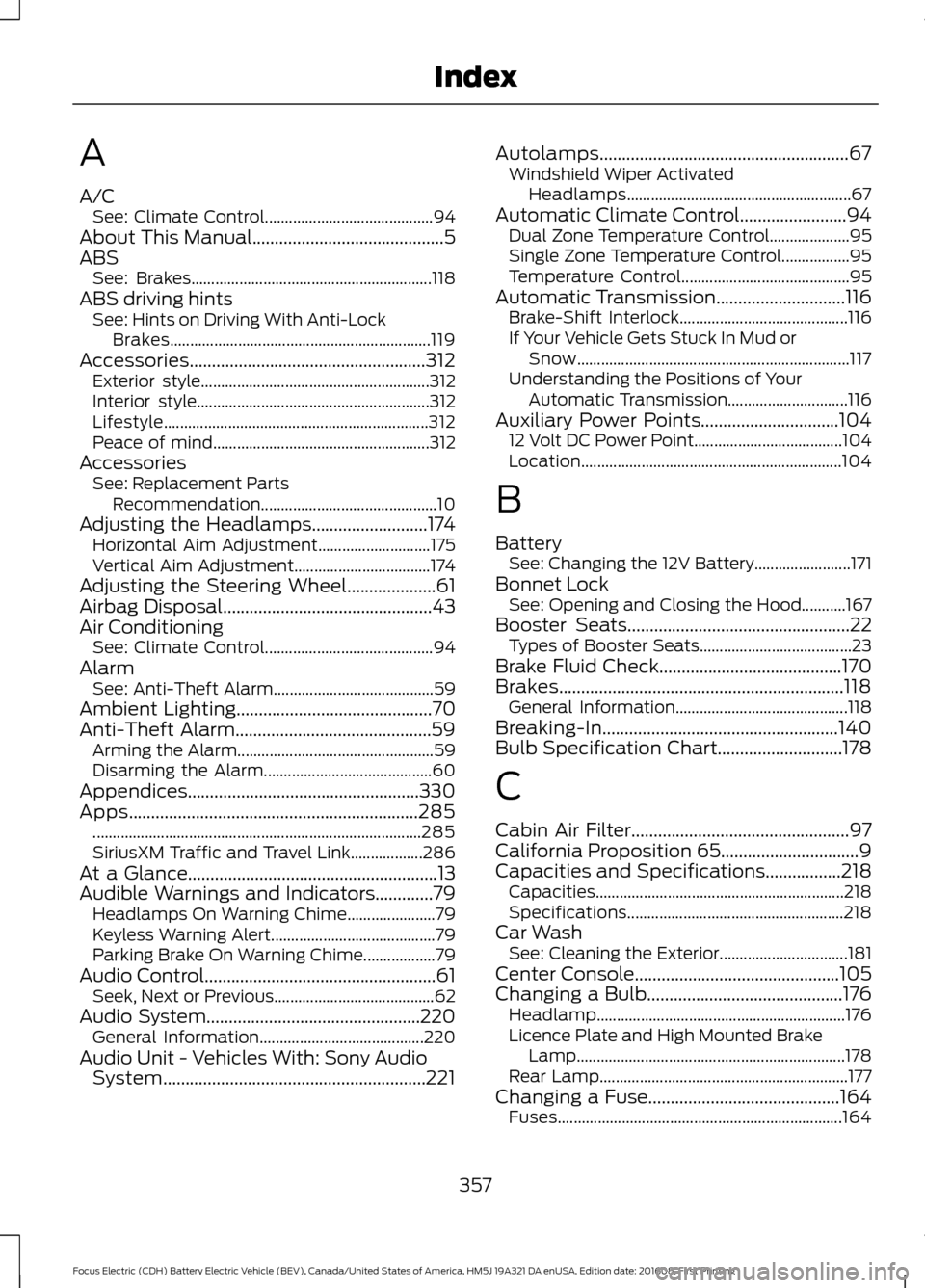
A
A/C
See: Climate Control.......................................... 94
About This Manual...........................................5
ABS See: Brakes............................................................ 118
ABS driving hints See: Hints on Driving With Anti-Lock
Brakes................................................................. 119
Accessories.....................................................312 Exterior style......................................................... 312
Interior style.......................................................... 312
Lifestyle.................................................................. 312
Peace of mind...................................................... 312
Accessories See: Replacement Parts
Recommendation............................................ 10
Adjusting the Headlamps..........................174 Horizontal Aim Adjustment............................ 175
Vertical Aim Adjustment.................................. 174
Adjusting the Steering Wheel....................61
Airbag Disposal...............................................43
Air Conditioning See: Climate Control.......................................... 94
Alarm See: Anti-Theft Alarm........................................ 59
Ambient Lighting
............................................70
Anti-Theft Alarm............................................59 Arming the Alarm................................................. 59
Disarming the Alarm.......................................... 60
Appendices....................................................330
Apps
.................................................................285
........................................................................\
.......... 285
SiriusXM Traffic and Travel Link.................. 286
At a Glance
........................................................13
Audible Warnings and Indicators.............79 Headlamps On Warning Chime...................... 79
Keyless Warning Alert......................................... 79
Parking Brake On Warning Chime.................. 79
Audio Control....................................................61 Seek, Next or Previous........................................ 62
Audio System................................................220 General Information......................................... 220
Audio Unit - Vehicles With: Sony Audio System...........................................................221 Autolamps........................................................67
Windshield Wiper Activated
Headlamps........................................................ 67
Automatic Climate Control
........................94
Dual Zone Temperature Control.................... 95
Single Zone Temperature Control.................95
Temperature Control.......................................... 95
Automatic Transmission
.............................116
Brake-Shift Interlock.......................................... 116
If Your Vehicle Gets Stuck In Mud or Snow.................................................................... 117
Understanding the Positions of Your Automatic Transmission.............................. 116
Auxiliary Power Points
...............................104
12 Volt DC Power Point..................................... 104
Location................................................................. 104
B
Battery See: Changing the 12V Battery........................ 171
Bonnet Lock See: Opening and Closing the Hood...........167
Booster Seats
..................................................22
Types of Booster Seats...................................... 23
Brake Fluid Check.........................................170
Brakes................................................................118 General Information........................................... 118
Breaking-In.....................................................140
Bulb Specification Chart............................178
C
Cabin Air Filter.................................................97
California Proposition 65...............................9
Capacities and Specifications
.................218
Capacities.............................................................. 218
Specifications...................................................... 218
Car Wash See: Cleaning the Exterior................................ 181
Center Console
..............................................105
Changing a Bulb............................................176
Headlamp.............................................................. 176
Licence Plate and High Mounted Brake Lamp................................................................... 178
Rear Lamp.............................................................. 177
Changing a Fuse
...........................................164
Fuses....................................................................... 164
357
Focus Electric (CDH) Battery Electric Vehicle (BEV), Canada/United States of America, HM5J 19A321 DA enUSA, Edition date: 201608, First Printing Index
Page 361 of 367
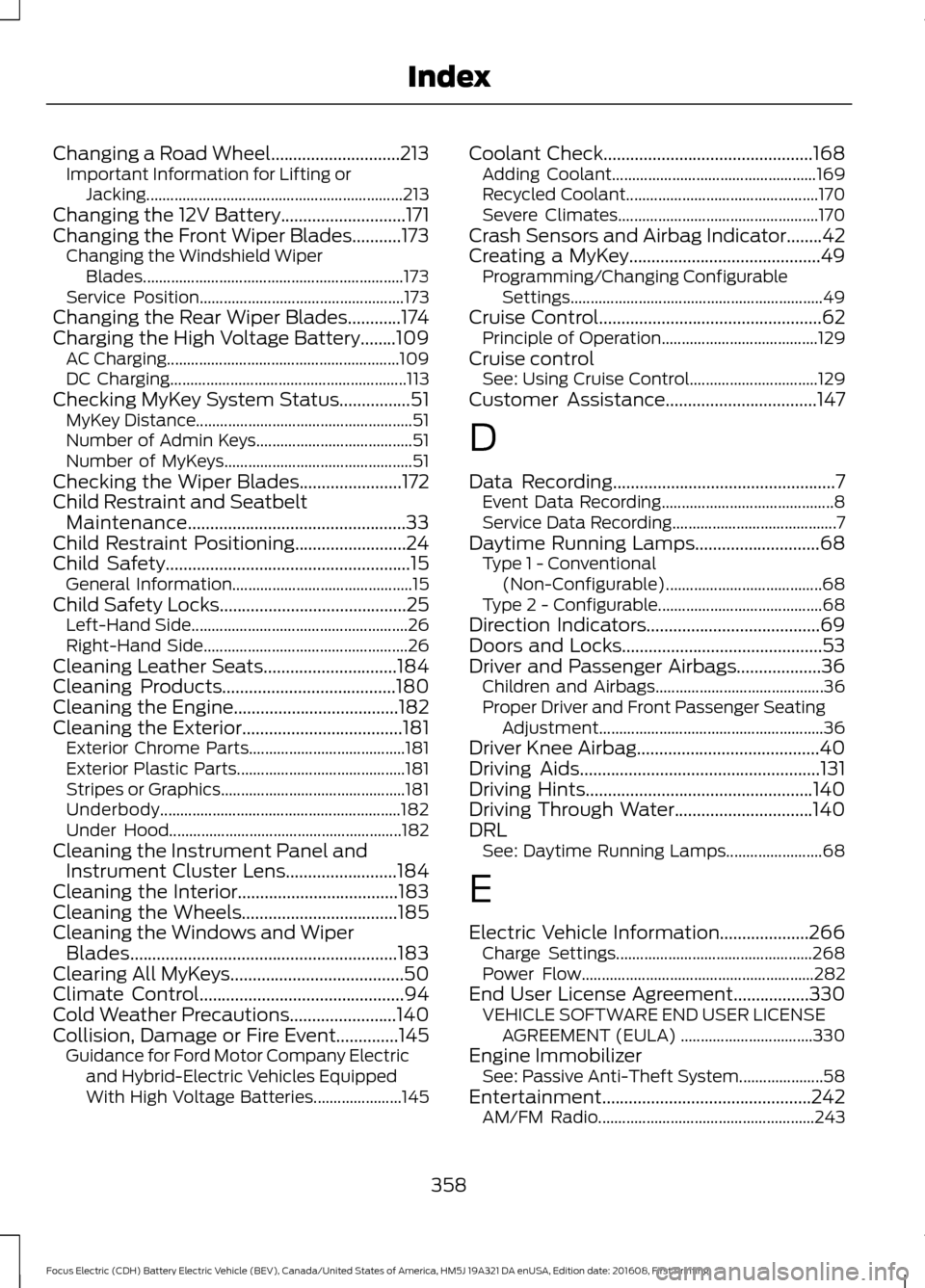
Changing a Road Wheel.............................213
Important Information for Lifting or
Jacking................................................................ 213
Changing the 12V Battery............................171
Changing the Front Wiper Blades
...........173
Changing the Windshield Wiper
Blades................................................................. 173
Service Position................................................... 173
Changing the Rear Wiper Blades............174
Charging the High Voltage Battery........109 AC Charging.......................................................... 109
DC Charging........................................................... 113
Checking MyKey System Status................51 MyKey Distance...................................................... 51
Number of Admin Keys....................................... 51
Number of MyKeys............................................... 51
Checking the Wiper Blades.......................172
Child Restraint and Seatbelt Maintenance.................................................33
Child Restraint Positioning.........................24
Child Safety
.......................................................15
General Information............................................. 15
Child Safety Locks
..........................................25
Left-Hand Side...................................................... 26
Right-Hand Side................................................... 26
Cleaning Leather Seats
..............................184
Cleaning Products.......................................180
Cleaning the Engine.....................................182
Cleaning the Exterior
....................................181
Exterior Chrome Parts....................................... 181
Exterior Plastic Parts.......................................... 181
Stripes or Graphics..............................................181
Underbody............................................................ 182
Under Hood.......................................................... 182
Cleaning the Instrument Panel and Instrument Cluster Lens.........................184
Cleaning the Interior....................................183
Cleaning the Wheels...................................185
Cleaning the Windows and Wiper Blades............................................................183
Clearing All MyKeys.......................................50
Climate Control
..............................................94
Cold Weather Precautions........................140
Collision, Damage or Fire Event..............145 Guidance for Ford Motor Company Electric
and Hybrid-Electric Vehicles Equipped
With High Voltage Batteries...................... 145Coolant Check
...............................................168
Adding Coolant................................................... 169
Recycled Coolant................................................ 170
Severe Climates.................................................. 170
Crash Sensors and Airbag Indicator........42
Creating a MyKey
...........................................49
Programming/Changing Configurable
Settings............................................................... 49
Cruise Control
..................................................62
Principle of Operation....................................... 129
Cruise control See: Using Cruise Control................................ 129
Customer Assistance
..................................147
D
Data Recording
..................................................7
Event Data Recording........................................... 8
Service Data Recording......................................... 7
Daytime Running Lamps
............................68
Type 1 - Conventional
(Non-Configurable)....................................... 68
Type 2 - Configurable......................................... 68
Direction Indicators.......................................69
Doors and Locks.............................................53
Driver and Passenger Airbags...................36 Children and Airbags.......................................... 36
Proper Driver and Front Passenger Seating Adjustment........................................................ 36
Driver Knee Airbag.........................................40
Driving Aids
......................................................131
Driving Hints...................................................140
Driving Through Water...............................140
DRL See: Daytime Running Lamps........................ 68
E
Electric Vehicle Information....................266 Charge Settings................................................. 268
Power Flow.......................................................... 282
End User License Agreement
.................330
VEHICLE SOFTWARE END USER LICENSE
AGREEMENT (EULA) ................................. 330
Engine Immobilizer See: Passive Anti-Theft System..................... 58
Entertainment...............................................242 AM/FM Radio...................................................... 243
358
Focus Electric (CDH) Battery Electric Vehicle (BEV), Canada/United States of America, HM5J 19A321 DA enUSA, Edition date: 201608, First Printing Index