service FORD FOCUS ELECTRIC 2018 User Guide
[x] Cancel search | Manufacturer: FORD, Model Year: 2018, Model line: FOCUS ELECTRIC, Model: FORD FOCUS ELECTRIC 2018Pages: 375, PDF Size: 12.81 MB
Page 90 of 375
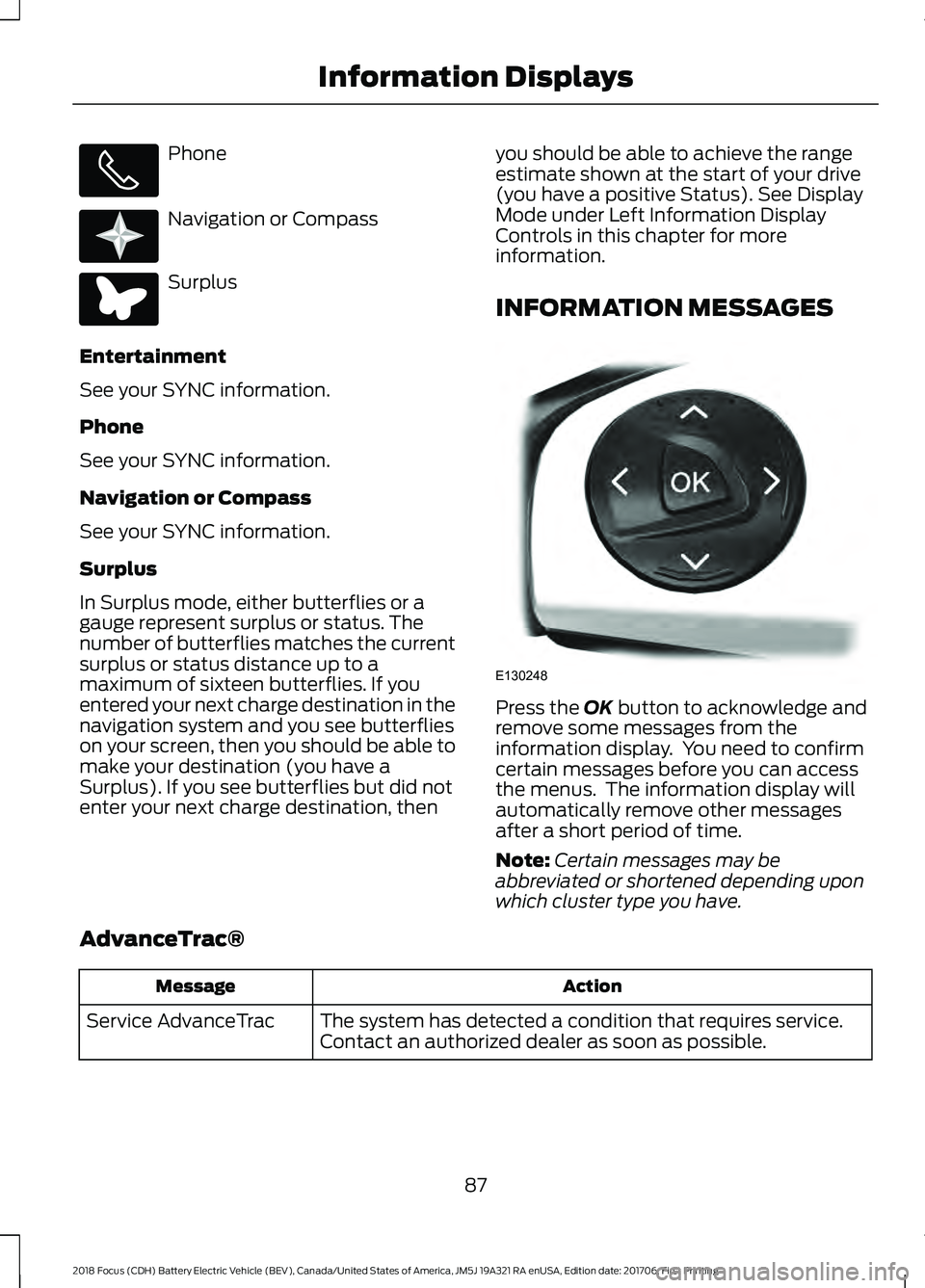
Phone
Navigation or Compass
Surplus
Entertainment
See your SYNC information.
Phone
See your SYNC information.
Navigation or Compass
See your SYNC information.
Surplus
In Surplus mode, either butterflies or a
gauge represent surplus or status. The
number of butterflies matches the current
surplus or status distance up to a
maximum of sixteen butterflies. If you
entered your next charge destination in the
navigation system and you see butterflies
on your screen, then you should be able to
make your destination (you have a
Surplus). If you see butterflies but did not
enter your next charge destination, then you should be able to achieve the range
estimate shown at the start of your drive
(you have a positive Status). See Display
Mode under Left Information Display
Controls in this chapter for more
information.
INFORMATION MESSAGES
Press the OK button to acknowledge and
remove some messages from the
information display. You need to confirm
certain messages before you can access
the menus. The information display will
automatically remove other messages
after a short period of time.
Note: Certain messages may be
abbreviated or shortened depending upon
which cluster type you have.
AdvanceTrac® Action
Message
The system has detected a condition that requires service.
Contact an authorized dealer as soon as possible.
Service AdvanceTrac
87
2018 Focus (CDH) Battery Electric Vehicle (BEV), Canada/United States of America, JM5J 19A321 RA enUSA, Edition date: 201706, First Printing Information Displays E220613 E220614 E130248
Page 93 of 375
Hill Start Assist
Action
Message
Displays when hill start assist is not available. Contact an
authorized dealer. See Hill Start Assist (page 122).
Hill Start Assist Not
Available
Keys and Intelligent Access Action
Message
This message is displayed when there is a problem with your
vehicle’s starting system. See your authorized dealer for
service.
Starting System Fault
Displays to remind you that the key is in the luggage
compartment. See
Starting the Electric Motor (page 107).
Key Inside vehicle
Displayed when a valid key is not detected within the vehicle.
See
Starting the Electric Motor (page 107).
Key Not Inside vehicle
Displayed if the key is not detected by the system. See
Starting the Electric Motor
(page 107).
No Key Detected
Displayed when your vehicle is in the Accessory ignition state.
Accessory Power is
Active
Displayed as a reminder to press the brake while starting the
vehicle.
To START Press Brake
Displayed as needed by the system for proper function.
Place Key in Backup
Location
Lighting Action
Message
Displays when the brake lamp bulb has burned out. Contact
an authorized dealer.
Brake lamp Bulb fault
Displays when the low beam headlamp bulb has burned out.
Contact an authorized dealer.
Low beam Bulb fault
Displays when an electrical system problem occurs with the
headlamp system. Contact an authorized dealer.
Headlamp fault Service
req'd
90
2018 Focus (CDH) Battery Electric Vehicle (BEV), Canada/United States of America, JM5J 19A321 RA enUSA, Edition date: 201706, First Printing Information Displays
Page 94 of 375
Maintenance
Action
Message
Indicates the brake fluid level is low and the brake system
should be inspected immediately. See Maintenance (page
169).
Brake fluid level low
Service now
Displays when the brake system needs servicing. Stop your
vehicle in a safe place. Contact an authorized dealer.
Brake system fault Stop
safely
Displays when the motor coolant temperature is excessively
high.
Motor Coolant Over
Temperature
Displayed when the kit needs service. See your authorized
dealer.
Service Tire Mobility Kit
Informs you that the powertrain needs service due to a
powertrain malfunction.
See Manual
Displays when the washer fluid is low and needs to be refilled.
See
Maintenance (page 169).
Washer Fluid Level Low
MyKey Action
Message
Displays when MyKey is active.
MyKey Active Drive
Safely
Displays when starting the vehicle and MyKey is in use and
the MyKey speed limit is on.
Speed Limited to
{MyKey limit ##0} mph
Displays when a MyKey is in use and the MyKey speed limit is
on and the vehicle speed is approaching 81 mph (130 km/h).
Near Vehicle Top Speed
Displays when a MyKey is in use and the MyKey speed limit is
reached.
Vehicle at Top Speed of
MyKey Setting
Displays when MyKey is active.
Check Speed Drive
Safely
Displays when a MyKey is in use and Belt- Minder is activated.
Buckle Up to Unmute
Audio
Displays when a MyKey is in use and park aid is activated.
MyKey Park Aid Cannot
be Deactivated
91
2018 Focus (CDH) Battery Electric Vehicle (BEV), Canada/United States of America, JM5J 19A321 RA enUSA, Edition date: 201706, First Printing Information Displays
Page 95 of 375
Parking Aid
Action
Message
The system has detected a condition that requires service.
Contact an authorized dealer.
Check Park Aid
Displays the park aid status.
Rear Park Aid On Off
Parking Brake Action
Message
Displays when the parking brake is set, the engine is running
and the vehicle is driven more than 3 mph (5 km/h). If the
warning stays on after the parking brake is released, contact
an authorized dealer.
Park Brake Engaged
Power Steering Action
Message
The power steering system has detected a condition that
requires service. Contact an authorized dealer.
Service Power Steering
The power steering system has detected a condition within
the power steering system that requires service immediately.
Contact an authorized dealer.
Service Power Steering
Now
The power steering system has disabled power steering assist
due to a system error. Contact an authorized dealer.
Power Steering Assist
Fault
The power steering system has detected a condition that
requires service. Contact an authorized dealer.
Steering fault Service
now
The power steering system has detected a condition within
the power steering system that requires service immediately.
Contact an authorized dealer.
Steering loss Stop safely
92
2018 Focus (CDH) Battery Electric Vehicle (BEV), Canada/United States of America, JM5J 19A321 RA enUSA, Edition date: 201706, First Printing Information Displays
Page 113 of 375
GENERAL INFORMATION
WARNINGS
This battery pack shall only be
serviced by an authorized electric
vehicle technician. Improper handling
can result in personal injury or death. Your vehicle consists of various high
voltage components and wiring. All
high voltage cables are labeled and
covered with a solid orange covering or
orange striped tape. Do not touch these
components. Failure to follow this warning
could result in serious personal injury or
death. The high voltage battery system is a high
voltage, lightweight lithium-ion battery
which has two individual packs. One pack
is located in the rear cargo area behind the
second row seats, the other is located
underneath the vehicle. The high voltage
battery system uses an advanced active
liquid heating and cooling system to
regulate high voltage battery temperature
and help maximize the life of the high
voltage battery.
Note:
The high voltage battery does not
require regular service maintenance.
Note: The high voltage battery will
experience gradual capacity loss with time
and usage. This is normal.
CHARGING THE HIGH
VOLTAGE BATTERY WARNINGS
Do not use the 120 volt convenience
cord with an extension cord,
two-prong adapter, surge protector,
timer or other adapter. In Canada, do not use the 120 volt
convenience cord in commercial
garages. WARNINGS
This equipment has arcing or
sparking parts. Do not expose to
flammable vapors. Position this
equipment at least 18 in (450 mm) above
the floor. Do not allow charging equipment to
be immersed in water or liquids.
Failure to follow this warning could
result in fire, serious personal injury or
death. Do not attempt to open the charging
equipment. Failure to follow this
instruction could result in personal
injury, death or property damage. Do not use the charging equipment
if it is faulty or has been damaged.
Failure to follow this instruction
could result in personal injury, death or
property damage. Install charging equipment in
compliance with local regulations.
Failure to follow this warning could
result in fire, serious personal injury or
death. The AC wall plug must fit firmly into
the AC outlet. If the connection feels
loose, worn or the AC outlet is
damaged, please have a qualified
electrician replace the AC outlet. Using a
convenience cord with a worn outlet may
cause burns, property damage and
increase the risk of electric shock. Note:
Find the nearest charging stations by
using the MyFord Mobile app.
AC Charging
Charging Equipment
Your vehicle is equipped with a standard
120 volt convenience cord. Lift the load
floor carpet in the rear of your vehicle to
access the 120 volt convenience cord.
110
2018 Focus (CDH) Battery Electric Vehicle (BEV), Canada/United States of America, JM5J 19A321 RA enUSA, Edition date: 201706, First Printing High Voltage Battery
Page 126 of 375
PRINCIPLE OF OPERATION
The traction control system helps avoid
drive wheel spin and loss of traction.
If your vehicle begins to slide, the system
applies the brakes to individual wheels
and, when needed, reduces engine power
at the same time. If the wheels spin when
accelerating on slippery or loose surfaces,
the system reduces engine power in order
to increase traction.
USING TRACTION CONTROL
WARNING
The stability and traction control
light illuminates steadily if the
system detects a failure. Make sure
you did not manually disable the traction
control system using the information
display controls or the switch. If the
stability control and traction control light
is still illuminating steadily, have the
system serviced by an authorized dealer
immediately. Operating your vehicle with
the traction control disabled could lead to
an increased risk of loss of vehicle control,
vehicle rollover, personal injury and death. The system automatically turns on each
time you switch the ignition on.
If your vehicle is stuck in mud or snow,
switching traction control off may be
beneficial as this allows the wheels to spin.
Note:
When you switch traction control off,
stability control remains fully active.
Switching the System Off
When you switch the system off or on, a
message appears in the information
display showing system status.
You can switch the system off by either
using the information display controls or
the switch. Using the Information Display
Controls
You can switch this feature off or on in the
information display. See General
Information (page 80).
Using a Switch
(If Equipped)
Use the traction control switch on the
instrument panel to switch the system off
or on.
System Indicator Lights and
Messages The stability and traction control
light:
• Temporarily illuminates on engine
start-up.
• Flashes when a driving condition
activates either of the systems.
• Illuminates if a problem occurs in either
of the systems. The stability and traction control
off light temporarily illuminates
on engine start-up and stays on
when you switch the traction control
system off.
123
2018 Focus (CDH) Battery Electric Vehicle (BEV), Canada/United States of America, JM5J 19A321 RA enUSA, Edition date: 201706, First Printing Traction ControlE138639 E130458
Page 136 of 375
STEERING
Electric Power Steering
WARNINGS
The electric power steering system
has diagnostic checks that
continuously monitor the system. If
a fault is detected, a message displays in
the information display. Stop your vehicle
as soon as it is safe to do so. Switch the
ignition off. After at least 10 seconds,
switch the ignition on and watch the
information display for a steering system
warning message. If a steering system
warning message returns, have the system
checked by an authorized dealer. If the system detects an error, you
may not feel a difference in the
steering, however a serious condition
may exist. Obtain immediate service from
an authorized dealer, failure to do so may
result in loss of steering control. Your vehicle has an electric power steering
system. There is no fluid reservoir. No
maintenance is required.
If your vehicle loses electrical power while
you are driving, electric power steering
assistance is lost. The steering system still
operates and you can steer your vehicle
manually. Manually steering your vehicle
requires more effort.
Extreme continuous steering may increase
the effort required for you to steer your
vehicle. This increased effort prevents
overheating and permanent damage to
the steering system. You do not lose the
ability to steer your vehicle manually.
Typical steering and driving maneuvers
allow the system to cool and return to
normal operation. Steering Tips
If the steering wanders or pulls, check for:
•
Correct tire pressures.
• Uneven tire wear.
• Loose or worn suspension
components.
• Loose or worn steering components.
• Improper vehicle alignment.
Note: A high crown in the road or high
crosswinds may also make the steering
seem to wander or pull.
Adaptive Learning
The electronic power steering system
adaptive learning helps correct road
irregularities and improves overall handling
and steering feel. It communicates with
the brake system to help operate
advanced stability control and accident
avoidance systems. Additionally, whenever
the battery is disconnected or a new
battery installed, you must drive your
vehicle a short distance before the system
relearns the strategy and reactivates all
systems.
133
2018 Focus (CDH) Battery Electric Vehicle (BEV), Canada/United States of America, JM5J 19A321 RA enUSA, Edition date: 201706, First Printing Driving Aids
Page 143 of 375
TOWING A TRAILER
WARNING
Your vehicle is not approved
for trailer towing. Never tow
a trailer with your vehicle. TRANSPORTING THE VEHICLE
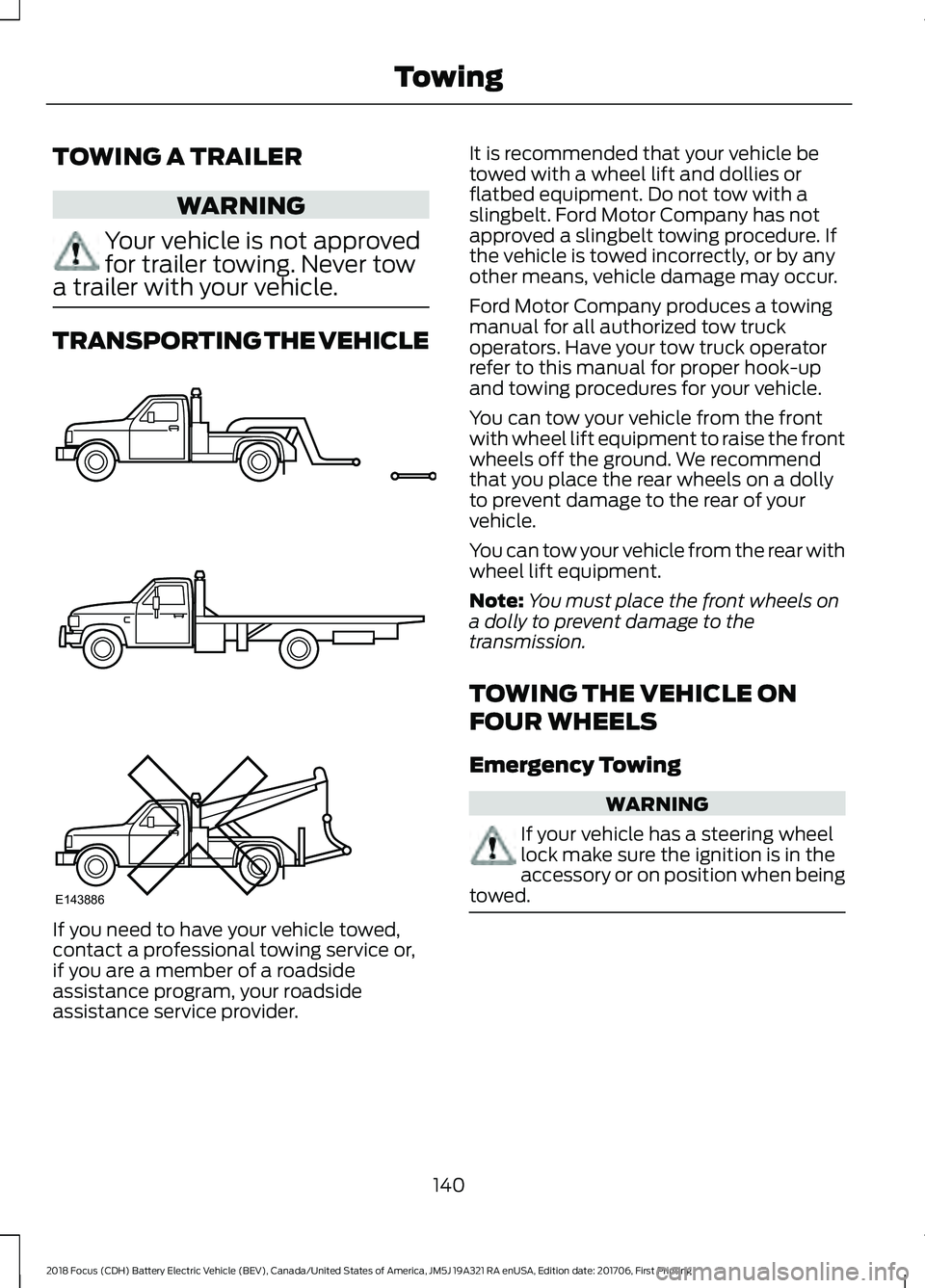
If you need to have your vehicle towed,
contact a professional towing service or,
if you are a member of a roadside
assistance program, your roadside
assistance service provider. It is recommended that your vehicle be
towed with a wheel lift and dollies or
flatbed equipment. Do not tow with a
slingbelt. Ford Motor Company has not
approved a slingbelt towing procedure. If
the vehicle is towed incorrectly, or by any
other means, vehicle damage may occur.
Ford Motor Company produces a towing
manual for all authorized tow truck
operators. Have your tow truck operator
refer to this manual for proper hook-up
and towing procedures for your vehicle.
You can tow your vehicle from the front
with wheel lift equipment to raise the front
wheels off the ground. We recommend
that you place the rear wheels on a dolly
to prevent damage to the rear of your
vehicle.
You can tow your vehicle from the rear with
wheel lift equipment.
Note:
You must place the front wheels on
a dolly to prevent damage to the
transmission.
TOWING THE VEHICLE ON
FOUR WHEELS
Emergency Towing WARNING
If your vehicle has a steering wheel
lock make sure the ignition is in the
accessory or on position when being
towed. 140
2018 Focus (CDH) Battery Electric Vehicle (BEV), Canada/United States of America, JM5J 19A321 RA enUSA, Edition date: 201706, First Printing TowingE143886
Page 147 of 375
ROADSIDE ASSISTANCE
Vehicles Sold in the United States:
Getting Roadside Assistance
To fully assist you should you have a
vehicle concern, Ford Motor Company
offers a complimentary roadside
assistance program. This program is
separate from the New Vehicle Limited
Warranty.
The service is available:
•
24 hours a day, seven days a week.
• For the coverage period listed on the
Roadside Assistance Card included in
your Owner's Manual portfolio.
Roadside Assistance covers:
• A flat tire change with a good spare
(except vehicles supplied with a tire
inflation kit).
• Battery jump start.
• Lock-out assistance (key replacement
cost is the customer's responsibility).
• Fuel delivery — independent service
contractors, if not prohibited by state,
local or municipal law, shall deliver up
to 2 gal (8 L) of gasoline or 5 gal (20 L)
of diesel fuel to a disabled vehicle.
Roadside Assistance limits fuel delivery
service to two no-charge occurrences
within a 12-month period.
• Winch out — available within 100 ft
(30 m) of a paved or county
maintained road, no recoveries. •
Towing — independent service
contractors, if not prohibited by state,
local or municipal law, shall tow Ford
eligible vehicles to an authorized dealer
within
35 mi (56 km) of the
disablement location or to the nearest
authorized dealer. If a member
requests a tow to an authorized dealer
that is more than
35 mi (56 km) from
the disablement location, the member
shall be responsible for any mileage
costs in excess of
35 mi (56 km).
• Roadside Assistance includes up to
$200 for a towed trailer if the disabled
eligible vehicle requires service at the
nearest authorized dealer. If the towing
vehicle is operational but the trailer is
not, then the trailer does not qualify for
any roadside services.
Vehicles Sold in the United States:
Using Roadside Assistance
Complete the roadside assistance
identification card and place it in your
wallet for quick reference. This card is in
the owner's information portfolio in the
glove compartment.
United States vehicle customers who
require Roadside Assistance, call
1-800-241-3673.
If you need to arrange roadside assistance
for yourself, Ford Motor Company
reimburses a reasonable amount for
towing to the nearest dealership within
35 mi (56 km)
. To obtain reimbursement
information, United States vehicle
customers call 1-800-241-3673.
Customers need to submit their original
receipts.
144
2018 Focus (CDH) Battery Electric Vehicle (BEV), Canada/United States of America, JM5J 19A321 RA enUSA, Edition date: 201706, First Printing Roadside Emergencies
Page 148 of 375
Vehicles Sold in Canada: Getting
Roadside Assistance
To fully assist you should you have a
vehicle concern, Ford Motor Company of
Canada, Limited offers a complimentary
roadside assistance program. This
program is eligible within Canada or the
continental United States.
This program is separate from the New
Vehicle Limited Warranty, but the coverage
is concurrent with the powertrain coverage
period of your vehicle.
Canadian customers who require roadside
assistance, call 1-800-665-2006.
Vehicles Sold in Canada: Using
Roadside Assistance
Complete the roadside assistance
identification card and place it in your
wallet for quick reference.
In Canada, this card is found in the
Warranty Guide in the glove compartment
of your vehicle.
Vehicles Sold in Canada: Roadside
Assistance Program Coverage
The service is available 24 hours a day,
seven days a week.
Canadian roadside coverage and benefits
may differ from the U.S. coverage.
If you require more information, please
refer to the coverage section of your
warranty guide, call us in Canada at
1-800-665-2006, or visit our website at
www.ford.ca.
HAZARD FLASHERS
Note:
If used when the vehicle is not
running, the battery will lose charge. There
may be insufficient power to restart your
vehicle. The hazard warning button is
located on the instrument panel.
Use it when your vehicle is
creating a safety hazard for other
motorists.
• Press the button to turn on the hazard
warning function, and the front and
rear direction indicators will flash.
• Press the button again to turn them
off.
JUMP STARTING THE VEHICLE WARNINGS
Connect batteries with only the same
nominal voltage. Failure to follow
this warning could result in serious
personal injury. Always use booster cables with
insulated clamps and adequate size
cable. Failure to follow this warning
could result in serious personal injury. Note:
This procedure is only for the 12 volt
under hood battery.
Note: Your vehicle has a 12 volt battery that
is easily accessible under the hood. The 12
volt battery controls the switches and
contacts that engage the high voltage
battery. Do not jump start the high voltage
battery using a standard 12 volt battery. You
must tow your vehicle to an authorized
dealer if the high voltage battery does not
accept a regular charge.
Note: Do not attempt to push start your
vehicle. You may cause transmission
damage.
Note: Do not disconnect the 12 volt battery
from your vehicle electrical system.
145
2018 Focus (CDH) Battery Electric Vehicle (BEV), Canada/United States of America, JM5J 19A321 RA enUSA, Edition date: 201706, First Printing Roadside Emergencies