stop start FORD FOCUS ELECTRIC 2018 Owners Manual
[x] Cancel search | Manufacturer: FORD, Model Year: 2018, Model line: FOCUS ELECTRIC, Model: FORD FOCUS ELECTRIC 2018Pages: 375, PDF Size: 12.81 MB
Page 5 of 375
Information Display Control.......................63
Wipers and Washers
Windshield Wipers........................................64
Windshield Washers
.....................................64
Rear Window Wiper and Washers...........65
Lighting
General Information.....................................66
Lighting Control..............................................66
Autolamps........................................................67
Instrument Lighting Dimmer.....................68
Headlamp Exit Delay....................................68
Daytime Running Lamps
............................68
Direction Indicators
.......................................69
Interior Lamps.................................................69
Ambient Lighting
............................................70
Windows and Mirrors
Power Windows
...............................................71
Exterior Mirrors
.................................................72
Interior Mirror
....................................................73
Sun Visors
..........................................................74
Instrument Cluster
Gauges................................................................75
Warning Lamps and Indicators..................77
Audible Warnings and Indicators
.............79
Information Displays
General Information
.....................................80
Information Messages
..................................87
Climate Control
Automatic Climate Control
........................94
Hints on Controlling the Interior Climate..........................................................95
Heated Windows and Mirrors...................96
Cabin Air Filter
.................................................97 Remote Start...................................................97
Seats
Sitting in the Correct Position...................99
Head Restraints..............................................99
Manual Seats
..................................................101
Power Seats
....................................................101
Rear Seats.......................................................102
Heated Seats
.................................................104
Auxiliary Power Points
Auxiliary Power Points
................................105
Storage Compartments
Center Console.............................................106
Overhead Console
.......................................106
Starting and Stopping the Electric Motor
Starting the Electric Motor........................107
Switching Off the Electric Motor............108
High Voltage Battery
General Information.....................................110
Charging the High Voltage Battery.........110
High Voltage Battery Cut-Off Switch............................................................116
Transmission
Automatic Transmission
............................118
Brakes
General Information
....................................120
Hints on Driving With Anti-Lock Brakes............................................................121
Parking Brake
...................................................121
Hill Start Assist..............................................122
Traction Control
Principle of Operation.................................123
2
2018 Focus (CDH) Battery Electric Vehicle (BEV), Canada/United States of America, JM5J 19A321 RA enUSA, Edition date: 201706, First Printing Table of Contents
Page 50 of 375
The horn sounds if the system fails to start,
unless quiet start is on. Quiet start runs the
blower fan at a slower speed to reduce
noise. You can switch the feature on or off
using the information display. See General
Information (page 80).
The power windows do not work during
remote start and the radio does not turn
on automatically.
The parking lamps remain on and your
vehicle runs for 5, 10 or 15 minutes,
depending on the setting.
Note: If you remote start your vehicle with
an intelligent access transmitter, you must
press the
START STOP button on the
instrument panel once while applying the
brake pedal before driving your vehicle.
Extending the Remote Start Running
Time
To extend the remote start running time
duration of your vehicle during remote
start, repeat steps 1 and 2 while your
vehicle is running. If the duration is set to
10 minutes, the duration extends by
another 10 minutes. For example, if your
vehicle had been running from the first
remote start for 5 minutes, your vehicle
continues to run now for a total of 20
minutes. You can extend the remote start
running time duration to a maximum of 30
minutes.
Wait at least five seconds before remote
starting after you switch your vehicle off.
Turning Your Vehicle Off After Remote
Starting Press the button once. The
parking lamps turn off.
You may have to be closer to
your vehicle than when starting due to
ground reflection and the added noise of
the running vehicle. You can turn the remote start system on
or off using the information display. See
General Information
(page 80).
REPLACING A LOST KEY OR
REMOTE CONTROL
You can purchase replacement keys or
remote controls from an authorized dealer.
Authorized dealers can program remote
controls for your vehicle.
See Passive
Anti-Theft System (page 58).
To re-program the passive anti-theft
system see an authorized dealer.
47
2018 Focus (CDH) Battery Electric Vehicle (BEV), Canada/United States of America, JM5J 19A321 RA enUSA, Edition date: 201706, First Printing Keys and Remote ControlsE138625
Page 52 of 375
•
Various vehicle speed minders can be
set. Once you select a speed, it will be
shown in the display, followed by an
audible tone when the preselected
vehicle speed is exceeded.
• Audio system maximum volume of
45%. A message will be shown in the
display when you attempt to exceed
the limited volume. Also, the
speed-sensitive or compensated
automatic volume control will be
disabled.
• Always on setting. When this is
selected, you will not be able to turn
off AdvanceTrac or traction control (if
your vehicle is equipped with these
features). CREATING A MYKEY
Use the information display to create a
MyKey:
1.
Insert the key you want to program into
the ignition. If your vehicle is equipped
with a push-button start, place the
intelligent access transmitter into the
backup position. The location of your
backup position is in another chapter.
See Starting and Stopping the
Electric Motor (page 107).
2. Switch the vehicle on.
3. Access the main menu through the information display controls. Use the
arrow keys to get to the following menu
selections: Action and Description
Message
Press the OK button or the right arrow key.
Settings
Press the OK button or the right arrow key.
MyKey
Press the OK button or the right arrow key.
Create MyKey
When prompted, hold the OK button until
you see a message informing you to label
this key as a MyKey. The key will be
restricted at the next start.
MyKey is successfully created. Make sure
you label it so you can distinguish it from
the admin keys.
You can also program configurable
settings for the key(s). See
Programming/Changing Configurable
Settings
. Programming/Changing
Configurable Settings
Use the information display to access your
configurable MyKey settings by doing the
following:
1. Switch the vehicle on using an admin
key.
2. Use the arrow keys to get to the following menu selections: Action and Description
Message
Press the OK button or the right arrow key.
Settings
Press the OK button or the right arrow key.
MyKey
49
2018 Focus (CDH) Battery Electric Vehicle (BEV), Canada/United States of America, JM5J 19A321 RA enUSA, Edition date: 201706, First Printing MyKey
™
Page 59 of 375
4. Press the power door unlock control
three times.
5. Switch your vehicle on. The horn sounds indicating your vehicle is in
programming mode.
6. Press the power door lock control and within five seconds, press the power
door unlock control. The horn sounds
once if disabled or twice if enabled.
7. Switch your vehicle off. The horn sounds indicating programming is
complete.
Illuminated Entry
The interior lamps and select exterior
lamps illuminate when you unlock the
doors with the remote entry system.
The lamps turn off if:
• Your vehicle is switched on.
• You press the remote control lock
button.
• 25 seconds have elapsed.
The lamps will not turn off if:
• You switch them on with the lighting
control.
• Any door is open.
Illuminated Exit
The lamps turn off if all the doors remain
closed and:
• 25 seconds have elapsed.
• You press the START/STOP button.
Battery Saver
If you leave the courtesy lamps, dome
lamps or headlamps on, the battery saver
will turn them off 10 minutes after you
switch your vehicle off. Accessory Mode Battery Saver for
Intelligent Access Keys (If Equipped)
If you leave your vehicle switched on and
the electric motor is not running, the
battery saver will turn the power off when
it detects a certain amount of battery
drain, or after 45 minutes have elapsed.
Opening the Liftgate
With the Remote Control
Press twice within three seconds
to unlatch the liftgate.
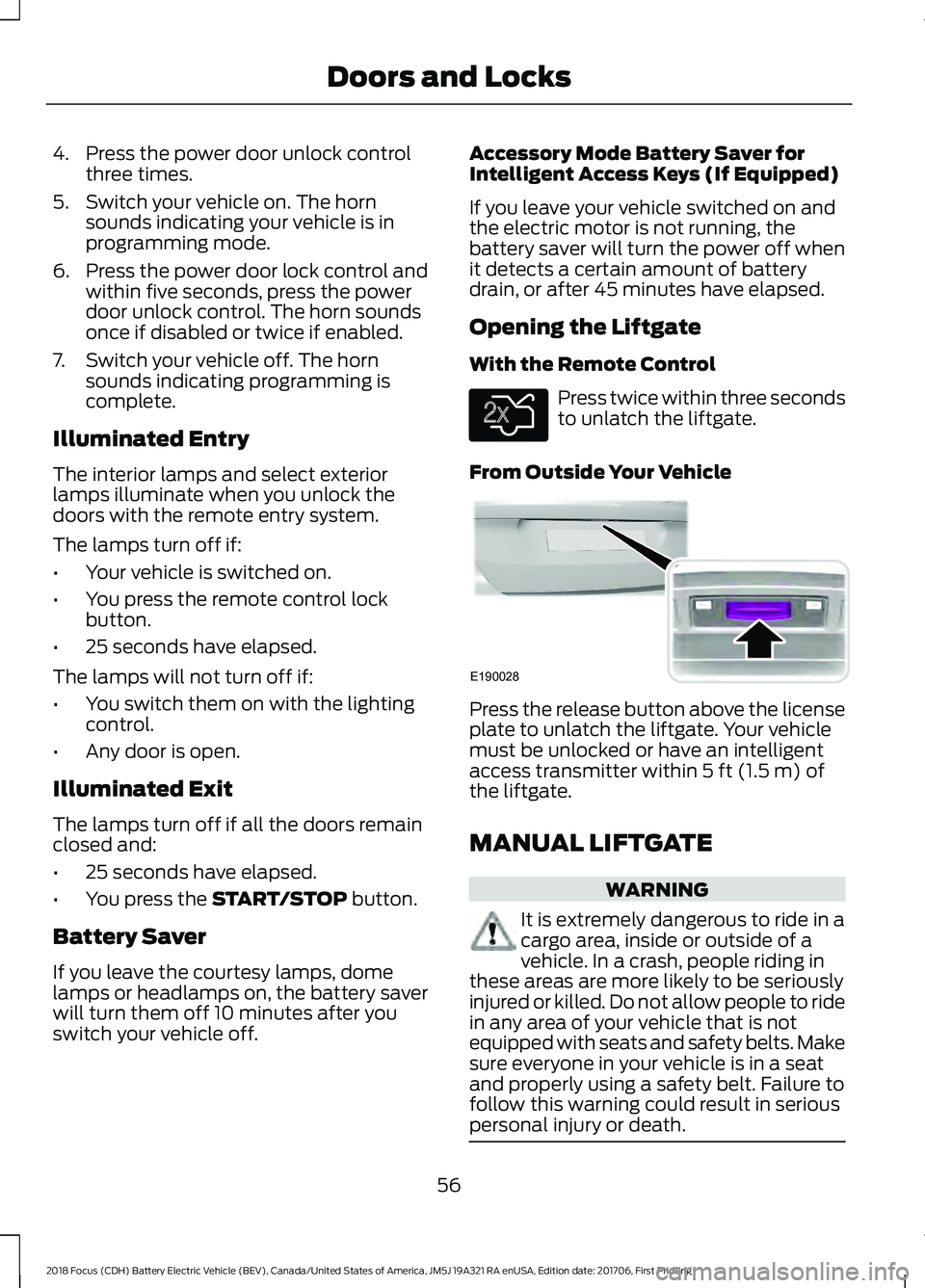
From Outside Your Vehicle Press the release button above the license
plate to unlatch the liftgate. Your vehicle
must be unlocked or have an intelligent
access transmitter within
5 ft (1.5 m) of
the liftgate.
MANUAL LIFTGATE WARNING
It is extremely dangerous to ride in a
cargo area, inside or outside of a
vehicle. In a crash, people riding in
these areas are more likely to be seriously
injured or killed. Do not allow people to ride
in any area of your vehicle that is not
equipped with seats and safety belts. Make
sure everyone in your vehicle is in a seat
and properly using a safety belt. Failure to
follow this warning could result in serious
personal injury or death. 56
2018 Focus (CDH) Battery Electric Vehicle (BEV), Canada/United States of America, JM5J 19A321 RA enUSA, Edition date: 201706, First Printing Doors and LocksE138630 E190028
Page 61 of 375
PASSIVE ANTI-THEFT
SYSTEM
Note:
The system is not compatible with
non-Ford aftermarket remote start systems.
Use of these systems may result in vehicle
starting problems and a loss of security
protection.
Note: Metallic objects, electronic devices
or a second coded key on the same key
chain may result in vehicle starting
problems, especially if they are too close to
the key when starting your vehicle. Prevent
these objects from touching the coded key
when starting your vehicle. If your vehicle
fails to start, switch your vehicle off, move
all objects on the key chain away from the
key and start your vehicle.
Note: Do not leave a duplicate coded key
in your vehicle. Always take your keys and
lock all doors when leaving your vehicle.
SecuriLock
The system helps prevent your vehicle
from starting unless you use a coded key
programmed to your vehicle. A message
may appear in the information display.
If your vehicle fails to start, the system may
have a fault. Contact an authorized dealer.
A message may appear in the information
display.
Automatic Arming
The system arms when you switch your
vehicle off.
Automatic Disarming
The system disarms when you switch your
vehicle on with a coded key.
Replacement Keys
Note: Your vehicle comes with two keys. The intelligent access key functions as a
programmed key that operates the driver
door lock and turns on the intelligent
access with push button start system, as
well as a remote control.
If your intelligent access keys are lost or
stolen and you do not have an extra coded
key, you need to have your vehicle towed
to an authorized dealer. You need to erase
the key codes from your vehicle and
program new coded keys.
Store a spare intelligent access key away
from your vehicle in a safe place. Contact
an authorized dealer to purchase
additional spare or replacement keys.
Programming a Spare Intelligent
Access Key
You must have two previously
programmed coded keys and the new
unprogrammed key readily accessible.
Contact an authorized dealer to have the
spare key programmed if two previously
programmed keys are not available.
Make sure that your vehicle is switched off
before beginning this procedure. Make sure
that you close all the doors before
beginning and that they remain closed
throughout the procedure. Carry out all
steps within 30 seconds of starting the
sequence. Stop and wait for at least one
minute before starting again if you carry
out any steps out of sequence.
Note:
You can program a maximum of eight
coded keys to your vehicle.
Read and understand the entire procedure
before you begin.
58
2018 Focus (CDH) Battery Electric Vehicle (BEV), Canada/United States of America, JM5J 19A321 RA enUSA, Edition date: 201706, First Printing Security
Page 62 of 375
1. Open the floor console storage
compartment lid.
2. Remove the tray. 3. Place the first programmed intelligent
access key flat on the symbol at the
bottom of the floor console storage
compartment.
4. Press the START STOP button.
5. Wait five seconds and then press the START STOP
button again.
6. Remove the intelligent access key. 7. Within 10 seconds, place a second
programmed intelligent access key flat
on the symbol.
8. Press the
START STOP button.
9. Wait five seconds and then press the START STOP
button again.
10. Remove the intelligent access key.
11. Within 10 seconds, place the unprogrammed intelligent access key
flat on the symbol.
12. Press the
START STOP button.
Programming is now complete. Check that
the remote control functions operate and
your vehicle starts with the new intelligent
access key.
If programming was unsuccessful, wait 10
seconds and repeat Steps 1 through 12. If
programming remains unsuccessful, have
your vehicle checked by an authorized
dealer.
ANTI-THEFT ALARM
The system will warn you of an
unauthorized entry to your vehicle. It will
be triggered if any door, the luggage
compartment or the hood is opened
without using the key, remote control or
keyless entry keypad.
The direction indicators will flash and the
horn will sound if unauthorized entry is
attempted while the alarm is armed.
Take all remote controls to an authorized
dealer if there is any potential alarm
problem with your vehicle.
Arming the Alarm
The alarm is ready to arm when there is
not a key in your vehicle. Electronically lock
your vehicle to arm the alarm.
59
2018 Focus (CDH) Battery Electric Vehicle (BEV), Canada/United States of America, JM5J 19A321 RA enUSA, Edition date: 201706, First Printing SecurityE184385
21 E184386
3
Page 63 of 375
Disarming the Alarm
Disarm the alarm by any of the following
actions:
•
Unlock the doors or luggage
compartment with the remote control
or keyless entry keypad.
• Switch your vehicle on or start your
vehicle.
• Use a key in the driver door to unlock
your vehicle, then switch your vehicle
on within 12 seconds.
Note: Pressing the panic button on the
remote control will stop the horn and signal
indicators, but will not disarm the system.
60
2018 Focus (CDH) Battery Electric Vehicle (BEV), Canada/United States of America, JM5J 19A321 RA enUSA, Edition date: 201706, First Printing Security
Page 80 of 375
Charging Status Screen
When you enter or switch off the vehicle,
on your right information display you have
the opportunity to view charging status,
charge start and end times as well as the
charging mode. You can also switch your
charging mode between Value Charge and
Charge Now. See Electric Vehicle
Information in your SYNC information.
WARNING LAMPS AND
INDICATORS
The following warning lamps and
indicators alert you to a vehicle condition
that may become serious. Some lamps
illuminate when you start your vehicle to
make sure they work. If any lamps remain
on after starting your vehicle, refer to the
respective system warning lamp for further
information.
Note:
Some warning indicators appear in
the information display and operate the
same as a warning lamp but do not
illuminate when you start your vehicle
Anti-Lock Braking System Warning
Lamp If it illuminates when you are
driving, this indicates a
malfunction. You will continue
to have the normal braking system
(without anti-lock braking system) unless
the brake system warning lamp is also
illuminated. Have your vehicle checked by
an authorized dealer.
It also momentarily illuminates when you
switch the ignition on to confirm the lamp
is functional. If it does not illuminate when
you switch the ignition on, or begins to
flash at any time, have the system checked
by an authorized dealer. Battery Charging Condition
Warning Lamp If it illuminates when driving, this
indicates a malfunction. Have
your vehicle checked by an
authorized dealer immediately.
Brake System Warning Lamp WARNING
Driving your vehicle with the warning
lamp on is dangerous. A significant
decrease in braking performance
may occur. It may take you longer to stop
your vehicle. Have your vehicle checked as
soon as possible. Driving extended
distances with the parking brake engaged
can cause brake failure and the risk of
personal injury. It will illuminate when you
engage the parking brake with
the vehicle on.
If it illuminates when you are driving, check
that the parking brake is not engaged. If
the parking brake is not engaged, this
indicates low brake fluid level or a brake
system malfunction. Have your vehicle
checked by an authorized dealer
immediately.
It also momentarily illuminates when you
switch the ignition on to confirm the lamp
is functional. If it does not illuminate when
you switch the ignition on, or begins to
flash at any time, have the system checked
by an authorized dealer.
Cruise Control Indicator It will illuminate when you switch
this feature on.
77
2018 Focus (CDH) Battery Electric Vehicle (BEV), Canada/United States of America, JM5J 19A321 RA enUSA, Edition date: 201706, First Printing Instrument Cluster E138644 E71340
Page 81 of 375
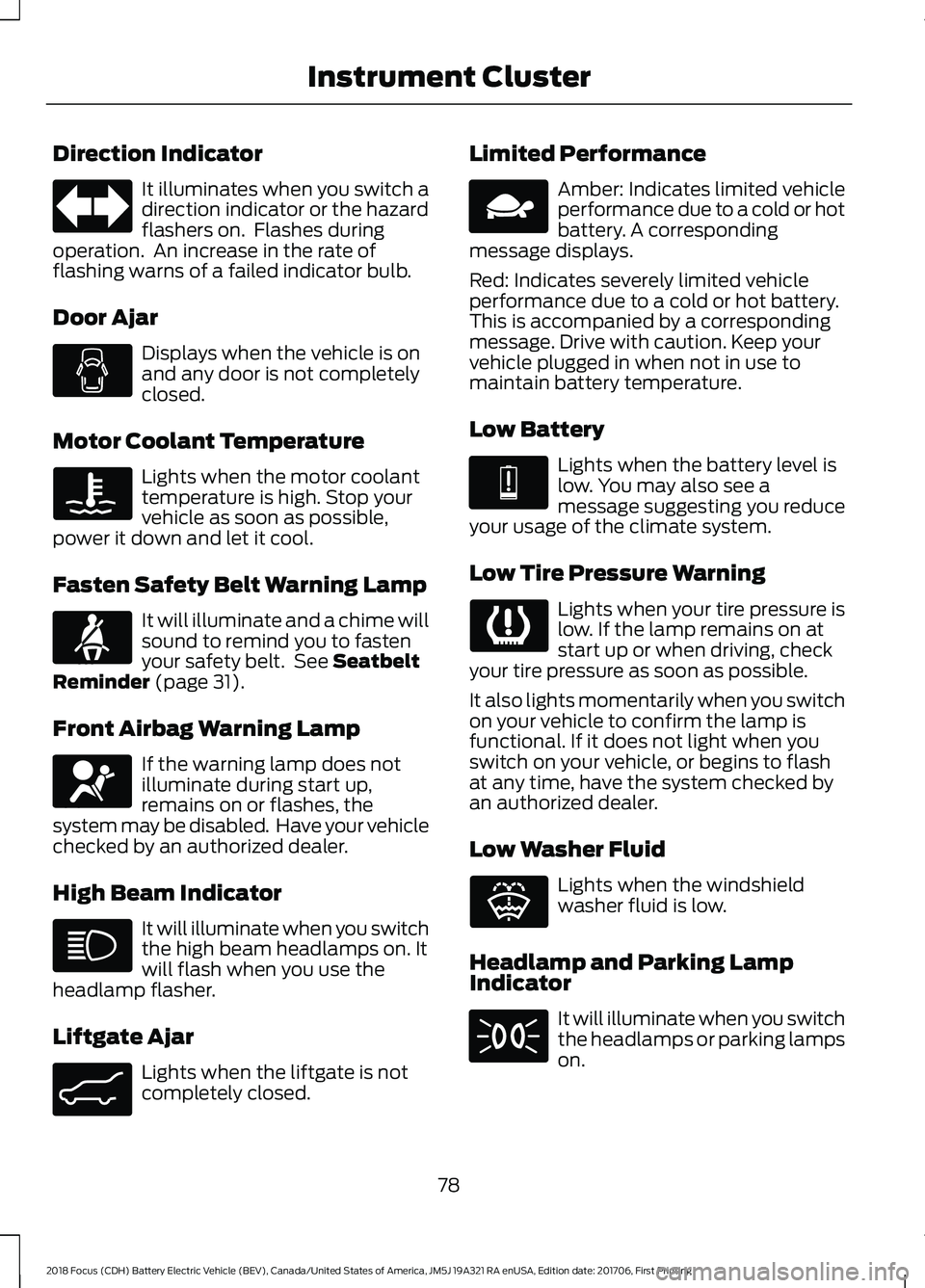
Direction Indicator
It illuminates when you switch a
direction indicator or the hazard
flashers on. Flashes during
operation. An increase in the rate of
flashing warns of a failed indicator bulb.
Door Ajar Displays when the vehicle is on
and any door is not completely
closed.
Motor Coolant Temperature Lights when the motor coolant
temperature is high. Stop your
vehicle as soon as possible,
power it down and let it cool.
Fasten Safety Belt Warning Lamp It will illuminate and a chime will
sound to remind you to fasten
your safety belt. See Seatbelt
Reminder (page 31).
Front Airbag Warning Lamp If the warning lamp does not
illuminate during start up,
remains on or flashes, the
system may be disabled. Have your vehicle
checked by an authorized dealer.
High Beam Indicator It will illuminate when you switch
the high beam headlamps on. It
will flash when you use the
headlamp flasher.
Liftgate Ajar Lights when the liftgate is not
completely closed. Limited Performance Amber: Indicates limited vehicle
performance due to a cold or hot
battery. A corresponding
message displays.
Red: Indicates severely limited vehicle
performance due to a cold or hot battery.
This is accompanied by a corresponding
message. Drive with caution. Keep your
vehicle plugged in when not in use to
maintain battery temperature.
Low Battery Lights when the battery level is
low. You may also see a
message suggesting you reduce
your usage of the climate system.
Low Tire Pressure Warning Lights when your tire pressure is
low. If the lamp remains on at
start up or when driving, check
your tire pressure as soon as possible.
It also lights momentarily when you switch
on your vehicle to confirm the lamp is
functional. If it does not light when you
switch on your vehicle, or begins to flash
at any time, have the system checked by
an authorized dealer.
Low Washer Fluid Lights when the windshield
washer fluid is low.
Headlamp and Parking Lamp
Indicator It will illuminate when you switch
the headlamps or parking lamps
on.
78
2018 Focus (CDH) Battery Electric Vehicle (BEV), Canada/United States of America, JM5J 19A321 RA enUSA, Edition date: 201706, First Printing Instrument Cluster E71880 E67017 E162453 E144690 E144691 E132353
Page 86 of 375
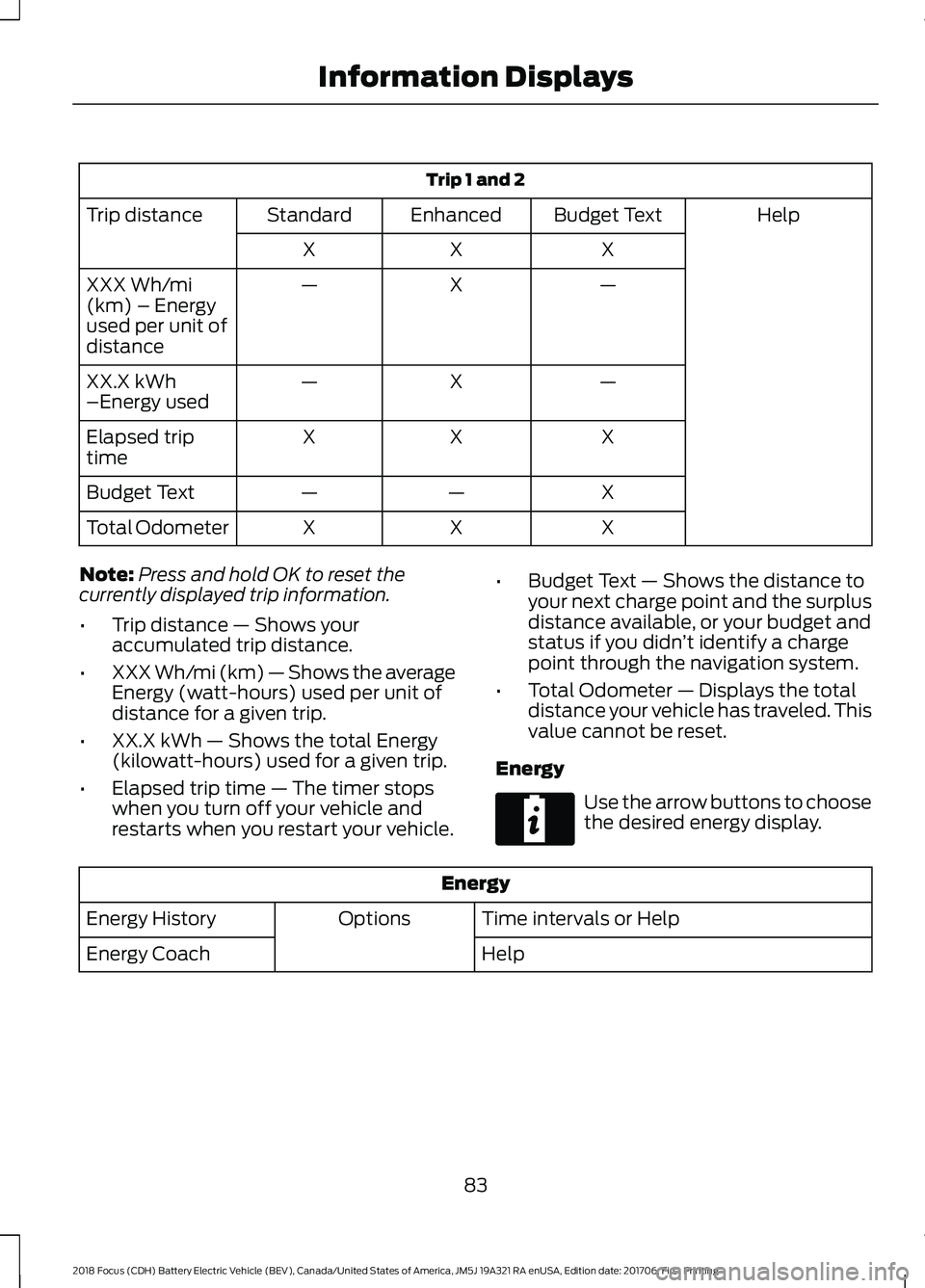
Trip 1 and 2
Help
Budget Text
Enhanced
Standard
Trip distance
X
X
X
—
X
—
XXX Wh/mi
(km) – Energy
used per unit of
distance
—
X
—
XX.X kWh
–Energy used
X
X
X
Elapsed trip
time
X
—
—
Budget Text
X
X
X
Total Odometer
Note: Press and hold OK to reset the
currently displayed trip information.
• Trip distance — Shows your
accumulated trip distance.
• XXX Wh/mi (km) — Shows the average
Energy (watt-hours) used per unit of
distance for a given trip.
• XX.X kWh — Shows the total Energy
(kilowatt-hours) used for a given trip.
• Elapsed trip time — The timer stops
when you turn off your vehicle and
restarts when you restart your vehicle. •
Budget Text — Shows the distance to
your next charge point and the surplus
distance available, or your budget and
status if you didn ’t identify a charge
point through the navigation system.
• Total Odometer — Displays the total
distance your vehicle has traveled. This
value cannot be reset.
Energy Use the arrow buttons to choose
the desired energy display.
Energy
Time intervals or Help
Options
Energy History
Help
Energy Coach
83
2018 Focus (CDH) Battery Electric Vehicle (BEV), Canada/United States of America, JM5J 19A321 RA enUSA, Edition date: 201706, First Printing Information DisplaysE220615