AUX FORD FREESTYLE 2008 Owner's Manual
[x] Cancel search | Manufacturer: FORD, Model Year: 2008, Model line: FREESTYLE, Model: FORD FREESTYLE 2008Pages: 352, PDF Size: 3.2 MB
Page 73 of 352
onto the media controls or into the system. If liquid is accidentally
spilled onto the system, immediately turn the system OFF and consult a
qualified service technician.
Cleaning the liquid crystal display (LCD) flip-down screen
Clean the display screen by applying a small amount of water or any
ammonia-based household glass cleaner directly to a soft cloth. Rub the
screen gently until the dust, dirt or fingerprints are removed. Do not spray
the screen directly with water or glass cleaning solvents. Overspray from
these fluids could drip down into the internal electronics of the screen and
cause damage. Do not apply excessive pressure while cleaning the screen.
Cleaning DVD and CD discs
Inspect all discs for contamination before playing. If necessary, clean
discs only with an approved DVD and CD cleaner and wipe from the
center out to the edge. Do not use circular motion.
Compatibility with aftermarket audio systems
(headphone only mode)
When the Family Entertainment System (FES) detects that the original
radio supplied by Ford Motor Company has been removed from the
vehicle, the FES will work in a state referred to as “Headphone Only
Mode.” This mode allows the FES to operate as a standalone system,
without interface to the radio.
While operating in Headphone Only Mode, the system will have limited
functionality.
•The system will only output audio to the headphones. It will not be
capable of providing audio to the speakers.
•The available sources in FES Headphone Only Mode are DVD-DISC
and DVD-AUX, regardless of headphone channel (A or B).
•When a disc is inserted into the FES while in Headphone Only Mode,
both headphone channels (A and B) will be connected to FES-DISC.
NAVIGATION SYSTEM (IF EQUIPPED)
Your vehicle may be equipped with a Navigation System. Refer to the
Navigation supplementfor further information.
SYNC™ SYSTEM (IF EQUIPPED)
Your vehicle may be equipped with SYNC™, a state of the art
multi-media system with special phone and media features. Refer to your
SYNC supplementfor further information.
2008 Taurus X(219)
Owners Guide (post-2002-fmt)
USA(fus)
Entertainment Systems
73
ProCarManuals.com
Page 75 of 352
6.Fan speed adjustment:Controls the volume of air circulated in the
vehicle.
Operating tips
•To reduce fog build up on the windshield during humid weather, place
the air flow selector in the
position.
•To reduce humidity build up inside the vehicle: do not drive with the
airflow selector in the O (OFF) or with recirculated air engaged.
•Do not put objects under the front seats that will interfere with the
airflow to the back seats.
•Remove any snow, ice or leaves from the air intake area at the base of
the windshield.
•For maximum cooling performance (MAX A/C):
In the MAX A/C mode:
•Move the temperature control selector to the coldest setting.
•Set the fan to the highest speed initially, then adjust to maintain
passenger comfort.
In the
andmodes:
•Move the temperature control selector to the coldest setting.
•Select A/C and recirculated air
. Usewith A/C to provide
colder airflow.
•Set the fan to the highest speed initially, then adjust to maintain
passenger comfort.
In extremely cold temperatures, to maximize overall heater performance
it is suggested to not operate the auxiliary system (if so equipped) until
the engine temperature gauge crosses into the normal operating range.
To aid in side window defogging/demisting in cold weather:
1. Select
.
2. Select A/C.
3. Set the temperature control to full heat.
4. Set the fan speed to the highest setting.
5. Direct the outer instrument panel vents towards the side windows.
Do not place objects on top of the instrument panel as these
objects may become projectiles in a collision or sudden stop.
2008 Taurus X(219)
Owners Guide (post-2002-fmt)
USA(fus)
Climate Controls
75
ProCarManuals.com
Page 80 of 352
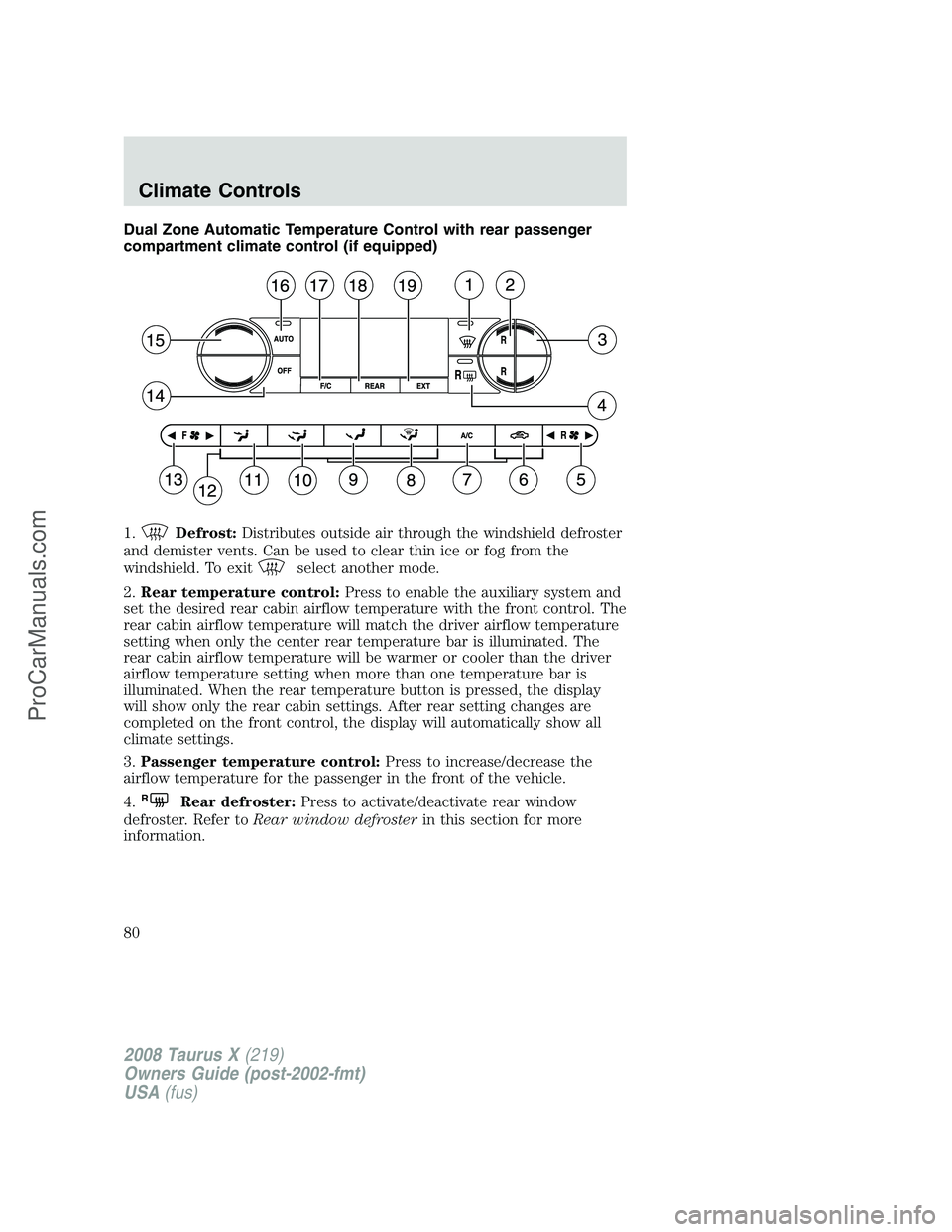
Dual Zone Automatic Temperature Control with rear passenger
compartment climate control (if equipped)
1.
Defrost:Distributes outside air through the windshield defroster
and demister vents. Can be used to clear thin ice or fog from the
windshield. To exit
select another mode.
2.Rear temperature control:Press to enable the auxiliary system and
set the desired rear cabin airflow temperature with the front control. The
rear cabin airflow temperature will match the driver airflow temperature
setting when only the center rear temperature bar is illuminated. The
rear cabin airflow temperature will be warmer or cooler than the driver
airflow temperature setting when more than one temperature bar is
illuminated. When the rear temperature button is pressed, the display
will show only the rear cabin settings. After rear setting changes are
completed on the front control, the display will automatically show all
climate settings.
3.Passenger temperature control:Press to increase/decrease the
airflow temperature for the passenger in the front of the vehicle.
4.
RRear defroster:Press to activate/deactivate rear window
defroster. Refer toRear window defrosterin this section for more
information.
2008 Taurus X(219)
Owners Guide (post-2002-fmt)
USA(fus)
Climate Controls
80
ProCarManuals.com
Page 81 of 352
5.Rear fan speed control:Press to enable the auxiliary system or
to adjust the rear fan speed from the front control. The rear fan speed
settings are 4, 3, 2, 1 and OFF. When the rear fan button is pressed, the
display will show only the rear cabin settings. After rear setting changes
are completed on the front control, the display will automatically show
all climate settings.
6.
Recirculated air:Press to activate/deactivate air recirculation
in the cabin. Recirculated air may reduce the amount of time to cool
down the interior of the vehicle and may also help reduce undesired
odors from reaching the interior of the vehicle. Recirculation can be
engaged manually in any other airflow selection except defrost.
Recirculation may turn off automatically in all airflow selections.
7.A/C:Press to activate/deactivate air conditioning. Use with
recirculated air to improve cooling performance and efficiency. Engages
automatically in AUTO, defrost and floor/defrost.
8.
:Distributes air through the windshield defroster, demister and
floor vents.
9.
:Distributes air through the floor vents.Note:You may notice a
small amount of air flowing from the demister and defroster vents.
10.
:Distributes air through the instrument panel and floor vents.
11.
:Distributes air through the instrument panel vents.
12.Manual override controls:Allows you to manually select where
airflow is directed. To return to full automatic control, press AUTO.
13.
Front fan speed control:Press to manually increase or
decrease the fan speed. To return to automatic fan operation, press
AUTO.
14.OFF:Outside air is shut out and the climate control system is turned
off.
15.Driver temperature control:Press to increase/decrease the
temperature on the driver side of the cabin. Sets the passenger side
temperature also when DUAL is disengaged. The recommended vehicle
cabin setting is between 72°F (22°C) and 75°F (24°C).
16.AUTO:To engage automatic temperature control, press AUTO and
select the desired temperature using the temperature control. The
system will automatically determine fan speed, airflow location, A/C on
or off, and outside or recirculated air, to heat or cool the vehicle to reach
the desired temperature.
2008 Taurus X(219)
Owners Guide (post-2002-fmt)
USA(fus)
Climate Controls
81
ProCarManuals.com
Page 82 of 352
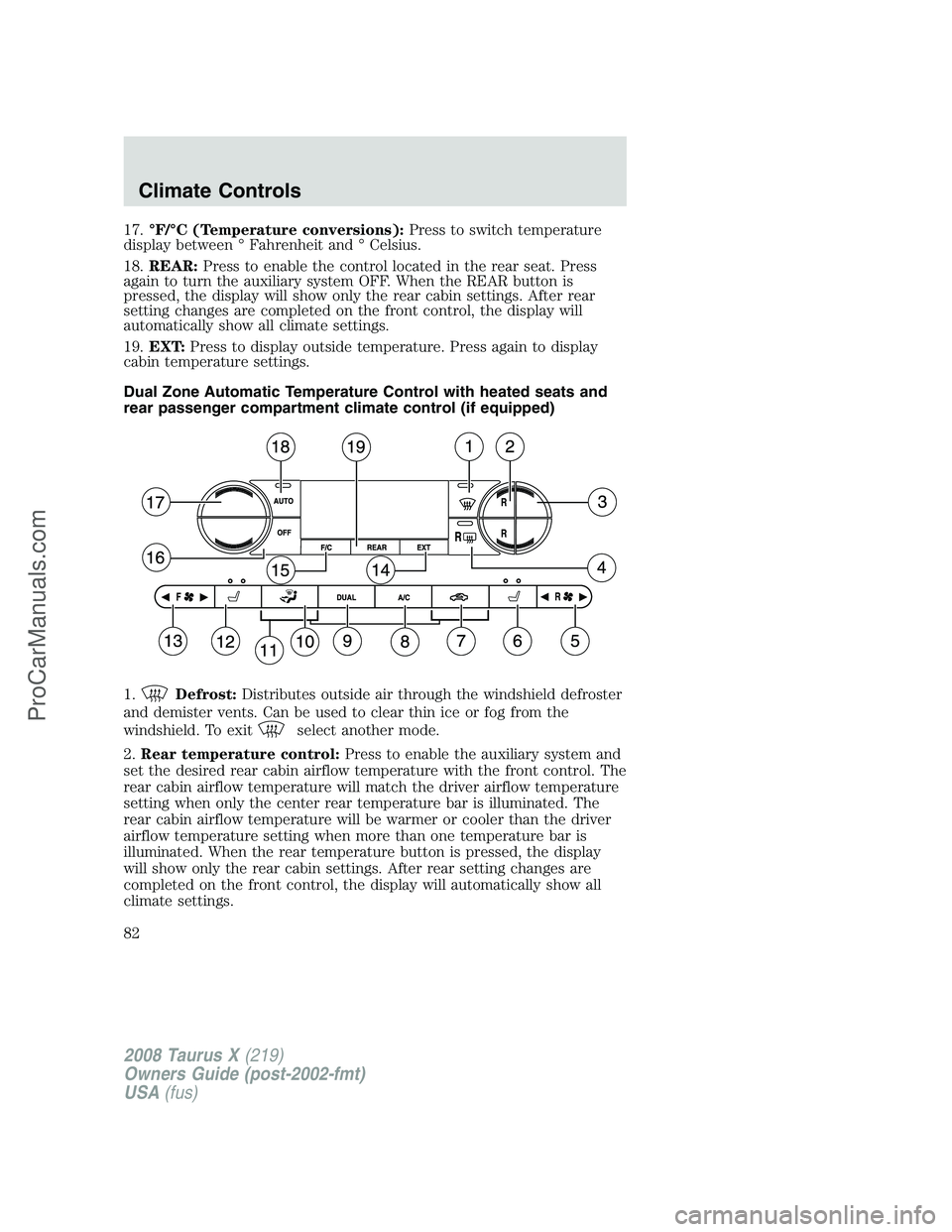
17.°F/°C (Temperature conversions):Press to switch temperature
display between ° Fahrenheit and ° Celsius.
18.REAR:Press to enable the control located in the rear seat. Press
again to turn the auxiliary system OFF. When the REAR button is
pressed, the display will show only the rear cabin settings. After rear
setting changes are completed on the front control, the display will
automatically show all climate settings.
19.EXT:Press to display outside temperature. Press again to display
cabin temperature settings.
Dual Zone Automatic Temperature Control with heated seats and
rear passenger compartment climate control (if equipped)
1.
Defrost:Distributes outside air through the windshield defroster
and demister vents. Can be used to clear thin ice or fog from the
windshield. To exit
select another mode.
2.Rear temperature control:Press to enable the auxiliary system and
set the desired rear cabin airflow temperature with the front control. The
rear cabin airflow temperature will match the driver airflow temperature
setting when only the center rear temperature bar is illuminated. The
rear cabin airflow temperature will be warmer or cooler than the driver
airflow temperature setting when more than one temperature bar is
illuminated. When the rear temperature button is pressed, the display
will show only the rear cabin settings. After rear setting changes are
completed on the front control, the display will automatically show all
climate settings.
2008 Taurus X(219)
Owners Guide (post-2002-fmt)
USA(fus)
Climate Controls
82
ProCarManuals.com
Page 83 of 352
3.Passenger temperature control:Press to increase/decrease the
airflow temperature for the passenger in the front of the vehicle.
4.
RRear defroster:Press to activate/deactivate rear window
defroster. Refer toRear window defrosterin this section for more
information.
5.
Rear fan speed control:Press to enable the auxiliary system or
to adjust the rear fan speed from the front control. The rear fan speed
settings are 4, 3, 2, 1 and OFF. When the rear fan button is pressed, the
display will show only the rear cabin settings. After rear setting changes
are completed on the front control, the display will automatically show
all climate settings.
6.
Passenger heated seat control:Press once to activate high heat
setting (2 indicator lights), press again to activate low heat setting (1
indicator light), and press again to deactivate the passenger heated seat.
7.
Recirculated air:Press to activate/deactivate air recirculation
in the cabin. Recirculated air may reduce the amount of time to cool
down the interior of the vehicle and may also help reduce undesired
odors from reaching the interior of the vehicle. Recirculation can be
engaged manually in any other airflow selection except defrost.
Recirculation may turn off automatically in all airflow selections.
8.A/C:Press to activate/deactivate air conditioning. Use with
recirculated air to improve cooling performance and efficiency. Engages
automatically in AUTO, defrost and floor/defrost.
9.DUAL (Dual temperature control):Press to engage/disengage
separate passenger side temperature control.
10.Airflow direction control:Press to toggle through the air
distribution modes listed below. The selected mode will be shown in the
display.
:Distributes air through the instrument panel and center console
vents (if equipped).
:Distributes air through the instrument panel, floor and center
console vents (if equipped).
:Distributes air through the floor vents.Note:You may notice a
small amount of air flowing from the demister and defroster vents.
:Distributes air through the windshield defroster, demister and floor
vents.
11.Manual override controls:Allows you to manually select where
airflow is directed. To return to full automatic control, press AUTO.
2008 Taurus X(219)
Owners Guide (post-2002-fmt)
USA(fus)
Climate Controls
83
ProCarManuals.com
Page 84 of 352
12.Driver heated seat control:Press to heat the driver seat. Press
once to activate high heat (two indicator lights). Press again to activate
low heat (one indicator light). Press again to deactivate the driver
heated seat.
13.
Front fan speed control:Press to manually increase or
decrease the fan speed. To return to automatic fan operation, press
AUTO.
14.EXT:Press to display outside temperature. Press again to display
cabin temperature settings.
15.°F/°C (Temperature conversions):Press to switch temperature
display between ° Fahrenheit and ° Celsius.
16.OFF:Outside air is shut out and the climate control system is turned
off.
17.Driver temperature control:Press to increase/decrease the
temperature on the driver side of the cabin. Sets the passenger side
temperature also when DUAL is disengaged. The recommended vehicle
cabin setting is between 72°F (22°C) and 75°F (24°C).
18.AUTO:Press to engage automatic temperature control. Select the
desired temperature using the temperature control. The system will
automatically determine fan speed, airflow location, A/C on or off, and
outside or recirculated air, to heat or cool the vehicle to reach the
desired temperature.
19.REAR:Press to enable the control located in the rear seat. Press
again to turn the auxiliary system OFF. When the REAR button is
pressed, the display will show only the rear cabin settings. After rear
setting changes are completed on the front control, the display will
automatically show all climate settings.
Operating tips
•To reduce fog build up on the windshield during humid weather, place
the air flow selector in the
position.
•To reduce humidity build up inside the vehicle: do not drive with the
airflow selector in the OFF or with recirculated air engaged.
•Do not put objects under the front seats that will interfere with the
airflow to the back seats.
•Remove any snow, ice or leaves from the air intake area at the base of
the windshield.
2008 Taurus X(219)
Owners Guide (post-2002-fmt)
USA(fus)
Climate Controls
84
ProCarManuals.com
Page 85 of 352
•For maximum cooling performance (MAX A/C):
In AUTO mode, press AUTO control and set to desired temperature.
In manual override control, select
or, A/C and recirculated
air
and set the temperature to 60°F (16°C). Set the fan to the
highest speed initially, then adjust to maintain passenger comfort.
•To improve the A/C cool down, drive with the windows slightly open
for 2–3 minutes after starting the vehicle or until the vehicle has
“aired out.”
In extremely cold temperatures, to maximize overall heater performance
it is suggested to not operate the auxiliary system (if so equipped) until
the engine temperature gauge crosses into the normal operating range.
To aid in side window defogging/demisting in cold weather:
1. Select
.
2. Select A/C.
3. Adjust the temperature control to maintain comfort.
4. Set the fan to the highest speed.
5. Direct the outer instrument panel vents towards the side windows.
Do not place objects on top of the instrument panel as these
objects may become projectiles in a collision or sudden stop.
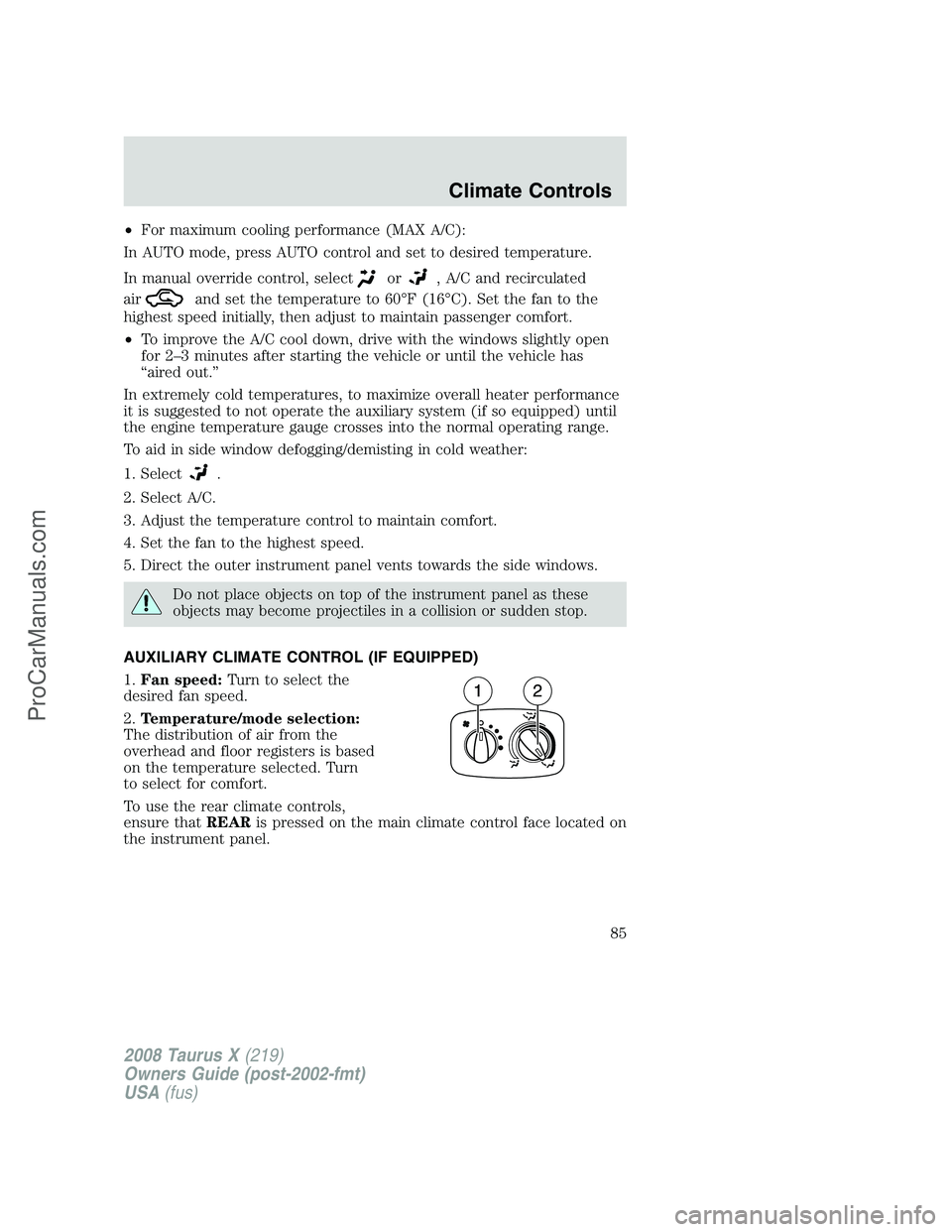
AUXILIARY CLIMATE CONTROL (IF EQUIPPED)
1.Fan speed:Turn to select the
desired fan speed.
2.Temperature/mode selection:
The distribution of air from the
overhead and floor registers is based
on the temperature selected. Turn
to select for comfort.
To use the rear climate controls,
ensure thatREARis pressed on the main climate control face located on
the instrument panel.
2008 Taurus X(219)
Owners Guide (post-2002-fmt)
USA(fus)
Climate Controls
85
ProCarManuals.com
Page 100 of 352
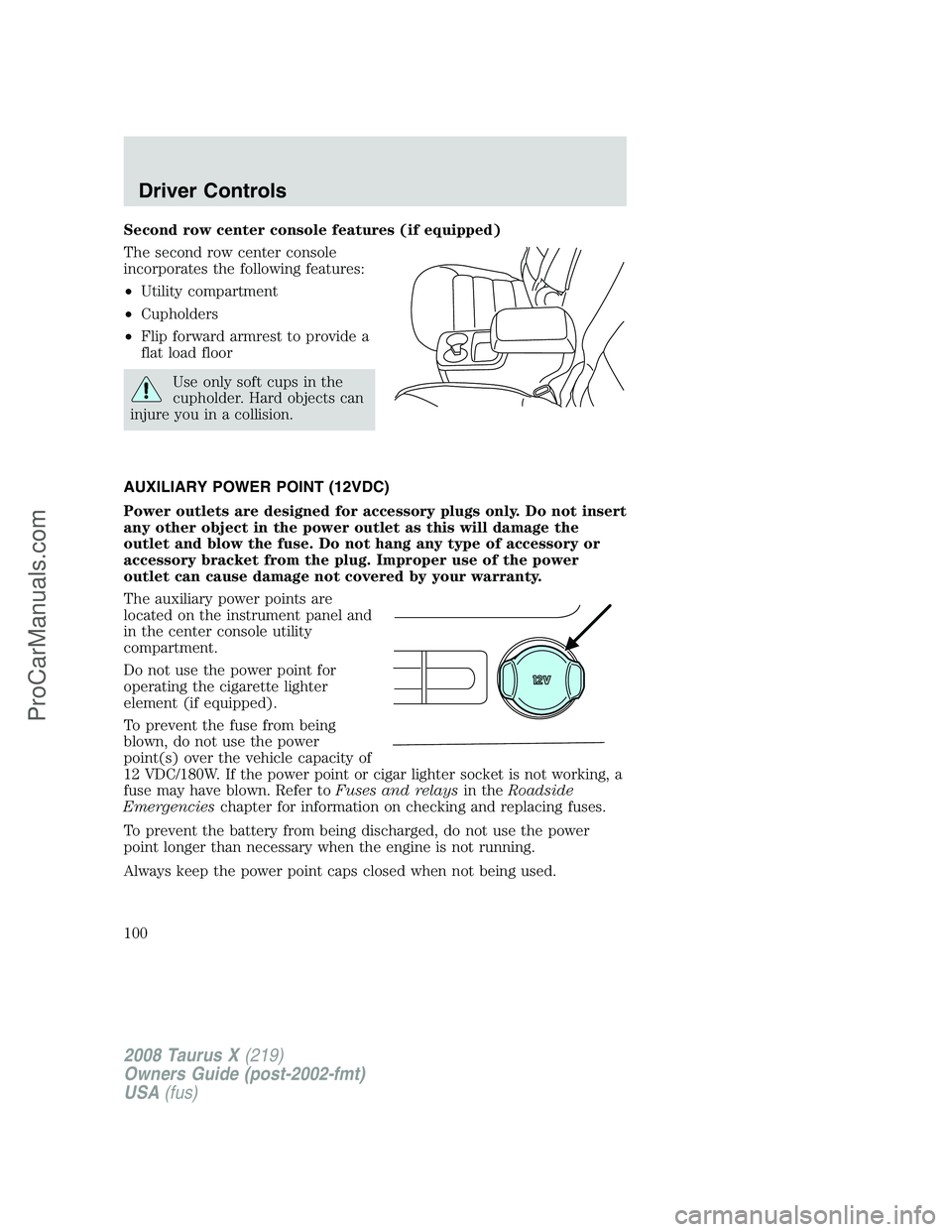
Second row center console features (if equipped)
The second row center console
incorporates the following features:
•Utility compartment
•Cupholders
•Flip forward armrest to provide a
flat load floor
Use only soft cups in the
cupholder. Hard objects can
injure you in a collision.
AUXILIARY POWER POINT (12VDC)
Power outlets are designed for accessory plugs only. Do not insert
any other object in the power outlet as this will damage the
outlet and blow the fuse. Do not hang any type of accessory or
accessory bracket from the plug. Improper use of the power
outlet can cause damage not covered by your warranty.
The auxiliary power points are
located on the instrument panel and
in the center console utility
compartment.
Do not use the power point for
operating the cigarette lighter
element (if equipped).
To prevent the fuse from being
blown, do not use the power
point(s) over the vehicle capacity of
12 VDC/180W. If the power point or cigar lighter socket is not working, a
fuse may have blown. Refer toFuses and relaysin theRoadside
Emergencieschapter for information on checking and replacing fuses.
To prevent the battery from being discharged, do not use the power
point longer than necessary when the engine is not running.
Always keep the power point caps closed when not being used.
2008 Taurus X(219)
Owners Guide (post-2002-fmt)
USA(fus)
Driver Controls
100
ProCarManuals.com
Page 101 of 352
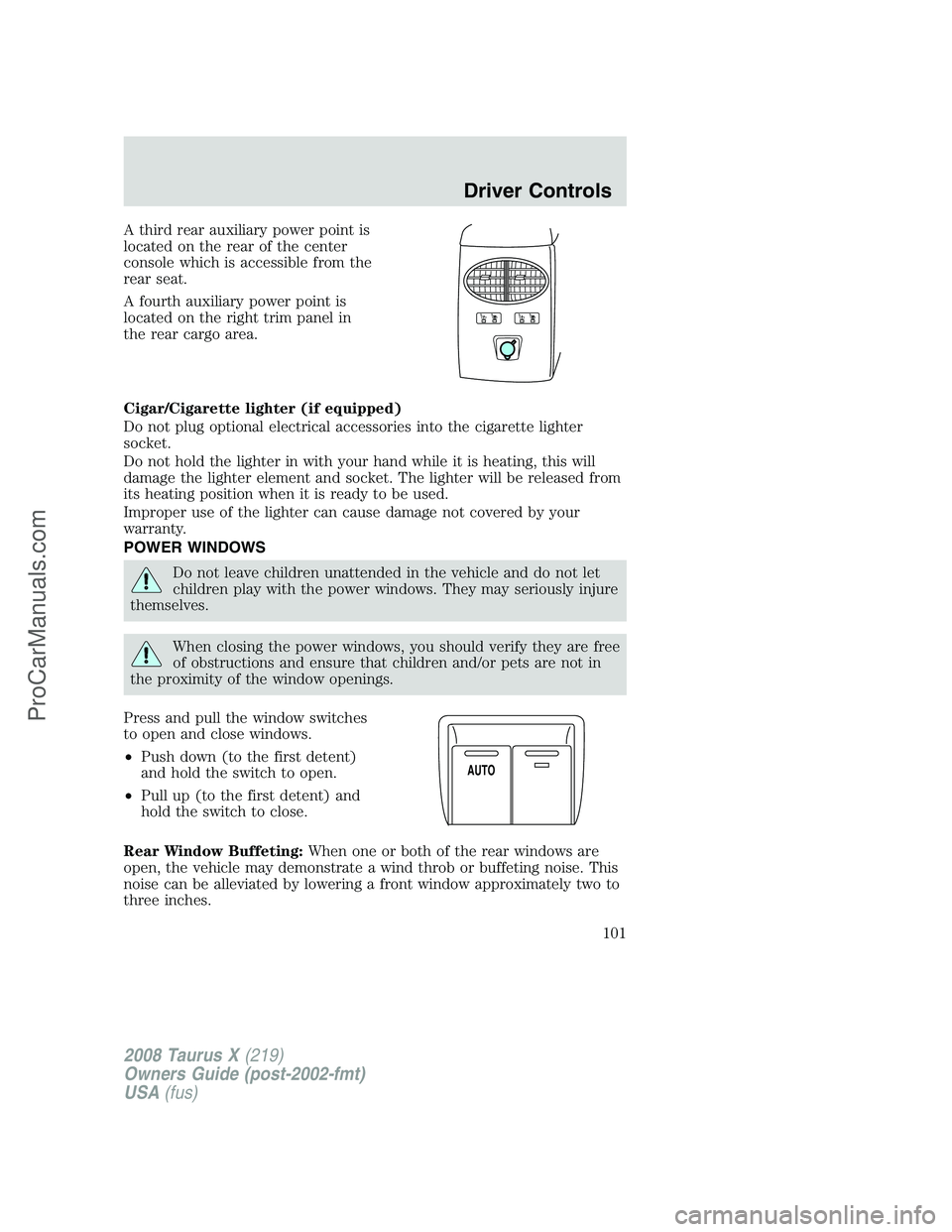
A third rear auxiliary power point is
located on the rear of the center
console which is accessible from the
rear seat.
A fourth auxiliary power point is
located on the right trim panel in
the rear cargo area.
Cigar/Cigarette lighter (if equipped)
Do not plug optional electrical accessories into the cigarette lighter
socket.
Do not hold the lighter in with your hand while it is heating, this will
damage the lighter element and socket. The lighter will be released from
its heating position when it is ready to be used.
Improper use of the lighter can cause damage not covered by your
warranty.
POWER WINDOWS
Do not leave children unattended in the vehicle and do not let
children play with the power windows. They may seriously injure
themselves.
When closing the power windows, you should verify they are free
of obstructions and ensure that children and/or pets are not in
the proximity of the window openings.
Press and pull the window switches
to open and close windows.
•Push down (to the first detent)
and hold the switch to open.
•Pull up (to the first detent) and
hold the switch to close.
Rear Window Buffeting:When one or both of the rear windows are
open, the vehicle may demonstrate a wind throb or buffeting noise. This
noise can be alleviated by lowering a front window approximately two to
three inches.
AUTO
2008 Taurus X(219)
Owners Guide (post-2002-fmt)
USA(fus)
Driver Controls
101
ProCarManuals.com