instrument cluster FORD FUSION 2018 Owners Manual
[x] Cancel search | Manufacturer: FORD, Model Year: 2018, Model line: FUSION, Model: FORD FUSION 2018Pages: 539, PDF Size: 6.42 MB
Page 5 of 539
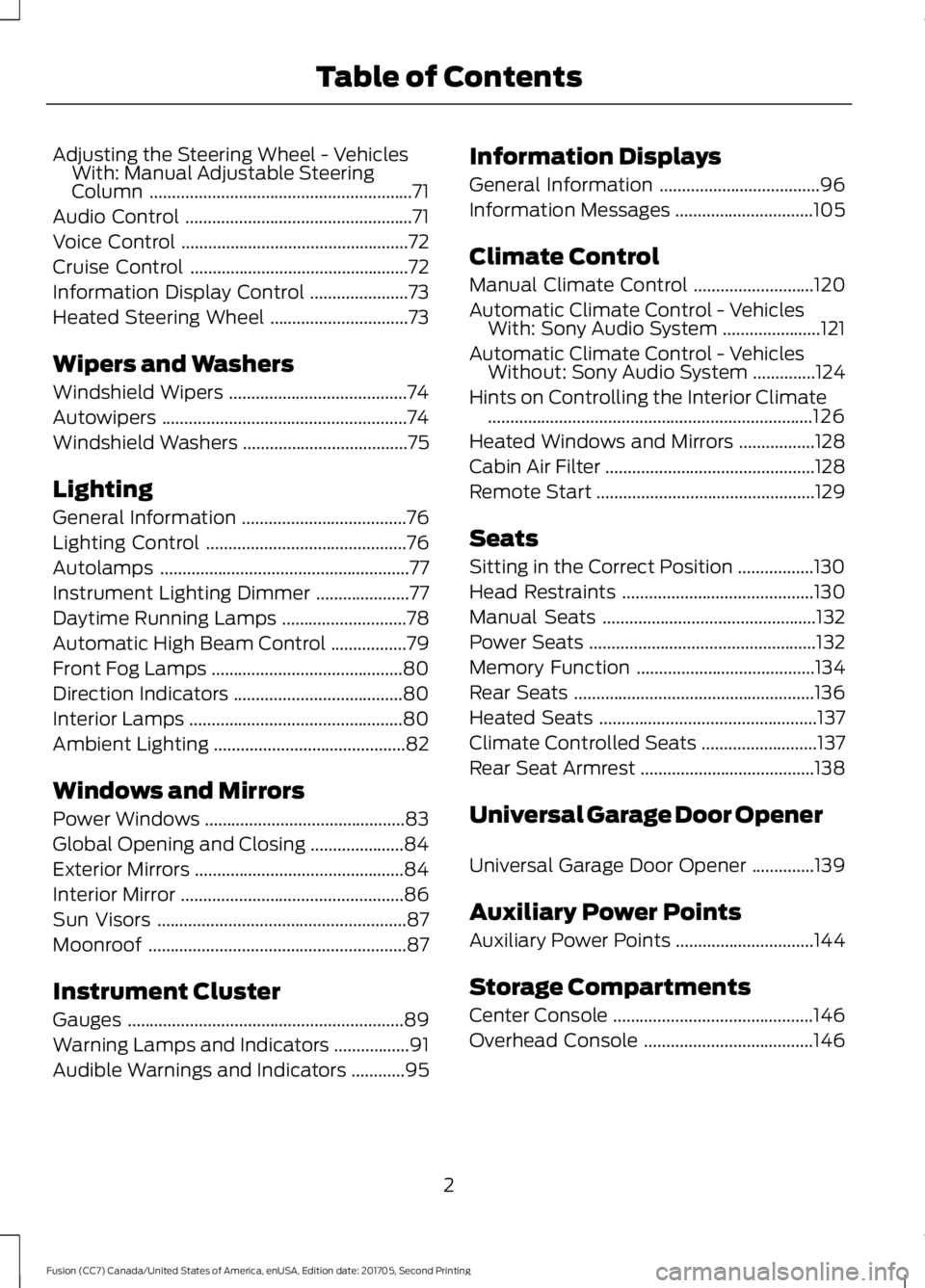
Adjusting the Steering Wheel - Vehicles
With: Manual Adjustable Steering
Column ...........................................................71
Audio Control ...................................................
71
Voice Control ...................................................
72
Cruise Control .................................................
72
Information Display Control ......................
73
Heated Steering Wheel ...............................
73
Wipers and Washers
Windshield Wipers ........................................
74
Autowipers .......................................................
74
Windshield Washers .....................................
75
Lighting
General Information .....................................
76
Lighting Control .............................................
76
Autolamps ........................................................
77
Instrument Lighting Dimmer .....................
77
Daytime Running Lamps ............................
78
Automatic High Beam Control .................
79
Front Fog Lamps ...........................................
80
Direction Indicators ......................................
80
Interior Lamps ................................................
80
Ambient Lighting ...........................................
82
Windows and Mirrors
Power Windows .............................................
83
Global Opening and Closing .....................
84
Exterior Mirrors ...............................................
84
Interior Mirror ..................................................
86
Sun Visors ........................................................
87
Moonroof ..........................................................
87
Instrument Cluster
Gauges ..............................................................
89
Warning Lamps and Indicators .................
91
Audible Warnings and Indicators ............
95Information Displays
General Information
....................................
96
Information Messages ...............................
105
Climate Control
Manual Climate Control ...........................
120
Automatic Climate Control - Vehicles With: Sony Audio System ......................
121
Automatic Climate Control - Vehicles Without: Sony Audio System ..............
124
Hints on Controlling the Interior Climate ........................................................................\
.
126
Heated Windows and Mirrors .................
128
Cabin Air Filter ...............................................
128
Remote Start .................................................
129
Seats
Sitting in the Correct Position .................
130
Head Restraints ...........................................
130
Manual Seats ................................................
132
Power Seats ...................................................
132
Memory Function ........................................
134
Rear Seats ......................................................
136
Heated Seats .................................................
137
Climate Controlled Seats ..........................
137
Rear Seat Armrest .......................................
138
Universal Garage Door Opener
Universal Garage Door Opener ..............
139
Auxiliary Power Points
Auxiliary Power Points ...............................
144
Storage Compartments
Center Console .............................................
146
Overhead Console ......................................
146
2
Fusion (CC7) Canada/United States of America, enUSA, Edition date: 201705, Second Printing Table of Contents
Page 7 of 539
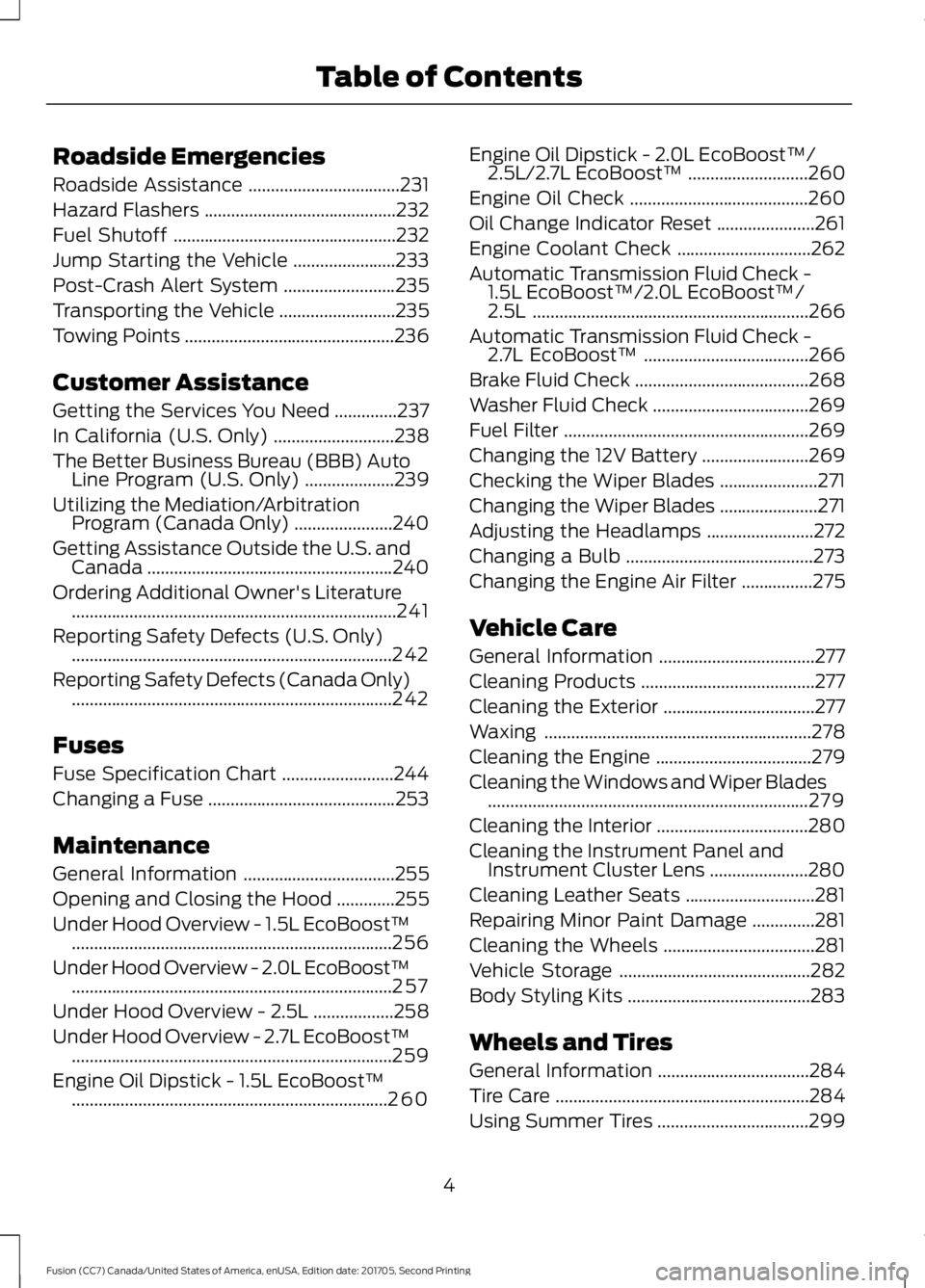
Roadside Emergencies
Roadside Assistance
..................................231
Hazard Flashers ...........................................
232
Fuel Shutoff ..................................................
232
Jump Starting the Vehicle .......................
233
Post-Crash Alert System .........................
235
Transporting the Vehicle ..........................
235
Towing Points ...............................................
236
Customer Assistance
Getting the Services You Need ..............
237
In California (U.S. Only) ...........................
238
The Better Business Bureau (BBB) Auto Line Program (U.S. Only) ....................
239
Utilizing the Mediation/Arbitration Program (Canada Only) ......................
240
Getting Assistance Outside the U.S. and Canada .......................................................
240
Ordering Additional Owner's Literature ........................................................................\
.
241
Reporting Safety Defects (U.S. Only) ........................................................................\
242
Reporting Safety Defects (Canada Only) ........................................................................\
242
Fuses
Fuse Specification Chart .........................
244
Changing a Fuse ..........................................
253
Maintenance
General Information ..................................
255
Opening and Closing the Hood .............
255
Under Hood Overview - 1.5L EcoBoost™ ........................................................................\
256
Under Hood Overview - 2.0L EcoBoost™ ........................................................................\
257
Under Hood Overview - 2.5L ..................
258
Under Hood Overview - 2.7L EcoBoost™ ........................................................................\
259
Engine Oil Dipstick - 1.5L EcoBoost™ .......................................................................
260 Engine Oil Dipstick - 2.0L EcoBoost™/
2.5L/2.7L EcoBoost™ ...........................
260
Engine Oil Check ........................................
260
Oil Change Indicator Reset ......................
261
Engine Coolant Check ..............................
262
Automatic Transmission Fluid Check - 1.5L EcoBoost™/2.0L EcoBoost™/
2.5L ..............................................................
266
Automatic Transmission Fluid Check - 2.7L EcoBoost™ .....................................
266
Brake Fluid Check .......................................
268
Washer Fluid Check ...................................
269
Fuel Filter .......................................................
269
Changing the 12V Battery ........................
269
Checking the Wiper Blades ......................
271
Changing the Wiper Blades ......................
271
Adjusting the Headlamps ........................
272
Changing a Bulb ..........................................
273
Changing the Engine Air Filter ................
275
Vehicle Care
General Information ...................................
277
Cleaning Products .......................................
277
Cleaning the Exterior ..................................
277
Waxing ............................................................
278
Cleaning the Engine ...................................
279
Cleaning the Windows and Wiper Blades ........................................................................\
279
Cleaning the Interior ..................................
280
Cleaning the Instrument Panel and Instrument Cluster Lens ......................
280
Cleaning Leather Seats .............................
281
Repairing Minor Paint Damage ..............
281
Cleaning the Wheels ..................................
281
Vehicle Storage ...........................................
282
Body Styling Kits .........................................
283
Wheels and Tires
General Information ..................................
284
Tire Care .........................................................
284
Using Summer Tires ..................................
299
4
Fusion (CC7) Canada/United States of America, enUSA, Edition date: 201705, Second Printing Table of Contents
Page 19 of 539
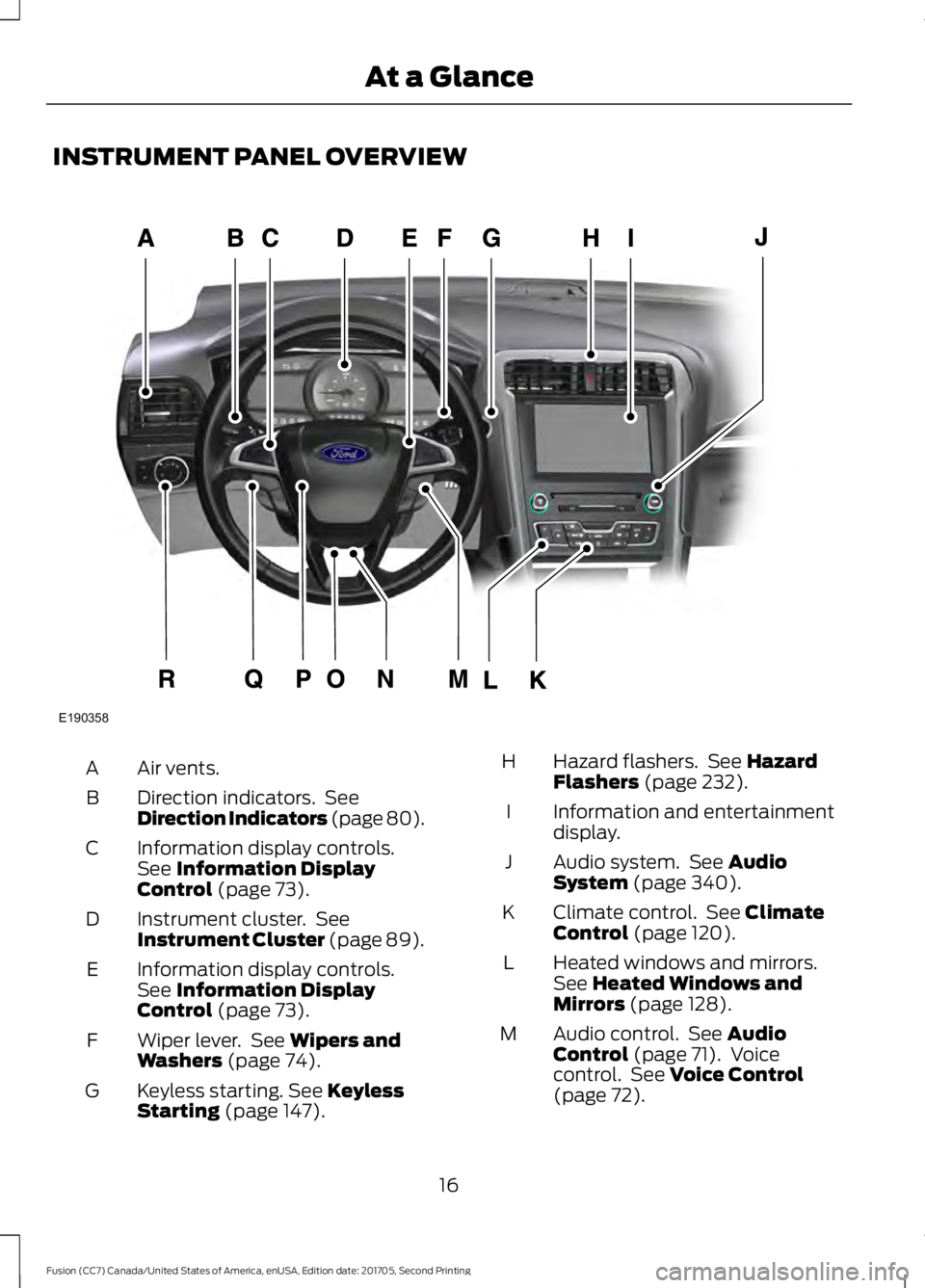
INSTRUMENT PANEL OVERVIEW
Air vents.
A
Direction indicators. See
Direction Indicators (page 80).
B
Information display controls.
See Information Display
Control (page 73).
C
Instrument cluster. See
Instrument Cluster
(page 89).
D
Information display controls.
See
Information Display
Control (page 73).
E
Wiper lever. See
Wipers and
Washers (page 74).
F
Keyless starting.
See Keyless
Starting (page 147).
G Hazard flashers. See
Hazard
Flashers (page 232).
H
Information and entertainment
display.
I
Audio system. See
Audio
System (page 340).
J
Climate control. See
Climate
Control (page 120).
K
Heated windows and mirrors.
See
Heated Windows and
Mirrors (page 128).
L
Audio control. See
Audio
Control (page 71). Voice
control. See Voice Control
(page 72).
M
16
Fusion (CC7) Canada/United States of America, enUSA, Edition date: 201705, Second Printing At a GlanceE190358
Page 51 of 539
The design and development of the Safety
Canopy included recommended testing
procedures that were developed by a
group of automotive safety experts known
as the Side Airbag Technical Working
Group. These recommended testing
procedures help reduce the risk of injuries
related to the deployment of side airbags
(including the Safety Canopy).
CRASH SENSORS AND
AIRBAG INDICATOR
WARNING
Modifying or adding equipment to
the front end of the vehicle (including
frame, bumper, front end body
structure and tow hooks) may affect the
performance of the airbag system,
increasing the risk of injury. Do not modify
the front end of the vehicle. Your vehicle has a collection of crash and
occupant sensors which provide
information to the restraints control
module. The restraints control module
deploys (activates) the front seatbelt
system, the adaptive collapsible steering
column, driver airbag, passenger airbag,
knee airbag(s), seat mounted side airbags,
Safety Canopy and optional rear inflatable
seatbelts. Based on the type of crash, the
restraints control module will deploy the
appropriate safety devices.
The restraints control module also
monitors the readiness of the above safety
devices plus the crash and occupant
sensors. The readiness of the safety
system is indicated by a warning indicator
light in the instrument cluster or a backup
tone (if equipped). Routine maintenance
of the airbag is not required.
A difficulty with the system is indicated by
one or more of the following: The readiness light will not
illuminate immediately after the
ignition is turned on.
• The readiness light will either flash or
stay lit.
• A series of five beeps will be heard (If
equipped). The tone pattern will repeat
periodically until the problem, the light
or both are repaired.
If any of these things happen, even
intermittently, have the supplemental
restraint system serviced at an authorized
dealer immediately. Unless serviced, the
system may not function properly in the
event of a crash.
The seatbelt pretensioners and the front
airbag supplemental restraint system are
designed to activate when the vehicle
sustains frontal deceleration sufficient to
cause the restraints control module to
deploy a safety device.
The fact that the seatbelt pretensioners
or front airbags did not activate for both
front seat occupants in a crash does not
mean that something is wrong with the
system. Rather, it means the restraints
control module determined the accident
conditions (crash severity, belt usage)
were not appropriate to activate these
safety devices.
• The design of the front airbags is to
activate only in frontal and near-frontal
crashes (not rollovers, side impacts or
rear impacts) unless the crash causes
sufficient frontal deceleration.
• The seatbelt pretensioners and rear
inflatable seatbelts are designed to
activate in frontal, near-frontal and
side crashes and rollovers.
• The knee airbag(s) may deploy based
on crash severity and occupant
conditions.
48
Fusion (CC7) Canada/United States of America, enUSA, Edition date: 201705, Second Printing Supplementary Restraints SystemE67017
Page 92 of 539
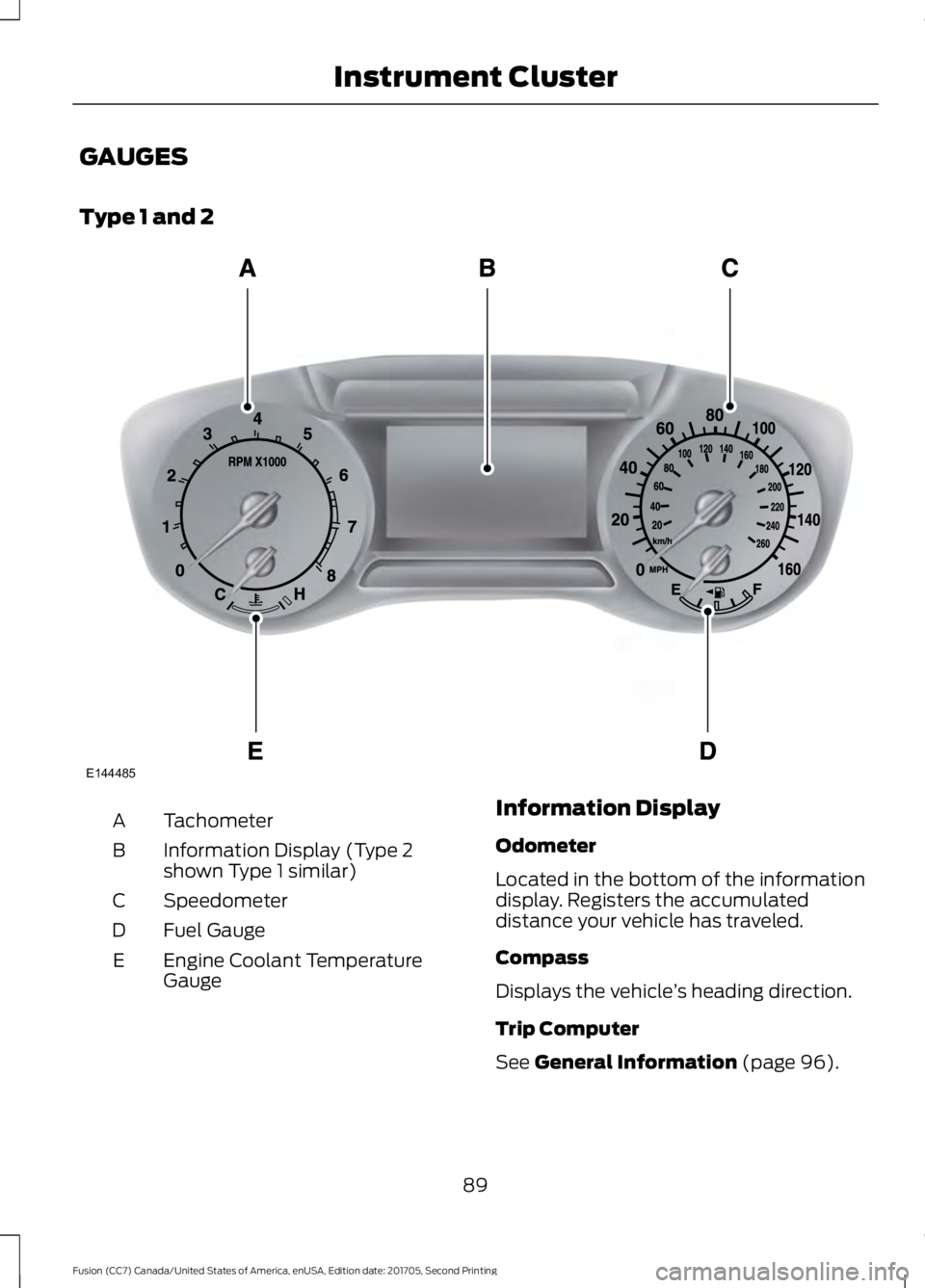
GAUGES
Type 1 and 2
Tachometer
A
Information Display (Type 2
shown Type 1 similar)
B
Speedometer
C
Fuel Gauge
D
Engine Coolant Temperature
Gauge
E Information Display
Odometer
Located in the bottom of the information
display. Registers the accumulated
distance your vehicle has traveled.
Compass
Displays the vehicle
’s heading direction.
Trip Computer
See General Information (page 96).
89
Fusion (CC7) Canada/United States of America, enUSA, Edition date: 201705, Second Printing Instrument ClusterE144485
Page 93 of 539
Vehicle Settings and Personalization
See General Information (page 96).
Engine Coolant Temperature
Gauge
Shows the temperature of the engine
coolant. At normal operating temperature,
the needle will remain in the center section.
If the needle enters the red section, the
engine is overheating. Stop the engine,
switch the ignition off and determine the
cause once the engine has cooled down.
Note: Do not restart the engine until the
cause of overheating has been resolved. WARNING
Never remove the coolant reservoir
cap while the engine is running or hot.
Fuel Gauge
Note:
The fuel gauge may vary slightly
when your vehicle is moving or on a gradient.
Switch the ignition on. The fuel gauge will
indicate approximately how much fuel is
left in the fuel tank. The arrow adjacent to
the fuel pump symbol indicates on which
side of your vehicle the fuel filler door is
located. The needle should move toward F when
you refuel your vehicle. If the needle points
to E after adding fuel, this indicates your
vehicle needs service soon.
After refueling some variability in needle
position is normal:
•
It may take a short time for the needle
to reach full after leaving the gas
station. This is normal and depends
upon the slope of pavement at the gas
station.
• The fuel amount dispensed into the
tank is a little less or more than the
gauge indicated. This is normal and
depends upon the slope of pavement
at the gas station.
• If the gas station nozzle shuts off
before the tank is full, try a different
gas pump nozzle.
• There is a small reserve left in the tank
when the fuel gauge reaches empty.
Low Fuel Reminder
A low fuel reminder triggers at
50 mi
(80 km) to empty.
Variations:
Note: The low fuel reminder can appear at
different fuel gauge positions depending on
fuel economy conditions. This variation is
normal.
90
Fusion (CC7) Canada/United States of America, enUSA, Edition date: 201705, Second Printing Instrument Cluster
Page 94 of 539
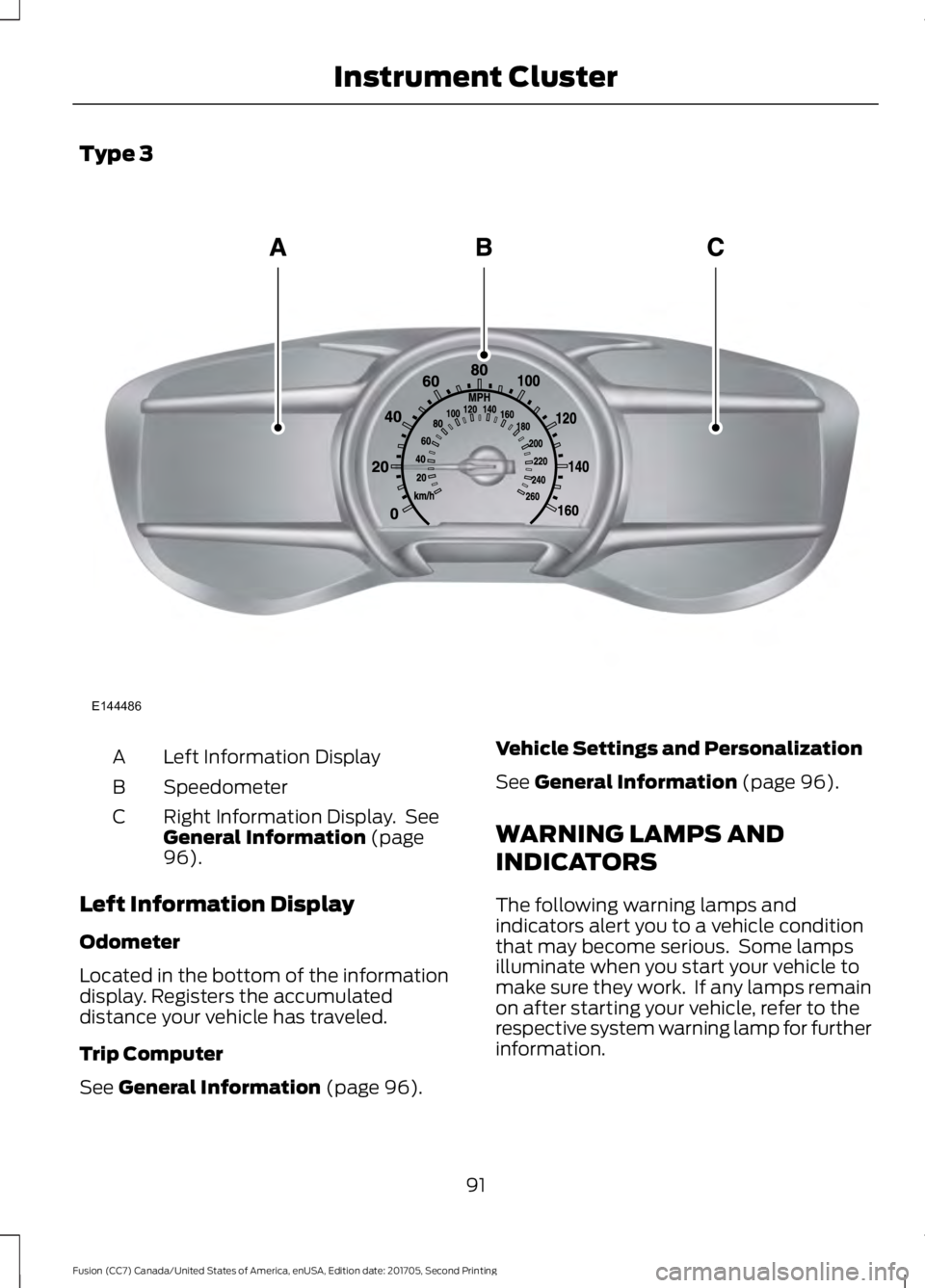
Type 3
Left Information Display
A
Speedometer
B
Right Information Display. See
General Information (page
96).
C
Left Information Display
Odometer
Located in the bottom of the information
display. Registers the accumulated
distance your vehicle has traveled.
Trip Computer
See
General Information (page 96). Vehicle Settings and Personalization
See
General Information (page 96).
WARNING LAMPS AND
INDICATORS
The following warning lamps and
indicators alert you to a vehicle condition
that may become serious. Some lamps
illuminate when you start your vehicle to
make sure they work. If any lamps remain
on after starting your vehicle, refer to the
respective system warning lamp for further
information.
91
Fusion (CC7) Canada/United States of America, enUSA, Edition date: 201705, Second Printing Instrument ClusterE144486
Page 95 of 539
Note:
Some warning indicators appear in
the information display and operate the
same as a warning lamp but do not
illuminate when you start your vehicle.
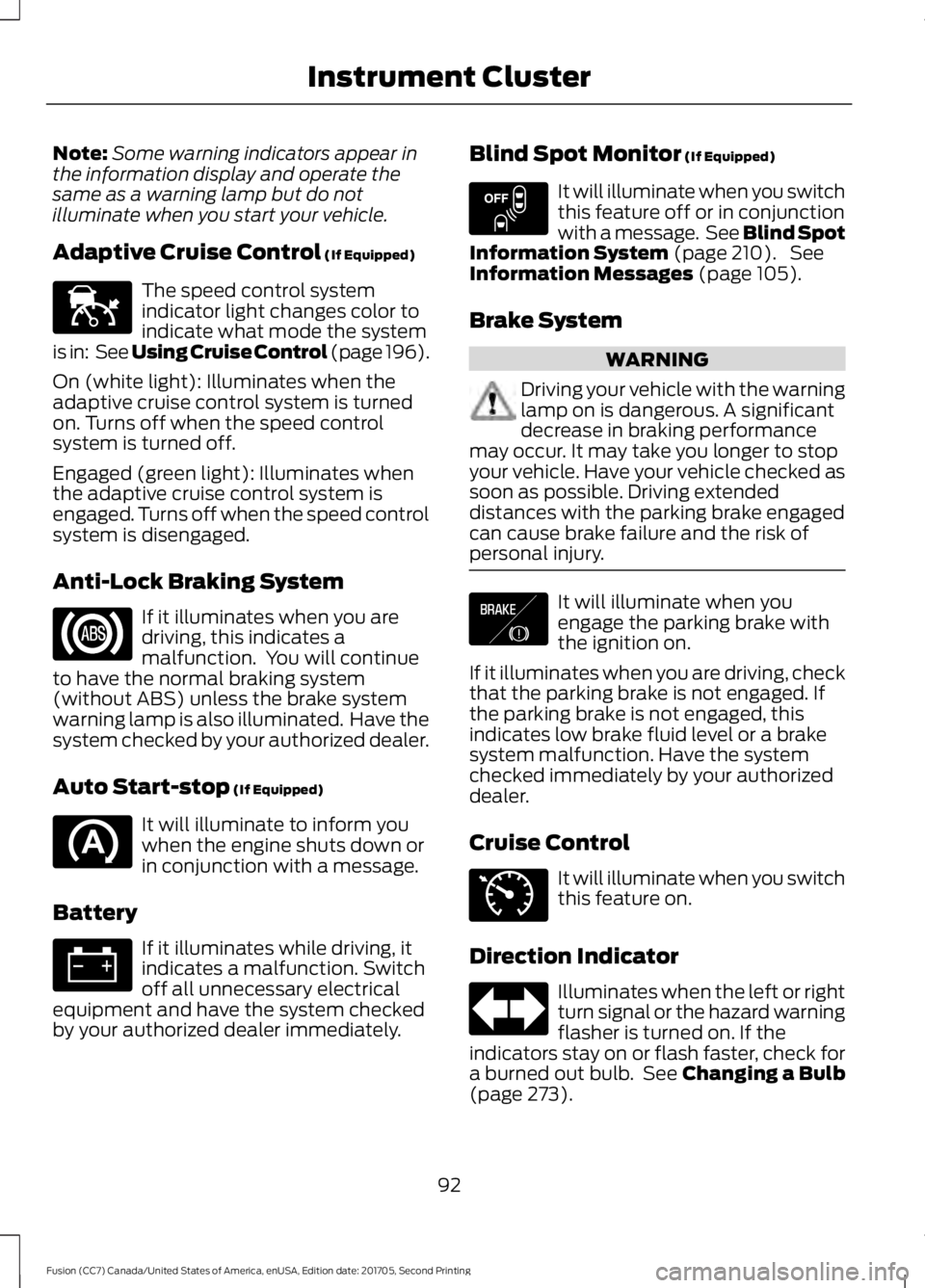
Adaptive Cruise Control (If Equipped) The speed control system
indicator light changes color to
indicate what mode the system
is in: See Using Cruise Control (page 196).
On (white light): Illuminates when the
adaptive cruise control system is turned
on. Turns off when the speed control
system is turned off.
Engaged (green light): Illuminates when
the adaptive cruise control system is
engaged. Turns off when the speed control
system is disengaged.
Anti-Lock Braking System If it illuminates when you are
driving, this indicates a
malfunction. You will continue
to have the normal braking system
(without ABS) unless the brake system
warning lamp is also illuminated. Have the
system checked by your authorized dealer.
Auto Start-stop
(If Equipped) It will illuminate to inform you
when the engine shuts down or
in conjunction with a message.
Battery If it illuminates while driving, it
indicates a malfunction. Switch
off all unnecessary electrical
equipment and have the system checked
by your authorized dealer immediately. Blind Spot Monitor
(If Equipped) It will illuminate when you switch
this feature off or in conjunction
with a message. See Blind Spot
Information System
(page 210). See
Information Messages (page 105).
Brake System WARNING
Driving your vehicle with the warning
lamp on is dangerous. A significant
decrease in braking performance
may occur. It may take you longer to stop
your vehicle. Have your vehicle checked as
soon as possible. Driving extended
distances with the parking brake engaged
can cause brake failure and the risk of
personal injury. It will illuminate when you
engage the parking brake with
the ignition on.
If it illuminates when you are driving, check
that the parking brake is not engaged. If
the parking brake is not engaged, this
indicates low brake fluid level or a brake
system malfunction. Have the system
checked immediately by your authorized
dealer.
Cruise Control It will illuminate when you switch
this feature on.
Direction Indicator Illuminates when the left or right
turn signal or the hazard warning
flasher is turned on. If the
indicators stay on or flash faster, check for
a burned out bulb. See
Changing a Bulb
(page 273).
92
Fusion (CC7) Canada/United States of America, enUSA, Edition date: 201705, Second Printing Instrument ClusterE144524 E151262 E138644 E71340
Page 96 of 539
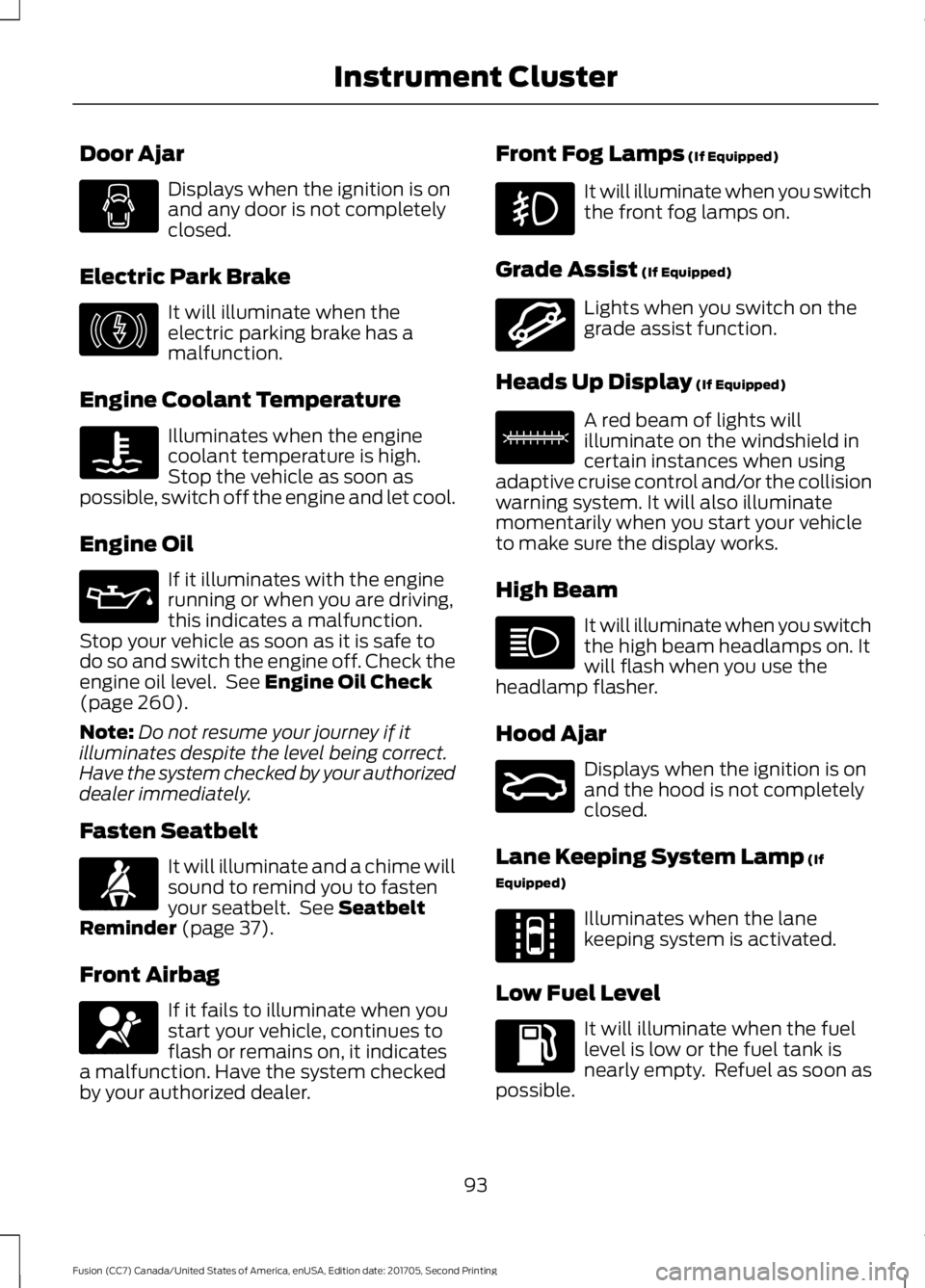
Door Ajar
Displays when the ignition is on
and any door is not completely
closed.
Electric Park Brake It will illuminate when the
electric parking brake has a
malfunction.
Engine Coolant Temperature Illuminates when the engine
coolant temperature is high.
Stop the vehicle as soon as
possible, switch off the engine and let cool.
Engine Oil If it illuminates with the engine
running or when you are driving,
this indicates a malfunction.
Stop your vehicle as soon as it is safe to
do so and switch the engine off. Check the
engine oil level. See Engine Oil Check
(page 260).
Note: Do not resume your journey if it
illuminates despite the level being correct.
Have the system checked by your authorized
dealer immediately.
Fasten Seatbelt It will illuminate and a chime will
sound to remind you to fasten
your seatbelt. See
Seatbelt
Reminder (page 37).
Front Airbag If it fails to illuminate when you
start your vehicle, continues to
flash or remains on, it indicates
a malfunction. Have the system checked
by your authorized dealer. Front Fog Lamps
(If Equipped) It will illuminate when you switch
the front fog lamps on.
Grade Assist
(If Equipped) Lights when you switch on the
grade assist function.
Heads Up Display
(If Equipped) A red beam of lights will
illuminate on the windshield in
certain instances when using
adaptive cruise control and/or the collision
warning system. It will also illuminate
momentarily when you start your vehicle
to make sure the display works.
High Beam It will illuminate when you switch
the high beam headlamps on. It
will flash when you use the
headlamp flasher.
Hood Ajar Displays when the ignition is on
and the hood is not completely
closed.
Lane Keeping System Lamp
(If
Equipped) Illuminates when the lane
keeping system is activated.
Low Fuel Level It will illuminate when the fuel
level is low or the fuel tank is
nearly empty. Refuel as soon as
possible.
93
Fusion (CC7) Canada/United States of America, enUSA, Edition date: 201705, Second Printing Instrument Cluster E146190 E71880 E67017 E144523 E156133 E159324 E144813
Page 97 of 539

Low Tire Pressure Warning
It will illuminate when your tire
pressure is low. If the lamp
remains on with the engine
running or when driving, check your tire
pressure as soon as possible.
It will also illuminate momentarily when
you switch the ignition on to confirm the
lamp is functional. If it does not illuminate
when you switch the ignition on, or begins
to flash at any time, have the system
checked by your authorized dealer.
Parking Lamps It will illuminate when you switch
the parking lamps on.
Powertrain Fault Illuminates when a powertrain
or an AWD fault has been
detected. Contact your
authorized dealer as soon as possible.
Service Engine Soon If it illuminates when the engine
is running this indicates a
malfunction. The On Board
Diagnostics system has detected a
malfunction of the vehicle emission control
system.
If it flashes, engine misfire may be
occurring. Increased exhaust gas
temperatures could damage the catalytic
converter or other vehicle components.
Drive in a moderate fashion (avoid heavy
acceleration and deceleration) and have
your vehicle immediately serviced.
It illuminates when you switch the ignition
on prior to engine start to check the bulb
and to indicate whether your vehicle is
ready for Inspection and Maintenance
(I/M) testing. Normally, it illuminates until the engine is
cranked and automatically turns off if no
malfunctions are present. However, if after
15 seconds it flashes eight times, this
indicates that your vehicle is not ready for
Inspection and Maintenance (I/M) testing.
See Emission Law (page 161).
Sport Mode Illuminates when you switch the
sport mode on.
Stability Control It will flash when the system is
active. If it remains illuminated
or does not illuminate when you
switch the ignition on, this indicates a
malfunction. During a malfunction the
system will switch off. Have the system
checked by your authorized dealer
immediately. See
Using Stability
Control (page 182).
Stability Control Off It will illuminate when you switch
the system off. It will go out
when you switch the system
back on or when you switch the ignition
off. See
Using Stability Control (page
182).
Trunk Ajar Displays when the ignition is on
and the trunk is not completely
closed.
94
Fusion (CC7) Canada/United States of America, enUSA, Edition date: 201705, Second Printing Instrument Cluster E176099 E138639 E130458 E159323