brake FORD FUSION 2019 Manual PDF
[x] Cancel search | Manufacturer: FORD, Model Year: 2019, Model line: FUSION, Model: FORD FUSION 2019Pages: 550, PDF Size: 8.5 MB
Page 234 of 550
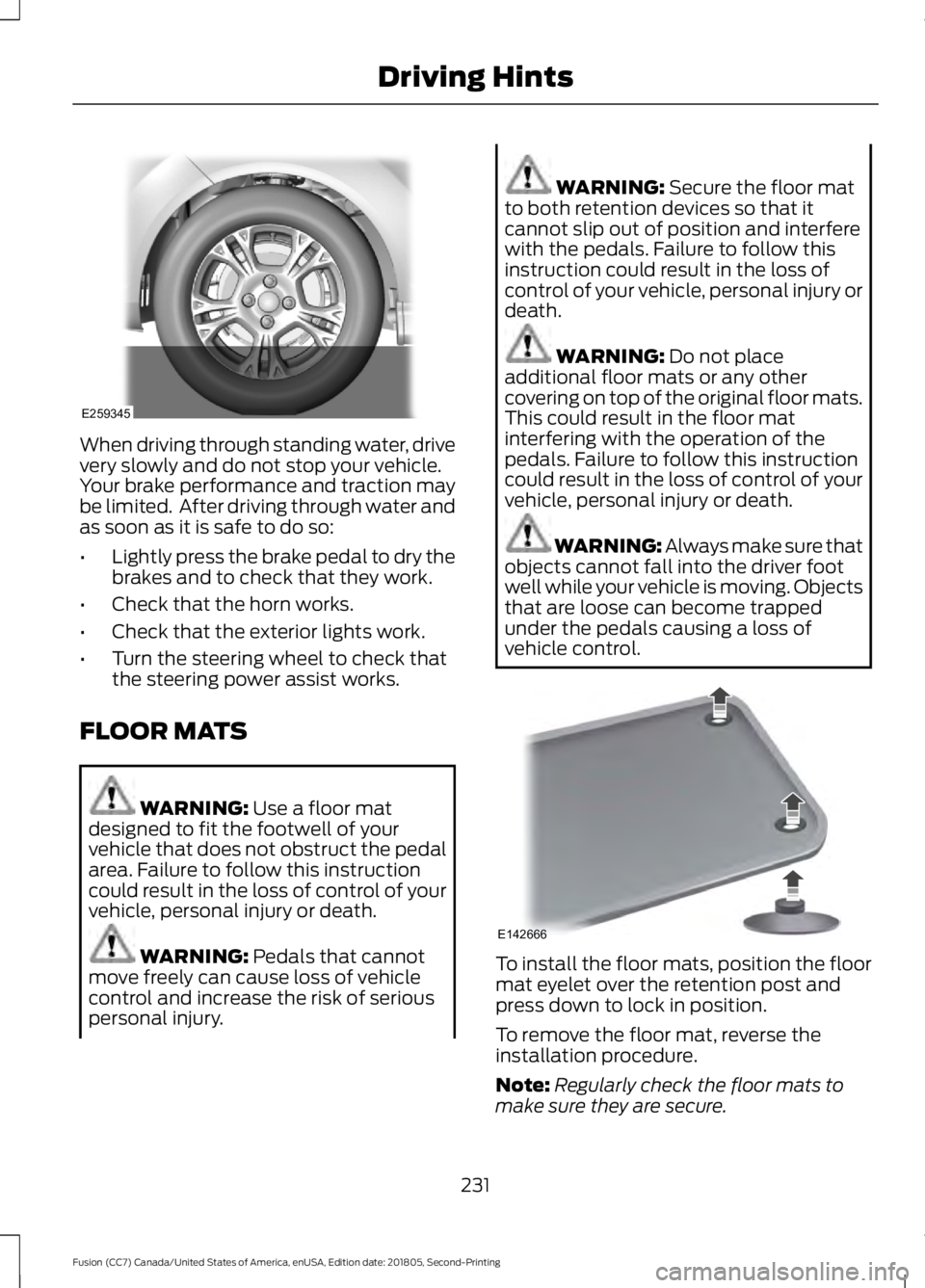
When driving through standing water, drive
very slowly and do not stop your vehicle.
Your brake performance and traction may
be limited. After driving through water and
as soon as it is safe to do so:
•
Lightly press the brake pedal to dry the
brakes and to check that they work.
• Check that the horn works.
• Check that the exterior lights work.
• Turn the steering wheel to check that
the steering power assist works.
FLOOR MATS WARNING: Use a floor mat
designed to fit the footwell of your
vehicle that does not obstruct the pedal
area. Failure to follow this instruction
could result in the loss of control of your
vehicle, personal injury or death. WARNING:
Pedals that cannot
move freely can cause loss of vehicle
control and increase the risk of serious
personal injury. WARNING:
Secure the floor mat
to both retention devices so that it
cannot slip out of position and interfere
with the pedals. Failure to follow this
instruction could result in the loss of
control of your vehicle, personal injury or
death. WARNING:
Do not place
additional floor mats or any other
covering on top of the original floor mats.
This could result in the floor mat
interfering with the operation of the
pedals. Failure to follow this instruction
could result in the loss of control of your
vehicle, personal injury or death. WARNING: Always make sure that
objects cannot fall into the driver foot
well while your vehicle is moving. Objects
that are loose can become trapped
under the pedals causing a loss of
vehicle control. To install the floor mats, position the floor
mat eyelet over the retention post and
press down to lock in position.
To remove the floor mat, reverse the
installation procedure.
Note:
Regularly check the floor mats to
make sure they are secure.
231
Fusion (CC7) Canada/United States of America, enUSA, Edition date: 201805, Second-Printing Driving HintsE259345 E142666
Page 236 of 550
Vehicles Sold in Canada: Getting
Roadside Assistance
To fully assist you should you have a
vehicle concern, Ford Motor Company of
Canada, Limited offers a complimentary
roadside assistance program. This program
is eligible within Canada or the continental
United States.
The service is available 24 hours a day,
seven days a week.
This program is separate from the New
Vehicle Limited Warranty, but the coverage
is concurrent with the powertrain coverage
period of your vehicle. Canadian roadside
coverage and benefits may differ from the
U.S. coverage.
If you require more information, please call
us in Canada at 1-800-665-2006, or visit
our website at www.ford.ca.
HAZARD FLASHERS
Note:
The hazard flashers operate when
the ignition is in any position, or if the key is
not in the ignition. If used when the vehicle
is not running, the battery loses charge. As
a result, there may be insufficient power to
restart your vehicle. The flasher control is on the
instrument panel. Use your
hazard flashers when your
vehicle is creating a safety hazard for other
motorists.
• Press the flasher control and all front
and rear direction indicators flash.
• Press the button again to switch them
off. FUEL SHUTOFF WARNING: If your vehicle has
been involved in a crash, have the fuel
system checked. Failure to follow this
instruction could result in fire, personal
injury or death.
Note: When you try to restart your vehicle
after a fuel shutoff, the vehicle makes sure
that various systems are safe to restart.
Once the vehicle determines the systems
are safe, then the vehicle allows you to
restart.
Note: In the event that your vehicle does
not restart after your third attempt, contact
a qualified technician.
The fuel pump shutoff stops the flow of
fuel to the engine in the event of a
moderate to severe crash. Not every
impact causes a shutoff.
Should your vehicle shut off after a crash,
you may restart your vehicle.
1. Press
START/STOP to switch off your
vehicle.
2. Press the brake pedal and START/STOP
to switch on your
vehicle.
3. Remove your foot from the brake pedal
and press
START/STOP to switch off
your vehicle.
4. You can attempt to start the vehicle by pressing the brake pedal and
START/STOP
, or press START/STOP
without pressing the brake pedal.
5. If the vehicle does not start, repeat steps 1 through 4.
233
Fusion (CC7) Canada/United States of America, enUSA, Edition date: 201805, Second-Printing Roadside Emergencies
Page 250 of 550
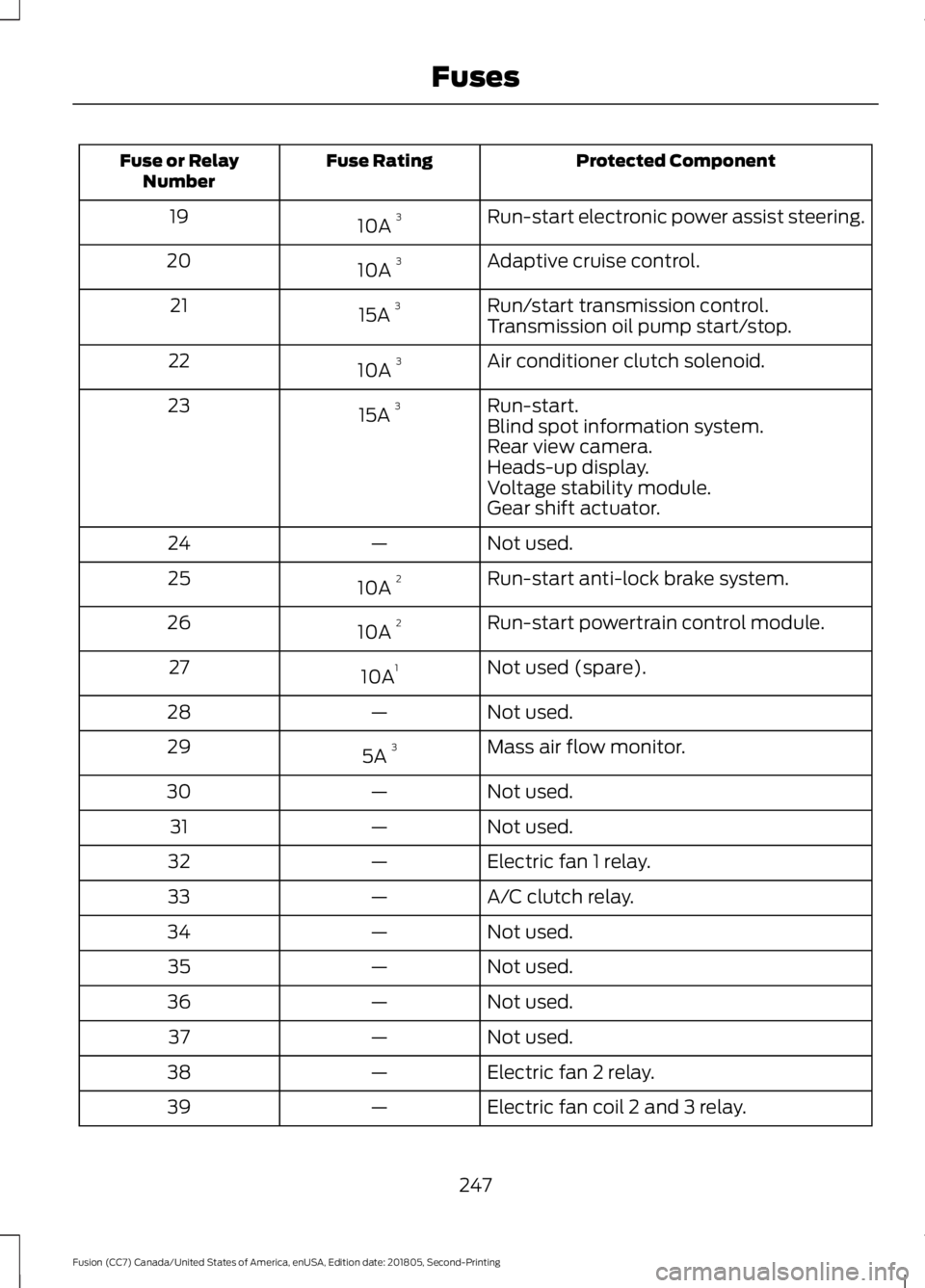
Protected Component
Fuse Rating
Fuse or Relay
Number
Run-start electronic power assist steering.
10A 3
19
Adaptive cruise control.
10A 3
20
Run/start transmission control.
15A 3
21
Transmission oil pump start/stop.
Air conditioner clutch solenoid.
10A 3
22
Run-start.
15A 3
23
Blind spot information system.
Rear view camera.
Heads-up display.
Voltage stability module.
Gear shift actuator.
Not used.
—
24
Run-start anti-lock brake system.
10A 2
25
Run-start powertrain control module.
10A 2
26
Not used (spare).
10A 1
27
Not used.
—
28
Mass air flow monitor.
5A 3
29
Not used.
—
30
Not used.
—
31
Electric fan 1 relay.
—
32
A/C clutch relay.
—
33
Not used.
—
34
Not used.
—
35
Not used.
—
36
Not used.
—
37
Electric fan 2 relay.
—
38
Electric fan coil 2 and 3 relay.
—
39
247
Fusion (CC7) Canada/United States of America, enUSA, Edition date: 201805, Second-Printing Fuses
Page 251 of 550
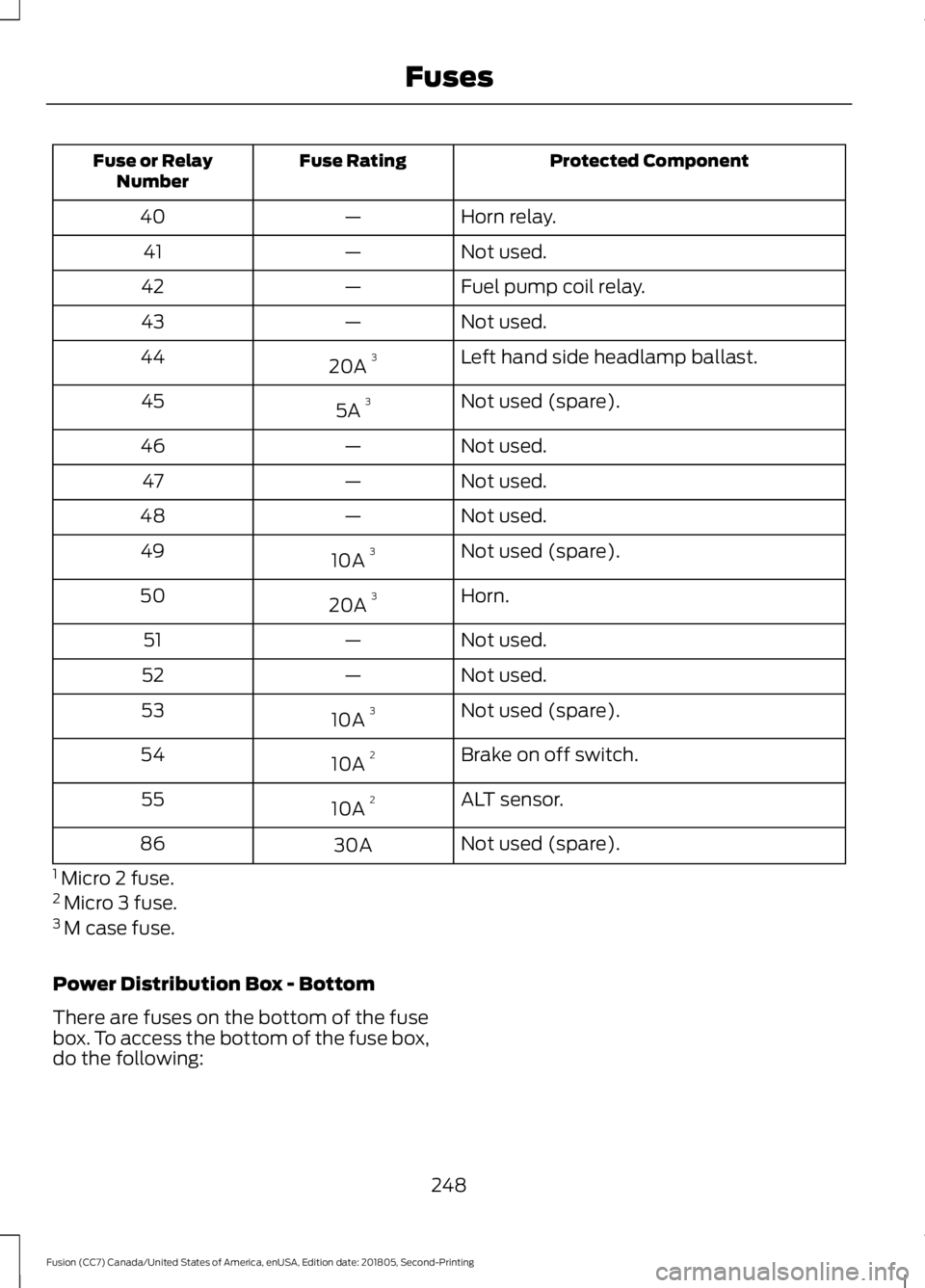
Protected Component
Fuse Rating
Fuse or Relay
Number
Horn relay.
—
40
Not used.
—
41
Fuel pump coil relay.
—
42
Not used.
—
43
Left hand side headlamp ballast.
20A 3
44
Not used (spare).
5A 3
45
Not used.
—
46
Not used.
—
47
Not used.
—
48
Not used (spare).
10A 3
49
Horn.
20A 3
50
Not used.
—
51
Not used.
—
52
Not used (spare).
10A 3
53
Brake on off switch.
10A 2
54
ALT sensor.
10A 2
55
Not used (spare).
30A
86
1 Micro 2 fuse.
2 Micro 3 fuse.
3 M case fuse.
Power Distribution Box - Bottom
There are fuses on the bottom of the fuse
box. To access the bottom of the fuse box,
do the following:
248
Fusion (CC7) Canada/United States of America, enUSA, Edition date: 201805, Second-Printing Fuses
Page 253 of 550
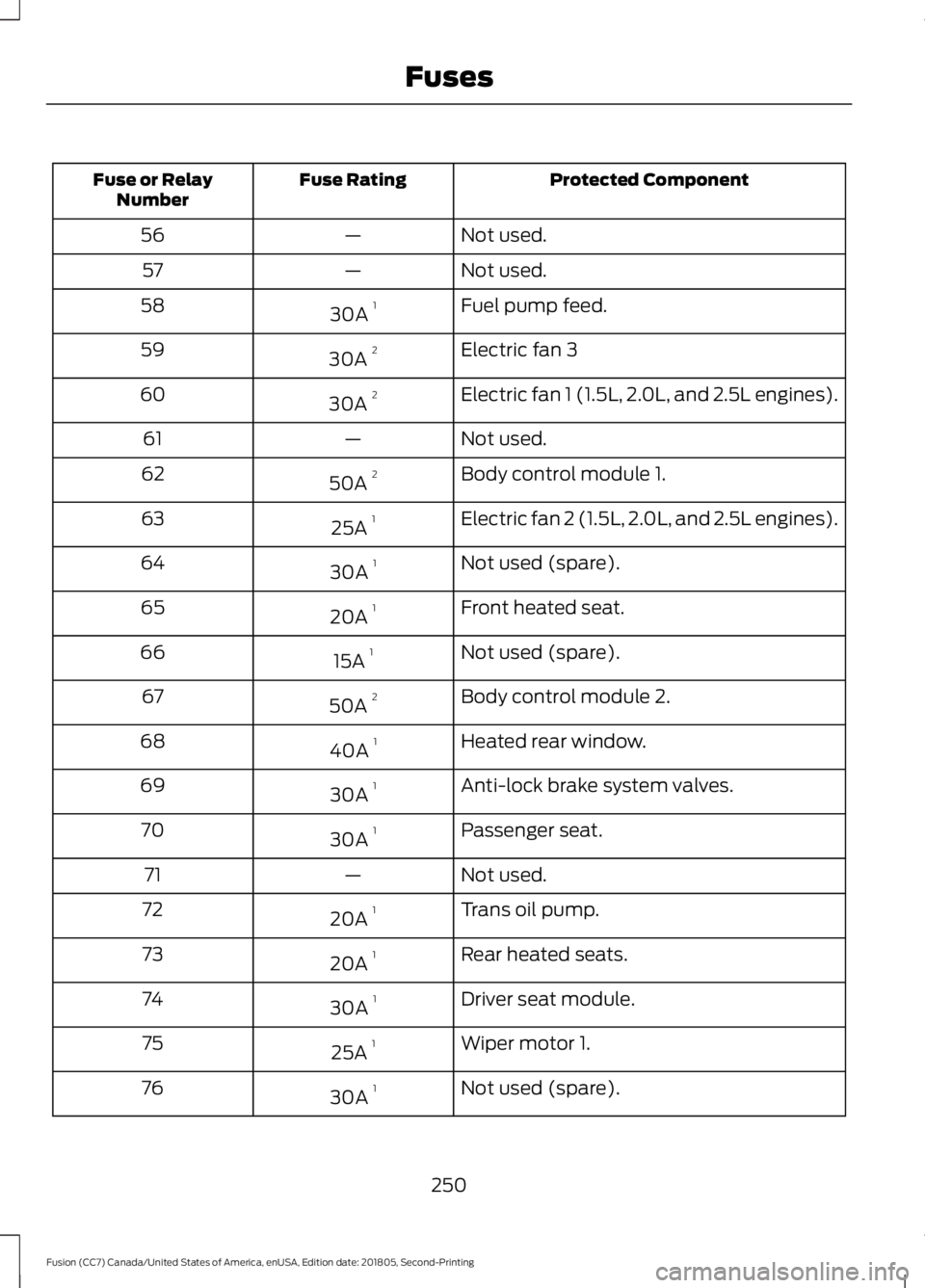
Protected Component
Fuse Rating
Fuse or Relay
Number
Not used.
—
56
Not used.
—
57
Fuel pump feed.
30A 1
58
Electric fan 3
30A 2
59
Electric fan 1 (1.5L, 2.0L, and 2.5L engines).
30A 2
60
Not used.
—
61
Body control module 1.
50A 2
62
Electric fan 2 (1.5L, 2.0L, and 2.5L engines).
25A 1
63
Not used (spare).
30A 1
64
Front heated seat.
20A 1
65
Not used (spare).
15A 1
66
Body control module 2.
50A 2
67
Heated rear window.
40A 1
68
Anti-lock brake system valves.
30A 1
69
Passenger seat.
30A 1
70
Not used.
—
71
Trans oil pump.
20A 1
72
Rear heated seats.
20A 1
73
Driver seat module.
30A 1
74
Wiper motor 1.
25A 1
75
Not used (spare).
30A 1
76
250
Fusion (CC7) Canada/United States of America, enUSA, Edition date: 201805, Second-Printing Fuses
Page 254 of 550
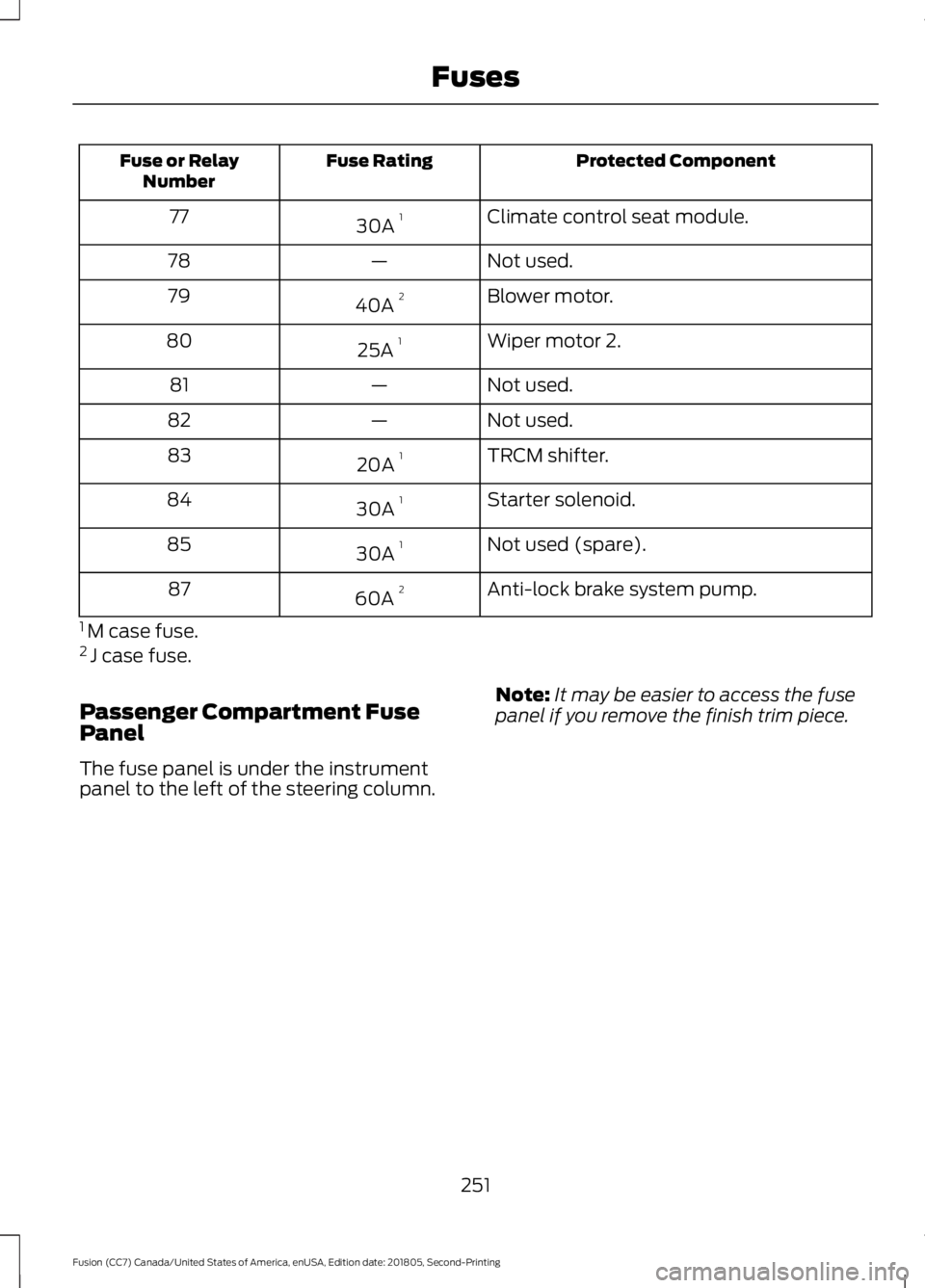
Protected Component
Fuse Rating
Fuse or Relay
Number
Climate control seat module.
30A 1
77
Not used.
—
78
Blower motor.
40A 2
79
Wiper motor 2.
25A 1
80
Not used.
—
81
Not used.
—
82
TRCM shifter.
20A 1
83
Starter solenoid.
30A 1
84
Not used (spare).
30A 1
85
Anti-lock brake system pump.
60A 2
87
1 M case fuse.
2 J case fuse.
Passenger Compartment Fuse
Panel
The fuse panel is under the instrument
panel to the left of the steering column. Note:
It may be easier to access the fuse
panel if you remove the finish trim piece.
251
Fusion (CC7) Canada/United States of America, enUSA, Edition date: 201805, Second-Printing Fuses
Page 259 of 550
GENERAL INFORMATION
Have your vehicle serviced regularly to help
maintain its roadworthiness and resale
value. There is a large network of
authorized dealers that are there to help
you with their professional servicing
expertise. We believe that their specially
trained technicians are best qualified to
service your vehicle properly and expertly.
They are supported by a wide range of
highly specialized tools developed
specifically for servicing your vehicle.
If your vehicle requires professional service,
an authorized dealer can provide the
necessary parts and service. Check your
warranty information to find out which
parts and services are covered.
Use only recommended fuels, lubricants,
fluids and service parts conforming to
specifications. Motorcraft® parts are
designed and built to provide the best
performance in your vehicle.
Precautions
•
Do not work on a hot engine.
• Make sure that nothing gets caught in
moving parts.
• Do not work on a vehicle with the
engine running in an enclosed space,
unless you are sure you have enough
ventilation.
• Keep all open flames and other burning
material (such as cigarettes) away
from the battery and all fuel related
parts.
Working with the Engine Off
1. Set the parking brake and shift the transmission to park (P).
2. Switch off the engine.
3. Block the wheels. Working with the Engine On WARNING: To reduce the risk of
vehicle damage and personal burn
injuries, do not start your engine with the
air cleaner removed and do not remove
it while the engine is running.
1. Set the parking brake and shift the transmission to park (P).
2. Block the wheels.
OPENING AND CLOSING THE
HOOD
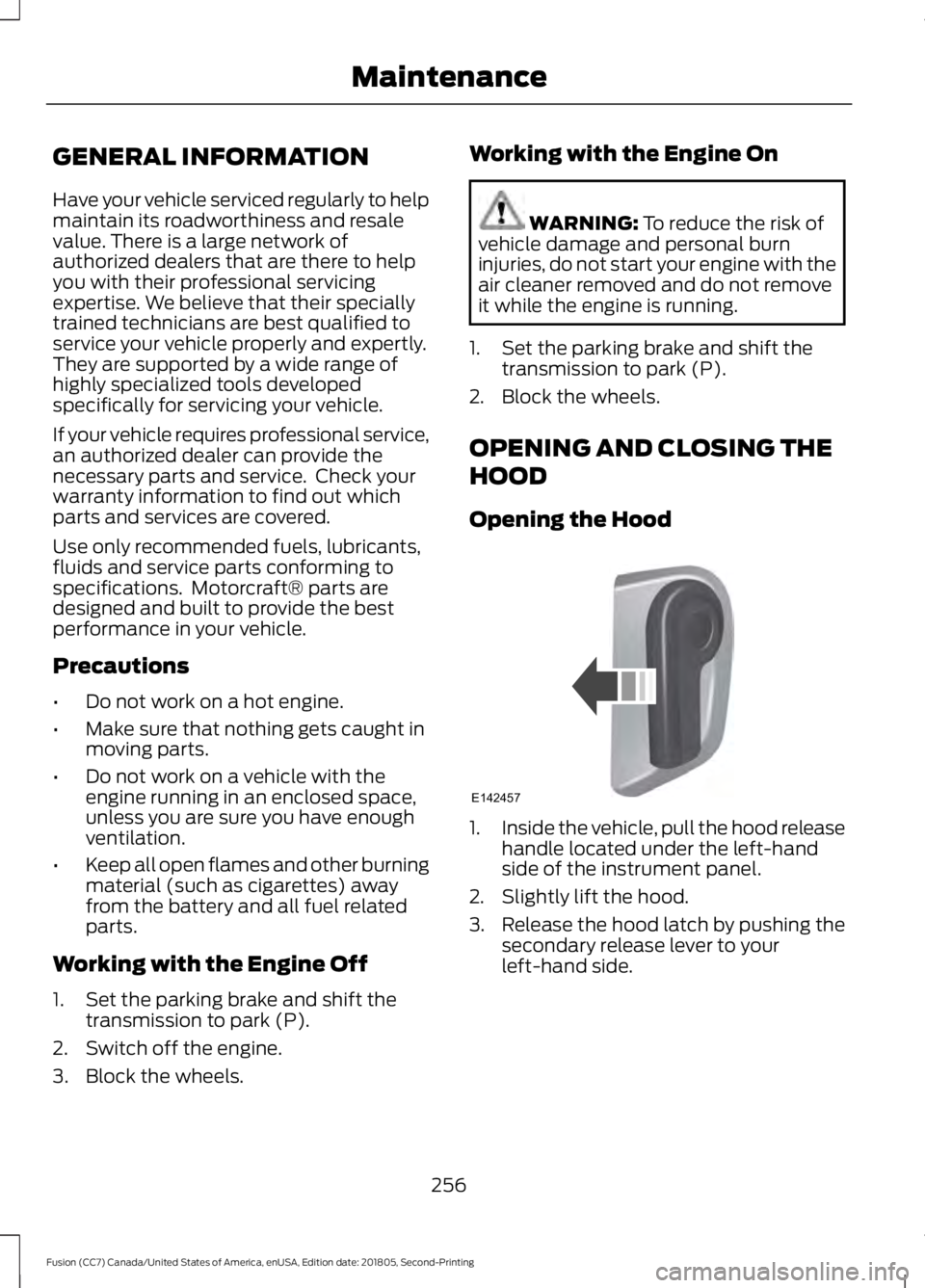
Opening the Hood 1.
Inside the vehicle, pull the hood release
handle located under the left-hand
side of the instrument panel.
2. Slightly lift the hood.
3. Release the hood latch by pushing the secondary release lever to your
left-hand side.
256
Fusion (CC7) Canada/United States of America, enUSA, Edition date: 201805, Second-Printing MaintenanceE142457
Page 261 of 550
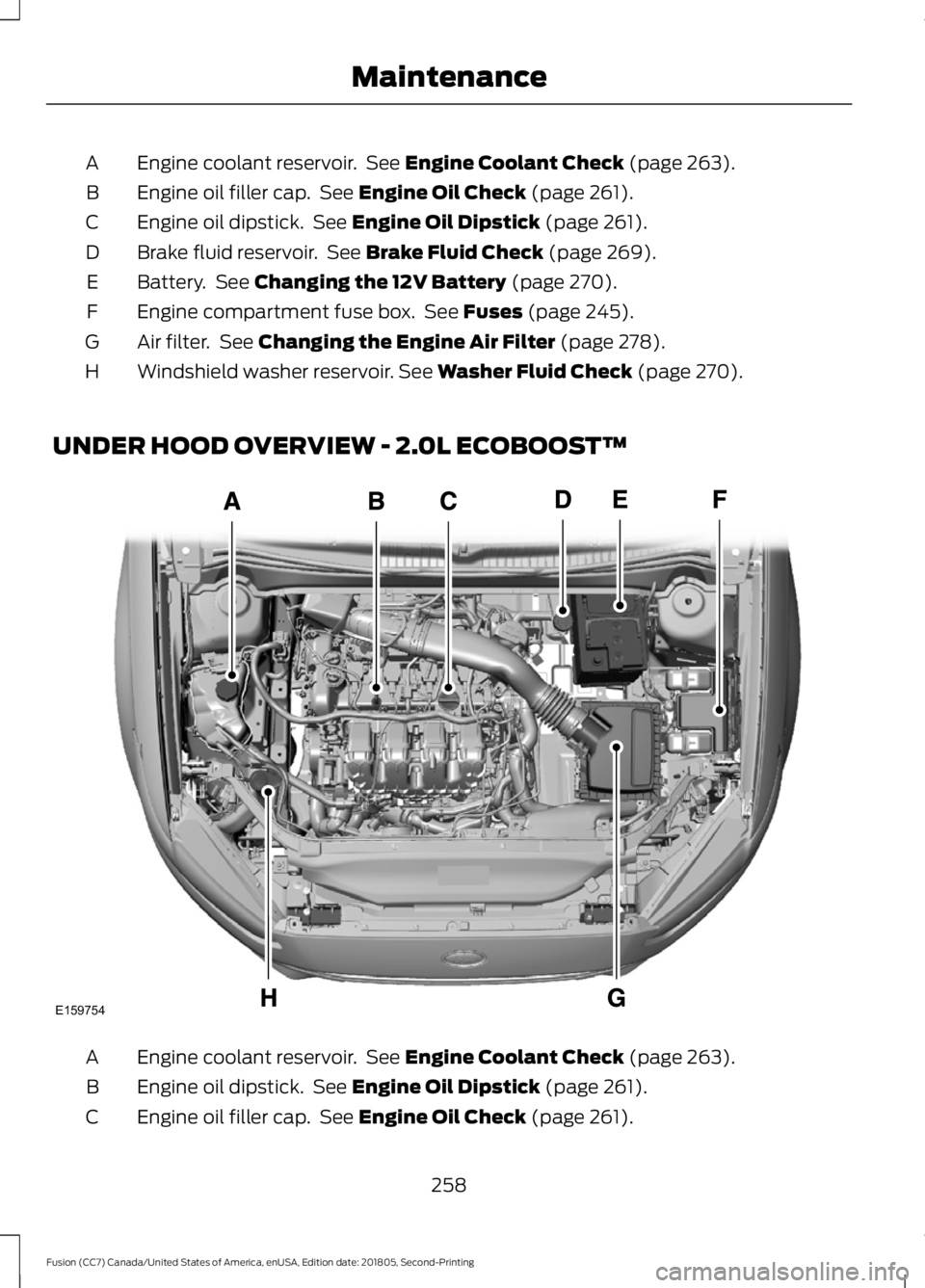
Engine coolant reservoir. See Engine Coolant Check (page 263).
A
Engine oil filler cap. See
Engine Oil Check (page 261).
B
Engine oil dipstick. See
Engine Oil Dipstick (page 261).
C
Brake fluid reservoir. See
Brake Fluid Check (page 269).
D
Battery. See
Changing the 12V Battery (page 270).
E
Engine compartment fuse box. See
Fuses (page 245).
F
Air filter. See
Changing the Engine Air Filter (page 278).
G
Windshield washer reservoir.
See Washer Fluid Check (page 270).
H
UNDER HOOD OVERVIEW - 2.0L ECOBOOST™ Engine coolant reservoir. See
Engine Coolant Check (page 263).
A
Engine oil dipstick. See
Engine Oil Dipstick (page 261).
B
Engine oil filler cap. See
Engine Oil Check (page 261).
C
258
Fusion (CC7) Canada/United States of America, enUSA, Edition date: 201805, Second-Printing MaintenanceE159754
Page 262 of 550
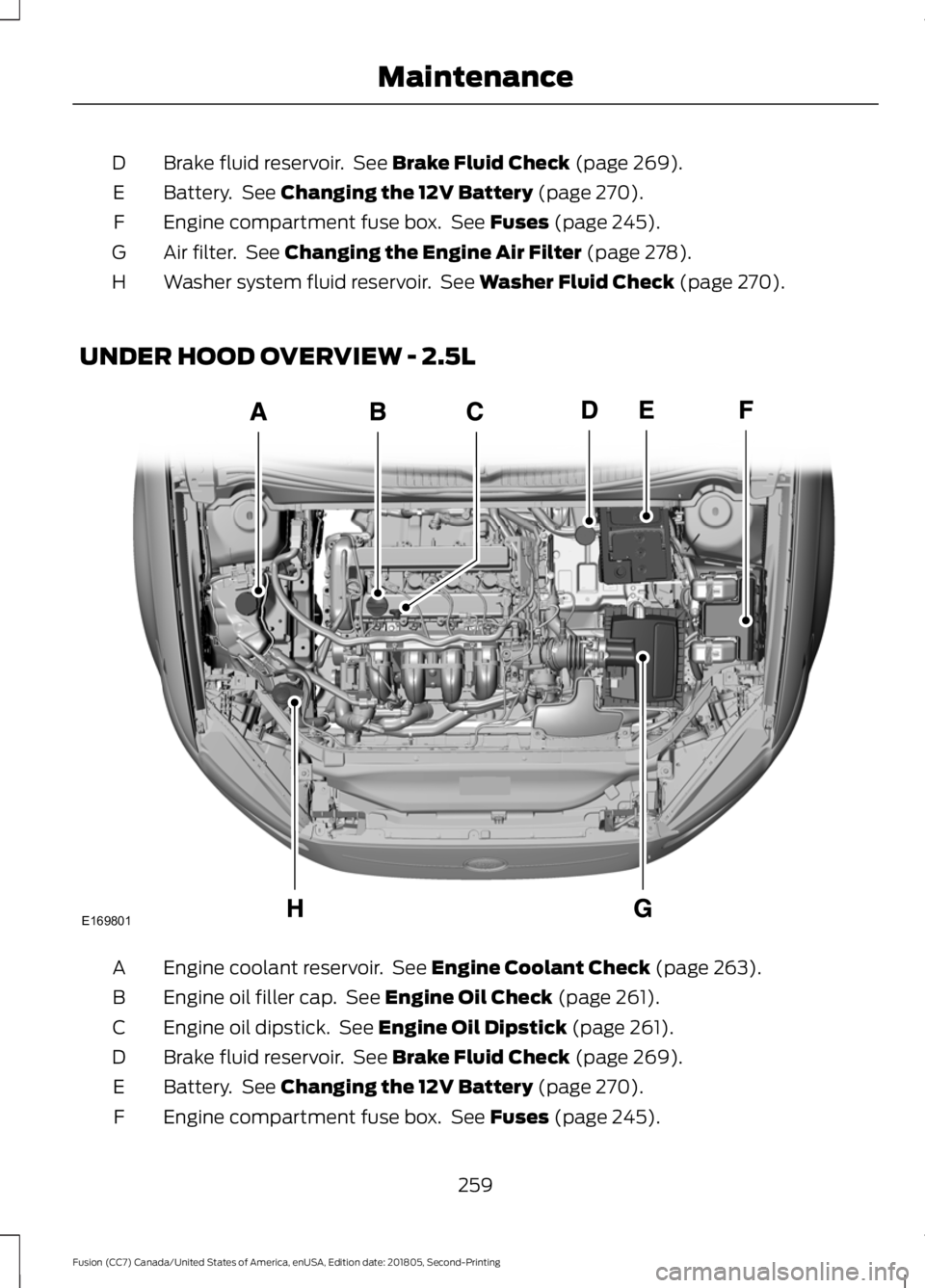
Brake fluid reservoir. See Brake Fluid Check (page 269).
D
Battery. See
Changing the 12V Battery (page 270).
E
Engine compartment fuse box. See
Fuses (page 245).
F
Air filter. See
Changing the Engine Air Filter (page 278).
G
Washer system fluid reservoir. See
Washer Fluid Check (page 270).
H
UNDER HOOD OVERVIEW - 2.5L Engine coolant reservoir. See
Engine Coolant Check (page 263).
A
Engine oil filler cap. See
Engine Oil Check (page 261).
B
Engine oil dipstick. See
Engine Oil Dipstick (page 261).
C
Brake fluid reservoir. See
Brake Fluid Check (page 269).
D
Battery. See
Changing the 12V Battery (page 270).
E
Engine compartment fuse box. See
Fuses (page 245).
F
259
Fusion (CC7) Canada/United States of America, enUSA, Edition date: 201805, Second-Printing MaintenanceE169801
Page 263 of 550
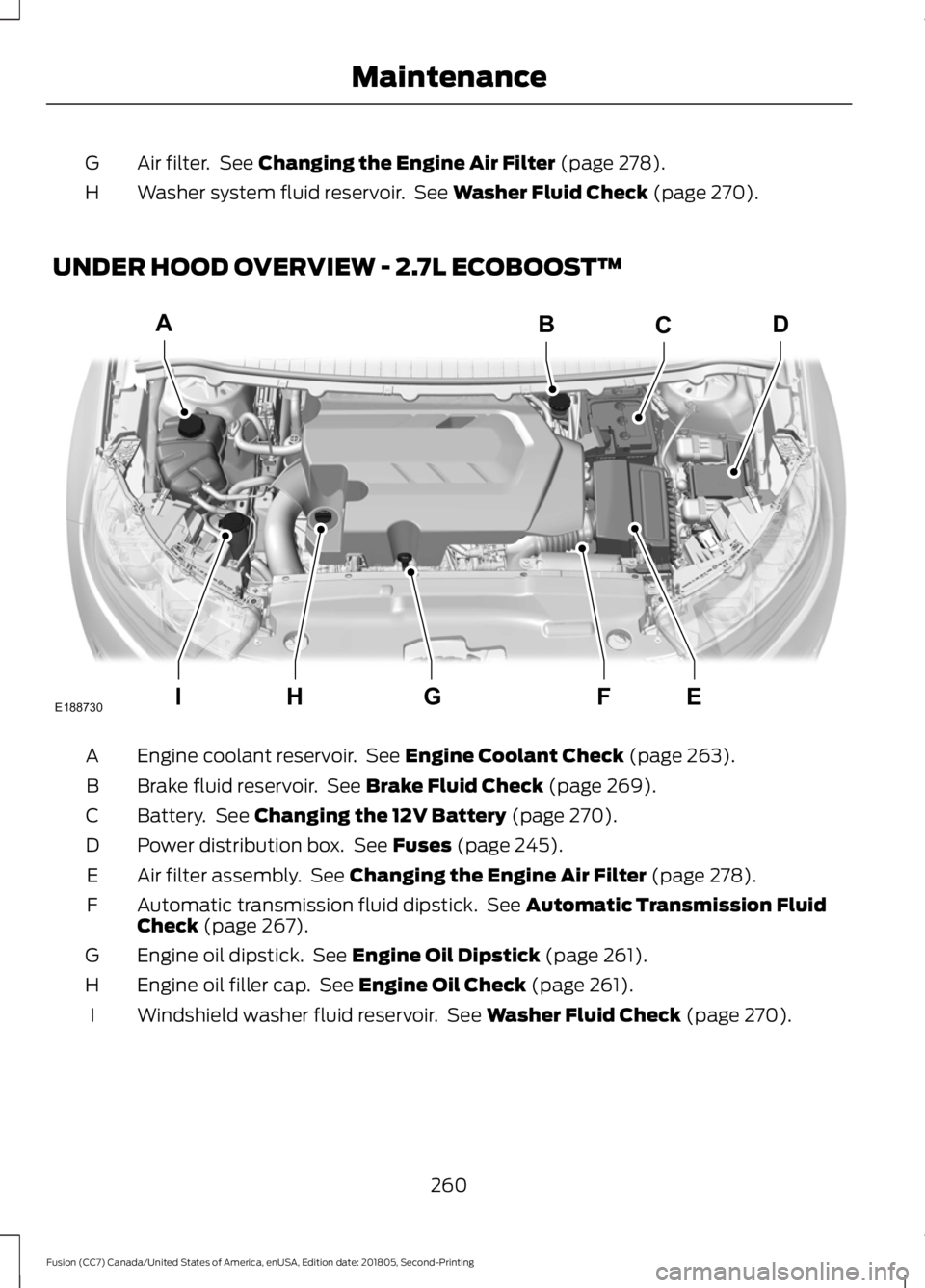
Air filter. See Changing the Engine Air Filter (page 278).
G
Washer system fluid reservoir. See
Washer Fluid Check (page 270).
H
UNDER HOOD OVERVIEW - 2.7L ECOBOOST™ Engine coolant reservoir. See
Engine Coolant Check (page 263).
A
Brake fluid reservoir. See
Brake Fluid Check (page 269).
B
Battery. See
Changing the 12V Battery (page 270).
C
Power distribution box. See
Fuses (page 245).
D
Air filter assembly. See
Changing the Engine Air Filter (page 278).
E
Automatic transmission fluid dipstick. See
Automatic Transmission Fluid
Check (page 267).
F
Engine oil dipstick. See
Engine Oil Dipstick (page 261).
G
Engine oil filler cap. See
Engine Oil Check (page 261).
H
Windshield washer fluid reservoir. See
Washer Fluid Check (page 270).
I
260
Fusion (CC7) Canada/United States of America, enUSA, Edition date: 201805, Second-Printing MaintenanceA
IEFGH
BCD
E188730