Vehicle op FORD FUSION 2020 User Guide
[x] Cancel search | Manufacturer: FORD, Model Year: 2020, Model line: FUSION, Model: FORD FUSION 2020Pages: 497, PDF Size: 6.64 MB
Page 15 of 497
Entertainment Data
Data recorded includes, for example:
•
Music, videos or album art.
• Contacts and corresponding address
book entries.
• Navigation destinations.
Services That We Provide
If you use our services, we collect and use
data, for example, account information,
vehicle location and driving characteristics,
that could identify you. We transmit this
data through a dedicated, protected
connection. We only collect and use data
to enable your use of our services to which
you have subscribed, with your consent or
where permitted by law. For additional
information, see the terms and conditions
of the services to which you have
subscribed.
Services That Third Parties
Provide
We recommend that you review the terms
and conditions and data privacy
information for any services to which you
subscribe. We take no responsibility for
services that third parties provide.
Vehicles With a Modem (If Equipped) The modem has a SIM. The
modem was enabled when your
vehicle was built and periodically
sends messages to stay connected to the
cell phone network, receive automatic
software updates and send vehicle-related
information to us, for example, diagnostic
information. These messages could
include information that identifies your
vehicle, the SIM and the electronic serial
number of the modem. Cell phone network service providers could have access to
additional information, for example, cell
phone network tower identification. For
additional information about our privacy
policy, visit
www .For dC onne c t e d . c om or
refer to your local Ford website.
Note: The modem continues to send this
information unless you disable the modem
or stop the modem from sharing vehicle
data by changing the modem settings. See
Connected Vehicle
(page 353).
Note: The service can be unavailable or
interrupted for a number of reasons, for
example, environmental or topographical
conditions and data plan coverage.
Note: To find out if your vehicle has a
modem, visit
www .For dC onne c t e d . c om .
Vehicles With SYNC
Mobile Device Data
If you connect a mobile device to your
vehicle, you can display data from your
device on the touchscreen for example,
music and album art. You can share your
vehicle data with mobile apps on your
device through the system. See
Apps
(page 412).
The mobile apps function operates by your
connected device sending data to us in the
United States. The data is encrypted and
includes the vehicle identification number
of your vehicle, the SYNC module serial
number, odometer, enabled apps, usage
statistics and debugging information. We
retain it only as long as necessary to
provide the service, to troubleshoot, for
continuous improvement and to offer you
products and services that may be of
interest to you according to your
preferences and where allowed by law.
12
Fusion (CC7) Canada/United States of America, enUSA, Edition date: 201905, Second-Printing Introduction
Page 16 of 497
If you connect a cell phone to the system,
the system creates a profile that links to
that cell phone. The cell phone profile
enables more mobile features and efficient
operation. The profile contains, for
example, data from your phonebook, read
and unread text messages and call history,
including history of calls when your cell
phone was not connected to the system.
If you connect a media device, the system
creates and retains a media device index
of supported media content. The system
also records a short diagnostic log of
approximately 10 minutes of all recent
system activity.
The cell phone profile, media device index
and diagnostic log remain in your vehicle
unless you delete them and are generally
accessible only in your vehicle when you
connect your cell phone or media device.
If you no longer plan to use the system or
your vehicle, we recommend you use the
master reset function to erase the stored
information. See Settings (page 415).
System data cannot be accessed without
special equipment and access to your
vehicle's module.
For additional information about our
privacy policy, refer to your local Ford
website.
Note: To find out if your vehicle has a
connectivity technology, visit
www .For dC onne c t e d . c om .
Vehicles With an Emergency Call
System
When the emergency call system is active,
it may disclose to emergency services that
your vehicle has been in a crash involving
the deployment of an airbag or activation
of the fuel pump shut-off. Certain versions
or updates to the emergency call system
may also be capable of electronically or
verbally disclosing to emergency services
operators your vehicle location or other details about your vehicle or crash to assist
emergency services operators to provide
the most appropriate emergency services.
If you do not want to disclose this
information, do not activate the emergency
call system.
Note:
You cannot deactivate emergency
call systems that are required by law.
PERCHLORATE
Certain components in your vehicle such
as airbag modules, seatbelt pretensioners
and remote control batteries may contain
perchlorate material. Special handling
may apply for service or vehicle end of life
disposal.
For more information visit: Web Address
www.dtsc.ca.gov/hazard- ouswaste/perchlorate
FORD CREDIT
US Only
Ford Credit offers a full range of financing
and lease plans to help you acquire your
vehicle. If you have financed or leased your
vehicle through Ford Credit, thank you for
your business.
For assistance call 1-800-727-7000, or for
more information about Ford Credit and
access to the online Account Manager tool,
visit www.ford.com/finance.
13
Fusion (CC7) Canada/United States of America, enUSA, Edition date: 201905, Second-Printing Introduction
Page 17 of 497
REPLACEMENT PARTS
RECOMMENDATION
We have built your vehicle to the highest
standards using quality parts. We
recommend that you demand the use of
genuine Ford and Motorcraft parts
whenever your vehicle requires scheduled
maintenance or repair. You can clearly
identify genuine Ford and Motorcraft parts
by looking for the Ford, FoMoCo or
Motorcraft branding on the parts or their
packaging.
Scheduled Maintenance and
Mechanical Repairs
One of the best ways for you to make sure
that your vehicle provides years of service
is to have it maintained in line with our
recommendations using parts that
conform to the specifications detailed in
this Owner
’s Manual. Genuine Ford and
Motorcraft parts meet or exceed these
specifications.
Collision Repairs
We hope that you never experience a
collision, but accidents do happen.
Genuine Ford replacement collision parts
meet our stringent requirements for fit,
finish, structural integrity, corrosion
protection and dent resistance. During
vehicle development we validate that
these parts deliver the intended level of
protection as a whole system. A great way
to know for sure you are getting this level
of protection is to use genuine Ford
replacement collision parts. Warranty on Replacement Parts
Genuine Ford and Motorcraft replacement
parts are the only replacement parts that
benefit from a Ford Warranty. The Ford
Warranty may not cover damage caused
to your vehicle as a result of failed
non-Ford parts. For additional information,
refer to the terms and conditions of the
Ford Warranty.
SPECIAL NOTICES
New Vehicle Limited Warranty
Vehicles sold in the United States and
Canada
For a detailed description of what is
covered by your New Vehicle Limited
Warranty, see your warranty guide that is
available online. For more information,
refer to our website and download your
copy of the warranty guide.
Vehicles sold outside the United States
and Canada
For a detailed description of what is
covered by your New Vehicle Limited
Warranty, see the warranty guide that is
provided to you along with your Owner
’s
Manual.
Special Instructions
For your added safety, your vehicle is fitted
with sophisticated electronic controls. WARNING: You risk death or
serious injury to yourself and others if you
do not follow the instruction highlighted
by the warning symbol. Failure to follow
the specific warnings and instructions
could result in personal injury.
14
Fusion (CC7) Canada/United States of America, enUSA, Edition date: 201905, Second-Printing Introduction
Page 18 of 497
WARNING: NEVER use a rearward
facing child restraint on a seat protected
by an ACTIVE AIRBAG in front of it,
DEATH or SERIOUS INJURY to the CHILD
can occur.
On Board Diagnostics Data Link
Connector WARNING: Do not connect
wireless plug-in devices to the data link
connector. Unauthorized third parties
could gain access to vehicle data and
impair the performance of safety related
systems. Only allow repair facilities that
follow our service and repair instructions
to connect their equipment to the data
link connector.
Your vehicle has an OBD Data Link
Connector (DLC) that is used in
conjunction with a diagnostic scan tool for
vehicle diagnostics, repairs and
reprogramming services. Installing an
aftermarket device that uses the DLC
during normal driving for purposes such as
remote insurance company monitoring,
transmission of vehicle data to other
devices or entities, or altering the
performance of the vehicle, may cause
interference with or even damage to
vehicle systems. We do not recommend
or endorse the use of aftermarket plug-in
devices unless approved by Ford. The
vehicle Warranty will not cover damage
caused by an aftermarket plug-in device. MOBILE COMMUNICATIONS
EQUIPMENT WARNING:
Driving while
distracted can result in loss of vehicle
control, crash and injury. We strongly
recommend that you use extreme
caution when using any device that may
take your focus off the road. Your
primary responsibility is the safe
operation of your vehicle. We
recommend against the use of any
hand-held device while driving and
encourage the use of voice-operated
systems when possible. Make sure you
are aware of all applicable local laws
that may affect the use of electronic
devices while driving.
Using mobile communications equipment
is becoming increasingly important in the
conduct of business and personal affairs.
However, you must not compromise your
own or others’ safety when using such
equipment. Mobile communications can
enhance personal safety and security when
appropriately used, particularly in
emergency situations. Safety must be
paramount when using mobile
communications equipment to avoid
negating these benefits. Mobile
communication equipment includes, but
is not limited to, cellular phones, pagers,
portable email devices, text messaging
devices and portable two-way radios.
EXPORT UNIQUE OPTIONS
For your particular global region, your
vehicle may be equipped with features and
options that are different from the features
and options that are described in this
Owner ’s Manual. A market unique
supplement may be supplied that
complements this book. By referring to the
15
Fusion (CC7) Canada/United States of America, enUSA, Edition date: 201905, Second-Printing Introduction
Page 19 of 497
market unique supplement, if provided,
you can properly identify those features,
recommendations and specifications that
are unique to your vehicle. This Owner
’s
Manual is written primarily for the U.S. and
Canadian Markets. Features or equipment
listed as standard may be different on units
built for export. Refer to this Owner ’s
Manual for all other required
information and warnings.
16
Fusion (CC7) Canada/United States of America, enUSA, Edition date: 201905, Second-Printing Introduction
Page 20 of 497
PROTECTING THE
ENVIRONMENT
You should play your part in protecting the
environment. Correct vehicle usage and
the authorized disposal of waste, cleaning
and lubrication materials are significant
steps toward this aim.
For additional information about our
sustainability progress and initiatives, visit
www
.sus t ainabilit y .f or d . c om .
17
Fusion (CC7) Canada/United States of America, enUSA, Edition date: 201905, Second-Printing Environment
Page 23 of 497
GENERAL INFORMATION
See the following sections for directions
on how to properly use safety restraints
for children.
WARNING: Always make sure your
child is secured properly in a device that
is appropriate for their height, age and
weight. Child safety restraints must be
bought separately from your vehicle.
Failure to follow these instructions and
guidelines may result in an increased risk
of serious injury or death to your child. WARNING: All children are shaped
differently. The National Highway Traffic
Safety Administration and other safety
organizations, base their
recommendations for child restraints on
probable child height, age and weight
thresholds, or on the minimum
requirements of the law. We recommend
that you check with a NHTSA Certified
Child Passenger Safety Technician (CPST) to make sure that you properly
install the child restraint in your vehicle
and that you consult your pediatrician to
make sure you have a child restraint
appropriate for your child. To locate a
child restraint fitting station and CPST,
contact NHTSA toll free at
1-888-327-4236 or go to
www.nhtsa.dot.gov. In Canada, contact
Transport Canada toll free at
1-800-333-0371 or go to www.tc.gc.ca
to find a Child Car Seat Clinic in your
area. Failure to properly restrain children
in child restraints made especially for
their height, age and weight, may result
in an increased risk of serious injury or
death to your child.
WARNING:
On hot days, the
temperature inside the vehicle can rise
very quickly. Exposure of people or
animals to these high temperatures for
even a short time can cause death or
serious heat related injuries, including
brain damage. Small children are
particularly at risk.
20
Fusion (CC7) Canada/United States of America, enUSA, Edition date: 201905, Second-Printing Child Safety
Page 24 of 497
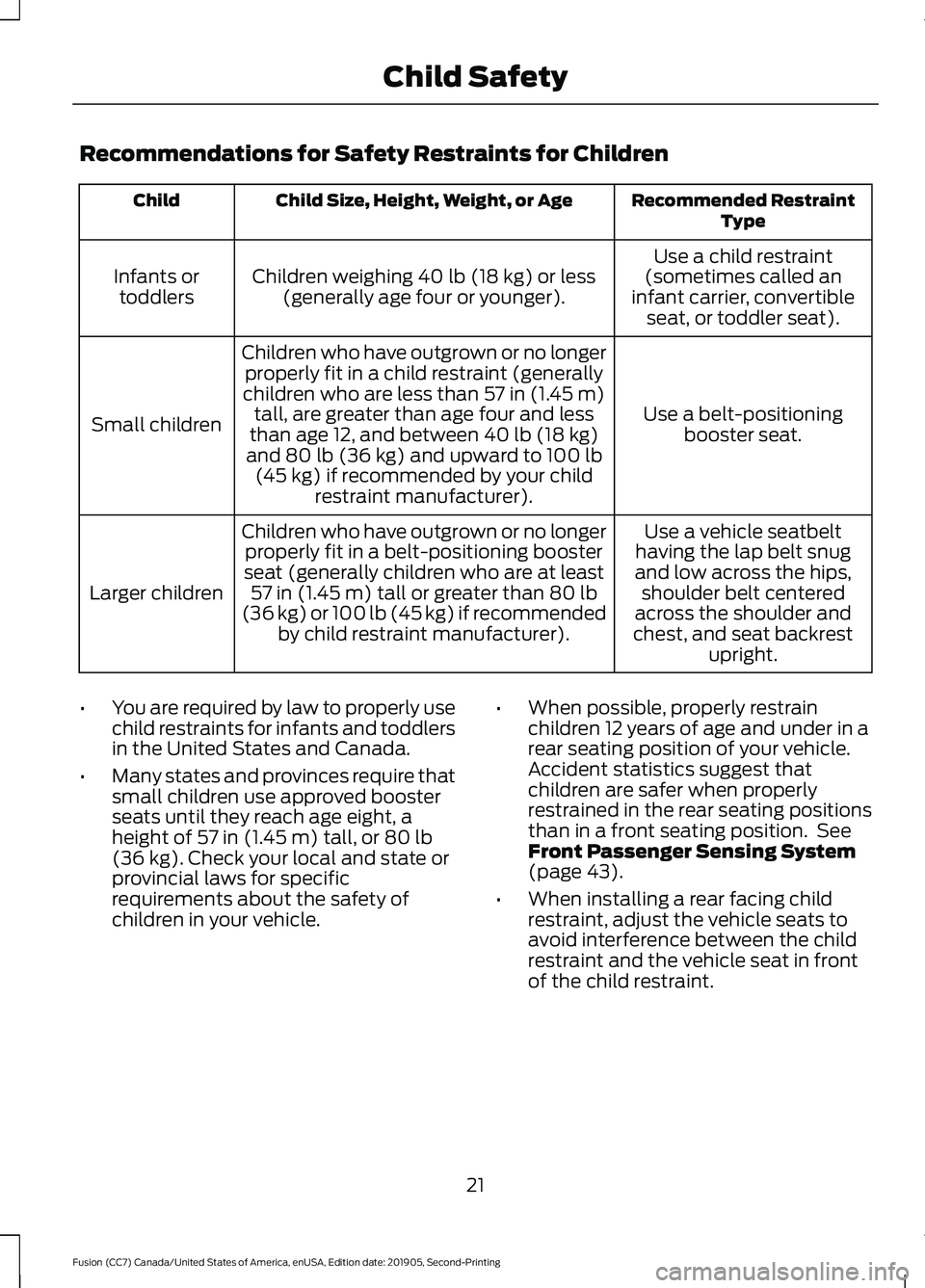
Recommendations for Safety Restraints for Children
Recommended Restraint
Type
Child Size, Height, Weight, or Age
Child
Use a child restraint
(sometimes called an
infant carrier, convertible seat, or toddler seat).
Children weighing 40 lb (18 kg) or less
(generally age four or younger).
Infants or
toddlers
Use a belt-positioningbooster seat.
Children who have outgrown or no longer
properly fit in a child restraint (generally
children who are less than
57 in (1.45 m)
tall, are greater than age four and less
than age 12, and between
40 lb (18 kg)
and 80 lb (36 kg) and upward to 100 lb
(45 kg) if recommended by your child
restraint manufacturer).
Small children
Use a vehicle seatbelt
having the lap belt snug
and low across the hips, shoulder belt centered
across the shoulder and
chest, and seat backrest upright.
Children who have outgrown or no longer
properly fit in a belt-positioning booster
seat (generally children who are at least 57 in (1.45 m)
tall or greater than 80 lb
(36 kg) or 100 lb (45 kg) if recommended by child restraint manufacturer).
Larger children
• You are required by law to properly use
child restraints for infants and toddlers
in the United States and Canada.
• Many states and provinces require that
small children use approved booster
seats until they reach age eight, a
height of
57 in (1.45 m) tall, or 80 lb
(36 kg). Check your local and state or
provincial laws for specific
requirements about the safety of
children in your vehicle. •
When possible, properly restrain
children 12 years of age and under in a
rear seating position of your vehicle.
Accident statistics suggest that
children are safer when properly
restrained in the rear seating positions
than in a front seating position. See
Front Passenger Sensing System
(page 43).
• When installing a rear facing child
restraint, adjust the vehicle seats to
avoid interference between the child
restraint and the vehicle seat in front
of the child restraint.
21
Fusion (CC7) Canada/United States of America, enUSA, Edition date: 201905, Second-Printing Child Safety
Page 25 of 497
INSTALLING CHILD
RESTRAINTS
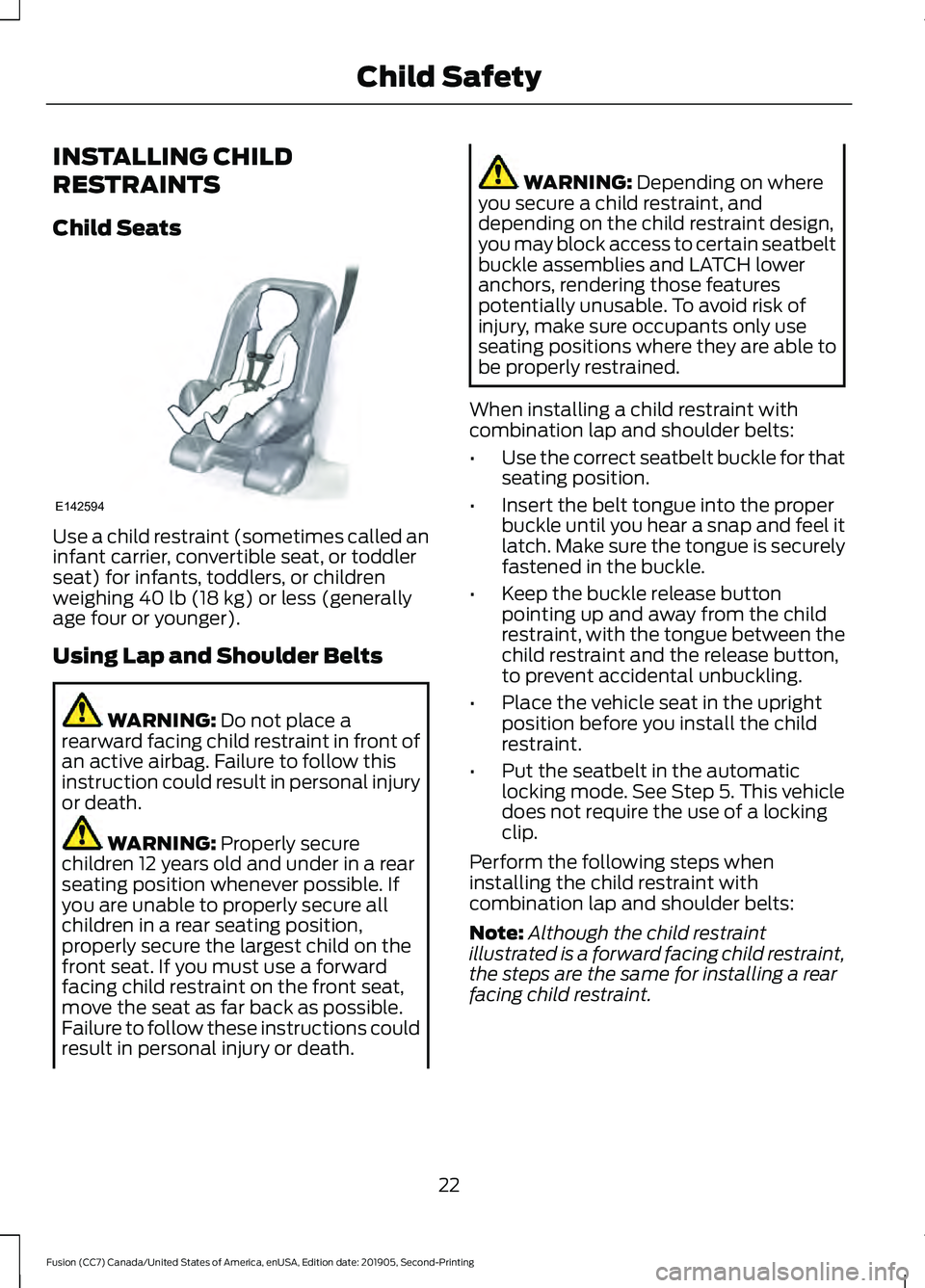
Child Seats
Use a child restraint (sometimes called an
infant carrier, convertible seat, or toddler
seat) for infants, toddlers, or children
weighing 40 lb (18 kg) or less (generally
age four or younger).
Using Lap and Shoulder Belts WARNING:
Do not place a
rearward facing child restraint in front of
an active airbag. Failure to follow this
instruction could result in personal injury
or death. WARNING:
Properly secure
children 12 years old and under in a rear
seating position whenever possible. If
you are unable to properly secure all
children in a rear seating position,
properly secure the largest child on the
front seat. If you must use a forward
facing child restraint on the front seat,
move the seat as far back as possible.
Failure to follow these instructions could
result in personal injury or death. WARNING:
Depending on where
you secure a child restraint, and
depending on the child restraint design,
you may block access to certain seatbelt
buckle assemblies and LATCH lower
anchors, rendering those features
potentially unusable. To avoid risk of
injury, make sure occupants only use
seating positions where they are able to
be properly restrained.
When installing a child restraint with
combination lap and shoulder belts:
• Use the correct seatbelt buckle for that
seating position.
• Insert the belt tongue into the proper
buckle until you hear a snap and feel it
latch. Make sure the tongue is securely
fastened in the buckle.
• Keep the buckle release button
pointing up and away from the child
restraint, with the tongue between the
child restraint and the release button,
to prevent accidental unbuckling.
• Place the vehicle seat in the upright
position before you install the child
restraint.
• Put the seatbelt in the automatic
locking mode. See Step 5. This vehicle
does not require the use of a locking
clip.
Perform the following steps when
installing the child restraint with
combination lap and shoulder belts:
Note: Although the child restraint
illustrated is a forward facing child restraint,
the steps are the same for installing a rear
facing child restraint.
22
Fusion (CC7) Canada/United States of America, enUSA, Edition date: 201905, Second-Printing Child SafetyE142594
Page 27 of 497
Note:
The automatic locking mode is
available on the front passenger and rear
seats. This vehicle does not require the use
of a locking clip.
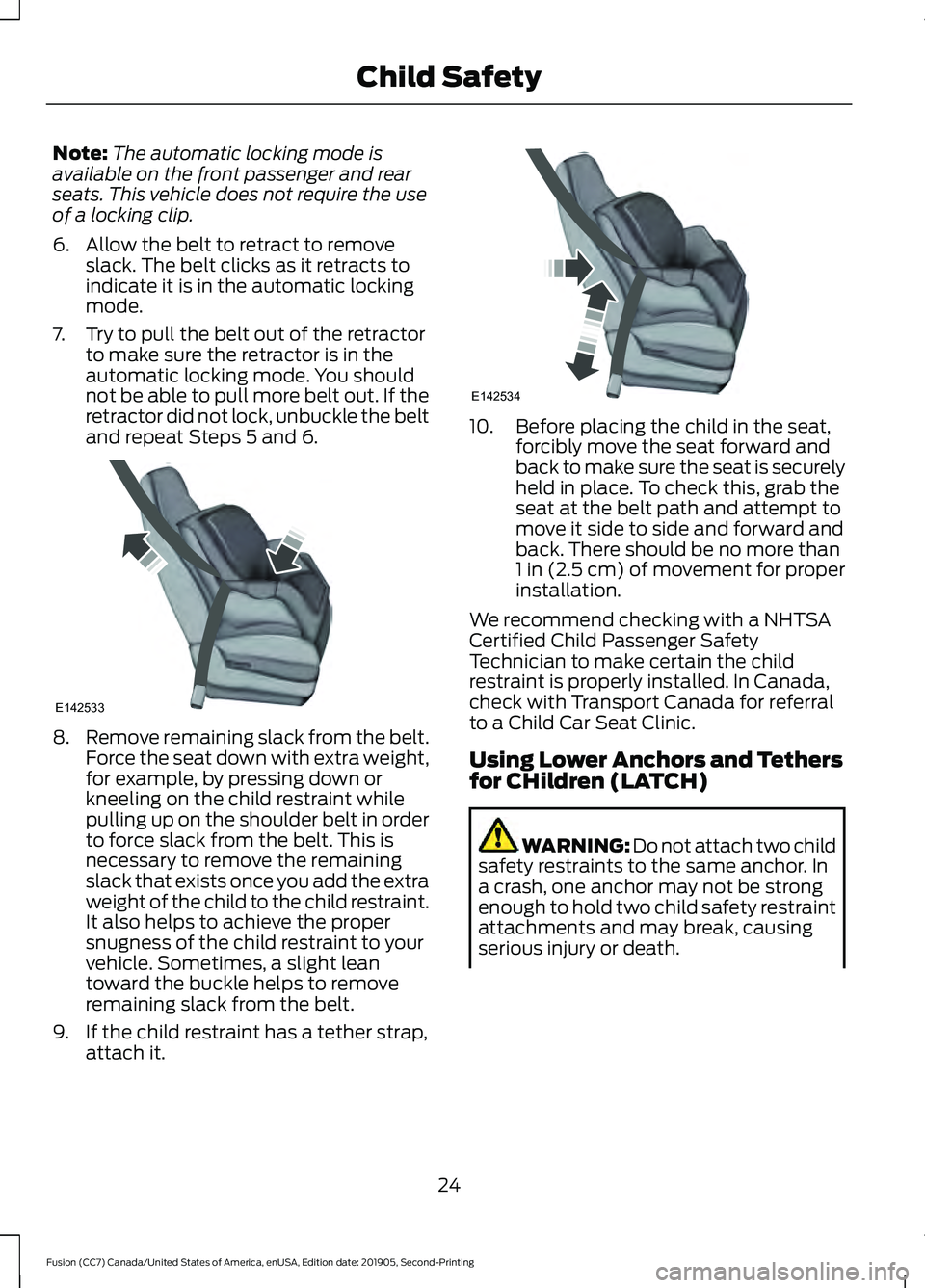
6. Allow the belt to retract to remove slack. The belt clicks as it retracts to
indicate it is in the automatic locking
mode.
7. Try to pull the belt out of the retractor to make sure the retractor is in the
automatic locking mode. You should
not be able to pull more belt out. If the
retractor did not lock, unbuckle the belt
and repeat Steps 5 and 6. 8.
Remove remaining slack from the belt.
Force the seat down with extra weight,
for example, by pressing down or
kneeling on the child restraint while
pulling up on the shoulder belt in order
to force slack from the belt. This is
necessary to remove the remaining
slack that exists once you add the extra
weight of the child to the child restraint.
It also helps to achieve the proper
snugness of the child restraint to your
vehicle. Sometimes, a slight lean
toward the buckle helps to remove
remaining slack from the belt.
9. If the child restraint has a tether strap, attach it. 10. Before placing the child in the seat,
forcibly move the seat forward and
back to make sure the seat is securely
held in place. To check this, grab the
seat at the belt path and attempt to
move it side to side and forward and
back. There should be no more than
1 in (2.5 cm) of movement for proper
installation.
We recommend checking with a NHTSA
Certified Child Passenger Safety
Technician to make certain the child
restraint is properly installed. In Canada,
check with Transport Canada for referral
to a Child Car Seat Clinic.
Using Lower Anchors and Tethers
for CHildren (LATCH) WARNING: Do not attach two child
safety restraints to the same anchor. In
a crash, one anchor may not be strong
enough to hold two child safety restraint
attachments and may break, causing
serious injury or death.
24
Fusion (CC7) Canada/United States of America, enUSA, Edition date: 201905, Second-Printing Child SafetyE142533 E142534