rear FORD FUSION 2020 Manual Online
[x] Cancel search | Manufacturer: FORD, Model Year: 2020, Model line: FUSION, Model: FORD FUSION 2020Pages: 497, PDF Size: 6.64 MB
Page 313 of 497
Give additional caution to the following
when driving with the full-size dissimilar
spare wheel and tire assembly:
•
Towing a trailer.
• Driving vehicles equipped with a
camper body.
• Driving vehicles with a load on the
cargo rack.
Drive cautiously when using a full-size
dissimilar spare wheel and tire assembly
and seek service as soon as possible.
Changing a Road Wheel Procedure WARNING: When one of the front
wheels is off the ground, the
transmission alone will not prevent the
vehicle from moving or slipping off the
jack, even if the transmission is in park
(P). WARNING:
To help prevent your
vehicle from moving when changing a
wheel, shift the transmission into park
(P), set the parking brake and use an
appropriate block or wheel chock to
secure the wheel diagonally opposite to
the wheel being changed. For example,
when changing the front left wheel,
place an appropriate block or wheel
chock on the right rear wheel. WARNING:
Do not work on your
vehicle when the jack is the only support.
If the vehicle slips off the jack, you or
someone else could be seriously injured. WARNING: Check that the vehicle
jack is not damaged or deformed and
the thread is lubricated and clean. WARNING:
Never place anything
between the vehicle jack and your
vehicle. WARNING:
Never place anything
between the vehicle jack and the ground. WARNING:
Do not attempt to
change a tire on the side of the vehicle
close to moving traffic. Pull far enough
off the road to avoid the danger of being
hit when operating the jack or changing
the wheel. WARNING:
Park your vehicle so
that you do not obstruct the flow of
traffic or place yourself in any danger and
set up a warning triangle. WARNING:
The jack supplied with
this vehicle is only intended for changing
wheels. Do not use the vehicle jack other
than when you are changing a wheel in
an emergency. WARNING:
Always use the jack
provided as original equipment with your
vehicle. If using a jack other than the one
provided, make sure the jack capacity is
adequate for the vehicle weight,
including any vehicle cargo or
modifications. If you are unsure if the jack
capacity is adequate, contact the
authorized dealer. WARNING:
Use only the specified
jacking points. If you use other positions,
you may damage the body, steering,
suspension, engine, braking system or
the fuel lines. WARNING:
Failure to follow these
guidelines could result in an increased
risk of loss of vehicle control, injury or
death.
310
Fusion (CC7) Canada/United States of America, enUSA, Edition date: 201905, Second-Printing Wheels and Tires
Page 314 of 497
Note:
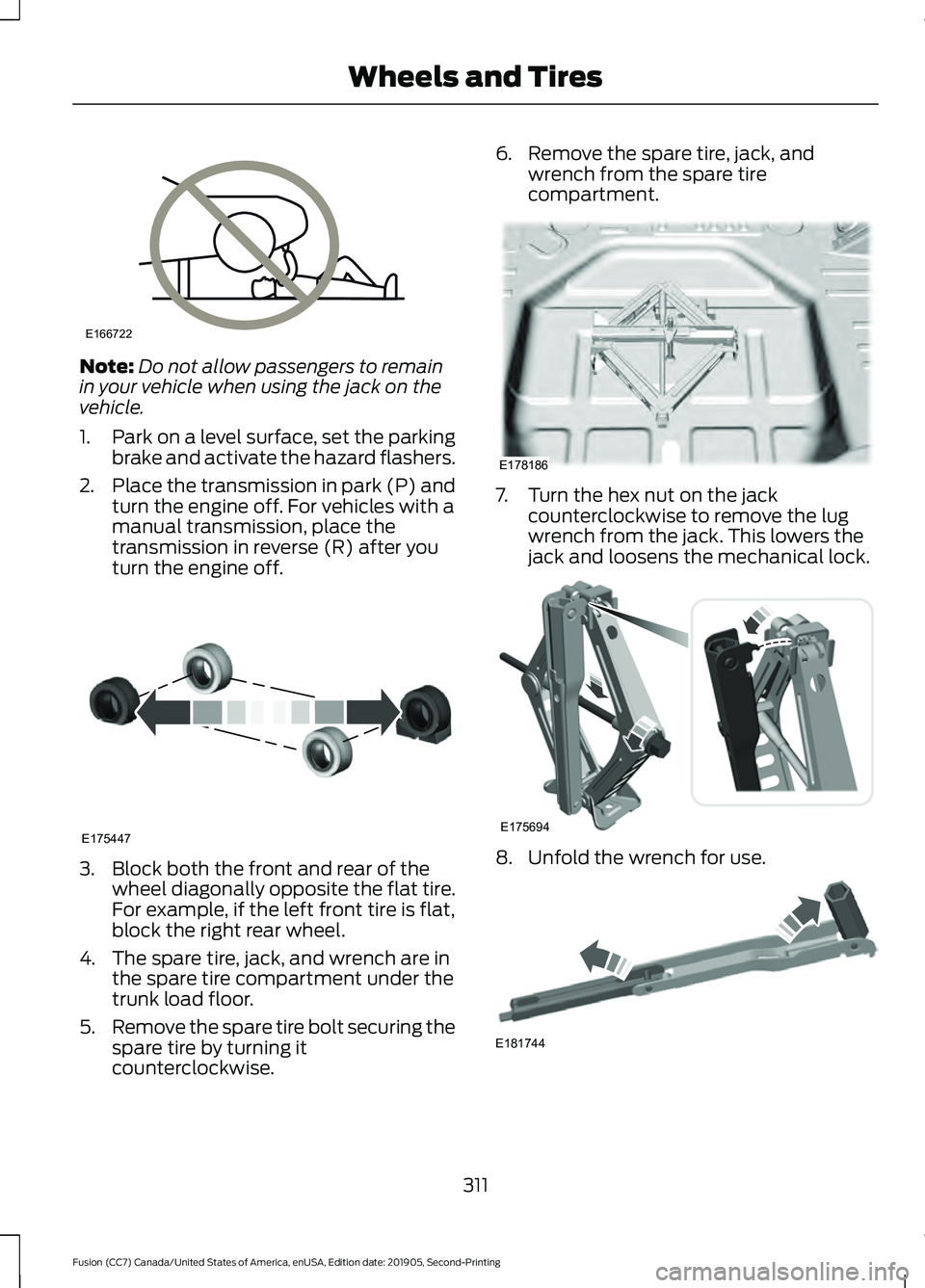
Do not allow passengers to remain
in your vehicle when using the jack on the
vehicle.
1. Park on a level surface, set the parking
brake and activate the hazard flashers.
2. Place the transmission in park (P) and
turn the engine off. For vehicles with a
manual transmission, place the
transmission in reverse (R) after you
turn the engine off. 3. Block both the front and rear of the
wheel diagonally opposite the flat tire.
For example, if the left front tire is flat,
block the right rear wheel.
4. The spare tire, jack, and wrench are in the spare tire compartment under the
trunk load floor.
5. Remove the spare tire bolt securing the
spare tire by turning it
counterclockwise. 6. Remove the spare tire, jack, and
wrench from the spare tire
compartment. 7. Turn the hex nut on the jack
counterclockwise to remove the lug
wrench from the jack. This lowers the
jack and loosens the mechanical lock. 8. Unfold the wrench for use.
311
Fusion (CC7) Canada/United States of America, enUSA, Edition date: 201905, Second-Printing Wheels and TiresE166722 E175447 E178186 E175694 E181744
Page 340 of 497
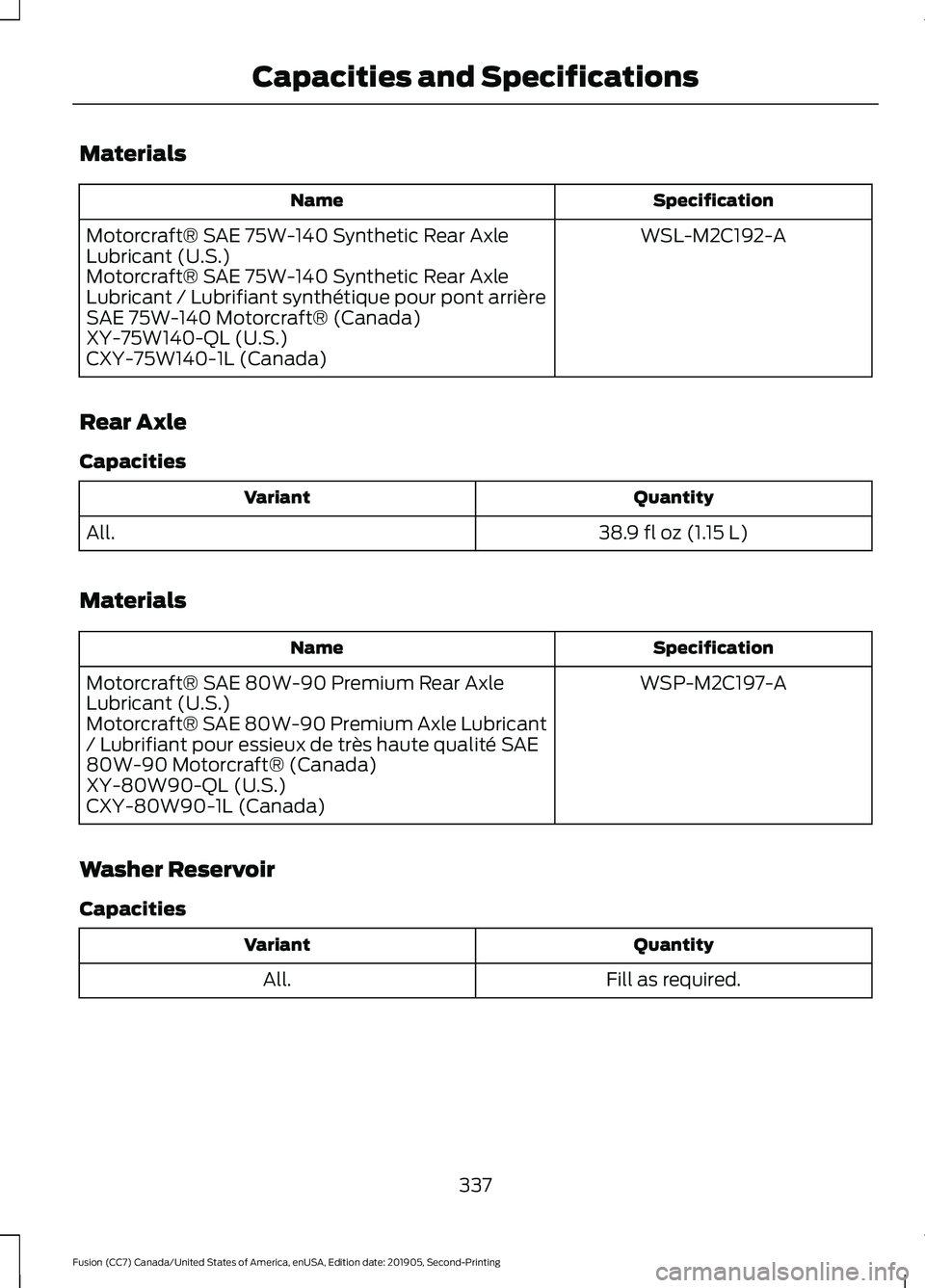
Materials
Specification
Name
WSL-M2C192-A
Motorcraft® SAE 75W-140 Synthetic Rear Axle
Lubricant (U.S.)
Motorcraft® SAE 75W-140 Synthetic Rear Axle
Lubricant / Lubrifiant synthétique pour pont arrière
SAE 75W-140 Motorcraft® (Canada)
XY-75W140-QL (U.S.)
CXY-75W140-1L (Canada)
Rear Axle
Capacities Quantity
Variant
38.9 fl oz (1.15 L)
All.
Materials Specification
Name
WSP-M2C197-A
Motorcraft® SAE 80W-90 Premium Rear Axle
Lubricant (U.S.)
Motorcraft® SAE 80W-90 Premium Axle Lubricant
/ Lubrifiant pour essieux de très haute qualité SAE
80W-90 Motorcraft® (Canada)
XY-80W90-QL (U.S.)
CXY-80W90-1L (Canada)
Washer Reservoir
Capacities Quantity
Variant
Fill as required.
All.
337
Fusion (CC7) Canada/United States of America, enUSA, Edition date: 201905, Second-Printing Capacities and Specifications
Page 353 of 497
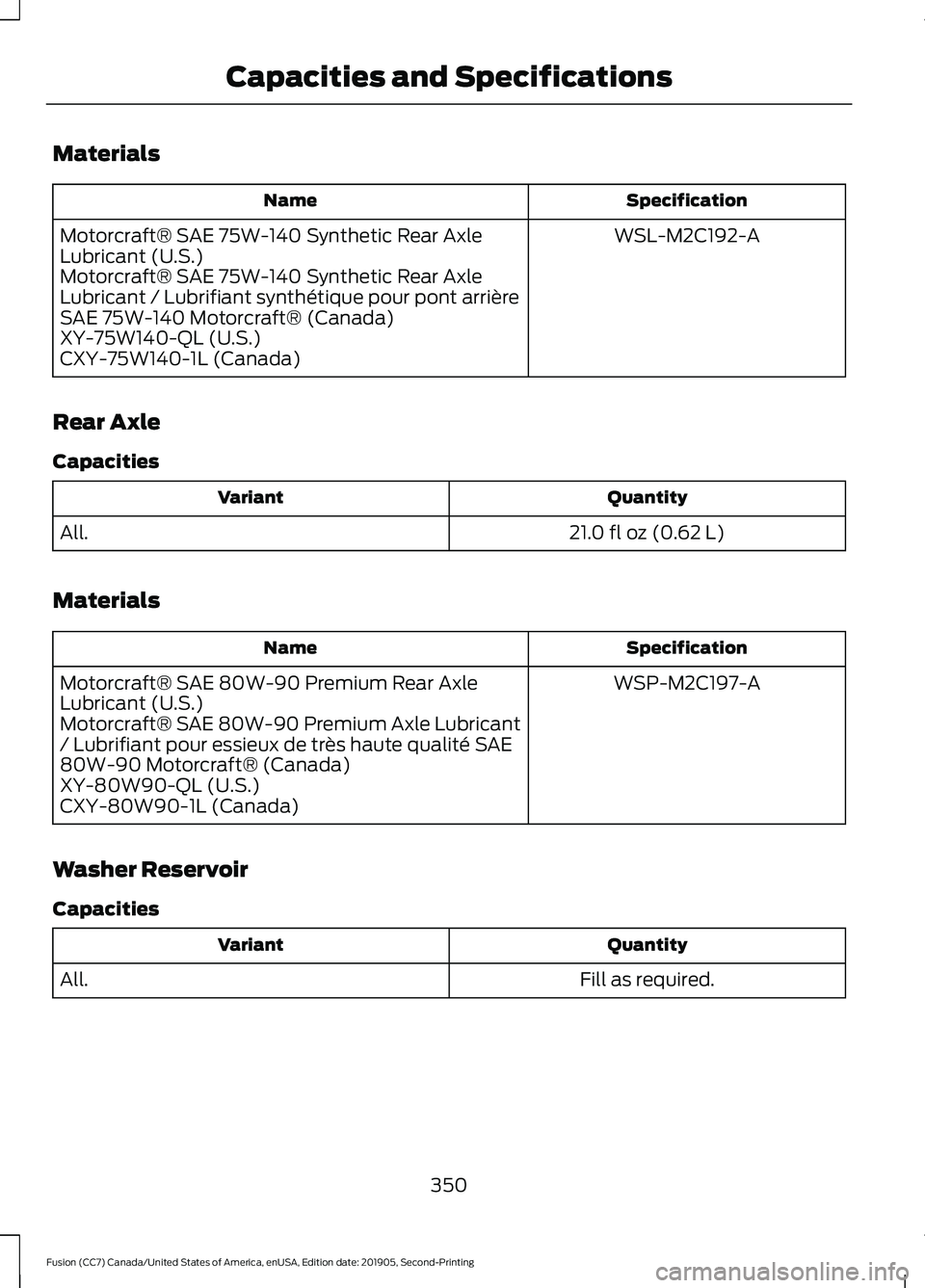
Materials
Specification
Name
WSL-M2C192-A
Motorcraft® SAE 75W-140 Synthetic Rear Axle
Lubricant (U.S.)
Motorcraft® SAE 75W-140 Synthetic Rear Axle
Lubricant / Lubrifiant synthétique pour pont arrière
SAE 75W-140 Motorcraft® (Canada)
XY-75W140-QL (U.S.)
CXY-75W140-1L (Canada)
Rear Axle
Capacities Quantity
Variant
21.0 fl oz (0.62 L)
All.
Materials Specification
Name
WSP-M2C197-A
Motorcraft® SAE 80W-90 Premium Rear Axle
Lubricant (U.S.)
Motorcraft® SAE 80W-90 Premium Axle Lubricant
/ Lubrifiant pour essieux de très haute qualité SAE
80W-90 Motorcraft® (Canada)
XY-80W90-QL (U.S.)
CXY-80W90-1L (Canada)
Washer Reservoir
Capacities Quantity
Variant
Fill as required.
All.
350
Fusion (CC7) Canada/United States of America, enUSA, Edition date: 201905, Second-Printing Capacities and Specifications
Page 355 of 497
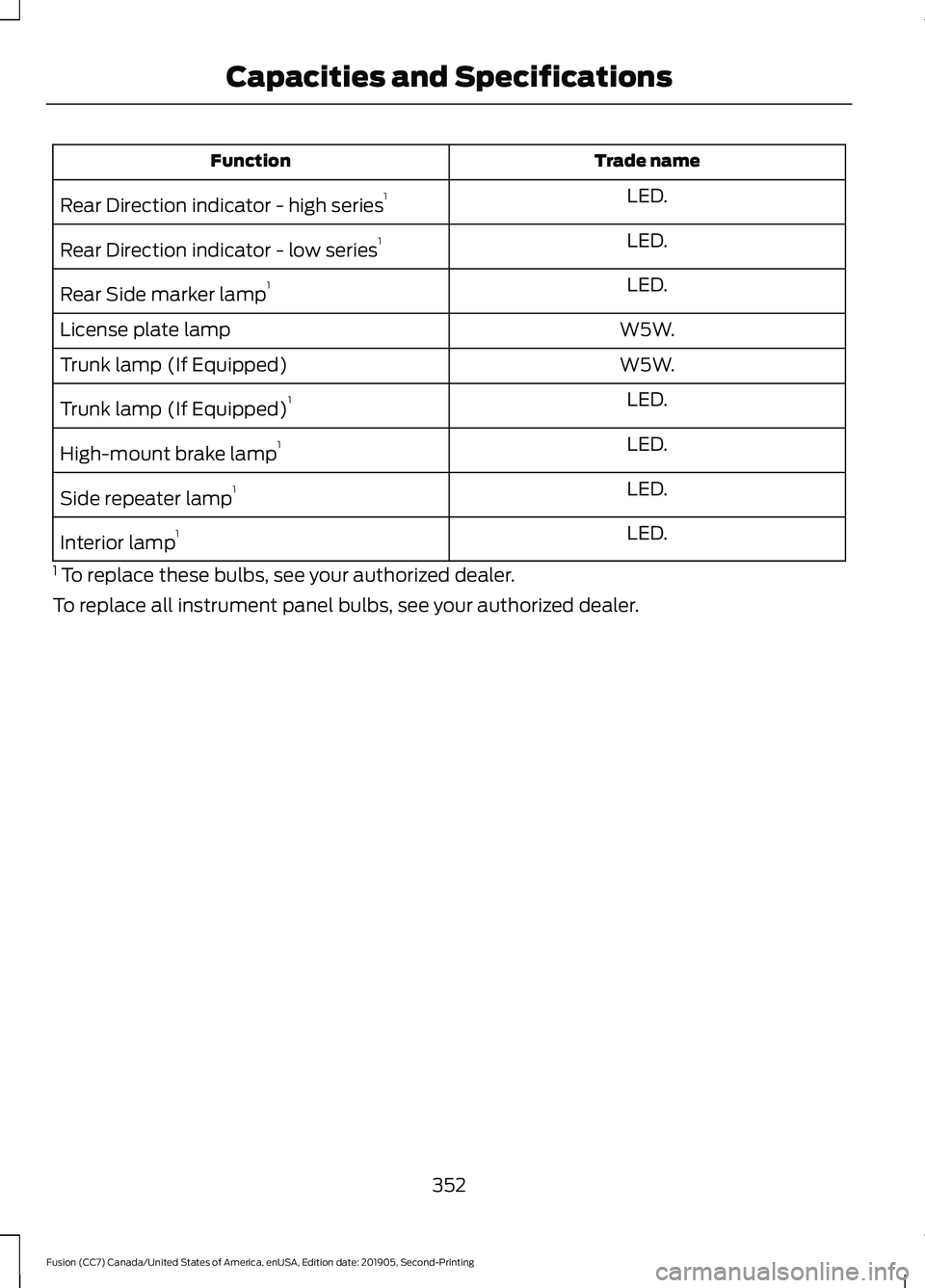
Trade name
Function
LED.
Rear Direction indicator - high series 1
LED.
Rear Direction indicator - low series 1
LED.
Rear Side marker lamp 1
W5W.
License plate lamp
W5W.
Trunk lamp (If Equipped)
LED.
Trunk lamp (If Equipped) 1
LED.
High-mount brake lamp 1
LED.
Side repeater lamp 1
LED.
Interior lamp 1
1 To replace these bulbs, see your authorized dealer.
To replace all instrument panel bulbs, see your authorized dealer.
352
Fusion (CC7) Canada/United States of America, enUSA, Edition date: 201905, Second-Printing Capacities and Specifications
Page 368 of 497
Note:
This receiver includes the eCos
real-time operating system. eCos is
published under the eCos License.
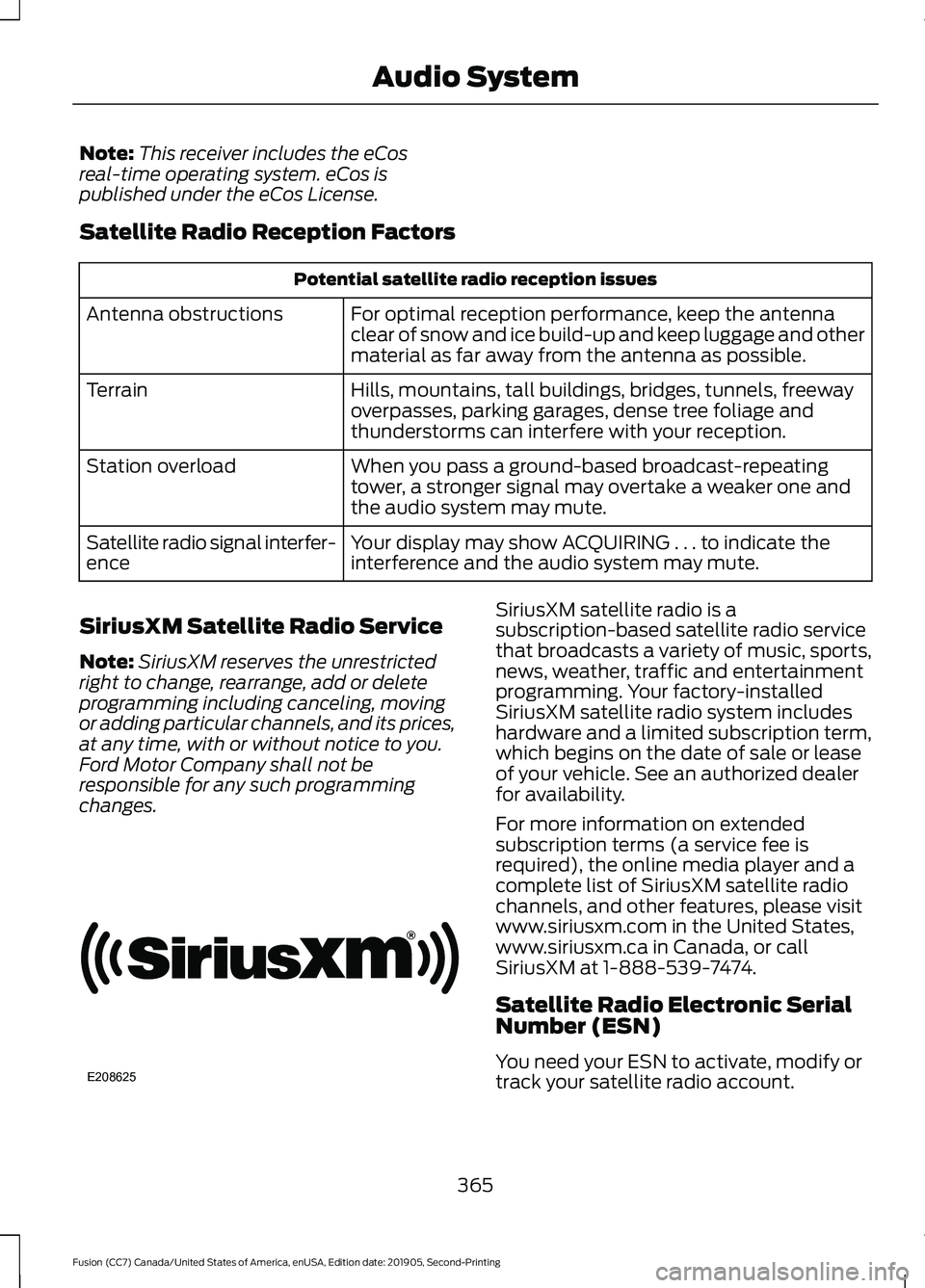
Satellite Radio Reception Factors Potential satellite radio reception issues
For optimal reception performance, keep the antenna
clear of snow and ice build-up and keep luggage and other
material as far away from the antenna as possible.
Antenna obstructions
Hills, mountains, tall buildings, bridges, tunnels, freeway
overpasses, parking garages, dense tree foliage and
thunderstorms can interfere with your reception.
Terrain
When you pass a ground-based broadcast-repeating
tower, a stronger signal may overtake a weaker one and
the audio system may mute.
Station overload
Your display may show ACQUIRING . . . to indicate the
interference and the audio system may mute.
Satellite radio signal interfer-
ence
SiriusXM Satellite Radio Service
Note: SiriusXM reserves the unrestricted
right to change, rearrange, add or delete
programming including canceling, moving
or adding particular channels, and its prices,
at any time, with or without notice to you.
Ford Motor Company shall not be
responsible for any such programming
changes. SiriusXM satellite radio is a
subscription-based satellite radio service
that broadcasts a variety of music, sports,
news, weather, traffic and entertainment
programming. Your factory-installed
SiriusXM satellite radio system includes
hardware and a limited subscription term,
which begins on the date of sale or lease
of your vehicle. See an authorized dealer
for availability.
For more information on extended
subscription terms (a service fee is
required), the online media player and a
complete list of SiriusXM satellite radio
channels, and other features, please visit
www.siriusxm.com in the United States,
www.siriusxm.ca in Canada, or call
SiriusXM at 1-888-539-7474.
Satellite Radio Electronic Serial
Number (ESN)
You need your ESN to activate, modify or
track your satellite radio account.
365
Fusion (CC7) Canada/United States of America, enUSA, Edition date: 201905, Second-Printing Audio SystemE208625
Page 376 of 497
![FORD FUSION 2020 Manual Online If a crash deploys an airbag (excluding
knee airbags and rear inflatable safety
belts [if equipped]) or activates the fuel
pump shut-off, your SYNC-equipped
vehicle may be able to contact emergency
se](/img/11/40666/w960_40666-375.png "FORD FUSION 2020 Manual Online If a crash deploys an airbag (excluding
knee airbags and rear inflatable safety
belts [if equipped]) or activates the fuel
pump shut-off, your SYNC-equipped
vehicle may be able to contact emergency
se")
If a crash deploys an airbag (excluding
knee airbags and rear inflatable safety
belts [if equipped]) or activates the fuel
pump shut-off, your SYNC-equipped
vehicle may be able to contact emergency
services by dialing 911 through a paired and
connected Bluetooth-enabled phone.
See Supplementary Restraints System
(page 41). Important information about
airbag deployment is in this chapter.
See
Roadside Emergencies (page 231).
Important information about the fuel pump
shut-off is in this chapter.
Setting 911 Assist On or Off
Press the Settings button then select: Action and Description
Menu
Item
Select the desired option, on
or off.
911 Assist
To make sure that 911 Assist works
properly:
• SYNC must be powered and working
properly at the time of the incident and
throughout feature activation and use.
• The 911 Assist feature must be set on
before the incident.
• You must pair and connect a Bluetooth
enabled and compatible cell phone to
SYNC.
• A connected Bluetooth enabled phone
must have the ability to make and
maintain an outgoing call at the time
of the incident.
• A connected Bluetooth enabled phone
must have adequate network coverage,
battery power and signal strength.
• The vehicle must have battery power
and be located in the U.S., Canada or
in a territory in which 911 is the
emergency number. In the Event of a Crash
Not all crashes deploy an airbag or activate
the fuel pump shut-off (the triggers for 911
Assist). If a connected cell phone sustains
damage or loses its connection to SYNC
during a crash, SYNC searches for and tries
to connect to a previously paired cell
phone; SYNC then attempts to call the
emergency services.
Before making the call:
•
SYNC provides a short window of time
(about 10 seconds) to cancel the call.
If you fail to cancel the call, SYNC
attempts to dial 911.
• SYNC says the following, or a similar
message: "SYNC will attempt to call
911, to cancel the call, press Cancel on
your screen or press and hold the
phone button on your steering wheel".
If you do not cancel the call, and SYNC
makes a successful call, a pre-recorded
message plays for the 911 operator, and
then the occupant(s) in your vehicle are
able to talk with the operator. Be prepared
to provide your name, phone number and
location immediately, because not all 911
systems are capable of receiving this
information electronically.
911 Assist May Not Work If
• Your cellular phone or 911 Assist
hardware sustains damage in a crash.
• The vehicle's battery or the SYNC
system has no power.
• The phone(s) thrown from your vehicle
are the ones paired and connected to
the system.
373
Fusion (CC7) Canada/United States of America, enUSA, Edition date: 201905, Second-Printing SYNC™
Page 398 of 497
SiriusXM® Satellite Radio (If
Activated)
Note:
This feature may not be available in
all markets and requires an active
subscription. SiriusXM satellite radio is a
subscription-based satellite radio service
that broadcasts a variety of music, sports,
news, weather, traffic and entertainment
programming. Your factory-installed
SiriusXM satellite radio system includes
hardware and a limited subscription term
that begins on the date of sale or lease of
your vehicle. See an authorized dealer for
availability.
For more information on extended
subscription terms (a service fee is
required), the online media player and a
list of SiriusXM satellite radio channels,
and other features, please visit
www.siriusxm.com in the United States,
www.siriusxm.ca in Canada, or call
SiriusXM at 1-888-539-7474.
Note:
SiriusXM reserves the unrestricted
right to change, rearrange, add or delete
programming. This includes canceling,
moving or adding particular channels, and
its prices, at any time, with or without notice
to you. We are not responsible for any such
programming changes.
Note: This receiver includes the eCos
real-time operating system. eCos is
published under the eCos License.
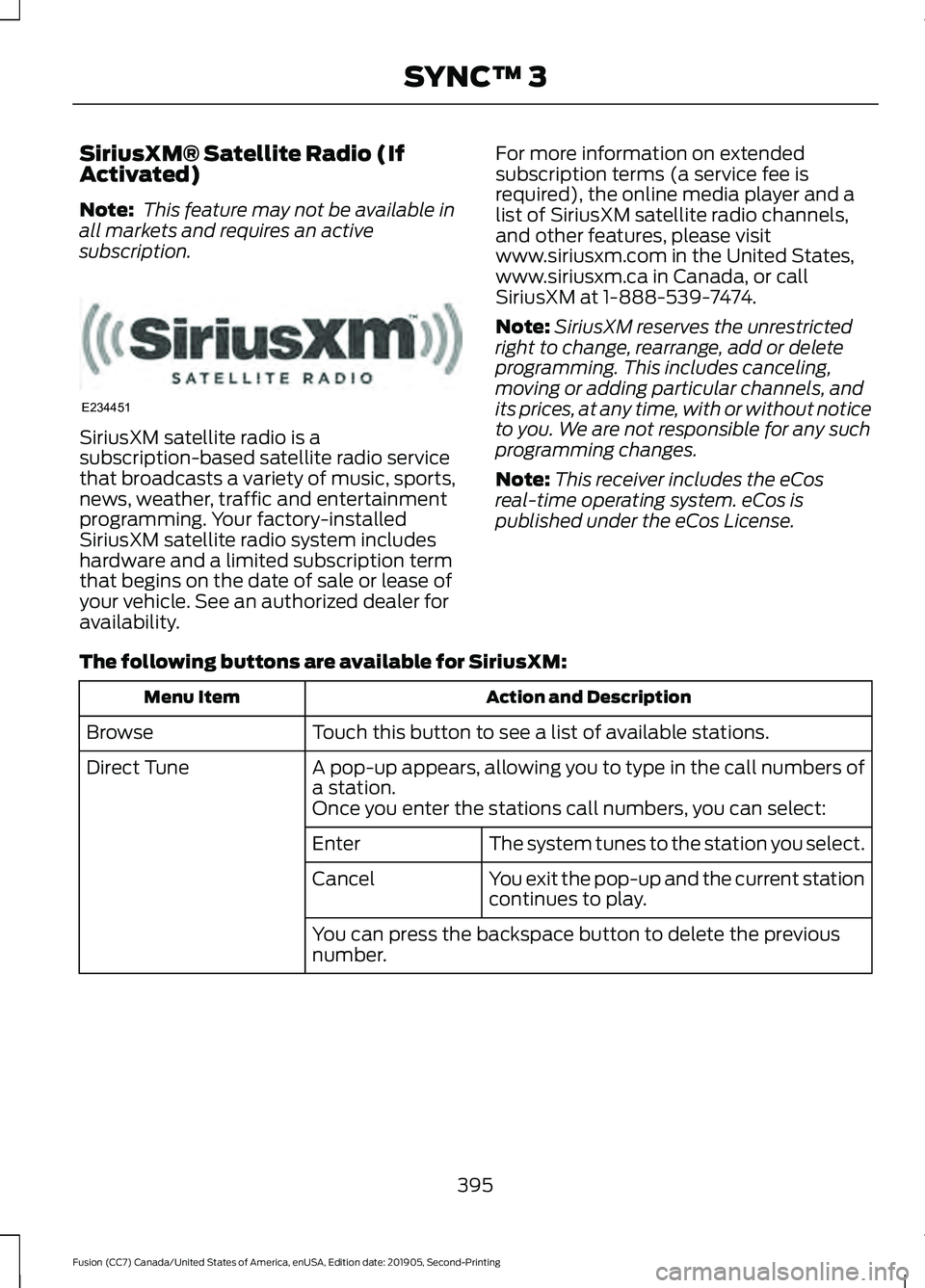
The following buttons are available for SiriusXM: Action and Description
Menu Item
Touch this button to see a list of available stations.
Browse
A pop-up appears, allowing you to type in the call numbers of
a station.
Direct Tune
Once you enter the stations call numbers, you can select:The system tunes to the station you select.
Enter
You exit the pop-up and the current station
continues to play.
Cancel
You can press the backspace button to delete the previous
number.
395
Fusion (CC7) Canada/United States of America, enUSA, Edition date: 201905, Second-Printing SYNC™ 3E234451
Page 407 of 497
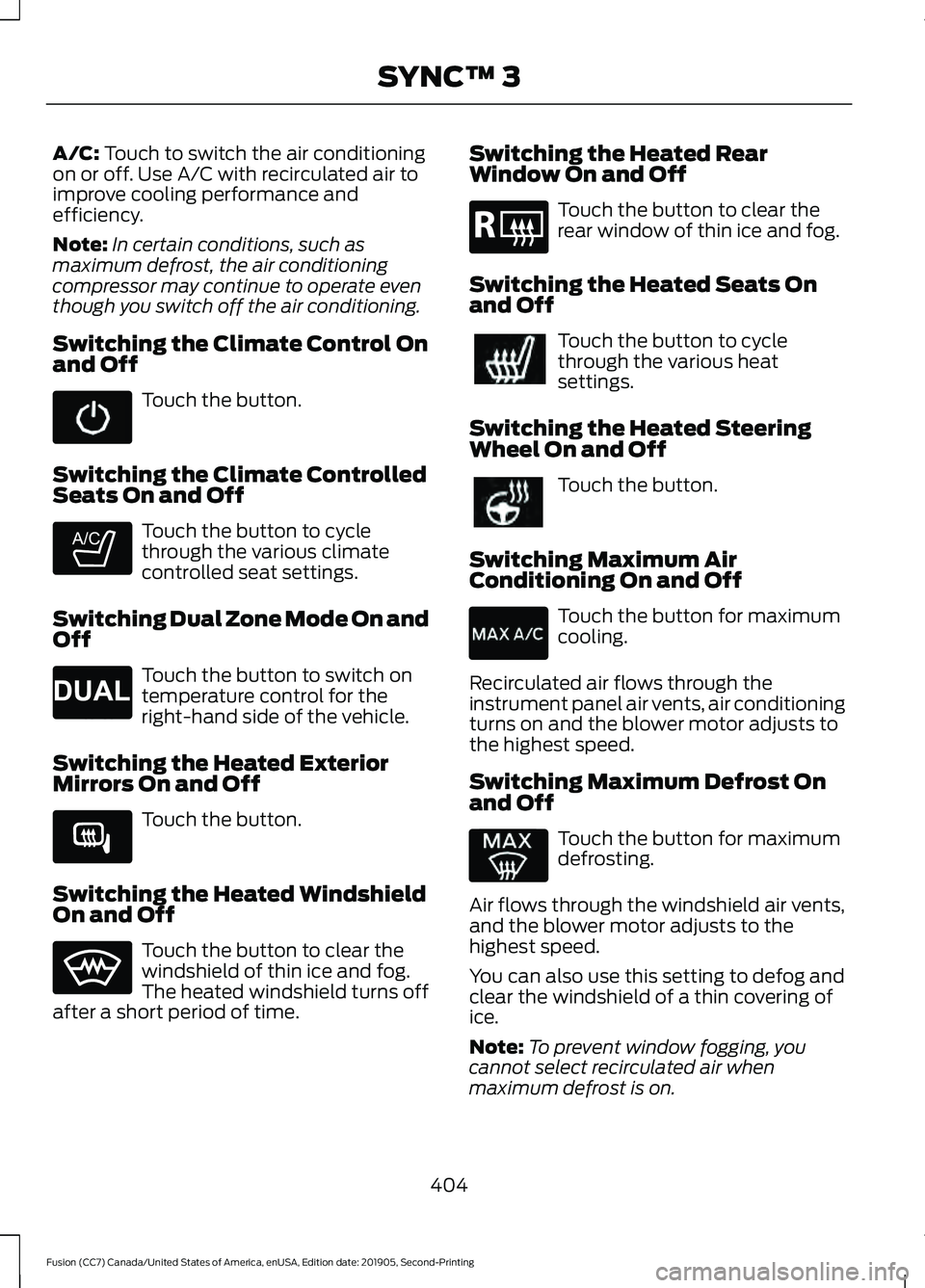
A/C: Touch to switch the air conditioning
on or off. Use A/C with recirculated air to
improve cooling performance and
efficiency.
Note: In certain conditions, such as
maximum defrost, the air conditioning
compressor may continue to operate even
though you switch off the air conditioning.
Switching the Climate Control On
and Off Touch the button.
Switching the Climate Controlled
Seats On and Off Touch the button to cycle
through the various climate
controlled seat settings.
Switching Dual Zone Mode On and
Off Touch the button to switch on
temperature control for the
right-hand side of the vehicle.
Switching the Heated Exterior
Mirrors On and Off Touch the button.
Switching the Heated Windshield
On and Off Touch the button to clear the
windshield of thin ice and fog.
The heated windshield turns off
after a short period of time. Switching the Heated Rear
Window On and Off Touch the button to clear the
rear window of thin ice and fog.
Switching the Heated Seats On
and Off Touch the button to cycle
through the various heat
settings.
Switching the Heated Steering
Wheel On and Off Touch the button.
Switching Maximum Air
Conditioning On and Off Touch the button for maximum
cooling.
Recirculated air flows through the
instrument panel air vents, air conditioning
turns on and the blower motor adjusts to
the highest speed.
Switching Maximum Defrost On
and Off Touch the button for maximum
defrosting.
Air flows through the windshield air vents,
and the blower motor adjusts to the
highest speed.
You can also use this setting to defog and
clear the windshield of a thin covering of
ice.
Note: To prevent window fogging, you
cannot select recirculated air when
maximum defrost is on.
404
Fusion (CC7) Canada/United States of America, enUSA, Edition date: 201905, Second-Printing SYNC™ 3 E265282 E265280 E266189 E184884
Page 408 of 497
Note:
The heated rear window also turns
on when you select maximum defrost.
Switching Recirculated Air On and
Off Touch the button to switch
between outside air and
recirculated air.
The air currently in the passenger
compartment recirculates. This may
reduce the time needed to cool the interior,
when used with A/C, and reduce unwanted
odors from entering your vehicle.
Note: Recirculated air may turn off, or
prevent you from switching on, in all air flow
modes except MAX A/C to reduce the risk
of fogging. Recirculation may also turn on
and off in various air distribution control
combinations during hot weather to improve
cooling efficiency.
Switching the Ventilated Seats On
and Off Touch the button to cycle
through the various ventilated
seat settings.
Accessing Rear Climate Controls Touch the button to access
additional controls for the rear
climate system.
Rear Climate Control Lock
Indicator Touch the button.
When on, you can only operate
the rear passenger settings
through the front controls. Switching Rear Auto Mode On and
Off Touch the button to switch on
rear automatic operation, then
set the temperature.
Switching the Rear Climate
Controlled Seats On and Off Touch the button to cycle
through the various climate
controlled seat settings.
Switching the Rear Heated Seats
On and Off Touch the button to cycle
through the various heat
settings.
Switching the Rear Ventilated
Seats On and Off Touch the button to cycle
through the various ventilated
seat settings.
PHONE WARNING: Driving while distracted
can result in loss of vehicle control, crash
and injury. We strongly recommend that
you use extreme caution when using any
device that may take your focus off the
road. Your primary responsibility is the
safe operation of your vehicle. We
recommend against the use of any
hand-held device while driving and
encourage the use of voice-operated
systems when possible. Make sure you
are aware of all applicable local laws
that may affect the use of electronic
devices while driving.
405
Fusion (CC7) Canada/United States of America, enUSA, Edition date: 201905, Second-Printing SYNC™ 3 E268558 E270447 E265289 E265282 E268558