lights FORD FUSION 2020 Owners Manual
[x] Cancel search | Manufacturer: FORD, Model Year: 2020, Model line: FUSION, Model: FORD FUSION 2020Pages: 497, PDF Size: 6.64 MB
Page 67 of 497
Autolock repeats when:
•
You open then close any door when
the ignition is on and your vehicle speed
is 9 mph (15 km/h) or lower.
• Your vehicle reaches a speed greater
than
12 mph (20 km/h).
Autounlock
Autounlock unlocks all the doors when all
of the following occur:
• The ignition is on, all the doors are
closed, and your vehicle has been
moving at a speed greater than 12 mph
(20 km/h)
.
• Your vehicle comes to a stop and you
switch the ignition off or to the
accessory position.
• You open the driver door within 10
minutes of switching the ignition off or
to accessory.
Note: If you electronically lock your vehicle
after you switch the ignition off with the
driver door closed, the doors will not
autounlock.
Enabling or Disabling Autounlock
Note: You can switch autounlock and
autolock on or off independently of each
other.
Autolock is not configurable in all markets.
If the autolock settings are not available
in your information display, then the
system is not configurable.
See General
Information (page 94).
Illuminated Entry
The interior lamps and some exterior
lamps illuminate when you unlock the
doors with the remote control. The illuminated entry system turns off the
lights if:
•
The ignition is on.
• You press the remote control lock
button.
• After 25 seconds of illumination.
The lights will not turn off if:
• You turn them on with the lamp
control.
• Any door is open.
Illuminated Exit
The interior lamps and some exterior
lamps illuminate when all doors are closed
and you switch the ignition off.
The lamps turn off if all the doors remain
closed and:
• 25 seconds have elapsed.
• You press the push button ignition
switch.
Battery Saver
If you leave the courtesy lamps, interior
lamps or headlamps on, the battery saver
shuts them off 10 minutes after you switch
the ignition off.
Battery Saver for Intelligent Access
Keys
If you leave the ignition switched on, it
shuts off when it detects a certain amount
of battery drain, or after 45 minutes.
KEYLESS ENTRY
SECURICODE™ Keyless Entry
Keypad
The keypad is near the driver window. It
illuminates when touched.
64
Fusion (CC7) Canada/United States of America, enUSA, Edition date: 201905, Second-Printing Doors and Locks
Page 82 of 497
When the interior lamp function is on and
you open a door, the courtesy and door
lamps turn on.
Note:
The indicator lamp lights amber
when the door function is off.
Individual Map Lamps
Press a map lens to switch individual map
lamps on and off independently.
Rear Interior Lamps
The rear interior lamps may be above the
rear seat or above the rear windows. Press to switch the lamps on or
off.
AMBIENT LIGHTING (IF EQUIPPED)
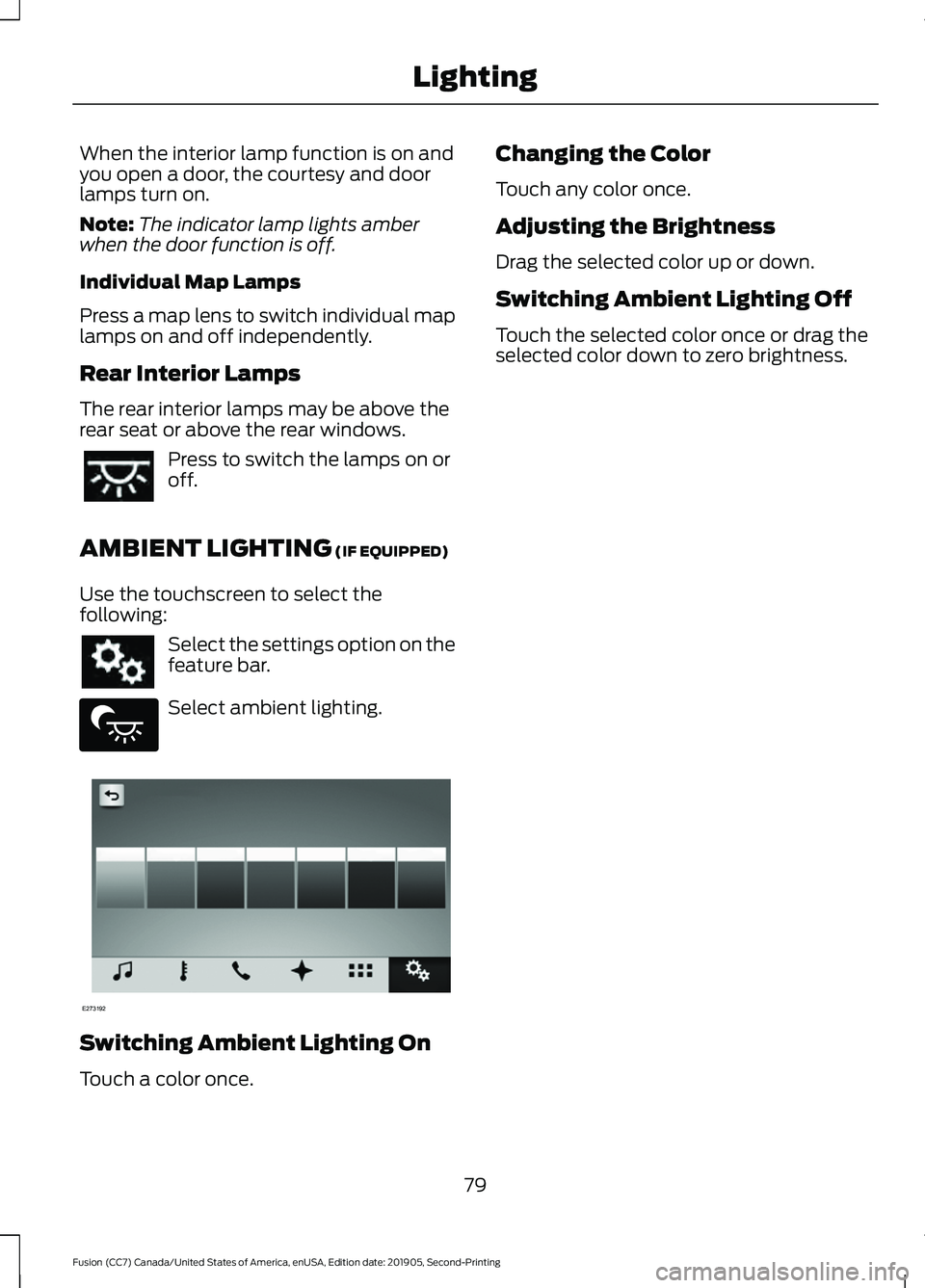
Use the touchscreen to select the
following: Select the settings option on the
feature bar.
Select ambient lighting.
Switching Ambient Lighting On
Touch a color once. Changing the Color
Touch any color once.
Adjusting the Brightness
Drag the selected color up or down.
Switching Ambient Lighting Off
Touch the selected color once or drag the
selected color down to zero brightness.
79
Fusion (CC7) Canada/United States of America, enUSA, Edition date: 201905, Second-Printing Lighting E279027 E273192
Page 88 of 497
INTERIOR MIRROR
WARNING: Do not adjust the
mirrors when your vehicle is moving. This
could result in the loss of control of your
vehicle, serious personal injury or death.
Note: Do not clean the mirror housing or
glass with harsh abrasives, fuel or other
petroleum-based cleaning products.
You can adjust the interior mirror to your
preference. Some mirrors also have a
second pivot point. This lets you move the
mirror hear up or down and from side to
side.
Manual Dimming Mirror
Pull the tab below the mirror toward you
to reduce the effect of bright light from
behind.
Auto-Dimming Mirror
(If Equipped)
Note: Do not block the sensors on the front
and back of the mirror. A rear center
passenger or raised rear center head
restraint may also block light from reaching
the sensor.
The mirror dims to reduce glare when
bright lights are detected from behind your
vehicle. It automatically returns to normal
reflection when you shift the transmission
into reverse (R) to make sure you have a
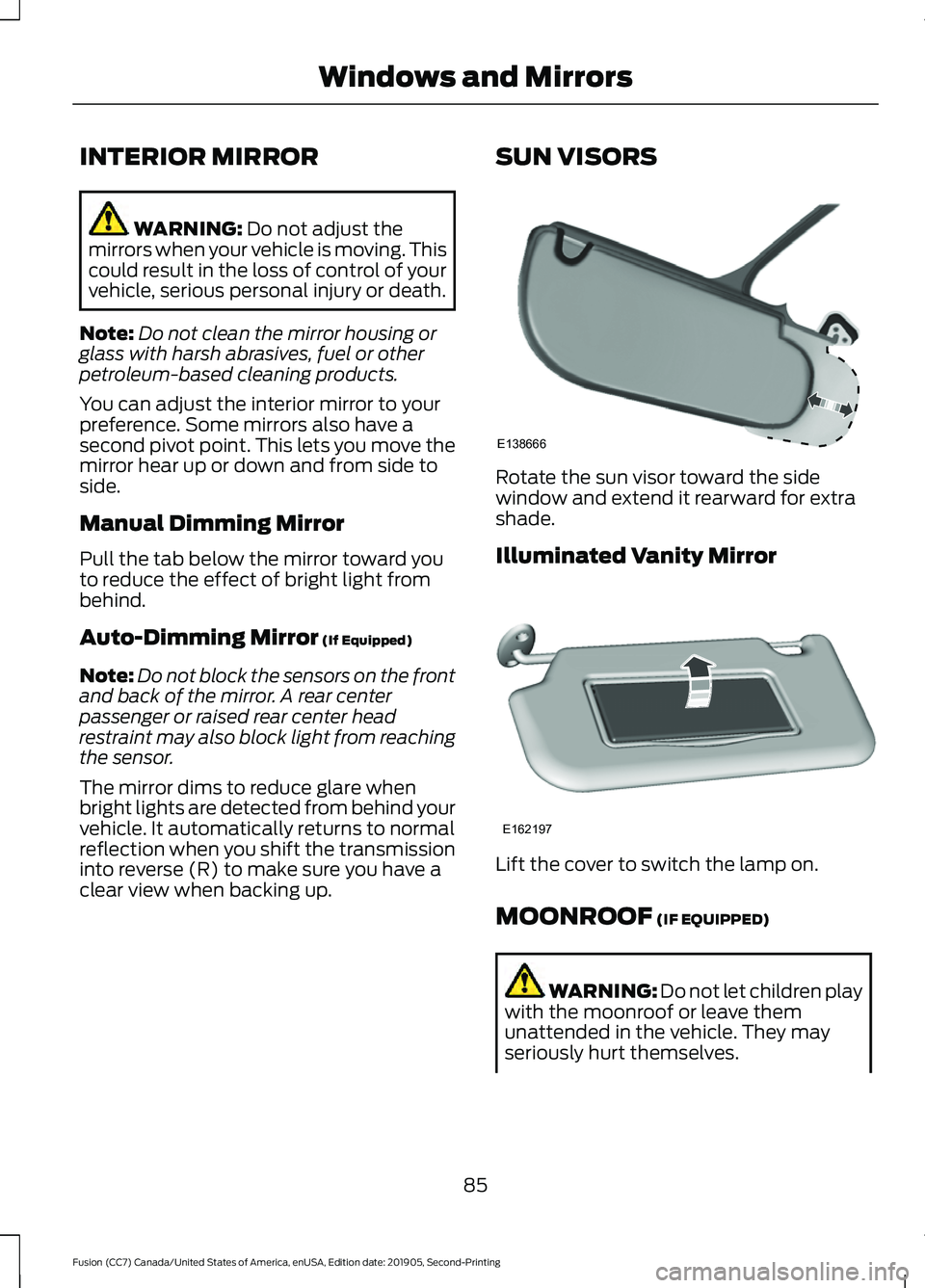
clear view when backing up. SUN VISORS Rotate the sun visor toward the side
window and extend it rearward for extra
shade.
Illuminated Vanity Mirror
Lift the cover to switch the lamp on.
MOONROOF
(IF EQUIPPED)
WARNING:
Do not let children play
with the moonroof or leave them
unattended in the vehicle. They may
seriously hurt themselves.
85
Fusion (CC7) Canada/United States of America, enUSA, Edition date: 201905, Second-Printing Windows and MirrorsE138666 E162197
Page 94 of 497
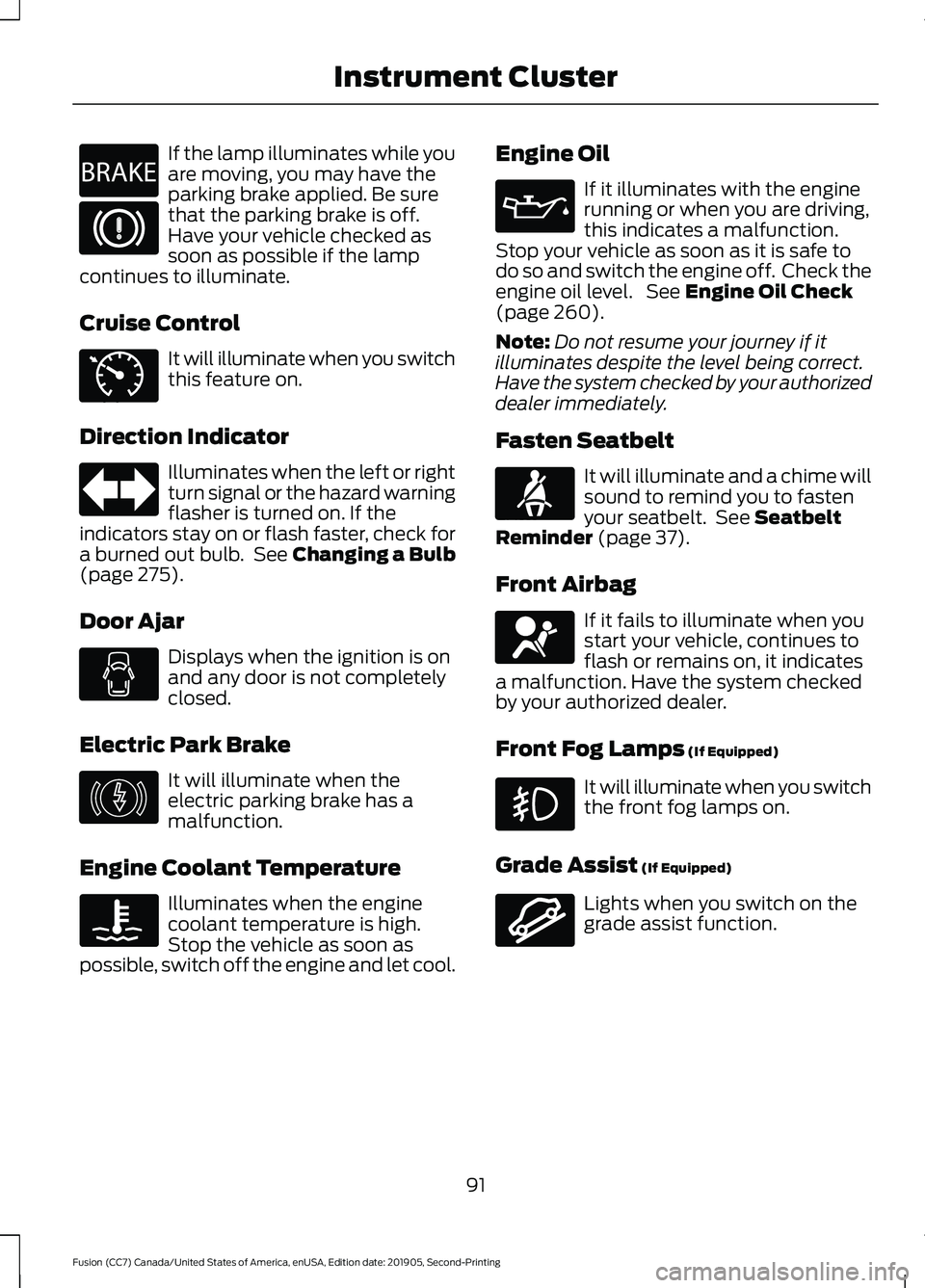
If the lamp illuminates while you
are moving, you may have the
parking brake applied. Be sure
that the parking brake is off.
Have your vehicle checked as
soon as possible if the lamp
continues to illuminate.
Cruise Control It will illuminate when you switch
this feature on.
Direction Indicator Illuminates when the left or right
turn signal or the hazard warning
flasher is turned on. If the
indicators stay on or flash faster, check for
a burned out bulb. See Changing a Bulb
(page 275).
Door Ajar Displays when the ignition is on
and any door is not completely
closed.
Electric Park Brake It will illuminate when the
electric parking brake has a
malfunction.
Engine Coolant Temperature Illuminates when the engine
coolant temperature is high.
Stop the vehicle as soon as
possible, switch off the engine and let cool. Engine Oil If it illuminates with the engine
running or when you are driving,
this indicates a malfunction.
Stop your vehicle as soon as it is safe to
do so and switch the engine off. Check the
engine oil level. See
Engine Oil Check
(page 260).
Note: Do not resume your journey if it
illuminates despite the level being correct.
Have the system checked by your authorized
dealer immediately.
Fasten Seatbelt It will illuminate and a chime will
sound to remind you to fasten
your seatbelt. See
Seatbelt
Reminder (page 37).
Front Airbag If it fails to illuminate when you
start your vehicle, continues to
flash or remains on, it indicates
a malfunction. Have the system checked
by your authorized dealer.
Front Fog Lamps
(If Equipped) It will illuminate when you switch
the front fog lamps on.
Grade Assist
(If Equipped) Lights when you switch on the
grade assist function.
91
Fusion (CC7) Canada/United States of America, enUSA, Edition date: 201905, Second-Printing Instrument ClusterE270480 E71340 E146190 E71880 E67017 E144523
Page 95 of 497
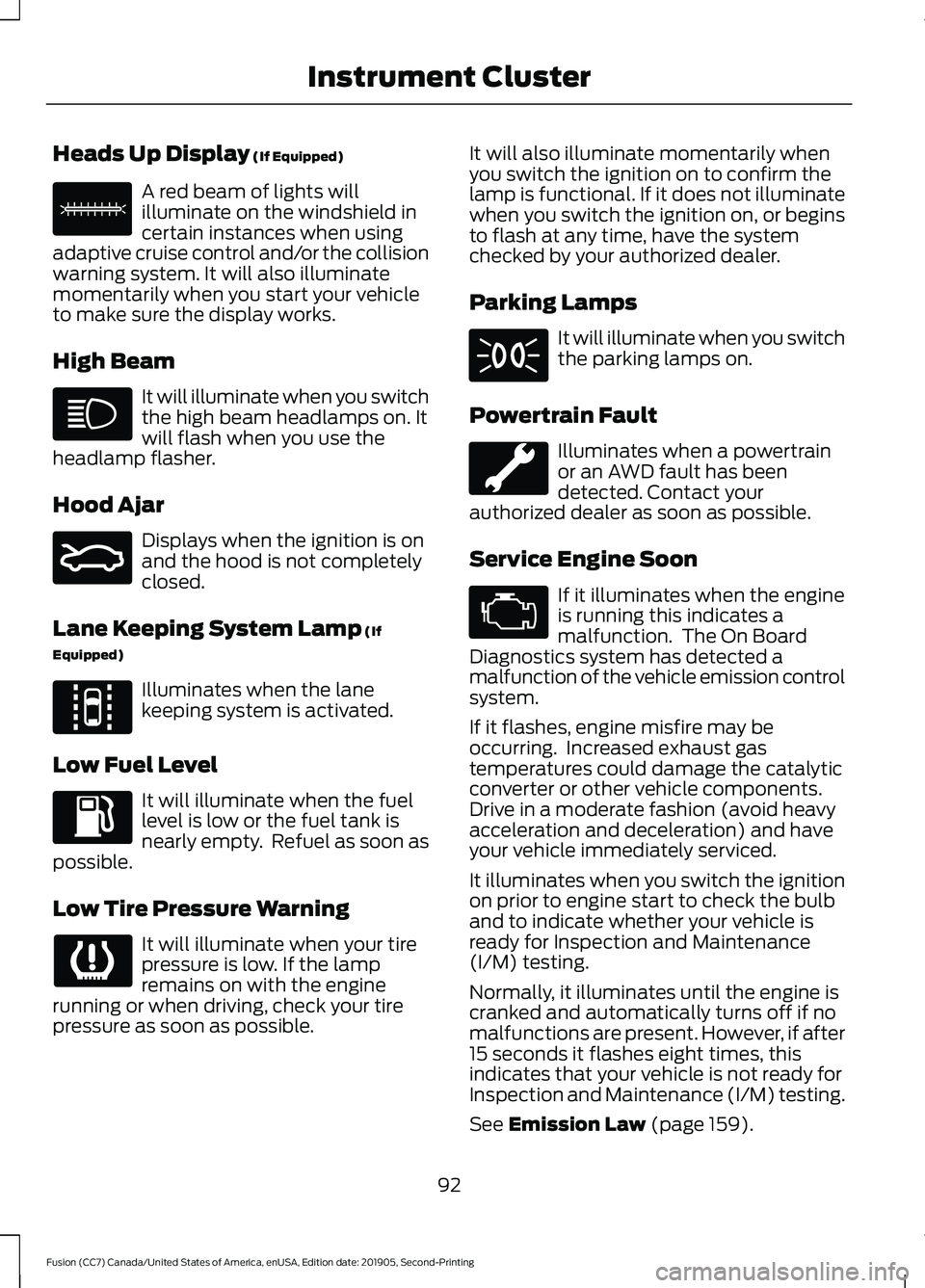
Heads Up Display (If Equipped)
A red beam of lights will
illuminate on the windshield in
certain instances when using
adaptive cruise control and/or the collision
warning system. It will also illuminate
momentarily when you start your vehicle
to make sure the display works.
High Beam It will illuminate when you switch
the high beam headlamps on. It
will flash when you use the
headlamp flasher.
Hood Ajar Displays when the ignition is on
and the hood is not completely
closed.
Lane Keeping System Lamp
(If
Equipped) Illuminates when the lane
keeping system is activated.
Low Fuel Level It will illuminate when the fuel
level is low or the fuel tank is
nearly empty. Refuel as soon as
possible.
Low Tire Pressure Warning It will illuminate when your tire
pressure is low. If the lamp
remains on with the engine
running or when driving, check your tire
pressure as soon as possible. It will also illuminate momentarily when
you switch the ignition on to confirm the
lamp is functional. If it does not illuminate
when you switch the ignition on, or begins
to flash at any time, have the system
checked by your authorized dealer.
Parking Lamps It will illuminate when you switch
the parking lamps on.
Powertrain Fault Illuminates when a powertrain
or an AWD fault has been
detected. Contact your
authorized dealer as soon as possible.
Service Engine Soon If it illuminates when the engine
is running this indicates a
malfunction. The On Board
Diagnostics system has detected a
malfunction of the vehicle emission control
system.
If it flashes, engine misfire may be
occurring. Increased exhaust gas
temperatures could damage the catalytic
converter or other vehicle components.
Drive in a moderate fashion (avoid heavy
acceleration and deceleration) and have
your vehicle immediately serviced.
It illuminates when you switch the ignition
on prior to engine start to check the bulb
and to indicate whether your vehicle is
ready for Inspection and Maintenance
(I/M) testing.
Normally, it illuminates until the engine is
cranked and automatically turns off if no
malfunctions are present. However, if after
15 seconds it flashes eight times, this
indicates that your vehicle is not ready for
Inspection and Maintenance (I/M) testing.
See
Emission Law (page 159).
92
Fusion (CC7) Canada/United States of America, enUSA, Edition date: 201905, Second-Printing Instrument ClusterE156133 E159324 E144813
Page 100 of 497
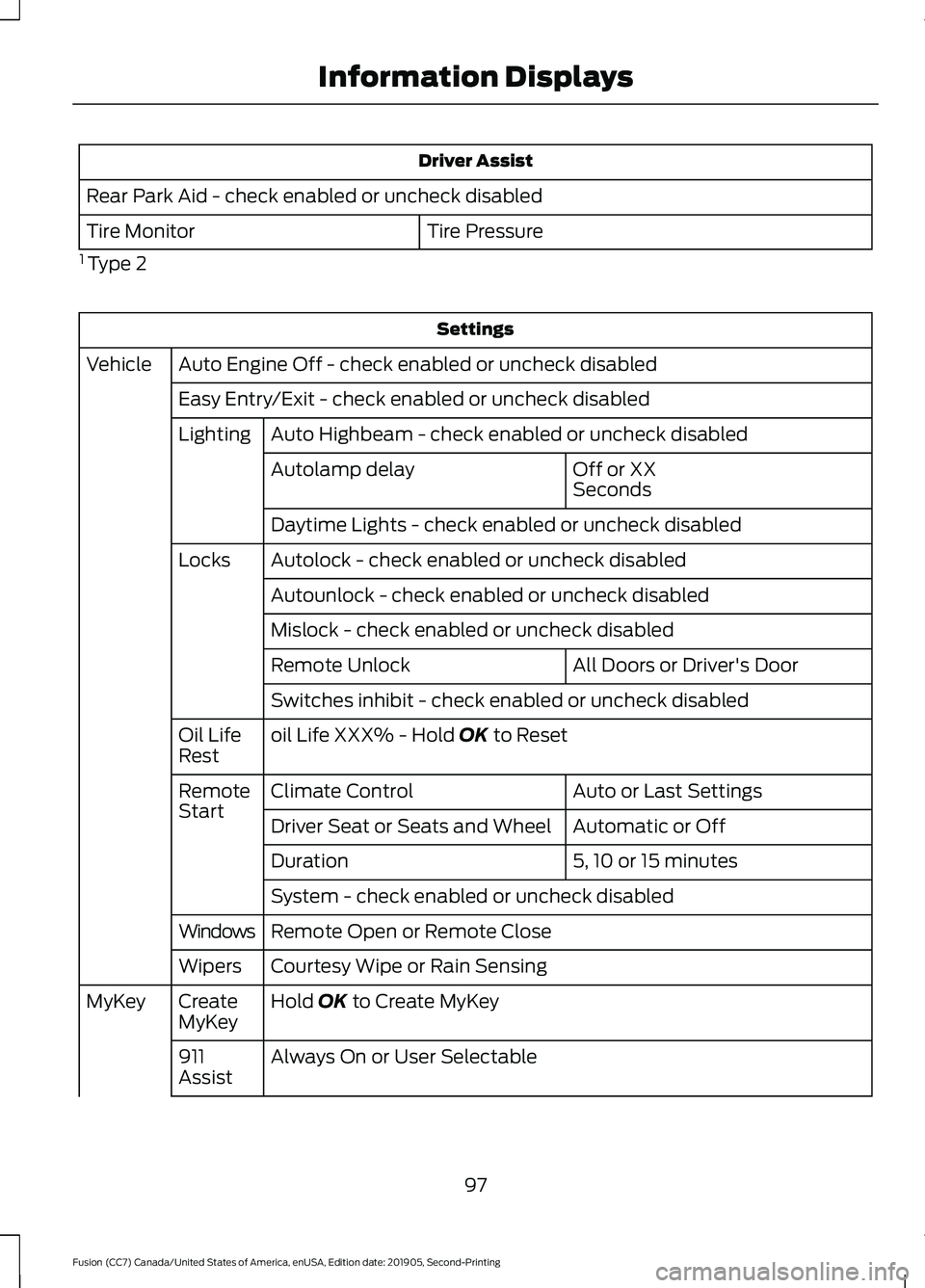
Driver Assist
Rear Park Aid - check enabled or uncheck disabled Tire Pressure
Tire Monitor
1 Type 2 Settings
Auto Engine Off - check enabled or uncheck disabled
Vehicle
Easy Entry/Exit - check enabled or uncheck disabledAuto Highbeam - check enabled or uncheck disabled
Lighting
Off or XX
Seconds
Autolamp delay
Daytime Lights - check enabled or uncheck disabled
Autolock - check enabled or uncheck disabled
Locks
Autounlock - check enabled or uncheck disabled
Mislock - check enabled or uncheck disabled All Doors or Driver's Door
Remote Unlock
Switches inhibit - check enabled or uncheck disabled
oil Life XXX% - Hold OK to Reset
Oil Life
Rest
Auto or Last Settings
Climate Control
Remote
Start
Automatic or Off
Driver Seat or Seats and Wheel
5, 10 or 15 minutes
Duration
System - check enabled or uncheck disabled
Remote Open or Remote Close
Windows
Courtesy Wipe or Rain Sensing
Wipers
Hold
OK to Create MyKey
Create
MyKey
MyKey
Always On or User Selectable
911
Assist
97
Fusion (CC7) Canada/United States of America, enUSA, Edition date: 201905, Second-Printing Information Displays
Page 104 of 497
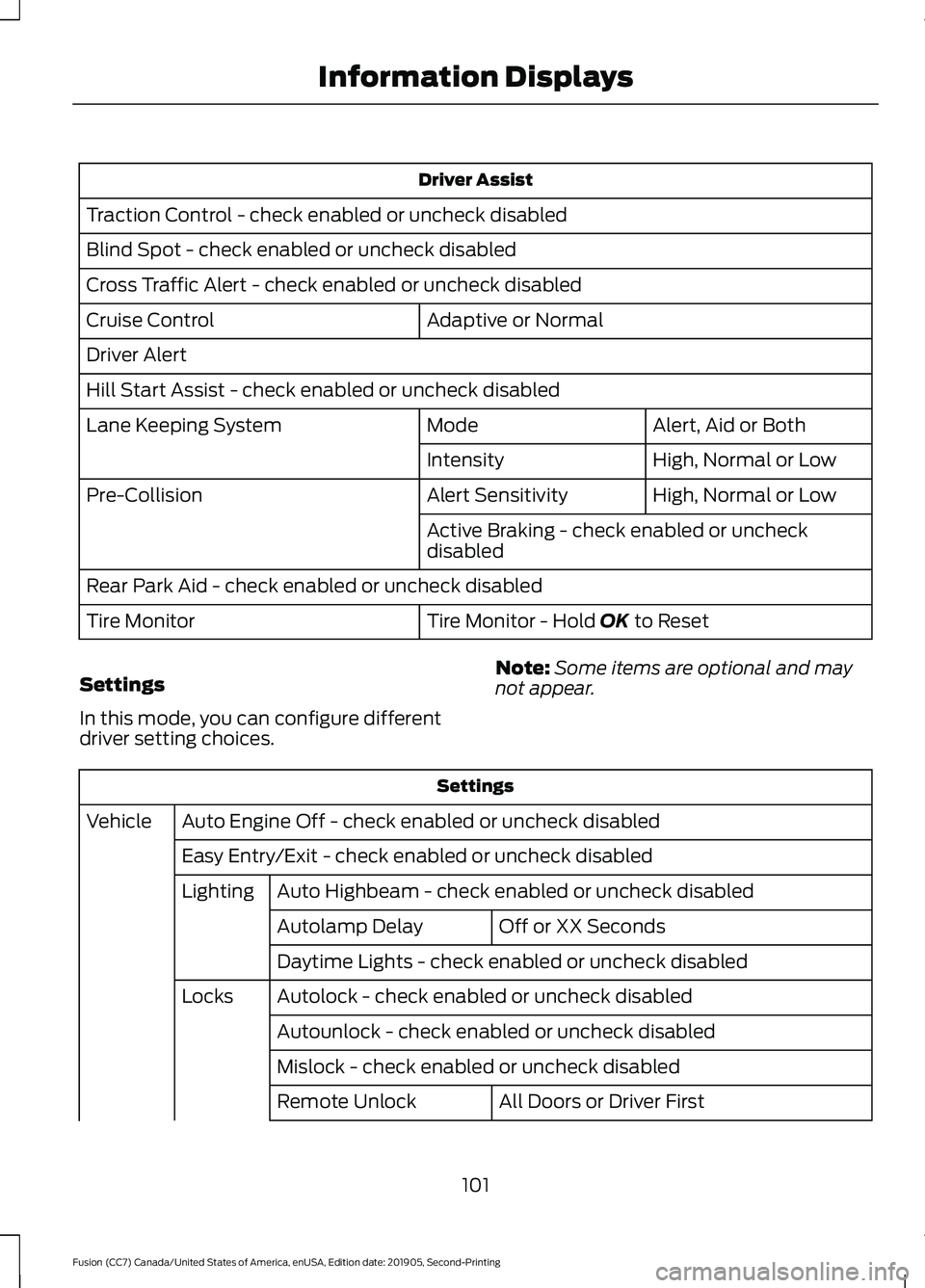
Driver Assist
Traction Control - check enabled or uncheck disabled
Blind Spot - check enabled or uncheck disabled
Cross Traffic Alert - check enabled or uncheck disabled Adaptive or Normal
Cruise Control
Driver Alert
Hill Start Assist - check enabled or uncheck disabled
Alert, Aid or Both
Mode
Lane Keeping System
High, Normal or Low
Intensity
High, Normal or Low
Alert Sensitivity
Pre-Collision
Active Braking - check enabled or uncheck
disabled
Rear Park Aid - check enabled or uncheck disabled Tire Monitor - Hold OK to Reset
Tire Monitor
Settings
In this mode, you can configure different
driver setting choices. Note:
Some items are optional and may
not appear. Settings
Auto Engine Off - check enabled or uncheck disabled
Vehicle
Easy Entry/Exit - check enabled or uncheck disabledAuto Highbeam - check enabled or uncheck disabled
Lighting
Off or XX Seconds
Autolamp Delay
Daytime Lights - check enabled or uncheck disabled
Autolock - check enabled or uncheck disabled
Locks
Autounlock - check enabled or uncheck disabled
Mislock - check enabled or uncheck disabled All Doors or Driver First
Remote Unlock
101
Fusion (CC7) Canada/United States of America, enUSA, Edition date: 201905, Second-Printing Information Displays
Page 121 of 497
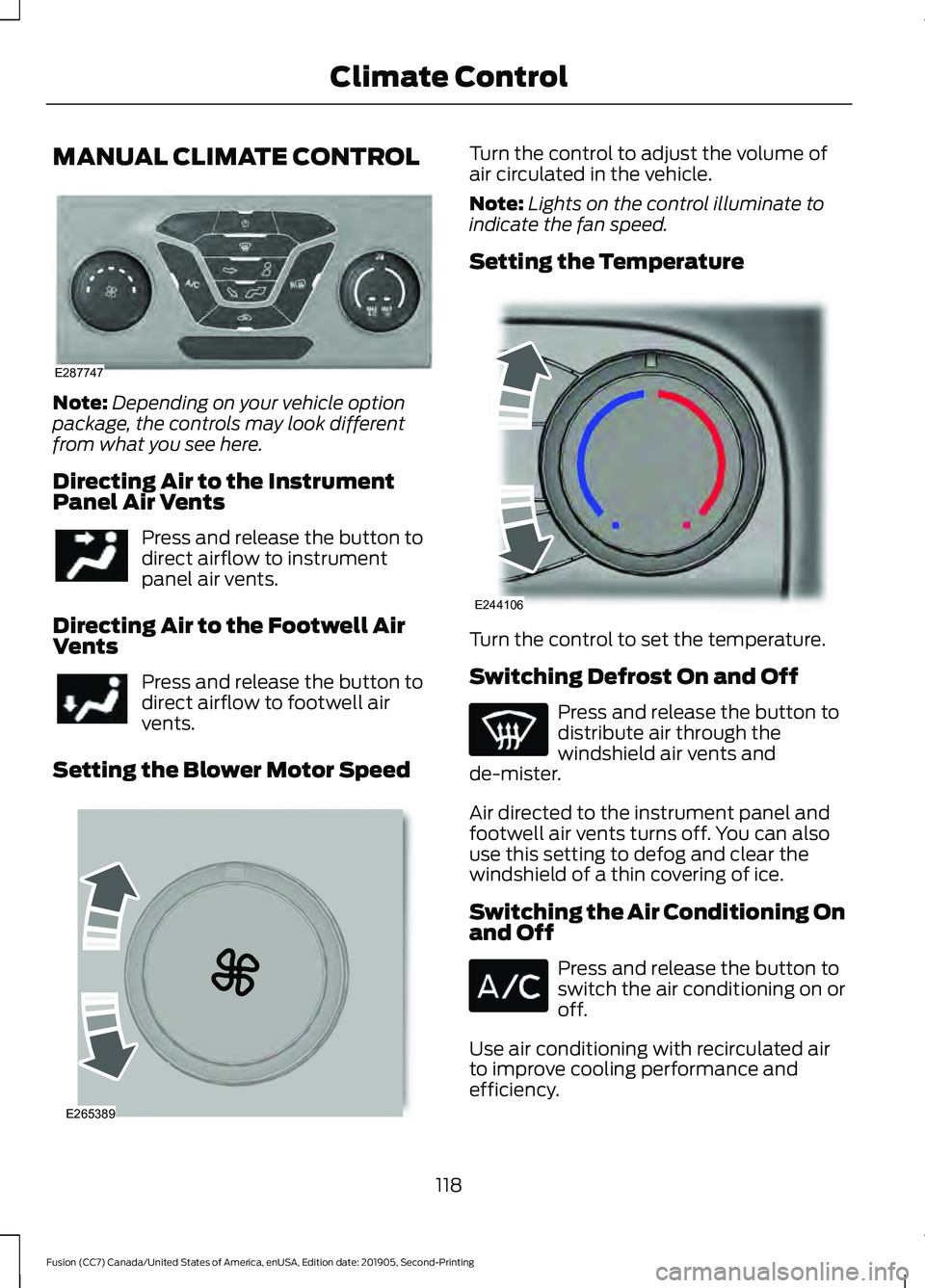
MANUAL CLIMATE CONTROL
Note:
Depending on your vehicle option
package, the controls may look different
from what you see here.
Directing Air to the Instrument
Panel Air Vents Press and release the button to
direct airflow to instrument
panel air vents.
Directing Air to the Footwell Air
Vents Press and release the button to
direct airflow to footwell air
vents.
Setting the Blower Motor Speed Turn the control to adjust the volume of
air circulated in the vehicle.
Note:
Lights on the control illuminate to
indicate the fan speed.
Setting the Temperature Turn the control to set the temperature.
Switching Defrost On and Off
Press and release the button to
distribute air through the
windshield air vents and
de-mister.
Air directed to the instrument panel and
footwell air vents turns off. You can also
use this setting to defog and clear the
windshield of a thin covering of ice.
Switching the Air Conditioning On
and Off Press and release the button to
switch the air conditioning on or
off.
Use air conditioning with recirculated air
to improve cooling performance and
efficiency.
118
Fusion (CC7) Canada/United States of America, enUSA, Edition date: 201905, Second-Printing Climate ControlE287747 E265389 E244106
Page 138 of 497
HEATED SEATS (IF EQUIPPED)
WARNING: Use caution when using
the heated seat if you are unable to feel
pain to your skin because of advanced
age, chronic illness, diabetes, spinal cord
injury, medication, alcohol use,
exhaustion or other physical conditions.
The heated seat could cause burns even
at low temperatures, especially if used
for long periods of time. Failure to follow
this instruction could result in personal
injury. WARNING:
Do not place anything
on the seat that blocks the heat, for
example a seat cover or a cushion. This
could cause the seat to overheat. Failure
to follow this instruction could result in
personal injury. WARNING:
Do not poke sharp
objects into the seat cushion or seat
backrest. This could damage the heated
seat element and cause it to overheat.
Failure to follow this instruction could
result in personal injury.
Do not do the following:
• Place heavy objects on the seat.
• Operate the heated seat if water or any
other liquid is spilled on the seat. Allow
the seat to dry thoroughly.
• Operate the heated seats unless the
engine is running. Doing so can cause
the battery to lose charge. Press the heated seat symbol to cycle
through the various heat settings and off.
Warmer settings are indicated by more
indicator lights.
CLIMATE CONTROLLED SEATS
(IF EQUIPPED)
Heated Seats
WARNING: Persons who are
unable to feel pain to the skin because
of advanced age, chronic illness,
diabetes, spinal cord injury, medication,
alcohol use, exhaustion, or other physical
conditions, must exercise care when
using the seat heater. The seat heater
may cause burns even at low
temperatures, especially if used for long
periods of time. Do not place anything
on the seat that insulates against heat,
such as a blanket or cushion, because
this may cause the seat heater to
overheat. Do not puncture the seat with
pins, needles, or other pointed objects
because this may damage the heating
element which may cause the seat
heater to overheat. An overheated seat
may cause serious personal injury.
135
Fusion (CC7) Canada/United States of America, enUSA, Edition date: 201905, Second-Printing SeatsE146941
Page 139 of 497
Do not do the following:
•
Place heavy objects on the seat.
• Operate the seat heater if water or any
other liquid spills on the seat. Allow the
seat to dry thoroughly.
• Operate the heated seats unless the
engine is running. Doing so can cause
the battery to lose charge. Press the heated seat symbol to cycle
through the various heat settings and off.
More indicator lights indicate warmer
settings.
Cooled Seats
The cooled seats will only function when
the engine is running.
To operate the cooled seats:
Press the cooled seat symbol to cycle
through the various cooling settings and
off. More indicator lights indicate cooler
settings.
If the engine falls below 350 RPM while
the cooled seats are on, the feature will
turn itself off. You will need to reactivate
it. Climate controlled seat air filter
replacement
Your vehicle is equipped with lifetime air
filters that are integrated with the seats.
Regular maintenance or replacement is
not needed.
136
Fusion (CC7) Canada/United States of America, enUSA, Edition date: 201905, Second-Printing SeatsE146322 E146309