engine FORD FUSION (AMERICAS) 2013 2.G Owner's Manual
[x] Cancel search | Manufacturer: FORD, Model Year: 2013, Model line: FUSION (AMERICAS), Model: FORD FUSION (AMERICAS) 2013 2.GPages: 458
Page 90 of 458
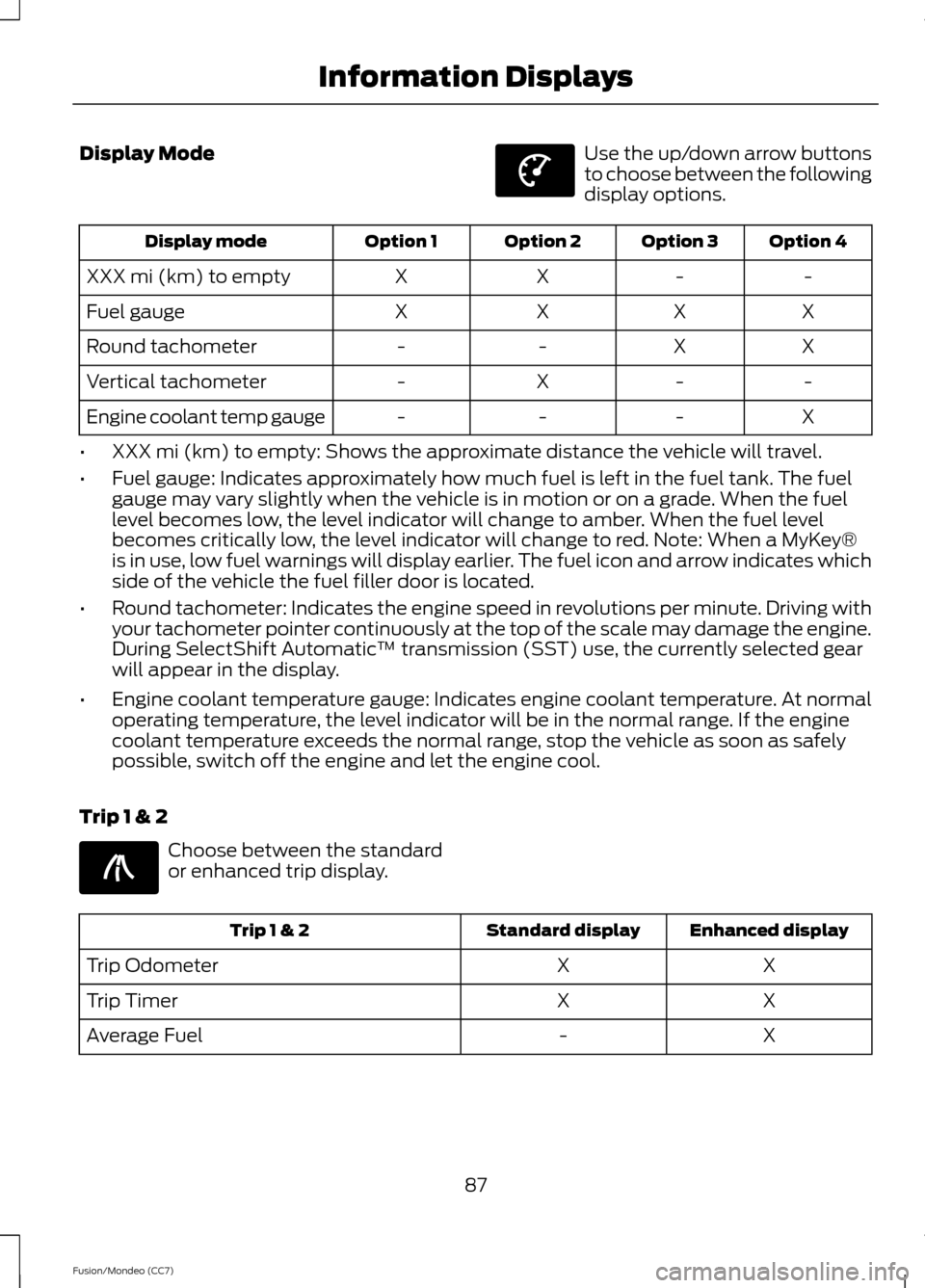
Display Mode Use the up/down arrow buttons
to choose between the following
display options.
Option 4
Option 3
Option 2
Option 1
Display mode
-
-
X
X
XXX mi (km) to empty
X
X
X
X
Fuel gauge
X
X
-
-
Round tachometer
-
-
X
-
Vertical tachometer
X
-
-
-
Engine coolant temp gauge
• XXX mi (km) to empty: Shows the approximate distance the vehicle will travel.
• Fuel gauge: Indicates approximately how much fuel is left in the fuel tank. The fuel
gauge may vary slightly when the vehicle is in motion or on a grade. When the fuel
level becomes low, the level indicator will change to amber. When the fuel level
becomes critically low, the level indicator will change to red. Note: When a MyKey®
is in use, low fuel warnings will display earlier. The fuel icon and arrow indicates which
side of the vehicle the fuel filler door is located.
• Round tachometer: Indicates the engine speed in revolutions per minute. Driving with
your tachometer pointer continuously at the top of the scale may damage the engine.
During SelectShift Automatic ™ transmission (SST) use, the currently selected gear
will appear in the display.
• Engine coolant temperature gauge: Indicates engine coolant temperature. At normal
operating temperature, the level indicator will be in the normal range. If the engine
coolant temperature exceeds the normal range, stop the vehicle as soon as safely
possible, switch off the engine and let the engine cool.
Trip 1 & 2 Choose between the standard
or enhanced trip display.
Enhanced display
Standard display
Trip 1 & 2
X
X
Trip Odometer
X
X
Trip Timer
X
-
Average Fuel
87
Fusion/Mondeo (CC7) Information DisplaysE144639 E138660
Page 93 of 458
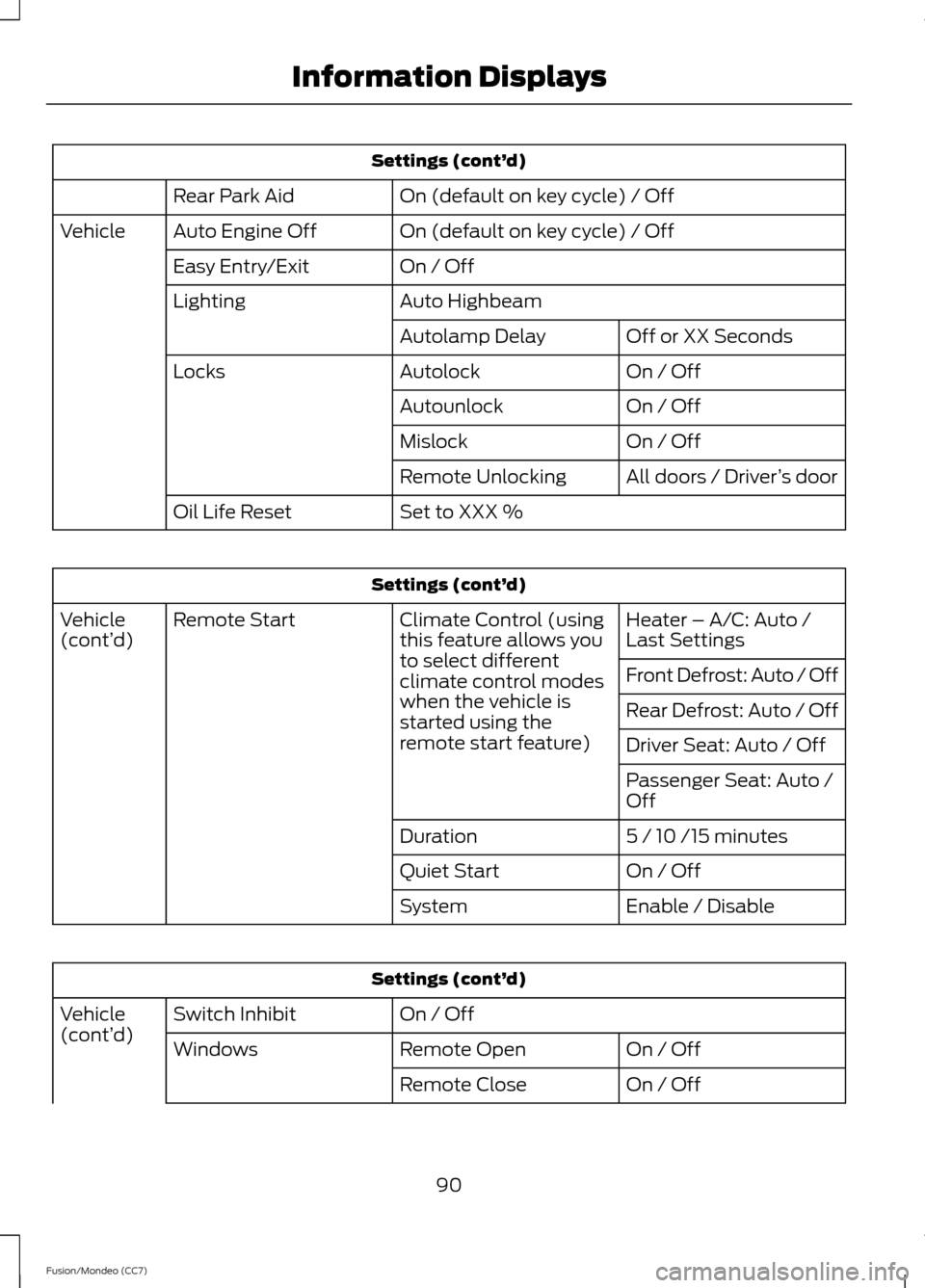
Settings (cont’
d)
On (default on key cycle) / Off
Rear Park Aid
On (default on key cycle) / Off
Auto Engine Off
Vehicle
On / Off
Easy Entry/Exit
Auto Highbeam
Lighting
Off or XX Seconds
Autolamp Delay
On / Off
Autolock
Locks
On / Off
Autounlock
On / Off
Mislock
All doors / Driver’s door
Remote Unlocking
Set to XXX %
Oil Life Reset Settings (cont’
d)
Heater – A/C: Auto /
Last Settings
Climate Control (using
this feature allows you
to select different
climate control modes
when the vehicle is
started using the
remote start feature)
Remote Start
Vehicle
(cont’ d)
Front Defrost: Auto / Off
Rear Defrost: Auto / Off
Driver Seat: Auto / Off
Passenger Seat: Auto /
Off
5 / 10 /15 minutes
Duration
On / Off
Quiet Start
Enable / Disable
System Settings (cont’
d)
On / Off
Switch Inhibit
Vehicle
(cont’ d)
On / Off
Remote Open
Windows
On / Off
Remote Close
90
Fusion/Mondeo (CC7) Information Displays
Page 96 of 458
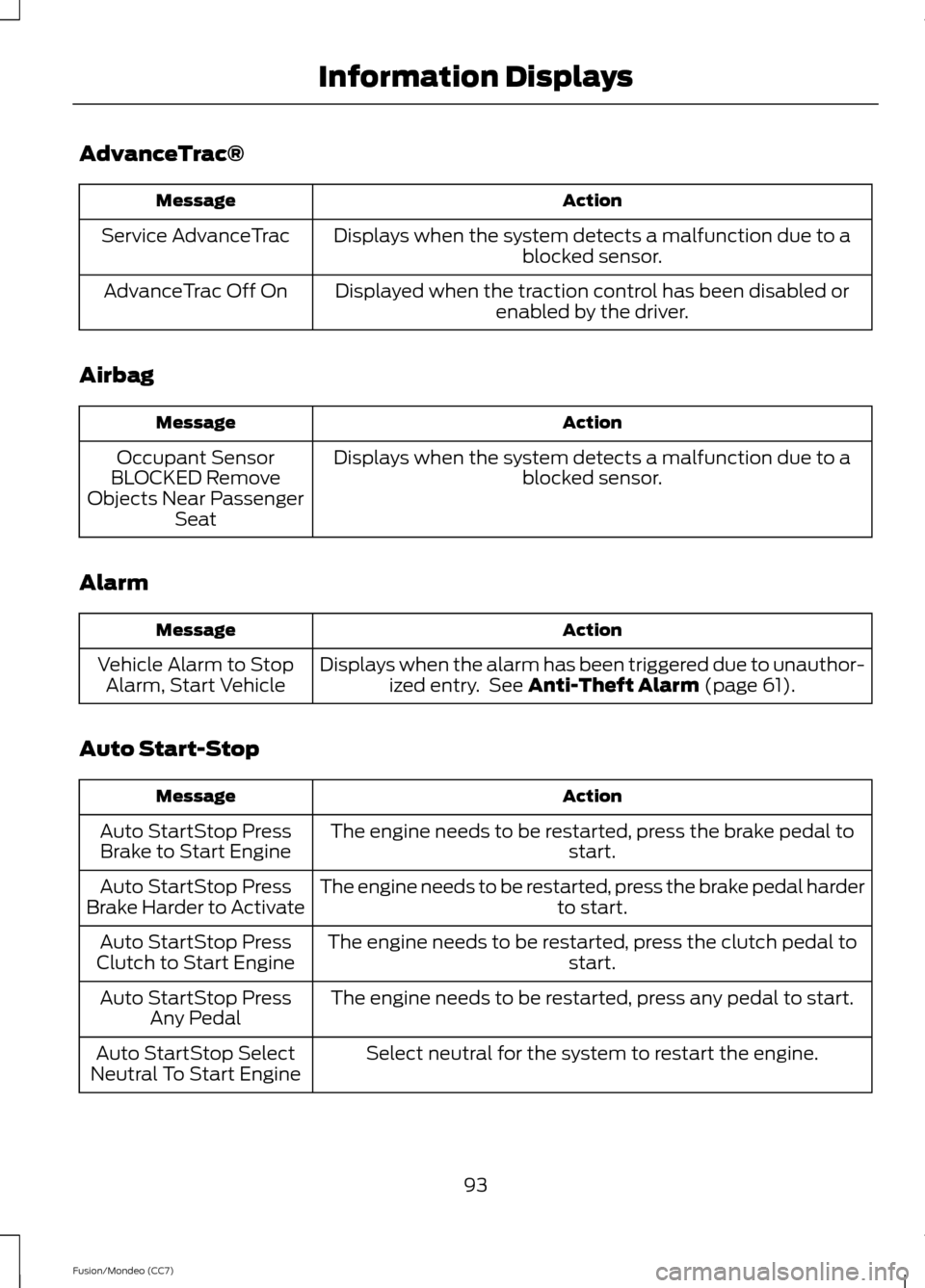
AdvanceTrac®
Action
Message
Displays when the system detects a malfunction due to a blocked sensor.
Service AdvanceTrac
Displayed when the traction control has been disabled orenabled by the driver.
AdvanceTrac Off On
Airbag Action
Message
Displays when the system detects a malfunction due to a blocked sensor.
Occupant Sensor
BLOCKED Remove
Objects Near Passenger Seat
Alarm Action
Message
Displays when the alarm has been triggered due to unauthor-ized entry. See Anti-Theft Alarm (page 61).
Vehicle Alarm to Stop
Alarm, Start Vehicle
Auto Start-Stop Action
Message
The engine needs to be restarted, press the brake pedal to start.
Auto StartStop Press
Brake to Start Engine
The engine needs to be restarted, press the brake pedal harder to start.
Auto StartStop Press
Brake Harder to Activate
The engine needs to be restarted, press the clutch pedal to start.
Auto StartStop Press
Clutch to Start Engine
The engine needs to be restarted, press any pedal to start.
Auto StartStop Press
Any Pedal
Select neutral for the system to restart the engine.
Auto StartStop Select
Neutral To Start Engine
93
Fusion/Mondeo (CC7) Information Displays
Page 97 of 458
Action
Message
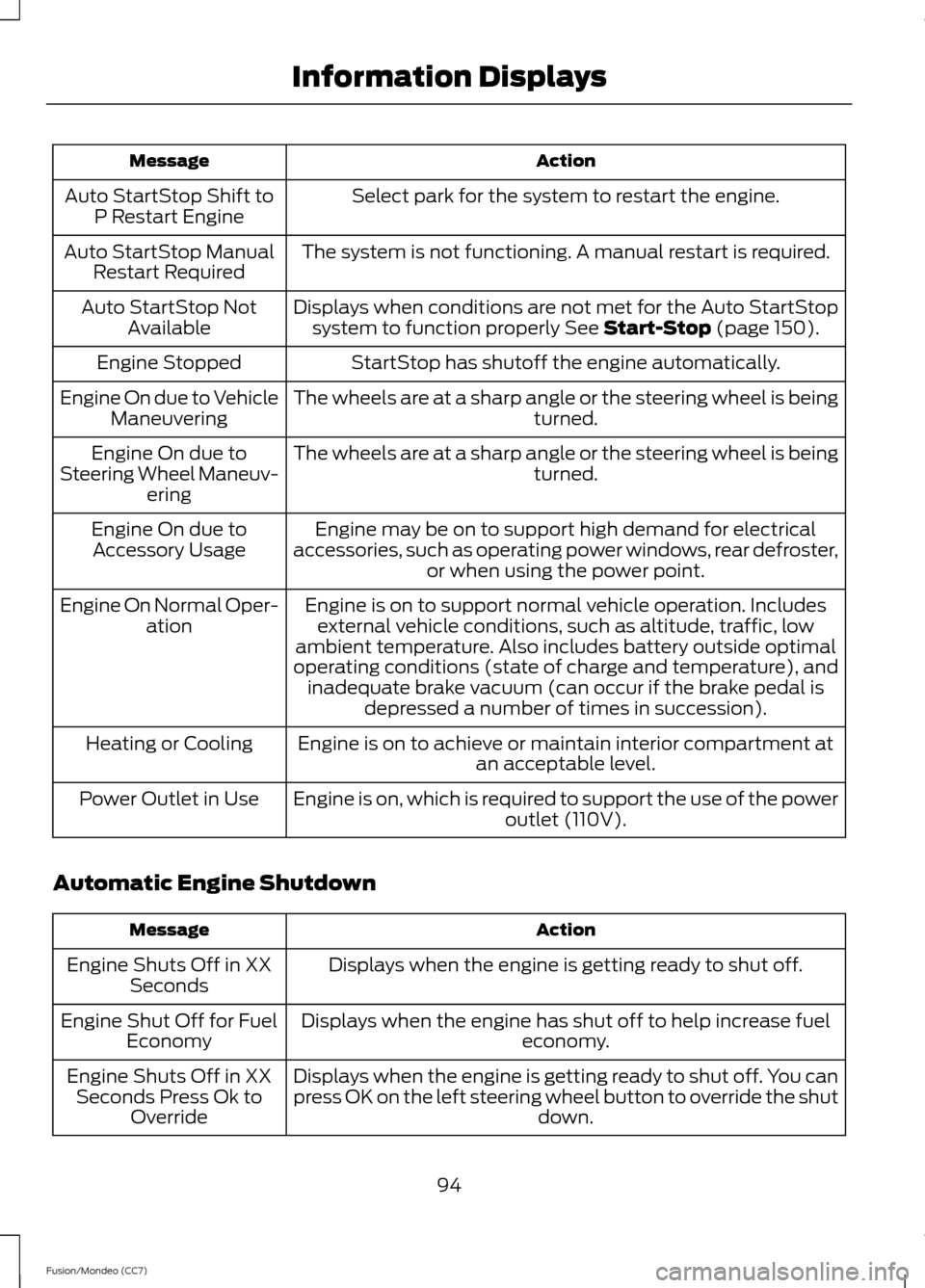
Select park for the system to restart the engine.
Auto StartStop Shift to
P Restart Engine
The system is not functioning. A manual restart is required.
Auto StartStop Manual
Restart Required
Displays when conditions are not met for the Auto StartStopsystem to function properly See Start-Stop (page 150).
Auto StartStop Not
Available
StartStop has shutoff the engine automatically.
Engine Stopped
The wheels are at a sharp angle or the steering wheel is being turned.
Engine On due to Vehicle
Maneuvering
The wheels are at a sharp angle or the steering wheel is being turned.
Engine On due to
Steering Wheel Maneuv- ering
Engine may be on to support high demand for electrical
accessories, such as operating power windows, rear defroster, or when using the power point.
Engine On due to
Accessory Usage
Engine is on to support normal vehicle operation. Includesexternal vehicle conditions, such as altitude, traffic, low
ambient temperature. Also includes battery outside optimal
operating conditions (state of charge and temperature), and inadequate brake vacuum (can occur if the brake pedal is depressed a number of times in succession).
Engine On Normal Oper-
ation
Engine is on to achieve or maintain interior compartment at an acceptable level.
Heating or Cooling
Engine is on, which is required to support the use of the power outlet (110V).
Power Outlet in Use
Automatic Engine Shutdown Action
Message
Displays when the engine is getting ready to shut off.
Engine Shuts Off in XX
Seconds
Displays when the engine has shut off to help increase fuel economy.
Engine Shut Off for Fuel
Economy
Displays when the engine is getting ready to shut off. You can
press OK on the left steering wheel button to override the shut down.
Engine Shuts Off in XX
Seconds Press Ok to Override
94
Fusion/Mondeo (CC7) Information Displays
Page 101 of 458
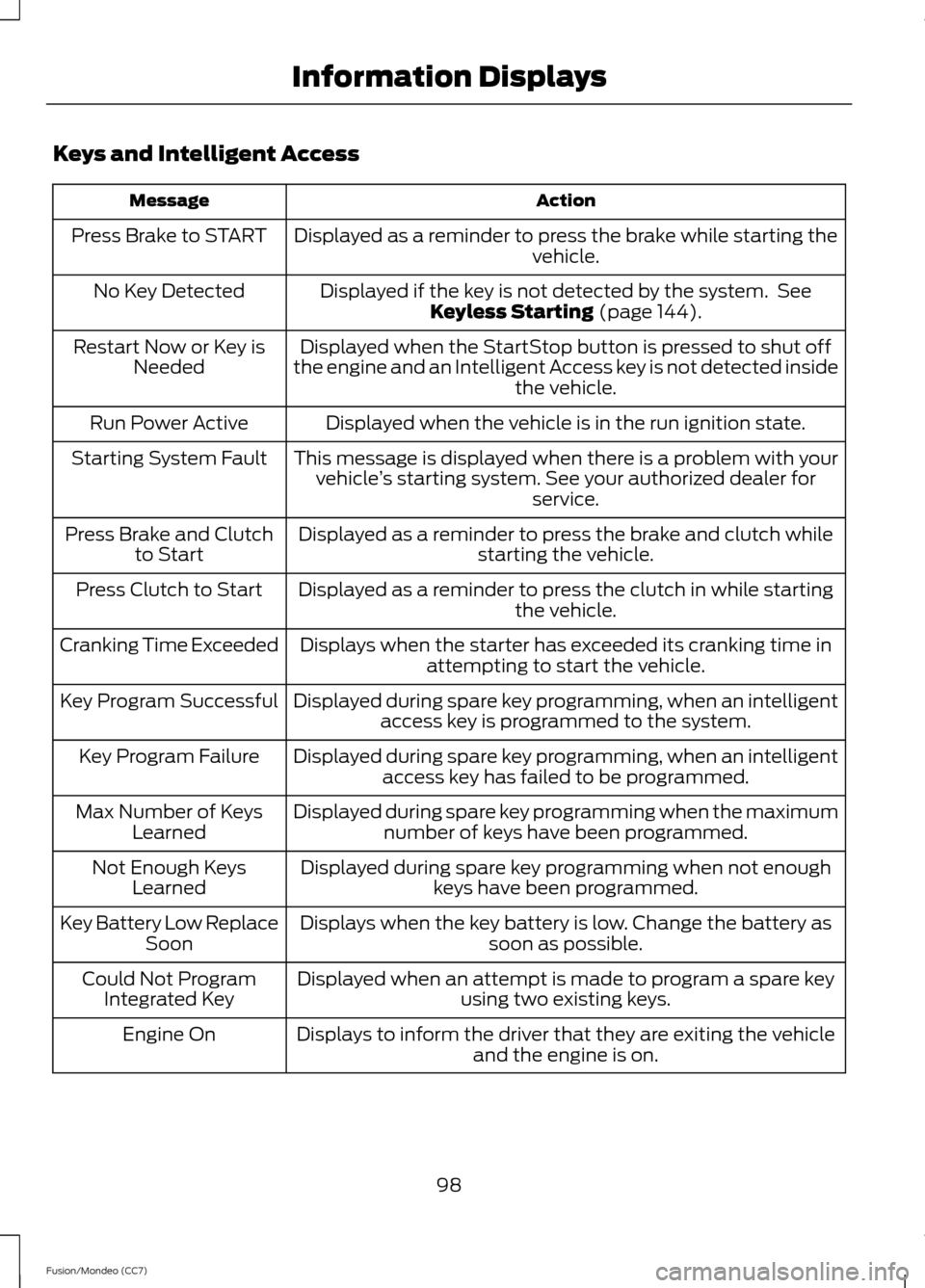
Keys and Intelligent Access
Action
Message
Displayed as a reminder to press the brake while starting the vehicle.
Press Brake to START
Displayed if the key is not detected by the system. SeeKeyless Starting (page 144).
No Key Detected
Displayed when the StartStop button is pressed to shut off
the engine and an Intelligent Access key is not detected inside the vehicle.
Restart Now or Key is
Needed
Displayed when the vehicle is in the run ignition state.
Run Power Active
This message is displayed when there is a problem with yourvehicle ’s starting system. See your authorized dealer for
service.
Starting System Fault
Displayed as a reminder to press the brake and clutch whilestarting the vehicle.
Press Brake and Clutch
to Start
Displayed as a reminder to press the clutch in while starting the vehicle.
Press Clutch to Start
Displays when the starter has exceeded its cranking time inattempting to start the vehicle.
Cranking Time Exceeded
Displayed during spare key programming, when an intelligentaccess key is programmed to the system.
Key Program Successful
Displayed during spare key programming, when an intelligentaccess key has failed to be programmed.
Key Program Failure
Displayed during spare key programming when the maximumnumber of keys have been programmed.
Max Number of Keys
Learned
Displayed during spare key programming when not enoughkeys have been programmed.
Not Enough Keys
Learned
Displays when the key battery is low. Change the battery as soon as possible.
Key Battery Low Replace
Soon
Displayed when an attempt is made to program a spare key using two existing keys.
Could Not Program
Integrated Key
Displays to inform the driver that they are exiting the vehicleand the engine is on.
Engine On
98
Fusion/Mondeo (CC7) Information Displays
Page 102 of 458
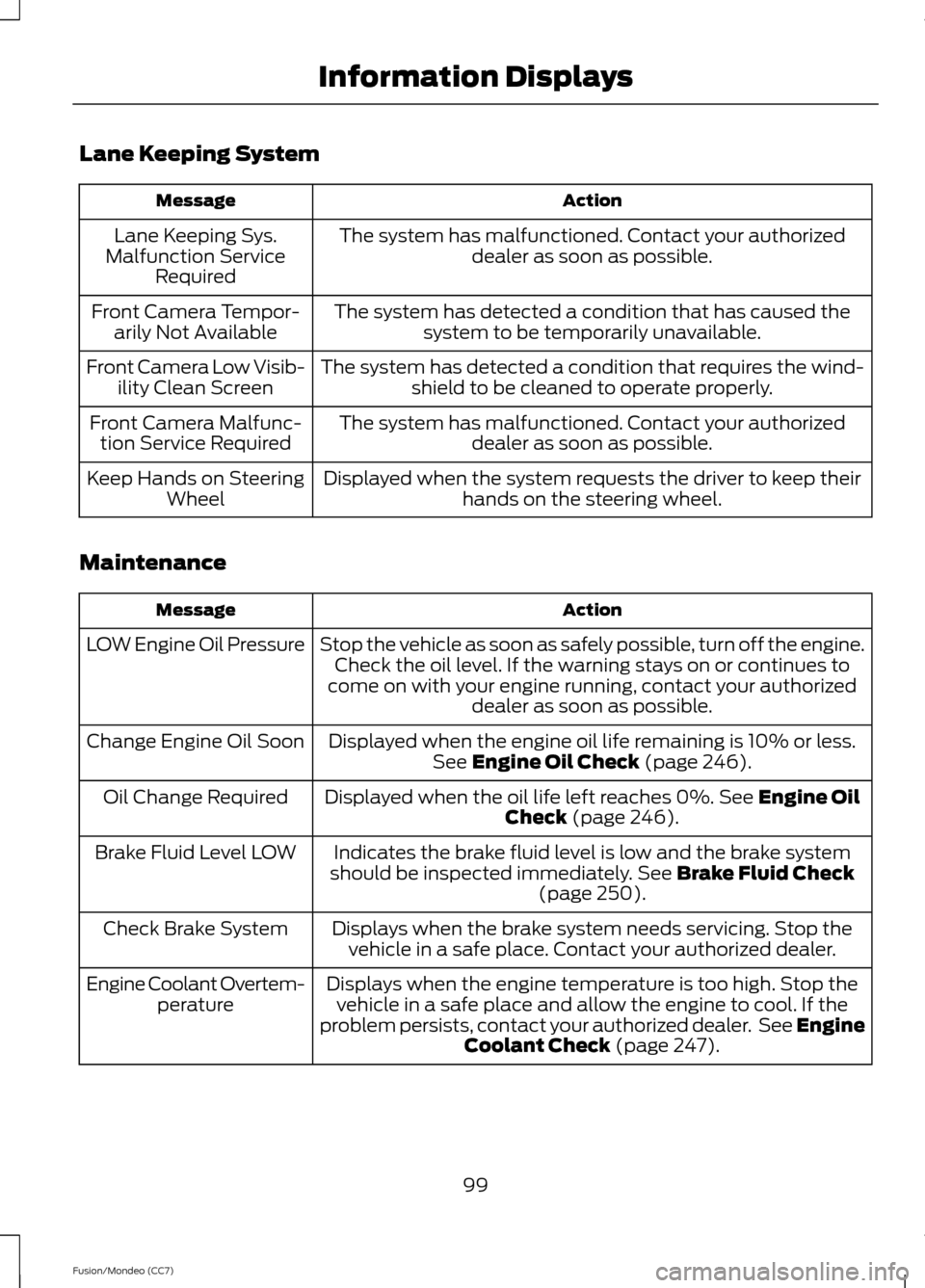
Lane Keeping System
Action
Message
The system has malfunctioned. Contact your authorizeddealer as soon as possible.
Lane Keeping Sys.
Malfunction Service Required
The system has detected a condition that has caused thesystem to be temporarily unavailable.
Front Camera Tempor-
arily Not Available
The system has detected a condition that requires the wind-shield to be cleaned to operate properly.
Front Camera Low Visib-
ility Clean Screen
The system has malfunctioned. Contact your authorizeddealer as soon as possible.
Front Camera Malfunc-
tion Service Required
Displayed when the system requests the driver to keep theirhands on the steering wheel.
Keep Hands on Steering
Wheel
Maintenance Action
Message
Stop the vehicle as soon as safely possible, turn off the engine.Check the oil level. If the warning stays on or continues to
come on with your engine running, contact your authorized dealer as soon as possible.
LOW Engine Oil Pressure
Displayed when the engine oil life remaining is 10% or less.See Engine Oil Check (page 246).
Change Engine Oil Soon
Displayed when the oil life left reaches 0%.
See Engine Oil
Check (page 246).
Oil Change Required
Indicates the brake fluid level is low and the brake system
should be inspected immediately.
See Brake Fluid Check
(page 250).
Brake Fluid Level LOW
Displays when the brake system needs servicing. Stop thevehicle in a safe place. Contact your authorized dealer.
Check Brake System
Displays when the engine temperature is too high. Stop thevehicle in a safe place and allow the engine to cool. If the
problem persists, contact your authorized dealer. See
Engine
Coolant Check (page 247).
Engine Coolant Overtem-
perature
99
Fusion/Mondeo (CC7) Information Displays
Page 103 of 458
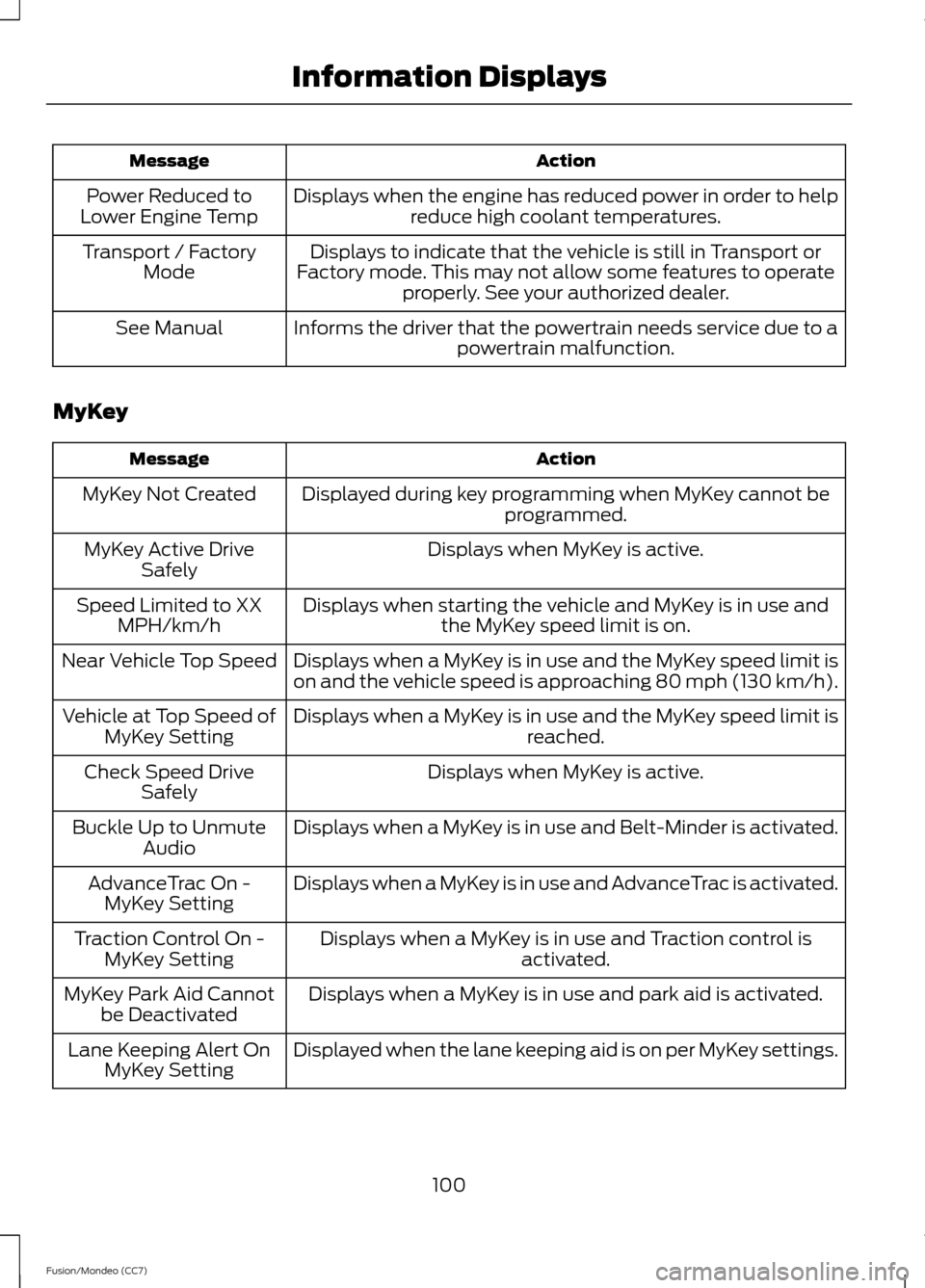
Action
Message
Displays when the engine has reduced power in order to helpreduce high coolant temperatures.
Power Reduced to
Lower Engine Temp
Displays to indicate that the vehicle is still in Transport or
Factory mode. This may not allow some features to operate properly. See your authorized dealer.
Transport / Factory
Mode
Informs the driver that the powertrain needs service due to a powertrain malfunction.
See Manual
MyKey Action
Message
Displayed during key programming when MyKey cannot be programmed.
MyKey Not Created
Displays when MyKey is active.
MyKey Active Drive
Safely
Displays when starting the vehicle and MyKey is in use andthe MyKey speed limit is on.
Speed Limited to XX
MPH/km/h
Displays when a MyKey is in use and the MyKey speed limit is
on and the vehicle speed is approaching 80 mph (130 km/h).
Near Vehicle Top Speed
Displays when a MyKey is in use and the MyKey speed limit is reached.
Vehicle at Top Speed of
MyKey Setting
Displays when MyKey is active.
Check Speed Drive
Safely
Displays when a MyKey is in use and Belt-Minder is activated.
Buckle Up to Unmute
Audio
Displays when a MyKey is in use and AdvanceTrac is activated.
AdvanceTrac On -
MyKey Setting
Displays when a MyKey is in use and Traction control isactivated.
Traction Control On -
MyKey Setting
Displays when a MyKey is in use and park aid is activated.
MyKey Park Aid Cannot
be Deactivated
Displayed when the lane keeping aid is on per MyKey settings.
Lane Keeping Alert On
MyKey Setting
100
Fusion/Mondeo (CC7) Information Displays
Page 104 of 458
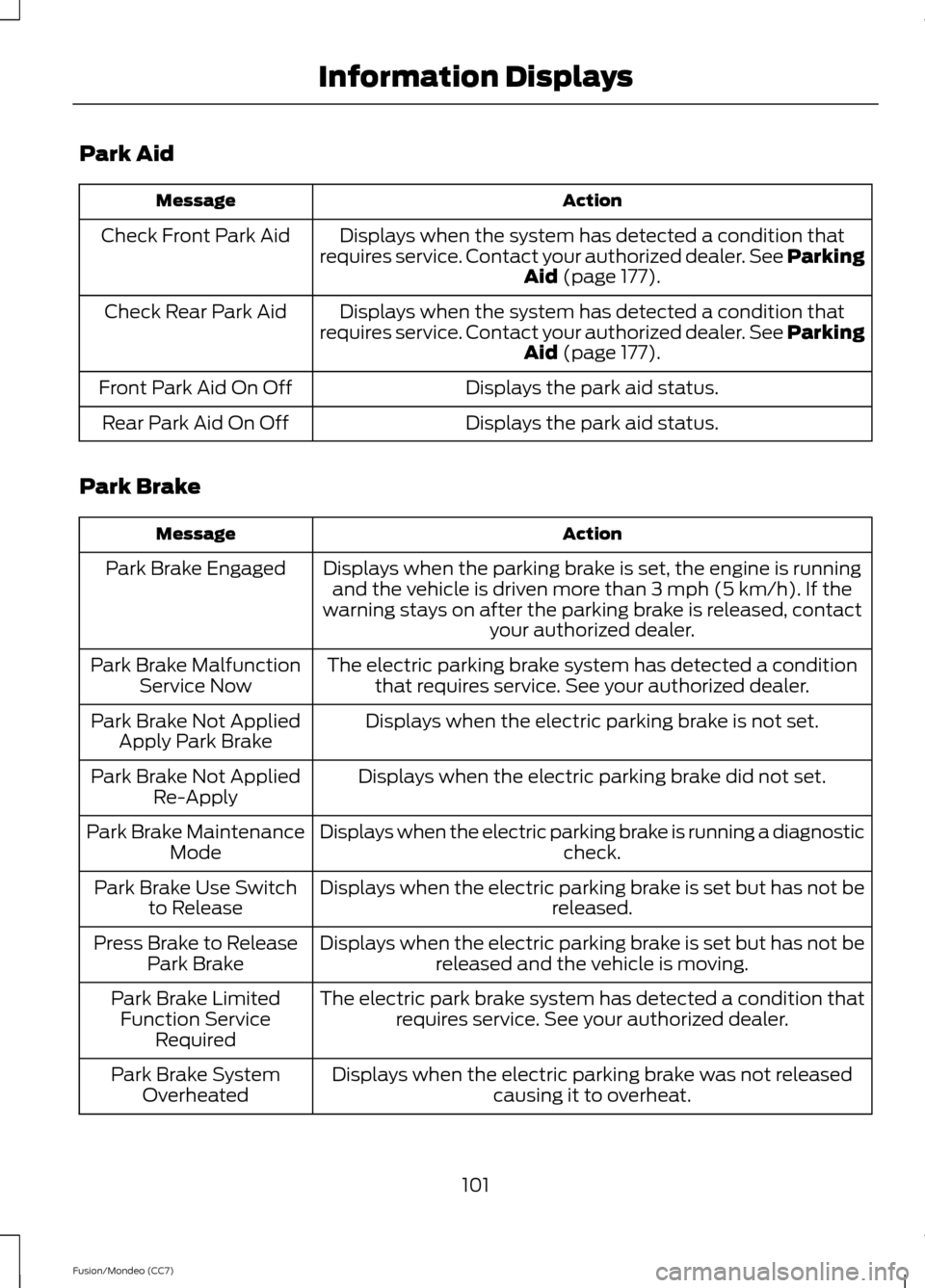
Park Aid
Action
Message
Displays when the system has detected a condition that
requires service. Contact your authorized dealer. See Parking Aid (page 177).
Check Front Park Aid
Displays when the system has detected a condition that
requires service. Contact your authorized dealer. See Parking Aid
(page 177).
Check Rear Park Aid
Displays the park aid status.
Front Park Aid On Off
Displays the park aid status.
Rear Park Aid On Off
Park Brake Action
Message
Displays when the parking brake is set, the engine is runningand the vehicle is driven more than 3 mph (5 km/h). If the
warning stays on after the parking brake is released, contact your authorized dealer.
Park Brake Engaged
The electric parking brake system has detected a conditionthat requires service. See your authorized dealer.
Park Brake Malfunction
Service Now
Displays when the electric parking brake is not set.
Park Brake Not Applied
Apply Park Brake
Displays when the electric parking brake did not set.
Park Brake Not Applied
Re-Apply
Displays when the electric parking brake is running a diagnostic check.
Park Brake Maintenance
Mode
Displays when the electric parking brake is set but has not be released.
Park Brake Use Switch
to Release
Displays when the electric parking brake is set but has not bereleased and the vehicle is moving.
Press Brake to Release
Park Brake
The electric park brake system has detected a condition thatrequires service. See your authorized dealer.
Park Brake Limited
Function Service Required
Displays when the electric parking brake was not releasedcausing it to overheat.
Park Brake System
Overheated
101
Fusion/Mondeo (CC7) Information Displays
Page 105 of 458
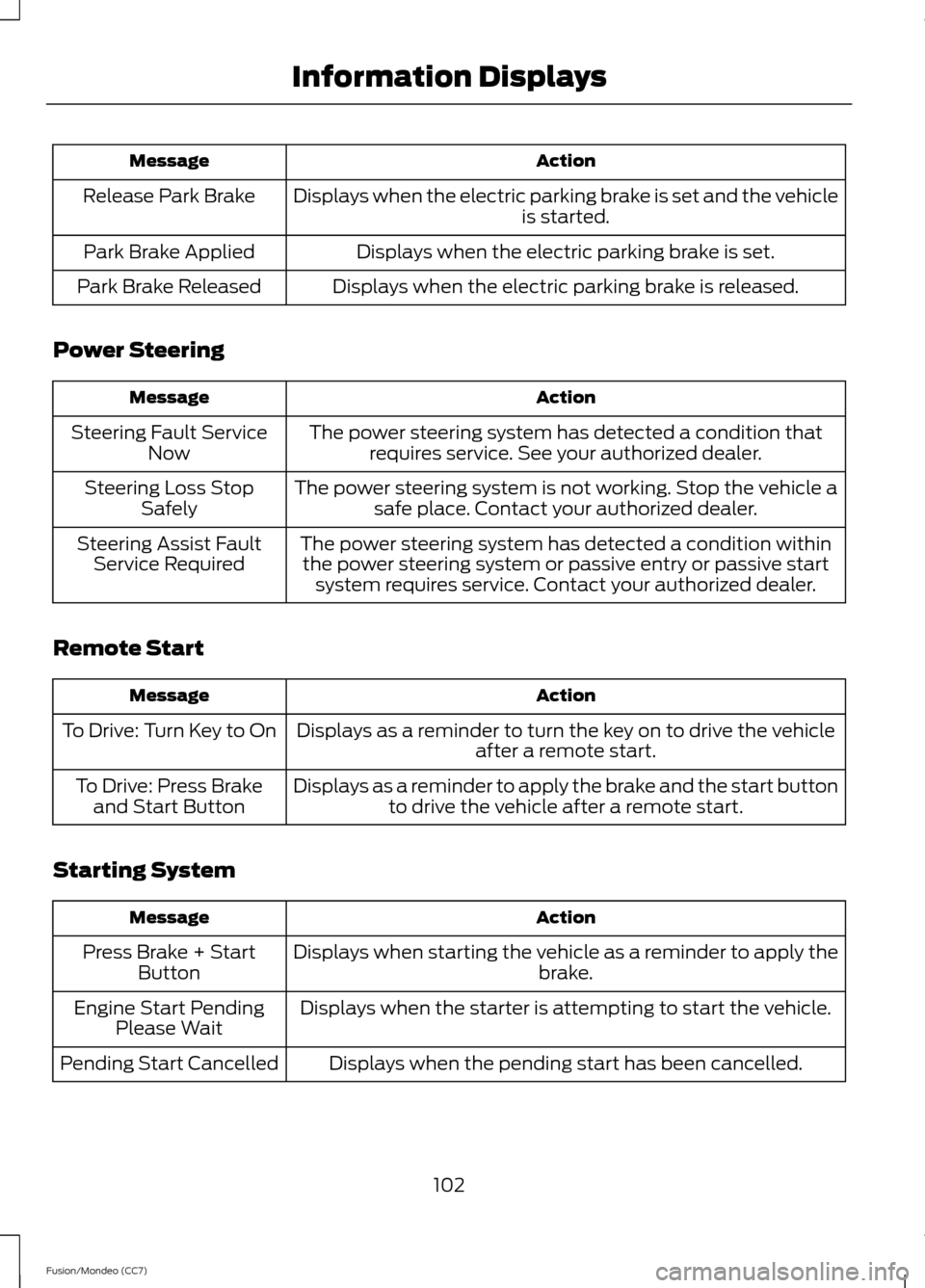
Action
Message
Displays when the electric parking brake is set and the vehicle is started.
Release Park Brake
Displays when the electric parking brake is set.
Park Brake Applied
Displays when the electric parking brake is released.
Park Brake Released
Power Steering Action
Message
The power steering system has detected a condition thatrequires service. See your authorized dealer.
Steering Fault Service
Now
The power steering system is not working. Stop the vehicle asafe place. Contact your authorized dealer.
Steering Loss Stop
Safely
The power steering system has detected a condition withinthe power steering system or passive entry or passive start system requires service. Contact your authorized dealer.
Steering Assist Fault
Service Required
Remote Start Action
Message
Displays as a reminder to turn the key on to drive the vehicle after a remote start.
To Drive: Turn Key to On
Displays as a reminder to apply the brake and the start buttonto drive the vehicle after a remote start.
To Drive: Press Brake
and Start Button
Starting System Action
Message
Displays when starting the vehicle as a reminder to apply the brake.
Press Brake + Start
Button
Displays when the starter is attempting to start the vehicle.
Engine Start Pending
Please Wait
Displays when the pending start has been cancelled.
Pending Start Cancelled
102
Fusion/Mondeo (CC7) Information Displays
Page 119 of 458
AUXILIARY INPUT JACK
WARNINGS
Driving while distracted can result in
loss of vehicle control, accident and
injury. We strongly recommend that
you use extreme caution when using any
device or feature that may take your focus
off the road. Your primary responsibility is
the safe operation of your vehicle. We
recommend against the use of any
handheld device while driving and
encourage the use of voice-operated
systems when possible. Make sure that
you are aware of applicable state and local
laws that may affect use of electronic
devices while driving. For safety reasons, do not connect
or adjust the settings on your
portable music player while your
vehicle is moving. Store the portable music player in a
secure location, such as the center
console or the glove box, when your
vehicle is moving. Hard objects may
become projectiles in a collision or sudden
stop, which may increase the risk of serious
injury. The audio extension cable must be
long enough to allow the portable music
player to be safely stored while your
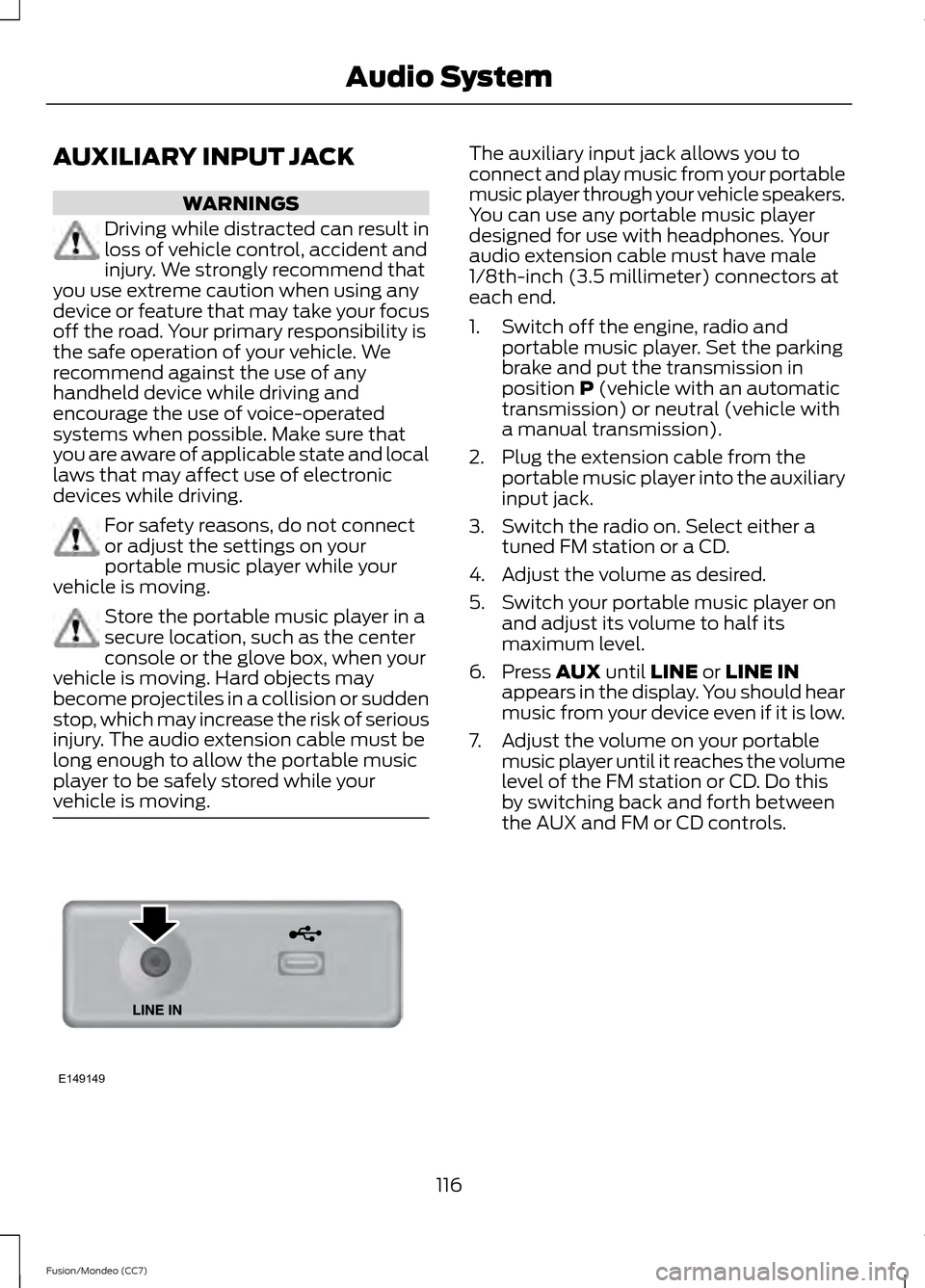
vehicle is moving. The auxiliary input jack allows you to
connect and play music from your portable
music player through your vehicle speakers.
You can use any portable music player
designed for use with headphones. Your
audio extension cable must have male
1/8th-inch (3.5 millimeter) connectors at
each end.
1. Switch off the engine, radio and
portable music player. Set the parking
brake and put the transmission in
position P (vehicle with an automatic
transmission) or neutral (vehicle with
a manual transmission).
2. Plug the extension cable from the portable music player into the auxiliary
input jack.
3. Switch the radio on. Select either a tuned FM station or a CD.
4. Adjust the volume as desired.
5. Switch your portable music player on and adjust its volume to half its
maximum level.
6. Press
AUX until LINE or LINE IN
appears in the display. You should hear
music from your device even if it is low.
7. Adjust the volume on your portable music player until it reaches the volume
level of the FM station or CD. Do this
by switching back and forth between
the AUX and FM or CD controls.
116
Fusion/Mondeo (CC7) Audio SystemE149149