battery FORD FUSION (AMERICAS) 2014 2.G Service Manual
[x] Cancel search | Manufacturer: FORD, Model Year: 2014, Model line: FUSION (AMERICAS), Model: FORD FUSION (AMERICAS) 2014 2.GPages: 458, PDF Size: 27.89 MB
Page 291 of 458
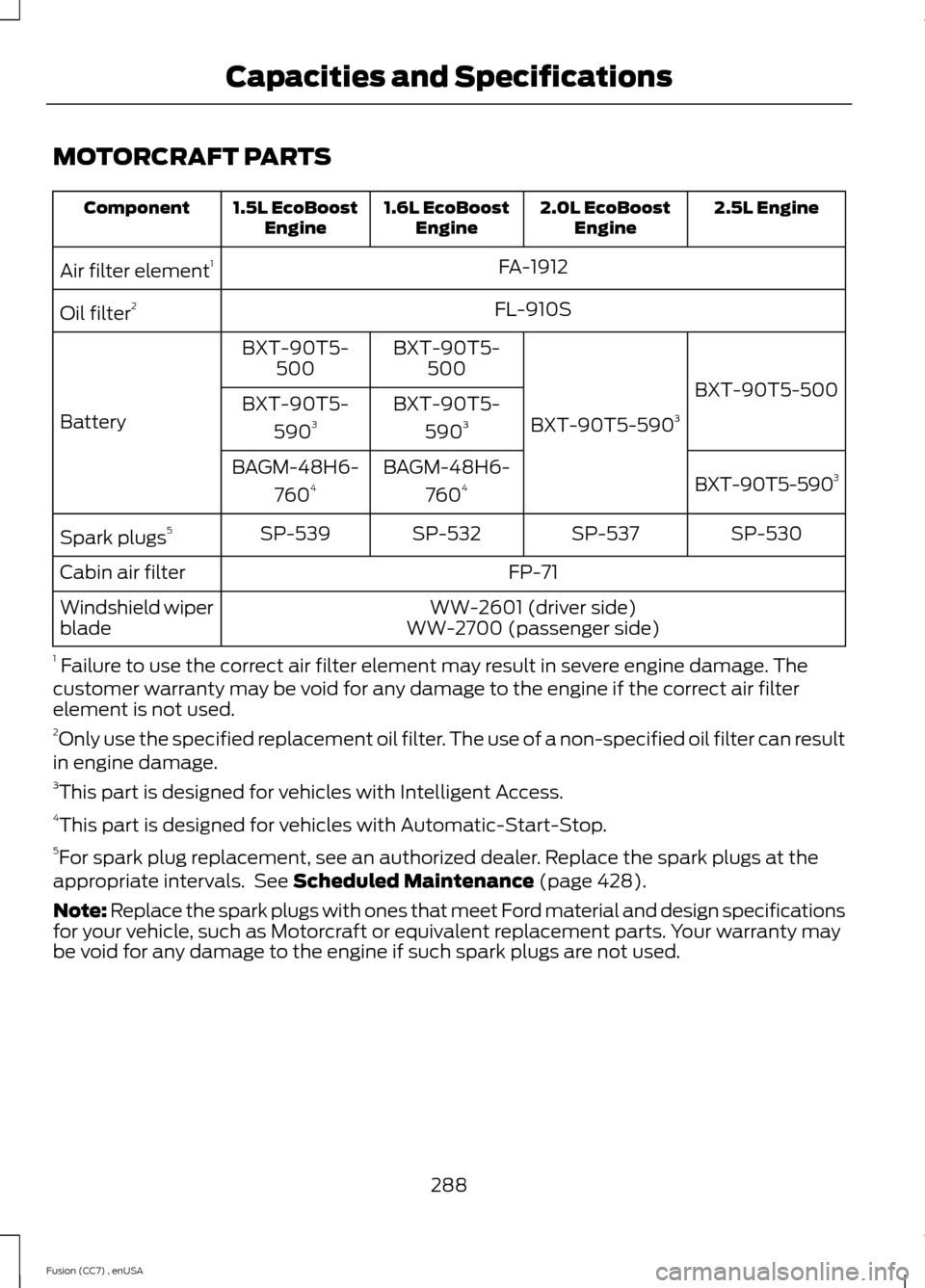
MOTORCRAFT PARTS
2.5L Engine2.0L EcoBoostEngine1.6L EcoBoostEngine1.5L EcoBoostEngineComponent
FA-1912Air filter element1
FL-910SOil filter2
BXT-90T5-500
BXT-90T5-5903
BXT-90T5-500BXT-90T5-500
BatteryBXT-90T5-
5903BXT-90T5-
5903
BXT-90T5-5903BAGM-48H6-
7604BAGM-48H6-
7604
SP-530SP-537SP-532SP-539Spark plugs5
FP-71Cabin air filter
WW-2601 (driver side)Windshield wiperbladeWW-2700 (passenger side)
1 Failure to use the correct air filter element may result in severe engine damage. Thecustomer warranty may be void for any damage to the engine if the correct air filterelement is not used.2Only use the specified replacement oil filter. The use of a non-specified oil filter can resultin engine damage.3This part is designed for vehicles with Intelligent Access.4This part is designed for vehicles with Automatic-Start-Stop.5For spark plug replacement, see an authorized dealer. Replace the spark plugs at theappropriate intervals. See Scheduled Maintenance (page 428).
Note: Replace the spark plugs with ones that meet Ford material and design specificationsfor your vehicle, such as Motorcraft or equivalent replacement parts. Your warranty maybe void for any damage to the engine if such spark plugs are not used.
288Fusion (CC7) , enUSACapacities and Specifications
Page 318 of 458
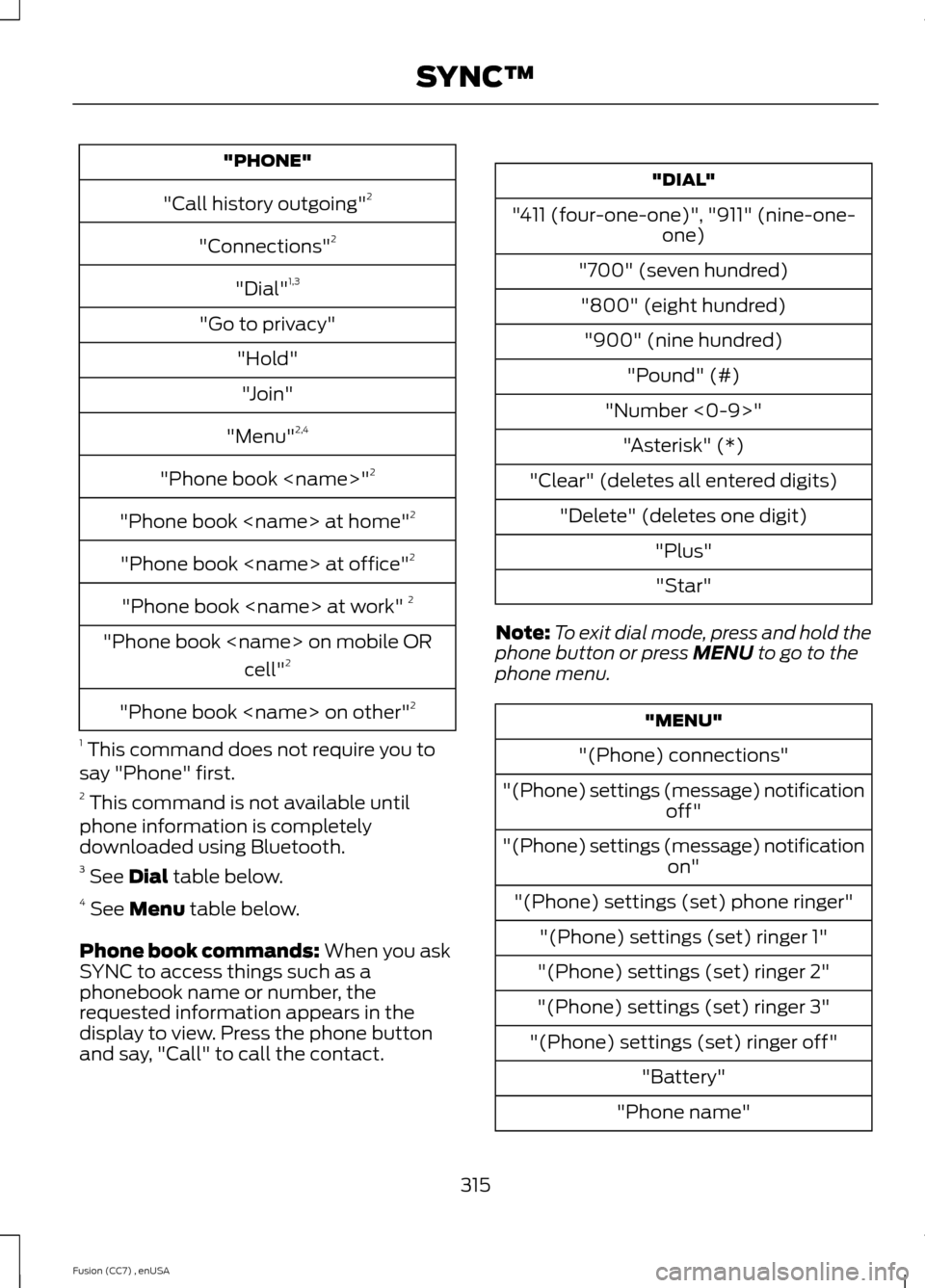
"PHONE"
"Call history outgoing"2
"Connections"2
"Dial"1,3
"Go to privacy"
"Hold"
"Join"
"Menu"2,4
"Phone book
"Phone book
"Phone book
"Phone book
"Phone book
cell"2
"Phone book
1 This command does not require you tosay "Phone" first.2 This command is not available untilphone information is completelydownloaded using Bluetooth.3 See Dial table below.4 See Menu table below.
Phone book commands: When you askSYNC to access things such as aphonebook name or number, therequested information appears in thedisplay to view. Press the phone buttonand say, "Call" to call the contact.
"DIAL"
"411 (four-one-one)", "911" (nine-one-one)
"700" (seven hundred)
"800" (eight hundred)
"900" (nine hundred)
"Pound" (#)
"Number <0-9>"
"Asterisk" (*)
"Clear" (deletes all entered digits)
"Delete" (deletes one digit)
"Plus"
"Star"
Note:To exit dial mode, press and hold thephone button or press MENU to go to thephone menu.
"MENU"
"(Phone) connections"
"(Phone) settings (message) notificationoff"
"(Phone) settings (message) notificationon"
"(Phone) settings (set) phone ringer"
"(Phone) settings (set) ringer 1"
"(Phone) settings (set) ringer 2"
"(Phone) settings (set) ringer 3"
"(Phone) settings (set) ringer off"
"Battery"
"Phone name"
315Fusion (CC7) , enUSASYNC™
Page 324 of 458
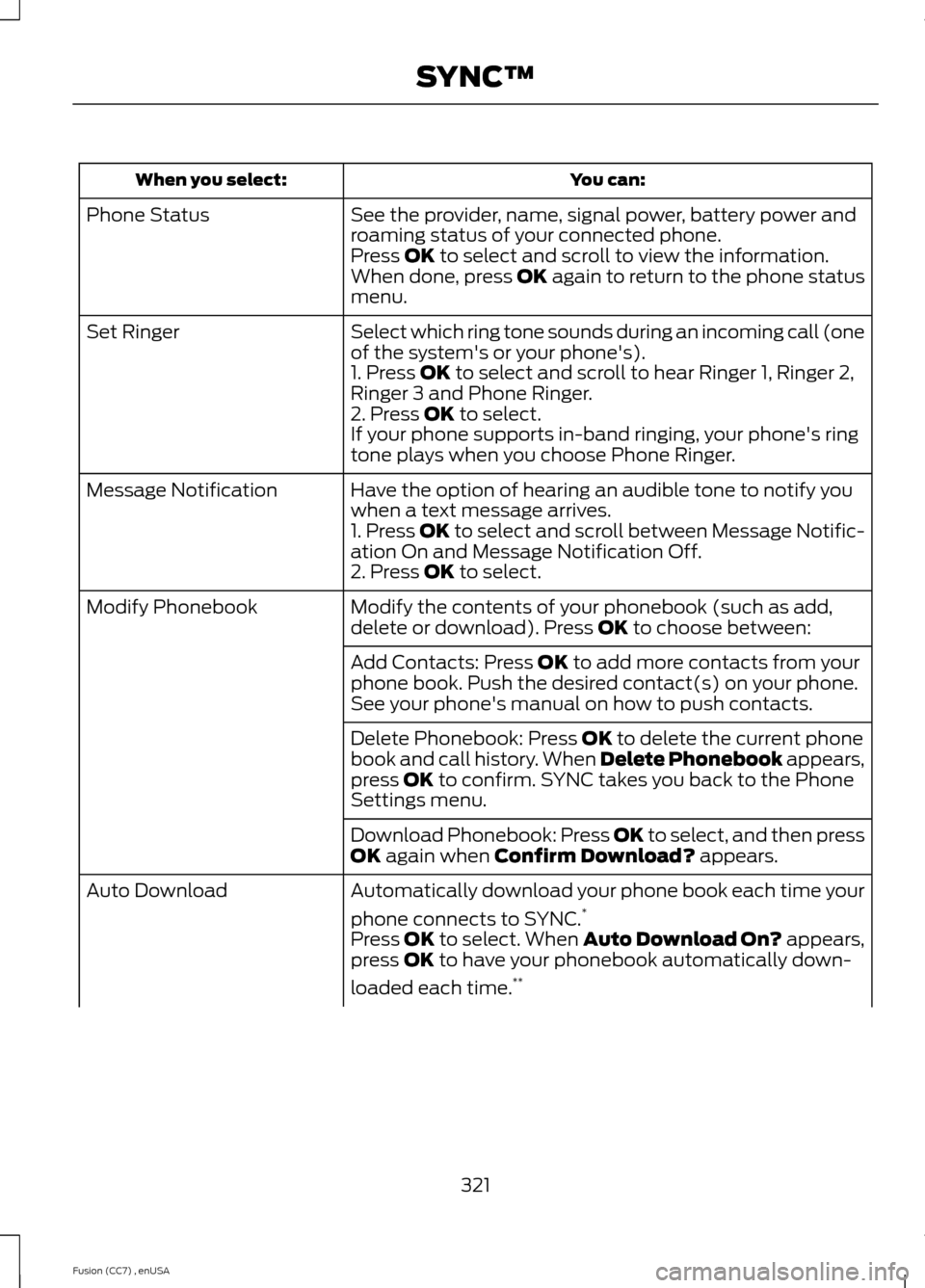
You can:When you select:
See the provider, name, signal power, battery power androaming status of your connected phone.Phone Status
Press OK to select and scroll to view the information.When done, press OK again to return to the phone statusmenu.
Select which ring tone sounds during an incoming call (oneof the system's or your phone's).Set Ringer
1. Press OK to select and scroll to hear Ringer 1, Ringer 2,Ringer 3 and Phone Ringer.2. Press OK to select.If your phone supports in-band ringing, your phone's ringtone plays when you choose Phone Ringer.
Have the option of hearing an audible tone to notify youwhen a text message arrives.Message Notification
1. Press OK to select and scroll between Message Notific-ation On and Message Notification Off.2. Press OK to select.
Modify the contents of your phonebook (such as add,delete or download). Press OK to choose between:Modify Phonebook
Add Contacts: Press OK to add more contacts from yourphone book. Push the desired contact(s) on your phone.See your phone's manual on how to push contacts.
Delete Phonebook: Press OK to delete the current phonebook and call history. When Delete Phonebook appears,press OK to confirm. SYNC takes you back to the PhoneSettings menu.
Download Phonebook: Press OK to select, and then pressOK again when Confirm Download? appears.
Automatically download your phone book each time your
phone connects to SYNC.*Auto Download
Press OK to select. When Auto Download On? appears,press OK to have your phonebook automatically down-
loaded each time.**
321Fusion (CC7) , enUSASYNC™
Page 329 of 458
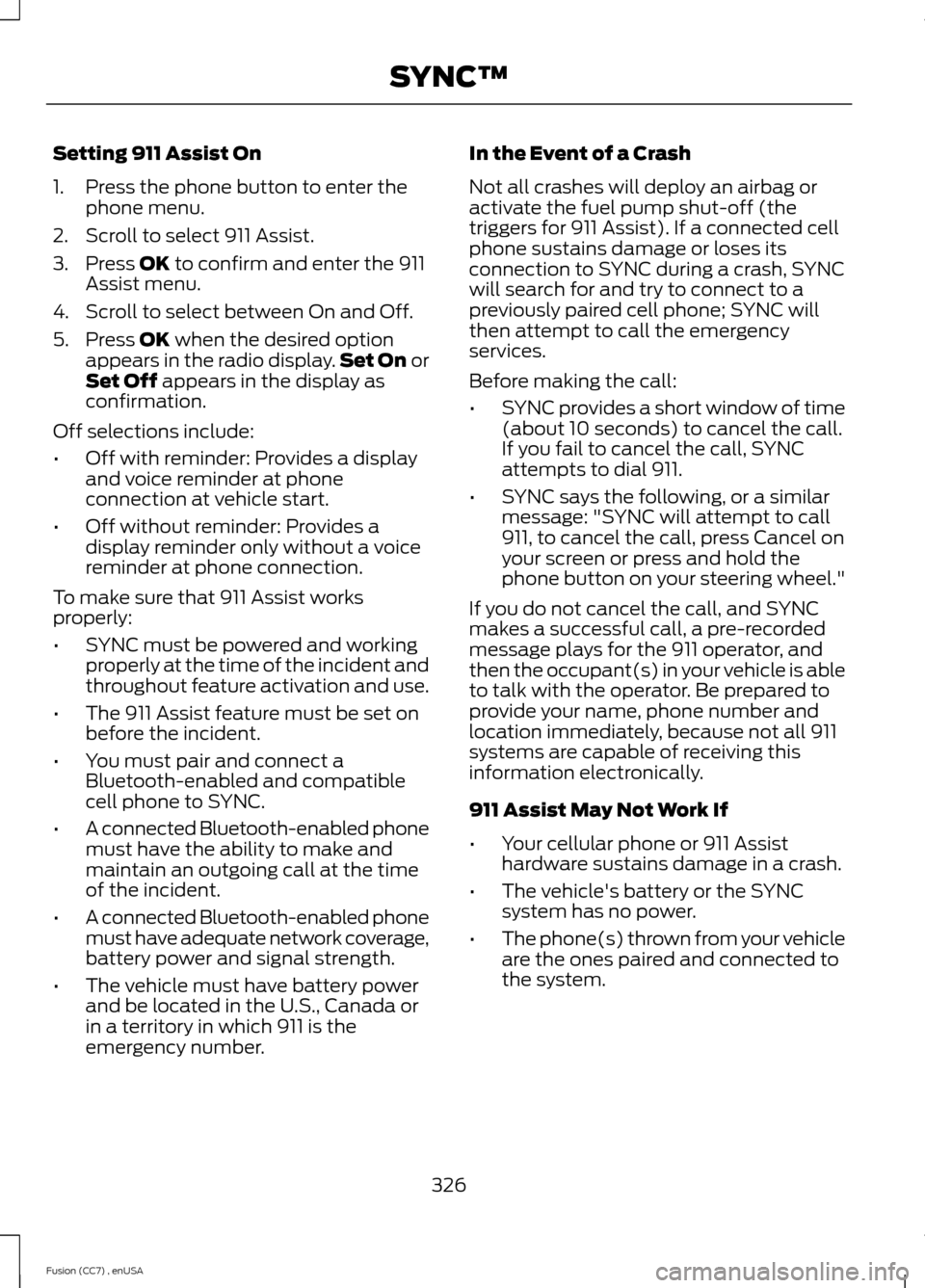
Setting 911 Assist On
1.Press the phone button to enter thephone menu.
2.Scroll to select 911 Assist.
3.Press OK to confirm and enter the 911Assist menu.
4.Scroll to select between On and Off.
5.Press OK when the desired optionappears in the radio display.Set On orSet Off appears in the display asconfirmation.
Off selections include:
•Off with reminder: Provides a displayand voice reminder at phoneconnection at vehicle start.
•Off without reminder: Provides adisplay reminder only without a voicereminder at phone connection.
To make sure that 911 Assist worksproperly:
•SYNC must be powered and workingproperly at the time of the incident andthroughout feature activation and use.
•The 911 Assist feature must be set onbefore the incident.
•You must pair and connect aBluetooth-enabled and compatiblecell phone to SYNC.
•A connected Bluetooth-enabled phonemust have the ability to make andmaintain an outgoing call at the timeof the incident.
•A connected Bluetooth-enabled phonemust have adequate network coverage,battery power and signal strength.
•The vehicle must have battery powerand be located in the U.S., Canada orin a territory in which 911 is theemergency number.
In the Event of a Crash
Not all crashes will deploy an airbag oractivate the fuel pump shut-off (thetriggers for 911 Assist). If a connected cellphone sustains damage or loses itsconnection to SYNC during a crash, SYNCwill search for and try to connect to apreviously paired cell phone; SYNC willthen attempt to call the emergencyservices.
Before making the call:
•SYNC provides a short window of time(about 10 seconds) to cancel the call.If you fail to cancel the call, SYNCattempts to dial 911.
•SYNC says the following, or a similarmessage: "SYNC will attempt to call911, to cancel the call, press Cancel onyour screen or press and hold thephone button on your steering wheel."
If you do not cancel the call, and SYNCmakes a successful call, a pre-recordedmessage plays for the 911 operator, andthen the occupant(s) in your vehicle is ableto talk with the operator. Be prepared toprovide your name, phone number andlocation immediately, because not all 911systems are capable of receiving thisinformation electronically.
911 Assist May Not Work If
•Your cellular phone or 911 Assisthardware sustains damage in a crash.
•The vehicle's battery or the SYNCsystem has no power.
•The phone(s) thrown from your vehicleare the ones paired and connected tothe system.
326Fusion (CC7) , enUSASYNC™
Page 343 of 458
You can:When you select:
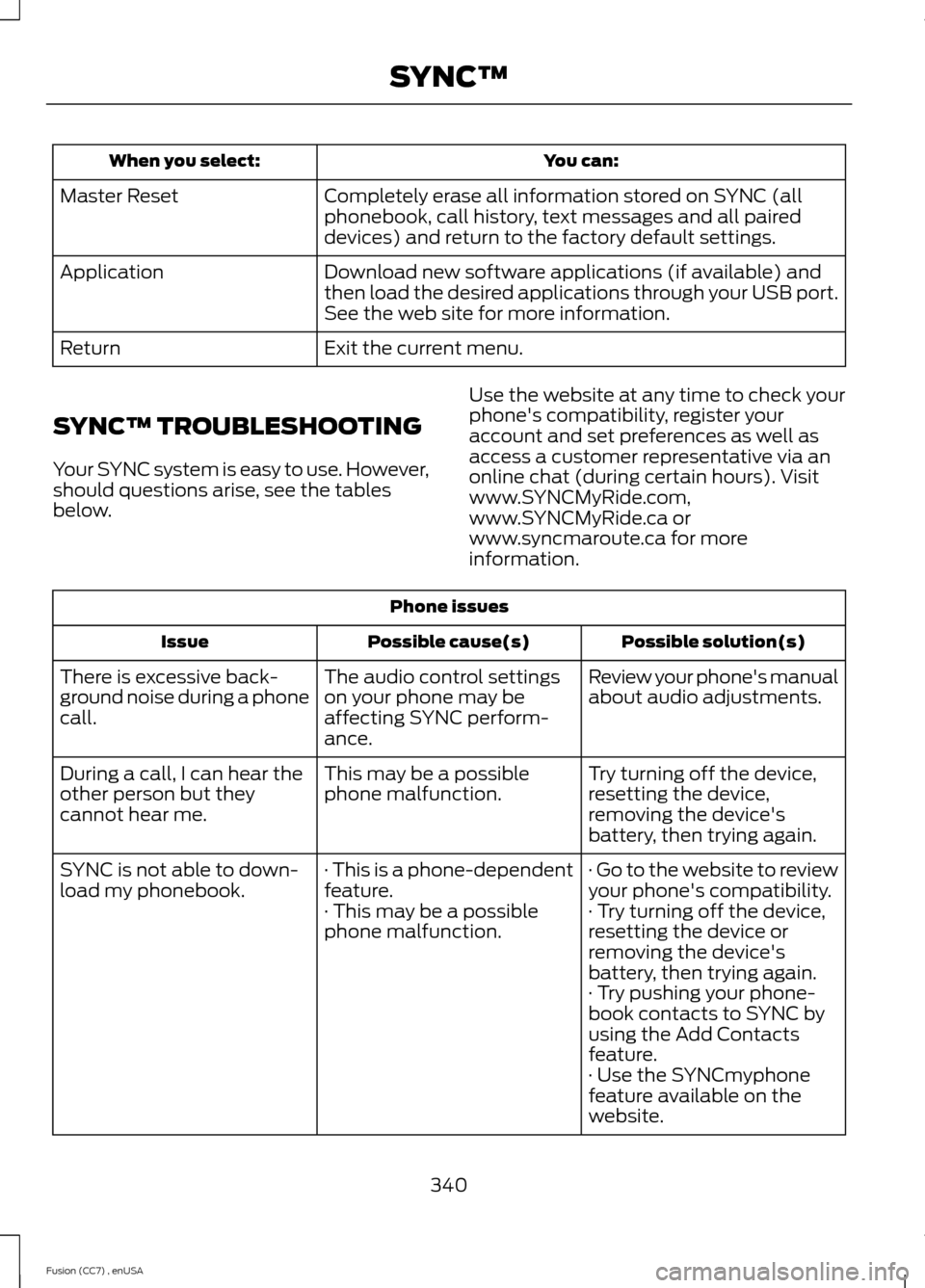
Completely erase all information stored on SYNC (allphonebook, call history, text messages and all paireddevices) and return to the factory default settings.
Master Reset
Download new software applications (if available) andthen load the desired applications through your USB port.See the web site for more information.
Application
Exit the current menu.Return
SYNC™ TROUBLESHOOTING
Your SYNC system is easy to use. However,should questions arise, see the tablesbelow.
Use the website at any time to check yourphone's compatibility, register youraccount and set preferences as well asaccess a customer representative via anonline chat (during certain hours). Visitwww.SYNCMyRide.com,www.SYNCMyRide.ca orwww.syncmaroute.ca for moreinformation.
Phone issues
Possible solution(s)Possible cause(s)Issue
Review your phone's manualabout audio adjustments.The audio control settingson your phone may beaffecting SYNC perform-ance.
There is excessive back-ground noise during a phonecall.
Try turning off the device,resetting the device,removing the device'sbattery, then trying again.
This may be a possiblephone malfunction.During a call, I can hear theother person but theycannot hear me.
· Go to the website to reviewyour phone's compatibility.· This is a phone-dependentfeature.SYNC is not able to down-load my phonebook.· Try turning off the device,resetting the device orremoving the device'sbattery, then trying again.
· This may be a possiblephone malfunction.
· Try pushing your phone-book contacts to SYNC byusing the Add Contactsfeature.· Use the SYNCmyphonefeature available on thewebsite.
340Fusion (CC7) , enUSASYNC™
Page 344 of 458
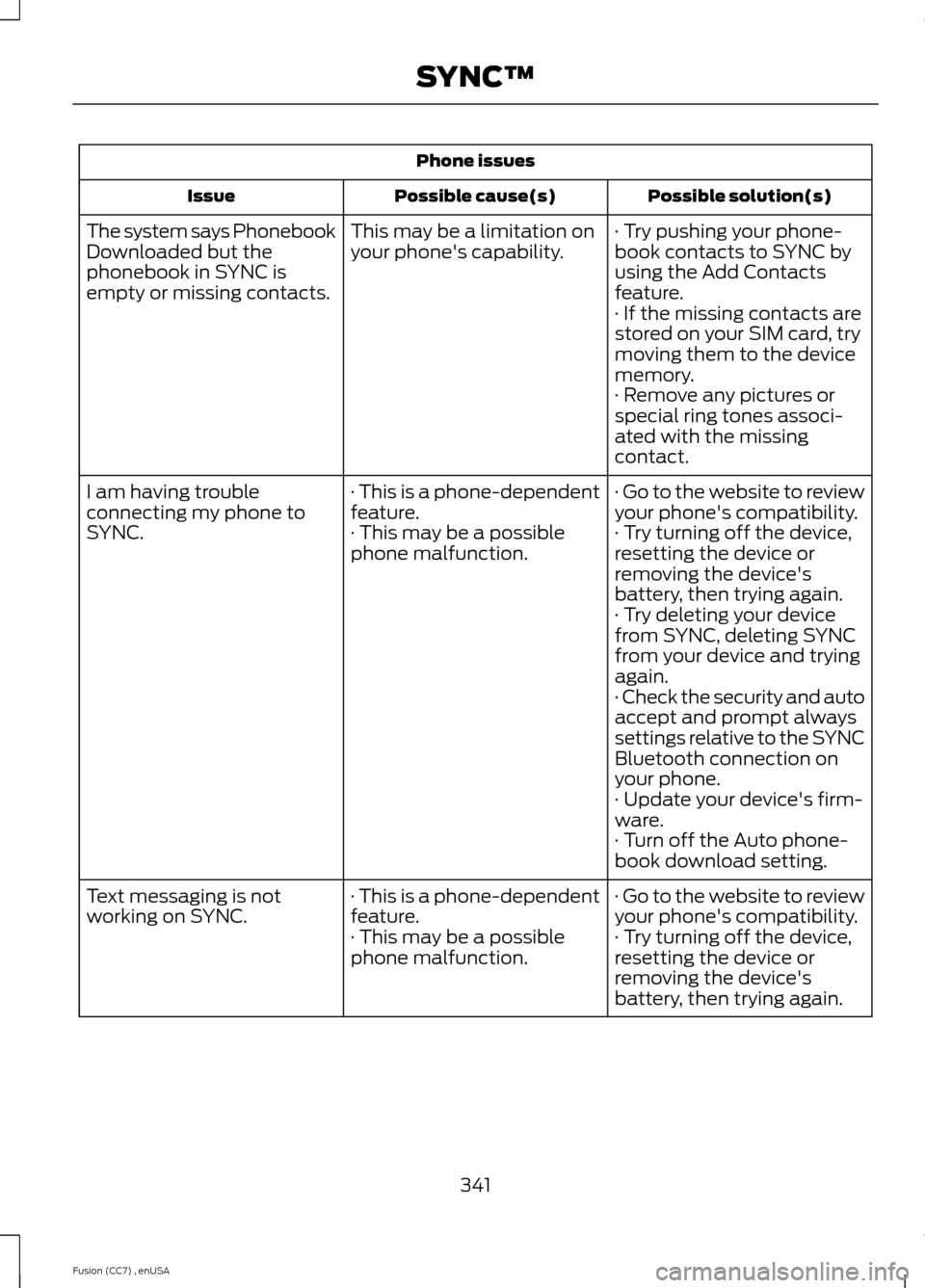
Phone issues
Possible solution(s)Possible cause(s)Issue
· Try pushing your phone-book contacts to SYNC byusing the Add Contactsfeature.
This may be a limitation onyour phone's capability.The system says PhonebookDownloaded but thephonebook in SYNC isempty or missing contacts.· If the missing contacts arestored on your SIM card, trymoving them to the devicememory.· Remove any pictures orspecial ring tones associ-ated with the missingcontact.
· Go to the website to reviewyour phone's compatibility.· This is a phone-dependentfeature.I am having troubleconnecting my phone toSYNC.· Try turning off the device,resetting the device orremoving the device'sbattery, then trying again.
· This may be a possiblephone malfunction.
· Try deleting your devicefrom SYNC, deleting SYNCfrom your device and tryingagain.· Check the security and autoaccept and prompt alwayssettings relative to the SYNCBluetooth connection onyour phone.· Update your device's firm-ware.· Turn off the Auto phone-book download setting.
· Go to the website to reviewyour phone's compatibility.· This is a phone-dependentfeature.Text messaging is notworking on SYNC.· Try turning off the device,resetting the device orremoving the device'sbattery, then trying again.
· This may be a possiblephone malfunction.
341Fusion (CC7) , enUSASYNC™
Page 345 of 458
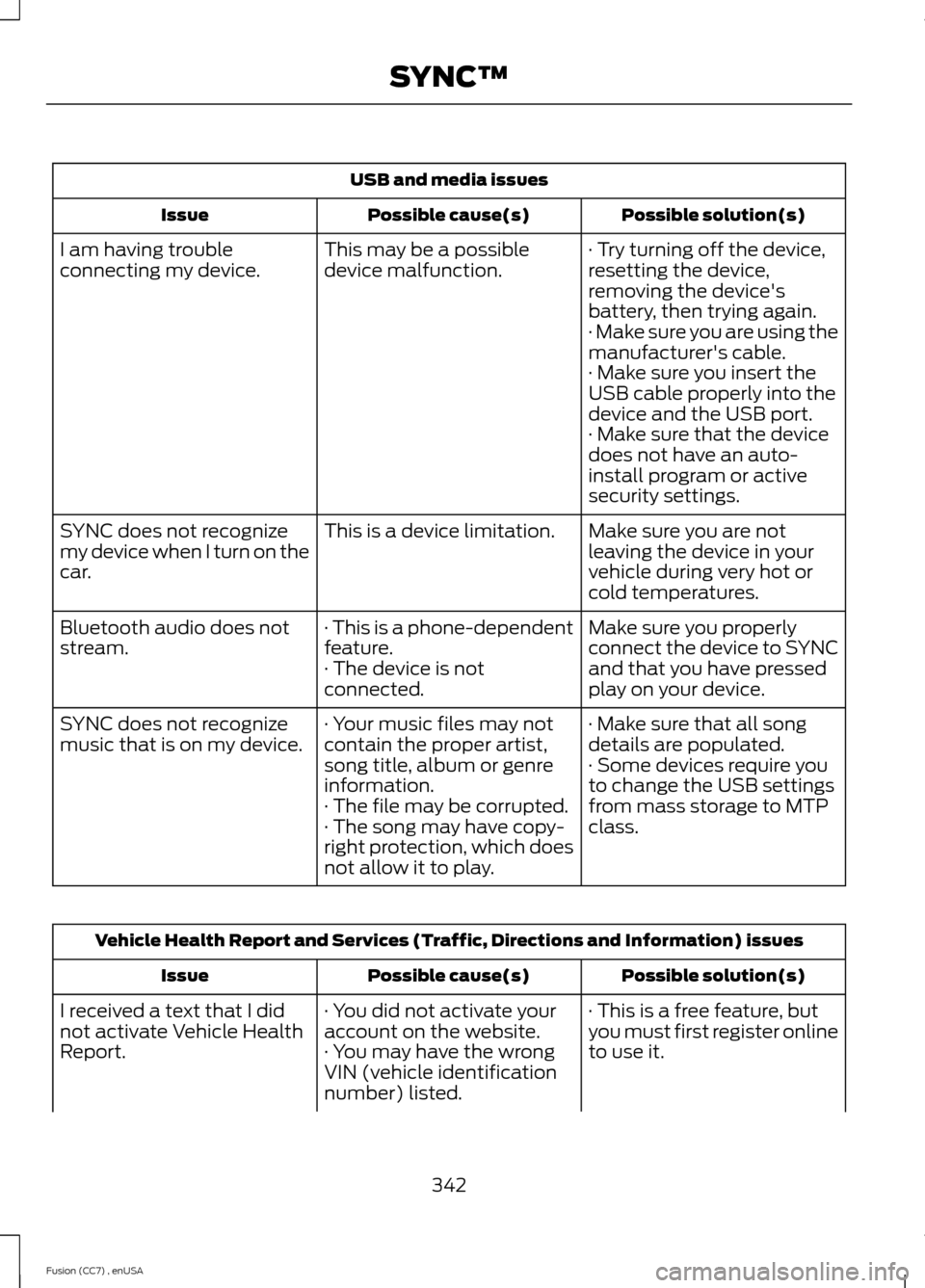
USB and media issues
Possible solution(s)Possible cause(s)Issue
· Try turning off the device,resetting the device,removing the device'sbattery, then trying again.
This may be a possibledevice malfunction.I am having troubleconnecting my device.
· Make sure you are using themanufacturer's cable.· Make sure you insert theUSB cable properly into thedevice and the USB port.· Make sure that the devicedoes not have an auto-install program or activesecurity settings.
Make sure you are notleaving the device in yourvehicle during very hot orcold temperatures.
This is a device limitation.SYNC does not recognizemy device when I turn on thecar.
Make sure you properlyconnect the device to SYNCand that you have pressedplay on your device.
· This is a phone-dependentfeature.· The device is notconnected.
Bluetooth audio does notstream.
· Make sure that all songdetails are populated.· Your music files may notcontain the proper artist,song title, album or genreinformation.
SYNC does not recognizemusic that is on my device.· Some devices require youto change the USB settingsfrom mass storage to MTPclass.· The file may be corrupted.· The song may have copy-right protection, which doesnot allow it to play.
Vehicle Health Report and Services (Traffic, Directions and Information) issues
Possible solution(s)Possible cause(s)Issue
· This is a free feature, butyou must first register onlineto use it.
· You did not activate youraccount on the website.· You may have the wrongVIN (vehicle identificationnumber) listed.
I received a text that I didnot activate Vehicle HealthReport.
342Fusion (CC7) , enUSASYNC™
Page 358 of 458
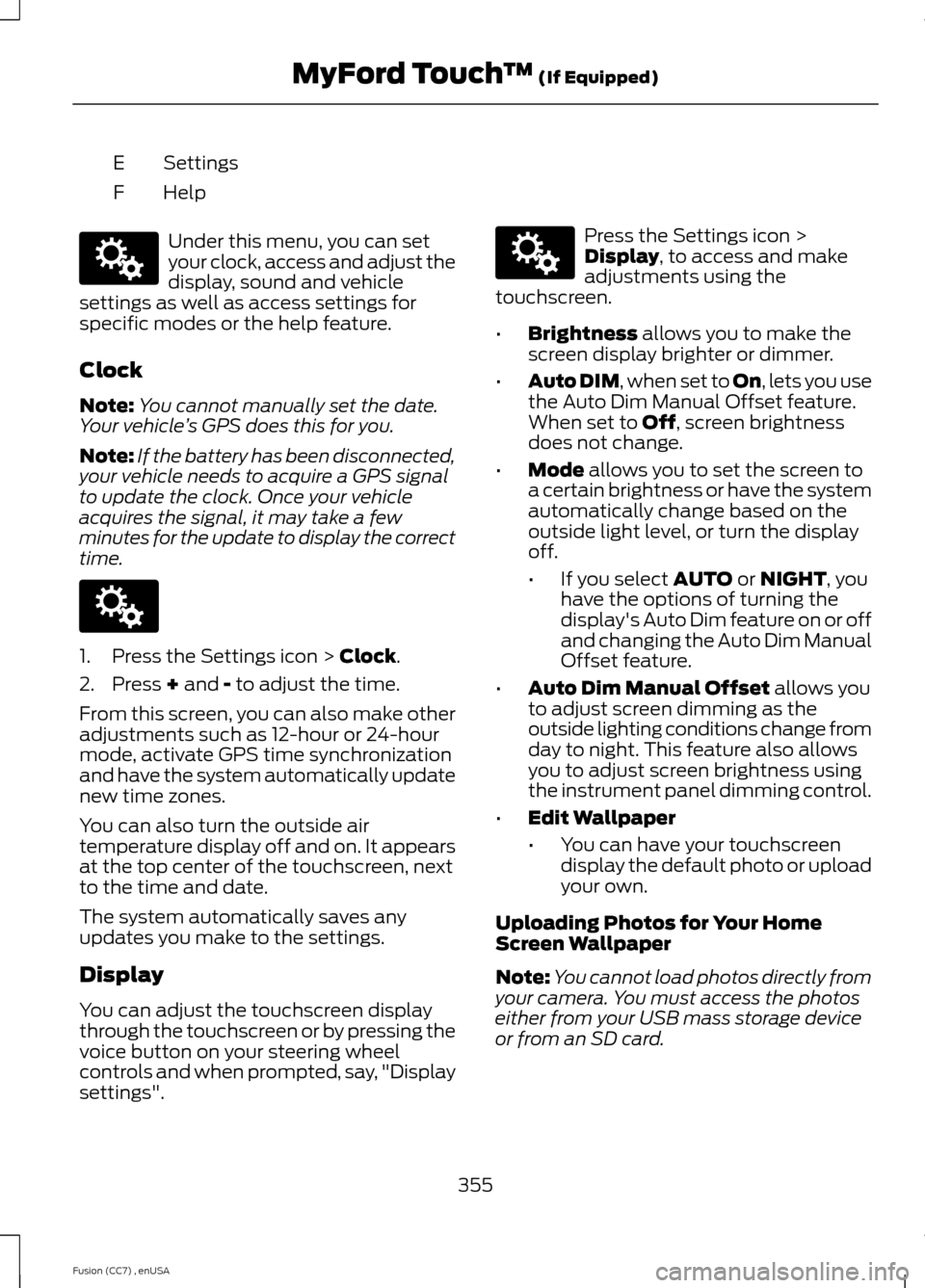
SettingsE
HelpF
Under this menu, you can setyour clock, access and adjust thedisplay, sound and vehiclesettings as well as access settings forspecific modes or the help feature.
Clock
Note:You cannot manually set the date.Your vehicle’s GPS does this for you.
Note:If the battery has been disconnected,your vehicle needs to acquire a GPS signalto update the clock. Once your vehicleacquires the signal, it may take a fewminutes for the update to display the correcttime.
1.Press the Settings icon > Clock.
2.Press + and - to adjust the time.
From this screen, you can also make otheradjustments such as 12-hour or 24-hourmode, activate GPS time synchronizationand have the system automatically updatenew time zones.
You can also turn the outside airtemperature display off and on. It appearsat the top center of the touchscreen, nextto the time and date.
The system automatically saves anyupdates you make to the settings.
Display
You can adjust the touchscreen displaythrough the touchscreen or by pressing thevoice button on your steering wheelcontrols and when prompted, say, "Displaysettings".
Press the Settings icon >Display, to access and makeadjustments using thetouchscreen.
•Brightness allows you to make thescreen display brighter or dimmer.
•Auto DIM, when set to On, lets you usethe Auto Dim Manual Offset feature.When set to Off, screen brightnessdoes not change.
•Mode allows you to set the screen toa certain brightness or have the systemautomatically change based on theoutside light level, or turn the displayoff.
•If you select AUTO or NIGHT, youhave the options of turning thedisplay's Auto Dim feature on or offand changing the Auto Dim ManualOffset feature.
•Auto Dim Manual Offset allows youto adjust screen dimming as theoutside lighting conditions change fromday to night. This feature also allowsyou to adjust screen brightness usingthe instrument panel dimming control.
•Edit Wallpaper
•You can have your touchscreendisplay the default photo or uploadyour own.
Uploading Photos for Your HomeScreen Wallpaper
Note:You cannot load photos directly fromyour camera. You must access the photoseither from your USB mass storage deviceor from an SD card.
355Fusion (CC7) , enUSAMyFord Touch™ (If Equipped)E142607 E142607 E142607
Page 397 of 458
Note:Before setting this feature on, makesure that you read the 911 Assist PrivacyNotice later in this section for importantinformation.
Note:If any user turns 911 Assist on or off,that setting applies for all paired phones. If911 Assist is turned off, either a voicemessage plays or a display message (oricon) comes on (or both) when your vehicleis started after a previously paired phoneconnects.
Note:Every phone operates differently.While SYNC 911 Assist works with mostcellular phones, some may have troubleusing this feature.
If a crash deploys an airbag (excludes kneeairbags and rear inflatable safety belts [ifequipped]) or activates the fuel pumpshut-off, your SYNC-equipped vehicle maybe able to contact emergency services bydialing 911 through a paired and connectedBluetooth-enabled phone. You can learnmore about the 911 Assist feature, visitwww.SYNCMyRide.com,www.SYNCMyRide.ca orwww.syncmaroute.ca.
See Supplementary Restraints System(page 35). Important informationregarding airbag deployment is in thischapter.
See Roadside Emergencies (page 215).Important information regarding the fuelpump shut-off is in this chapter.
Setting 911 Assist On
If your vehicle is equipped withNavigation, touch the i(Information) button to accessthese features. If your vehicle is notequipped with Navigation, touch the cornerof the touchscreen with the green tab.
Touch Apps > 911 Assist, then select On.
You can also access 911 Assistby:
•Pressing the Settings icon > Settings> Phone > 911 Assist, or
•Pressing the Settings icon > Help > 911Assist.
To make sure that 911 Assist worksproperly:
•SYNC must be powered and workingproperly at the time of the incident andthroughout feature activation and use.
•The 911 Assist feature must be set onprior to the incident.
•You must pair and connect aBluetooth-enabled and compatiblephone to SYNC.
•A connected Bluetooth-enabled phonemust have the ability to make andmaintain an outgoing call at the timeof the incident.
•A connected Bluetooth-enabled phonemust have adequate network coverage,battery power and signal strength.
•The vehicle must have battery powerand be located in the United States,Canada or in a territory in which 911 isthe emergency number.
In the Event of a Crash
Not all crashes deploy an airbag or activatethe fuel pump shut-off (which wouldtrigger 911 Assist); however, SYNC tries tocontact emergency services if 911 Assisttriggers. If a connected phone sustainsdamage or loses connection to SYNC,SYNC searches for, and tries to connectto, any available previously paired phoneand tries to make the call to 911.
394Fusion (CC7) , enUSAMyFord Touch™ (If Equipped)E142608 E142607
Page 398 of 458
Before making the call:
•SYNC provides a short window of time(about 10 seconds) to cancel the call.If you fail to cancel the call, SYNCattempts to dial 911.
•SYNC says the following, or a similarmessage: "SYNC will attempt to call911, to cancel the call, press Cancel onyour screen or press and hold thephone button on your steering wheel."
If you do not cancel the call, and SYNCmakes a successful call, a pre-recordedmessage plays for the 911 operator, andthen the occupant(s) in your vehicle is ableto talk with the operator. Be prepared toprovide your name, phone number andlocation immediately, because not all 911systems are capable of receiving thisinformation electronically.
911 Assist May Not Work If
•Your cellular phone or 911 Assisthardware sustains damage in a crash.
•The vehicle's battery or the SYNCsystem has no power.
•The phone(s) thrown from your vehicleare the ones paired and connected tothe system.
911 Assist Privacy Notice
When you turn on 911 Assist, it maydisclose to emergency services that yourvehicle has been in a crash involving thedeployment of an airbag or activation ofthe fuel pump shut-off. Certain versions orupdates to 911 Assist may also be capableof electronically or verbally disclosing to911 operators your vehicle location or otherdetails about your vehicle or crash to assist911 operators to provide the mostappropriate emergency services. If you donot want to disclose this information, donot turn the feature on.
Vehicle Health Report (If Equipped)
WARNING
Always follow scheduledmaintenance instructions, regularlyinspect your vehicle, and seek repairfor any damage or problem you suspect.Vehicle Health Report supplements, butcannot replace, normal maintenance andvehicle inspection. Vehicle Health Reportonly monitors certain systemselectronically monitored by your vehicleand will not monitor or report the statusof any other system, (such as brake liningwear). Failure to perform scheduledmaintenance and regularly inspect yourvehicle may result in vehicle damage andserious injury.
Note:This feature is only available in theUnited States.
Note:Your Vehicle Health Report featurerequires activation prior to use. Visitwww.SYNCMyRide.com to register. Thereis no fee or subscription associated withVehicle Health Report, but you must registerto use this feature.
Note:This feature may not functionproperly if you have enabled caller IDblocking on your cellular phone. Beforerunning a report, review the Vehicle HealthReport Privacy Notice.
Note:In order to allow a break-in period foryour vehicle, you may not be able to createa Vehicle Health Report until your vehicleodometer has reached 200 miles.
Note:Cellular phone and SMS charges mayapply when making a report.
395Fusion (CC7) , enUSAMyFord Touch™ (If Equipped)