tire pressure FORD FUSION (AMERICAS) 2014 2.G Owners Manual
[x] Cancel search | Manufacturer: FORD, Model Year: 2014, Model line: FUSION (AMERICAS), Model: FORD FUSION (AMERICAS) 2014 2.GPages: 458, PDF Size: 27.89 MB
Page 7 of 458
Ordering Additional Owner'sLiterature....................................................224
Reporting Safety Defects (U.S.Only).............................................................224
Reporting Safety Defects (CanadaOnly).............................................................225
Fuses
Fuse Specification Chart..........................226
Changing a Fuse...........................................235
Maintenance
General Information...................................236
Opening and Closing the Hood..............236
Under Hood Overview - 1.5L EcoBoost™/1.6L EcoBoost™.......................................238
Under Hood Overview - 2.0LEcoBoost™................................................239
Under Hood Overview - 2.5L..................240
Engine Oil Dipstick - 1.5L EcoBoost™/1.6L EcoBoost™........................................241
Engine Oil Dipstick - 2.0L EcoBoost™/2.5L................................................................241
Engine Oil Check...........................................241
Oil Change Indicator Reset......................242
Engine Coolant Check................................242
Automatic Transmission FluidCheck...........................................................245
Brake and Clutch Fluid Check.................245
Power Steering Fluid Check.....................245
Washer Fluid Check....................................245
Fuel Filter........................................................245
Changing the 12V Battery.........................245
Checking the Wiper Blades......................247
Changing the Wiper Blades.....................247
Adjusting the Headlamps........................248
Removing a Headlamp.............................249
Changing a Bulb............................................251
Bulb Specification Chart...........................253
Changing the Engine Air Filter.................255
Vehicle Care
General Information...................................256
Cleaning Products.......................................256
Cleaning the Exterior..................................256
Waxing..............................................................257
Cleaning the Engine....................................257
Cleaning the Windows and WiperBlades..........................................................258
Cleaning the Interior...................................258
Cleaning the Instrument Panel andInstrument Cluster Lens.......................258
Cleaning Leather Seats.............................259
Repairing Minor Paint Damage..............260
Cleaning the Alloy Wheels.......................260
Vehicle Storage............................................260
Wheels and Tires
Tire Care..........................................................263
Using Snow Chains.....................................278
Tire Pressure Monitoring System...........279
Changing a Road Wheel...........................282
Technical Specifications..........................286
Capacities and Specific-ations
Engine Specifications.................................287
Motorcraft Parts..........................................288
Vehicle Identification Number...............289
Vehicle Certification Label.......................289
Transmission Code Designation............290
Technical Specifications............................291
Audio System
General Information...................................294
Audio unit - Vehicles With: AM/FM/CD/SYNC/Satellite Radio............................295
Audio unit - Vehicles With: Premium AM/FM/CD..........................................................297
Audio unit - Vehicles With: Sony AM/FM/CD.................................................................299
4Fusion (CC7) , enUSATable of Contents
Page 12 of 458
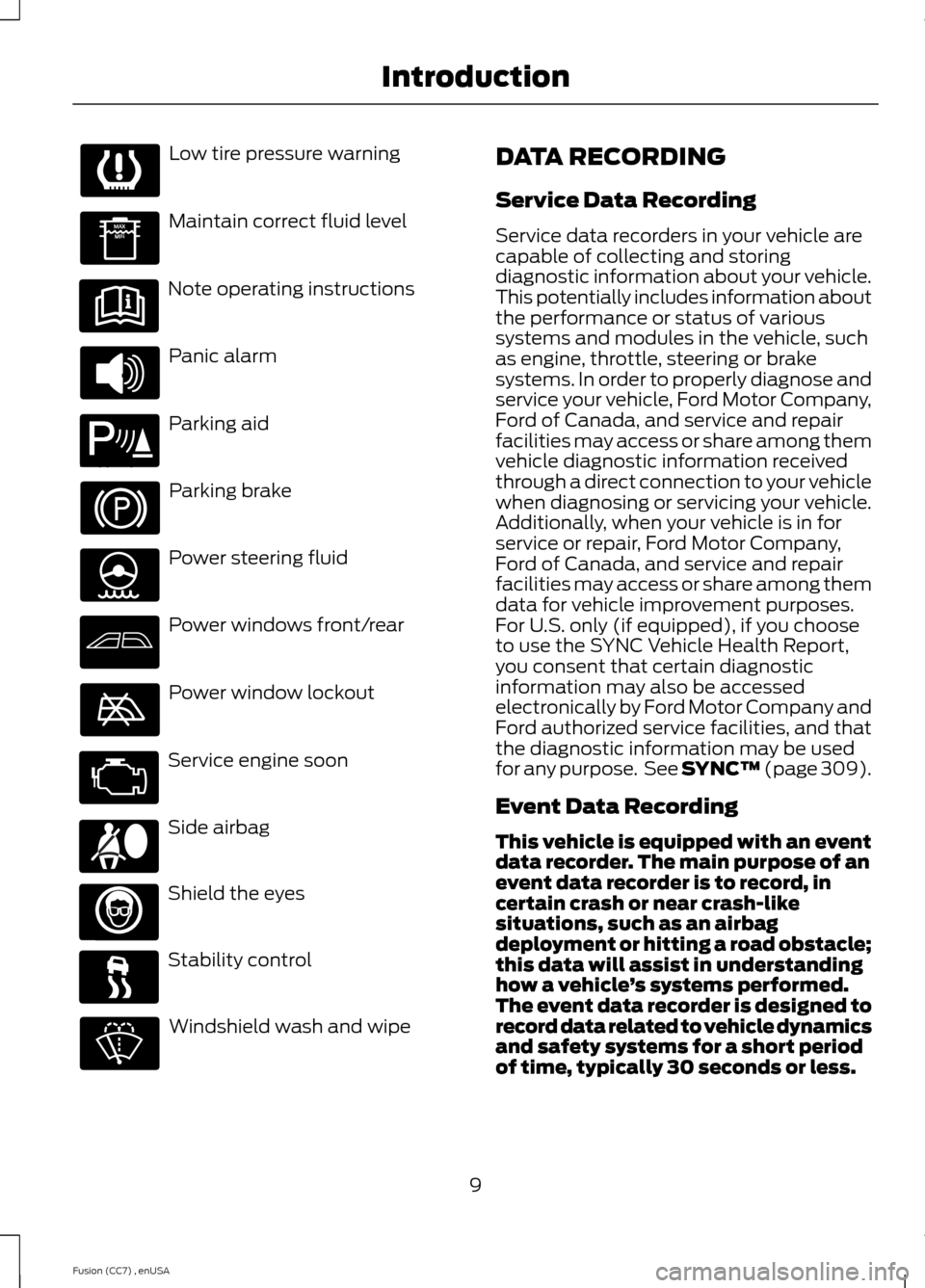
Low tire pressure warning
Maintain correct fluid level
Note operating instructions
Panic alarm
Parking aid
Parking brake
Power steering fluid
Power windows front/rear
Power window lockout
Service engine soon
Side airbag
Shield the eyes
Stability control
Windshield wash and wipe
DATA RECORDING
Service Data Recording
Service data recorders in your vehicle arecapable of collecting and storingdiagnostic information about your vehicle.This potentially includes information aboutthe performance or status of varioussystems and modules in the vehicle, suchas engine, throttle, steering or brakesystems. In order to properly diagnose andservice your vehicle, Ford Motor Company,Ford of Canada, and service and repairfacilities may access or share among themvehicle diagnostic information receivedthrough a direct connection to your vehiclewhen diagnosing or servicing your vehicle.Additionally, when your vehicle is in forservice or repair, Ford Motor Company,Ford of Canada, and service and repairfacilities may access or share among themdata for vehicle improvement purposes.For U.S. only (if equipped), if you chooseto use the SYNC Vehicle Health Report,you consent that certain diagnosticinformation may also be accessedelectronically by Ford Motor Company andFord authorized service facilities, and thatthe diagnostic information may be usedfor any purpose. See SYNC™ (page 309).
Event Data Recording
This vehicle is equipped with an eventdata recorder. The main purpose of anevent data recorder is to record, incertain crash or near crash-likesituations, such as an airbagdeployment or hitting a road obstacle;this data will assist in understandinghow a vehicle’s systems performed.The event data recorder is designed torecord data related to vehicle dynamicsand safety systems for a short periodof time, typically 30 seconds or less.
9Fusion (CC7) , enUSAIntroduction E139213 E167012
Page 31 of 458
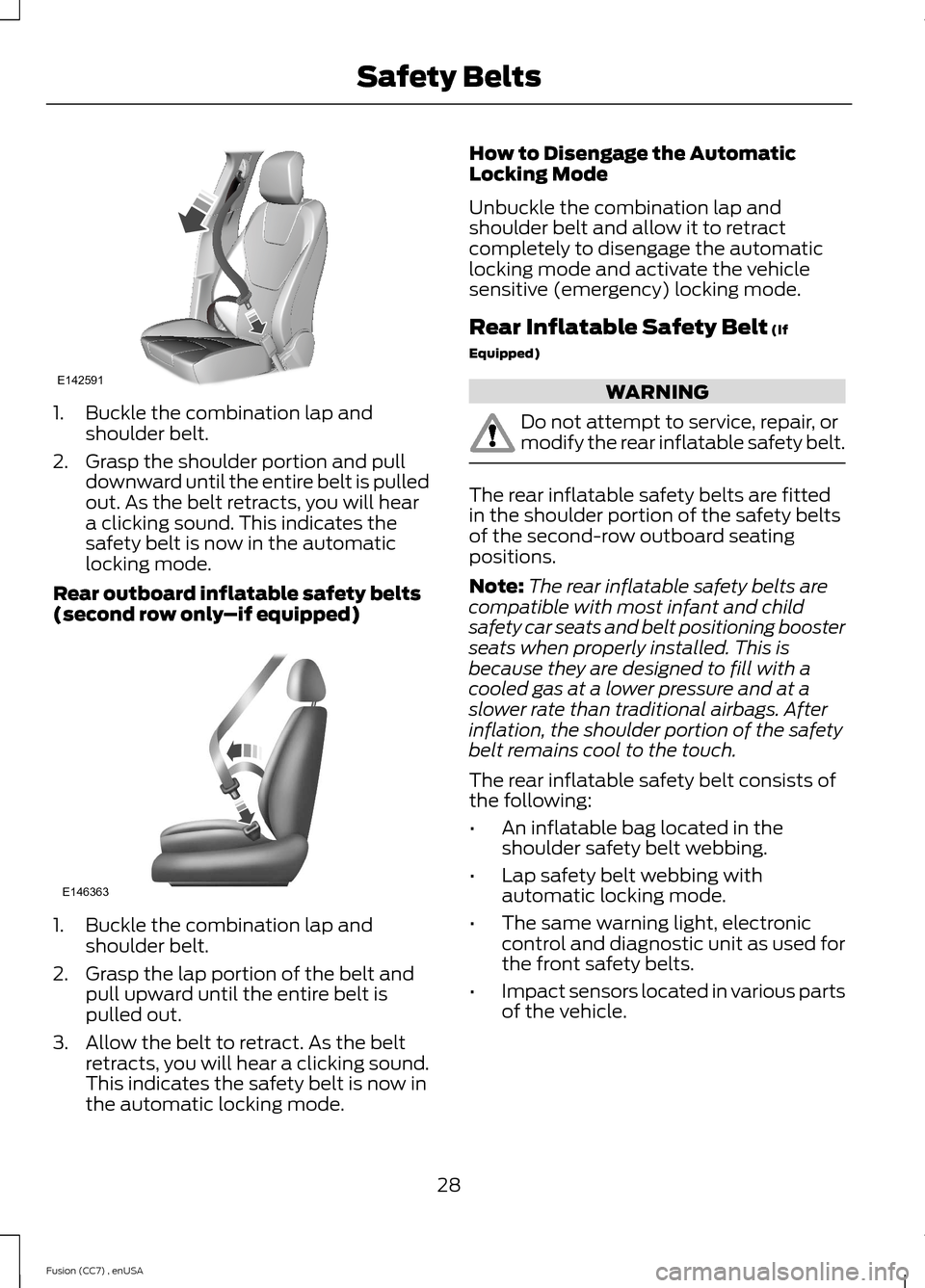
1.Buckle the combination lap andshoulder belt.
2.Grasp the shoulder portion and pulldownward until the entire belt is pulledout. As the belt retracts, you will heara clicking sound. This indicates thesafety belt is now in the automaticlocking mode.
Rear outboard inflatable safety belts(second row only–if equipped)
1.Buckle the combination lap andshoulder belt.
2.Grasp the lap portion of the belt andpull upward until the entire belt ispulled out.
3.Allow the belt to retract. As the beltretracts, you will hear a clicking sound.This indicates the safety belt is now inthe automatic locking mode.
How to Disengage the AutomaticLocking Mode
Unbuckle the combination lap andshoulder belt and allow it to retractcompletely to disengage the automaticlocking mode and activate the vehiclesensitive (emergency) locking mode.
Rear Inflatable Safety Belt (If
Equipped)
WARNING
Do not attempt to service, repair, ormodify the rear inflatable safety belt.
The rear inflatable safety belts are fittedin the shoulder portion of the safety beltsof the second-row outboard seatingpositions.
Note:The rear inflatable safety belts arecompatible with most infant and childsafety car seats and belt positioning boosterseats when properly installed. This isbecause they are designed to fill with acooled gas at a lower pressure and at aslower rate than traditional airbags. Afterinflation, the shoulder portion of the safetybelt remains cool to the touch.
The rear inflatable safety belt consists ofthe following:
•An inflatable bag located in theshoulder safety belt webbing.
•Lap safety belt webbing withautomatic locking mode.
•The same warning light, electroniccontrol and diagnostic unit as used forthe front safety belts.
•Impact sensors located in various partsof the vehicle.
28Fusion (CC7) , enUSASafety BeltsE142591 E146363
Page 87 of 458
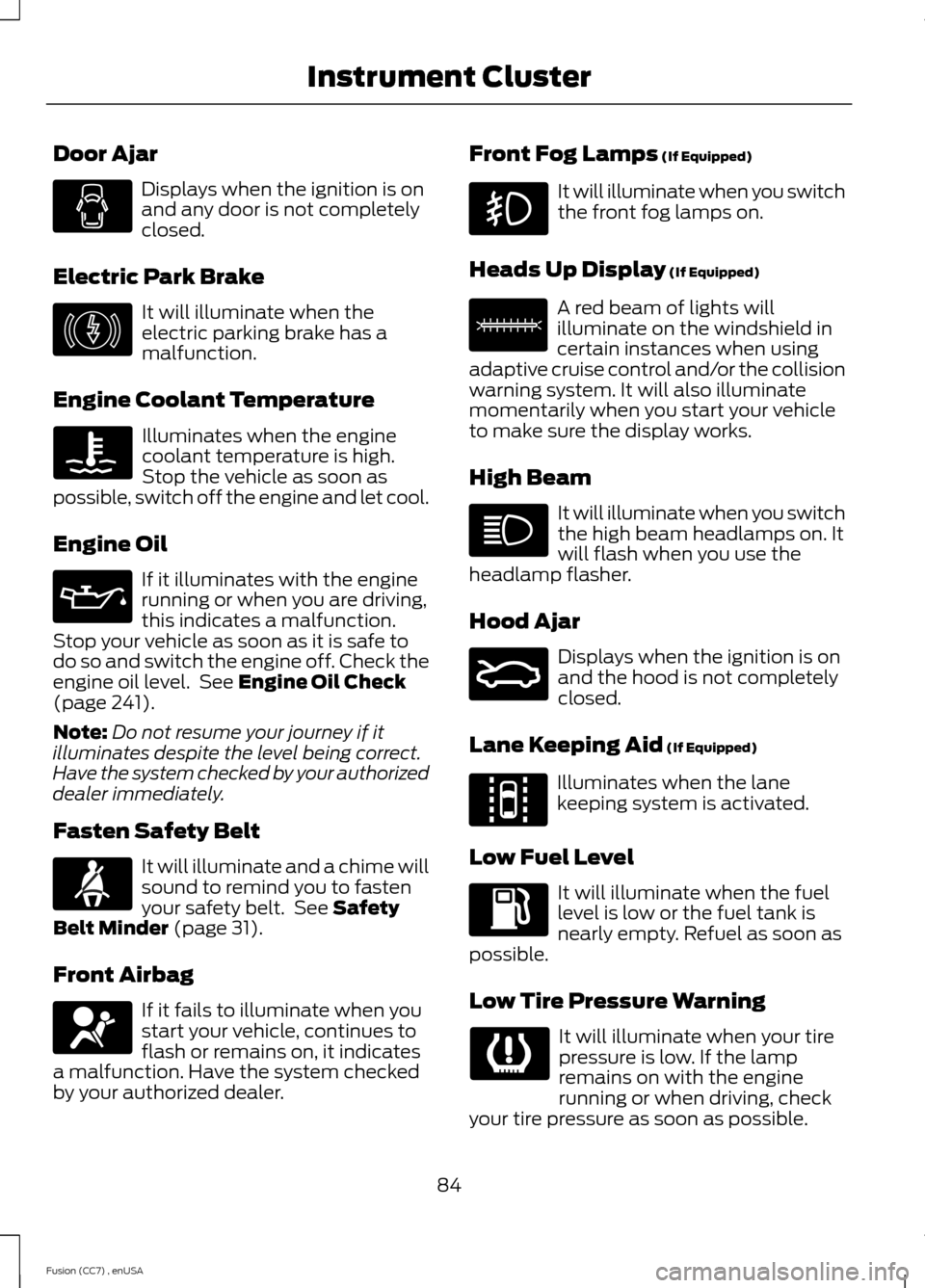
Door Ajar
Displays when the ignition is onand any door is not completelyclosed.
Electric Park Brake
It will illuminate when theelectric parking brake has amalfunction.
Engine Coolant Temperature
Illuminates when the enginecoolant temperature is high.Stop the vehicle as soon aspossible, switch off the engine and let cool.
Engine Oil
If it illuminates with the enginerunning or when you are driving,this indicates a malfunction.Stop your vehicle as soon as it is safe todo so and switch the engine off. Check theengine oil level. See Engine Oil Check(page 241).
Note:Do not resume your journey if itilluminates despite the level being correct.Have the system checked by your authorizeddealer immediately.
Fasten Safety Belt
It will illuminate and a chime willsound to remind you to fastenyour safety belt. See SafetyBelt Minder (page 31).
Front Airbag
If it fails to illuminate when youstart your vehicle, continues toflash or remains on, it indicatesa malfunction. Have the system checkedby your authorized dealer.
Front Fog Lamps (If Equipped)
It will illuminate when you switchthe front fog lamps on.
Heads Up Display (If Equipped)
A red beam of lights willilluminate on the windshield incertain instances when usingadaptive cruise control and/or the collisionwarning system. It will also illuminatemomentarily when you start your vehicleto make sure the display works.
High Beam
It will illuminate when you switchthe high beam headlamps on. Itwill flash when you use theheadlamp flasher.
Hood Ajar
Displays when the ignition is onand the hood is not completelyclosed.
Lane Keeping Aid (If Equipped)
Illuminates when the lanekeeping system is activated.
Low Fuel Level
It will illuminate when the fuellevel is low or the fuel tank isnearly empty. Refuel as soon aspossible.
Low Tire Pressure Warning
It will illuminate when your tirepressure is low. If the lampremains on with the enginerunning or when driving, checkyour tire pressure as soon as possible.
84Fusion (CC7) , enUSAInstrument Cluster E146190 E156133 E159324 E144813
Page 111 of 458
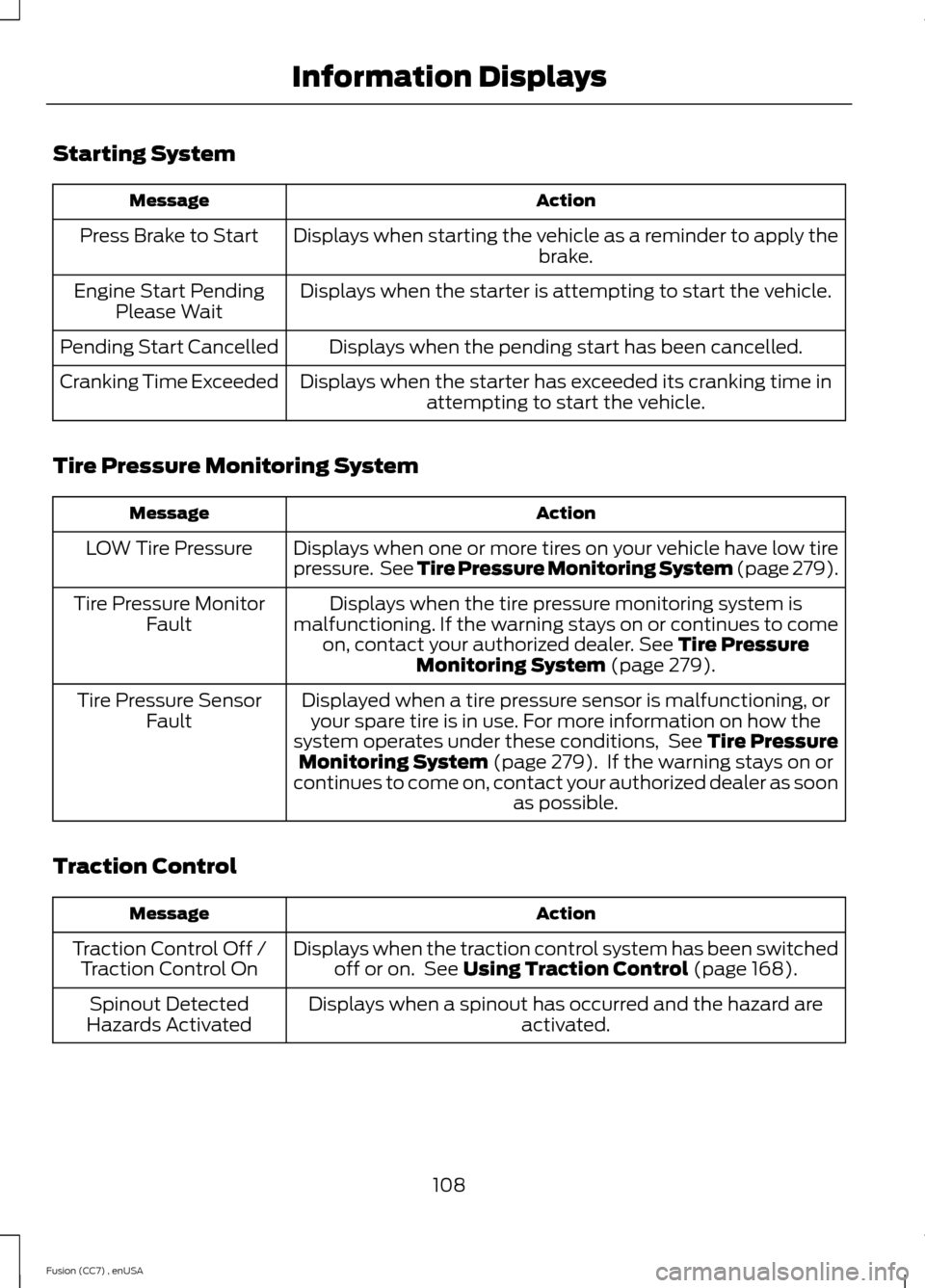
Starting System
ActionMessage
Displays when starting the vehicle as a reminder to apply thebrake.Press Brake to Start
Displays when the starter is attempting to start the vehicle.Engine Start PendingPlease Wait
Displays when the pending start has been cancelled.Pending Start Cancelled
Displays when the starter has exceeded its cranking time inattempting to start the vehicle.Cranking Time Exceeded
Tire Pressure Monitoring System
ActionMessage
Displays when one or more tires on your vehicle have low tirepressure. See Tire Pressure Monitoring System (page 279).LOW Tire Pressure
Displays when the tire pressure monitoring system ismalfunctioning. If the warning stays on or continues to comeon, contact your authorized dealer. See Tire PressureMonitoring System (page 279).
Tire Pressure MonitorFault
Displayed when a tire pressure sensor is malfunctioning, oryour spare tire is in use. For more information on how thesystem operates under these conditions, See Tire PressureMonitoring System (page 279). If the warning stays on orcontinues to come on, contact your authorized dealer as soonas possible.
Tire Pressure SensorFault
Traction Control
ActionMessage
Displays when the traction control system has been switchedoff or on. See Using Traction Control (page 168).Traction Control Off /Traction Control On
Displays when a spinout has occurred and the hazard areactivated.Spinout DetectedHazards Activated
108Fusion (CC7) , enUSAInformation Displays
Page 162 of 458
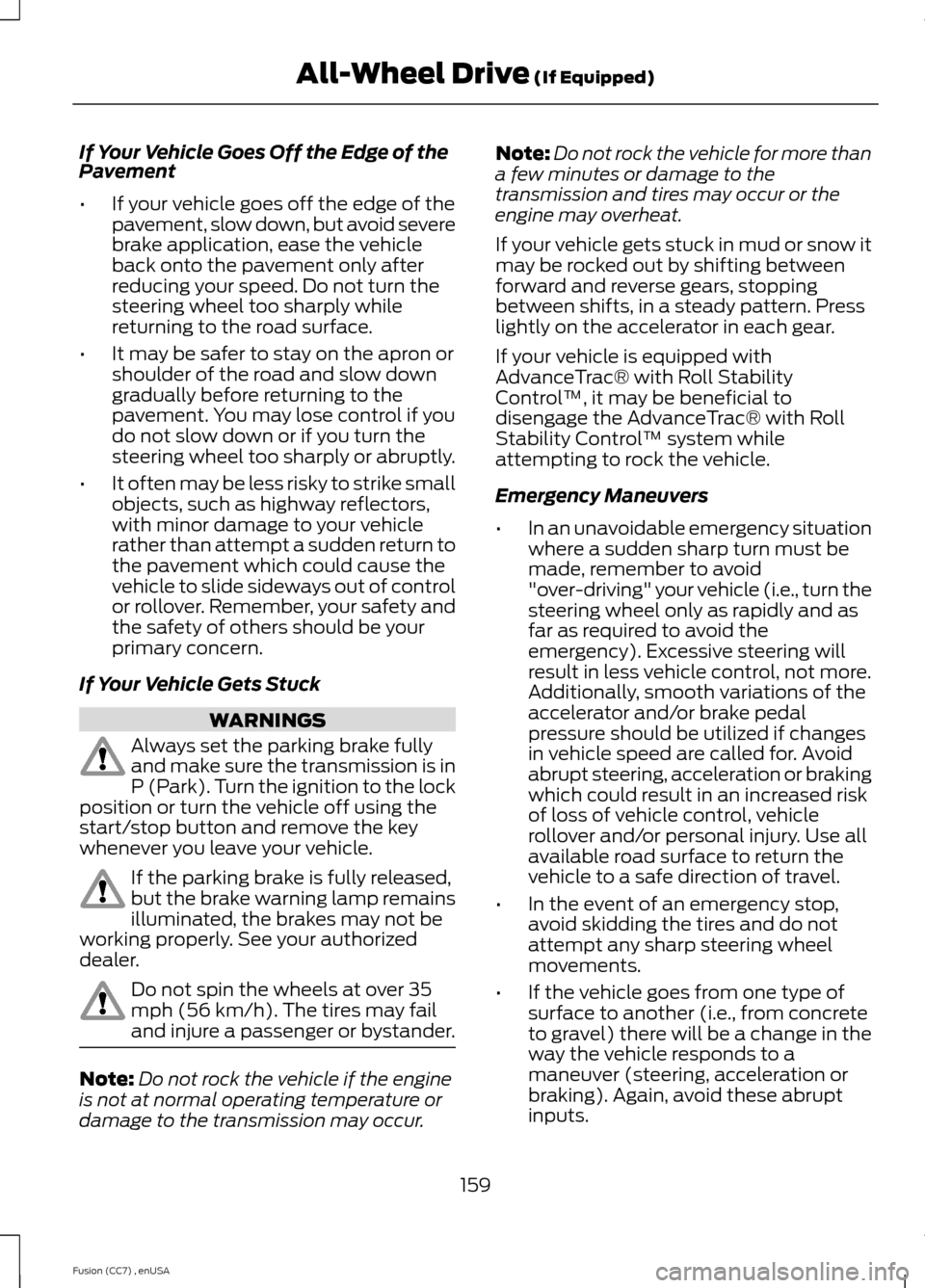
If Your Vehicle Goes Off the Edge of thePavement
•If your vehicle goes off the edge of thepavement, slow down, but avoid severebrake application, ease the vehicleback onto the pavement only afterreducing your speed. Do not turn thesteering wheel too sharply whilereturning to the road surface.
•It may be safer to stay on the apron orshoulder of the road and slow downgradually before returning to thepavement. You may lose control if youdo not slow down or if you turn thesteering wheel too sharply or abruptly.
•It often may be less risky to strike smallobjects, such as highway reflectors,with minor damage to your vehiclerather than attempt a sudden return tothe pavement which could cause thevehicle to slide sideways out of controlor rollover. Remember, your safety andthe safety of others should be yourprimary concern.
If Your Vehicle Gets Stuck
WARNINGS
Always set the parking brake fullyand make sure the transmission is inP (Park). Turn the ignition to the lockposition or turn the vehicle off using thestart/stop button and remove the keywhenever you leave your vehicle.
If the parking brake is fully released,but the brake warning lamp remainsilluminated, the brakes may not beworking properly. See your authorizeddealer.
Do not spin the wheels at over 35mph (56 km/h). The tires may failand injure a passenger or bystander.
Note:Do not rock the vehicle if the engineis not at normal operating temperature ordamage to the transmission may occur.
Note:Do not rock the vehicle for more thana few minutes or damage to thetransmission and tires may occur or theengine may overheat.
If your vehicle gets stuck in mud or snow itmay be rocked out by shifting betweenforward and reverse gears, stoppingbetween shifts, in a steady pattern. Presslightly on the accelerator in each gear.
If your vehicle is equipped withAdvanceTrac® with Roll StabilityControl™, it may be beneficial todisengage the AdvanceTrac® with RollStability Control™ system whileattempting to rock the vehicle.
Emergency Maneuvers
•In an unavoidable emergency situationwhere a sudden sharp turn must bemade, remember to avoid"over-driving" your vehicle (i.e., turn thesteering wheel only as rapidly and asfar as required to avoid theemergency). Excessive steering willresult in less vehicle control, not more.Additionally, smooth variations of theaccelerator and/or brake pedalpressure should be utilized if changesin vehicle speed are called for. Avoidabrupt steering, acceleration or brakingwhich could result in an increased riskof loss of vehicle control, vehiclerollover and/or personal injury. Use allavailable road surface to return thevehicle to a safe direction of travel.
•In the event of an emergency stop,avoid skidding the tires and do notattempt any sharp steering wheelmovements.
•If the vehicle goes from one type ofsurface to another (i.e., from concreteto gravel) there will be a change in theway the vehicle responds to amaneuver (steering, acceleration orbraking). Again, avoid these abruptinputs.
159Fusion (CC7) , enUSAAll-Wheel Drive (If Equipped)
Page 163 of 458
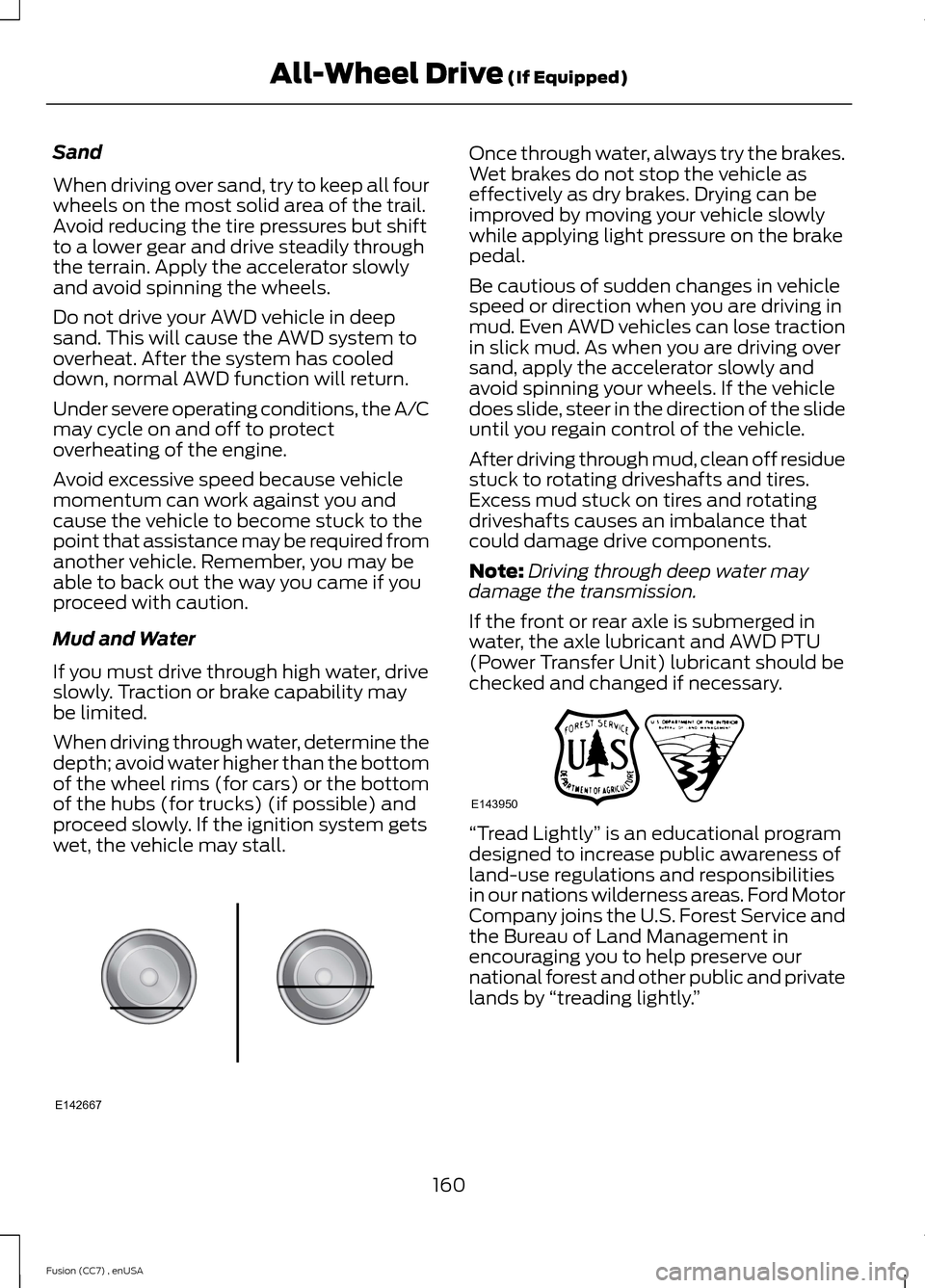
Sand
When driving over sand, try to keep all fourwheels on the most solid area of the trail.Avoid reducing the tire pressures but shiftto a lower gear and drive steadily throughthe terrain. Apply the accelerator slowlyand avoid spinning the wheels.
Do not drive your AWD vehicle in deepsand. This will cause the AWD system tooverheat. After the system has cooleddown, normal AWD function will return.
Under severe operating conditions, the A/Cmay cycle on and off to protectoverheating of the engine.
Avoid excessive speed because vehiclemomentum can work against you andcause the vehicle to become stuck to thepoint that assistance may be required fromanother vehicle. Remember, you may beable to back out the way you came if youproceed with caution.
Mud and Water
If you must drive through high water, driveslowly. Traction or brake capability maybe limited.
When driving through water, determine thedepth; avoid water higher than the bottomof the wheel rims (for cars) or the bottomof the hubs (for trucks) (if possible) andproceed slowly. If the ignition system getswet, the vehicle may stall.
Once through water, always try the brakes.Wet brakes do not stop the vehicle aseffectively as dry brakes. Drying can beimproved by moving your vehicle slowlywhile applying light pressure on the brakepedal.
Be cautious of sudden changes in vehiclespeed or direction when you are driving inmud. Even AWD vehicles can lose tractionin slick mud. As when you are driving oversand, apply the accelerator slowly andavoid spinning your wheels. If the vehicledoes slide, steer in the direction of the slideuntil you regain control of the vehicle.
After driving through mud, clean off residuestuck to rotating driveshafts and tires.Excess mud stuck on tires and rotatingdriveshafts causes an imbalance thatcould damage drive components.
Note:Driving through deep water maydamage the transmission.
If the front or rear axle is submerged inwater, the axle lubricant and AWD PTU(Power Transfer Unit) lubricant should bechecked and changed if necessary.
“Tread Lightly” is an educational programdesigned to increase public awareness ofland-use regulations and responsibilitiesin our nations wilderness areas. Ford MotorCompany joins the U.S. Forest Service andthe Bureau of Land Management inencouraging you to help preserve ournational forest and other public and privatelands by “treading lightly.”
160Fusion (CC7) , enUSAAll-Wheel Drive (If Equipped)E142667 E143950
Page 193 of 458
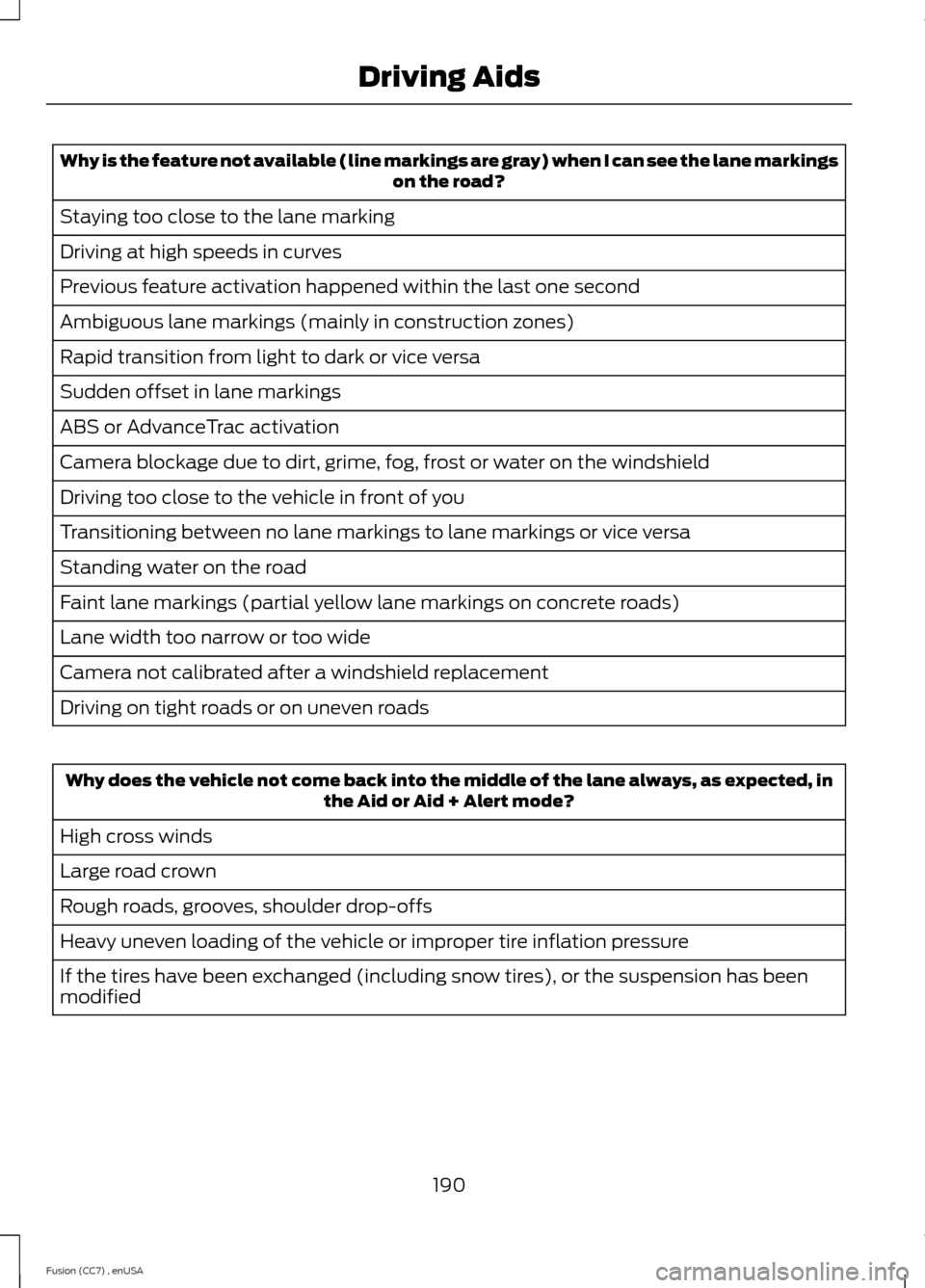
Why is the feature not available (line markings are gray) when I can see the lane markingson the road?
Staying too close to the lane marking
Driving at high speeds in curves
Previous feature activation happened within the last one second
Ambiguous lane markings (mainly in construction zones)
Rapid transition from light to dark or vice versa
Sudden offset in lane markings
ABS or AdvanceTrac activation
Camera blockage due to dirt, grime, fog, frost or water on the windshield
Driving too close to the vehicle in front of you
Transitioning between no lane markings to lane markings or vice versa
Standing water on the road
Faint lane markings (partial yellow lane markings on concrete roads)
Lane width too narrow or too wide
Camera not calibrated after a windshield replacement
Driving on tight roads or on uneven roads
Why does the vehicle not come back into the middle of the lane always, as expected, inthe Aid or Aid + Alert mode?
High cross winds
Large road crown
Rough roads, grooves, shoulder drop-offs
Heavy uneven loading of the vehicle or improper tire inflation pressure
If the tires have been exchanged (including snow tires), or the suspension has beenmodified
190Fusion (CC7) , enUSADriving Aids
Page 259 of 458
GENERAL INFORMATION
Your Ford or Lincoln authorized dealer hasmany quality products available to cleanyour vehicle and protect its finishes.
CLEANING PRODUCTS
For best results, use the following productsor products of equivalent quality:
Motorcraft Bug and Tar Remover (ZC-42)
Motorcraft Custom Bright Metal Cleaner(ZC-15)
Motorcraft Detail Wash (ZC-3-A)
Motorcraft Dusting Cloth (ZC-24)
Motorcraft Engine Shampoo andDegreaser (U.S. only) (ZC-20)
Motorcraft Engine Shampoo (Canadaonly) (CXC-66-A)
Motorcraft Multi-Purpose Cleaner (Canadaonly) (CXC-101)
Motorcraft Premium Glass Cleaner(Canada only) (CXC-100)
Motorcraft Premium Quality WindshieldWasher Fluid (Canada only) [CXC-37-(A,B, D or F)]
Motorcraft Premium Windshield WashConcentrate with Bitterant (U.S. only)(ZC-32-B1)
Motorcraft Professional Strength Carpet& Upholstery Cleaner (ZC-54)
Motorcraft Spot and Stain Remover (U.S.only) (ZC-14)
Motorcraft Ultra-Clear Spray Glass Cleaner(ZC-23)
Motorcraft Wheel and Tire Cleaner(ZC-37-A)
CLEANING THE EXTERIOR
Wash your vehicle regularly with cool orlukewarm water and a neutral pHshampoo, such as Motorcraft Detail Wash.
•Never use strong household detergentsor soap, such as dish washing orlaundry liquid. These products candiscolor and spot painted surfaces.
•Never wash a vehicle that is “hot to thetouch” or during exposure to strong,direct sunlight.
•Dry your vehicle with a chamois or softterry cloth towel in order to eliminatewater spotting.
•Immediately remove items such asgasoline, diesel fuel, bird droppings andinsect deposits because they can causedamage to your vehicle’s paintworkand trim over time. Use Motorcraft Bugand Tar Remover.
•Remove any exterior accessories, suchas antennas, before entering a carwash.
Note:Suntan lotions and insect repellentscan damage any painted surface; if thesesubstances come in contact with yourvehicle, wash off as soon as possible.
Stripes or Graphics (if equipped)
Do not use a commercial or high-pressuresprayer on the surface or edge of stripesand graphics. This can cause damage tothe film and cause the edge of the film topeel away from the vehicle surface.
Exterior Chrome
Note:Never use abrasive materials such assteel wool or plastic pads as they canscratch the chrome surface.
Note:Do not use chrome cleaner, metalcleaner or polish on wheels and wheelcovers
256Fusion (CC7) , enUSAVehicle Care
Page 264 of 458
•Touch-up exposed or primed metal toprevent rust.
•Cover chrome and stainless steel partswith a thick coat of auto wax to preventdiscoloration. Re-wax as necessarywhen your vehicle is washed.
•Lubricate all hood, door and trunk lidhinges, and latches with a light gradeoil.
•Cover interior trim to prevent fading.
•Keep all rubber parts free from oil andsolvents.
Engine
•The engine oil and filter should bechanged prior to storage, as usedengine oil contain contaminates thatmay cause engine damage.
•Start the engine every 15 days. Run atfast idle until it reaches normaloperating temperature
•With your foot on the brake, shiftthrough all the gears while the engineis running.
Fuel system
•Fill the fuel tank with high-quality fueluntil the first automatic shutoff of thefuel pump nozzle.
Cooling system
•Protect against freezing temperatures.
•When removing your vehicle fromstorage, check coolant fluid level.Confirm there are no cooling systemleaks, and fluid is at the recommendedlevel.
Battery
•Check and recharge as necessary. Keepconnections clean.
•If storing your vehicle for more than 30days without recharging the battery, itmay be advisable to disconnect thebattery cables to ensure battery chargeis maintained for quick starting.
Note:If battery cables are disconnected, itwill be necessary to reset memory features.
Brakes
•Make sure brakes and parking brakeare fully released.
Tires
•Maintain recommended air pressure.
Miscellaneous
•Make sure all linkages, cables, leversand pins under your vehicle are coveredwith grease to prevent rust.
•Move vehicles at least 25 feet (8meters) every 15 days to lubricateworking parts and prevent corrosion.
Removing Vehicle From Storage
When your vehicle is ready to come out ofstorage, do the following:
•Wash your vehicle to remove any dirtor grease film build-up on windowsurfaces.
•Check windshield wipers for anydeterioration.
•Check under the hood for any foreignmaterial that may have collectedduring storage (mice/squirrel nests).
•Check the exhaust for any foreignmaterial that may have collectedduring storage.
•Check tire pressures and set tireinflation per the Tire Label.
261Fusion (CC7) , enUSAVehicle Care