ad blue FORD FUSION (AMERICAS) 2014 2.G Owners Manual
[x] Cancel search | Manufacturer: FORD, Model Year: 2014, Model line: FUSION (AMERICAS), Model: FORD FUSION (AMERICAS) 2014 2.GPages: 458, PDF Size: 27.89 MB
Page 76 of 458
DIRECTION INDICATORS
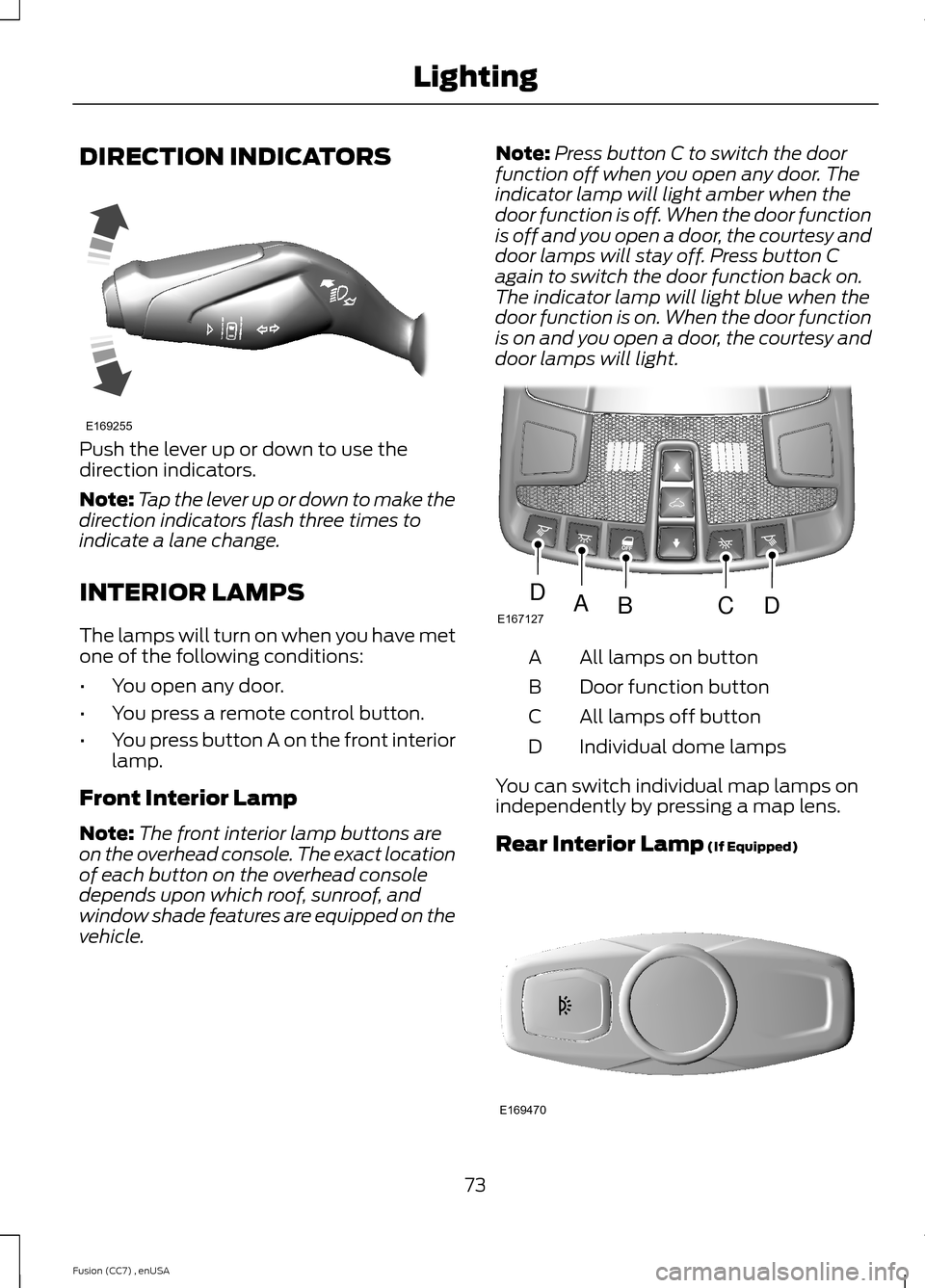
Push the lever up or down to use thedirection indicators.
Note:Tap the lever up or down to make thedirection indicators flash three times toindicate a lane change.
INTERIOR LAMPS
The lamps will turn on when you have metone of the following conditions:
•You open any door.
•You press a remote control button.
•You press button A on the front interiorlamp.
Front Interior Lamp
Note:The front interior lamp buttons areon the overhead console. The exact locationof each button on the overhead consoledepends upon which roof, sunroof, andwindow shade features are equipped on thevehicle.
Note:Press button C to switch the doorfunction off when you open any door. Theindicator lamp will light amber when thedoor function is off. When the door functionis off and you open a door, the courtesy anddoor lamps will stay off. Press button Cagain to switch the door function back on.The indicator lamp will light blue when thedoor function is on. When the door functionis on and you open a door, the courtesy anddoor lamps will light.
All lamps on buttonA
Door function buttonB
All lamps off buttonC
Individual dome lampsD
You can switch individual map lamps onindependently by pressing a map lens.
Rear Interior Lamp (If Equipped)
73Fusion (CC7) , enUSALightingE169255 E167127ABCDD E169470
Page 135 of 458
1.Press and hold the previouslyprogrammed Genie button on thehand-held transmitter for 10 seconds.The indicator light will change from redto red and green.
2.Press the same button twice to confirmthe change. If done correctly theindicator light will turn green.
Programming HomeLink to the GenieIntellicode Garage Door Opener Motor
Note:You may need a ladder to access thegarage door opener motor.
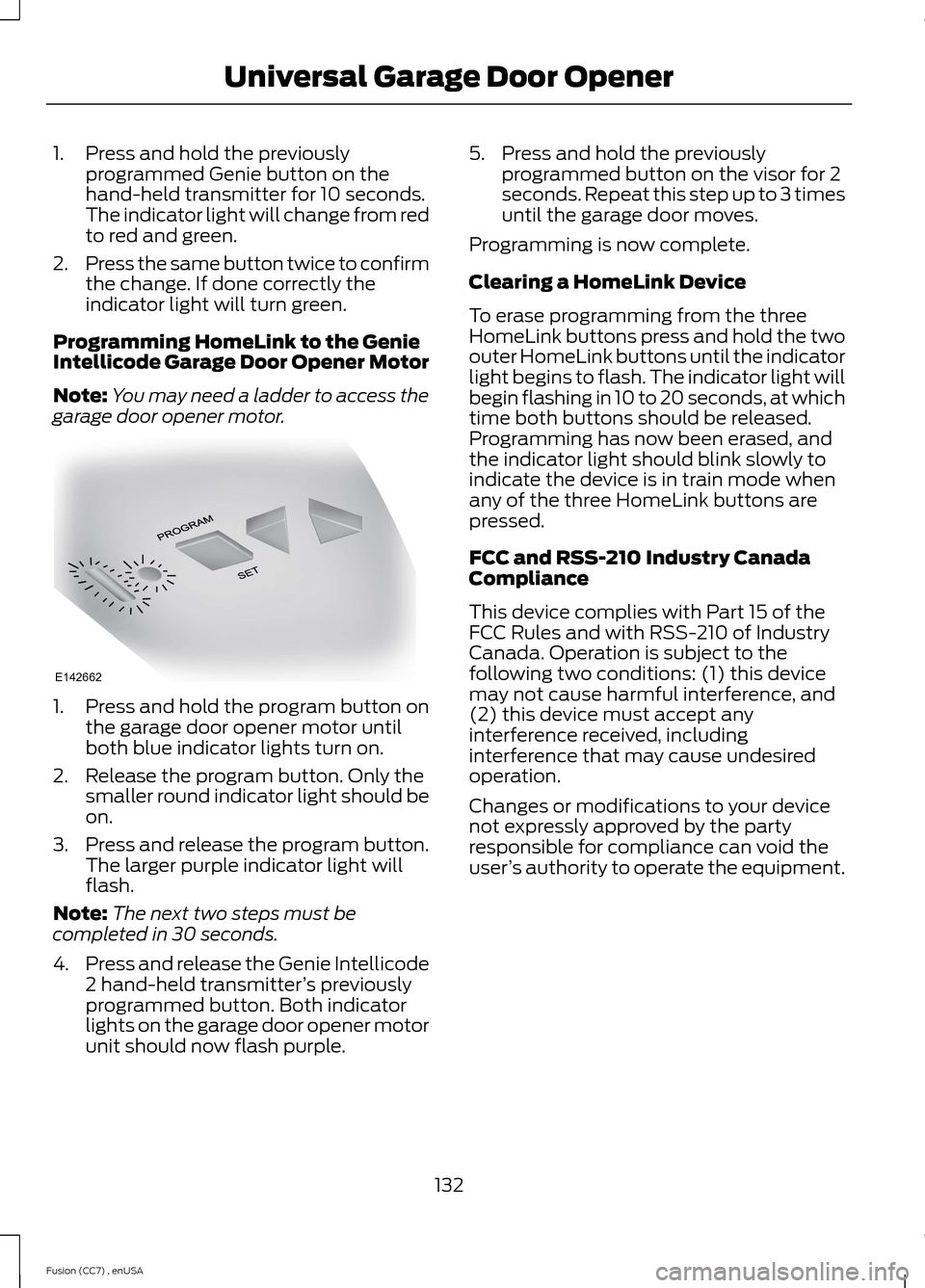
1.Press and hold the program button onthe garage door opener motor untilboth blue indicator lights turn on.
2.Release the program button. Only thesmaller round indicator light should beon.
3.Press and release the program button.The larger purple indicator light willflash.
Note:The next two steps must becompleted in 30 seconds.
4.Press and release the Genie Intellicode2 hand-held transmitter’s previouslyprogrammed button. Both indicatorlights on the garage door opener motorunit should now flash purple.
5.Press and hold the previouslyprogrammed button on the visor for 2seconds. Repeat this step up to 3 timesuntil the garage door moves.
Programming is now complete.
Clearing a HomeLink Device
To erase programming from the threeHomeLink buttons press and hold the twoouter HomeLink buttons until the indicatorlight begins to flash. The indicator light willbegin flashing in 10 to 20 seconds, at whichtime both buttons should be released.Programming has now been erased, andthe indicator light should blink slowly toindicate the device is in train mode whenany of the three HomeLink buttons arepressed.
FCC and RSS-210 Industry CanadaCompliance
This device complies with Part 15 of theFCC Rules and with RSS-210 of IndustryCanada. Operation is subject to thefollowing two conditions: (1) this devicemay not cause harmful interference, and(2) this device must accept anyinterference received, includinginterference that may cause undesiredoperation.
Changes or modifications to your devicenot expressly approved by the partyresponsible for compliance can void theuser’s authority to operate the equipment.
132Fusion (CC7) , enUSAUniversal Garage Door OpenerE142662
Page 238 of 458
CHANGING A FUSE
Fuses
WARNING
Always replace a fuse with one thathas the specified amperage rating.Using a fuse with a higher amperagerating can cause severe wire damage andcould start a fire.
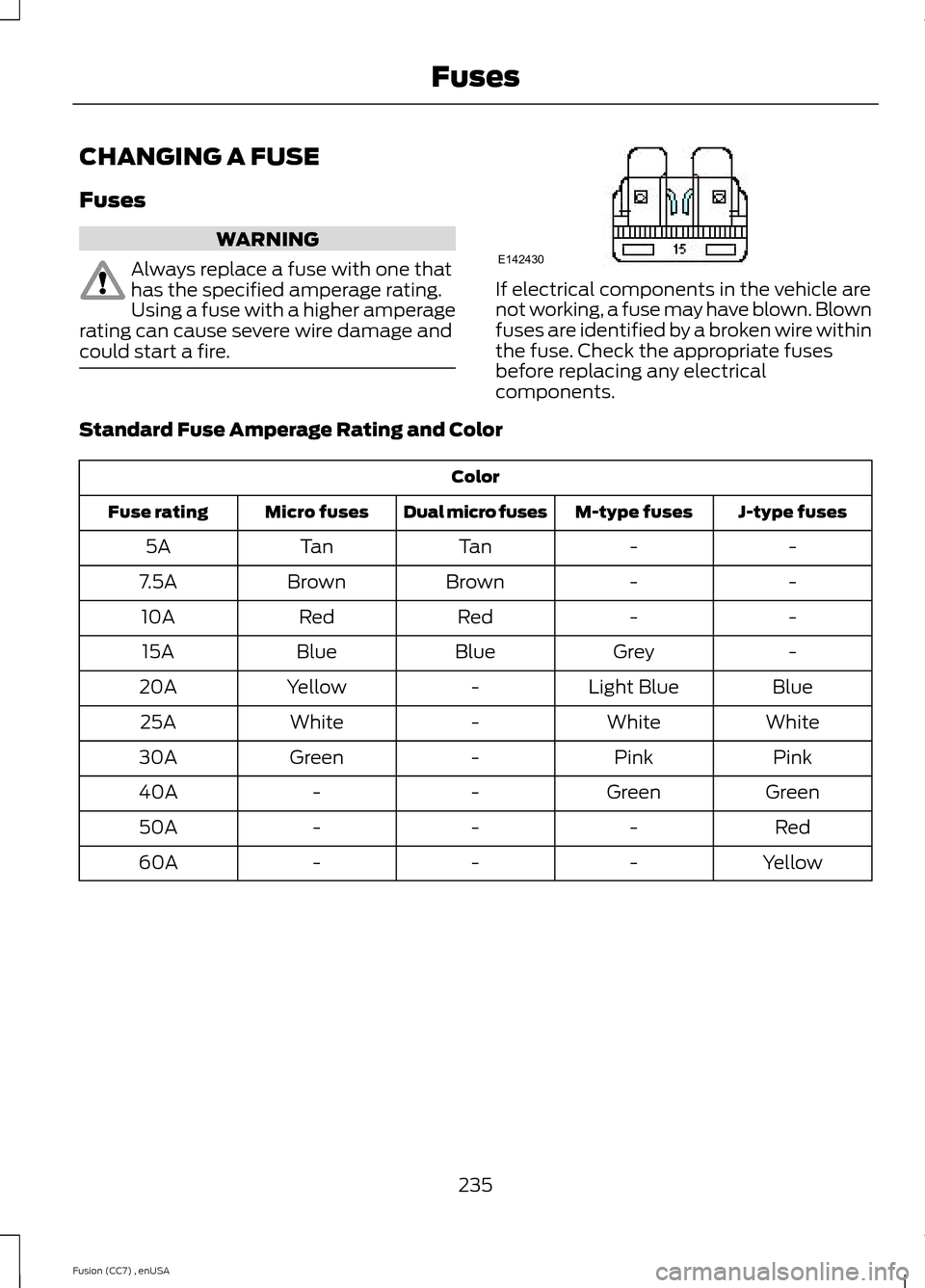
If electrical components in the vehicle arenot working, a fuse may have blown. Blownfuses are identified by a broken wire withinthe fuse. Check the appropriate fusesbefore replacing any electricalcomponents.
Standard Fuse Amperage Rating and Color
Color
J-type fusesM-type fusesDual micro fusesMicro fusesFuse rating
--TanTan5A
--BrownBrown7.5A
--RedRed10A
-GreyBlueBlue15A
BlueLight Blue-Yellow20A
WhiteWhite-White25A
PinkPink-Green30A
GreenGreen--40A
Red---50A
Yellow---60A
235Fusion (CC7) , enUSAFusesE142430
Page 312 of 458
GENERAL INFORMATION
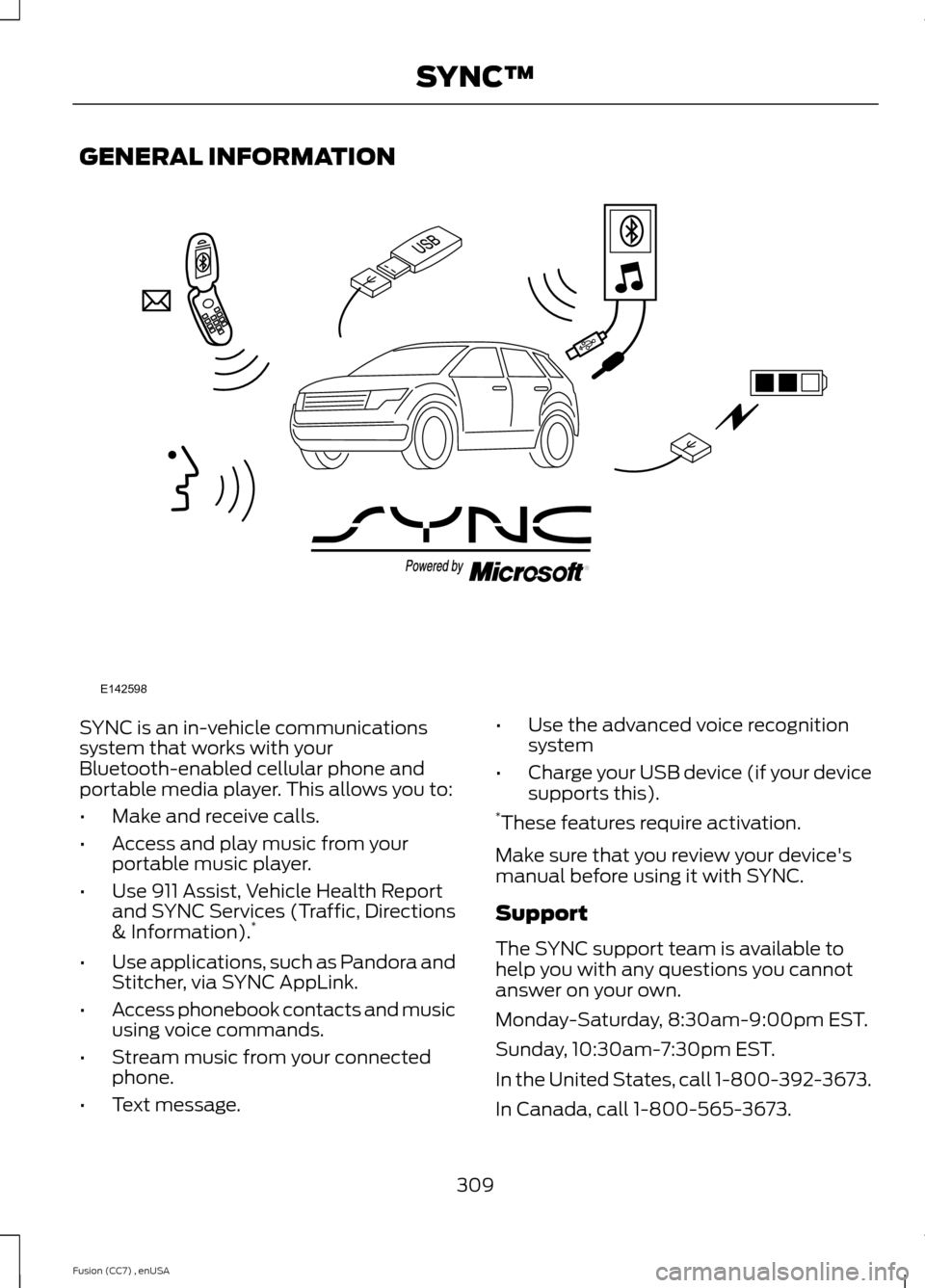
SYNC is an in-vehicle communicationssystem that works with yourBluetooth-enabled cellular phone andportable media player. This allows you to:
•Make and receive calls.
•Access and play music from yourportable music player.
•Use 911 Assist, Vehicle Health Reportand SYNC Services (Traffic, Directions& Information).*
•Use applications, such as Pandora andStitcher, via SYNC AppLink.
•Access phonebook contacts and musicusing voice commands.
•Stream music from your connectedphone.
•Text message.
•Use the advanced voice recognitionsystem
•Charge your USB device (if your devicesupports this).*These features require activation.
Make sure that you review your device'smanual before using it with SYNC.
Support
The SYNC support team is available tohelp you with any questions you cannotanswer on your own.
Monday-Saturday, 8:30am-9:00pm EST.
Sunday, 10:30am-7:30pm EST.
In the United States, call 1-800-392-3673.
In Canada, call 1-800-565-3673.
309Fusion (CC7) , enUSASYNC™E142598
Page 314 of 458
System data cannot be accessed withoutspecial equipment and access to thevehicle's SYNC module. Ford MotorCompany and Ford of Canada will notaccess the system data for any purposeother than as described absent consent, acourt order, or where required by lawenforcement, other governmentauthorities, or other third parties actingwith lawful authority. Other parties mayseek to access the informationindependently of Ford Motor Company andFord of Canada. For further privacyinformation, see the sections on 911 Assist,Vehicle Health Report, and Traffic,Directions and Information.
USING VOICE RECOGNITION
This system helps you control manyfeatures using voice commands. Thisallows you to keep your hands on thewheel and focus on what is in front of you.
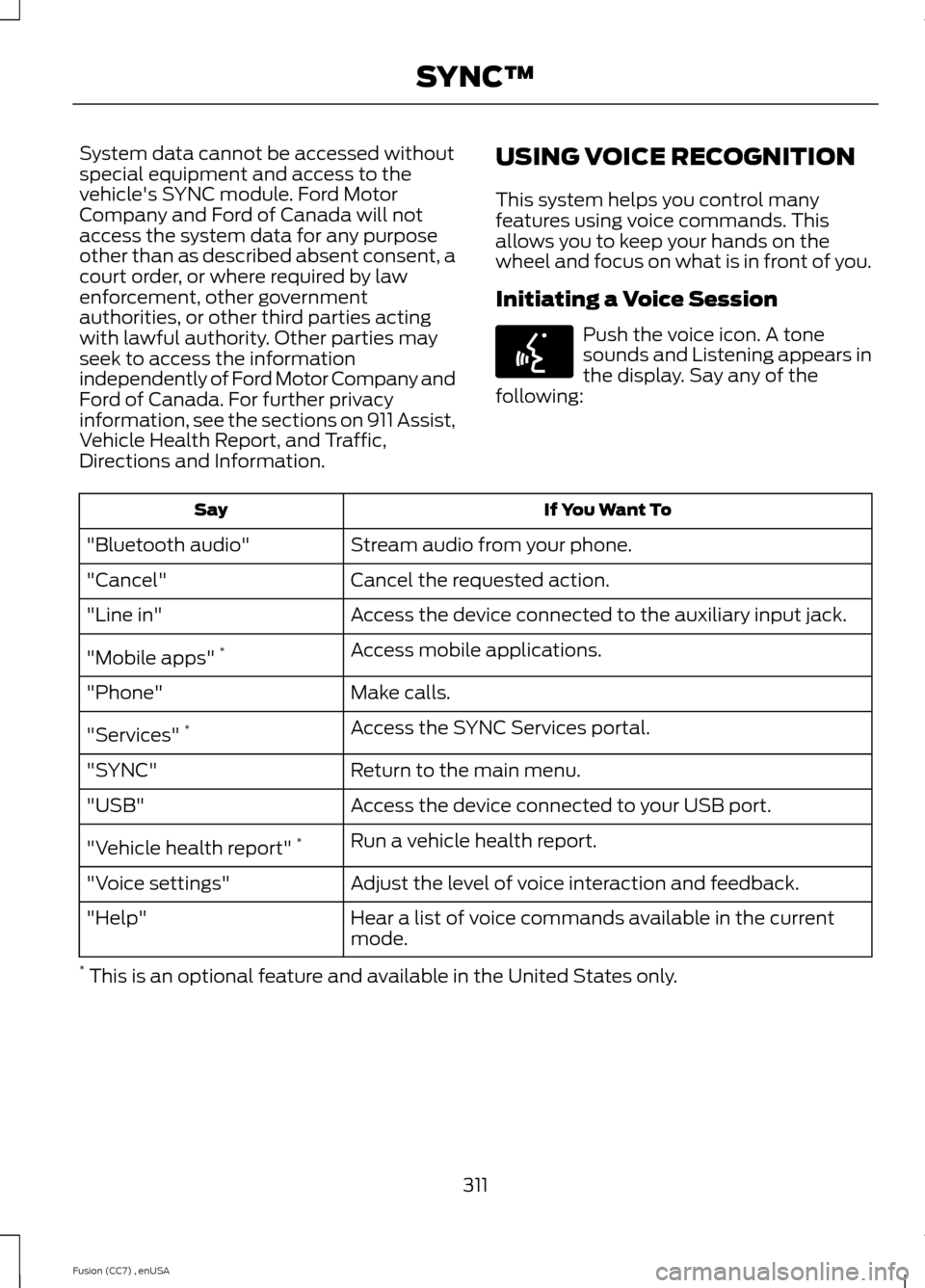
Initiating a Voice Session
Push the voice icon. A tonesounds and Listening appears inthe display. Say any of thefollowing:
If You Want ToSay
Stream audio from your phone."Bluetooth audio"
Cancel the requested action."Cancel"
Access the device connected to the auxiliary input jack."Line in"
Access mobile applications."Mobile apps" *
Make calls."Phone"
Access the SYNC Services portal."Services" *
Return to the main menu."SYNC"
Access the device connected to your USB port."USB"
Run a vehicle health report."Vehicle health report" *
Adjust the level of voice interaction and feedback."Voice settings"
Hear a list of voice commands available in the currentmode."Help"
* This is an optional feature and available in the United States only.
311Fusion (CC7) , enUSASYNC™E142599
Page 316 of 458
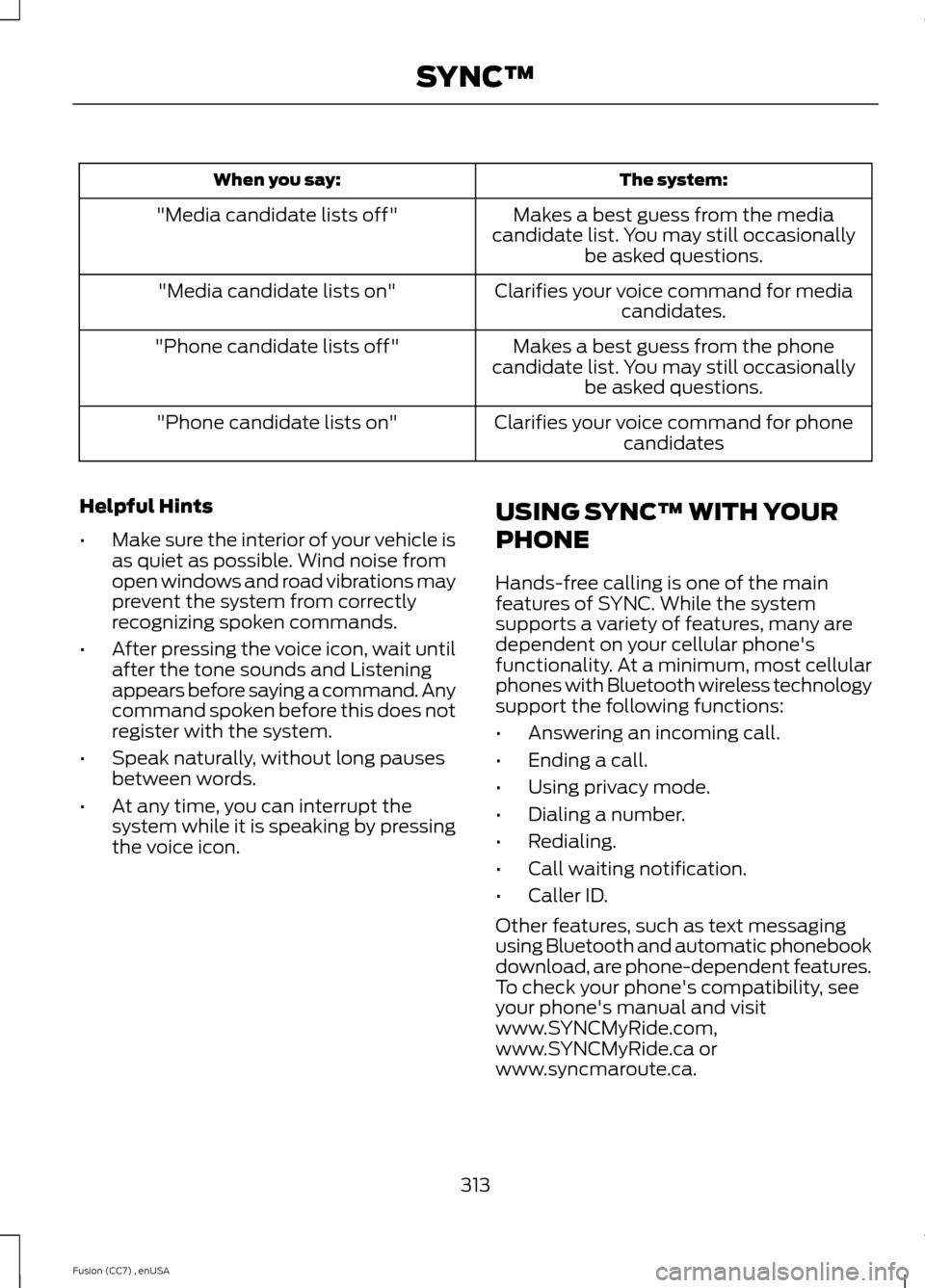
The system:When you say:
Makes a best guess from the mediacandidate list. You may still occasionallybe asked questions.
"Media candidate lists off"
Clarifies your voice command for mediacandidates."Media candidate lists on"
Makes a best guess from the phonecandidate list. You may still occasionallybe asked questions.
"Phone candidate lists off"
Clarifies your voice command for phonecandidates"Phone candidate lists on"
Helpful Hints
•Make sure the interior of your vehicle isas quiet as possible. Wind noise fromopen windows and road vibrations mayprevent the system from correctlyrecognizing spoken commands.
•After pressing the voice icon, wait untilafter the tone sounds and Listeningappears before saying a command. Anycommand spoken before this does notregister with the system.
•Speak naturally, without long pausesbetween words.
•At any time, you can interrupt thesystem while it is speaking by pressingthe voice icon.
USING SYNC™ WITH YOUR
PHONE
Hands-free calling is one of the mainfeatures of SYNC. While the systemsupports a variety of features, many aredependent on your cellular phone'sfunctionality. At a minimum, most cellularphones with Bluetooth wireless technologysupport the following functions:
•Answering an incoming call.
•Ending a call.
•Using privacy mode.
•Dialing a number.
•Redialing.
•Call waiting notification.
•Caller ID.
Other features, such as text messagingusing Bluetooth and automatic phonebookdownload, are phone-dependent features.To check your phone's compatibility, seeyour phone's manual and visitwww.SYNCMyRide.com,www.SYNCMyRide.ca orwww.syncmaroute.ca.
313Fusion (CC7) , enUSASYNC™
Page 317 of 458
Pairing a Phone for the First Time
Note:SYNC can support downloading upto approximately 1000 entries perBluetooth-enabled cellular phone.
Note:Make sure to switch on the ignitionand the radio. Put the transmission inposition P (automatic transmission) orneutral with the parking brake applied(manual transmission).
Note:To scroll through the menus, pressthe up and down arrows on your audiosystem.
Wirelessly pairing your phone with SYNCallows you to make and receive hands-freecalls.
1.Press the phone button. When thedisplay indicates there is no phonepaired, press OK.
2.When Find SYNC appears in thedisplay, press OK.
3.Put your phone into Bluetoothdiscovery mode. See your device'smanual if necessary.
4.When prompted on your phone'sdisplay, enter the six-digit PIN providedby SYNC in the radio display. Thedisplay indicates when the pairing issuccessful.
Depending on your phone's capability andyour market, the system may prompt youwith questions, such as setting the currentphone as the primary phone (the phoneSYNC automatically tries to connect withfirst upon vehicle start-up) anddownloading your phonebook.
Pairing Subsequent Phones
Note:Make sure to switch on the ignitionand the radio. Put the transmission inposition P (automatic transmission) orneutral with the parking brake applied(manual transmission).
Note:To scroll through the menus, pressthe up and down arrows on your audiosystem.
1.Press the phone button, and then scrollto System Settings. Press OK.
2.Scroll to Bluetooth Devices. Press OK.
3.Scroll to Add Bluetooth Device. PressOK.
4.When Find SYNC appears in thedisplay, press OK.
5.Put your phone into Bluetoothdiscovery mode. See your phone'smanual if necessary.
6.When prompted on your phone'sdisplay, enter the six-digit PIN providedby SYNC in the radio display. Thedisplay indicates when the pairing issuccessful.
The system then prompts with questions,such as if you would like to set the currentphone as the primary phone (the phoneSYNC automatically tries to connect withfirst upon vehicle start-up) or downloadyour phone book.
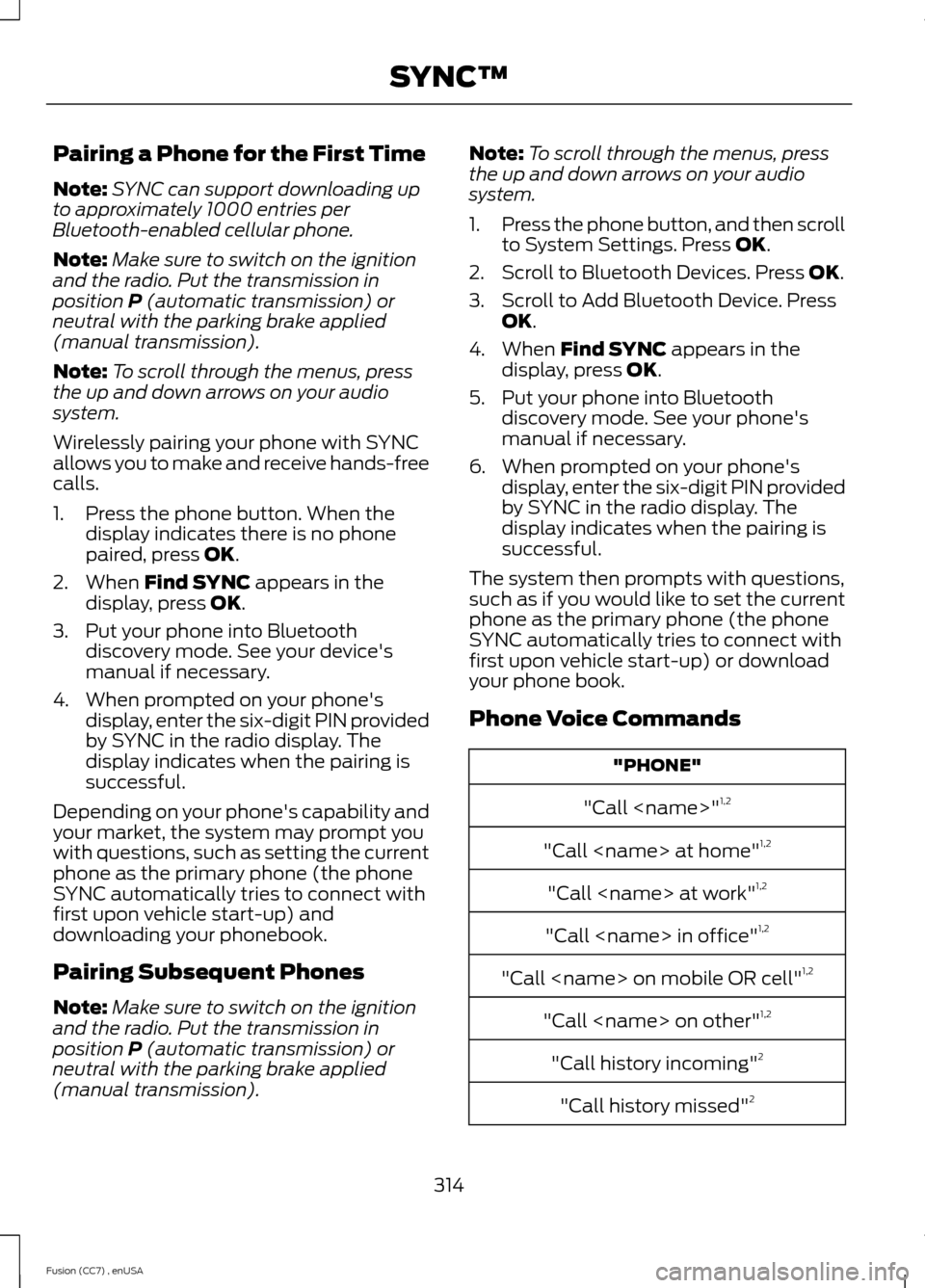
Phone Voice Commands
"PHONE"
"Call
"Call
"Call
"Call
"Call
"Call
"Call history incoming"2
"Call history missed"2
314Fusion (CC7) , enUSASYNC™
Page 318 of 458
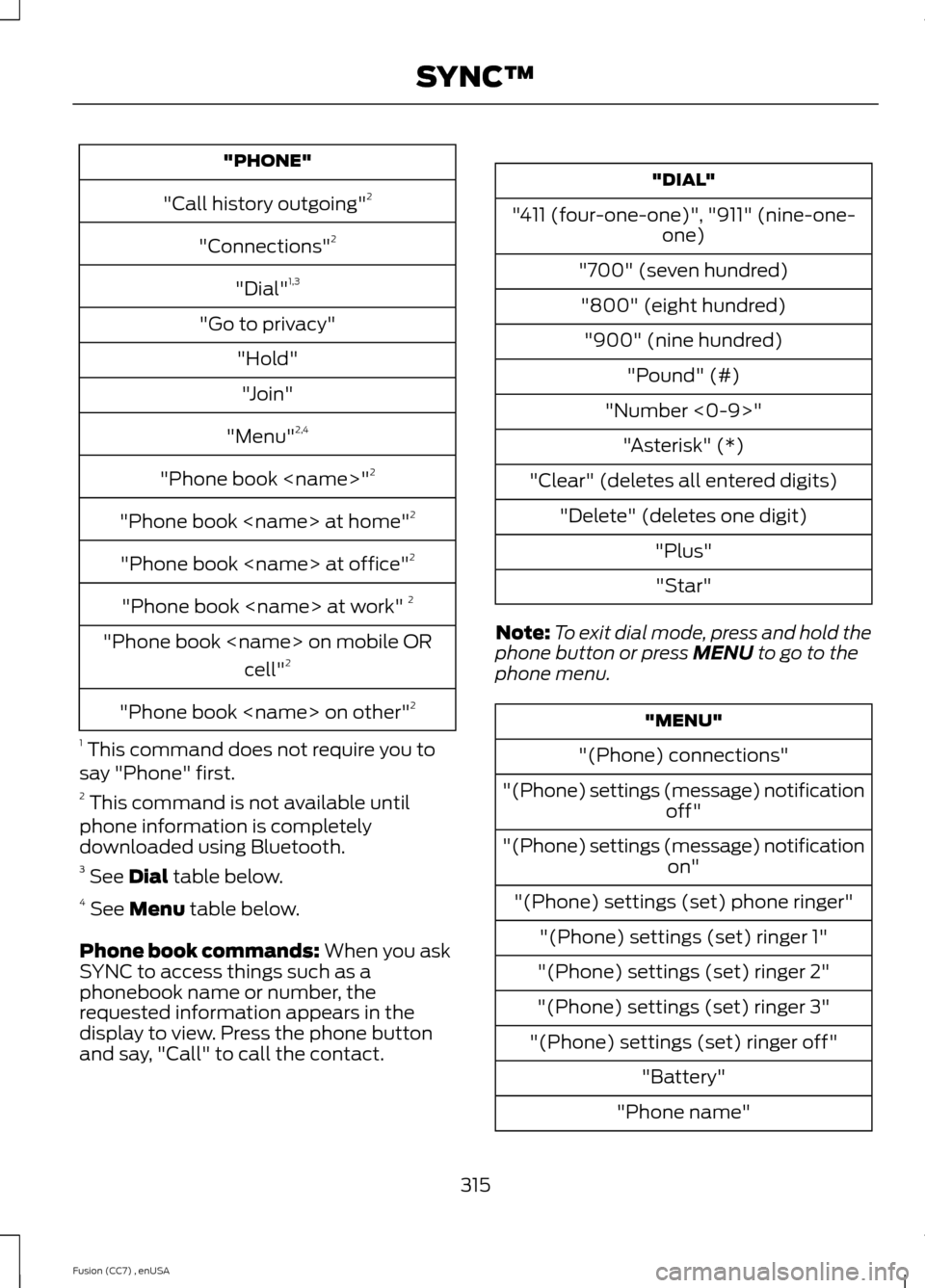
"PHONE"
"Call history outgoing"2
"Connections"2
"Dial"1,3
"Go to privacy"
"Hold"
"Join"
"Menu"2,4
"Phone book
"Phone book
"Phone book
"Phone book
"Phone book
cell"2
"Phone book
1 This command does not require you tosay "Phone" first.2 This command is not available untilphone information is completelydownloaded using Bluetooth.3 See Dial table below.4 See Menu table below.
Phone book commands: When you askSYNC to access things such as aphonebook name or number, therequested information appears in thedisplay to view. Press the phone buttonand say, "Call" to call the contact.
"DIAL"
"411 (four-one-one)", "911" (nine-one-one)
"700" (seven hundred)
"800" (eight hundred)
"900" (nine hundred)
"Pound" (#)
"Number <0-9>"
"Asterisk" (*)
"Clear" (deletes all entered digits)
"Delete" (deletes one digit)
"Plus"
"Star"
Note:To exit dial mode, press and hold thephone button or press MENU to go to thephone menu.
"MENU"
"(Phone) connections"
"(Phone) settings (message) notificationoff"
"(Phone) settings (message) notificationon"
"(Phone) settings (set) phone ringer"
"(Phone) settings (set) ringer 1"
"(Phone) settings (set) ringer 2"
"(Phone) settings (set) ringer 3"
"(Phone) settings (set) ringer off"
"Battery"
"Phone name"
315Fusion (CC7) , enUSASYNC™
Page 320 of 458
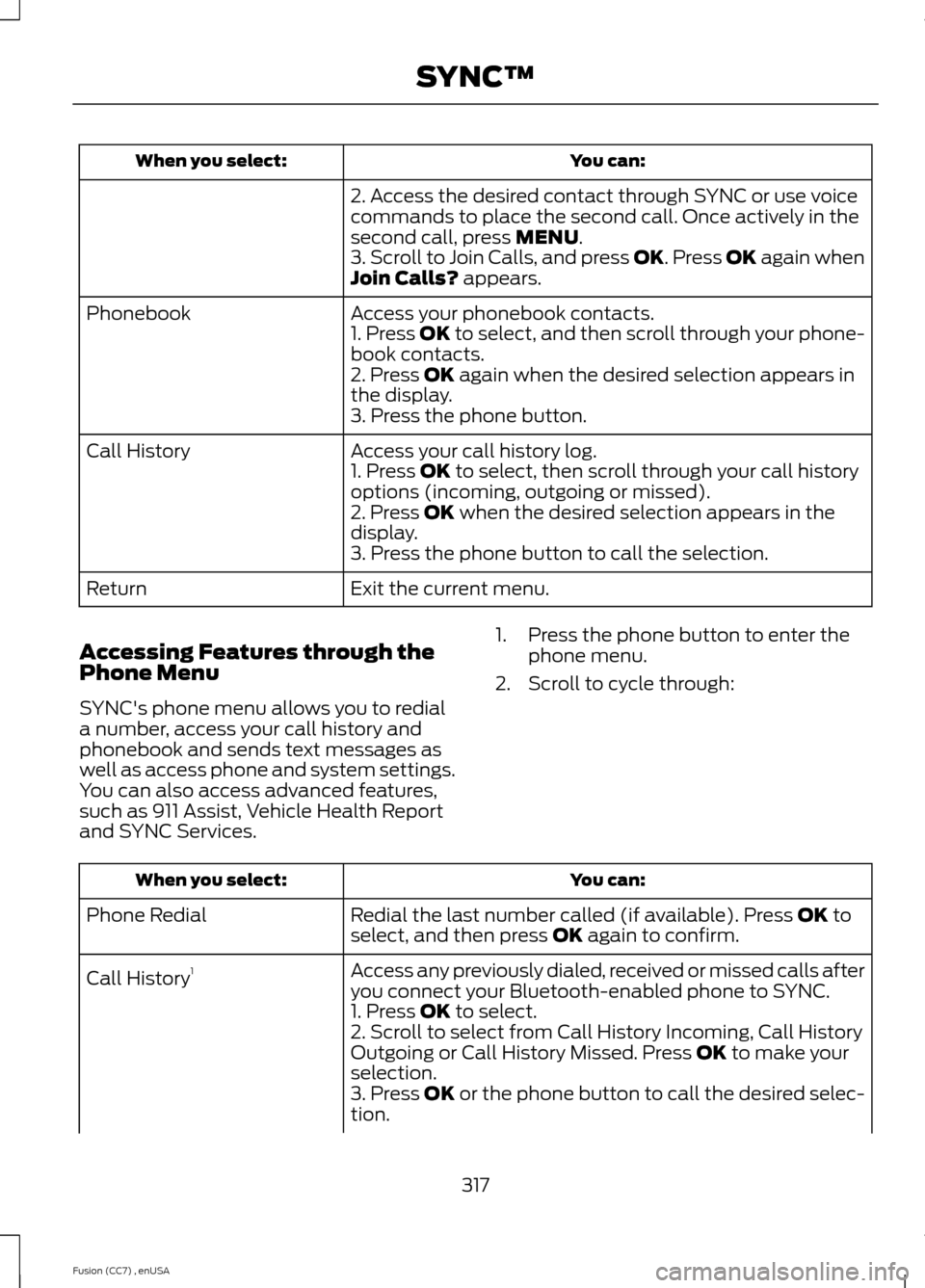
You can:When you select:
2. Access the desired contact through SYNC or use voicecommands to place the second call. Once actively in thesecond call, press MENU.3. Scroll to Join Calls, and press OK. Press OK again whenJoin Calls? appears.
Access your phonebook contacts.Phonebook1. Press OK to select, and then scroll through your phone-book contacts.2. Press OK again when the desired selection appears inthe display.3. Press the phone button.
Access your call history log.Call History1. Press OK to select, then scroll through your call historyoptions (incoming, outgoing or missed).2. Press OK when the desired selection appears in thedisplay.3. Press the phone button to call the selection.
Exit the current menu.Return
Accessing Features through thePhone Menu
SYNC's phone menu allows you to rediala number, access your call history andphonebook and sends text messages aswell as access phone and system settings.You can also access advanced features,such as 911 Assist, Vehicle Health Reportand SYNC Services.
1.Press the phone button to enter thephone menu.
2.Scroll to cycle through:
You can:When you select:
Redial the last number called (if available). Press OK toselect, and then press OK again to confirm.Phone Redial
Access any previously dialed, received or missed calls afteryou connect your Bluetooth-enabled phone to SYNC.Call History1
1. Press OK to select.2. Scroll to select from Call History Incoming, Call HistoryOutgoing or Call History Missed. Press OK to make yourselection.3. Press OK or the phone button to call the desired selec-tion.
317Fusion (CC7) , enUSASYNC™
Page 321 of 458
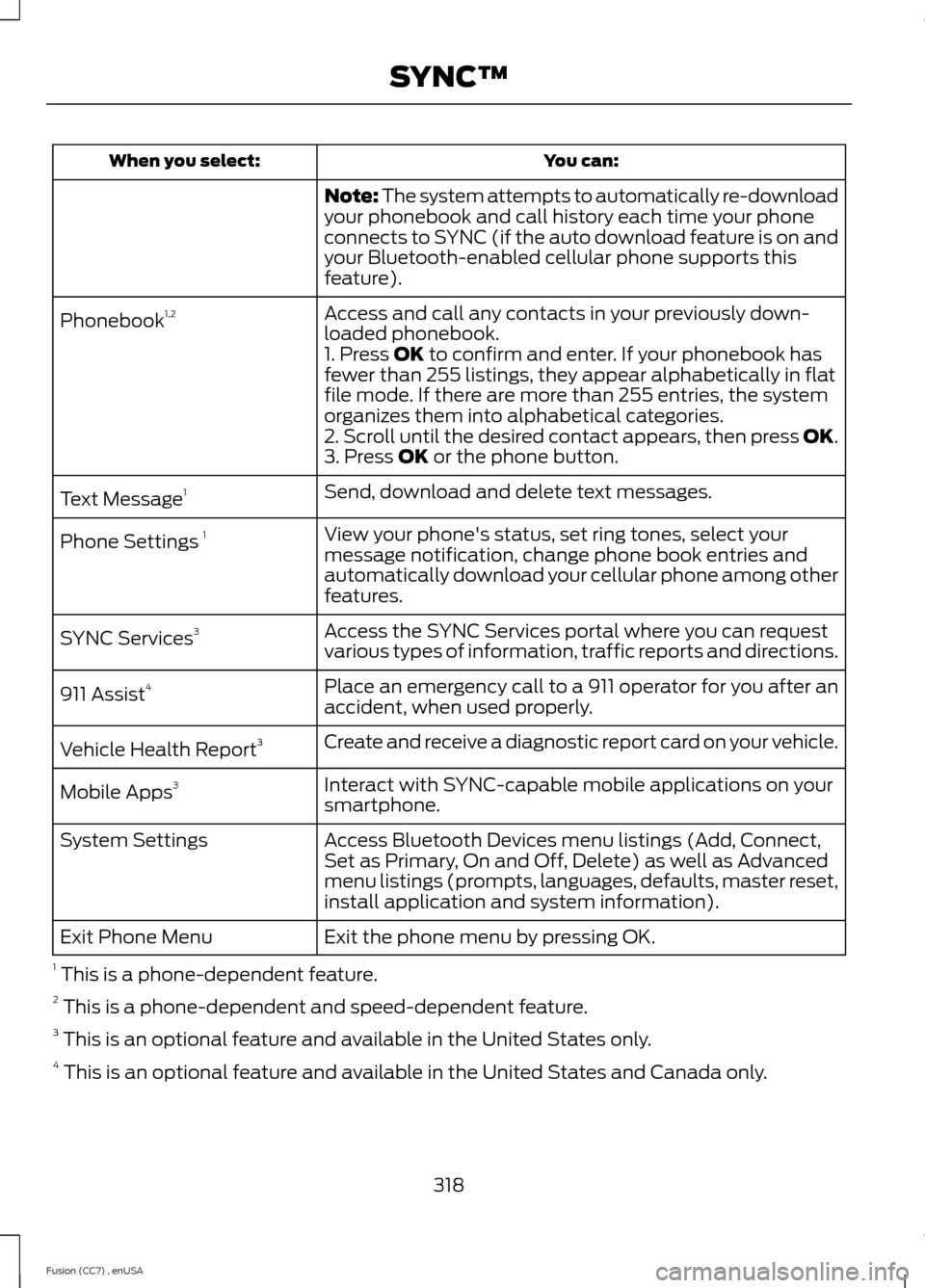
You can:When you select:
Note: The system attempts to automatically re-downloadyour phonebook and call history each time your phoneconnects to SYNC (if the auto download feature is on andyour Bluetooth-enabled cellular phone supports thisfeature).
Access and call any contacts in your previously down-loaded phonebook.Phonebook1,2
1. Press OK to confirm and enter. If your phonebook hasfewer than 255 listings, they appear alphabetically in flatfile mode. If there are more than 255 entries, the systemorganizes them into alphabetical categories.2. Scroll until the desired contact appears, then press OK.3. Press OK or the phone button.
Send, download and delete text messages.Text Message1
View your phone's status, set ring tones, select yourmessage notification, change phone book entries andautomatically download your cellular phone among otherfeatures.
Phone Settings 1
Access the SYNC Services portal where you can requestvarious types of information, traffic reports and directions.SYNC Services3
Place an emergency call to a 911 operator for you after anaccident, when used properly.911 Assist4
Create and receive a diagnostic report card on your vehicle.Vehicle Health Report3
Interact with SYNC-capable mobile applications on yoursmartphone.Mobile Apps3
Access Bluetooth Devices menu listings (Add, Connect,Set as Primary, On and Off, Delete) as well as Advancedmenu listings (prompts, languages, defaults, master reset,install application and system information).
System Settings
Exit the phone menu by pressing OK.Exit Phone Menu
1 This is a phone-dependent feature.2 This is a phone-dependent and speed-dependent feature.3 This is an optional feature and available in the United States only.4 This is an optional feature and available in the United States and Canada only.
318Fusion (CC7) , enUSASYNC™