steering wheel FORD FUSION (AMERICAS) 2016 2.G User Guide
[x] Cancel search | Manufacturer: FORD, Model Year: 2016, Model line: FUSION (AMERICAS), Model: FORD FUSION (AMERICAS) 2016 2.GPages: 518, PDF Size: 5.72 MB
Page 99 of 518
GENERAL INFORMATION
WARNING
Driving while distracted can result in
loss of vehicle control, crash and
injury. We strongly recommend that
you use extreme caution when using any
device that may take your focus off the
road. Your primary responsibility is the safe
operation of your vehicle. We recommend
against the use of any handheld device
while driving and encourage the use of
voice-operated systems when possible.
Make sure you are aware of all applicable
local laws that may affect the use of
electronic devices while driving. Note:
Your vehicle may or may not be
equipped with all the messages listed in this
chapter. Your vehicle will not display
messages of systems it is not equipped with.
Various systems on your vehicle can be
controlled using the information display
controls on the steering wheel.
Corresponding information is displayed in
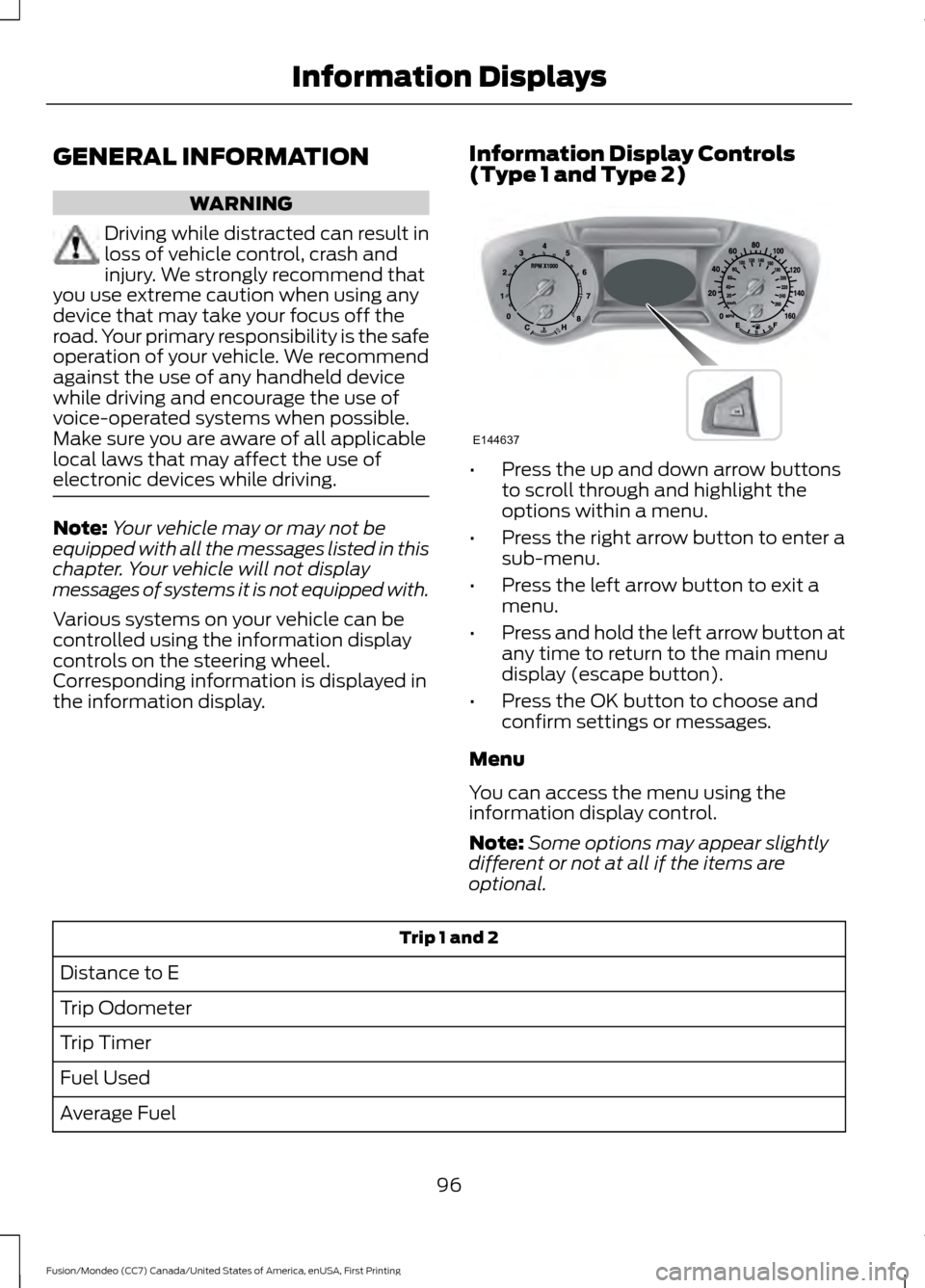
the information display. Information Display Controls
(Type 1 and Type 2) •
Press the up and down arrow buttons
to scroll through and highlight the
options within a menu.
• Press the right arrow button to enter a
sub-menu.
• Press the left arrow button to exit a
menu.
• Press and hold the left arrow button at
any time to return to the main menu
display (escape button).
• Press the OK button to choose and
confirm settings or messages.
Menu
You can access the menu using the
information display control.
Note: Some options may appear slightly
different or not at all if the items are
optional. Trip 1 and 2
Distance to E
Trip Odometer
Trip Timer
Fuel Used
Average Fuel
96
Fusion/Mondeo (CC7) Canada/United States of America, enUSA, First Printing Information DisplaysE144637
Page 101 of 518
Fuel Economy
All Values 1
Auto StartStop
1 Type 2
• Distance to Empty - Shows the approximate distance your vehicle can travel before
running out of fuel.
• Inst Fuel Economy - Shows a visual graph of your instantaneous fuel economy along
with your Avg MPG since the function was last reset.
• Long Term Fuel Economy - Shows your long term fuel economy.
• Fuel History - Shows a bar chart of your fuel history.
• Average Fuel — Shows the average fuel economy for a given trip.
• All Values — Shows all fuel economy values (DTE, Inst Fuel Econ, Avg Fuel).
• Auto StartStop - Available Auto Start-Stop messaging will provide details about what
is happening with your system. See Information Messages (page 105).
Note: You can reset your average fuel economy by pressing and holding the OK button on
the left hand steering wheel controls. Driver Assist
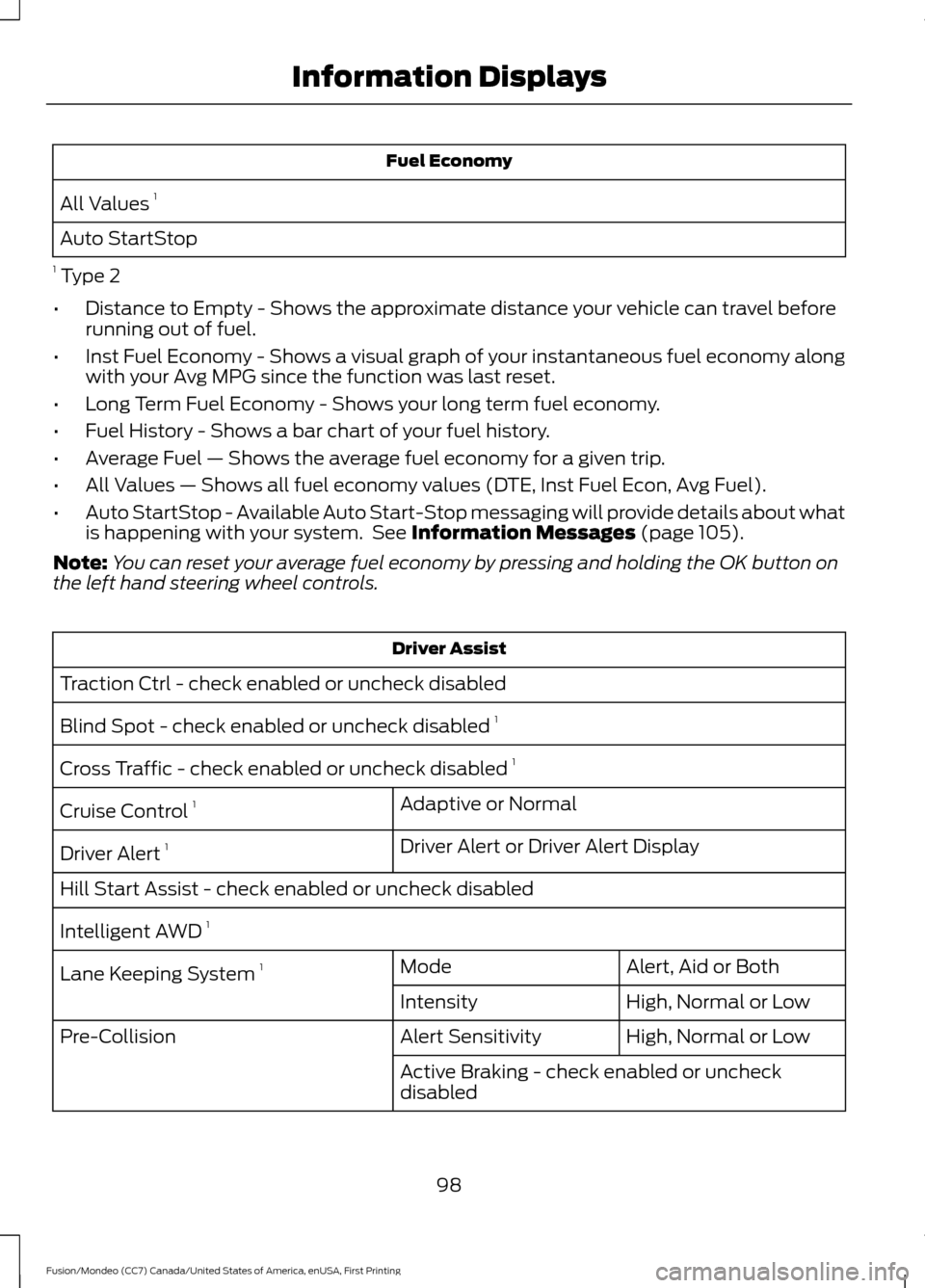
Traction Ctrl - check enabled or uncheck disabled
Blind Spot - check enabled or uncheck disabled 1
Cross Traffic - check enabled or uncheck disabled 1
Adaptive or Normal
Cruise Control 1
Driver Alert or Driver Alert Display
Driver Alert 1
Hill Start Assist - check enabled or uncheck disabled
Intelligent AWD 1
Alert, Aid or Both
Mode
Lane Keeping System 1
High, Normal or Low
Intensity
High, Normal or Low
Alert Sensitivity
Pre-Collision
Active Braking - check enabled or uncheck
disabled
98
Fusion/Mondeo (CC7) Canada/United States of America, enUSA, First Printing Information Displays
Page 105 of 518
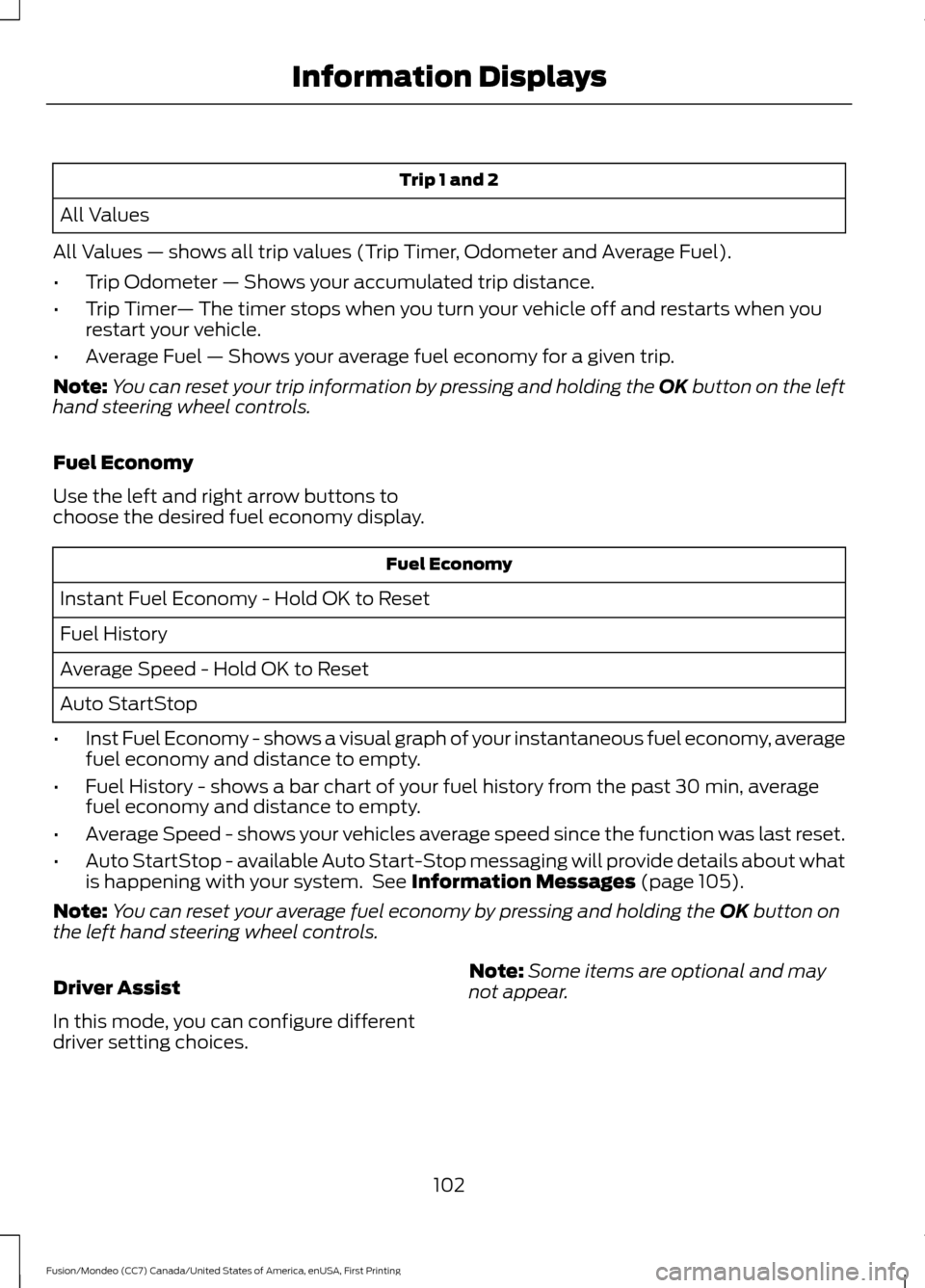
Trip 1 and 2
All Values
All Values — shows all trip values (Trip Timer, Odometer and Average Fuel).
• Trip Odometer — Shows your accumulated trip distance.
• Trip Timer — The timer stops when you turn your vehicle off and restarts when you
restart your vehicle.
• Average Fuel — Shows your average fuel economy for a given trip.
Note: You can reset your trip information by pressing and holding the OK button on the left
hand steering wheel controls.
Fuel Economy
Use the left and right arrow buttons to
choose the desired fuel economy display. Fuel Economy
Instant Fuel Economy - Hold OK to Reset
Fuel History
Average Speed - Hold OK to Reset
Auto StartStop
• Inst Fuel Economy - shows a visual graph of your instantaneous fuel economy, average
fuel economy and distance to empty.
• Fuel History - shows a bar chart of your fuel history from the past 30 min, average
fuel economy and distance to empty.
• Average Speed - shows your vehicles average speed since the function was last reset.
• Auto StartStop - available Auto Start-Stop messaging will provide details about what
is happening with your system. See Information Messages (page 105).
Note: You can reset your average fuel economy by pressing and holding the
OK button on
the left hand steering wheel controls.
Driver Assist
In this mode, you can configure different
driver setting choices. Note:
Some items are optional and may
not appear.
102
Fusion/Mondeo (CC7) Canada/United States of America, enUSA, First Printing Information Displays
Page 110 of 518
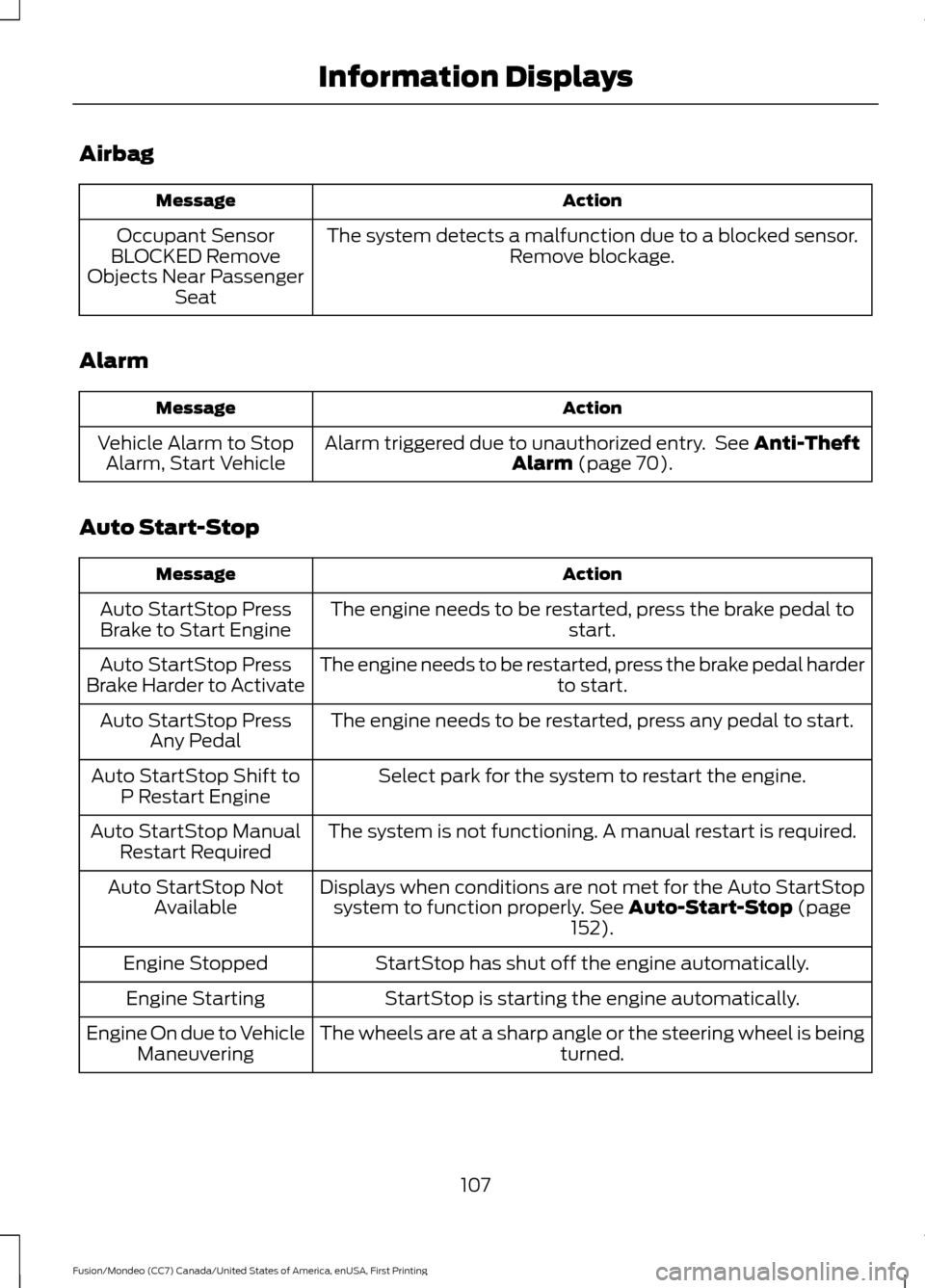
Airbag
Action
Message
The system detects a malfunction due to a blocked sensor. Remove blockage.
Occupant Sensor
BLOCKED Remove
Objects Near Passenger Seat
Alarm Action
Message
Alarm triggered due to unauthorized entry. See Anti-Theft
Alarm (page 70).
Vehicle Alarm to Stop
Alarm, Start Vehicle
Auto Start-Stop Action
Message
The engine needs to be restarted, press the brake pedal to start.
Auto StartStop Press
Brake to Start Engine
The engine needs to be restarted, press the brake pedal harder to start.
Auto StartStop Press
Brake Harder to Activate
The engine needs to be restarted, press any pedal to start.
Auto StartStop Press
Any Pedal
Select park for the system to restart the engine.
Auto StartStop Shift to
P Restart Engine
The system is not functioning. A manual restart is required.
Auto StartStop Manual
Restart Required
Displays when conditions are not met for the Auto StartStopsystem to function properly.
See Auto-Start-Stop (page
152).
Auto StartStop Not
Available
StartStop has shut off the engine automatically.
Engine Stopped
StartStop is starting the engine automatically.
Engine Starting
The wheels are at a sharp angle or the steering wheel is being turned.
Engine On due to Vehicle
Maneuvering
107
Fusion/Mondeo (CC7) Canada/United States of America, enUSA, First Printing Information Displays
Page 111 of 518
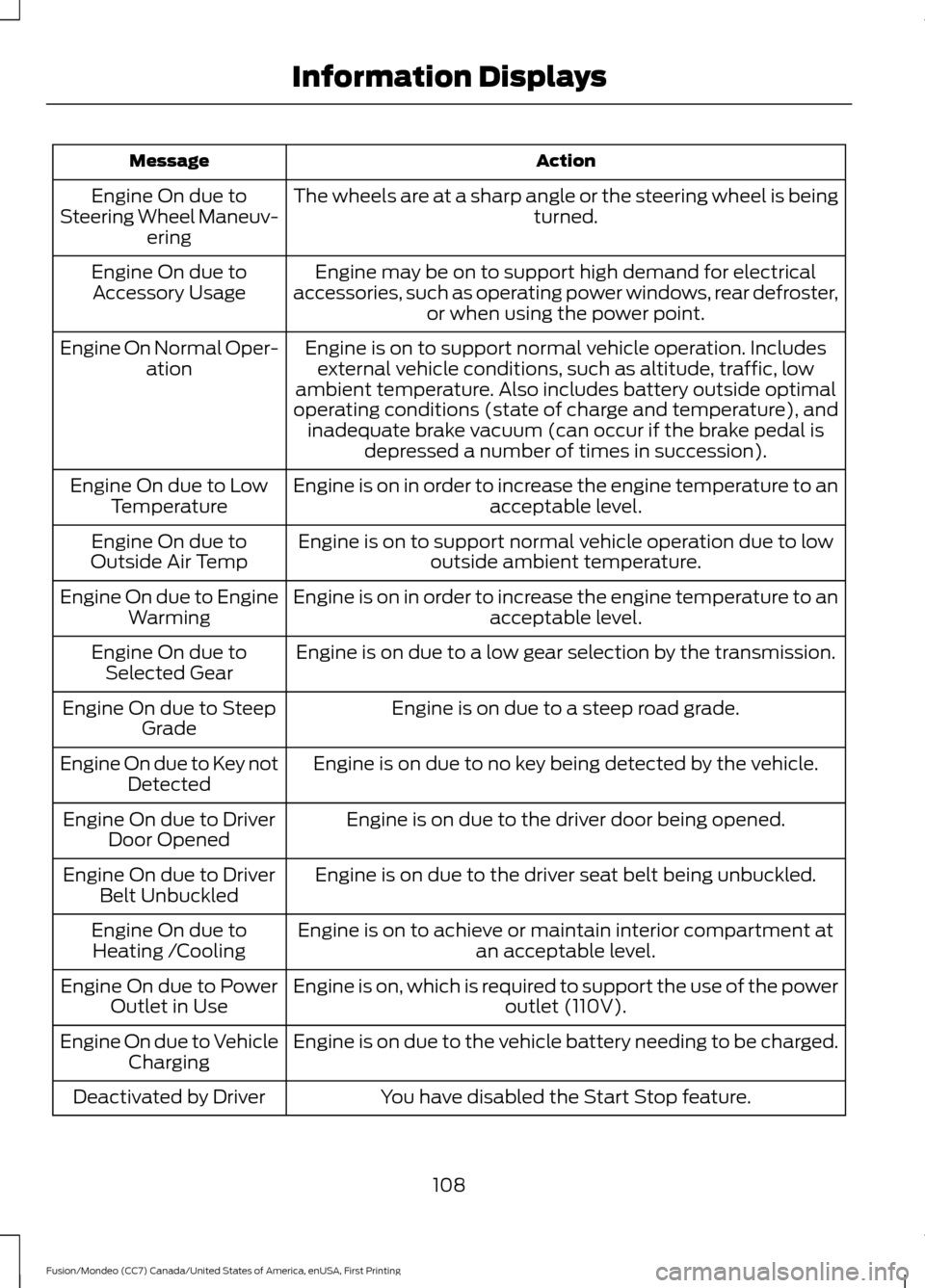
Action
Message
The wheels are at a sharp angle or the steering wheel is being turned.
Engine On due to
Steering Wheel Maneuv- ering
Engine may be on to support high demand for electrical
accessories, such as operating power windows, rear defroster, or when using the power point.
Engine On due to
Accessory Usage
Engine is on to support normal vehicle operation. Includesexternal vehicle conditions, such as altitude, traffic, low
ambient temperature. Also includes battery outside optimal
operating conditions (state of charge and temperature), and inadequate brake vacuum (can occur if the brake pedal is depressed a number of times in succession).
Engine On Normal Oper-
ation
Engine is on in order to increase the engine temperature to an acceptable level.
Engine On due to Low
Temperature
Engine is on to support normal vehicle operation due to lowoutside ambient temperature.
Engine On due to
Outside Air Temp
Engine is on in order to increase the engine temperature to anacceptable level.
Engine On due to Engine
Warming
Engine is on due to a low gear selection by the transmission.
Engine On due to
Selected Gear
Engine is on due to a steep road grade.
Engine On due to Steep
Grade
Engine is on due to no key being detected by the vehicle.
Engine On due to Key not
Detected
Engine is on due to the driver door being opened.
Engine On due to Driver
Door Opened
Engine is on due to the driver seat belt being unbuckled.
Engine On due to Driver
Belt Unbuckled
Engine is on to achieve or maintain interior compartment atan acceptable level.
Engine On due to
Heating /Cooling
Engine is on, which is required to support the use of the power outlet (110V).
Engine On due to Power
Outlet in Use
Engine is on due to the vehicle battery needing to be charged.
Engine On due to Vehicle
Charging
You have disabled the Start Stop feature.
Deactivated by Driver
108
Fusion/Mondeo (CC7) Canada/United States of America, enUSA, First Printing Information Displays
Page 112 of 518
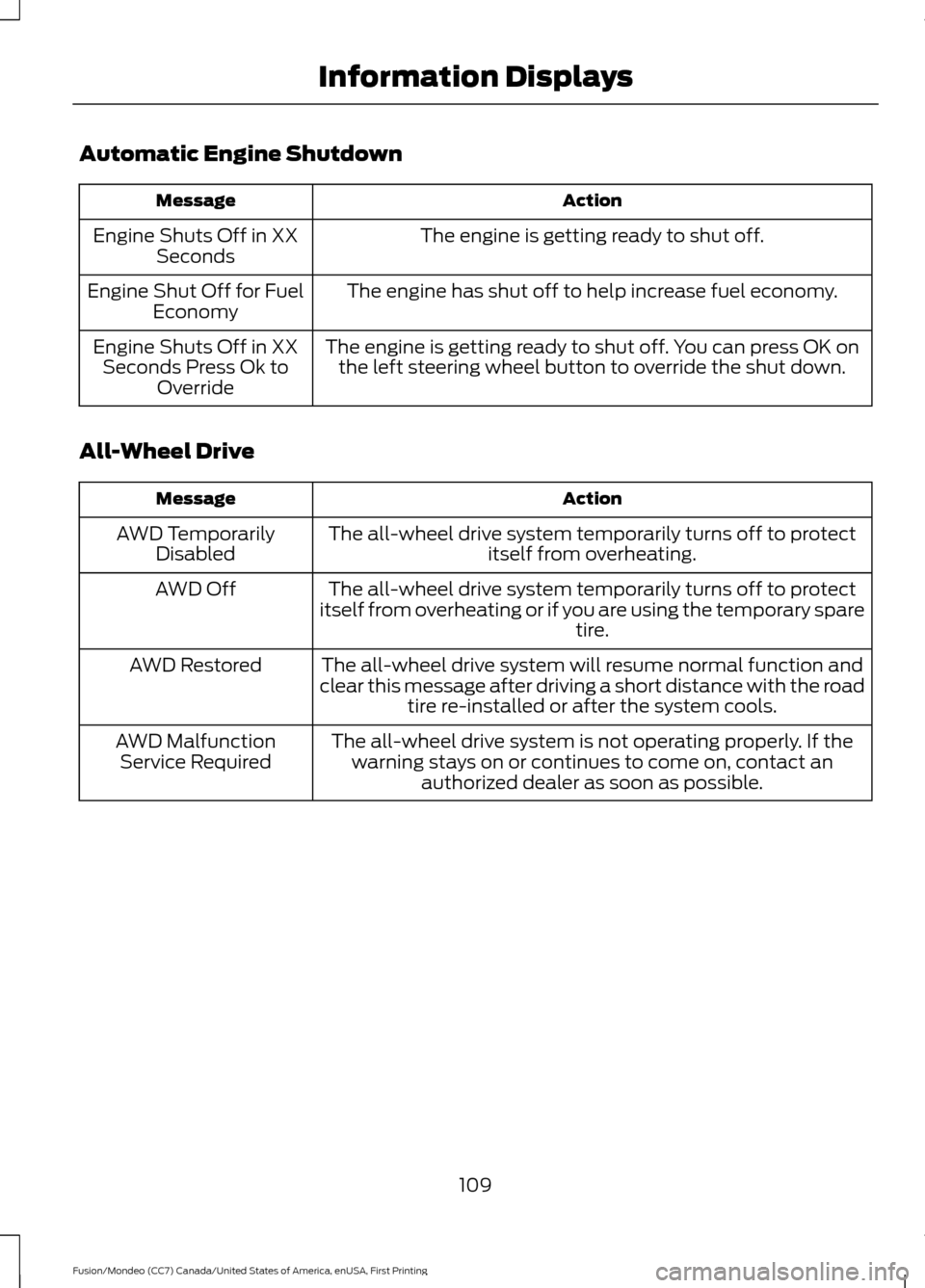
Automatic Engine Shutdown
Action
Message
The engine is getting ready to shut off.
Engine Shuts Off in XX
Seconds
The engine has shut off to help increase fuel economy.
Engine Shut Off for Fuel
Economy
The engine is getting ready to shut off. You can press OK onthe left steering wheel button to override the shut down.
Engine Shuts Off in XX
Seconds Press Ok to Override
All-Wheel Drive Action
Message
The all-wheel drive system temporarily turns off to protectitself from overheating.
AWD Temporarily
Disabled
The all-wheel drive system temporarily turns off to protect
itself from overheating or if you are using the temporary spare tire.
AWD Off
The all-wheel drive system will resume normal function and
clear this message after driving a short distance with the road tire re-installed or after the system cools.
AWD Restored
The all-wheel drive system is not operating properly. If thewarning stays on or continues to come on, contact an authorized dealer as soon as possible.
AWD Malfunction
Service Required
109
Fusion/Mondeo (CC7) Canada/United States of America, enUSA, First Printing Information Displays
Page 116 of 518
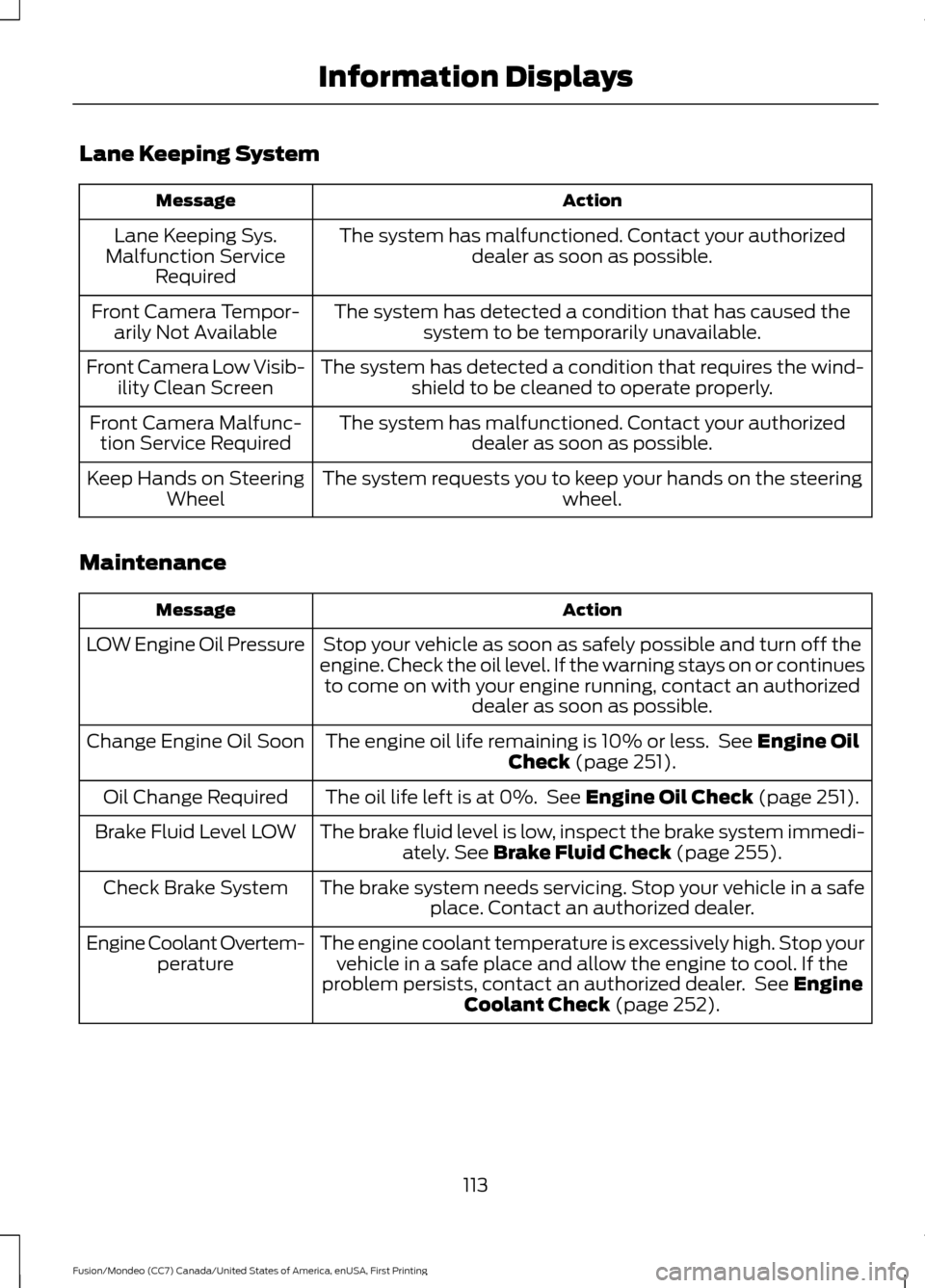
Lane Keeping System
Action
Message
The system has malfunctioned. Contact your authorizeddealer as soon as possible.
Lane Keeping Sys.
Malfunction Service Required
The system has detected a condition that has caused thesystem to be temporarily unavailable.
Front Camera Tempor-
arily Not Available
The system has detected a condition that requires the wind-shield to be cleaned to operate properly.
Front Camera Low Visib-
ility Clean Screen
The system has malfunctioned. Contact your authorizeddealer as soon as possible.
Front Camera Malfunc-
tion Service Required
The system requests you to keep your hands on the steering wheel.
Keep Hands on Steering
Wheel
Maintenance Action
Message
Stop your vehicle as soon as safely possible and turn off the
engine. Check the oil level. If the warning stays on or continues to come on with your engine running, contact an authorized dealer as soon as possible.
LOW Engine Oil Pressure
The engine oil life remaining is 10% or less. See Engine Oil
Check (page 251).
Change Engine Oil Soon
The oil life left is at 0%. See
Engine Oil Check (page 251).
Oil Change Required
The brake fluid level is low, inspect the brake system immedi-ately.
See Brake Fluid Check (page 255).
Brake Fluid Level LOW
The brake system needs servicing. Stop your vehicle in a safeplace. Contact an authorized dealer.
Check Brake System
The engine coolant temperature is excessively high. Stop yourvehicle in a safe place and allow the engine to cool. If the
problem persists, contact an authorized dealer. See
Engine
Coolant Check (page 252).
Engine Coolant Overtem-
perature
113
Fusion/Mondeo (CC7) Canada/United States of America, enUSA, First Printing Information Displays
Page 132 of 518
For additional cabin air filter information,
or to replace the filter, see an authorized
dealer.
REMOTE START (If Equipped)
The remote start feature allows you to
pre-condition the interior of your vehicle.
The climate control system works to
achieve comfort according to your previous
settings.
Note: You cannot adjust the system during
remote start operation.
Turn the ignition on to return the system
to its previous settings. You can now make
adjustments normally, but you need to turn
certain vehicle-dependent features back
on, such as:
• Heated seats.
• Cooled seats.
• Heated steering wheel.
• Heated mirrors.
• Heated rear window.
You can adjust the default remote start
settings using the information display
controls. See
Information Displays
(page 96).
Automatic Settings
In hot weather, the system is set to 72°F
(22°C). The cooled seats are set to high
(if available, and selected to AUTO in the
information display).
In moderate weather, the system either
heats or cools (based on previous
settings). The rear defroster, heated
mirrors and heated seats do not
automatically turn on.
In cold weather, the system is set to 72°F
(22°C). The heated seats are set to high
(if available, and selected to AUTO in the
information display). The rear defroster
and heated mirrors automatically turn on.
129
Fusion/Mondeo (CC7) Canada/United States of America, enUSA, First Printing Climate Control
Page 133 of 518
SITTING IN THE CORRECT
POSITION
WARNINGS
Sitting improperly, out of position or
with the seatback reclined too far
can take weight off the seat cushion
and affect the decision of the passenger
sensing system, resulting in serious injury
or death in the event of a crash. Always sit
upright against your seat back, with your
feet on the floor. Do not recline the seatback as this
can cause the occupant to slide
under the safety belt, resulting in
serious injury in the event of a crash. Do not place objects higher than the
seatback to reduce the risk of serious
injury in the event of a crash or during
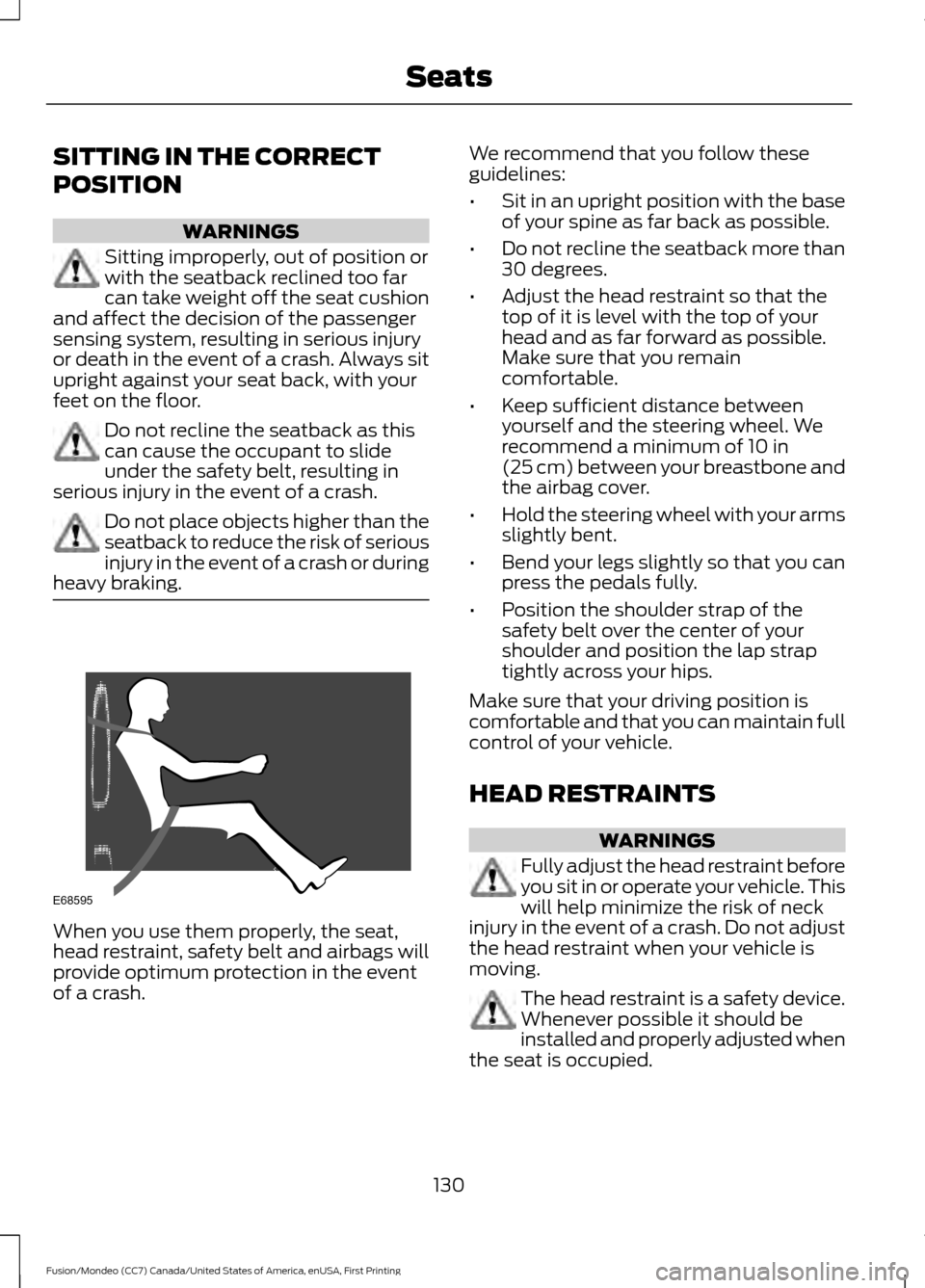
heavy braking. When you use them properly, the seat,
head restraint, safety belt and airbags will
provide optimum protection in the event
of a crash. We recommend that you follow these
guidelines:
•
Sit in an upright position with the base
of your spine as far back as possible.
• Do not recline the seatback more than
30 degrees.
• Adjust the head restraint so that the
top of it is level with the top of your
head and as far forward as possible.
Make sure that you remain
comfortable.
• Keep sufficient distance between
yourself and the steering wheel. We
recommend a minimum of 10 in
(25 cm) between your breastbone and
the airbag cover.
• Hold the steering wheel with your arms
slightly bent.
• Bend your legs slightly so that you can
press the pedals fully.
• Position the shoulder strap of the
safety belt over the center of your
shoulder and position the lap strap
tightly across your hips.
Make sure that your driving position is
comfortable and that you can maintain full
control of your vehicle.
HEAD RESTRAINTS WARNINGS
Fully adjust the head restraint before
you sit in or operate your vehicle. This
will help minimize the risk of neck
injury in the event of a crash. Do not adjust
the head restraint when your vehicle is
moving. The head restraint is a safety device.
Whenever possible it should be
installed and properly adjusted when
the seat is occupied.
130
Fusion/Mondeo (CC7) Canada/United States of America, enUSA, First Printing SeatsE68595
Page 155 of 518
AUTO-START-STOP (If Equipped)
The system helps reduce fuel consumption
by automatically shutting off and restarting
the engine while your vehicle is stopped.
The engine will restart automatically when
you release the brake pedal. In some
situations, your vehicle may restart
automatically, for example:
• To maintain interior comfort
• To recharge the battery
Note: Power assist steering is turned off
when the engine is off. WARNINGS
The engine may restart
automatically if required by the
system.
Switch the ignition off before
opening the hood or performing any
maintenance. Failure to do so may
result in serious injuries due to automatic
engine restart. Always switch the ignition off before
leaving your vehicle, as the system
may have turned the engine off, but
the ignition will still be on and automatic
restart may occur. The Auto StartStop system status is
available at a glance within the information
display. See Information Displays (page
96
).
Enabling Auto StartStop
The system is automatically enabled every
time you start your vehicle if the following
conditions are met:
• The Auto StartStop button is not
pressed (not illuminated).
• Your vehicle exceeds an initial speed
of 3 mph (4 km/h) after the vehicle has
been initially started.
• Your vehicle is stopped. •
Your foot is on the brake pedal.
• The transmission is in drive (D).
• The driver's door is closed.
• There is adequate brake vacuum.
• The interior compartment has been
cooled or warmed to an acceptable
level.
• The front windshield defroster is off.
• The steering wheel is not turned rapidly
or is not at a sharp angle.
• The vehicle is not on a steep road
grade.
• The battery is within optimal operating
conditions (battery state of charge and
temperature in range).
• The engine coolant is at operating
temperature.
• Elevation is below approximately
10000 feet (3048 meters).
• Ambient temperature is moderate.
Note: The system allows multiple
successive Auto StartStop events, but it
may not operate in conditions of heavy
traffic or in extended low speed operation. Note: The green Auto StartStop
indicator light on the instrument
cluster will illuminate to indicate
when the automatic engine stop occurs. Note:
If the instrument cluster
is equipped with a grey Auto
StartStop indicator light, it is
illuminated when automatic engine stop
is not available due to one of the above
noted conditions not being met.
Automatic Engine Restart
Any of the following conditions will result
in an automatic restart of the engine:
• Your foot is removed from the brake
pedal.
• You press the accelerator pedal.
152
Fusion/Mondeo (CC7) Canada/United States of America, enUSA, First Printing Unique Driving Characteristics E146361