window FORD FUSION (AMERICAS) 2016 2.G Owners Manual
[x] Cancel search | Manufacturer: FORD, Model Year: 2016, Model line: FUSION (AMERICAS), Model: FORD FUSION (AMERICAS) 2016 2.GPages: 518, PDF Size: 5.72 MB
Page 5 of 518
Heated Steering Wheel................................73
Wipers and Washers
Windshield Wipers
.........................................74
Autowipers........................................................74
Windshield Washers......................................75
Lighting
General Information
.......................................77
Lighting Control
...............................................77
Autolamps........................................................78
Instrument Lighting Dimmer
......................79
Headlamp Exit Delay....................................79
Daytime Running Lamps............................80
Automatic High Beam Control.................80
Front Fog Lamps
............................................82
Direction Indicators
.......................................82
Interior Lamps.................................................82
Ambient Lighting
............................................83
Windows and Mirrors
Power Windows.............................................84
Global Opening and Closing......................85
Exterior Mirrors
................................................85
Interior Mirror
...................................................86
Sun Visors
.........................................................87
Moonroof...........................................................87
Instrument Cluster
Gauges...............................................................89
Warning Lamps and Indicators..................91
Audible Warnings and Indicators.............95
Information Displays
General Information.....................................96
Information Messages
................................105
Climate Control
Manual Climate Control............................120 Automatic Climate Control -
Vehicles
Without: Sony Audio System...............122
Automatic Climate Control -
Vehicles
With: Sony Audio System/Sony Audio
System
..........................................................123
Hints on Controlling the Interior Climate.........................................................125
Heated Windows and Mirrors
..................128
Cabin Air Filter
................................................128
Remote Start
..................................................129
Seats
Sitting in the Correct Position..................130
Head Restraints............................................130
Manual Seats.................................................132
Power Seats
....................................................132
Memory Function.........................................134
Rear Seats.......................................................136
Heated Seats
..................................................137
Climate Controlled Seats...........................137
Rear Seat Armrest........................................138
Universal Garage Door Opener
Universal Garage Door Opener...............139
Auxiliary Power Points
Auxiliary Power Points................................143
Storage Compartments
Center Console
..............................................145
Overhead Console
........................................145
Starting and Stopping the Engine
General Information
....................................146
Ignition Switch
...............................................146
Keyless Starting............................................146
Starting a Gasoline Engine........................147
Engine Block Heater....................................150
2
Fusion/Mondeo (CC7) Canada/United States of America, enUSA, First Printing Table of Contents
Page 7 of 518
Customer Assistance
Getting the Services You Need................231
In California (U.S. Only).............................232
The Better Business Bureau (BBB) Auto
Line Program (U.S. Only)......................233
Utilizing the Mediation/Arbitration Program (Canada Only).......................233
Getting Assistance Outside the U.S. and Canada........................................................234
Ordering Additional Owner's Literature.....................................................235
Reporting Safety Defects (U.S. Only).............................................................235
Reporting Safety Defects (Canada Only)
.............................................................236
Fuses
Fuse Specification Chart...........................237
Changing a Fuse..........................................246
Maintenance
General Information....................................247
Opening and Closing the Hood..............247
Under Hood Overview -
1.5L
EcoBoost™...............................................248
Under Hood Overview -
2.0L
EcoBoost™...............................................249
Under Hood Overview - 2.5L...................250
Engine Oil Dipstick -
1.5L
EcoBoost™.................................................251
Engine Oil Dipstick -
2.0L EcoBoost™/
2.5L.................................................................251
Engine Oil Check
...........................................251
Oil Change Indicator Reset
.......................252
Engine Coolant Check................................252
Automatic Transmission Fluid Check...........................................................255
Brake Fluid Check........................................255
Power Steering Fluid Check.....................255
Washer Fluid Check....................................256
Fuel Filter
........................................................256
Changing the 12V Battery.........................256 Checking the Wiper Blades
.....................258
Changing the Wiper Blades
.....................258
Adjusting the Headlamps........................258
Removing a Headlamp.............................260
Changing a Bulb............................................261
Bulb Specification Chart...........................263
Changing the Engine Air Filter
................265
Vehicle Care
General Information...................................266
Cleaning Products.......................................266
Cleaning the Exterior..................................266
Waxing
.............................................................267
Cleaning the Engine....................................267
Cleaning the Windows and Wiper Blades..........................................................268
Cleaning the Interior...................................268
Cleaning the Instrument Panel and Instrument Cluster Lens.......................269
Cleaning Leather Seats
.............................269
Repairing Minor Paint Damage
...............270
Cleaning the Alloy Wheels.......................270
Vehicle Storage.............................................270
Wheels and Tires
Temporary Mobility Kit...............................273
Tire Care
..........................................................285
Using Summer Tires..................................300
Using Snow Chains
......................................301
Tire Pressure Monitoring System
...........301
Changing a Road Wheel...........................305
Technical Specifications
.............................311
Capacities and Specific- ations
Engine Specifications
..................................313
Motorcraft Parts
............................................313
Vehicle Identification Number
.................315
Vehicle Certification Label
........................315
Transmission Code Designation
.............316
4
Fusion/Mondeo (CC7) Canada/United States of America, enUSA, First Printing Table of Contents
Page 11 of 518
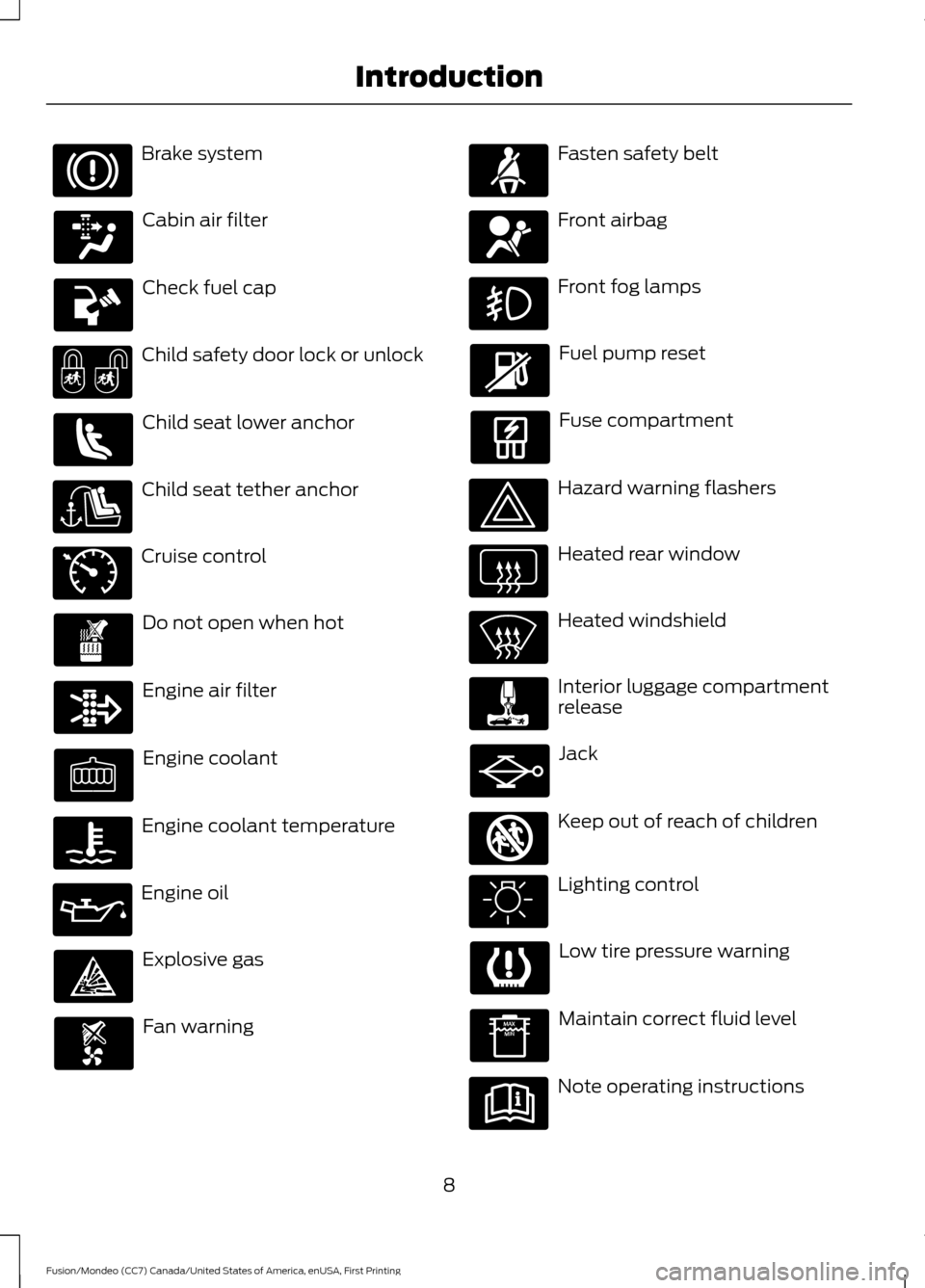
Brake system
Cabin air filter
Check fuel cap
Child safety door lock or unlock
Child seat lower anchor
Child seat tether anchor
Cruise control
Do not open when hot
Engine air filter
Engine coolant
Engine coolant temperature
Engine oil
Explosive gas
Fan warning Fasten safety belt
Front airbag
Front fog lamps
Fuel pump reset
Fuse compartment
Hazard warning flashers
Heated rear window
Heated windshield
Interior luggage compartment
release
Jack
Keep out of reach of children
Lighting control
Low tire pressure warning
Maintain correct fluid level
Note operating instructions
8
Fusion/Mondeo (CC7) Canada/United States of America, enUSA, First Printing Introduction E71340 E161353
Page 12 of 518
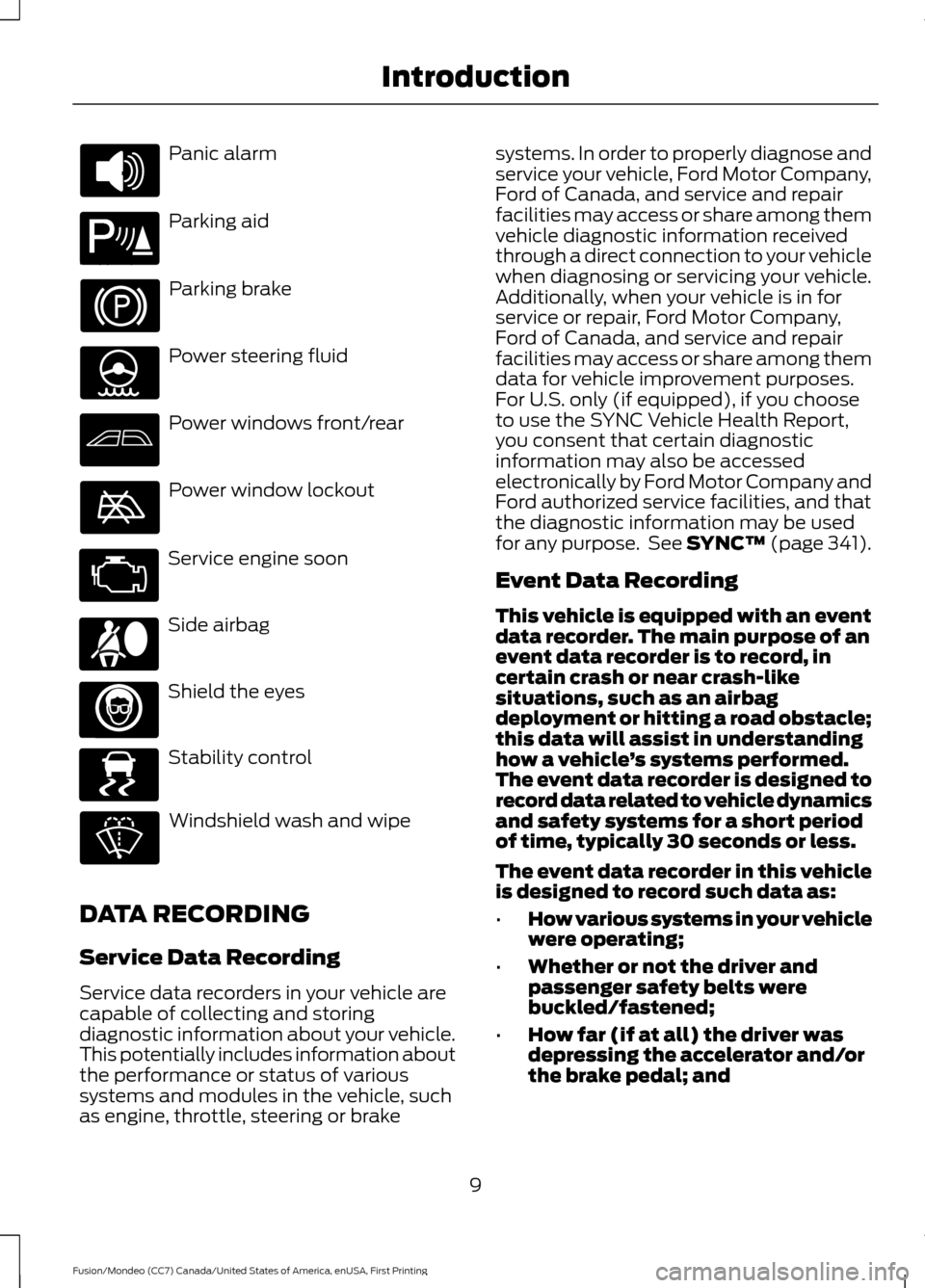
Panic alarm
Parking aid
Parking brake
Power steering fluid
Power windows front/rear
Power window lockout
Service engine soon
Side airbag
Shield the eyes
Stability control
Windshield wash and wipe
DATA RECORDING
Service Data Recording
Service data recorders in your vehicle are
capable of collecting and storing
diagnostic information about your vehicle.
This potentially includes information about
the performance or status of various
systems and modules in the vehicle, such
as engine, throttle, steering or brake systems. In order to properly diagnose and
service your vehicle, Ford Motor Company,
Ford of Canada, and service and repair
facilities may access or share among them
vehicle diagnostic information received
through a direct connection to your vehicle
when diagnosing or servicing your vehicle.
Additionally, when your vehicle is in for
service or repair, Ford Motor Company,
Ford of Canada, and service and repair
facilities may access or share among them
data for vehicle improvement purposes.
For U.S. only (if equipped), if you choose
to use the SYNC Vehicle Health Report,
you consent that certain diagnostic
information may also be accessed
electronically by Ford Motor Company and
Ford authorized service facilities, and that
the diagnostic information may be used
for any purpose. See SYNC™ (page 341).
Event Data Recording
This vehicle is equipped with an event
data recorder. The main purpose of an
event data recorder is to record, in
certain crash or near crash-like
situations, such as an airbag
deployment or hitting a road obstacle;
this data will assist in understanding
how a vehicle
’s systems performed.
The event data recorder is designed to
record data related to vehicle dynamics
and safety systems for a short period
of time, typically 30 seconds or less.
The event data recorder in this vehicle
is designed to record such data as:
• How various systems in your vehicle
were operating;
• Whether or not the driver and
passenger safety belts were
buckled/fastened;
• How far (if at all) the driver was
depressing the accelerator and/or
the brake pedal; and
9
Fusion/Mondeo (CC7) Canada/United States of America, enUSA, First Printing Introduction E139213 E167012 E138639
Page 47 of 518
Make sure the knee airbags are
operating properly. See Crash
Sensors and Airbag Indicator
(page
45).
SIDE CURTAIN AIRBAGS WARNINGS
Do not place objects or mount
equipment on or near the headliner
at the siderail that may come into
contact with a deploying side curtain
airbag. Failure to follow these instructions
may increase the risk of personal injury in
the event of a crash. Do not lean your head on the door.
The side curtain airbag could injure
you as it deploys from the headliner.
Do not attempt to service, repair, or
modify the side curtain airbags, its
fuses, the A, B, or C pillar trim, or the
headliner on a vehicle containing side
curtain airbags. Contact your authorized
dealer as soon as possible. All occupants of the vehicle including
the driver should always wear their
safety belts even when an airbag
supplemental restraint system and side
curtain airbag is provided. To reduce risk of injury, do not
obstruct or place objects in the
deployment path of the side curtain
airbag. If the side curtain airbags have
deployed, the side curtain airbags
will not function again. The side
curtain airbags (including the A, B and C
pillar trim and headliner) must be
inspected and serviced by an authorized
dealer. If the side curtain airbag is not
replaced, the unrepaired area will increase
the risk of injury in a crash. The side curtain airbags will deploy during
significant side crashes. The side curtain
airbags are mounted to the roof side-rail
sheet metal, behind the headliner, above
each row of seats. In certain sideways
crashes, the side curtain airbag on the
impacted side of the vehicle will be
activated. The side curtain airbags are
designed to inflate between the side
window area and occupants to further
enhance protection provided in side impact
crashes.
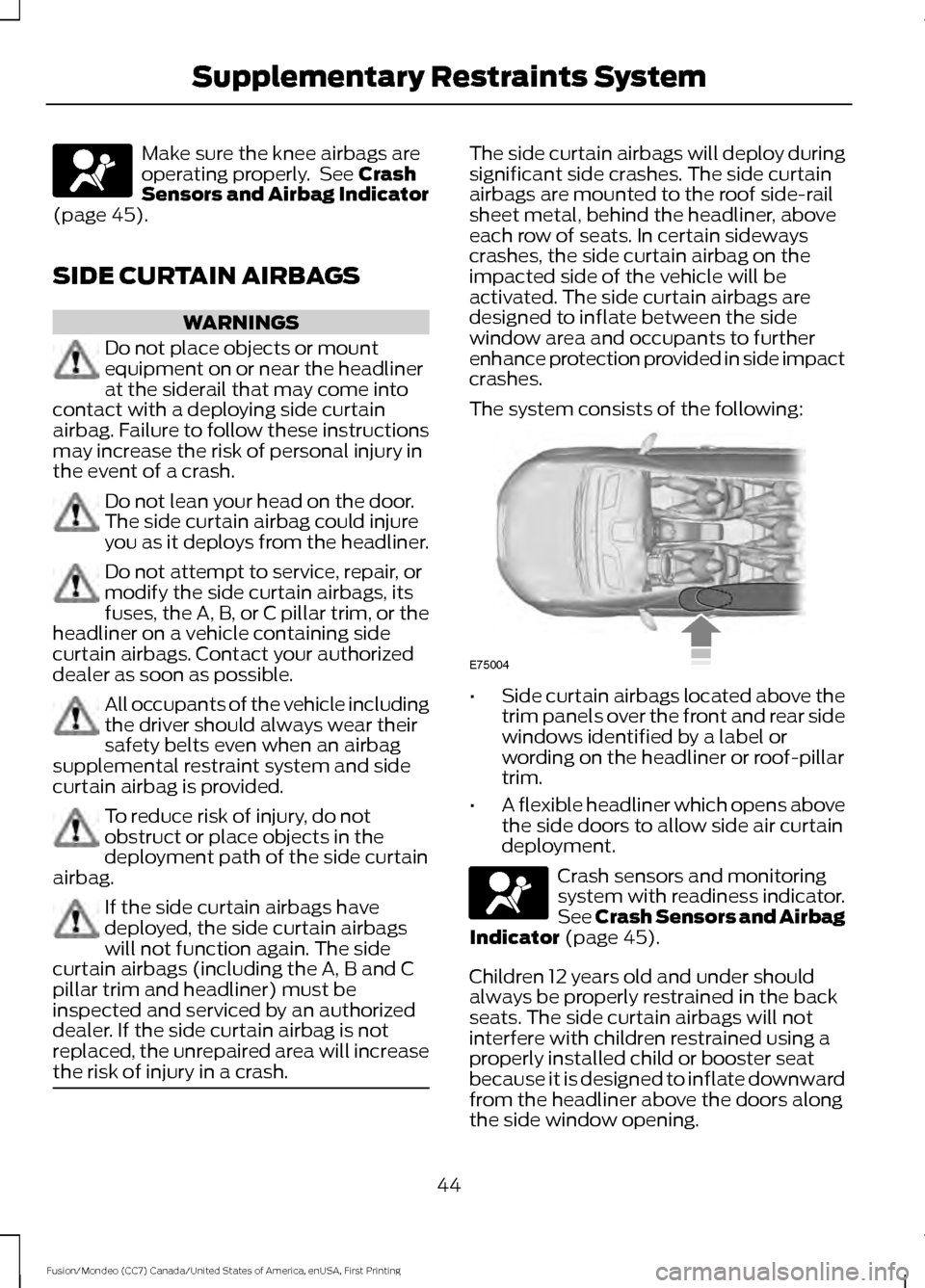
The system consists of the following:
•
Side curtain airbags located above the
trim panels over the front and rear side
windows identified by a label or
wording on the headliner or roof-pillar
trim.
• A flexible headliner which opens above
the side doors to allow side air curtain
deployment. Crash sensors and monitoring
system with readiness indicator.
See
Crash Sensors and Airbag
Indicator (page 45).
Children 12 years old and under should
always be properly restrained in the back
seats. The side curtain airbags will not
interfere with children restrained using a
properly installed child or booster seat
because it is designed to inflate downward
from the headliner above the doors along
the side window opening.
44
Fusion/Mondeo (CC7) Canada/United States of America, enUSA, First Printing Supplementary Restraints System E75004
Page 55 of 518
Status
LED
Remote start orextension
successful.
Solid green.
Remote stop
successful; vehicle off.
Solid red.
Remote start orstop failed.
Blinking red.
Waiting for statusupdate.
Blinking green.
Remote Starting the Vehicle
Note: You must press each button within
three seconds of each other. Your vehicle
will not remote start if you do not follow this
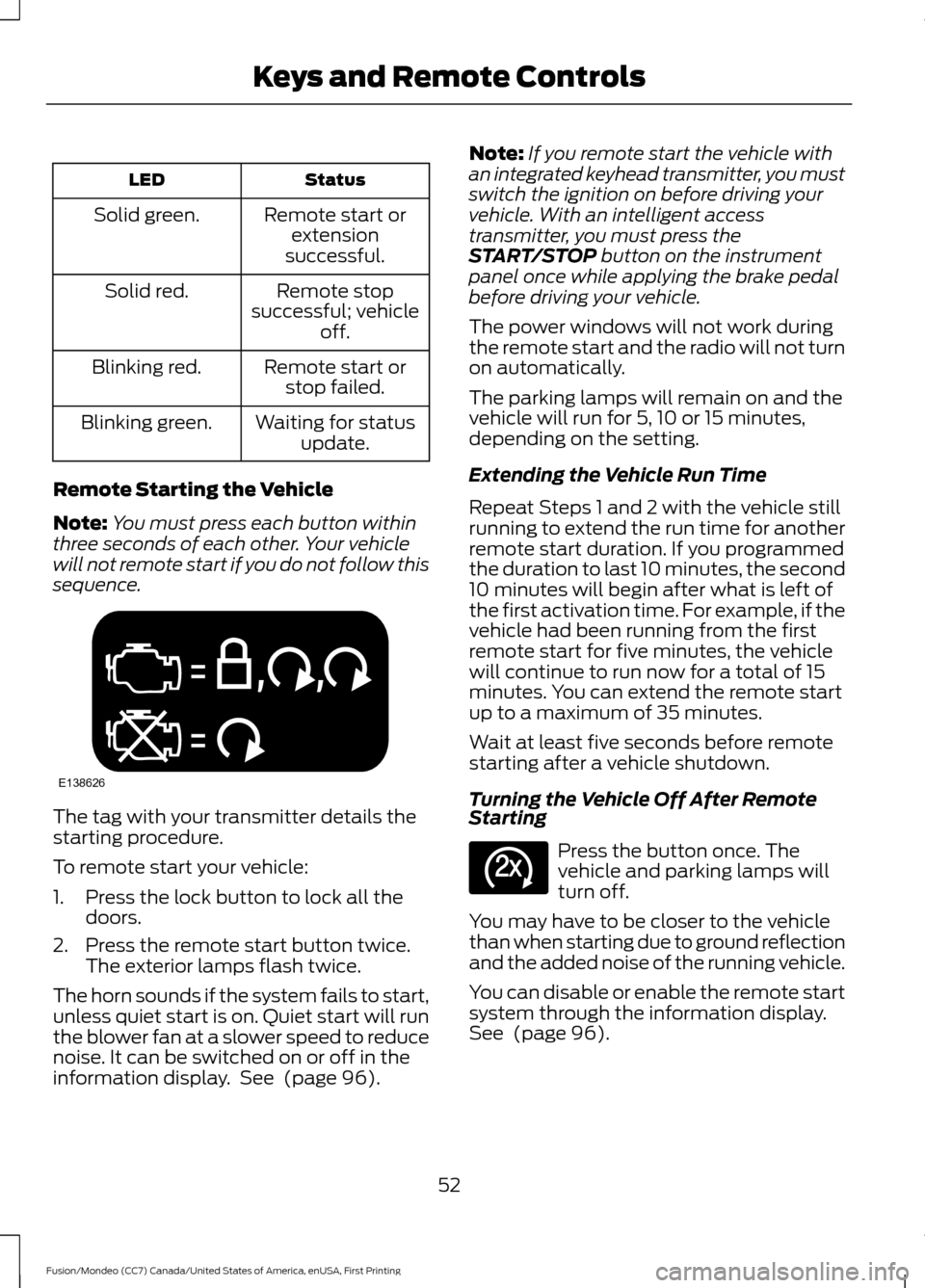
sequence. The tag with your transmitter details the
starting procedure.
To remote start your vehicle:
1. Press the lock button to lock all the
doors.
2. Press the remote start button twice. The exterior lamps flash twice.
The horn sounds if the system fails to start,
unless quiet start is on. Quiet start will run
the blower fan at a slower speed to reduce
noise. It can be switched on or off in the
information display. See (page 96). Note:
If you remote start the vehicle with
an integrated keyhead transmitter, you must
switch the ignition on before driving your
vehicle. With an intelligent access
transmitter, you must press the
START/STOP
button on the instrument
panel once while applying the brake pedal
before driving your vehicle.
The power windows will not work during
the remote start and the radio will not turn
on automatically.
The parking lamps will remain on and the
vehicle will run for 5, 10 or 15 minutes,
depending on the setting.
Extending the Vehicle Run Time
Repeat Steps 1 and 2 with the vehicle still
running to extend the run time for another
remote start duration. If you programmed
the duration to last 10 minutes, the second
10 minutes will begin after what is left of
the first activation time. For example, if the
vehicle had been running from the first
remote start for five minutes, the vehicle
will continue to run now for a total of 15
minutes. You can extend the remote start
up to a maximum of 35 minutes.
Wait at least five seconds before remote
starting after a vehicle shutdown.
Turning the Vehicle Off After Remote
Starting Press the button once. The
vehicle and parking lamps will
turn off.
You may have to be closer to the vehicle
than when starting due to ground reflection
and the added noise of the running vehicle.
You can disable or enable the remote start
system through the information display.
See
(page 96).
52
Fusion/Mondeo (CC7) Canada/United States of America, enUSA, First Printing Keys and Remote ControlsE138626 E138625
Page 63 of 518
LOCKING AND UNLOCKING
You can use the power door lock control
or the remote control to lock and unlock
the vehicle.
Power Door Locks
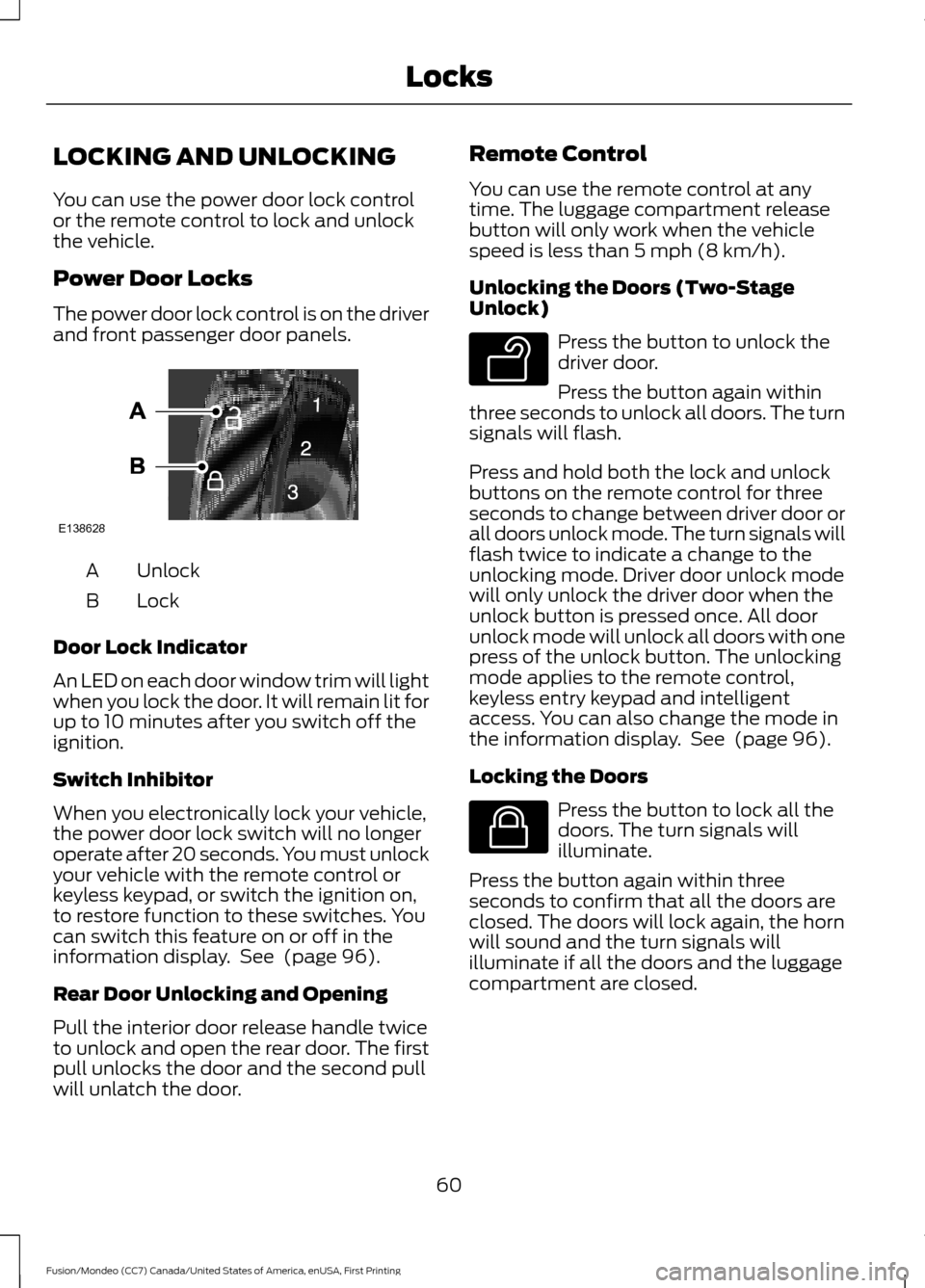
The power door lock control is on the driver
and front passenger door panels.
Unlock
A
Lock
B
Door Lock Indicator
An LED on each door window trim will light
when you lock the door. It will remain lit for
up to 10 minutes after you switch off the
ignition.
Switch Inhibitor
When you electronically lock your vehicle,
the power door lock switch will no longer
operate after 20 seconds. You must unlock
your vehicle with the remote control or
keyless keypad, or switch the ignition on,
to restore function to these switches. You
can switch this feature on or off in the
information display. See (page 96).
Rear Door Unlocking and Opening
Pull the interior door release handle twice
to unlock and open the rear door. The first
pull unlocks the door and the second pull
will unlatch the door. Remote Control
You can use the remote control at any
time. The luggage compartment release
button will only work when the vehicle
speed is less than 5 mph (8 km/h).
Unlocking the Doors (Two-Stage
Unlock)
Press the button to unlock the
driver door.
Press the button again within
three seconds to unlock all doors. The turn
signals will flash.
Press and hold both the lock and unlock
buttons on the remote control for three
seconds to change between driver door or
all doors unlock mode. The turn signals will
flash twice to indicate a change to the
unlocking mode. Driver door unlock mode
will only unlock the driver door when the
unlock button is pressed once. All door
unlock mode will unlock all doors with one
press of the unlock button. The unlocking
mode applies to the remote control,
keyless entry keypad and intelligent
access. You can also change the mode in
the information display. See
(page 96).
Locking the Doors Press the button to lock all the
doors. The turn signals will
illuminate.
Press the button again within three
seconds to confirm that all the doors are
closed. The doors will lock again, the horn
will sound and the turn signals will
illuminate if all the doors and the luggage
compartment are closed.
60
Fusion/Mondeo (CC7) Canada/United States of America, enUSA, First Printing LocksE138628 E138629 E138623
Page 67 of 518
Luggage Compartment
With the Remote Control
Press twice within three seconds
to unlatch the trunk.
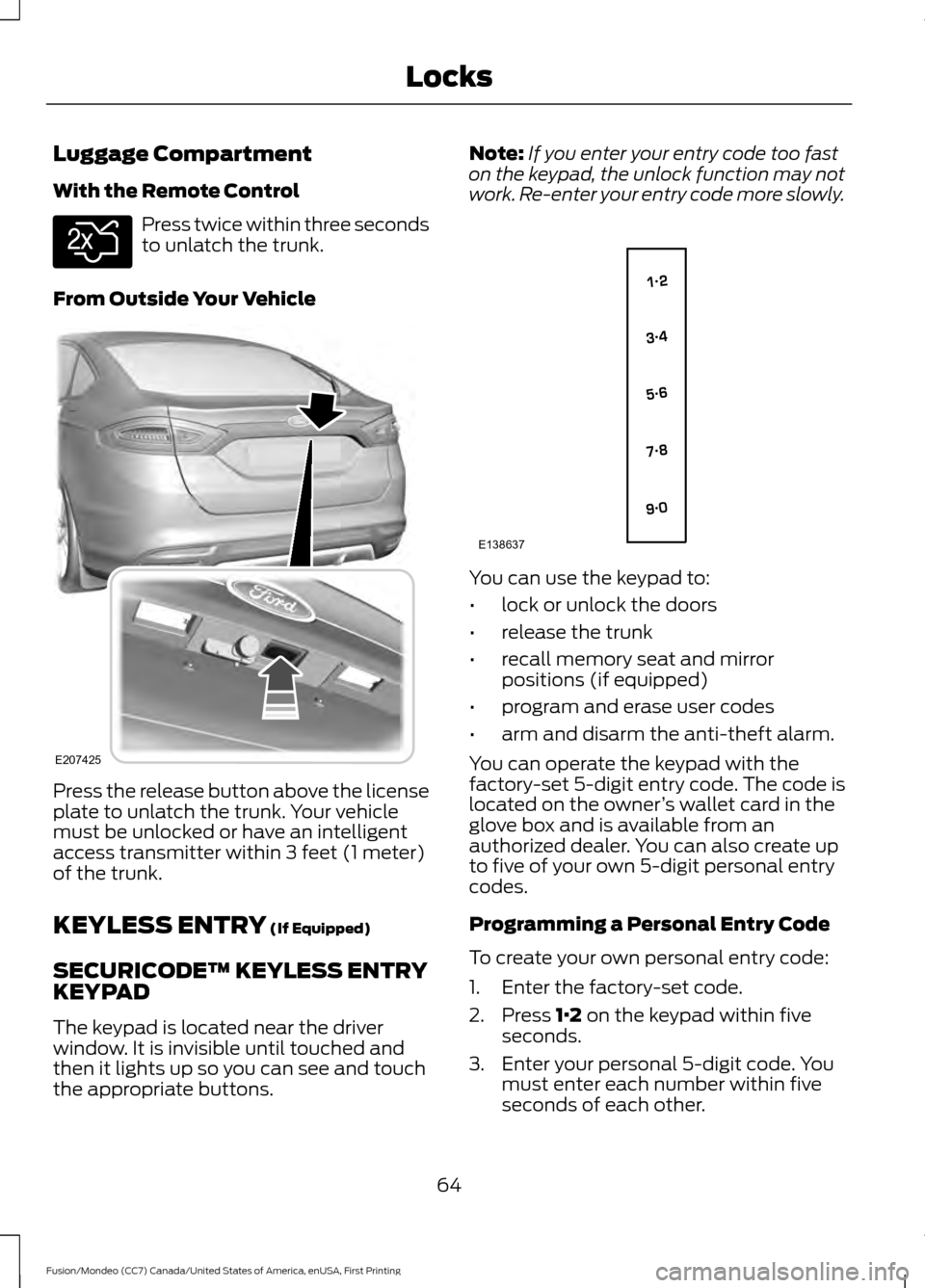
From Outside Your Vehicle Press the release button above the license
plate to unlatch the trunk. Your vehicle
must be unlocked or have an intelligent
access transmitter within 3 feet (1 meter)
of the trunk.
KEYLESS ENTRY (If Equipped)
SECURICODE™ KEYLESS ENTRY
KEYPAD
The keypad is located near the driver
window. It is invisible until touched and
then it lights up so you can see and touch
the appropriate buttons. Note:
If you enter your entry code too fast
on the keypad, the unlock function may not
work. Re-enter your entry code more slowly. You can use the keypad to:
•
lock or unlock the doors
• release the trunk
• recall memory seat and mirror
positions (if equipped)
• program and erase user codes
• arm and disarm the anti-theft alarm.
You can operate the keypad with the
factory-set 5-digit entry code. The code is
located on the owner ’s wallet card in the
glove box and is available from an
authorized dealer. You can also create up
to five of your own 5-digit personal entry
codes.
Programming a Personal Entry Code
To create your own personal entry code:
1. Enter the factory-set code.
2. Press
1·2 on the keypad within five
seconds.
3. Enter your personal 5-digit code. You must enter each number within five
seconds of each other.
64
Fusion/Mondeo (CC7) Canada/United States of America, enUSA, First Printing LocksE138630 E207425 E138637
Page 85 of 518
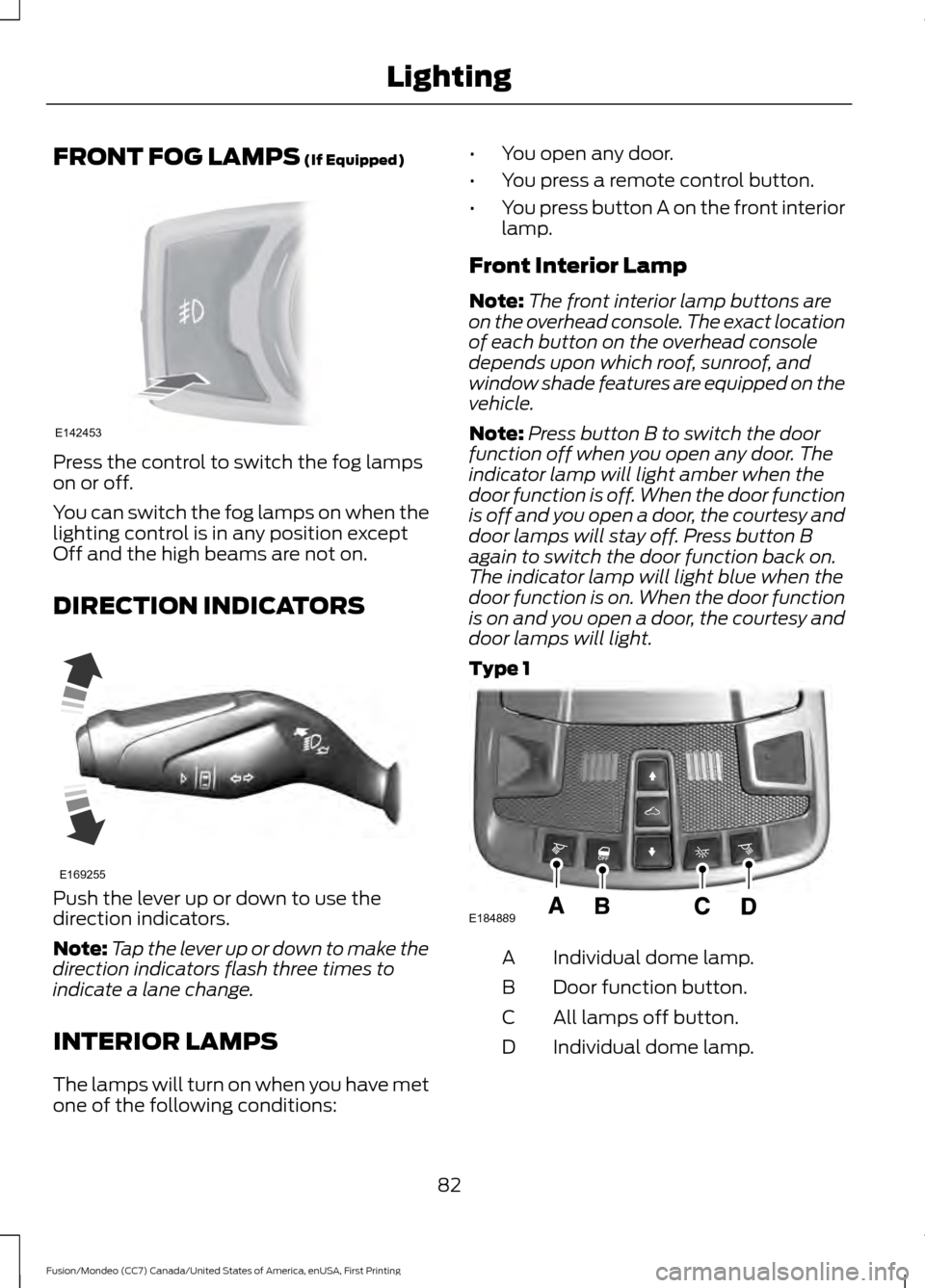
FRONT FOG LAMPS (If Equipped)
Press the control to switch the fog lamps
on or off.
You can switch the fog lamps on when the
lighting control is in any position except
Off and the high beams are not on.
DIRECTION INDICATORS
Push the lever up or down to use the
direction indicators.
Note:
Tap the lever up or down to make the
direction indicators flash three times to
indicate a lane change.
INTERIOR LAMPS
The lamps will turn on when you have met
one of the following conditions: •
You open any door.
• You press a remote control button.
• You press button A on the front interior
lamp.
Front Interior Lamp
Note: The front interior lamp buttons are
on the overhead console. The exact location
of each button on the overhead console
depends upon which roof, sunroof, and
window shade features are equipped on the
vehicle.
Note: Press button B to switch the door
function off when you open any door. The
indicator lamp will light amber when the
door function is off. When the door function
is off and you open a door, the courtesy and
door lamps will stay off. Press button B
again to switch the door function back on.
The indicator lamp will light blue when the
door function is on. When the door function
is on and you open a door, the courtesy and
door lamps will light.
Type 1 Individual dome lamp.
A
Door function button.
B
All lamps off button.
C
Individual dome lamp.
D
82
Fusion/Mondeo (CC7) Canada/United States of America, enUSA, First Printing LightingE142453 E169255 E184889
Page 87 of 518
POWER WINDOWS
WARNINGS
Do not leave children unattended in
your vehicle and do not let them play
with the power windows. They may
seriously injure themselves. When closing the power windows,
you should verify they are free of
obstructions and make sure that
children and pets are not in the proximity
of the window openings. Note:
You may hear a pulsing noise when
just one of the windows is open. Lower the
opposite window slightly to reduce this
noise.
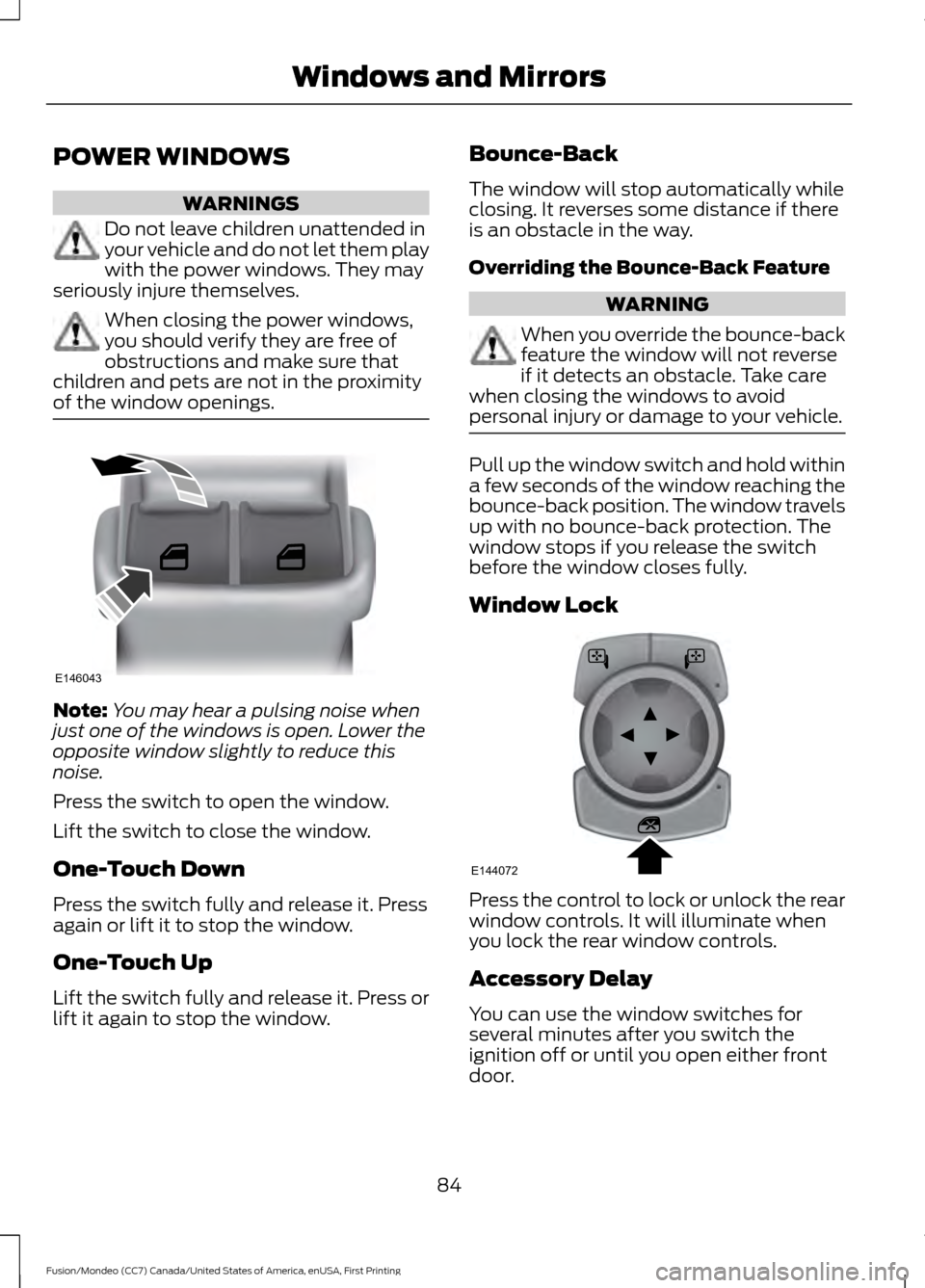
Press the switch to open the window.
Lift the switch to close the window.
One-Touch Down
Press the switch fully and release it. Press
again or lift it to stop the window.
One-Touch Up
Lift the switch fully and release it. Press or
lift it again to stop the window. Bounce-Back
The window will stop automatically while
closing. It reverses some distance if there
is an obstacle in the way.
Overriding the Bounce-Back Feature WARNING
When you override the bounce-back
feature the window will not reverse
if it detects an obstacle. Take care
when closing the windows to avoid
personal injury or damage to your vehicle. Pull up the window switch and hold within
a few seconds of the window reaching the
bounce-back position. The window travels
up with no bounce-back protection. The
window stops if you release the switch
before the window closes fully.
Window Lock
Press the control to lock or unlock the rear
window controls. It will illuminate when
you lock the rear window controls.
Accessory Delay
You can use the window switches for
several minutes after you switch the
ignition off or until you open either front
door.
84
Fusion/Mondeo (CC7) Canada/United States of America, enUSA, First Printing Windows and MirrorsE146043 E144072