charging FORD FUSION ENERGI 2017 Owner's Manual
[x] Cancel search | Manufacturer: FORD, Model Year: 2017, Model line: FUSION ENERGI, Model: FORD FUSION ENERGI 2017Pages: 526, PDF Size: 7.89 MB
Page 420 of 526
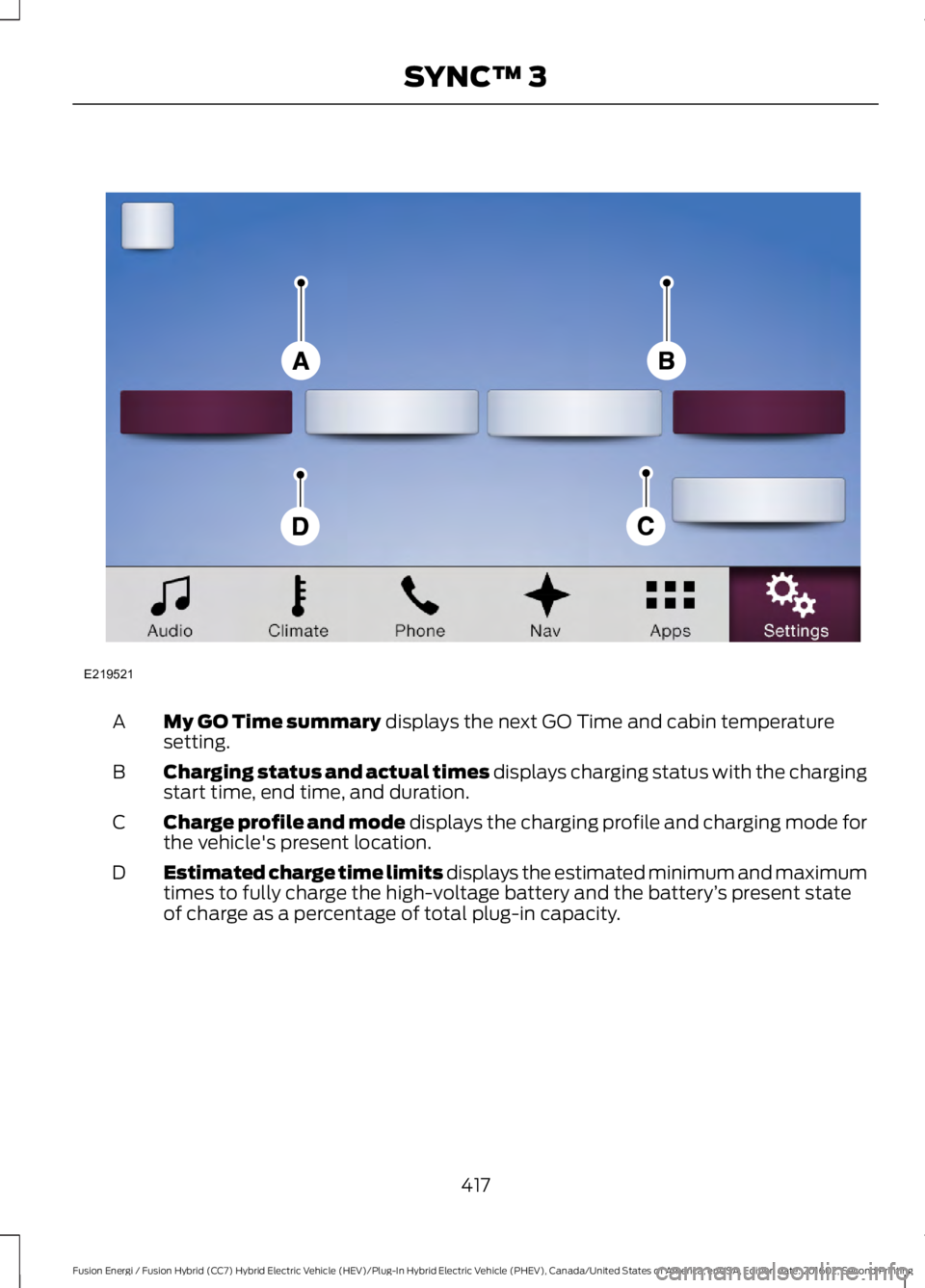
My GO Time summary displays the next GO Time and cabin temperaturesetting.A
Charging status and actual times displays charging status with the chargingstart time, end time, and duration.B
Charge profile and mode displays the charging profile and charging mode forthe vehicle's present location.C
Estimated charge time limits displays the estimated minimum and maximumtimes to fully charge the high-voltage battery and the battery’s present stateof charge as a percentage of total plug-in capacity.
D
417
Fusion Energi / Fusion Hybrid (CC7) Hybrid Electric Vehicle (HEV)/Plug-In Hybrid Electric Vehicle (PHEV), Canada/United States of America, enUSA, Edition date: 201602, Second Printing
SYNC™ 3E219521
Page 422 of 526
Action and DescriptionMenu ItemItem
This area of the screen shows your scheduled Go Time andyour cabin conditioning information.My GO TimesA
This is the time and date of your next set drive time. Yourvehicle automatically schedules charging and cabin condi-tioning to finish by this time.
Next GO TimeB
This is the chosen cabin conditioning setting for this GOTime.TemperatureC
This accesses your GO Time Schedule (see GO TimeSchedule later in this section).EditD
This cancels the cabin conditioning for the present GO Time.Once you touch Skip, the GO Time and Temperature greyout, and the LED illuminates on the Skip button. Touch thebutton again to switch on the cabin conditioning. Thisfeature allows you to ignore the present GO Time withouthaving to delete it or having to switch off the entire schedule(see GO Time Schedule later in this section). After thepresent GO Time passes, this feature resets.
SkipE
Conflict Notification
The system alerts you to any conflicts byhighlighting areas of the screen in coloredtext.
If your battery cannot have a full charge by the scheduled drive time, the systemhighlights your next GO Time and Charge Complete time and the followingmessage appears:
Action and DescriptionMenu Item
This is normal; the vehicle is informing you of the conflicting situation.This notification only displays when the gearshift selector lever is inposition P.
Charge timenot sufficientto meetscheduledGO Timesettings
Note: Charging occurs as soon as you plug the vehicle in. The systemlimits cabin conditioning to 15 minutes before your GO Time.
419
Fusion Energi / Fusion Hybrid (CC7) Hybrid Electric Vehicle (HEV)/Plug-In Hybrid Electric Vehicle (PHEV), Canada/United States of America, enUSA, Edition date: 201602, Second Printing
SYNC™ 3
Page 423 of 526
To eliminate the conflict notificationimmediately or to prevent a conflict in thefuture, try the following:
•Switch the present GO Time to occurlater.
•Plug the vehicle into a 240V highcurrent charging station instead ofusing the 120V low current conveniencecord. Higher power charging yieldsshorter charge times.
•Plug the vehicle in sooner.
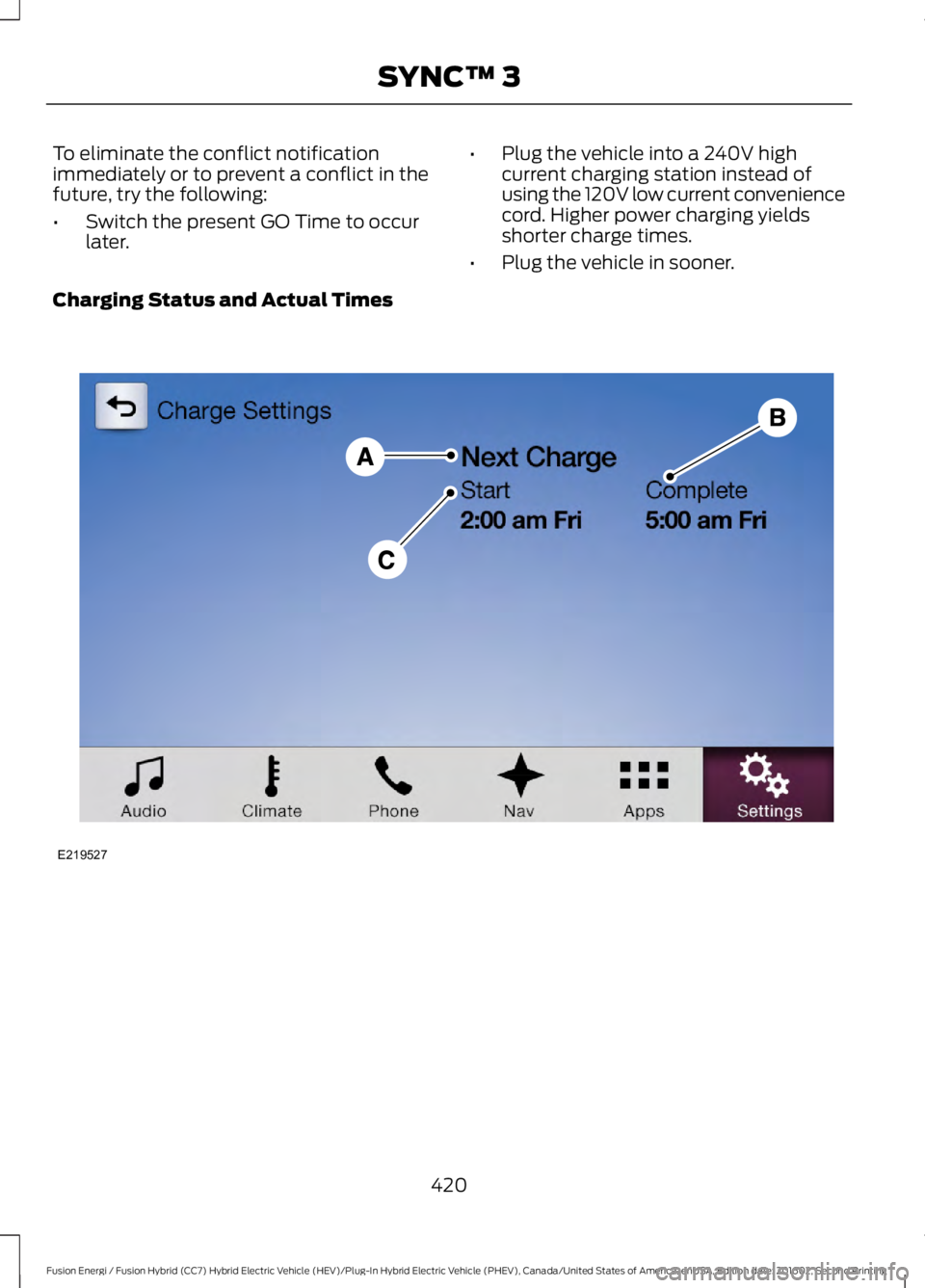
Charging Status and Actual Times
420
Fusion Energi / Fusion Hybrid (CC7) Hybrid Electric Vehicle (HEV)/Plug-In Hybrid Electric Vehicle (PHEV), Canada/United States of America, enUSA, Edition date: 201602, Second Printing
SYNC™ 3E219527
Page 424 of 526
Action and DescriptionMenu ItemItem
This is the status of the charging system, which includesthe charging plug, high-voltage battery and charger.Charge StatusA
This means the vehicle isunplugged. Charge Start andComplete information is for thepresent vehicle location.
Next Charge
This means you plugged thevehicle in and it is ready tocharge. Typical of Value Chargemode, the vehicle may not startcharging right away because itis set to charge at times withlower utility costs.
Waiting to charge
This means the high-voltagebattery is charging.Charging
This informs you that the high-voltage battery is fully chargedand not currently scheduled forfurther charging.
Charged
This alerts you that a fault ispresent and is preventing thehigh-voltage battery fromcharging. Check the chargeplug connection, charge cord,and charging station.
Fault
This is the estimated time of charge completion.CompleteB
When the vehicle is in ChargeNow mode, and unplugged, thesystem displays the chargingduration in hours. Once youplug in the vehicle, the valueshows the estimated time tofinish charging.
Charge Now Duration
421
Fusion Energi / Fusion Hybrid (CC7) Hybrid Electric Vehicle (HEV)/Plug-In Hybrid Electric Vehicle (PHEV), Canada/United States of America, enUSA, Edition date: 201602, Second Printing
SYNC™ 3
Page 425 of 526
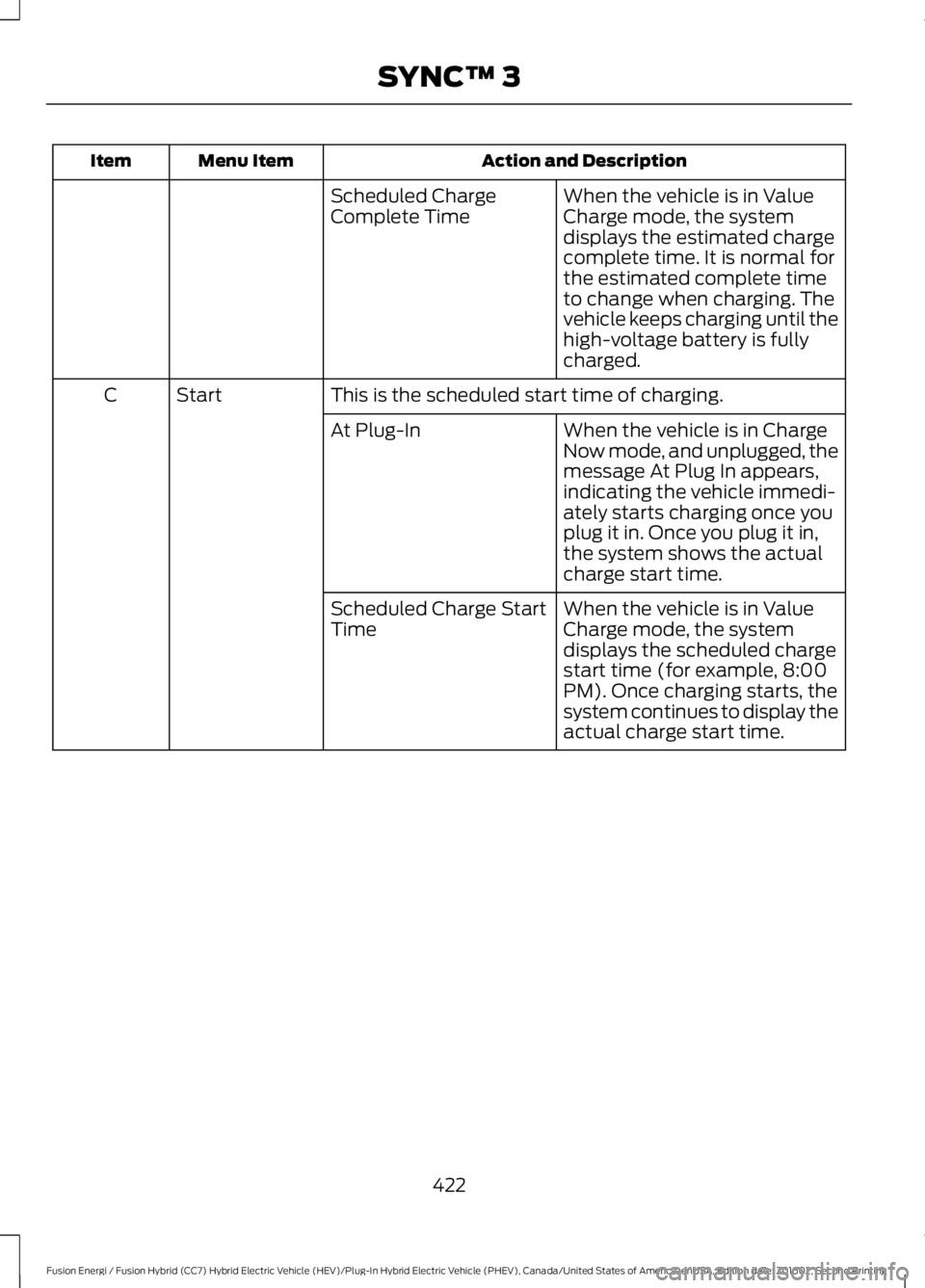
Action and DescriptionMenu ItemItem
When the vehicle is in ValueCharge mode, the systemdisplays the estimated chargecomplete time. It is normal forthe estimated complete timeto change when charging. Thevehicle keeps charging until thehigh-voltage battery is fullycharged.
Scheduled ChargeComplete Time
This is the scheduled start time of charging.StartC
When the vehicle is in ChargeNow mode, and unplugged, themessage At Plug In appears,indicating the vehicle immedi-ately starts charging once youplug it in. Once you plug it in,the system shows the actualcharge start time.
At Plug-In
When the vehicle is in ValueCharge mode, the systemdisplays the scheduled chargestart time (for example, 8:00PM). Once charging starts, thesystem continues to display theactual charge start time.
Scheduled Charge StartTime
422
Fusion Energi / Fusion Hybrid (CC7) Hybrid Electric Vehicle (HEV)/Plug-In Hybrid Electric Vehicle (PHEV), Canada/United States of America, enUSA, Edition date: 201602, Second Printing
SYNC™ 3
Page 428 of 526
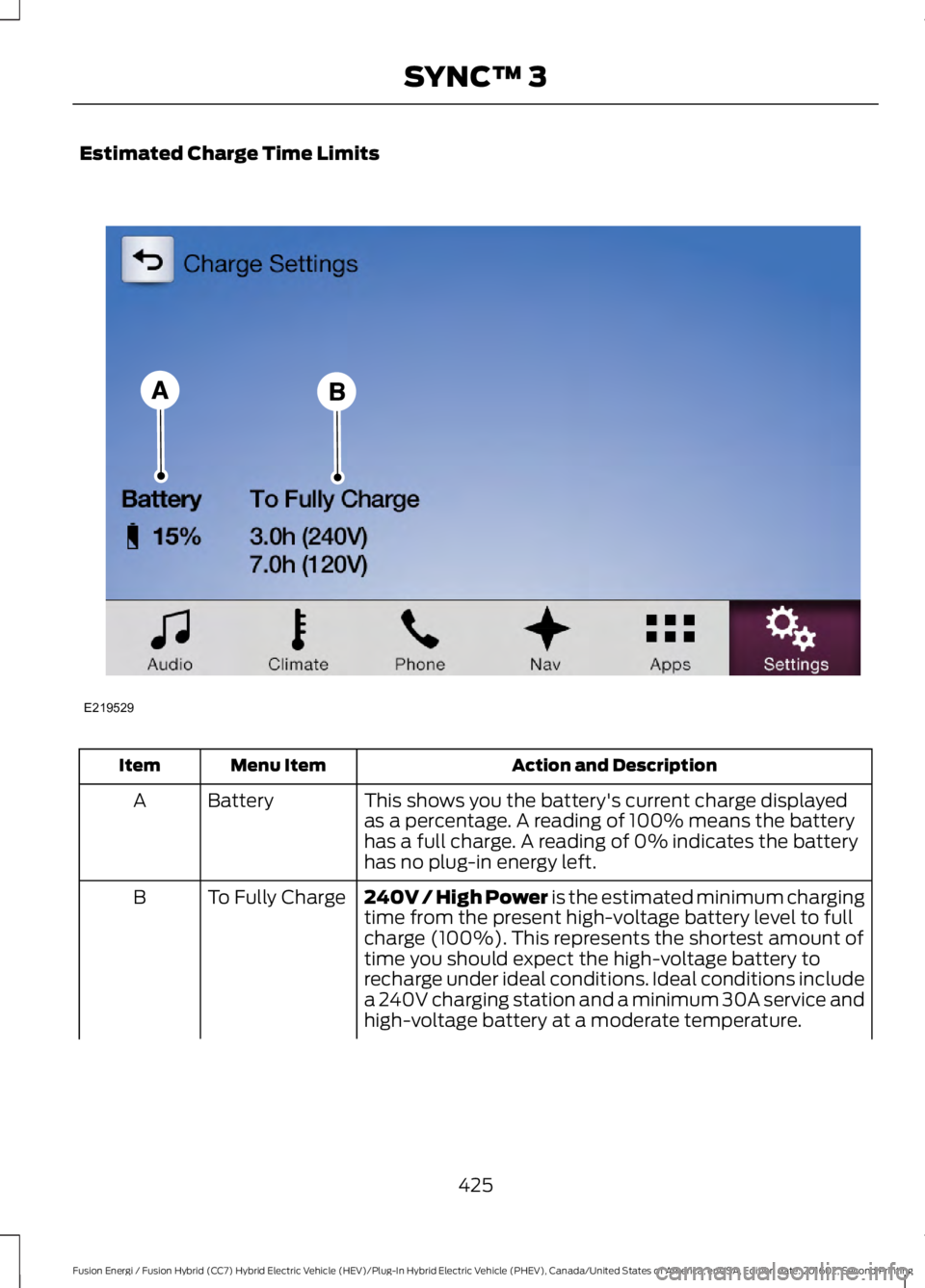
Estimated Charge Time Limits
Action and DescriptionMenu ItemItem
This shows you the battery's current charge displayedas a percentage. A reading of 100% means the batteryhas a full charge. A reading of 0% indicates the batteryhas no plug-in energy left.
BatteryA
240V / High Power is the estimated minimum chargingtime from the present high-voltage battery level to fullcharge (100%). This represents the shortest amount oftime you should expect the high-voltage battery torecharge under ideal conditions. Ideal conditions includea 240V charging station and a minimum 30A service andhigh-voltage battery at a moderate temperature.
To Fully ChargeB
425
Fusion Energi / Fusion Hybrid (CC7) Hybrid Electric Vehicle (HEV)/Plug-In Hybrid Electric Vehicle (PHEV), Canada/United States of America, enUSA, Edition date: 201602, Second Printing
SYNC™ 3E219529
Page 429 of 526
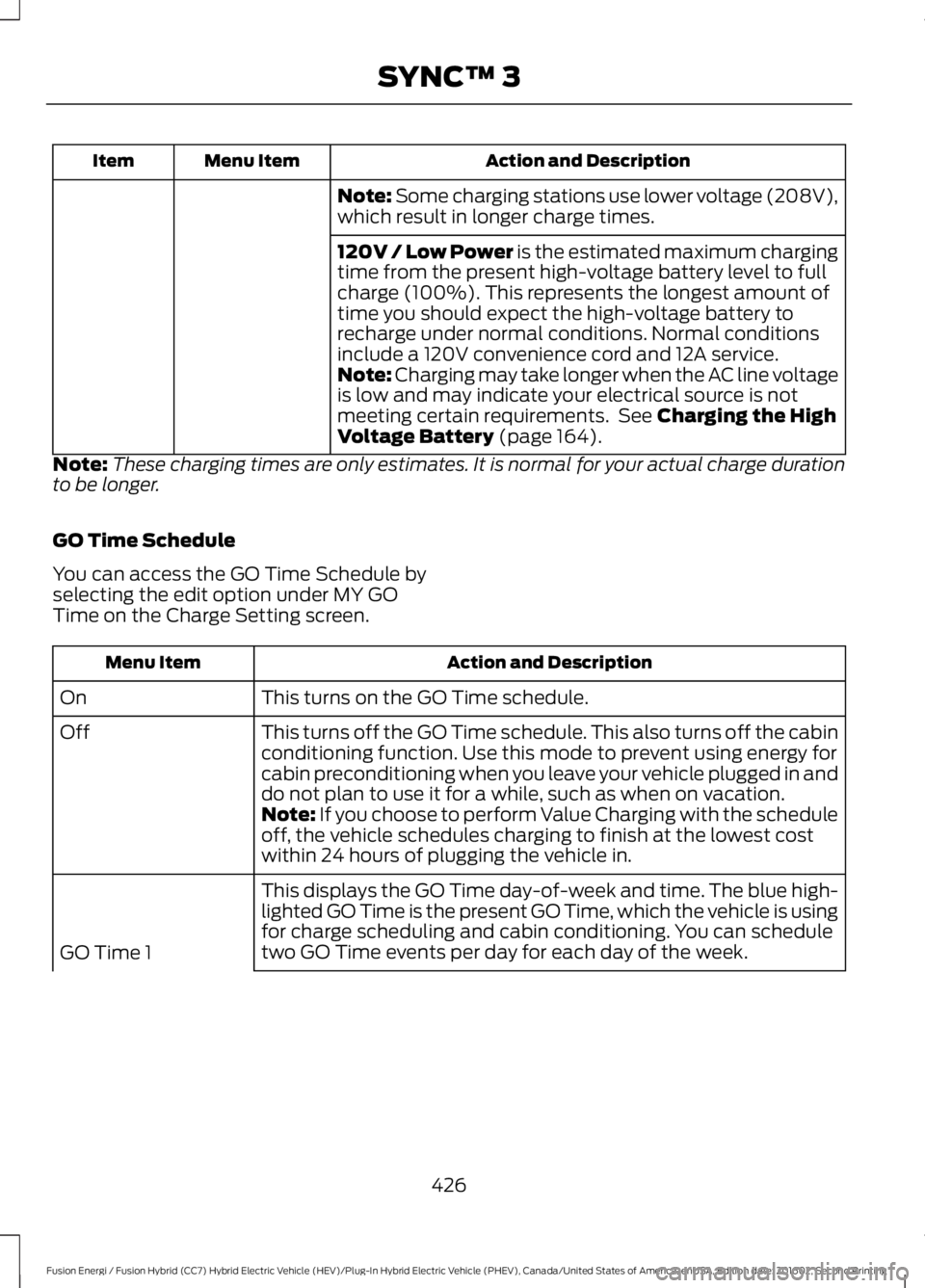
Action and DescriptionMenu ItemItem
Note: Some charging stations use lower voltage (208V),which result in longer charge times.
120V / Low Power is the estimated maximum chargingtime from the present high-voltage battery level to fullcharge (100%). This represents the longest amount oftime you should expect the high-voltage battery torecharge under normal conditions. Normal conditionsinclude a 120V convenience cord and 12A service.Note: Charging may take longer when the AC line voltageis low and may indicate your electrical source is notmeeting certain requirements. See Charging the HighVoltage Battery (page 164).
Note:These charging times are only estimates. It is normal for your actual charge durationto be longer.
GO Time Schedule
You can access the GO Time Schedule byselecting the edit option under MY GOTime on the Charge Setting screen.
Action and DescriptionMenu Item
This turns on the GO Time schedule.On
This turns off the GO Time schedule. This also turns off the cabinconditioning function. Use this mode to prevent using energy forcabin preconditioning when you leave your vehicle plugged in anddo not plan to use it for a while, such as when on vacation.
Off
Note: If you choose to perform Value Charging with the scheduleoff, the vehicle schedules charging to finish at the lowest costwithin 24 hours of plugging the vehicle in.
This displays the GO Time day-of-week and time. The blue high-lighted GO Time is the present GO Time, which the vehicle is usingfor charge scheduling and cabin conditioning. You can scheduletwo GO Time events per day for each day of the week.GO Time 1
426
Fusion Energi / Fusion Hybrid (CC7) Hybrid Electric Vehicle (HEV)/Plug-In Hybrid Electric Vehicle (PHEV), Canada/United States of America, enUSA, Edition date: 201602, Second Printing
SYNC™ 3
Page 430 of 526
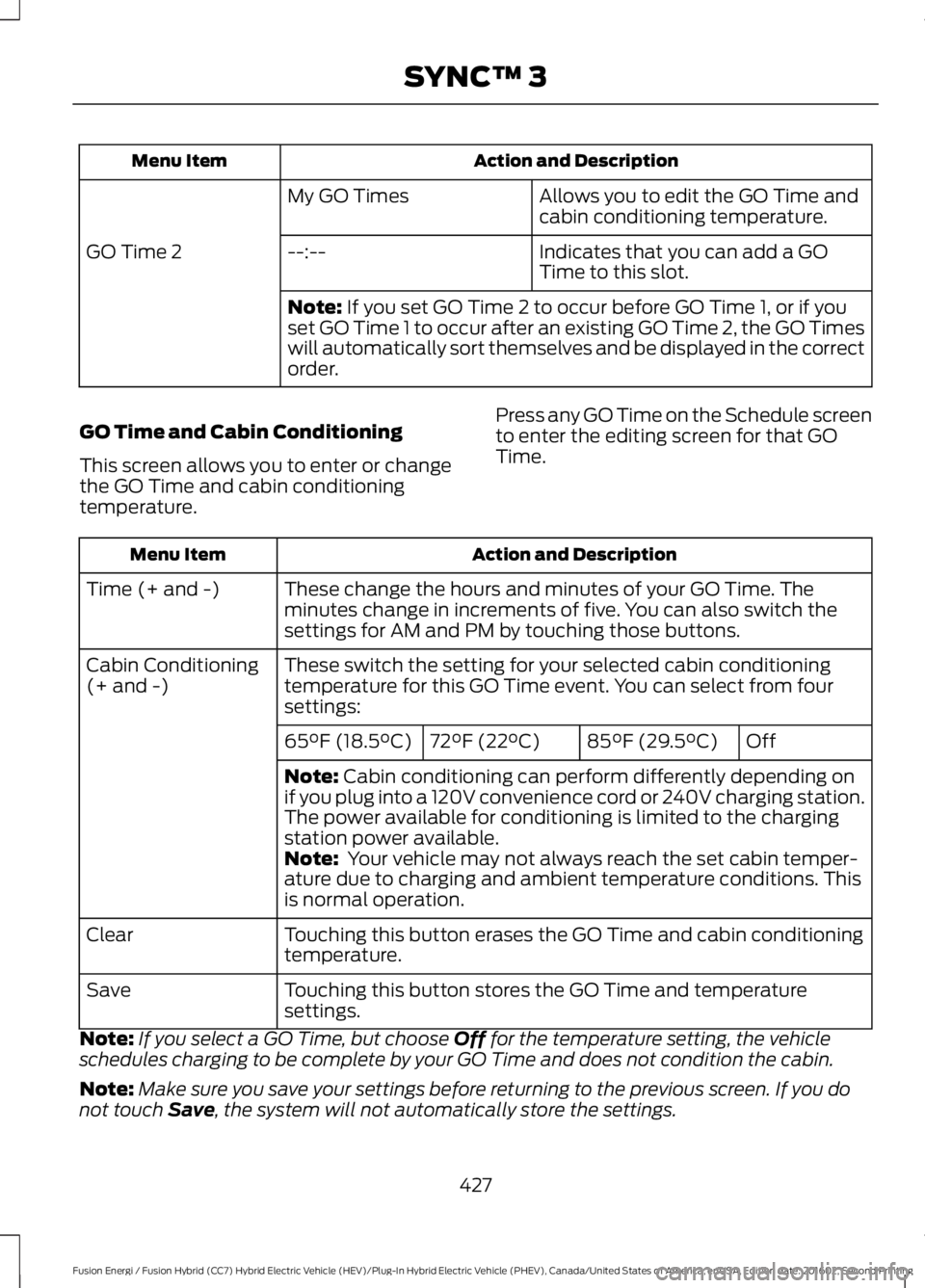
Action and DescriptionMenu Item
Allows you to edit the GO Time andcabin conditioning temperature.My GO Times
Indicates that you can add a GOTime to this slot.--:--GO Time 2
Note: If you set GO Time 2 to occur before GO Time 1, or if youset GO Time 1 to occur after an existing GO Time 2, the GO Timeswill automatically sort themselves and be displayed in the correctorder.
GO Time and Cabin Conditioning
This screen allows you to enter or changethe GO Time and cabin conditioningtemperature.
Press any GO Time on the Schedule screento enter the editing screen for that GOTime.
Action and DescriptionMenu Item
These change the hours and minutes of your GO Time. Theminutes change in increments of five. You can also switch thesettings for AM and PM by touching those buttons.
Time (+ and -)
These switch the setting for your selected cabin conditioningtemperature for this GO Time event. You can select from foursettings:
Cabin Conditioning(+ and -)
Off85°F (29.5°C)72°F (22°C)65°F (18.5°C)
Note: Cabin conditioning can perform differently depending onif you plug into a 120V convenience cord or 240V charging station.The power available for conditioning is limited to the chargingstation power available.Note: Your vehicle may not always reach the set cabin temper-ature due to charging and ambient temperature conditions. Thisis normal operation.
Touching this button erases the GO Time and cabin conditioningtemperature.Clear
Touching this button stores the GO Time and temperaturesettings.Save
Note:If you select a GO Time, but choose Off for the temperature setting, the vehicleschedules charging to be complete by your GO Time and does not condition the cabin.
Note:Make sure you save your settings before returning to the previous screen. If you donot touch Save, the system will not automatically store the settings.
427
Fusion Energi / Fusion Hybrid (CC7) Hybrid Electric Vehicle (HEV)/Plug-In Hybrid Electric Vehicle (PHEV), Canada/United States of America, enUSA, Edition date: 201602, Second Printing
SYNC™ 3
Page 431 of 526
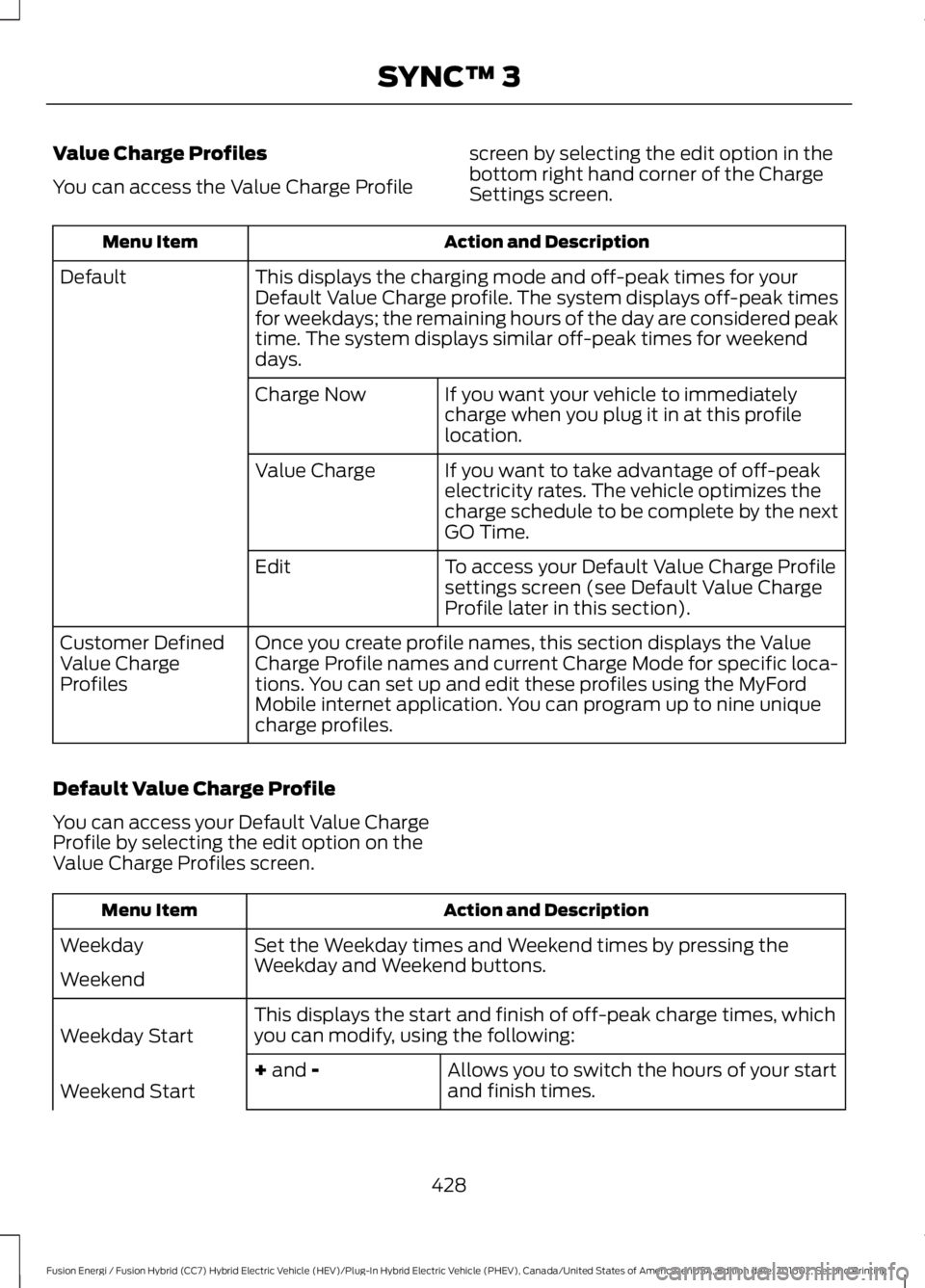
Value Charge Profiles
You can access the Value Charge Profile
screen by selecting the edit option in thebottom right hand corner of the ChargeSettings screen.
Action and DescriptionMenu Item
This displays the charging mode and off-peak times for yourDefault Value Charge profile. The system displays off-peak timesfor weekdays; the remaining hours of the day are considered peaktime. The system displays similar off-peak times for weekenddays.
Default
If you want your vehicle to immediatelycharge when you plug it in at this profilelocation.
Charge Now
If you want to take advantage of off-peakelectricity rates. The vehicle optimizes thecharge schedule to be complete by the nextGO Time.
Value Charge
To access your Default Value Charge Profilesettings screen (see Default Value ChargeProfile later in this section).
Edit
Once you create profile names, this section displays the ValueCharge Profile names and current Charge Mode for specific loca-tions. You can set up and edit these profiles using the MyFordMobile internet application. You can program up to nine uniquecharge profiles.
Customer DefinedValue ChargeProfiles
Default Value Charge Profile
You can access your Default Value ChargeProfile by selecting the edit option on theValue Charge Profiles screen.
Action and DescriptionMenu Item
Set the Weekday times and Weekend times by pressing theWeekday and Weekend buttons.Weekday
Weekend
This displays the start and finish of off-peak charge times, whichyou can modify, using the following:Weekday Start
Allows you to switch the hours of your startand finish times.+ and -Weekend Start
428
Fusion Energi / Fusion Hybrid (CC7) Hybrid Electric Vehicle (HEV)/Plug-In Hybrid Electric Vehicle (PHEV), Canada/United States of America, enUSA, Edition date: 201602, Second Printing
SYNC™ 3
Page 433 of 526
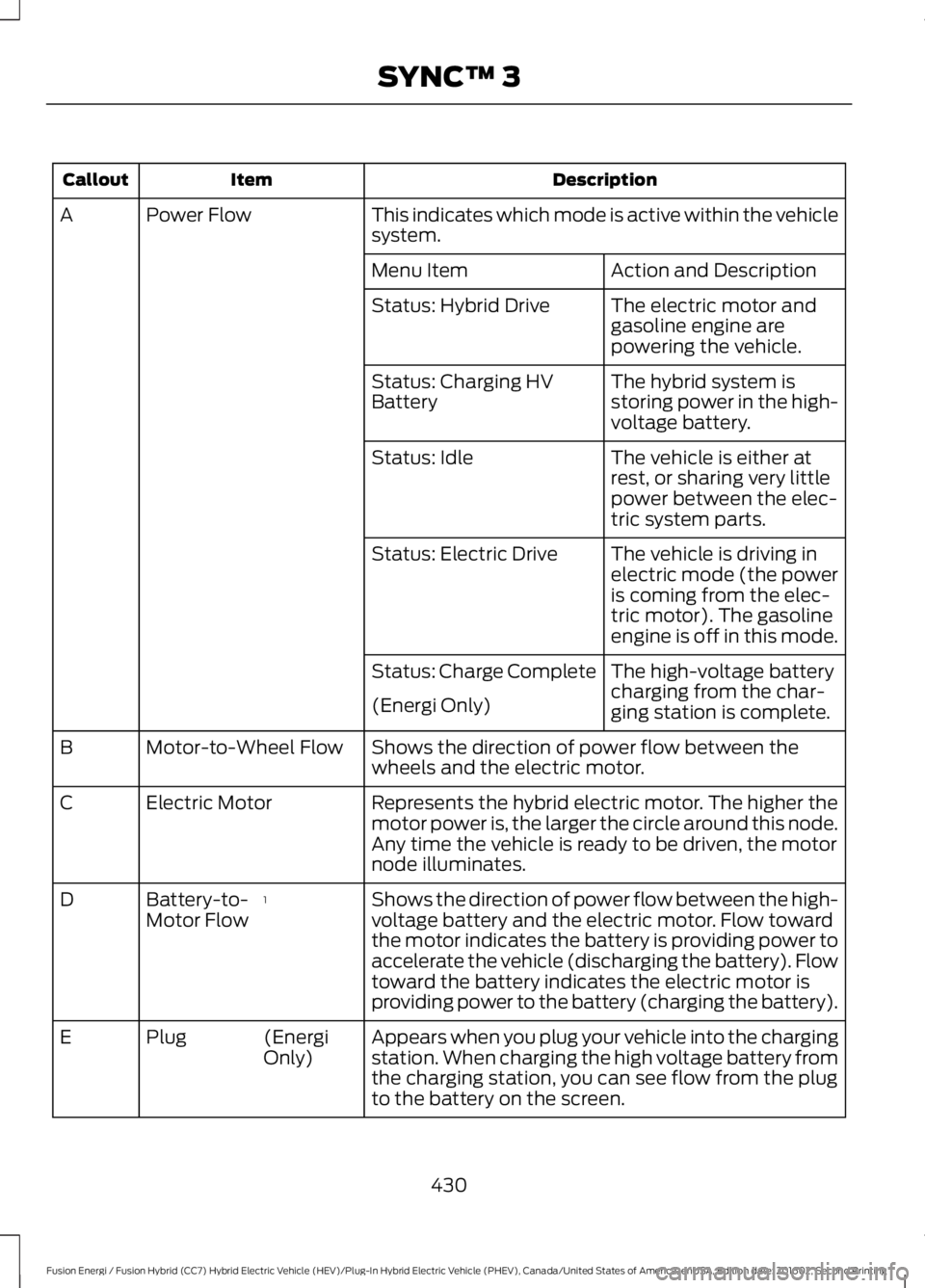
DescriptionItemCallout
This indicates which mode is active within the vehiclesystem.Power FlowA
Action and DescriptionMenu Item
The electric motor andgasoline engine arepowering the vehicle.
Status: Hybrid Drive
The hybrid system isstoring power in the high-voltage battery.
Status: Charging HVBattery
The vehicle is either atrest, or sharing very littlepower between the elec-tric system parts.
Status: Idle
The vehicle is driving inelectric mode (the poweris coming from the elec-tric motor). The gasolineengine is off in this mode.
Status: Electric Drive
The high-voltage batterycharging from the char-ging station is complete.
Status: Charge Complete
(Energi Only)
Shows the direction of power flow between thewheels and the electric motor.Motor-to-Wheel FlowB
Represents the hybrid electric motor. The higher themotor power is, the larger the circle around this node.Any time the vehicle is ready to be driven, the motornode illuminates.
Electric MotorC
Shows the direction of power flow between the high-voltage battery and the electric motor. Flow towardthe motor indicates the battery is providing power toaccelerate the vehicle (discharging the battery). Flowtoward the battery indicates the electric motor isproviding power to the battery (charging the battery).
1Battery-to-Motor FlowD
Appears when you plug your vehicle into the chargingstation. When charging the high voltage battery fromthe charging station, you can see flow from the plugto the battery on the screen.
(EnergiOnly)PlugE
430
Fusion Energi / Fusion Hybrid (CC7) Hybrid Electric Vehicle (HEV)/Plug-In Hybrid Electric Vehicle (PHEV), Canada/United States of America, enUSA, Edition date: 201602, Second Printing
SYNC™ 3