ESP FORD FUSION ENERGI 2017 Owner's Guide
[x] Cancel search | Manufacturer: FORD, Model Year: 2017, Model line: FUSION ENERGI, Model: FORD FUSION ENERGI 2017Pages: 526, PDF Size: 7.89 MB
Page 163 of 526
Your vehicle is equipped with variousemission control components and acatalytic converter that will enable yourvehicle to comply with applicable exhaustemission standards.
To make sure that the catalytic converterand other emission control componentscontinue to work properly:
•Use only the specified fuel listed.
•Avoid running out of fuel.
•Do not turn off the ignition while yourvehicle is moving, especially at highspeeds.
•Have the items listed in scheduledmaintenance information performedaccording to the specified schedule.
The scheduled maintenance items listedin scheduled maintenance information areessential to the life and performance ofyour vehicle and to its emissions system.
If you use anything other than Ford,Motorcraft or Ford-authorized parts formaintenance replacements or for serviceof components affecting emission control,such non-Ford parts should be equivalentto genuine Ford Motor Company parts inperformance and durability.
Illumination of the service engine soonindicator, charging system warning light orthe temperature warning light, fluid leaks,strange odors, smoke or loss of enginepower could indicate that the emissioncontrol system is not working properly.
An improperly operating or damagedexhaust system may allow exhaust toenter the vehicle. Have a damaged orimproperly operating exhaust systeminspected and repaired immediately.
Do not make any unauthorized changes toyour vehicle or engine. By law, vehicleowners and anyone who manufactures,repairs, services, sells, leases, tradesvehicles, or supervises a fleet of vehiclesare not permitted to intentionally remove
an emission control device or prevent itfrom working. Information about yourvehicle’s emission system is on the VehicleEmission Control Information Decallocated on or near the engine. This decalalso lists engine displacement.
Please consult your warranty informationfor complete details.
On-Board Diagnostics (OBD-II)
Your vehicle has a computer known as theon-board diagnostics system (OBD-II) thatmonitors the engine’s emission controlsystem. The system protects theenvironment by making sure that yourvehicle continues to meet governmentemission standards. The OBD-II systemalso assists a service technician in properlyservicing your vehicle.
When the service engine soonindicator illuminates, the OBD-IIsystem has detected amalfunction. Temporary malfunctions maycause the service engine soon indicator toilluminate. Examples are:
1. Your vehicle has run out of fuel—theengine may misfire or run poorly.
2. Poor fuel quality or water in thefuel—the engine may misfire or runpoorly.
3. The fuel fill inlet may not have closedproperly. See Refueling (page 156).
4. Driving through deep water—theelectrical system may be wet.
You can correct these temporarymalfunctions by filling the fuel tank withgood quality fuel, properly closing the fuelfill inlet or letting the electrical system dryout. After three driving cycles without theseor any other temporary malfunctions
160
Fusion Energi / Fusion Hybrid (CC7) Hybrid Electric Vehicle (HEV)/Plug-In Hybrid Electric Vehicle (PHEV), Canada/United States of America, enUSA, Edition date: 201602, Second Printing
Fuel and Refueling
Page 170 of 526
Charge Port
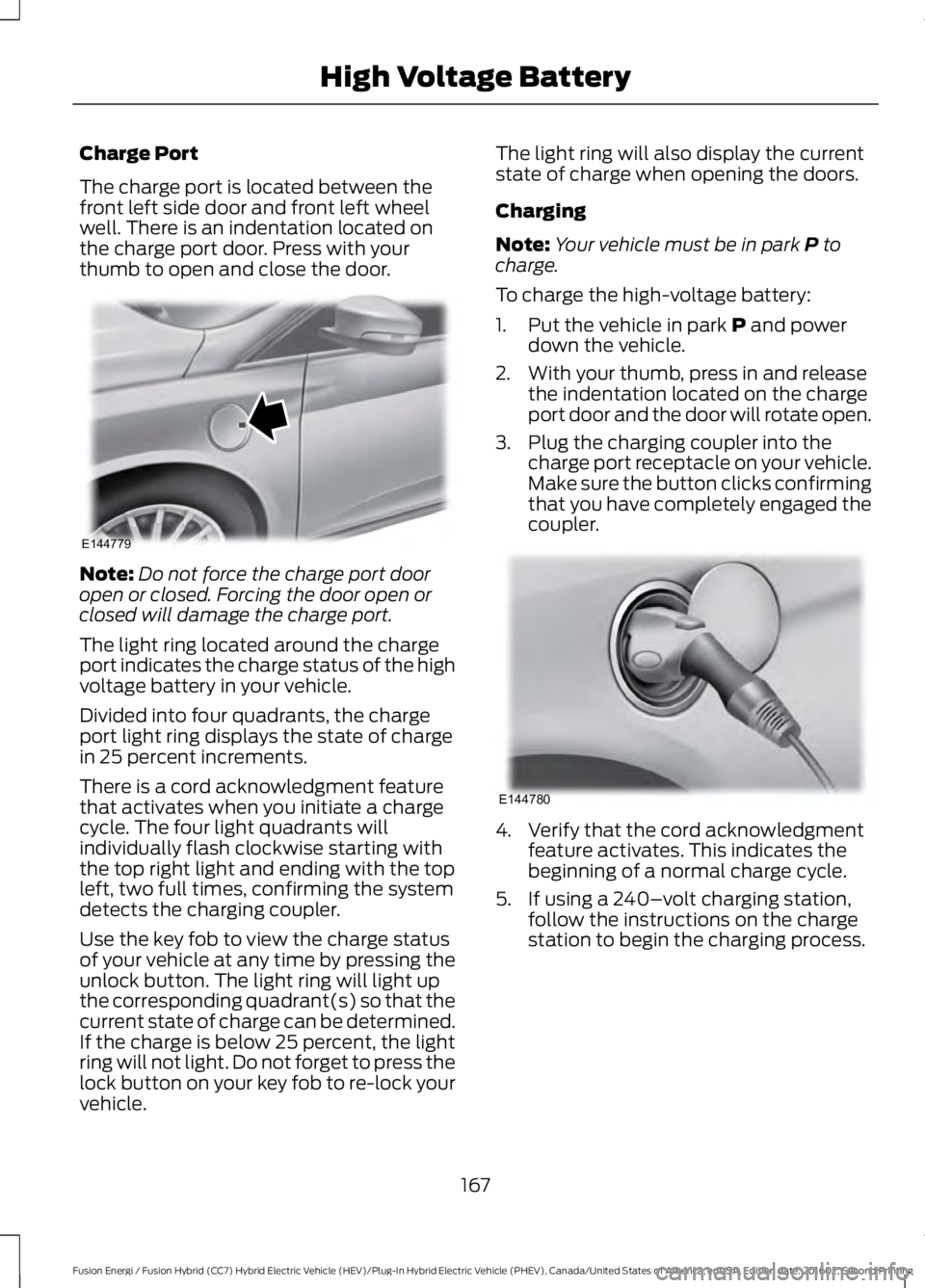
The charge port is located between thefront left side door and front left wheelwell. There is an indentation located onthe charge port door. Press with yourthumb to open and close the door.
Note:Do not force the charge port dooropen or closed. Forcing the door open orclosed will damage the charge port.
The light ring located around the chargeport indicates the charge status of the highvoltage battery in your vehicle.
Divided into four quadrants, the chargeport light ring displays the state of chargein 25 percent increments.
There is a cord acknowledgment featurethat activates when you initiate a chargecycle. The four light quadrants willindividually flash clockwise starting withthe top right light and ending with the topleft, two full times, confirming the systemdetects the charging coupler.
Use the key fob to view the charge statusof your vehicle at any time by pressing theunlock button. The light ring will light upthe corresponding quadrant(s) so that thecurrent state of charge can be determined.If the charge is below 25 percent, the lightring will not light. Do not forget to press thelock button on your key fob to re-lock yourvehicle.
The light ring will also display the currentstate of charge when opening the doors.
Charging
Note:Your vehicle must be in park P tocharge.
To charge the high-voltage battery:
1. Put the vehicle in park P and powerdown the vehicle.
2. With your thumb, press in and releasethe indentation located on the chargeport door and the door will rotate open.
3. Plug the charging coupler into thecharge port receptacle on your vehicle.Make sure the button clicks confirmingthat you have completely engaged thecoupler.
4. Verify that the cord acknowledgmentfeature activates. This indicates thebeginning of a normal charge cycle.
5. If using a 240–volt charging station,follow the instructions on the chargestation to begin the charging process.
167
Fusion Energi / Fusion Hybrid (CC7) Hybrid Electric Vehicle (HEV)/Plug-In Hybrid Electric Vehicle (PHEV), Canada/United States of America, enUSA, Edition date: 201602, Second Printing
High Voltage BatteryE144779 E144780
Page 180 of 526
Automatic release - drive away release
Your vehicle will automatically release theparking brake if all of the followingconditions exist:
•The driver door is closed.
•The accelerator pedal is pressed.
•There are no faults detected in theparking brake system.
Note:If the electric parking brake warninglamp stays illuminated, the electric parkingbrake will not automatically release. Youmust release the electric parking brake usingthe electric parking brake switch.
Note:On manual transmission vehicles, ifthe transmission is in neutral (N) when yourelease the clutch pedal and press theaccelerator pedal, the electric parking brakewill release automatically.
Note:On manual transmission vehicles,you must fully press the clutch pedal beforethe drive away release feature will operate.Drive as normal using the accelerator andclutch pedals and the electric parking brakewill be automatically released.
The brake system warning lamp will go offto confirm that the electric parking brakehas been released.
Note:The electric parking brake drive awayrelease makes starting on a hill easier. Thisfeature will release the parking brakeautomatically when the vehicle hassufficient drive force to move up the hill. Toassure drive away release when startinguphill, press the accelerator pedal quickly.
Driving with a Trailer
Depending on the slope and the weight ofthe trailer, your vehicle and trailer may rollbackwards slightly when you start on aslope.
To prevent this from happening, do thefollowing:
1. Pull the switch up and hold it in thisposition.
2. Drive your vehicle, then release theswitch when you notice that the enginehas developed sufficient driving force.
Battery With No Charge
WARNING
You will not be able to apply orrelease the electric parking brake ifthe battery is low or has no charge.
If the battery is low or has no charge, usejumper cables and a booster battery.
HILL START ASSIST
WARNINGS
The system does not replace theparking brake. When you leave yourvehicle, always apply the parkingbrake and shift the transmission into park(P) (automatic transmission) or first gear(1) (manual transmission).
You must remain in your vehicle onceyou have activated the system.
During all times, you are responsiblefor controlling your vehicle,supervising the system andintervening, if required.
If the engine is revved excessively, orif a malfunction is detected, thesystem will be deactivated.
The system makes it easier to pull awaywhen your vehicle is on a slope without theneed to use the parking brake.
When the system is active, your vehicle willremain stationary on the slope for two tothree seconds after you release the brakepedal. This allows you time to move yourfoot from the brake to the acceleratorpedal. The brakes release automatically
177
Fusion Energi / Fusion Hybrid (CC7) Hybrid Electric Vehicle (HEV)/Plug-In Hybrid Electric Vehicle (PHEV), Canada/United States of America, enUSA, Edition date: 201602, Second Printing
Brakes
Page 189 of 526
•The anti-lock brake system isactivated.
•The traction control system isactivated.
ACTIVE PARK ASSIST
Parallel Parking, PerpendicularParking, Parallel Park Out Assist
WARNINGS
You must remain in your vehiclewhen the system turns on. At alltimes, you are responsible forcontrolling your vehicle, supervising thesystem and intervening, if required. Failureto take care may result in the loss ofcontrol of your vehicle, serious personalinjury or death.
The sensors may not detect objectsin heavy rain or other conditions thatcause interference.
Active park assist does not apply thebrakes under any circumstances.
The system is designed to aid thedriver. It is not intended to replaceyour attention and judgment. You arestill responsible to drive with due care andattention.
Note:The Blind Spot Information Systemdoes not detect traffic alongside or behindyour vehicle during an active park assistmaneuver.
The system detects an available parallelor perpendicular parking space andautomatically steers your vehicle into thespace (hands-free) while you control theaccelerator, gearshift and brakes. Thesystem visually and audibly guides you topark your vehicle.
If you are uncomfortable with the proximityto any vehicle or object, you may chooseto override the system by grabbing thesteering wheel or pushing the active parkassist button.
Parallel Park Out Assist automaticallysteers your vehicle out of a parallel parkingspace (hands-free) while you control theaccelerator, gearshift and brakes. Thesystem visually and audibly guides you toenter traffic.
The system may not correctly operate inany of the following conditions:
•You use a spare tire or a tiresignificantly worn more than the othertires.
•One or more tires are improperlyinflated.
•You try to park on a tight curve.
•Something passes between the frontbumper and the parking space (apedestrian or cyclist).
•The edge of the neighboring parkedvehicle is high off the ground (forexample, a bus, tow truck or flatbedtruck).
•The weather conditions are poor(heavy rain, snow, fog, etc).
Note:Keep the sensors, located on thebumper or fascia, free from snow, ice andlarge accumulations of dirt. Covered sensorscan affect the system's accuracy. Do notclean the sensors with sharp objects.
Note:The sensors may not detect objectswith surfaces that absorb ultrasonic wavesor cause ultrasonic interference (motorcycleexhaust, truck air brakes or horns).
186
Fusion Energi / Fusion Hybrid (CC7) Hybrid Electric Vehicle (HEV)/Plug-In Hybrid Electric Vehicle (PHEV), Canada/United States of America, enUSA, Edition date: 201602, Second Printing
Parking Aids
Page 190 of 526
Do not use the system if:
•You have attached a foreign object (forexample, a bike rack or trailer) close tothe sensors on the front or rear of yourvehicle.
•You have attached an overhangingobject (for example, a surfboard) tothe roof.
•A foreign object damages or obstructsthe front or rear bumper or sidesensors.
•The correct tire size is not in use on yourvehicle (for example, a mini-spare tire).
Using Active Park Assist - ParallelParking
Press the active park assistbutton to search for a parallelparking space.
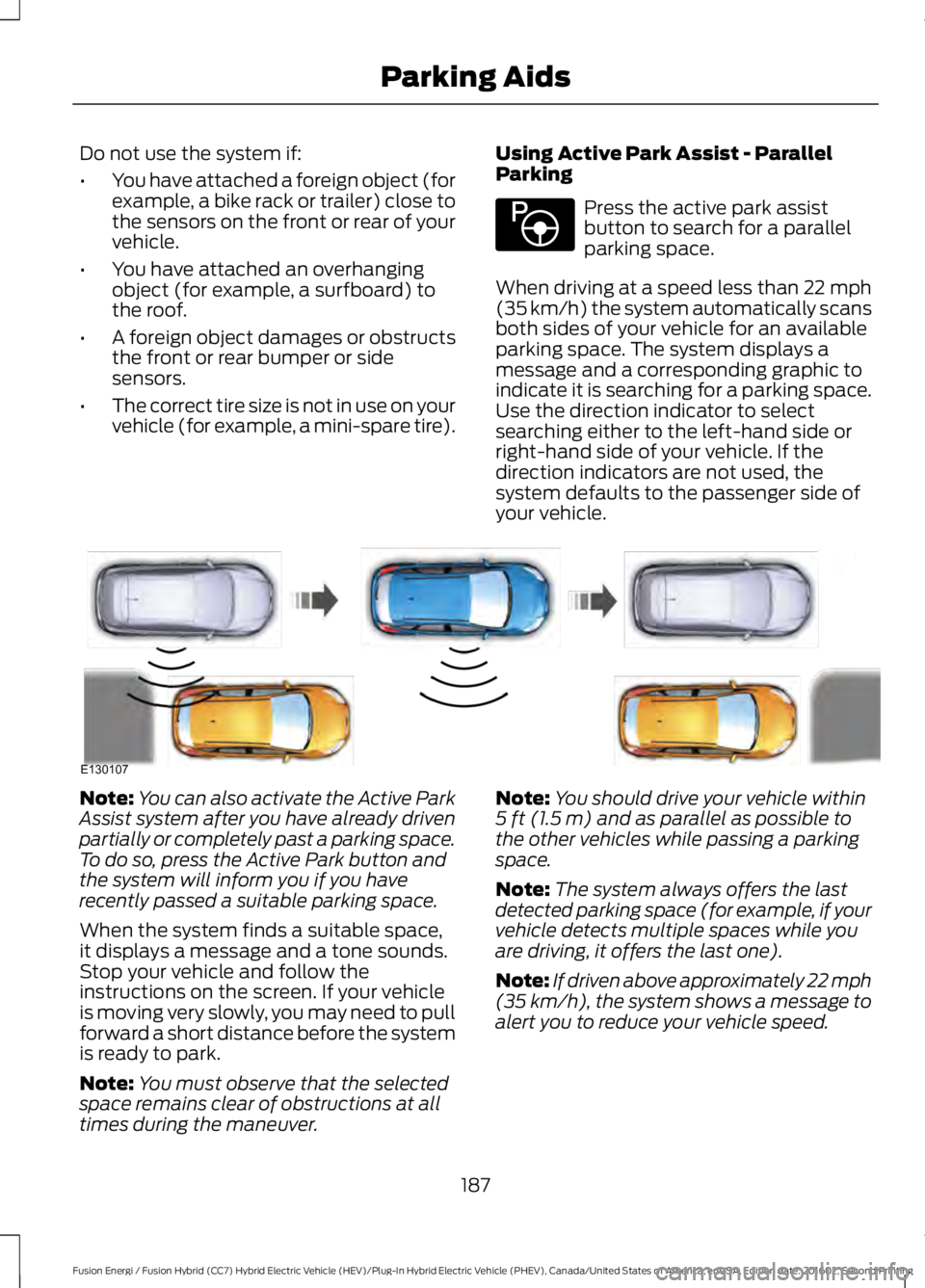
When driving at a speed less than 22 mph(35 km/h) the system automatically scansboth sides of your vehicle for an availableparking space. The system displays amessage and a corresponding graphic toindicate it is searching for a parking space.Use the direction indicator to selectsearching either to the left-hand side orright-hand side of your vehicle. If thedirection indicators are not used, thesystem defaults to the passenger side ofyour vehicle.
Note:You can also activate the Active ParkAssist system after you have already drivenpartially or completely past a parking space.To do so, press the Active Park button andthe system will inform you if you haverecently passed a suitable parking space.
When the system finds a suitable space,it displays a message and a tone sounds.Stop your vehicle and follow theinstructions on the screen. If your vehicleis moving very slowly, you may need to pullforward a short distance before the systemis ready to park.
Note:You must observe that the selectedspace remains clear of obstructions at alltimes during the maneuver.
Note:You should drive your vehicle within5 ft (1.5 m) and as parallel as possible tothe other vehicles while passing a parkingspace.
Note:The system always offers the lastdetected parking space (for example, if yourvehicle detects multiple spaces while youare driving, it offers the last one).
Note:If driven above approximately 22 mph(35 km/h), the system shows a message toalert you to reduce your vehicle speed.
187
Fusion Energi / Fusion Hybrid (CC7) Hybrid Electric Vehicle (HEV)/Plug-In Hybrid Electric Vehicle (PHEV), Canada/United States of America, enUSA, Edition date: 201602, Second Printing
Parking AidsE146186 E130107
Page 191 of 526
Automatic Steering into Parking Space
Note:If your vehicle speed exceedsapproximately 6 mph (10 km/h) or themaneuver is interrupted (driver input), thesystem switches off and you need to takefull control of your vehicle.
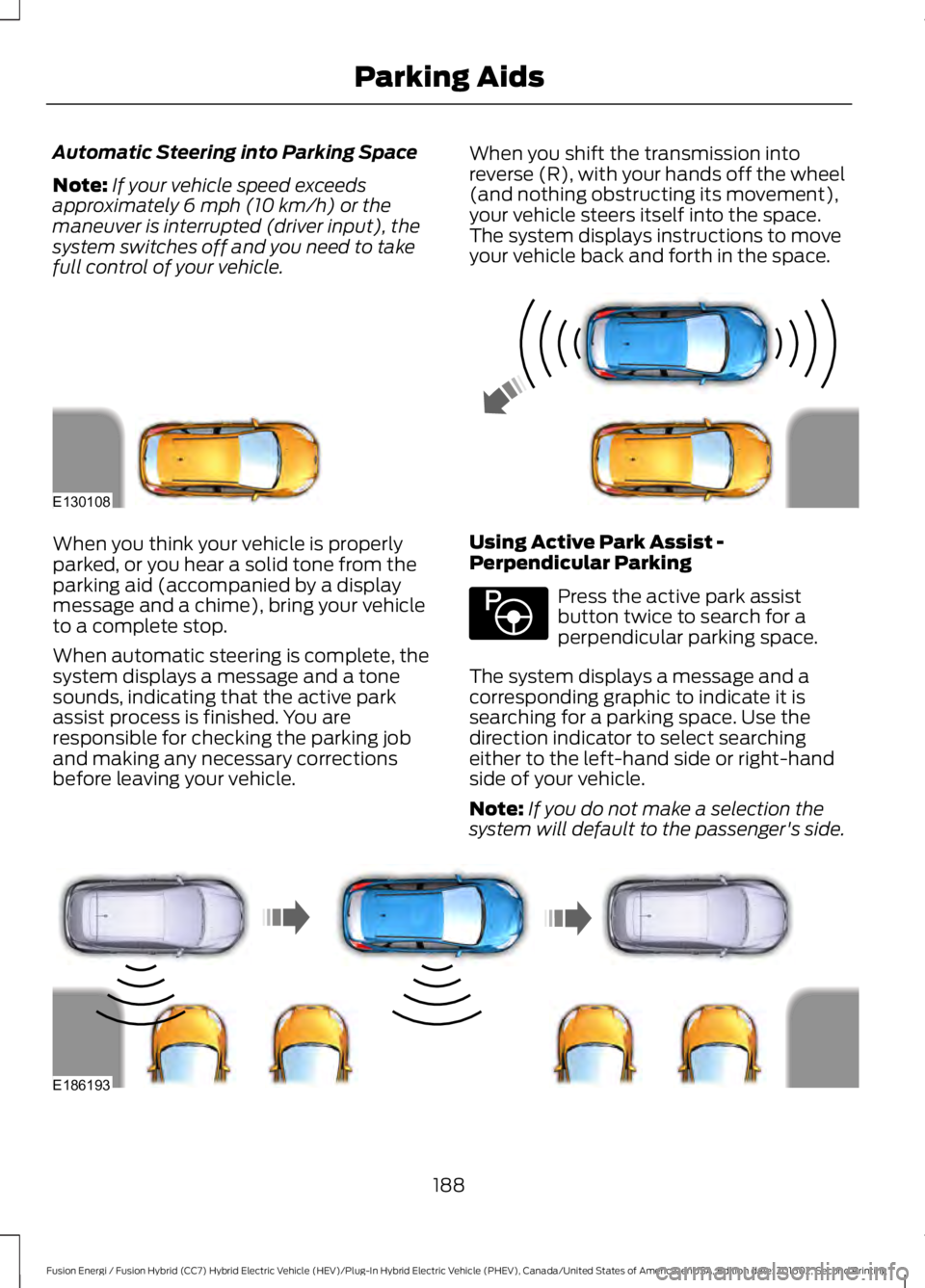
When you shift the transmission intoreverse (R), with your hands off the wheel(and nothing obstructing its movement),your vehicle steers itself into the space.The system displays instructions to moveyour vehicle back and forth in the space.
When you think your vehicle is properlyparked, or you hear a solid tone from theparking aid (accompanied by a displaymessage and a chime), bring your vehicleto a complete stop.
When automatic steering is complete, thesystem displays a message and a tonesounds, indicating that the active parkassist process is finished. You areresponsible for checking the parking joband making any necessary correctionsbefore leaving your vehicle.
Using Active Park Assist -Perpendicular Parking
Press the active park assistbutton twice to search for aperpendicular parking space.
The system displays a message and acorresponding graphic to indicate it issearching for a parking space. Use thedirection indicator to select searchingeither to the left-hand side or right-handside of your vehicle.
Note:If you do not make a selection thesystem will default to the passenger's side.
188
Fusion Energi / Fusion Hybrid (CC7) Hybrid Electric Vehicle (HEV)/Plug-In Hybrid Electric Vehicle (PHEV), Canada/United States of America, enUSA, Edition date: 201602, Second Printing
Parking AidsE130108 E146186 E186193
Page 192 of 526
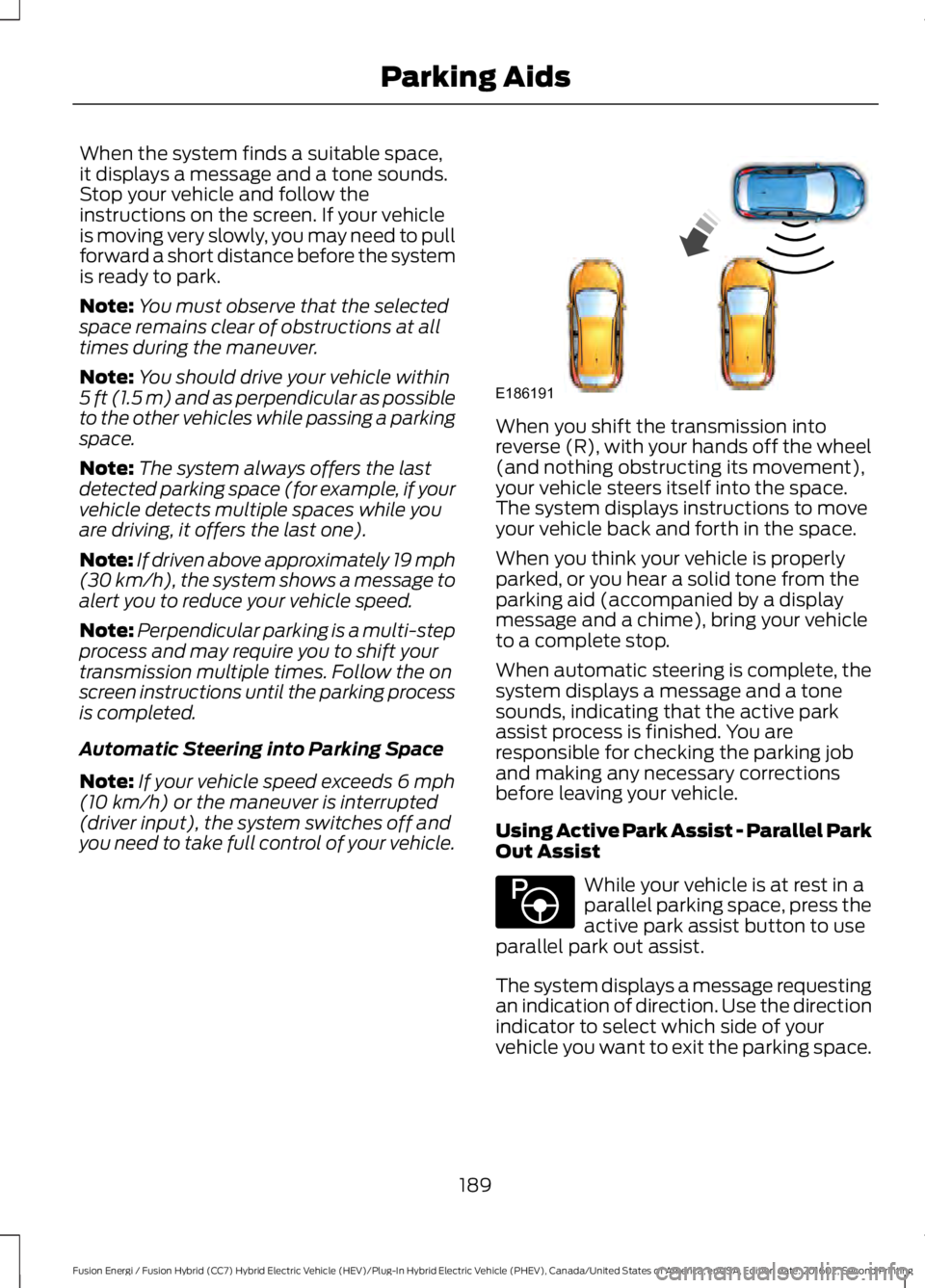
When the system finds a suitable space,it displays a message and a tone sounds.Stop your vehicle and follow theinstructions on the screen. If your vehicleis moving very slowly, you may need to pullforward a short distance before the systemis ready to park.
Note:You must observe that the selectedspace remains clear of obstructions at alltimes during the maneuver.
Note:You should drive your vehicle within5 ft (1.5 m) and as perpendicular as possibleto the other vehicles while passing a parkingspace.
Note:The system always offers the lastdetected parking space (for example, if yourvehicle detects multiple spaces while youare driving, it offers the last one).
Note:If driven above approximately 19 mph(30 km/h), the system shows a message toalert you to reduce your vehicle speed.
Note:Perpendicular parking is a multi-stepprocess and may require you to shift yourtransmission multiple times. Follow the onscreen instructions until the parking processis completed.
Automatic Steering into Parking Space
Note:If your vehicle speed exceeds 6 mph(10 km/h) or the maneuver is interrupted(driver input), the system switches off andyou need to take full control of your vehicle.
When you shift the transmission intoreverse (R), with your hands off the wheel(and nothing obstructing its movement),your vehicle steers itself into the space.The system displays instructions to moveyour vehicle back and forth in the space.
When you think your vehicle is properlyparked, or you hear a solid tone from theparking aid (accompanied by a displaymessage and a chime), bring your vehicleto a complete stop.
When automatic steering is complete, thesystem displays a message and a tonesounds, indicating that the active parkassist process is finished. You areresponsible for checking the parking joband making any necessary correctionsbefore leaving your vehicle.
Using Active Park Assist - Parallel ParkOut Assist
While your vehicle is at rest in aparallel parking space, press theactive park assist button to useparallel park out assist.
The system displays a message requestingan indication of direction. Use the directionindicator to select which side of yourvehicle you want to exit the parking space.
189
Fusion Energi / Fusion Hybrid (CC7) Hybrid Electric Vehicle (HEV)/Plug-In Hybrid Electric Vehicle (PHEV), Canada/United States of America, enUSA, Edition date: 201602, Second Printing
Parking AidsE186191 E146186
Page 193 of 526
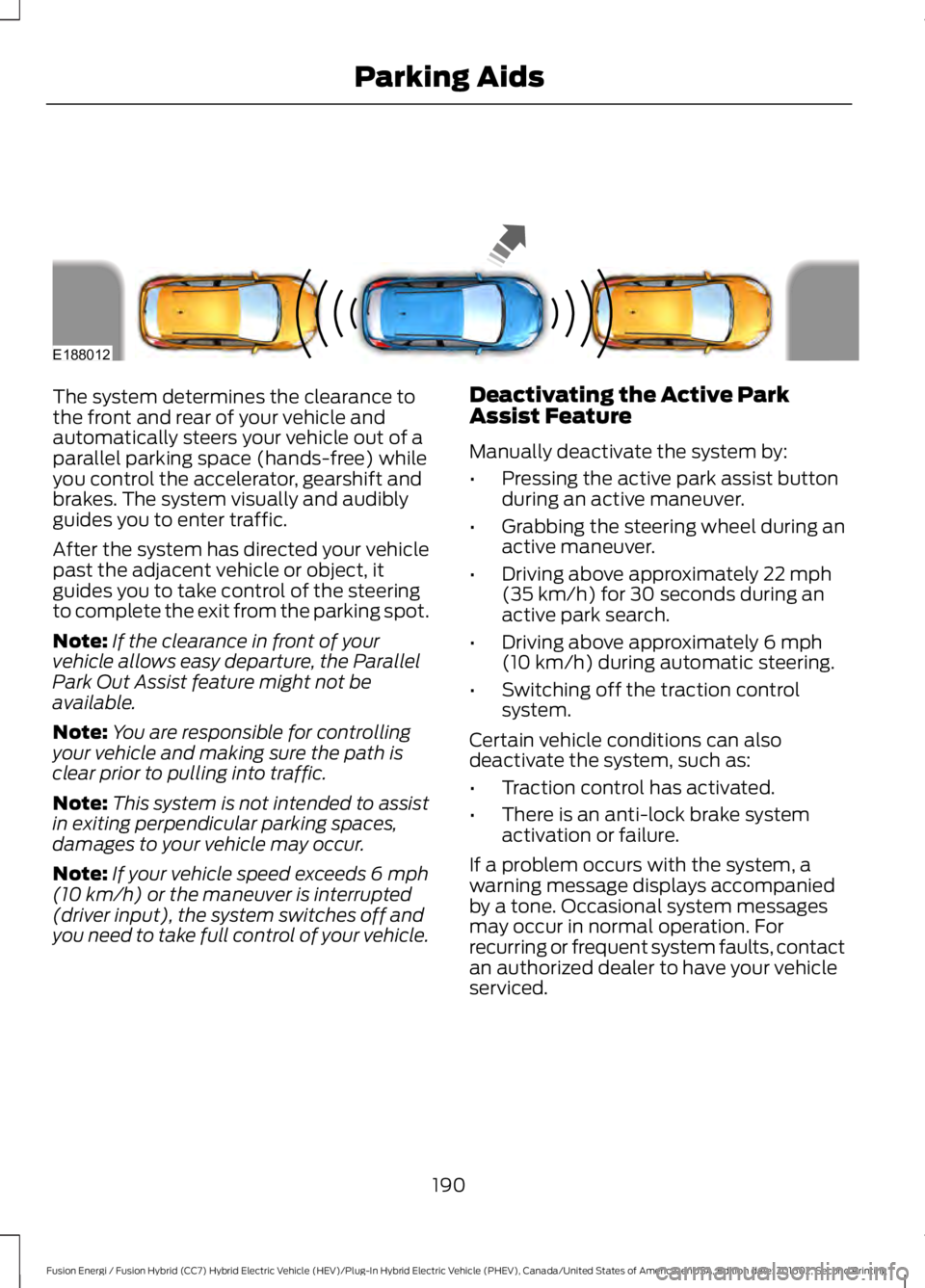
The system determines the clearance tothe front and rear of your vehicle andautomatically steers your vehicle out of aparallel parking space (hands-free) whileyou control the accelerator, gearshift andbrakes. The system visually and audiblyguides you to enter traffic.
After the system has directed your vehiclepast the adjacent vehicle or object, itguides you to take control of the steeringto complete the exit from the parking spot.
Note:If the clearance in front of yourvehicle allows easy departure, the ParallelPark Out Assist feature might not beavailable.
Note:You are responsible for controllingyour vehicle and making sure the path isclear prior to pulling into traffic.
Note:This system is not intended to assistin exiting perpendicular parking spaces,damages to your vehicle may occur.
Note:If your vehicle speed exceeds 6 mph(10 km/h) or the maneuver is interrupted(driver input), the system switches off andyou need to take full control of your vehicle.
Deactivating the Active ParkAssist Feature
Manually deactivate the system by:
•Pressing the active park assist buttonduring an active maneuver.
•Grabbing the steering wheel during anactive maneuver.
•Driving above approximately 22 mph(35 km/h) for 30 seconds during anactive park search.
•Driving above approximately 6 mph(10 km/h) during automatic steering.
•Switching off the traction controlsystem.
Certain vehicle conditions can alsodeactivate the system, such as:
•Traction control has activated.
•There is an anti-lock brake systemactivation or failure.
If a problem occurs with the system, awarning message displays accompaniedby a tone. Occasional system messagesmay occur in normal operation. Forrecurring or frequent system faults, contactan authorized dealer to have your vehicleserviced.
190
Fusion Energi / Fusion Hybrid (CC7) Hybrid Electric Vehicle (HEV)/Plug-In Hybrid Electric Vehicle (PHEV), Canada/United States of America, enUSA, Edition date: 201602, Second Printing
Parking AidsE188012
Page 199 of 526
•Press the accelerator or brake pedaluntil you reach the desired speed. Pressand release SET+.
•Press and hold SET+ or SET-. Releasethe control when you reach the desiredspeed.
•Press and release SET+ or SET-. Theset speed will change in approximately1 mph (2 km/h) increments.
Canceling the Set Speed
Press and release CAN or tap the brakepedal. The set speed does not erase.
Resuming the Set Speed
Press and release RES.
Switching Cruise Control Off
Note:You erase the set speed when youswitch the system off.
Press and release OFF when the system isin stand by mode or switch the ignition off.
USING ADAPTIVE CRUISE
CONTROL (If Equipped)
WARNINGS
Always pay close attention tochanging road conditions when usingadaptive cruise control. The systemdoes not replace attentive driving. Failingto pay attention to the road may result ina crash, serious injury or death.
Adaptive cruise control does notdetect stationary or slow movingvehicles below 6 mph (10 km/h).
Do not use adaptive cruise controlon winding roads, in heavy traffic orwhen the road surface is slippery.This could result in loss of vehicle control,serious injury or death.
WARNINGS
Do not use adaptive cruise controlwhen towing a trailer that has trailerbrakes. The auto-brake componentof the adaptive cruise control system doesnot operate the trailer brakes. Usingadaptive cruise control when towing atrailer that has trailer brakes may result inthe loss of vehicle control, which couldresult in serious injury.
Adaptive cruise control is not a crashwarning or avoidance system.
Adaptive cruise control does notdetect pedestrians or objects in theroad.
Adaptive cruise control does notdetect oncoming vehicles in thesame lane.
Do not use the system in poorvisibility, for example fog, heavy rain,spray or snow.
Do not use the adaptive cruisecontrol when entering or leaving ahighway, on roads with intersectionsor roundabouts or non-vehicular traffic orroads that are winding, slippery, unpaved,or steep slopes.
Do not use tire sizes other than thoserecommended because this canaffect the normal operation of thesystem. Failure to do so may result in a lossof vehicle control, which could result inserious injury.
Note:It is your responsibility to stay alert,drive safely and be in control of the vehicleat all times.
The system adjusts your vehicle speed tomaintain the set gap between you and thevehicle in front of you in the same lane.You can select four gap settings.
196
Fusion Energi / Fusion Hybrid (CC7) Hybrid Electric Vehicle (HEV)/Plug-In Hybrid Electric Vehicle (PHEV), Canada/United States of America, enUSA, Edition date: 201602, Second Printing
Cruise Control
Page 201 of 526
3. Press and release RES+.
4. The set speed automatically adjuststo 20 mph (30 km/h). A green indicatorlight and the current gap setting appearin the information display.
Following a Vehicle
WARNINGS
When following a vehicle, yourvehicle does not decelerateautomatically to a stop, nor doesyour vehicle always decelerate quicklyenough to avoid a crash without driverintervention. Always apply the brakes whennecessary. Failing to do so may result in acrash, serious injury or death.
Adaptive cruise control only warnsof vehicles detected by the radarsensor. In some cases there may beno warning or a delayed warning. Youshould always apply the brakes whennecessary. Failure to do so may result in acrash, serious injury or death.
Note:The brakes may emit noise whenapplied by the system.
When a vehicle ahead of you enters thesame lane or a slower vehicle is ahead inthe same lane, the vehicle speed adjuststo maintain a preset gap distance. Avehicle graphic illuminates in theinstrument cluster.
When you are following a vehicle and youswitch on your left directional indicator,adaptive cruise control may provide asmall temporary acceleration to help youpass.
Your vehicle maintains a consistent gapfrom the vehicle ahead until:
•The vehicle in front of you acceleratesto a speed above the set speed.
•The vehicle in front of you moves outof the lane you are in.
•You set a new gap distance.
The vehicle applies brakes to slow thevehicle to maintain a safe distance fromthe vehicle in front. The maximum brakingwhich the system can apply is limited. Youcan override the system by applying thebrakes.
If the system predicts that its maximumbraking level is insufficient, an audiblewarning sounds while the systemcontinues to brake. The red warning barappears on the windshield. You shouldtake immediate action.
Following a Vehicle to a CompleteStop
If your vehicle follows a vehicle to acomplete stop and remains stationary forless than three seconds, your vehicleautomatically accelerates from astationary position to follow the vehicleahead when you release the brake pedal.
If your vehicle follows a vehicle to acomplete stop and remains stationary formore than three seconds, you must pressand release the RES+ button or theaccelerator pedal to accelerate from astationary position and follow the vehicleahead when you release the brake pedal.
Setting the Gap Distance
You can decrease or increase the distancebetween your vehicle and the vehicle infront by pressing the gap control.
Note:It is your responsibility to select a gapappropriate to the driving conditions.
198
Fusion Energi / Fusion Hybrid (CC7) Hybrid Electric Vehicle (HEV)/Plug-In Hybrid Electric Vehicle (PHEV), Canada/United States of America, enUSA, Edition date: 201602, Second Printing
Cruise Control