light FORD FUSION ENERGI 2017 Owner's Guide
[x] Cancel search | Manufacturer: FORD, Model Year: 2017, Model line: FUSION ENERGI, Model: FORD FUSION ENERGI 2017Pages: 526, PDF Size: 7.89 MB
Page 93 of 526
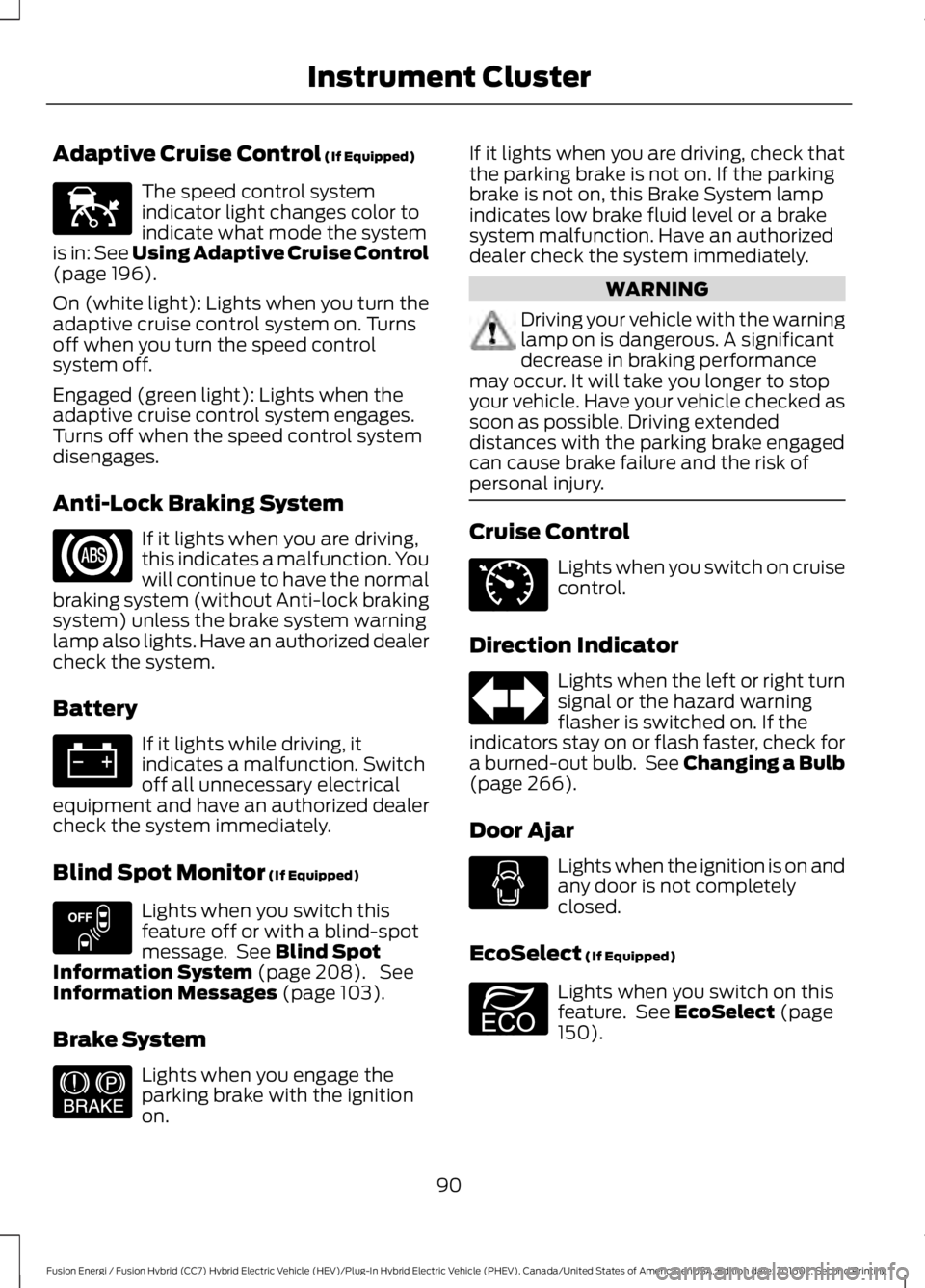
Adaptive Cruise Control (If Equipped)
The speed control systemindicator light changes color toindicate what mode the systemis in: See Using Adaptive Cruise Control(page 196).
On (white light): Lights when you turn theadaptive cruise control system on. Turnsoff when you turn the speed controlsystem off.
Engaged (green light): Lights when theadaptive cruise control system engages.Turns off when the speed control systemdisengages.
Anti-Lock Braking System
If it lights when you are driving,this indicates a malfunction. Youwill continue to have the normalbraking system (without Anti-lock brakingsystem) unless the brake system warninglamp also lights. Have an authorized dealercheck the system.
Battery
If it lights while driving, itindicates a malfunction. Switchoff all unnecessary electricalequipment and have an authorized dealercheck the system immediately.
Blind Spot Monitor (If Equipped)
Lights when you switch thisfeature off or with a blind-spotmessage. See Blind SpotInformation System (page 208). SeeInformation Messages (page 103).
Brake System
Lights when you engage theparking brake with the ignitionon.
If it lights when you are driving, check thatthe parking brake is not on. If the parkingbrake is not on, this Brake System lampindicates low brake fluid level or a brakesystem malfunction. Have an authorizeddealer check the system immediately.
WARNING
Driving your vehicle with the warninglamp on is dangerous. A significantdecrease in braking performancemay occur. It will take you longer to stopyour vehicle. Have your vehicle checked assoon as possible. Driving extendeddistances with the parking brake engagedcan cause brake failure and the risk ofpersonal injury.
Cruise Control
Lights when you switch on cruisecontrol.
Direction Indicator
Lights when the left or right turnsignal or the hazard warningflasher is switched on. If theindicators stay on or flash faster, check fora burned-out bulb. See Changing a Bulb(page 266).
Door Ajar
Lights when the ignition is on andany door is not completelyclosed.
EcoSelect (If Equipped)
Lights when you switch on thisfeature. See EcoSelect (page150).
90
Fusion Energi / Fusion Hybrid (CC7) Hybrid Electric Vehicle (HEV)/Plug-In Hybrid Electric Vehicle (PHEV), Canada/United States of America, enUSA, Edition date: 201602, Second Printing
Instrument ClusterE144524 E151262 E144522 E71340 E194390
Page 94 of 526
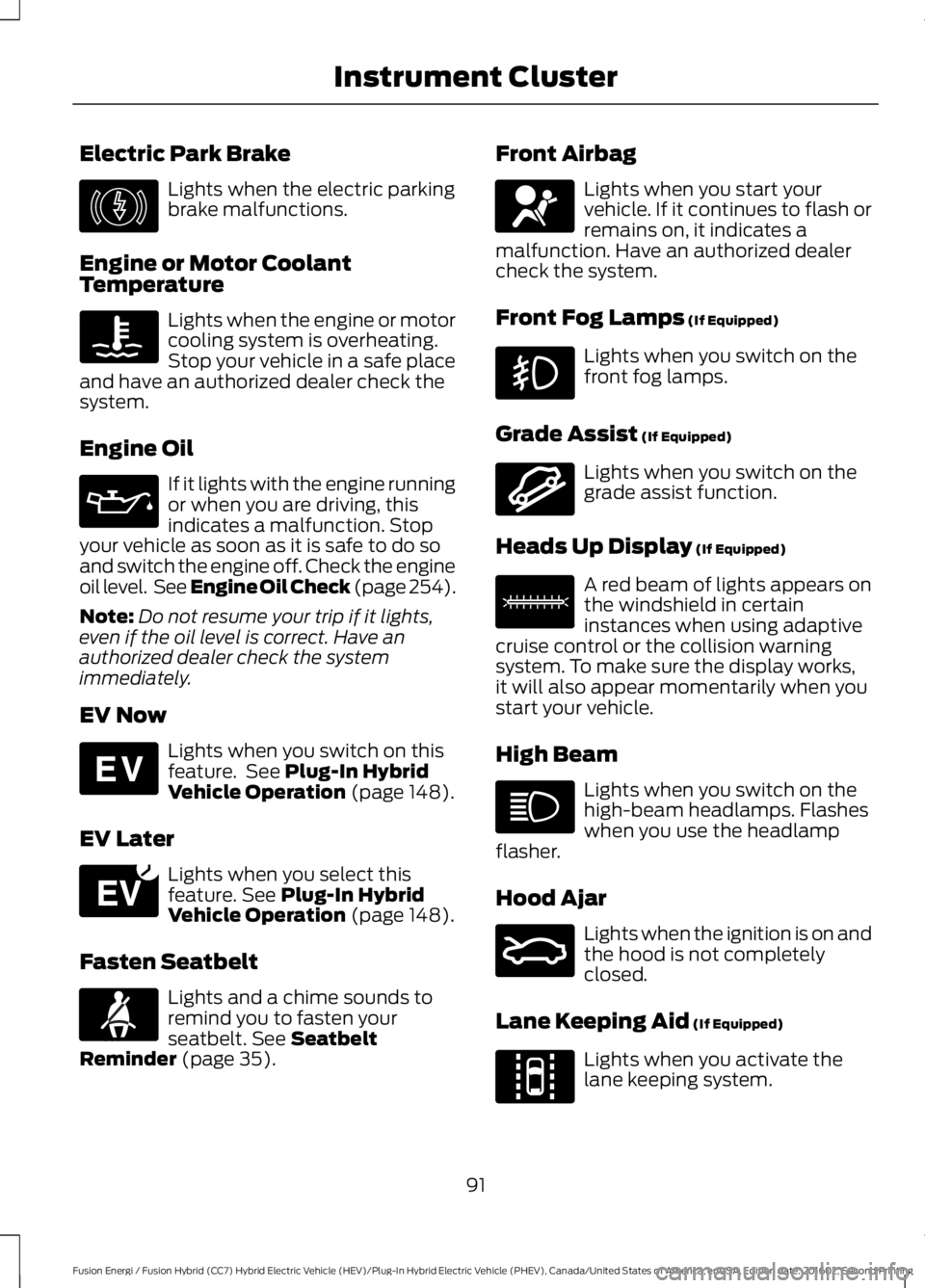
Electric Park Brake
Lights when the electric parkingbrake malfunctions.
Engine or Motor CoolantTemperature
Lights when the engine or motorcooling system is overheating.Stop your vehicle in a safe placeand have an authorized dealer check thesystem.
Engine Oil
If it lights with the engine runningor when you are driving, thisindicates a malfunction. Stopyour vehicle as soon as it is safe to do soand switch the engine off. Check the engineoil level. See Engine Oil Check (page 254).
Note:Do not resume your trip if it lights,even if the oil level is correct. Have anauthorized dealer check the systemimmediately.
EV Now
Lights when you switch on thisfeature. See Plug-In HybridVehicle Operation (page 148).
EV Later
Lights when you select thisfeature. See Plug-In HybridVehicle Operation (page 148).
Fasten Seatbelt
Lights and a chime sounds toremind you to fasten yourseatbelt. See SeatbeltReminder (page 35).
Front Airbag
Lights when you start yourvehicle. If it continues to flash orremains on, it indicates amalfunction. Have an authorized dealercheck the system.
Front Fog Lamps (If Equipped)
Lights when you switch on thefront fog lamps.
Grade Assist (If Equipped)
Lights when you switch on thegrade assist function.
Heads Up Display (If Equipped)
A red beam of lights appears onthe windshield in certaininstances when using adaptivecruise control or the collision warningsystem. To make sure the display works,it will also appear momentarily when youstart your vehicle.
High Beam
Lights when you switch on thehigh-beam headlamps. Flasheswhen you use the headlampflasher.
Hood Ajar
Lights when the ignition is on andthe hood is not completelyclosed.
Lane Keeping Aid (If Equipped)
Lights when you activate thelane keeping system.
91
Fusion Energi / Fusion Hybrid (CC7) Hybrid Electric Vehicle (HEV)/Plug-In Hybrid Electric Vehicle (PHEV), Canada/United States of America, enUSA, Edition date: 201602, Second Printing
Instrument ClusterE146190 E144814 E151263 E71880 E67017 E144523 E156133 E159324 E144813
Page 95 of 526
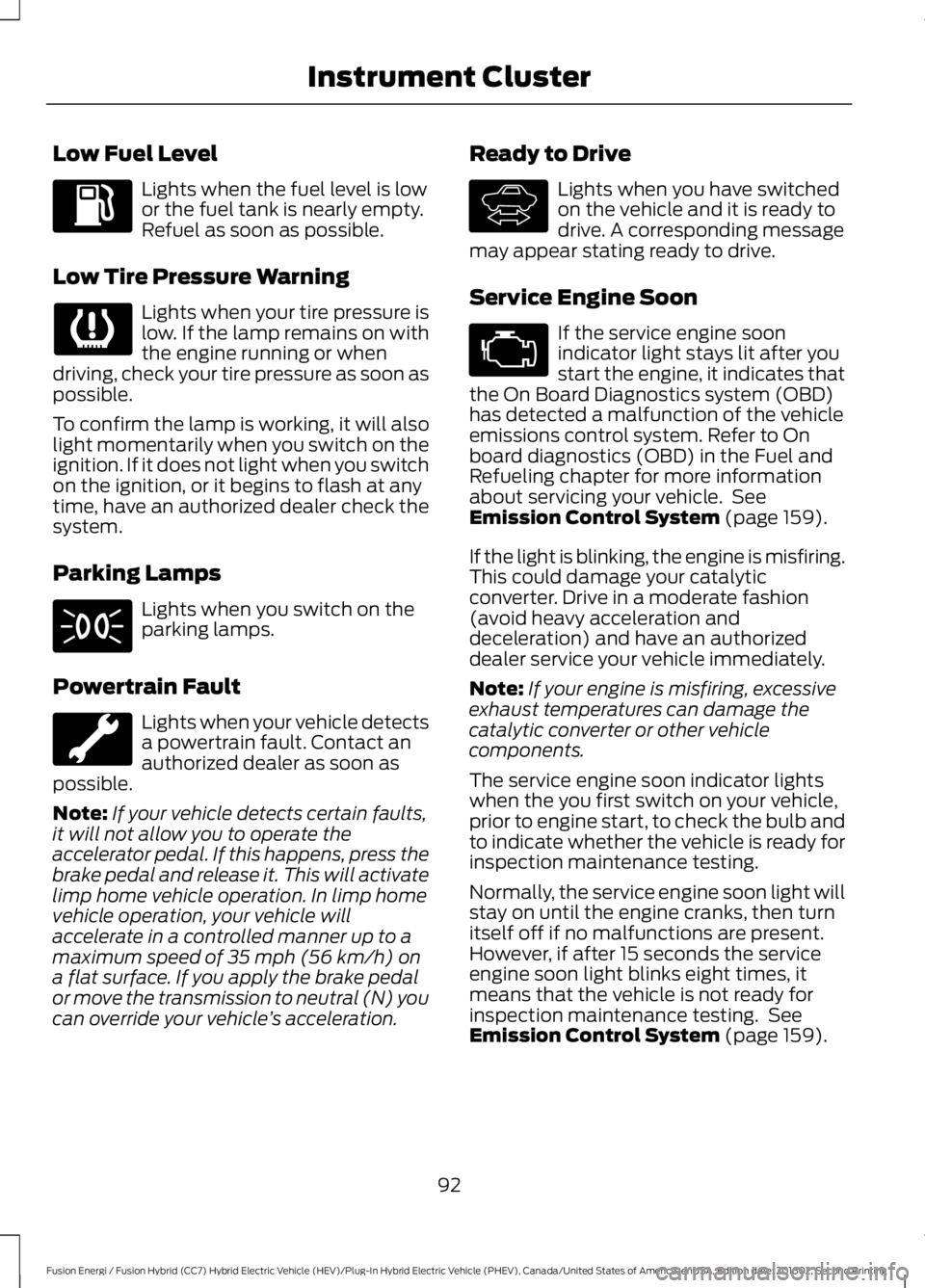
Low Fuel Level
Lights when the fuel level is lowor the fuel tank is nearly empty.Refuel as soon as possible.
Low Tire Pressure Warning
Lights when your tire pressure islow. If the lamp remains on withthe engine running or whendriving, check your tire pressure as soon aspossible.
To confirm the lamp is working, it will alsolight momentarily when you switch on theignition. If it does not light when you switchon the ignition, or it begins to flash at anytime, have an authorized dealer check thesystem.
Parking Lamps
Lights when you switch on theparking lamps.
Powertrain Fault
Lights when your vehicle detectsa powertrain fault. Contact anauthorized dealer as soon aspossible.
Note:If your vehicle detects certain faults,it will not allow you to operate theaccelerator pedal. If this happens, press thebrake pedal and release it. This will activatelimp home vehicle operation. In limp homevehicle operation, your vehicle willaccelerate in a controlled manner up to amaximum speed of 35 mph (56 km/h) ona flat surface. If you apply the brake pedalor move the transmission to neutral (N) youcan override your vehicle’s acceleration.
Ready to Drive
Lights when you have switchedon the vehicle and it is ready todrive. A corresponding messagemay appear stating ready to drive.
Service Engine Soon
If the service engine soonindicator light stays lit after youstart the engine, it indicates thatthe On Board Diagnostics system (OBD)has detected a malfunction of the vehicleemissions control system. Refer to Onboard diagnostics (OBD) in the Fuel andRefueling chapter for more informationabout servicing your vehicle. SeeEmission Control System (page 159).
If the light is blinking, the engine is misfiring.This could damage your catalyticconverter. Drive in a moderate fashion(avoid heavy acceleration anddeceleration) and have an authorizeddealer service your vehicle immediately.
Note:If your engine is misfiring, excessiveexhaust temperatures can damage thecatalytic converter or other vehiclecomponents.
The service engine soon indicator lightswhen the you first switch on your vehicle,prior to engine start, to check the bulb andto indicate whether the vehicle is ready forinspection maintenance testing.
Normally, the service engine soon light willstay on until the engine cranks, then turnitself off if no malfunctions are present.However, if after 15 seconds the serviceengine soon light blinks eight times, itmeans that the vehicle is not ready forinspection maintenance testing. SeeEmission Control System (page 159).
92
Fusion Energi / Fusion Hybrid (CC7) Hybrid Electric Vehicle (HEV)/Plug-In Hybrid Electric Vehicle (PHEV), Canada/United States of America, enUSA, Edition date: 201602, Second Printing
Instrument Cluster E144692
Page 96 of 526
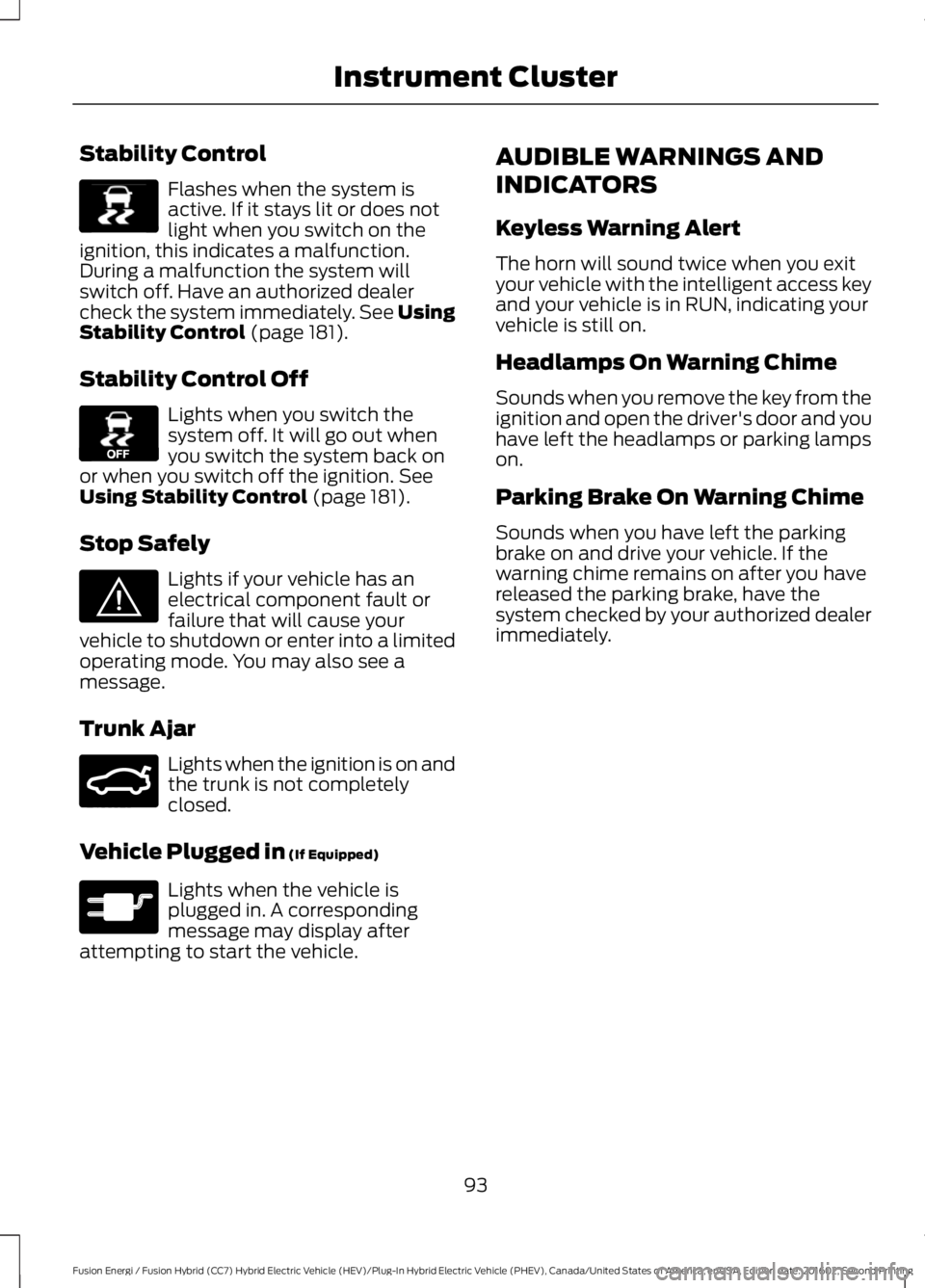
Stability Control
Flashes when the system isactive. If it stays lit or does notlight when you switch on theignition, this indicates a malfunction.During a malfunction the system willswitch off. Have an authorized dealercheck the system immediately. See UsingStability Control (page 181).
Stability Control Off
Lights when you switch thesystem off. It will go out whenyou switch the system back onor when you switch off the ignition. SeeUsing Stability Control (page 181).
Stop Safely
Lights if your vehicle has anelectrical component fault orfailure that will cause yourvehicle to shutdown or enter into a limitedoperating mode. You may also see amessage.
Trunk Ajar
Lights when the ignition is on andthe trunk is not completelyclosed.
Vehicle Plugged in (If Equipped)
Lights when the vehicle isplugged in. A correspondingmessage may display afterattempting to start the vehicle.
AUDIBLE WARNINGS AND
INDICATORS
Keyless Warning Alert
The horn will sound twice when you exityour vehicle with the intelligent access keyand your vehicle is in RUN, indicating yourvehicle is still on.
Headlamps On Warning Chime
Sounds when you remove the key from theignition and open the driver's door and youhave left the headlamps or parking lampson.
Parking Brake On Warning Chime
Sounds when you have left the parkingbrake on and drive your vehicle. If thewarning chime remains on after you havereleased the parking brake, have thesystem checked by your authorized dealerimmediately.
93
Fusion Energi / Fusion Hybrid (CC7) Hybrid Electric Vehicle (HEV)/Plug-In Hybrid Electric Vehicle (PHEV), Canada/United States of America, enUSA, Edition date: 201602, Second Printing
Instrument ClusterE138639 E130458 E144693 E159323 E144694
Page 97 of 526
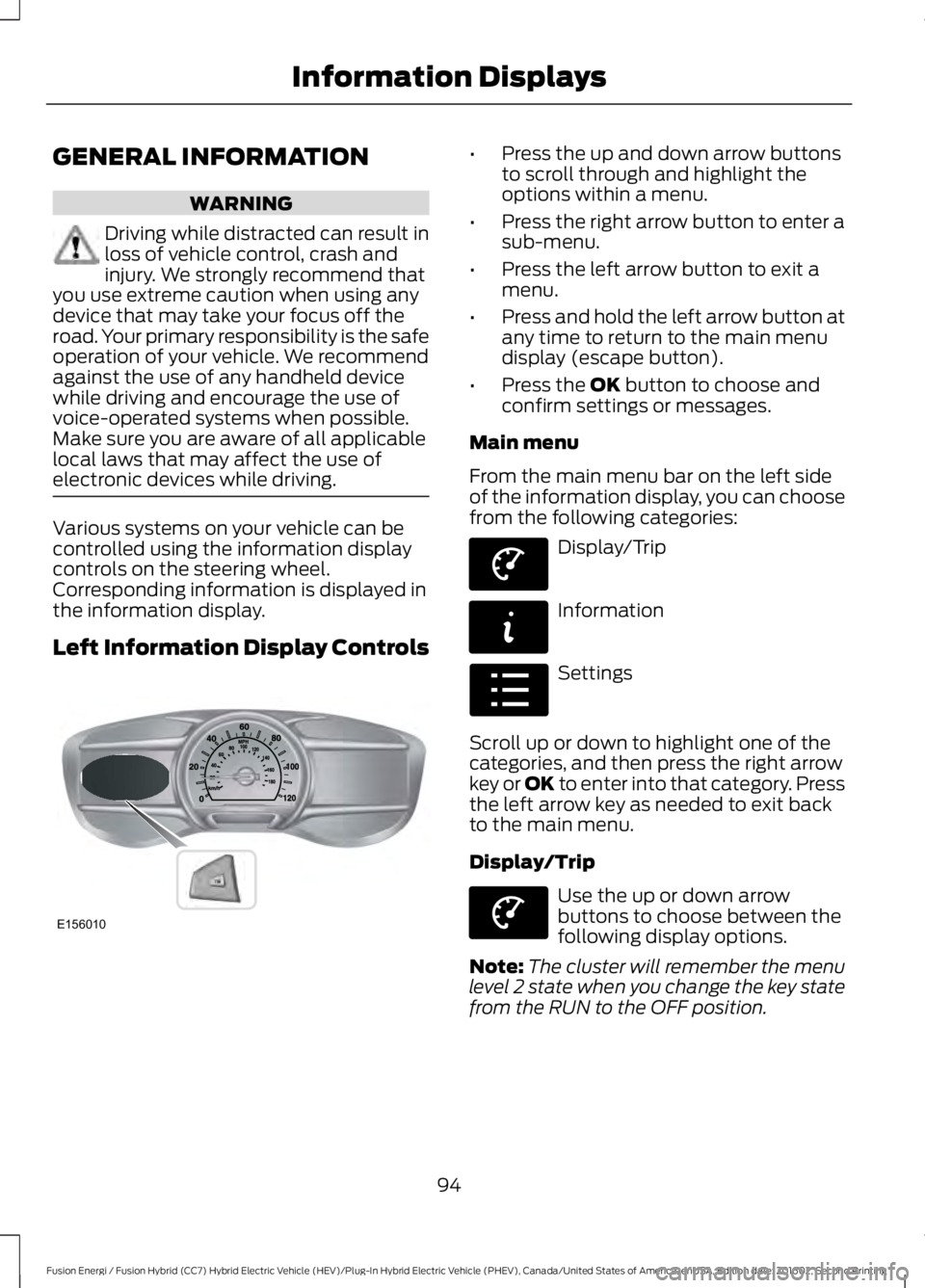
GENERAL INFORMATION
WARNING
Driving while distracted can result inloss of vehicle control, crash andinjury. We strongly recommend thatyou use extreme caution when using anydevice that may take your focus off theroad. Your primary responsibility is the safeoperation of your vehicle. We recommendagainst the use of any handheld devicewhile driving and encourage the use ofvoice-operated systems when possible.Make sure you are aware of all applicablelocal laws that may affect the use ofelectronic devices while driving.
Various systems on your vehicle can becontrolled using the information displaycontrols on the steering wheel.Corresponding information is displayed inthe information display.
Left Information Display Controls
•Press the up and down arrow buttonsto scroll through and highlight theoptions within a menu.
•Press the right arrow button to enter asub-menu.
•Press the left arrow button to exit amenu.
•Press and hold the left arrow button atany time to return to the main menudisplay (escape button).
•Press the OK button to choose andconfirm settings or messages.
Main menu
From the main menu bar on the left sideof the information display, you can choosefrom the following categories:
Display/Trip
Information
Settings
Scroll up or down to highlight one of thecategories, and then press the right arrowkey or OK to enter into that category. Pressthe left arrow key as needed to exit backto the main menu.
Display/Trip
Use the up or down arrowbuttons to choose between thefollowing display options.
Note:The cluster will remember the menulevel 2 state when you change the key statefrom the RUN to the OFF position.
94
Fusion Energi / Fusion Hybrid (CC7) Hybrid Electric Vehicle (HEV)/Plug-In Hybrid Electric Vehicle (PHEV), Canada/United States of America, enUSA, Edition date: 201602, Second Printing
Information DisplaysE156010 E144639 E144642 E100023 E144639
Page 100 of 526
MyView
You can choose what to display in thisview. Selecting Change MyView in theoptions menu allows you to scroll throughtwo columns of content choices.
•Press the up or down arrow to viewcontent.
•Press OK to save your selectedcontent.
•You must select content in bothcolumns before you can save your newMyView.
Unique content available in MyView:
•Vehicle Range (Energi vehicles only) –Indicates the estimated distance yourvehicle will travel with the energycurrently onboard. Separately displaysrange available in Hybrid Mode fueledby gasoline, electric range available inPlug-in Power Mode, and total range.Gasoline range and electric range arealso shown on the bottom of the rightinformation display. Changes in drivingpattern and climate control use willcause the values to vary.
•Accessory Power— Indicates electricalpower demands from your vehicle’saccessory systems. Accessories usepower but do not contribute topropelling your vehicle. The gaugeseparately displays power demand inkilowatts (kW) for climate and otheraccessories. Climate includes thepower being used by high voltageclimate control components such asthe electric A/C compressor and theelectric heater (Energi vehicles only).Other includes all power being used bythe low voltage accessories (cabinfans, headlights, heated seats, etc.).
•Coolant Temp – Indicates enginecoolant temperature. At normaloperating temperature, the levelindicator will be white and will be in thenormal range (between H and C). If theengine coolant temperature exceedsthe normal range, the level indicatorwill change to red to indicate that theengine is overheating. Stop your vehicleas soon as safely possible, turn yourvehicle off and let the engine cool.
•Tach rpm x 1000 — When the gasolineengine is running, the tachometergauge displays the engine speed inrevolutions per minute (RPM). Whenyour vehicle is operating on batterypower only with the engine off, EVdisplays and the tachometer is greyedout.
Note:The trip data, and average fueleconomy cannot be reset in MyView.
Miles (or km)/Full Charge (Energi only)
In Hybrid Mode the display changes to FuelEconomy. Miles or Kilometers per FullCharge is an estimate of your EV Rangewith a fully charged battery.
This display is only available in Plug-inPower Mode.
Average Miles or Kilometers per FullCharge is provided along with anInstantaneous gauge. This information isbased on your energy usage while driving.Energy usage is affected by your drivingstyle and route, climate control use,outside temperature and other factors. Formore information refer to Next Full Charge.See Gauges (page 86).
When you select EV Now operation thisscreen will automatically be shown. Youcan press OK to enable the engine whenviewing this screen during EV Nowoperation. See Plug-In Hybrid VehicleOperation (page 148).
97
Fusion Energi / Fusion Hybrid (CC7) Hybrid Electric Vehicle (HEV)/Plug-In Hybrid Electric Vehicle (PHEV), Canada/United States of America, enUSA, Edition date: 201602, Second Printing
Information Displays
Page 102 of 526
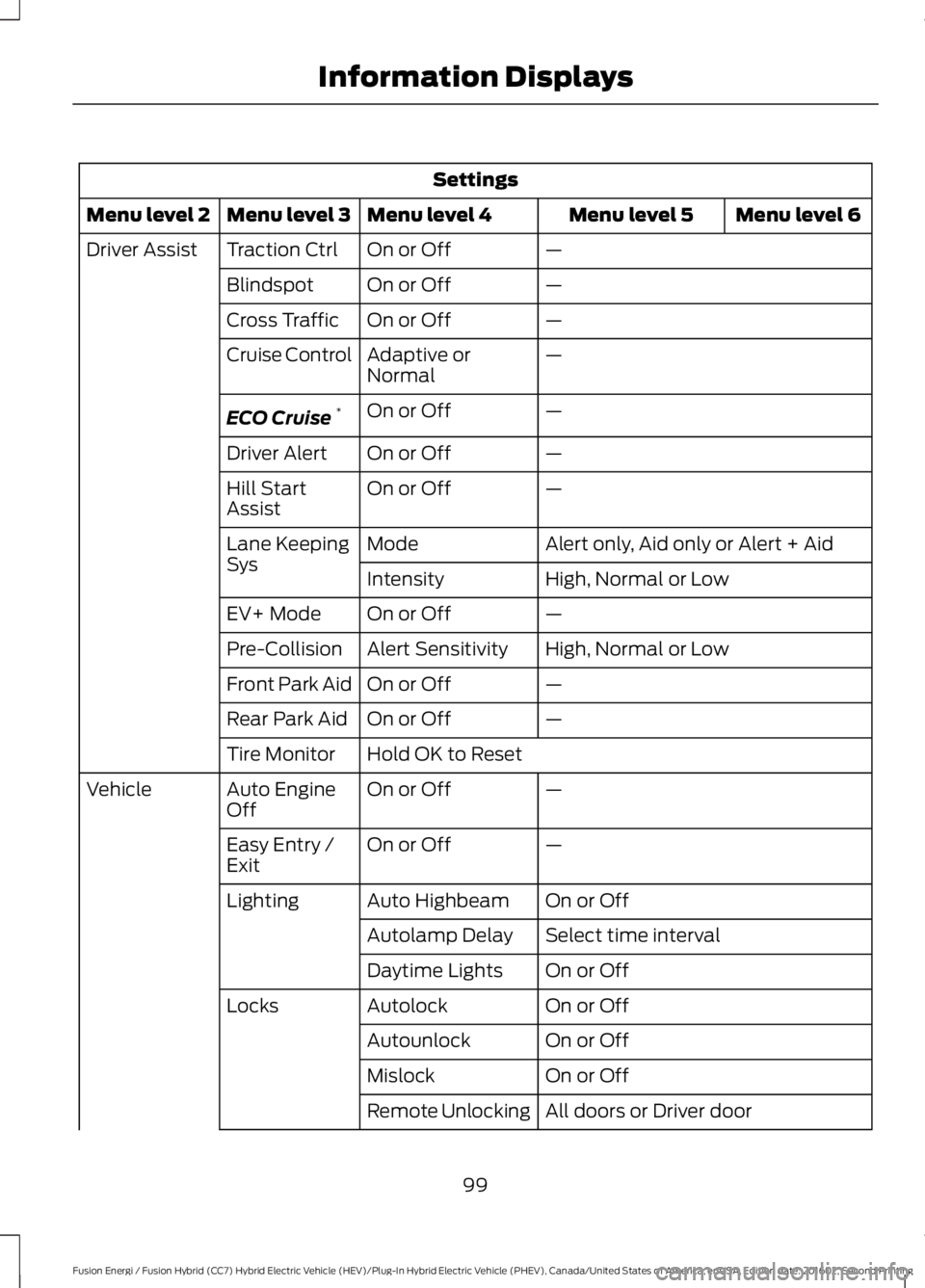
Settings
Menu level 6Menu level 5Menu level 4Menu level 3Menu level 2
—On or OffTraction CtrlDriver Assist
—On or OffBlindspot
—On or OffCross Traffic
—Adaptive orNormalCruise Control
—On or OffECO Cruise*
—On or OffDriver Alert
—On or OffHill StartAssist
Alert only, Aid only or Alert + AidModeLane KeepingSysHigh, Normal or LowIntensity
—On or OffEV+ Mode
High, Normal or LowAlert SensitivityPre-Collision
—On or OffFront Park Aid
—On or OffRear Park Aid
Hold OK to ResetTire Monitor
—On or OffAuto EngineOffVehicle
—On or OffEasy Entry /Exit
On or OffAuto HighbeamLighting
Select time intervalAutolamp Delay
On or OffDaytime Lights
On or OffAutolockLocks
On or OffAutounlock
On or OffMislock
All doors or Driver doorRemote Unlocking
99
Fusion Energi / Fusion Hybrid (CC7) Hybrid Electric Vehicle (HEV)/Plug-In Hybrid Electric Vehicle (PHEV), Canada/United States of America, enUSA, Edition date: 201602, Second Printing
Information Displays
Page 104 of 526
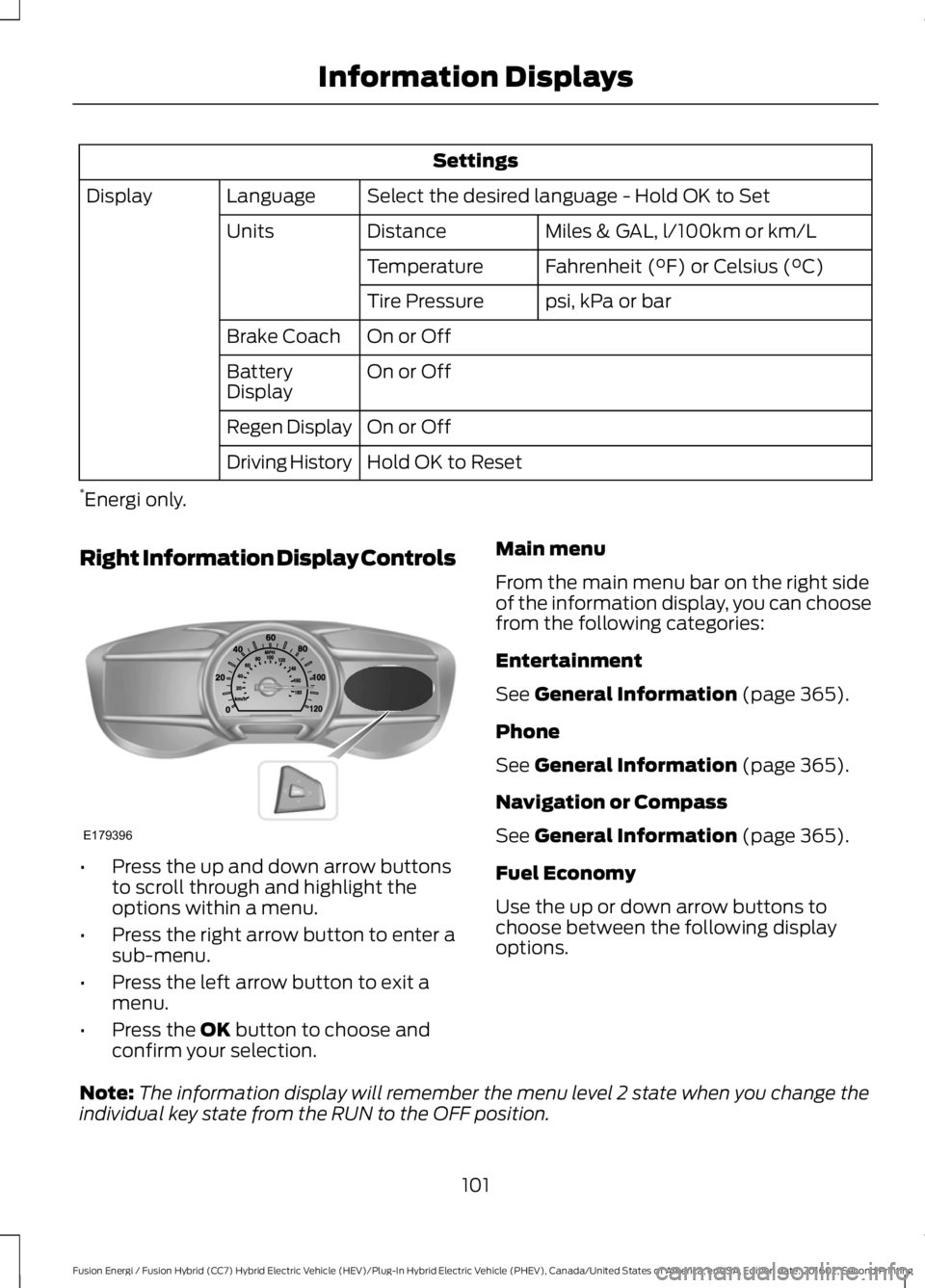
Settings
Select the desired language - Hold OK to SetLanguageDisplay
Miles & GAL, l/100km or km/LDistanceUnits
Fahrenheit (°F) or Celsius (°C)Temperature
psi, kPa or barTire Pressure
On or OffBrake Coach
On or OffBatteryDisplay
On or OffRegen Display
Hold OK to ResetDriving History
*Energi only.
Right Information Display Controls
•Press the up and down arrow buttonsto scroll through and highlight theoptions within a menu.
•Press the right arrow button to enter asub-menu.
•Press the left arrow button to exit amenu.
•Press the OK button to choose andconfirm your selection.
Main menu
From the main menu bar on the right sideof the information display, you can choosefrom the following categories:
Entertainment
See General Information (page 365).
Phone
See General Information (page 365).
Navigation or Compass
See General Information (page 365).
Fuel Economy
Use the up or down arrow buttons tochoose between the following displayoptions.
Note:The information display will remember the menu level 2 state when you change theindividual key state from the RUN to the OFF position.
101
Fusion Energi / Fusion Hybrid (CC7) Hybrid Electric Vehicle (HEV)/Plug-In Hybrid Electric Vehicle (PHEV), Canada/United States of America, enUSA, Edition date: 201602, Second Printing
Information DisplaysE179396
Page 123 of 526
Note:Remove any snow, ice or leaves fromthe air intake area at the base of thewindshield.
Note:To improve the time to reach comfortin hot weather, drive with the windowsslightly open for 2-3 minutes after start-upor until your vehicle airs out.
Automatic Climate Control
Note:Adjusting the settings when yourvehicle interior is extremely hot or cold isnot necessary. The system automaticallyadjusts to heat or cool the cabin to yourselected temperature as quickly as possible.For the system to function efficiently, theinstrument panel and side air vents shouldbe fully open.
Note:If you select AUTO during coldoutside temperatures, the system directsairflow to the windshield and side windowvents. In addition, the fan may run at aslower speed until the engine warms up.
Note:If you select AUTO during hot outsidetemperatures, or when the inside of thevehicle is hot, the system automatically usesrecirculated air to maximize interior cooling.When the interior reaches the selectedtemperature, the system automaticallyswitches to using outside air.
Heating the Interior Quickly
1. Press the AUTO button.
2. Adjust the temperature control to thedesired setting.
Recommended Settings forHeating
1. Press the AUTO button.
2. Adjust the temperature control to thedesired setting. Use 72°F (22°C) as astarting point, then adjust the settingas necessary.
Cooling the Interior Quickly
Press the MAX A/C button.
Recommended Settings forCooling
1. Press the AUTO button.
2. Adjust the temperature control to thedesired setting. Use 72°F (22°C) as astarting point, then adjust the settingas necessary.
Side Window Defogging in ColdWeather
1. Press the defrost button.
2. Adjust the temperature control to thedesired setting. Use 72°F (22°C) as astarting point, then adjust the settingas necessary.
HEATED WINDOWS AND
MIRRORS (If Equipped)
Heated Rear Window
Note:Make sure the engine is runningbefore operating the heated windows.
Press the button to clear theheated rear window of thin iceand fog. The heated rear windowwill automatically turn off after a shortperiod of time. Start the engine before youswitch the heated rear window on.
Note:Do not use razor blades or othersharp objects to clean or remove decalsfrom the inside of the heated rear window.The vehicle warranty does not coverdamage caused to the heated rear windowgrid lines.
Heated Exterior Mirror (If Equipped)
When you switch the heated rear windowon, the heated exterior mirrors willautomatically turn on.
120
Fusion Energi / Fusion Hybrid (CC7) Hybrid Electric Vehicle (HEV)/Plug-In Hybrid Electric Vehicle (PHEV), Canada/United States of America, enUSA, Edition date: 201602, Second Printing
Climate ControlE184884
Page 125 of 526
SITTING IN THE CORRECT
POSITION
WARNINGS
Sitting improperly, out of position orwith the seatback reclined too farcan take weight off the seat cushionand affect the decision of the passengersensing system, resulting in serious injuryor death in the event of a crash. Always situpright against your seat back, with yourfeet on the floor.
Do not recline the seatback as thiscan cause the occupant to slideunder the safety belt, resulting inserious injury in the event of a crash.
Do not place objects higher than theseatback to reduce the risk of seriousinjury in the event of a crash or duringheavy braking.
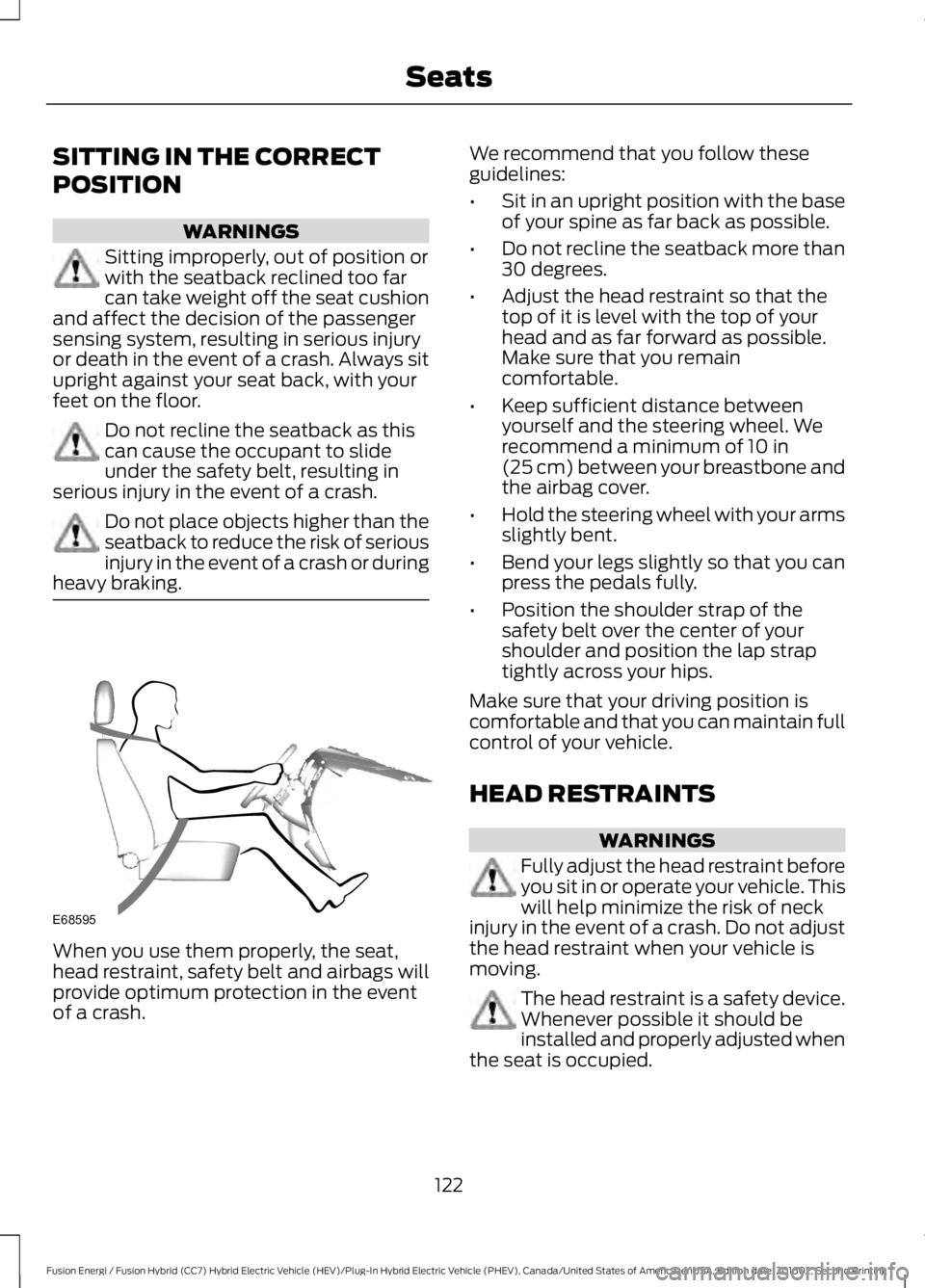
When you use them properly, the seat,head restraint, safety belt and airbags willprovide optimum protection in the eventof a crash.
We recommend that you follow theseguidelines:
•Sit in an upright position with the baseof your spine as far back as possible.
•Do not recline the seatback more than30 degrees.
•Adjust the head restraint so that thetop of it is level with the top of yourhead and as far forward as possible.Make sure that you remaincomfortable.
•Keep sufficient distance betweenyourself and the steering wheel. Werecommend a minimum of 10 in(25 cm) between your breastbone andthe airbag cover.
•Hold the steering wheel with your armsslightly bent.
•Bend your legs slightly so that you canpress the pedals fully.
•Position the shoulder strap of thesafety belt over the center of yourshoulder and position the lap straptightly across your hips.
Make sure that your driving position iscomfortable and that you can maintain fullcontrol of your vehicle.
HEAD RESTRAINTS
WARNINGS
Fully adjust the head restraint beforeyou sit in or operate your vehicle. Thiswill help minimize the risk of neckinjury in the event of a crash. Do not adjustthe head restraint when your vehicle ismoving.
The head restraint is a safety device.Whenever possible it should beinstalled and properly adjusted whenthe seat is occupied.
122
Fusion Energi / Fusion Hybrid (CC7) Hybrid Electric Vehicle (HEV)/Plug-In Hybrid Electric Vehicle (PHEV), Canada/United States of America, enUSA, Edition date: 201602, Second Printing
SeatsE68595