change time FORD FUSION ENERGI 2017 Service Manual
[x] Cancel search | Manufacturer: FORD, Model Year: 2017, Model line: FUSION ENERGI, Model: FORD FUSION ENERGI 2017Pages: 526, PDF Size: 7.89 MB
Page 363 of 526
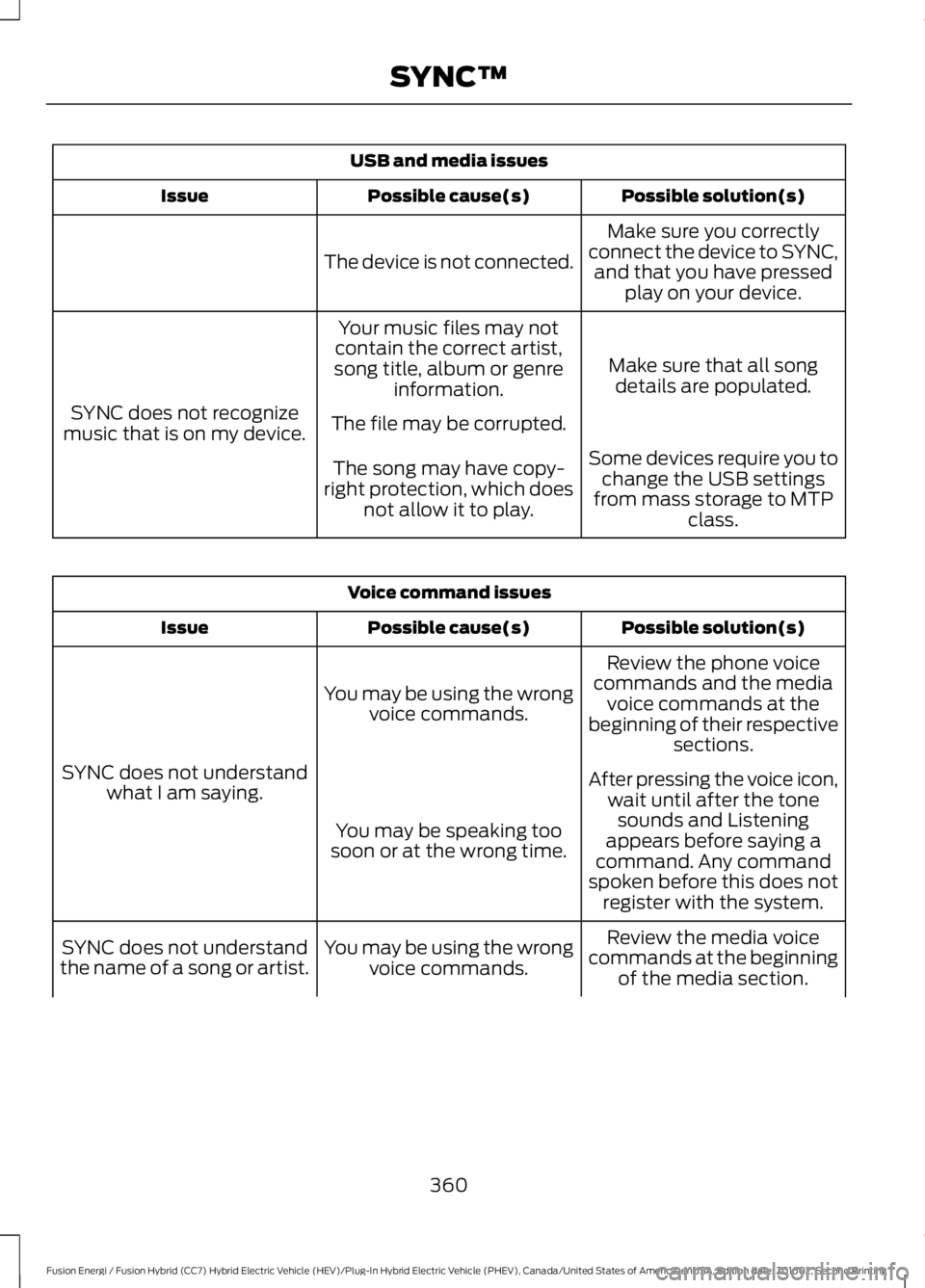
USB and media issues
Possible solution(s)Possible cause(s)Issue
Make sure you correctlyconnect the device to SYNC,and that you have pressedplay on your device.
The device is not connected.
Make sure that all songdetails are populated.
Your music files may notcontain the correct artist,song title, album or genreinformation.
SYNC does not recognizemusic that is on my device.The file may be corrupted.
Some devices require you tochange the USB settingsfrom mass storage to MTPclass.
The song may have copy-right protection, which doesnot allow it to play.
Voice command issues
Possible solution(s)Possible cause(s)Issue
Review the phone voicecommands and the mediavoice commands at thebeginning of their respectivesections.
You may be using the wrongvoice commands.
SYNC does not understandwhat I am saying.After pressing the voice icon,wait until after the tonesounds and Listeningappears before saying acommand. Any commandspoken before this does notregister with the system.
You may be speaking toosoon or at the wrong time.
Review the media voicecommands at the beginningof the media section.
You may be using the wrongvoice commands.SYNC does not understandthe name of a song or artist.
360
Fusion Energi / Fusion Hybrid (CC7) Hybrid Electric Vehicle (HEV)/Plug-In Hybrid Electric Vehicle (PHEV), Canada/United States of America, enUSA, Edition date: 201602, Second Printing
SYNC™
Page 368 of 526
GENERAL INFORMATION
WARNING
Driving while distracted can result inloss of vehicle control, crash andinjury. We strongly recommend thatyou use extreme caution when using anydevice that may take your focus off theroad. Your primary responsibility is the safeoperation of your vehicle. We recommendagainst the use of any hand-held devicewhile driving and encourage the use ofvoice-operated systems when possible.Make sure you are aware of all applicablelocal laws that may affect the use ofelectronic devices while driving.
Getting to Know Your System
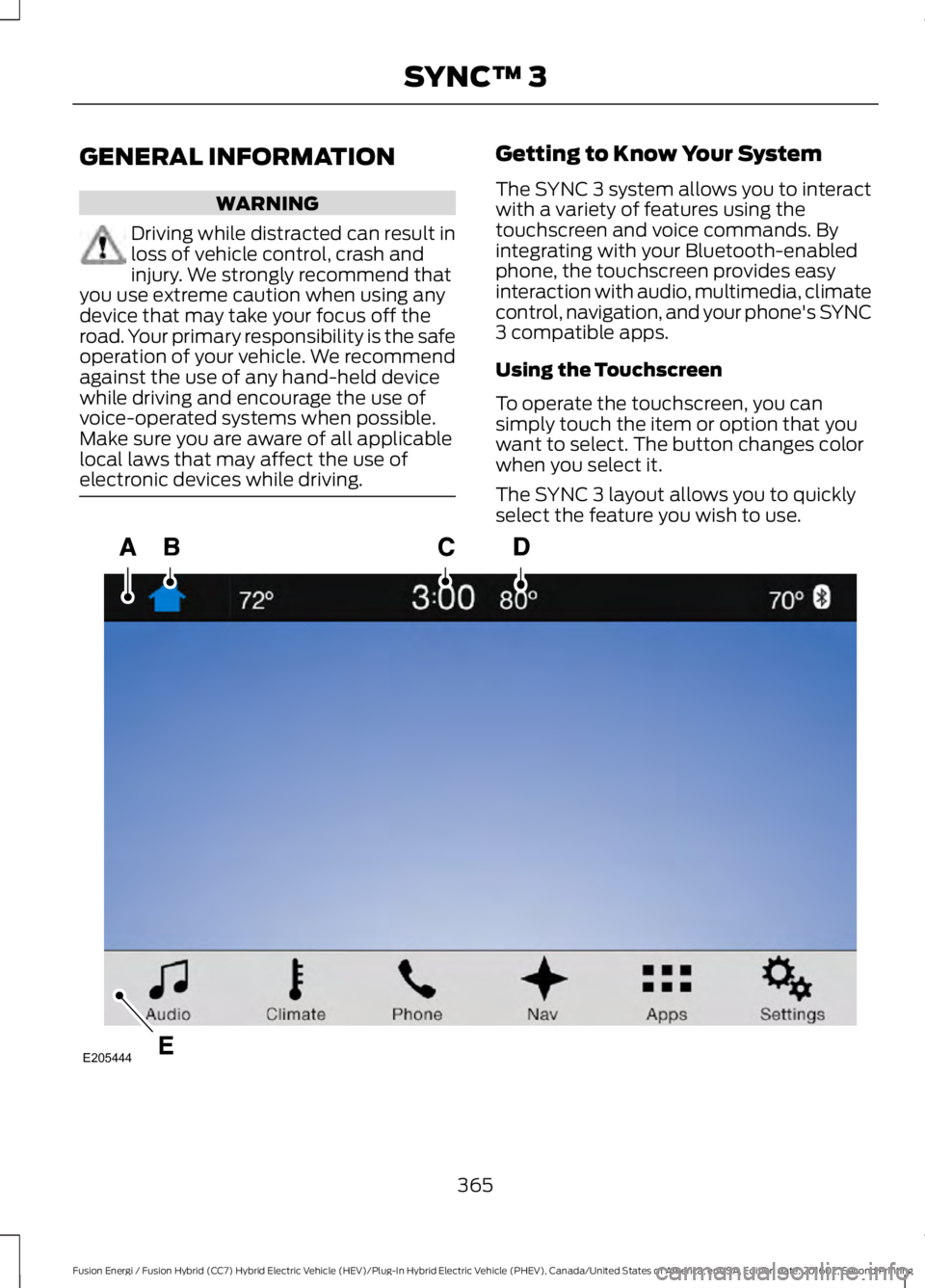
The SYNC 3 system allows you to interactwith a variety of features using thetouchscreen and voice commands. Byintegrating with your Bluetooth-enabledphone, the touchscreen provides easyinteraction with audio, multimedia, climatecontrol, navigation, and your phone's SYNC3 compatible apps.
Using the Touchscreen
To operate the touchscreen, you cansimply touch the item or option that youwant to select. The button changes colorwhen you select it.
The SYNC 3 layout allows you to quicklyselect the feature you wish to use.
365
Fusion Energi / Fusion Hybrid (CC7) Hybrid Electric Vehicle (HEV)/Plug-In Hybrid Electric Vehicle (PHEV), Canada/United States of America, enUSA, Edition date: 201602, Second Printing
SYNC™ 3E205444
Page 380 of 526
When Wi-Fi and automatic updates areenabled, your system checks for softwareupdates periodically. If a new version isavailable, it downloads at that time.Software downloads can take place for upto 30 minutes after you have switched yourvehicle off. The updates do not interruptthe normal use of your SYNC 3 system. Ifa download does not complete for anyreason, the download continues where itleft off at the next Wi-Fi connectedopportunity. Upon activation of an update,a banner displays on the touchscreenindicating the system update. Select theicon to see more detail. This icon displaysfor two ignition cycles.
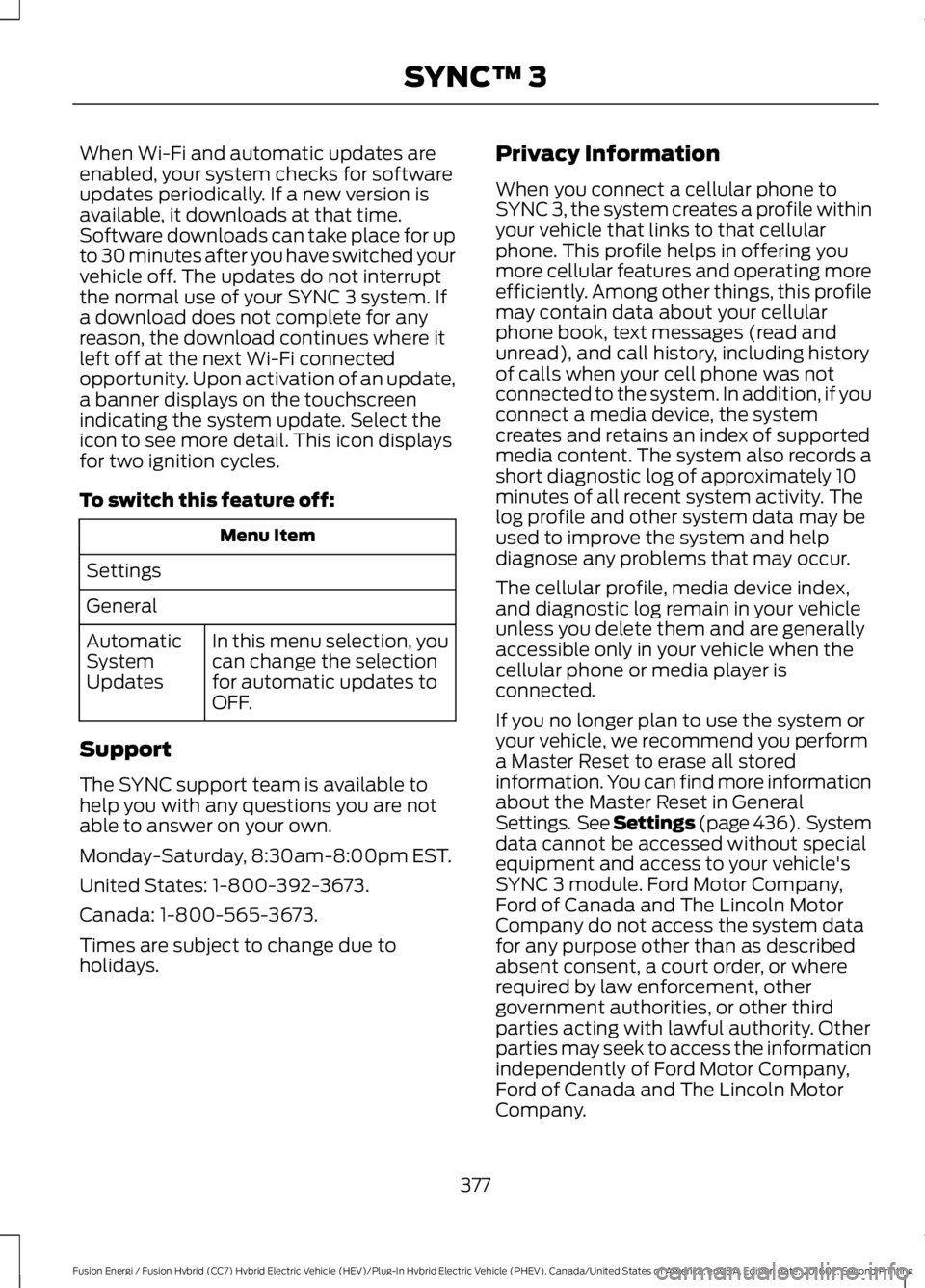
To switch this feature off:
Menu Item
Settings
General
In this menu selection, youcan change the selectionfor automatic updates toOFF.
AutomaticSystemUpdates
Support
The SYNC support team is available tohelp you with any questions you are notable to answer on your own.
Monday-Saturday, 8:30am-8:00pm EST.
United States: 1-800-392-3673.
Canada: 1-800-565-3673.
Times are subject to change due toholidays.
Privacy Information
When you connect a cellular phone toSYNC 3, the system creates a profile withinyour vehicle that links to that cellularphone. This profile helps in offering youmore cellular features and operating moreefficiently. Among other things, this profilemay contain data about your cellularphone book, text messages (read andunread), and call history, including historyof calls when your cell phone was notconnected to the system. In addition, if youconnect a media device, the systemcreates and retains an index of supportedmedia content. The system also records ashort diagnostic log of approximately 10minutes of all recent system activity. Thelog profile and other system data may beused to improve the system and helpdiagnose any problems that may occur.
The cellular profile, media device index,and diagnostic log remain in your vehicleunless you delete them and are generallyaccessible only in your vehicle when thecellular phone or media player isconnected.
If you no longer plan to use the system oryour vehicle, we recommend you performa Master Reset to erase all storedinformation. You can find more informationabout the Master Reset in GeneralSettings. See Settings (page 436). Systemdata cannot be accessed without specialequipment and access to your vehicle'sSYNC 3 module. Ford Motor Company,Ford of Canada and The Lincoln MotorCompany do not access the system datafor any purpose other than as describedabsent consent, a court order, or whererequired by law enforcement, othergovernment authorities, or other thirdparties acting with lawful authority. Otherparties may seek to access the informationindependently of Ford Motor Company,Ford of Canada and The Lincoln MotorCompany.
377
Fusion Energi / Fusion Hybrid (CC7) Hybrid Electric Vehicle (HEV)/Plug-In Hybrid Electric Vehicle (PHEV), Canada/United States of America, enUSA, Edition date: 201602, Second Printing
SYNC™ 3
Page 391 of 526
SIRIUS satellite radio is asubscription-based satellite radio servicethat broadcasts a variety of music, sports,news, weather, traffic and entertainmentprogramming. Your factory-installedSIRIUS satellite radio system includeshardware and a limited subscription termthat begins on the date of sale or lease ofyour vehicle. See an authorized dealer foravailability.
For more information on extendedsubscription terms (a service fee isrequired), the online media player and alist of SIRIUS satellite radio channels, andother features, please visitwww.siriusxm.com in the United States,www.siriusxm.ca in Canada, or call SIRIUSat 1-888-539-7474.
Note:SIRIUS reserves the unrestricted rightto change, rearrange, add or deleteprogramming. This includes canceling,moving or adding particular channels, andits prices, at any time, with or without noticeto you. Ford Motor Company shall not beresponsible for any such programmingchanges.
Note:This receiver includes the eCosreal-time operating system. eCos ispublished under the eCos License.
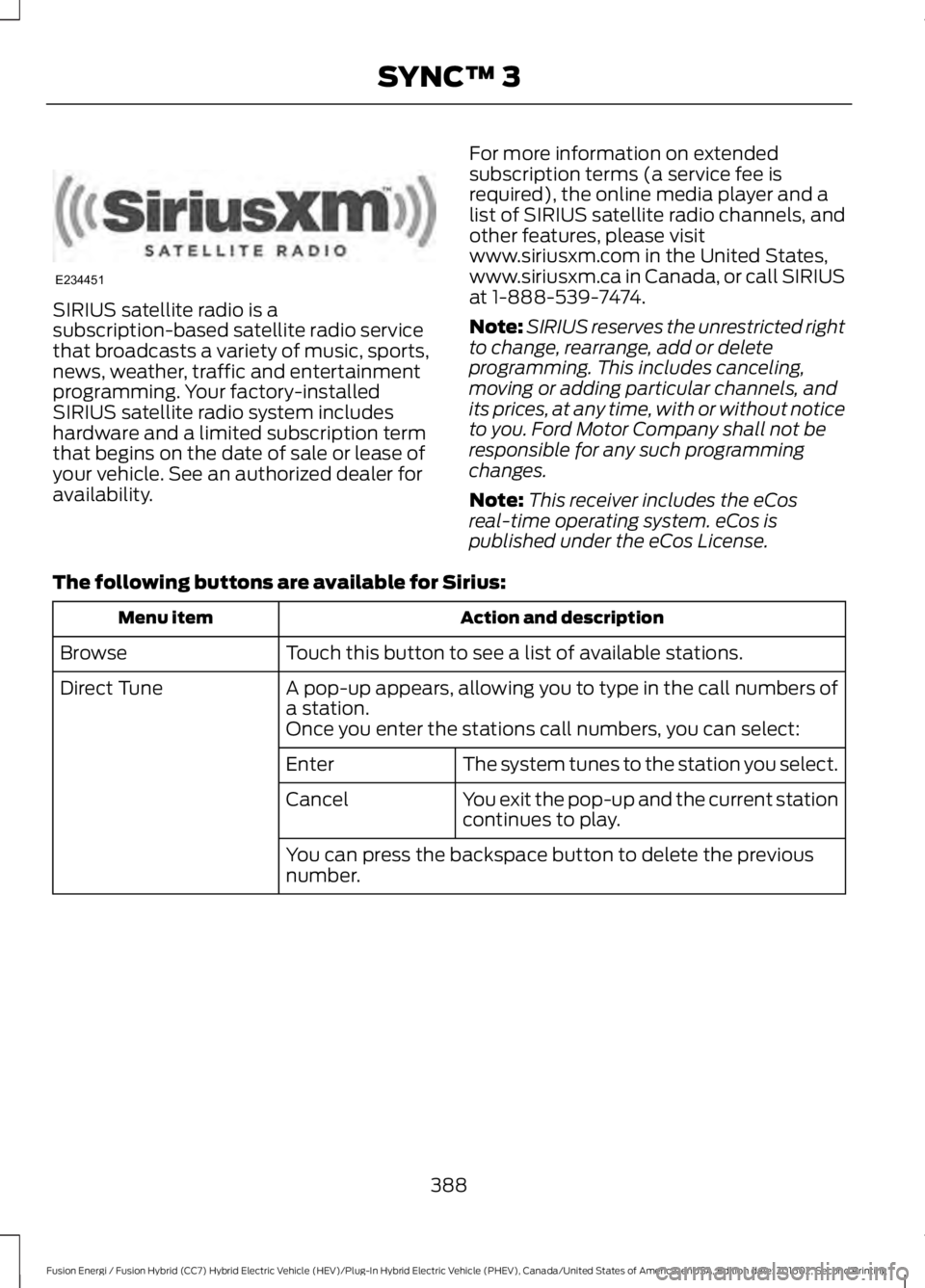
The following buttons are available for Sirius:
Action and descriptionMenu item
Touch this button to see a list of available stations.Browse
A pop-up appears, allowing you to type in the call numbers ofa station.Direct Tune
Once you enter the stations call numbers, you can select:
The system tunes to the station you select.Enter
You exit the pop-up and the current stationcontinues to play.Cancel
You can press the backspace button to delete the previousnumber.
388
Fusion Energi / Fusion Hybrid (CC7) Hybrid Electric Vehicle (HEV)/Plug-In Hybrid Electric Vehicle (PHEV), Canada/United States of America, enUSA, Edition date: 201602, Second Printing
SYNC™ 3E234451
Page 395 of 526
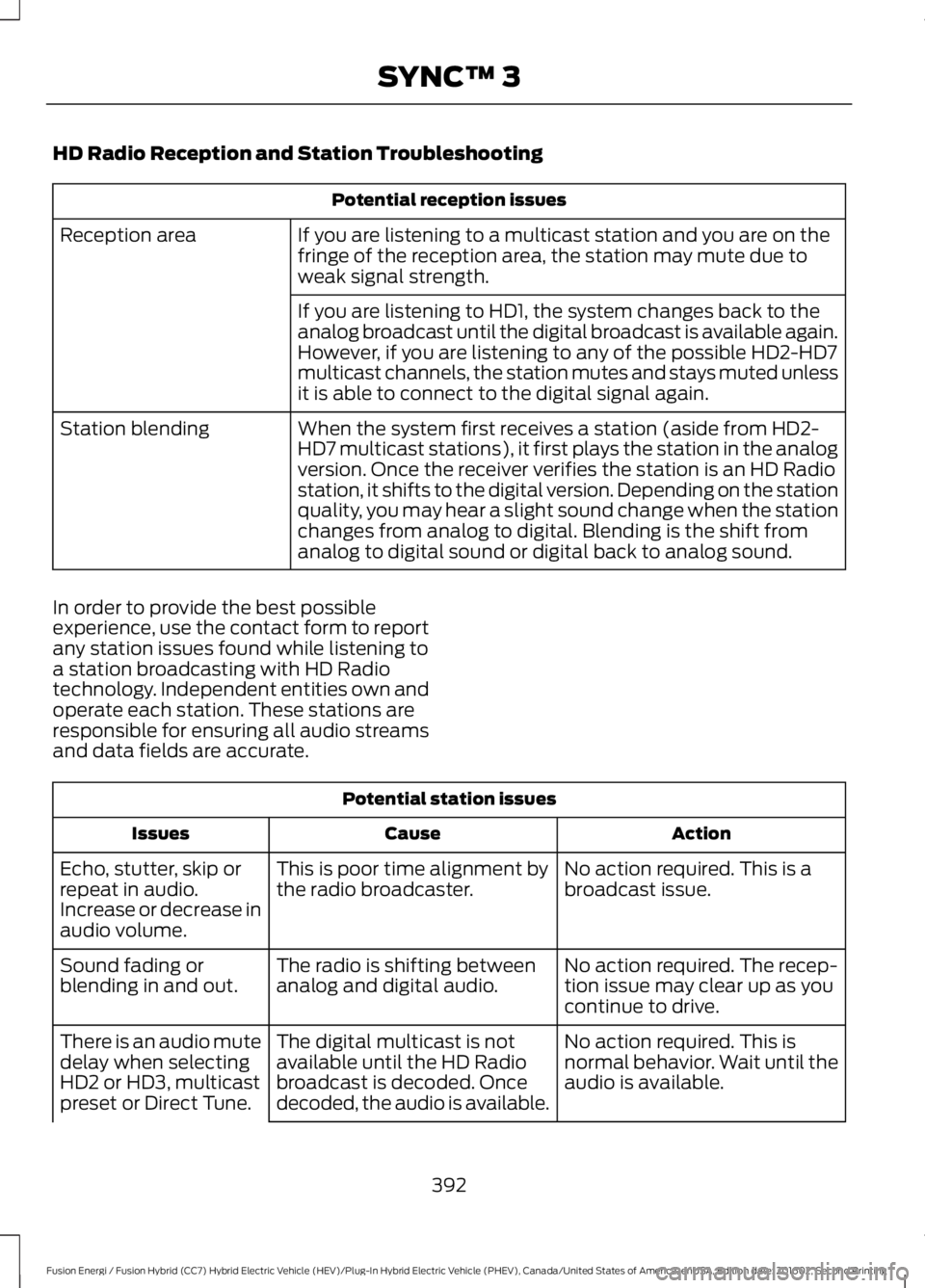
HD Radio Reception and Station Troubleshooting
Potential reception issues
If you are listening to a multicast station and you are on thefringe of the reception area, the station may mute due toweak signal strength.
Reception area
If you are listening to HD1, the system changes back to theanalog broadcast until the digital broadcast is available again.However, if you are listening to any of the possible HD2-HD7multicast channels, the station mutes and stays muted unlessit is able to connect to the digital signal again.
When the system first receives a station (aside from HD2-HD7 multicast stations), it first plays the station in the analogversion. Once the receiver verifies the station is an HD Radiostation, it shifts to the digital version. Depending on the stationquality, you may hear a slight sound change when the stationchanges from analog to digital. Blending is the shift fromanalog to digital sound or digital back to analog sound.
Station blending
In order to provide the best possibleexperience, use the contact form to reportany station issues found while listening toa station broadcasting with HD Radiotechnology. Independent entities own andoperate each station. These stations areresponsible for ensuring all audio streamsand data fields are accurate.
Potential station issues
ActionCauseIssues
No action required. This is abroadcast issue.This is poor time alignment bythe radio broadcaster.Echo, stutter, skip orrepeat in audio.Increase or decrease inaudio volume.
No action required. The recep-tion issue may clear up as youcontinue to drive.
The radio is shifting betweenanalog and digital audio.Sound fading orblending in and out.
No action required. This isnormal behavior. Wait until theaudio is available.
The digital multicast is notavailable until the HD Radiobroadcast is decoded. Oncedecoded, the audio is available.
There is an audio mutedelay when selectingHD2 or HD3, multicastpreset or Direct Tune.
392
Fusion Energi / Fusion Hybrid (CC7) Hybrid Electric Vehicle (HEV)/Plug-In Hybrid Electric Vehicle (PHEV), Canada/United States of America, enUSA, Edition date: 201602, Second Printing
SYNC™ 3
Page 396 of 526
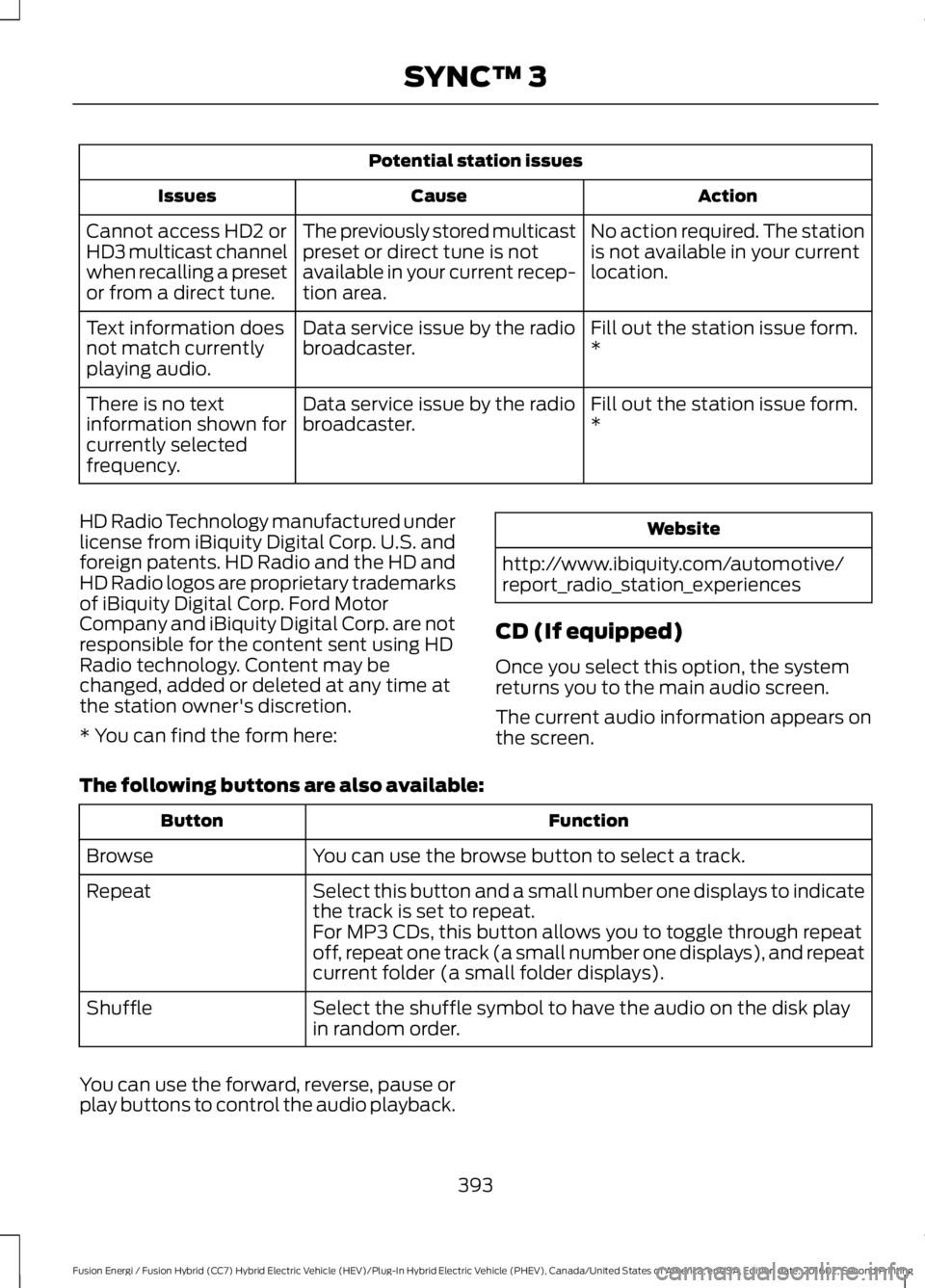
Potential station issues
ActionCauseIssues
No action required. The stationis not available in your currentlocation.
The previously stored multicastpreset or direct tune is notavailable in your current recep-tion area.
Cannot access HD2 orHD3 multicast channelwhen recalling a presetor from a direct tune.
Fill out the station issue form.*Data service issue by the radiobroadcaster.Text information doesnot match currentlyplaying audio.
Fill out the station issue form.*Data service issue by the radiobroadcaster.There is no textinformation shown forcurrently selectedfrequency.
HD Radio Technology manufactured underlicense from iBiquity Digital Corp. U.S. andforeign patents. HD Radio and the HD andHD Radio logos are proprietary trademarksof iBiquity Digital Corp. Ford MotorCompany and iBiquity Digital Corp. are notresponsible for the content sent using HDRadio technology. Content may bechanged, added or deleted at any time atthe station owner's discretion.
* You can find the form here:
Website
http://www.ibiquity.com/automotive/report_radio_station_experiences
CD (If equipped)
Once you select this option, the systemreturns you to the main audio screen.
The current audio information appears onthe screen.
The following buttons are also available:
FunctionButton
You can use the browse button to select a track.Browse
Select this button and a small number one displays to indicatethe track is set to repeat.Repeat
For MP3 CDs, this button allows you to toggle through repeatoff, repeat one track (a small number one displays), and repeatcurrent folder (a small folder displays).
Select the shuffle symbol to have the audio on the disk playin random order.Shuffle
You can use the forward, reverse, pause orplay buttons to control the audio playback.
393
Fusion Energi / Fusion Hybrid (CC7) Hybrid Electric Vehicle (HEV)/Plug-In Hybrid Electric Vehicle (PHEV), Canada/United States of America, enUSA, Edition date: 201602, Second Printing
SYNC™ 3
Page 425 of 526
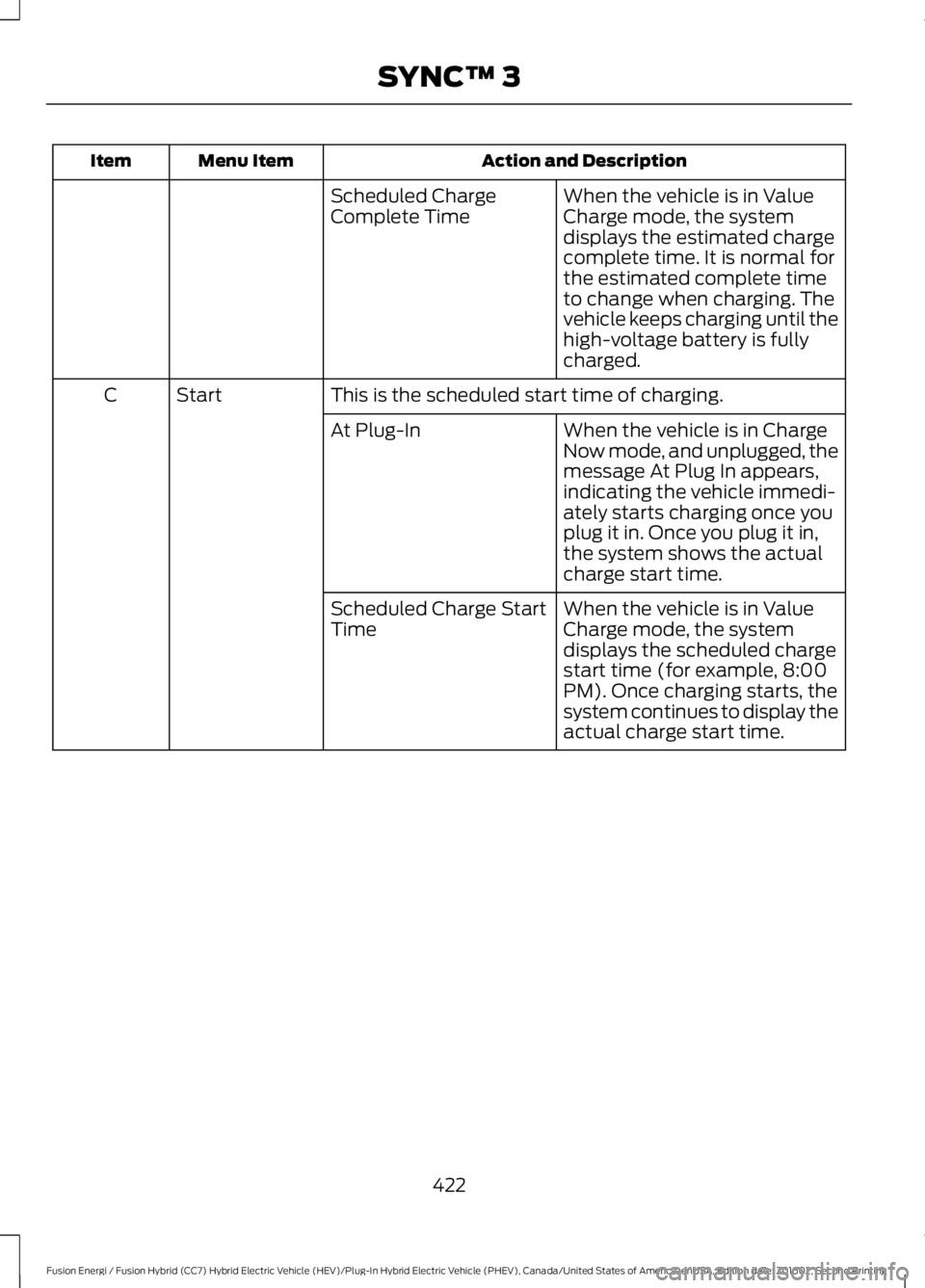
Action and DescriptionMenu ItemItem
When the vehicle is in ValueCharge mode, the systemdisplays the estimated chargecomplete time. It is normal forthe estimated complete timeto change when charging. Thevehicle keeps charging until thehigh-voltage battery is fullycharged.
Scheduled ChargeComplete Time
This is the scheduled start time of charging.StartC
When the vehicle is in ChargeNow mode, and unplugged, themessage At Plug In appears,indicating the vehicle immedi-ately starts charging once youplug it in. Once you plug it in,the system shows the actualcharge start time.
At Plug-In
When the vehicle is in ValueCharge mode, the systemdisplays the scheduled chargestart time (for example, 8:00PM). Once charging starts, thesystem continues to display theactual charge start time.
Scheduled Charge StartTime
422
Fusion Energi / Fusion Hybrid (CC7) Hybrid Electric Vehicle (HEV)/Plug-In Hybrid Electric Vehicle (PHEV), Canada/United States of America, enUSA, Edition date: 201602, Second Printing
SYNC™ 3
Page 430 of 526
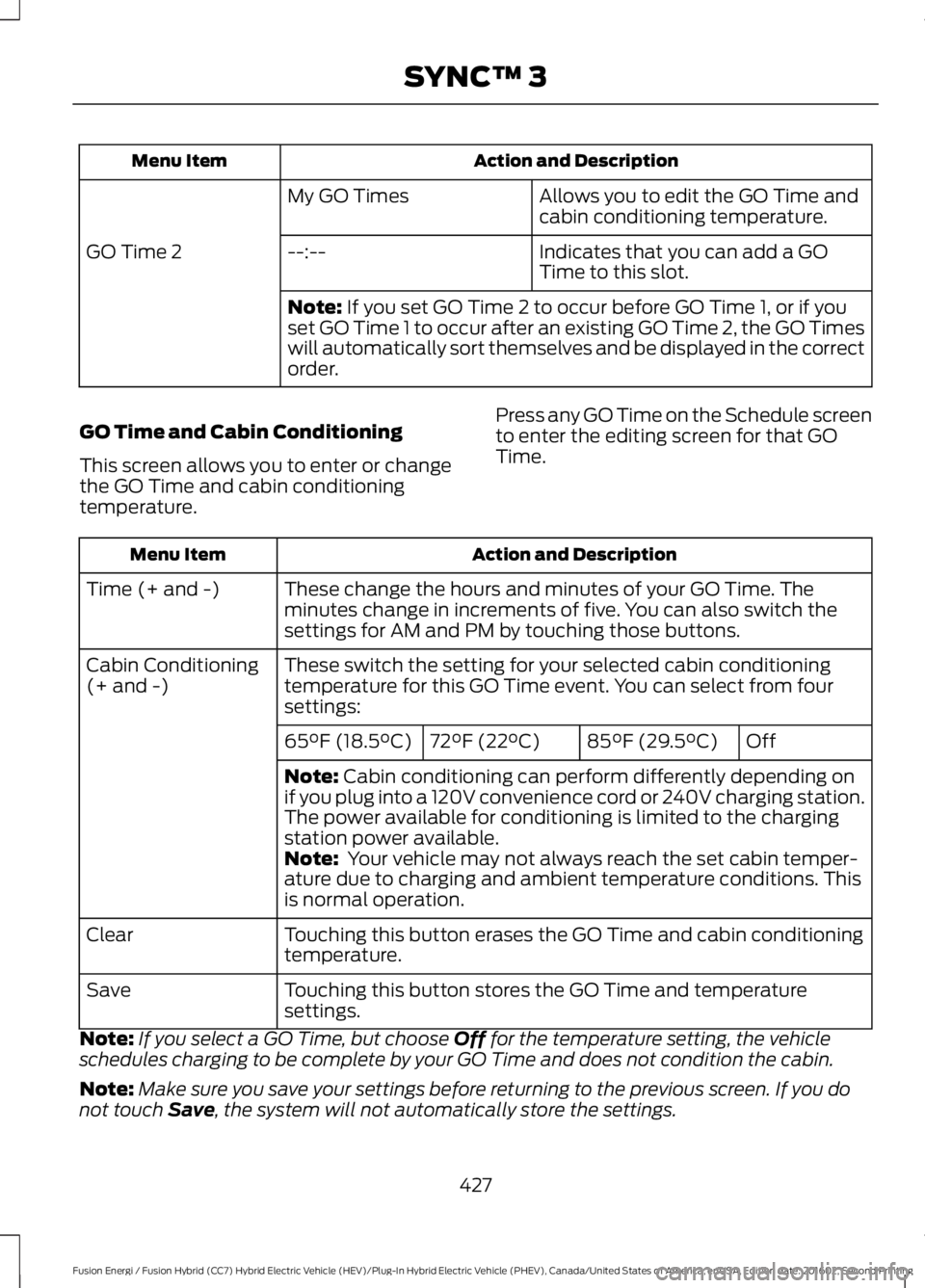
Action and DescriptionMenu Item
Allows you to edit the GO Time andcabin conditioning temperature.My GO Times
Indicates that you can add a GOTime to this slot.--:--GO Time 2
Note: If you set GO Time 2 to occur before GO Time 1, or if youset GO Time 1 to occur after an existing GO Time 2, the GO Timeswill automatically sort themselves and be displayed in the correctorder.
GO Time and Cabin Conditioning
This screen allows you to enter or changethe GO Time and cabin conditioningtemperature.
Press any GO Time on the Schedule screento enter the editing screen for that GOTime.
Action and DescriptionMenu Item
These change the hours and minutes of your GO Time. Theminutes change in increments of five. You can also switch thesettings for AM and PM by touching those buttons.
Time (+ and -)
These switch the setting for your selected cabin conditioningtemperature for this GO Time event. You can select from foursettings:
Cabin Conditioning(+ and -)
Off85°F (29.5°C)72°F (22°C)65°F (18.5°C)
Note: Cabin conditioning can perform differently depending onif you plug into a 120V convenience cord or 240V charging station.The power available for conditioning is limited to the chargingstation power available.Note: Your vehicle may not always reach the set cabin temper-ature due to charging and ambient temperature conditions. Thisis normal operation.
Touching this button erases the GO Time and cabin conditioningtemperature.Clear
Touching this button stores the GO Time and temperaturesettings.Save
Note:If you select a GO Time, but choose Off for the temperature setting, the vehicleschedules charging to be complete by your GO Time and does not condition the cabin.
Note:Make sure you save your settings before returning to the previous screen. If you donot touch Save, the system will not automatically store the settings.
427
Fusion Energi / Fusion Hybrid (CC7) Hybrid Electric Vehicle (HEV)/Plug-In Hybrid Electric Vehicle (PHEV), Canada/United States of America, enUSA, Edition date: 201602, Second Printing
SYNC™ 3
Page 438 of 526
Note:You must enable mobile apps foreach connected device the first time youselect a mobile app using the system.
Note:Ford reserves the right to limitfunctionality or deactivate mobile apps atany time.
Note:Standard data rates apply. Ford isnot responsible for any additional chargesyou may receive from your service provider,when your vehicle sends or receives datathrough the connected device. This includesany additional charges incurred due todriving in areas when roaming out of a homenetwork.
You can enable and disable apps throughsettings. See Settings (page 436).
App Permissions
The system organizes the App permissionsinto groups. You can grant these grouppermissions individually. You can changea permission group status any time whennot driving, by using the settings menu.While in the settings menu, you can alsosee the data included in each group.
When you launch an app using SYNC 3,the system may ask you to grant certainpermissions, for example Vehicleinformation, Driving characteristics, GPSand Speed, and/or Push notifications. Youcan enable all groups or none of themduring the initial app permissions prompts.The settings menu offers individual grouppermission control.
Note:You are only prompted to grantpermissions the first time you use an appwith SYNC 3.
Note:If you disable group permissions,apps will still be enabled to work with SYNC3 unless you deactivate All Apps in thesettings menu.
SiriusXM Traffic and Travel Link (If
Equipped)
WARNING
Driving while distracted can result inloss of vehicle control, crash andinjury. We strongly recommend thatyou use extreme caution when using anydevice that may take your focus off theroad. Your primary responsibility is the safeoperation of your vehicle. We recommendagainst the use of any hand-held devicewhile driving and encourage the use ofvoice-operated systems when possible.Make sure you are aware of all applicablelocal laws that may affect the use ofelectronic devices while driving.
Note:SiriusXM Traffic and Travel Link maynot be available in all markets.
Note:In order to use SiriusXM Traffic andTravel Link, your vehicle must havenavigation.
Note:A paid subscription is required toaccess and use these features. Go towww.siriusxm.com/travellink for moreinformation.
Note:Visit www.siriusxm.com/traffic andclick on Coverage map and details for acomplete listing of all traffic areas coveredby SiriusXM Traffic and Travel Link.
Note:Neither Sirius nor Ford is responsiblefor any errors or inaccuracies in the SiriusXMTraffic and Travel Link services or its use invehicles.
When you subscribe to SiriusXM Trafficand Travel Link, it can help you locate thebest gas prices, find movie listings, getcurrent traffic alerts, view the currentweather map, get accurate ski conditionsand see scores to current sports games.
435
Fusion Energi / Fusion Hybrid (CC7) Hybrid Electric Vehicle (HEV)/Plug-In Hybrid Electric Vehicle (PHEV), Canada/United States of America, enUSA, Edition date: 201602, Second Printing
SYNC™ 3
Page 441 of 526
Action and DescriptionMenu Item
This allows you to view the version level of the Gracenote Database.Gracenote® Data-base Info
This allows you to view the manufacturer and model number of yourmedia device.Device Informa-tion
Erase the stored in media information in order to re-index.Update MediaIndex
Clock
To adjust the time, select the up and downarrows on either side of the screen. Thearrows on the left adjust the hour andarrows on the right adjust the minute. Youcan then select AM or PM.
You can adjust the following features:
Action and DescriptionMenu Item
Select how time displays.Clock Format
When active, the clock adjusts to time zone changes.Auto Time ZoneUpdateThis feature is only available in vehicles with navigation.
When selected, the vehicle clock resets to GPS satellite time.Reset Clock toGPS Time
The system automatically saves anyupdates you make to the settings.Bluetooth
Pressing this button allows you to accessthe following:
ActionMenu Item
Turning Bluetooth off disconnects all devices and does not permitnew connections.Bluetooth
You must activate Bluetooth to pair aBluetooth-enabled device.
The processes of pairing a Bluetoothdevice is the same as pairing a phone.SeePairing a Device in Phone settings for howto pair a device and the available options.
Phone
Pair your Bluetooth-enabled phone withthe system before using the functions inhands-free mode.
Switch on Bluetooth on your device tobegin pairing. See your phone’s manual ifnecessary.
438
Fusion Energi / Fusion Hybrid (CC7) Hybrid Electric Vehicle (HEV)/Plug-In Hybrid Electric Vehicle (PHEV), Canada/United States of America, enUSA, Edition date: 201602, Second Printing
SYNC™ 3