lock FORD FUSION ENERGI 2017 Repair Manual
[x] Cancel search | Manufacturer: FORD, Model Year: 2017, Model line: FUSION ENERGI, Model: FORD FUSION ENERGI 2017Pages: 526, PDF Size: 7.89 MB
Page 178 of 526
braking. When the battery is almost fullycharged, the amount of regenerativebraking is limited to avoid overcharging,and the requested deceleration isproduced by standard friction brakingalone.
Regenerative braking does not take theplace of the standard friction brakes; it onlyassists them. Regenerative braking hasalso been designed to interact with theanti-lock brake system. Regenerativebraking is disabled when the anti-lockbrake system is activated or the battery isfully charged.
HINTS ON DRIVING WITH
ANTI-LOCK BRAKES
Note:When the system is operating, thebrake pedal may pulse and may travelfurther. Maintain pressure on the brakepedal. You may also hear a noise from thesystem. This is normal.
The anti-lock braking system will noteliminate the risks when:
•You drive too closely to the vehicle infront of you.
•Your vehicle is hydroplaning.
•You take corners too fast.
•The road surface is poor.
ELECTRIC PARKING BRAKE
The electric parking brake replaces theconventional handbrake. The operatingswitch is located in the center console.
WARNING
Always set the parking brake andleave your vehicle with thetransmission in park (P) (automatictransmission) or in first gear (1) or reverse(R) (manual transmission).
Note:When you apply the electric parkingbrake in certain conditions, for example, ona steep hill, the electric parking brake mayreapply the brakes within three to tenminutes.
Note:You may notice various noises whenyou apply and release the electric parkingbrake. This is normal and no cause forconcern.
Parking On a Hill (Vehicles With aManual Transmission)
If you park your vehicle facing uphill, movethe transmission to first gear (1) and turnthe steering wheel away from the curb. Ifyou park your vehicle facing downhill, movethe transmission to reverse (R) and turnthe steering wheel toward the curb.
Applying the Electric Parkingbrake
WARNINGS
The brake system warning lamp willflash during an electric parking brakeapply. If the brake system warninglamp continues to flash, there could be aproblem with your electric parking brake.
Applying the electric parking brakewhile moving will result in use of theanti-lock braking system. Do not usethe electric parking brake system when thevehicle is moving unless the normal brakesystem is unable to stop the vehicle.
With the exception of emergencyconditions (for example, the brakepedal does not work or is blocked),do not apply the electric parking brakewhile the vehicle is moving. On bends, orpoor road surfaces or weather conditions,emergency braking can cause the vehicleto skid out of control or off the road.
175
Fusion Energi / Fusion Hybrid (CC7) Hybrid Electric Vehicle (HEV)/Plug-In Hybrid Electric Vehicle (PHEV), Canada/United States of America, enUSA, Edition date: 201602, Second Printing
Brakes
Page 185 of 526
PRINCIPLE OF OPERATION
WARNINGS
The system may not detect objectswith surfaces that absorb reflection.Always drive with due care andattention. Failure to take care may resultin a crash.
To help avoid personal injury, alwaysuse caution when in reverse (R) andwhen using the sensing system.
The system may not detect small ormoving objects, particularly thoseclose to the ground.
Note:Some add-on accessories such aslarge trailer hitches, bike or surfboard rackscan cause reduced performance or falsealerts.
Note: Keep the sensors free from snow, iceand large accumulations of dirt. Blockedsensors may affect system accuracy. Donot clean the sensors with sharp objects.
Note:If your vehicle sustains damageleaving the sensors misaligned, this willcause inaccurate measurements or falsealerts.
Note:The sensing system cannot be turnedoff when a MyKey is present. See Principleof Operation (page 54).
Note:Some add-on accessories such aslarge trailer hitches, bike or surfboard rackscan cause reduced performance or falsealerts.
We recommend that you take some timeto get to know the system and itslimitations by reading this section.
The system may provide display or soundwarnings when the detected obstacle is12 in (30 cm) or less from the bumper.
The sensing system warns the driver ofobstacles within a certain range of yourvehicle. The system automatically turnson each time you switch the ignition on.
You can turn the system on oroff by pressing the parking aidbutton. If your vehicle does nothave a parking aid button, the system canbe switched off through the informationdisplay menu or from the pop-up messagethat appears once you shift thetransmission into reverse (R). See GeneralInformation (page 94).
If a fault is present in the system, a warningmessage appears in the informationdisplay and does not allow you to switchthe system on.
See Information Messages (page 103).
REAR PARKING AID (If Equipped)
The rear sensors are only active when thetransmission is in reverse (R). As yourvehicle moves closer to the obstacle, therate of the audible warning increases.When the obstacle is less than 12 in(30 cm) away, the warning soundscontinuously. If the system detects astationary or receding object farther than12 in (30 cm) from the corners of thebumper, the tone sounds for only threeseconds. Once the system detects anobject approaching, the warning soundsagain.
182
Fusion Energi / Fusion Hybrid (CC7) Hybrid Electric Vehicle (HEV)/Plug-In Hybrid Electric Vehicle (PHEV), Canada/United States of America, enUSA, Edition date: 201602, Second Printing
Parking AidsE139213
Page 186 of 526
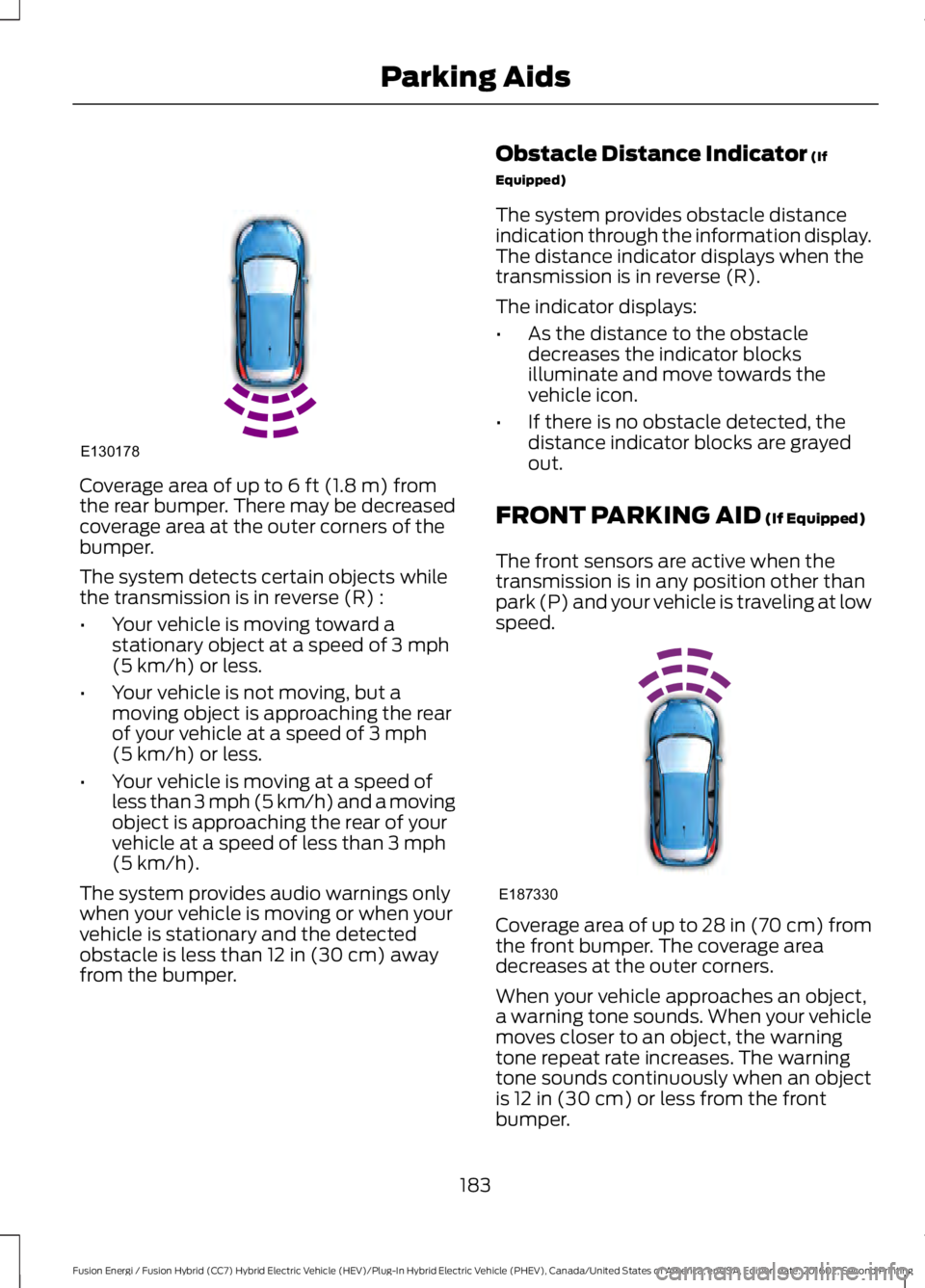
Coverage area of up to 6 ft (1.8 m) fromthe rear bumper. There may be decreasedcoverage area at the outer corners of thebumper.
The system detects certain objects whilethe transmission is in reverse (R) :
•Your vehicle is moving toward astationary object at a speed of 3 mph(5 km/h) or less.
•Your vehicle is not moving, but amoving object is approaching the rearof your vehicle at a speed of 3 mph(5 km/h) or less.
•Your vehicle is moving at a speed ofless than 3 mph (5 km/h) and a movingobject is approaching the rear of yourvehicle at a speed of less than 3 mph(5 km/h).
The system provides audio warnings onlywhen your vehicle is moving or when yourvehicle is stationary and the detectedobstacle is less than 12 in (30 cm) awayfrom the bumper.
Obstacle Distance Indicator (If
Equipped)
The system provides obstacle distanceindication through the information display.The distance indicator displays when thetransmission is in reverse (R).
The indicator displays:
•As the distance to the obstacledecreases the indicator blocksilluminate and move towards thevehicle icon.
•If there is no obstacle detected, thedistance indicator blocks are grayedout.
FRONT PARKING AID (If Equipped)
The front sensors are active when thetransmission is in any position other thanpark (P) and your vehicle is traveling at lowspeed.
Coverage area of up to 28 in (70 cm) fromthe front bumper. The coverage areadecreases at the outer corners.
When your vehicle approaches an object,a warning tone sounds. When your vehiclemoves closer to an object, the warningtone repeat rate increases. The warningtone sounds continuously when an objectis 12 in (30 cm) or less from the frontbumper.
183
Fusion Energi / Fusion Hybrid (CC7) Hybrid Electric Vehicle (HEV)/Plug-In Hybrid Electric Vehicle (PHEV), Canada/United States of America, enUSA, Edition date: 201602, Second Printing
Parking AidsE130178 E187330
Page 187 of 526
You can switch the system off through theinformation display menu or from thepop-up message that appears once youshift the transmission into reverse (R). SeeGeneral Information (page 94). If yourvehicle has a parking aid button, you canswitch the system off by pressing thebutton.
Obstacle Distance Indicator (If
Equipped)
The system provides obstacle distanceindication through the information display.
The indicator displays:
•As the distance to the obstacledecreases the indicator blocksilluminate and move towards thevehicle icon.
•If there is no obstacle detected, thedistance indicator blocks are grayedout.
If the transmission is in reverse (R), thefront sensing system provides audiowarnings when your vehicle is moving andthe detected obstacle is moving towardsyour vehicle. Once the vehicle is stationary,the audio warning will be stopped after 2seconds. Visual indication is alwayspresent in reverse (R).
If the transmission is in drive (D) or anyother forward gear (for example, low (L),sport (S) or any forward gear in a manualtransmission), the front sensing systemprovides audio and visual warnings whenyour vehicle is moving below a speed of7 mph (12 km/h) and an obstacle is locatedinside the detection area. Once the vehicleis stationary, the audio warning will bestopped after 2 seconds and the visualindication stops after 4 seconds. If theobstacles detected are within 12 in(30 cm), the visual indication remains on.
If the transmission is in neutral (N), thesystem provides visual indication onlywhen your vehicle is moving at 7 mph(12 km/h) or below and an obstacle islocated inside the detection area. Onceyour vehicle is stationary, the visualindication will stop after 4 seconds.
SIDE SENSING SYSTEM
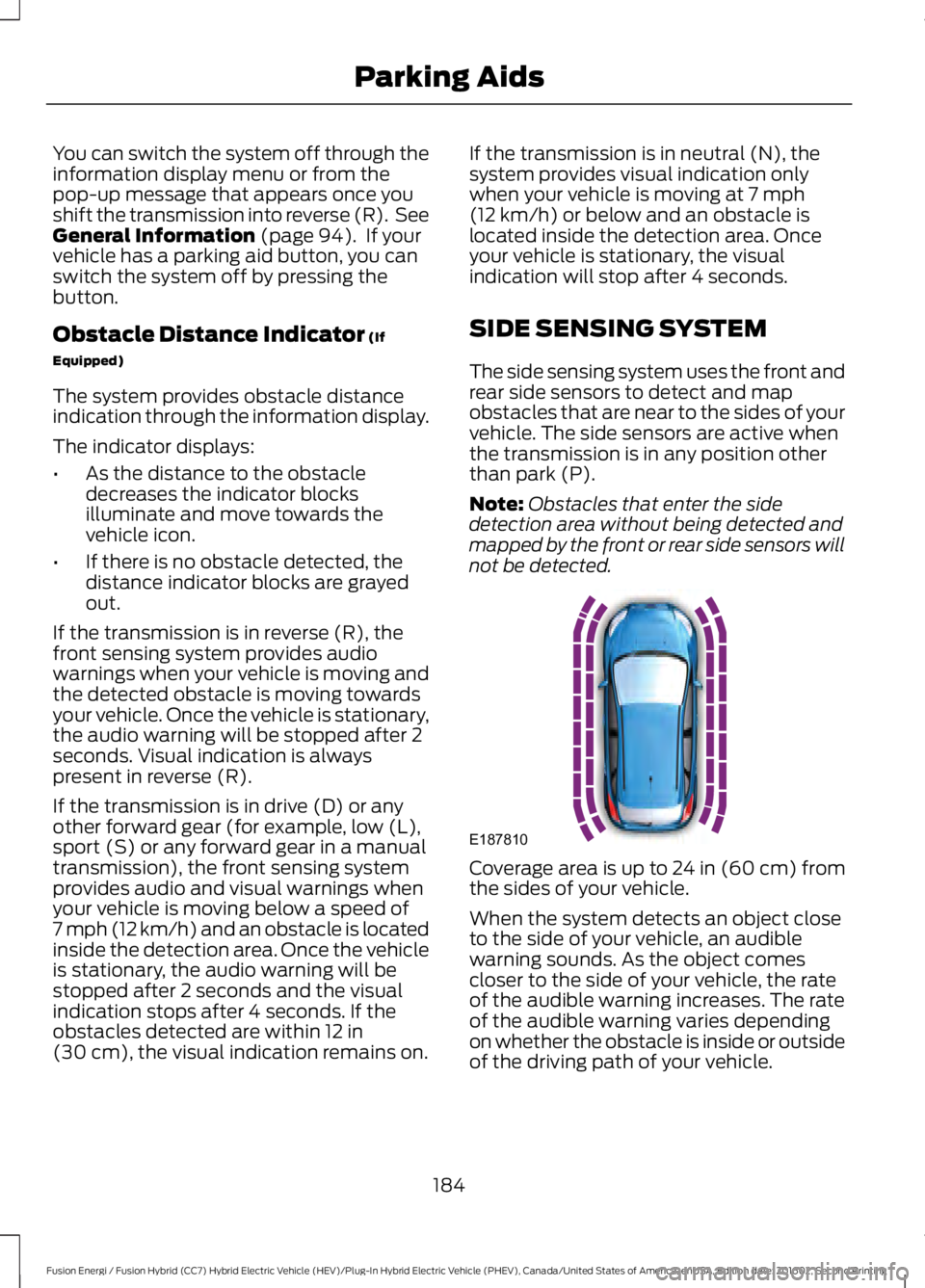
The side sensing system uses the front andrear side sensors to detect and mapobstacles that are near to the sides of yourvehicle. The side sensors are active whenthe transmission is in any position otherthan park (P).
Note:Obstacles that enter the sidedetection area without being detected andmapped by the front or rear side sensors willnot be detected.
Coverage area is up to 24 in (60 cm) fromthe sides of your vehicle.
When the system detects an object closeto the side of your vehicle, an audiblewarning sounds. As the object comescloser to the side of your vehicle, the rateof the audible warning increases. The rateof the audible warning varies dependingon whether the obstacle is inside or outsideof the driving path of your vehicle.
184
Fusion Energi / Fusion Hybrid (CC7) Hybrid Electric Vehicle (HEV)/Plug-In Hybrid Electric Vehicle (PHEV), Canada/United States of America, enUSA, Edition date: 201602, Second Printing
Parking AidsE187810
Page 188 of 526
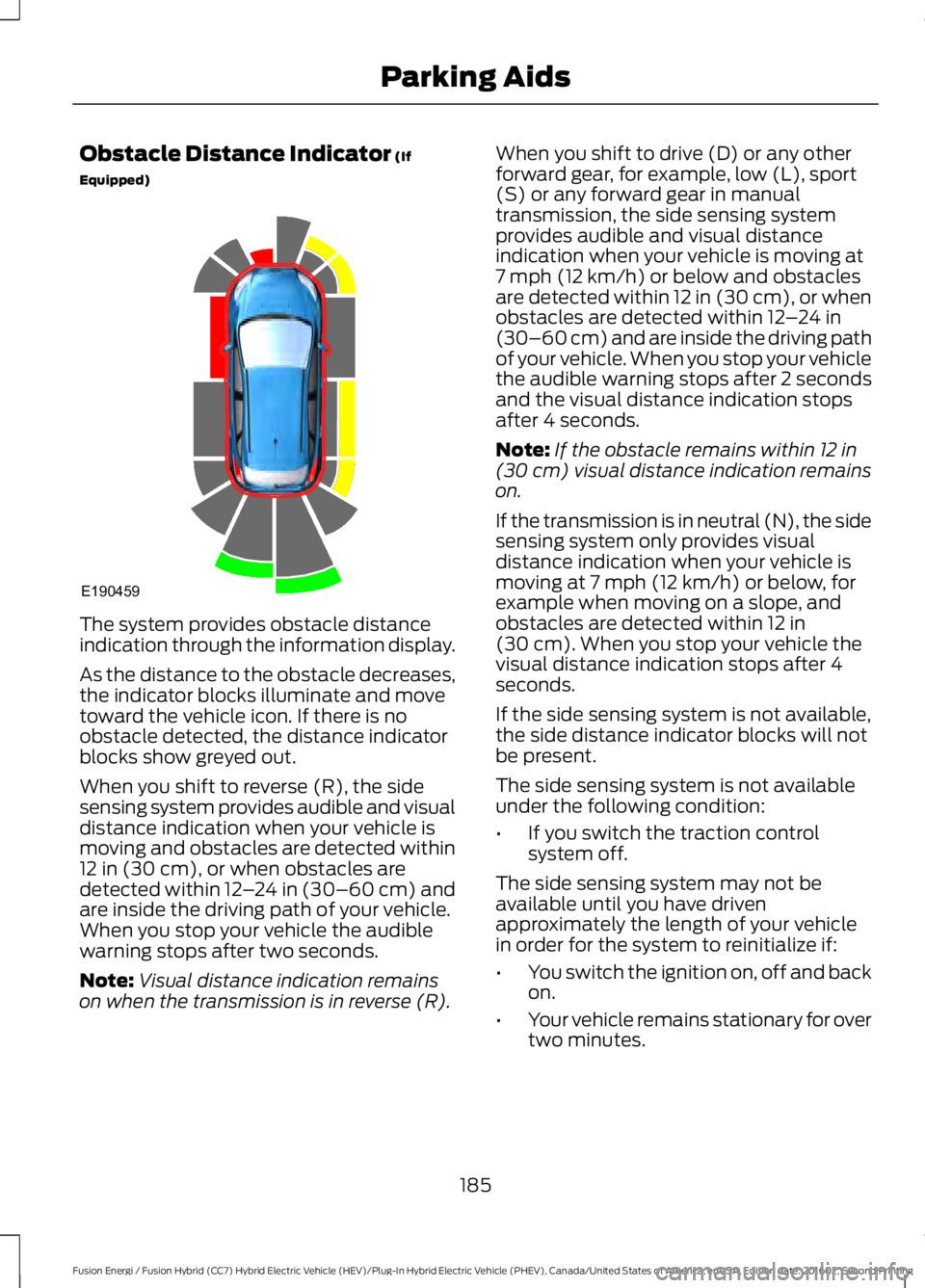
Obstacle Distance Indicator (If
Equipped)
The system provides obstacle distanceindication through the information display.
As the distance to the obstacle decreases,the indicator blocks illuminate and movetoward the vehicle icon. If there is noobstacle detected, the distance indicatorblocks show greyed out.
When you shift to reverse (R), the sidesensing system provides audible and visualdistance indication when your vehicle ismoving and obstacles are detected within12 in (30 cm), or when obstacles aredetected within 12–24 in (30–60 cm) andare inside the driving path of your vehicle.When you stop your vehicle the audiblewarning stops after two seconds.
Note:Visual distance indication remainson when the transmission is in reverse (R).
When you shift to drive (D) or any otherforward gear, for example, low (L), sport(S) or any forward gear in manualtransmission, the side sensing systemprovides audible and visual distanceindication when your vehicle is moving at7 mph (12 km/h) or below and obstaclesare detected within 12 in (30 cm), or whenobstacles are detected within 12–24 in(30–60 cm) and are inside the driving pathof your vehicle. When you stop your vehiclethe audible warning stops after 2 secondsand the visual distance indication stopsafter 4 seconds.
Note:If the obstacle remains within 12 in(30 cm) visual distance indication remainson.
If the transmission is in neutral (N), the sidesensing system only provides visualdistance indication when your vehicle ismoving at 7 mph (12 km/h) or below, forexample when moving on a slope, andobstacles are detected within 12 in(30 cm). When you stop your vehicle thevisual distance indication stops after 4seconds.
If the side sensing system is not available,the side distance indicator blocks will notbe present.
The side sensing system is not availableunder the following condition:
•If you switch the traction controlsystem off.
The side sensing system may not beavailable until you have drivenapproximately the length of your vehiclein order for the system to reinitialize if:
•You switch the ignition on, off and backon.
•Your vehicle remains stationary for overtwo minutes.
185
Fusion Energi / Fusion Hybrid (CC7) Hybrid Electric Vehicle (HEV)/Plug-In Hybrid Electric Vehicle (PHEV), Canada/United States of America, enUSA, Edition date: 201602, Second Printing
Parking AidsE190459
Page 189 of 526
•The anti-lock brake system isactivated.
•The traction control system isactivated.
ACTIVE PARK ASSIST
Parallel Parking, PerpendicularParking, Parallel Park Out Assist
WARNINGS
You must remain in your vehiclewhen the system turns on. At alltimes, you are responsible forcontrolling your vehicle, supervising thesystem and intervening, if required. Failureto take care may result in the loss ofcontrol of your vehicle, serious personalinjury or death.
The sensors may not detect objectsin heavy rain or other conditions thatcause interference.
Active park assist does not apply thebrakes under any circumstances.
The system is designed to aid thedriver. It is not intended to replaceyour attention and judgment. You arestill responsible to drive with due care andattention.
Note:The Blind Spot Information Systemdoes not detect traffic alongside or behindyour vehicle during an active park assistmaneuver.
The system detects an available parallelor perpendicular parking space andautomatically steers your vehicle into thespace (hands-free) while you control theaccelerator, gearshift and brakes. Thesystem visually and audibly guides you topark your vehicle.
If you are uncomfortable with the proximityto any vehicle or object, you may chooseto override the system by grabbing thesteering wheel or pushing the active parkassist button.
Parallel Park Out Assist automaticallysteers your vehicle out of a parallel parkingspace (hands-free) while you control theaccelerator, gearshift and brakes. Thesystem visually and audibly guides you toenter traffic.
The system may not correctly operate inany of the following conditions:
•You use a spare tire or a tiresignificantly worn more than the othertires.
•One or more tires are improperlyinflated.
•You try to park on a tight curve.
•Something passes between the frontbumper and the parking space (apedestrian or cyclist).
•The edge of the neighboring parkedvehicle is high off the ground (forexample, a bus, tow truck or flatbedtruck).
•The weather conditions are poor(heavy rain, snow, fog, etc).
Note:Keep the sensors, located on thebumper or fascia, free from snow, ice andlarge accumulations of dirt. Covered sensorscan affect the system's accuracy. Do notclean the sensors with sharp objects.
Note:The sensors may not detect objectswith surfaces that absorb ultrasonic wavesor cause ultrasonic interference (motorcycleexhaust, truck air brakes or horns).
186
Fusion Energi / Fusion Hybrid (CC7) Hybrid Electric Vehicle (HEV)/Plug-In Hybrid Electric Vehicle (PHEV), Canada/United States of America, enUSA, Edition date: 201602, Second Printing
Parking Aids
Page 193 of 526
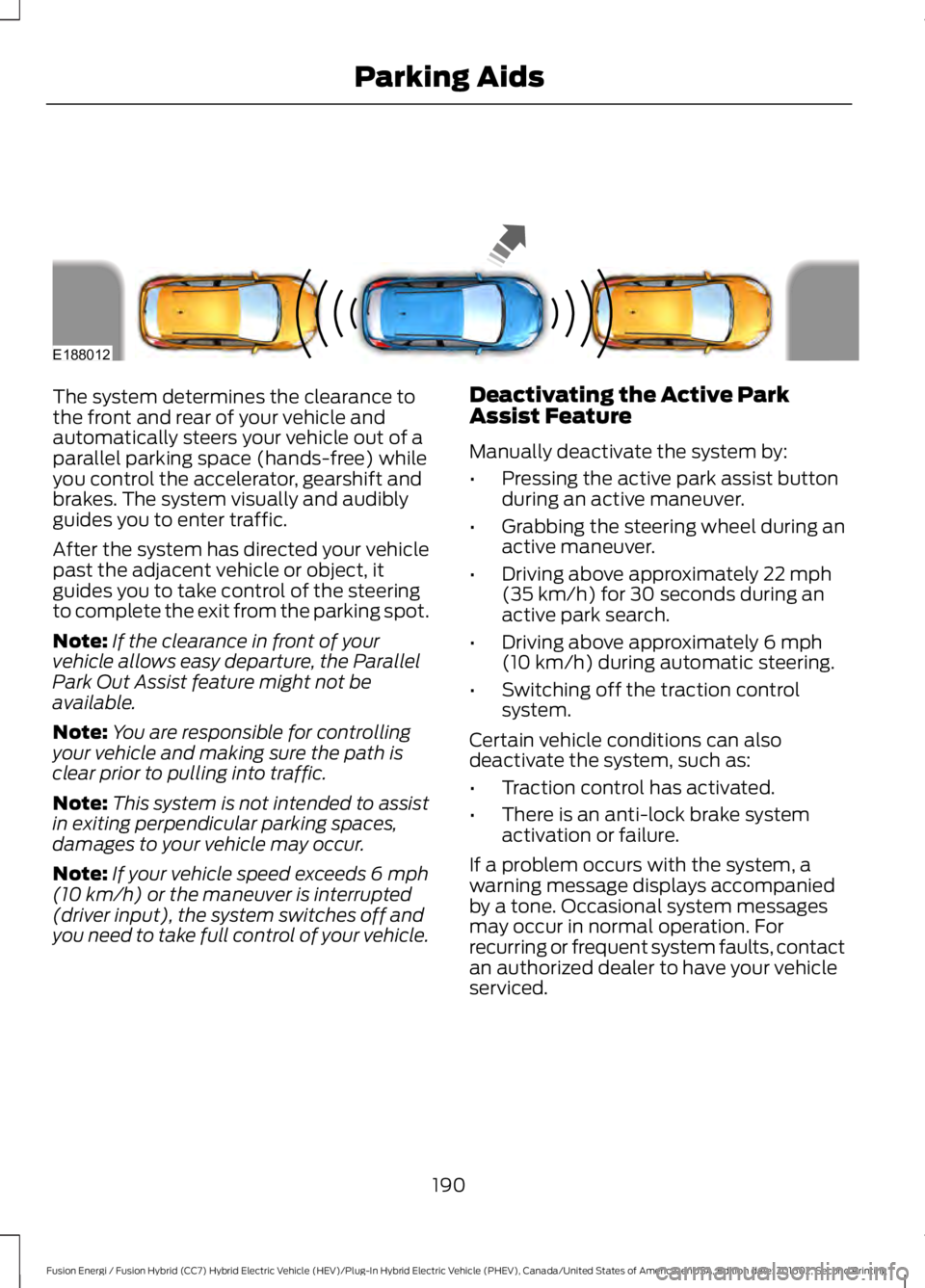
The system determines the clearance tothe front and rear of your vehicle andautomatically steers your vehicle out of aparallel parking space (hands-free) whileyou control the accelerator, gearshift andbrakes. The system visually and audiblyguides you to enter traffic.
After the system has directed your vehiclepast the adjacent vehicle or object, itguides you to take control of the steeringto complete the exit from the parking spot.
Note:If the clearance in front of yourvehicle allows easy departure, the ParallelPark Out Assist feature might not beavailable.
Note:You are responsible for controllingyour vehicle and making sure the path isclear prior to pulling into traffic.
Note:This system is not intended to assistin exiting perpendicular parking spaces,damages to your vehicle may occur.
Note:If your vehicle speed exceeds 6 mph(10 km/h) or the maneuver is interrupted(driver input), the system switches off andyou need to take full control of your vehicle.
Deactivating the Active ParkAssist Feature
Manually deactivate the system by:
•Pressing the active park assist buttonduring an active maneuver.
•Grabbing the steering wheel during anactive maneuver.
•Driving above approximately 22 mph(35 km/h) for 30 seconds during anactive park search.
•Driving above approximately 6 mph(10 km/h) during automatic steering.
•Switching off the traction controlsystem.
Certain vehicle conditions can alsodeactivate the system, such as:
•Traction control has activated.
•There is an anti-lock brake systemactivation or failure.
If a problem occurs with the system, awarning message displays accompaniedby a tone. Occasional system messagesmay occur in normal operation. Forrecurring or frequent system faults, contactan authorized dealer to have your vehicleserviced.
190
Fusion Energi / Fusion Hybrid (CC7) Hybrid Electric Vehicle (HEV)/Plug-In Hybrid Electric Vehicle (PHEV), Canada/United States of America, enUSA, Edition date: 201602, Second Printing
Parking AidsE188012
Page 204 of 526
Detection Issues
WARNING
On rare occasions, detection issuescan occur due to the roadinfrastructures, for example bridges,tunnels and safety barriers. In these cases,the system may brake late orunexpectedly. At all times, you areresponsible for controlling your vehicle,supervising the system and intervening, ifrequired.
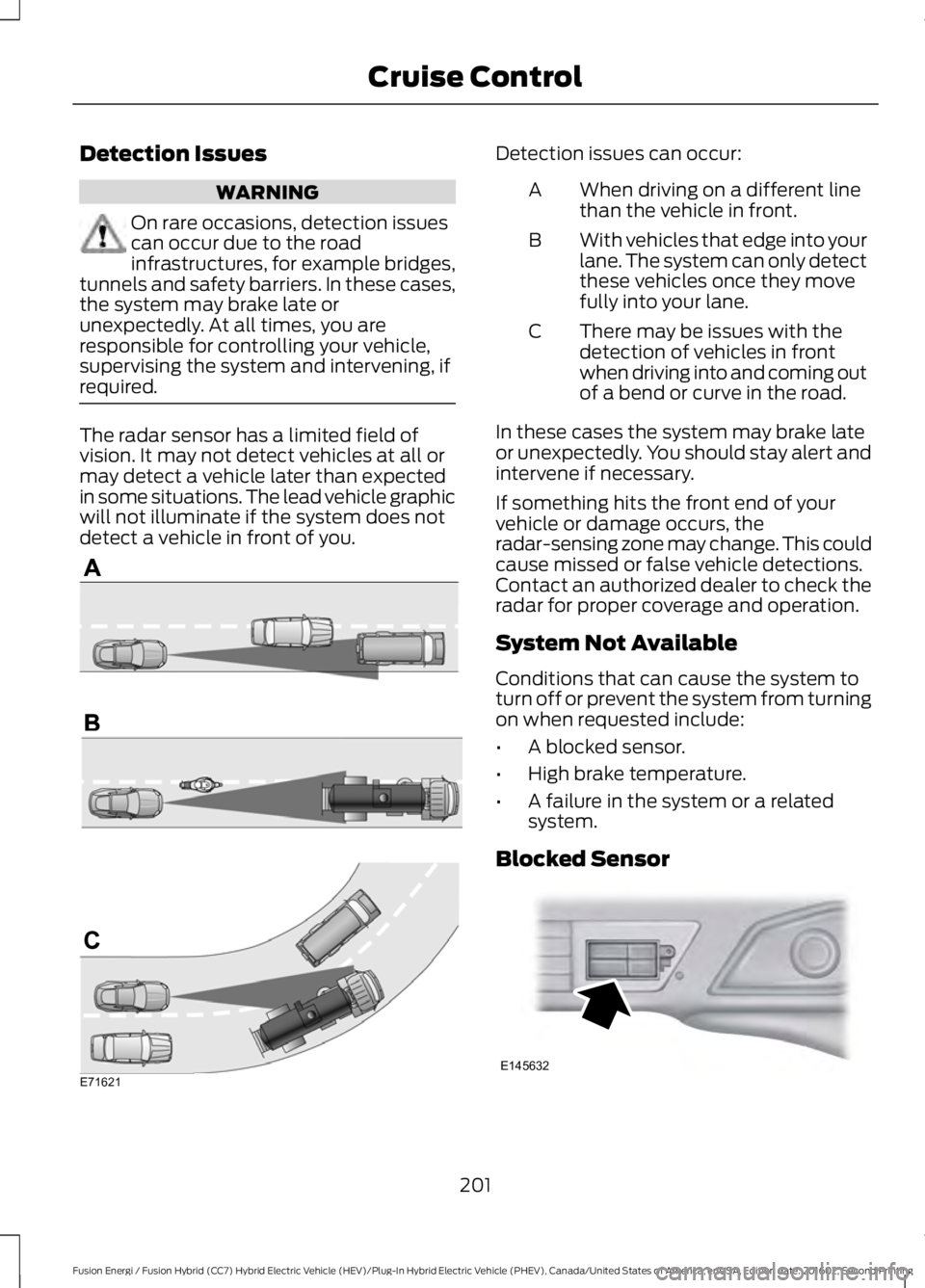
The radar sensor has a limited field ofvision. It may not detect vehicles at all ormay detect a vehicle later than expectedin some situations. The lead vehicle graphicwill not illuminate if the system does notdetect a vehicle in front of you.
Detection issues can occur:
When driving on a different linethan the vehicle in front.A
With vehicles that edge into yourlane. The system can only detectthese vehicles once they movefully into your lane.
B
There may be issues with thedetection of vehicles in frontwhen driving into and coming outof a bend or curve in the road.
C
In these cases the system may brake lateor unexpectedly. You should stay alert andintervene if necessary.
If something hits the front end of yourvehicle or damage occurs, theradar-sensing zone may change. This couldcause missed or false vehicle detections.Contact an authorized dealer to check theradar for proper coverage and operation.
System Not Available
Conditions that can cause the system toturn off or prevent the system from turningon when requested include:
•A blocked sensor.
•High brake temperature.
•A failure in the system or a relatedsystem.
Blocked Sensor
201
Fusion Energi / Fusion Hybrid (CC7) Hybrid Electric Vehicle (HEV)/Plug-In Hybrid Electric Vehicle (PHEV), Canada/United States of America, enUSA, Edition date: 201602, Second Printing
Cruise ControlE71621 E145632
Page 205 of 526
A message appears if something obstructsthe sensor's radar signals. The sensor islocated behind a cover near the driver sideof the lower grille. The system cannotdetect a vehicle ahead and does notfunction when something obstructs the
radar signal.
Note:You cannot see the sensor, it isbehind a fascia panel.
The following table lists possible causesand actions for this message displaying.
ActionCause
Clean the grille surface in front of the radaror remove the object obstructing it.The surface of the radar in the grille is dirtyor obstructed in some way.
Wait a short time. It may take severalminutes for the radar to detect that it is freefrom obstruction.
The surface of the radar in the grille is cleanbut the message remains in the display.
Do not use the system in these conditionsbecause it may not detect any vehiclesahead.
Heavy rain or snow is interfering with theradar signals.
Do not use the system in these conditionsbecause it may not detect any vehiclesahead.
Swirling water, or snow or ice on the surfaceof the road may interfere with the radarsignals.
Wait a short time or switch to normal cruisecontrol.You are in a desert or remote area with noother vehicles and no roadside objects.
Due to the nature of radar technology, it ispossible to get a blockage warning and notbe blocked. This can happen, for example,when driving in sparse rural or desertenvironments. A false blocked conditionwill either self clear or clear after a keycycle.
Switching to Normal CruiseControl
WARNING
Normal cruise control will not brakedue to slower vehicles. Always beaware of which mode you haveselected and apply the brakes whennecessary.
You can manually change from adaptivecruise control to normal cruise controlthrough the information display. SeeInformation Displays (page 94).
The cruise control indicator lightreplaces the adaptive cruisecontrol indicator light if youselect normal cruise control. The gapsetting will not display, the system will notautomatically respond to lead vehicles andautomatic braking will not activate.
202
Fusion Energi / Fusion Hybrid (CC7) Hybrid Electric Vehicle (HEV)/Plug-In Hybrid Electric Vehicle (PHEV), Canada/United States of America, enUSA, Edition date: 201602, Second Printing
Cruise ControlE71340
Page 206 of 526
DRIVER ALERT (If Equipped)
PRINCIPLE OF OPERATION
WARNINGS
The system is designed to aid thedriver. It is not intended to replaceyour attention and judgment. You arestill responsible to drive with due care andattention.
At all times, you are responsible forcontrolling your vehicle, supervisingthe system and intervening, ifrequired. Failure to take care may result inthe loss of control of your vehicle, seriouspersonal injury or death.
The system may not function if thesensor is blocked.
Take regular rest breaks if you feeltired. Do not wait for the system towarn you.
Certain driving styles may result inthe system warning you even if youare not feeling tired.
In cold and severe weatherconditions the system may notfunction. Rain, snow and spray canall limit sensor performance.
The system will not operate if thesensor cannot track the road lanemarkings.
If damage occurs in the immediatearea surrounding the sensor, haveyour vehicle checked as soon aspossible.
The system may not correctlyoperate if your vehicle is fitted witha suspension kit not approved by us.
Note:Keep the windshield free fromobstructions for example bird droppings,insects and snow or ice.
Note:If the camera is blocked or if thewindshield is damaged, the system may notfunction.
Note:The system will store the on or offsetting in the information display menuthrough ignition cycles.
Note:If enabled in the menu, the systemwill be active at speeds above 40 mph(64 km/h). When below the activationspeed, the information display will informthe driver that the system is unavailable.
The system automatically monitors yourdriving behavior using various inputsincluding the front camera sensor.
If the system detects that your drivingalertness is reduced below a certainthreshold, the system will alert you usinga chime and a message in the clusterdisplay.
USING DRIVER ALERT
Switching the System On and Off
Switch the system on or off using theinformation display. See GeneralInformation (page 94).
When activated, the system will monitoryour alertness level based upon yourdriving behavior in relation to the lanemarkings, and other factors.
System Warnings
Note:The system will not issue warningsbelow approximately 40 mph (64 km/h).
The warning system has two stages. Atfirst, the system issues a temporarywarning that you need to take a rest. Thismessage will only appear for a short time.If the system detects further reduction indriving alertness, it may issue anotherwarning that will remain in the informationdisplay for a longer time. You can press OKon the steering wheel control to clear thewarning.
203
Fusion Energi / Fusion Hybrid (CC7) Hybrid Electric Vehicle (HEV)/Plug-In Hybrid Electric Vehicle (PHEV), Canada/United States of America, enUSA, Edition date: 201602, Second Printing
Driving Aids