battery FORD FUSION ENERGI 2017 Manual PDF
[x] Cancel search | Manufacturer: FORD, Model Year: 2017, Model line: FUSION ENERGI, Model: FORD FUSION ENERGI 2017Pages: 526, PDF Size: 7.89 MB
Page 280 of 526
We recommend the following options foryour plug-in vehicle:
•Leave your vehicle plugged in. The 12Vbattery maintains power if left pluggedin. However, this periodically useselectricity from the household outlet.
•Connect a battery charger to your 12Vbattery and leave it on a continuous,slow charge.
•Disconnect the 12V battery. If your 12Vbattery is located in the luggagecompartment, do not fully shut theluggage compartment afterdisconnecting the 12V battery. Onlyleave the luggage compartment openif your vehicle is stored in a lockedlocation.
Brakes
•Make sure the brakes and parking brakerelease fully.
Tires
•Maintain recommended air pressure.
Miscellaneous
•Make sure you cover all linkages,cables, levers and pins under yourvehicle with grease to prevent rust.
•Move vehicles at least 25 ft (7.5 m)every 15 days to lubricate working partsand prevent corrosion.
Removing Vehicle From Storage
When your vehicle is ready to come out ofstorage, do the following:
•Wash your vehicle to remove any dirtor grease film build-up on windowsurfaces.
•Check windshield wipers for anydeterioration.
•Check under the hood for any foreignmaterial that may have collectedduring storage such as mice or squirrelnests.
•Check the exhaust for any foreignmaterial that may have collectedduring storage.
•Check tire pressures and set tireinflation per the Tire Label.
•Check brake pedal operation. Driveyour vehicle 15 ft (4.5 m) back andforth to remove rust build-up.
•Check fluid levels (including coolantand gas) to make sure there are noleaks, and fluids are at recommendedlevels.
•If you remove the 12-volt battery, cleanthe cable ends and inspect.
Contact an authorized dealer if you haveany concerns or issues.
277
Fusion Energi / Fusion Hybrid (CC7) Hybrid Electric Vehicle (HEV)/Plug-In Hybrid Electric Vehicle (PHEV), Canada/United States of America, enUSA, Edition date: 201602, Second Printing
Vehicle Care
Page 282 of 526
General Information
WARNING
Failure to follow these guidelinescould result in an increased risk ofloss of vehicle control, injury or death.
Note:Do not use the kit if a tire has becomeseverely damaged. Only punctures locatedwithin the tire tread can be sealed with thekit.
Do not attempt to repair punctures largerthan ¼ inch (6 millimeters) or damage tothe tire's sidewall. The tire may notcompletely seal.
Loss of air pressure may adversely affecttire performance. For this reason:
Note:Do not drive the vehicle above50 mph (80 km/h).
Note:Do not drive further than 120 mi(200 km). Drive only to the closestauthorized Ford dealer or tire repair shop tohave your tire inspected.
•Drive carefully and avoid abruptsteering maneuvers.
•Periodically monitor tire inflationpressure in the affected tire; if the tireis losing pressure, have the vehicletowed.
•Read the information in the Tips forUse of the Kit section to make sure safeoperation of the kit and your vehicle.
Tips for Use of the Kit
To ensure safe operation of the kit:
•Read all instructions and cautions fully.
•Before operating the kit, make sureyour vehicle is safely off the road andaway from moving traffic. Turn on thehazard lights.
•Always set the parking brake to ensurethe vehicle doesn't move unexpectedly.
•Do not remove any foreign objects,such as nails or screws, from the tire.
•When using the kit, leave the enginerunning (only if the vehicle is outdoorsor in a well-ventilated area) so thecompressor does not drain thevehicle's battery.
•Do not allow the compressor tooperate continuously for more than 15minutes. This will help prevent thecompressor from overheating.
•Never leave the kit unattended duringoperation.
•Sealant compound contains latex.Those with latex sensitivities shoulduse appropriate precautions to avoidan allergic reaction.
•Keep the kit away from children.
•Only use the kit when the ambienttemperature is between -22°F (-30°C)and 158°F (70°C).
•Only use the sealing compound beforethe use-by date. The use-by date is ona label on the sealant canister and canbe seen through the rectangularviewing window on the bottom of thecompressor. Check the use-by dateregularly and replace the canister afterfour years of non-use.
•Do not store the kit unsecured insidethe passenger compartment of thevehicle as it may cause injury during asudden stop or crash. Always store thekit in its original location.
•After sealant use, the tire pressuremonitoring system sensor and valvestem on the wheel must be replacedby an authorized Ford dealer.
•Operating the kit could cause anelectrical disturbance in radio, CD, andDVD player operation.
279
Fusion Energi / Fusion Hybrid (CC7) Hybrid Electric Vehicle (HEV)/Plug-In Hybrid Electric Vehicle (PHEV), Canada/United States of America, enUSA, Edition date: 201602, Second Printing
Wheels and Tires
Page 284 of 526
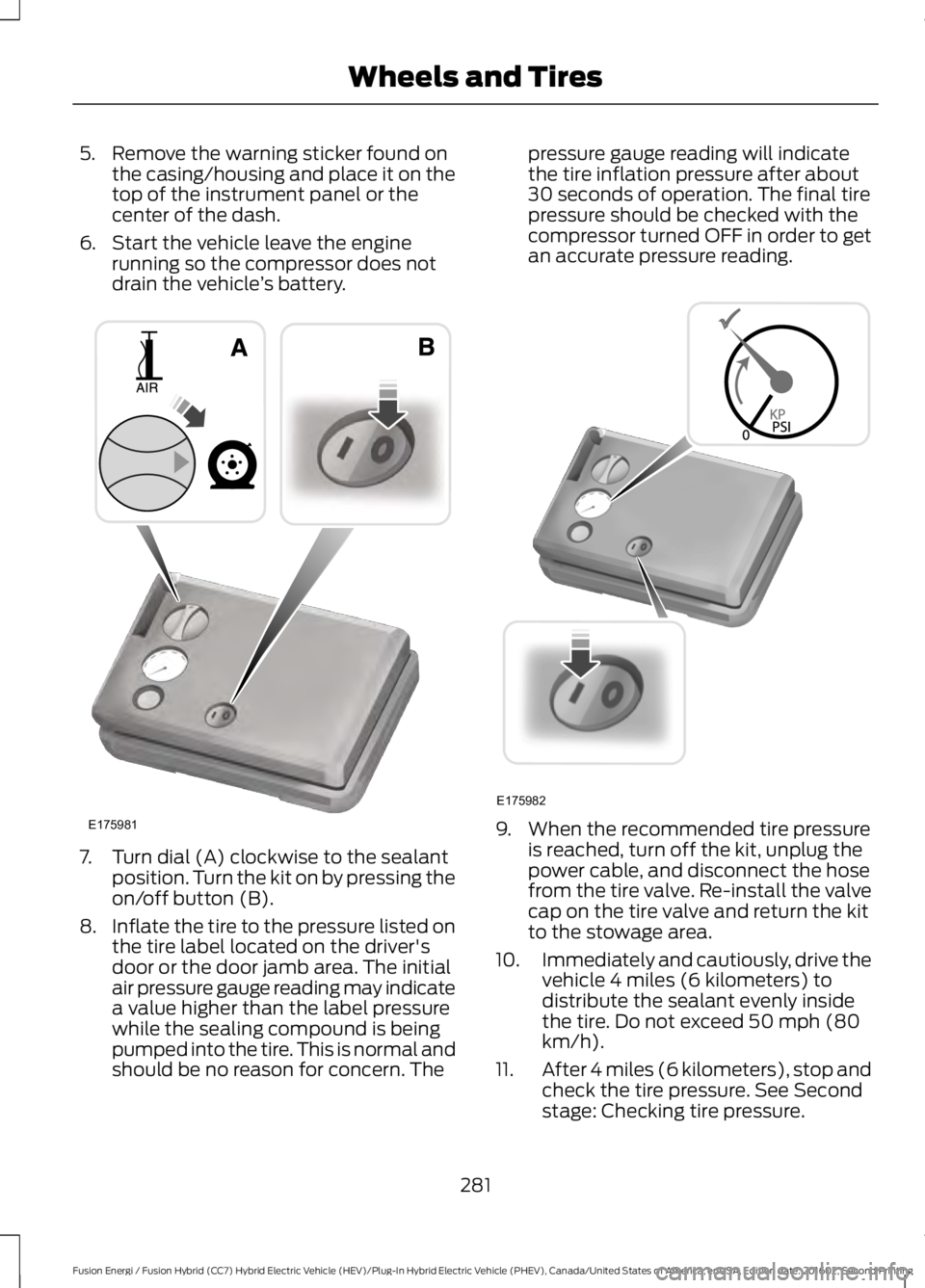
5. Remove the warning sticker found onthe casing/housing and place it on thetop of the instrument panel or thecenter of the dash.
6. Start the vehicle leave the enginerunning so the compressor does notdrain the vehicle’s battery.
7. Turn dial (A) clockwise to the sealantposition. Turn the kit on by pressing theon/off button (B).
8.Inflate the tire to the pressure listed onthe tire label located on the driver'sdoor or the door jamb area. The initialair pressure gauge reading may indicatea value higher than the label pressurewhile the sealing compound is beingpumped into the tire. This is normal andshould be no reason for concern. The
pressure gauge reading will indicatethe tire inflation pressure after about30 seconds of operation. The final tirepressure should be checked with thecompressor turned OFF in order to getan accurate pressure reading.
9. When the recommended tire pressureis reached, turn off the kit, unplug thepower cable, and disconnect the hosefrom the tire valve. Re-install the valvecap on the tire valve and return the kitto the stowage area.
10.Immediately and cautiously, drive thevehicle 4 miles (6 kilometers) todistribute the sealant evenly insidethe tire. Do not exceed 50 mph (80km/h).
11.After 4 miles (6 kilometers), stop andcheck the tire pressure. See Secondstage: Checking tire pressure.
281
Fusion Energi / Fusion Hybrid (CC7) Hybrid Electric Vehicle (HEV)/Plug-In Hybrid Electric Vehicle (PHEV), Canada/United States of America, enUSA, Edition date: 201602, Second Printing
Wheels and TiresE175981 E175982
Page 309 of 526
MOTORCRAFT PARTS
2.0L ATK iVCT EngineComponent
FA-1911Air filterelement
FL-910-SOil filter
BXT-99RT4Battery
SP-530Spark plugs
FP-71Cabin air filter
WW-2601(driver side)Windshieldwiper bladeWW-2700 (passenger side)
We recommend Motorcraft replacement parts available at your Ford dealer or atfordparts.com for scheduled maintenance. These parts meet or exceed Ford MotorCompany’s specifications and are engineered for your vehicle. Use of other parts mayimpact vehicle performance, emissions and durability. Your warranty may be void for anydamage related to use of other parts.
If a Motorcraft oil filter is not available, use an oil filter that meets industry performancespecification SAE/USCAR-36.
For spark plug replacement, contact an authorized dealer. Replace the spark plugs at theappropriate intervals. See Scheduled Maintenance (page 467).
306
Fusion Energi / Fusion Hybrid (CC7) Hybrid Electric Vehicle (HEV)/Plug-In Hybrid Electric Vehicle (PHEV), Canada/United States of America, enUSA, Edition date: 201602, Second Printing
Capacities and Specifications
Page 347 of 526
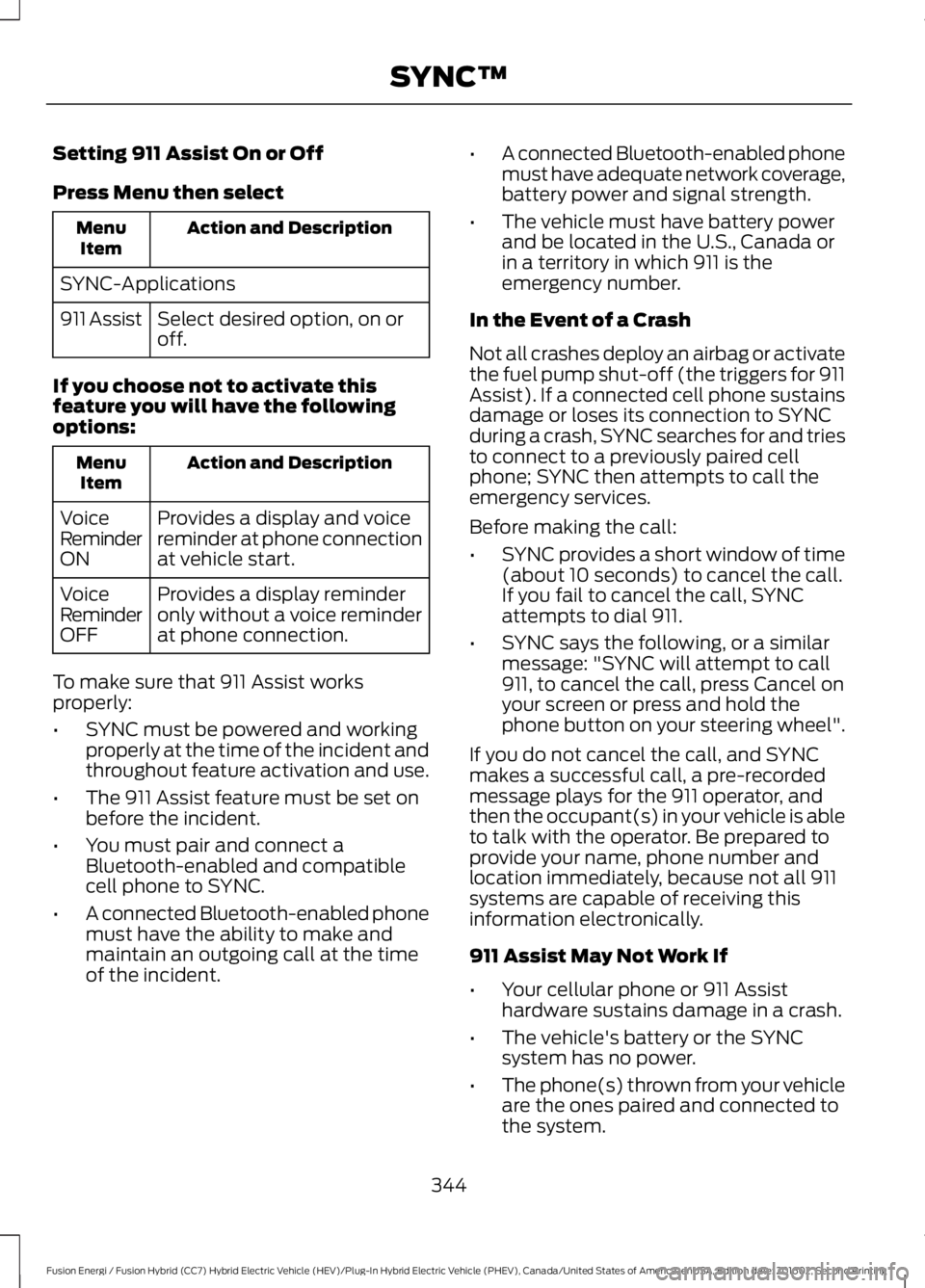
Setting 911 Assist On or Off
Press Menu then select
Action and DescriptionMenuItem
SYNC-Applications
Select desired option, on oroff.911 Assist
If you choose not to activate thisfeature you will have the followingoptions:
Action and DescriptionMenuItem
Provides a display and voicereminder at phone connectionat vehicle start.
VoiceReminderON
Provides a display reminderonly without a voice reminderat phone connection.
VoiceReminderOFF
To make sure that 911 Assist worksproperly:
•SYNC must be powered and workingproperly at the time of the incident andthroughout feature activation and use.
•The 911 Assist feature must be set onbefore the incident.
•You must pair and connect aBluetooth-enabled and compatiblecell phone to SYNC.
•A connected Bluetooth-enabled phonemust have the ability to make andmaintain an outgoing call at the timeof the incident.
•A connected Bluetooth-enabled phonemust have adequate network coverage,battery power and signal strength.
•The vehicle must have battery powerand be located in the U.S., Canada orin a territory in which 911 is theemergency number.
In the Event of a Crash
Not all crashes deploy an airbag or activatethe fuel pump shut-off (the triggers for 911Assist). If a connected cell phone sustainsdamage or loses its connection to SYNCduring a crash, SYNC searches for and triesto connect to a previously paired cellphone; SYNC then attempts to call theemergency services.
Before making the call:
•SYNC provides a short window of time(about 10 seconds) to cancel the call.If you fail to cancel the call, SYNCattempts to dial 911.
•SYNC says the following, or a similarmessage: "SYNC will attempt to call911, to cancel the call, press Cancel onyour screen or press and hold thephone button on your steering wheel".
If you do not cancel the call, and SYNCmakes a successful call, a pre-recordedmessage plays for the 911 operator, andthen the occupant(s) in your vehicle is ableto talk with the operator. Be prepared toprovide your name, phone number andlocation immediately, because not all 911systems are capable of receiving thisinformation electronically.
911 Assist May Not Work If
•Your cellular phone or 911 Assisthardware sustains damage in a crash.
•The vehicle's battery or the SYNCsystem has no power.
•The phone(s) thrown from your vehicleare the ones paired and connected tothe system.
344
Fusion Energi / Fusion Hybrid (CC7) Hybrid Electric Vehicle (HEV)/Plug-In Hybrid Electric Vehicle (PHEV), Canada/United States of America, enUSA, Edition date: 201602, Second Printing
SYNC™
Page 360 of 526
![FORD FUSION ENERGI 2017 Manual PDF Voice Command
(shuffle | random | mix) (CD [player] |disc) [on]
(shuffle | random | mix) folder [on]
shuffle off
SYNC™ TROUBLESHOOTING
Your SYNC system is easy to use. However,should questions arise](/img/11/58804/w960_58804-359.png "FORD FUSION ENERGI 2017 Manual PDF Voice Command
(shuffle | random | mix) (CD [player] |disc) [on]
(shuffle | random | mix) folder [on]
shuffle off
SYNC™ TROUBLESHOOTING
Your SYNC system is easy to use. However,should questions arise")
Voice Command
(shuffle | random | mix) (CD [player] |disc) [on]
(shuffle | random | mix) folder [on]
shuffle off
SYNC™ TROUBLESHOOTING
Your SYNC system is easy to use. However,should questions arise, see the tablesbelow.
Use the website at any time to check yourphone's compatibility, register youraccount and set preferences as well asaccess a customer representative via anonline chat (during certain hours). Visitwww.SYNCMyRide.com,www.SYNCMyRide.ca orwww.syncmaroute.ca for moreinformation.
Phone issues
Possible solution(s)Possible cause(s)Issue
Review your phone's manualabout audio adjustments.The audio control settingson your phone may beaffecting SYNC perform-ance.
There is excessive back-ground noise during a phonecall.
Try turning off the device,resetting the device,removing the device'sbattery, then trying again.
This may be a possiblephone malfunction.
During a call, I can hear theother person but theycannot hear me.
Go to the website to reviewyour phone's compatibility.
This is a phone-dependentfeature.
SYNC is not able to down-load my phonebook.
Try turning off the device,resetting the device orremoving the device'sbattery, then trying again.
Try pushing your phonebookcontacts to SYNC by usingthe Add Contacts feature.This may be a possiblephone malfunction.Use the SYNCmyphonefeature available on thewebsite.
Try pushing your phonebookcontacts to SYNC by usingthe Add Contacts feature.This may be a limitation onyour phone's capability.
The system says PhonebookDownloaded but thephonebook in SYNC isempty or missing contacts.
357
Fusion Energi / Fusion Hybrid (CC7) Hybrid Electric Vehicle (HEV)/Plug-In Hybrid Electric Vehicle (PHEV), Canada/United States of America, enUSA, Edition date: 201602, Second Printing
SYNC™
Page 361 of 526
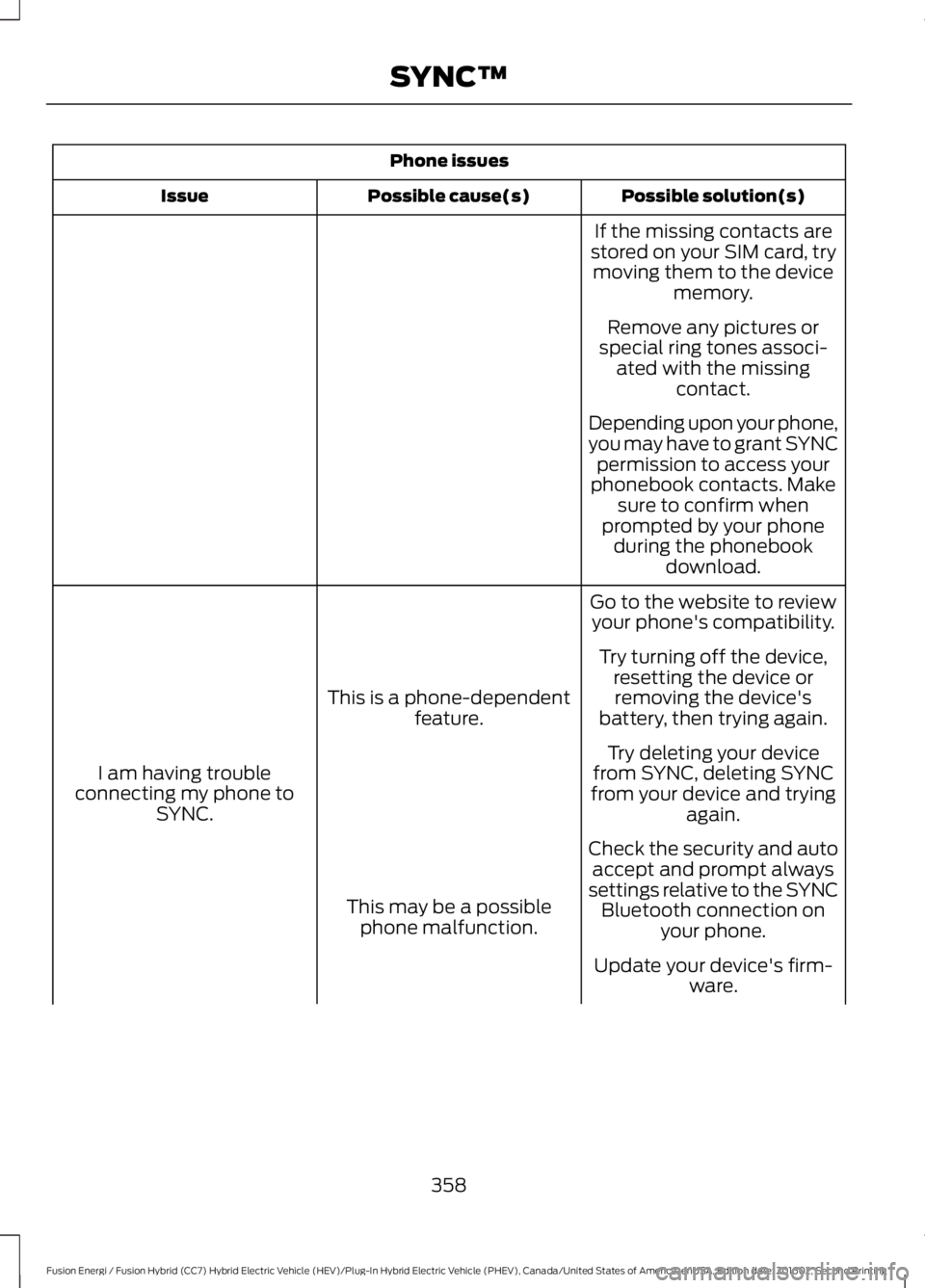
Phone issues
Possible solution(s)Possible cause(s)Issue
If the missing contacts arestored on your SIM card, trymoving them to the devicememory.
Remove any pictures orspecial ring tones associ-ated with the missingcontact.
Depending upon your phone,you may have to grant SYNCpermission to access yourphonebook contacts. Makesure to confirm whenprompted by your phoneduring the phonebookdownload.
Go to the website to reviewyour phone's compatibility.
This is a phone-dependentfeature.
I am having troubleconnecting my phone toSYNC.
Try turning off the device,resetting the device orremoving the device'sbattery, then trying again.
Try deleting your devicefrom SYNC, deleting SYNCfrom your device and tryingagain.
Check the security and autoaccept and prompt alwayssettings relative to the SYNCBluetooth connection onyour phone.
This may be a possiblephone malfunction.
Update your device's firm-ware.
358
Fusion Energi / Fusion Hybrid (CC7) Hybrid Electric Vehicle (HEV)/Plug-In Hybrid Electric Vehicle (PHEV), Canada/United States of America, enUSA, Edition date: 201602, Second Printing
SYNC™
Page 362 of 526
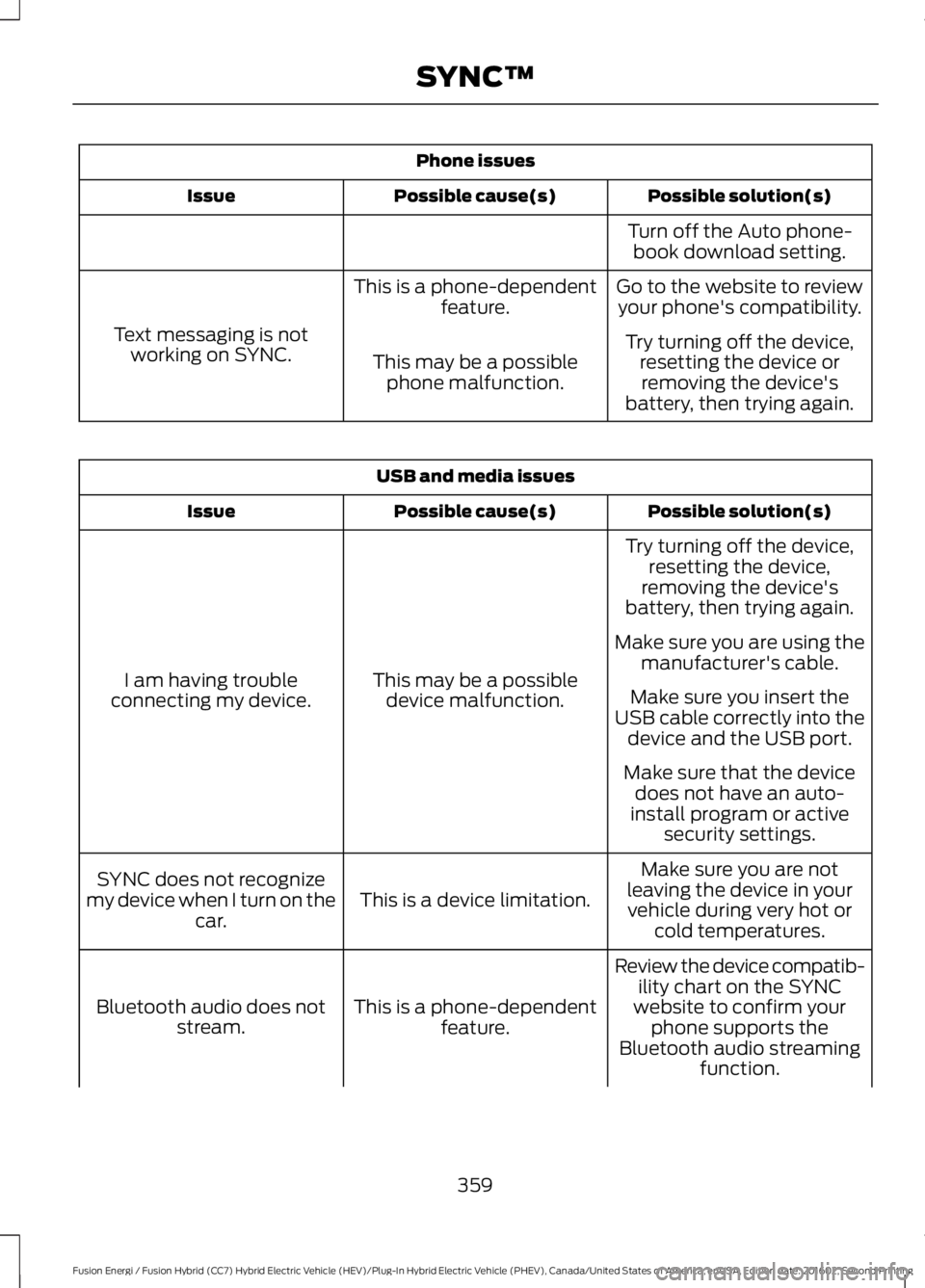
Phone issues
Possible solution(s)Possible cause(s)Issue
Turn off the Auto phone-book download setting.
Go to the website to reviewyour phone's compatibility.This is a phone-dependentfeature.
Text messaging is notworking on SYNC.Try turning off the device,resetting the device orremoving the device'sbattery, then trying again.
This may be a possiblephone malfunction.
USB and media issues
Possible solution(s)Possible cause(s)Issue
Try turning off the device,resetting the device,removing the device'sbattery, then trying again.
This may be a possibledevice malfunction.I am having troubleconnecting my device.
Make sure you are using themanufacturer's cable.
Make sure you insert theUSB cable correctly into thedevice and the USB port.
Make sure that the devicedoes not have an auto-install program or activesecurity settings.
Make sure you are notleaving the device in yourvehicle during very hot orcold temperatures.
This is a device limitation.SYNC does not recognizemy device when I turn on thecar.
Review the device compatib-ility chart on the SYNCwebsite to confirm yourphone supports theBluetooth audio streamingfunction.
This is a phone-dependentfeature.Bluetooth audio does notstream.
359
Fusion Energi / Fusion Hybrid (CC7) Hybrid Electric Vehicle (HEV)/Plug-In Hybrid Electric Vehicle (PHEV), Canada/United States of America, enUSA, Edition date: 201602, Second Printing
SYNC™
Page 376 of 526
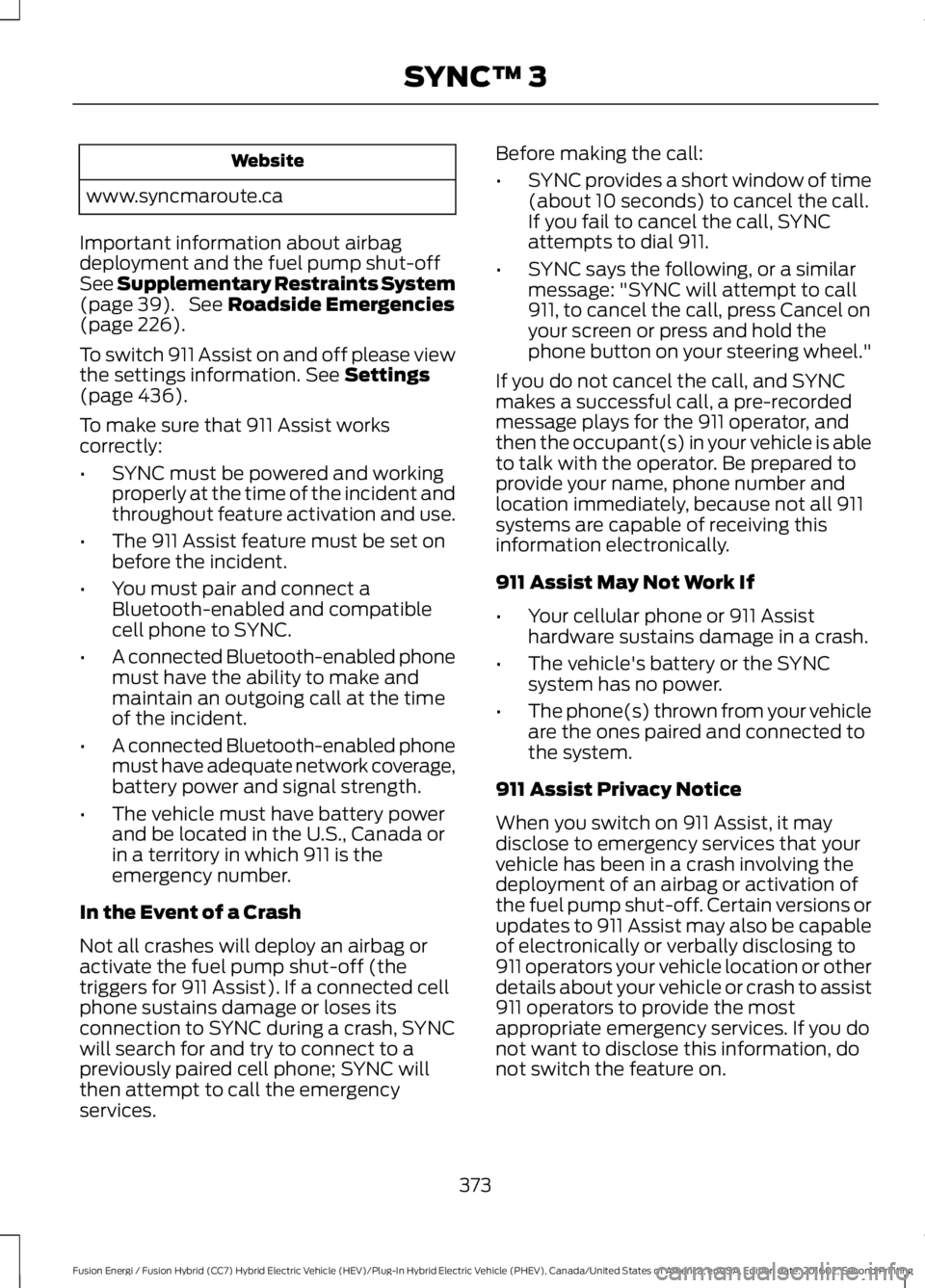
Website
www.syncmaroute.ca
Important information about airbagdeployment and the fuel pump shut-offSee Supplementary Restraints System(page 39). See Roadside Emergencies(page 226).
To switch 911 Assist on and off please viewthe settings information. See Settings(page 436).
To make sure that 911 Assist workscorrectly:
•SYNC must be powered and workingproperly at the time of the incident andthroughout feature activation and use.
•The 911 Assist feature must be set onbefore the incident.
•You must pair and connect aBluetooth-enabled and compatiblecell phone to SYNC.
•A connected Bluetooth-enabled phonemust have the ability to make andmaintain an outgoing call at the timeof the incident.
•A connected Bluetooth-enabled phonemust have adequate network coverage,battery power and signal strength.
•The vehicle must have battery powerand be located in the U.S., Canada orin a territory in which 911 is theemergency number.
In the Event of a Crash
Not all crashes will deploy an airbag oractivate the fuel pump shut-off (thetriggers for 911 Assist). If a connected cellphone sustains damage or loses itsconnection to SYNC during a crash, SYNCwill search for and try to connect to apreviously paired cell phone; SYNC willthen attempt to call the emergencyservices.
Before making the call:
•SYNC provides a short window of time(about 10 seconds) to cancel the call.If you fail to cancel the call, SYNCattempts to dial 911.
•SYNC says the following, or a similarmessage: "SYNC will attempt to call911, to cancel the call, press Cancel onyour screen or press and hold thephone button on your steering wheel."
If you do not cancel the call, and SYNCmakes a successful call, a pre-recordedmessage plays for the 911 operator, andthen the occupant(s) in your vehicle is ableto talk with the operator. Be prepared toprovide your name, phone number andlocation immediately, because not all 911systems are capable of receiving thisinformation electronically.
911 Assist May Not Work If
•Your cellular phone or 911 Assisthardware sustains damage in a crash.
•The vehicle's battery or the SYNCsystem has no power.
•The phone(s) thrown from your vehicleare the ones paired and connected tothe system.
911 Assist Privacy Notice
When you switch on 911 Assist, it maydisclose to emergency services that yourvehicle has been in a crash involving thedeployment of an airbag or activation ofthe fuel pump shut-off. Certain versions orupdates to 911 Assist may also be capableof electronically or verbally disclosing to911 operators your vehicle location or otherdetails about your vehicle or crash to assist911 operators to provide the mostappropriate emergency services. If you donot want to disclose this information, donot switch the feature on.
373
Fusion Energi / Fusion Hybrid (CC7) Hybrid Electric Vehicle (HEV)/Plug-In Hybrid Electric Vehicle (PHEV), Canada/United States of America, enUSA, Edition date: 201602, Second Printing
SYNC™ 3
Page 381 of 526
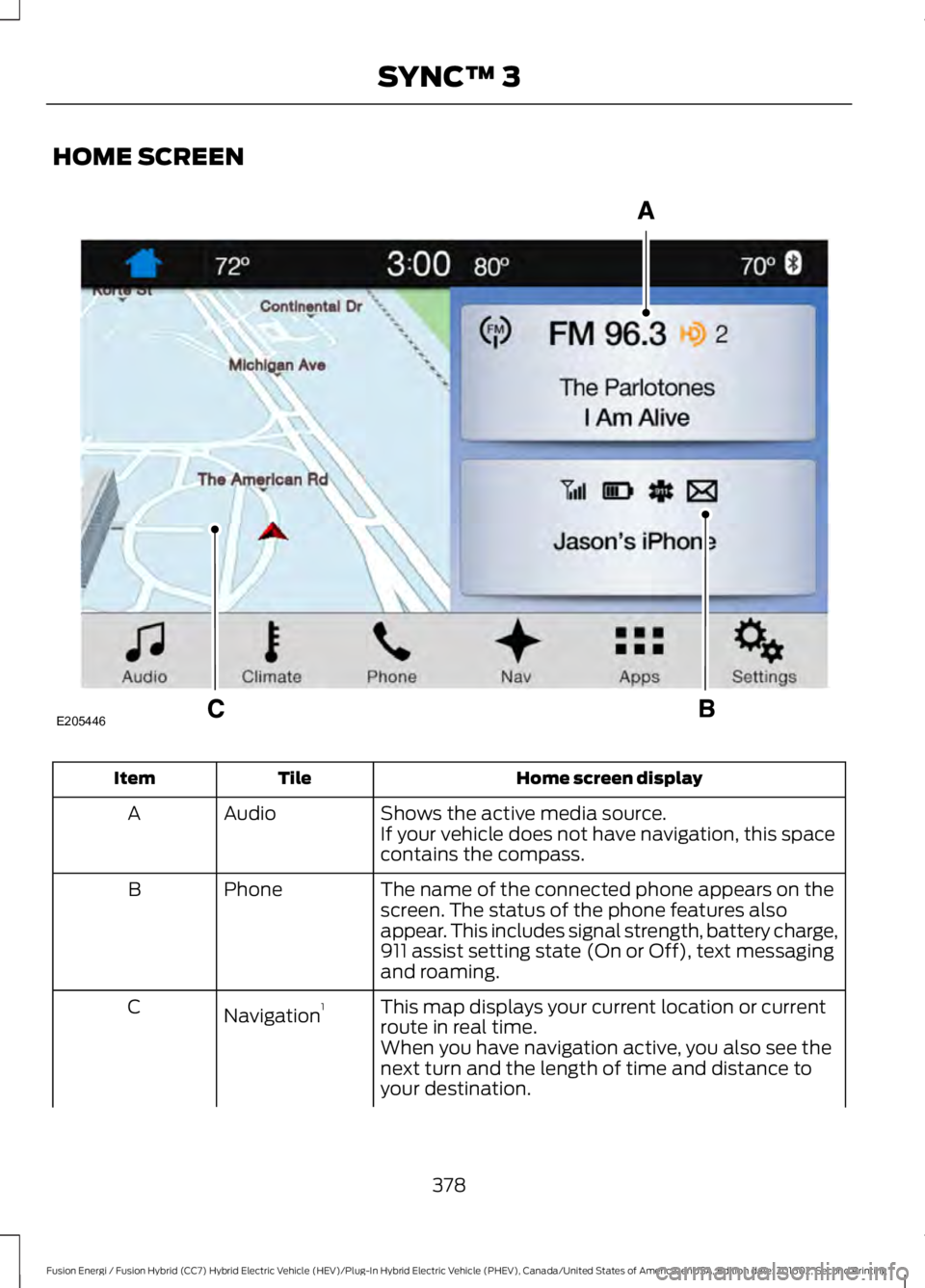
HOME SCREEN
Home screen displayTileItem
Shows the active media source.AudioAIf your vehicle does not have navigation, this spacecontains the compass.
The name of the connected phone appears on thescreen. The status of the phone features alsoappear. This includes signal strength, battery charge,911 assist setting state (On or Off), text messagingand roaming.
PhoneB
This map displays your current location or currentroute in real time.Navigation1C
When you have navigation active, you also see thenext turn and the length of time and distance toyour destination.
378
Fusion Energi / Fusion Hybrid (CC7) Hybrid Electric Vehicle (HEV)/Plug-In Hybrid Electric Vehicle (PHEV), Canada/United States of America, enUSA, Edition date: 201602, Second Printing
SYNC™ 3E205446