light FORD FUSION ENERGI 2018 Owners Manual
[x] Cancel search | Manufacturer: FORD, Model Year: 2018, Model line: FUSION ENERGI, Model: FORD FUSION ENERGI 2018Pages: 538, PDF Size: 7.52 MB
Page 458 of 538
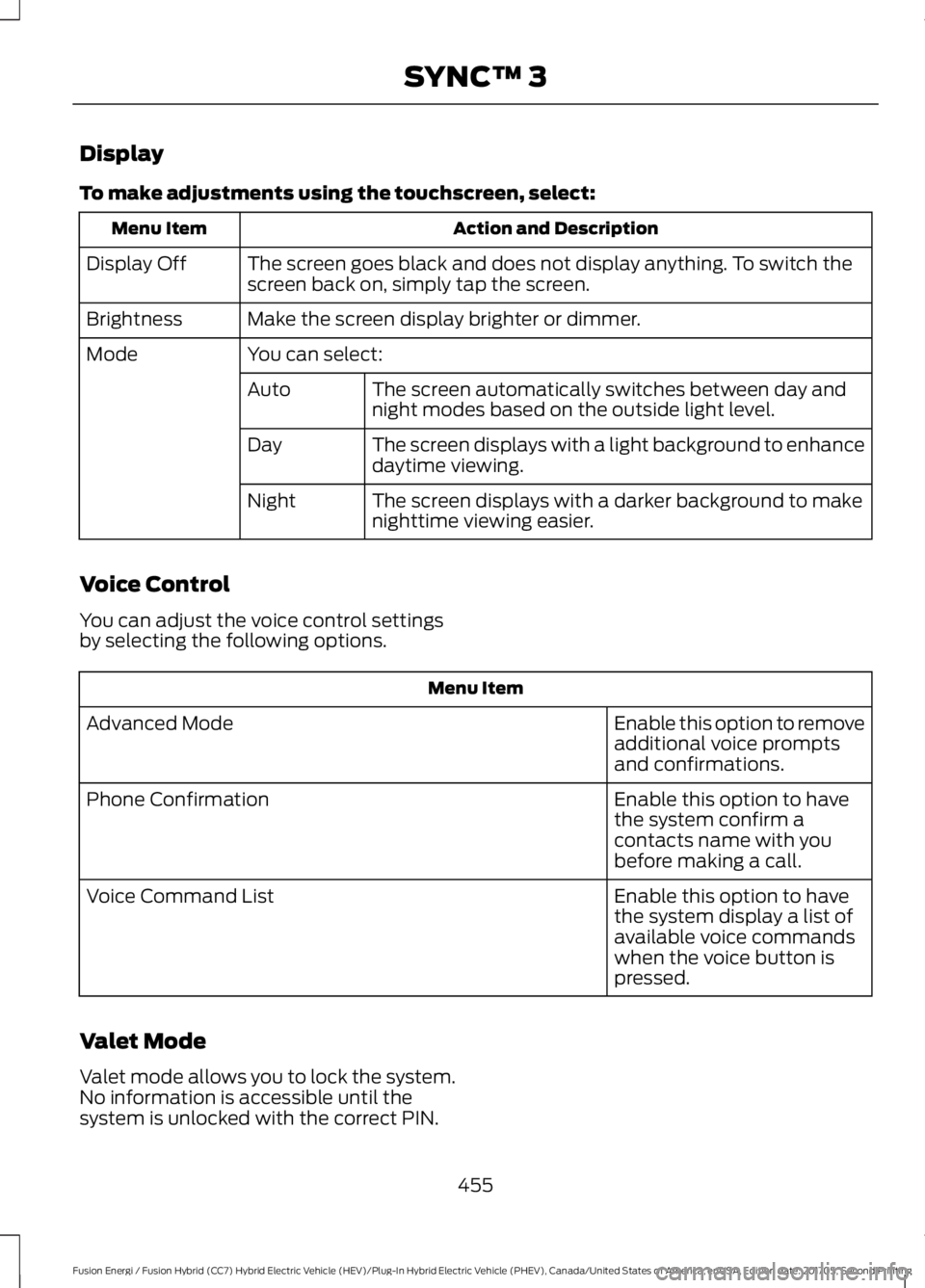
Display
To make adjustments using the touchscreen, select:
Action and DescriptionMenu Item
The screen goes black and does not display anything. To switch thescreen back on, simply tap the screen.Display Off
Make the screen display brighter or dimmer.Brightness
You can select:Mode
The screen automatically switches between day andnight modes based on the outside light level.Auto
The screen displays with a light background to enhancedaytime viewing.Day
The screen displays with a darker background to makenighttime viewing easier.Night
Voice Control
You can adjust the voice control settingsby selecting the following options.
Menu Item
Enable this option to removeadditional voice promptsand confirmations.
Advanced Mode
Enable this option to havethe system confirm acontacts name with youbefore making a call.
Phone Confirmation
Enable this option to havethe system display a list ofavailable voice commandswhen the voice button ispressed.
Voice Command List
Valet Mode
Valet mode allows you to lock the system.No information is accessible until thesystem is unlocked with the correct PIN.
455
Fusion Energi / Fusion Hybrid (CC7) Hybrid Electric Vehicle (HEV)/Plug-In Hybrid Electric Vehicle (PHEV), Canada/United States of America, enUSA, Edition date: 201705, Second Printing
SYNC™ 3
Page 459 of 538
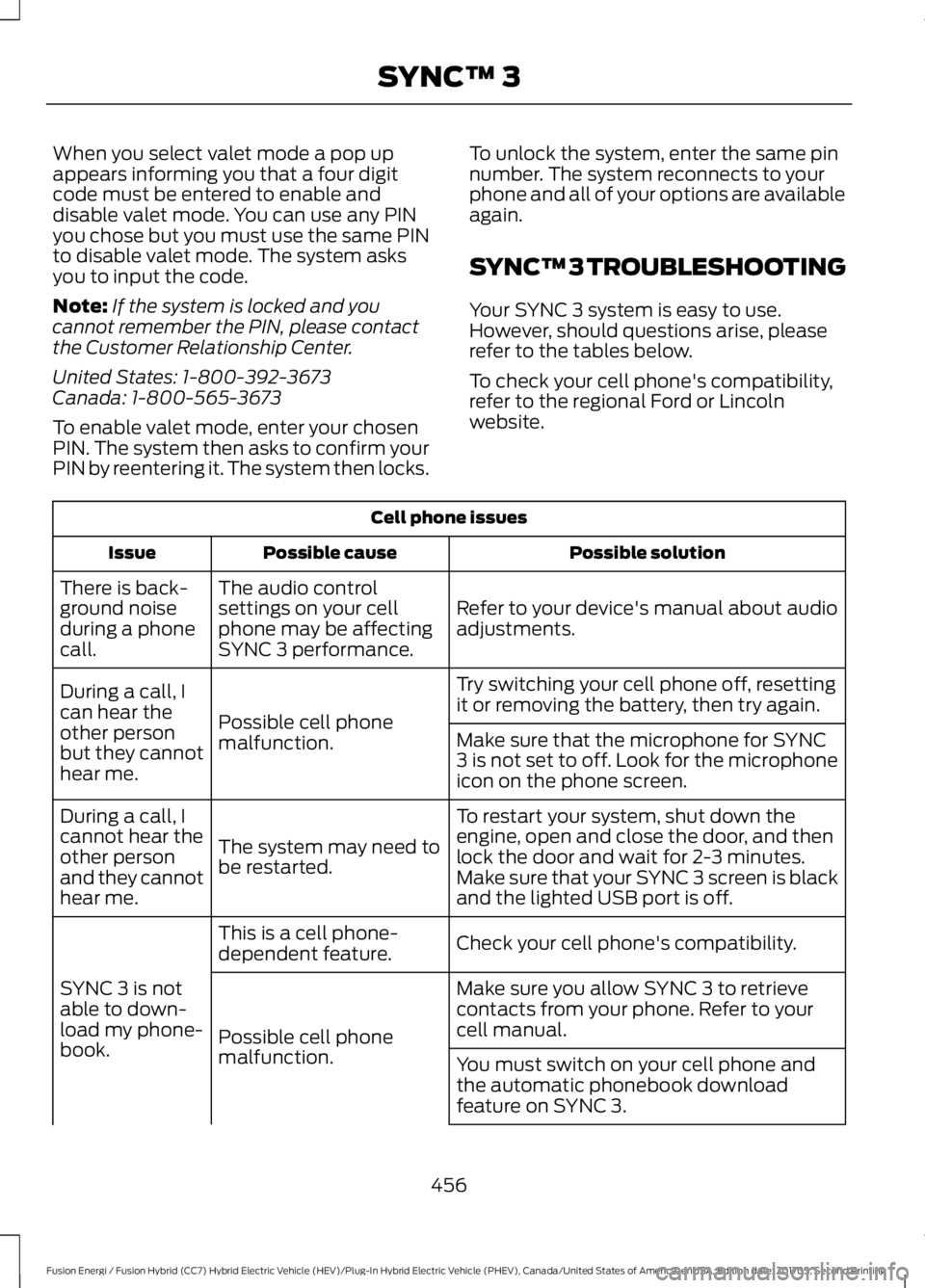
When you select valet mode a pop upappears informing you that a four digitcode must be entered to enable anddisable valet mode. You can use any PINyou chose but you must use the same PINto disable valet mode. The system asksyou to input the code.
Note:If the system is locked and youcannot remember the PIN, please contactthe Customer Relationship Center.
United States: 1-800-392-3673Canada: 1-800-565-3673
To enable valet mode, enter your chosenPIN. The system then asks to confirm yourPIN by reentering it. The system then locks.
To unlock the system, enter the same pinnumber. The system reconnects to yourphone and all of your options are availableagain.
SYNC™ 3 TROUBLESHOOTING
Your SYNC 3 system is easy to use.However, should questions arise, pleaserefer to the tables below.
To check your cell phone's compatibility,refer to the regional Ford or Lincolnwebsite.
Cell phone issues
Possible solutionPossible causeIssue
Refer to your device's manual about audioadjustments.
The audio controlsettings on your cellphone may be affectingSYNC 3 performance.
There is back-ground noiseduring a phonecall.
Try switching your cell phone off, resettingit or removing the battery, then try again.Possible cell phonemalfunction.
During a call, Ican hear theother personbut they cannothear me.
Make sure that the microphone for SYNC3 is not set to off. Look for the microphoneicon on the phone screen.
To restart your system, shut down theengine, open and close the door, and thenlock the door and wait for 2-3 minutes.Make sure that your SYNC 3 screen is blackand the lighted USB port is off.
The system may need tobe restarted.
During a call, Icannot hear theother personand they cannothear me.
Check your cell phone's compatibility.This is a cell phone-dependent feature.
SYNC 3 is notable to down-load my phone-book.
Make sure you allow SYNC 3 to retrievecontacts from your phone. Refer to yourcell manual.Possible cell phonemalfunction.You must switch on your cell phone andthe automatic phonebook downloadfeature on SYNC 3.
456
Fusion Energi / Fusion Hybrid (CC7) Hybrid Electric Vehicle (HEV)/Plug-In Hybrid Electric Vehicle (PHEV), Canada/United States of America, enUSA, Edition date: 201705, Second Printing
SYNC™ 3
Page 472 of 538
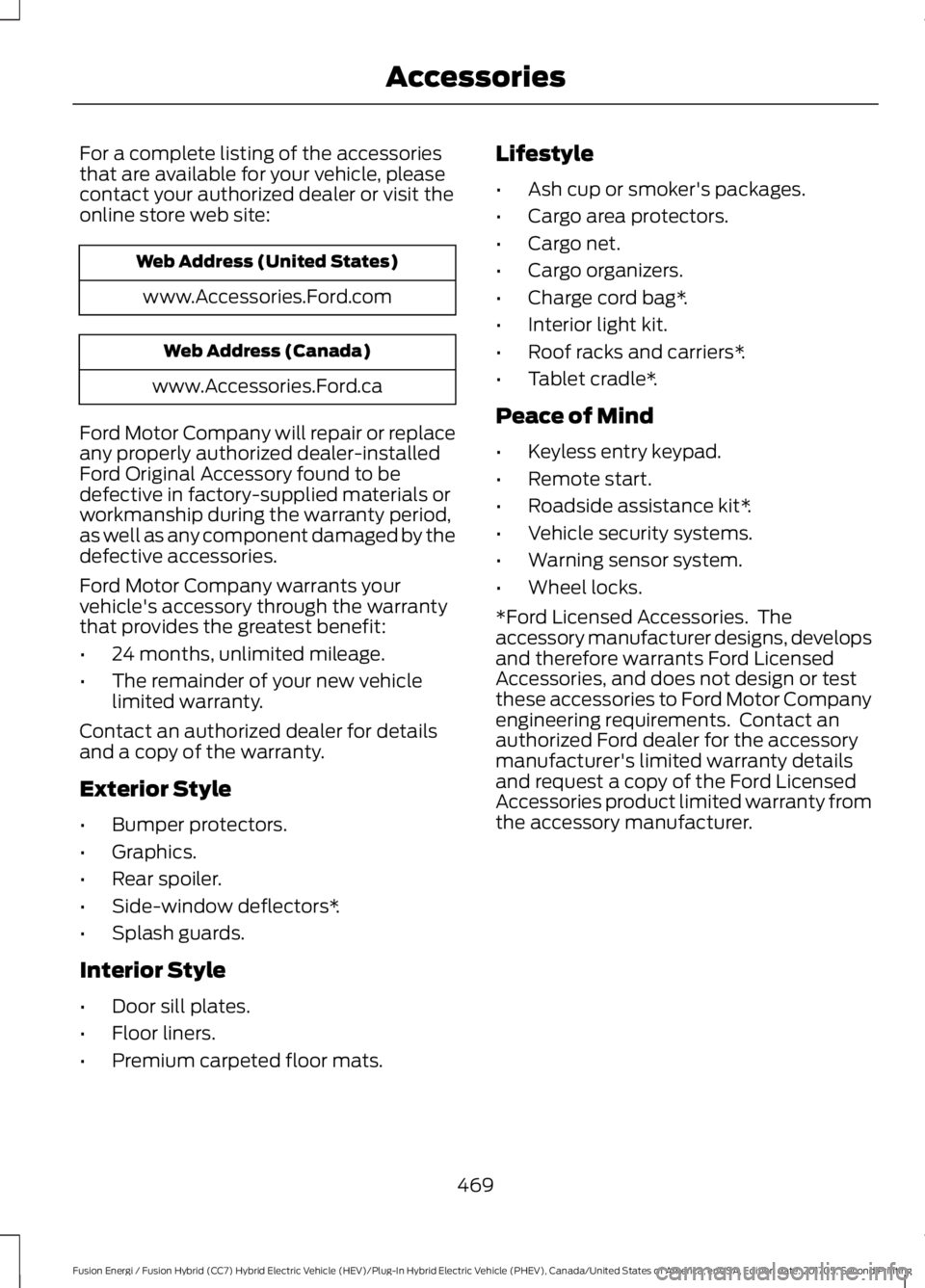
For a complete listing of the accessoriesthat are available for your vehicle, pleasecontact your authorized dealer or visit theonline store web site:
Web Address (United States)
www.Accessories.Ford.com
Web Address (Canada)
www.Accessories.Ford.ca
Ford Motor Company will repair or replaceany properly authorized dealer-installedFord Original Accessory found to bedefective in factory-supplied materials orworkmanship during the warranty period,as well as any component damaged by thedefective accessories.
Ford Motor Company warrants yourvehicle's accessory through the warrantythat provides the greatest benefit:
•24 months, unlimited mileage.
•The remainder of your new vehiclelimited warranty.
Contact an authorized dealer for detailsand a copy of the warranty.
Exterior Style
•Bumper protectors.
•Graphics.
•Rear spoiler.
•Side-window deflectors*.
•Splash guards.
Interior Style
•Door sill plates.
•Floor liners.
•Premium carpeted floor mats.
Lifestyle
•Ash cup or smoker's packages.
•Cargo area protectors.
•Cargo net.
•Cargo organizers.
•Charge cord bag*.
•Interior light kit.
•Roof racks and carriers*.
•Tablet cradle*.
Peace of Mind
•Keyless entry keypad.
•Remote start.
•Roadside assistance kit*.
•Vehicle security systems.
•Warning sensor system.
•Wheel locks.
*Ford Licensed Accessories. Theaccessory manufacturer designs, developsand therefore warrants Ford LicensedAccessories, and does not design or testthese accessories to Ford Motor Companyengineering requirements. Contact anauthorized Ford dealer for the accessorymanufacturer's limited warranty detailsand request a copy of the Ford LicensedAccessories product limited warranty fromthe accessory manufacturer.
469
Fusion Energi / Fusion Hybrid (CC7) Hybrid Electric Vehicle (HEV)/Plug-In Hybrid Electric Vehicle (PHEV), Canada/United States of America, enUSA, Edition date: 201705, Second Printing
Accessories
Page 478 of 538
Make sure to change your vehicle’s oils andfluids at the specified intervals or inconjunction with a repair. Flushing is aviable way to change fluid for many vehiclesub-systems during scheduledmaintenance. It is critical that systems areflushed only with new fluid that is the sameas that required to fill and operate the
system or using a Ford-approved flushingchemical.
Owner Checks and Services
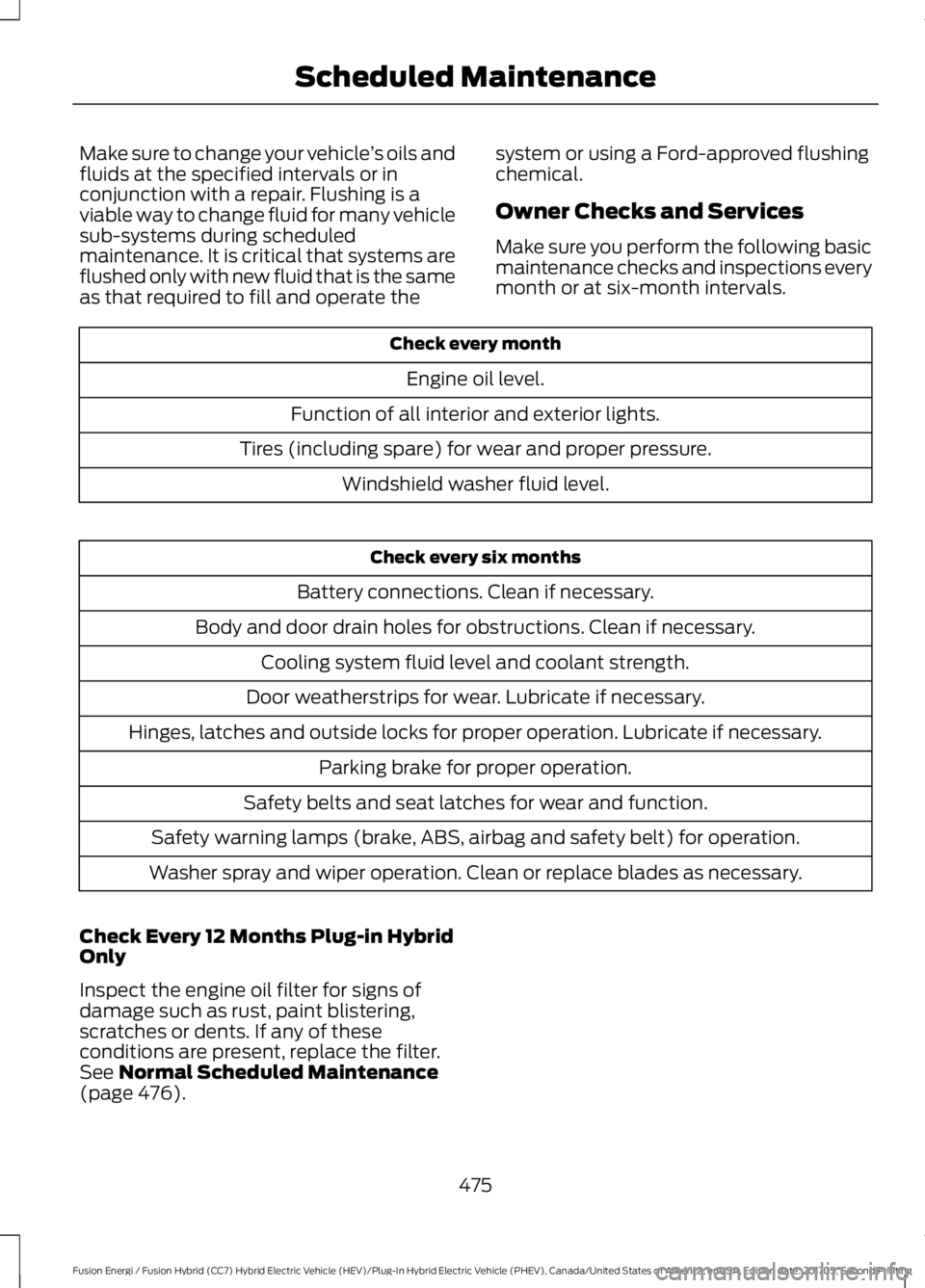
Make sure you perform the following basicmaintenance checks and inspections everymonth or at six-month intervals.
Check every month
Engine oil level.
Function of all interior and exterior lights.
Tires (including spare) for wear and proper pressure.
Windshield washer fluid level.
Check every six months
Battery connections. Clean if necessary.
Body and door drain holes for obstructions. Clean if necessary.
Cooling system fluid level and coolant strength.
Door weatherstrips for wear. Lubricate if necessary.
Hinges, latches and outside locks for proper operation. Lubricate if necessary.
Parking brake for proper operation.
Safety belts and seat latches for wear and function.
Safety warning lamps (brake, ABS, airbag and safety belt) for operation.
Washer spray and wiper operation. Clean or replace blades as necessary.
Check Every 12 Months Plug-in HybridOnly
Inspect the engine oil filter for signs ofdamage such as rust, paint blistering,scratches or dents. If any of theseconditions are present, replace the filter.See Normal Scheduled Maintenance(page 476).
475
Fusion Energi / Fusion Hybrid (CC7) Hybrid Electric Vehicle (HEV)/Plug-In Hybrid Electric Vehicle (PHEV), Canada/United States of America, enUSA, Edition date: 201705, Second Printing
Scheduled Maintenance
Page 480 of 538
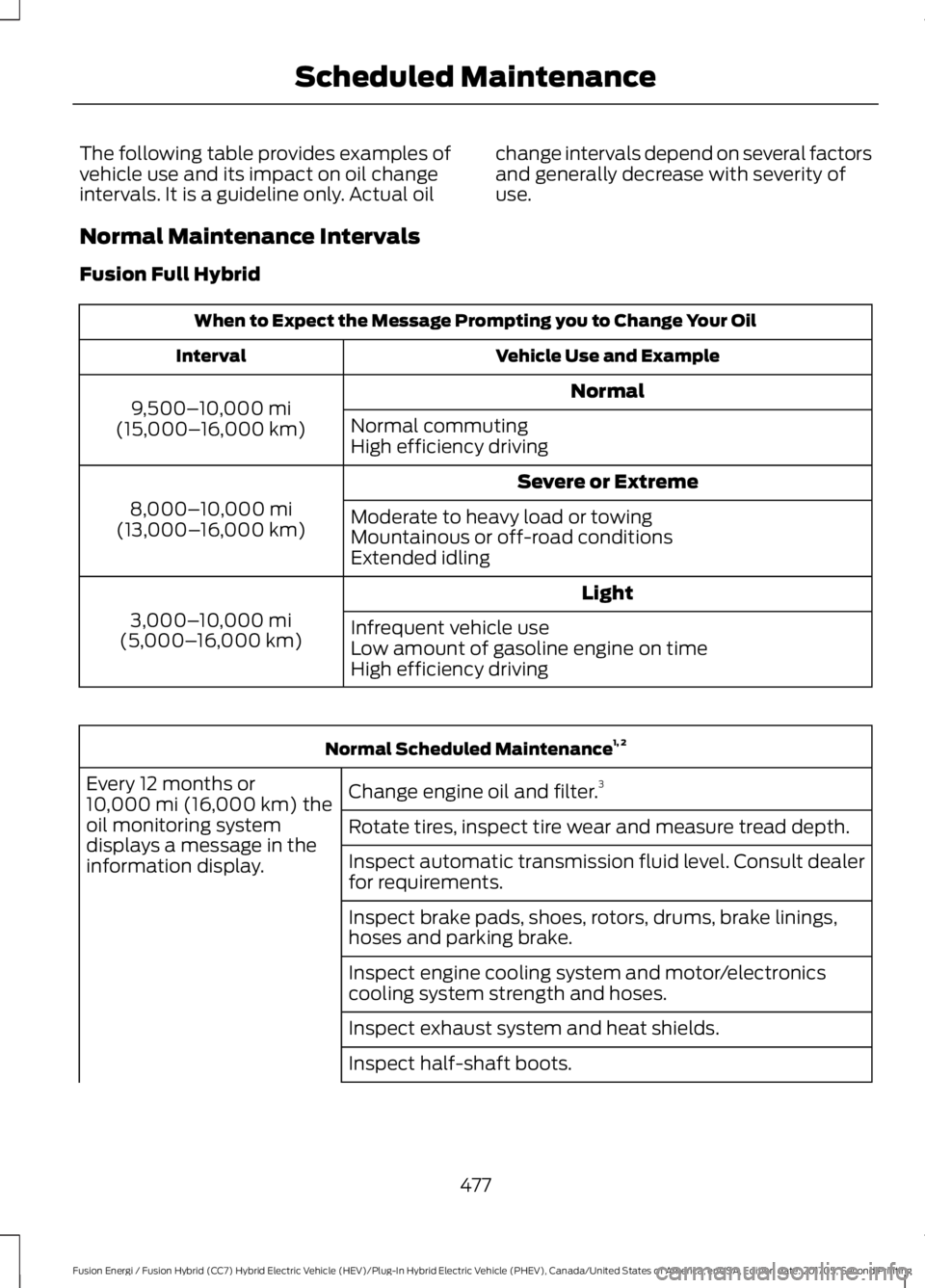
The following table provides examples ofvehicle use and its impact on oil changeintervals. It is a guideline only. Actual oil
change intervals depend on several factorsand generally decrease with severity ofuse.
Normal Maintenance Intervals
Fusion Full Hybrid
When to Expect the Message Prompting you to Change Your Oil
Vehicle Use and ExampleInterval
Normal9,500–10,000 mi(15,000–16,000 km)Normal commutingHigh efficiency driving
Severe or Extreme
8,000–10,000 mi(13,000–16,000 km)Moderate to heavy load or towingMountainous or off-road conditionsExtended idling
Light
3,000–10,000 mi(5,000–16,000 km)Infrequent vehicle useLow amount of gasoline engine on timeHigh efficiency driving
Normal Scheduled Maintenance1, 2
Change engine oil and filter.3Every 12 months or10,000 mi (16,000 km) theoil monitoring systemdisplays a message in theinformation display.
Rotate tires, inspect tire wear and measure tread depth.
Inspect automatic transmission fluid level. Consult dealerfor requirements.
Inspect brake pads, shoes, rotors, drums, brake linings,hoses and parking brake.
Inspect engine cooling system and motor/electronicscooling system strength and hoses.
Inspect exhaust system and heat shields.
Inspect half-shaft boots.
477
Fusion Energi / Fusion Hybrid (CC7) Hybrid Electric Vehicle (HEV)/Plug-In Hybrid Electric Vehicle (PHEV), Canada/United States of America, enUSA, Edition date: 201705, Second Printing
Scheduled Maintenance
Page 482 of 538
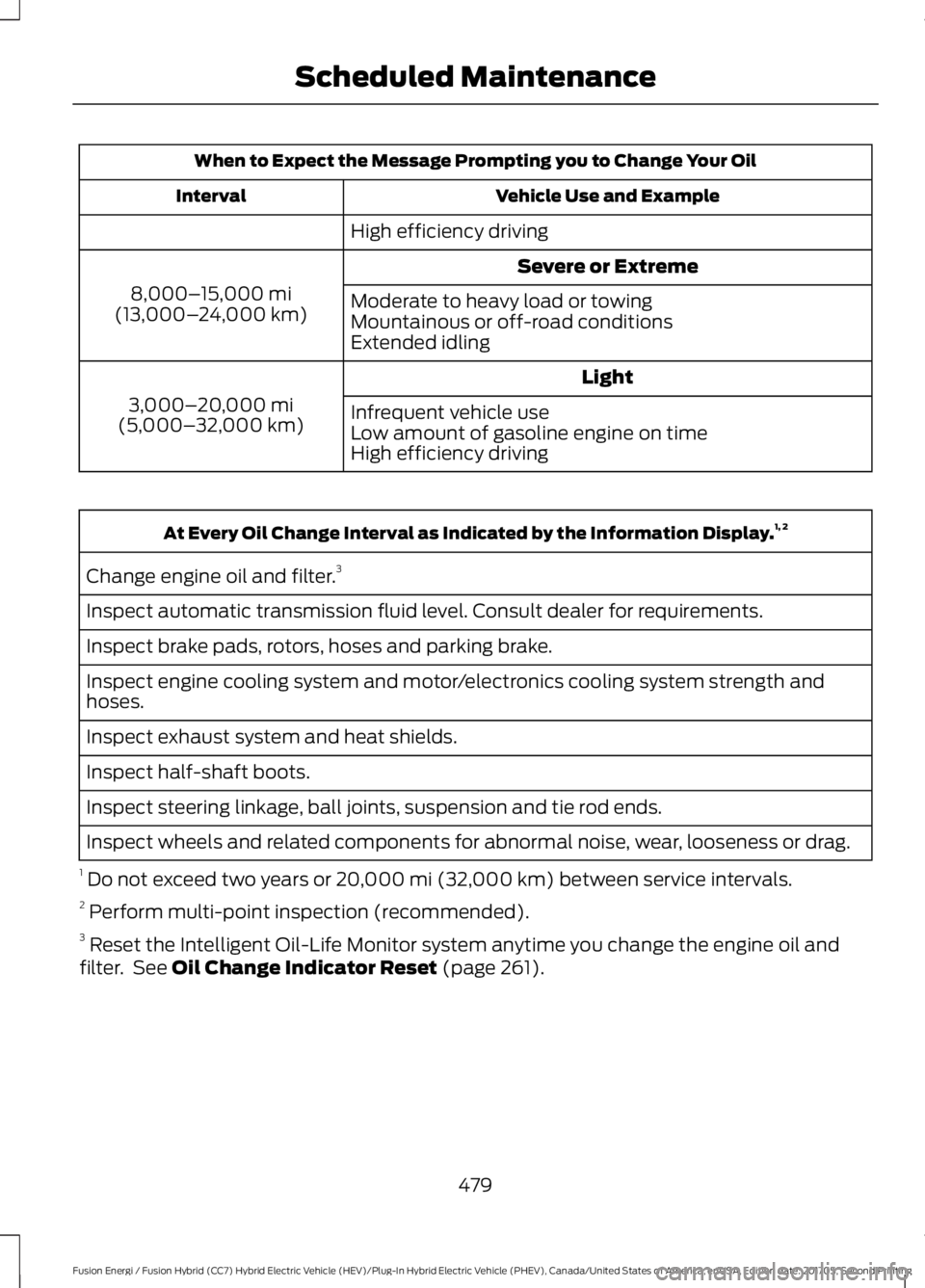
When to Expect the Message Prompting you to Change Your Oil
Vehicle Use and ExampleInterval
High efficiency driving
Severe or Extreme
8,000–15,000 mi(13,000–24,000 km)Moderate to heavy load or towingMountainous or off-road conditionsExtended idling
Light
3,000–20,000 mi(5,000–32,000 km)Infrequent vehicle useLow amount of gasoline engine on timeHigh efficiency driving
At Every Oil Change Interval as Indicated by the Information Display.1, 2
Change engine oil and filter.3
Inspect automatic transmission fluid level. Consult dealer for requirements.
Inspect brake pads, rotors, hoses and parking brake.
Inspect engine cooling system and motor/electronics cooling system strength andhoses.
Inspect exhaust system and heat shields.
Inspect half-shaft boots.
Inspect steering linkage, ball joints, suspension and tie rod ends.
Inspect wheels and related components for abnormal noise, wear, looseness or drag.
1 Do not exceed two years or 20,000 mi (32,000 km) between service intervals.2 Perform multi-point inspection (recommended).3 Reset the Intelligent Oil-Life Monitor system anytime you change the engine oil andfilter. See Oil Change Indicator Reset (page 261).
479
Fusion Energi / Fusion Hybrid (CC7) Hybrid Electric Vehicle (HEV)/Plug-In Hybrid Electric Vehicle (PHEV), Canada/United States of America, enUSA, Edition date: 201705, Second Printing
Scheduled Maintenance
Page 523 of 538
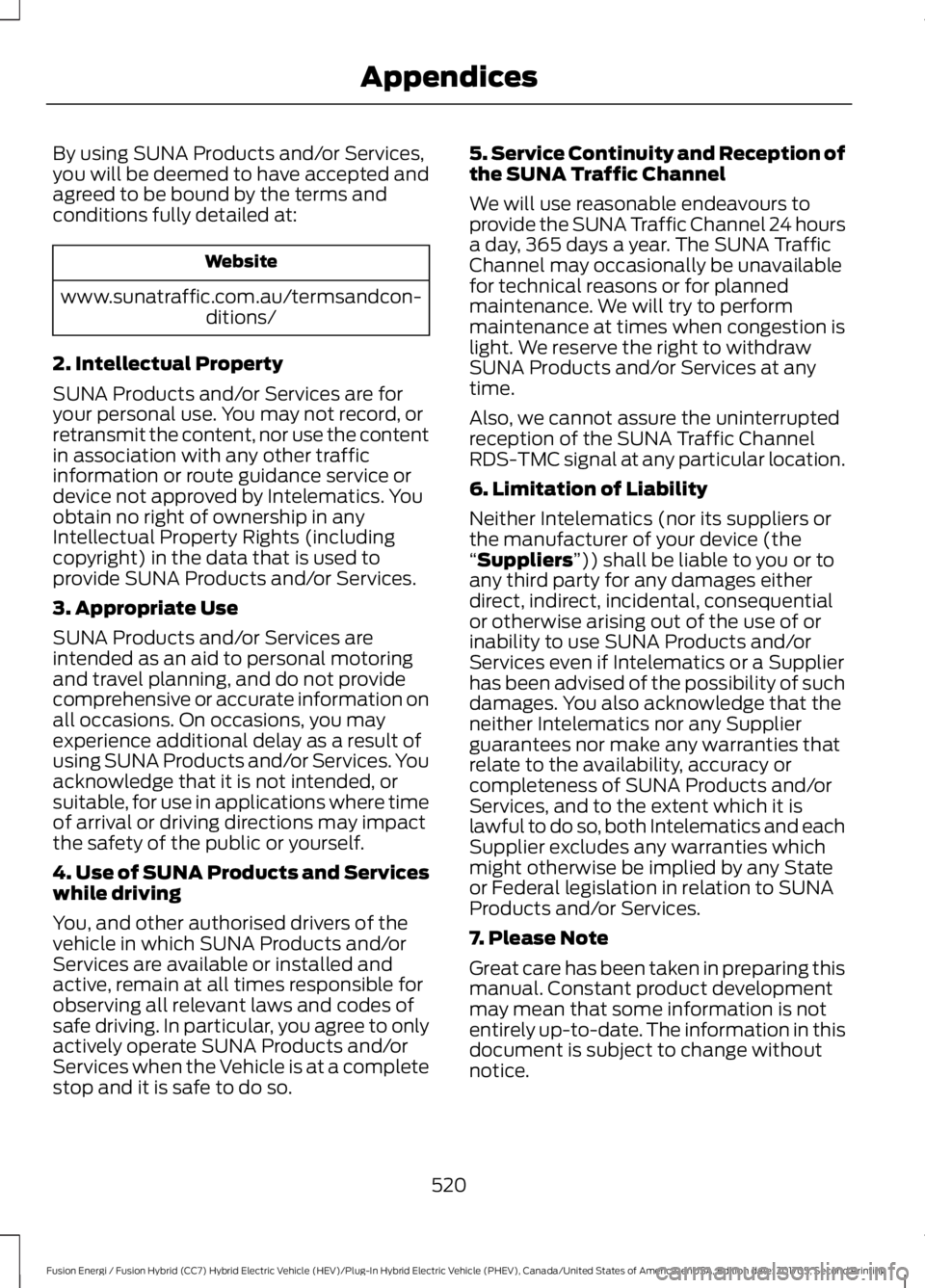
By using SUNA Products and/or Services,you will be deemed to have accepted andagreed to be bound by the terms andconditions fully detailed at:
Website
www.sunatraffic.com.au/termsandcon-ditions/
2. Intellectual Property
SUNA Products and/or Services are foryour personal use. You may not record, orretransmit the content, nor use the contentin association with any other trafficinformation or route guidance service ordevice not approved by Intelematics. Youobtain no right of ownership in anyIntellectual Property Rights (includingcopyright) in the data that is used toprovide SUNA Products and/or Services.
3. Appropriate Use
SUNA Products and/or Services areintended as an aid to personal motoringand travel planning, and do not providecomprehensive or accurate information onall occasions. On occasions, you mayexperience additional delay as a result ofusing SUNA Products and/or Services. Youacknowledge that it is not intended, orsuitable, for use in applications where timeof arrival or driving directions may impactthe safety of the public or yourself.
4. Use of SUNA Products and Serviceswhile driving
You, and other authorised drivers of thevehicle in which SUNA Products and/orServices are available or installed andactive, remain at all times responsible forobserving all relevant laws and codes ofsafe driving. In particular, you agree to onlyactively operate SUNA Products and/orServices when the Vehicle is at a completestop and it is safe to do so.
5. Service Continuity and Reception ofthe SUNA Traffic Channel
We will use reasonable endeavours toprovide the SUNA Traffic Channel 24 hoursa day, 365 days a year. The SUNA TrafficChannel may occasionally be unavailablefor technical reasons or for plannedmaintenance. We will try to performmaintenance at times when congestion islight. We reserve the right to withdrawSUNA Products and/or Services at anytime.
Also, we cannot assure the uninterruptedreception of the SUNA Traffic ChannelRDS-TMC signal at any particular location.
6. Limitation of Liability
Neither Intelematics (nor its suppliers orthe manufacturer of your device (the“Suppliers”)) shall be liable to you or toany third party for any damages eitherdirect, indirect, incidental, consequentialor otherwise arising out of the use of orinability to use SUNA Products and/orServices even if Intelematics or a Supplierhas been advised of the possibility of suchdamages. You also acknowledge that theneither Intelematics nor any Supplierguarantees nor make any warranties thatrelate to the availability, accuracy orcompleteness of SUNA Products and/orServices, and to the extent which it islawful to do so, both Intelematics and eachSupplier excludes any warranties whichmight otherwise be implied by any Stateor Federal legislation in relation to SUNAProducts and/or Services.
7. Please Note
Great care has been taken in preparing thismanual. Constant product developmentmay mean that some information is notentirely up-to-date. The information in thisdocument is subject to change withoutnotice.
520
Fusion Energi / Fusion Hybrid (CC7) Hybrid Electric Vehicle (HEV)/Plug-In Hybrid Electric Vehicle (PHEV), Canada/United States of America, enUSA, Edition date: 201705, Second Printing
Appendices
Page 528 of 538
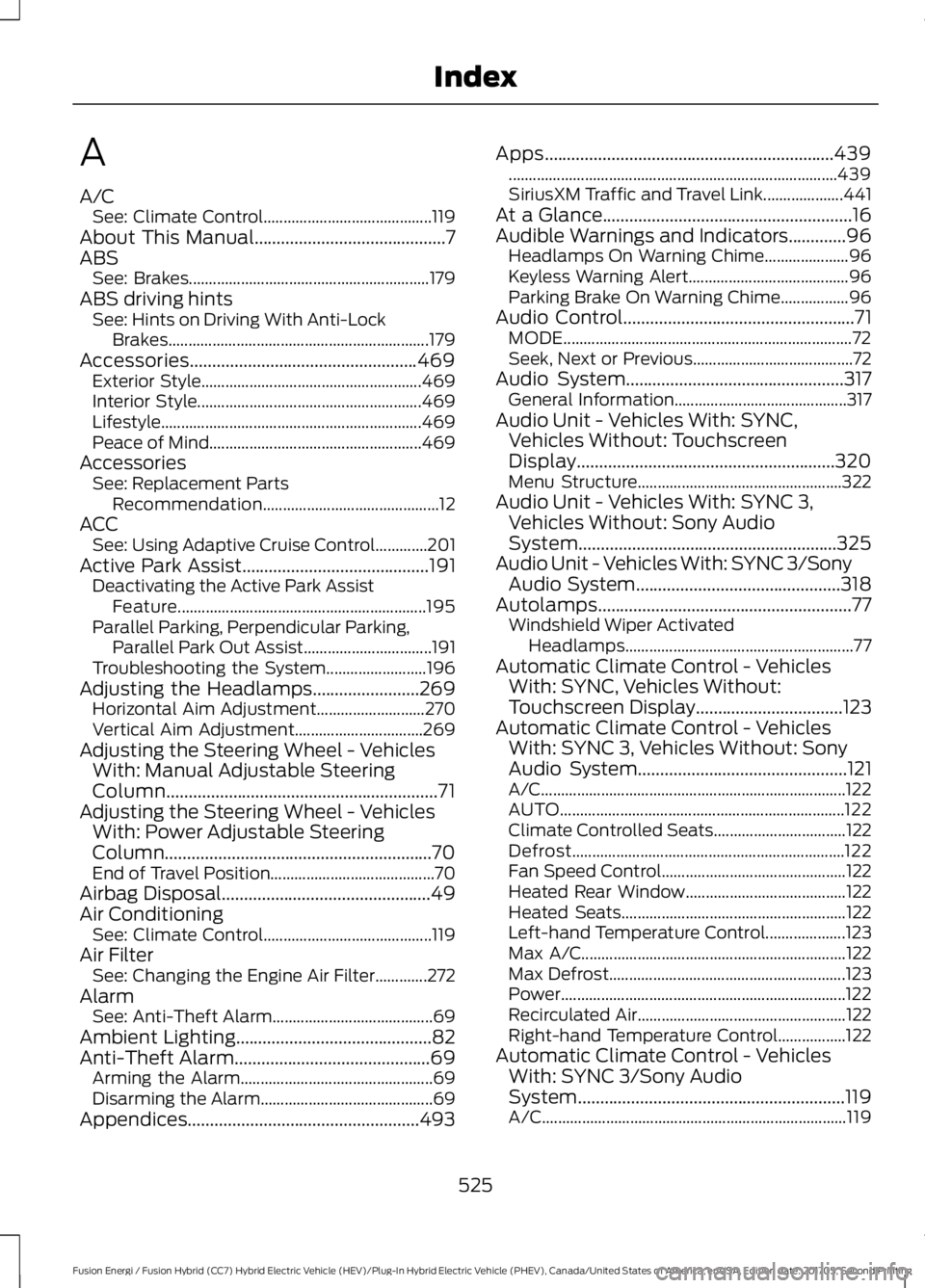
A
A/CSee: Climate Control..........................................119About This Manual...........................................7ABSSee: Brakes............................................................179ABS driving hintsSee: Hints on Driving With Anti-LockBrakes.................................................................179Accessories...................................................469Exterior Style.......................................................469Interior Style........................................................469Lifestyle.................................................................469Peace of Mind.....................................................469AccessoriesSee: Replacement PartsRecommendation............................................12ACCSee: Using Adaptive Cruise Control.............201Active Park Assist..........................................191Deactivating the Active Park AssistFeature..............................................................195Parallel Parking, Perpendicular Parking,Parallel Park Out Assist................................191Troubleshooting the System.........................196Adjusting the Headlamps........................269Horizontal Aim Adjustment...........................270Vertical Aim Adjustment................................269Adjusting the Steering Wheel - VehiclesWith: Manual Adjustable SteeringColumn.............................................................71Adjusting the Steering Wheel - VehiclesWith: Power Adjustable SteeringColumn............................................................70End of Travel Position.........................................70Airbag Disposal...............................................49Air ConditioningSee: Climate Control..........................................119Air FilterSee: Changing the Engine Air Filter.............272AlarmSee: Anti-Theft Alarm........................................69Ambient Lighting............................................82Anti-Theft Alarm............................................69Arming the Alarm................................................69Disarming the Alarm...........................................69Appendices....................................................493
Apps.................................................................439..................................................................................439SiriusXM Traffic and Travel Link....................441At a Glance........................................................16Audible Warnings and Indicators.............96Headlamps On Warning Chime.....................96Keyless Warning Alert........................................96Parking Brake On Warning Chime.................96Audio Control....................................................71MODE........................................................................72Seek, Next or Previous........................................72Audio System.................................................317General Information...........................................317Audio Unit - Vehicles With: SYNC,Vehicles Without: TouchscreenDisplay..........................................................320Menu Structure...................................................322Audio Unit - Vehicles With: SYNC 3,Vehicles Without: Sony AudioSystem..........................................................325Audio Unit - Vehicles With: SYNC 3/SonyAudio System..............................................318Autolamps.........................................................77Windshield Wiper ActivatedHeadlamps.........................................................77Automatic Climate Control - VehiclesWith: SYNC, Vehicles Without:Touchscreen Display.................................123Automatic Climate Control - VehiclesWith: SYNC 3, Vehicles Without: SonyAudio System...............................................121A/C............................................................................122AUTO.......................................................................122Climate Controlled Seats.................................122Defrost....................................................................122Fan Speed Control..............................................122Heated Rear Window........................................122Heated Seats........................................................122Left-hand Temperature Control....................123Max A/C..................................................................122Max Defrost...........................................................123Power.......................................................................122Recirculated Air....................................................122Right-hand Temperature Control.................122Automatic Climate Control - VehiclesWith: SYNC 3/Sony AudioSystem............................................................119A/C............................................................................119
525
Fusion Energi / Fusion Hybrid (CC7) Hybrid Electric Vehicle (HEV)/Plug-In Hybrid Electric Vehicle (PHEV), Canada/United States of America, enUSA, Edition date: 201705, Second Printing
Index
Page 530 of 538
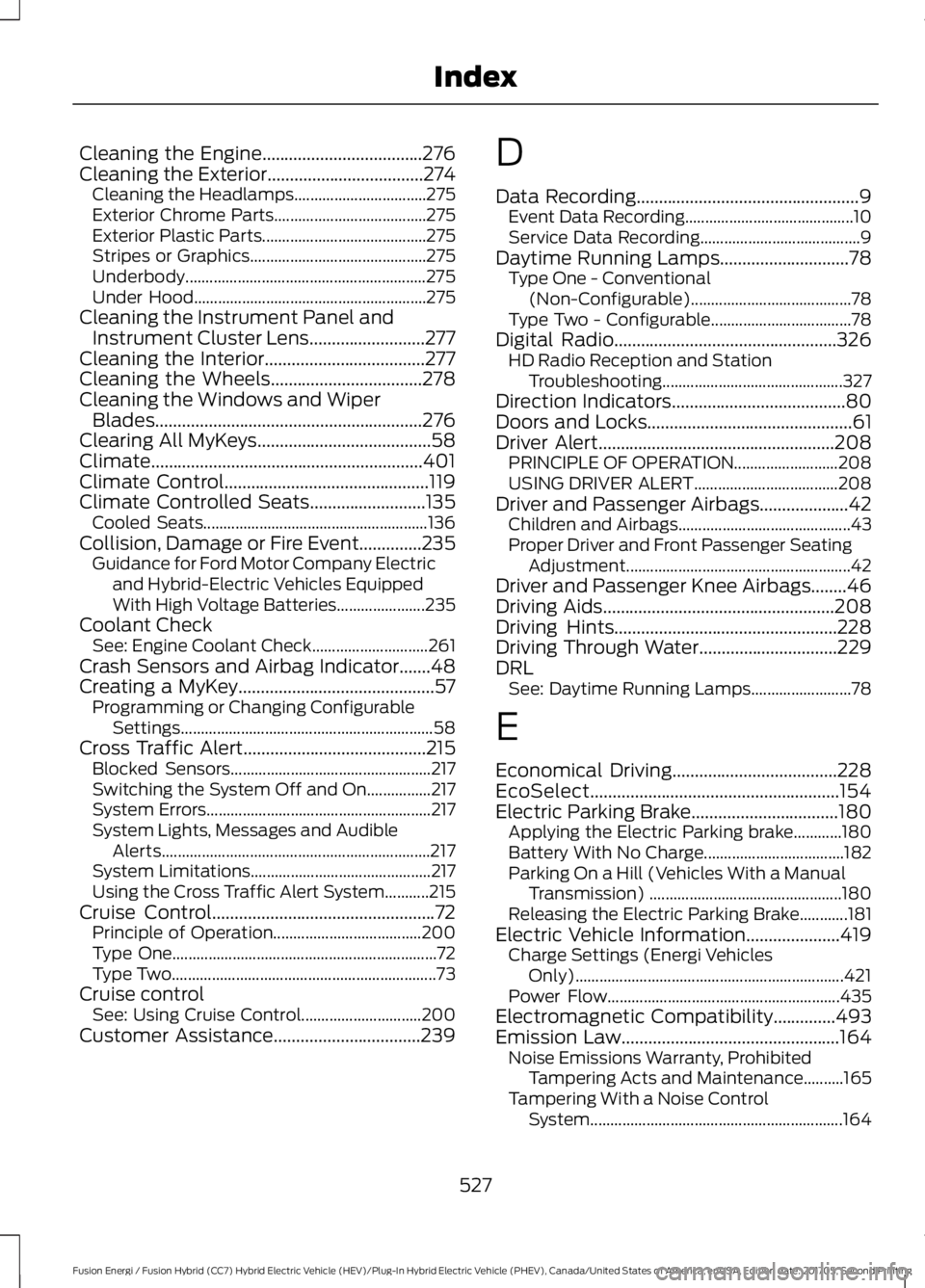
Cleaning the Engine....................................276Cleaning the Exterior...................................274Cleaning the Headlamps.................................275Exterior Chrome Parts......................................275Exterior Plastic Parts.........................................275Stripes or Graphics............................................275Underbody............................................................275Under Hood..........................................................275Cleaning the Instrument Panel andInstrument Cluster Lens..........................277Cleaning the Interior....................................277Cleaning the Wheels..................................278Cleaning the Windows and WiperBlades............................................................276Clearing All MyKeys.......................................58Climate.............................................................401Climate Control..............................................119Climate Controlled Seats..........................135Cooled Seats........................................................136Collision, Damage or Fire Event..............235Guidance for Ford Motor Company Electricand Hybrid-Electric Vehicles EquippedWith High Voltage Batteries......................235Coolant CheckSee: Engine Coolant Check.............................261Crash Sensors and Airbag Indicator.......48Creating a MyKey............................................57Programming or Changing ConfigurableSettings...............................................................58Cross Traffic Alert.........................................215Blocked Sensors..................................................217Switching the System Off and On................217System Errors........................................................217System Lights, Messages and AudibleAlerts...................................................................217System Limitations.............................................217Using the Cross Traffic Alert System...........215Cruise Control..................................................72Principle of Operation.....................................200Type One..................................................................72Type Two..................................................................73Cruise controlSee: Using Cruise Control..............................200Customer Assistance.................................239
D
Data Recording..................................................9Event Data Recording..........................................10Service Data Recording........................................9Daytime Running Lamps.............................78Type One - Conventional(Non-Configurable)........................................78Type Two - Configurable...................................78Digital Radio..................................................326HD Radio Reception and StationTroubleshooting.............................................327Direction Indicators.......................................80Doors and Locks..............................................61Driver Alert.....................................................208PRINCIPLE OF OPERATION..........................208USING DRIVER ALERT....................................208Driver and Passenger Airbags....................42Children and Airbags...........................................43Proper Driver and Front Passenger SeatingAdjustment........................................................42Driver and Passenger Knee Airbags........46Driving Aids....................................................208Driving Hints..................................................228Driving Through Water...............................229DRLSee: Daytime Running Lamps.........................78
E
Economical Driving.....................................228EcoSelect........................................................154Electric Parking Brake.................................180Applying the Electric Parking brake............180Battery With No Charge...................................182Parking On a Hill (Vehicles With a ManualTransmission) ................................................180Releasing the Electric Parking Brake............181Electric Vehicle Information.....................419Charge Settings (Energi VehiclesOnly)...................................................................421Power Flow..........................................................435Electromagnetic Compatibility..............493Emission Law.................................................164Noise Emissions Warranty, ProhibitedTampering Acts and Maintenance..........165Tampering With a Noise ControlSystem...............................................................164
527
Fusion Energi / Fusion Hybrid (CC7) Hybrid Electric Vehicle (HEV)/Plug-In Hybrid Electric Vehicle (PHEV), Canada/United States of America, enUSA, Edition date: 201705, Second Printing
Index
Page 533 of 538
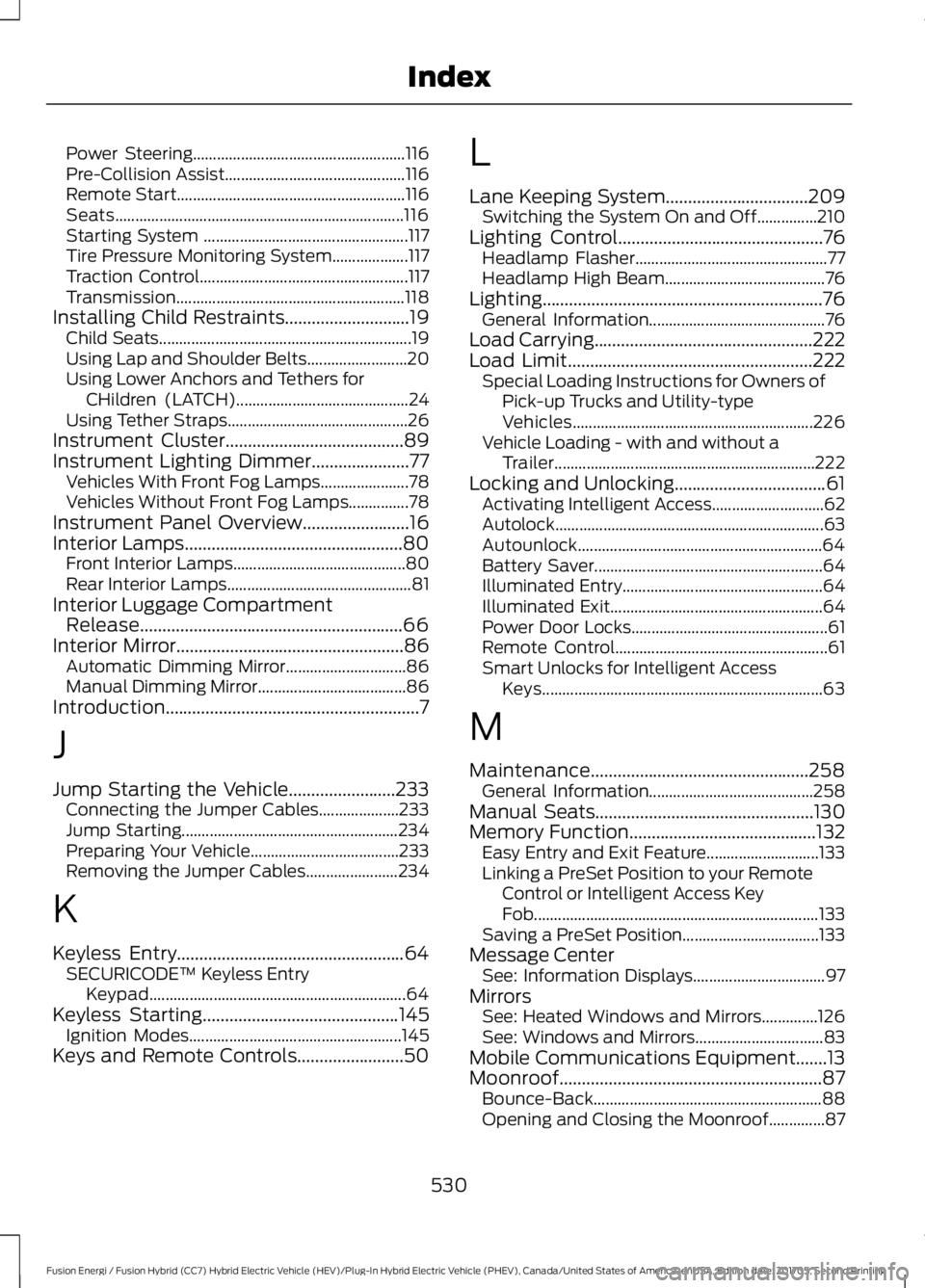
Power Steering.....................................................116Pre-Collision Assist.............................................116Remote Start.........................................................116Seats........................................................................116Starting System ...................................................117Tire Pressure Monitoring System...................117Traction Control....................................................117Transmission.........................................................118Installing Child Restraints............................19Child Seats...............................................................19Using Lap and Shoulder Belts.........................20Using Lower Anchors and Tethers forCHildren (LATCH)...........................................24Using Tether Straps.............................................26Instrument Cluster........................................89Instrument Lighting Dimmer......................77Vehicles With Front Fog Lamps......................78Vehicles Without Front Fog Lamps...............78Instrument Panel Overview........................16Interior Lamps.................................................80Front Interior Lamps...........................................80Rear Interior Lamps..............................................81Interior Luggage CompartmentRelease...........................................................66Interior Mirror...................................................86Automatic Dimming Mirror..............................86Manual Dimming Mirror.....................................86Introduction.........................................................7
J
Jump Starting the Vehicle........................233Connecting the Jumper Cables....................233Jump Starting......................................................234Preparing Your Vehicle.....................................233Removing the Jumper Cables.......................234
K
Keyless Entry...................................................64SECURICODE™ Keyless EntryKeypad................................................................64Keyless Starting............................................145Ignition Modes.....................................................145Keys and Remote Controls........................50
L
Lane Keeping System................................209Switching the System On and Off...............210Lighting Control..............................................76Headlamp Flasher................................................77Headlamp High Beam........................................76Lighting...............................................................76General Information............................................76Load Carrying.................................................222Load Limit.......................................................222Special Loading Instructions for Owners ofPick-up Trucks and Utility-typeVehicles............................................................226Vehicle Loading - with and without aTrailer.................................................................222Locking and Unlocking..................................61Activating Intelligent Access............................62Autolock...................................................................63Autounlock.............................................................64Battery Saver.........................................................64Illuminated Entry..................................................64Illuminated Exit.....................................................64Power Door Locks.................................................61Remote Control.....................................................61Smart Unlocks for Intelligent AccessKeys......................................................................63
M
Maintenance.................................................258General Information.........................................258Manual Seats.................................................130Memory Function..........................................132Easy Entry and Exit Feature............................133Linking a PreSet Position to your RemoteControl or Intelligent Access KeyFob.......................................................................133Saving a PreSet Position..................................133Message CenterSee: Information Displays.................................97MirrorsSee: Heated Windows and Mirrors..............126See: Windows and Mirrors................................83Mobile Communications Equipment.......13Moonroof...........................................................87Bounce-Back.........................................................88Opening and Closing the Moonroof..............87
530
Fusion Energi / Fusion Hybrid (CC7) Hybrid Electric Vehicle (HEV)/Plug-In Hybrid Electric Vehicle (PHEV), Canada/United States of America, enUSA, Edition date: 201705, Second Printing
Index